




iobroker kaum benutzbar - redis 100%
-
Und redis ist wieder dabei...
top - 15:05:44 up 4:18, 1 user, load average: 2.93, 2.94, 2.79 Tasks: 94 total, 2 running, 92 sleeping, 0 stopped, 0 zombie %Cpu(s): 43.9 us, 12.3 sy, 0.0 ni, 43.9 id, 0.0 wa, 0.0 hi, 0.0 si, 0.0 st MiB Mem : 12000.0 total, 4081.3 free, 5597.1 used, 2321.6 buff/cache MiB Swap: 7168.0 total, 7167.8 free, 0.2 used. 6402.9 avail Mem PID USER PR NI VIRT RES SHR S %CPU %MEM TIME+ COMMAND 197 redis 20 0 1426156 969148 7108 R 107.7 7.9 54:07.23 redis-server 454 iobroker 20 0 1447856 617244 45496 S 7.7 5.0 5:16.45 io.admin.0 364786 iobroker 20 0 681452 73428 38688 S 7.7 0.6 0:00.86 node 365587 iobroker 20 0 7176 3308 2680 R 7.7 0.0 0:00.01 top 1 root 20 0 165704 9560 7100 S 0.0 0.1 0:00.31 systemd 49 root 20 0 72964 15456 14508 S 0.0 0.1 0:00.12 systemd-journal 64 root 20 0 5228 160 4 S 0.0 0.0 0:00.00 blkmapd 70 systemd+ 20 0 16048 6568 5700 S 0.0 0.1 0:01.51 systemd-network 80 root 20 0 3056 176 0 S 0.0 0.0 0:00.00 rpc.idmapd 112 _rpc 20 0 7900 3944 3496 S 0.0 0.0 0:00.01 rpcbind 113 systemd+ 20 0 24108 11424 7496 S 0.0 0.1 0:00.06 systemd-resolve 127 message+ 20 0 8260 3800 3336 S 0.0 0.0 0:00.03 dbus-daemon 128 root 20 0 220796 3504 3076 S 0.0 0.0 0:00.01 rsyslogd 129 root 20 0 13988 6628 5808 S 0.0 0.1 0:00.04 systemd-logind 198 root 20 0 106188 20468 12068 S 0.0 0.2 0:00.08 unattended-upgr 201 root 20 0 5136 536 0 S 0.0 0.0 0:00.00 rpc.mountd 257 mysql 20 0 2630916 122328 14548 S 0.0 1.0 0:05.24 mariadbd 388 iobroker 20 0 11.0g 150560 46264 S 0.0 1.2 0:48.35 iobroker.js-con 473 iobroker 20 0 688604 80512 38448 S 0.0 0.7 0:03.83 io.scheduler.0 520 iobroker 20 0 972128 109480 45196 S 0.0 0.9 0:11.96 io.telegram.0 543 iobroker 20 0 685020 79832 38844 S 0.0 0.6 0:04.01 io.whatsapp-cmb 574 iobroker 20 0 706052 103808 40656 S 0.0 0.8 0:17.97 io.sql.0 601 iobroker 20 0 1409696 564580 44644 S 0.0 4.6 8:37.99 io.javascript.0 627 iobroker 20 0 683996 76044 38916 S 0.0 0.6 0:03.96 io.scenes.0 658 iobroker 20 0 703964 101764 39084 S 0.0 0.8 0:30.52 io.shelly.0 685 iobroker 20 0 689628 83328 38744 S 0.0 0.7 0:20.68 io.ping.0 718 iobroker 20 0 10.7g 105916 41436 S 0.0 0.9 6:21.47 io.unifi.0 747 iobroker 20 0 710416 86652 42748 S 0.0 0.7 0:04.80 io.mihome-vacuu 778 iobroker 20 0 687068 80288 38840 S 0.0 0.7 0:05.09 io.wolf.0 805 iobroker 20 0 686720 79544 38812 S 0.0 0.6 0:04.64 io.fhem.3 836 iobroker 20 0 935004 139660 41052 S 0.0 1.1 1:04.45 io.zigbee.0 855 iobroker 20 0 10.8g 91504 46712 S 0.0 0.7 0:04.64 io.mielecloudse 882 iobroker 20 0 696420 91636 39104 S 0.0 0.7 0:07.34 io.tr-064.0 917 iobroker 20 0 10.7g 106732 40608 S 0.0 0.9 1:37.35 io.synology.0 999 iobroker 20 0 760212 155748 39112 S 0.0 1.3 3:42.50 io.sonoff.0 1055 iobroker 20 0 970652 102728 40268 S 0.0 0.8 0:18.40 io.alexa2.0 1083 iobroker 20 0 684764 78400 39012 S 0.0 0.6 0:05.23 io.mihome.0 1113 iobroker 20 0 684160 76472 39144 S 0.0 0.6 0:04.50 io.fhem.1 1175 iobroker 20 0 967396 108104 47072 S 0.0 0.9 0:07.69 io.ham.0 1272 iobroker 20 0 694716 88500 39040 S 0.0 0.7 1:05.25 io.net-tools.0 1329 iobroker 20 0 689648 78704 39196 S 0.0 0.6 0:03.95 io.terminal.0 1429 iobroker 20 0 689008 81284 39020 S 0.0 0.7 0:07.08 io.simple-api.0 1487 iobroker 20 0 687600 82044 40160 S 0.0 0.7 0:06.73 io.sainlogic.0 1555 iobroker 20 0 685424 75932 38832 S 0.0 0.6 0:03.93 io.ws.0 1590 iobroker 20 0 693488 88404 39020 S 0.0 0.7 0:26.29 io.go-e.0 1614 iobroker 20 0 698332 98240 39380 S 0.0 0.8 0:08.48 io.fritzdect.0 1644 iobroker 20 0 958132 93404 39900 S 0.0 0.8 0:15.33 io.bring.0 1677 iobroker 20 0 10.9g 121436 46916 S 0.0 1.0 0:15.01 io.iot.0 1706 iobroker 20 0 10.7g 96840 46276 S 0.0 0.8 0:04.41 io.backitup.0 1776 iobroker 20 0 948336 88324 45548 S 0.0 0.7 0:05.83 io.pvforecast.0 1817 iobroker 20 0 10.9g 106016 47116 S 0.0 0.9 0:29.55 io.tesla-motors 1850 iobroker 20 0 680432 73092 38916 S 0.0 0.6 0:03.98 io.enigma2.1 1920 iobroker 20 0 680964 73712 39040 S 0.0 0.6 0:04.01 io.enigma2.0 1947 iobroker 20 0 700432 97476 39572 S 0.0 0.8 0:20.26 io.upnp.0 2003 iobroker 20 0 949784 82036 40068 S 0.0 0.7 0:05.61 io.nina.0 2106 iobroker 20 0 682900 75904 39064 S 0.0 0.6 0:03.85 io.text2command -
Und redis ist wieder dabei...
top - 15:05:44 up 4:18, 1 user, load average: 2.93, 2.94, 2.79 Tasks: 94 total, 2 running, 92 sleeping, 0 stopped, 0 zombie %Cpu(s): 43.9 us, 12.3 sy, 0.0 ni, 43.9 id, 0.0 wa, 0.0 hi, 0.0 si, 0.0 st MiB Mem : 12000.0 total, 4081.3 free, 5597.1 used, 2321.6 buff/cache MiB Swap: 7168.0 total, 7167.8 free, 0.2 used. 6402.9 avail Mem PID USER PR NI VIRT RES SHR S %CPU %MEM TIME+ COMMAND 197 redis 20 0 1426156 969148 7108 R 107.7 7.9 54:07.23 redis-server 454 iobroker 20 0 1447856 617244 45496 S 7.7 5.0 5:16.45 io.admin.0 364786 iobroker 20 0 681452 73428 38688 S 7.7 0.6 0:00.86 node 365587 iobroker 20 0 7176 3308 2680 R 7.7 0.0 0:00.01 top 1 root 20 0 165704 9560 7100 S 0.0 0.1 0:00.31 systemd 49 root 20 0 72964 15456 14508 S 0.0 0.1 0:00.12 systemd-journal 64 root 20 0 5228 160 4 S 0.0 0.0 0:00.00 blkmapd 70 systemd+ 20 0 16048 6568 5700 S 0.0 0.1 0:01.51 systemd-network 80 root 20 0 3056 176 0 S 0.0 0.0 0:00.00 rpc.idmapd 112 _rpc 20 0 7900 3944 3496 S 0.0 0.0 0:00.01 rpcbind 113 systemd+ 20 0 24108 11424 7496 S 0.0 0.1 0:00.06 systemd-resolve 127 message+ 20 0 8260 3800 3336 S 0.0 0.0 0:00.03 dbus-daemon 128 root 20 0 220796 3504 3076 S 0.0 0.0 0:00.01 rsyslogd 129 root 20 0 13988 6628 5808 S 0.0 0.1 0:00.04 systemd-logind 198 root 20 0 106188 20468 12068 S 0.0 0.2 0:00.08 unattended-upgr 201 root 20 0 5136 536 0 S 0.0 0.0 0:00.00 rpc.mountd 257 mysql 20 0 2630916 122328 14548 S 0.0 1.0 0:05.24 mariadbd 388 iobroker 20 0 11.0g 150560 46264 S 0.0 1.2 0:48.35 iobroker.js-con 473 iobroker 20 0 688604 80512 38448 S 0.0 0.7 0:03.83 io.scheduler.0 520 iobroker 20 0 972128 109480 45196 S 0.0 0.9 0:11.96 io.telegram.0 543 iobroker 20 0 685020 79832 38844 S 0.0 0.6 0:04.01 io.whatsapp-cmb 574 iobroker 20 0 706052 103808 40656 S 0.0 0.8 0:17.97 io.sql.0 601 iobroker 20 0 1409696 564580 44644 S 0.0 4.6 8:37.99 io.javascript.0 627 iobroker 20 0 683996 76044 38916 S 0.0 0.6 0:03.96 io.scenes.0 658 iobroker 20 0 703964 101764 39084 S 0.0 0.8 0:30.52 io.shelly.0 685 iobroker 20 0 689628 83328 38744 S 0.0 0.7 0:20.68 io.ping.0 718 iobroker 20 0 10.7g 105916 41436 S 0.0 0.9 6:21.47 io.unifi.0 747 iobroker 20 0 710416 86652 42748 S 0.0 0.7 0:04.80 io.mihome-vacuu 778 iobroker 20 0 687068 80288 38840 S 0.0 0.7 0:05.09 io.wolf.0 805 iobroker 20 0 686720 79544 38812 S 0.0 0.6 0:04.64 io.fhem.3 836 iobroker 20 0 935004 139660 41052 S 0.0 1.1 1:04.45 io.zigbee.0 855 iobroker 20 0 10.8g 91504 46712 S 0.0 0.7 0:04.64 io.mielecloudse 882 iobroker 20 0 696420 91636 39104 S 0.0 0.7 0:07.34 io.tr-064.0 917 iobroker 20 0 10.7g 106732 40608 S 0.0 0.9 1:37.35 io.synology.0 999 iobroker 20 0 760212 155748 39112 S 0.0 1.3 3:42.50 io.sonoff.0 1055 iobroker 20 0 970652 102728 40268 S 0.0 0.8 0:18.40 io.alexa2.0 1083 iobroker 20 0 684764 78400 39012 S 0.0 0.6 0:05.23 io.mihome.0 1113 iobroker 20 0 684160 76472 39144 S 0.0 0.6 0:04.50 io.fhem.1 1175 iobroker 20 0 967396 108104 47072 S 0.0 0.9 0:07.69 io.ham.0 1272 iobroker 20 0 694716 88500 39040 S 0.0 0.7 1:05.25 io.net-tools.0 1329 iobroker 20 0 689648 78704 39196 S 0.0 0.6 0:03.95 io.terminal.0 1429 iobroker 20 0 689008 81284 39020 S 0.0 0.7 0:07.08 io.simple-api.0 1487 iobroker 20 0 687600 82044 40160 S 0.0 0.7 0:06.73 io.sainlogic.0 1555 iobroker 20 0 685424 75932 38832 S 0.0 0.6 0:03.93 io.ws.0 1590 iobroker 20 0 693488 88404 39020 S 0.0 0.7 0:26.29 io.go-e.0 1614 iobroker 20 0 698332 98240 39380 S 0.0 0.8 0:08.48 io.fritzdect.0 1644 iobroker 20 0 958132 93404 39900 S 0.0 0.8 0:15.33 io.bring.0 1677 iobroker 20 0 10.9g 121436 46916 S 0.0 1.0 0:15.01 io.iot.0 1706 iobroker 20 0 10.7g 96840 46276 S 0.0 0.8 0:04.41 io.backitup.0 1776 iobroker 20 0 948336 88324 45548 S 0.0 0.7 0:05.83 io.pvforecast.0 1817 iobroker 20 0 10.9g 106016 47116 S 0.0 0.9 0:29.55 io.tesla-motors 1850 iobroker 20 0 680432 73092 38916 S 0.0 0.6 0:03.98 io.enigma2.1 1920 iobroker 20 0 680964 73712 39040 S 0.0 0.6 0:04.01 io.enigma2.0 1947 iobroker 20 0 700432 97476 39572 S 0.0 0.8 0:20.26 io.upnp.0 2003 iobroker 20 0 949784 82036 40068 S 0.0 0.7 0:05.61 io.nina.0 2106 iobroker 20 0 682900 75904 39064 S 0.0 0.6 0:03.85 io.text2command@caravandriver sagte in iobroker kaum benutzbar - redis 100%:
Und redis ist wieder dabei...
Moin,
na dann gib doch mal zum Besten, wie Du Dein
redis Serverinstalliert hast und wie er konfiguriert ist! Was wird insrdeisLog File geschrieben, wenn die Last ansteigt?VG
Bernd -
@caravandriver also ich nutze Redis auch und hatte noch nie Probleme, ganz im Gegenteil. Dank Redis läuft alles "flotter" und benötigt unterm Strich deutlich weniger Ressourcen.
Wenn es bei dir anders ist (konnte man ja sehen), dann würde ich zuerst die Frage an dich stellen:
- Was hast du an der redis config denn geändert?
Ro75.
SERVER = Beelink U59 16GB DDR4 RAM 512GB SSD, FB 7490, FritzDect 200+301+440, ConBee II, Zigbee Aqara Sensoren + NOUS A1Z, NOUS A1T, Philips Hue ** ioBroker, REDIS, influxdb2, Grafana, PiHole, Plex-Mediaserver, paperless-ngx (Docker), MariaDB + phpmyadmin *** VIS-Runtime = Intel NUC 8GB RAM 128GB SSD + 24" Touchscreen
-
@caravandriver also ich nutze Redis auch und hatte noch nie Probleme, ganz im Gegenteil. Dank Redis läuft alles "flotter" und benötigt unterm Strich deutlich weniger Ressourcen.
Wenn es bei dir anders ist (konnte man ja sehen), dann würde ich zuerst die Frage an dich stellen:
- Was hast du an der redis config denn geändert?
Ro75.
@ro75 Ich habe da gar nichts geändert. Ich habe eine große iobroker installation. Klar, ohne redis wird es schlimmer sein, nur ist es eben mit nicht gut.
-
@dp20eic
Installiert
iobroker stop
sudo apt install redis-server
iobroker setup customwie finde ich raus, was in redis geschrieben wird?
-
@ro75 Ich habe da gar nichts geändert. Ich habe eine große iobroker installation. Klar, ohne redis wird es schlimmer sein, nur ist es eben mit nicht gut.
@caravandriver sagte in iobroker kaum benutzbar - redis 100%:
Ich habe da gar nichts geändert. Ich habe eine große iobroker installation.
Moin,
das kann ja dann schon mal ein Hinweis sein, denn Redis funktioniert nur so gut wie es auch eingerichtet ist, vielleicht ist ja die Standardkonfiguration nicht für Deine Installation geeignet, also zeig mal das Konfigurationsfile.
Logs sollten unter
/var/logzu finden sein.VG
Bernd -
@caravandriver sagte in iobroker kaum benutzbar - redis 100%:
Ich habe da gar nichts geändert. Ich habe eine große iobroker installation.
Moin,
das kann ja dann schon mal ein Hinweis sein, denn Redis funktioniert nur so gut wie es auch eingerichtet ist, vielleicht ist ja die Standardkonfiguration nicht für Deine Installation geeignet, also zeig mal das Konfigurationsfile.
Logs sollten unter
/var/logzu finden sein.VG
Bernd@dp20eic
tail -f /var/log/redis/ --> ist leer
-
@caravandriver sagte in iobroker kaum benutzbar - redis 100%:
Ich habe da gar nichts geändert. Ich habe eine große iobroker installation.
Moin,
das kann ja dann schon mal ein Hinweis sein, denn Redis funktioniert nur so gut wie es auch eingerichtet ist, vielleicht ist ja die Standardkonfiguration nicht für Deine Installation geeignet, also zeig mal das Konfigurationsfile.
Logs sollten unter
/var/logzu finden sein.VG
Bernd -
@dp20eic
Installiert
iobroker stop
sudo apt install redis-server
iobroker setup customwie finde ich raus, was in redis geschrieben wird?
-
@dp20eic
tail -f /var/log/redis/ --> ist leer
@caravandriver sagte in iobroker kaum benutzbar - redis 100%:
@dp20eic
tail -f /var/log/redis/ --> ist leer
Moin,
Dir ist bewusst, dass das nur der Ordner ist, auf den Du ein
tailmachst?# ls -la /var/log/redis/* Dann tail auf das Logfile, das zur Problemzeit passt # tail -f /var/log/redis/logfile.xyzVG
Bernd -
apt policy redis* redis-server: Installed: 5:6.0.16-1+deb11u2 Candidate: 5:6.0.16-1+deb11u2 Version table: *** 5:6.0.16-1+deb11u2 500 500 http://ftp.debian.org/debian bullseye/main amd64 Packages 500 http://security.debian.org bullseye-security/main amd64 Packages 100 /var/lib/dpkg/status redis-redisearch-doc: Installed: (none) Candidate: 1:1.2.2-4 Version table: 1:1.2.2-4 500 500 http://ftp.debian.org/debian bullseye/main amd64 Packages redis-sentinel: Installed: (none) Candidate: 5:6.0.16-1+deb11u2 Version table: 5:6.0.16-1+deb11u2 500 500 http://ftp.debian.org/debian bullseye/main amd64 Packages 500 http://security.debian.org bullseye-security/main amd64 Packages redis-tools: Installed: 5:6.0.16-1+deb11u2 Candidate: 5:6.0.16-1+deb11u2 Version table: *** 5:6.0.16-1+deb11u2 500 500 http://ftp.debian.org/debian bullseye/main amd64 Packages 500 http://security.debian.org bullseye-security/main amd64 Packages 100 /var/lib/dpkg/status redis-redisearch: Installed: (none) Candidate: 1:1.2.2-4 Version table: 1:1.2.2-4 500 500 http://ftp.debian.org/debian bullseye/main amd64 Packages redis: Installed: 5:6.0.16-1+deb11u2 Candidate: 5:6.0.16-1+deb11u2 Version table: *** 5:6.0.16-1+deb11u2 500 500 http://ftp.debian.org/debian bullseye/main amd64 Packages 500 http://security.debian.org bullseye-security/main amd64 Packages 100 /var/lib/dpkg/status -
@caravandriver sagte in iobroker kaum benutzbar - redis 100%:
@dp20eic
tail -f /var/log/redis/ --> ist leer
Moin,
Dir ist bewusst, dass das nur der Ordner ist, auf den Du ein
tailmachst?# ls -la /var/log/redis/* Dann tail auf das Logfile, das zur Problemzeit passt # tail -f /var/log/redis/logfile.xyzVG
Bernd@dp20eic sagte in iobroker kaum benutzbar - redis 100%:
ls -la /var/log/redis/*
ja ist mir bewusst. Ich tabbe an der stelle und es ist nichts drin...
-
@caravandriver sagte in iobroker kaum benutzbar - redis 100%:
@dp20eic
tail -f /var/log/redis/ --> ist leer
Moin,
Dir ist bewusst, dass das nur der Ordner ist, auf den Du ein
tailmachst?# ls -la /var/log/redis/* Dann tail auf das Logfile, das zur Problemzeit passt # tail -f /var/log/redis/logfile.xyzVG
Bernd@dp20eic
ls -la /var/log/redis/*
ls: cannot access '/var/log/redis/*': Permission denied
sudo ls -la /var/log/redis/* ls: cannot access '/var/log/redis/*': No such file or directorymit einem sudo chmod -R 777 /var/log/redis/
komme ich nun dran...iobroker@SmarthomeVM:~$ tail -f /var/log/redis/redis-server.log 197:M 05 Sep 2023 09:36:07.012 * 10000 changes in 60 seconds. Saving... 197:M 05 Sep 2023 09:36:07.022 * Background saving started by pid 1919271 1919271:C 05 Sep 2023 09:36:16.429 * DB saved on disk 1919271:C 05 Sep 2023 09:36:16.440 * RDB: 24 MB of memory used by copy-on-write 197:M 05 Sep 2023 09:36:16.462 * Background saving terminated with success 197:M 05 Sep 2023 09:37:17.080 * 10000 changes in 60 seconds. Saving... 197:M 05 Sep 2023 09:37:17.089 * Background saving started by pid 1920931 1920931:C 05 Sep 2023 09:37:26.622 * DB saved on disk 1920931:C 05 Sep 2023 09:37:26.633 * RDB: 18 MB of memory used by copy-on-write 197:M 05 Sep 2023 09:37:26.737 * Background saving terminated with success 197:M 05 Sep 2023 09:38:27.057 * 10000 changes in 60 seconds. Saving... 197:M 05 Sep 2023 09:38:27.066 * Background saving started by pid 1922567 1922567:C 05 Sep 2023 09:38:36.614 * DB saved on disk 1922567:C 05 Sep 2023 09:38:36.625 * RDB: 18 MB of memory used by copy-on-write 197:M 05 Sep 2023 09:38:36.650 * Background saving terminated with success 197:M 05 Sep 2023 09:39:37.073 * 10000 changes in 60 seconds. Saving... 197:M 05 Sep 2023 09:39:37.082 * Background saving started by pid 1924186 1924186:C 05 Sep 2023 09:39:47.195 * DB saved on disk 1924186:C 05 Sep 2023 09:39:47.207 * RDB: 22 MB of memory used by copy-on-write 197:M 05 Sep 2023 09:39:47.241 * Background saving terminated with success 197:M 05 Sep 2023 09:40:48.076 * 10000 changes in 60 seconds. Saving... 197:M 05 Sep 2023 09:40:48.085 * Background saving started by pid 192589710000 Änderungen in 60 sek??? Das ist viel, oder? Wo sehe ich was das macht?
-
@dp20eic
ls -la /var/log/redis/*
ls: cannot access '/var/log/redis/*': Permission denied
sudo ls -la /var/log/redis/* ls: cannot access '/var/log/redis/*': No such file or directorymit einem sudo chmod -R 777 /var/log/redis/
komme ich nun dran...iobroker@SmarthomeVM:~$ tail -f /var/log/redis/redis-server.log 197:M 05 Sep 2023 09:36:07.012 * 10000 changes in 60 seconds. Saving... 197:M 05 Sep 2023 09:36:07.022 * Background saving started by pid 1919271 1919271:C 05 Sep 2023 09:36:16.429 * DB saved on disk 1919271:C 05 Sep 2023 09:36:16.440 * RDB: 24 MB of memory used by copy-on-write 197:M 05 Sep 2023 09:36:16.462 * Background saving terminated with success 197:M 05 Sep 2023 09:37:17.080 * 10000 changes in 60 seconds. Saving... 197:M 05 Sep 2023 09:37:17.089 * Background saving started by pid 1920931 1920931:C 05 Sep 2023 09:37:26.622 * DB saved on disk 1920931:C 05 Sep 2023 09:37:26.633 * RDB: 18 MB of memory used by copy-on-write 197:M 05 Sep 2023 09:37:26.737 * Background saving terminated with success 197:M 05 Sep 2023 09:38:27.057 * 10000 changes in 60 seconds. Saving... 197:M 05 Sep 2023 09:38:27.066 * Background saving started by pid 1922567 1922567:C 05 Sep 2023 09:38:36.614 * DB saved on disk 1922567:C 05 Sep 2023 09:38:36.625 * RDB: 18 MB of memory used by copy-on-write 197:M 05 Sep 2023 09:38:36.650 * Background saving terminated with success 197:M 05 Sep 2023 09:39:37.073 * 10000 changes in 60 seconds. Saving... 197:M 05 Sep 2023 09:39:37.082 * Background saving started by pid 1924186 1924186:C 05 Sep 2023 09:39:47.195 * DB saved on disk 1924186:C 05 Sep 2023 09:39:47.207 * RDB: 22 MB of memory used by copy-on-write 197:M 05 Sep 2023 09:39:47.241 * Background saving terminated with success 197:M 05 Sep 2023 09:40:48.076 * 10000 changes in 60 seconds. Saving... 197:M 05 Sep 2023 09:40:48.085 * Background saving started by pid 192589710000 Änderungen in 60 sek??? Das ist viel, oder? Wo sehe ich was das macht?
@caravandriver sagte in iobroker kaum benutzbar - redis 100%:
17.080 * 10000 changes in 60 seconds. Saving...
ist nicht dein Ernst?
und du wunderst dich dass es klemmt?kein Support per PN! - Fragen im Forum stellen -
Benutzt das Voting rechts unten im Beitrag wenn er euch geholfen hat.
Das Forum freut sich über eine Spende. Benutzt dazu den Spendenbutton oben rechts. Danke!
der Installationsfixer: curl -fsL https://iobroker.net/fix.sh | bash - -
@dp20eic
ls -la /var/log/redis/*
ls: cannot access '/var/log/redis/*': Permission denied
sudo ls -la /var/log/redis/* ls: cannot access '/var/log/redis/*': No such file or directorymit einem sudo chmod -R 777 /var/log/redis/
komme ich nun dran...iobroker@SmarthomeVM:~$ tail -f /var/log/redis/redis-server.log 197:M 05 Sep 2023 09:36:07.012 * 10000 changes in 60 seconds. Saving... 197:M 05 Sep 2023 09:36:07.022 * Background saving started by pid 1919271 1919271:C 05 Sep 2023 09:36:16.429 * DB saved on disk 1919271:C 05 Sep 2023 09:36:16.440 * RDB: 24 MB of memory used by copy-on-write 197:M 05 Sep 2023 09:36:16.462 * Background saving terminated with success 197:M 05 Sep 2023 09:37:17.080 * 10000 changes in 60 seconds. Saving... 197:M 05 Sep 2023 09:37:17.089 * Background saving started by pid 1920931 1920931:C 05 Sep 2023 09:37:26.622 * DB saved on disk 1920931:C 05 Sep 2023 09:37:26.633 * RDB: 18 MB of memory used by copy-on-write 197:M 05 Sep 2023 09:37:26.737 * Background saving terminated with success 197:M 05 Sep 2023 09:38:27.057 * 10000 changes in 60 seconds. Saving... 197:M 05 Sep 2023 09:38:27.066 * Background saving started by pid 1922567 1922567:C 05 Sep 2023 09:38:36.614 * DB saved on disk 1922567:C 05 Sep 2023 09:38:36.625 * RDB: 18 MB of memory used by copy-on-write 197:M 05 Sep 2023 09:38:36.650 * Background saving terminated with success 197:M 05 Sep 2023 09:39:37.073 * 10000 changes in 60 seconds. Saving... 197:M 05 Sep 2023 09:39:37.082 * Background saving started by pid 1924186 1924186:C 05 Sep 2023 09:39:47.195 * DB saved on disk 1924186:C 05 Sep 2023 09:39:47.207 * RDB: 22 MB of memory used by copy-on-write 197:M 05 Sep 2023 09:39:47.241 * Background saving terminated with success 197:M 05 Sep 2023 09:40:48.076 * 10000 changes in 60 seconds. Saving... 197:M 05 Sep 2023 09:40:48.085 * Background saving started by pid 192589710000 Änderungen in 60 sek??? Das ist viel, oder? Wo sehe ich was das macht?
@caravandriver
In der Instanz Sicht des iobrokers kann man sehen wieviele Events pro Eintrag vorkommen.
Das ist ein Hinweis auf dir Anzahl der gelesenen und geschriebenen datenpunkte.Meine Adapter und Widgets
TVProgram, SqueezeboxRPC, OpenLiga, RSSFeed, MyTime,, pi-hole2, vis-json-template, skiinfo, vis-mapwidgets, vis-2-widgets-rssfeed
Links im Profil -
@caravandriver sagte in iobroker kaum benutzbar - redis 100%:
17.080 * 10000 changes in 60 seconds. Saving...
ist nicht dein Ernst?
und du wunderst dich dass es klemmt?@homoran
Nein, ich wunder mich nicht, aber warum ist das so? Ich habe nichts irgendwo eingestellt das sagt "mach das so"... -
@dp20eic
ls -la /var/log/redis/*
ls: cannot access '/var/log/redis/*': Permission denied
sudo ls -la /var/log/redis/* ls: cannot access '/var/log/redis/*': No such file or directorymit einem sudo chmod -R 777 /var/log/redis/
komme ich nun dran...iobroker@SmarthomeVM:~$ tail -f /var/log/redis/redis-server.log 197:M 05 Sep 2023 09:36:07.012 * 10000 changes in 60 seconds. Saving... 197:M 05 Sep 2023 09:36:07.022 * Background saving started by pid 1919271 1919271:C 05 Sep 2023 09:36:16.429 * DB saved on disk 1919271:C 05 Sep 2023 09:36:16.440 * RDB: 24 MB of memory used by copy-on-write 197:M 05 Sep 2023 09:36:16.462 * Background saving terminated with success 197:M 05 Sep 2023 09:37:17.080 * 10000 changes in 60 seconds. Saving... 197:M 05 Sep 2023 09:37:17.089 * Background saving started by pid 1920931 1920931:C 05 Sep 2023 09:37:26.622 * DB saved on disk 1920931:C 05 Sep 2023 09:37:26.633 * RDB: 18 MB of memory used by copy-on-write 197:M 05 Sep 2023 09:37:26.737 * Background saving terminated with success 197:M 05 Sep 2023 09:38:27.057 * 10000 changes in 60 seconds. Saving... 197:M 05 Sep 2023 09:38:27.066 * Background saving started by pid 1922567 1922567:C 05 Sep 2023 09:38:36.614 * DB saved on disk 1922567:C 05 Sep 2023 09:38:36.625 * RDB: 18 MB of memory used by copy-on-write 197:M 05 Sep 2023 09:38:36.650 * Background saving terminated with success 197:M 05 Sep 2023 09:39:37.073 * 10000 changes in 60 seconds. Saving... 197:M 05 Sep 2023 09:39:37.082 * Background saving started by pid 1924186 1924186:C 05 Sep 2023 09:39:47.195 * DB saved on disk 1924186:C 05 Sep 2023 09:39:47.207 * RDB: 22 MB of memory used by copy-on-write 197:M 05 Sep 2023 09:39:47.241 * Background saving terminated with success 197:M 05 Sep 2023 09:40:48.076 * 10000 changes in 60 seconds. Saving... 197:M 05 Sep 2023 09:40:48.085 * Background saving started by pid 192589710000 Änderungen in 60 sek??? Das ist viel, oder? Wo sehe ich was das macht?
@caravandriver sagte in iobroker kaum benutzbar - redis 100%:
sudo chmod -R 777 /var/log/redis/
Am Rande: 777 rekursiv über ein Verzeichnis kippen ist immer die allerallerschlechteste Herangehensweise.
Ich vermute, da fehlt die Mitgliedschaft in einer Gruppe 'redis' oder ähnliches. -
@caravandriver
In der Instanz Sicht des iobrokers kann man sehen wieviele Events pro Eintrag vorkommen.
Das ist ein Hinweis auf dir Anzahl der gelesenen und geschriebenen datenpunkte.hier?
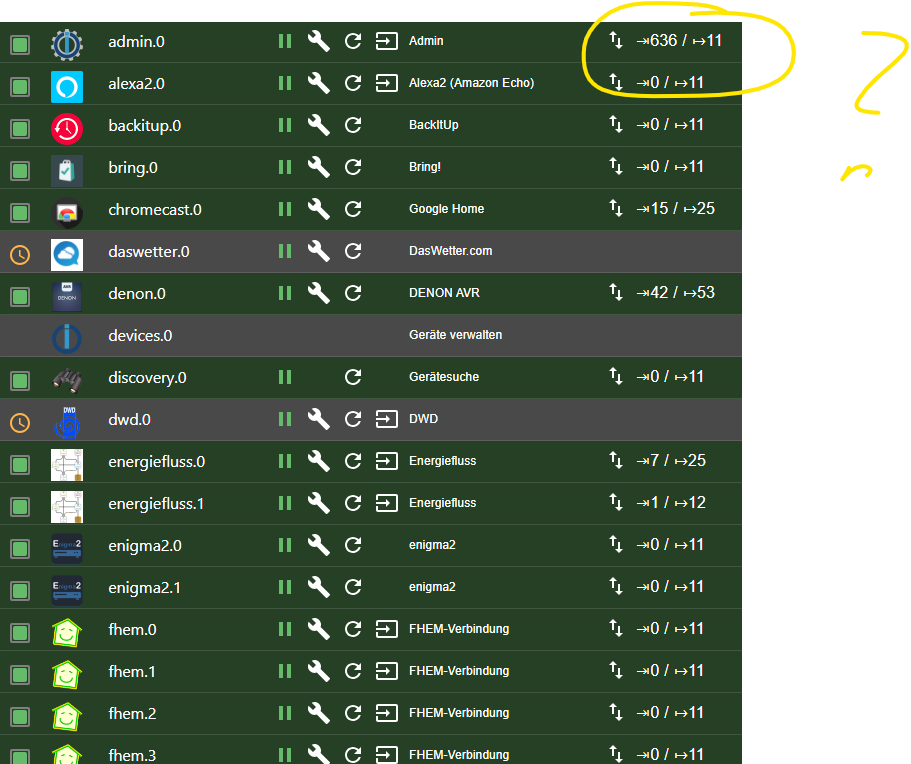
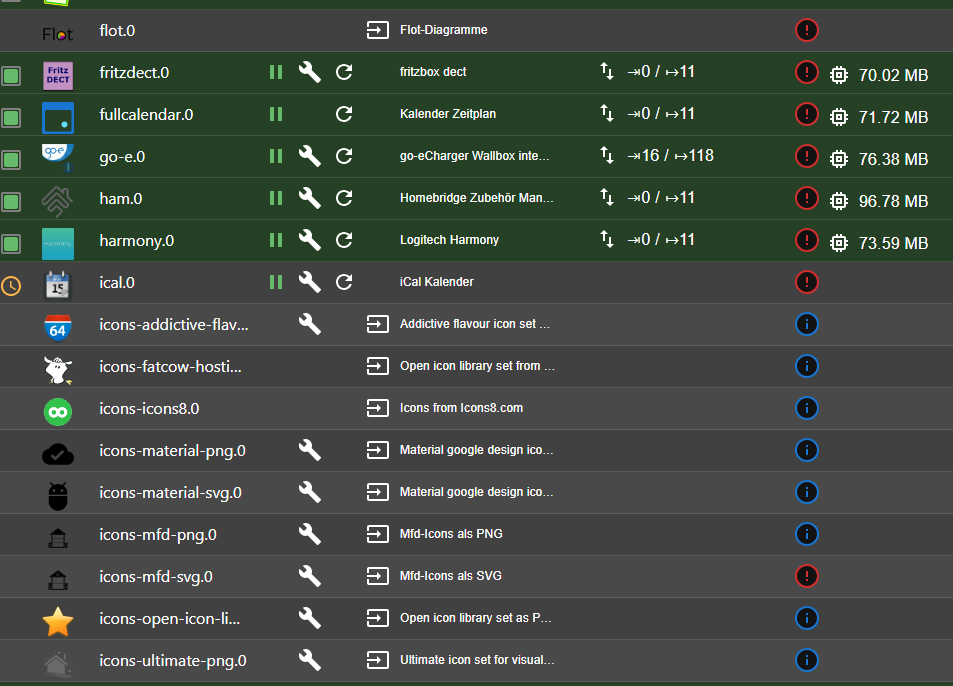
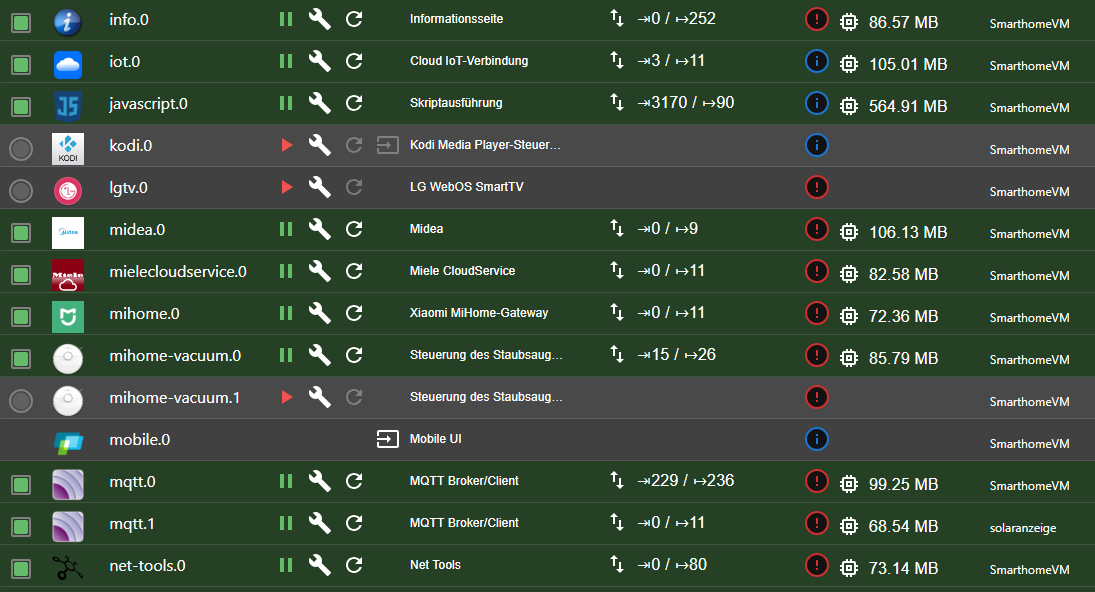
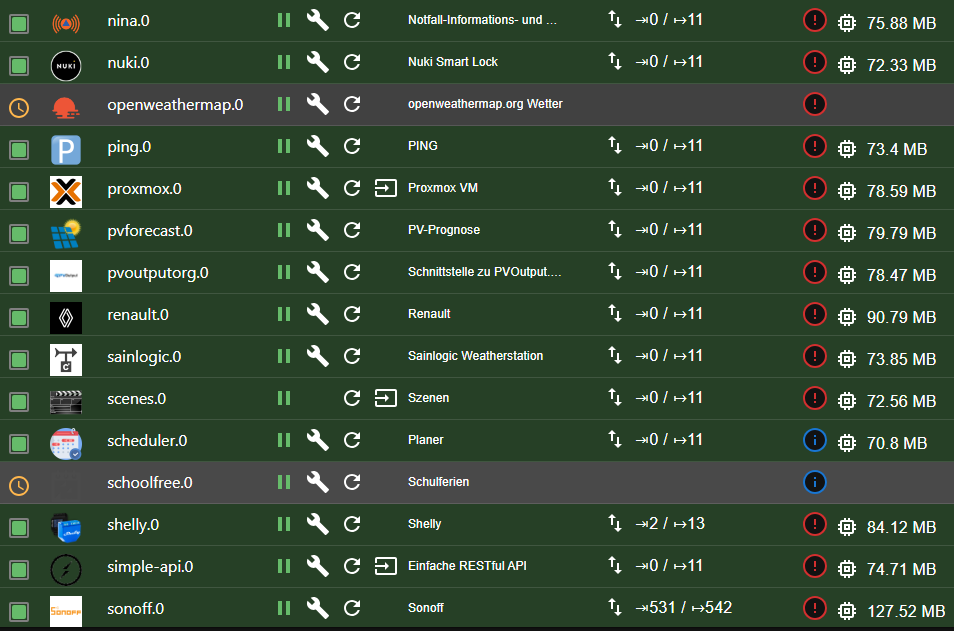
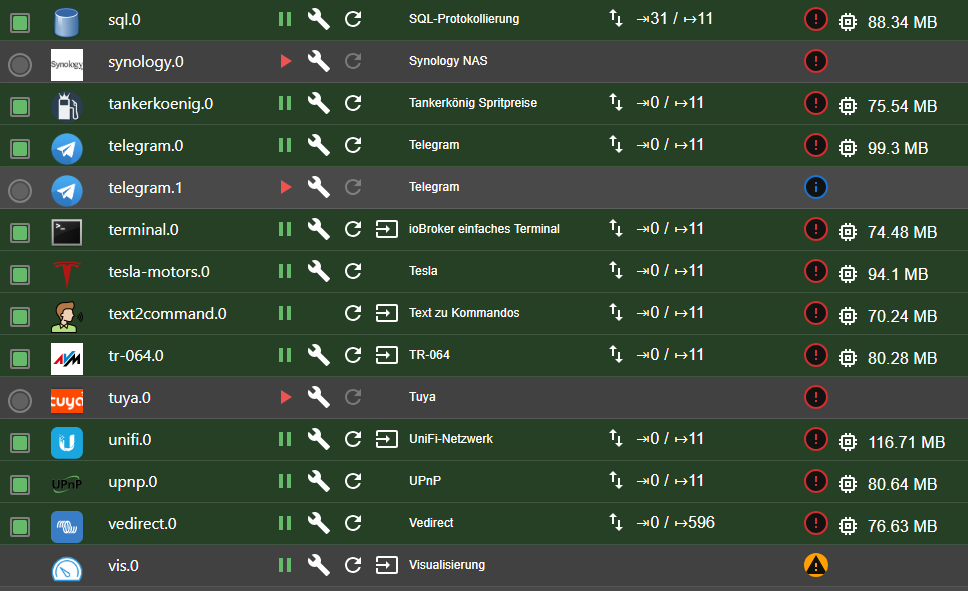
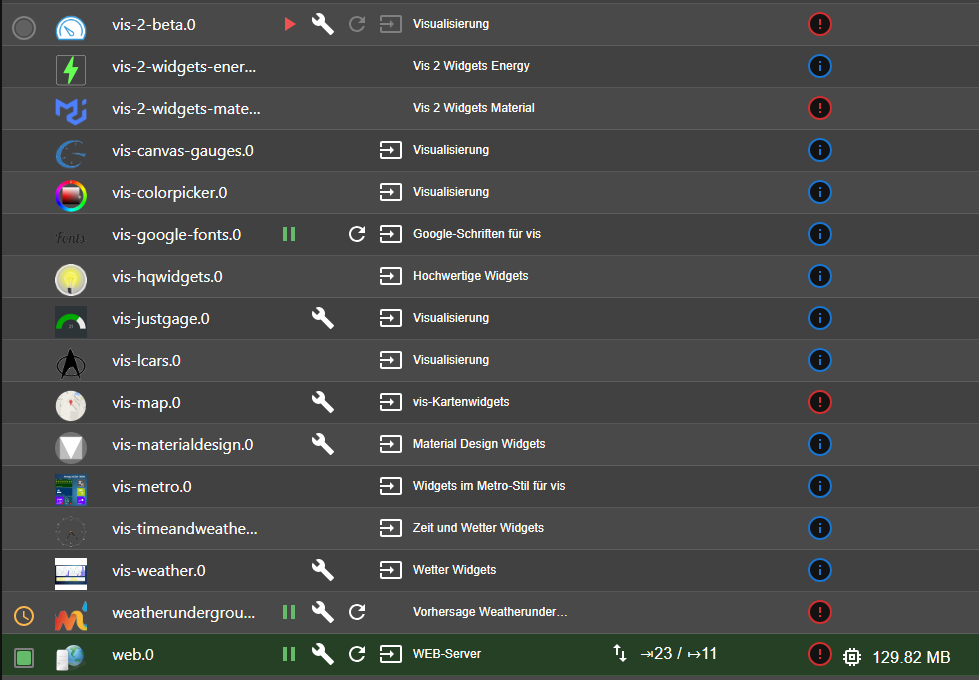
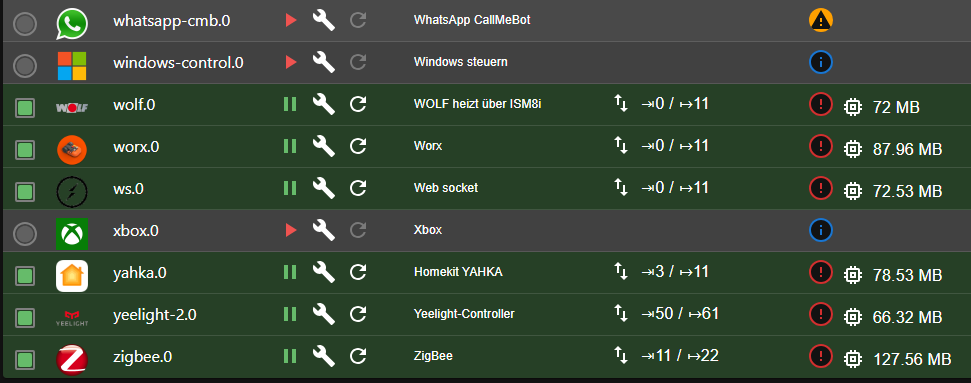
Ja, ich habe einige Javascripte. Die machen am meisten. Aber: Wie finde ich raus, welches da am meisten input macht? ggf ist ja eines kaputt..
Aber: Auch wenn ich javascript anhalte wird es nicht besser.
-
hier?
Ja, ich habe einige Javascripte. Die machen am meisten. Aber: Wie finde ich raus, welches da am meisten input macht? ggf ist ja eines kaputt..
Aber: Auch wenn ich javascript anhalte wird es nicht besser.
@caravandriver hast du alle hunderte Instanzen aud Logstufe debug?
kein Support per PN! - Fragen im Forum stellen -
Benutzt das Voting rechts unten im Beitrag wenn er euch geholfen hat.
Das Forum freut sich über eine Spende. Benutzt dazu den Spendenbutton oben rechts. Danke!
der Installationsfixer: curl -fsL https://iobroker.net/fix.sh | bash - -
@caravandriver hast du alle hunderte Instanzen aud Logstufe debug?
@homoran Nein, alle sind auf "Error"



Hey! Du scheinst an dieser Unterhaltung interessiert zu sein, hast aber noch kein Konto.
Hast du es satt, bei jedem Besuch durch die gleichen Beiträge zu scrollen? Wenn du dich für ein Konto anmeldest, kommst du immer genau dorthin zurück, wo du zuvor warst, und kannst dich über neue Antworten benachrichtigen lassen (entweder per E-Mail oder Push-Benachrichtigung). Du kannst auch Lesezeichen speichern und Beiträge positiv bewerten, um anderen Community-Mitgliedern deine Wertschätzung zu zeigen.
Mit deinem Input könnte dieser Beitrag noch besser werden 💗
Registrieren Anmelden415
Online33.0k
Benutzer83.5k
Themen1.3m
Beiträge