




DWD und Das Wetter Adapter
-
So auf den ersten Blick sehe ich nix wirklich krummes.
Nur der bemerkenswert hohe Arbeitsspeicherverbrauch fällt auf.
Relativiert sich aber wieder, wenn man dieActive iob-Instances: 61
berücksichtigt.
@thomas-braun Ok danke... und an was könnte es liegen, das die beiden nicht gehen?
-
So auf den ersten Blick sehe ich nix wirklich krummes.
Nur der bemerkenswert hohe Arbeitsspeicherverbrauch fällt auf.
Relativiert sich aber wieder, wenn man dieActive iob-Instances: 61
berücksichtigt.
@thomas-braun gibt es eine gute Anleitung, wie man einen iobroker aufsetzt?
-
@longbow sagte in DWD und Das Wetter Adapter:
Das sollte es sein oder
Ja, aber da scheint ja vieles krumm zu sein... vll kann da mal @Thomas-Braun einen Blick drauf werfen ?!
-
======== Start marking the full check here ========= Skript v.2023-04-16 *** BASE SYSTEM *** Architecture : x86_64 Docker : false Virtualization : lxc Distributor ID: Ubuntu Description: Ubuntu 22.04.3 LTS Release: 22.04 Codename: jammy PRETTY_NAME="Ubuntu 22.04.3 LTS" NAME="Ubuntu" VERSION_ID="22.04" VERSION="22.04.3 LTS (Jammy Jellyfish)" VERSION_CODENAME=jammy ID=ubuntu ID_LIKE=debian HOME_URL="https://www.ubuntu.com/" SUPPORT_URL="https://help.ubuntu.com/" BUG_REPORT_URL="https://bugs.launchpad.net/ubuntu/" PRIVACY_POLICY_URL="https://www.ubuntu.com/legal/terms-and-policies/privacy-policy" UBUNTU_CODENAME=jammy Systemuptime and Load: 15:18:25 up 3 days, 17:27, 2 users, load average: 2.52, 2.71, 2.90 CPU threads: 4 *** Time and Time Zones *** Local time: Tue 2023-08-29 15:18:25 CEST Universal time: Tue 2023-08-29 13:18:25 UTC RTC time: n/a Time zone: Europe/Berlin (CEST, +0200) System clock synchronized: yes NTP service: inactive RTC in local TZ: no *** X-Server-Setup *** X-Server: false Desktop: Terminal: Boot Target: graphical.target *** MEMORY *** total used free shared buff/cache available Mem: 15G 5.7G 8.7G 0.0K 1.5G 10G Swap: 8.2G 0B 8.2G Total: 24G 5.7G 16G 15894 M total memory 5683 M used memory 632 M active memory 6065 M inactive memory 8733 M free memory 0 M buffer memory 1476 M swap cache 8191 M total swap 0 M used swap 8191 M free swap *** FILESYSTEM *** Filesystem Type Size Used Avail Use% Mounted on /dev/mapper/pve-vm--213--disk--0 ext4 54G 11G 41G 22% / none tmpfs 492K 4.0K 488K 1% /dev tmpfs tmpfs 7.8G 0 7.8G 0% /dev/shm tmpfs tmpfs 3.2G 120K 3.2G 1% /run tmpfs tmpfs 5.0M 0 5.0M 0% /run/lock Messages concerning ext4 filesystem in dmesg: dmesg: read kernel buffer failed: Operation not permitted Show mounted filesystems (real ones only): TARGET SOURCE FSTYPE OPTIONS / /dev/mapper/pve-vm--213--disk--0 ext4 rw,relatime,stripe=16 Files in neuralgic directories: /var: 4.6G /var/ 4.0G /var/log/journal/ddbba1a4925941c98f0be027bc45e442 4.0G /var/log/journal 4.0G /var/log 340M /var/cache Hint: You are currently not seeing messages from other users and the system. Users in groups 'adm', 'systemd-journal' can see all messages. Pass -q to turn off this notice. Archived and active journals take up 16.0M in the file system. /opt/iobroker/backups: 406M /opt/iobroker/backups/ /opt/iobroker/iobroker-data: 944M /opt/iobroker/iobroker-data/ 669M /opt/iobroker/iobroker-data/files 126M /opt/iobroker/iobroker-data/backup-objects 88M /opt/iobroker/iobroker-data/files/echarts.admin 78M /opt/iobroker/iobroker-data/files/icons-open-icon-library-png The five largest files in iobroker-data are: 72M /opt/iobroker/iobroker-data/states.jsonl 52M /opt/iobroker/iobroker-data/objects.jsonl 35M /opt/iobroker/iobroker-data/files/devices.admin/static/js/main.24f2bb56.js.map 23M /opt/iobroker/iobroker-data/files/echarts/static/js/main.eb0afecd.js.map 23M /opt/iobroker/iobroker-data/files/echarts.admin/static/js/main.7952f0f7.js.map *** NodeJS-Installation *** /usr/bin/nodejs v18.17.1 /usr/bin/node v18.17.1 /usr/bin/npm 9.6.7 /usr/bin/npx 9.6.7 nodejs: Installed: 18.17.1-deb-1nodesource1 Candidate: 18.17.1-deb-1nodesource1 Version table: *** 18.17.1-deb-1nodesource1 500 500 https://deb.nodesource.com/node_18.x jammy/main amd64 Packages 100 /var/lib/dpkg/status 12.22.9~dfsg-1ubuntu3 500 500 http://archive.ubuntu.com/ubuntu jammy/universe amd64 Packages Temp directories causing npm8 problem: 0 No problems detected *** ioBroker-Installation *** ioBroker Status iobroker is running on this host. Objects type: jsonl States type: jsonl ======== Start marking the full check here ========= Skript v.2023-04-16 *** BASE SYSTEM *** Architecture : x86_64 Docker : false Virtualization : lxc Distributor ID: Ubuntu Description: Ubuntu 22.04.3 LTS Release: 22.04 Codename: jammy PRETTY_NAME="Ubuntu 22.04.3 LTS" NAME="Ubuntu" VERSION_ID="22.04" VERSION="22.04.3 LTS (Jammy Jellyfish)" VERSION_CODENAME=jammy ID=ubuntu ID_LIKE=debian HOME_URL="https://www.ubuntu.com/" SUPPORT_URL="https://help.ubuntu.com/" BUG_REPORT_URL="https://bugs.launchpad.net/ubuntu/" PRIVACY_POLICY_URL="https://www.ubuntu.com/legal/terms-and-policies/privacy-policy" UBUNTU_CODENAME=jammy Systemuptime and Load: 15:18:25 up 3 days, 17:27, 2 users, load average: 2.52, 2.71, 2.90 CPU threads: 4 *** Time and Time Zones *** Local time: Tue 2023-08-29 15:18:25 CEST Universal time: Tue 2023-08-29 13:18:25 UTC RTC time: n/a Time zone: Europe/Berlin (CEST, +0200) System clock synchronized: yes NTP service: inactive RTC in local TZ: no *** X-Server-Setup *** X-Server: false Desktop: Terminal: Boot Target: graphical.target *** MEMORY *** total used free shared buff/cache available Mem: 15G 5.7G 8.7G 0.0K 1.5G 10G Swap: 8.2G 0B 8.2G Total: 24G 5.7G 16G 15894 M total memory 5683 M used memory 632 M active memory 6065 M inactive memory 8733 M free memory 0 M buffer memory 1476 M swap cache 8191 M total swap 0 M used swap 8191 M free swap *** FILESYSTEM *** Filesystem Type Size Used Avail Use% Mounted on /dev/mapper/pve-vm--213--disk--0 ext4 54G 11G 41G 22% / none tmpfs 492K 4.0K 488K 1% /dev tmpfs tmpfs 7.8G 0 7.8G 0% /dev/shm tmpfs tmpfs 3.2G 120K 3.2G 1% /run tmpfs tmpfs 5.0M 0 5.0M 0% /run/lock Messages concerning ext4 filesystem in dmesg: dmesg: read kernel buffer failed: Operation not permitted Show mounted filesystems (real ones only): TARGET SOURCE FSTYPE OPTIONS / /dev/mapper/pve-vm--213--disk--0 ext4 rw,relatime,stripe=16 Files in neuralgic directories: /var: 4.6G /var/ 4.0G /var/log/journal/ddbba1a4925941c98f0be027bc45e442 4.0G /var/log/journal 4.0G /var/log 340M /var/cache Hint: You are currently not seeing messages from other users and the system. Users in groups 'adm', 'systemd-journal' can see all messages. Pass -q to turn off this notice. Archived and active journals take up 16.0M in the file system. /opt/iobroker/backups: 406M /opt/iobroker/backups/ /opt/iobroker/iobroker-data: 944M /opt/iobroker/iobroker-data/ 669M /opt/iobroker/iobroker-data/files 126M /opt/iobroker/iobroker-data/backup-objects 88M /opt/iobroker/iobroker-data/files/echarts.admin 78M /opt/iobroker/iobroker-data/files/icons-open-icon-library-png The five largest files in iobroker-data are: 72M /opt/iobroker/iobroker-data/states.jsonl 52M /opt/iobroker/iobroker-data/objects.jsonl 35M /opt/iobroker/iobroker-data/files/devices.admin/static/js/main.24f2bb56.js.map 23M /opt/iobroker/iobroker-data/files/echarts/static/js/main.eb0afecd.js.map 23M /opt/iobroker/iobroker-data/files/echarts.admin/static/js/main.7952f0f7.js.map *** NodeJS-Installation *** /usr/bin/nodejs v18.17.1 /usr/bin/node v18.17.1 /usr/bin/npm 9.6.7 /usr/bin/npx 9.6.7 nodejs: Installed: 18.17.1-deb-1nodesource1 Candidate: 18.17.1-deb-1nodesource1 Version table: *** 18.17.1-deb-1nodesource1 500 500 https://deb.nodesource.com/node_18.x jammy/main amd64 Packages 100 /var/lib/dpkg/status 12.22.9~dfsg-1ubuntu3 500 500 http://archive.ubuntu.com/ubuntu jammy/universe amd64 Packages Temp directories causing npm8 problem: 0 No problems detected *** ioBroker-Installation *** ioBroker Status iobroker is running on this host. Objects type: jsonl States type: jsonl Adapter State + system.adapter.admin.0 : admin : Iobroker-test - enabled, port: 8777, bind: 0.0.0.0, run as: admin + system.adapter.alexa2.0 : alexa2 : Iobroker-test - enabled system.adapter.alias-manager.0 : alias-manager : Iobroker-test - disabled + system.adapter.backitup.0 : backitup : Iobroker-test - enabled + system.adapter.cameras.0 : cameras : Iobroker-test - enabled, port: 8200, bind: 127.0.0.1 system.adapter.chromecast.0 : chromecast : Iobroker-test - disabled + system.adapter.cloud.0 : cloud : Iobroker-test - enabled system.adapter.daswetter.0 : daswetter : Iobroker-test - enabled system.adapter.devices.0 : devices : Iobroker-test - enabled + system.adapter.discovery.0 : discovery : Iobroker-test - enabled + system.adapter.dwd.0 : dwd : Iobroker-test - enabled + system.adapter.echarts.0 : echarts : Iobroker-test - enabled + system.adapter.email.0 : email : Iobroker-test - enabled + system.adapter.energiefluss-erweitert.0 : energiefluss-erweitert: Iobroker-test - enabled + system.adapter.energiefluss.0 : energiefluss : Iobroker-test - enabled + system.adapter.eusec.0 : eusec : Iobroker-test - enabled + system.adapter.fb-checkpresence.0 : fb-checkpresence : Iobroker-test - enabled + system.adapter.fb-checkpresence.1 : fb-checkpresence : Iobroker-test - enabled system.adapter.flot.0 : flot : Iobroker-test - disabled + system.adapter.followthesun.0 : followthesun : Iobroker-test - enabled system.adapter.geofency.0 : geofency : Iobroker-test - disabled, port: 7999, bind: 0.0.0.0 system.adapter.heatingcontrol.0 : heatingcontrol : Iobroker-test - disabled + system.adapter.history.0 : history : Iobroker-test - enabled + system.adapter.hm-rega.0 : hm-rega : Iobroker-test - enabled + system.adapter.hm-rpc.0 : hm-rpc : Iobroker-test - enabled, port: 0 + system.adapter.hm-rpc.1 : hm-rpc : Iobroker-test - enabled, port: 0 + system.adapter.homeconnect.0 : homeconnect : Iobroker-test - enabled system.adapter.hue-extended.0 : hue-extended : Iobroker-test - disabled + system.adapter.hue.0 : hue : Iobroker-test - enabled, port: 443 system.adapter.ical.0 : ical : Iobroker-test - enabled system.adapter.icons-addictive-flavour-png.0: icons-addictive-flavour-png: Iobroker-test - disabled system.adapter.icons-icons8.0 : icons-icons8 : Iobroker-test - disabled system.adapter.icons-material-png.0 : icons-material-png : Iobroker-test - disabled system.adapter.icons-material-svg.0 : icons-material-svg : Iobroker-test - disabled system.adapter.icons-mfd-png.0 : icons-mfd-png : Iobroker-test - disabled system.adapter.icons-mfd-svg.0 : icons-mfd-svg : Iobroker-test - disabled system.adapter.icons-open-icon-library-png.0: icons-open-icon-library-png: Iobroker-test - disabled system.adapter.icons-ultimate-png.0 : icons-ultimate-png : Iobroker-test - disabled + system.adapter.influxdb.0 : influxdb : Iobroker-test - enabled, port: 8086 + system.adapter.info.0 : info : Iobroker-test - enabled + system.adapter.iot.0 : iot : Iobroker-test - enabled + system.adapter.javascript.0 : javascript : Iobroker-test - enabled system.adapter.klf200.0 : klf200 : Iobroker-test - enabled + system.adapter.mihome-vacuum.0 : mihome-vacuum : Iobroker-test - enabled, port: 54321 + system.adapter.modbus.0 : modbus : Iobroker-test - enabled system.adapter.mqtt-client.0 : mqtt-client : Iobroker-test - disabled, port: 1883 + system.adapter.mqtt.0 : mqtt : Iobroker-test - enabled, port: 1883, bind: 0.0.0.0 + system.adapter.myenergi.0 : myenergi : Iobroker-test - enabled + system.adapter.netatmo.0 : netatmo : Iobroker-test - enabled + system.adapter.nina.0 : nina : Iobroker-test - enabled + system.adapter.nuki.0 : nuki : Iobroker-test - enabled + system.adapter.openweathermap.0 : openweathermap : Iobroker-test - enabled system.adapter.parser.0 : parser : Iobroker-test - disabled system.adapter.places.0 : places : Iobroker-test - disabled + system.adapter.pollenflug.0 : pollenflug : Iobroker-test - enabled + system.adapter.proxmox.0 : proxmox : Iobroker-test - enabled, port: 8006 + system.adapter.pushover.0 : pushover : Iobroker-test - enabled + system.adapter.pvforecast.0 : pvforecast : Iobroker-test - enabled + system.adapter.robonect.0 : robonect : Iobroker-test - enabled system.adapter.rtspstream.0 : rtspstream : Iobroker-test - disabled, port: 9088 system.adapter.samsung.0 : samsung : Iobroker-test - disabled + system.adapter.scenes.0 : scenes : Iobroker-test - enabled + system.adapter.shelly.0 : shelly : Iobroker-test - enabled, port: 1882, bind: 0.0.0.0 + system.adapter.smartgarden.0 : smartgarden : Iobroker-test - enabled + system.adapter.smartthings.0 : smartthings : Iobroker-test - enabled + system.adapter.sonos.0 : sonos : Iobroker-test - enabled + system.adapter.sourceanalytix.0 : sourceanalytix : Iobroker-test - enabled + system.adapter.statistics.0 : statistics : Iobroker-test - enabled + system.adapter.synology.0 : synology : Iobroker-test - enabled, port: 5001 system.adapter.synology.1 : synology : Iobroker-test - disabled, port: 5001 + system.adapter.tankerkoenig.0 : tankerkoenig : Iobroker-test - enabled + system.adapter.telegram.0 : telegram : Iobroker-test - enabled, port: 8443, bind: 0.0.0.0 + system.adapter.tr-064.0 : tr-064 : Iobroker-test - enabled + system.adapter.tr-064.1 : tr-064 : Iobroker-test - enabled + system.adapter.trashschedule.0 : trashschedule : Iobroker-test - enabled + system.adapter.tuya.0 : tuya : Iobroker-test - enabled + system.adapter.tvprogram.0 : tvprogram : Iobroker-test - enabled + system.adapter.upnp.0 : upnp : Iobroker-test - enabled system.adapter.vis-bars.0 : vis-bars : Iobroker-test - disabled system.adapter.vis-canvas-gauges.0 : vis-canvas-gauges : Iobroker-test - disabled system.adapter.vis-colorpicker.0 : vis-colorpicker : Iobroker-test - disabled system.adapter.vis-fancyswitch.0 : vis-fancyswitch : Iobroker-test - disabled system.adapter.vis-google-fonts.0 : vis-google-fonts : Iobroker-test - enabled system.adapter.vis-history.0 : vis-history : Iobroker-test - disabled system.adapter.vis-hqwidgets.0 : vis-hqwidgets : Iobroker-test - disabled system.adapter.vis-icontwo.0 : vis-icontwo : Iobroker-test - disabled + system.adapter.vis-inventwo.0 : vis-inventwo : Iobroker-test - enabled system.adapter.vis-justgage.0 : vis-justgage : Iobroker-test - disabled system.adapter.vis-map.0 : vis-map : Iobroker-test - disabled system.adapter.vis-material-advanced.0 : vis-material-advanced : Iobroker-test - disabled system.adapter.vis-materialdesign.0 : vis-materialdesign : Iobroker-test - enabled system.adapter.vis-metro.0 : vis-metro : Iobroker-test - disabled system.adapter.vis-rgraph.0 : vis-rgraph : Iobroker-test - disabled system.adapter.vis-timeandweather.0 : vis-timeandweather : Iobroker-test - disabled system.adapter.vis.0 : vis : Iobroker-test - enabled + system.adapter.vw-connect.0 : vw-connect : Iobroker-test - enabled + system.adapter.vw-connect.1 : vw-connect : Iobroker-test - enabled system.adapter.weatherunderground.0 : weatherunderground : Iobroker-test - enabled + system.adapter.web.0 : web : Iobroker-test - enabled, port: 8082, bind: 0.0.0.0, run as: admin + system.adapter.wolf-smartset.0 : wolf-smartset : Iobroker-test - enabled + system.adapter.wolf.0 : wolf : Iobroker-test - enabled, port: 12004, bind: 0.0.0.0 + system.adapter.ws.0 : ws : Iobroker-test - enabled, port: 8084, bind: 0.0.0.0, run as: admin system.adapter.youtube.0 : youtube : Iobroker-test - enabled system.adapter.yr.0 : yr : Iobroker-test - enabled + instance is alive Used repository: stable Adapter "admin" : 6.8.0 , installed 6.8.0 Adapter "alexa2" : 3.24.1 , installed 3.24.1 Adapter "alias-manager": 1.2.4 , installed 1.2.6 Adapter "backitup" : 2.6.23 , installed 2.6.23 Adapter "chromecast" : 3.0.3 , installed 3.0.3 Adapter "cloud" : 4.4.1 , installed 4.4.1 Adapter "daswetter" : 3.1.10 , installed 3.1.10 Adapter "devices" : 1.1.5 , installed 1.1.5 Adapter "discovery" : 3.1.0 , installed 3.1.0 Adapter "dwd" : 2.8.5 , installed 2.8.5 Adapter "echarts" : 1.5.1 , installed 1.5.1 Adapter "email" : 1.2.0 , installed 1.2.0 Adapter "eusec" : 1.1.1 , installed 1.1.1 Adapter "fb-checkpresence": 1.2.2 , installed 1.2.2 Adapter "feiertage" : 1.1.0 , installed 1.1.0 Adapter "flot" : 1.12.0 , installed 1.12.0 Adapter "followthesun" : 0.4.2 , installed 0.4.1 [Updatable] Adapter "geofency" : 1.2.4 , installed 1.2.4 Adapter "hass" : 1.4.0 , installed 1.4.0 Adapter "heatingcontrol": 2.11.1 , installed 2.11.1 Adapter "history" : 2.2.6 , installed 2.2.6 Adapter "hm-rega" : 3.0.47 , installed 3.0.47 Adapter "hm-rpc" : 1.15.19 , installed 1.15.19 Adapter "homeconnect" : 1.1.1 , installed 1.1.1 Adapter "hue" : 3.9.5 , installed 3.9.5 Adapter "hue-extended" : 2.0.0 , installed 2.0.0 Adapter "ical" : 1.13.3 , installed 1.13.3 Adapter "icons-addictive-flavour-png": 0.1.0, installed 0.1.0 Adapter "icons-icons8" : 0.0.1 , installed 0.0.1 Adapter "icons-material-png": 0.1.0, installed 0.1.0 Adapter "icons-material-svg": 0.1.0, installed 0.1.0 Adapter "icons-mfd-png": 1.1.0 , installed 1.1.0 Adapter "icons-mfd-svg": 1.1.0 , installed 1.1.0 Adapter "icons-open-icon-library-png": 0.1.2, installed 0.1.2 Adapter "icons-ultimate-png": 1.0.1, installed 1.0.1 Adapter "influxdb" : 3.2.0 , installed 3.2.0 Adapter "info" : 1.9.26 , installed 1.9.26 Adapter "iot" : 1.14.5 , installed 1.14.5 Adapter "javascript" : 7.0.3 , installed 7.0.3 Controller "js-controller": 4.0.24 , installed 4.0.24 Adapter "klf200" : 1.0.1 , installed 1.0.1 Adapter "mihome-vacuum": 3.11.0 , installed 3.11.0 Adapter "modbus" : 5.0.11 , installed 5.0.11 Adapter "mqtt" : 4.1.1 , installed 4.1.1 Adapter "mqtt-client" : 1.6.3 , installed 1.6.3 Adapter "myenergi" : 0.0.3 , installed 0.0.3 Adapter "netatmo" : 3.1.0 , installed 3.1.0 Adapter "nina" : 0.0.25 , installed 0.0.25 Adapter "nuki" : 1.6.0 , installed 1.6.0 Adapter "openweathermap": 0.3.9 , installed 0.3.9 Adapter "parser" : 1.3.2 , installed 1.3.2 Adapter "places" : 1.1.2 , installed 1.1.2 Adapter "pollenflug" : 1.0.6 , installed 1.0.6 Adapter "proxmox" : 1.3.5 , installed 1.3.5 Adapter "pushover" : 3.0.3 , installed 3.0.3 Adapter "pvforecast" : 2.7.1 , installed 2.7.1 Adapter "robonect" : 0.1.4 , installed 0.1.4 Adapter "samsung" : 0.5.11 , installed 0.5.11 Adapter "scenes" : 2.3.9 , installed 2.3.9 Adapter "shelly" : 6.4.1 , installed 6.4.1 Adapter "simple-api" : 2.7.2 , installed 2.7.2 Adapter "smartgarden" : 2.0.0 , installed 2.0.0 Adapter "smartthings" : 0.0.4 , installed 0.0.4 Adapter "socketio" : 4.2.0 , installed 4.2.0 Adapter "sonos" : 2.3.1 , installed 2.3.1 Adapter "statistics" : 2.3.0 , installed 2.3.0 Adapter "synology" : 2.1.13 , installed 2.1.13 Adapter "tankerkoenig" : 3.3.7 , installed 3.3.7 Adapter "telegram" : 1.16.0 , installed 1.16.0 Adapter "tr-064" : 4.2.18 , installed 4.2.18 Adapter "trashschedule": 2.2.0 , installed 2.2.0 Adapter "tuya" : 3.14.2 , installed 3.14.2 Adapter "tvprogram" : 1.1.2 , installed 1.1.2 Adapter "unifi" : 0.6.6 , installed 0.6.6 Adapter "upnp" : 1.0.21 , installed 1.0.21 Adapter "vis" : 1.4.16 , installed 1.4.16 Adapter "vis-bars" : 0.1.4 , installed 0.1.4 Adapter "vis-canvas-gauges": 1.0.1, installed 1.0.1 Adapter "vis-colorpicker": 2.0.3 , installed 2.0.3 Adapter "vis-fancyswitch": 1.1.0 , installed 1.1.0 Adapter "vis-google-fonts": 1.0.4 , installed 1.0.4 Adapter "vis-history" : 1.0.0 , installed 1.0.0 Adapter "vis-hqwidgets": 1.4.0 , installed 1.4.0 Adapter "vis-icontwo" : 0.96.0 , installed 0.96.0 Adapter "vis-inventwo" : 3.3.3 , installed 3.3.3 Adapter "vis-justgage" : 1.0.2 , installed 1.0.2 Adapter "vis-map" : 1.0.4 , installed 1.0.4 Adapter "vis-material-advanced": 1.7.2, installed 1.7.2 Adapter "vis-metro" : 1.2.0 , installed 1.2.0 Adapter "vis-rgraph" : 0.0.2 , installed 0.0.2 Adapter "vis-timeandweather": 1.2.2, installed 1.2.2 Adapter "vw-connect" : 0.0.67 , installed 0.0.67 Adapter "weatherunderground": 3.4.2, installed 3.4.2 Adapter "web" : 4.3.0 , installed 4.3.0 Adapter "withings" : 0.0.13 , installed 0.0.13 Adapter "wolf" : 1.7.0 , installed 1.7.0 Adapter "wolf-smartset": 1.1.1 , installed 1.1.1 Adapter "ws" : 1.3.0 , installed 1.3.0 Adapter "youtube" : 4.2.1 , installed 4.2.1 Adapter "yr" : 5.3.0 , installed 5.3.0 Objects and States Please stand by - This may take a while Objects: 70890 *** OS-Repositories and Updates *** Hit:1 https://deb.nodesource.com/node_18.x jammy InRelease Hit:2 http://archive.ubuntu.com/ubuntu jammy InRelease Hit:3 http://archive.ubuntu.com/ubuntu jammy-updates InRelease Hit:4 http://archive.ubuntu.com/ubuntu jammy-security InRelease Reading package lists... Pending Updates: 17 *** Listening Ports *** Active Internet connections (only servers) Proto Recv-Q Send-Q Local Address Foreign Address State User Inode PID/Program name tcp 0 0 192.168.178.213:2001 0.0.0.0:* LISTEN 1000 134283856 33130/io.hm-rpc.1 tcp 0 0 0.0.0.0:8555 0.0.0.0:* LISTEN 1000 134298364 34136/go2rtc tcp 0 0 0.0.0.0:111 0.0.0.0:* LISTEN 0 42784434 1/init tcp 0 0 0.0.0.0:2010 0.0.0.0:* LISTEN 1000 134278690 32860/io.hm-rpc.0 tcp 0 0 127.0.0.53:53 0.0.0.0:* LISTEN 106 42784711 118/systemd-resolve tcp 0 0 0.0.0.0:1883 0.0.0.0:* LISTEN 113 42787856 145/mosquitto tcp 0 0 0.0.0.0:1882 0.0.0.0:* LISTEN 1000 134281530 32965/io.shelly.0 tcp 0 0 0.0.0.0:12004 0.0.0.0:* LISTEN 1000 134282199 33085/io.wolf.0 tcp 0 0 127.0.0.1:9000 0.0.0.0:* LISTEN 1000 134276662 32650/iobroker.js-c tcp 0 0 127.0.0.1:9001 0.0.0.0:* LISTEN 1000 134276655 32650/iobroker.js-c tcp 0 0 127.0.0.1:8200 0.0.0.0:* LISTEN 1000 134298215 34104/io.cameras.0 tcp 0 0 127.0.0.1:25 0.0.0.0:* LISTEN 0 42785434 316/master tcp6 0 0 :::8777 :::* LISTEN 1000 134277405 32675/io.admin.0 tcp6 0 0 :::8554 :::* LISTEN 1000 134298359 34136/go2rtc tcp6 0 0 :::111 :::* LISTEN 0 42784436 1/init tcp6 0 0 :::22 :::* LISTEN 0 42785209 1/init tcp6 0 0 :::1984 :::* LISTEN 1000 134298358 34136/go2rtc tcp6 0 0 :::1883 :::* LISTEN 113 42787857 145/mosquitto tcp6 0 0 ::1:25 :::* LISTEN 0 42785435 316/master tcp6 0 0 :::3500 :::* LISTEN 1000 134282316 32980/io.sonos.0 tcp6 0 0 :::8084 :::* LISTEN 1000 134296855 33999/io.ws.0 tcp6 0 0 :::8082 :::* LISTEN 1000 134296785 33984/io.web.0 tcp6 0 0 :::8000 :::* LISTEN 1000 134300448 33891/io.upnp.0 udp 0 0 0.0.0.0:58377 0.0.0.0:* 1000 134298381 34119/io.eusec.0 udp 0 0 0.0.0.0:50671 0.0.0.0:* 1000 134299871 34119/io.eusec.0 udp 0 0 0.0.0.0:1900 0.0.0.0:* 1000 134294394 33891/io.upnp.0 udp 0 0 0.0.0.0:42966 0.0.0.0:* 1000 134299889 34119/io.eusec.0 udp 0 0 0.0.0.0:43291 0.0.0.0:* 1000 138645628 34119/io.eusec.0 udp 0 0 0.0.0.0:35184 0.0.0.0:* 1000 138636952 34119/io.eusec.0 udp 0 0 0.0.0.0:52729 0.0.0.0:* 1000 134291236 33891/io.upnp.0 udp 0 0 0.0.0.0:53121 0.0.0.0:* 1000 136555816 34119/io.eusec.0 udp 0 0 0.0.0.0:53421 0.0.0.0:* 1000 134281312 32905/io.mihome-vac udp 0 0 192.168.178.213:5353 0.0.0.0:* 1000 134283352 33025/io.tr-064.1 udp 0 0 192.168.178.213:5353 0.0.0.0:* 1000 134283324 33010/io.tr-064.0 udp 0 0 0.0.0.0:6666 0.0.0.0:* 1000 134281955 33040/io.tuya.0 udp 0 0 0.0.0.0:6667 0.0.0.0:* 1000 134281956 33040/io.tuya.0 udp 0 0 0.0.0.0:56958 0.0.0.0:* 1000 136555224 34119/io.eusec.0 udp 0 0 127.0.0.53:53 0.0.0.0:* 106 42784710 118/systemd-resolve udp 0 0 0.0.0.0:57410 0.0.0.0:* 1000 138634891 34119/io.eusec.0 udp 0 0 0.0.0.0:111 0.0.0.0:* 0 42784435 1/init udp 0 0 0.0.0.0:8555 0.0.0.0:* 1000 134298360 34136/go2rtc udp6 0 0 :::111 :::* 0 42784437 1/init udp6 0 0 :::8443 :::* 1000 134298365 34136/go2rtc *** Log File - Last 25 Lines *** 2023-08-29 15:23:06.849 - warn: fb-checkpresence.0 (33265) getWlBlInfo TypeError: Cannot read properties of null (reading 'length') 2023-08-29 15:24:03.588 - info: javascript.0 (32749) script.js.SolarEgde-Script: Die aktuelle Lesitung der Anlage "2712611" wird verarbeitet. 2023-08-29 15:24:03.814 - info: dwd.0 (51237) force terminating after 4 minutes 2023-08-29 15:24:03.815 - info: dwd.0 (51237) Terminated (ADAPTER_REQUESTED_TERMINATION): Without reason 2023-08-29 15:24:04.504 - error: dwd.0 (51237) Unhandled promise rejection. This error originated either by throwing inside of an async function without a catch block, or by rejecting a promise which was not handled with .catch(). 2023-08-29 15:24:04.504 - error: dwd.0 (51237) unhandled promise rejection: DB closed 2023-08-29 15:24:04.507 - error: dwd.0 (51237) Error: DB closed at close (/opt/iobroker/node_modules/ioredis/built/redis/event_handler.js:184:25) at Socket.<anonymous> (/opt/iobroker/node_modules/ioredis/built/redis/event_handler.js:151:20) at Object.onceWrapper (node:events:629:26) at Socket.emit (node:events:514:28) at Socket.emit (node:domain:489:12) at TCP.<anonymous> (node:net:323:12) 2023-08-29 15:24:04.507 - error: dwd.0 (51237) DB closed 2023-08-29 15:24:06.016 - info: dwd.0 (51237) terminating with timeout 2023-08-29 15:24:08.306 - info: host.Iobroker-test instance system.adapter.dwd.0 terminated with code 11 (ADAPTER_REQUESTED_TERMINATION) 2023-08-29 15:24:14.456 - info: smartgarden.0 (33801) 3/ on_pong: ++ pong'ed ++ 2023-08-29 15:25:01.008 - warn: fb-checkpresence.0 (33265) getWlBlInfo TypeError: Cannot read properties of null (reading 'length') 2023-08-29 15:25:03.022 - info: host.Iobroker-test instance system.adapter.dwd.0 started with pid 51552 2023-08-29 15:25:03.574 - info: javascript.0 (32749) script.js.SolarEgde-Script: Die aktuelle Lesitung der Anlage "2712611" wird verarbeitet. 2023-08-29 15:25:07.441 - info: javascript.0 (32749) script.js.SolarEgde-Script: Der Energieertrag der Anlage "2712611" wird verarbeitet. 2023-08-29 15:26:03.493 - info: javascript.0 (32749) script.js.SolarEgde-Script: Die aktuelle Lesitung der Anlage "2712611" wird verarbeitet. 2023-08-29 15:26:37.247 - info: dwd.0 (51552) starting. Version 2.8.5 in /opt/iobroker/node_modules/iobroker.dwd, node: v18.17.1, js-controller: 4.0.24 2023-08-29 15:26:44.457 - info: smartgarden.0 (33801) 3/ on_pong: ++ pong'ed ++ 2023-08-29 15:27:03.504 - info: javascript.0 (32749) script.js.SolarEgde-Script: Die aktuelle Lesitung der Anlage "2712611" wird verarbeitet. ============ Mark until here for C&P ============= iob diag has finished. Press any key for a summary ======================= SUMMARY ======================= v.2023-04-16 Operatingsystem: Ubuntu 22.04.3 LTS Kernel: 5.15.30-2-pve Installation: lxc Timezone: Europe/Berlin (CEST, +0200) User-ID: 1002 X-Server: false Boot Target: graphical.target Pending OS-Updates: 17 Pending iob updates: 1 Nodejs-Installation: /usr/bin/nodejs v18.17.1 /usr/bin/node v18.17.1 /usr/bin/npm 9.6.7 /usr/bin/npx 9.6.7 Recommended versions are nodejs 18.x.y and npm 9.x.y Your nodejs installation is correct MEMORY: total used free shared buff/cache available Mem: 15G 5.7G 8.7G 0.0K 1.5G 10G Swap: 8.2G 0B 8.2G Total: 24G 5.7G 16G Active iob-Instances: 61 Active repo(s): stable ioBroker Core: js-controller 4.0.24 admin 6.8.0 ioBroker Status: iobroker is running on this host. Objects type: jsonl States type: jsonl Status admin and web instance: + system.adapter.admin.0 : admin : Iobroker-test - enabled, port: 8777, bind: 0.0.0.0, run as: admin + system.adapter.web.0 : web : Iobroker-test - enabled, port: 8082, bind: 0.0.0.0, run as: admin Objects: 70890 States: 59474 Size of iob-Database: 52M /opt/iobroker/iobroker-data/objects.jsonl 101M /opt/iobroker/iobroker-data/states.jsonl =================== END OF SUMMARY ====================Das sollte es sein oder
@longbow sagte in DWD und Das Wetter Adapter:
load average: 2.52, 2.71, 2.90
Ist "etwas" hoch und ich bin irritiert wegen:
Messages concerning ext4 filesystem in dmesg:
dmesg: read kernel buffer failed: Operation not permitted
und
Hint: You are currently not seeing messages from other users and the system.
      Users in groups 'adm', 'systemd-journal' can see all messages.
muss jetzt aber nix heissen, daher hab ich ja @Thomas-Braun mit ins Boot genommen, der kennt sich da viiiieeeel besser aus ;)
Lehrling seit 1975 !!!
Beitrag geholfen ? dann gerne ein upvote rechts unten im Beitrag klicken ;)
https://forum.iobroker.net/topic/51555/hinweise-f%C3%BCr-gute-forenbeitr%C3%A4ge -
@longbow sagte in DWD und Das Wetter Adapter:
load average: 2.52, 2.71, 2.90
Ist "etwas" hoch und ich bin irritiert wegen:
Messages concerning ext4 filesystem in dmesg:
dmesg: read kernel buffer failed: Operation not permitted
und
Hint: You are currently not seeing messages from other users and the system.
      Users in groups 'adm', 'systemd-journal' can see all messages.
muss jetzt aber nix heissen, daher hab ich ja @Thomas-Braun mit ins Boot genommen, der kennt sich da viiiieeeel besser aus ;)
@djmarc75 sagte in DWD und Das Wetter Adapter:
dmesg: read kernel buffer failed: Operation not permitted
Dürfte am Setup als LXC liegen.
Hint: You are currently not seeing messages from other users and the system.
Users in groups 'adm', 'systemd-journal' can see all messages.Da fehlt der User in einer der beiden Gruppen.
-
@djmarc75 sagte in DWD und Das Wetter Adapter:
dmesg: read kernel buffer failed: Operation not permitted
Dürfte am Setup als LXC liegen.
Hint: You are currently not seeing messages from other users and the system.
Users in groups 'adm', 'systemd-journal' can see all messages.Da fehlt der User in einer der beiden Gruppen.
@thomas-braun wie bekomme ich es besser hin das Setup vom LXC?
und was meinst du mit dem User in einer der beiden Gruppen?
-
@thomas-braun wie bekomme ich es besser hin das Setup vom LXC?
und was meinst du mit dem User in einer der beiden Gruppen?
@longbow sagte in DWD und Das Wetter Adapter:
wie bekomme ich es besser hin das Setup vom LXC?
Kann ich dir nicht sagen, ich verwende keine Container. Ist mir zu kompliziert. :-)
und was meinst du mit dem User in einer der beiden Gruppen?
Den user mit der uid=1002 in die Gruppe
admodersystemd-journalpacken.
Hast du die Ausgabe von iob diag gekürzt? Üblicherweise gibt es da einen Block mit den usernames. Genau für solche Fälle nämlich... -
@longbow sagte in DWD und Das Wetter Adapter:
wie bekomme ich es besser hin das Setup vom LXC?
Kann ich dir nicht sagen, ich verwende keine Container. Ist mir zu kompliziert. :-)
und was meinst du mit dem User in einer der beiden Gruppen?
Den user mit der uid=1002 in die Gruppe
admodersystemd-journalpacken.
Hast du die Ausgabe von iob diag gekürzt? Üblicherweise gibt es da einen Block mit den usernames. Genau für solche Fälle nämlich... -
wie nutzt du das?
Meinst du das?
*** User and Groups ***
cliffkirchhof
/home/cliffkirchhof
cliffkirchhof iobroker adm@longbow sagte in DWD und Das Wetter Adapter:
cliffkirchhof
Dann so:
sudo usermod -a -G adm cliffkirchhofEinmal den cliffkirchhof aus- und wieder einloggen, erst dann stehen die Gruppen richtig.
-
@thomas-braun wie bekomme ich es besser hin das Setup vom LXC?
und was meinst du mit dem User in einer der beiden Gruppen?
@longbow sagte in DWD und Das Wetter Adapter:
wie bekomme ich es besser hin das Setup vom LXC?
Du nutzt ja sicherlich Proxmox ?!
Warum nutzt man nicht die offizielle Anleitung ?
https://www.iobroker.net/#de/documentation/install/proxmox.md
Lehrling seit 1975 !!!
Beitrag geholfen ? dann gerne ein upvote rechts unten im Beitrag klicken ;)
https://forum.iobroker.net/topic/51555/hinweise-f%C3%BCr-gute-forenbeitr%C3%A4ge -
@longbow sagte in DWD und Das Wetter Adapter:
wie bekomme ich es besser hin das Setup vom LXC?
Du nutzt ja sicherlich Proxmox ?!
Warum nutzt man nicht die offizielle Anleitung ?
https://www.iobroker.net/#de/documentation/install/proxmox.md
-
@djmarc75 macht es sind, auf Ubuntu 22.04.3 von 20.04.6 update zu daten vor dem Installieren des iobrokers oder kann das auch später gemacht werden ?
@longbow sagte in DWD und Das Wetter Adapter:
macht es sind, auf Ubuntu 22.04.3 von 20.04.6 update zu daten vor dem Installieren des iobrokers oder kann das auch später gemacht werden ?
ich hab keine Ahnung, ich nutze kein Ubuntu, sondern Debian. Da kann ich Dir leider nix zu sagen.
-
@djmarc75 macht es sind, auf Ubuntu 22.04.3 von 20.04.6 update zu daten vor dem Installieren des iobrokers oder kann das auch später gemacht werden ?
Es macht immer Sinn eine aktuelle stabile Distribution zu fahren. Die Reihenfolge ist da aber nicht gar so wichtig.
-
Abend zusammen,
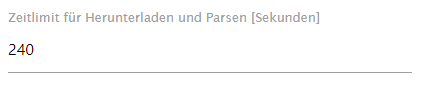
ich habe im Log immer wieder Fehlermeldungen von dem Adapter, kann jemand sagen was das zu bedeuten hat?
Laufen tut der Adapter und auf der VIS ist auch alles korrekt.

-




Hey! Du scheinst an dieser Unterhaltung interessiert zu sein, hast aber noch kein Konto.
Hast du es satt, bei jedem Besuch durch die gleichen Beiträge zu scrollen? Wenn du dich für ein Konto anmeldest, kommst du immer genau dorthin zurück, wo du zuvor warst, und kannst dich über neue Antworten benachrichtigen lassen (entweder per E-Mail oder Push-Benachrichtigung). Du kannst auch Lesezeichen speichern und Beiträge positiv bewerten, um anderen Community-Mitgliedern deine Wertschätzung zu zeigen.
Mit deinem Input könnte dieser Beitrag noch besser werden 💗
Registrieren AnmeldenSupport us
282
Online33.0k
Benutzer83.3k
Themen1.3m
Beiträge