




Nach Systemaktualisierung Modbus Fehler 25
-
Jetzt bin ich ja "beruhigt" ;)) Ich hänge wieder da, wo es vorher auch schon nicht weiter ging, wenn ich IOBroker ( per curl -sLf https://iobroker.net/install.sh | bash - ) aufspiele:
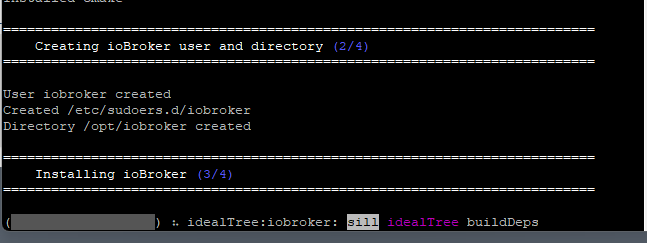
Wenn ich nichts mache, geht es nach ~ 5-6 Minuten "weiter" und es kommt dieses hier:
Holger @raspberryiobroker: ~$ curl - sLf https://iobroker.net/install.sh | bash -
library: loaded
Library version = 2022 - 12 - 09

==========================================================================

    Welcome to the ioBroker installer!
    Installer version: 2023-04-16

    You might need to enter your password a couple of times.

==========================================================================


==========================================================================
    Installing prerequisites (1/4)
==========================================================================

Hit:1 http://deb.debian.org/debian bullseye InRelease
Hit:2 http://deb.debian.org/debian bullseye-updates InRelease
Hit:3 http://security.debian.org/debian-security bullseye-security InRelease
Hit:4 http://archive.raspberrypi.org/debian bullseye InRelease
Reading package lists... Done

==========================================================================

    Node.js not found. Installing...

==========================================================================


## Installing the NodeSource Node.js 18.x repo...


## Populating apt-get cache...

+ apt-get update
Hit:1 http://deb.debian.org/debian bullseye InRelease
Hit:2 http://deb.debian.org/debian bullseye-updates InRelease
Hit:3 http://security.debian.org/debian-security bullseye-security InRelease
Hit:4 http://archive.raspberrypi.org/debian bullseye InRelease
Reading package lists... Done

## Confirming "bullseye" is supported...

+ curl -sLf -o /dev/null 'https://deb.nodesource.com/node_18.x/dists/bullseye/Re            lease'

## Adding the NodeSource signing key to your keyring...

+ curl -s https://deb.nodesource.com/gpgkey/nodesource.gpg.key | gpg --dearmor |             tee /usr/share/keyrings/nodesource.gpg >/dev/null

## Creating apt sources list file for the NodeSource Node.js 18.x repo...

+ echo 'deb [signed-by=/usr/share/keyrings/nodesource.gpg] https://deb.nodesourc            e.com/node_18.x bullseye main' > /etc/apt/sources.list.d/nodesource.list
+ echo 'deb-src [signed-by=/usr/share/keyrings/nodesource.gpg] https://deb.nodes            ource.com/node_18.x bullseye main' >> /etc/apt/sources.list.d/nodesource.list

## Running `apt-get update` for you...

+ apt-get update
Hit:1 http://archive.raspberrypi.org/debian bullseye InRelease
Get:2 https://deb.nodesource.com/node_18.x bullseye InRelease [4,586 B]
Hit:3 http://security.debian.org/debian-security bullseye-security InRelease
Hit:4 http://deb.debian.org/debian bullseye InRelease
Hit:5 http://deb.debian.org/debian bullseye-updates InRelease
Get:6 https://deb.nodesource.com/node_18.x bullseye/main arm64 Packages [776 B]
Get:7 https://deb.nodesource.com/node_18.x bullseye/main armhf Packages [787 B]
Fetched 6,149 B in 2s (2,634 B/s)
Reading package lists... Done

## Run `sudo apt-get install -y nodejs` to install Node.js 18.x and npm
## You may also need development tools to build native addons:
     sudo apt-get install gcc g++ make
## To install the Yarn package manager, run:
     curl -sL https://dl.yarnpkg.com/debian/pubkey.gpg | gpg --dearmor | sudo te            e /usr/share/keyrings/yarnkey.gpg >/dev/null
     echo "deb [signed-by=/usr/share/keyrings/yarnkey.gpg] https://dl.yarnpkg.co            m/debian stable main" | sudo tee /etc/apt/sources.list.d/yarn.list
     sudo apt-get update && sudo apt-get install yarn


Installed nodejs
Node.js Installed successfully!
Changing npm registry to https://registry.npmjs.org
Installed acl
Installed gcc-c++
Installed libavahi-compat-libdnssd-dev
Installed libudev-dev
Installed libpam0g-dev
Installed git
Installed libcairo2-dev
Installed libpango1.0-dev
Installed libjpeg-dev
Installed libgif-dev
Installed librsvg2-dev
Installed cmake

==========================================================================
    Creating ioBroker user and directory (2/4)
==========================================================================

User iobroker created
Created /etc/sudoers.d/iobroker
Directory /opt/iobroker created

==========================================================================
    Installing ioBroker (3/4)
==========================================================================

npm ERR! code ECONNREFUSED
npm ERR! syscall connect
npm ERR! errno ECONNREFUSED
npm ERR! FetchError: request to https://registry.npmjs.org/iobroker.admin failed            , reason: connect ECONNREFUSED 2606:4700::6810:b22:443
npm ERR!     at ClientRequest.<anonymous> (/usr/lib/node_modules/npm/node_module            s/minipass-fetch/lib/index.js:130:14)
npm ERR!     at ClientRequest.emit (node:events:514:28)
npm ERR!     at TLSSocket.socketErrorListener (node:_http_client:501:9)
npm ERR!     at TLSSocket.emit (node:events:526:35)
npm ERR!     at emitErrorNT (node:internal/streams/destroy:151:8)
npm ERR!     at emitErrorCloseNT (node:internal/streams/destroy:116:3)
npm ERR!     at process.processTicksAndRejections (node:internal/process/task_qu            eues:82:21)
npm ERR!  FetchError: request to https://registry.npmjs.org/iobroker.admin faile            d, reason: connect ECONNREFUSED 2606:4700::6810:b22:443
npm ERR!     at ClientRequest.<anonymous> (/usr/lib/node_modules/npm/node_module            s/minipass-fetch/lib/index.js:130:14)
npm ERR!     at ClientRequest.emit (node:events:514:28)
npm ERR!     at TLSSocket.socketErrorListener (node:_http_client:501:9)
npm ERR!     at TLSSocket.emit (node:events:526:35)
npm ERR!     at emitErrorNT (node:internal/streams/destroy:151:8)
npm ERR!     at emitErrorCloseNT (node:internal/streams/destroy:116:3)
npm ERR!     at process.processTicksAndRejections (node:internal/process/task_qu            eues:82:21) {
npm ERR!   code: 'ECONNREFUSED',
npm ERR!   errno: 'ECONNREFUSED',
npm ERR!   syscall: 'connect',
npm ERR!   address: '2606:4700::6810:b22',
npm ERR!   port: 443,
npm ERR!   type: 'system',
npm ERR!   requiredBy: '.'
npm ERR! }
npm ERR!
npm ERR! If you are behind a proxy, please make sure that the
npm ERR! 'proxy' config is set properly.  See: 'npm help config'

npm ERR! A complete log of this run can be found in: /home/Holger/.npm/_logs/202            3-08-22T12_14_59_986Z-debug-0.log

==========================================================================
    Finalizing installation (4/4)
==========================================================================

Enabling autostart...
Created symlink /etc/systemd/system/multi-user.target.wants/iobroker.service → /            lib/systemd/system/iobroker.service.
Autostart enabled!
Fixing directory permissions...

==========================================================================

    ioBroker was installed successfully
    Open http://192.168.0.191:8081 in a browser and start configuring!

==========================================================================


You need to re-login before doing anything else on the console!
Und nu' ... ?
Gruß
HolgerHier noch die diag, falls es helfen sollte:
Skript v.2023-04-16 *** BASE SYSTEM *** Model : Raspberry Pi 3 Model B Plus Rev 1.3 Architecture : aarch64 Docker : false Virtualization : none Distributor ID: Debian Description: Debian GNU/Linux 11 (bullseye) Release: 11 Codename: bullseye PRETTY_NAME="Debian GNU/Linux 11 (bullseye)" NAME="Debian GNU/Linux" VERSION_ID="11" VERSION="11 (bullseye)" VERSION_CODENAME=bullseye ID=debian HOME_URL="https://www.debian.org/" SUPPORT_URL="https://www.debian.org/support" BUG_REPORT_URL="https://bugs.debian.org/" Systemuptime and Load: 14:26:08 up 17 min, 1 user, load average: 0.07, 0.20, 0.28 CPU threads: 4 Raspberry only: throttled=0x0 Other values than 0x0 hint to temperature/voltage problems temp=54.8'C volt=1.3813V *** Time and Time Zones *** Local time: Tue 2023-08-22 14:26:08 CEST Universal time: Tue 2023-08-22 12:26:08 UTC RTC time: n/a Time zone: Europe/Berlin (CEST, +0200) System clock synchronized: yes NTP service: active RTC in local TZ: no *** User and Groups *** Holger /home/Holger Holger adm dialout cdrom sudo audio video plugdev games users input render netdev gpio i2c spi *** X-Server-Setup *** X-Server: false Desktop: Terminal: tty Boot Target: multi-user.target *** MEMORY *** total used free shared buff/cache available Mem: 909M 79M 223M 0.0K 606M 765M Swap: 99M 0B 99M Total: 1.0G 79M 323M 909 M total memory 79 M used memory 125 M active memory 445 M inactive memory 223 M free memory 39 M buffer memory 567 M swap cache 99 M total swap 0 M used swap 99 M free swap Raspberry only: oom events: 0 lifetime oom required: 0 Mbytes total time in oom handler: 0 ms max time spent in oom handler: 0 ms *** FILESYSTEM *** Filesystem Type Size Used Avail Use% Mounted on /dev/root ext4 29G 2.0G 26G 7% / devtmpfs devtmpfs 325M 0 325M 0% /dev tmpfs tmpfs 455M 0 455M 0% /dev/shm tmpfs tmpfs 182M 976K 181M 1% /run tmpfs tmpfs 5.0M 4.0K 5.0M 1% /run/lock /dev/mmcblk0p1 vfat 255M 31M 225M 13% /boot tmpfs tmpfs 91M 0 91M 0% /run/user/1000 Messages concerning ext4 filesystem in dmesg: [Tue Aug 22 14:08:52 2023] Kernel command line: coherent_pool=1M 8250.nr_uarts=0 snd_bcm2835.enable_headphones=0 snd_bcm2835.enable_headphones=1 snd_bcm2835.enable_hdmi=1 snd_bcm2835.enable_hdmi=0 video=Composite-1:720x480@60i vc_mem.mem_base=0x3ec00000 vc_mem.mem_size=0x40000000 console=ttyS0,115200 console=tty1 root=PARTUUID=26b2c4cb-02 rootfstype=ext4 fsck.repair=yes rootwait [Tue Aug 22 14:08:55 2023] EXT4-fs (mmcblk0p2): mounted filesystem with ordered data mode. Quota mode: none. [Tue Aug 22 14:08:55 2023] VFS: Mounted root (ext4 filesystem) readonly on device 179:2. [Tue Aug 22 14:08:58 2023] EXT4-fs (mmcblk0p2): re-mounted. Quota mode: none. Show mounted filesystems (real ones only): TARGET SOURCE FSTYPE OPTIONS / /dev/mmcblk0p2 ext4 rw,noatime,commit=600 `-/boot /dev/mmcblk0p1 vfat rw,relatime,fmask=0022,dmask=0022,codepage=437,iocharset=ascii,shortname=mixed,errors=remount-ro Files in neuralgic directories: /var: 476M /var/ 180M /var/cache 174M /var/cache/apt 147M /var/lib 123M /var/lib/apt/lists Archived and active journals take up 48.0M in the file system. /opt/iobroker/backups: du: cannot access '/opt/iobroker/backups/': No such file or directory /opt/iobroker/iobroker-data: du: cannot access '/opt/iobroker/iobroker-data/': No such file or directory The five largest files in iobroker-data are: find: '/opt/iobroker/iobroker-data': No such file or directory *** NodeJS-Installation *** /usr/bin/nodejs v18.17.1 /usr/bin/node v18.17.1 /usr/bin/npm 9.6.7 /usr/bin/npx 9.6.7 nodejs: Installed: 18.17.1-deb-1nodesource1 Candidate: 18.17.1-deb-1nodesource1 Version table: *** 18.17.1-deb-1nodesource1 500 500 https://deb.nodesource.com/node_18.x bullseye/main arm64 Packages 100 /var/lib/dpkg/status 12.22.12~dfsg-1~deb11u4 500 500 http://security.debian.org/debian-security bullseye-security/main arm64 Packages 12.22.12~dfsg-1~deb11u3 500 500 http://deb.debian.org/debian bullseye/main arm64 Packages find: '/opt/iobroker/node_modules': No such file or directory Temp directories causing npm8 problem: 0 No problems detected *** ioBroker-Installation *** ioBroker Status node:internal/modules/cjs/loader:1080 throw err; ^ Error: Cannot find module '/opt/iobroker/node_modules/iobroker.js-controller/iobroker.js' at Module._resolveFilename (node:internal/modules/cjs/loader:1077:15) at Module._load (node:internal/modules/cjs/loader:922:27) at Function.executeUserEntryPoint [as runMain] (node:internal/modules/run_main:81:12) at node:internal/main/run_main_module:23:47 { code: 'MODULE_NOT_FOUND', requireStack: [] } Node.js v18.17.1 node:internal/modules/cjs/loader:1080 throw err; ^ Error: Cannot find module '/opt/iobroker/node_modules/iobroker.js-controller/iobroker.js' at Module._resolveFilename (node:internal/modules/cjs/loader:1077:15) at Module._load (node:internal/modules/cjs/loader:922:27) at Function.executeUserEntryPoint [as runMain] (node:internal/modules/run_main:81:12) at node:internal/main/run_main_module:23:47 { code: 'MODULE_NOT_FOUND', requireStack: [] } Node.js v18.17.1 Core adapters versions node:internal/modules/cjs/loader:1080 throw err; ^ Error: Cannot find module '/opt/iobroker/node_modules/iobroker.js-controller/iobroker.js' at Module._resolveFilename (node:internal/modules/cjs/loader:1077:15) at Module._load (node:internal/modules/cjs/loader:922:27) at Function.executeUserEntryPoint [as runMain] (node:internal/modules/run_main:81:12) at node:internal/main/run_main_module:23:47 { code: 'MODULE_NOT_FOUND', requireStack: [] } Node.js v18.17.1 js-controller: node:internal/modules/cjs/loader:1080 throw err; ^ Error: Cannot find module '/opt/iobroker/node_modules/iobroker.js-controller/iobroker.js' at Module._resolveFilename (node:internal/modules/cjs/loader:1077:15) at Module._load (node:internal/modules/cjs/loader:922:27) at Function.executeUserEntryPoint [as runMain] (node:internal/modules/run_main:81:12) at node:internal/main/run_main_module:23:47 { code: 'MODULE_NOT_FOUND', requireStack: [] } Node.js v18.17.1 admin: node:internal/modules/cjs/loader:1080 throw err; ^ Error: Cannot find module '/opt/iobroker/node_modules/iobroker.js-controller/iobroker.js' at Module._resolveFilename (node:internal/modules/cjs/loader:1077:15) at Module._load (node:internal/modules/cjs/loader:922:27) at Function.executeUserEntryPoint [as runMain] (node:internal/modules/run_main:81:12) at node:internal/main/run_main_module:23:47 { code: 'MODULE_NOT_FOUND', requireStack: [] } Node.js v18.17.1 javascript: npm ERR! code ELSPROBLEMS npm ERR! missing: iobroker.admin@stable, required by iobroker.inst@3.0.0 npm ERR! missing: iobroker.backitup@stable, required by iobroker.inst@3.0.0 npm ERR! missing: iobroker.discovery@stable, required by iobroker.inst@3.0.0 npm ERR! missing: iobroker.js-controller@stable, required by iobroker.inst@3.0.0 npm ERR! A complete log of this run can be found in: /home/Holger/.npm/_logs/2023-08-22T12_26_18_961Z-debug-0.log Adapters from github: 0 Adapter State node:internal/modules/cjs/loader:1080 throw err; ^ Error: Cannot find module '/opt/iobroker/node_modules/iobroker.js-controller/iobroker.js' at Module._resolveFilename (node:internal/modules/cjs/loader:1077:15) at Module._load (node:internal/modules/cjs/loader:922:27) at Function.executeUserEntryPoint [as runMain] (node:internal/modules/run_main:81:12) at node:internal/main/run_main_module:23:47 { code: 'MODULE_NOT_FOUND', requireStack: [] } Node.js v18.17.1 Enabled adapters with bindings node:internal/modules/cjs/loader:1080 throw err; ^ Error: Cannot find module '/opt/iobroker/node_modules/iobroker.js-controller/iobroker.js' at Module._resolveFilename (node:internal/modules/cjs/loader:1077:15) at Module._load (node:internal/modules/cjs/loader:922:27) at Function.executeUserEntryPoint [as runMain] (node:internal/modules/run_main:81:12) at node:internal/main/run_main_module:23:47 { code: 'MODULE_NOT_FOUND', requireStack: [] } Node.js v18.17.1 ioBroker-Repositories node:internal/modules/cjs/loader:1080 throw err; ^ Error: Cannot find module '/opt/iobroker/node_modules/iobroker.js-controller/iobroker.js' at Module._resolveFilename (node:internal/modules/cjs/loader:1077:15) at Module._load (node:internal/modules/cjs/loader:922:27) at Function.executeUserEntryPoint [as runMain] (node:internal/modules/run_main:81:12) at node:internal/main/run_main_module:23:47 { code: 'MODULE_NOT_FOUND', requireStack: [] } Node.js v18.17.1 Installed ioBroker-Instances node:internal/modules/cjs/loader:1080 throw err; ^ Error: Cannot find module '/opt/iobroker/node_modules/iobroker.js-controller/iobroker.js' at Module._resolveFilename (node:internal/modules/cjs/loader:1077:15) at Module._load (node:internal/modules/cjs/loader:922:27) at Function.executeUserEntryPoint [as runMain] (node:internal/modules/run_main:81:12) at node:internal/main/run_main_module:23:47 { code: 'MODULE_NOT_FOUND', requireStack: [] } Node.js v18.17.1 Objects and States Please stand by - This may take a while Objects: 0 States: 0 *** OS-Repositories and Updates *** Hit:1 http://deb.debian.org/debian bullseye InRelease Hit:2 http://deb.debian.org/debian bullseye-updates InRelease Hit:3 http://security.debian.org/debian-security bullseye-security InRelease Hit:4 http://archive.raspberrypi.org/debian bullseye InRelease Hit:5 https://deb.nodesource.com/node_18.x bullseye InRelease Reading package lists... Pending Updates: 0 *** Listening Ports *** Active Internet connections (only servers) Proto Recv-Q Send-Q Local Address Foreign Address State User Inode PID/Program name tcp 0 0 0.0.0.0:22 0.0.0.0:* LISTEN 0 12883 474/sshd: /usr/sbin tcp6 0 0 :::22 :::* LISTEN 0 12885 474/sshd: /usr/sbin udp 0 0 0.0.0.0:60377 0.0.0.0:* 108 13975 354/avahi-daemon: r udp 0 0 0.0.0.0:68 0.0.0.0:* 0 14343 602/dhcpcd udp 0 0 0.0.0.0:5353 0.0.0.0:* 108 13973 354/avahi-daemon: r udp6 0 0 :::546 :::* 0 1654 602/dhcpcd udp6 0 0 :::5353 :::* 108 13974 354/avahi-daemon: r udp6 0 0 :::43804 :::* 108 13976 354/avahi-daemon: r *** Log File - Last 25 Lines *** tail: cannot open '/opt/iobroker/log/iobroker.current.log' for reading: No such file or directory ============ Mark until here for C&P ============= -
Hier noch die diag, falls es helfen sollte:
Skript v.2023-04-16 *** BASE SYSTEM *** Model : Raspberry Pi 3 Model B Plus Rev 1.3 Architecture : aarch64 Docker : false Virtualization : none Distributor ID: Debian Description: Debian GNU/Linux 11 (bullseye) Release: 11 Codename: bullseye PRETTY_NAME="Debian GNU/Linux 11 (bullseye)" NAME="Debian GNU/Linux" VERSION_ID="11" VERSION="11 (bullseye)" VERSION_CODENAME=bullseye ID=debian HOME_URL="https://www.debian.org/" SUPPORT_URL="https://www.debian.org/support" BUG_REPORT_URL="https://bugs.debian.org/" Systemuptime and Load: 14:26:08 up 17 min, 1 user, load average: 0.07, 0.20, 0.28 CPU threads: 4 Raspberry only: throttled=0x0 Other values than 0x0 hint to temperature/voltage problems temp=54.8'C volt=1.3813V *** Time and Time Zones *** Local time: Tue 2023-08-22 14:26:08 CEST Universal time: Tue 2023-08-22 12:26:08 UTC RTC time: n/a Time zone: Europe/Berlin (CEST, +0200) System clock synchronized: yes NTP service: active RTC in local TZ: no *** User and Groups *** Holger /home/Holger Holger adm dialout cdrom sudo audio video plugdev games users input render netdev gpio i2c spi *** X-Server-Setup *** X-Server: false Desktop: Terminal: tty Boot Target: multi-user.target *** MEMORY *** total used free shared buff/cache available Mem: 909M 79M 223M 0.0K 606M 765M Swap: 99M 0B 99M Total: 1.0G 79M 323M 909 M total memory 79 M used memory 125 M active memory 445 M inactive memory 223 M free memory 39 M buffer memory 567 M swap cache 99 M total swap 0 M used swap 99 M free swap Raspberry only: oom events: 0 lifetime oom required: 0 Mbytes total time in oom handler: 0 ms max time spent in oom handler: 0 ms *** FILESYSTEM *** Filesystem Type Size Used Avail Use% Mounted on /dev/root ext4 29G 2.0G 26G 7% / devtmpfs devtmpfs 325M 0 325M 0% /dev tmpfs tmpfs 455M 0 455M 0% /dev/shm tmpfs tmpfs 182M 976K 181M 1% /run tmpfs tmpfs 5.0M 4.0K 5.0M 1% /run/lock /dev/mmcblk0p1 vfat 255M 31M 225M 13% /boot tmpfs tmpfs 91M 0 91M 0% /run/user/1000 Messages concerning ext4 filesystem in dmesg: [Tue Aug 22 14:08:52 2023] Kernel command line: coherent_pool=1M 8250.nr_uarts=0 snd_bcm2835.enable_headphones=0 snd_bcm2835.enable_headphones=1 snd_bcm2835.enable_hdmi=1 snd_bcm2835.enable_hdmi=0 video=Composite-1:720x480@60i vc_mem.mem_base=0x3ec00000 vc_mem.mem_size=0x40000000 console=ttyS0,115200 console=tty1 root=PARTUUID=26b2c4cb-02 rootfstype=ext4 fsck.repair=yes rootwait [Tue Aug 22 14:08:55 2023] EXT4-fs (mmcblk0p2): mounted filesystem with ordered data mode. Quota mode: none. [Tue Aug 22 14:08:55 2023] VFS: Mounted root (ext4 filesystem) readonly on device 179:2. [Tue Aug 22 14:08:58 2023] EXT4-fs (mmcblk0p2): re-mounted. Quota mode: none. Show mounted filesystems (real ones only): TARGET SOURCE FSTYPE OPTIONS / /dev/mmcblk0p2 ext4 rw,noatime,commit=600 `-/boot /dev/mmcblk0p1 vfat rw,relatime,fmask=0022,dmask=0022,codepage=437,iocharset=ascii,shortname=mixed,errors=remount-ro Files in neuralgic directories: /var: 476M /var/ 180M /var/cache 174M /var/cache/apt 147M /var/lib 123M /var/lib/apt/lists Archived and active journals take up 48.0M in the file system. /opt/iobroker/backups: du: cannot access '/opt/iobroker/backups/': No such file or directory /opt/iobroker/iobroker-data: du: cannot access '/opt/iobroker/iobroker-data/': No such file or directory The five largest files in iobroker-data are: find: '/opt/iobroker/iobroker-data': No such file or directory *** NodeJS-Installation *** /usr/bin/nodejs v18.17.1 /usr/bin/node v18.17.1 /usr/bin/npm 9.6.7 /usr/bin/npx 9.6.7 nodejs: Installed: 18.17.1-deb-1nodesource1 Candidate: 18.17.1-deb-1nodesource1 Version table: *** 18.17.1-deb-1nodesource1 500 500 https://deb.nodesource.com/node_18.x bullseye/main arm64 Packages 100 /var/lib/dpkg/status 12.22.12~dfsg-1~deb11u4 500 500 http://security.debian.org/debian-security bullseye-security/main arm64 Packages 12.22.12~dfsg-1~deb11u3 500 500 http://deb.debian.org/debian bullseye/main arm64 Packages find: '/opt/iobroker/node_modules': No such file or directory Temp directories causing npm8 problem: 0 No problems detected *** ioBroker-Installation *** ioBroker Status node:internal/modules/cjs/loader:1080 throw err; ^ Error: Cannot find module '/opt/iobroker/node_modules/iobroker.js-controller/iobroker.js' at Module._resolveFilename (node:internal/modules/cjs/loader:1077:15) at Module._load (node:internal/modules/cjs/loader:922:27) at Function.executeUserEntryPoint [as runMain] (node:internal/modules/run_main:81:12) at node:internal/main/run_main_module:23:47 { code: 'MODULE_NOT_FOUND', requireStack: [] } Node.js v18.17.1 node:internal/modules/cjs/loader:1080 throw err; ^ Error: Cannot find module '/opt/iobroker/node_modules/iobroker.js-controller/iobroker.js' at Module._resolveFilename (node:internal/modules/cjs/loader:1077:15) at Module._load (node:internal/modules/cjs/loader:922:27) at Function.executeUserEntryPoint [as runMain] (node:internal/modules/run_main:81:12) at node:internal/main/run_main_module:23:47 { code: 'MODULE_NOT_FOUND', requireStack: [] } Node.js v18.17.1 Core adapters versions node:internal/modules/cjs/loader:1080 throw err; ^ Error: Cannot find module '/opt/iobroker/node_modules/iobroker.js-controller/iobroker.js' at Module._resolveFilename (node:internal/modules/cjs/loader:1077:15) at Module._load (node:internal/modules/cjs/loader:922:27) at Function.executeUserEntryPoint [as runMain] (node:internal/modules/run_main:81:12) at node:internal/main/run_main_module:23:47 { code: 'MODULE_NOT_FOUND', requireStack: [] } Node.js v18.17.1 js-controller: node:internal/modules/cjs/loader:1080 throw err; ^ Error: Cannot find module '/opt/iobroker/node_modules/iobroker.js-controller/iobroker.js' at Module._resolveFilename (node:internal/modules/cjs/loader:1077:15) at Module._load (node:internal/modules/cjs/loader:922:27) at Function.executeUserEntryPoint [as runMain] (node:internal/modules/run_main:81:12) at node:internal/main/run_main_module:23:47 { code: 'MODULE_NOT_FOUND', requireStack: [] } Node.js v18.17.1 admin: node:internal/modules/cjs/loader:1080 throw err; ^ Error: Cannot find module '/opt/iobroker/node_modules/iobroker.js-controller/iobroker.js' at Module._resolveFilename (node:internal/modules/cjs/loader:1077:15) at Module._load (node:internal/modules/cjs/loader:922:27) at Function.executeUserEntryPoint [as runMain] (node:internal/modules/run_main:81:12) at node:internal/main/run_main_module:23:47 { code: 'MODULE_NOT_FOUND', requireStack: [] } Node.js v18.17.1 javascript: npm ERR! code ELSPROBLEMS npm ERR! missing: iobroker.admin@stable, required by iobroker.inst@3.0.0 npm ERR! missing: iobroker.backitup@stable, required by iobroker.inst@3.0.0 npm ERR! missing: iobroker.discovery@stable, required by iobroker.inst@3.0.0 npm ERR! missing: iobroker.js-controller@stable, required by iobroker.inst@3.0.0 npm ERR! A complete log of this run can be found in: /home/Holger/.npm/_logs/2023-08-22T12_26_18_961Z-debug-0.log Adapters from github: 0 Adapter State node:internal/modules/cjs/loader:1080 throw err; ^ Error: Cannot find module '/opt/iobroker/node_modules/iobroker.js-controller/iobroker.js' at Module._resolveFilename (node:internal/modules/cjs/loader:1077:15) at Module._load (node:internal/modules/cjs/loader:922:27) at Function.executeUserEntryPoint [as runMain] (node:internal/modules/run_main:81:12) at node:internal/main/run_main_module:23:47 { code: 'MODULE_NOT_FOUND', requireStack: [] } Node.js v18.17.1 Enabled adapters with bindings node:internal/modules/cjs/loader:1080 throw err; ^ Error: Cannot find module '/opt/iobroker/node_modules/iobroker.js-controller/iobroker.js' at Module._resolveFilename (node:internal/modules/cjs/loader:1077:15) at Module._load (node:internal/modules/cjs/loader:922:27) at Function.executeUserEntryPoint [as runMain] (node:internal/modules/run_main:81:12) at node:internal/main/run_main_module:23:47 { code: 'MODULE_NOT_FOUND', requireStack: [] } Node.js v18.17.1 ioBroker-Repositories node:internal/modules/cjs/loader:1080 throw err; ^ Error: Cannot find module '/opt/iobroker/node_modules/iobroker.js-controller/iobroker.js' at Module._resolveFilename (node:internal/modules/cjs/loader:1077:15) at Module._load (node:internal/modules/cjs/loader:922:27) at Function.executeUserEntryPoint [as runMain] (node:internal/modules/run_main:81:12) at node:internal/main/run_main_module:23:47 { code: 'MODULE_NOT_FOUND', requireStack: [] } Node.js v18.17.1 Installed ioBroker-Instances node:internal/modules/cjs/loader:1080 throw err; ^ Error: Cannot find module '/opt/iobroker/node_modules/iobroker.js-controller/iobroker.js' at Module._resolveFilename (node:internal/modules/cjs/loader:1077:15) at Module._load (node:internal/modules/cjs/loader:922:27) at Function.executeUserEntryPoint [as runMain] (node:internal/modules/run_main:81:12) at node:internal/main/run_main_module:23:47 { code: 'MODULE_NOT_FOUND', requireStack: [] } Node.js v18.17.1 Objects and States Please stand by - This may take a while Objects: 0 States: 0 *** OS-Repositories and Updates *** Hit:1 http://deb.debian.org/debian bullseye InRelease Hit:2 http://deb.debian.org/debian bullseye-updates InRelease Hit:3 http://security.debian.org/debian-security bullseye-security InRelease Hit:4 http://archive.raspberrypi.org/debian bullseye InRelease Hit:5 https://deb.nodesource.com/node_18.x bullseye InRelease Reading package lists... Pending Updates: 0 *** Listening Ports *** Active Internet connections (only servers) Proto Recv-Q Send-Q Local Address Foreign Address State User Inode PID/Program name tcp 0 0 0.0.0.0:22 0.0.0.0:* LISTEN 0 12883 474/sshd: /usr/sbin tcp6 0 0 :::22 :::* LISTEN 0 12885 474/sshd: /usr/sbin udp 0 0 0.0.0.0:60377 0.0.0.0:* 108 13975 354/avahi-daemon: r udp 0 0 0.0.0.0:68 0.0.0.0:* 0 14343 602/dhcpcd udp 0 0 0.0.0.0:5353 0.0.0.0:* 108 13973 354/avahi-daemon: r udp6 0 0 :::546 :::* 0 1654 602/dhcpcd udp6 0 0 :::5353 :::* 108 13974 354/avahi-daemon: r udp6 0 0 :::43804 :::* 108 13976 354/avahi-daemon: r *** Log File - Last 25 Lines *** tail: cannot open '/opt/iobroker/log/iobroker.current.log' for reading: No such file or directory ============ Mark until here for C&P =============und hier noch das komplette Log-File:
Skript v.2023-04-16 *** BASE SYSTEM *** Model : Raspberry Pi 3 Model B Plus Rev 1.3 Architecture : aarch64 Docker : false Virtualization : none Distributor ID: Debian Description: Debian GNU/Linux 11 (bullseye) Release: 11 Codename: bullseye PRETTY_NAME="Debian GNU/Linux 11 (bullseye)" NAME="Debian GNU/Linux" VERSION_ID="11" VERSION="11 (bullseye)" VERSION_CODENAME=bullseye ID=debian HOME_URL="https://www.debian.org/" SUPPORT_URL="https://www.debian.org/support" BUG_REPORT_URL="https://bugs.debian.org/" Systemuptime and Load: 14:26:08 up 17 min, 1 user, load average: 0.07, 0.20, 0.28 CPU threads: 4 Raspberry only: throttled=0x0 Other values than 0x0 hint to temperature/voltage problems temp=54.8'C volt=1.3813V *** Time and Time Zones *** Local time: Tue 2023-08-22 14:26:08 CEST Universal time: Tue 2023-08-22 12:26:08 UTC RTC time: n/a Time zone: Europe/Berlin (CEST, +0200) System clock synchronized: yes NTP service: active RTC in local TZ: no *** User and Groups *** Holger /home/Holger Holger adm dialout cdrom sudo audio video plugdev games users input render netdev gpio i2c spi *** X-Server-Setup *** X-Server: false Desktop: Terminal: tty Boot Target: multi-user.target *** MEMORY *** total used free shared buff/cache available Mem: 909M 79M 223M 0.0K 606M 765M Swap: 99M 0B 99M Total: 1.0G 79M 323M 909 M total memory 79 M used memory 125 M active memory 445 M inactive memory 223 M free memory 39 M buffer memory 567 M swap cache 99 M total swap 0 M used swap 99 M free swap Raspberry only: oom events: 0 lifetime oom required: 0 Mbytes total time in oom handler: 0 ms max time spent in oom handler: 0 ms *** FILESYSTEM *** Filesystem Type Size Used Avail Use% Mounted on /dev/root ext4 29G 2.0G 26G 7% / devtmpfs devtmpfs 325M 0 325M 0% /dev tmpfs tmpfs 455M 0 455M 0% /dev/shm tmpfs tmpfs 182M 976K 181M 1% /run tmpfs tmpfs 5.0M 4.0K 5.0M 1% /run/lock /dev/mmcblk0p1 vfat 255M 31M 225M 13% /boot tmpfs tmpfs 91M 0 91M 0% /run/user/1000 Messages concerning ext4 filesystem in dmesg: [Tue Aug 22 14:08:52 2023] Kernel command line: coherent_pool=1M 8250.nr_uarts=0 snd_bcm2835.enable_headphones=0 snd_bcm2835.enable_headphones=1 snd_bcm2835.enable_hdmi=1 snd_bcm2835.enable_hdmi=0 video=Composite-1:720x480@60i vc_mem.mem_base=0x3ec00000 vc_mem.mem_size=0x40000000 console=ttyS0,115200 console=tty1 root=PARTUUID=26b2c4cb-02 rootfstype=ext4 fsck.repair=yes rootwait [Tue Aug 22 14:08:55 2023] EXT4-fs (mmcblk0p2): mounted filesystem with ordered data mode. Quota mode: none. [Tue Aug 22 14:08:55 2023] VFS: Mounted root (ext4 filesystem) readonly on device 179:2. [Tue Aug 22 14:08:58 2023] EXT4-fs (mmcblk0p2): re-mounted. Quota mode: none. Show mounted filesystems (real ones only): TARGET SOURCE FSTYPE OPTIONS / /dev/mmcblk0p2 ext4 rw,noatime,commit=600 `-/boot /dev/mmcblk0p1 vfat rw,relatime,fmask=0022,dmask=0022,codepage=437,iocharset=ascii,shortname=mixed,errors=remount-ro Files in neuralgic directories: /var: 476M /var/ 180M /var/cache 174M /var/cache/apt 147M /var/lib 123M /var/lib/apt/lists Archived and active journals take up 48.0M in the file system. /opt/iobroker/backups: du: cannot access '/opt/iobroker/backups/': No such file or directory /opt/iobroker/iobroker-data: du: cannot access '/opt/iobroker/iobroker-data/': No such file or directory The five largest files in iobroker-data are: find: '/opt/iobroker/iobroker-data': No such file or directory *** NodeJS-Installation *** /usr/bin/nodejs v18.17.1 /usr/bin/node v18.17.1 /usr/bin/npm 9.6.7 /usr/bin/npx 9.6.7 nodejs: Installed: 18.17.1-deb-1nodesource1 Candidate: 18.17.1-deb-1nodesource1 Version table: *** 18.17.1-deb-1nodesource1 500 500 https://deb.nodesource.com/node_18.x bullseye/main arm64 Packages 100 /var/lib/dpkg/status 12.22.12~dfsg-1~deb11u4 500 500 http://security.debian.org/debian-security bullseye-security/main arm64 Packages 12.22.12~dfsg-1~deb11u3 500 500 http://deb.debian.org/debian bullseye/main arm64 Packages find: '/opt/iobroker/node_modules': No such file or directory Temp directories causing npm8 problem: 0 No problems detected *** ioBroker-Installation *** ioBroker Status node:internal/modules/cjs/loader:1080 throw err; ^ Error: Cannot find module '/opt/iobroker/node_modules/iobroker.js-controller/iobroker.js' at Module._resolveFilename (node:internal/modules/cjs/loader:1077:15) at Module._load (node:internal/modules/cjs/loader:922:27) at Function.executeUserEntryPoint [as runMain] (node:internal/modules/run_main:81:12) at node:internal/main/run_main_module:23:47 { code: 'MODULE_NOT_FOUND', requireStack: [] } Node.js v18.17.1 node:internal/modules/cjs/loader:1080 throw err; ^ Error: Cannot find module '/opt/iobroker/node_modules/iobroker.js-controller/iobroker.js' at Module._resolveFilename (node:internal/modules/cjs/loader:1077:15) at Module._load (node:internal/modules/cjs/loader:922:27) at Function.executeUserEntryPoint [as runMain] (node:internal/modules/run_main:81:12) at node:internal/main/run_main_module:23:47 { code: 'MODULE_NOT_FOUND', requireStack: [] } Node.js v18.17.1 Core adapters versions node:internal/modules/cjs/loader:1080 throw err; ^ Error: Cannot find module '/opt/iobroker/node_modules/iobroker.js-controller/iobroker.js' at Module._resolveFilename (node:internal/modules/cjs/loader:1077:15) at Module._load (node:internal/modules/cjs/loader:922:27) at Function.executeUserEntryPoint [as runMain] (node:internal/modules/run_main:81:12) at node:internal/main/run_main_module:23:47 { code: 'MODULE_NOT_FOUND', requireStack: [] } Node.js v18.17.1 js-controller: node:internal/modules/cjs/loader:1080 throw err; ^ Error: Cannot find module '/opt/iobroker/node_modules/iobroker.js-controller/iobroker.js' at Module._resolveFilename (node:internal/modules/cjs/loader:1077:15) at Module._load (node:internal/modules/cjs/loader:922:27) at Function.executeUserEntryPoint [as runMain] (node:internal/modules/run_main:81:12) at node:internal/main/run_main_module:23:47 { code: 'MODULE_NOT_FOUND', requireStack: [] } Node.js v18.17.1 admin: node:internal/modules/cjs/loader:1080 throw err; ^ Error: Cannot find module '/opt/iobroker/node_modules/iobroker.js-controller/iobroker.js' at Module._resolveFilename (node:internal/modules/cjs/loader:1077:15) at Module._load (node:internal/modules/cjs/loader:922:27) at Function.executeUserEntryPoint [as runMain] (node:internal/modules/run_main:81:12) at node:internal/main/run_main_module:23:47 { code: 'MODULE_NOT_FOUND', requireStack: [] } Node.js v18.17.1 javascript: npm ERR! code ELSPROBLEMS npm ERR! missing: iobroker.admin@stable, required by iobroker.inst@3.0.0 npm ERR! missing: iobroker.backitup@stable, required by iobroker.inst@3.0.0 npm ERR! missing: iobroker.discovery@stable, required by iobroker.inst@3.0.0 npm ERR! missing: iobroker.js-controller@stable, required by iobroker.inst@3.0.0 npm ERR! A complete log of this run can be found in: /home/Holger/.npm/_logs/2023-08-22T12_26_18_961Z-debug-0.log Adapters from github: 0 Adapter State node:internal/modules/cjs/loader:1080 throw err; ^ Error: Cannot find module '/opt/iobroker/node_modules/iobroker.js-controller/iobroker.js' at Module._resolveFilename (node:internal/modules/cjs/loader:1077:15) at Module._load (node:internal/modules/cjs/loader:922:27) at Function.executeUserEntryPoint [as runMain] (node:internal/modules/run_main:81:12) at node:internal/main/run_main_module:23:47 { code: 'MODULE_NOT_FOUND', requireStack: [] } Node.js v18.17.1 Enabled adapters with bindings node:internal/modules/cjs/loader:1080 throw err; ^ Error: Cannot find module '/opt/iobroker/node_modules/iobroker.js-controller/iobroker.js' at Module._resolveFilename (node:internal/modules/cjs/loader:1077:15) at Module._load (node:internal/modules/cjs/loader:922:27) at Function.executeUserEntryPoint [as runMain] (node:internal/modules/run_main:81:12) at node:internal/main/run_main_module:23:47 { code: 'MODULE_NOT_FOUND', requireStack: [] } Node.js v18.17.1 ioBroker-Repositories node:internal/modules/cjs/loader:1080 throw err; ^ Error: Cannot find module '/opt/iobroker/node_modules/iobroker.js-controller/iobroker.js' at Module._resolveFilename (node:internal/modules/cjs/loader:1077:15) at Module._load (node:internal/modules/cjs/loader:922:27) at Function.executeUserEntryPoint [as runMain] (node:internal/modules/run_main:81:12) at node:internal/main/run_main_module:23:47 { code: 'MODULE_NOT_FOUND', requireStack: [] } Node.js v18.17.1 Installed ioBroker-Instances node:internal/modules/cjs/loader:1080 throw err; ^ Error: Cannot find module '/opt/iobroker/node_modules/iobroker.js-controller/iobroker.js' at Module._resolveFilename (node:internal/modules/cjs/loader:1077:15) at Module._load (node:internal/modules/cjs/loader:922:27) at Function.executeUserEntryPoint [as runMain] (node:internal/modules/run_main:81:12) at node:internal/main/run_main_module:23:47 { code: 'MODULE_NOT_FOUND', requireStack: [] } Node.js v18.17.1 Objects and States Please stand by - This may take a while Objects: 0 States: 0 *** OS-Repositories and Updates *** Hit:1 http://deb.debian.org/debian bullseye InRelease Hit:2 http://deb.debian.org/debian bullseye-updates InRelease Hit:3 http://security.debian.org/debian-security bullseye-security InRelease Hit:4 http://archive.raspberrypi.org/debian bullseye InRelease Hit:5 https://deb.nodesource.com/node_18.x bullseye InRelease Reading package lists... Pending Updates: 0 *** Listening Ports *** Active Internet connections (only servers) Proto Recv-Q Send-Q Local Address Foreign Address State User Inode PID/Program name tcp 0 0 0.0.0.0:22 0.0.0.0:* LISTEN 0 12883 474/sshd: /usr/sbin tcp6 0 0 :::22 :::* LISTEN 0 12885 474/sshd: /usr/sbin udp 0 0 0.0.0.0:60377 0.0.0.0:* 108 13975 354/avahi-daemon: r udp 0 0 0.0.0.0:68 0.0.0.0:* 0 14343 602/dhcpcd udp 0 0 0.0.0.0:5353 0.0.0.0:* 108 13973 354/avahi-daemon: r udp6 0 0 :::546 :::* 0 1654 602/dhcpcd udp6 0 0 :::5353 :::* 108 13974 354/avahi-daemon: r udp6 0 0 :::43804 :::* 108 13976 354/avahi-daemon: r *** Log File - Last 25 Lines *** tail: cannot open '/opt/iobroker/log/iobroker.current.log' for reading: No such file or directory ============ Mark until here for C&P ============= iob diag has finished. Press any key for a summary Holger@raspberryiobroker:~ $ cd /home/Holger/.npm/_logs Holger@raspberryiobroker:~/.npm/_logs $ dir -a . 2023-08-22T12_26_10_875Z-debug-0.log .. 2023-08-22T12_26_12_556Z-debug-0.log 2023-08-22T12_11_53_157Z-debug-0.log 2023-08-22T12_26_14_191Z-debug-0.log 2023-08-22T12_11_54_801Z-debug-0.log 2023-08-22T12_26_15_825Z-debug-0.log 2023-08-22T12_14_59_986Z-debug-0.log 2023-08-22T12_26_18_961Z-debug-0.log Holger@raspberryiobroker:~/.npm/_logs $ mcedit 2023-08-22T12_26_18_961Z-debug-0.log -bash: mcedit: command not found Holger@raspberryiobroker:~/.npm/_logs $ ^C Holger@raspberryiobroker:~/.npm/_logs $ sudo edit 2023-08-22T12_26_18_961Z-debug-0.log 0 verbose cli /usr/bin/node /usr/bin/npm 1 info using npm@9.6.7 2 info using node@v18.17.1 3 timing npm:load:whichnode Completed in 6ms 4 timing config:load:defaults Completed in 11ms 5 timing config:load:file:/usr/lib/node_modules/npm/npmrc Completed in 5ms 6 timing config:load:builtin Completed in 6ms 7 timing config:load:cli Completed in 14ms 8 timing config:load:env Completed in 3ms 9 timing config:load:file:/opt/iobroker/.npmrc Completed in 9ms 10 timing config:load:project Completed in 32ms 11 timing config:load:file:/home/Holger/.npmrc Completed in 2ms 12 timing config:load:user Completed in 3ms 13 timing config:load:file:/usr/etc/npmrc Completed in 0ms 14 timing config:load:global Completed in 1ms 15 timing config:load:setEnvs Completed in 6ms 16 timing config:load Completed in 80ms 17 timing npm:load:configload Completed in 81ms 18 timing npm:load:mkdirpcache Completed in 2ms 19 timing npm:load:mkdirplogs Completed in 1ms 20 verbose title npm ls 21 verbose argv "ls" 22 timing npm:load:setTitle Completed in 6ms 23 timing config:load:flatten Completed in 16ms 24 timing npm:load:display Completed in 21ms 25 verbose logfile logs-max:10 dir:/home/Holger/.npm/_logs/2023-08-22T12_26_18_961Z- 26 verbose logfile /home/Holger/.npm/_logs/2023-08-22T12_26_18_961Z-debug-0.log 27 timing npm:load:logFile Completed in 50ms 28 timing npm:load:timers Completed in 1ms 29 timing npm:load:configScope Completed in 0ms 30 timing npm:load Completed in 171ms 31 timing arborist:ctor Completed in 4ms 32 silly logfile done cleaning log files 33 timing command:ls Completed in 1010ms 34 verbose stack Error: missing: iobroker.admin@stable, required by iobroker.inst@3.0.0 34 verbose stack missing: iobroker.backitup@stable, required by iobroker.inst@3.0.0 34 verbose stack missing: iobroker.discovery@stable, required by iobroker.inst@3.0.0 34 verbose stack missing: iobroker.js-controller@stable, required by iobroker.inst@3.0.0 34 verbose stack at LS.exec (/usr/lib/node_modules/npm/lib/commands/ls.js:202:9) 34 verbose stack at async module.exports (/usr/lib/node_modules/npm/lib/cli.js:89:5) 35 verbose cwd /opt/iobroker 36 verbose Linux 6.1.21-v8+ 37 verbose node v18.17.1 38 verbose npm v9.6.7 39 error code ELSPROBLEMS 40 error missing: iobroker.admin@stable, required by iobroker.inst@3.0.0 40 error missing: iobroker.backitup@stable, required by iobroker.inst@3.0.0 40 error missing: iobroker.discovery@stable, required by iobroker.inst@3.0.0 40 error missing: iobroker.js-controller@stable, required by iobroker.inst@3.0.0 41 verbose exit 1 42 timing npm Completed in 1352ms 43 verbose code 1 44 error A complete log of this run can be found in: /home/Holger/.npm/_logs/2023-08-22T12_26_18_961Z-debug-0.log ~ ~ ~ ~ ~ "/home/Holger/.npm/_logs/2023-08-22T12_26_18_961Z-debug-0.log" 53 lines, 2732 bytes -
und hier noch das komplette Log-File:
Skript v.2023-04-16 *** BASE SYSTEM *** Model : Raspberry Pi 3 Model B Plus Rev 1.3 Architecture : aarch64 Docker : false Virtualization : none Distributor ID: Debian Description: Debian GNU/Linux 11 (bullseye) Release: 11 Codename: bullseye PRETTY_NAME="Debian GNU/Linux 11 (bullseye)" NAME="Debian GNU/Linux" VERSION_ID="11" VERSION="11 (bullseye)" VERSION_CODENAME=bullseye ID=debian HOME_URL="https://www.debian.org/" SUPPORT_URL="https://www.debian.org/support" BUG_REPORT_URL="https://bugs.debian.org/" Systemuptime and Load: 14:26:08 up 17 min, 1 user, load average: 0.07, 0.20, 0.28 CPU threads: 4 Raspberry only: throttled=0x0 Other values than 0x0 hint to temperature/voltage problems temp=54.8'C volt=1.3813V *** Time and Time Zones *** Local time: Tue 2023-08-22 14:26:08 CEST Universal time: Tue 2023-08-22 12:26:08 UTC RTC time: n/a Time zone: Europe/Berlin (CEST, +0200) System clock synchronized: yes NTP service: active RTC in local TZ: no *** User and Groups *** Holger /home/Holger Holger adm dialout cdrom sudo audio video plugdev games users input render netdev gpio i2c spi *** X-Server-Setup *** X-Server: false Desktop: Terminal: tty Boot Target: multi-user.target *** MEMORY *** total used free shared buff/cache available Mem: 909M 79M 223M 0.0K 606M 765M Swap: 99M 0B 99M Total: 1.0G 79M 323M 909 M total memory 79 M used memory 125 M active memory 445 M inactive memory 223 M free memory 39 M buffer memory 567 M swap cache 99 M total swap 0 M used swap 99 M free swap Raspberry only: oom events: 0 lifetime oom required: 0 Mbytes total time in oom handler: 0 ms max time spent in oom handler: 0 ms *** FILESYSTEM *** Filesystem Type Size Used Avail Use% Mounted on /dev/root ext4 29G 2.0G 26G 7% / devtmpfs devtmpfs 325M 0 325M 0% /dev tmpfs tmpfs 455M 0 455M 0% /dev/shm tmpfs tmpfs 182M 976K 181M 1% /run tmpfs tmpfs 5.0M 4.0K 5.0M 1% /run/lock /dev/mmcblk0p1 vfat 255M 31M 225M 13% /boot tmpfs tmpfs 91M 0 91M 0% /run/user/1000 Messages concerning ext4 filesystem in dmesg: [Tue Aug 22 14:08:52 2023] Kernel command line: coherent_pool=1M 8250.nr_uarts=0 snd_bcm2835.enable_headphones=0 snd_bcm2835.enable_headphones=1 snd_bcm2835.enable_hdmi=1 snd_bcm2835.enable_hdmi=0 video=Composite-1:720x480@60i vc_mem.mem_base=0x3ec00000 vc_mem.mem_size=0x40000000 console=ttyS0,115200 console=tty1 root=PARTUUID=26b2c4cb-02 rootfstype=ext4 fsck.repair=yes rootwait [Tue Aug 22 14:08:55 2023] EXT4-fs (mmcblk0p2): mounted filesystem with ordered data mode. Quota mode: none. [Tue Aug 22 14:08:55 2023] VFS: Mounted root (ext4 filesystem) readonly on device 179:2. [Tue Aug 22 14:08:58 2023] EXT4-fs (mmcblk0p2): re-mounted. Quota mode: none. Show mounted filesystems (real ones only): TARGET SOURCE FSTYPE OPTIONS / /dev/mmcblk0p2 ext4 rw,noatime,commit=600 `-/boot /dev/mmcblk0p1 vfat rw,relatime,fmask=0022,dmask=0022,codepage=437,iocharset=ascii,shortname=mixed,errors=remount-ro Files in neuralgic directories: /var: 476M /var/ 180M /var/cache 174M /var/cache/apt 147M /var/lib 123M /var/lib/apt/lists Archived and active journals take up 48.0M in the file system. /opt/iobroker/backups: du: cannot access '/opt/iobroker/backups/': No such file or directory /opt/iobroker/iobroker-data: du: cannot access '/opt/iobroker/iobroker-data/': No such file or directory The five largest files in iobroker-data are: find: '/opt/iobroker/iobroker-data': No such file or directory *** NodeJS-Installation *** /usr/bin/nodejs v18.17.1 /usr/bin/node v18.17.1 /usr/bin/npm 9.6.7 /usr/bin/npx 9.6.7 nodejs: Installed: 18.17.1-deb-1nodesource1 Candidate: 18.17.1-deb-1nodesource1 Version table: *** 18.17.1-deb-1nodesource1 500 500 https://deb.nodesource.com/node_18.x bullseye/main arm64 Packages 100 /var/lib/dpkg/status 12.22.12~dfsg-1~deb11u4 500 500 http://security.debian.org/debian-security bullseye-security/main arm64 Packages 12.22.12~dfsg-1~deb11u3 500 500 http://deb.debian.org/debian bullseye/main arm64 Packages find: '/opt/iobroker/node_modules': No such file or directory Temp directories causing npm8 problem: 0 No problems detected *** ioBroker-Installation *** ioBroker Status node:internal/modules/cjs/loader:1080 throw err; ^ Error: Cannot find module '/opt/iobroker/node_modules/iobroker.js-controller/iobroker.js' at Module._resolveFilename (node:internal/modules/cjs/loader:1077:15) at Module._load (node:internal/modules/cjs/loader:922:27) at Function.executeUserEntryPoint [as runMain] (node:internal/modules/run_main:81:12) at node:internal/main/run_main_module:23:47 { code: 'MODULE_NOT_FOUND', requireStack: [] } Node.js v18.17.1 node:internal/modules/cjs/loader:1080 throw err; ^ Error: Cannot find module '/opt/iobroker/node_modules/iobroker.js-controller/iobroker.js' at Module._resolveFilename (node:internal/modules/cjs/loader:1077:15) at Module._load (node:internal/modules/cjs/loader:922:27) at Function.executeUserEntryPoint [as runMain] (node:internal/modules/run_main:81:12) at node:internal/main/run_main_module:23:47 { code: 'MODULE_NOT_FOUND', requireStack: [] } Node.js v18.17.1 Core adapters versions node:internal/modules/cjs/loader:1080 throw err; ^ Error: Cannot find module '/opt/iobroker/node_modules/iobroker.js-controller/iobroker.js' at Module._resolveFilename (node:internal/modules/cjs/loader:1077:15) at Module._load (node:internal/modules/cjs/loader:922:27) at Function.executeUserEntryPoint [as runMain] (node:internal/modules/run_main:81:12) at node:internal/main/run_main_module:23:47 { code: 'MODULE_NOT_FOUND', requireStack: [] } Node.js v18.17.1 js-controller: node:internal/modules/cjs/loader:1080 throw err; ^ Error: Cannot find module '/opt/iobroker/node_modules/iobroker.js-controller/iobroker.js' at Module._resolveFilename (node:internal/modules/cjs/loader:1077:15) at Module._load (node:internal/modules/cjs/loader:922:27) at Function.executeUserEntryPoint [as runMain] (node:internal/modules/run_main:81:12) at node:internal/main/run_main_module:23:47 { code: 'MODULE_NOT_FOUND', requireStack: [] } Node.js v18.17.1 admin: node:internal/modules/cjs/loader:1080 throw err; ^ Error: Cannot find module '/opt/iobroker/node_modules/iobroker.js-controller/iobroker.js' at Module._resolveFilename (node:internal/modules/cjs/loader:1077:15) at Module._load (node:internal/modules/cjs/loader:922:27) at Function.executeUserEntryPoint [as runMain] (node:internal/modules/run_main:81:12) at node:internal/main/run_main_module:23:47 { code: 'MODULE_NOT_FOUND', requireStack: [] } Node.js v18.17.1 javascript: npm ERR! code ELSPROBLEMS npm ERR! missing: iobroker.admin@stable, required by iobroker.inst@3.0.0 npm ERR! missing: iobroker.backitup@stable, required by iobroker.inst@3.0.0 npm ERR! missing: iobroker.discovery@stable, required by iobroker.inst@3.0.0 npm ERR! missing: iobroker.js-controller@stable, required by iobroker.inst@3.0.0 npm ERR! A complete log of this run can be found in: /home/Holger/.npm/_logs/2023-08-22T12_26_18_961Z-debug-0.log Adapters from github: 0 Adapter State node:internal/modules/cjs/loader:1080 throw err; ^ Error: Cannot find module '/opt/iobroker/node_modules/iobroker.js-controller/iobroker.js' at Module._resolveFilename (node:internal/modules/cjs/loader:1077:15) at Module._load (node:internal/modules/cjs/loader:922:27) at Function.executeUserEntryPoint [as runMain] (node:internal/modules/run_main:81:12) at node:internal/main/run_main_module:23:47 { code: 'MODULE_NOT_FOUND', requireStack: [] } Node.js v18.17.1 Enabled adapters with bindings node:internal/modules/cjs/loader:1080 throw err; ^ Error: Cannot find module '/opt/iobroker/node_modules/iobroker.js-controller/iobroker.js' at Module._resolveFilename (node:internal/modules/cjs/loader:1077:15) at Module._load (node:internal/modules/cjs/loader:922:27) at Function.executeUserEntryPoint [as runMain] (node:internal/modules/run_main:81:12) at node:internal/main/run_main_module:23:47 { code: 'MODULE_NOT_FOUND', requireStack: [] } Node.js v18.17.1 ioBroker-Repositories node:internal/modules/cjs/loader:1080 throw err; ^ Error: Cannot find module '/opt/iobroker/node_modules/iobroker.js-controller/iobroker.js' at Module._resolveFilename (node:internal/modules/cjs/loader:1077:15) at Module._load (node:internal/modules/cjs/loader:922:27) at Function.executeUserEntryPoint [as runMain] (node:internal/modules/run_main:81:12) at node:internal/main/run_main_module:23:47 { code: 'MODULE_NOT_FOUND', requireStack: [] } Node.js v18.17.1 Installed ioBroker-Instances node:internal/modules/cjs/loader:1080 throw err; ^ Error: Cannot find module '/opt/iobroker/node_modules/iobroker.js-controller/iobroker.js' at Module._resolveFilename (node:internal/modules/cjs/loader:1077:15) at Module._load (node:internal/modules/cjs/loader:922:27) at Function.executeUserEntryPoint [as runMain] (node:internal/modules/run_main:81:12) at node:internal/main/run_main_module:23:47 { code: 'MODULE_NOT_FOUND', requireStack: [] } Node.js v18.17.1 Objects and States Please stand by - This may take a while Objects: 0 States: 0 *** OS-Repositories and Updates *** Hit:1 http://deb.debian.org/debian bullseye InRelease Hit:2 http://deb.debian.org/debian bullseye-updates InRelease Hit:3 http://security.debian.org/debian-security bullseye-security InRelease Hit:4 http://archive.raspberrypi.org/debian bullseye InRelease Hit:5 https://deb.nodesource.com/node_18.x bullseye InRelease Reading package lists... Pending Updates: 0 *** Listening Ports *** Active Internet connections (only servers) Proto Recv-Q Send-Q Local Address Foreign Address State User Inode PID/Program name tcp 0 0 0.0.0.0:22 0.0.0.0:* LISTEN 0 12883 474/sshd: /usr/sbin tcp6 0 0 :::22 :::* LISTEN 0 12885 474/sshd: /usr/sbin udp 0 0 0.0.0.0:60377 0.0.0.0:* 108 13975 354/avahi-daemon: r udp 0 0 0.0.0.0:68 0.0.0.0:* 0 14343 602/dhcpcd udp 0 0 0.0.0.0:5353 0.0.0.0:* 108 13973 354/avahi-daemon: r udp6 0 0 :::546 :::* 0 1654 602/dhcpcd udp6 0 0 :::5353 :::* 108 13974 354/avahi-daemon: r udp6 0 0 :::43804 :::* 108 13976 354/avahi-daemon: r *** Log File - Last 25 Lines *** tail: cannot open '/opt/iobroker/log/iobroker.current.log' for reading: No such file or directory ============ Mark until here for C&P ============= iob diag has finished. Press any key for a summary Holger@raspberryiobroker:~ $ cd /home/Holger/.npm/_logs Holger@raspberryiobroker:~/.npm/_logs $ dir -a . 2023-08-22T12_26_10_875Z-debug-0.log .. 2023-08-22T12_26_12_556Z-debug-0.log 2023-08-22T12_11_53_157Z-debug-0.log 2023-08-22T12_26_14_191Z-debug-0.log 2023-08-22T12_11_54_801Z-debug-0.log 2023-08-22T12_26_15_825Z-debug-0.log 2023-08-22T12_14_59_986Z-debug-0.log 2023-08-22T12_26_18_961Z-debug-0.log Holger@raspberryiobroker:~/.npm/_logs $ mcedit 2023-08-22T12_26_18_961Z-debug-0.log -bash: mcedit: command not found Holger@raspberryiobroker:~/.npm/_logs $ ^C Holger@raspberryiobroker:~/.npm/_logs $ sudo edit 2023-08-22T12_26_18_961Z-debug-0.log 0 verbose cli /usr/bin/node /usr/bin/npm 1 info using npm@9.6.7 2 info using node@v18.17.1 3 timing npm:load:whichnode Completed in 6ms 4 timing config:load:defaults Completed in 11ms 5 timing config:load:file:/usr/lib/node_modules/npm/npmrc Completed in 5ms 6 timing config:load:builtin Completed in 6ms 7 timing config:load:cli Completed in 14ms 8 timing config:load:env Completed in 3ms 9 timing config:load:file:/opt/iobroker/.npmrc Completed in 9ms 10 timing config:load:project Completed in 32ms 11 timing config:load:file:/home/Holger/.npmrc Completed in 2ms 12 timing config:load:user Completed in 3ms 13 timing config:load:file:/usr/etc/npmrc Completed in 0ms 14 timing config:load:global Completed in 1ms 15 timing config:load:setEnvs Completed in 6ms 16 timing config:load Completed in 80ms 17 timing npm:load:configload Completed in 81ms 18 timing npm:load:mkdirpcache Completed in 2ms 19 timing npm:load:mkdirplogs Completed in 1ms 20 verbose title npm ls 21 verbose argv "ls" 22 timing npm:load:setTitle Completed in 6ms 23 timing config:load:flatten Completed in 16ms 24 timing npm:load:display Completed in 21ms 25 verbose logfile logs-max:10 dir:/home/Holger/.npm/_logs/2023-08-22T12_26_18_961Z- 26 verbose logfile /home/Holger/.npm/_logs/2023-08-22T12_26_18_961Z-debug-0.log 27 timing npm:load:logFile Completed in 50ms 28 timing npm:load:timers Completed in 1ms 29 timing npm:load:configScope Completed in 0ms 30 timing npm:load Completed in 171ms 31 timing arborist:ctor Completed in 4ms 32 silly logfile done cleaning log files 33 timing command:ls Completed in 1010ms 34 verbose stack Error: missing: iobroker.admin@stable, required by iobroker.inst@3.0.0 34 verbose stack missing: iobroker.backitup@stable, required by iobroker.inst@3.0.0 34 verbose stack missing: iobroker.discovery@stable, required by iobroker.inst@3.0.0 34 verbose stack missing: iobroker.js-controller@stable, required by iobroker.inst@3.0.0 34 verbose stack at LS.exec (/usr/lib/node_modules/npm/lib/commands/ls.js:202:9) 34 verbose stack at async module.exports (/usr/lib/node_modules/npm/lib/cli.js:89:5) 35 verbose cwd /opt/iobroker 36 verbose Linux 6.1.21-v8+ 37 verbose node v18.17.1 38 verbose npm v9.6.7 39 error code ELSPROBLEMS 40 error missing: iobroker.admin@stable, required by iobroker.inst@3.0.0 40 error missing: iobroker.backitup@stable, required by iobroker.inst@3.0.0 40 error missing: iobroker.discovery@stable, required by iobroker.inst@3.0.0 40 error missing: iobroker.js-controller@stable, required by iobroker.inst@3.0.0 41 verbose exit 1 42 timing npm Completed in 1352ms 43 verbose code 1 44 error A complete log of this run can be found in: /home/Holger/.npm/_logs/2023-08-22T12_26_18_961Z-debug-0.log ~ ~ ~ ~ ~ "/home/Holger/.npm/_logs/2023-08-22T12_26_18_961Z-debug-0.log" 53 lines, 2732 bytes -
Ok, Danke für die Info. Noch eine Idee, was ich hier bei mir probieren könnte oder bin ich
jetzt erst einmal "lahmgelegt"?Oder doch wieder ein Image nehmen und dann nicht auf die aktuellsten Versionen gehen? Wobei
das ja eigentlich genau der Grund war ...Auf jeden Fall nochmal Danke für die Mühen :)
-
Ok, Danke für die Info. Noch eine Idee, was ich hier bei mir probieren könnte oder bin ich
jetzt erst einmal "lahmgelegt"?Oder doch wieder ein Image nehmen und dann nicht auf die aktuellsten Versionen gehen? Wobei
das ja eigentlich genau der Grund war ...Auf jeden Fall nochmal Danke für die Mühen :)
@dooley_76 sagte in Nach Systemaktualisierung Modbus Fehler 25:
Oder doch wieder ein Image nehmen und dann nicht auf die aktuellsten Versionen gehen? Wobei
das ja eigentlich genau der Grund war ...Das nutzt dir natürlich bei 'Netzwerktrouble' nix.
Hast du irgendwas 'ungewöhnliches' da bei dir laufen?
pihole? Sonst irgendwas in der Richtung? -
@dooley_76 sagte in Nach Systemaktualisierung Modbus Fehler 25:
Oder doch wieder ein Image nehmen und dann nicht auf die aktuellsten Versionen gehen? Wobei
das ja eigentlich genau der Grund war ...Das nutzt dir natürlich bei 'Netzwerktrouble' nix.
Hast du irgendwas 'ungewöhnliches' da bei dir laufen?
pihole? Sonst irgendwas in der Richtung?Nur einen anderen Pi, auf der "Solaranzeige" läuft ( https://solaranzeige.de/phpBB3/solaranzeige.php )
Aber der ist nur für die InfluxDB und Darstellung in Grafana zuständig. Die Darstellungen hatte ich dann
bei IOBroker eingebunden.Und der läuft aber auch schon ewig und war auch schon bei der ersten Installation von IOB am Laufen ...
Mit anderen Worten: Gegenüber der ersten Installation habe ich nichts verändert. Es sei denn, der Shelly
kann hier noch etwas mit zu tun haben, denn der ist seit der letzten Installation neu dazu gekommen. -
Nur einen anderen Pi, auf der "Solaranzeige" läuft ( https://solaranzeige.de/phpBB3/solaranzeige.php )
Aber der ist nur für die InfluxDB und Darstellung in Grafana zuständig. Die Darstellungen hatte ich dann
bei IOBroker eingebunden.Und der läuft aber auch schon ewig und war auch schon bei der ersten Installation von IOB am Laufen ...
Mit anderen Worten: Gegenüber der ersten Installation habe ich nichts verändert. Es sei denn, der Shelly
kann hier noch etwas mit zu tun haben, denn der ist seit der letzten Installation neu dazu gekommen.Ich glaub' ich werde heute Abend mal alles andere an Netzwerk abhängen inkl. WLAN deaktivieren, so das nur noch mein Computer und der Pi noch "online" sind und mal sehen, was dann passiert. ..
-
Jetzt bin ich ja "beruhigt" ;)) Ich hänge wieder da, wo es vorher auch schon nicht weiter ging, wenn ich IOBroker ( per curl -sLf https://iobroker.net/install.sh | bash - ) aufspiele:
Wenn ich nichts mache, geht es nach ~ 5-6 Minuten "weiter" und es kommt dieses hier:
Holger @raspberryiobroker: ~$ curl - sLf https://iobroker.net/install.sh | bash -
library: loaded
Library version = 2022 - 12 - 09

==========================================================================

    Welcome to the ioBroker installer!
    Installer version: 2023-04-16

    You might need to enter your password a couple of times.

==========================================================================


==========================================================================
    Installing prerequisites (1/4)
==========================================================================

Hit:1 http://deb.debian.org/debian bullseye InRelease
Hit:2 http://deb.debian.org/debian bullseye-updates InRelease
Hit:3 http://security.debian.org/debian-security bullseye-security InRelease
Hit:4 http://archive.raspberrypi.org/debian bullseye InRelease
Reading package lists... Done

==========================================================================

    Node.js not found. Installing...

==========================================================================


## Installing the NodeSource Node.js 18.x repo...


## Populating apt-get cache...

+ apt-get update
Hit:1 http://deb.debian.org/debian bullseye InRelease
Hit:2 http://deb.debian.org/debian bullseye-updates InRelease
Hit:3 http://security.debian.org/debian-security bullseye-security InRelease
Hit:4 http://archive.raspberrypi.org/debian bullseye InRelease
Reading package lists... Done

## Confirming "bullseye" is supported...

+ curl -sLf -o /dev/null 'https://deb.nodesource.com/node_18.x/dists/bullseye/Re            lease'

## Adding the NodeSource signing key to your keyring...

+ curl -s https://deb.nodesource.com/gpgkey/nodesource.gpg.key | gpg --dearmor |             tee /usr/share/keyrings/nodesource.gpg >/dev/null

## Creating apt sources list file for the NodeSource Node.js 18.x repo...

+ echo 'deb [signed-by=/usr/share/keyrings/nodesource.gpg] https://deb.nodesourc            e.com/node_18.x bullseye main' > /etc/apt/sources.list.d/nodesource.list
+ echo 'deb-src [signed-by=/usr/share/keyrings/nodesource.gpg] https://deb.nodes            ource.com/node_18.x bullseye main' >> /etc/apt/sources.list.d/nodesource.list

## Running `apt-get update` for you...

+ apt-get update
Hit:1 http://archive.raspberrypi.org/debian bullseye InRelease
Get:2 https://deb.nodesource.com/node_18.x bullseye InRelease [4,586 B]
Hit:3 http://security.debian.org/debian-security bullseye-security InRelease
Hit:4 http://deb.debian.org/debian bullseye InRelease
Hit:5 http://deb.debian.org/debian bullseye-updates InRelease
Get:6 https://deb.nodesource.com/node_18.x bullseye/main arm64 Packages [776 B]
Get:7 https://deb.nodesource.com/node_18.x bullseye/main armhf Packages [787 B]
Fetched 6,149 B in 2s (2,634 B/s)
Reading package lists... Done

## Run `sudo apt-get install -y nodejs` to install Node.js 18.x and npm
## You may also need development tools to build native addons:
     sudo apt-get install gcc g++ make
## To install the Yarn package manager, run:
     curl -sL https://dl.yarnpkg.com/debian/pubkey.gpg | gpg --dearmor | sudo te            e /usr/share/keyrings/yarnkey.gpg >/dev/null
     echo "deb [signed-by=/usr/share/keyrings/yarnkey.gpg] https://dl.yarnpkg.co            m/debian stable main" | sudo tee /etc/apt/sources.list.d/yarn.list
     sudo apt-get update && sudo apt-get install yarn


Installed nodejs
Node.js Installed successfully!
Changing npm registry to https://registry.npmjs.org
Installed acl
Installed gcc-c++
Installed libavahi-compat-libdnssd-dev
Installed libudev-dev
Installed libpam0g-dev
Installed git
Installed libcairo2-dev
Installed libpango1.0-dev
Installed libjpeg-dev
Installed libgif-dev
Installed librsvg2-dev
Installed cmake

==========================================================================
    Creating ioBroker user and directory (2/4)
==========================================================================

User iobroker created
Created /etc/sudoers.d/iobroker
Directory /opt/iobroker created

==========================================================================
    Installing ioBroker (3/4)
==========================================================================

npm ERR! code ECONNREFUSED
npm ERR! syscall connect
npm ERR! errno ECONNREFUSED
npm ERR! FetchError: request to https://registry.npmjs.org/iobroker.admin failed            , reason: connect ECONNREFUSED 2606:4700::6810:b22:443
npm ERR!     at ClientRequest.<anonymous> (/usr/lib/node_modules/npm/node_module            s/minipass-fetch/lib/index.js:130:14)
npm ERR!     at ClientRequest.emit (node:events:514:28)
npm ERR!     at TLSSocket.socketErrorListener (node:_http_client:501:9)
npm ERR!     at TLSSocket.emit (node:events:526:35)
npm ERR!     at emitErrorNT (node:internal/streams/destroy:151:8)
npm ERR!     at emitErrorCloseNT (node:internal/streams/destroy:116:3)
npm ERR!     at process.processTicksAndRejections (node:internal/process/task_qu            eues:82:21)
npm ERR!  FetchError: request to https://registry.npmjs.org/iobroker.admin faile            d, reason: connect ECONNREFUSED 2606:4700::6810:b22:443
npm ERR!     at ClientRequest.<anonymous> (/usr/lib/node_modules/npm/node_module            s/minipass-fetch/lib/index.js:130:14)
npm ERR!     at ClientRequest.emit (node:events:514:28)
npm ERR!     at TLSSocket.socketErrorListener (node:_http_client:501:9)
npm ERR!     at TLSSocket.emit (node:events:526:35)
npm ERR!     at emitErrorNT (node:internal/streams/destroy:151:8)
npm ERR!     at emitErrorCloseNT (node:internal/streams/destroy:116:3)
npm ERR!     at process.processTicksAndRejections (node:internal/process/task_qu            eues:82:21) {
npm ERR!   code: 'ECONNREFUSED',
npm ERR!   errno: 'ECONNREFUSED',
npm ERR!   syscall: 'connect',
npm ERR!   address: '2606:4700::6810:b22',
npm ERR!   port: 443,
npm ERR!   type: 'system',
npm ERR!   requiredBy: '.'
npm ERR! }
npm ERR!
npm ERR! If you are behind a proxy, please make sure that the
npm ERR! 'proxy' config is set properly.  See: 'npm help config'

npm ERR! A complete log of this run can be found in: /home/Holger/.npm/_logs/202            3-08-22T12_14_59_986Z-debug-0.log

==========================================================================
    Finalizing installation (4/4)
==========================================================================

Enabling autostart...
Created symlink /etc/systemd/system/multi-user.target.wants/iobroker.service → /            lib/systemd/system/iobroker.service.
Autostart enabled!
Fixing directory permissions...

==========================================================================

    ioBroker was installed successfully
    Open http://192.168.0.191:8081 in a browser and start configuring!

==========================================================================


You need to re-login before doing anything else on the console!
Und nu' ... ?
Gruß
Holger@dooley_76 sagte in Nach Systemaktualisierung Modbus Fehler 25:
Wenn ich nichts mache, geht es nach ~ 5-6 Minuten "weiter"
der pi3 ist zwar langsam, aber so lange sollte die "Pause" nicht sein. Da wird im Hintergrund gearbeitet.
@dooley_76 sagte in Nach Systemaktualisierung Modbus Fehler 25:
request to https://registry.npmjs.org/iobroker.admin failed , reason: connect ECONNREFUSED 2606:4700::6810:b22:443
hast du irgendwelche Blocker im Netz?
ist das eine ipv6 Adresse von dir?Edit:
da tauchen gerade die anderen Posts auf! sorrykein Support per PN! - Fragen im Forum stellen - Benutzt das Voting rechts unten im Beitrag wenn er euch geholfen hat.
Das Forum freut sich über eine Spende. Benutzt dazu den Spendenbutton oben rechts. Danke!
der Installationsfixer: curl -fsL https://iobroker.net/fix.sh | bash - -
@dooley_76 sagte in Nach Systemaktualisierung Modbus Fehler 25:
Wenn ich nichts mache, geht es nach ~ 5-6 Minuten "weiter"
der pi3 ist zwar langsam, aber so lange sollte die "Pause" nicht sein. Da wird im Hintergrund gearbeitet.
@dooley_76 sagte in Nach Systemaktualisierung Modbus Fehler 25:
request to https://registry.npmjs.org/iobroker.admin failed , reason: connect ECONNREFUSED 2606:4700::6810:b22:443
hast du irgendwelche Blocker im Netz?
ist das eine ipv6 Adresse von dir?Edit:
da tauchen gerade die anderen Posts auf! sorry@homoran sagte in Nach Systemaktualisierung Modbus Fehler 25:
ist das eine ipv6 Adresse von dir?
Nö, die gehört zu Cloudflare.
-
@homoran sagte in Nach Systemaktualisierung Modbus Fehler 25:
ist das eine ipv6 Adresse von dir?
Nö, die gehört zu Cloudflare.
@thomas-braun kann es am ipv6 selbst liegen? wenn kein ipv4 läuft?
kein Support per PN! - Fragen im Forum stellen - Benutzt das Voting rechts unten im Beitrag wenn er euch geholfen hat.
Das Forum freut sich über eine Spende. Benutzt dazu den Spendenbutton oben rechts. Danke!
der Installationsfixer: curl -fsL https://iobroker.net/fix.sh | bash - -
@thomas-braun kann es am ipv6 selbst liegen? wenn kein ipv4 läuft?
@homoran sagte in Nach Systemaktualisierung Modbus Fehler 25:
kann es am ipv6 selbst liegen? wenn kein ipv4 läuft?
Eigentlich nicht. Bei mir läuft auch Kabelinternet mit ipv6 (nach draußen).
-
@homoran sagte in Nach Systemaktualisierung Modbus Fehler 25:
kann es am ipv6 selbst liegen? wenn kein ipv4 läuft?
Eigentlich nicht. Bei mir läuft auch Kabelinternet mit ipv6 (nach draußen).
Kurzes Update:
Alles noch einmal installiert und dieses mal über das Gast-WLAN, also keine weiteren Geräte, keine Beschränkungen, Portweiterleitungen o.ä.
Aber leider immer noch derselbe Fehler ... :(
Keine Ahnung ... ich werde es jetzt wohl noch einmal mit dem Image aufsetzen, auch wenn es dann nicht auf dem aktuellsten Stand ist, aber es funktioniert wenigstens.
Für weitere Ratschläge oder Ideen bin ich natürlich trotzdem jederzeit gern zu haben :)
In diesem Sinne aber noch einmal Danke für Eure bisherige (und vor allem schnelle :)) Hilfe ...
Gruß
Holger -
Kurzes Update:
Alles noch einmal installiert und dieses mal über das Gast-WLAN, also keine weiteren Geräte, keine Beschränkungen, Portweiterleitungen o.ä.
Aber leider immer noch derselbe Fehler ... :(
Keine Ahnung ... ich werde es jetzt wohl noch einmal mit dem Image aufsetzen, auch wenn es dann nicht auf dem aktuellsten Stand ist, aber es funktioniert wenigstens.
Für weitere Ratschläge oder Ideen bin ich natürlich trotzdem jederzeit gern zu haben :)
In diesem Sinne aber noch einmal Danke für Eure bisherige (und vor allem schnelle :)) Hilfe ...
Gruß
Holger@dooley_76 fahre den zweiten PI mit Solaranzeige mal runter dann nimmst du ihn vom Netzwerk Lan Kabel ziehen etc.
Dann machst du die Installation noch mal neu und schaust dann was passiert.
Was für einen Router hast du und hast du darin irgendwelche Ports geblockt oder eine Firewall. Du kannst auch mal den Router neu starten. Viel Glück, ich hau mich auf Ohr.
-
So, ein kurzes Update für alle:
nachdem ich mit der "normalen" Installation einfach nicht ans Ziel gekommen bin, habe ich einen anderen Weg eingeschlagen:
Image IOBroker installiert ( https://github.com/buanet/ioBroker.raspberry-os/releases )
Nach der Installation hatte ich folgende Versionen:
NPM 8.19.4 (9.6.7)
Node.js v16.20.2Dann erst einmal getestet, ob ich hiermit wieder Modbus etc. installieren kann > i.O.
Also SD-Karte wieder platt gemacht, Image neu - ohne Modbus etc. - installiert, damit ich wieder
die gleiche Ausgangslage habe.Danach mich an das manuelle Upgrade nach Thomas seiner wirklich guten Anleitung gemacht:
( https://forum.iobroker.net/topic/35090/howto-nodejs-installation-und-upgrades-unter-debian )Gebe zu, das war ein bisschen Arbeit, aber am Ende hatte ich alles auf aktuellem Stand:
NPM 9.6.7
Node.js v18.17.1Und siehe da: Ich konnte alle Adapter installieren :)
Ich habe keine Ahnung, warum er die "normale" Installation nicht gemacht hat. Irgendwas scheint
ja aber anders zu sein. Wenn es ein genereller Netzwerkfehler ist/wäre, hätte ich doch auch hier nichts
installieren können müssen, oder? Zumindest habe ich bei beiden Wegen die gleichen Voraussetzungen
geschaffen, damit ich vergleichen kann. Also irgendwas scheint durch das Image anders zu laufen ...Aber hey ... what ever: ich habe jetzt ein stabil laufendes System, welches aktuell ist und mit dem ich erst
einmal wieder an meiner Automation arbeiten kann.Nebenbei habe ich mir aber noch eine 2te SD-Karte fertig gemacht, mit der ich zwischendrin mal
verschiedene Szenarien durchspielen werde. Irgendwie muss der "Fehler" ja einzugrenzen zu sein.Am Ende möchte ich aber auf jeden Fall noch einmal Danke :) für Eure Zeit und Hilfe sagen.
Greez
Holger


Hey! Du scheinst an dieser Unterhaltung interessiert zu sein, hast aber noch kein Konto.
Hast du es satt, bei jedem Besuch durch die gleichen Beiträge zu scrollen? Wenn du dich für ein Konto anmeldest, kommst du immer genau dorthin zurück, wo du zuvor warst, und kannst dich über neue Antworten benachrichtigen lassen (entweder per E-Mail oder Push-Benachrichtigung). Du kannst auch Lesezeichen speichern und Beiträge positiv bewerten, um anderen Community-Mitgliedern deine Wertschätzung zu zeigen.
Mit deinem Input könnte dieser Beitrag noch besser werden 💗
Registrieren AnmeldenSupport us
273
Online33.0k
Benutzer83.6k
Themen1.3m
Beiträge