




Nach Systemaktualisierung Modbus Fehler 25
-
Plattform: linux
Betriebssystem: linux
Architektur: arm
CPUs: 4
Geschwindigkeit: 1400 MHz
Modell: ARMv7 Processor rev 4 (v7l)
RAM: 971.5 MB
System-Betriebszeit: 00:01:26
Node.js: v18.17.1
time: 1692697203358
timeOffset: -60
Adapter-Anzahl: 491
NPM: 9.6.7
Datenträgergröße: 28.9 GB
Freier Festplattenspeicher: 24.8 GB
Betriebszeit: 00:01:22
Aktive Instanzen: 9
Pfad: /opt/iobroker/Hi zusamen,
heute habe ich mir mal die Mühe gemacht, das System neu aufzusetzen, damit ich mal auf aktuellem Stand bin. Nach kleineren "Zickereien", habe ich dann den IOB auch wieder am laufen gehabt. Jetzt wollte ich wieder alle Adapter installieren, die ich benötige und scheitere leider gleich am ersten, den Modbus.
Jedes Mal wenn ich die Installation starte, steigt er mit Fehler 25 aus. Folgendes habe ich jetzt gemacht:
iobroker update -i
Used repository: stable
Adapter "admin" : 6.8.0 , installed 6.8.0
Adapter "backitup" : 2.6.23 , installed 2.6.23
Adapter "chromecast" : 3.0.3 , installed 3.0.3
Adapter "discovery" : 3.1.0 , installed 3.1.0
Adapter "echarts" : 1.5.1 , installed 1.5.1
Adapter "influxdb" : 3.2.0 , installed 3.2.0
Adapter "jarvis" : 3.1.2 , installed 3.1.2
Adapter "javascript" : 7.0.3 , installed 7.0.3
Controller "js-controller": 4.0.24 , installed 4.0.24
Adapter "net-tools" : 0.2.0 , installed 0.2.0
Adapter "ping" : 1.6.2 , installed 1.6.2
Adapter "simple-api" : 2.7.2 , installed 2.7.2
Adapter "socketio" : 4.2.0 , installed 4.2.0
Adapter "synology" : 2.1.13 , installed 2.1.13
Adapter "vis" : 1.4.16 , installed 1.4.16
Adapter "web" : 4.3.0 , installed 4.3.0
Adapter "ws" : 1.3.0 , installed 1.3.0pi@iobroker-pi:~ $ iobroker upgrade
All adapters are up to dateDanach npm cache clear --force versucht und versucht zu installieren, aber auch keinen Erfolg =>
$ iobroker add modbus --host iobroker-pi
NPM version: 9.6.7
Installing iobroker.modbus@5.0.11... (System call)
host.iobroker-pi Cannot install iobroker.modbus@5.0.11: 1
ERROR: Process exited with code 25
Die Adapter sind alle auf neuestem Stand.
Jemand noch eine Idee?
Danke und Gruß
Holger -
Plattform: linux
Betriebssystem: linux
Architektur: arm
CPUs: 4
Geschwindigkeit: 1400 MHz
Modell: ARMv7 Processor rev 4 (v7l)
RAM: 971.5 MB
System-Betriebszeit: 00:01:26
Node.js: v18.17.1
time: 1692697203358
timeOffset: -60
Adapter-Anzahl: 491
NPM: 9.6.7
Datenträgergröße: 28.9 GB
Freier Festplattenspeicher: 24.8 GB
Betriebszeit: 00:01:22
Aktive Instanzen: 9
Pfad: /opt/iobroker/Hi zusamen,
heute habe ich mir mal die Mühe gemacht, das System neu aufzusetzen, damit ich mal auf aktuellem Stand bin. Nach kleineren "Zickereien", habe ich dann den IOB auch wieder am laufen gehabt. Jetzt wollte ich wieder alle Adapter installieren, die ich benötige und scheitere leider gleich am ersten, den Modbus.
Jedes Mal wenn ich die Installation starte, steigt er mit Fehler 25 aus. Folgendes habe ich jetzt gemacht:
iobroker update -i
Used repository: stable
Adapter "admin" : 6.8.0 , installed 6.8.0
Adapter "backitup" : 2.6.23 , installed 2.6.23
Adapter "chromecast" : 3.0.3 , installed 3.0.3
Adapter "discovery" : 3.1.0 , installed 3.1.0
Adapter "echarts" : 1.5.1 , installed 1.5.1
Adapter "influxdb" : 3.2.0 , installed 3.2.0
Adapter "jarvis" : 3.1.2 , installed 3.1.2
Adapter "javascript" : 7.0.3 , installed 7.0.3
Controller "js-controller": 4.0.24 , installed 4.0.24
Adapter "net-tools" : 0.2.0 , installed 0.2.0
Adapter "ping" : 1.6.2 , installed 1.6.2
Adapter "simple-api" : 2.7.2 , installed 2.7.2
Adapter "socketio" : 4.2.0 , installed 4.2.0
Adapter "synology" : 2.1.13 , installed 2.1.13
Adapter "vis" : 1.4.16 , installed 1.4.16
Adapter "web" : 4.3.0 , installed 4.3.0
Adapter "ws" : 1.3.0 , installed 1.3.0pi@iobroker-pi:~ $ iobroker upgrade
All adapters are up to dateDanach npm cache clear --force versucht und versucht zu installieren, aber auch keinen Erfolg =>
$ iobroker add modbus --host iobroker-pi
NPM version: 9.6.7
Installing iobroker.modbus@5.0.11... (System call)
host.iobroker-pi Cannot install iobroker.modbus@5.0.11: 1
ERROR: Process exited with code 25
Die Adapter sind alle auf neuestem Stand.
Jemand noch eine Idee?
Danke und Gruß
Holger -
@fa-bio
Danke erst einmal für Deine schnelle Antwort. Eigentlich hatte ich das am Ende der Installation auch schon gemacht, habe es jetzt aber noch einmal laufen lassen:
pi@iobroker-pi:~ $ iob fix
library: loaded
Library version=2022-12-09==========================================================================
Welcome to the ioBroker installation fixer!
Script version: 2023-04-02

You might need to enter your password a couple of times.
==========================================================================
==========================================================================
Installing prerequisites (1/5)Hit:1 http://raspbian.raspberrypi.org/raspbian bullseye InRelease
Hit:2 http://archive.raspberrypi.org/debian bullseye InRelease
Hit:3 https://deb.nodesource.com/node_18.x bullseye InRelease
Reading package lists... Done
Installed gcc-c++==========================================================================
Checking ioBroker user and directory permissions (2/5)Created /etc/sudoers.d/iobroker
Fixing directory permissions...==========================================================================
Check and cleanup npm temporary directories (3/5)Done.
==========================================================================
Database maintenance (4/5)Checking for uncompressed JSONL databases... This might take a while!
npm ERR! code ECONNREFUSED
npm ERR! syscall connect
npm ERR! errno ECONNREFUSED
npm ERR! FetchError: request to https://registry.npmjs.org/@iobroker%2Fjsonltool failed, reason: connect ECONNREFUSED 2606:4700::6810:22:443
npm ERR! at ClientRequest.<anonymous> (/usr/lib/node_modules/npm/node_modules/minipass-fetch/lib/index.js:130:14)
npm ERR! at ClientRequest.emit (node:events:514:28)
npm ERR! at TLSSocket.socketErrorListener (node:_http_client:501:9)
npm ERR! at TLSSocket.emit (node:events:526:35)
npm ERR! at emitErrorNT (node:internal/streams/destroy:151:8)
npm ERR! at emitErrorCloseNT (node:internal/streams/destroy:116:3)
npm ERR! at process.processTicksAndRejections (node:internal/process/task_queues:82:21)
npm ERR! FetchError: request to https://registry.npmjs.org/@iobroker%2Fjsonltool failed, reason: connect ECONNREFUSED 2606:4700::6810:22:443
npm ERR! at ClientRequest.<anonymous> (/usr/lib/node_modules/npm/node_modules/minipass-fetch/lib/index.js:130:14)
npm ERR! at ClientRequest.emit (node:events:514:28)
npm ERR! at TLSSocket.socketErrorListener (node:_http_client:501:9)
npm ERR! at TLSSocket.emit (node:events:526:35)
npm ERR! at emitErrorNT (node:internal/streams/destroy:151:8)
npm ERR! at emitErrorCloseNT (node:internal/streams/destroy:116:3)
npm ERR! at process.processTicksAndRejections (node:internal/process/task_queues:82:21) {
npm ERR! code: 'ECONNREFUSED',
npm ERR! errno: 'ECONNREFUSED',
npm ERR! syscall: 'connect',
npm ERR! address: '2606:4700::6810:22',
npm ERR! port: 443,
npm ERR! type: 'system'
npm ERR! }
npm ERR!
npm ERR! If you are behind a proxy, please make sure that the
npm ERR! 'proxy' config is set properly. See: 'npm help config'npm ERR! A complete log of this run can be found in: /home/iobroker/.npm/_logs/2023-08-22T10_17_48_534Z-debug-0.log
==========================================================================
Checking autostart (5/5)Enabling autostart...
Autostart enabled!==========================================================================
Your installation was fixed successfully
Run iobroker start to start ioBroker again!
Allerdings hilft mir das gerade nicht wirklich weiter, was da steht ;)
Gruß
Holger -
@fa-bio
Danke erst einmal für Deine schnelle Antwort. Eigentlich hatte ich das am Ende der Installation auch schon gemacht, habe es jetzt aber noch einmal laufen lassen:
pi@iobroker-pi:~ $ iob fix
library: loaded
Library version=2022-12-09==========================================================================
Welcome to the ioBroker installation fixer!
Script version: 2023-04-02

You might need to enter your password a couple of times.
==========================================================================
==========================================================================
Installing prerequisites (1/5)Hit:1 http://raspbian.raspberrypi.org/raspbian bullseye InRelease
Hit:2 http://archive.raspberrypi.org/debian bullseye InRelease
Hit:3 https://deb.nodesource.com/node_18.x bullseye InRelease
Reading package lists... Done
Installed gcc-c++==========================================================================
Checking ioBroker user and directory permissions (2/5)Created /etc/sudoers.d/iobroker
Fixing directory permissions...==========================================================================
Check and cleanup npm temporary directories (3/5)Done.
==========================================================================
Database maintenance (4/5)Checking for uncompressed JSONL databases... This might take a while!
npm ERR! code ECONNREFUSED
npm ERR! syscall connect
npm ERR! errno ECONNREFUSED
npm ERR! FetchError: request to https://registry.npmjs.org/@iobroker%2Fjsonltool failed, reason: connect ECONNREFUSED 2606:4700::6810:22:443
npm ERR! at ClientRequest.<anonymous> (/usr/lib/node_modules/npm/node_modules/minipass-fetch/lib/index.js:130:14)
npm ERR! at ClientRequest.emit (node:events:514:28)
npm ERR! at TLSSocket.socketErrorListener (node:_http_client:501:9)
npm ERR! at TLSSocket.emit (node:events:526:35)
npm ERR! at emitErrorNT (node:internal/streams/destroy:151:8)
npm ERR! at emitErrorCloseNT (node:internal/streams/destroy:116:3)
npm ERR! at process.processTicksAndRejections (node:internal/process/task_queues:82:21)
npm ERR! FetchError: request to https://registry.npmjs.org/@iobroker%2Fjsonltool failed, reason: connect ECONNREFUSED 2606:4700::6810:22:443
npm ERR! at ClientRequest.<anonymous> (/usr/lib/node_modules/npm/node_modules/minipass-fetch/lib/index.js:130:14)
npm ERR! at ClientRequest.emit (node:events:514:28)
npm ERR! at TLSSocket.socketErrorListener (node:_http_client:501:9)
npm ERR! at TLSSocket.emit (node:events:526:35)
npm ERR! at emitErrorNT (node:internal/streams/destroy:151:8)
npm ERR! at emitErrorCloseNT (node:internal/streams/destroy:116:3)
npm ERR! at process.processTicksAndRejections (node:internal/process/task_queues:82:21) {
npm ERR! code: 'ECONNREFUSED',
npm ERR! errno: 'ECONNREFUSED',
npm ERR! syscall: 'connect',
npm ERR! address: '2606:4700::6810:22',
npm ERR! port: 443,
npm ERR! type: 'system'
npm ERR! }
npm ERR!
npm ERR! If you are behind a proxy, please make sure that the
npm ERR! 'proxy' config is set properly. See: 'npm help config'npm ERR! A complete log of this run can be found in: /home/iobroker/.npm/_logs/2023-08-22T10_17_48_534Z-debug-0.log
==========================================================================
Checking autostart (5/5)Enabling autostart...
Autostart enabled!==========================================================================
Your installation was fixed successfully
Run iobroker start to start ioBroker again!
Allerdings hilft mir das gerade nicht wirklich weiter, was da steht ;)
Gruß
Holger@dooley_76 Dann bitte mal die Ausgabe von
iob diagzeigen, aber nicht einfach hier reinkopieren sondern in Codetags setzen - kann man dann besser lesen
-
@dooley_76 Dann bitte mal die Ausgabe von
iob diagzeigen, aber nicht einfach hier reinkopieren sondern in Codetags setzen - kann man dann besser lesen
@djmarc75 said in Nach Systemaktualisierung Modbus Fehler 25:
iob diag
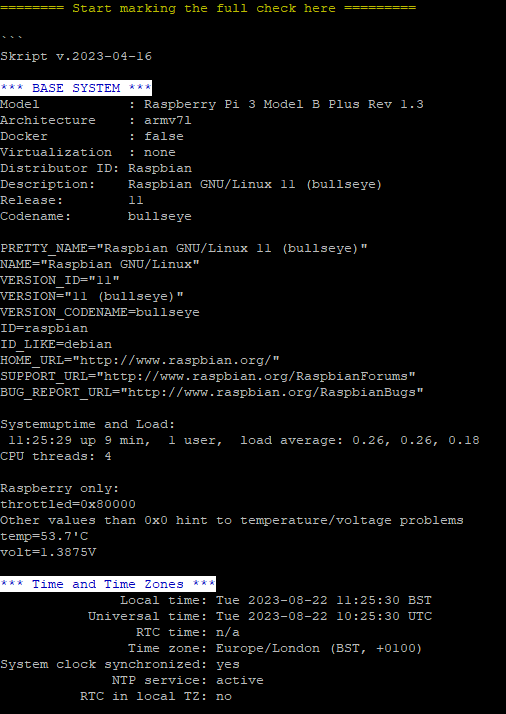
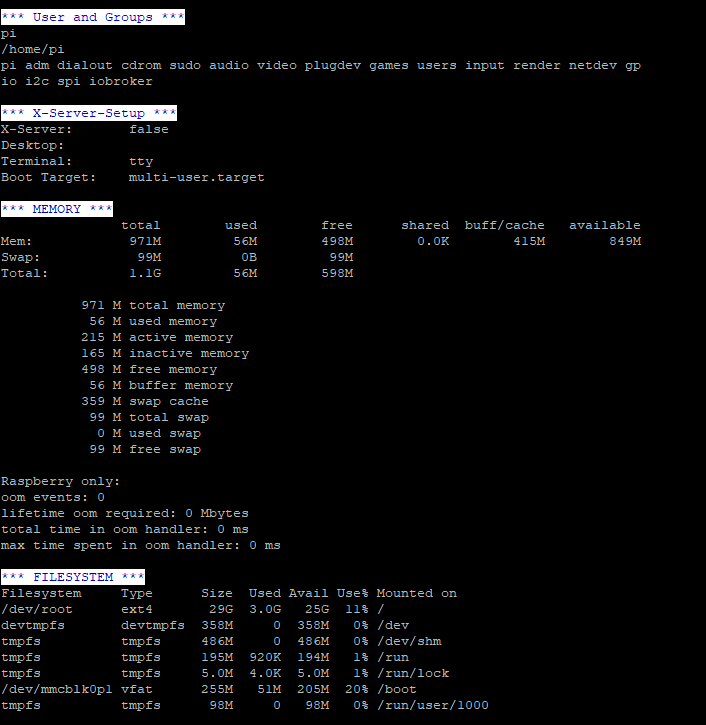
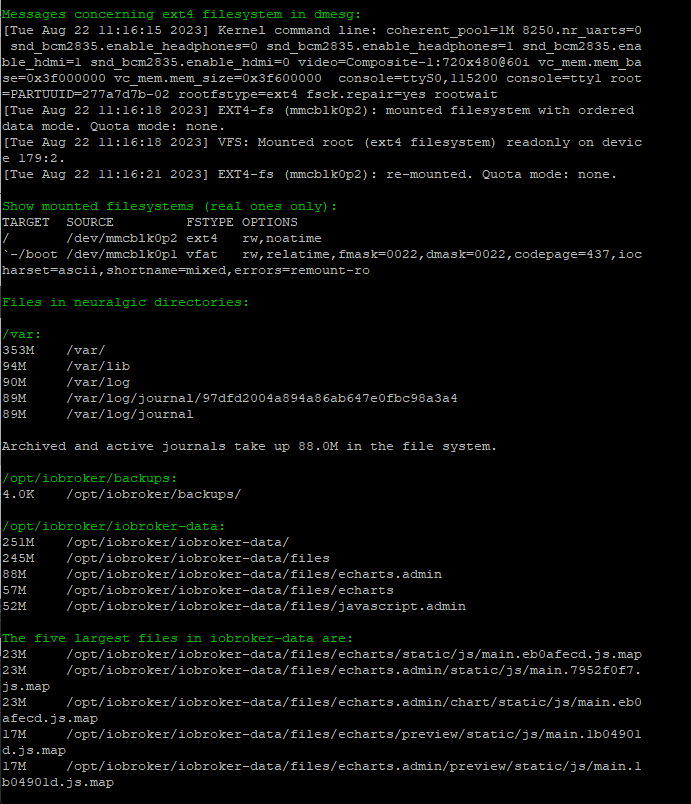
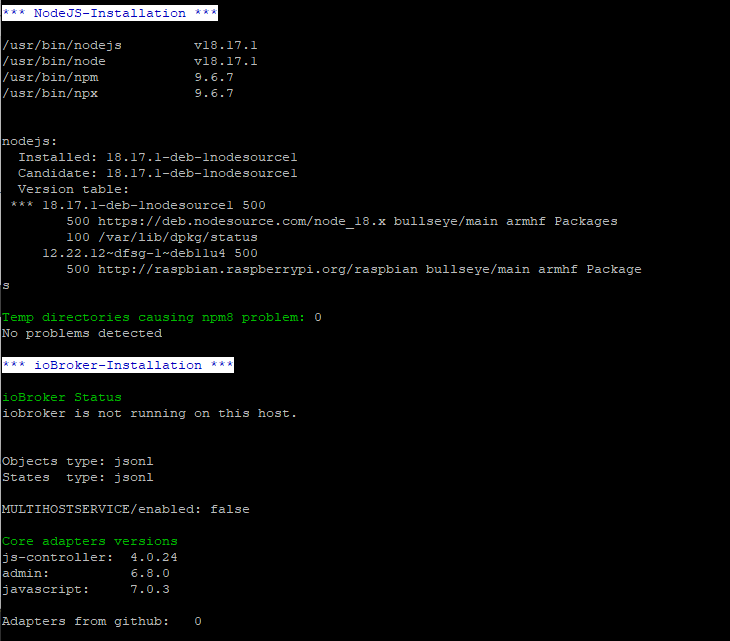
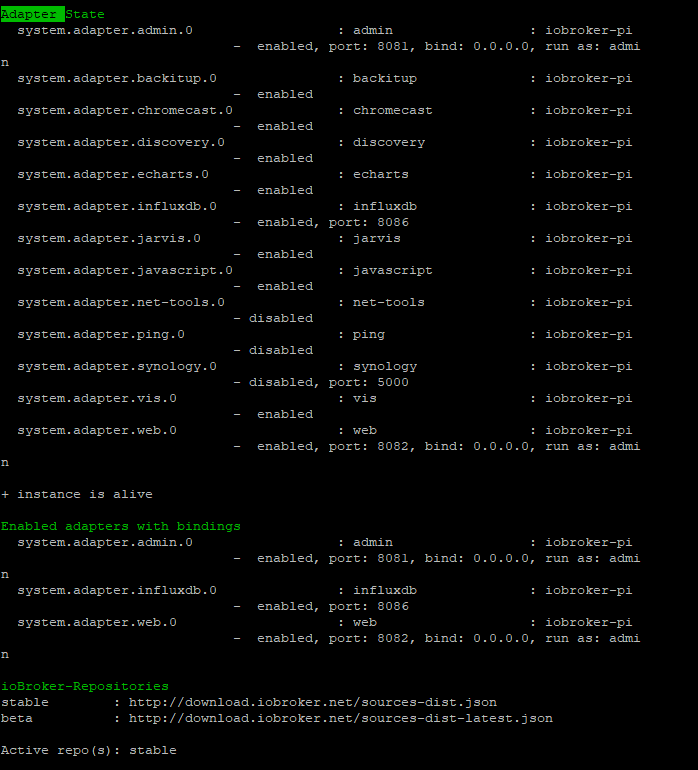
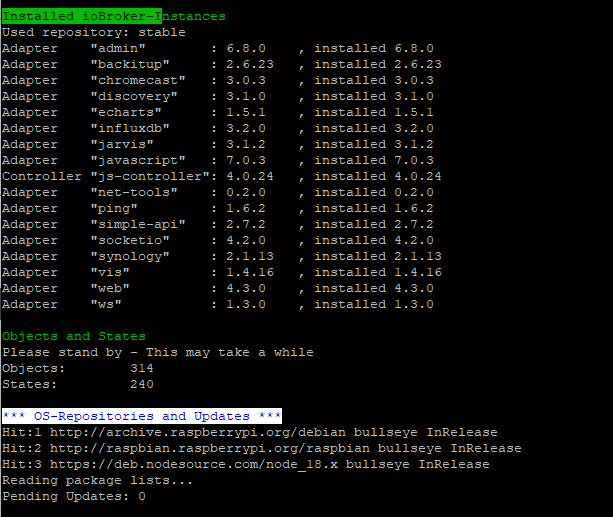
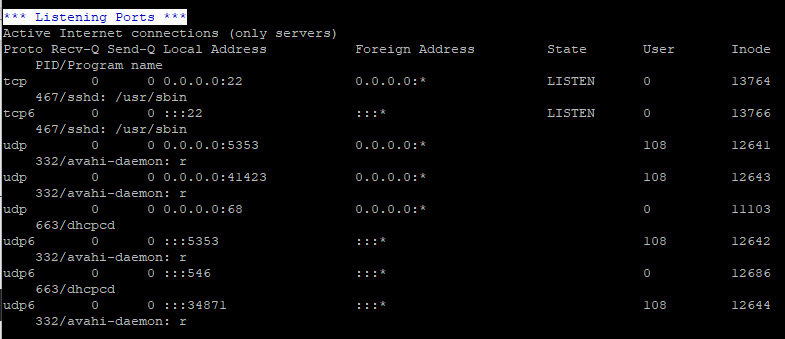
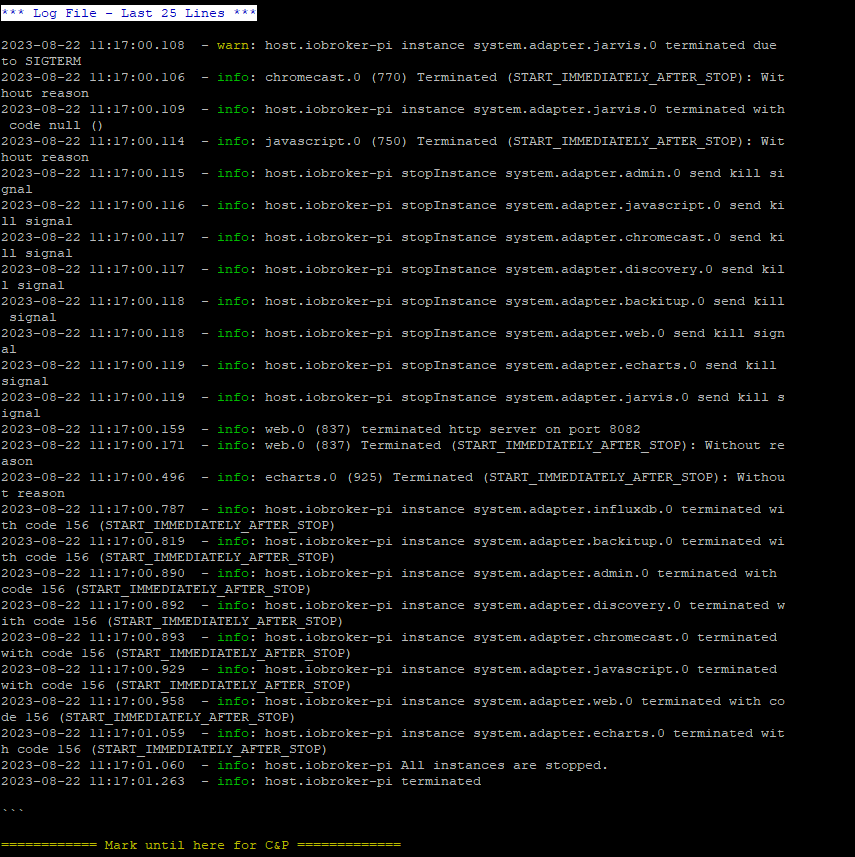
Das hier ist die Ausgabe von diag ...
Gruß
Holger -
@djmarc75 said in Nach Systemaktualisierung Modbus Fehler 25:
iob diag
Das hier ist die Ausgabe von diag ...
Gruß
Holger======== Start marking the full check here =========
Skript v.2023-04-16 *** BASE SYSTEM *** Model : Raspberry Pi 3 Model B Plus Rev 1.3 Architecture : armv7l Docker : false Virtualization : none Distributor ID: Raspbian Description: Raspbian GNU/Linux 11 (bullseye) Release: 11 Codename: bullseye PRETTY_NAME="Raspbian GNU/Linux 11 (bullseye)" NAME="Raspbian GNU/Linux" VERSION_ID="11" VERSION="11 (bullseye)" VERSION_CODENAME=bullseye ID=raspbian ID_LIKE=debian HOME_URL="http://www.raspbian.org/" SUPPORT_URL="http://www.raspbian.org/RaspbianForums" BUG_REPORT_URL="http://www.raspbian.org/RaspbianBugs" Systemuptime and Load: 11:25:29 up 9 min, 1 user, load average: 0.26, 0.26, 0.18 CPU threads: 4 Raspberry only: throttled=0x80000 Other values than 0x0 hint to temperature/voltage problems temp=53.7'C volt=1.3875V *** Time and Time Zones *** Local time: Tue 2023-08-22 11:25:30 BST Universal time: Tue 2023-08-22 10:25:30 UTC RTC time: n/a Time zone: Europe/London (BST, +0100) System clock synchronized: yes NTP service: active RTC in local TZ: no *** User and Groups *** pi /home/pi pi adm dialout cdrom sudo audio video plugdev games users input render netdev gp io i2c spi iobroker *** X-Server-Setup *** X-Server: false Desktop: Terminal: tty Boot Target: multi-user.target *** MEMORY *** total used free shared buff/cache available Mem: 971M 56M 498M 0.0K 415M 849M Swap: 99M 0B 99M Total: 1.1G 56M 598M 971 M total memory 56 M used memory 215 M active memory 165 M inactive memory 498 M free memory 56 M buffer memory 359 M swap cache 99 M total swap 0 M used swap 99 M free swap Raspberry only: oom events: 0 lifetime oom required: 0 Mbytes total time in oom handler: 0 ms max time spent in oom handler: 0 ms *** FILESYSTEM *** Filesystem Type Size Used Avail Use% Mounted on /dev/root ext4 29G 3.0G 25G 11% / devtmpfs devtmpfs 358M 0 358M 0% /dev tmpfs tmpfs 486M 0 486M 0% /dev/shm tmpfs tmpfs 195M 920K 194M 1% /run tmpfs tmpfs 5.0M 4.0K 5.0M 1% /run/lock /dev/mmcblk0p1 vfat 255M 51M 205M 20% /boot tmpfs tmpfs 98M 0 98M 0% /run/user/1000 Messages concerning ext4 filesystem in dmesg: [Tue Aug 22 11:16:15 2023] Kernel command line: coherent_pool=1M 8250.nr_uarts=0 snd_bcm2835.enable_headphones=0 snd_bcm2835.enable_headphones=1 snd_bcm2835.ena ble_hdmi=1 snd_bcm2835.enable_hdmi=0 video=Composite-1:720x480@60i vc_mem.mem_ba se=0x3f000000 vc_mem.mem_size=0x3f600000 console=ttyS0,115200 console=tty1 root =PARTUUID=277a7d7b-02 rootfstype=ext4 fsck.repair=yes rootwait [Tue Aug 22 11:16:18 2023] EXT4-fs (mmcblk0p2): mounted filesystem with ordered data mode. Quota mode: none. [Tue Aug 22 11:16:18 2023] VFS: Mounted root (ext4 filesystem) readonly on devic e 179:2. [Tue Aug 22 11:16:21 2023] EXT4-fs (mmcblk0p2): re-mounted. Quota mode: none. Show mounted filesystems (real ones only): TARGET SOURCE FSTYPE OPTIONS / /dev/mmcblk0p2 ext4 rw,noatime `-/boot /dev/mmcblk0p1 vfat rw,relatime,fmask=0022,dmask=0022,codepage=437,ioc harset=ascii,shortname=mixed,errors=remount-ro Files in neuralgic directories: /var: 353M /var/ 94M /var/lib 90M /var/log 89M /var/log/journal/97dfd2004a894a86ab647e0fbc98a3a4 89M /var/log/journal Archived and active journals take up 88.0M in the file system. /opt/iobroker/backups: 4.0K /opt/iobroker/backups/ /opt/iobroker/iobroker-data: 251M /opt/iobroker/iobroker-data/ 245M /opt/iobroker/iobroker-data/files 88M /opt/iobroker/iobroker-data/files/echarts.admin 57M /opt/iobroker/iobroker-data/files/echarts 52M /opt/iobroker/iobroker-data/files/javascript.admin The five largest files in iobroker-data are: 23M /opt/iobroker/iobroker-data/files/echarts/static/js/main.eb0afecd.js.map 23M /opt/iobroker/iobroker-data/files/echarts.admin/static/js/main.7952f0f7. js.map 23M /opt/iobroker/iobroker-data/files/echarts.admin/chart/static/js/main.eb0 afecd.js.map 17M /opt/iobroker/iobroker-data/files/echarts/preview/static/js/main.1b04901 d.js.map 17M /opt/iobroker/iobroker-data/files/echarts.admin/preview/static/js/main.1 b04901d.js.map *** NodeJS-Installation *** /usr/bin/nodejs v18.17.1 /usr/bin/node v18.17.1 /usr/bin/npm 9.6.7 /usr/bin/npx 9.6.7 nodejs: Installed: 18.17.1-deb-1nodesource1 Candidate: 18.17.1-deb-1nodesource1 Version table: *** 18.17.1-deb-1nodesource1 500 500 https://deb.nodesource.com/node_18.x bullseye/main armhf Packages 100 /var/lib/dpkg/status 12.22.12~dfsg-1~deb11u4 500 500 http://raspbian.raspberrypi.org/raspbian bullseye/main armhf Package s Temp directories causing npm8 problem: 0 No problems detected *** ioBroker-Installation *** ioBroker Status iobroker is not running on this host. Objects type: jsonl States type: jsonl MULTIHOSTSERVICE/enabled: false Core adapters versions js-controller: 4.0.24 admin: 6.8.0 javascript: 7.0.3 Adapters from github: 0 Adapter State system.adapter.admin.0 : admin : iobroker-pi - enabled, port: 8081, bind: 0.0.0.0, run as: admi n system.adapter.backitup.0 : backitup : iobroker-pi - enabled system.adapter.chromecast.0 : chromecast : iobroker-pi - enabled system.adapter.discovery.0 : discovery : iobroker-pi - enabled system.adapter.echarts.0 : echarts : iobroker-pi - enabled system.adapter.influxdb.0 : influxdb : iobroker-pi - enabled, port: 8086 system.adapter.jarvis.0 : jarvis : iobroker-pi - enabled system.adapter.javascript.0 : javascript : iobroker-pi - enabled system.adapter.net-tools.0 : net-tools : iobroker-pi - disabled system.adapter.ping.0 : ping : iobroker-pi - disabled system.adapter.synology.0 : synology : iobroker-pi - disabled, port: 5000 system.adapter.vis.0 : vis : iobroker-pi - enabled system.adapter.web.0 : web : iobroker-pi - enabled, port: 8082, bind: 0.0.0.0, run as: admi n + instance is alive Enabled adapters with bindings system.adapter.admin.0 : admin : iobroker-pi - enabled, port: 8081, bind: 0.0.0.0, run as: admi n system.adapter.influxdb.0 : influxdb : iobroker-pi - enabled, port: 8086 system.adapter.web.0 : web : iobroker-pi - enabled, port: 8082, bind: 0.0.0.0, run as: admi n ioBroker-Repositories stable : http://download.iobroker.net/sources-dist.json beta : http://download.iobroker.net/sources-dist-latest.json Active repo(s): stable Installed ioBroker-Instances Used repository: stable Adapter "admin" : 6.8.0 , installed 6.8.0 Adapter "backitup" : 2.6.23 , installed 2.6.23 Adapter "chromecast" : 3.0.3 , installed 3.0.3 Adapter "discovery" : 3.1.0 , installed 3.1.0 Adapter "echarts" : 1.5.1 , installed 1.5.1 Adapter "influxdb" : 3.2.0 , installed 3.2.0 Adapter "jarvis" : 3.1.2 , installed 3.1.2 Adapter "javascript" : 7.0.3 , installed 7.0.3 Controller "js-controller": 4.0.24 , installed 4.0.24 Adapter "net-tools" : 0.2.0 , installed 0.2.0 Adapter "ping" : 1.6.2 , installed 1.6.2 Adapter "simple-api" : 2.7.2 , installed 2.7.2 Adapter "socketio" : 4.2.0 , installed 4.2.0 Adapter "synology" : 2.1.13 , installed 2.1.13 Adapter "vis" : 1.4.16 , installed 1.4.16 Adapter "web" : 4.3.0 , installed 4.3.0 Adapter "ws" : 1.3.0 , installed 1.3.0 Objects and States Please stand by - This may take a while Objects: 314 States: 240 *** OS-Repositories and Updates *** Hit:1 http://archive.raspberrypi.org/debian bullseye InRelease Hit:2 http://raspbian.raspberrypi.org/raspbian bullseye InRelease Hit:3 https://deb.nodesource.com/node_18.x bullseye InRelease Reading package lists... Pending Updates: 0 *** Listening Ports *** Active Internet connections (only servers) Proto Recv-Q Send-Q Local Address Foreign Address State User Inode PID/Program name tcp 0 0 0.0.0.0:22 0.0.0.0:* LISTEN 0 13764 467/sshd: /usr/sbin tcp6 0 0 :::22 :::* LISTEN 0 13766 467/sshd: /usr/sbin udp 0 0 0.0.0.0:5353 0.0.0.0:* 108 12641 332/avahi-daemon: r udp 0 0 0.0.0.0:41423 0.0.0.0:* 108 12643 332/avahi-daemon: r udp 0 0 0.0.0.0:68 0.0.0.0:* 0 11103 663/dhcpcd udp6 0 0 :::5353 :::* 108 12642 332/avahi-daemon: r udp6 0 0 :::546 :::* 0 12686 663/dhcpcd udp6 0 0 :::34871 :::* 108 12644 332/avahi-daemon: r *** Log File - Last 25 Lines *** 2023-08-22 11:17:00.108 - warn: host.iobroker-pi instance system.adapter.jarvis.0 terminated due to SIGTERM 2023-08-22 11:17:00.106 - info: chromecast.0 (770) Terminated (START_IMMEDIATELY_AFTER_STOP): Wit hout reason 2023-08-22 11:17:00.109 - info: host.iobroker-pi instance system.adapter.jarvis.0 terminated with code null () 2023-08-22 11:17:00.114 - info: javascript.0 (750) Terminated (START_IMMEDIATELY_AFTER_STOP): Wit hout reason 2023-08-22 11:17:00.115 - info: host.iobroker-pi stopInstance system.adapter.admin.0 send kill si gnal 2023-08-22 11:17:00.116 - info: host.iobroker-pi stopInstance system.adapter.javascript.0 send ki ll signal 2023-08-22 11:17:00.117 - info: host.iobroker-pi stopInstance system.adapter.chromecast.0 send ki ll signal 2023-08-22 11:17:00.117 - info: host.iobroker-pi stopInstance system.adapter.discovery.0 send kil l signal 2023-08-22 11:17:00.118 - info: host.iobroker-pi stopInstance system.adapter.backitup.0 send kill signal 2023-08-22 11:17:00.118 - info: host.iobroker-pi stopInstance system.adapter.web.0 send kill sign al 2023-08-22 11:17:00.119 - info: host.iobroker-pi stopInstance system.adapter.echarts.0 send kill signal 2023-08-22 11:17:00.119 - info: host.iobroker-pi stopInstance system.adapter.jarvis.0 send kill s ignal 2023-08-22 11:17:00.159 - info: web.0 (837) terminated http server on port 8082 2023-08-22 11:17:00.171 - info: web.0 (837) Terminated (START_IMMEDIATELY_AFTER_STOP): Without re ason 2023-08-22 11:17:00.496 - info: echarts.0 (925) Terminated (START_IMMEDIATELY_AFTER_STOP): Withou t reason 2023-08-22 11:17:00.787 - info: host.iobroker-pi instance system.adapter.influxdb.0 terminated wi th code 156 (START_IMMEDIATELY_AFTER_STOP) 2023-08-22 11:17:00.819 - info: host.iobroker-pi instance system.adapter.backitup.0 terminated wi th code 156 (START_IMMEDIATELY_AFTER_STOP) 2023-08-22 11:17:00.890 - info: host.iobroker-pi instance system.adapter.admin.0 terminated with code 156 (START_IMMEDIATELY_AFTER_STOP) 2023-08-22 11:17:00.892 - info: host.iobroker-pi instance system.adapter.discovery.0 terminated w ith code 156 (START_IMMEDIATELY_AFTER_STOP) 2023-08-22 11:17:00.893 - info: host.iobroker-pi instance system.adapter.chromecast.0 terminated with code 156 (START_IMMEDIATELY_AFTER_STOP) 2023-08-22 11:17:00.929 - info: host.iobroker-pi instance system.adapter.javascript.0 terminated with code 156 (START_IMMEDIATELY_AFTER_STOP) 2023-08-22 11:17:00.958 - info: host.iobroker-pi instance system.adapter.web.0 terminated with co de 156 (START_IMMEDIATELY_AFTER_STOP) 2023-08-22 11:17:01.059 - info: host.iobroker-pi instance system.adapter.echarts.0 terminated wit h code 156 (START_IMMEDIATELY_AFTER_STOP) 2023-08-22 11:17:01.060 - info: host.iobroker-pi All instances are stopped. 2023-08-22 11:17:01.263 - info: host.iobroker-pi terminated============ Mark until here for C&P =============
-
@djmarc75 said in Nach Systemaktualisierung Modbus Fehler 25:
iob diag
Das hier ist die Ausgabe von diag ...
Gruß
Holger@dooley_76 setze die Ausgabe bitte in die Code Tags </> damit man das lesen kann.
-
@dooley_76 setze die Ausgabe bitte in die Code Tags </> damit man das lesen kann.
@fa-bio
Irgendwas scheint da gerade bei der Übertragung nicht gefunzt zu haben, also hier nochmal
======== Start marking the full check here =========
Skript v.2023-04-16

*** BASE SYSTEM ***
Model           : Raspberry Pi 3 Model B Plus Rev 1.3
Architecture    : armv7l
Docker          : false
Virtualization  : none
Distributor ID: Raspbian
Description:    Raspbian GNU/Linux 11 (bullseye)
Release:        11
Codename:       bullseye

PRETTY_NAME="Raspbian GNU/Linux 11 (bullseye)"
NAME="Raspbian GNU/Linux"
VERSION_ID="11"
VERSION="11 (bullseye)"
VERSION_CODENAME=bullseye
ID=raspbian
ID_LIKE=debian
HOME_URL="http://www.raspbian.org/"
SUPPORT_URL="http://www.raspbian.org/RaspbianForums"
BUG_REPORT_URL="http://www.raspbian.org/RaspbianBugs"

Systemuptime and Load:
 11:25:29 up 9 min,  1 user,  load average: 0.26, 0.26, 0.18
CPU threads: 4

Raspberry only:
throttled=0x80000
Other values than 0x0 hint to temperature/voltage problems
temp=53.7'C
volt=1.3875V

*** Time and Time Zones ***
               Local time: Tue 2023-08-22 11:25:30 BST
           Universal time: Tue 2023-08-22 10:25:30 UTC
                 RTC time: n/a
                Time zone: Europe/London (BST, +0100)
System clock synchronized: yes
              NTP service: active
          RTC in local TZ: no

*** User and Groups ***
pi
/home/pi
pi adm dialout cdrom sudo audio video plugdev games users input render netdev gpio i2c spi iobroker

*** X-Server-Setup ***
X-Server:       false
Desktop:
Terminal:       tty
Boot Target:    multi-user.target

*** MEMORY ***
               total        used        free      shared  buff/cache   available
Mem:            971M         56M        498M        0.0K        415M        849M
Swap:            99M          0B         99M
Total:          1.1G         56M        598M

          971 M total memory
           56 M used memory
          215 M active memory
          165 M inactive memory
          498 M free memory
           56 M buffer memory
          359 M swap cache
           99 M total swap
            0 M used swap
           99 M free swap

Raspberry only:
oom events: 0
lifetime oom required: 0 Mbytes
total time in oom handler: 0 ms
max time spent in oom handler: 0 ms

*** FILESYSTEM ***
Filesystem     Type      Size  Used Avail Use% Mounted on
/dev/root      ext4       29G  3.0G   25G  11% /
devtmpfs       devtmpfs  358M     0  358M   0% /dev
tmpfs          tmpfs     486M     0  486M   0% /dev/shm
tmpfs          tmpfs     195M  920K  194M   1% /run
tmpfs          tmpfs     5.0M  4.0K  5.0M   1% /run/lock
/dev/mmcblk0p1 vfat      255M   51M  205M  20% /boot
tmpfs          tmpfs      98M     0   98M   0% /run/user/1000

Messages concerning ext4 filesystem in dmesg:
[Tue Aug 22 11:16:15 2023] Kernel command line: coherent_pool=1M 8250.nr_uarts=0                                                                                                  data mode. Quota mode: none.
[Tue Aug 22 11:16:18 2023] VFS: Mounted root (ext4 filesystem) readonly on device 179:2.
[Tue Aug 22 11:16:21 2023] EXT4-fs (mmcblk0p2): re-mounted. Quota mode: none.

Show mounted filesystems (real ones only):
TARGET  SOURCE         FSTYPE OPTIONS
/       /dev/mmcblk0p2 ext4   rw,noatime
`-/boot /dev/mmcblk0p1 vfat   rw,relatime,fmask=0022,dmask=0022,codepage=437,iocharset=ascii,shortname=mixed,errors=remount-ro

Files in neuralgic directories:

/var:
353M    /var/
94M     /var/lib
90M     /var/log
89M     /var/log/journal/97dfd2004a894a86ab647e0fbc98a3a4
89M     /var/log/journal

Archived and active journals take up 88.0M in the file system.

/opt/iobroker/backups:
4.0K    /opt/iobroker/backups/

/opt/iobroker/iobroker-data:
251M    /opt/iobroker/iobroker-data/
245M    /opt/iobroker/iobroker-data/files
88M     /opt/iobroker/iobroker-data/files/echarts.admin
57M     /opt/iobroker/iobroker-data/files/echarts
52M     /opt/iobroker/iobroker-data/files/javascript.admin

The five largest files in iobroker-data are:
23M     /opt/iobroker/iobroker-data/files/echarts/static/js/main.eb0afecd.js.map
23M     /opt/iobroker/iobroker-data/files/echarts.admin/static/js/main.7952f0f7.js.map
23M     /opt/iobroker/iobroker-data/files/echarts.admin/chart/static/js/main.eb0afecd.js.map
17M     /opt/iobroker/iobroker-data/files/echarts/preview/static/js/main.1b04901d.js.map
17M     /opt/iobroker/iobroker-data/files/echarts.admin/preview/static/js/main.1b04901d.js.map

*** NodeJS-Installation ***

/usr/bin/nodejs         v18.17.1
/usr/bin/node           v18.17.1
/usr/bin/npm            9.6.7
/usr/bin/npx            9.6.7


nodejs:
  Installed: 18.17.1-deb-1nodesource1
  Candidate: 18.17.1-deb-1nodesource1
  Version table:
 *** 18.17.1-deb-1nodesource1 500
        500 https://deb.nodesource.com/node_18.x bullseye/main armhf Packages
        100 /var/lib/dpkg/status
     12.22.12~dfsg-1~deb11u4 500
        500 http://raspbian.raspberrypi.org/raspbian bullseye/main armhf Packages

Temp directories causing npm8 problem: 0
No problems detected

*** ioBroker-Installation ***

ioBroker Status
iobroker is not running on this host.


Objects type: jsonl
States  type: jsonl

MULTIHOSTSERVICE/enabled: false

Core adapters versions
js-controller:  4.0.24
admin:          6.8.0
javascript:     7.0.3

Adapters from github:   0

Adapter State
  system.adapter.admin.0                  : admin                 : iobroker-pi                                                                               -  enabled, port: 8081, bind: 0.0.0.0, run as: admi                                                 n
  system.adapter.backitup.0               : backitup              : iobroker-pi                                                                               -  enabled
  system.adapter.chromecast.0             : chromecast            : iobroker-pi                                                                               -  enabled
  system.adapter.discovery.0              : discovery             : iobroker-pi                                                                               -  enabled
  system.adapter.echarts.0                : echarts               : iobroker-pi                                                                               -  enabled
  system.adapter.influxdb.0               : influxdb              : iobroker-pi                                                                               -  enabled, port: 8086
  system.adapter.jarvis.0                 : jarvis                : iobroker-pi                                                                               -  enabled
  system.adapter.javascript.0             : javascript            : iobroker-pi                                                                               -  enabled
  system.adapter.net-tools.0              : net-tools             : iobroker-pi                                                                               - disabled
  system.adapter.ping.0                   : ping                  : iobroker-pi                                                                               - disabled
  system.adapter.synology.0               : synology              : iobroker-pi                                                                               - disabled, port: 5000
  system.adapter.vis.0                    : vis                   : iobroker-pi                                                                               -  enabled
  system.adapter.web.0                    : web                   : iobroker-pi                                                                               -  enabled, port: 8082, bind: 0.0.0.0, run as: admi                                                 n

+ instance is alive

Enabled adapters with bindings
  system.adapter.admin.0                  : admin                 : iobroker-pi                                                                               -  enabled, port: 8081, bind: 0.0.0.0, run as: admi                                                 n
  system.adapter.influxdb.0               : influxdb              : iobroker-pi                                                                               -  enabled, port: 8086
  system.adapter.web.0                    : web                   : iobroker-pi                                                                               -  enabled, port: 8082, bind: 0.0.0.0, run as: admi                                                 n

ioBroker-Repositories
stable        : http://download.iobroker.net/sources-dist.json
beta          : http://download.iobroker.net/sources-dist-latest.json

Active repo(s): stable

Installed ioBroker-Instances
Used repository: stable
Adapter    "admin"        : 6.8.0    , installed 6.8.0
Adapter    "backitup"     : 2.6.23   , installed 2.6.23
Adapter    "chromecast"   : 3.0.3    , installed 3.0.3
Adapter    "discovery"    : 3.1.0    , installed 3.1.0
Adapter    "echarts"      : 1.5.1    , installed 1.5.1
Adapter    "influxdb"     : 3.2.0    , installed 3.2.0
Adapter    "jarvis"       : 3.1.2    , installed 3.1.2
Adapter    "javascript"   : 7.0.3    , installed 7.0.3
Controller "js-controller": 4.0.24   , installed 4.0.24
Adapter    "net-tools"    : 0.2.0    , installed 0.2.0
Adapter    "ping"         : 1.6.2    , installed 1.6.2
Adapter    "simple-api"   : 2.7.2    , installed 2.7.2
Adapter    "socketio"     : 4.2.0    , installed 4.2.0
Adapter    "synology"     : 2.1.13   , installed 2.1.13
Adapter    "vis"          : 1.4.16   , installed 1.4.16
Adapter    "web"          : 4.3.0    , installed 4.3.0
Adapter    "ws"           : 1.3.0    , installed 1.3.0

Objects and States
Please stand by - This may take a while
Objects:        314
States:         240

*** OS-Repositories and Updates ***
Hit:1 http://archive.raspberrypi.org/debian bullseye InRelease
Hit:2 http://raspbian.raspberrypi.org/raspbian bullseye InRelease
Hit:3 https://deb.nodesource.com/node_18.x bullseye InRelease
Reading package lists...
Pending Updates: 0

*** Listening Ports ***
Active Internet connections (only servers)
Proto Recv-Q Send-Q Local Address           Foreign Address         State       User       Inode    PID/Program name
tcp        0      0 0.0.0.0:22              0.0.0.0:*               LISTEN      0          13764    467/sshd: /usr/sbin
tcp6       0      0 :::22                   :::*                    LISTEN      0          13766    467/sshd: /usr/sbin
udp        0      0 0.0.0.0:5353            0.0.0.0:*                           108        12641    332/avahi-daemon: r
udp        0      0 0.0.0.0:41423           0.0.0.0:*                           108        12643    332/avahi-daemon: r
udp        0      0 0.0.0.0:68              0.0.0.0:*                           0          11103    663/dhcpcd
udp6       0      0 :::5353                 :::*                                108        12642    332/avahi-daemon: r
udp6       0      0 :::546                  :::*                                0          12686    663/dhcpcd
udp6       0      0 :::34871                :::*                                108        12644    332/avahi-daemon: r

*** Log File - Last 25 Lines ***

2023-08-22 11:17:00.108  - warn: host.iobroker-pi instance system.adapter.jarvis.0 terminated due to SIGTERM
2023-08-22 11:17:00.106  - info: chromecast.0 (770) Terminated (START_IMMEDIATELY_AFTER_STOP): Without reason
2023-08-22 11:17:00.109  - info: host.iobroker-pi instance system.adapter.jarvis.0 terminated with code null ()
2023-08-22 11:17:00.114  - info: javascript.0 (750) Terminated (START_IMMEDIATELY_AFTER_STOP): Without reason
2023-08-22 11:17:00.115  - info: host.iobroker-pi stopInstance system.adapter.admin.0 send kill signal
2023-08-22 11:17:00.116  - info: host.iobroker-pi stopInstance system.adapter.javascript.0 send kill signal
2023-08-22 11:17:00.117  - info: host.iobroker-pi stopInstance system.adapter.chromecast.0 send kill signal
2023-08-22 11:17:00.117  - info: host.iobroker-pi stopInstance system.adapter.discovery.0 send kill signal
2023-08-22 11:17:00.118  - info: host.iobroker-pi stopInstance system.adapter.backitup.0 send kill signal
2023-08-22 11:17:00.118  - info: host.iobroker-pi stopInstance system.adapter.web.0 send kill signal
2023-08-22 11:17:00.119  - info: host.iobroker-pi stopInstance system.adapter.echarts.0 send kill signal
2023-08-22 11:17:00.119  - info: host.iobroker-pi stopInstance system.adapter.jarvis.0 send kill signal
2023-08-22 11:17:00.159  - info: web.0 (837) terminated http server on port 8082
2023-08-22 11:17:00.171  - info: web.0 (837) Terminated (START_IMMEDIATELY_AFTER_STOP): Without reason
2023-08-22 11:17:00.496  - info: echarts.0 (925) Terminated (START_IMMEDIATELY_AFTER_STOP): Without reason
2023-08-22 11:17:00.787  - info: host.iobroker-pi instance system.adapter.influxdb.0 terminated with code 156 (START_IMMEDIATELY_AFTER_STOP)
2023-08-22 11:17:00.819  - info: host.iobroker-pi instance system.adapter.backitup.0 terminated with code 156 (START_IMMEDIATELY_AFTER_STOP)
2023-08-22 11:17:00.890  - info: host.iobroker-pi instance system.adapter.admin.0 terminated with code 156 (START_IMMEDIATELY_AFTER_STOP)
2023-08-22 11:17:00.892  - info: host.iobroker-pi instance system.adapter.discovery.0 terminated with code 156 (START_IMMEDIATELY_AFTER_STOP)
2023-08-22 11:17:00.893  - info: host.iobroker-pi instance system.adapter.chromecast.0 terminated with code 156 (START_IMMEDIATELY_AFTER_STOP)
2023-08-22 11:17:00.929  - info: host.iobroker-pi instance system.adapter.javascript.0 terminated with code 156 (START_IMMEDIATELY_AFTER_STOP)
2023-08-22 11:17:00.958  - info: host.iobroker-pi instance system.adapter.web.0 terminated with code 156 (START_IMMEDIATELY_AFTER_STOP)
2023-08-22 11:17:01.059  - info: host.iobroker-pi instance system.adapter.echarts.0 terminated with code 156 (START_IMMEDIATELY_AFTER_STOP)
2023-08-22 11:17:01.060  - info: host.iobroker-pi All instances are stopped.
2023-08-22 11:17:01.263  - info: host.iobroker-pi terminated
============ Mark until here for C&P =============
-
@fa-bio
Irgendwas scheint da gerade bei der Übertragung nicht gefunzt zu haben, also hier nochmal
======== Start marking the full check here =========
Skript v.2023-04-16

*** BASE SYSTEM ***
Model           : Raspberry Pi 3 Model B Plus Rev 1.3
Architecture    : armv7l
Docker          : false
Virtualization  : none
Distributor ID: Raspbian
Description:    Raspbian GNU/Linux 11 (bullseye)
Release:        11
Codename:       bullseye

PRETTY_NAME="Raspbian GNU/Linux 11 (bullseye)"
NAME="Raspbian GNU/Linux"
VERSION_ID="11"
VERSION="11 (bullseye)"
VERSION_CODENAME=bullseye
ID=raspbian
ID_LIKE=debian
HOME_URL="http://www.raspbian.org/"
SUPPORT_URL="http://www.raspbian.org/RaspbianForums"
BUG_REPORT_URL="http://www.raspbian.org/RaspbianBugs"

Systemuptime and Load:
 11:25:29 up 9 min,  1 user,  load average: 0.26, 0.26, 0.18
CPU threads: 4

Raspberry only:
throttled=0x80000
Other values than 0x0 hint to temperature/voltage problems
temp=53.7'C
volt=1.3875V

*** Time and Time Zones ***
               Local time: Tue 2023-08-22 11:25:30 BST
           Universal time: Tue 2023-08-22 10:25:30 UTC
                 RTC time: n/a
                Time zone: Europe/London (BST, +0100)
System clock synchronized: yes
              NTP service: active
          RTC in local TZ: no

*** User and Groups ***
pi
/home/pi
pi adm dialout cdrom sudo audio video plugdev games users input render netdev gpio i2c spi iobroker

*** X-Server-Setup ***
X-Server:       false
Desktop:
Terminal:       tty
Boot Target:    multi-user.target

*** MEMORY ***
               total        used        free      shared  buff/cache   available
Mem:            971M         56M        498M        0.0K        415M        849M
Swap:            99M          0B         99M
Total:          1.1G         56M        598M

          971 M total memory
           56 M used memory
          215 M active memory
          165 M inactive memory
          498 M free memory
           56 M buffer memory
          359 M swap cache
           99 M total swap
            0 M used swap
           99 M free swap

Raspberry only:
oom events: 0
lifetime oom required: 0 Mbytes
total time in oom handler: 0 ms
max time spent in oom handler: 0 ms

*** FILESYSTEM ***
Filesystem     Type      Size  Used Avail Use% Mounted on
/dev/root      ext4       29G  3.0G   25G  11% /
devtmpfs       devtmpfs  358M     0  358M   0% /dev
tmpfs          tmpfs     486M     0  486M   0% /dev/shm
tmpfs          tmpfs     195M  920K  194M   1% /run
tmpfs          tmpfs     5.0M  4.0K  5.0M   1% /run/lock
/dev/mmcblk0p1 vfat      255M   51M  205M  20% /boot
tmpfs          tmpfs      98M     0   98M   0% /run/user/1000

Messages concerning ext4 filesystem in dmesg:
[Tue Aug 22 11:16:15 2023] Kernel command line: coherent_pool=1M 8250.nr_uarts=0                                                                                                  data mode. Quota mode: none.
[Tue Aug 22 11:16:18 2023] VFS: Mounted root (ext4 filesystem) readonly on device 179:2.
[Tue Aug 22 11:16:21 2023] EXT4-fs (mmcblk0p2): re-mounted. Quota mode: none.

Show mounted filesystems (real ones only):
TARGET  SOURCE         FSTYPE OPTIONS
/       /dev/mmcblk0p2 ext4   rw,noatime
`-/boot /dev/mmcblk0p1 vfat   rw,relatime,fmask=0022,dmask=0022,codepage=437,iocharset=ascii,shortname=mixed,errors=remount-ro

Files in neuralgic directories:

/var:
353M    /var/
94M     /var/lib
90M     /var/log
89M     /var/log/journal/97dfd2004a894a86ab647e0fbc98a3a4
89M     /var/log/journal

Archived and active journals take up 88.0M in the file system.

/opt/iobroker/backups:
4.0K    /opt/iobroker/backups/

/opt/iobroker/iobroker-data:
251M    /opt/iobroker/iobroker-data/
245M    /opt/iobroker/iobroker-data/files
88M     /opt/iobroker/iobroker-data/files/echarts.admin
57M     /opt/iobroker/iobroker-data/files/echarts
52M     /opt/iobroker/iobroker-data/files/javascript.admin

The five largest files in iobroker-data are:
23M     /opt/iobroker/iobroker-data/files/echarts/static/js/main.eb0afecd.js.map
23M     /opt/iobroker/iobroker-data/files/echarts.admin/static/js/main.7952f0f7.js.map
23M     /opt/iobroker/iobroker-data/files/echarts.admin/chart/static/js/main.eb0afecd.js.map
17M     /opt/iobroker/iobroker-data/files/echarts/preview/static/js/main.1b04901d.js.map
17M     /opt/iobroker/iobroker-data/files/echarts.admin/preview/static/js/main.1b04901d.js.map

*** NodeJS-Installation ***

/usr/bin/nodejs         v18.17.1
/usr/bin/node           v18.17.1
/usr/bin/npm            9.6.7
/usr/bin/npx            9.6.7


nodejs:
  Installed: 18.17.1-deb-1nodesource1
  Candidate: 18.17.1-deb-1nodesource1
  Version table:
 *** 18.17.1-deb-1nodesource1 500
        500 https://deb.nodesource.com/node_18.x bullseye/main armhf Packages
        100 /var/lib/dpkg/status
     12.22.12~dfsg-1~deb11u4 500
        500 http://raspbian.raspberrypi.org/raspbian bullseye/main armhf Packages

Temp directories causing npm8 problem: 0
No problems detected

*** ioBroker-Installation ***

ioBroker Status
iobroker is not running on this host.


Objects type: jsonl
States  type: jsonl

MULTIHOSTSERVICE/enabled: false

Core adapters versions
js-controller:  4.0.24
admin:          6.8.0
javascript:     7.0.3

Adapters from github:   0

Adapter State
  system.adapter.admin.0                  : admin                 : iobroker-pi                                                                               -  enabled, port: 8081, bind: 0.0.0.0, run as: admi                                                 n
  system.adapter.backitup.0               : backitup              : iobroker-pi                                                                               -  enabled
  system.adapter.chromecast.0             : chromecast            : iobroker-pi                                                                               -  enabled
  system.adapter.discovery.0              : discovery             : iobroker-pi                                                                               -  enabled
  system.adapter.echarts.0                : echarts               : iobroker-pi                                                                               -  enabled
  system.adapter.influxdb.0               : influxdb              : iobroker-pi                                                                               -  enabled, port: 8086
  system.adapter.jarvis.0                 : jarvis                : iobroker-pi                                                                               -  enabled
  system.adapter.javascript.0             : javascript            : iobroker-pi                                                                               -  enabled
  system.adapter.net-tools.0              : net-tools             : iobroker-pi                                                                               - disabled
  system.adapter.ping.0                   : ping                  : iobroker-pi                                                                               - disabled
  system.adapter.synology.0               : synology              : iobroker-pi                                                                               - disabled, port: 5000
  system.adapter.vis.0                    : vis                   : iobroker-pi                                                                               -  enabled
  system.adapter.web.0                    : web                   : iobroker-pi                                                                               -  enabled, port: 8082, bind: 0.0.0.0, run as: admi                                                 n

+ instance is alive

Enabled adapters with bindings
  system.adapter.admin.0                  : admin                 : iobroker-pi                                                                               -  enabled, port: 8081, bind: 0.0.0.0, run as: admi                                                 n
  system.adapter.influxdb.0               : influxdb              : iobroker-pi                                                                               -  enabled, port: 8086
  system.adapter.web.0                    : web                   : iobroker-pi                                                                               -  enabled, port: 8082, bind: 0.0.0.0, run as: admi                                                 n

ioBroker-Repositories
stable        : http://download.iobroker.net/sources-dist.json
beta          : http://download.iobroker.net/sources-dist-latest.json

Active repo(s): stable

Installed ioBroker-Instances
Used repository: stable
Adapter    "admin"        : 6.8.0    , installed 6.8.0
Adapter    "backitup"     : 2.6.23   , installed 2.6.23
Adapter    "chromecast"   : 3.0.3    , installed 3.0.3
Adapter    "discovery"    : 3.1.0    , installed 3.1.0
Adapter    "echarts"      : 1.5.1    , installed 1.5.1
Adapter    "influxdb"     : 3.2.0    , installed 3.2.0
Adapter    "jarvis"       : 3.1.2    , installed 3.1.2
Adapter    "javascript"   : 7.0.3    , installed 7.0.3
Controller "js-controller": 4.0.24   , installed 4.0.24
Adapter    "net-tools"    : 0.2.0    , installed 0.2.0
Adapter    "ping"         : 1.6.2    , installed 1.6.2
Adapter    "simple-api"   : 2.7.2    , installed 2.7.2
Adapter    "socketio"     : 4.2.0    , installed 4.2.0
Adapter    "synology"     : 2.1.13   , installed 2.1.13
Adapter    "vis"          : 1.4.16   , installed 1.4.16
Adapter    "web"          : 4.3.0    , installed 4.3.0
Adapter    "ws"           : 1.3.0    , installed 1.3.0

Objects and States
Please stand by - This may take a while
Objects:        314
States:         240

*** OS-Repositories and Updates ***
Hit:1 http://archive.raspberrypi.org/debian bullseye InRelease
Hit:2 http://raspbian.raspberrypi.org/raspbian bullseye InRelease
Hit:3 https://deb.nodesource.com/node_18.x bullseye InRelease
Reading package lists...
Pending Updates: 0

*** Listening Ports ***
Active Internet connections (only servers)
Proto Recv-Q Send-Q Local Address           Foreign Address         State       User       Inode    PID/Program name
tcp        0      0 0.0.0.0:22              0.0.0.0:*               LISTEN      0          13764    467/sshd: /usr/sbin
tcp6       0      0 :::22                   :::*                    LISTEN      0          13766    467/sshd: /usr/sbin
udp        0      0 0.0.0.0:5353            0.0.0.0:*                           108        12641    332/avahi-daemon: r
udp        0      0 0.0.0.0:41423           0.0.0.0:*                           108        12643    332/avahi-daemon: r
udp        0      0 0.0.0.0:68              0.0.0.0:*                           0          11103    663/dhcpcd
udp6       0      0 :::5353                 :::*                                108        12642    332/avahi-daemon: r
udp6       0      0 :::546                  :::*                                0          12686    663/dhcpcd
udp6       0      0 :::34871                :::*                                108        12644    332/avahi-daemon: r

*** Log File - Last 25 Lines ***

2023-08-22 11:17:00.108  - warn: host.iobroker-pi instance system.adapter.jarvis.0 terminated due to SIGTERM
2023-08-22 11:17:00.106  - info: chromecast.0 (770) Terminated (START_IMMEDIATELY_AFTER_STOP): Without reason
2023-08-22 11:17:00.109  - info: host.iobroker-pi instance system.adapter.jarvis.0 terminated with code null ()
2023-08-22 11:17:00.114  - info: javascript.0 (750) Terminated (START_IMMEDIATELY_AFTER_STOP): Without reason
2023-08-22 11:17:00.115  - info: host.iobroker-pi stopInstance system.adapter.admin.0 send kill signal
2023-08-22 11:17:00.116  - info: host.iobroker-pi stopInstance system.adapter.javascript.0 send kill signal
2023-08-22 11:17:00.117  - info: host.iobroker-pi stopInstance system.adapter.chromecast.0 send kill signal
2023-08-22 11:17:00.117  - info: host.iobroker-pi stopInstance system.adapter.discovery.0 send kill signal
2023-08-22 11:17:00.118  - info: host.iobroker-pi stopInstance system.adapter.backitup.0 send kill signal
2023-08-22 11:17:00.118  - info: host.iobroker-pi stopInstance system.adapter.web.0 send kill signal
2023-08-22 11:17:00.119  - info: host.iobroker-pi stopInstance system.adapter.echarts.0 send kill signal
2023-08-22 11:17:00.119  - info: host.iobroker-pi stopInstance system.adapter.jarvis.0 send kill signal
2023-08-22 11:17:00.159  - info: web.0 (837) terminated http server on port 8082
2023-08-22 11:17:00.171  - info: web.0 (837) Terminated (START_IMMEDIATELY_AFTER_STOP): Without reason
2023-08-22 11:17:00.496  - info: echarts.0 (925) Terminated (START_IMMEDIATELY_AFTER_STOP): Without reason
2023-08-22 11:17:00.787  - info: host.iobroker-pi instance system.adapter.influxdb.0 terminated with code 156 (START_IMMEDIATELY_AFTER_STOP)
2023-08-22 11:17:00.819  - info: host.iobroker-pi instance system.adapter.backitup.0 terminated with code 156 (START_IMMEDIATELY_AFTER_STOP)
2023-08-22 11:17:00.890  - info: host.iobroker-pi instance system.adapter.admin.0 terminated with code 156 (START_IMMEDIATELY_AFTER_STOP)
2023-08-22 11:17:00.892  - info: host.iobroker-pi instance system.adapter.discovery.0 terminated with code 156 (START_IMMEDIATELY_AFTER_STOP)
2023-08-22 11:17:00.893  - info: host.iobroker-pi instance system.adapter.chromecast.0 terminated with code 156 (START_IMMEDIATELY_AFTER_STOP)
2023-08-22 11:17:00.929  - info: host.iobroker-pi instance system.adapter.javascript.0 terminated with code 156 (START_IMMEDIATELY_AFTER_STOP)
2023-08-22 11:17:00.958  - info: host.iobroker-pi instance system.adapter.web.0 terminated with code 156 (START_IMMEDIATELY_AFTER_STOP)
2023-08-22 11:17:01.059  - info: host.iobroker-pi instance system.adapter.echarts.0 terminated with code 156 (START_IMMEDIATELY_AFTER_STOP)
2023-08-22 11:17:01.060  - info: host.iobroker-pi All instances are stopped.
2023-08-22 11:17:01.263  - info: host.iobroker-pi terminated
============ Mark until here for C&P =============
@dooley_76 okay ich glaube da sollte mal @Thomas-Braun drüber schauen.
-
@fa-bio
Irgendwas scheint da gerade bei der Übertragung nicht gefunzt zu haben, also hier nochmal
======== Start marking the full check here =========
Skript v.2023-04-16

*** BASE SYSTEM ***
Model           : Raspberry Pi 3 Model B Plus Rev 1.3
Architecture    : armv7l
Docker          : false
Virtualization  : none
Distributor ID: Raspbian
Description:    Raspbian GNU/Linux 11 (bullseye)
Release:        11
Codename:       bullseye

PRETTY_NAME="Raspbian GNU/Linux 11 (bullseye)"
NAME="Raspbian GNU/Linux"
VERSION_ID="11"
VERSION="11 (bullseye)"
VERSION_CODENAME=bullseye
ID=raspbian
ID_LIKE=debian
HOME_URL="http://www.raspbian.org/"
SUPPORT_URL="http://www.raspbian.org/RaspbianForums"
BUG_REPORT_URL="http://www.raspbian.org/RaspbianBugs"

Systemuptime and Load:
 11:25:29 up 9 min,  1 user,  load average: 0.26, 0.26, 0.18
CPU threads: 4

Raspberry only:
throttled=0x80000
Other values than 0x0 hint to temperature/voltage problems
temp=53.7'C
volt=1.3875V

*** Time and Time Zones ***
               Local time: Tue 2023-08-22 11:25:30 BST
           Universal time: Tue 2023-08-22 10:25:30 UTC
                 RTC time: n/a
                Time zone: Europe/London (BST, +0100)
System clock synchronized: yes
              NTP service: active
          RTC in local TZ: no

*** User and Groups ***
pi
/home/pi
pi adm dialout cdrom sudo audio video plugdev games users input render netdev gpio i2c spi iobroker

*** X-Server-Setup ***
X-Server:       false
Desktop:
Terminal:       tty
Boot Target:    multi-user.target

*** MEMORY ***
               total        used        free      shared  buff/cache   available
Mem:            971M         56M        498M        0.0K        415M        849M
Swap:            99M          0B         99M
Total:          1.1G         56M        598M

          971 M total memory
           56 M used memory
          215 M active memory
          165 M inactive memory
          498 M free memory
           56 M buffer memory
          359 M swap cache
           99 M total swap
            0 M used swap
           99 M free swap

Raspberry only:
oom events: 0
lifetime oom required: 0 Mbytes
total time in oom handler: 0 ms
max time spent in oom handler: 0 ms

*** FILESYSTEM ***
Filesystem     Type      Size  Used Avail Use% Mounted on
/dev/root      ext4       29G  3.0G   25G  11% /
devtmpfs       devtmpfs  358M     0  358M   0% /dev
tmpfs          tmpfs     486M     0  486M   0% /dev/shm
tmpfs          tmpfs     195M  920K  194M   1% /run
tmpfs          tmpfs     5.0M  4.0K  5.0M   1% /run/lock
/dev/mmcblk0p1 vfat      255M   51M  205M  20% /boot
tmpfs          tmpfs      98M     0   98M   0% /run/user/1000

Messages concerning ext4 filesystem in dmesg:
[Tue Aug 22 11:16:15 2023] Kernel command line: coherent_pool=1M 8250.nr_uarts=0                                                                                                  data mode. Quota mode: none.
[Tue Aug 22 11:16:18 2023] VFS: Mounted root (ext4 filesystem) readonly on device 179:2.
[Tue Aug 22 11:16:21 2023] EXT4-fs (mmcblk0p2): re-mounted. Quota mode: none.

Show mounted filesystems (real ones only):
TARGET  SOURCE         FSTYPE OPTIONS
/       /dev/mmcblk0p2 ext4   rw,noatime
`-/boot /dev/mmcblk0p1 vfat   rw,relatime,fmask=0022,dmask=0022,codepage=437,iocharset=ascii,shortname=mixed,errors=remount-ro

Files in neuralgic directories:

/var:
353M    /var/
94M     /var/lib
90M     /var/log
89M     /var/log/journal/97dfd2004a894a86ab647e0fbc98a3a4
89M     /var/log/journal

Archived and active journals take up 88.0M in the file system.

/opt/iobroker/backups:
4.0K    /opt/iobroker/backups/

/opt/iobroker/iobroker-data:
251M    /opt/iobroker/iobroker-data/
245M    /opt/iobroker/iobroker-data/files
88M     /opt/iobroker/iobroker-data/files/echarts.admin
57M     /opt/iobroker/iobroker-data/files/echarts
52M     /opt/iobroker/iobroker-data/files/javascript.admin

The five largest files in iobroker-data are:
23M     /opt/iobroker/iobroker-data/files/echarts/static/js/main.eb0afecd.js.map
23M     /opt/iobroker/iobroker-data/files/echarts.admin/static/js/main.7952f0f7.js.map
23M     /opt/iobroker/iobroker-data/files/echarts.admin/chart/static/js/main.eb0afecd.js.map
17M     /opt/iobroker/iobroker-data/files/echarts/preview/static/js/main.1b04901d.js.map
17M     /opt/iobroker/iobroker-data/files/echarts.admin/preview/static/js/main.1b04901d.js.map

*** NodeJS-Installation ***

/usr/bin/nodejs         v18.17.1
/usr/bin/node           v18.17.1
/usr/bin/npm            9.6.7
/usr/bin/npx            9.6.7


nodejs:
  Installed: 18.17.1-deb-1nodesource1
  Candidate: 18.17.1-deb-1nodesource1
  Version table:
 *** 18.17.1-deb-1nodesource1 500
        500 https://deb.nodesource.com/node_18.x bullseye/main armhf Packages
        100 /var/lib/dpkg/status
     12.22.12~dfsg-1~deb11u4 500
        500 http://raspbian.raspberrypi.org/raspbian bullseye/main armhf Packages

Temp directories causing npm8 problem: 0
No problems detected

*** ioBroker-Installation ***

ioBroker Status
iobroker is not running on this host.


Objects type: jsonl
States  type: jsonl

MULTIHOSTSERVICE/enabled: false

Core adapters versions
js-controller:  4.0.24
admin:          6.8.0
javascript:     7.0.3

Adapters from github:   0

Adapter State
  system.adapter.admin.0                  : admin                 : iobroker-pi                                                                               -  enabled, port: 8081, bind: 0.0.0.0, run as: admi                                                 n
  system.adapter.backitup.0               : backitup              : iobroker-pi                                                                               -  enabled
  system.adapter.chromecast.0             : chromecast            : iobroker-pi                                                                               -  enabled
  system.adapter.discovery.0              : discovery             : iobroker-pi                                                                               -  enabled
  system.adapter.echarts.0                : echarts               : iobroker-pi                                                                               -  enabled
  system.adapter.influxdb.0               : influxdb              : iobroker-pi                                                                               -  enabled, port: 8086
  system.adapter.jarvis.0                 : jarvis                : iobroker-pi                                                                               -  enabled
  system.adapter.javascript.0             : javascript            : iobroker-pi                                                                               -  enabled
  system.adapter.net-tools.0              : net-tools             : iobroker-pi                                                                               - disabled
  system.adapter.ping.0                   : ping                  : iobroker-pi                                                                               - disabled
  system.adapter.synology.0               : synology              : iobroker-pi                                                                               - disabled, port: 5000
  system.adapter.vis.0                    : vis                   : iobroker-pi                                                                               -  enabled
  system.adapter.web.0                    : web                   : iobroker-pi                                                                               -  enabled, port: 8082, bind: 0.0.0.0, run as: admi                                                 n

+ instance is alive

Enabled adapters with bindings
  system.adapter.admin.0                  : admin                 : iobroker-pi                                                                               -  enabled, port: 8081, bind: 0.0.0.0, run as: admi                                                 n
  system.adapter.influxdb.0               : influxdb              : iobroker-pi                                                                               -  enabled, port: 8086
  system.adapter.web.0                    : web                   : iobroker-pi                                                                               -  enabled, port: 8082, bind: 0.0.0.0, run as: admi                                                 n

ioBroker-Repositories
stable        : http://download.iobroker.net/sources-dist.json
beta          : http://download.iobroker.net/sources-dist-latest.json

Active repo(s): stable

Installed ioBroker-Instances
Used repository: stable
Adapter    "admin"        : 6.8.0    , installed 6.8.0
Adapter    "backitup"     : 2.6.23   , installed 2.6.23
Adapter    "chromecast"   : 3.0.3    , installed 3.0.3
Adapter    "discovery"    : 3.1.0    , installed 3.1.0
Adapter    "echarts"      : 1.5.1    , installed 1.5.1
Adapter    "influxdb"     : 3.2.0    , installed 3.2.0
Adapter    "jarvis"       : 3.1.2    , installed 3.1.2
Adapter    "javascript"   : 7.0.3    , installed 7.0.3
Controller "js-controller": 4.0.24   , installed 4.0.24
Adapter    "net-tools"    : 0.2.0    , installed 0.2.0
Adapter    "ping"         : 1.6.2    , installed 1.6.2
Adapter    "simple-api"   : 2.7.2    , installed 2.7.2
Adapter    "socketio"     : 4.2.0    , installed 4.2.0
Adapter    "synology"     : 2.1.13   , installed 2.1.13
Adapter    "vis"          : 1.4.16   , installed 1.4.16
Adapter    "web"          : 4.3.0    , installed 4.3.0
Adapter    "ws"           : 1.3.0    , installed 1.3.0

Objects and States
Please stand by - This may take a while
Objects:        314
States:         240

*** OS-Repositories and Updates ***
Hit:1 http://archive.raspberrypi.org/debian bullseye InRelease
Hit:2 http://raspbian.raspberrypi.org/raspbian bullseye InRelease
Hit:3 https://deb.nodesource.com/node_18.x bullseye InRelease
Reading package lists...
Pending Updates: 0

*** Listening Ports ***
Active Internet connections (only servers)
Proto Recv-Q Send-Q Local Address           Foreign Address         State       User       Inode    PID/Program name
tcp        0      0 0.0.0.0:22              0.0.0.0:*               LISTEN      0          13764    467/sshd: /usr/sbin
tcp6       0      0 :::22                   :::*                    LISTEN      0          13766    467/sshd: /usr/sbin
udp        0      0 0.0.0.0:5353            0.0.0.0:*                           108        12641    332/avahi-daemon: r
udp        0      0 0.0.0.0:41423           0.0.0.0:*                           108        12643    332/avahi-daemon: r
udp        0      0 0.0.0.0:68              0.0.0.0:*                           0          11103    663/dhcpcd
udp6       0      0 :::5353                 :::*                                108        12642    332/avahi-daemon: r
udp6       0      0 :::546                  :::*                                0          12686    663/dhcpcd
udp6       0      0 :::34871                :::*                                108        12644    332/avahi-daemon: r

*** Log File - Last 25 Lines ***

2023-08-22 11:17:00.108  - warn: host.iobroker-pi instance system.adapter.jarvis.0 terminated due to SIGTERM
2023-08-22 11:17:00.106  - info: chromecast.0 (770) Terminated (START_IMMEDIATELY_AFTER_STOP): Without reason
2023-08-22 11:17:00.109  - info: host.iobroker-pi instance system.adapter.jarvis.0 terminated with code null ()
2023-08-22 11:17:00.114  - info: javascript.0 (750) Terminated (START_IMMEDIATELY_AFTER_STOP): Without reason
2023-08-22 11:17:00.115  - info: host.iobroker-pi stopInstance system.adapter.admin.0 send kill signal
2023-08-22 11:17:00.116  - info: host.iobroker-pi stopInstance system.adapter.javascript.0 send kill signal
2023-08-22 11:17:00.117  - info: host.iobroker-pi stopInstance system.adapter.chromecast.0 send kill signal
2023-08-22 11:17:00.117  - info: host.iobroker-pi stopInstance system.adapter.discovery.0 send kill signal
2023-08-22 11:17:00.118  - info: host.iobroker-pi stopInstance system.adapter.backitup.0 send kill signal
2023-08-22 11:17:00.118  - info: host.iobroker-pi stopInstance system.adapter.web.0 send kill signal
2023-08-22 11:17:00.119  - info: host.iobroker-pi stopInstance system.adapter.echarts.0 send kill signal
2023-08-22 11:17:00.119  - info: host.iobroker-pi stopInstance system.adapter.jarvis.0 send kill signal
2023-08-22 11:17:00.159  - info: web.0 (837) terminated http server on port 8082
2023-08-22 11:17:00.171  - info: web.0 (837) Terminated (START_IMMEDIATELY_AFTER_STOP): Without reason
2023-08-22 11:17:00.496  - info: echarts.0 (925) Terminated (START_IMMEDIATELY_AFTER_STOP): Without reason
2023-08-22 11:17:00.787  - info: host.iobroker-pi instance system.adapter.influxdb.0 terminated with code 156 (START_IMMEDIATELY_AFTER_STOP)
2023-08-22 11:17:00.819  - info: host.iobroker-pi instance system.adapter.backitup.0 terminated with code 156 (START_IMMEDIATELY_AFTER_STOP)
2023-08-22 11:17:00.890  - info: host.iobroker-pi instance system.adapter.admin.0 terminated with code 156 (START_IMMEDIATELY_AFTER_STOP)
2023-08-22 11:17:00.892  - info: host.iobroker-pi instance system.adapter.discovery.0 terminated with code 156 (START_IMMEDIATELY_AFTER_STOP)
2023-08-22 11:17:00.893  - info: host.iobroker-pi instance system.adapter.chromecast.0 terminated with code 156 (START_IMMEDIATELY_AFTER_STOP)
2023-08-22 11:17:00.929  - info: host.iobroker-pi instance system.adapter.javascript.0 terminated with code 156 (START_IMMEDIATELY_AFTER_STOP)
2023-08-22 11:17:00.958  - info: host.iobroker-pi instance system.adapter.web.0 terminated with code 156 (START_IMMEDIATELY_AFTER_STOP)
2023-08-22 11:17:01.059  - info: host.iobroker-pi instance system.adapter.echarts.0 terminated with code 156 (START_IMMEDIATELY_AFTER_STOP)
2023-08-22 11:17:01.060  - info: host.iobroker-pi All instances are stopped.
2023-08-22 11:17:01.263  - info: host.iobroker-pi terminated
============ Mark until here for C&P =============
@dooley_76 sagte in Nach Systemaktualisierung Modbus Fehler 25:
Architecture : armv7l
Frisch aufgesetzt? Ich hätte da dann die 64bit-Version genommen.
Raspberry only:
throttled=0x80000
Other values than 0x0 hint to temperature/voltage problemsOriginal Netzteil in Verwendung? Das scheint mir zuviel Spannung zu sein.
Time zone: Europe/London (BST, +0100)
Vermutlich die falsche Zeitzone, oder hockst du auf der Insel?
Ansonsten läuft da keine einzige Instanz.
Was sagt:
iobroker add modbus --host iobroker-pi --debug -
@fa-bio
Ok, dann warten wir mal ab ...
Hier noch ein paar Randinformationen, falls die helfen und sich somit hoffentlich keiner unnötig auf einen "Irrweg" begibt:
Aktuell:
- Installation des Images von buanet: https://github.com/buanet/ioBroker.raspberry-os/releases
Nach der Installation des Images habe ich mich dann mit Thomas Braun seiner Anleitung weiter gemacht, was die Installation node betrifft: https://forum.iobroker.net/topic/35090/howto-nodejs-installation-und-upgrades-unter-debian
Leider war es mir nicht möglich, IOBroker manuell zu installieren, da er IMMER mit einem Fehler abgebrochen hat.
Ich weiß die Meldung nicht mehr aus dem Kopf, aber irgendwas mit ... tree ... Im Zweifel kann ich die SD-Karte noch einmal löschen und den Fehler nachstellen, wenn wir so nicht weiter kommen.Gehalten habe ich mich dabei an folgende Anleitung: https://www.iobroker.net/#de/documentation/install/nodejs.md
Vorher habe ich noch das aktuelle Raspberry Image Lite (64bit) per PI Imager aufgespielt.Das hat dann auch alles soweit geklappt, alles war auf aktuellem Stand. Nur die Adapter (alle) lassen sich nicht installieren. Alle brechen mit Code 25 ab.
Hier übrigens noch die Struktur:
pi @iobroker-pi: ~$ uname - m && type - P nodejs node npm npx corepack && nodejs - v && node - v && npm - v && npx - v && corepack - v && iob - v && whoami && groups && echo $XDG_SESSION_TYPE && pwd && sudo apt update &> /dev/null && sudo apt update && apt policy nodejs
armv7l
    / usr / bin / nodejs
    / usr / bin / node
    / usr / bin / npm
    / usr / bin / npx
    / usr / bin / corepack
v18.17.1
v18.17.1
9.6.7
9.6.7
0.18.0
4.0.24
pi
pi adm dialout cdrom sudo audio video plugdev games users input render netdev gpio i2c spi iobroker
tty
    / home / pi
Hit: 1 http://raspbian.raspberrypi.org/raspbian bullseye InRelease
Hit: 2 http://archive.raspberrypi.org/debian bullseye InRelease
Hit: 3 https://deb.nodesource.com/node_18.x bullseye InRelease
Reading package lists...Done
Building dependency tree...Done
Reading state information...Done
All packages are up to date.
    nodejs:
Installed: 18.17.1 - deb - 1nodesource1
Candidate: 18.17.1 - deb - 1nodesource1
  Version table:
 *** 18.17.1 - deb - 1nodesource1 500
500 https://deb.nodesource.com/node_18.x bullseye/main armhf Packages
100 /var/lib/dpkg / status
12.22.12~dfsg - 1~deb11u4 500
500 http://raspbian.raspberrypi.org/raspbian bullseye/main armhf Packages
Ich hoffe ich habe keinen "Dummy-Fehler" begangen ... ;)
Danke Euch schon einmal im voraus für Eure Mühen ...
Gruß
Holger -
@dooley_76 sagte in Nach Systemaktualisierung Modbus Fehler 25:
Architecture : armv7l
Frisch aufgesetzt? Ich hätte da dann die 64bit-Version genommen.
Raspberry only:
throttled=0x80000
Other values than 0x0 hint to temperature/voltage problemsOriginal Netzteil in Verwendung? Das scheint mir zuviel Spannung zu sein.
Time zone: Europe/London (BST, +0100)
Vermutlich die falsche Zeitzone, oder hockst du auf der Insel?
Ansonsten läuft da keine einzige Instanz.
Was sagt:
iobroker add modbus --host iobroker-pi --debugOriginal-Netzteil: Nein, damit habe ich immer Unterspannungsfehler bekommen, welche ich jetzt teilweise auch nocht hatte
Zeitzone: Hatte ich eigentlich eingestellt, aber ich prüfe es nochmal, vielleicht habe ich ja die falsche erwischt.Hier noch die Ausgabe Deiner Anfrage:
pi @iobroker-pi: ~$ iobroker add modbus--host iobroker - pi--debug
NPM version: 9.6.7
Installing iobroker.modbus@5.0.11... (System call)
npm ERR! code ECONNREFUSED
npm ERR! syscall connect
npm ERR! errno ECONNREFUSED
npm ERR! FetchError: request to https://registry.npmjs.org/iobroker.modbus failed, reason: connect ECONNREFUSED 2606:4700::6810:622:443
npm ERR!     at ClientRequest.< anonymous > (/usr/lib / node_modules / npm / node_modules / minipass - fetch / lib / index.js: 130: 14)
npm ERR!     at ClientRequest.emit(node: events: 514: 28)
npm ERR!     at TLSSocket.socketErrorListener(node: _http_client: 501: 9)
npm ERR!     at TLSSocket.emit(node: events: 526: 35)
npm ERR!     at emitErrorNT(node: internal / streams / destroy: 151: 8)
npm ERR!     at emitErrorCloseNT(node: internal / streams / destroy: 116: 3)
npm ERR!     at process.processTicksAndRejections(node: internal / process / task_queues: 82: 21)
npm ERR!  FetchError: request to https://registry.npmjs.org/iobroker.modbus failed, reason: connect ECONNREFUSED 2606:4700::6810:622:443
npm ERR!     at ClientRequest.< anonymous > (/usr/lib / node_modules / npm / node_modules / minipass - fetch / lib / index.js: 130: 14)
npm ERR!     at ClientRequest.emit(node: events: 514: 28)
npm ERR!     at TLSSocket.socketErrorListener(node: _http_client: 501: 9)
npm ERR!     at TLSSocket.emit(node: events: 526: 35)
npm ERR!     at emitErrorNT(node: internal / streams / destroy: 151: 8)
npm ERR!     at emitErrorCloseNT(node: internal / streams / destroy: 116: 3)
npm ERR!     at process.processTicksAndRejections(node: internal / process / task_queues: 82: 21) {
npm ERR!   code: 'ECONNREFUSED',
        npm ERR!   errno: 'ECONNREFUSED',
            npm ERR!   syscall: 'connect',
                npm ERR!   address: '2606:4700::6810:622',
                    npm ERR!   port: 443,
                        npm ERR!   type: 'system',
                            npm ERR!   requiredBy: '.'
npm ERR!
}
npm ERR!
npm ERR! If you are behind a proxy, please make sure that the
npm ERR! 'proxy' config is set properly.See: 'npm help config'

npm ERR! A complete log of this run can be found in: /home/iobroker /.npm / _logs / 2023 - 08 - 22T11_21_24_839Z - debug - 0.log
host.iobroker - pi Cannot install iobroker.modbus@5.0.11: 1
Danke,
Gruß Holger -
@fa-bio
Ok, dann warten wir mal ab ...
Hier noch ein paar Randinformationen, falls die helfen und sich somit hoffentlich keiner unnötig auf einen "Irrweg" begibt:
Aktuell:
- Installation des Images von buanet: https://github.com/buanet/ioBroker.raspberry-os/releases
Nach der Installation des Images habe ich mich dann mit Thomas Braun seiner Anleitung weiter gemacht, was die Installation node betrifft: https://forum.iobroker.net/topic/35090/howto-nodejs-installation-und-upgrades-unter-debian
Leider war es mir nicht möglich, IOBroker manuell zu installieren, da er IMMER mit einem Fehler abgebrochen hat.
Ich weiß die Meldung nicht mehr aus dem Kopf, aber irgendwas mit ... tree ... Im Zweifel kann ich die SD-Karte noch einmal löschen und den Fehler nachstellen, wenn wir so nicht weiter kommen.Gehalten habe ich mich dabei an folgende Anleitung: https://www.iobroker.net/#de/documentation/install/nodejs.md
Vorher habe ich noch das aktuelle Raspberry Image Lite (64bit) per PI Imager aufgespielt.Das hat dann auch alles soweit geklappt, alles war auf aktuellem Stand. Nur die Adapter (alle) lassen sich nicht installieren. Alle brechen mit Code 25 ab.
Hier übrigens noch die Struktur:
pi @iobroker-pi: ~$ uname - m && type - P nodejs node npm npx corepack && nodejs - v && node - v && npm - v && npx - v && corepack - v && iob - v && whoami && groups && echo $XDG_SESSION_TYPE && pwd && sudo apt update &> /dev/null && sudo apt update && apt policy nodejs
armv7l
    / usr / bin / nodejs
    / usr / bin / node
    / usr / bin / npm
    / usr / bin / npx
    / usr / bin / corepack
v18.17.1
v18.17.1
9.6.7
9.6.7
0.18.0
4.0.24
pi
pi adm dialout cdrom sudo audio video plugdev games users input render netdev gpio i2c spi iobroker
tty
    / home / pi
Hit: 1 http://raspbian.raspberrypi.org/raspbian bullseye InRelease
Hit: 2 http://archive.raspberrypi.org/debian bullseye InRelease
Hit: 3 https://deb.nodesource.com/node_18.x bullseye InRelease
Reading package lists...Done
Building dependency tree...Done
Reading state information...Done
All packages are up to date.
    nodejs:
Installed: 18.17.1 - deb - 1nodesource1
Candidate: 18.17.1 - deb - 1nodesource1
  Version table:
 *** 18.17.1 - deb - 1nodesource1 500
500 https://deb.nodesource.com/node_18.x bullseye/main armhf Packages
100 /var/lib/dpkg / status
12.22.12~dfsg - 1~deb11u4 500
500 http://raspbian.raspberrypi.org/raspbian bullseye/main armhf Packages
Ich hoffe ich habe keinen "Dummy-Fehler" begangen ... ;)
Danke Euch schon einmal im voraus für Eure Mühen ...
Gruß
Holger@dooley_76 sagte in Nach Systemaktualisierung Modbus Fehler 25:
irgendwas mit ... tree ... I
das wird im von @fa-bio verlinkten Beitrag zum Error 25 gefixt
-
@dooley_76 sagte in Nach Systemaktualisierung Modbus Fehler 25:
irgendwas mit ... tree ... I
das wird im von @fa-bio verlinkten Beitrag zum Error 25 gefixt
-
Danke, den hatte ich auch gefunden und probiert: ( https://forum.iobroker.net/topic/57337/fehler-25-217-oder-enotempty-bei-adapter-install-update/2 )
leider ohne Erfolg :(
Gruß
HolgerIch würde die Kiste nochmal ganz neu aufsetzen. Keine iob-Images, keine manuelle Installation von nodejs usw, dafür direkt mit einem user, der weder pi noch iobroker heißt und mit der richtigen Zeitzone:
https://forum.iobroker.net/topic/51869/installation-auf-raspi-einfacher-geht-s-nicht
Da ist auch was beim Netzwerk 'krumm'. Kann sein, dass da schon die falsche Zeitzone reinspielt.
-
Ich würde die Kiste nochmal ganz neu aufsetzen. Keine iob-Images, keine manuelle Installation von nodejs usw, dafür direkt mit einem user, der weder pi noch iobroker heißt und mit der richtigen Zeitzone:
https://forum.iobroker.net/topic/51869/installation-auf-raspi-einfacher-geht-s-nicht
Da ist auch was beim Netzwerk 'krumm'. Kann sein, dass da schon die falsche Zeitzone reinspielt.
-
Ok, dann mache ich das mal. Hab es jetzt schon so oft gemacht, da kommt es auf einmal mehr auch nicht mehr an ;))
Danke und ich melde mich dann wieder zwecks Rückmeldung ...
Gruß
HolgerAber irgendwas machst du falsch, denn
Vorher habe ich noch das aktuelle Raspberry Image Lite (64bit) per PI Imager aufgespielt.
führt nicht zu
armv7l. Das ist die 32bit-Version. -
Aber irgendwas machst du falsch, denn
Vorher habe ich noch das aktuelle Raspberry Image Lite (64bit) per PI Imager aufgespielt.
führt nicht zu
armv7l. Das ist die 32bit-Version.Da habe ich mich vielleicht unglücklich bzw. falsch ausgedrückt:
Ich habe es einmal mit dem "original" Image per Imager versucht (Raspberry 64bit Lite)
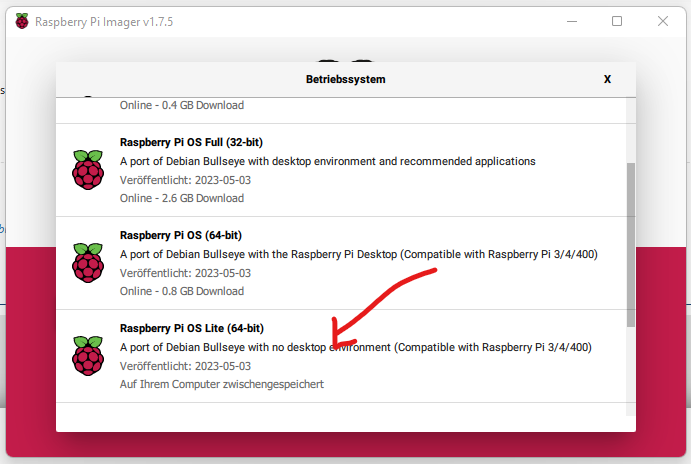
und dann versucht IOBroker zu installieren, was dann ja immer nicht funktioniert hat.
Danach erst habe ich das Image genommen, welches jetzt läuft und das ist wohl kein 64bit.
Gruß
Holger -
Da habe ich mich vielleicht unglücklich bzw. falsch ausgedrückt:
Ich habe es einmal mit dem "original" Image per Imager versucht (Raspberry 64bit Lite)
und dann versucht IOBroker zu installieren, was dann ja immer nicht funktioniert hat.
Danach erst habe ich das Image genommen, welches jetzt läuft und das ist wohl kein 64bit.
Gruß
Holger@dooley_76 sagte in Nach Systemaktualisierung Modbus Fehler 25:
und dann versucht IOBroker zu installieren, was dann ja immer nicht funktioniert hat.
Warum nicht?
Hier nach geht das:https://forum.iobroker.net/topic/51869/installation-auf-raspi-einfacher-geht-s-nicht
-
@dooley_76 sagte in Nach Systemaktualisierung Modbus Fehler 25:
und dann versucht IOBroker zu installieren, was dann ja immer nicht funktioniert hat.
Warum nicht?
Hier nach geht das:https://forum.iobroker.net/topic/51869/installation-auf-raspi-einfacher-geht-s-nicht
Hallo Thomas,
vielleicht habe ich bei der letzten Installation eine andere Anleitung bzw. andere Befehle benutzt, die da standen. Ganz sicher bin ich mir aber mittlerweile nicht mehr. Ich habe den Pi jetzt seit heute morgen bestimmt schon 10-15 mal neu installiert, immer wieder mit anderen Anleitungen/Wegen/Versuchen, bis ich mich in meiner Verzweiflung an Euch gewandt habe.
Aber ich bin gerade dabei, es jetzt noch einmal nach Deiner Anleitung zu machen und werde ich auch strikt daran halten ;)
Ich geb' Bescheid ...Gruß
HolgerP.S.: Wenn das dann wirklich gleich laufen sollte mach' ich alles aus, nimm' mir ein Bier, setz' mich nach draußen und heul :D



Hey! Du scheinst an dieser Unterhaltung interessiert zu sein, hast aber noch kein Konto.
Hast du es satt, bei jedem Besuch durch die gleichen Beiträge zu scrollen? Wenn du dich für ein Konto anmeldest, kommst du immer genau dorthin zurück, wo du zuvor warst, und kannst dich über neue Antworten benachrichtigen lassen (entweder per E-Mail oder Push-Benachrichtigung). Du kannst auch Lesezeichen speichern und Beiträge positiv bewerten, um anderen Community-Mitgliedern deine Wertschätzung zu zeigen.
Mit deinem Input könnte dieser Beitrag noch besser werden 💗
Registrieren AnmeldenSupport us
271
Online33.0k
Benutzer83.6k
Themen1.3m
Beiträge