



Skip to content
  • Home
  • Aktuell
  • Tags
  • 0 Ungelesen 0
  • Kategorien
  • Unreplied
  • Beliebt
  • GitHub
  • Docu
  • Hilfe
Skins
  • Light
  • Brite
  • Cerulean
  • Cosmo
  • Flatly
  • Journal
  • Litera
  • Lumen
  • Lux
  • Materia
  • Minty
  • Morph
  • Pulse
  • Sandstone
  • Simplex
  • Sketchy
  • Spacelab
  • United
  • Yeti
  • Zephyr
  • Dark
  • Cyborg
  • Darkly
  • Quartz
  • Slate
  • Solar
  • Superhero
  • Vapor

  • Standard: (Kein Skin)
  • Kein Skin
Einklappen
ioBroker Logo

Community Forum

donate donate
  1. ioBroker Community Home
  2. Deutsch
  3. ioBroker Allgemein
  4. Noch ein Zigbee Problem....

NEWS

  • Weihnachtsangebot 2025! 🎄
    BluefoxB
    Bluefox
    18
    1
    647

  • UPDATE 31.10.: Amazon Alexa - ioBroker Skill läuft aus ?
    apollon77A
    apollon77
    48
    3
    9.0k

  • Monatsrückblick – September 2025
    BluefoxB
    Bluefox
    13
    1
    2.3k

Noch ein Zigbee Problem....
Geplant Angeheftet Gesperrt Verschoben ioBroker Allgemein
137 Beiträge 7 Kommentatoren 16.7k Aufrufe 5 Watching
  • Älteste zuerst
  • Neuste zuerst
  • Meiste Stimmen
Antworten
  • In einem neuen Thema antworten
Anmelden zum Antworten
Dieses Thema wurde gelöscht. Nur Nutzer mit entsprechenden Rechten können es sehen.
  • Thomas BraunT Thomas Braun

    @brokeling sagte in Noch ein Zigbee Problem....:

    Terminated (ADAPTER_REQUESTED_TERMINATION): port 8081 already in use

    Da wohnt schon wer.

    B Offline
    B Offline
    brokeling
    schrieb am zuletzt editiert von
    #54

    @thomas-braun
    wer hat sich da zwischenzeitlich eingeschlichen?

    Thomas BraunT 1 Antwort Letzte Antwort
    0
    • B brokeling

      @thomas-braun
      wer hat sich da zwischenzeitlich eingeschlichen?

      Thomas BraunT Online
      Thomas BraunT Online
      Thomas Braun
      Most Active
      schrieb am zuletzt editiert von
      #55

      @brokeling

      motion

      
      tcp        0      0 127.0.0.1:8081          0.0.0.0:*               LISTEN      119        15504      393/motion
      

      Linux-Werkzeugkasten:
      https://forum.iobroker.net/topic/42952/der-kleine-iobroker-linux-werkzeugkasten
      NodeJS Fixer Skript:
      https://forum.iobroker.net/topic/68035/iob-node-fix-skript
      iob_diag: curl -sLf -o diag.sh https://iobroker.net/diag.sh && bash diag.sh

      B 1 Antwort Letzte Antwort
      0
      • B Offline
        B Offline
        brokeling
        schrieb am zuletzt editiert von brokeling
        #56

        @thomas-braun
        ich meine, dass ich motion (derzeit) gar nicht brauche.
        Meine Kameras laufen über den reolink Adapter. Motion ist mir jetzt nicht geläufig.

        Thomas BraunT 1 Antwort Letzte Antwort
        0
        • B brokeling

          @thomas-braun
          ich meine, dass ich motion (derzeit) gar nicht brauche.
          Meine Kameras laufen über den reolink Adapter. Motion ist mir jetzt nicht geläufig.

          Thomas BraunT Online
          Thomas BraunT Online
          Thomas Braun
          Most Active
          schrieb am zuletzt editiert von
          #57

          @brokeling

          Ob du das meinst ist dem dort laufenden Dienst relativ egal. Denn musst du dann entweder ausschalten oder auf einen anderen Port biegen. Oder den Admin auf einen anderen Port. Beide auf 8081 geht nix.

          Linux-Werkzeugkasten:
          https://forum.iobroker.net/topic/42952/der-kleine-iobroker-linux-werkzeugkasten
          NodeJS Fixer Skript:
          https://forum.iobroker.net/topic/68035/iob-node-fix-skript
          iob_diag: curl -sLf -o diag.sh https://iobroker.net/diag.sh && bash diag.sh

          B 1 Antwort Letzte Antwort
          0
          • Thomas BraunT Thomas Braun

            @brokeling

            Ob du das meinst ist dem dort laufenden Dienst relativ egal. Denn musst du dann entweder ausschalten oder auf einen anderen Port biegen. Oder den Admin auf einen anderen Port. Beide auf 8081 geht nix.

            B Offline
            B Offline
            brokeling
            schrieb am zuletzt editiert von
            #58

            @thomas-braun
            wie bringe ich das motion weg?

            Thomas BraunT 1 Antwort Letzte Antwort
            0
            • B brokeling

              @thomas-braun
              wie bringe ich das motion weg?

              Thomas BraunT Online
              Thomas BraunT Online
              Thomas Braun
              Most Active
              schrieb am zuletzt editiert von
              #59

              @brokeling

              Ich kenne motion nicht. Wie hast du es denn installiert?

              Linux-Werkzeugkasten:
              https://forum.iobroker.net/topic/42952/der-kleine-iobroker-linux-werkzeugkasten
              NodeJS Fixer Skript:
              https://forum.iobroker.net/topic/68035/iob-node-fix-skript
              iob_diag: curl -sLf -o diag.sh https://iobroker.net/diag.sh && bash diag.sh

              B 1 Antwort Letzte Antwort
              0
              • Thomas BraunT Thomas Braun

                @brokeling

                Ich kenne motion nicht. Wie hast du es denn installiert?

                B Offline
                B Offline
                brokeling
                schrieb am zuletzt editiert von
                #60

                @thomas-braun
                ?
                eine sehr gute Frage. Ich weiß es ehrlich gesagt nicht (mehr).
                OK. Dann lassen wir das erstmal.
                Vielleicht doch besser den Admin Port ändern.
                Wie kann ich das machen?

                crunchipC 1 Antwort Letzte Antwort
                0
                • B brokeling

                  @thomas-braun
                  ?
                  eine sehr gute Frage. Ich weiß es ehrlich gesagt nicht (mehr).
                  OK. Dann lassen wir das erstmal.
                  Vielleicht doch besser den Admin Port ändern.
                  Wie kann ich das machen?

                  crunchipC Abwesend
                  crunchipC Abwesend
                  crunchip
                  Forum Testing Most Active
                  schrieb am zuletzt editiert von
                  #61

                  @brokeling sagte in Noch ein Zigbee Problem....:

                  Ich weiß es ehrlich gesagt nicht

                  https://github.com/motioneye-project/motioneye/wiki/Installation

                  umgestiegen von Proxmox auf Unraid

                  B 1 Antwort Letzte Antwort
                  0
                  • crunchipC crunchip

                    @brokeling sagte in Noch ein Zigbee Problem....:

                    Ich weiß es ehrlich gesagt nicht

                    https://github.com/motioneye-project/motioneye/wiki/Installation

                    B Offline
                    B Offline
                    brokeling
                    schrieb am zuletzt editiert von
                    #62

                    @crunchip
                    nein, wenn das motioneye ist - das benötige ich nicht.
                    (Wie) kann ich das deinstallieren?

                    crunchipC 1 Antwort Letzte Antwort
                    0
                    • B brokeling

                      @crunchip
                      nein, wenn das motioneye ist - das benötige ich nicht.
                      (Wie) kann ich das deinstallieren?

                      crunchipC Abwesend
                      crunchipC Abwesend
                      crunchip
                      Forum Testing Most Active
                      schrieb am zuletzt editiert von
                      #63

                      @brokeling

                      sudo pip uninstall motioneye
                      

                      umgestiegen von Proxmox auf Unraid

                      B 1 Antwort Letzte Antwort
                      0
                      • crunchipC crunchip

                        @brokeling

                        sudo pip uninstall motioneye
                        
                        B Offline
                        B Offline
                        brokeling
                        schrieb am zuletzt editiert von
                        #64

                        @crunchip

                        pi@raspi:~ $ sudo pip uninstall motioneye
                        sudo: pip: Befehl nicht gefunden
                        
                        crunchipC 1 Antwort Letzte Antwort
                        0
                        • B brokeling

                          @crunchip

                          pi@raspi:~ $ sudo pip uninstall motioneye
                          sudo: pip: Befehl nicht gefunden
                          
                          crunchipC Abwesend
                          crunchipC Abwesend
                          crunchip
                          Forum Testing Most Active
                          schrieb am zuletzt editiert von
                          #65

                          @brokeling keine Ahnung wie du ds dann installiert hast

                          ansonsten, zwecks Port

                          https://forum.iobroker.net/post/747666

                          umgestiegen von Proxmox auf Unraid

                          B 1 Antwort Letzte Antwort
                          0
                          • crunchipC crunchip

                            @brokeling keine Ahnung wie du ds dann installiert hast

                            ansonsten, zwecks Port

                            https://forum.iobroker.net/post/747666

                            B Offline
                            B Offline
                            brokeling
                            schrieb am zuletzt editiert von
                            #66

                            @crunchip
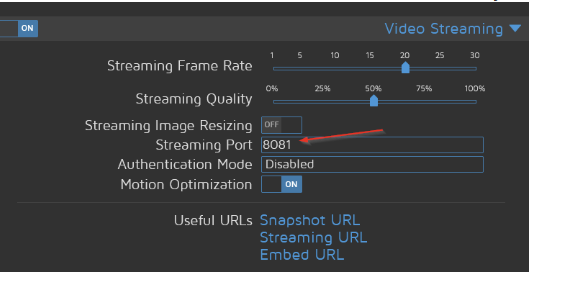
                            würde mich auch interessieren...
                            wie komme ich an die motioneye benutzeroberfläche?
                            bd39c7c8-e421-4f70-8b8b-66d484245137-image.png

                            crunchipC 1 Antwort Letzte Antwort
                            0
                            • B brokeling

                              @crunchip
                              würde mich auch interessieren...
                              wie komme ich an die motioneye benutzeroberfläche?
                              bd39c7c8-e421-4f70-8b8b-66d484245137-image.png

                              crunchipC Abwesend
                              crunchipC Abwesend
                              crunchip
                              Forum Testing Most Active
                              schrieb am zuletzt editiert von crunchip
                              #67

                              @brokeling eigentlich

                              http://deine IP:8765
                              

                              ansonsten könntest du motioneye auch einfach auschalten ohne zu deinstallieren

                              sudo systemctl stop motioneye
                              sudo systemctl disable motioneye
                              sudo systemctl daemon-reload
                              

                              umgestiegen von Proxmox auf Unraid

                              B 1 Antwort Letzte Antwort
                              0
                              • crunchipC crunchip

                                @brokeling eigentlich

                                http://deine IP:8765
                                

                                ansonsten könntest du motioneye auch einfach auschalten ohne zu deinstallieren

                                sudo systemctl stop motioneye
                                sudo systemctl disable motioneye
                                sudo systemctl daemon-reload
                                
                                B Offline
                                B Offline
                                brokeling
                                schrieb am zuletzt editiert von
                                #68

                                @crunchip
                                ahem, was ist meine IP???

                                crunchipC 1 Antwort Letzte Antwort
                                0
                                • B brokeling

                                  @crunchip
                                  ahem, was ist meine IP???

                                  crunchipC Abwesend
                                  crunchipC Abwesend
                                  crunchip
                                  Forum Testing Most Active
                                  schrieb am zuletzt editiert von
                                  #69

                                  @brokeling ernsthaft die Frage?
                                  na deine Ip von deinem Pi

                                  umgestiegen von Proxmox auf Unraid

                                  B 1 Antwort Letzte Antwort
                                  0
                                  • crunchipC crunchip

                                    @brokeling ernsthaft die Frage?
                                    na deine Ip von deinem Pi

                                    B Offline
                                    B Offline
                                    brokeling
                                    schrieb am zuletzt editiert von brokeling
                                    #70

                                    @crunchip
                                    ich glaube ich habe kein motion...

                                    pi@raspi:~ $ sudo systemctl stop motioneye
                                    Failed to stop motioneye.service: Unit motioneye.service not loaded.
                                    pi@raspi:~ $ sudo systemctl disable motioneye
                                    Failed to disable unit: Unit file motioneye.service does not exist.
                                    
                                    Thomas BraunT 1 Antwort Letzte Antwort
                                    0
                                    • Thomas BraunT Thomas Braun

                                      @brokeling

                                      motion

                                      
                                      tcp        0      0 127.0.0.1:8081          0.0.0.0:*               LISTEN      119        15504      393/motion
                                      
                                      B Offline
                                      B Offline
                                      brokeling
                                      schrieb am zuletzt editiert von
                                      #71

                                      @thomas-braun said in Noch ein Zigbee Problem....:

                                      @brokeling

                                      motion

                                      
                                      tcp        0      0 127.0.0.1:8081          0.0.0.0:*               LISTEN      119        15504      393/motion
                                      

                                      wo ist das her und was könnte es sein?

                                      1 Antwort Letzte Antwort
                                      0
                                      • B brokeling

                                        @djmarc75
                                        Summary:

                                        ======================= SUMMARY =======================
                                                             v.2023-04-16
                                        
                                        
                                        Operatingsystem:        Raspbian GNU/Linux 10 (buster)
                                        Kernel:                 5.10.103-v7l+
                                        Installation:           Native
                                        Timezone:               Europe/Berlin (CEST, +0200)
                                        User-ID:                1000
                                        X-Server:               false
                                        Boot Target:            multi-user.target
                                        
                                        Pending OS-Updates:     8
                                        Pending iob updates:    5
                                        
                                        Nodejs-Installation:    /usr/bin/nodejs         v18.17.1
                                                                /usr/bin/node           v18.17.1
                                                                /usr/bin/npm            9.6.7
                                                                /usr/bin/npx            9.6.7
                                        
                                        Recommended versions are nodejs 18.x.y and npm 9.x.y
                                        Your nodejs installation is correct
                                        
                                        MEMORY:
                                                      total        used        free      shared  buff/cache   available
                                        Mem:           3.8G        1.6G        1.2G        8.0M        921M        2.0G
                                        Swap:           99M          0B         99M
                                        Total:         3.9G        1.6G        1.3G
                                        
                                        Active iob-Instances:   33
                                        Active repo(s): beta
                                        
                                        ioBroker Core:          js-controller           5.0.11
                                                                admin                   6.7.2
                                        
                                        ioBroker Status:        iobroker is running on this host.
                                        
                                        
                                        Objects type: jsonl
                                        States  type: redis
                                        
                                        Status admin and web instance:
                                        + system.adapter.admin.1                  : admin                 : raspi                                    -  enabled, port: 8081, bind: 0.0.0.0, run as: admin
                                        + system.adapter.web.0                    : web                   : raspi                                    -  enabled, port: 8082, bind: 0.0.0.0, run as: admin
                                        
                                        Objects:                17066
                                        States:                 12808
                                        
                                        Size of iob-Database:
                                        
                                        22M     /opt/iobroker/iobroker-data/objects.jsonl
                                        8.4M    /opt/iobroker/iobroker-data/objects.json.migrated
                                        8.4M    /opt/iobroker/iobroker-data/objects.json.bak.migrated
                                        12K     /opt/iobroker/iobroker-data/objects.json.old
                                        41M     /opt/iobroker/iobroker-data/states.json.old
                                        41M     /opt/iobroker/iobroker-data/states.json.bak
                                        0       /opt/iobroker/iobroker-data/states.json


                                        =================== END OF SUMMARY ====================
                                        

                                        lange Version:

                                        
                                        ======== Start marking the full check here =========
                                        
                                        Skript v.2023-04-16
                                        
                                        *** BASE SYSTEM ***
                                        Model           : Raspberry Pi 4 Model B Rev 1.1
                                        Architecture    : armv7l
                                        Docker          : false
                                        Virtualization  : none
                                        Distributor ID: Raspbian
                                        Description:    Raspbian GNU/Linux 10 (buster)
                                        Release:        10
                                        Codename:       buster
                                        
                                        PRETTY_NAME="Raspbian GNU/Linux 10 (buster)"
                                        NAME="Raspbian GNU/Linux"
                                        VERSION_ID="10"
                                        VERSION="10 (buster)"
                                        VERSION_CODENAME=buster
                                        ID=raspbian
                                        ID_LIKE=debian
                                        HOME_URL="http://www.raspbian.org/"
                                        SUPPORT_URL="http://www.raspbian.org/RaspbianForums"
                                        BUG_REPORT_URL="http://www.raspbian.org/RaspbianBugs"
                                        
                                        Systemuptime and Load:
                                         14:19:25 up 5 min,  1 user,  load average: 4.56, 4.04, 1.85
                                        CPU threads: 4
                                        
                                        Raspberry only:
                                        throttled=0x0
                                        Other values than 0x0 hint to temperature/voltage problems
                                        temp=64.2'C
                                        volt=0.8375V
                                        
                                        *** Time and Time Zones ***
                                                       Local time: Thu 2023-08-17 14:19:25 CEST
                                                   Universal time: Thu 2023-08-17 12:19:25 UTC
                                                         RTC time: n/a
                                                        Time zone: Europe/Berlin (CEST, +0200)
                                        System clock synchronized: yes
                                                      NTP service: active
                                                  RTC in local TZ: no
                                        
                                        *** User and Groups ***
                                        pi
                                        /home/pi
                                        pi adm dialout cdrom sudo audio video plugdev games users input netdev lpadmin gpio i2c spi iobroker
                                        
                                        *** X-Server-Setup ***
                                        X-Server:       false
                                        Desktop:
                                        Terminal:       tty
                                        Boot Target:    multi-user.target
                                        
                                        *** MEMORY ***
                                                      total        used        free      shared  buff/cache   available
                                        Mem:           3.8G        1.6G        1.3G        8.0M        918M        2.1G
                                        Swap:           99M          0B         99M
                                        Total:         3.9G        1.6G        1.4G
                                        
                                                 3786 M total memory
                                                 1568 M used memory
                                                  363 M active memory
                                                 1974 M inactive memory
                                                 1298 M free memory
                                                  109 M buffer memory
                                                  809 M swap cache
                                                   99 M total swap
                                                    0 M used swap
                                                   99 M free swap
                                        
                                        Raspberry only:
                                        oom events: 0
                                        lifetime oom required: 0 Mbytes
                                        total time in oom handler: 0 ms
                                        max time spent in oom handler: 0 ms
                                        
                                        *** FILESYSTEM ***
                                        Filesystem     Type      Size  Used Avail Use% Mounted on
                                        /dev/root      ext4      117G   17G   94G  16% /
                                        devtmpfs       devtmpfs  1.7G     0  1.7G   0% /dev
                                        tmpfs          tmpfs     1.9G     0  1.9G   0% /dev/shm
                                        tmpfs          tmpfs     1.9G  8.6M  1.9G   1% /run
                                        tmpfs          tmpfs     5.0M  4.0K  5.0M   1% /run/lock
                                        tmpfs          tmpfs     1.9G     0  1.9G   0% /sys/fs/cgroup
                                        /dev/sdb1      ext4      113G   71G   37G  66% /backup
                                        /dev/sda1      vfat      253M   49M  204M  20% /boot
                                        tmpfs          tmpfs     379M     0  379M   0% /run/user/1000
                                        
                                        Messages concerning ext4 filesystem in dmesg:
                                        [Thu Aug 17 14:13:40 2023] Kernel command line: coherent_pool=1M 8250.nr_uarts=1 snd_bcm2835.enable_compat_alsa=0 snd_bcm2835.enable_hdmi=1  smsc95xx.macaddr=DC:A6:32:40:0F:7D vc_mem.mem_base=0x3eb00000 vc_mem.mem_size=0x3ff00000  console=tty1 root=PARTUUID=6c586e13-02 rootfstype=ext4 elevator=deadline fsck.repair=yes rootwait quiet splash plymouth.ignore-serial-consoles
                                        [Thu Aug 17 14:13:42 2023] EXT4-fs (sda2): mounted filesystem with ordered data mode. Opts: (null)
                                        [Thu Aug 17 14:13:42 2023] VFS: Mounted root (ext4 filesystem) readonly on device 8:2.
                                        [Thu Aug 17 14:13:43 2023] EXT4-fs (sda2): re-mounted. Opts: (null)
                                        [Thu Aug 17 14:13:46 2023] EXT4-fs (sdb1): mounted filesystem with ordered data mode. Opts: (null)
                                        
                                        Show mounted filesystems (real ones only):
                                        TARGET        SOURCE    FSTYPE OPTIONS
                                        /             /dev/sda2 ext4   rw,noatime,stripe=8191
                                        |-/sys/fs/bpf none      bpf    rw,nosuid,nodev,noexec,relatime,mode=700
                                        |-/backup     /dev/sdb1 ext4   rw,noatime
                                        `-/boot       /dev/sda1 vfat   rw,relatime,fmask=0022,dmask=0022,codepage=437,iocharset=ascii,shortname=mixed,errors=remount-ro
                                        
                                        Files in neuralgic directories:
                                        
                                        /var:
                                        5.8G    /var/
                                        3.4G    /var/cache
                                        3.3G    /var/cache/apt/archives
                                        3.3G    /var/cache/apt
                                        2.4G    /var/lib
                                        
                                        Archived and active journals take up 8.0M in the file system.
                                        
                                        /opt/iobroker/backups:
                                        2.9G    /opt/iobroker/backups/
                                        
                                        /opt/iobroker/iobroker-data:
                                        1.1G    /opt/iobroker/iobroker-data/
                                        541M    /opt/iobroker/iobroker-data/backup-objects
                                        383M    /opt/iobroker/iobroker-data/files
                                        78M     /opt/iobroker/iobroker-data/files/icons-open-icon-library-png
                                        52M     /opt/iobroker/iobroker-data/files/javascript.admin
                                        
                                        The five largest files in iobroker-data are:
                                        41M     /opt/iobroker/iobroker-data/states.json.old
                                        41M     /opt/iobroker/iobroker-data/states.json.bak
                                        35M     /opt/iobroker/iobroker-data/files/devices.admin/static/js/main.24f2bb56.js.map
                                        22M     /opt/iobroker/iobroker-data/objects.jsonl
                                        21M     /opt/iobroker/iobroker-data/files/web.admin/static/js/main.e564fb87.js.map
                                        
                                        *** NodeJS-Installation ***
                                        
                                        /usr/bin/nodejs         v18.17.1
                                        /usr/bin/node           v18.17.1
                                        /usr/bin/npm            9.6.7
                                        /usr/bin/npx            9.6.7
                                        
                                        
                                        nodejs:
                                          Installed: 18.17.1-deb-1nodesource1
                                          Candidate: 18.17.1-deb-1nodesource1
                                          Version table:
                                         *** 18.17.1-deb-1nodesource1 500
                                                500 https://deb.nodesource.com/node_18.x bullseye/main armhf Packages
                                                100 /var/lib/dpkg/status
                                             16.20.2-deb-1nodesource1 500
                                                500 https://deb.nodesource.com/node_16.x bullseye/main armhf Packages
                                             14.21.3-deb-1nodesource1 500
                                                500 https://deb.nodesource.com/node_14.x buster/main armhf Packages
                                             12.22.12-deb-1nodesource1 500
                                                500 https://deb.nodesource.com/node_12.x buster/main armhf Packages
                                             10.24.0~dfsg-1~deb10u3 500
                                                500 http://raspbian.raspberrypi.org/raspbian buster/main armhf Packages
                                        
                                        Temp directories causing npm8 problem: 0
                                        No problems detected
                                        
                                        *** ioBroker-Installation ***
                                        
                                        ioBroker Status
                                        iobroker is running on this host.
                                        
                                        
                                        Objects type: jsonl
                                        States  type: redis
                                        
                                        MULTIHOSTSERVICE/enabled: false
                                        
                                        Core adapters versions
                                        js-controller:  5.0.11
                                        admin:          6.7.2
                                        javascript:     7.1.4
                                        
                                        Adapters from github:   3
                                        
                                        Adapter State
                                        + system.adapter.admin.1                  : admin                 : raspi                                    -  enabled, port: 8081, bind: 0.0.0.0, run as: admin
                                          system.adapter.alias-manager.0          : alias-manager         : raspi                                    -  enabled
                                        + system.adapter.backitup.0               : backitup              : raspi                                    -  enabled
                                        + system.adapter.chromecast.0             : chromecast            : raspi                                    -  enabled
                                        + system.adapter.cloud.0                  : cloud                 : raspi                                    -  enabled
                                          system.adapter.deconz.0                 : deconz                : raspi                                    - disabled, port: 80
                                          system.adapter.devices.0                : devices               : raspi                                    -  enabled
                                        + system.adapter.discovery.0              : discovery             : raspi                                    -  enabled
                                          system.adapter.fb-checkpresence.0       : fb-checkpresence      : raspi                                    - disabled
                                          system.adapter.feiertage.0              : feiertage             : raspi                                    -  enabled
                                          system.adapter.flot.0                   : flot                  : raspi                                    -  enabled
                                          system.adapter.fritzdect.0              : fritzdect             : raspi                                    - disabled
                                          system.adapter.hue-extended.0           : hue-extended          : raspi                                    - disabled
                                          system.adapter.hue.0                    : hue                   : raspi                                    - disabled, port: 443
                                          system.adapter.ical.0                   : ical                  : raspi                                    -  enabled
                                          system.adapter.icons-icons8.0           : icons-icons8          : raspi                                    -  enabled
                                          system.adapter.icons-mfd-svg.0          : icons-mfd-svg         : raspi                                    -  enabled
                                          system.adapter.icons-open-icon-library-png.0: icons-open-icon-library-png: raspi                                    -  enabled
                                          system.adapter.iqontrol.0               : iqontrol              : raspi                                    - disabled
                                        + system.adapter.javascript.0             : javascript            : raspi                                    -  enabled
                                          system.adapter.luftdaten.0              : luftdaten             : raspi                                    -  enabled
                                          system.adapter.luftdaten.1              : luftdaten             : raspi                                    -  enabled
                                          system.adapter.mqtt.0                   : mqtt                  : raspi                                    - disabled, port: 1884, bind: 0.0.0.0
                                        + system.adapter.net-tools.0              : net-tools             : raspi                                    -  enabled
                                        + system.adapter.netatmo-crawler.0        : netatmo-crawler       : raspi                                    -  enabled
                                        + system.adapter.nuki.0                   : nuki                  : raspi                                    -  enabled
                                        + system.adapter.onvif.0                  : onvif                 : raspi                                    -  enabled, port: 80, 7575, 8000, 8080, 8081, 8899
                                        + system.adapter.ping.0                   : ping                  : raspi                                    -  enabled
                                        + system.adapter.pushover.0               : pushover              : raspi                                    -  enabled
                                        + system.adapter.reolink.0                : reolink               : raspi                                    -  enabled
                                        + system.adapter.reolink.1                : reolink               : raspi                                    -  enabled
                                        + system.adapter.reolink.2                : reolink               : raspi                                    -  enabled
                                        + system.adapter.reolink.3                : reolink               : raspi                                    -  enabled
                                        + system.adapter.reolink.4                : reolink               : raspi                                    -  enabled
                                          system.adapter.samsung_tizen.0          : samsung_tizen         : raspi                                    -  enabled, port: 8002
                                        + system.adapter.sayit.0                  : sayit                 : raspi                                    -  enabled
                                        + system.adapter.sayit.1                  : sayit                 : raspi                                    -  enabled
                                        + system.adapter.sayit.2                  : sayit                 : raspi                                    -  enabled
                                        + system.adapter.sayit.3                  : sayit                 : raspi                                    -  enabled
                                        + system.adapter.sayit.4                  : sayit                 : raspi                                    -  enabled
                                        + system.adapter.sayit.5                  : sayit                 : raspi                                    -  enabled
                                        + system.adapter.shelly.0                 : shelly                : raspi                                    -  enabled, port: 1883, bind: 0.0.0.0
                                        + system.adapter.simple-api.0             : simple-api            : raspi                                    -  enabled, port: 8087, bind: 0.0.0.0, run as: admin
                                          system.adapter.smartcontrol.0           : smartcontrol          : raspi                                    - disabled
                                        + system.adapter.sonoff.0                 : sonoff                : raspi                                    -  enabled, port: 1883, bind: 0.0.0.0
                                        + system.adapter.sourceanalytix.0         : sourceanalytix        : raspi                                    -  enabled
                                        + system.adapter.spotify-premium.0        : spotify-premium       : raspi                                    -  enabled
                                        + system.adapter.sql.0                    : sql                   : raspi                                    -  enabled, port: 0
                                          system.adapter.statistics.0             : statistics            : raspi                                    -  enabled
                                        + system.adapter.telegram.0               : telegram              : raspi                                    -  enabled, port: 8443, bind: 0.0.0.0
                                          system.adapter.text2command.0           : text2command          : raspi                                    - disabled
                                          system.adapter.vis-colorpicker.0        : vis-colorpicker       : raspi                                    -  enabled
                                          system.adapter.vis-fancyswitch.0        : vis-fancyswitch       : raspi                                    -  enabled
                                          system.adapter.vis-google-fonts.0       : vis-google-fonts      : raspi                                    -  enabled
                                          system.adapter.vis-history.0            : vis-history           : raspi                                    -  enabled
                                          system.adapter.vis-hqwidgets.0          : vis-hqwidgets         : raspi                                    -  enabled
                                          system.adapter.vis-icontwo.0            : vis-icontwo           : raspi                                    -  enabled
                                          system.adapter.vis-jqui-mfd.0           : vis-jqui-mfd          : raspi                                    -  enabled
                                          system.adapter.vis-justgage.0           : vis-justgage          : raspi                                    -  enabled
                                          system.adapter.vis-material-advanced.0  : vis-material-advanced : raspi                                    -  enabled
                                          system.adapter.vis-metro.0              : vis-metro             : raspi                                    -  enabled
                                          system.adapter.vis-rgraph.0             : vis-rgraph            : raspi                                    -  enabled
                                          system.adapter.vis-timeandweather.0     : vis-timeandweather    : raspi                                    -  enabled
                                          system.adapter.vis.0                    : vis                   : raspi                                    -  enabled
                                        + system.adapter.web.0                    : web                   : raspi                                    -  enabled, port: 8082, bind: 0.0.0.0, run as: admin
                                        + system.adapter.whatsapp-cmb.0           : whatsapp-cmb          : raspi                                    -  enabled
                                        + system.adapter.zigbee.0                 : zigbee                : raspi                                    -  enabled, port: /dev/serial/by-id/usb-Texas_Instruments_XDS110__03.00.00.18__Embed_with_CMSIS-DAP_L1100GB8-if00
                                        
                                        + instance is alive
                                        
                                        Enabled adapters with bindings
                                        + system.adapter.admin.1                  : admin                 : raspi                                    -  enabled, port: 8081, bind: 0.0.0.0, run as: admin
                                        + system.adapter.onvif.0                  : onvif                 : raspi                                    -  enabled, port: 80, 7575, 8000, 8080, 8081, 8899
                                          system.adapter.samsung_tizen.0          : samsung_tizen         : raspi                                    -  enabled, port: 8002
                                        + system.adapter.shelly.0                 : shelly                : raspi                                    -  enabled, port: 1883, bind: 0.0.0.0
                                        + system.adapter.simple-api.0             : simple-api            : raspi                                    -  enabled, port: 8087, bind: 0.0.0.0, run as: admin
                                        + system.adapter.sonoff.0                 : sonoff                : raspi                                    -  enabled, port: 1883, bind: 0.0.0.0
                                        + system.adapter.sql.0                    : sql                   : raspi                                    -  enabled, port: 0
                                        + system.adapter.telegram.0               : telegram              : raspi                                    -  enabled, port: 8443, bind: 0.0.0.0
                                        + system.adapter.web.0                    : web                   : raspi                                    -  enabled, port: 8082, bind: 0.0.0.0, run as: admin
                                        + system.adapter.zigbee.0                 : zigbee                : raspi                                    -  enabled, port: /dev/serial/by-id/usb-Texas_Instruments_XDS110__03.00.00.18__Embed_with_CMSIS-DAP_L1100GB8-if00
                                        
                                        ioBroker-Repositories
                                        stable        : http://download.iobroker.net/sources-dist.json
                                        beta          : http://download.iobroker.net/sources-dist-latest.json
                                        
                                        Active repo(s): beta
                                        
                                        Installed ioBroker-Instances
                                        Used repository: beta
                                        Adapter    "admin"        : 6.8.3    , installed 6.7.2  [Updatable]
                                        Adapter    "alias-manager": 1.2.6    , installed 1.2.6
                                        Adapter    "asterisk"     : 1.0.6    , installed 1.0.6
                                        Adapter    "backitup"     : 2.7.0    , installed 2.6.23 [Updatable]
                                        Adapter    "chromecast"   : 3.0.3    , installed 3.0.3
                                        Adapter    "cloud"        : 4.4.1    , installed 4.4.1
                                        Adapter    "countdown"    : 2.1.0    , installed 2.0.1  [Updatable]
                                        Adapter    "deconz"       : 1.3.21   , installed 1.3.21
                                        Adapter    "devices"      : 1.1.5    , installed 1.1.5
                                        Adapter    "digitalstrom" : 2.3.0    , installed 2.3.0
                                        Adapter    "discovery"    : 3.2.0    , installed 3.2.0
                                        Adapter    "fb-checkpresence": 1.2.2 , installed 1.2.2
                                        Adapter    "feiertage"    : 1.1.0    , installed 1.1.0
                                        Adapter    "flot"         : 1.12.0   , installed 1.12.0
                                        Adapter    "fritzdect"    : 2.3.1    , installed 2.3.1
                                        Adapter    "fullybrowser" : 2.1.2    , installed 2.1.2
                                        Adapter    "hue"          : 3.9.6    , installed 3.9.3  [Updatable]
                                        Adapter    "hue-extended" : 2.0.0    , installed 2.0.0
                                        Adapter    "ical"         : 1.13.3   , installed 1.13.3
                                        Adapter    "icons-icons8" : 0.0.1    , installed 0.0.1
                                        Adapter    "icons-mfd-svg": 1.1.0    , installed 1.1.0
                                        Adapter    "icons-open-icon-library-png": 0.1.2, installed 0.1.2
                                        Adapter    "info"         : 1.9.26   , installed 1.9.26
                                        Adapter    "iqontrol"     : 2.3.0    , installed 2.2.0  [Updatable]
                                        Adapter    "javascript"   : 7.1.4    , installed 7.1.4
                                        Controller "js-controller": 5.0.11   , installed 5.0.11
                                        Adapter    "luftdaten"    : 3.0.0    , installed 3.0.0
                                        Adapter    "moma"         : 1.2.9    , installed 1.2.9
                                        Adapter    "mqtt"         : 4.1.1    , installed 4.1.1
                                        Adapter    "mydlink"      : 1.3.2    , installed 1.3.2
                                        Adapter    "net-tools"    : 0.2.0    , installed 0.2.0
                                        Adapter    "netatmo-crawler": 0.8.1  , installed 0.8.1
                                        Adapter    "nuki"         : 1.6.0    , installed 1.6.0
                                        Adapter    "nuki-extended": 2.6.5    , installed 2.6.5
                                        Adapter    "octoprint"    : 5.0.1    , installed 5.0.1
                                        Adapter    "onvif"        : 1.0.5    , installed 1.0.5
                                        Adapter    "owntracks"    : 1.0.5    , installed 1.0.5
                                        Adapter    "paw"          : 0.3.2    , installed 0.3.2
                                        Adapter    "ph803w"       : 1.1.1    , installed 1.1.1
                                        Adapter    "ping"         : 1.6.2    , installed 1.6.2
                                        Adapter    "pushover"     : 3.0.4    , installed 3.0.4
                                        Adapter    "samsung"      : 0.5.11   , installed 0.5.11
                                        Adapter    "sayit"        : 3.0.5    , installed 3.0.5
                                        Adapter    "shelly"       : 6.4.1    , installed 6.4.1
                                        Adapter    "simple-api"   : 2.7.2    , installed 2.7.2
                                        Adapter    "smartcontrol" : 1.3.2    , installed 1.3.2
                                        Adapter    "socketio"     : 6.5.2    , installed 6.5.2
                                        Adapter    "sonoff"       : 2.5.7    , installed 2.5.7
                                        Adapter    "sourceanalytix": 0.4.14  , installed 0.4.14
                                        Adapter    "spotify-premium": 1.2.2  , installed 1.2.2
                                        Adapter    "sql"          : 2.2.0    , installed 2.2.0
                                        Adapter    "statistics"   : 2.3.0    , installed 2.3.0
                                        Adapter    "telegram"     : 1.16.0   , installed 1.16.0
                                        Adapter    "text2command" : 3.0.2    , installed 3.0.2
                                        Adapter    "tr-064"       : 4.2.18   , installed 4.2.18
                                        Adapter    "vis"          : 1.4.16   , installed 1.4.16
                                        Adapter    "vis-colorpicker": 2.0.3  , installed 2.0.3
                                        Adapter    "vis-fancyswitch": 1.1.0  , installed 1.1.0
                                        Adapter    "vis-google-fonts": 1.0.4 , installed 1.0.4
                                        Adapter    "vis-history"  : 1.0.0    , installed 1.0.0
                                        Adapter    "vis-hqwidgets": 1.4.0    , installed 1.4.0
                                        Adapter    "vis-icontwo"  : 0.96.0   , installed 0.96.0
                                        Adapter    "vis-jqui-mfd" : 1.0.12   , installed 1.0.12
                                        Adapter    "vis-justgage" : 1.0.2    , installed 1.0.2
                                        Adapter    "vis-material-advanced": 1.7.2, installed 1.7.2
                                        Adapter    "vis-metro"    : 1.2.0    , installed 1.2.0
                                        Adapter    "vis-rgraph"   : 0.0.2    , installed 0.0.2
                                        Adapter    "vis-timeandweather": 1.2.2, installed 1.2.2
                                        Adapter    "web"          : 6.1.0    , installed 6.1.0
                                        Adapter    "whatsapp-cmb" : 0.2.3    , installed 0.2.3
                                        Adapter    "wiobrowser"   : 2.0.1    , installed 2.0.1
                                        Adapter    "ws"           : 2.5.3    , installed 2.5.3
                                        Adapter    "zigbee"       : 1.8.23   , installed 1.8.23
                                        
                                        Objects and States
                                        Please stand by - This may take a while
                                        Objects:        17066
                                        States:         12808
                                        
                                        *** OS-Repositories and Updates ***
                                        Hit:1 http://phoscon.de/apt/deconz buster InRelease
                                        Hit:2 http://raspbian.raspberrypi.org/raspbian buster InRelease
                                        Hit:3 http://archive.raspberrypi.org/debian buster InRelease
                                        Hit:4 https://deb.nodesource.com/node_12.x buster InRelease
                                        Hit:5 https://deb.nodesource.com/node_14.x buster InRelease
                                        Hit:6 https://deb.nodesource.com/node_16.x bullseye InRelease
                                        Hit:7 https://deb.nodesource.com/node_18.x bullseye InRelease
                                        Reading package lists...
                                        Pending Updates: 8
                                        
                                        *** Listening Ports ***
                                        Active Internet connections (only servers)
                                        Proto Recv-Q Send-Q Local Address           Foreign Address         State       User       Inode      PID/Program name
                                        tcp        0      0 127.0.0.1:8080          0.0.0.0:*               LISTEN      119        19462      568/motion
                                        tcp        0      0 0.0.0.0:80              0.0.0.0:*               LISTEN      1000       18473      374/deCONZ
                                        tcp        0      0 0.0.0.0:8083            0.0.0.0:*               LISTEN      119        18490      568/motion
                                        tcp        0      0 0.0.0.0:22              0.0.0.0:*               LISTEN      0          20173      709/sshd
                                        tcp        0      0 127.0.0.1:631           0.0.0.0:*               LISTEN      0          18483      388/cupsd
                                        tcp        0      0 0.0.0.0:1883            0.0.0.0:*               LISTEN      1001       22385      1418/io.sonoff.0
                                        tcp        0      0 0.0.0.0:443             0.0.0.0:*               LISTEN      1000       17607      374/deCONZ
                                        tcp        0      0 192.168.178.53:9092     0.0.0.0:*               LISTEN      1001       28921      2139/io.nuki.0
                                        tcp        0      0 127.0.0.1:9001          0.0.0.0:*               LISTEN      1001       18204      736/iobroker.js-con
                                        tcp        0      0 0.0.0.0:3306            0.0.0.0:*               LISTEN      110        20247      764/mysqld
                                        tcp        0      0 0.0.0.0:6379            0.0.0.0:*               LISTEN      118        17803      717/redis-server 0.
                                        tcp6       0      0 :::8081                 :::*                    LISTEN      1001       18345      1042/io.admin.1
                                        tcp6       0      0 :::8082                 :::*                    LISTEN      1001       25805      1789/io.web.0
                                        tcp6       0      0 :::22                   :::*                    LISTEN      0          20175      709/sshd
                                        tcp6       0      0 :::8087                 :::*                    LISTEN      1001       31564      3271/io.simple-api.
                                        tcp6       0      0 ::1:631                 :::*                    LISTEN      0          18482      388/cupsd
                                        tcp6       0      0 ::1:6379                :::*                    LISTEN      118        17804      717/redis-server 0.
                                        udp        0      0 0.0.0.0:5683            0.0.0.0:*                           1001       24368      1753/io.shelly.0
                                        udp        0      0 0.0.0.0:68              0.0.0.0:*                           0          16243      698/dhcpcd
                                        udp        0      0 0.0.0.0:631             0.0.0.0:*                           0          17398      491/cups-browsed
                                        udp        0      0 0.0.0.0:5353            0.0.0.0:*                           1001       24971      1499/io.chromecast.
                                        udp        0      0 0.0.0.0:5353            0.0.0.0:*                           108        16027      382/avahi-daemon: r
                                        udp        0      0 0.0.0.0:55070           0.0.0.0:*                           108        16029      382/avahi-daemon: r
                                        udp        0      0 0.0.0.0:1900            0.0.0.0:*                           1000       17630      374/deCONZ
                                        udp6       0      0 :::546                  :::*                                0          16265      698/dhcpcd
                                        udp6       0      0 :::5353                 :::*                                108        16028      382/avahi-daemon: r
                                        udp6       0      0 :::49038                :::*                                108        16030      382/avahi-daemon: r
                                        
                                        *** Log File - Last 25 Lines ***
                                        
                                        2023-08-17 14:20:07.253  - info: netatmo-crawler.0 (7697) Getting data for stationid:70:ee:50:29:08:fe
                                        2023-08-17 14:20:08.850  - info: netatmo-crawler.0 (7697) Getting data for stationid:70:ee:50:3f:34:04
                                        2023-08-17 14:20:09.919  - info: netatmo-crawler.0 (7697) Getting data for stationid:70:ee:50:52:e9:96
                                        2023-08-17 14:20:10.497  - info: javascript.0 (1115) script.js.common.Akustischer_Alarm____Steuerung_Haus._Alarmauslösung_Cams: Alarm durch Reolink
                                        2023-08-17 14:20:10.952  - info: netatmo-crawler.0 (7697) Getting data for stationid:70:ee:50:05:53:68
                                        2023-08-17 14:20:12.503  - info: netatmo-crawler.0 (7697) Terminated (ADAPTER_REQUESTED_TERMINATION): Everything done. Going to terminate till next schedule
                                        2023-08-17 14:20:13.056  - info: host.raspi instance system.adapter.netatmo-crawler.0 terminated with code 11 (ADAPTER_REQUESTED_TERMINATION)
                                        2023-08-17 14:20:15.074  - info: javascript.0 (1115) script.js.common.Akustischer_Alarm____Steuerung_Haus._Alarmauslösung_Cams: Alarm durch Reolink
                                        2023-08-17 14:20:33.803  - info: vis.0 (8140) starting. Version 1.4.16 in /opt/iobroker/node_modules/iobroker.vis, node: v18.17.1, js-controller: 5.0.11
                                        2023-08-17 14:20:34.515  - info: vis.0 (8140) vis license is OK.
                                        2023-08-17 14:20:34.919  - info: sayit.0 (8113) starting. Version 3.0.5 in /opt/iobroker/node_modules/iobroker.sayit, node: v18.17.1, js-controller: 5.0.11
                                        2023-08-17 14:20:34.934  - info: sayit.0 (8113) Install process. Upload files and stop.
                                        2023-08-17 14:20:34.937  - info: sayit.0 (8113) Upload announce mp3 files
                                        2023-08-17 14:20:35.236  - info: sayit.0 (8113) stopping...
                                        2023-08-17 14:20:35.243  - info: sayit.0 (8113) terminating
                                        2023-08-17 14:20:35.287  - info: sayit.0 (8113) Terminated (NO_ERROR): Without reason
                                        2023-08-17 14:20:35.745  - info: sayit.0 (8113) terminating
                                        2023-08-17 14:20:35.831  - info: sayit.0 (8113) stopping...
                                        2023-08-17 14:20:36.803  - info: vis.0 (8140) Terminated (NO_ERROR): Without reason
                                        2023-08-17 14:20:41.997  - info: vis-google-fonts.0 (8334) starting. Version 1.0.4 in /opt/iobroker/node_modules/iobroker.vis-google-fonts, node: v18.17.1, js-controller: 5.0.11
                                        2023-08-17 14:20:42.567  - info: javascript.0 (1115) script.js.common.Akustischer_Alarm____Steuerung_Haus._Alarmauslösung_Cams: Alarm durch Reolink
                                        2023-08-17 14:20:42.796  - info: vis-google-fonts.0 (8334) Terminated (NO_ERROR): Without reason
                                        2023-08-17 14:20:46.080  - info: javascript.0 (1115) script.js.common.Akustischer_Alarm____Steuerung_Haus._Alarmauslösung_Cams: Alarm durch Reolink
                                        2023-08-17 14:20:54.716  - info: javascript.0 (1115) script.js.common.Akustischer_Alarm____Steuerung_Haus._Alarmauslösung_Cams: Alarm durch Reolink
                                        2023-08-17 14:21:06.846  - info: javascript.0 (1115) script.js.common.Akustischer_Alarm____Steuerung_Haus._Alarmauslösung_Cams: Alarm durch Reolink
                                        
                                        ============ Mark until here for C&P =============
                                        
                                        iob diag has finished.
                                        
                                        crunchipC Abwesend
                                        crunchipC Abwesend
                                        crunchip
                                        Forum Testing Most Active
                                        schrieb am zuletzt editiert von
                                        #72

                                        @brokeling sagte in Noch ein Zigbee Problem....:

                                        0.0.0.0:8083 0.0.0.0:* LISTEN 119 18490 568/motion

                                        @brokeling sagte in Noch ein Zigbee Problem....:

                                        127.0.0.1:8081 0.0.0.0:* LISTEN 119 15504 393/motion

                                        keine Ahnung was bei dir da läuft, einmal so einmal so:thinking_face:

                                        umgestiegen von Proxmox auf Unraid

                                        1 Antwort Letzte Antwort
                                        0
                                        • B brokeling

                                          @crunchip
                                          ich glaube ich habe kein motion...

                                          pi@raspi:~ $ sudo systemctl stop motioneye
                                          Failed to stop motioneye.service: Unit motioneye.service not loaded.
                                          pi@raspi:~ $ sudo systemctl disable motioneye
                                          Failed to disable unit: Unit file motioneye.service does not exist.
                                          
                                          Thomas BraunT Online
                                          Thomas BraunT Online
                                          Thomas Braun
                                          Most Active
                                          schrieb am zuletzt editiert von
                                          #73

                                          @brokeling

                                          Der Service dürfte 'motion' heißen.

                                          Also

                                          sudo systemctl stop motion
                                          sudo systemctl disable motion
                                          sudo systemctl mask motion
                                          

                                          Linux-Werkzeugkasten:
                                          https://forum.iobroker.net/topic/42952/der-kleine-iobroker-linux-werkzeugkasten
                                          NodeJS Fixer Skript:
                                          https://forum.iobroker.net/topic/68035/iob-node-fix-skript
                                          iob_diag: curl -sLf -o diag.sh https://iobroker.net/diag.sh && bash diag.sh

                                          crunchipC B 2 Antworten Letzte Antwort
                                          0
                                          Antworten
                                          • In einem neuen Thema antworten
                                          Anmelden zum Antworten
                                          • Älteste zuerst
                                          • Neuste zuerst
                                          • Meiste Stimmen


                                          Support us

                                          ioBroker
                                          Community Adapters
                                          Donate
                                          FAQ Cloud / IOT
                                          HowTo: Node.js-Update
                                          HowTo: Backup/Restore
                                          Downloads
                                          BLOG

                                          414

                                          Online

                                          32.5k

                                          Benutzer

                                          81.6k

                                          Themen

                                          1.3m

                                          Beiträge
                                          Community
                                          Impressum | Datenschutz-Bestimmungen | Nutzungsbedingungen | Einwilligungseinstellungen
                                          ioBroker Community 2014-2025
                                          logo
                                          • Anmelden

                                          • Du hast noch kein Konto? Registrieren

                                          • Anmelden oder registrieren, um zu suchen
                                          • Erster Beitrag
                                            Letzter Beitrag
                                          0
                                          • Home
                                          • Aktuell
                                          • Tags
                                          • Ungelesen 0
                                          • Kategorien
                                          • Unreplied
                                          • Beliebt
                                          • GitHub
                                          • Docu
                                          • Hilfe
