Skip to content
  • Home
  • Aktuell
  • Tags
  • 0 Ungelesen 0
  • Kategorien
  • Unreplied
  • Beliebt
  • GitHub
  • Docu
  • Hilfe
Skins
  • Light
  • Brite
  • Cerulean
  • Cosmo
  • Flatly
  • Journal
  • Litera
  • Lumen
  • Lux
  • Materia
  • Minty
  • Morph
  • Pulse
  • Sandstone
  • Simplex
  • Sketchy
  • Spacelab
  • United
  • Yeti
  • Zephyr
  • Dark
  • Cyborg
  • Darkly
  • Quartz
  • Slate
  • Solar
  • Superhero
  • Vapor

  • Standard: (Kein Skin)
  • Kein Skin
Einklappen
ioBroker Logo

Community Forum

donate donate
  1. ioBroker Community Home
  2. Deutsch
  3. Off Topic
  4. ConBee2 auf Raspi 4 umziehen [gelöst]

NEWS

  • Neuer Blogbeitrag: Monatsrückblick - Dezember 2025 🎄
    BluefoxB
    Bluefox
    11
    1
    524

  • Weihnachtsangebot 2025! 🎄
    BluefoxB
    Bluefox
    24
    1
    1.7k

  • UPDATE 31.10.: Amazon Alexa - ioBroker Skill läuft aus ?
    apollon77A
    apollon77
    48
    3
    9.6k

ConBee2 auf Raspi 4 umziehen [gelöst]

Geplant Angeheftet Gesperrt Verschoben Off Topic
59 Beiträge 3 Kommentatoren 3.8k Aufrufe 2 Watching
  • Älteste zuerst
  • Neuste zuerst
  • Meiste Stimmen
Antworten
  • In einem neuen Thema antworten
Anmelden zum Antworten
Dieses Thema wurde gelöscht. Nur Nutzer mit entsprechenden Rechten können es sehen.
  • I ichwersonst
    Skript v.2023-04-16
    
    *** BASE SYSTEM ***
    Model           : Raspberry Pi 4 Model B Rev 1.5
    Architecture    : aarch64
    Docker          : false
    Virtualization  : none
    Distributor ID: Raspbian
    Description:    Raspbian GNU/Linux 11 (bullseye)
    Release:        11
    Codename:       bullseye
    
    PRETTY_NAME="Raspbian GNU/Linux 11 (bullseye)"
    NAME="Raspbian GNU/Linux"
    VERSION_ID="11"
    VERSION="11 (bullseye)"
    VERSION_CODENAME=bullseye
    ID=raspbian
    ID_LIKE=debian
    HOME_URL="http://www.raspbian.org/"
    SUPPORT_URL="http://www.raspbian.org/RaspbianForums"
    BUG_REPORT_URL="http://www.raspbian.org/RaspbianBugs"
    
    Systemuptime and Load:
     17:43:22 up 42 min,  3 users,  load average: 0.68, 0.60, 0.56
    CPU threads: 4
    
    Raspberry only:
    throttled=0x0
    Other values than 0x0 hint to temperature/voltage problems
    temp=50.1'C
    volt=0.9260V
    
    *** Time and Time Zones ***
                   Local time: Fri 2023-07-28 17:43:22 CEST
               Universal time: Fri 2023-07-28 15:43:22 UTC
                     RTC time: n/a
                    Time zone: Europe/Berlin (CEST, +0200)
    System clock synchronized: yes
                  NTP service: active
              RTC in local TZ: no
    
    *** User and Groups ***
    pi
    /home/pi
    pi adm dialout cdrom sudo audio video plugdev games users input render netdev lpadmin gpio i2c spi iobroker
    
    *** X-Server-Setup ***
    X-Server:       true
    Desktop:
    Terminal:       tty
    Boot Target:    graphical.target
    
    *** MEMORY ***
                   total        used        free      shared  buff/cache   available
    Mem:            3.8G        884M        1.9G         35M        1.0G        2.8G
    Swap:            99M          0B         99M
    Total:          3.9G        884M        2.0G
    
             3793 M total memory
              884 M used memory
             1358 M active memory
              383 M inactive memory
             1870 M free memory
               49 M buffer memory
              987 M swap cache
               99 M total swap
                0 M used swap
               99 M free swap
    
    Raspberry only:
    oom events: 0
    lifetime oom required: 0 Mbytes
    total time in oom handler: 0 ms
    max time spent in oom handler: 0 ms
    
    *** FILESYSTEM ***
    Filesystem     Type      Size  Used Avail Use% Mounted on
    /dev/root      ext4       56G  5.6G   48G  11% /
    devtmpfs       devtmpfs  1.7G     0  1.7G   0% /dev
    tmpfs          tmpfs     1.9G     0  1.9G   0% /dev/shm
    tmpfs          tmpfs     759M  1.3M  758M   1% /run
    tmpfs          tmpfs     5.0M  4.0K  5.0M   1% /run/lock
    /dev/sda1      vfat      253M   51M  202M  20% /boot
    tmpfs          tmpfs     380M   20K  380M   1% /run/user/1000
    
    Messages concerning ext4 filesystem in dmesg:
    [Fri Jul 28 17:00:33 2023] Kernel command line: coherent_pool=1M 8250.nr_uarts=1 snd_bcm2835.enable_headphones=0 snd_bcm2835.enable_headphones=1 snd_bcm2835.enable_hdmi=1 snd_bcm2835.enable_hdmi=0  smsc95xx.macaddr=D8:3A:DD:37:DD:BE vc_mem.mem_base=0x3eb00000 vc_mem.mem_size=0x3ff00000  console=tty1 root=PARTUUID=2a31fda3-02 rootfstype=ext4 fsck.repair=yes rootwait quiet splash plymouth.ignore-serial-consoles
    [Fri Jul 28 17:00:36 2023] EXT4-fs (sda2): mounted filesystem with ordered data mode. Quota mode: none.
    [Fri Jul 28 17:00:36 2023] VFS: Mounted root (ext4 filesystem) readonly on device 8:2.
    [Fri Jul 28 17:00:38 2023] EXT4-fs (sda2): re-mounted. Quota mode: none.
    
    Show mounted filesystems (real ones only):
    TARGET  SOURCE    FSTYPE OPTIONS
    /       /dev/sda2 ext4   rw,noatime
    `-/boot /dev/sda1 vfat   rw,relatime,fmask=0022,dmask=0022,codepage=437,iocharset=ascii,shortname=mixed,errors=remount-ro
    
    Files in neuralgic directories:
    
    /var:
    814M    /var/
    399M    /var/log
    393M    /var/log/journal/5530f3d80baf4cc0bb1ed682675aa129
    393M    /var/log/journal
    191M    /var/cache
    
    Archived and active journals take up 392.0M in the file system.
    
    /opt/iobroker/backups:
    37M     /opt/iobroker/backups/
    
    /opt/iobroker/iobroker-data:
    314M    /opt/iobroker/iobroker-data/
    271M    /opt/iobroker/iobroker-data/files
    88M     /opt/iobroker/iobroker-data/files/echarts.admin
    57M     /opt/iobroker/iobroker-data/files/echarts
    52M     /opt/iobroker/iobroker-data/files/javascript.admin
    
    The five largest files in iobroker-data are:
    31M     /opt/iobroker/iobroker-data/states.jsonl
    23M     /opt/iobroker/iobroker-data/files/echarts/static/js/main.eb0afecd.js.map
    23M     /opt/iobroker/iobroker-data/files/echarts.admin/static/js/main.7952f0f7.js.map
    23M     /opt/iobroker/iobroker-data/files/echarts.admin/chart/static/js/main.eb0afecd.js.map
    17M     /opt/iobroker/iobroker-data/files/echarts/preview/static/js/main.1b04901d.js.map
    
    *** NodeJS-Installation ***
    
    /usr/bin/nodejs         v18.17.0
    /usr/bin/node           v18.17.0
    /usr/bin/npm            9.6.7
    /usr/bin/npx            9.6.7
    
    
    nodejs:
      Installed: 18.17.0-deb-1nodesource1
      Candidate: 18.17.0-deb-1nodesource1
      Version table:
     *** 18.17.0-deb-1nodesource1 500
            500 https://deb.nodesource.com/node_18.x bullseye/main armhf Packages
            100 /var/lib/dpkg/status
         12.22.12~dfsg-1~deb11u4 500
            500 http://raspbian.raspberrypi.org/raspbian bullseye/main armhf Packages
         12.22.12~dfsg-1~deb11u4 500
            500 http://deb.debian.org/debian bullseye-proposed-updates/main armhf Packages
    
    Temp directories causing npm8 problem: 0
    No problems detected
    
    *** ioBroker-Installation ***
    
    ioBroker Status
    iobroker is running on this host.
    
    
    Objects type: jsonl
    States  type: jsonl
    
    MULTIHOSTSERVICE/enabled: false
    
    Core adapters versions
    js-controller:  4.0.24
    admin:          6.3.5
    javascript:     7.0.3
    
    Adapters from github:   0
    
    Adapter State
    + system.adapter.admin.0                  : admin                 : raspberrypi                              -  enabled, port: 8081, bind: 0.0.0.0 (SSL), run as: admin
    + system.adapter.backitup.0               : backitup              : raspberrypi                              -  enabled
    + system.adapter.broadlink2.0             : broadlink2            : raspberrypi                              -  enabled
    + system.adapter.broadlink2.1             : broadlink2            : raspberrypi                              -  enabled
    + system.adapter.deconz.0                 : deconz                : raspberrypi                              -  enabled, port: 80
      system.adapter.flot.0                   : flot                  : raspberrypi                              -  enabled
    + system.adapter.history.0                : history               : raspberrypi                              -  enabled
      system.adapter.icons-icons8.0           : icons-icons8          : raspberrypi                              -  enabled
    + system.adapter.info.0                   : info                  : raspberrypi                              -  enabled
    + system.adapter.javascript.0             : javascript            : raspberrypi                              -  enabled
    + system.adapter.lgtv.0                   : lgtv                  : raspberrypi                              -  enabled
    + system.adapter.pushbullet.0             : pushbullet            : raspberrypi                              -  enabled
    + system.adapter.sayit.0                  : sayit                 : raspberrypi                              -  enabled
    + system.adapter.shelly.0                 : shelly                : raspberrypi                              -  enabled, port: 1883, bind: 0.0.0.0
    + system.adapter.spotify-premium.0        : spotify-premium       : raspberrypi                              -  enabled
      system.adapter.vis-hqwidgets.0          : vis-hqwidgets         : raspberrypi                              -  enabled
      system.adapter.vis-jqui-mfd.0           : vis-jqui-mfd          : raspberrypi                              -  enabled
      system.adapter.vis-map.0                : vis-map               : raspberrypi                              -  enabled
      system.adapter.vis-timeandweather.0     : vis-timeandweather    : raspberrypi                              -  enabled
      system.adapter.vis.0                    : vis                   : raspberrypi                              -  enabled
    + system.adapter.vw-connect.0             : vw-connect            : raspberrypi                              -  enabled
    + system.adapter.web.0                    : web                   : raspberrypi                              -  enabled, port: 8082, bind: 0.0.0.0, run as: admin
    + system.adapter.wled.0                   : wled                  : raspberrypi                              -  enabled
    
    + instance is alive
    
    Enabled adapters with bindings
    + system.adapter.admin.0                  : admin                 : raspberrypi                              -  enabled, port: 8081, bind: 0.0.0.0 (SSL), run as: admin
    + system.adapter.deconz.0                 : deconz                : raspberrypi                              -  enabled, port: 80
    + system.adapter.shelly.0                 : shelly                : raspberrypi                              -  enabled, port: 1883, bind: 0.0.0.0
    + system.adapter.web.0                    : web                   : raspberrypi                              -  enabled, port: 8082, bind: 0.0.0.0, run as: admin
    
    ioBroker-Repositories
    stable        : http://download.iobroker.net/sources-dist.json
    beta          : http://download.iobroker.net/sources-dist-latest.json
    
    Active repo(s): stable
    
    Installed ioBroker-Instances
    Used repository: stable
    Adapter    "admin"        : 6.3.5    , installed 6.3.5
    Adapter    "backitup"     : 2.6.23   , installed 2.6.23
    Adapter    "broadlink2"   : 2.1.5    , installed 2.1.5
    Adapter    "deconz"       : 1.3.21   , installed 1.3.21
    Adapter    "echarts"      : 1.5.1    , installed 1.5.1
    Adapter    "flot"         : 1.12.0   , installed 1.12.0
    Adapter    "history"      : 2.2.4    , installed 2.2.4
    Adapter    "icons-icons8" : 0.0.1    , installed 0.0.1
    Adapter    "info"         : 1.9.26   , installed 1.9.26
    Adapter    "javascript"   : 7.0.3    , installed 7.0.3
    Controller "js-controller": 4.0.24   , installed 4.0.24
    Adapter    "lgtv"         : 1.1.10   , installed 1.1.10
    Adapter    "pushbullet"   : 0.0.11   , installed 0.0.11
    Adapter    "sayit"        : 3.0.5    , installed 3.0.5
    Adapter    "shelly"       : 6.4.1    , installed 6.4.1
    Adapter    "simple-api"   : 2.7.2    , installed 2.7.2
    Adapter    "socketio"     : 4.2.0    , installed 4.2.0
    Adapter    "spotify-premium": 1.2.2  , installed 1.2.2
    Adapter    "vis"          : 1.4.16   , installed 1.4.16
    Adapter    "vis-hqwidgets": 1.4.0    , installed 1.4.0
    Adapter    "vis-jqui-mfd" : 1.0.12   , installed 1.0.12
    Adapter    "vis-map"      : 1.0.4    , installed 1.0.4
    Adapter    "vis-timeandweather": 1.2.2, installed 1.2.2
    Adapter    "vw-connect"   : 0.0.67   , installed 0.0.67
    Adapter    "web"          : 4.3.0    , installed 4.3.0
    Adapter    "wled"         : 0.6.7    , installed 0.6.7
    Adapter    "ws"           : 1.3.0    , installed 1.3.0
    
    Objects and States
    Please stand by - This may take a while
    Objects:        4231
    States:         3203
    
    *** OS-Repositories and Updates ***
    Hit:1 http://deb.debian.org/debian bullseye-proposed-updates InRelease
    Hit:2 http://phoscon.de/apt/deconz bullseye InRelease
    Hit:3 http://raspbian.raspberrypi.org/raspbian bullseye InRelease
    Hit:4 http://archive.raspberrypi.org/debian bullseye InRelease
    Hit:5 https://deb.nodesource.com/node_18.x bullseye InRelease
    Reading package lists...
    Pending Updates: 0
    
    *** Listening Ports ***
    Active Internet connections (only servers)
    Proto Recv-Q Send-Q Local Address           Foreign Address         State       User       Inode      PID/Program name
    tcp        0      0 127.0.0.1:9001          0.0.0.0:*               LISTEN      1001       16690      570/iobroker.js-con
    tcp        0      0 127.0.0.1:9000          0.0.0.0:*               LISTEN      1001       16221      570/iobroker.js-con
    tcp        0      0 0.0.0.0:5900            0.0.0.0:*               LISTEN      0          15946      585/vncserver-x11-c
    tcp        0      0 127.0.0.1:631           0.0.0.0:*               LISTEN      0          14029      560/cupsd
    tcp        0      0 0.0.0.0:1883            0.0.0.0:*               LISTEN      1001       20844      1673/io.shelly.0
    tcp        0      0 0.0.0.0:22              0.0.0.0:*               LISTEN      0          12952      596/sshd: /usr/sbin
    tcp        0      0 0.0.0.0:80              0.0.0.0:*               LISTEN      1000       12988      406/deCONZ
    tcp        0      0 0.0.0.0:443             0.0.0.0:*               LISTEN      1000       16541      406/deCONZ
    tcp6       0      0 :::5900                 :::*                    LISTEN      0          15945      585/vncserver-x11-c
    tcp6       0      0 :::8081                 :::*                    LISTEN      1001       18185      1011/io.admin.0
    tcp6       0      0 :::8082                 :::*                    LISTEN      1001       21697      1930/io.web.0
    tcp6       0      0 ::1:631                 :::*                    LISTEN      0          14028      560/cupsd
    tcp6       0      0 :::22                   :::*                    LISTEN      0          12954      596/sshd: /usr/sbin
    udp        0      0 0.0.0.0:47627           0.0.0.0:*                           1001       20952      1752/io.broadlink2.
    udp        0      0 0.0.0.0:631             0.0.0.0:*                           0          14052      616/cups-browsed
    udp        0      0 0.0.0.0:15001           0.0.0.0:*                           1001       23689      2046/io.broadlink2.
    udp        0      0 0.0.0.0:15001           0.0.0.0:*                           1001       18361      1752/io.broadlink2.
    udp        0      0 0.0.0.0:47976           0.0.0.0:*                           1001       18365      1752/io.broadlink2.
    udp        0      0 0.0.0.0:37808           0.0.0.0:*                           108        15333      399/avahi-daemon: r
    udp        0      0 0.0.0.0:5353            0.0.0.0:*                           1001       23555      1834/io.wled.0
    udp        0      0 0.0.0.0:5353            0.0.0.0:*                           108        15331      399/avahi-daemon: r
    udp        0      0 0.0.0.0:52584           0.0.0.0:*                           1001       21248      2046/io.broadlink2.
    udp        0      0 0.0.0.0:44635           0.0.0.0:*                           1001       18364      1752/io.broadlink2.
    udp        0      0 0.0.0.0:55030           0.0.0.0:*                           1001       22945      2046/io.broadlink2.
    udp        0      0 0.0.0.0:1900            0.0.0.0:*                           1001       86348      23134/io.deconz.0
    udp        0      0 0.0.0.0:1900            0.0.0.0:*                           1000       13093      406/deCONZ
    udp        0      0 0.0.0.0:68              0.0.0.0:*                           0          16606      506/dhcpcd
    udp        0      0 0.0.0.0:51595           0.0.0.0:*                           1001       21249      2046/io.broadlink2.
    udp6       0      0 :::5353                 :::*                                108        15332      399/avahi-daemon: r
    udp6       0      0 :::1900                 :::*                                1001       86350      23134/io.deconz.0
    udp6       0      0 :::1900                 :::*                                1001       86349      23134/io.deconz.0
    udp6       0      0 :::51200                :::*                                108        15334      399/avahi-daemon: r
    
    *** Log File - Last 25 Lines ***
    
    2023-07-28 17:09:41.943  - info: host.raspberrypi stopInstance system.adapter.deconz.0 send kill signal
    2023-07-28 17:09:42.434  - info: host.raspberrypi instance system.adapter.deconz.0 terminated with code 11 (ADAPTER_REQUESTED_TERMINATION)
    2023-07-28 17:09:44.991  - info: host.raspberrypi instance system.adapter.deconz.0 started with pid 23134
    2023-07-28 17:09:47.612  - info: deconz.0 (23134) starting. Version 1.3.21 in /opt/iobroker/node_modules/iobroker.deconz, node: v18.17.0, js-controller: 4.0.24
    2023-07-28 17:09:47.749  - info: deconz.0 (23134) deConz Version: 2.22.2; API version: 1.16.0
    2023-07-28 17:31:23.633  - error: vw-connect.0 (1795) Restart adapter
    2023-07-28 17:31:23.634  - warn: vw-connect.0 (1795) Restart initiated
    2023-07-28 17:31:23.636  - info: vw-connect.0 (1795) cleaned everything up...
    2023-07-28 17:31:23.647  - info: vw-connect.0 (1795) terminating
    2023-07-28 17:31:23.649  - info: vw-connect.0 (1795) Terminated (NO_ERROR): Without reason
    2023-07-28 17:31:24.253  - info: host.raspberrypi instance system.adapter.vw-connect.0 terminated with code 0 (NO_ERROR)
    2023-07-28 17:31:24.256  - info: host.raspberrypi Restart adapter system.adapter.vw-connect.0 because enabled
    2023-07-28 17:31:54.305  - info: host.raspberrypi instance system.adapter.vw-connect.0 started with pid 16709
    2023-07-28 17:31:57.695  - info: vw-connect.0 (16709) starting. Version 0.0.67 in /opt/iobroker/node_modules/iobroker.vw-connect, node: v18.17.0, js-controller: 4.0.24
    2023-07-28 17:31:57.741  - info: vw-connect.0 (16709) Login in with skoda
    2023-07-28 17:31:59.705  - warn: vw-connect.0 (16709) /signin-service/v1/...
    2023-07-28 17:31:59.705  - warn: vw-connect.0 (16709) No valid userid, please check username and password or visit this link or logout and login in your app account:
    2023-07-28 17:31:59.706  - warn: vw-connect.0 (16709) Bitte in die App einloggen und die Nutzungsbedingungen akzeptieren.
    2023-07-28 17:31:59.707  - warn: vw-connect.0 (16709) https://identity....
    2023-07-28 17:31:59.707  - warn: vw-connect.0 (16709) Try to auto accept new consent
    2023-07-28 17:31:59.715  - error: vw-connect.0 (16709) Login Failed
    2023-07-28 17:31:59.715  - error: vw-connect.0 (16709) Restart Adapter in 30min
    2023-07-28 17:32:00.106  - error: vw-connect.0 (16709) Error in consent form
    2023-07-28 17:32:00.107  - error: vw-connect.0 (16709) SyntaxError: Unexpected token c in JSON at position 1430
    2023-07-28 17:34:59.399  - warn: deconz.0 (23134) State "deconz.0.Sensors.22.buttonpressed" has no existing object, this might lead to an error in future versions
    
    
    Thomas BraunT Online
    Thomas BraunT Online
    Thomas Braun
    Most Active
    schrieb am zuletzt editiert von
    #40

    @ichwersonst sagte in ConBee2 auf Raspi 4 umziehen:

    
    023-07-28 17:34:59.399  - warn: deconz.0 (23134) State "deconz.0.Sensors.22.buttonpressed" has no existing object, this might lead to an error in future versions
    

    Da läuft der Adapter doch. Zur Konfiguration kann ich dir nix sagen, hab den nicht in Benutzung.

    Linux-Werkzeugkasten:
    https://forum.iobroker.net/topic/42952/der-kleine-iobroker-linux-werkzeugkasten
    NodeJS Fixer Skript:
    https://forum.iobroker.net/topic/68035/iob-node-fix-skript
    iob_diag: curl -sLf -o diag.sh https://iobroker.net/diag.sh && bash diag.sh

    1 Antwort Letzte Antwort
    0
    • Thomas BraunT Thomas Braun

      @ichwersonst

      sudo raspi-config
      

      Dann dort:

      1 System Options       
      S5 Boot / Auto Login 
      B1 Console
      I Offline
      I Offline
      ichwersonst
      schrieb am zuletzt editiert von
      #41

      @thomas-braun

      okay gemacht...

      bevor ich den ausgeschalten hatte ist mir noch auf dem desktop was aufgefallen :
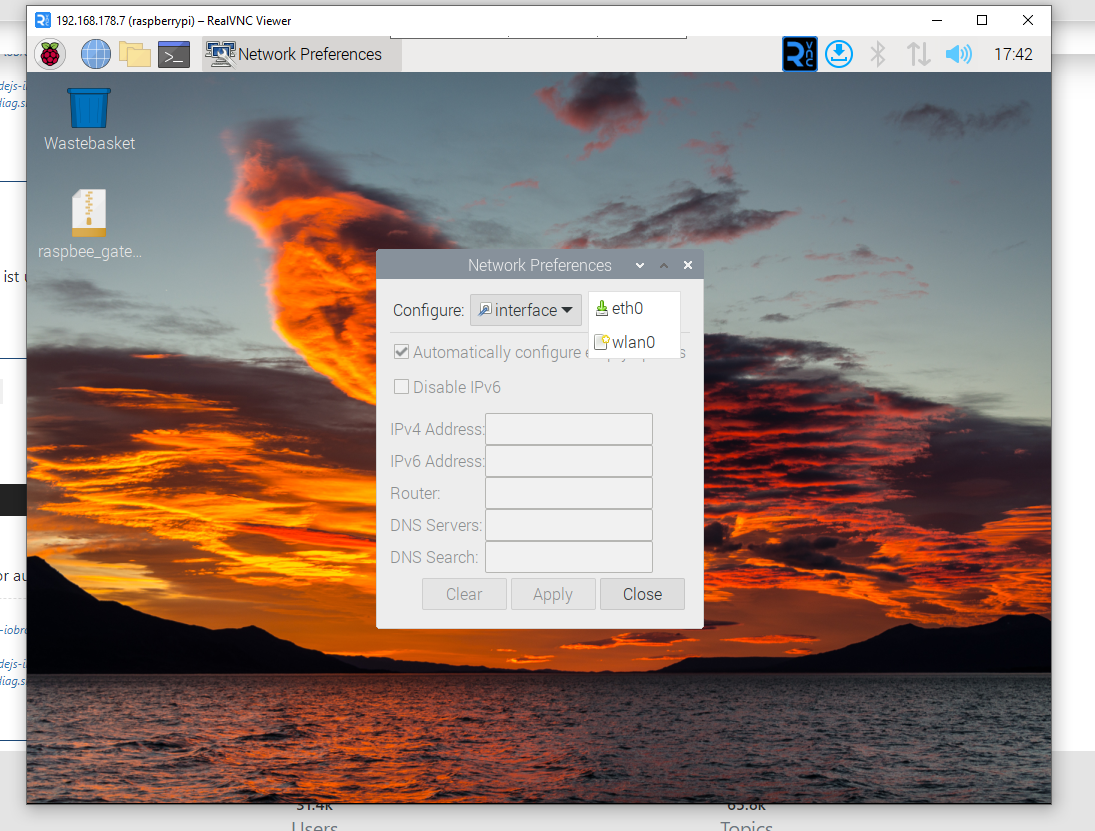
      e3e7337b-15eb-4c63-be73-de109c836bb2-image.png

      beim 3b+ erscheint der stick mit bei der Interfaceauswahl

      Thomas BraunT 1 Antwort Letzte Antwort
      0
      • I ichwersonst

        @thomas-braun

        okay gemacht...

        bevor ich den ausgeschalten hatte ist mir noch auf dem desktop was aufgefallen :

        e3e7337b-15eb-4c63-be73-de109c836bb2-image.png

        beim 3b+ erscheint der stick mit bei der Interfaceauswahl

        Thomas BraunT Online
        Thomas BraunT Online
        Thomas Braun
        Most Active
        schrieb am zuletzt editiert von
        #42

        @ichwersonst

        Desktop-Geraffel ist per se uninteressant.

        Linux-Werkzeugkasten:
        https://forum.iobroker.net/topic/42952/der-kleine-iobroker-linux-werkzeugkasten
        NodeJS Fixer Skript:
        https://forum.iobroker.net/topic/68035/iob-node-fix-skript
        iob_diag: curl -sLf -o diag.sh https://iobroker.net/diag.sh && bash diag.sh

        I 1 Antwort Letzte Antwort
        0
        • Thomas BraunT Thomas Braun

          @ichwersonst

          Desktop-Geraffel ist per se uninteressant.

          I Offline
          I Offline
          ichwersonst
          schrieb am zuletzt editiert von
          #43

          @thomas-braun

          hmm dann muss ich weiter das internet durchforsten um da noch auf einen grünen zweig zu kommen.
          danke trotzdem erstmal :-)

          Thomas BraunT 1 Antwort Letzte Antwort
          0
          • I ichwersonst

            @thomas-braun

            hmm dann muss ich weiter das internet durchforsten um da noch auf einen grünen zweig zu kommen.
            danke trotzdem erstmal :-)

            Thomas BraunT Online
            Thomas BraunT Online
            Thomas Braun
            Most Active
            schrieb am zuletzt editiert von
            #44

            @ichwersonst

            Hast du denn Objects zu dem Adapter?

            Linux-Werkzeugkasten:
            https://forum.iobroker.net/topic/42952/der-kleine-iobroker-linux-werkzeugkasten
            NodeJS Fixer Skript:
            https://forum.iobroker.net/topic/68035/iob-node-fix-skript
            iob_diag: curl -sLf -o diag.sh https://iobroker.net/diag.sh && bash diag.sh

            I 2 Antworten Letzte Antwort
            0
            • Thomas BraunT Thomas Braun

              @ichwersonst

              Hast du denn Objects zu dem Adapter?

              I Offline
              I Offline
              ichwersonst
              schrieb am zuletzt editiert von
              #45

              @thomas-braun

              jup hab die objects ausm iob vom 3b+ exportiert und hier im iob 4b importiert

              Thomas BraunT 1 Antwort Letzte Antwort
              0
              • Thomas BraunT Thomas Braun

                @ichwersonst

                Hast du denn Objects zu dem Adapter?

                I Offline
                I Offline
                ichwersonst
                schrieb am zuletzt editiert von
                #46

                @thomas-braun

                und hab auch die stick config exportiert um sie im 4b wieder zu importieren .... also sämtliche dinge die im webinterface einzustellen sind

                Thomas BraunT 1 Antwort Letzte Antwort
                0
                • I ichwersonst

                  @thomas-braun

                  jup hab die objects ausm iob vom 3b+ exportiert und hier im iob 4b importiert

                  Thomas BraunT Online
                  Thomas BraunT Online
                  Thomas Braun
                  Most Active
                  schrieb am zuletzt editiert von
                  #47

                  @ichwersonst

                  Häh?

                  Die Objekte werden vom Adapter zur Laufzeit angelegt...
                  Was haste denn da kopiert?

                  Linux-Werkzeugkasten:
                  https://forum.iobroker.net/topic/42952/der-kleine-iobroker-linux-werkzeugkasten
                  NodeJS Fixer Skript:
                  https://forum.iobroker.net/topic/68035/iob-node-fix-skript
                  iob_diag: curl -sLf -o diag.sh https://iobroker.net/diag.sh && bash diag.sh

                  I 1 Antwort Letzte Antwort
                  0
                  • I ichwersonst

                    @thomas-braun

                    und hab auch die stick config exportiert um sie im 4b wieder zu importieren .... also sämtliche dinge die im webinterface einzustellen sind

                    Thomas BraunT Online
                    Thomas BraunT Online
                    Thomas Braun
                    Most Active
                    schrieb am zuletzt editiert von
                    #48

                    @ichwersonst sagte in ConBee2 auf Raspi 4 umziehen:

                    @thomas-braun

                    und hab auch die stick config exportiert um sie im 4b wieder zu importieren .... also sämtliche dinge die im webinterface einzustellen sind

                    Vermutlich mit falschen Rechten und/oder an der falschen Stelle.

                    Linux-Werkzeugkasten:
                    https://forum.iobroker.net/topic/42952/der-kleine-iobroker-linux-werkzeugkasten
                    NodeJS Fixer Skript:
                    https://forum.iobroker.net/topic/68035/iob-node-fix-skript
                    iob_diag: curl -sLf -o diag.sh https://iobroker.net/diag.sh && bash diag.sh

                    1 Antwort Letzte Antwort
                    0
                    • Thomas BraunT Thomas Braun

                      @ichwersonst

                      Häh?

                      Die Objekte werden vom Adapter zur Laufzeit angelegt...
                      Was haste denn da kopiert?

                      I Offline
                      I Offline
                      ichwersonst
                      schrieb am zuletzt editiert von
                      #49

                      @thomas-braun

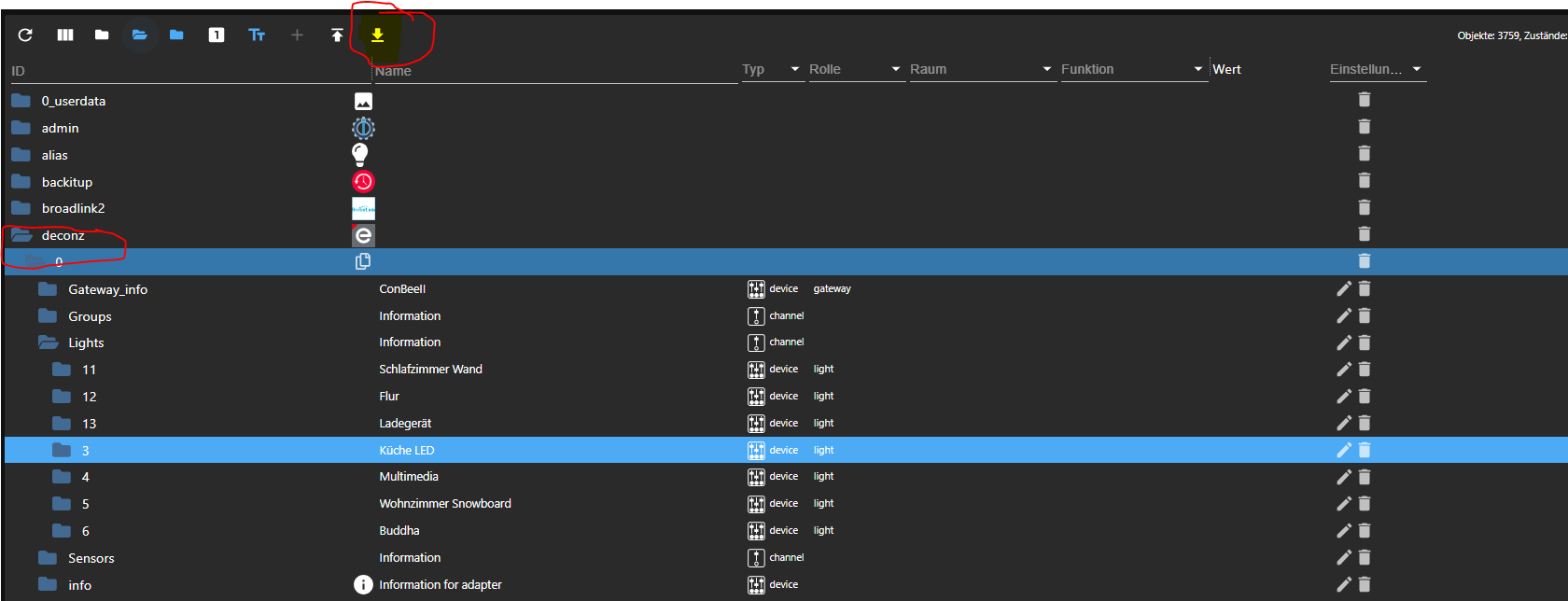
                      so hier

                      a95bd01e-046d-4076-b80b-9dc251423ff3-image.png

                      Thomas BraunT 1 Antwort Letzte Antwort
                      0
                      • I ichwersonst

                        @thomas-braun

                        so hier

                        a95bd01e-046d-4076-b80b-9dc251423ff3-image.png

                        Thomas BraunT Online
                        Thomas BraunT Online
                        Thomas Braun
                        Most Active
                        schrieb am zuletzt editiert von
                        #50

                        @ichwersonst

                        Und wozu?

                        Linux-Werkzeugkasten:
                        https://forum.iobroker.net/topic/42952/der-kleine-iobroker-linux-werkzeugkasten
                        NodeJS Fixer Skript:
                        https://forum.iobroker.net/topic/68035/iob-node-fix-skript
                        iob_diag: curl -sLf -o diag.sh https://iobroker.net/diag.sh && bash diag.sh

                        I 1 Antwort Letzte Antwort
                        0
                        • Thomas BraunT Thomas Braun

                          @ichwersonst

                          Und wozu?

                          I Offline
                          I Offline
                          ichwersonst
                          schrieb am zuletzt editiert von
                          #51

                          @thomas-braun

                          weil es mir sonst an allen Stellen, die Variablen, die ich steuere rausschmeißt und ich alles neu verknüpfen muss.

                          Ro75R 1 Antwort Letzte Antwort
                          0
                          • I ichwersonst

                            @thomas-braun

                            weil es mir sonst an allen Stellen, die Variablen, die ich steuere rausschmeißt und ich alles neu verknüpfen muss.

                            Ro75R Offline
                            Ro75R Offline
                            Ro75
                            schrieb am zuletzt editiert von
                            #52

                            @ichwersonst sagte in ConBee2 auf Raspi 4 umziehen:

                            weil es mir sonst an allen Stellen, die Variablen, die ich steuere rausschmeißt und ich alles neu verknüpfen muss.

                            Wenn du den Deconz-Adapter nutzt, ohne die Alias-Funktion, wird dir das früher oder später mehr oder weniger oft, so wieso passieren.

                            SERVER = Beelink U59 16GB DDR4 RAM 512GB SSD, FB 7490, FritzDect 200+301+440, ConBee II, Zigbee Aqara Sensoren + NOUS A1Z, NOUS A1T, Philips Hue ** ioBroker, REDIS, influxdb2, Grafana, PiHole, Plex-Mediaserver, paperless-ngx (Docker), MariaDB + phpmyadmin *** VIS-Runtime = Intel NUC 8GB RAM 128GB SSD + 24" Touchscreen

                            I 1 Antwort Letzte Antwort
                            0
                            • Ro75R Ro75

                              @ichwersonst sagte in ConBee2 auf Raspi 4 umziehen:

                              weil es mir sonst an allen Stellen, die Variablen, die ich steuere rausschmeißt und ich alles neu verknüpfen muss.

                              Wenn du den Deconz-Adapter nutzt, ohne die Alias-Funktion, wird dir das früher oder später mehr oder weniger oft, so wieso passieren.

                              I Offline
                              I Offline
                              ichwersonst
                              schrieb am zuletzt editiert von
                              #53

                              @ro75

                              was ist die alias funktion ?

                              @Thomas-Braun

                              ich würde vielleicht einfach den adapter und den conbee stick vom pi deinstallieren und nochmal von vorne beginnen.
                              Vielleicht hilft das ja

                              Ro75R 1 Antwort Letzte Antwort
                              0
                              • I ichwersonst

                                @ro75

                                was ist die alias funktion ?

                                @Thomas-Braun

                                ich würde vielleicht einfach den adapter und den conbee stick vom pi deinstallieren und nochmal von vorne beginnen.
                                Vielleicht hilft das ja

                                Ro75R Offline
                                Ro75R Offline
                                Ro75
                                schrieb am zuletzt editiert von
                                #54

                                @ichwersonst falls du vorhast die deconzsoftware komplett zu entfernen, dann schaue dir zuvor ggfs. den zigbee-adapter an.

                                SERVER = Beelink U59 16GB DDR4 RAM 512GB SSD, FB 7490, FritzDect 200+301+440, ConBee II, Zigbee Aqara Sensoren + NOUS A1Z, NOUS A1T, Philips Hue ** ioBroker, REDIS, influxdb2, Grafana, PiHole, Plex-Mediaserver, paperless-ngx (Docker), MariaDB + phpmyadmin *** VIS-Runtime = Intel NUC 8GB RAM 128GB SSD + 24" Touchscreen

                                I 1 Antwort Letzte Antwort
                                0
                                • Ro75R Ro75

                                  @ichwersonst falls du vorhast die deconzsoftware komplett zu entfernen, dann schaue dir zuvor ggfs. den zigbee-adapter an.

                                  I Offline
                                  I Offline
                                  ichwersonst
                                  schrieb am zuletzt editiert von
                                  #55

                                  @ro75 @Thomas-Braun

                                  völlig behämmert.... der stick will an ein Verlängerungskabel gehangen werden weil er von den umliegenden usb3.0 buchsen gestört wird.... heißt: gelöst!

                                  Thomas BraunT 1 Antwort Letzte Antwort
                                  0
                                  • I ichwersonst

                                    @ro75 @Thomas-Braun

                                    völlig behämmert.... der stick will an ein Verlängerungskabel gehangen werden weil er von den umliegenden usb3.0 buchsen gestört wird.... heißt: gelöst!

                                    Thomas BraunT Online
                                    Thomas BraunT Online
                                    Thomas Braun
                                    Most Active
                                    schrieb am zuletzt editiert von
                                    #56

                                    @ichwersonst sagte in ConBee2 auf Raspi 4 umziehen:

                                    der stick will an ein Verlängerungskabel gehangen werden weil er von den umliegenden usb3.0 buchsen gestört wird

                                    Das hatte ich vorausgesetzt. Das Phänomen ist ja kein ganz unbekanntes.

                                    Linux-Werkzeugkasten:
                                    https://forum.iobroker.net/topic/42952/der-kleine-iobroker-linux-werkzeugkasten
                                    NodeJS Fixer Skript:
                                    https://forum.iobroker.net/topic/68035/iob-node-fix-skript
                                    iob_diag: curl -sLf -o diag.sh https://iobroker.net/diag.sh && bash diag.sh

                                    I 1 Antwort Letzte Antwort
                                    1
                                    • Thomas BraunT Thomas Braun

                                      @ichwersonst sagte in ConBee2 auf Raspi 4 umziehen:

                                      der stick will an ein Verlängerungskabel gehangen werden weil er von den umliegenden usb3.0 buchsen gestört wird

                                      Das hatte ich vorausgesetzt. Das Phänomen ist ja kein ganz unbekanntes.

                                      I Offline
                                      I Offline
                                      ichwersonst
                                      schrieb am zuletzt editiert von
                                      #57

                                      @thomas-braun

                                      nicht am 3b+ da gibt es nur 2.0 buchsen...

                                      Thomas BraunT 1 Antwort Letzte Antwort
                                      0
                                      • I ichwersonst

                                        @thomas-braun

                                        nicht am 3b+ da gibt es nur 2.0 buchsen...

                                        Thomas BraunT Online
                                        Thomas BraunT Online
                                        Thomas Braun
                                        Most Active
                                        schrieb am zuletzt editiert von
                                        #58

                                        @ichwersonst

                                        Aber für den RPi 4 ist das nichts neues.

                                        Linux-Werkzeugkasten:
                                        https://forum.iobroker.net/topic/42952/der-kleine-iobroker-linux-werkzeugkasten
                                        NodeJS Fixer Skript:
                                        https://forum.iobroker.net/topic/68035/iob-node-fix-skript
                                        iob_diag: curl -sLf -o diag.sh https://iobroker.net/diag.sh && bash diag.sh

                                        I 1 Antwort Letzte Antwort
                                        0
                                        • Thomas BraunT Thomas Braun

                                          @ichwersonst

                                          Aber für den RPi 4 ist das nichts neues.

                                          I Offline
                                          I Offline
                                          ichwersonst
                                          schrieb am zuletzt editiert von
                                          #59

                                          @thomas-braun

                                          hmm und da ich den raspi 4 neu habe ist diese tatsache für mich auch neu ;-)

                                          1 Antwort Letzte Antwort
                                          0
                                          Antworten
                                          • In einem neuen Thema antworten
                                          Anmelden zum Antworten
                                          • Älteste zuerst
                                          • Neuste zuerst
                                          • Meiste Stimmen


                                          Support us

                                          ioBroker
                                          Community Adapters
                                          Donate

                                          898

                                          Online

                                          32.5k

                                          Benutzer

                                          81.8k

                                          Themen

                                          1.3m

                                          Beiträge
                                          Community
                                          Impressum | Datenschutz-Bestimmungen | Nutzungsbedingungen | Einwilligungseinstellungen
                                          ioBroker Community 2014-2025
                                          logo
                                          • Anmelden

                                          • Du hast noch kein Konto? Registrieren

                                          • Anmelden oder registrieren, um zu suchen
                                          • Erster Beitrag
                                            Letzter Beitrag
                                          0
                                          • Home
                                          • Aktuell
                                          • Tags
                                          • Ungelesen 0
                                          • Kategorien
                                          • Unreplied
                                          • Beliebt
                                          • GitHub
                                          • Docu
                                          • Hilfe