




Absturz während Repo Update
-
Nö, das ist doch alles bei Bedarf beim Backitup-Adapter bzw. dem dazugehörigen Wiki nachzulesen.
-
@thomas-braun
Danke - hab das hier gefunden und werde es damit versuchen. Gibt es etwas Besonderes bei Grafana und influxdb zu beachten?Bei influx muss ggfls. mit dem Token 'gezaubert' werden. Hab das aber selber nicht im Einsatz, kann ich also nicht viel zu sagen.
-
Bei influx muss ggfls. mit dem Token 'gezaubert' werden. Hab das aber selber nicht im Einsatz, kann ich also nicht viel zu sagen.
-
@thomas-braun
ok, danke - dann mach ich mich da mal schlau. Hoffentlich letzte Frage. Wie mache ich das mit meinen USB Sticks (Selve Steuerung und Sonoff Zigbee)? Gleich stecken mit erstem OS Boot?@mp_trixi sagte in Absturz während Repo Update:
Gleich stecken mit erstem OS Boot?
Egal. Die Treiber/Kernelmodule werden eh bei Bedarf geladen.
-
@mp_trixi sagte in Absturz während Repo Update:
Gleich stecken mit erstem OS Boot?
Egal. Die Treiber/Kernelmodule werden eh bei Bedarf geladen.
@thomas-braun
neuer Raspi ist da - nackt gemäß Anleitung installiert (ist noch kein restore gelaufen, also direkt nach dem Start). Habe schon wieder das im log:host.smarthome 2023-07-10 14:47:40.587 error Error by updating repository "stable" under "http://download.iobroker.net/sources-dist.json": Cannot download repository file from "http://download.iobroker.net/sources-dist.json": timeout of 10000ms exceededgehe also wieder auf das live, richtig?
-
@thomas-braun
neuer Raspi ist da - nackt gemäß Anleitung installiert (ist noch kein restore gelaufen, also direkt nach dem Start). Habe schon wieder das im log:host.smarthome 2023-07-10 14:47:40.587 error Error by updating repository "stable" under "http://download.iobroker.net/sources-dist.json": Cannot download repository file from "http://download.iobroker.net/sources-dist.json": timeout of 10000ms exceededgehe also wieder auf das live, richtig?
@mp_trixi kann es sein das du ein Netzwerkproblem hast?
Pihole, Adguard der gleichen? -
@crunchip
nein, keines das mir bewusst wäre. Adguard oÄ habe ich nicht im Einsatz. Als Router ist ne Fritzbox im Einsatz.
Habs mal mit wget versucht:pi@smarthome:~ $ cd /tmp pi@smarthome:/tmp $ wget http://download.iobroker.net/sources-dist.json --2023-07-10 15:02:46-- http://download.iobroker.net/sources-dist.json Auflösen des Hostnamens download.iobroker.net (download.iobroker.net)… 93.90.206.45 Verbindungsaufbau zu download.iobroker.net (download.iobroker.net)|93.90.206.45|:80 … verbunden. HTTP-Anforderung gesendet, auf Antwort wird gewartet … 301 Moved Permanently Platz: http://repo.iobroker.live/sources-dist.json [folgend] --2023-07-10 15:03:01-- http://repo.iobroker.live/sources-dist.json Auflösen des Hostnamens repo.iobroker.live (repo.iobroker.live)… 172.67.222.102, 104.21.86.170, 2606:4700:3035::6815:56aa, ... Verbindungsaufbau zu repo.iobroker.live (repo.iobroker.live)|172.67.222.102|:80 … verbunden. HTTP-Anforderung gesendet, auf Antwort wird gewartet … 200 OK Länge: 3333047 (3,2M) [application/json] Wird in »sources-dist.json« gespeichert. sources-dist.json 100%[==========================================================================================================>] 3,18M 5,65MB/s in 0,6s 2023-07-10 15:03:01 (5,65 MB/s) - »sources-dist.json« gespeichert [3333047/3333047]Bekomme aber auch eine Meldung vom admin
admin.0 (3353) Cannot update rating: timeout of 15000ms exceededHier das iob diag des frischen Systems:
Skript v.2023-04-16 *** BASE SYSTEM *** Model : Raspberry Pi 4 Model B Rev 1.5 Architecture : aarch64 Docker : false Virtualization : none Distributor ID: Debian Description: Debian GNU/Linux 11 (bullseye) Release: 11 Codename: bullseye PRETTY_NAME="Debian GNU/Linux 11 (bullseye)" NAME="Debian GNU/Linux" VERSION_ID="11" VERSION="11 (bullseye)" VERSION_CODENAME=bullseye ID=debian HOME_URL="https://www.debian.org/" SUPPORT_URL="https://www.debian.org/support" BUG_REPORT_URL="https://bugs.debian.org/" Systemuptime and Load: 14:57:50 up 30 min, 1 user, load average: 0.16, 0.12, 0.13 CPU threads: 4 Raspberry only: throttled=0x0 Other values than 0x0 hint to temperature/voltage problems temp=55.0'C volt=0.9360V *** Time and Time Zones *** Local time: Mon 2023-07-10 14:57:50 CEST Universal time: Mon 2023-07-10 12:57:50 UTC RTC time: n/a Time zone: Europe/Berlin (CEST, +0200) System clock synchronized: yes NTP service: active RTC in local TZ: no *** User and Groups *** pi /home/pi pi adm dialout cdrom sudo audio video plugdev games users input render netdev gpio i2c spi iobroker *** X-Server-Setup *** X-Server: false Desktop: Terminal: tty Boot Target: multi-user.target *** MEMORY *** total used free shared buff/cache available Mem: 7.8G 493M 6.2G 1.0M 1.1G 7.2G Swap: 99M 0B 99M Total: 7.9G 493M 6.3G 7812 M total memory 493 M used memory 562 M active memory 926 M inactive memory 6185 M free memory 42 M buffer memory 1090 M swap cache 99 M total swap 0 M used swap 99 M free swap Raspberry only: oom events: 0 lifetime oom required: 0 Mbytes total time in oom handler: 0 ms max time spent in oom handler: 0 ms *** FILESYSTEM *** Filesystem Type Size Used Avail Use% Mounted on /dev/root ext4 58G 2.9G 53G 6% / devtmpfs devtmpfs 3.6G 0 3.6G 0% /dev tmpfs tmpfs 3.9G 0 3.9G 0% /dev/shm tmpfs tmpfs 1.6G 1.2M 1.6G 1% /run tmpfs tmpfs 5.0M 4.0K 5.0M 1% /run/lock /dev/mmcblk0p1 vfat 255M 31M 225M 13% /boot tmpfs tmpfs 782M 0 782M 0% /run/user/1000 Messages concerning ext4 filesystem in dmesg: [Mon Jul 10 14:27:05 2023] Kernel command line: coherent_pool=1M 8250.nr_uarts=0 snd_bcm2835.enable_headphones=0 snd_bcm2835.enable_headphones=1 snd_bcm2835.enable_hdmi=1 snd_bcm2835.enable_hdmi=0 smsc95xx.macaddr=D8:3A:DD:38:25:E4 vc_mem.mem_base=0x3ec00000 vc_mem.mem_size=0x40000000 console=ttyS0,115200 console=tty1 root=PARTUUID=192fb279-02 rootfstype=ext4 fsck.repair=yes rootwait [Mon Jul 10 14:27:06 2023] EXT4-fs (mmcblk0p2): mounted filesystem with ordered data mode. Quota mode: none. [Mon Jul 10 14:27:06 2023] VFS: Mounted root (ext4 filesystem) readonly on device 179:2. [Mon Jul 10 14:27:08 2023] EXT4-fs (mmcblk0p2): re-mounted. Quota mode: none. Show mounted filesystems (real ones only): TARGET SOURCE FSTYPE OPTIONS / /dev/mmcblk0p2 ext4 rw,noatime,commit=600 `-/boot /dev/mmcblk0p1 vfat rw,relatime,fmask=0022,dmask=0022,codepage=437,iocharset=ascii,shortname=mixed,errors=remount-ro Files in neuralgic directories: /var: 632M /var/ 308M /var/cache 303M /var/cache/apt 201M /var/cache/apt/archives 159M /var/lib Archived and active journals take up 64.0M in the file system. /opt/iobroker/backups: 4.0K /opt/iobroker/backups/ /opt/iobroker/iobroker-data: 18M /opt/iobroker/iobroker-data/ 15M /opt/iobroker/iobroker-data/files 13M /opt/iobroker/iobroker-data/files/admin.admin/custom/static/js 13M /opt/iobroker/iobroker-data/files/admin.admin/custom/static 13M /opt/iobroker/iobroker-data/files/admin.admin/custom The five largest files in iobroker-data are: 6.3M /opt/iobroker/iobroker-data/files/admin.admin/custom/static/js/vendors-node_modules_iobroker_adapter-react-v5_assets_devices_parseNames_js-node_modules_iobr-99c23e.847b8ad9.chunk.js.map 3.5M /opt/iobroker/iobroker-data/objects.jsonl 2.8M /opt/iobroker/iobroker-data/files/admin.admin/custom/static/js/vendors-node_modules_iobroker_adapter-react-v5_assets_devices_parseNames_js-node_modules_iobr-99c23e.847b8ad9.chunk.js 1.6M /opt/iobroker/iobroker-data/files/admin.admin/custom/static/js/vendors-node_modules_mui_material_Accordion_index_js-node_modules_mui_material_AccordionDetai-57e02d.0886b730.chunk.js.map 652K /opt/iobroker/iobroker-data/files/admin.admin/custom/static/js/vendors-node_modules_mui_material_index_js.40e01f69.chunk.js.map *** NodeJS-Installation *** /usr/bin/nodejs v18.16.1 /usr/bin/node v18.16.1 /usr/bin/npm 9.5.1 /usr/bin/npx 9.5.1 nodejs: Installed: 18.16.1-deb-1nodesource1 Candidate: 18.16.1-deb-1nodesource1 Version table: *** 18.16.1-deb-1nodesource1 500 500 https://deb.nodesource.com/node_18.x bullseye/main arm64 Packages 100 /var/lib/dpkg/status 12.22.12~dfsg-1~deb11u4 500 500 http://security.debian.org/debian-security bullseye-security/main arm64 Packages 12.22.12~dfsg-1~deb11u3 500 500 http://deb.debian.org/debian bullseye/main arm64 Packages Temp directories causing npm8 problem: 0 No problems detected *** ioBroker-Installation *** ioBroker Status iobroker is running on this host. Objects type: jsonl States type: jsonl MULTIHOSTSERVICE/enabled: false Core adapters versions js-controller: 4.0.24 admin: 6.3.5 javascript: "javascript" not found Adapters from github: 0 Adapter State + system.adapter.admin.0 : admin : smarthome - enabled, port: 8081, bind: 0.0.0.0 (SSL), run as: admin + system.adapter.backitup.0 : backitup : smarthome - enabled + system.adapter.discovery.0 : discovery : smarthome - enabled + instance is alive Enabled adapters with bindings + system.adapter.admin.0 : admin : smarthome - enabled, port: 8081, bind: 0.0.0.0 (SSL), run as: admin ioBroker-Repositories stable : http://download.iobroker.net/sources-dist.json beta : http://download.iobroker.net/sources-dist-latest.json live-stable : http://iobroker.live/repo/sources-dist.json Active repo(s): live-stable Installed ioBroker-Instances Used repository: live-stable Adapter "admin" : 6.3.5 , installed 6.3.5 Adapter "backitup" : 2.6.23 , installed 2.6.23 Adapter "discovery" : 3.1.0 , installed 3.1.0 Controller "js-controller": 4.0.24 , installed 4.0.24 Objects and States Please stand by - This may take a while Objects: 142 States: 104 *** OS-Repositories and Updates *** Hit:1 http://deb.debian.org/debian bullseye InRelease Hit:2 http://deb.debian.org/debian bullseye-updates InRelease Hit:3 http://security.debian.org/debian-security bullseye-security InRelease Hit:4 http://archive.raspberrypi.org/debian bullseye InRelease Hit:5 https://deb.nodesource.com/node_18.x bullseye InRelease Hit:6 https://repos.influxdata.com/debian stable InRelease Hit:7 https://apt.grafana.com stable InRelease Reading package lists... Pending Updates: 0 *** Listening Ports *** Active Internet connections (only servers) Proto Recv-Q Send-Q Local Address Foreign Address State User Inode PID/Program name tcp 0 0 127.0.0.1:9000 0.0.0.0:* LISTEN 1001 1546 550/iobroker.js-con tcp 0 0 127.0.0.1:9001 0.0.0.0:* LISTEN 1001 1539 550/iobroker.js-con tcp 0 0 0.0.0.0:22 0.0.0.0:* LISTEN 0 13826 594/sshd: /usr/sbin tcp 0 0 127.0.0.1:8088 0.0.0.0:* LISTEN 999 18804 1502/influxd tcp6 0 0 :::3000 :::* LISTEN 110 23678 3317/grafana tcp6 0 0 :::8081 :::* LISTEN 1001 23493 3353/io.admin.0 tcp6 0 0 :::8086 :::* LISTEN 999 16955 1502/influxd tcp6 0 0 :::22 :::* LISTEN 0 13828 594/sshd: /usr/sbin udp 0 0 0.0.0.0:68 0.0.0.0:* 0 1579 733/dhcpcd udp 0 0 0.0.0.0:5353 0.0.0.0:* 108 1485 451/avahi-daemon: r udp 0 0 0.0.0.0:39251 0.0.0.0:* 108 1487 451/avahi-daemon: r udp6 0 0 :::5353 :::* 108 1486 451/avahi-daemon: r udp6 0 0 :::59339 :::* 108 1488 451/avahi-daemon: r *** Log File - Last 25 Lines *** 2023-07-10 14:47:20.308 - info: admin.0 (622) ==> Connected system.user.admin from ::ffff:192.168.1.138 2023-07-10 14:47:20.477 - info: host.smarthome Updating repository "stable" under "http://download.iobroker.net/sources-dist.json" 2023-07-10 14:47:40.587 - error: host.smarthome Error by updating repository "stable" under "http://download.iobroker.net/sources-dist.json": Cannot download repository file from "http://download.iobroker.net/sources-dist.json": timeout of 10000ms exceeded 2023-07-10 14:51:18.222 - info: host.smarthome stopInstance system.adapter.admin.0 (force=false, process=true) 2023-07-10 14:51:18.232 - info: admin.0 (622) Got terminate signal TERMINATE_YOURSELF 2023-07-10 14:51:18.235 - info: admin.0 (622) terminating http server on port 8081 2023-07-10 14:51:18.245 - info: admin.0 (622) terminating 2023-07-10 14:51:18.248 - info: admin.0 (622) Terminated (ADAPTER_REQUESTED_TERMINATION): Without reason 2023-07-10 14:51:18.273 - info: host.smarthome stopInstance system.adapter.admin.0 send kill signal 2023-07-10 14:51:18.799 - info: host.smarthome instance system.adapter.admin.0 terminated with code 11 (ADAPTER_REQUESTED_TERMINATION) 2023-07-10 14:51:21.299 - info: host.smarthome instance system.adapter.admin.0 started with pid 3353 2023-07-10 14:51:23.503 - info: admin.0 (3353) starting. Version 6.3.5 in /opt/iobroker/node_modules/iobroker.admin, node: v18.16.1, js-controller: 4.0.24 2023-07-10 14:51:23.699 - info: admin.0 (3353) requesting all states 2023-07-10 14:51:23.700 - info: admin.0 (3353) requesting all objects 2023-07-10 14:51:23.771 - info: admin.0 (3353) received all objects 2023-07-10 14:51:23.796 - warn: admin.0 (3353) Repository cannot be read: Active repo - stable 2023-07-10 14:51:23.797 - warn: admin.0 (3353) Active repository "stable" cannot be read 2023-07-10 14:51:23.888 - info: admin.0 (3353) https server listening on port 8081 2023-07-10 14:51:23.889 - info: admin.0 (3353) Use link "https://localhost:8081" to configure. 2023-07-10 14:51:23.899 - info: admin.0 (3353) Secure socket.io server listening on port 8081 2023-07-10 14:51:33.242 - info: admin.0 (3353) ==> Connected system.user.admin from ::ffff:192.168.1.138 2023-07-10 14:51:33.347 - info: host.smarthome Updating repository "stable" under "http://download.iobroker.net/sources-dist.json" 2023-07-10 14:51:38.998 - warn: admin.0 (3353) Cannot update rating: timeout of 15000ms exceeded 2023-07-10 14:51:48.523 - info: host.smarthome Updating repository "stable" under "http://download.iobroker.net/sources-dist.json" 2023-07-10 14:52:16.893 - warn: admin.0 (3353) Cannot update rating: timeout of 15000ms exceeded -
@crunchip
nein, keines das mir bewusst wäre. Adguard oÄ habe ich nicht im Einsatz. Als Router ist ne Fritzbox im Einsatz.
Habs mal mit wget versucht:pi@smarthome:~ $ cd /tmp pi@smarthome:/tmp $ wget http://download.iobroker.net/sources-dist.json --2023-07-10 15:02:46-- http://download.iobroker.net/sources-dist.json Auflösen des Hostnamens download.iobroker.net (download.iobroker.net)… 93.90.206.45 Verbindungsaufbau zu download.iobroker.net (download.iobroker.net)|93.90.206.45|:80 … verbunden. HTTP-Anforderung gesendet, auf Antwort wird gewartet … 301 Moved Permanently Platz: http://repo.iobroker.live/sources-dist.json [folgend] --2023-07-10 15:03:01-- http://repo.iobroker.live/sources-dist.json Auflösen des Hostnamens repo.iobroker.live (repo.iobroker.live)… 172.67.222.102, 104.21.86.170, 2606:4700:3035::6815:56aa, ... Verbindungsaufbau zu repo.iobroker.live (repo.iobroker.live)|172.67.222.102|:80 … verbunden. HTTP-Anforderung gesendet, auf Antwort wird gewartet … 200 OK Länge: 3333047 (3,2M) [application/json] Wird in »sources-dist.json« gespeichert. sources-dist.json 100%[==========================================================================================================>] 3,18M 5,65MB/s in 0,6s 2023-07-10 15:03:01 (5,65 MB/s) - »sources-dist.json« gespeichert [3333047/3333047]Bekomme aber auch eine Meldung vom admin
admin.0 (3353) Cannot update rating: timeout of 15000ms exceededHier das iob diag des frischen Systems:
Skript v.2023-04-16 *** BASE SYSTEM *** Model : Raspberry Pi 4 Model B Rev 1.5 Architecture : aarch64 Docker : false Virtualization : none Distributor ID: Debian Description: Debian GNU/Linux 11 (bullseye) Release: 11 Codename: bullseye PRETTY_NAME="Debian GNU/Linux 11 (bullseye)" NAME="Debian GNU/Linux" VERSION_ID="11" VERSION="11 (bullseye)" VERSION_CODENAME=bullseye ID=debian HOME_URL="https://www.debian.org/" SUPPORT_URL="https://www.debian.org/support" BUG_REPORT_URL="https://bugs.debian.org/" Systemuptime and Load: 14:57:50 up 30 min, 1 user, load average: 0.16, 0.12, 0.13 CPU threads: 4 Raspberry only: throttled=0x0 Other values than 0x0 hint to temperature/voltage problems temp=55.0'C volt=0.9360V *** Time and Time Zones *** Local time: Mon 2023-07-10 14:57:50 CEST Universal time: Mon 2023-07-10 12:57:50 UTC RTC time: n/a Time zone: Europe/Berlin (CEST, +0200) System clock synchronized: yes NTP service: active RTC in local TZ: no *** User and Groups *** pi /home/pi pi adm dialout cdrom sudo audio video plugdev games users input render netdev gpio i2c spi iobroker *** X-Server-Setup *** X-Server: false Desktop: Terminal: tty Boot Target: multi-user.target *** MEMORY *** total used free shared buff/cache available Mem: 7.8G 493M 6.2G 1.0M 1.1G 7.2G Swap: 99M 0B 99M Total: 7.9G 493M 6.3G 7812 M total memory 493 M used memory 562 M active memory 926 M inactive memory 6185 M free memory 42 M buffer memory 1090 M swap cache 99 M total swap 0 M used swap 99 M free swap Raspberry only: oom events: 0 lifetime oom required: 0 Mbytes total time in oom handler: 0 ms max time spent in oom handler: 0 ms *** FILESYSTEM *** Filesystem Type Size Used Avail Use% Mounted on /dev/root ext4 58G 2.9G 53G 6% / devtmpfs devtmpfs 3.6G 0 3.6G 0% /dev tmpfs tmpfs 3.9G 0 3.9G 0% /dev/shm tmpfs tmpfs 1.6G 1.2M 1.6G 1% /run tmpfs tmpfs 5.0M 4.0K 5.0M 1% /run/lock /dev/mmcblk0p1 vfat 255M 31M 225M 13% /boot tmpfs tmpfs 782M 0 782M 0% /run/user/1000 Messages concerning ext4 filesystem in dmesg: [Mon Jul 10 14:27:05 2023] Kernel command line: coherent_pool=1M 8250.nr_uarts=0 snd_bcm2835.enable_headphones=0 snd_bcm2835.enable_headphones=1 snd_bcm2835.enable_hdmi=1 snd_bcm2835.enable_hdmi=0 smsc95xx.macaddr=D8:3A:DD:38:25:E4 vc_mem.mem_base=0x3ec00000 vc_mem.mem_size=0x40000000 console=ttyS0,115200 console=tty1 root=PARTUUID=192fb279-02 rootfstype=ext4 fsck.repair=yes rootwait [Mon Jul 10 14:27:06 2023] EXT4-fs (mmcblk0p2): mounted filesystem with ordered data mode. Quota mode: none. [Mon Jul 10 14:27:06 2023] VFS: Mounted root (ext4 filesystem) readonly on device 179:2. [Mon Jul 10 14:27:08 2023] EXT4-fs (mmcblk0p2): re-mounted. Quota mode: none. Show mounted filesystems (real ones only): TARGET SOURCE FSTYPE OPTIONS / /dev/mmcblk0p2 ext4 rw,noatime,commit=600 `-/boot /dev/mmcblk0p1 vfat rw,relatime,fmask=0022,dmask=0022,codepage=437,iocharset=ascii,shortname=mixed,errors=remount-ro Files in neuralgic directories: /var: 632M /var/ 308M /var/cache 303M /var/cache/apt 201M /var/cache/apt/archives 159M /var/lib Archived and active journals take up 64.0M in the file system. /opt/iobroker/backups: 4.0K /opt/iobroker/backups/ /opt/iobroker/iobroker-data: 18M /opt/iobroker/iobroker-data/ 15M /opt/iobroker/iobroker-data/files 13M /opt/iobroker/iobroker-data/files/admin.admin/custom/static/js 13M /opt/iobroker/iobroker-data/files/admin.admin/custom/static 13M /opt/iobroker/iobroker-data/files/admin.admin/custom The five largest files in iobroker-data are: 6.3M /opt/iobroker/iobroker-data/files/admin.admin/custom/static/js/vendors-node_modules_iobroker_adapter-react-v5_assets_devices_parseNames_js-node_modules_iobr-99c23e.847b8ad9.chunk.js.map 3.5M /opt/iobroker/iobroker-data/objects.jsonl 2.8M /opt/iobroker/iobroker-data/files/admin.admin/custom/static/js/vendors-node_modules_iobroker_adapter-react-v5_assets_devices_parseNames_js-node_modules_iobr-99c23e.847b8ad9.chunk.js 1.6M /opt/iobroker/iobroker-data/files/admin.admin/custom/static/js/vendors-node_modules_mui_material_Accordion_index_js-node_modules_mui_material_AccordionDetai-57e02d.0886b730.chunk.js.map 652K /opt/iobroker/iobroker-data/files/admin.admin/custom/static/js/vendors-node_modules_mui_material_index_js.40e01f69.chunk.js.map *** NodeJS-Installation *** /usr/bin/nodejs v18.16.1 /usr/bin/node v18.16.1 /usr/bin/npm 9.5.1 /usr/bin/npx 9.5.1 nodejs: Installed: 18.16.1-deb-1nodesource1 Candidate: 18.16.1-deb-1nodesource1 Version table: *** 18.16.1-deb-1nodesource1 500 500 https://deb.nodesource.com/node_18.x bullseye/main arm64 Packages 100 /var/lib/dpkg/status 12.22.12~dfsg-1~deb11u4 500 500 http://security.debian.org/debian-security bullseye-security/main arm64 Packages 12.22.12~dfsg-1~deb11u3 500 500 http://deb.debian.org/debian bullseye/main arm64 Packages Temp directories causing npm8 problem: 0 No problems detected *** ioBroker-Installation *** ioBroker Status iobroker is running on this host. Objects type: jsonl States type: jsonl MULTIHOSTSERVICE/enabled: false Core adapters versions js-controller: 4.0.24 admin: 6.3.5 javascript: "javascript" not found Adapters from github: 0 Adapter State + system.adapter.admin.0 : admin : smarthome - enabled, port: 8081, bind: 0.0.0.0 (SSL), run as: admin + system.adapter.backitup.0 : backitup : smarthome - enabled + system.adapter.discovery.0 : discovery : smarthome - enabled + instance is alive Enabled adapters with bindings + system.adapter.admin.0 : admin : smarthome - enabled, port: 8081, bind: 0.0.0.0 (SSL), run as: admin ioBroker-Repositories stable : http://download.iobroker.net/sources-dist.json beta : http://download.iobroker.net/sources-dist-latest.json live-stable : http://iobroker.live/repo/sources-dist.json Active repo(s): live-stable Installed ioBroker-Instances Used repository: live-stable Adapter "admin" : 6.3.5 , installed 6.3.5 Adapter "backitup" : 2.6.23 , installed 2.6.23 Adapter "discovery" : 3.1.0 , installed 3.1.0 Controller "js-controller": 4.0.24 , installed 4.0.24 Objects and States Please stand by - This may take a while Objects: 142 States: 104 *** OS-Repositories and Updates *** Hit:1 http://deb.debian.org/debian bullseye InRelease Hit:2 http://deb.debian.org/debian bullseye-updates InRelease Hit:3 http://security.debian.org/debian-security bullseye-security InRelease Hit:4 http://archive.raspberrypi.org/debian bullseye InRelease Hit:5 https://deb.nodesource.com/node_18.x bullseye InRelease Hit:6 https://repos.influxdata.com/debian stable InRelease Hit:7 https://apt.grafana.com stable InRelease Reading package lists... Pending Updates: 0 *** Listening Ports *** Active Internet connections (only servers) Proto Recv-Q Send-Q Local Address Foreign Address State User Inode PID/Program name tcp 0 0 127.0.0.1:9000 0.0.0.0:* LISTEN 1001 1546 550/iobroker.js-con tcp 0 0 127.0.0.1:9001 0.0.0.0:* LISTEN 1001 1539 550/iobroker.js-con tcp 0 0 0.0.0.0:22 0.0.0.0:* LISTEN 0 13826 594/sshd: /usr/sbin tcp 0 0 127.0.0.1:8088 0.0.0.0:* LISTEN 999 18804 1502/influxd tcp6 0 0 :::3000 :::* LISTEN 110 23678 3317/grafana tcp6 0 0 :::8081 :::* LISTEN 1001 23493 3353/io.admin.0 tcp6 0 0 :::8086 :::* LISTEN 999 16955 1502/influxd tcp6 0 0 :::22 :::* LISTEN 0 13828 594/sshd: /usr/sbin udp 0 0 0.0.0.0:68 0.0.0.0:* 0 1579 733/dhcpcd udp 0 0 0.0.0.0:5353 0.0.0.0:* 108 1485 451/avahi-daemon: r udp 0 0 0.0.0.0:39251 0.0.0.0:* 108 1487 451/avahi-daemon: r udp6 0 0 :::5353 :::* 108 1486 451/avahi-daemon: r udp6 0 0 :::59339 :::* 108 1488 451/avahi-daemon: r *** Log File - Last 25 Lines *** 2023-07-10 14:47:20.308 - info: admin.0 (622) ==> Connected system.user.admin from ::ffff:192.168.1.138 2023-07-10 14:47:20.477 - info: host.smarthome Updating repository "stable" under "http://download.iobroker.net/sources-dist.json" 2023-07-10 14:47:40.587 - error: host.smarthome Error by updating repository "stable" under "http://download.iobroker.net/sources-dist.json": Cannot download repository file from "http://download.iobroker.net/sources-dist.json": timeout of 10000ms exceeded 2023-07-10 14:51:18.222 - info: host.smarthome stopInstance system.adapter.admin.0 (force=false, process=true) 2023-07-10 14:51:18.232 - info: admin.0 (622) Got terminate signal TERMINATE_YOURSELF 2023-07-10 14:51:18.235 - info: admin.0 (622) terminating http server on port 8081 2023-07-10 14:51:18.245 - info: admin.0 (622) terminating 2023-07-10 14:51:18.248 - info: admin.0 (622) Terminated (ADAPTER_REQUESTED_TERMINATION): Without reason 2023-07-10 14:51:18.273 - info: host.smarthome stopInstance system.adapter.admin.0 send kill signal 2023-07-10 14:51:18.799 - info: host.smarthome instance system.adapter.admin.0 terminated with code 11 (ADAPTER_REQUESTED_TERMINATION) 2023-07-10 14:51:21.299 - info: host.smarthome instance system.adapter.admin.0 started with pid 3353 2023-07-10 14:51:23.503 - info: admin.0 (3353) starting. Version 6.3.5 in /opt/iobroker/node_modules/iobroker.admin, node: v18.16.1, js-controller: 4.0.24 2023-07-10 14:51:23.699 - info: admin.0 (3353) requesting all states 2023-07-10 14:51:23.700 - info: admin.0 (3353) requesting all objects 2023-07-10 14:51:23.771 - info: admin.0 (3353) received all objects 2023-07-10 14:51:23.796 - warn: admin.0 (3353) Repository cannot be read: Active repo - stable 2023-07-10 14:51:23.797 - warn: admin.0 (3353) Active repository "stable" cannot be read 2023-07-10 14:51:23.888 - info: admin.0 (3353) https server listening on port 8081 2023-07-10 14:51:23.889 - info: admin.0 (3353) Use link "https://localhost:8081" to configure. 2023-07-10 14:51:23.899 - info: admin.0 (3353) Secure socket.io server listening on port 8081 2023-07-10 14:51:33.242 - info: admin.0 (3353) ==> Connected system.user.admin from ::ffff:192.168.1.138 2023-07-10 14:51:33.347 - info: host.smarthome Updating repository "stable" under "http://download.iobroker.net/sources-dist.json" 2023-07-10 14:51:38.998 - warn: admin.0 (3353) Cannot update rating: timeout of 15000ms exceeded 2023-07-10 14:51:48.523 - info: host.smarthome Updating repository "stable" under "http://download.iobroker.net/sources-dist.json" 2023-07-10 14:52:16.893 - warn: admin.0 (3353) Cannot update rating: timeout of 15000ms exceeded@mp_trixi sagte in Absturz während Repo Update:
frischen Systems
und da gibt es nun von Haus aus?
ioBroker-Repositories stable : http://download.iobroker.net/sources-dist.json beta : http://download.iobroker.net/sources-dist-latest.json live-stable : http://iobroker.live/repo/sources-dist.json Active repo(s): live-stable@mp_trixi sagte in Absturz während Repo Update:
bind: 0.0.0.0 (SSL)
hast du auch eingerichtet?
@crunchip sagte in Absturz während Repo Update:
Active repo(s): live-stable
passt ja irgendwie nicht zu
error: host.smarthome Error by updating repository "stable" under "http://download.iobroker.net/sources-dist.json": Cannot download repository file from "http://download.iobroker.net/sources-dist.json": timeout of 10000ms exceeded -
@mp_trixi sagte in Absturz während Repo Update:
frischen Systems
und da gibt es nun von Haus aus?
ioBroker-Repositories stable : http://download.iobroker.net/sources-dist.json beta : http://download.iobroker.net/sources-dist-latest.json live-stable : http://iobroker.live/repo/sources-dist.json Active repo(s): live-stable@mp_trixi sagte in Absturz während Repo Update:
bind: 0.0.0.0 (SSL)
hast du auch eingerichtet?
@crunchip sagte in Absturz während Repo Update:
Active repo(s): live-stable
passt ja irgendwie nicht zu
error: host.smarthome Error by updating repository "stable" under "http://download.iobroker.net/sources-dist.json": Cannot download repository file from "http://download.iobroker.net/sources-dist.json": timeout of 10000ms exceeded@crunchip
jein. Der Repo- und auch der Admin-Fehler war direkt nach der Installation im Log. Beim ersten iobroker Start kommt ja der Einrichtungsassistent. Lokation etc. Hier habe ich bei Zertifikate auf "selbstsigniertes Zertifikat umgestellt". Dann wie im alten System auf live (was ich mit der Referenz(https://forum.iobroker.net/topic/57541/gelöst-nach-installation-weden-keine-adapter-angezeigt/11) tun sollte wenn man mit der ursprünglichen Repo Schwierigkeiten hat. D.h.:iobroker repo add live-stable http://iobroker.live/repo/sources-dist.json iobroker repo unset stable iobroker repo set live-stableinfluxdb 1 und grafana habe ich auch installiert
danach das iob diag
-
@crunchip
jein. Der Repo- und auch der Admin-Fehler war direkt nach der Installation im Log. Beim ersten iobroker Start kommt ja der Einrichtungsassistent. Lokation etc. Hier habe ich bei Zertifikate auf "selbstsigniertes Zertifikat umgestellt". Dann wie im alten System auf live (was ich mit der Referenz(https://forum.iobroker.net/topic/57541/gelöst-nach-installation-weden-keine-adapter-angezeigt/11) tun sollte wenn man mit der ursprünglichen Repo Schwierigkeiten hat. D.h.:iobroker repo add live-stable http://iobroker.live/repo/sources-dist.json iobroker repo unset stable iobroker repo set live-stableinfluxdb 1 und grafana habe ich auch installiert
danach das iob diag
@mp_trixi ok, hatte es so verstanden
@mp_trixi sagte in Absturz während Repo Update:
nackt gemäß Anleitung installiert (ist noch kein restore gelaufen
das influx und grafana bereits installiert sind hab ich dann auch gesehen
allerdings wie bereits geschrieben, passt die Log-Ausgabe nicht zu deiner Repo Einstellung
@crunchip sagte in Absturz während Repo Update:
Error by updating repository "stable"
@crunchip sagte in Absturz während Repo Update:
Active repo(s): live-stable
-
@mp_trixi ok, hatte es so verstanden
@mp_trixi sagte in Absturz während Repo Update:
nackt gemäß Anleitung installiert (ist noch kein restore gelaufen
das influx und grafana bereits installiert sind hab ich dann auch gesehen
allerdings wie bereits geschrieben, passt die Log-Ausgabe nicht zu deiner Repo Einstellung
@crunchip sagte in Absturz während Repo Update:
Error by updating repository "stable"
@crunchip sagte in Absturz während Repo Update:
Active repo(s): live-stable
@crunchip sagte in Absturz während Repo Update:
allerdings wie bereits geschrieben, passt die Log-Ausgabe nicht zu deiner Repo Einstellung
ja, das liegt daran, dass die Log-Ausgabe vor der Umstellung auf live war. Das iob diag danach.
stelle ich wie folgt wieder um:
pi@smarthome:/tmp $ iobroker repo unset live-stable
Repository "live-stable" deactivated.
stable        : http://download.iobroker.net/sources-dist.json
beta          : http://download.iobroker.net/sources-dist-latest.json
live-stable   : http://iobroker.live/repo/sources-dist.json

Active repo(s):
pi@smarthome:/tmp $ iobroker repo set stable
Repository "stable" set as active.
stable        : http://download.iobroker.net/sources-dist.json
beta          : http://download.iobroker.net/sources-dist-latest.json
live-stable   : http://iobroker.live/repo/sources-dist.json

Active repo(s): stable
bring iob diag auch den Repo-Fehler (btw habe jetzt noch vis installiert und wollte dann jetzt den restore starten):
Skript v.2023-04-16

*** BASE SYSTEM ***
Model           : Raspberry Pi 4 Model B Rev 1.5
Architecture    : aarch64
Docker          : false
Virtualization  : none
Distributor ID: Debian
Description:    Debian GNU/Linux 11 (bullseye)
Release:        11
Codename:       bullseye

PRETTY_NAME="Debian GNU/Linux 11 (bullseye)"
NAME="Debian GNU/Linux"
VERSION_ID="11"
VERSION="11 (bullseye)"
VERSION_CODENAME=bullseye
ID=debian
HOME_URL="https://www.debian.org/"
SUPPORT_URL="https://www.debian.org/support"
BUG_REPORT_URL="https://bugs.debian.org/"

Systemuptime and Load:
 15:34:05 up  1:06,  1 user,  load average: 0.16, 0.15, 0.10
CPU threads: 4

Raspberry only:
throttled=0x0
Other values than 0x0 hint to temperature/voltage problems
temp=55.5'C
volt=0.9360V

*** Time and Time Zones ***
               Local time: Mon 2023-07-10 15:34:05 CEST
           Universal time: Mon 2023-07-10 13:34:05 UTC
                 RTC time: n/a
                Time zone: Europe/Berlin (CEST, +0200)
System clock synchronized: yes
              NTP service: active
          RTC in local TZ: no

*** User and Groups ***
pi
/home/pi
pi adm dialout cdrom sudo audio video plugdev games users input render netdev gpio i2c spi iobroker

*** X-Server-Setup ***
X-Server:       false
Desktop:
Terminal:       tty
Boot Target:    multi-user.target

*** MEMORY ***
               total        used        free      shared  buff/cache   available
Mem:            7.8G        581M        5.8G        1.0M        1.4G        7.1G
Swap:            99M          0B         99M
Total:          7.9G        581M        5.9G

         7812 M total memory
          581 M used memory
          653 M active memory
         1212 M inactive memory
         5790 M free memory
           53 M buffer memory
         1386 M swap cache
           99 M total swap
            0 M used swap
           99 M free swap

Raspberry only:
oom events: 0
lifetime oom required: 0 Mbytes
total time in oom handler: 0 ms
max time spent in oom handler: 0 ms

*** FILESYSTEM ***
Filesystem     Type      Size  Used Avail Use% Mounted on
/dev/root      ext4       58G  3.2G   53G   6% /
devtmpfs       devtmpfs  3.6G     0  3.6G   0% /dev
tmpfs          tmpfs     3.9G     0  3.9G   0% /dev/shm
tmpfs          tmpfs     1.6G  1.2M  1.6G   1% /run
tmpfs          tmpfs     5.0M  4.0K  5.0M   1% /run/lock
/dev/mmcblk0p1 vfat      255M   31M  225M  13% /boot
tmpfs          tmpfs     782M     0  782M   0% /run/user/1000

Messages concerning ext4 filesystem in dmesg:
[Mon Jul 10 14:27:05 2023] Kernel command line: coherent_pool=1M 8250.nr_uarts=0 snd_bcm2835.enable_headphones=0 snd_bcm2835.enable_headphones=1 snd_bcm2835.enable_hdmi=1 snd_bcm2835.enable_hdmi=0  smsc95xx.macaddr=D8:3A:DD:38:25:E4 vc_mem.mem_base=0x3ec00000 vc_mem.mem_size=0x40000000  console=ttyS0,115200 console=tty1 root=PARTUUID=192fb279-02 rootfstype=ext4 fsck.repair=yes rootwait
[Mon Jul 10 14:27:06 2023] EXT4-fs (mmcblk0p2): mounted filesystem with ordered data mode. Quota mode: none.
[Mon Jul 10 14:27:06 2023] VFS: Mounted root (ext4 filesystem) readonly on device 179:2.
[Mon Jul 10 14:27:08 2023] EXT4-fs (mmcblk0p2): re-mounted. Quota mode: none.

Show mounted filesystems (real ones only):
TARGET  SOURCE         FSTYPE OPTIONS
/       /dev/mmcblk0p2 ext4   rw,noatime,commit=600
`-/boot /dev/mmcblk0p1 vfat   rw,relatime,fmask=0022,dmask=0022,codepage=437,iocharset=ascii,shortname=mixed,errors=remount-ro

Files in neuralgic directories:

/var:
632M    /var/
308M    /var/cache
303M    /var/cache/apt
201M    /var/cache/apt/archives
159M    /var/lib

Archived and active journals take up 64.0M in the file system.

/opt/iobroker/backups:
196M    /opt/iobroker/backups/

/opt/iobroker/iobroker-data:
55M     /opt/iobroker/iobroker-data/
35M     /opt/iobroker/iobroker-data/files
13M     /opt/iobroker/iobroker-data/files/admin.admin/custom/static/js
13M     /opt/iobroker/iobroker-data/files/admin.admin/custom/static
13M     /opt/iobroker/iobroker-data/files/admin.admin/custom

The five largest files in iobroker-data are:
20M     /opt/iobroker/iobroker-data/objects.jsonl
6.3M    /opt/iobroker/iobroker-data/files/admin.admin/custom/static/js/vendors-node_modules_iobroker_adapter-react-v5_assets_devices_parseNames_js-node_modules_iobr-99c23e.847b8ad9.chunk.js.map
4.5M    /opt/iobroker/iobroker-data/files/web.admin/static/js/2.b1d56998.chunk.js.map
2.8M    /opt/iobroker/iobroker-data/files/admin.admin/custom/static/js/vendors-node_modules_iobroker_adapter-react-v5_assets_devices_parseNames_js-node_modules_iobr-99c23e.847b8ad9.chunk.js
1.6M    /opt/iobroker/iobroker-data/files/admin.admin/custom/static/js/vendors-node_modules_mui_material_Accordion_index_js-node_modules_mui_material_AccordionDetai-57e02d.0886b730.chunk.js.map

*** NodeJS-Installation ***

/usr/bin/nodejs         v18.16.1
/usr/bin/node           v18.16.1
/usr/bin/npm            9.5.1
/usr/bin/npx            9.5.1


nodejs:
  Installed: 18.16.1-deb-1nodesource1
  Candidate: 18.16.1-deb-1nodesource1
  Version table:
 *** 18.16.1-deb-1nodesource1 500
        500 https://deb.nodesource.com/node_18.x bullseye/main arm64 Packages
        100 /var/lib/dpkg/status
     12.22.12~dfsg-1~deb11u4 500
        500 http://security.debian.org/debian-security bullseye-security/main arm64 Packages
     12.22.12~dfsg-1~deb11u3 500
        500 http://deb.debian.org/debian bullseye/main arm64 Packages

Temp directories causing npm8 problem: 0
No problems detected

*** ioBroker-Installation ***

ioBroker Status
iobroker is running on this host.


Objects type: jsonl
States  type: jsonl

MULTIHOSTSERVICE/enabled: false

Core adapters versions
js-controller:  4.0.24
admin:          6.3.5
javascript:     "javascript" not found

Adapters from github:   0

Adapter State
+ system.adapter.admin.0                  : admin                 : smarthome                                -  enabled, port: 8081, bind: 0.0.0.0 (SSL), run as: admin
+ system.adapter.backitup.0               : backitup              : smarthome                                -  enabled
  system.adapter.discovery.0              : discovery             : smarthome                                - disabled
  system.adapter.vis.0                    : vis                   : smarthome                                -  enabled
+ system.adapter.web.0                    : web                   : smarthome                                -  enabled, port: 8082, bind: 0.0.0.0, run as: admin

+ instance is alive

Enabled adapters with bindings
+ system.adapter.admin.0                  : admin                 : smarthome                                -  enabled, port: 8081, bind: 0.0.0.0 (SSL), run as: admin
+ system.adapter.web.0                    : web                   : smarthome                                -  enabled, port: 8082, bind: 0.0.0.0, run as: admin

ioBroker-Repositories
stable        : http://download.iobroker.net/sources-dist.json
beta          : http://download.iobroker.net/sources-dist-latest.json
live-stable   : http://iobroker.live/repo/sources-dist.json

Active repo(s): stable

Installed ioBroker-Instances
Used repository: stable
Cannot download repository hash file from "http://download.iobroker.net/sources-dist-hash.json": timeout of 10000ms exceeded
Cannot download repository file from "http://download.iobroker.net/sources-dist.json": timeout of 10000ms exceeded
Adapter    "admin"        : 6.3.5    , installed 6.3.5
Adapter    "backitup"     : 2.6.23   , installed 2.6.23
Adapter    "discovery"    : 3.1.0    , installed 3.1.0
Controller "js-controller": 4.0.24   , installed 4.0.24
Adapter    "simple-api"   : 2.7.2    , installed 2.7.2
Adapter    "socketio"     : 4.2.0    , installed 4.2.0
Adapter    "vis"          : 1.4.16   , installed 1.4.16
Adapter    "web"          : 4.3.0    , installed 4.3.0
Adapter    "ws"           : 1.3.0    , installed 1.3.0

Objects and States
Please stand by - This may take a while
Objects:        178
States:         137

*** OS-Repositories and Updates ***
Hit:1 http://deb.debian.org/debian bullseye InRelease
Hit:2 http://deb.debian.org/debian bullseye-updates InRelease
Hit:3 http://security.debian.org/debian-security bullseye-security InRelease
Hit:4 http://archive.raspberrypi.org/debian bullseye InRelease
Hit:5 https://repos.influxdata.com/debian stable InRelease
Hit:6 https://deb.nodesource.com/node_18.x bullseye InRelease
Hit:7 https://apt.grafana.com stable InRelease
Reading package lists...
Pending Updates: 0

*** Listening Ports ***
Active Internet connections (only servers)
Proto Recv-Q Send-Q Local Address           Foreign Address         State       User       Inode      PID/Program name
tcp        0      0 127.0.0.1:9000          0.0.0.0:*               LISTEN      1001       30537      4667/iobroker.js-co
tcp        0      0 127.0.0.1:9001          0.0.0.0:*               LISTEN      1001       30530      4667/iobroker.js-co
tcp        0      0 0.0.0.0:22              0.0.0.0:*               LISTEN      0          13826      594/sshd: /usr/sbin
tcp        0      0 127.0.0.1:8088          0.0.0.0:*               LISTEN      999        18804      1502/influxd
tcp6       0      0 :::3000                 :::*                    LISTEN      110        23678      3317/grafana
tcp6       0      0 :::8082                 :::*                    LISTEN      1001       32800      4843/io.web.0
tcp6       0      0 :::8081                 :::*                    LISTEN      1001       28745      4685/io.admin.0
tcp6       0      0 :::8086                 :::*                    LISTEN      999        16955      1502/influxd
tcp6       0      0 :::22                   :::*                    LISTEN      0          13828      594/sshd: /usr/sbin
udp        0      0 0.0.0.0:68              0.0.0.0:*                           0          1579       733/dhcpcd
udp        0      0 0.0.0.0:5353            0.0.0.0:*                           108        1485       451/avahi-daemon: r
udp        0      0 0.0.0.0:39251           0.0.0.0:*                           108        1487       451/avahi-daemon: r
udp6       0      0 :::5353                 :::*                                108        1486       451/avahi-daemon: r
udp6       0      0 :::59339                :::*                                108        1488       451/avahi-daemon: r

*** Log File - Last 25 Lines ***

2023-07-10 15:10:36.540  - info: web.0 (4843) starting. Version 4.3.0 in /opt/iobroker/node_modules/iobroker.web, node: v18.16.1, js-controller: 4.0.24
2023-07-10 15:10:36.786  - info: web.0 (4843) socket.io server listening on port 8082
2023-07-10 15:10:36.794  - info: web.0 (4843) http server listening on port 8082
2023-07-10 15:10:38.172  - info: host.smarthome "system.adapter.vis.0" disabled
2023-07-10 15:10:38.175  - info: host.smarthome stopInstance system.adapter.vis.0 (force=false, process=true)
2023-07-10 15:10:38.185  - info: host.smarthome "system.adapter.vis.0" enabled
2023-07-10 15:10:38.186  - info: host.smarthome stopInstance system.adapter.vis.0 (force=false, process=true)
2023-07-10 15:10:40.184  - info: vis.0 (4850) Uploaded. 0
2023-07-10 15:10:40.691  - info: vis.0 (4850) Terminated (NO_ERROR): Without reason
2023-07-10 15:10:41.241  - info: host.smarthome instance system.adapter.vis.0 terminated while should be started once
2023-07-10 15:16:21.253  - info: admin.0 (4685) ==> Connected system.user.admin from ::ffff:192.168.1.138
2023-07-10 15:16:29.334  - info: admin.0 (4685) <== Disconnect system.user.admin from ::ffff:192.168.1.138
2023-07-10 15:16:30.870  - info: vis.0 (4888) starting. Version 1.4.16 in /opt/iobroker/node_modules/iobroker.vis, node: v18.16.1, js-controller: 4.0.24
2023-07-10 15:16:31.185  - info: vis.0 (4888) vis license is OK.
2023-07-10 15:16:31.212  - info: vis.0 (4888) config.js changed. Upload.
2023-07-10 15:16:31.307  - info: vis.0 (4888) Changes in index.html detected => update cache.manifest
2023-07-10 15:16:31.319  - info: vis.0 (4888) Upload vis anew, while changes detected...
2023-07-10 15:16:33.316  - info: host.smarthome "system.adapter.vis.0" disabled
2023-07-10 15:16:33.317  - info: host.smarthome stopInstance system.adapter.vis.0 (force=false, process=true)
2023-07-10 15:16:33.333  - info: host.smarthome "system.adapter.vis.0" enabled
2023-07-10 15:16:33.334  - info: host.smarthome stopInstance system.adapter.vis.0 (force=false, process=true)
2023-07-10 15:16:35.326  - info: vis.0 (4888) Uploaded. 0
2023-07-10 15:16:35.833  - info: vis.0 (4888) Terminated (NO_ERROR): Without reason
2023-07-10 15:16:36.380  - info: host.smarthome instance system.adapter.vis.0 terminated while should be started once
2023-07-10 15:28:52.755  - info: admin.0 (4685) ==> Connected system.user.admin from ::ffff:192.168.1.138
das war ja irgendwie auch der Hund der alten Installation - hatte gehofft das wäre nun weg.
-
@crunchip sagte in Absturz während Repo Update:
allerdings wie bereits geschrieben, passt die Log-Ausgabe nicht zu deiner Repo Einstellung
ja, das liegt daran, dass die Log-Ausgabe vor der Umstellung auf live war. Das iob diag danach.
stelle ich wie folgt wieder um:
pi@smarthome:/tmp $ iobroker repo unset live-stable
Repository "live-stable" deactivated.
stable        : http://download.iobroker.net/sources-dist.json
beta          : http://download.iobroker.net/sources-dist-latest.json
live-stable   : http://iobroker.live/repo/sources-dist.json

Active repo(s):
pi@smarthome:/tmp $ iobroker repo set stable
Repository "stable" set as active.
stable        : http://download.iobroker.net/sources-dist.json
beta          : http://download.iobroker.net/sources-dist-latest.json
live-stable   : http://iobroker.live/repo/sources-dist.json

Active repo(s): stable
bring iob diag auch den Repo-Fehler (btw habe jetzt noch vis installiert und wollte dann jetzt den restore starten):
Skript v.2023-04-16

*** BASE SYSTEM ***
Model           : Raspberry Pi 4 Model B Rev 1.5
Architecture    : aarch64
Docker          : false
Virtualization  : none
Distributor ID: Debian
Description:    Debian GNU/Linux 11 (bullseye)
Release:        11
Codename:       bullseye

PRETTY_NAME="Debian GNU/Linux 11 (bullseye)"
NAME="Debian GNU/Linux"
VERSION_ID="11"
VERSION="11 (bullseye)"
VERSION_CODENAME=bullseye
ID=debian
HOME_URL="https://www.debian.org/"
SUPPORT_URL="https://www.debian.org/support"
BUG_REPORT_URL="https://bugs.debian.org/"

Systemuptime and Load:
 15:34:05 up  1:06,  1 user,  load average: 0.16, 0.15, 0.10
CPU threads: 4

Raspberry only:
throttled=0x0
Other values than 0x0 hint to temperature/voltage problems
temp=55.5'C
volt=0.9360V

*** Time and Time Zones ***
               Local time: Mon 2023-07-10 15:34:05 CEST
           Universal time: Mon 2023-07-10 13:34:05 UTC
                 RTC time: n/a
                Time zone: Europe/Berlin (CEST, +0200)
System clock synchronized: yes
              NTP service: active
          RTC in local TZ: no

*** User and Groups ***
pi
/home/pi
pi adm dialout cdrom sudo audio video plugdev games users input render netdev gpio i2c spi iobroker

*** X-Server-Setup ***
X-Server:       false
Desktop:
Terminal:       tty
Boot Target:    multi-user.target

*** MEMORY ***
               total        used        free      shared  buff/cache   available
Mem:            7.8G        581M        5.8G        1.0M        1.4G        7.1G
Swap:            99M          0B         99M
Total:          7.9G        581M        5.9G

         7812 M total memory
          581 M used memory
          653 M active memory
         1212 M inactive memory
         5790 M free memory
           53 M buffer memory
         1386 M swap cache
           99 M total swap
            0 M used swap
           99 M free swap

Raspberry only:
oom events: 0
lifetime oom required: 0 Mbytes
total time in oom handler: 0 ms
max time spent in oom handler: 0 ms

*** FILESYSTEM ***
Filesystem     Type      Size  Used Avail Use% Mounted on
/dev/root      ext4       58G  3.2G   53G   6% /
devtmpfs       devtmpfs  3.6G     0  3.6G   0% /dev
tmpfs          tmpfs     3.9G     0  3.9G   0% /dev/shm
tmpfs          tmpfs     1.6G  1.2M  1.6G   1% /run
tmpfs          tmpfs     5.0M  4.0K  5.0M   1% /run/lock
/dev/mmcblk0p1 vfat      255M   31M  225M  13% /boot
tmpfs          tmpfs     782M     0  782M   0% /run/user/1000

Messages concerning ext4 filesystem in dmesg:
[Mon Jul 10 14:27:05 2023] Kernel command line: coherent_pool=1M 8250.nr_uarts=0 snd_bcm2835.enable_headphones=0 snd_bcm2835.enable_headphones=1 snd_bcm2835.enable_hdmi=1 snd_bcm2835.enable_hdmi=0  smsc95xx.macaddr=D8:3A:DD:38:25:E4 vc_mem.mem_base=0x3ec00000 vc_mem.mem_size=0x40000000  console=ttyS0,115200 console=tty1 root=PARTUUID=192fb279-02 rootfstype=ext4 fsck.repair=yes rootwait
[Mon Jul 10 14:27:06 2023] EXT4-fs (mmcblk0p2): mounted filesystem with ordered data mode. Quota mode: none.
[Mon Jul 10 14:27:06 2023] VFS: Mounted root (ext4 filesystem) readonly on device 179:2.
[Mon Jul 10 14:27:08 2023] EXT4-fs (mmcblk0p2): re-mounted. Quota mode: none.

Show mounted filesystems (real ones only):
TARGET  SOURCE         FSTYPE OPTIONS
/       /dev/mmcblk0p2 ext4   rw,noatime,commit=600
`-/boot /dev/mmcblk0p1 vfat   rw,relatime,fmask=0022,dmask=0022,codepage=437,iocharset=ascii,shortname=mixed,errors=remount-ro

Files in neuralgic directories:

/var:
632M    /var/
308M    /var/cache
303M    /var/cache/apt
201M    /var/cache/apt/archives
159M    /var/lib

Archived and active journals take up 64.0M in the file system.

/opt/iobroker/backups:
196M    /opt/iobroker/backups/

/opt/iobroker/iobroker-data:
55M     /opt/iobroker/iobroker-data/
35M     /opt/iobroker/iobroker-data/files
13M     /opt/iobroker/iobroker-data/files/admin.admin/custom/static/js
13M     /opt/iobroker/iobroker-data/files/admin.admin/custom/static
13M     /opt/iobroker/iobroker-data/files/admin.admin/custom

The five largest files in iobroker-data are:
20M     /opt/iobroker/iobroker-data/objects.jsonl
6.3M    /opt/iobroker/iobroker-data/files/admin.admin/custom/static/js/vendors-node_modules_iobroker_adapter-react-v5_assets_devices_parseNames_js-node_modules_iobr-99c23e.847b8ad9.chunk.js.map
4.5M    /opt/iobroker/iobroker-data/files/web.admin/static/js/2.b1d56998.chunk.js.map
2.8M    /opt/iobroker/iobroker-data/files/admin.admin/custom/static/js/vendors-node_modules_iobroker_adapter-react-v5_assets_devices_parseNames_js-node_modules_iobr-99c23e.847b8ad9.chunk.js
1.6M    /opt/iobroker/iobroker-data/files/admin.admin/custom/static/js/vendors-node_modules_mui_material_Accordion_index_js-node_modules_mui_material_AccordionDetai-57e02d.0886b730.chunk.js.map

*** NodeJS-Installation ***

/usr/bin/nodejs         v18.16.1
/usr/bin/node           v18.16.1
/usr/bin/npm            9.5.1
/usr/bin/npx            9.5.1


nodejs:
  Installed: 18.16.1-deb-1nodesource1
  Candidate: 18.16.1-deb-1nodesource1
  Version table:
 *** 18.16.1-deb-1nodesource1 500
        500 https://deb.nodesource.com/node_18.x bullseye/main arm64 Packages
        100 /var/lib/dpkg/status
     12.22.12~dfsg-1~deb11u4 500
        500 http://security.debian.org/debian-security bullseye-security/main arm64 Packages
     12.22.12~dfsg-1~deb11u3 500
        500 http://deb.debian.org/debian bullseye/main arm64 Packages

Temp directories causing npm8 problem: 0
No problems detected

*** ioBroker-Installation ***

ioBroker Status
iobroker is running on this host.


Objects type: jsonl
States  type: jsonl

MULTIHOSTSERVICE/enabled: false

Core adapters versions
js-controller:  4.0.24
admin:          6.3.5
javascript:     "javascript" not found

Adapters from github:   0

Adapter State
+ system.adapter.admin.0                  : admin                 : smarthome                                -  enabled, port: 8081, bind: 0.0.0.0 (SSL), run as: admin
+ system.adapter.backitup.0               : backitup              : smarthome                                -  enabled
  system.adapter.discovery.0              : discovery             : smarthome                                - disabled
  system.adapter.vis.0                    : vis                   : smarthome                                -  enabled
+ system.adapter.web.0                    : web                   : smarthome                                -  enabled, port: 8082, bind: 0.0.0.0, run as: admin

+ instance is alive

Enabled adapters with bindings
+ system.adapter.admin.0                  : admin                 : smarthome                                -  enabled, port: 8081, bind: 0.0.0.0 (SSL), run as: admin
+ system.adapter.web.0                    : web                   : smarthome                                -  enabled, port: 8082, bind: 0.0.0.0, run as: admin

ioBroker-Repositories
stable        : http://download.iobroker.net/sources-dist.json
beta          : http://download.iobroker.net/sources-dist-latest.json
live-stable   : http://iobroker.live/repo/sources-dist.json

Active repo(s): stable

Installed ioBroker-Instances
Used repository: stable
Cannot download repository hash file from "http://download.iobroker.net/sources-dist-hash.json": timeout of 10000ms exceeded
Cannot download repository file from "http://download.iobroker.net/sources-dist.json": timeout of 10000ms exceeded
Adapter    "admin"        : 6.3.5    , installed 6.3.5
Adapter    "backitup"     : 2.6.23   , installed 2.6.23
Adapter    "discovery"    : 3.1.0    , installed 3.1.0
Controller "js-controller": 4.0.24   , installed 4.0.24
Adapter    "simple-api"   : 2.7.2    , installed 2.7.2
Adapter    "socketio"     : 4.2.0    , installed 4.2.0
Adapter    "vis"          : 1.4.16   , installed 1.4.16
Adapter    "web"          : 4.3.0    , installed 4.3.0
Adapter    "ws"           : 1.3.0    , installed 1.3.0

Objects and States
Please stand by - This may take a while
Objects:        178
States:         137

*** OS-Repositories and Updates ***
Hit:1 http://deb.debian.org/debian bullseye InRelease
Hit:2 http://deb.debian.org/debian bullseye-updates InRelease
Hit:3 http://security.debian.org/debian-security bullseye-security InRelease
Hit:4 http://archive.raspberrypi.org/debian bullseye InRelease
Hit:5 https://repos.influxdata.com/debian stable InRelease
Hit:6 https://deb.nodesource.com/node_18.x bullseye InRelease
Hit:7 https://apt.grafana.com stable InRelease
Reading package lists...
Pending Updates: 0

*** Listening Ports ***
Active Internet connections (only servers)
Proto Recv-Q Send-Q Local Address           Foreign Address         State       User       Inode      PID/Program name
tcp        0      0 127.0.0.1:9000          0.0.0.0:*               LISTEN      1001       30537      4667/iobroker.js-co
tcp        0      0 127.0.0.1:9001          0.0.0.0:*               LISTEN      1001       30530      4667/iobroker.js-co
tcp        0      0 0.0.0.0:22              0.0.0.0:*               LISTEN      0          13826      594/sshd: /usr/sbin
tcp        0      0 127.0.0.1:8088          0.0.0.0:*               LISTEN      999        18804      1502/influxd
tcp6       0      0 :::3000                 :::*                    LISTEN      110        23678      3317/grafana
tcp6       0      0 :::8082                 :::*                    LISTEN      1001       32800      4843/io.web.0
tcp6       0      0 :::8081                 :::*                    LISTEN      1001       28745      4685/io.admin.0
tcp6       0      0 :::8086                 :::*                    LISTEN      999        16955      1502/influxd
tcp6       0      0 :::22                   :::*                    LISTEN      0          13828      594/sshd: /usr/sbin
udp        0      0 0.0.0.0:68              0.0.0.0:*                           0          1579       733/dhcpcd
udp        0      0 0.0.0.0:5353            0.0.0.0:*                           108        1485       451/avahi-daemon: r
udp        0      0 0.0.0.0:39251           0.0.0.0:*                           108        1487       451/avahi-daemon: r
udp6       0      0 :::5353                 :::*                                108        1486       451/avahi-daemon: r
udp6       0      0 :::59339                :::*                                108        1488       451/avahi-daemon: r

*** Log File - Last 25 Lines ***

2023-07-10 15:10:36.540  - info: web.0 (4843) starting. Version 4.3.0 in /opt/iobroker/node_modules/iobroker.web, node: v18.16.1, js-controller: 4.0.24
2023-07-10 15:10:36.786  - info: web.0 (4843) socket.io server listening on port 8082
2023-07-10 15:10:36.794  - info: web.0 (4843) http server listening on port 8082
2023-07-10 15:10:38.172  - info: host.smarthome "system.adapter.vis.0" disabled
2023-07-10 15:10:38.175  - info: host.smarthome stopInstance system.adapter.vis.0 (force=false, process=true)
2023-07-10 15:10:38.185  - info: host.smarthome "system.adapter.vis.0" enabled
2023-07-10 15:10:38.186  - info: host.smarthome stopInstance system.adapter.vis.0 (force=false, process=true)
2023-07-10 15:10:40.184  - info: vis.0 (4850) Uploaded. 0
2023-07-10 15:10:40.691  - info: vis.0 (4850) Terminated (NO_ERROR): Without reason
2023-07-10 15:10:41.241  - info: host.smarthome instance system.adapter.vis.0 terminated while should be started once
2023-07-10 15:16:21.253  - info: admin.0 (4685) ==> Connected system.user.admin from ::ffff:192.168.1.138
2023-07-10 15:16:29.334  - info: admin.0 (4685) <== Disconnect system.user.admin from ::ffff:192.168.1.138
2023-07-10 15:16:30.870  - info: vis.0 (4888) starting. Version 1.4.16 in /opt/iobroker/node_modules/iobroker.vis, node: v18.16.1, js-controller: 4.0.24
2023-07-10 15:16:31.185  - info: vis.0 (4888) vis license is OK.
2023-07-10 15:16:31.212  - info: vis.0 (4888) config.js changed. Upload.
2023-07-10 15:16:31.307  - info: vis.0 (4888) Changes in index.html detected => update cache.manifest
2023-07-10 15:16:31.319  - info: vis.0 (4888) Upload vis anew, while changes detected...
2023-07-10 15:16:33.316  - info: host.smarthome "system.adapter.vis.0" disabled
2023-07-10 15:16:33.317  - info: host.smarthome stopInstance system.adapter.vis.0 (force=false, process=true)
2023-07-10 15:16:33.333  - info: host.smarthome "system.adapter.vis.0" enabled
2023-07-10 15:16:33.334  - info: host.smarthome stopInstance system.adapter.vis.0 (force=false, process=true)
2023-07-10 15:16:35.326  - info: vis.0 (4888) Uploaded. 0
2023-07-10 15:16:35.833  - info: vis.0 (4888) Terminated (NO_ERROR): Without reason
2023-07-10 15:16:36.380  - info: host.smarthome instance system.adapter.vis.0 terminated while should be started once
2023-07-10 15:28:52.755  - info: admin.0 (4685) ==> Connected system.user.admin from ::ffff:192.168.1.138
das war ja irgendwie auch der Hund der alten Installation - hatte gehofft das wäre nun weg.
@mp_trixi sagte in Absturz während Repo Update:
ja, das liegt daran, dass die Log-Ausgabe vor der Umstellung auf live war. Das iob diag danach.
neeee deine Ausgabe ist aus dem iob diag zusammen hängend und da steht als eingestelltes Repo live-stable aber im log steht stable
unabhängig davon,
ja es gibt einen bug der vereinzelt auftritt/auftrat, bei denen das Repo nicht funktioniert, in jenem Fall umstellen aufs live -
@thomas-braun
neuer Raspi ist da - nackt gemäß Anleitung installiert (ist noch kein restore gelaufen, also direkt nach dem Start). Habe schon wieder das im log:host.smarthome 2023-07-10 14:47:40.587 error Error by updating repository "stable" under "http://download.iobroker.net/sources-dist.json": Cannot download repository file from "http://download.iobroker.net/sources-dist.json": timeout of 10000ms exceededgehe also wieder auf das live, richtig?
@mp_trixi sagte in Absturz während Repo Update:
Habe schon wieder das im log:
host.smarthome 2023-07-10 14:47:40.587 error Error by updating repository "stable" under "http://download.iobroker.net/sources-dist.json": Cannot download repository file from "http://download.iobroker.net/sources-dist.json": timeout of 10000ms exceeded -
@mp_trixi sagte in Absturz während Repo Update:
ja, das liegt daran, dass die Log-Ausgabe vor der Umstellung auf live war. Das iob diag danach.
neeee deine Ausgabe ist aus dem iob diag zusammen hängend und da steht als eingestelltes Repo live-stable aber im log steht stable
unabhängig davon,
ja es gibt einen bug der vereinzelt auftritt/auftrat, bei denen das Repo nicht funktioniert, in jenem Fall umstellen aufs live@crunchip sagte in Absturz während Repo Update:
da steht als eingestelltes Repo live-stable aber im log steht stable
das letzte im log ist von 14:51. Danach habe ich die Konsolenbefehle zur Umstellung eingegeben und danach gleich den iob diag gemacht (14:57) - oder ich verstehe Dich falsch.
ja es gibt einen bug der vereinzelt auftritt/auftrat, bei denen das Repo nicht funktioniert, in jenem Fall umstellen aufs live
Also ist die Umstellung so wie gemacht richtig?iobroker repo add live-stable http://iobroker.live/repo/sources-dist.json iobroker repo unset stable iobroker repo set live-stable -
@crunchip sagte in Absturz während Repo Update:
da steht als eingestelltes Repo live-stable aber im log steht stable
das letzte im log ist von 14:51. Danach habe ich die Konsolenbefehle zur Umstellung eingegeben und danach gleich den iob diag gemacht (14:57) - oder ich verstehe Dich falsch.
ja es gibt einen bug der vereinzelt auftritt/auftrat, bei denen das Repo nicht funktioniert, in jenem Fall umstellen aufs live
Also ist die Umstellung so wie gemacht richtig?iobroker repo add live-stable http://iobroker.live/repo/sources-dist.json iobroker repo unset stable iobroker repo set live-stable@crunchip
@thomas-braun
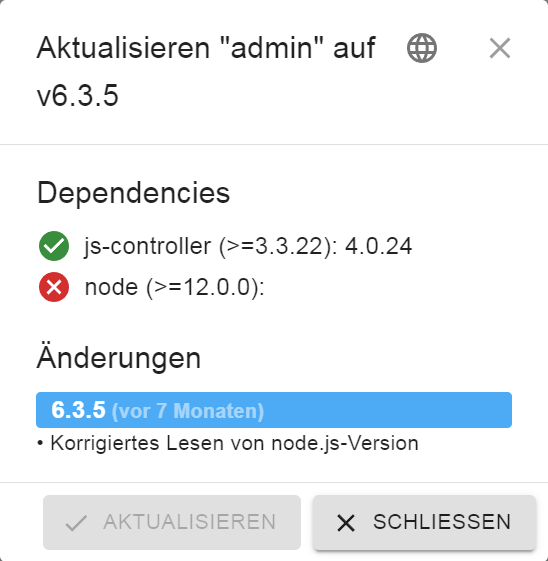
habe jetzt via backitup den ioBroker Restore angestossen. Interessant ist hierbei: Ich hatte im alten System den admin 6.3.5 drauf. Auch die Neuinstallation hatte den 6.3.5. Durch den Restore hat er nun die Version 6.3.4 installiert:ioBroker-Repositories stable : http://download.iobroker.net/sources-dist.json beta : http://download.iobroker.net/sources-dist-latest.json live-stable : http://iobroker.live/repo/sources-dist.json Active repo(s): live-stable Installed ioBroker-Instances Used repository: live-stable Adapter "admin" : 6.3.5 , installed 6.3.4 [Updatable] -
@crunchip
@thomas-braun
habe jetzt via backitup den ioBroker Restore angestossen. Interessant ist hierbei: Ich hatte im alten System den admin 6.3.5 drauf. Auch die Neuinstallation hatte den 6.3.5. Durch den Restore hat er nun die Version 6.3.4 installiert:ioBroker-Repositories stable : http://download.iobroker.net/sources-dist.json beta : http://download.iobroker.net/sources-dist-latest.json live-stable : http://iobroker.live/repo/sources-dist.json Active repo(s): live-stable Installed ioBroker-Instances Used repository: live-stable Adapter "admin" : 6.3.5 , installed 6.3.4 [Updatable]@mp_trixi sagte in Absturz während Repo Update:
Durch den Restore hat er nun die Version 6.3.4 installiert:
sollte an und für sich gar nicht möglich sein, einziges was mir dazu einfallen würde, falsches backup genutzt, dann sollten aber auch bei andere Adaptern falsche Versionen vorliegen
-
@mp_trixi sagte in Absturz während Repo Update:
Durch den Restore hat er nun die Version 6.3.4 installiert:
sollte an und für sich gar nicht möglich sein, einziges was mir dazu einfallen würde, falsches backup genutzt, dann sollten aber auch bei andere Adaptern falsche Versionen vorliegen
@crunchip
ok, komisch. Hab extra nicht das Backup von heute Nacht genommen sondern nochmal eins gemacht, bevor ich den alten heruntergefahren hatte:
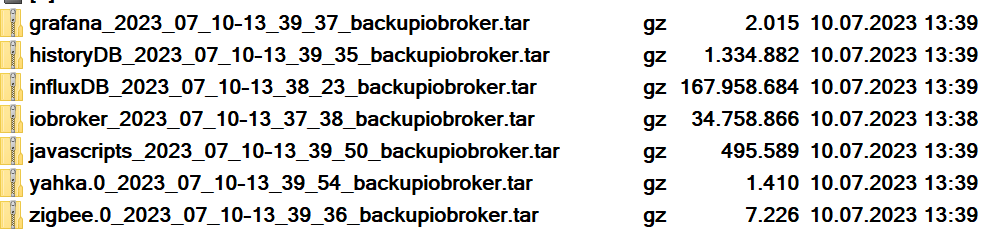
das dann per FTP auf das neue System kopiert (nach /opt/iobroker/backups) und dann in der WebGUI den Restore des iobroker gestartet
-
@crunchip
ok, komisch. Hab extra nicht das Backup von heute Nacht genommen sondern nochmal eins gemacht, bevor ich den alten heruntergefahren hatte:
das dann per FTP auf das neue System kopiert (nach /opt/iobroker/backups) und dann in der WebGUI den Restore des iobroker gestartet
@mp_trixi kein Plan,
reine Vermutung, vllt gab es zum Zeitpunkt X damals als du das Upgrade von v6.3.4 auf .5 gemacht hattest irgendein Problem und sich das nicht weiter bemerkbar machte(ausser dein Repoproblem) -
@mp_trixi kein Plan,
reine Vermutung, vllt gab es zum Zeitpunkt X damals als du das Upgrade von v6.3.4 auf .5 gemacht hattest irgendein Problem und sich das nicht weiter bemerkbar machte(ausser dein Repoproblem) -
@mp_trixi das sollte eigentlich auch nicht so sein
mach mal
iob stop
iob fix
iob upload all
iob start


Hey! Du scheinst an dieser Unterhaltung interessiert zu sein, hast aber noch kein Konto.
Hast du es satt, bei jedem Besuch durch die gleichen Beiträge zu scrollen? Wenn du dich für ein Konto anmeldest, kommst du immer genau dorthin zurück, wo du zuvor warst, und kannst dich über neue Antworten benachrichtigen lassen (entweder per E-Mail oder Push-Benachrichtigung). Du kannst auch Lesezeichen speichern und Beiträge positiv bewerten, um anderen Community-Mitgliedern deine Wertschätzung zu zeigen.
Mit deinem Input könnte dieser Beitrag noch besser werden 💗
Registrieren Anmelden372
Online33.0k
Benutzer83.5k
Themen1.3m
Beiträge