




2 x Influxdb - Dienste ?
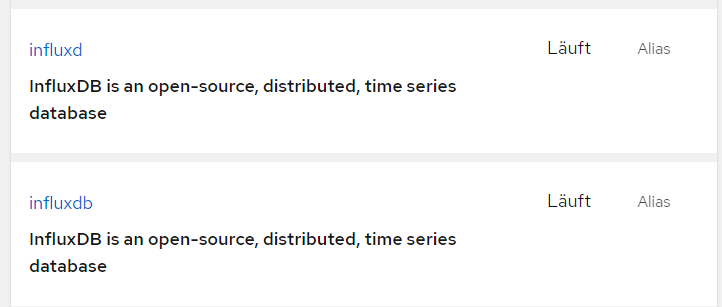
-
@dp20eic
moin,
ok so schnell bin ich nicht mehr ;).
Habe einen kleinen NUC als ioserver eingerichtet:Plattform: linux Betriebssystem: linux Architektur: x64 CPUs: 2 Geschwindigkeit: 798 MHz Modell: Intel(R) Celeron(R) J4005 CPU @ 2.00GHz RAM: 7.3 GB System-Betriebszeit: 01:12:02 Node.js: v18.16.1 time: 1688555960238 timeOffset: -120 Adapter-Anzahl: 479 NPM: v9.5.1 Datenträgergröße: 217.6 GB Freier Festplattenspeicher: 213.4 GB Betriebszeit: 01:11:54 Aktive Instanzen: 5 Pfad: /opt/iobroker/ aktiv:Ja, IOB, Grafana und Influxdb alles auf der gleichen Maschine auf Debian 12.
Habe mich an diese Hinweise vom Backitup-Adapater gehalten und so installiert:
InfluxDB2
CLI2
zeigen aber beide auf den gleichen Dienst:

Keine Ahnung ob ich CLI nochmal irgendwo benötige?
Habe vielleicht auch was nicht verstanden
Dann lösche ich die influx im Ordner /usr/local/bin/ wieder.
War mir nur unsicher...
Danke ;)@friedhofsblond sagte in 2 x Influxdb - Dienste ?:
Ja, IOB, Grafana und Influxdb alles auf der gleichen Maschine auf Debian 12.
Habe mich an diese Hinweise vom Backitup-Adapater gehalten und so installiert:
InfluxDB2
CLI2Moin,
wenn alles auf einer Maschine läuft, dann brauchst Du auch beide Pakete. Dass Du Dir die Dokumentation zur Installation von
influxDBzur Hand genommen hast, ist sehr löblich, aber es gibt beiinfluxDBleider in der Dokumentation ein Bruch und die einzig korrekte Beschreibung steht da leider nur für die Version 2.2 -> https://docs.influxdata.com/influxdb/v2.2/install/?t=Linux.
Alle davor, danach, werkeln am System vorbei, indem dort diedebPakete direkt eingespielt werden.Die Installation für
influxDB2ist wie folgt zu sehen, je nach Grundinstallation:Alle Dienste auf einem System
Installierte Pakete
- influxDB2 <- Datenbankmanager
- influxDB2-cli <- Kommandline Tools, die z.B. für das Backup gebraucht werden
- Grafana
Dienste verteil auf mehrere Systeme
Pakete influxDB Datenbanksystem
- influxDB2 -> Datenbankmanager
- wenn man auf diesem system auch auf der Kommandozeile arbeiten möchte, dann muss natürlich auch hier das Paket
- influxdb-cli installiert werden
- wenn man auf diesem system auch auf der Kommandozeile arbeiten möchte, dann muss natürlich auch hier das Paket
Pakete für Systeme, die mit dem Datenbankmanager interagieren z.B.:
ioBroker - BackitUp- influxdb2-cli <- Kommandline Tools, die z.B. für das Backup gebraucht werden
Was sind die einzelnen Aufgaben
influx->influxdb-cli$ influx NAME: influx - Influx Client USAGE: influx [command] HINT: If you are looking for the InfluxQL shell from 1.x, run "influx v1 shell" COMMANDS: version Print the influx CLI version write Write points to InfluxDB bucket Bucket management commands completion Generates completion scripts query Execute a Flux query config Config management commands org, organization Organization management commands delete Delete points from InfluxDB user User management commands task Task management commands telegrafs List Telegraf configuration(s). Subcommands manage Telegraf configurations. dashboards List Dashboard(s). export Export existing resources as a template secret Secret management commands v1 InfluxDB v1 management commands auth, authorization Authorization management commands apply Apply a template to manage resources stacks List stack(s) and associated templates. Subcommands manage stacks. template Summarize the provided template bucket-schema Bucket schema management commands scripts Scripts management commands ping Check the InfluxDB /health endpoint setup Setup instance with initial user, org, bucket backup Backup database restore Restores a backup directory to InfluxDB remote Remote connection management commands replication Replication stream management commands server-config Display server config help, h Shows a list of commands or help for one commandinfluxd->influxDB2$ influxd --help Start up the daemon configured with flags/env vars/config file. The order of precedence for config options are as follows (1 highest, 3 lowest): 1. flags 2. env vars 3. config file A config file can be provided via the INFLUXD_CONFIG_PATH env var. If a file is not provided via an env var, influxd will look in the current directory for a config.{json|toml|yaml|yml} file. If one does not exist, then it will continue unchanged. Usage: influxd [flags] influxd [command] Available Commands: downgrade Downgrade metadata schema used by influxd to match the expectations of an older release help Help about any command inspect Commands for inspecting on-disk database data recovery Commands used to recover / regenerate operator access to the DB run Start the influxd server upgrade Upgrade a 1.x version of InfluxDB version Print the influxd server version Flags: --assets-path string override default assets by serving from a specific directory (developer mode) --bolt-path string path to boltdb database (default "/home/dp20eic/.influxdbv2/influxd.bolt") --e2e-testing add /debug/flush endpoint to clear stores; used for end-to-end tests --engine-path string path to persistent engine files (default "/home/dp20eic/.influxdbv2/engine") --feature-flags stringToString feature flag overrides (default []) --flux-log-enabled enables detailed logging for flux queries --hardening-enabled enable hardening options (disallow private IPs within flux and templates HTTP requests) -h, --help help for influxd --http-bind-address string bind address for the REST HTTP API (default ":8086") --http-idle-timeout duration max duration the server should keep established connections alive while waiting for new requests. Set to 0 for no timeout (default 3m0s) --http-read-header-timeout duration max duration the server should spend trying to read HTTP headers for new requests. Set to 0 for no timeout (default 10s) --http-read-timeout duration max duration the server should spend trying to read the entirety of new requests. Set to 0 for no timeout --http-write-timeout duration max duration the server should spend on processing+responding to requests. Set to 0 for no timeout --influxql-max-select-buckets int The maximum number of group by time bucket a SELECT can create. A value of zero will max the maximum number of buckets unlimited. --influxql-max-select-point int The maximum number of points a SELECT can process. A value of 0 will make the maximum point count unlimited. This will only be checked every second so queries will not be aborted immediately when hitting the limit. --influxql-max-select-series int The maximum number of series a SELECT can run. A value of 0 will make the maximum series count unlimited. --instance-id string add an instance id for replications to prevent collisions and allow querying by edge node --log-level Log-Level supported log levels are debug, info, and error (default info) --metrics-disabled Don't expose metrics over HTTP at /metrics --no-tasks disables the task scheduler --pprof-disabled Don't expose debugging information over HTTP at /debug/pprof --query-concurrency int32 the number of queries that are allowed to execute concurrently. Set to 0 to allow an unlimited number of concurrent queries (default 1024) --query-initial-memory-bytes int the initial number of bytes allocated for a query when it is started. If this is unset, then query-memory-bytes will be used --query-max-memory-bytes int the maximum amount of memory used for queries. Can only be set when query-concurrency is limited. If this is unset, then this number is query-concurrency * query-memory-bytes --query-memory-bytes int maximum number of bytes a query is allowed to use at any given time. This must be greater or equal to query-initial-memory-bytes --query-queue-size int32 the number of queries that are allowed to be awaiting execution before new queries are rejected. Must be > 0 if query-concurrency is not unlimited (default 1024) --reporting-disabled disable sending telemetry data to https://telemetry.influxdata.com every 8 hours --secret-store string data store for secrets (bolt or vault) (default "bolt") --session-length int ttl in minutes for newly created sessions (default 60) --session-renew-disabled disables automatically extending session ttl on request --sqlite-path string path to sqlite database. if not set, sqlite database will be stored in the bolt-path directory as "influxd.sqlite". --storage-cache-max-memory-size Size The maximum size a shard's cache can reach before it starts rejecting writes. (default 1.0 GiB) --storage-cache-snapshot-memory-size Size The size at which the engine will snapshot the cache and write it to a TSM file, freeing up memory. (default 25 MiB) --storage-cache-snapshot-write-cold-duration Duration The length of time at which the engine will snapshot the cache and write it to a new TSM file if the shard hasn't received writes or deletes. (default 10m0s) --storage-compact-full-write-cold-duration Duration The duration at which the engine will compact all TSM files in a shard if it hasn't received a write or delete. (default 4h0m0s) --storage-compact-throughput-burst Size The rate limit in bytes per second that we will allow TSM compactions to write to disk. (default 48 MiB) --storage-max-concurrent-compactions int The maximum number of concurrent full and level compactions that can run at one time. A value of 0 results in 50% of runtime.GOMAXPROCS(0) used at runtime. Any number greater than 0 limits compactions to that value. This setting does not apply to cache snapshotting. --storage-max-index-log-file-size Size The threshold, in bytes, when an index write-ahead log file will compact into an index file. Lower sizes will cause log files to be compacted more quickly and result in lower heap usage at the expense of write throughput. (default 1.0 MiB) --storage-no-validate-field-size Skip field-size validation on incoming writes. --storage-retention-check-interval Duration The interval of time when retention policy enforcement checks run. (default 30m0s) --storage-series-file-max-concurrent-snapshot-compactions int The maximum number of concurrent snapshot compactions that can be running at one time across all series partitions in a database. --storage-series-id-set-cache-size int The size of the internal cache used in the TSI index to store previously calculated series results. --storage-shard-precreator-advance-period Duration The default period ahead of the endtime of a shard group that its successor group is created. (default 30m0s) --storage-shard-precreator-check-interval Duration The interval of time when the check to pre-create new shards runs. (default 10m0s) --storage-tsm-use-madv-willneed Controls whether we hint to the kernel that we intend to page in mmap'd sections of TSM files. --storage-validate-keys Validates incoming writes to ensure keys only have valid unicode characters. --storage-wal-fsync-delay Duration The amount of time that a write will wait before fsyncing. A duration greater than 0 can be used to batch up multiple fsync calls. This is useful for slower disks or when WAL write contention is seen. (default 0s) --storage-wal-max-concurrent-writes int The max number of writes that will attempt to write to the WAL at a time. (default <nprocs> * 2) --storage-wal-max-write-delay storage-wal-max-concurrent-writes The max amount of time a write will wait when the WAL already has storage-wal-max-concurrent-writes active writes. Set to 0 to disable the timeout. (default 10m0s) --storage-write-timeout duration The max amount of time the engine will spend completing a write request before cancelling with a timeout. (default 10s) --store string backing store for REST resources (disk or memory) (default "disk") --testing-always-allow-setup ensures the /api/v2/setup endpoint always returns true to allow onboarding --tls-cert string TLS certificate for HTTPs --tls-key string TLS key for HTTPs --tls-min-version string Minimum accepted TLS version (default "1.2") --tls-strict-ciphers Restrict accept ciphers to: ECDHE_ECDSA_WITH_AES_128_GCM_SHA256, ECDHE_RSA_WITH_AES_128_GCM_SHA256, ECDHE_ECDSA_WITH_AES_256_GCM_SHA384, ECDHE_RSA_WITH_AES_256_GCM_SHA384, ECDHE_ECDSA_WITH_CHACHA20_POLY1305, ECDHE_RSA_WITH_CHACHA20_POLY1305 --tracing-type string supported tracing types are log, jaeger --ui-disabled Disable the InfluxDB UI --vault-addr string address of the Vault server expressed as a URL and port, for example: https://127.0.0.1:8200/. --vault-cacert string path to a PEM-encoded CA certificate file on the local disk. This file is used to verify the Vault server's SSL certificate. This environment variable takes precedence over VAULT_CAPATH. --vault-capath string path to a directory of PEM-encoded CA certificate files on the local disk. These certificates are used to verify the Vault server's SSL certificate. --vault-client-cert string path to a PEM-encoded client certificate on the local disk. This file is used for TLS communication with the Vault server. --vault-client-key string path to an unencrypted, PEM-encoded private key on disk which corresponds to the matching client certificate. --vault-client-timeout duration timeout variable. The default value is 60s. --vault-max-retries int maximum number of retries when a 5xx error code is encountered. The default is 2, for three total attempts. Set this to 0 or less to disable retrying. --vault-skip-verify do not verify Vault's presented certificate before communicating with it. Setting this variable is not recommended and voids Vault's security model. --vault-tls-server-name string name to use as the SNI host when connecting via TLS. --vault-token string vault authentication token Use "influxd [command] --help" for more information about a command.Kleiner Exkurs, ob und wie Du da jetzt weiter machst, musst Du Dich Fragen, die Einschränkung, die Du hast, ist, dass Du nicht automatisch mitbekommst wann es Updates für die
influxdbPakete gibt.VG
Bernd -
@friedhofsblond sagte in 2 x Influxdb - Dienste ?:
Ja, IOB, Grafana und Influxdb alles auf der gleichen Maschine auf Debian 12.
Habe mich an diese Hinweise vom Backitup-Adapater gehalten und so installiert:
InfluxDB2
CLI2Moin,
wenn alles auf einer Maschine läuft, dann brauchst Du auch beide Pakete. Dass Du Dir die Dokumentation zur Installation von
influxDBzur Hand genommen hast, ist sehr löblich, aber es gibt beiinfluxDBleider in der Dokumentation ein Bruch und die einzig korrekte Beschreibung steht da leider nur für die Version 2.2 -> https://docs.influxdata.com/influxdb/v2.2/install/?t=Linux.
Alle davor, danach, werkeln am System vorbei, indem dort diedebPakete direkt eingespielt werden.Die Installation für
influxDB2ist wie folgt zu sehen, je nach Grundinstallation:Alle Dienste auf einem System
Installierte Pakete
- influxDB2 <- Datenbankmanager
- influxDB2-cli <- Kommandline Tools, die z.B. für das Backup gebraucht werden
- Grafana
Dienste verteil auf mehrere Systeme
Pakete influxDB Datenbanksystem
- influxDB2 -> Datenbankmanager
- wenn man auf diesem system auch auf der Kommandozeile arbeiten möchte, dann muss natürlich auch hier das Paket
- influxdb-cli installiert werden
- wenn man auf diesem system auch auf der Kommandozeile arbeiten möchte, dann muss natürlich auch hier das Paket
Pakete für Systeme, die mit dem Datenbankmanager interagieren z.B.:
ioBroker - BackitUp- influxdb2-cli <- Kommandline Tools, die z.B. für das Backup gebraucht werden
Was sind die einzelnen Aufgaben
influx->influxdb-cli$ influx NAME: influx - Influx Client USAGE: influx [command] HINT: If you are looking for the InfluxQL shell from 1.x, run "influx v1 shell" COMMANDS: version Print the influx CLI version write Write points to InfluxDB bucket Bucket management commands completion Generates completion scripts query Execute a Flux query config Config management commands org, organization Organization management commands delete Delete points from InfluxDB user User management commands task Task management commands telegrafs List Telegraf configuration(s). Subcommands manage Telegraf configurations. dashboards List Dashboard(s). export Export existing resources as a template secret Secret management commands v1 InfluxDB v1 management commands auth, authorization Authorization management commands apply Apply a template to manage resources stacks List stack(s) and associated templates. Subcommands manage stacks. template Summarize the provided template bucket-schema Bucket schema management commands scripts Scripts management commands ping Check the InfluxDB /health endpoint setup Setup instance with initial user, org, bucket backup Backup database restore Restores a backup directory to InfluxDB remote Remote connection management commands replication Replication stream management commands server-config Display server config help, h Shows a list of commands or help for one commandinfluxd->influxDB2$ influxd --help Start up the daemon configured with flags/env vars/config file. The order of precedence for config options are as follows (1 highest, 3 lowest): 1. flags 2. env vars 3. config file A config file can be provided via the INFLUXD_CONFIG_PATH env var. If a file is not provided via an env var, influxd will look in the current directory for a config.{json|toml|yaml|yml} file. If one does not exist, then it will continue unchanged. Usage: influxd [flags] influxd [command] Available Commands: downgrade Downgrade metadata schema used by influxd to match the expectations of an older release help Help about any command inspect Commands for inspecting on-disk database data recovery Commands used to recover / regenerate operator access to the DB run Start the influxd server upgrade Upgrade a 1.x version of InfluxDB version Print the influxd server version Flags: --assets-path string override default assets by serving from a specific directory (developer mode) --bolt-path string path to boltdb database (default "/home/dp20eic/.influxdbv2/influxd.bolt") --e2e-testing add /debug/flush endpoint to clear stores; used for end-to-end tests --engine-path string path to persistent engine files (default "/home/dp20eic/.influxdbv2/engine") --feature-flags stringToString feature flag overrides (default []) --flux-log-enabled enables detailed logging for flux queries --hardening-enabled enable hardening options (disallow private IPs within flux and templates HTTP requests) -h, --help help for influxd --http-bind-address string bind address for the REST HTTP API (default ":8086") --http-idle-timeout duration max duration the server should keep established connections alive while waiting for new requests. Set to 0 for no timeout (default 3m0s) --http-read-header-timeout duration max duration the server should spend trying to read HTTP headers for new requests. Set to 0 for no timeout (default 10s) --http-read-timeout duration max duration the server should spend trying to read the entirety of new requests. Set to 0 for no timeout --http-write-timeout duration max duration the server should spend on processing+responding to requests. Set to 0 for no timeout --influxql-max-select-buckets int The maximum number of group by time bucket a SELECT can create. A value of zero will max the maximum number of buckets unlimited. --influxql-max-select-point int The maximum number of points a SELECT can process. A value of 0 will make the maximum point count unlimited. This will only be checked every second so queries will not be aborted immediately when hitting the limit. --influxql-max-select-series int The maximum number of series a SELECT can run. A value of 0 will make the maximum series count unlimited. --instance-id string add an instance id for replications to prevent collisions and allow querying by edge node --log-level Log-Level supported log levels are debug, info, and error (default info) --metrics-disabled Don't expose metrics over HTTP at /metrics --no-tasks disables the task scheduler --pprof-disabled Don't expose debugging information over HTTP at /debug/pprof --query-concurrency int32 the number of queries that are allowed to execute concurrently. Set to 0 to allow an unlimited number of concurrent queries (default 1024) --query-initial-memory-bytes int the initial number of bytes allocated for a query when it is started. If this is unset, then query-memory-bytes will be used --query-max-memory-bytes int the maximum amount of memory used for queries. Can only be set when query-concurrency is limited. If this is unset, then this number is query-concurrency * query-memory-bytes --query-memory-bytes int maximum number of bytes a query is allowed to use at any given time. This must be greater or equal to query-initial-memory-bytes --query-queue-size int32 the number of queries that are allowed to be awaiting execution before new queries are rejected. Must be > 0 if query-concurrency is not unlimited (default 1024) --reporting-disabled disable sending telemetry data to https://telemetry.influxdata.com every 8 hours --secret-store string data store for secrets (bolt or vault) (default "bolt") --session-length int ttl in minutes for newly created sessions (default 60) --session-renew-disabled disables automatically extending session ttl on request --sqlite-path string path to sqlite database. if not set, sqlite database will be stored in the bolt-path directory as "influxd.sqlite". --storage-cache-max-memory-size Size The maximum size a shard's cache can reach before it starts rejecting writes. (default 1.0 GiB) --storage-cache-snapshot-memory-size Size The size at which the engine will snapshot the cache and write it to a TSM file, freeing up memory. (default 25 MiB) --storage-cache-snapshot-write-cold-duration Duration The length of time at which the engine will snapshot the cache and write it to a new TSM file if the shard hasn't received writes or deletes. (default 10m0s) --storage-compact-full-write-cold-duration Duration The duration at which the engine will compact all TSM files in a shard if it hasn't received a write or delete. (default 4h0m0s) --storage-compact-throughput-burst Size The rate limit in bytes per second that we will allow TSM compactions to write to disk. (default 48 MiB) --storage-max-concurrent-compactions int The maximum number of concurrent full and level compactions that can run at one time. A value of 0 results in 50% of runtime.GOMAXPROCS(0) used at runtime. Any number greater than 0 limits compactions to that value. This setting does not apply to cache snapshotting. --storage-max-index-log-file-size Size The threshold, in bytes, when an index write-ahead log file will compact into an index file. Lower sizes will cause log files to be compacted more quickly and result in lower heap usage at the expense of write throughput. (default 1.0 MiB) --storage-no-validate-field-size Skip field-size validation on incoming writes. --storage-retention-check-interval Duration The interval of time when retention policy enforcement checks run. (default 30m0s) --storage-series-file-max-concurrent-snapshot-compactions int The maximum number of concurrent snapshot compactions that can be running at one time across all series partitions in a database. --storage-series-id-set-cache-size int The size of the internal cache used in the TSI index to store previously calculated series results. --storage-shard-precreator-advance-period Duration The default period ahead of the endtime of a shard group that its successor group is created. (default 30m0s) --storage-shard-precreator-check-interval Duration The interval of time when the check to pre-create new shards runs. (default 10m0s) --storage-tsm-use-madv-willneed Controls whether we hint to the kernel that we intend to page in mmap'd sections of TSM files. --storage-validate-keys Validates incoming writes to ensure keys only have valid unicode characters. --storage-wal-fsync-delay Duration The amount of time that a write will wait before fsyncing. A duration greater than 0 can be used to batch up multiple fsync calls. This is useful for slower disks or when WAL write contention is seen. (default 0s) --storage-wal-max-concurrent-writes int The max number of writes that will attempt to write to the WAL at a time. (default <nprocs> * 2) --storage-wal-max-write-delay storage-wal-max-concurrent-writes The max amount of time a write will wait when the WAL already has storage-wal-max-concurrent-writes active writes. Set to 0 to disable the timeout. (default 10m0s) --storage-write-timeout duration The max amount of time the engine will spend completing a write request before cancelling with a timeout. (default 10s) --store string backing store for REST resources (disk or memory) (default "disk") --testing-always-allow-setup ensures the /api/v2/setup endpoint always returns true to allow onboarding --tls-cert string TLS certificate for HTTPs --tls-key string TLS key for HTTPs --tls-min-version string Minimum accepted TLS version (default "1.2") --tls-strict-ciphers Restrict accept ciphers to: ECDHE_ECDSA_WITH_AES_128_GCM_SHA256, ECDHE_RSA_WITH_AES_128_GCM_SHA256, ECDHE_ECDSA_WITH_AES_256_GCM_SHA384, ECDHE_RSA_WITH_AES_256_GCM_SHA384, ECDHE_ECDSA_WITH_CHACHA20_POLY1305, ECDHE_RSA_WITH_CHACHA20_POLY1305 --tracing-type string supported tracing types are log, jaeger --ui-disabled Disable the InfluxDB UI --vault-addr string address of the Vault server expressed as a URL and port, for example: https://127.0.0.1:8200/. --vault-cacert string path to a PEM-encoded CA certificate file on the local disk. This file is used to verify the Vault server's SSL certificate. This environment variable takes precedence over VAULT_CAPATH. --vault-capath string path to a directory of PEM-encoded CA certificate files on the local disk. These certificates are used to verify the Vault server's SSL certificate. --vault-client-cert string path to a PEM-encoded client certificate on the local disk. This file is used for TLS communication with the Vault server. --vault-client-key string path to an unencrypted, PEM-encoded private key on disk which corresponds to the matching client certificate. --vault-client-timeout duration timeout variable. The default value is 60s. --vault-max-retries int maximum number of retries when a 5xx error code is encountered. The default is 2, for three total attempts. Set this to 0 or less to disable retrying. --vault-skip-verify do not verify Vault's presented certificate before communicating with it. Setting this variable is not recommended and voids Vault's security model. --vault-tls-server-name string name to use as the SNI host when connecting via TLS. --vault-token string vault authentication token Use "influxd [command] --help" for more information about a command.Kleiner Exkurs, ob und wie Du da jetzt weiter machst, musst Du Dich Fragen, die Einschränkung, die Du hast, ist, dass Du nicht automatisch mitbekommst wann es Updates für die
influxdbPakete gibt.VG
Bernd@dp20eic
Moin,
danke für die Ausführliche Antwort.
So ganz falsch war das aber nicht was ich gemacht habe, denn nach dem Löschen von influx in /usr/local/bin - funktioniert das Backup nicht mehr.backitup.0 2023-07-06 18:47:34.359 error [iobroker] Error: Command failed: influx backup --bucket iobrokerdb -t ODCfOlLAch57HCbNeNTmqnU3_H7IoBs0F8iuI9G1Mhc7Xqmgn6-zXD0IA3oSynI8WSDE1rQ5DzpckqqxF9WOEQ== "/opt/iobroker/backups/influxDB_2023_07_06-18_47_34_deb12_backupiobroker"/bin/sh: 1: influx: not found backitup.0 2023-07-06 18:47:34.358 error [iobroker/influxDB] /bin/sh: 1: influx: not found backitup.0 2023-07-06 18:47:34.352 error [iobroker/influxDB] Error: Command failed: influx backup --bucket iobrokerdb -t ODCfOlLAch57HCbNeNTmqnU3_H7IoBs0F8iuI9G1Mhc7Xqmgn6-zXD0IA3oSynI8WSDE1rQ5DzpckqqxF9WOEQ== "/opt/iobroker/backups/influxDB_2023_07_06-18_47_34_deb12_backupiobroker"Habe also nochmal neu ausgeführt: "sudo cp influx /usr/local/bin/" danach funktioniert backitup wieder wie gehabt.
-
@dp20eic
Moin,
danke für die Ausführliche Antwort.
So ganz falsch war das aber nicht was ich gemacht habe, denn nach dem Löschen von influx in /usr/local/bin - funktioniert das Backup nicht mehr.backitup.0 2023-07-06 18:47:34.359 error [iobroker] Error: Command failed: influx backup --bucket iobrokerdb -t ODCfOlLAch57HCbNeNTmqnU3_H7IoBs0F8iuI9G1Mhc7Xqmgn6-zXD0IA3oSynI8WSDE1rQ5DzpckqqxF9WOEQ== "/opt/iobroker/backups/influxDB_2023_07_06-18_47_34_deb12_backupiobroker"/bin/sh: 1: influx: not found backitup.0 2023-07-06 18:47:34.358 error [iobroker/influxDB] /bin/sh: 1: influx: not found backitup.0 2023-07-06 18:47:34.352 error [iobroker/influxDB] Error: Command failed: influx backup --bucket iobrokerdb -t ODCfOlLAch57HCbNeNTmqnU3_H7IoBs0F8iuI9G1Mhc7Xqmgn6-zXD0IA3oSynI8WSDE1rQ5DzpckqqxF9WOEQ== "/opt/iobroker/backups/influxDB_2023_07_06-18_47_34_deb12_backupiobroker"Habe also nochmal neu ausgeführt: "sudo cp influx /usr/local/bin/" danach funktioniert backitup wieder wie gehabt.
@friedhofsblond sagte in 2 x Influxdb - Dienste ?:
So ganz falsch war das aber nicht was ich gemacht habe,
Doch, die Installation ist halt jetzt schräg bei dir.
Die Programme liegen normalerweise in /usr/bin und nicht wie bei dir in /usr/local/bin
Siehe:echad@chet:~ $ type -p influx influxd /usr/bin/influx /usr/bin/influxd echad@chet:~ $ -
@friedhofsblond sagte in 2 x Influxdb - Dienste ?:
So ganz falsch war das aber nicht was ich gemacht habe,
Doch, die Installation ist halt jetzt schräg bei dir.
Die Programme liegen normalerweise in /usr/bin und nicht wie bei dir in /usr/local/bin
Siehe:echad@chet:~ $ type -p influx influxd /usr/bin/influx /usr/bin/influxd echad@chet:~ $@thomas-braun
Wie soll die denn nu gehen - richtig?
Sorry, bin alter Windowszausel und 65 - Linux nur rudimentär
:( -
@dp20eic
Moin,
danke für die Ausführliche Antwort.
So ganz falsch war das aber nicht was ich gemacht habe, denn nach dem Löschen von influx in /usr/local/bin - funktioniert das Backup nicht mehr.backitup.0 2023-07-06 18:47:34.359 error [iobroker] Error: Command failed: influx backup --bucket iobrokerdb -t ODCfOlLAch57HCbNeNTmqnU3_H7IoBs0F8iuI9G1Mhc7Xqmgn6-zXD0IA3oSynI8WSDE1rQ5DzpckqqxF9WOEQ== "/opt/iobroker/backups/influxDB_2023_07_06-18_47_34_deb12_backupiobroker"/bin/sh: 1: influx: not found backitup.0 2023-07-06 18:47:34.358 error [iobroker/influxDB] /bin/sh: 1: influx: not found backitup.0 2023-07-06 18:47:34.352 error [iobroker/influxDB] Error: Command failed: influx backup --bucket iobrokerdb -t ODCfOlLAch57HCbNeNTmqnU3_H7IoBs0F8iuI9G1Mhc7Xqmgn6-zXD0IA3oSynI8WSDE1rQ5DzpckqqxF9WOEQ== "/opt/iobroker/backups/influxDB_2023_07_06-18_47_34_deb12_backupiobroker"Habe also nochmal neu ausgeführt: "sudo cp influx /usr/local/bin/" danach funktioniert backitup wieder wie gehabt.
@friedhofsblond sagte in 2 x Influxdb - Dienste ?:
@dp20eic
Moin,
danke für die Ausführliche Antwort.
So ganz falsch war das aber nicht was ich gemacht habe, denn nach dem Löschen von influx in /usr/local/bin - funktioniert das Backup nicht mehr.
Habe also nochmal neu ausgeführt: "sudo cp influx /usr/local/bin/" danach funktioniert backitup wieder wie gehabt.Moin,
ja natürlich, wenn Du das Programm löschst, kann danach auchBackitUpnicht mehr laufen, da es ja dieses Programm braucht.Das was ich und @Thomas-Braun da als falsch, nicht ganz korrekt genannt haben, ist, dass Du das
debPakete, für den Datenbankmanagerinfluxdmittelsdpkginstalliert hast und das PaketinfluxDB-CLIalstgzausgepackt hast und dann kopiert hast.Richtig wäre es gewesen, das Repository von
influxDBin sein Debian mit aufzunehmen und dann mittelsaptzu installieren, so wie man das mit jedem anderen Paket unter Debian auch macht.Wie ich bei Einschränkung im obigen Post schon schrieb, wirst Du keine automatischen Updates bekommen und musst immer selbst schauen, ob es neuere Version gibt und Du musst immer wieder von Hand die Pakete so wie Du es gemacht hast einspielen.
VG
Bernd -
@thomas-braun
Wie soll die denn nu gehen - richtig?
Sorry, bin alter Windowszausel und 65 - Linux nur rudimentär
:(Lösch den Sums aus /usr/local/bin wieder.
Und dannsudo apt update sudo apt install --reinstall influxdb2 influxdb2-cliUnd dann die User abmelden, damit der sog. PATH neu eingelesen wird. Alternativ die ganze Kiste mal sauber durchstarten.
Setzt natürlich voraus, das du die entsprechende Quelle auch angelegt hast.
-
Lösch den Sums aus /usr/local/bin wieder.
Und dannsudo apt update sudo apt install --reinstall influxdb2 influxdb2-cliUnd dann die User abmelden, damit der sog. PATH neu eingelesen wird. Alternativ die ganze Kiste mal sauber durchstarten.
Setzt natürlich voraus, das du die entsprechende Quelle auch angelegt hast.
@thomas-braun sagte in 2 x Influxdb - Dienste ?:
Und dann
Moin,
ich glaube, der TE hat das Repository noch nicht bei sich eingerichtet und wenn er das macht, wird er erst einmal versuchen müssen, das
debPaket wieder loszuwerden.VG
Bernd -
@thomas-braun sagte in 2 x Influxdb - Dienste ?:
Und dann
Moin,
ich glaube, der TE hat das Repository noch nicht bei sich eingerichtet und wenn er das macht, wird er erst einmal versuchen müssen, das
debPaket wieder loszuwerden.VG
Bernd@dp20eic sagte in 2 x Influxdb - Dienste ?:
@thomas-braun sagte in 2 x Influxdb - Dienste ?:
Und dann
Moin,
ich glaube, der TE hat das Repository noch nicht bei sich eingerichtet und wenn er das macht, wird er erst einmal versuchen müssen, das
debPaket wieder loszuwerden.VG
BerndP.S.: warst schneller :)
-
@thomas-braun sagte in 2 x Influxdb - Dienste ?:
Und dann
Moin,
ich glaube, der TE hat das Repository noch nicht bei sich eingerichtet und wenn er das macht, wird er erst einmal versuchen müssen, das
debPaket wieder loszuwerden.VG
Bernd@dp20eic sagte in 2 x Influxdb - Dienste ?:
wird er erst einmal versuchen müssen, das deb Paket wieder loszuwerden.
Ich meine man könne auch per apt 'drüberklatschen'.
Wenn die Pfade im deb denn die gleichen sind, wovon ich mal ausgehen würde. -
@dp20eic sagte in 2 x Influxdb - Dienste ?:
@thomas-braun sagte in 2 x Influxdb - Dienste ?:
Und dann
Moin,
ich glaube, der TE hat das Repository noch nicht bei sich eingerichtet und wenn er das macht, wird er erst einmal versuchen müssen, das
debPaket wieder loszuwerden.VG
BerndP.S.: warst schneller :)
@dp20eic
Stimmt habe InfluxDB über dep und cli mit dem cp "installiert"
:( -
@dp20eic sagte in 2 x Influxdb - Dienste ?:
wird er erst einmal versuchen müssen, das deb Paket wieder loszuwerden.
Ich meine man könne auch per apt 'drüberklatschen'.
Wenn die Pfade im deb denn die gleichen sind, wovon ich mal ausgehen würde.@thomas-braun sagte in 2 x Influxdb - Dienste ?:
Ich meine man könne auch per apt 'drüberklatschen'.
Moin,
hab ich noch nicht versucht, aber ich glaube mich zu erinnern, dass ich mal eine Fehlermeldung gesehen habe, die beim Auspacken per
aptsagte, dass es das File schon gebe und dann brachaptab.
Bekomme aber den gesamten Zusammenhang nicht mehr zusammen, da ich ja auch schon 60 bin ;)VG
Bernd -
@thomas-braun sagte in 2 x Influxdb - Dienste ?:
Ich meine man könne auch per apt 'drüberklatschen'.
Moin,
hab ich noch nicht versucht, aber ich glaube mich zu erinnern, dass ich mal eine Fehlermeldung gesehen habe, die beim Auspacken per
aptsagte, dass es das File schon gebe und dann brachaptab.
Bekomme aber den gesamten Zusammenhang nicht mehr zusammen, da ich ja auch schon 60 bin ;)VG
Bernd@dp20eic sagte in 2 x Influxdb - Dienste ?:
die beim Auspacken per apt sagte, dass es das File schon gebe und dann brach apt ab.
Das ist dann einer der ganz wenigen Fälle wo man --force bemühen darf.
-
@thomas-braun sagte in 2 x Influxdb - Dienste ?:
Ich meine man könne auch per apt 'drüberklatschen'.
Moin,
hab ich noch nicht versucht, aber ich glaube mich zu erinnern, dass ich mal eine Fehlermeldung gesehen habe, die beim Auspacken per
aptsagte, dass es das File schon gebe und dann brachaptab.
Bekomme aber den gesamten Zusammenhang nicht mehr zusammen, da ich ja auch schon 60 bin ;)VG
Bernd@dp20eic
Ich habe noch nicht viel gemacht im iobroker und verschiedene installationzustände per acronis usb-stick gesichert. Ausserdem könnte ich ja die Backups von iob grafana und influx wieder zurückspielen.Wie füge ich denn influx richtig zu den Repositorys hinzu?
-
@dp20eic
Ich habe noch nicht viel gemacht im iobroker und verschiedene installationzustände per acronis usb-stick gesichert. Ausserdem könnte ich ja die Backups von iob grafana und influx wieder zurückspielen.Wie füge ich denn influx richtig zu den Repositorys hinzu?
Schau mal nach meinem Betrag 'Phantastische Repos und wo sie zu finden sind'
-
Schau mal nach meinem Betrag 'Phantastische Repos und wo sie zu finden sind'
@thomas-braun
Ach da wieder - da waren wir schon mal ...... 
-
@dp20eic sagte in 2 x Influxdb - Dienste ?:
die beim Auspacken per apt sagte, dass es das File schon gebe und dann brach apt ab.
Das ist dann einer der ganz wenigen Fälle wo man --force bemühen darf.
@thomas-braun sagte in 2 x Influxdb - Dienste ?:
Das ist dann einer der ganz wenigen Fälle wo man --force bemühen darf.
Moin,
ja, wie gesagt, war mal hier im Forum, kann sein, dass da dann auch die Lösung
--forcewar.Ich mache ja nicht so viel mit Debian, ich verbiege alles so, dass es unter Arch Linux läuft, da kenne, ich mich definitiv besser mit aus :)
Hat hier aber nicht zu suchen, also streichen :)VG
Bernd -
@thomas-braun sagte in 2 x Influxdb - Dienste ?:
Das ist dann einer der ganz wenigen Fälle wo man --force bemühen darf.
Moin,
ja, wie gesagt, war mal hier im Forum, kann sein, dass da dann auch die Lösung
--forcewar.Ich mache ja nicht so viel mit Debian, ich verbiege alles so, dass es unter Arch Linux läuft, da kenne, ich mich definitiv besser mit aus :)
Hat hier aber nicht zu suchen, also streichen :)VG
Bernd -
Das ist ein anderes 'Problem'.
Wenn du das Repo so wie in meinem Thread anlegst passt auch der Schlüssel. -
@friedhofsblond sagte in 2 x Influxdb - Dienste ?:
@dp20eic
Hab noch was gefunden:
https://www.rustimation.eu/index.php/influxdb-probleme-bei-installation-und-update/
https://www.influxdata.com/blog/linux-package-signing-key-rotation/@thomas-braun sagte in 2 x Influxdb - Dienste ?:
Das ist ein anderes 'Problem'.
Wenn du das Repo so wie in meinem Thread anlegst passt auch der Schlüssel.Moin,
mach das besser so wie @Thomas-Braun gesagt/vorgeschlagen hat. Da bist Du auf jeden Fall auf der sicheren Seite und es passt mit dem restlichen System zusammen.
VG
Bernd -
@friedhofsblond sagte in 2 x Influxdb - Dienste ?:
@dp20eic
Hab noch was gefunden:
https://www.rustimation.eu/index.php/influxdb-probleme-bei-installation-und-update/
https://www.influxdata.com/blog/linux-package-signing-key-rotation/@thomas-braun sagte in 2 x Influxdb - Dienste ?:
Das ist ein anderes 'Problem'.
Wenn du das Repo so wie in meinem Thread anlegst passt auch der Schlüssel.Moin,
mach das besser so wie @Thomas-Braun gesagt/vorgeschlagen hat. Da bist Du auf jeden Fall auf der sicheren Seite und es passt mit dem restlichen System zusammen.
VG
Bernd@dp20eic
Jo mach ich - aber morgen brauch meinen Schönheitschlaf :D


Hey! Du scheinst an dieser Unterhaltung interessiert zu sein, hast aber noch kein Konto.
Hast du es satt, bei jedem Besuch durch die gleichen Beiträge zu scrollen? Wenn du dich für ein Konto anmeldest, kommst du immer genau dorthin zurück, wo du zuvor warst, und kannst dich über neue Antworten benachrichtigen lassen (entweder per E-Mail oder Push-Benachrichtigung). Du kannst auch Lesezeichen speichern und Beiträge positiv bewerten, um anderen Community-Mitgliedern deine Wertschätzung zu zeigen.
Mit deinem Input könnte dieser Beitrag noch besser werden 💗
Registrieren AnmeldenSupport us
321
Online33.0k
Benutzer83.6k
Themen1.3m
Beiträge