



Skip to content
  • Home
  • Aktuell
  • Tags
  • 0 Ungelesen 0
  • Kategorien
  • Unreplied
  • Beliebt
  • GitHub
  • Docu
  • Hilfe
Skins
  • Light
  • Brite
  • Cerulean
  • Cosmo
  • Flatly
  • Journal
  • Litera
  • Lumen
  • Lux
  • Materia
  • Minty
  • Morph
  • Pulse
  • Sandstone
  • Simplex
  • Sketchy
  • Spacelab
  • United
  • Yeti
  • Zephyr
  • Dark
  • Cyborg
  • Darkly
  • Quartz
  • Slate
  • Solar
  • Superhero
  • Vapor

  • Standard: (Kein Skin)
  • Kein Skin
Einklappen
ioBroker Logo

Community Forum

donate donate
  1. ioBroker Community Home
  2. Deutsch
  3. ioBroker Allgemein
  4. web0 startet nicht - versehentlich Beta Updates gemacht

NEWS

  • UPDATE 31.10.: Amazon Alexa - ioBroker Skill läuft aus ?
    apollon77A
    apollon77
    48
    3
    8.9k

  • Monatsrückblick – September 2025
    BluefoxB
    Bluefox
    13
    1
    2.3k

  • Neues Video "KI im Smart Home" - ioBroker plus n8n
    BluefoxB
    Bluefox
    16
    1
    3.6k

web0 startet nicht - versehentlich Beta Updates gemacht

Geplant Angeheftet Gesperrt Verschoben ioBroker Allgemein
53 Beiträge 4 Kommentatoren 3.7k Aufrufe 2 Watching
  • Älteste zuerst
  • Neuste zuerst
  • Meiste Stimmen
Antworten
  • In einem neuen Thema antworten
Anmelden zum Antworten
Dieses Thema wurde gelöscht. Nur Nutzer mit entsprechenden Rechten können es sehen.
  • paul53P paul53

    @fraso sagte: Instance "web.0" is not running

    iob start web.0
    
    F Offline
    F Offline
    fraso
    schrieb am zuletzt editiert von
    #5

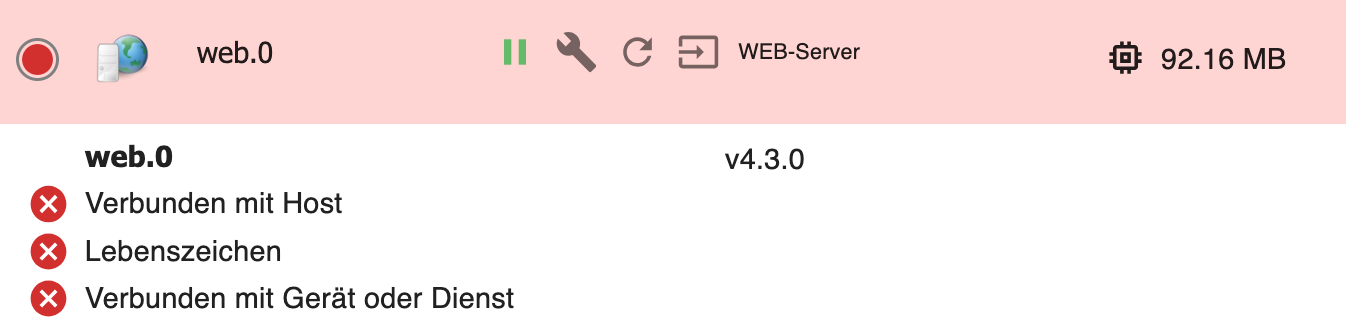
    @paul53

    hab ich gemacht.

    e6iob@NUCioBroker:~$ iob start web.0
    The adapter "web.0" was started.


    Aber:
    37f97d95-248c-4398-94e6-d237beeb5a1c-image.png

    paul53P 1 Antwort Letzte Antwort
    0
    • F fraso

      @homoran

      danke. wie kriege ich das wieder auf das stable installiert? wie ist der Befehl in der Console?

      HomoranH Nicht stören
      HomoranH Nicht stören
      Homoran
      Global Moderator Administrators
      schrieb am zuletzt editiert von
      #6

      @fraso sagte in web0 startet nicht - versehentlich Beta Updates gemacht:

      wie kriege ich das wieder auf das stable installiert? wie ist der Befehl in der Console?

      müsstest du im Beta-Tester Thread finden.
      Steht bei so was üblicherweise im Startpost

      kein Support per PN! - Fragen im Forum stellen - es gibt fast nichts, was nicht auch für andere interessant ist.

      Benutzt das Voting rechts unten im Beitrag wenn er euch geholfen hat.

      der Installationsfixer: curl -fsL https://iobroker.net/fix.sh | bash -

      F 1 Antwort Letzte Antwort
      0
      • F fraso

        @paul53

        hab ich gemacht.

        e6iob@NUCioBroker:~$ iob start web.0
        The adapter "web.0" was started.


        Aber:

        37f97d95-248c-4398-94e6-d237beeb5a1c-image.png

        paul53P Offline
        paul53P Offline
        paul53
        schrieb am zuletzt editiert von
        #7

        @fraso sagte: The adapter "web.0" was started.

        Dann schau ins Log: Die Instanz wird wohl aufgrund eines Fehlers wieder gestoppt.

        Bitte verzichtet auf Chat-Nachrichten, denn die Handhabung ist grauenhaft !
        Produktiv: RPi 2 mit S.USV, HM-MOD-RPI und SLC-USB-Stick mit root fs

        F 1 Antwort Letzte Antwort
        0
        • HomoranH Homoran

          @fraso sagte in web0 startet nicht - versehentlich Beta Updates gemacht:

          wie kriege ich das wieder auf das stable installiert? wie ist der Befehl in der Console?

          müsstest du im Beta-Tester Thread finden.
          Steht bei so was üblicherweise im Startpost

          F Offline
          F Offline
          fraso
          schrieb am zuletzt editiert von
          #8

          @homoran

          Weider doofe Frage:

          ist die iob version 5.0.5 die npm version? Ich muss das Fragen - ich weiß es nicht.

          (
          npm install iobroker.js-controller@version ("version" durch die gewünschte Versionsnummer ersetzen) installiert werden und sollte alles wieder herstellen (Letzter Stable Stand ist die 4.0.24)
          )

          paul53P HomoranH Thomas BraunT 3 Antworten Letzte Antwort
          0
          • F fraso

            @homoran

            Weider doofe Frage:

            ist die iob version 5.0.5 die npm version? Ich muss das Fragen - ich weiß es nicht.

            (
            npm install iobroker.js-controller@version ("version" durch die gewünschte Versionsnummer ersetzen) installiert werden und sollte alles wieder herstellen (Letzter Stable Stand ist die 4.0.24)
            )

            paul53P Offline
            paul53P Offline
            paul53
            schrieb am zuletzt editiert von
            #9

            @fraso sagte: ist die iob version 5.0.5 die npm version?

            Das ist die (experimentelle) Version des js-controllers (Host).

            Bitte verzichtet auf Chat-Nachrichten, denn die Handhabung ist grauenhaft !
            Produktiv: RPi 2 mit S.USV, HM-MOD-RPI und SLC-USB-Stick mit root fs

            F 1 Antwort Letzte Antwort
            0
            • F fraso

              @homoran

              Weider doofe Frage:

              ist die iob version 5.0.5 die npm version? Ich muss das Fragen - ich weiß es nicht.

              (
              npm install iobroker.js-controller@version ("version" durch die gewünschte Versionsnummer ersetzen) installiert werden und sollte alles wieder herstellen (Letzter Stable Stand ist die 4.0.24)
              )

              HomoranH Nicht stören
              HomoranH Nicht stören
              Homoran
              Global Moderator Administrators
              schrieb am zuletzt editiert von
              #10

              @fraso sagte in web0 startet nicht - versehentlich Beta Updates gemacht:

              ich weiß es nicht.

              ich auch nicht.
              wie hast du sie denn installiert?

              achso - nicht die über npm installierte version?
              @fraso sagte in web0 startet nicht - versehentlich Beta Updates gemacht:

              ist die iob version 5.0.5 die npm version?

              das ist der js-controller

              kein Support per PN! - Fragen im Forum stellen - es gibt fast nichts, was nicht auch für andere interessant ist.

              Benutzt das Voting rechts unten im Beitrag wenn er euch geholfen hat.

              der Installationsfixer: curl -fsL https://iobroker.net/fix.sh | bash -

              1 Antwort Letzte Antwort
              0
              • paul53P paul53

                @fraso sagte: The adapter "web.0" was started.

                Dann schau ins Log: Die Instanz wird wohl aufgrund eines Fehlers wieder gestoppt.

                F Offline
                F Offline
                fraso
                schrieb am zuletzt editiert von
                #11

                @paul53

                hier das log:

                e6iob@NUCioBroker:~$ iob logs web
                Uncaught Rejection: Error: Cannot create a string longer than 0x1fffffe8 characters
                    at Object.slice (node:buffer:599:37)
                    at Buffer.toString (node:buffer:819:14)
                    at CLILogs.execute (/opt/iobroker/node_modules/@iobroker/js-controller-cli/build/lib/cli/cliLogs.js:39:67)
                    at processCommand (/opt/iobroker/node_modules/@iobroker/js-controller-cli/build/lib/setup.js:1056:25)
                    at Object.execute (/opt/iobroker/node_modules/@iobroker/js-controller-cli/build/lib/setup.js:3138:5)
                    at Object.<anonymous> (/opt/iobroker/node_modules/iobroker.js-controller/iobroker.js:1:40)
                    at Module._compile (node:internal/modules/cjs/loader:1126:14)
                    at Object.Module._extensions..js (node:internal/modules/cjs/loader:1180:10)
                    at Module.load (node:internal/modules/cjs/loader:1004:32)
                    at Function.Module._load (node:internal/modules/cjs/loader:839:12)
                e6iob@NUCioBroker:~$ 
                
                
                1 Antwort Letzte Antwort
                0
                • F fraso

                  @homoran

                  Weider doofe Frage:

                  ist die iob version 5.0.5 die npm version? Ich muss das Fragen - ich weiß es nicht.

                  (
                  npm install iobroker.js-controller@version ("version" durch die gewünschte Versionsnummer ersetzen) installiert werden und sollte alles wieder herstellen (Letzter Stable Stand ist die 4.0.24)
                  )

                  Thomas BraunT Online
                  Thomas BraunT Online
                  Thomas Braun
                  Most Active
                  schrieb am zuletzt editiert von
                  #12

                  @fraso
                  Schau dir

                  iob diag
                  

                  in der Langfassung an. Da dürften alle Versionen aus dem derzeitig aktiven Repo drin sein. Und die letzten 25 Zeilen aus dem logfile auch

                  Linux-Werkzeugkasten:
                  https://forum.iobroker.net/topic/42952/der-kleine-iobroker-linux-werkzeugkasten
                  NodeJS Fixer Skript:
                  https://forum.iobroker.net/topic/68035/iob-node-fix-skript
                  iob_diag: curl -sLf -o diag.sh https://iobroker.net/diag.sh && bash diag.sh

                  F 1 Antwort Letzte Antwort
                  0
                  • Thomas BraunT Thomas Braun

                    @fraso
                    Schau dir

                    iob diag
                    

                    in der Langfassung an. Da dürften alle Versionen aus dem derzeitig aktiven Repo drin sein. Und die letzten 25 Zeilen aus dem logfile auch

                    F Offline
                    F Offline
                    fraso
                    schrieb am zuletzt editiert von
                    #13

                    @thomas-braun

                    *** NodeJS-Installation ***
                    
                    /usr/bin/nodejs 	v16.17.1
                    /usr/bin/node 		v16.17.1
                    /usr/bin/npm 		9.2.0
                    /usr/local/bin/npx 		8.3.2
                    *** nodejs is NOT correctly installed ***
                    
                    nodejs:
                      Installed: 16.17.1-deb-1nodesource1
                      Candidate: 16.20.1-deb-1nodesource1
                      Version table:
                         16.20.1-deb-1nodesource1 500
                            500 https://deb.nodesource.com/node_16.x bullseye/main amd64 Packages
                     *** 16.17.1-deb-1nodesource1 100
                            100 /var/lib/dpkg/status
                         12.22.12~dfsg-1~deb11u4 500
                            500 http://security.debian.org/debian-security bullseye-security/main amd64 Packages
                         12.22.12~dfsg-1~deb11u3 500
                            500 http://deb.debian.org/debian bullseye/main amd64 Packages
                    
                    Temp directories causing npm8 problem: 0
                    No problems detected
                    
                    *** ioBroker-Installation ***
                    
                    ioBroker Status
                    iobroker is running on this host.
                    
                    
                    Objects type: jsonl
                    States  type: jsonl
                    
                    MULTIHOSTSERVICE/enabled: false
                    
                    Core adapters versions
                    js-controller: 	5.0.5
                    admin: 		6.5.9
                    javascript: 	5.7.0
                    
                    Adapters from github: 	1
                    
                    Adapter State
                    + system.adapter.admin.0                  : admin                 : NUCioBroker                              -  enabled, port: 8081, bind: 0.0.0.0, run as: admin
                    + system.adapter.alexa2.0                 : alexa2                : NUCioBroker                              -  enabled
                    + system.adapter.backitup.0               : backitup              : NUCioBroker                              -  enabled
                    + system.adapter.cloud.0                  : cloud                 : NUCioBroker                              -  enabled
                    + system.adapter.device-reminder.0        : device-reminder       : NUCioBroker                              -  enabled
                      system.adapter.devices.0                : devices               : NUCioBroker                              - disabled
                      system.adapter.discovery.0              : discovery             : NUCioBroker                              - disabled
                    + system.adapter.echarts.0                : echarts               : NUCioBroker                              -  enabled
                    + system.adapter.email.0                  : email                 : NUCioBroker                              -  enabled
                      system.adapter.fb-checkpresence.0       : fb-checkpresence      : NUCioBroker                              - disabled
                      system.adapter.flot.0                   : flot                  : NUCioBroker                              - disabled
                    + system.adapter.fritzdect.0              : fritzdect             : NUCioBroker                              -  enabled
                    + system.adapter.fronius.0                : fronius               : NUCioBroker                              -  enabled
                      system.adapter.habpanel.0               : habpanel              : NUCioBroker                              - disabled
                      system.adapter.ham.0                    : ham                   : NUCioBroker                              - disabled
                    + system.adapter.history.0                : history               : NUCioBroker                              -  enabled
                    + system.adapter.hm-rega.0                : hm-rega               : NUCioBroker                              -  enabled
                    + system.adapter.hm-rega.1                : hm-rega               : NUCioBroker                              -  enabled
                    + system.adapter.hm-rega.2                : hm-rega               : NUCioBroker                              -  enabled
                    + system.adapter.hm-rega.3                : hm-rega               : NUCioBroker                              -  enabled
                    + system.adapter.hm-rega.4                : hm-rega               : NUCioBroker                              -  enabled
                      system.adapter.hm-rega.5                : hm-rega               : NUCioBroker                              - disabled
                    + system.adapter.hm-rpc.0                 : hm-rpc                : NUCioBroker                              -  enabled, port: 0
                    + system.adapter.hm-rpc.1                 : hm-rpc                : NUCioBroker                              -  enabled, port: 0
                    + system.adapter.hm-rpc.2                 : hm-rpc                : NUCioBroker                              -  enabled, port: 0
                    + system.adapter.hm-rpc.3                 : hm-rpc                : NUCioBroker                              -  enabled, port: 0
                    + system.adapter.hm-rpc.4                 : hm-rpc                : NUCioBroker                              -  enabled, port: 0
                      system.adapter.hm-rpc.5                 : hm-rpc                : NUCioBroker                              - disabled, port: 0
                    + system.adapter.hs100.0                  : hs100                 : NUCioBroker                              -  enabled
                      system.adapter.ical.0                   : ical                  : NUCioBroker                              - disabled
                      system.adapter.icons-addictive-flavour-png.0: icons-addictive-flavour-png: NUCioBroker                              - disabled
                      system.adapter.icons-mfd-png.0          : icons-mfd-png         : NUCioBroker                              - disabled
                    + system.adapter.influxdb.0               : influxdb              : NUCioBroker                              -  enabled, port: 8086
                    + system.adapter.iot.0                    : iot                   : NUCioBroker                              -  enabled
                    + system.adapter.javascript.0             : javascript            : NUCioBroker                              -  enabled
                    + system.adapter.libre.0                  : libre                 : NUCioBroker                              -  enabled
                    + system.adapter.modbus.0                 : modbus                : NUCioBroker                              -  enabled
                    + system.adapter.modbus.1                 : modbus                : NUCioBroker                              -  enabled
                    + system.adapter.modbus.2                 : modbus                : NUCioBroker                              -  enabled
                    + system.adapter.mqtt.0                   : mqtt                  : NUCioBroker                              -  enabled, port: 1887, bind: 0.0.0.0
                      system.adapter.mqtt.1                   : mqtt                  : NUCioBroker                              - disabled, port: 1885, bind: 0.0.0.0
                    + system.adapter.niu.0                    : niu                   : NUCioBroker                              -  enabled
                      system.adapter.node-red.0               : node-red              : NUCioBroker                              - disabled, port: 1880, bind: 192.168.178.35
                      system.adapter.openhab.0                : openhab               : NUCioBroker                              - disabled, port: 8080
                      system.adapter.openweathermap.0         : openweathermap        : NUCioBroker                              -  enabled
                    + system.adapter.parser.0                 : parser                : NUCioBroker                              -  enabled
                    + system.adapter.ping.0                   : ping                  : NUCioBroker                              -  enabled
                    + system.adapter.puppeteer.0              : puppeteer             : NUCioBroker                              -  enabled
                    + system.adapter.ring.0                   : ring                  : NUCioBroker                              -  enabled
                    + system.adapter.senec.0                  : senec                 : NUCioBroker                              -  enabled
                    + system.adapter.shelly.0                 : shelly                : NUCioBroker                              -  enabled, port: 1886, bind: 0.0.0.0
                    + system.adapter.simple-api.0             : simple-api            : NUCioBroker                              -  enabled, port: 8087, bind: 0.0.0.0, run as: admin
                    + system.adapter.sonoff.0                 : sonoff                : NUCioBroker                              -  enabled, port: 1883, bind: 0.0.0.0
                      system.adapter.systeminfo.0             : systeminfo            : NUCioBroker                              - disabled
                    + system.adapter.telegram.0               : telegram              : NUCioBroker                              -  enabled, port: 8443, bind: 0.0.0.0
                    + system.adapter.tesla-motors.0           : tesla-motors          : NUCioBroker                              -  enabled
                    + system.adapter.text2command.0           : text2command          : NUCioBroker                              -  enabled
                    + system.adapter.tuya.0                   : tuya                  : NUCioBroker                              -  enabled
                      system.adapter.vis-jqui-mfd.0           : vis-jqui-mfd          : NUCioBroker                              - disabled
                      system.adapter.vis-timeandweather.0     : vis-timeandweather    : NUCioBroker                              - disabled
                      system.adapter.vis-weather.0            : vis-weather           : NUCioBroker                              - disabled
                      system.adapter.vis.0                    : vis                   : NUCioBroker                              -  enabled
                      system.adapter.web.0                    : web                   : NUCioBroker                              -  enabled, port: 8082, bind: 0.0.0.0, run as: admin
                    + system.adapter.whatsapp-cmb.0           : whatsapp-cmb          : NUCioBroker                              -  enabled
                    + system.adapter.withings.0               : withings              : NUCioBroker                              -  enabled
                    + system.adapter.wled.0                   : wled                  : NUCioBroker                              -  enabled
                    + system.adapter.yeelight-2.0             : yeelight-2            : NUCioBroker                              -  enabled
                      system.adapter.zigbee.0                 : zigbee                : NUCioBroker                              - disabled, port: tcp://192.168.178.63:6638
                    
                    + instance is alive
                    
                    Enabled adapters with bindings
                    + system.adapter.admin.0                  : admin                 : NUCioBroker                              -  enabled, port: 8081, bind: 0.0.0.0, run as: admin
                    + system.adapter.hm-rpc.0                 : hm-rpc                : NUCioBroker                              -  enabled, port: 0
                    + system.adapter.hm-rpc.1                 : hm-rpc                : NUCioBroker                              -  enabled, port: 0
                    + system.adapter.hm-rpc.2                 : hm-rpc                : NUCioBroker                              -  enabled, port: 0
                    + system.adapter.hm-rpc.3                 : hm-rpc                : NUCioBroker                              -  enabled, port: 0
                    + system.adapter.hm-rpc.4                 : hm-rpc                : NUCioBroker                              -  enabled, port: 0
                    + system.adapter.influxdb.0               : influxdb              : NUCioBroker                              -  enabled, port: 8086
                    + system.adapter.mqtt.0                   : mqtt                  : NUCioBroker                              -  enabled, port: 1887, bind: 0.0.0.0
                    + system.adapter.shelly.0                 : shelly                : NUCioBroker                              -  enabled, port: 1886, bind: 0.0.0.0
                    + system.adapter.simple-api.0             : simple-api            : NUCioBroker                              -  enabled, port: 8087, bind: 0.0.0.0, run as: admin
                    + system.adapter.sonoff.0                 : sonoff                : NUCioBroker                              -  enabled, port: 1883, bind: 0.0.0.0
                    + system.adapter.telegram.0               : telegram              : NUCioBroker                              -  enabled, port: 8443, bind: 0.0.0.0
                      system.adapter.web.0                    : web                   : NUCioBroker                              -  enabled, port: 8082, bind: 0.0.0.0, run as: admin
                    
                    ioBroker-Repositories
                    beta          : http://download.iobroker.net/sources-dist-latest.json
                    live-stable   : http://iobroker.live/repo/sources-dist.json
                    live-beta     : http://iobroker.live/repo/sources-dist-latest.json
                    stable        : http://download.iobroker.net/sources-dist.json
                    
                    Active repo(s): stable
                    
                    Installed ioBroker-Instances
                    Used repository: stable
                    Cannot download repository hash file from "http://download.iobroker.net/sources-dist-hash.json": timeout of 10000ms exceeded
                    Adapter    "admin"        : 6.3.5    , installed 6.5.9
                    Adapter    "alexa2"       : 3.23.2   , installed 3.23.2
                    Adapter    "backitup"     : 2.6.23   , installed 2.6.23
                    Adapter    "cloud"        : 4.4.1    , installed 4.1.1  [Updatable]
                    Adapter    "device-reminder": 1.2.9  , installed 1.2.9
                    Adapter    "devices"      : 1.1.5    , installed 1.1.5
                    Adapter    "discovery"    : 3.1.0    , installed 3.2.0
                    Adapter    "echarts"      : 1.5.1    , installed 1.5.1
                    Adapter    "email"        : 1.2.0    , installed 1.2.0
                    Adapter    "fb-checkpresence": 1.1.26, installed 1.1.26
                    Adapter    "flot"         : 1.12.0   , installed 1.12.0
                    Adapter    "fritzdect"    : 2.2.6    , installed 2.3.1
                    Adapter    "fronius"      : 1.1.3    , installed 2.0.1
                    Adapter    "habpanel"     : 0.5.0    , installed 0.5.0
                    Adapter    "ham"          : 5.3.1    , installed 5.3.1
                    Adapter    "history"      : 2.2.4    , installed 2.2.4
                    Adapter    "hm-rega"      : 3.0.46   , installed 3.0.46
                    Adapter    "hm-rpc"       : 1.15.18  , installed 1.15.18
                    Adapter    "hs100"        : 2.1.2    , installed 2.1.2
                    Adapter    "ical"         : 1.13.2   , installed 1.13.2
                    Adapter    "icons-addictive-flavour-png": 0.1.0, installed 0.1.0
                    Adapter    "icons-mfd-png": 1.1.0    , installed 1.1.0
                    Adapter    "influxdb"     : 3.2.0    , installed 3.2.0
                    Adapter    "iot"          : 1.14.5   , installed 1.11.4 [Updatable]
                    Adapter    "javascript"   : 7.0.3    , installed 5.7.0  [Updatable]
                    Controller "js-controller": 4.0.24   , installed 5.0.5
                    Adapter    "libre"        : 0.0.4    , installed 0.0.5
                    Adapter    "modbus"       : 5.0.11   , installed 5.0.11
                    Adapter    "mqtt"         : 4.1.1    , installed 4.1.1
                    Adapter    "niu"          : 0.0.3    , installed 0.0.3
                    Adapter    "node-red"     : 4.0.3    , installed 4.0.3
                    Adapter    "openhab"      : 1.1.0    , installed 1.1.0
                    Adapter    "openweathermap": 0.3.9   , installed 0.3.9
                    Adapter    "parser"       : 1.3.2    , installed 1.3.2
                    Adapter    "ping"         : 1.5.3    , installed 1.5.3
                    Adapter    "puppeteer"    : 0.2.7    , installed 0.2.6  [Updatable]
                    Adapter    "ring"         : 3.2.2    , installed 3.4.0
                    Adapter    "shelly"       : 6.4.1    , installed 6.4.1
                    Adapter    "simple-api"   : 2.7.2    , installed 2.7.2
                    Adapter    "socketio"     : 4.2.0    , installed 4.2.0
                    Adapter    "sonoff"       : 2.5.3    , installed 2.5.3
                    Adapter    "systeminfo"   : 0.3.1    , installed 0.3.1
                    Adapter    "telegram"     : 1.15.6   , installed 1.16.0
                    Adapter    "tesla-motors" : 1.3.2    , installed 1.3.2
                    Adapter    "text2command" : 3.0.2    , installed 3.0.2
                    Adapter    "tuya"         : 3.14.2   , installed 3.14.2
                    Adapter    "vis"          : 1.4.16   , installed 1.4.16
                    Adapter    "vis-jqui-mfd" : 1.0.12   , installed 1.0.12
                    Adapter    "vis-timeandweather": 1.2.2, installed 1.2.2
                    Adapter    "vis-weather"  : 2.5.6    , installed 2.5.6
                    Adapter    "web"          : 4.3.0    , installed 4.3.0
                    Adapter    "whatsapp-cmb" : 0.2.3    , installed 0.2.3
                    Adapter    "withings"     : 0.0.13   , installed 0.0.13
                    Adapter    "wled"         : 0.6.7    , installed 0.6.7
                    Adapter    "ws"           : 1.3.0    , installed 2.3.6
                    Adapter    "yeelight-2"   : 1.1.2    , installed 1.2.1
                    Adapter    "zigbee"       : 1.8.10   , installed 1.8.10
                    
                    Objects and States
                    Please stand by - This may take a while
                    Objects: 	71655
                    States: 	56106
                    
                    *** OS-Repositories and Updates ***
                    W: An error occurred during the signature verification. The repository is not updated and the previous index files will be used. GPG error: https://repos.influxdata.com/debian bullseye InRelease: The following signatures couldn't be verified because the public key is not available: NO_PUBKEY D8FF8E1F7DF8B07E
                    W: Failed to fetch https://repos.influxdata.com/debian/dists/bullseye/InRelease  The following signatures couldn't be verified because the public key is not available: NO_PUBKEY D8FF8E1F7DF8B07E
                    W: Some index files failed to download. They have been ignored, or old ones used instead.
                    Hit:1 https://packages.grafana.com/oss/deb stable InRelease
                    Hit:2 http://deb.debian.org/debian bullseye InRelease
                    Hit:3 http://deb.debian.org/debian bullseye-updates InRelease
                    Hit:4 https://deb.nodesource.com/node_16.x bullseye InRelease
                    Hit:5 http://security.debian.org/debian-security bullseye-security InRelease
                    Get:6 https://repos.influxdata.com/debian bullseye InRelease [7040 B]
                    Err:6 https://repos.influxdata.com/debian bullseye InRelease
                      The following signatures couldn't be verified because the public key is not available: NO_PUBKEY D8FF8E1F7DF8B07E
                    Fetched 7040 B in 10s (672 B/s)
                    Reading package lists...
                    W: An error occurred during the signature verification. The repository is not updated and the previous index files will be used. GPG error: https://repos.influxdata.com/debian bullseye InRelease: The following signatures couldn't be verified because the public key is not available: NO_PUBKEY D8FF8E1F7DF8B07E
                    W: Failed to fetch https://repos.influxdata.com/debian/dists/bullseye/InRelease  The following signatures couldn't be verified because the public key is not available: NO_PUBKEY D8FF8E1F7DF8B07E
                    W: Some index files failed to download. They have been ignored, or old ones used instead.
                    Pending Updates: 178
                    
                    *** Listening Ports ***
                    Active Internet connections (only servers)
                    Proto Recv-Q Send-Q Local Address           Foreign Address         State       User       Inode      PID/Program name    
                    tcp        0      0 127.0.0.1:9000          0.0.0.0:*               LISTEN      1001       24797512   181020/iobroker.js- 
                    tcp        0      0 127.0.0.1:9001          0.0.0.0:*               LISTEN      1001       24794842   181020/iobroker.js- 
                    tcp        0      0 127.0.0.1:44397         0.0.0.0:*               LISTEN      1001       24840100   183620/chrome       
                    tcp        0      0 0.0.0.0:111             0.0.0.0:*               LISTEN      0          9775       1/init              
                    tcp        0      0 192.168.178.35:2000     0.0.0.0:*               LISTEN      1001       24801873   181737/io.hm-rpc.1  
                    tcp        0      0 192.168.178.35:2001     0.0.0.0:*               LISTEN      1001       24798930   181711/io.hm-rpc.0  
                    tcp        0      0 192.168.178.35:2002     0.0.0.0:*               LISTEN      1001       24799002   181815/io.hm-rpc.4  
                    tcp        0      0 0.0.0.0:22              0.0.0.0:*               LISTEN      0          13630      488/sshd: /usr/sbin 
                    tcp        0      0 127.0.0.1:8088          0.0.0.0:*               LISTEN      998        15295      439/influxd         
                    tcp        0      0 127.0.0.1:45273         0.0.0.0:*               LISTEN      1001       24803067   182386/chrome       
                    tcp        0      0 192.168.178.35:2010     0.0.0.0:*               LISTEN      1001       24798977   181774/io.hm-rpc.3  
                    tcp        0      0 0.0.0.0:1883            0.0.0.0:*               LISTEN      1001       24802490   181980/io.sonoff.0  
                    tcp        0      0 192.168.178.35:8701     0.0.0.0:*               LISTEN      1001       24800843   181759/io.hm-rpc.2  
                    tcp        0      0 0.0.0.0:1886            0.0.0.0:*               LISTEN      1001       24799184   181951/io.shelly.0  
                    tcp        0      0 0.0.0.0:1887            0.0.0.0:*               LISTEN      1001       24800240   181897/io.mqtt.0    
                    tcp        0      0 0.0.0.0:1888            0.0.0.0:*               LISTEN      1001       24800241   181897/io.mqtt.0    
                    tcp        0      0 127.0.0.1:43041         0.0.0.0:*               LISTEN      1001       24800415   181454/chrome       
                    tcp6       0      0 :::111                  :::*                    LISTEN      0          9779       1/init              
                    tcp6       0      0 :::8081                 :::*                    LISTEN      1001       24797679   181146/io.admin.0   
                    tcp6       0      0 :::8086                 :::*                    LISTEN      998        15303      439/influxd         
                    tcp6       0      0 :::22                   :::*                    LISTEN      0          13632      488/sshd: /usr/sbin 
                    tcp6       0      0 :::8087                 :::*                    LISTEN      1001       24805054   182466/io.simple-ap 
                    tcp6       0      0 :::3000                 :::*                    LISTEN      109        10224      432/grafana-server  
                    udp        0      0 0.0.0.0:5353            0.0.0.0:*                           1001       24806157   182529/io.wled.0    
                    udp        0      0 0.0.0.0:6666            0.0.0.0:*                           1001       24801131   182002/io.tuya.0    
                    udp        0      0 0.0.0.0:6667            0.0.0.0:*                           1001       24801132   182002/io.tuya.0    
                    udp        0      0 0.0.0.0:68              0.0.0.0:*                           0          15884      411/dhclient        
                    udp        0      0 0.0.0.0:111             0.0.0.0:*                           0          9776       1/init              
                    udp6       0      0 :::111                  :::*                                0          9782       1/init              
                    
                    *** Log File - Last 25 Lines ***
                    
                    2023-06-25 13:49:28.747  - debug: senec.0 (182455) (doState) Update: _calc.LIVE_GRID_EXPORT.today: 63.56 -> 63.57
                    2023-06-25 13:49:28.748  - debug: senec.0 (182455) (doState) Update: _calc.LIVE_HOUSE_CONS.today: 193.17 -> 193.18
                    2023-06-25 13:49:28.748  - debug: senec.0 (182455) (doState) Update: _calc.LIVE_PV_GEN.today: 243.57 -> 243.58
                    2023-06-25 13:49:28.935  - debug: senec.0 (182455) (doState) Update: _calc.LIVE_GRID_EXPORT.week: 748.25 -> 748.26
                    2023-06-25 13:49:28.951  - debug: senec.0 (182455) (doState) Update: _calc.LIVE_PV_GEN.week: 2111.46 -> 2111.47
                    2023-06-25 13:49:28.960  - debug: senec.0 (182455) (doState) Update: _calc.LIVE_GRID_EXPORT.month: 4291.35 -> 4291.36
                    2023-06-25 13:49:28.960  - debug: senec.0 (182455) (doState) Update: _calc.LIVE_HOUSE_CONS.week: 1594.03 -> 1594.04
                    2023-06-25 13:49:28.961  - debug: senec.0 (182455) (doState) Update: _calc.LIVE_PV_GEN.month: 8978.45 -> 8978.46
                    2023-06-25 13:49:28.977  - debug: modbus.1 (181871) [DevID_255] Poll start ---------------------
                    2023-06-25 13:49:28.978  - debug: modbus.1 (181871) [DevID_255/inputRegs] Poll address 230 - 50 registers
                    2023-06-25 13:49:28.979  - debug: modbus.1 (181871) [DevID_255/inputRegs] Poll address 230 DONE
                    2023-06-25 13:49:28.979  - debug: modbus.1 (181871) [DevID_255/inputRegs] Poll address 400 - 5 registers
                    2023-06-25 13:49:28.981  - debug: modbus.1 (181871) [DevID_255/inputRegs] Poll address 400 DONE
                    2023-06-25 13:49:28.982  - debug: modbus.1 (181871) [DevID_255/inputRegs] Poll address 1000 - 38 registers
                    2023-06-25 13:49:28.982  - debug: modbus.1 (181871) [DevID_255/inputRegs] Poll address 1000 DONE
                    2023-06-25 13:49:28.983  - debug: modbus.1 (181871) [DevID_255/inputRegs] Poll address 1100 - 7 registers
                    2023-06-25 13:49:28.983  - debug: modbus.1 (181871) [DevID_255/inputRegs] Poll address 1100 DONE
                    2023-06-25 13:49:28.983  - debug: modbus.1 (181871) [DevID_255/inputRegs] Poll address 1502 - 12 registers
                    2023-06-25 13:49:28.984  - debug: modbus.1 (181871) [DevID_255/inputRegs] Poll address 1502 DONE
                    2023-06-25 13:49:28.984  - debug: modbus.1 (181871) [DevID_255/holdingRegs] Poll address 2000 - 3 registers
                    2023-06-25 13:49:28.984  - debug: modbus.1 (181871) [DevID_255/holdingRegs] Poll address 2000 DONE
                    2023-06-25 13:49:28.984  - debug: modbus.1 (181871) [DevID_255/holdingRegs] Poll address 5004 - 1 registers
                    2023-06-25 13:49:28.985  - debug: modbus.1 (181871) [DevID_255/holdingRegs] Poll address 5004 DONE
                    2023-06-25 13:49:29.105  - debug: senec.0 (182455) (doState) Update: _calc.LIVE_GRID_EXPORT.year: 14676.22 -> 14676.23
                    2023-06-25 13:49:29.271  - debug: senec.0 (182455) (doState) Update: _calc.LIVE_PV_GEN.year: 34384.84 -> 34384.85


                    ============ Mark until here for C&P =============

                    iob diag has finished.

                    Thomas BraunT 1 Antwort Letzte Antwort
                    0
                    • paul53P paul53

                      @fraso sagte: ist die iob version 5.0.5 die npm version?

                      Das ist die (experimentelle) Version des js-controllers (Host).

                      F Offline
                      F Offline
                      fraso
                      schrieb am zuletzt editiert von
                      #14

                      @paul53

                      Ich habe das ausgeführt:

                      npm install iobroker.js-controller@4.0.24

                      er zeigt trotzdem Version 5.0.5 an.

                      Ich bin lost..

                      HomoranH Thomas BraunT 2 Antworten Letzte Antwort
                      0
                      • F fraso

                        @thomas-braun

                        *** NodeJS-Installation ***
                        
                        /usr/bin/nodejs 	v16.17.1
                        /usr/bin/node 		v16.17.1
                        /usr/bin/npm 		9.2.0
                        /usr/local/bin/npx 		8.3.2
                        *** nodejs is NOT correctly installed ***
                        
                        nodejs:
                          Installed: 16.17.1-deb-1nodesource1
                          Candidate: 16.20.1-deb-1nodesource1
                          Version table:
                             16.20.1-deb-1nodesource1 500
                                500 https://deb.nodesource.com/node_16.x bullseye/main amd64 Packages
                         *** 16.17.1-deb-1nodesource1 100
                                100 /var/lib/dpkg/status
                             12.22.12~dfsg-1~deb11u4 500
                                500 http://security.debian.org/debian-security bullseye-security/main amd64 Packages
                             12.22.12~dfsg-1~deb11u3 500
                                500 http://deb.debian.org/debian bullseye/main amd64 Packages
                        
                        Temp directories causing npm8 problem: 0
                        No problems detected
                        
                        *** ioBroker-Installation ***
                        
                        ioBroker Status
                        iobroker is running on this host.
                        
                        
                        Objects type: jsonl
                        States  type: jsonl
                        
                        MULTIHOSTSERVICE/enabled: false
                        
                        Core adapters versions
                        js-controller: 	5.0.5
                        admin: 		6.5.9
                        javascript: 	5.7.0
                        
                        Adapters from github: 	1
                        
                        Adapter State
                        + system.adapter.admin.0                  : admin                 : NUCioBroker                              -  enabled, port: 8081, bind: 0.0.0.0, run as: admin
                        + system.adapter.alexa2.0                 : alexa2                : NUCioBroker                              -  enabled
                        + system.adapter.backitup.0               : backitup              : NUCioBroker                              -  enabled
                        + system.adapter.cloud.0                  : cloud                 : NUCioBroker                              -  enabled
                        + system.adapter.device-reminder.0        : device-reminder       : NUCioBroker                              -  enabled
                          system.adapter.devices.0                : devices               : NUCioBroker                              - disabled
                          system.adapter.discovery.0              : discovery             : NUCioBroker                              - disabled
                        + system.adapter.echarts.0                : echarts               : NUCioBroker                              -  enabled
                        + system.adapter.email.0                  : email                 : NUCioBroker                              -  enabled
                          system.adapter.fb-checkpresence.0       : fb-checkpresence      : NUCioBroker                              - disabled
                          system.adapter.flot.0                   : flot                  : NUCioBroker                              - disabled
                        + system.adapter.fritzdect.0              : fritzdect             : NUCioBroker                              -  enabled
                        + system.adapter.fronius.0                : fronius               : NUCioBroker                              -  enabled
                          system.adapter.habpanel.0               : habpanel              : NUCioBroker                              - disabled
                          system.adapter.ham.0                    : ham                   : NUCioBroker                              - disabled
                        + system.adapter.history.0                : history               : NUCioBroker                              -  enabled
                        + system.adapter.hm-rega.0                : hm-rega               : NUCioBroker                              -  enabled
                        + system.adapter.hm-rega.1                : hm-rega               : NUCioBroker                              -  enabled
                        + system.adapter.hm-rega.2                : hm-rega               : NUCioBroker                              -  enabled
                        + system.adapter.hm-rega.3                : hm-rega               : NUCioBroker                              -  enabled
                        + system.adapter.hm-rega.4                : hm-rega               : NUCioBroker                              -  enabled
                          system.adapter.hm-rega.5                : hm-rega               : NUCioBroker                              - disabled
                        + system.adapter.hm-rpc.0                 : hm-rpc                : NUCioBroker                              -  enabled, port: 0
                        + system.adapter.hm-rpc.1                 : hm-rpc                : NUCioBroker                              -  enabled, port: 0
                        + system.adapter.hm-rpc.2                 : hm-rpc                : NUCioBroker                              -  enabled, port: 0
                        + system.adapter.hm-rpc.3                 : hm-rpc                : NUCioBroker                              -  enabled, port: 0
                        + system.adapter.hm-rpc.4                 : hm-rpc                : NUCioBroker                              -  enabled, port: 0
                          system.adapter.hm-rpc.5                 : hm-rpc                : NUCioBroker                              - disabled, port: 0
                        + system.adapter.hs100.0                  : hs100                 : NUCioBroker                              -  enabled
                          system.adapter.ical.0                   : ical                  : NUCioBroker                              - disabled
                          system.adapter.icons-addictive-flavour-png.0: icons-addictive-flavour-png: NUCioBroker                              - disabled
                          system.adapter.icons-mfd-png.0          : icons-mfd-png         : NUCioBroker                              - disabled
                        + system.adapter.influxdb.0               : influxdb              : NUCioBroker                              -  enabled, port: 8086
                        + system.adapter.iot.0                    : iot                   : NUCioBroker                              -  enabled
                        + system.adapter.javascript.0             : javascript            : NUCioBroker                              -  enabled
                        + system.adapter.libre.0                  : libre                 : NUCioBroker                              -  enabled
                        + system.adapter.modbus.0                 : modbus                : NUCioBroker                              -  enabled
                        + system.adapter.modbus.1                 : modbus                : NUCioBroker                              -  enabled
                        + system.adapter.modbus.2                 : modbus                : NUCioBroker                              -  enabled
                        + system.adapter.mqtt.0                   : mqtt                  : NUCioBroker                              -  enabled, port: 1887, bind: 0.0.0.0
                          system.adapter.mqtt.1                   : mqtt                  : NUCioBroker                              - disabled, port: 1885, bind: 0.0.0.0
                        + system.adapter.niu.0                    : niu                   : NUCioBroker                              -  enabled
                          system.adapter.node-red.0               : node-red              : NUCioBroker                              - disabled, port: 1880, bind: 192.168.178.35
                          system.adapter.openhab.0                : openhab               : NUCioBroker                              - disabled, port: 8080
                          system.adapter.openweathermap.0         : openweathermap        : NUCioBroker                              -  enabled
                        + system.adapter.parser.0                 : parser                : NUCioBroker                              -  enabled
                        + system.adapter.ping.0                   : ping                  : NUCioBroker                              -  enabled
                        + system.adapter.puppeteer.0              : puppeteer             : NUCioBroker                              -  enabled
                        + system.adapter.ring.0                   : ring                  : NUCioBroker                              -  enabled
                        + system.adapter.senec.0                  : senec                 : NUCioBroker                              -  enabled
                        + system.adapter.shelly.0                 : shelly                : NUCioBroker                              -  enabled, port: 1886, bind: 0.0.0.0
                        + system.adapter.simple-api.0             : simple-api            : NUCioBroker                              -  enabled, port: 8087, bind: 0.0.0.0, run as: admin
                        + system.adapter.sonoff.0                 : sonoff                : NUCioBroker                              -  enabled, port: 1883, bind: 0.0.0.0
                          system.adapter.systeminfo.0             : systeminfo            : NUCioBroker                              - disabled
                        + system.adapter.telegram.0               : telegram              : NUCioBroker                              -  enabled, port: 8443, bind: 0.0.0.0
                        + system.adapter.tesla-motors.0           : tesla-motors          : NUCioBroker                              -  enabled
                        + system.adapter.text2command.0           : text2command          : NUCioBroker                              -  enabled
                        + system.adapter.tuya.0                   : tuya                  : NUCioBroker                              -  enabled
                          system.adapter.vis-jqui-mfd.0           : vis-jqui-mfd          : NUCioBroker                              - disabled
                          system.adapter.vis-timeandweather.0     : vis-timeandweather    : NUCioBroker                              - disabled
                          system.adapter.vis-weather.0            : vis-weather           : NUCioBroker                              - disabled
                          system.adapter.vis.0                    : vis                   : NUCioBroker                              -  enabled
                          system.adapter.web.0                    : web                   : NUCioBroker                              -  enabled, port: 8082, bind: 0.0.0.0, run as: admin
                        + system.adapter.whatsapp-cmb.0           : whatsapp-cmb          : NUCioBroker                              -  enabled
                        + system.adapter.withings.0               : withings              : NUCioBroker                              -  enabled
                        + system.adapter.wled.0                   : wled                  : NUCioBroker                              -  enabled
                        + system.adapter.yeelight-2.0             : yeelight-2            : NUCioBroker                              -  enabled
                          system.adapter.zigbee.0                 : zigbee                : NUCioBroker                              - disabled, port: tcp://192.168.178.63:6638
                        
                        + instance is alive
                        
                        Enabled adapters with bindings
                        + system.adapter.admin.0                  : admin                 : NUCioBroker                              -  enabled, port: 8081, bind: 0.0.0.0, run as: admin
                        + system.adapter.hm-rpc.0                 : hm-rpc                : NUCioBroker                              -  enabled, port: 0
                        + system.adapter.hm-rpc.1                 : hm-rpc                : NUCioBroker                              -  enabled, port: 0
                        + system.adapter.hm-rpc.2                 : hm-rpc                : NUCioBroker                              -  enabled, port: 0
                        + system.adapter.hm-rpc.3                 : hm-rpc                : NUCioBroker                              -  enabled, port: 0
                        + system.adapter.hm-rpc.4                 : hm-rpc                : NUCioBroker                              -  enabled, port: 0
                        + system.adapter.influxdb.0               : influxdb              : NUCioBroker                              -  enabled, port: 8086
                        + system.adapter.mqtt.0                   : mqtt                  : NUCioBroker                              -  enabled, port: 1887, bind: 0.0.0.0
                        + system.adapter.shelly.0                 : shelly                : NUCioBroker                              -  enabled, port: 1886, bind: 0.0.0.0
                        + system.adapter.simple-api.0             : simple-api            : NUCioBroker                              -  enabled, port: 8087, bind: 0.0.0.0, run as: admin
                        + system.adapter.sonoff.0                 : sonoff                : NUCioBroker                              -  enabled, port: 1883, bind: 0.0.0.0
                        + system.adapter.telegram.0               : telegram              : NUCioBroker                              -  enabled, port: 8443, bind: 0.0.0.0
                          system.adapter.web.0                    : web                   : NUCioBroker                              -  enabled, port: 8082, bind: 0.0.0.0, run as: admin
                        
                        ioBroker-Repositories
                        beta          : http://download.iobroker.net/sources-dist-latest.json
                        live-stable   : http://iobroker.live/repo/sources-dist.json
                        live-beta     : http://iobroker.live/repo/sources-dist-latest.json
                        stable        : http://download.iobroker.net/sources-dist.json
                        
                        Active repo(s): stable
                        
                        Installed ioBroker-Instances
                        Used repository: stable
                        Cannot download repository hash file from "http://download.iobroker.net/sources-dist-hash.json": timeout of 10000ms exceeded
                        Adapter    "admin"        : 6.3.5    , installed 6.5.9
                        Adapter    "alexa2"       : 3.23.2   , installed 3.23.2
                        Adapter    "backitup"     : 2.6.23   , installed 2.6.23
                        Adapter    "cloud"        : 4.4.1    , installed 4.1.1  [Updatable]
                        Adapter    "device-reminder": 1.2.9  , installed 1.2.9
                        Adapter    "devices"      : 1.1.5    , installed 1.1.5
                        Adapter    "discovery"    : 3.1.0    , installed 3.2.0
                        Adapter    "echarts"      : 1.5.1    , installed 1.5.1
                        Adapter    "email"        : 1.2.0    , installed 1.2.0
                        Adapter    "fb-checkpresence": 1.1.26, installed 1.1.26
                        Adapter    "flot"         : 1.12.0   , installed 1.12.0
                        Adapter    "fritzdect"    : 2.2.6    , installed 2.3.1
                        Adapter    "fronius"      : 1.1.3    , installed 2.0.1
                        Adapter    "habpanel"     : 0.5.0    , installed 0.5.0
                        Adapter    "ham"          : 5.3.1    , installed 5.3.1
                        Adapter    "history"      : 2.2.4    , installed 2.2.4
                        Adapter    "hm-rega"      : 3.0.46   , installed 3.0.46
                        Adapter    "hm-rpc"       : 1.15.18  , installed 1.15.18
                        Adapter    "hs100"        : 2.1.2    , installed 2.1.2
                        Adapter    "ical"         : 1.13.2   , installed 1.13.2
                        Adapter    "icons-addictive-flavour-png": 0.1.0, installed 0.1.0
                        Adapter    "icons-mfd-png": 1.1.0    , installed 1.1.0
                        Adapter    "influxdb"     : 3.2.0    , installed 3.2.0
                        Adapter    "iot"          : 1.14.5   , installed 1.11.4 [Updatable]
                        Adapter    "javascript"   : 7.0.3    , installed 5.7.0  [Updatable]
                        Controller "js-controller": 4.0.24   , installed 5.0.5
                        Adapter    "libre"        : 0.0.4    , installed 0.0.5
                        Adapter    "modbus"       : 5.0.11   , installed 5.0.11
                        Adapter    "mqtt"         : 4.1.1    , installed 4.1.1
                        Adapter    "niu"          : 0.0.3    , installed 0.0.3
                        Adapter    "node-red"     : 4.0.3    , installed 4.0.3
                        Adapter    "openhab"      : 1.1.0    , installed 1.1.0
                        Adapter    "openweathermap": 0.3.9   , installed 0.3.9
                        Adapter    "parser"       : 1.3.2    , installed 1.3.2
                        Adapter    "ping"         : 1.5.3    , installed 1.5.3
                        Adapter    "puppeteer"    : 0.2.7    , installed 0.2.6  [Updatable]
                        Adapter    "ring"         : 3.2.2    , installed 3.4.0
                        Adapter    "shelly"       : 6.4.1    , installed 6.4.1
                        Adapter    "simple-api"   : 2.7.2    , installed 2.7.2
                        Adapter    "socketio"     : 4.2.0    , installed 4.2.0
                        Adapter    "sonoff"       : 2.5.3    , installed 2.5.3
                        Adapter    "systeminfo"   : 0.3.1    , installed 0.3.1
                        Adapter    "telegram"     : 1.15.6   , installed 1.16.0
                        Adapter    "tesla-motors" : 1.3.2    , installed 1.3.2
                        Adapter    "text2command" : 3.0.2    , installed 3.0.2
                        Adapter    "tuya"         : 3.14.2   , installed 3.14.2
                        Adapter    "vis"          : 1.4.16   , installed 1.4.16
                        Adapter    "vis-jqui-mfd" : 1.0.12   , installed 1.0.12
                        Adapter    "vis-timeandweather": 1.2.2, installed 1.2.2
                        Adapter    "vis-weather"  : 2.5.6    , installed 2.5.6
                        Adapter    "web"          : 4.3.0    , installed 4.3.0
                        Adapter    "whatsapp-cmb" : 0.2.3    , installed 0.2.3
                        Adapter    "withings"     : 0.0.13   , installed 0.0.13
                        Adapter    "wled"         : 0.6.7    , installed 0.6.7
                        Adapter    "ws"           : 1.3.0    , installed 2.3.6
                        Adapter    "yeelight-2"   : 1.1.2    , installed 1.2.1
                        Adapter    "zigbee"       : 1.8.10   , installed 1.8.10
                        
                        Objects and States
                        Please stand by - This may take a while
                        Objects: 	71655
                        States: 	56106
                        
                        *** OS-Repositories and Updates ***
                        W: An error occurred during the signature verification. The repository is not updated and the previous index files will be used. GPG error: https://repos.influxdata.com/debian bullseye InRelease: The following signatures couldn't be verified because the public key is not available: NO_PUBKEY D8FF8E1F7DF8B07E
                        W: Failed to fetch https://repos.influxdata.com/debian/dists/bullseye/InRelease  The following signatures couldn't be verified because the public key is not available: NO_PUBKEY D8FF8E1F7DF8B07E
                        W: Some index files failed to download. They have been ignored, or old ones used instead.
                        Hit:1 https://packages.grafana.com/oss/deb stable InRelease
                        Hit:2 http://deb.debian.org/debian bullseye InRelease
                        Hit:3 http://deb.debian.org/debian bullseye-updates InRelease
                        Hit:4 https://deb.nodesource.com/node_16.x bullseye InRelease
                        Hit:5 http://security.debian.org/debian-security bullseye-security InRelease
                        Get:6 https://repos.influxdata.com/debian bullseye InRelease [7040 B]
                        Err:6 https://repos.influxdata.com/debian bullseye InRelease
                          The following signatures couldn't be verified because the public key is not available: NO_PUBKEY D8FF8E1F7DF8B07E
                        Fetched 7040 B in 10s (672 B/s)
                        Reading package lists...
                        W: An error occurred during the signature verification. The repository is not updated and the previous index files will be used. GPG error: https://repos.influxdata.com/debian bullseye InRelease: The following signatures couldn't be verified because the public key is not available: NO_PUBKEY D8FF8E1F7DF8B07E
                        W: Failed to fetch https://repos.influxdata.com/debian/dists/bullseye/InRelease  The following signatures couldn't be verified because the public key is not available: NO_PUBKEY D8FF8E1F7DF8B07E
                        W: Some index files failed to download. They have been ignored, or old ones used instead.
                        Pending Updates: 178
                        
                        *** Listening Ports ***
                        Active Internet connections (only servers)
                        Proto Recv-Q Send-Q Local Address           Foreign Address         State       User       Inode      PID/Program name    
                        tcp        0      0 127.0.0.1:9000          0.0.0.0:*               LISTEN      1001       24797512   181020/iobroker.js- 
                        tcp        0      0 127.0.0.1:9001          0.0.0.0:*               LISTEN      1001       24794842   181020/iobroker.js- 
                        tcp        0      0 127.0.0.1:44397         0.0.0.0:*               LISTEN      1001       24840100   183620/chrome       
                        tcp        0      0 0.0.0.0:111             0.0.0.0:*               LISTEN      0          9775       1/init              
                        tcp        0      0 192.168.178.35:2000     0.0.0.0:*               LISTEN      1001       24801873   181737/io.hm-rpc.1  
                        tcp        0      0 192.168.178.35:2001     0.0.0.0:*               LISTEN      1001       24798930   181711/io.hm-rpc.0  
                        tcp        0      0 192.168.178.35:2002     0.0.0.0:*               LISTEN      1001       24799002   181815/io.hm-rpc.4  
                        tcp        0      0 0.0.0.0:22              0.0.0.0:*               LISTEN      0          13630      488/sshd: /usr/sbin 
                        tcp        0      0 127.0.0.1:8088          0.0.0.0:*               LISTEN      998        15295      439/influxd         
                        tcp        0      0 127.0.0.1:45273         0.0.0.0:*               LISTEN      1001       24803067   182386/chrome       
                        tcp        0      0 192.168.178.35:2010     0.0.0.0:*               LISTEN      1001       24798977   181774/io.hm-rpc.3  
                        tcp        0      0 0.0.0.0:1883            0.0.0.0:*               LISTEN      1001       24802490   181980/io.sonoff.0  
                        tcp        0      0 192.168.178.35:8701     0.0.0.0:*               LISTEN      1001       24800843   181759/io.hm-rpc.2  
                        tcp        0      0 0.0.0.0:1886            0.0.0.0:*               LISTEN      1001       24799184   181951/io.shelly.0  
                        tcp        0      0 0.0.0.0:1887            0.0.0.0:*               LISTEN      1001       24800240   181897/io.mqtt.0    
                        tcp        0      0 0.0.0.0:1888            0.0.0.0:*               LISTEN      1001       24800241   181897/io.mqtt.0    
                        tcp        0      0 127.0.0.1:43041         0.0.0.0:*               LISTEN      1001       24800415   181454/chrome       
                        tcp6       0      0 :::111                  :::*                    LISTEN      0          9779       1/init              
                        tcp6       0      0 :::8081                 :::*                    LISTEN      1001       24797679   181146/io.admin.0   
                        tcp6       0      0 :::8086                 :::*                    LISTEN      998        15303      439/influxd         
                        tcp6       0      0 :::22                   :::*                    LISTEN      0          13632      488/sshd: /usr/sbin 
                        tcp6       0      0 :::8087                 :::*                    LISTEN      1001       24805054   182466/io.simple-ap 
                        tcp6       0      0 :::3000                 :::*                    LISTEN      109        10224      432/grafana-server  
                        udp        0      0 0.0.0.0:5353            0.0.0.0:*                           1001       24806157   182529/io.wled.0    
                        udp        0      0 0.0.0.0:6666            0.0.0.0:*                           1001       24801131   182002/io.tuya.0    
                        udp        0      0 0.0.0.0:6667            0.0.0.0:*                           1001       24801132   182002/io.tuya.0    
                        udp        0      0 0.0.0.0:68              0.0.0.0:*                           0          15884      411/dhclient        
                        udp        0      0 0.0.0.0:111             0.0.0.0:*                           0          9776       1/init              
                        udp6       0      0 :::111                  :::*                                0          9782       1/init              
                        
                        *** Log File - Last 25 Lines ***
                        
                        2023-06-25 13:49:28.747  - debug: senec.0 (182455) (doState) Update: _calc.LIVE_GRID_EXPORT.today: 63.56 -> 63.57
                        2023-06-25 13:49:28.748  - debug: senec.0 (182455) (doState) Update: _calc.LIVE_HOUSE_CONS.today: 193.17 -> 193.18
                        2023-06-25 13:49:28.748  - debug: senec.0 (182455) (doState) Update: _calc.LIVE_PV_GEN.today: 243.57 -> 243.58
                        2023-06-25 13:49:28.935  - debug: senec.0 (182455) (doState) Update: _calc.LIVE_GRID_EXPORT.week: 748.25 -> 748.26
                        2023-06-25 13:49:28.951  - debug: senec.0 (182455) (doState) Update: _calc.LIVE_PV_GEN.week: 2111.46 -> 2111.47
                        2023-06-25 13:49:28.960  - debug: senec.0 (182455) (doState) Update: _calc.LIVE_GRID_EXPORT.month: 4291.35 -> 4291.36
                        2023-06-25 13:49:28.960  - debug: senec.0 (182455) (doState) Update: _calc.LIVE_HOUSE_CONS.week: 1594.03 -> 1594.04
                        2023-06-25 13:49:28.961  - debug: senec.0 (182455) (doState) Update: _calc.LIVE_PV_GEN.month: 8978.45 -> 8978.46
                        2023-06-25 13:49:28.977  - debug: modbus.1 (181871) [DevID_255] Poll start ---------------------
                        2023-06-25 13:49:28.978  - debug: modbus.1 (181871) [DevID_255/inputRegs] Poll address 230 - 50 registers
                        2023-06-25 13:49:28.979  - debug: modbus.1 (181871) [DevID_255/inputRegs] Poll address 230 DONE
                        2023-06-25 13:49:28.979  - debug: modbus.1 (181871) [DevID_255/inputRegs] Poll address 400 - 5 registers
                        2023-06-25 13:49:28.981  - debug: modbus.1 (181871) [DevID_255/inputRegs] Poll address 400 DONE
                        2023-06-25 13:49:28.982  - debug: modbus.1 (181871) [DevID_255/inputRegs] Poll address 1000 - 38 registers
                        2023-06-25 13:49:28.982  - debug: modbus.1 (181871) [DevID_255/inputRegs] Poll address 1000 DONE
                        2023-06-25 13:49:28.983  - debug: modbus.1 (181871) [DevID_255/inputRegs] Poll address 1100 - 7 registers
                        2023-06-25 13:49:28.983  - debug: modbus.1 (181871) [DevID_255/inputRegs] Poll address 1100 DONE
                        2023-06-25 13:49:28.983  - debug: modbus.1 (181871) [DevID_255/inputRegs] Poll address 1502 - 12 registers
                        2023-06-25 13:49:28.984  - debug: modbus.1 (181871) [DevID_255/inputRegs] Poll address 1502 DONE
                        2023-06-25 13:49:28.984  - debug: modbus.1 (181871) [DevID_255/holdingRegs] Poll address 2000 - 3 registers
                        2023-06-25 13:49:28.984  - debug: modbus.1 (181871) [DevID_255/holdingRegs] Poll address 2000 DONE
                        2023-06-25 13:49:28.984  - debug: modbus.1 (181871) [DevID_255/holdingRegs] Poll address 5004 - 1 registers
                        2023-06-25 13:49:28.985  - debug: modbus.1 (181871) [DevID_255/holdingRegs] Poll address 5004 DONE
                        2023-06-25 13:49:29.105  - debug: senec.0 (182455) (doState) Update: _calc.LIVE_GRID_EXPORT.year: 14676.22 -> 14676.23
                        2023-06-25 13:49:29.271  - debug: senec.0 (182455) (doState) Update: _calc.LIVE_PV_GEN.year: 34384.84 -> 34384.85


                        ============ Mark until here for C&P =============

                        iob diag has finished.

                        Thomas BraunT Online
                        Thomas BraunT Online
                        Thomas Braun
                        Most Active
                        schrieb am zuletzt editiert von
                        #15

                        @fraso

                        Da ist bei nodejs auch schon was was krumm.

                        Linux-Werkzeugkasten:
                        https://forum.iobroker.net/topic/42952/der-kleine-iobroker-linux-werkzeugkasten
                        NodeJS Fixer Skript:
                        https://forum.iobroker.net/topic/68035/iob-node-fix-skript
                        iob_diag: curl -sLf -o diag.sh https://iobroker.net/diag.sh && bash diag.sh

                        1 Antwort Letzte Antwort
                        0
                        • F fraso

                          @paul53

                          Ich habe das ausgeführt:

                          npm install iobroker.js-controller@4.0.24

                          er zeigt trotzdem Version 5.0.5 an.

                          Ich bin lost..

                          HomoranH Nicht stören
                          HomoranH Nicht stören
                          Homoran
                          Global Moderator Administrators
                          schrieb am zuletzt editiert von
                          #16

                          @fraso sagte in web0 startet nicht - versehentlich Beta Updates gemacht:

                          Ich habe das ausgeführt:

                          wo???

                          alles zeigen!
                          keine Nacherzählung

                          kein Support per PN! - Fragen im Forum stellen - es gibt fast nichts, was nicht auch für andere interessant ist.

                          Benutzt das Voting rechts unten im Beitrag wenn er euch geholfen hat.

                          der Installationsfixer: curl -fsL https://iobroker.net/fix.sh | bash -

                          F 1 Antwort Letzte Antwort
                          0
                          • HomoranH Homoran

                            @fraso sagte in web0 startet nicht - versehentlich Beta Updates gemacht:

                            Ich habe das ausgeführt:

                            wo???

                            alles zeigen!
                            keine Nacherzählung

                            F Offline
                            F Offline
                            fraso
                            schrieb am zuletzt editiert von fraso
                            #17

                            @homoran

                            Also ich habe das als Laie als "keine Fehlermeldung" interpretiert. Bei genauerem Hinsehen hat er aber mitgeteilt das er "gar nix" gemacht hat - richtig?

                            Bleibt die Frage: wie kriege ich die stable wieder hin?

                            e6iob@NUCioBroker:~$ npm install iobroker.js-controller@4.0.24
                            
                            up to date, audited 499 packages in 17s
                            
                            44 packages are looking for funding
                              run `npm fund` for details
                            
                            28 vulnerabilities (1 low, 19 moderate, 8 high)
                            
                            To address issues that do not require attention, run:
                              npm audit fix
                            
                            To address all issues (including breaking changes), run:
                              npm audit fix --force
                            
                            Run `npm audit` for details.
                            e6iob@NUCioBroker:~$ 
                            
                            
                            paul53P 1 Antwort Letzte Antwort
                            0
                            • F fraso

                              @paul53

                              Ich habe das ausgeführt:

                              npm install iobroker.js-controller@4.0.24

                              er zeigt trotzdem Version 5.0.5 an.

                              Ich bin lost..

                              Thomas BraunT Online
                              Thomas BraunT Online
                              Thomas Braun
                              Most Active
                              schrieb am zuletzt editiert von Thomas Braun
                              #18

                              @fraso sagte in web0 startet nicht - versehentlich Beta Updates gemacht:

                              Ich habe das ausgeführt:
                              npm install iobroker.js-controller@4.0.24
                              er zeigt trotzdem Version 5.0.5 an.

                              Hatten wir eben im Parallelthread schon.

                              Immer vollständige EIN- wie AUsgaben posten.
                              Vermutlich standst du nicht im richtigen Verzeichnis.

                              Edit: Du hast das jetzt im Home-Verzeichnis installiert.
                              Du musst zuvor nach /opt/iobroker wechseln.

                              Linux-Werkzeugkasten:
                              https://forum.iobroker.net/topic/42952/der-kleine-iobroker-linux-werkzeugkasten
                              NodeJS Fixer Skript:
                              https://forum.iobroker.net/topic/68035/iob-node-fix-skript
                              iob_diag: curl -sLf -o diag.sh https://iobroker.net/diag.sh && bash diag.sh

                              HomoranH F 2 Antworten Letzte Antwort
                              0
                              • F fraso

                                @homoran

                                Also ich habe das als Laie als "keine Fehlermeldung" interpretiert. Bei genauerem Hinsehen hat er aber mitgeteilt das er "gar nix" gemacht hat - richtig?

                                Bleibt die Frage: wie kriege ich die stable wieder hin?

                                e6iob@NUCioBroker:~$ npm install iobroker.js-controller@4.0.24
                                
                                up to date, audited 499 packages in 17s
                                
                                44 packages are looking for funding
                                  run `npm fund` for details
                                
                                28 vulnerabilities (1 low, 19 moderate, 8 high)
                                
                                To address issues that do not require attention, run:
                                  npm audit fix
                                
                                To address all issues (including breaking changes), run:
                                  npm audit fix --force
                                
                                Run `npm audit` for details.
                                e6iob@NUCioBroker:~$ 
                                
                                
                                paul53P Offline
                                paul53P Offline
                                paul53
                                schrieb am zuletzt editiert von paul53
                                #19

                                @fraso sagte: "keine Fehlermeldung" interpretiert.

                                Wenn die Instanzen "senec.0" und "modbus.1" im Debug-Level laufen, sieht man in den letzten 25 Zeilen die Fehlermeldungen nicht mehr.

                                Bitte verzichtet auf Chat-Nachrichten, denn die Handhabung ist grauenhaft !
                                Produktiv: RPi 2 mit S.USV, HM-MOD-RPI und SLC-USB-Stick mit root fs

                                1 Antwort Letzte Antwort
                                0
                                • Thomas BraunT Thomas Braun

                                  @fraso sagte in web0 startet nicht - versehentlich Beta Updates gemacht:

                                  Ich habe das ausgeführt:
                                  npm install iobroker.js-controller@4.0.24
                                  er zeigt trotzdem Version 5.0.5 an.

                                  Hatten wir eben im Parallelthread schon.

                                  Immer vollständige EIN- wie AUsgaben posten.
                                  Vermutlich standst du nicht im richtigen Verzeichnis.

                                  Edit: Du hast das jetzt im Home-Verzeichnis installiert.
                                  Du musst zuvor nach /opt/iobroker wechseln.

                                  HomoranH Nicht stören
                                  HomoranH Nicht stören
                                  Homoran
                                  Global Moderator Administrators
                                  schrieb am zuletzt editiert von
                                  #20

                                  @thomas-braun sagte in web0 startet nicht - versehentlich Beta Updates gemacht:

                                  Hatten wir eben im Parallelthread schon.

                                  nöö!
                                  das war hier, vor 3 Posts

                                  kein Support per PN! - Fragen im Forum stellen - es gibt fast nichts, was nicht auch für andere interessant ist.

                                  Benutzt das Voting rechts unten im Beitrag wenn er euch geholfen hat.

                                  der Installationsfixer: curl -fsL https://iobroker.net/fix.sh | bash -

                                  1 Antwort Letzte Antwort
                                  0
                                  • Thomas BraunT Thomas Braun

                                    @fraso sagte in web0 startet nicht - versehentlich Beta Updates gemacht:

                                    Ich habe das ausgeführt:
                                    npm install iobroker.js-controller@4.0.24
                                    er zeigt trotzdem Version 5.0.5 an.

                                    Hatten wir eben im Parallelthread schon.

                                    Immer vollständige EIN- wie AUsgaben posten.
                                    Vermutlich standst du nicht im richtigen Verzeichnis.

                                    Edit: Du hast das jetzt im Home-Verzeichnis installiert.
                                    Du musst zuvor nach /opt/iobroker wechseln.

                                    F Offline
                                    F Offline
                                    fraso
                                    schrieb am zuletzt editiert von
                                    #21

                                    @thomas-braun

                                    Der Hinweis: Du musst zuvor nach /opt/iobroker wechseln. war genau das
                                    was ich brauchte. DANKE!

                                    ich sag ja, das kann so einfach sein. wenn man es weiß.

                                    web.0 läuft
                                    vis.0 läuft

                                    Soll ich noch was anderes gerade biegen?

                                    e6iob@NUCioBroker:/opt/iobroker$ npm install iobroker.js-controller@4.0.24
                                    
                                    added 4 packages, removed 691 packages, and changed 16 packages in 26s
                                    
                                    162 packages are looking for funding
                                      run `npm fund` for details
                                    e6iob@NUCioBroker:/opt/iobroker$ iob version
                                    4.0.24
                                    e6iob@NUCioBroker:/opt/iobroker$ 
                                    
                                    Thomas BraunT HomoranH 2 Antworten Letzte Antwort
                                    0
                                    • F fraso

                                      @thomas-braun

                                      Der Hinweis: Du musst zuvor nach /opt/iobroker wechseln. war genau das
                                      was ich brauchte. DANKE!

                                      ich sag ja, das kann so einfach sein. wenn man es weiß.

                                      web.0 läuft
                                      vis.0 läuft

                                      Soll ich noch was anderes gerade biegen?

                                      e6iob@NUCioBroker:/opt/iobroker$ npm install iobroker.js-controller@4.0.24
                                      
                                      added 4 packages, removed 691 packages, and changed 16 packages in 26s
                                      
                                      162 packages are looking for funding
                                        run `npm fund` for details
                                      e6iob@NUCioBroker:/opt/iobroker$ iob version
                                      4.0.24
                                      e6iob@NUCioBroker:/opt/iobroker$ 
                                      
                                      Thomas BraunT Online
                                      Thomas BraunT Online
                                      Thomas Braun
                                      Most Active
                                      schrieb am zuletzt editiert von Thomas Braun
                                      #22

                                      @fraso

                                      Stell mal die ganzen Instanzen auf ein anderes LogLevel, damit du nicht totgeworfen wirst mit debug-Meldungen, die du gerade gar nicht betrachtest.

                                      Dann nochmal die Langfassung von

                                      iob diag
                                      

                                      Hast du die falsche Version von npx gelöscht?

                                      Linux-Werkzeugkasten:
                                      https://forum.iobroker.net/topic/42952/der-kleine-iobroker-linux-werkzeugkasten
                                      NodeJS Fixer Skript:
                                      https://forum.iobroker.net/topic/68035/iob-node-fix-skript
                                      iob_diag: curl -sLf -o diag.sh https://iobroker.net/diag.sh && bash diag.sh

                                      F 1 Antwort Letzte Antwort
                                      0
                                      • Thomas BraunT Thomas Braun

                                        @fraso

                                        Stell mal die ganzen Instanzen auf ein anderes LogLevel, damit du nicht totgeworfen wirst mit debug-Meldungen, die du gerade gar nicht betrachtest.

                                        Dann nochmal die Langfassung von

                                        iob diag
                                        

                                        Hast du die falsche Version von npx gelöscht?

                                        F Offline
                                        F Offline
                                        fraso
                                        schrieb am zuletzt editiert von
                                        #23

                                        @thomas-braun sagte in web0 startet nicht - versehentlich Beta Updates gemacht:

                                        Hast du die falsche Version von npx gelöscht?

                                        nein. wie mache ich das?

                                        Loglevel INFO ist die richtige Einstellung wenn man es nicht betrachtet?

                                        Thomas BraunT paul53P 2 Antworten Letzte Antwort
                                        0
                                        • F fraso

                                          @thomas-braun sagte in web0 startet nicht - versehentlich Beta Updates gemacht:

                                          Hast du die falsche Version von npx gelöscht?

                                          nein. wie mache ich das?

                                          Loglevel INFO ist die richtige Einstellung wenn man es nicht betrachtet?

                                          Thomas BraunT Online
                                          Thomas BraunT Online
                                          Thomas Braun
                                          Most Active
                                          schrieb am zuletzt editiert von
                                          #24

                                          @fraso

                                          INFO oder WARNING
                                          jenachdem wie gesprächig der Adapter in Info noch ist.

                                          sudo rm /usr/local/bin/npx
                                          

                                          Linux-Werkzeugkasten:
                                          https://forum.iobroker.net/topic/42952/der-kleine-iobroker-linux-werkzeugkasten
                                          NodeJS Fixer Skript:
                                          https://forum.iobroker.net/topic/68035/iob-node-fix-skript
                                          iob_diag: curl -sLf -o diag.sh https://iobroker.net/diag.sh && bash diag.sh

                                          F 1 Antwort Letzte Antwort
                                          0
                                          Antworten
                                          • In einem neuen Thema antworten
                                          Anmelden zum Antworten
                                          • Älteste zuerst
                                          • Neuste zuerst
                                          • Meiste Stimmen


                                          Support us

                                          ioBroker
                                          Community Adapters
                                          Donate
                                          FAQ Cloud / IOT
                                          HowTo: Node.js-Update
                                          HowTo: Backup/Restore
                                          Downloads
                                          BLOG

                                          675

                                          Online

                                          32.5k

                                          Benutzer

                                          81.6k

                                          Themen

                                          1.3m

                                          Beiträge
                                          Community
                                          Impressum | Datenschutz-Bestimmungen | Nutzungsbedingungen | Einwilligungseinstellungen
                                          ioBroker Community 2014-2025
                                          logo
                                          • Anmelden

                                          • Du hast noch kein Konto? Registrieren

                                          • Anmelden oder registrieren, um zu suchen
                                          • Erster Beitrag
                                            Letzter Beitrag
                                          0
                                          • Home
                                          • Aktuell
                                          • Tags
                                          • Ungelesen 0
                                          • Kategorien
                                          • Unreplied
                                          • Beliebt
                                          • GitHub
                                          • Docu
                                          • Hilfe
