




vis funktioniert Nicht nach Update von node.js
-
Hallo comunity,
als stiller mitleser habe ich in den letzen Jahren schon so einiges hinbekommen. Leider bin ich heute an meine Grenzen gestoßen.
Vorweg: ich habe einen ioBroker im Docker von André (buanet) auf einer Synology Nas am laufen.
Heute habe ich mich an das längst überfällige update von node.js getraut und dachte mit dem Backup (über Backitup) bin ich gut gerüstet.Hier mal ein riesen DANKESCHÖN an André für die klasse Arbeit und die gute Tutorials!
Das Update hab ich nach der Anleitung von André: [https://smarthome.buanet.de/2020/10/iobroker-docker-container-updates-upgrades/](link url)
durchgeführt. Das hat auch alles funktioniert, außer, dass der ioBroker komlett leer war. Also keine Adapter installiert waren.Was solls, dachte ich mir: Backitup -> wieder herstellen. Auch das hat funktioniert, außer VIS.
Vis funktioniert nicht mehr.
Unter /opt/iobroker/node_modules hat der ordner iobroker.vis gefehlt
Also Vis mit ```
npm install vis@1.4.16Wenn ich in den Instanzen auf die Einstellungen von Vis klicke bekomme ich diese Fehlermeldung: File index_m.html not found Kann mir einer der Profis sagen, wie ich den Fehler finden und beheben kann? in welchen Logs muss ich nachsehen? Ich hoffe nur, dass die ganzen Einstellungen und Bilder die ich angelegt habe nicht weg sind. hier stecken mehrere Tag, nein Wochen Arbeit drin. Vielen Dank Frosch@frosch-23 sagte in vis funktioniert Nicht nach Update von node.js:
File index_m.html not found
Zeige mal die Full Ausgabe von
iob diagaber die Ausgabe in Code-Tags </> posten !
( Glaskugel sagt ... Web Adapter ist nicht enable )
-
Hallo comunity,
als stiller mitleser habe ich in den letzen Jahren schon so einiges hinbekommen. Leider bin ich heute an meine Grenzen gestoßen.
Vorweg: ich habe einen ioBroker im Docker von André (buanet) auf einer Synology Nas am laufen.
Heute habe ich mich an das längst überfällige update von node.js getraut und dachte mit dem Backup (über Backitup) bin ich gut gerüstet.Hier mal ein riesen DANKESCHÖN an André für die klasse Arbeit und die gute Tutorials!
Das Update hab ich nach der Anleitung von André: [https://smarthome.buanet.de/2020/10/iobroker-docker-container-updates-upgrades/](link url)
durchgeführt. Das hat auch alles funktioniert, außer, dass der ioBroker komlett leer war. Also keine Adapter installiert waren.Was solls, dachte ich mir: Backitup -> wieder herstellen. Auch das hat funktioniert, außer VIS.
Vis funktioniert nicht mehr.
Unter /opt/iobroker/node_modules hat der ordner iobroker.vis gefehlt
Also Vis mit ```
npm install vis@1.4.16Wenn ich in den Instanzen auf die Einstellungen von Vis klicke bekomme ich diese Fehlermeldung: File index_m.html not found Kann mir einer der Profis sagen, wie ich den Fehler finden und beheben kann? in welchen Logs muss ich nachsehen? Ich hoffe nur, dass die ganzen Einstellungen und Bilder die ich angelegt habe nicht weg sind. hier stecken mehrere Tag, nein Wochen Arbeit drin. Vielen Dank Frosch@frosch-23 sagte in vis funktioniert Nicht nach Update von node.js:
als stiller mitleser
Dann hast Du bestimmt überlesen dass man VOR einem Restore per Backitup den Adapter VIS installieren sollte. ;)
Falls dies mit diesem Buanet auf Synology (kenne beides nicht) anders ist dann mach erstmal das was @Glasfaser geschrieben hat :)Lehrling seit 1975 !!!
Beitrag geholfen ? dann gerne ein upvote rechts unten im Beitrag klicken ;)
https://forum.iobroker.net/topic/51555/hinweise-f%C3%BCr-gute-forenbeitr%C3%A4ge -
@frosch-23 sagte in vis funktioniert Nicht nach Update von node.js:
als stiller mitleser
Dann hast Du bestimmt überlesen dass man VOR einem Restore per Backitup den Adapter VIS installieren sollte. ;)
Falls dies mit diesem Buanet auf Synology (kenne beides nicht) anders ist dann mach erstmal das was @Glasfaser geschrieben hat :)@djmarc75 sagte in vis funktioniert Nicht nach Update von node.js:
Falls dies mit diesem Buanet auf Synology (kenne beides nicht) anders ist dann mach erstmal das was @Glasfaser geschrieben hat
Ist das gleiche zu beachten ... wie du auch soeben geschrieben hast

es muß auch vor der Einspielung Vis installiert werden , bevor eine Restore gemacht wird .
-
@frosch-23 sagte in vis funktioniert Nicht nach Update von node.js:
als stiller mitleser
Dann hast Du bestimmt überlesen dass man VOR einem Restore per Backitup den Adapter VIS installieren sollte. ;)
Falls dies mit diesem Buanet auf Synology (kenne beides nicht) anders ist dann mach erstmal das was @Glasfaser geschrieben hat :)Nur passt das alles hier nicht zusammen
Thread Titel :
vis funktioniert Nicht nach Update von node.js
und dann
und dachte mit dem Backup (über Backitup) bin ich gut gerüstet.
verstehe ich nicht ganz , warum ein Backup anschließend eingespielt wird
Das hat auch alles funktioniert, außer, dass der ioBroker komlett leer war.
-
Hallo comunity,
als stiller mitleser habe ich in den letzen Jahren schon so einiges hinbekommen. Leider bin ich heute an meine Grenzen gestoßen.
Vorweg: ich habe einen ioBroker im Docker von André (buanet) auf einer Synology Nas am laufen.
Heute habe ich mich an das längst überfällige update von node.js getraut und dachte mit dem Backup (über Backitup) bin ich gut gerüstet.Hier mal ein riesen DANKESCHÖN an André für die klasse Arbeit und die gute Tutorials!
Das Update hab ich nach der Anleitung von André: [https://smarthome.buanet.de/2020/10/iobroker-docker-container-updates-upgrades/](link url)
durchgeführt. Das hat auch alles funktioniert, außer, dass der ioBroker komlett leer war. Also keine Adapter installiert waren.Was solls, dachte ich mir: Backitup -> wieder herstellen. Auch das hat funktioniert, außer VIS.
Vis funktioniert nicht mehr.
Unter /opt/iobroker/node_modules hat der ordner iobroker.vis gefehlt
Also Vis mit ```
npm install vis@1.4.16Wenn ich in den Instanzen auf die Einstellungen von Vis klicke bekomme ich diese Fehlermeldung: File index_m.html not found Kann mir einer der Profis sagen, wie ich den Fehler finden und beheben kann? in welchen Logs muss ich nachsehen? Ich hoffe nur, dass die ganzen Einstellungen und Bilder die ich angelegt habe nicht weg sind. hier stecken mehrere Tag, nein Wochen Arbeit drin. Vielen Dank Frosch@frosch-23 sagte in vis funktioniert Nicht nach Update von node.js:
als stiller mitleser habe
schon so einiges hinbekommen
Das sehe ich nicht so , warum hast du mir in deinem anderen alten Thread nicht geantwortet
Backup in neuen ioBroker (Docker) installieren
Zitat :
Hat noch jemand eine Idee? Ich Weiß nicht mehr nach was ich suchen soll. Zudem müsste ich ein neues Backup einspielen, da das Problem schon vor 2 Monaten entstand und seit dem auf der Suche nach einer Lösung bin.Leider bin ich heute an meine Grenzen gestoßen.
dann wäre das hier nicht passiert
-
@frosch-23 sagte in vis funktioniert Nicht nach Update von node.js:
als stiller mitleser
Dann hast Du bestimmt überlesen dass man VOR einem Restore per Backitup den Adapter VIS installieren sollte. ;)
Falls dies mit diesem Buanet auf Synology (kenne beides nicht) anders ist dann mach erstmal das was @Glasfaser geschrieben hat :)@djmarc75 sagte in vis funktioniert Nicht nach Update von node.js:
Dann hast Du bestimmt überlesen dass man VOR einem Restore per Backitup den Adapter VIS installieren sollte.
Müsste das nicht mittlerweile gefixt sein.
@Homoran hat doch schon vor Wochen geschrieben, dass man da dran ist.
Wenn ich helfen konnte, dann Daumen hoch (Pfeil nach oben)!
Danke.
gute Forenbeiträge: https://forum.iobroker.net/topic/51555/hinweise-f%C3%BCr-gute-forenbeitr%C3%A4ge
ScreenToGif :https://www.screentogif.com/downloads.html -
@djmarc75 sagte in vis funktioniert Nicht nach Update von node.js:
Dann hast Du bestimmt überlesen dass man VOR einem Restore per Backitup den Adapter VIS installieren sollte.
Müsste das nicht mittlerweile gefixt sein.
@Homoran hat doch schon vor Wochen geschrieben, dass man da dran ist.@bahnuhr sagte in vis funktioniert Nicht nach Update von node.js:
Müsste das nicht mittlerweile gefixt sein.
Ist mir nicht bekannt

@bahnuhr sagte in vis funktioniert Nicht nach Update von node.js:
@Homoran hat doch schon vor Wochen geschrieben, dass man da dran ist.
vll dass man da "dran ist" ... mehr weiss ich auch nicht
-
@frosch-23 sagte in vis funktioniert Nicht nach Update von node.js:
als stiller mitleser habe
schon so einiges hinbekommen
Das sehe ich nicht so , warum hast du mir in deinem anderen alten Thread nicht geantwortet
Backup in neuen ioBroker (Docker) installieren
Zitat :
Hat noch jemand eine Idee? Ich Weiß nicht mehr nach was ich suchen soll. Zudem müsste ich ein neues Backup einspielen, da das Problem schon vor 2 Monaten entstand und seit dem auf der Suche nach einer Lösung bin.Leider bin ich heute an meine Grenzen gestoßen.
dann wäre das hier nicht passiert
Guten Morgen,
zunächst möchte ich auf eure Fragen eingehen:
als stiller mitleser habe
Ich beschäftige mich schon seit mehreren Jahren mit dem Thema rund um SmartHome. Leider reicht die Zeit nicht um richtig dran zu beliben und so gehe ich von Zeit zu Zeit die Themen an.Das sehe ich nicht so , warum hast du mir in deinem anderen alten Thread nicht geantwortet
Nun ja, am wahrscheinlichsten ist, dass ich das Problem damals anders gelöst hatte und somit die Frage überflüssig war. Wenn ich dann vergessen habe zu Antworten lag das bestimmt nicht an einer bösen Absicht, sondern eher daran, dass ich es in meiner Struddeligkeit vergessen habe.
PS: Das MacVLAN habe ich am laufen, auch die Multicast Adaper funktionieren. Jetzt hab ich nur ncoh ein neues Problem: Mit OpenVPN komme ich nicht mehr auf meinen ioBroker. Wenn ich mal Zeit hab...Nun zum eigentlichen Problem:
Nach dem Update von node.js war mein ioBroker, als ich das UI aufgerufen hatte leer. Nur Backitup war drin. Bei VIS bin ich mir grade nicht sicher. Und ja, ich hab VIS nicht vor dem Wiederherstellen installiert. Aber wie komme ich nun raus aus dem Schlamassel? Neuen Docker aufsetzen und dann das Prozedere nochmal? Vis->Backitup, oder gibt es eine andere Lösung?Danke schonmal für die Antworten, und bitte nicht böse sein wenn ich etwas brauche zum Testen und zurückschreiben.
Anbei noch die iob Diag:
======== Start marking the full check here ========= Skript v.2023-04-16 *** BASE SYSTEM *** Architecture : x86_64 Docker : v8.0.1 Virtualization : Unknown (buanet/Synology?) Distributor ID: Debian Description: Debian GNU/Linux 11 (bullseye) Release: 11 Codename: bullseye PRETTY_NAME="Debian GNU/Linux 11 (bullseye)" NAME="Debian GNU/Linux" VERSION_ID="11" VERSION="11 (bullseye)" VERSION_CODENAME=bullseye ID=debian HOME_URL="https://www.debian.org/" SUPPORT_URL="https://www.debian.org/support" BUG_REPORT_URL="https://bugs.debian.org/" Systemuptime and Load: 06:57:28 up 45 days, 4:02, 0 users, load average: 0.28, 0.28, 0.17 CPU threads: 2 *** Time and Time Zones *** Tue Jun 6 04:57:28 UTC 2023 Tue Jun 6 06:57:28 CEST 2023 CEST +0200 Etc/UTC *** User and Groups *** root /root root *** X-Server-Setup *** X-Server: false Desktop: Terminal: *** MEMORY *** total used free shared buff/cache available Mem: 1.8G 1.2G 159M 1.0M 353M 302M Swap: 3.1G 1.2G 1.9G Total: 4.9G 2.4G 2.1G 1753 M total memory 1240 M used memory 477 M active memory 500 M inactive memory 159 M free memory 0 M buffer memory 352 M swap cache 3101 M total swap 1154 M used swap 1947 M free swap *** FILESYSTEM *** Filesystem Type Size Used Avail Use% Mounted on /dev/vg1/volume_1 btrfs 889G 5.9G 884G 1% / tmpfs tmpfs 64M 0 64M 0% /dev tmpfs tmpfs 877M 0 877M 0% /sys/fs/cgroup shm tmpfs 64M 0 64M 0% /dev/shm /dev/vg1/volume_1 btrfs 889G 5.9G 884G 1% /opt/iobroker tmpfs tmpfs 877M 0 877M 0% /proc/acpi tmpfs tmpfs 877M 0 877M 0% /proc/scsi tmpfs tmpfs 877M 0 877M 0% /sys/firmware Messages concerning ext4 filesystem in dmesg: [Sat Apr 22 02:54:41 2023] EXT4-fs (md0): couldn't mount as ext3 due to feature incompatibilities [Sat Apr 22 02:54:41 2023] EXT4-fs (md0): mounted filesystem with ordered data mode. Opts: (null) [Sat Apr 22 02:54:42 2023] EXT4-fs (md0): couldn't mount as ext3 due to feature incompatibilities [Sat Apr 22 02:54:42 2023] EXT4-fs (md0): mounted filesystem with ordered data mode. Opts: (null) [Sat Apr 22 02:54:47 2023] EXT4-fs (md0): couldn't mount as ext3 due to feature incompatibilities [Sat Apr 22 02:54:47 2023] EXT4-fs (md0): mounted filesystem with ordered data mode. Opts: (null) [Sat Apr 22 02:54:48 2023] EXT4-fs (md0): couldn't mount as ext3 due to feature incompatibilities [Sat Apr 22 02:54:48 2023] EXT4-fs (md0): mounted filesystem with ordered data mode. Opts: barrier=1 [Sat Apr 22 02:55:22 2023] EXT4-fs (loop0): mounted filesystem with ordered data mode. Opts: (null) Show mounted filesystems (real ones only): TARGET SOURCE FSTYPE OPTIONS / /dev/vg1/volume_1[/@syno/@docker/btrfs/subvolumes/fea930021a2c117bca511fa2dd45b8fd34d8efb3720fed6120841c476f454e02] btrfs rw,nodev,relatime,ssd,synoacl,space_cache=v2,auto_reclaim_space,metadata_ratio=50,block_group_cache_tree,syno_allocator,subvolid=292,subvol=/@syno/@docker/btrfs/subvolumes/fea930021a2c117bca511fa2dd45b8fd34d8efb3720fed6120841c476f454e02 |-/opt/iobroker /dev/vg1/volume_1[/@syno/@docker/volumes/4e009e52d4c8c9014dd9b3c5f83c32ade2e66d1daa8b143becec6333d21fc9c3/_data] btrfs rw,nodev,relatime,ssd,synoacl,space_cache=v2,auto_reclaim_space,metadata_ratio=50,block_group_cache_tree,syno_allocator,subvolid=256,subvol=/@syno/@docker/volumes/4e009e52d4c8c9014dd9b3c5f83c32ade2e66d1daa8b143becec6333d21fc9c3/_data |-/etc/resolv.conf /dev/vg1/volume_1[/@syno/@docker/containers/b3199280fb44eec8f0426cdedd9f1d11569c8fd644986453207c0f2b07074543/resolv.conf] btrfs rw,nodev,relatime,ssd,synoacl,space_cache=v2,auto_reclaim_space,metadata_ratio=50,block_group_cache_tree,syno_allocator,subvolid=256,subvol=/@syno/@docker/containers/b3199280fb44eec8f0426cdedd9f1d11569c8fd644986453207c0f2b07074543/resolv.conf |-/etc/hostname /dev/vg1/volume_1[/@syno/@docker/containers/b3199280fb44eec8f0426cdedd9f1d11569c8fd644986453207c0f2b07074543/hostname] btrfs rw,nodev,relatime,ssd,synoacl,space_cache=v2,auto_reclaim_space,metadata_ratio=50,block_group_cache_tree,syno_allocator,subvolid=256,subvol=/@syno/@docker/containers/b3199280fb44eec8f0426cdedd9f1d11569c8fd644986453207c0f2b07074543/hostname `-/etc/hosts /dev/vg1/volume_1[/@syno/@docker/containers/b3199280fb44eec8f0426cdedd9f1d11569c8fd644986453207c0f2b07074543/hosts] btrfs rw,nodev,relatime,ssd,synoacl,space_cache=v2,auto_reclaim_space,metadata_ratio=50,block_group_cache_tree,syno_allocator,subvolid=256,subvol=/@syno/@docker/containers/b3199280fb44eec8f0426cdedd9f1d11569c8fd644986453207c0f2b07074543/hosts Files in neuralgic directories: /var: 33M /var/ 30M /var/lib 18M /var/lib/apt/lists 18M /var/lib/apt 13M /var/lib/dpkg /opt/iobroker/backups: 16M /opt/iobroker/backups/ /opt/iobroker/iobroker-data: 241M /opt/iobroker/iobroker-data/ 164M /opt/iobroker/iobroker-data/files 51M /opt/iobroker/iobroker-data/files/javascript.admin 50M /opt/iobroker/iobroker-data/backup-objects 42M /opt/iobroker/iobroker-data/files/devices.admin The five largest files in iobroker-data are: 33M /opt/iobroker/iobroker-data/files/devices.admin/static/js/main.10538062.js.map 21M /opt/iobroker/iobroker-data/objects.jsonl 11M /opt/iobroker/iobroker-data/files/s7.admin/static/js/main.05e58ebd.js.map 8.2M /opt/iobroker/iobroker-data/files/devices.admin/static/js/main.10538062.js 6.9M /opt/iobroker/iobroker-data/files/javascript.admin/static/js/610.de0231c9.chunk.js.map *** NodeJS-Installation *** /usr/bin/nodejs v18.16.0 /usr/bin/node v18.16.0 /usr/bin/npm 9.5.1 /usr/bin/npx 9.5.1 nodejs: Installed: 18.16.0-deb-1nodesource1 Candidate: 18.16.0-deb-1nodesource1 Version table: *** 18.16.0-deb-1nodesource1 500 500 https://deb.nodesource.com/node_18.x bullseye/main amd64 Packages 100 /var/lib/dpkg/status 12.22.12~dfsg-1~deb11u4 500 500 http://deb.debian.org/debian-security bullseye-security/main amd64 Packages 12.22.12~dfsg-1~deb11u3 500 500 http://deb.debian.org/debian bullseye/main amd64 Packages Temp directories causing npm8 problem: 0 No problems detected *** ioBroker-Installation *** ioBroker Status iobroker is running on this host. Objects type: jsonl States type: jsonl MULTIHOSTSERVICE/enabled: false Core adapters versions js-controller: 4.0.24 admin: 6.3.5 javascript: 6.1.4 Adapters from github: 1 Adapter State + system.adapter.admin.0 : admin : buanet-iobroker1 - enabled, port: 8081, bind: 0.0.0.0, run as: admin + system.adapter.backitup.0 : backitup : buanet-iobroker1 - enabled + system.adapter.bshb.0 : bshb : buanet-iobroker1 - enabled system.adapter.daswetter.0 : daswetter : buanet-iobroker1 - enabled system.adapter.devices.0 : devices : buanet-iobroker1 - disabled + system.adapter.discovery.0 : discovery : buanet-iobroker1 - enabled system.adapter.dwd.0 : dwd : buanet-iobroker1 - enabled + system.adapter.email.0 : email : buanet-iobroker1 - enabled + system.adapter.energiefluss.0 : energiefluss : buanet-iobroker1 - enabled system.adapter.flot.0 : flot : buanet-iobroker1 - disabled + system.adapter.followthesun.0 : followthesun : buanet-iobroker1 - enabled + system.adapter.fronius-solarweb.0 : fronius-solarweb : buanet-iobroker1 - enabled + system.adapter.fronius.0 : fronius : buanet-iobroker1 - enabled + system.adapter.harmony.0 : harmony : buanet-iobroker1 - enabled + system.adapter.history.0 : history : buanet-iobroker1 - enabled + system.adapter.homeconnect.0 : homeconnect : buanet-iobroker1 - enabled system.adapter.ical.0 : ical : buanet-iobroker1 - enabled + system.adapter.javascript.0 : javascript : buanet-iobroker1 - enabled system.adapter.luxtronik2.1 : luxtronik2 : buanet-iobroker1 - disabled, port: 8214 + system.adapter.netatmo.0 : netatmo : buanet-iobroker1 - enabled + system.adapter.s7.0 : s7 : buanet-iobroker1 - enabled + system.adapter.sonoff.0 : sonoff : buanet-iobroker1 - enabled, port: 1883, bind: 0.0.0.0 system.adapter.sourceanalytix.0 : sourceanalytix : buanet-iobroker1 - disabled system.adapter.tr-064.0 : tr-064 : buanet-iobroker1 - disabled + system.adapter.trashschedule.0 : trashschedule : buanet-iobroker1 - enabled system.adapter.vis-icontwo.0 : vis-icontwo : buanet-iobroker1 - disabled + system.adapter.vis-inventwo.0 : vis-inventwo : buanet-iobroker1 - enabled system.adapter.vis-timeandweather.0 : vis-timeandweather : buanet-iobroker1 - disabled system.adapter.vis.0 : vis : buanet-iobroker1 - enabled + system.adapter.web.0 : web : buanet-iobroker1 - enabled, port: 8082, bind: 0.0.0.0, run as: admin + instance is alive Enabled adapters with bindings + system.adapter.admin.0 : admin : buanet-iobroker1 - enabled, port: 8081, bind: 0.0.0.0, run as: admin + system.adapter.sonoff.0 : sonoff : buanet-iobroker1 - enabled, port: 1883, bind: 0.0.0.0 + system.adapter.web.0 : web : buanet-iobroker1 - enabled, port: 8082, bind: 0.0.0.0, run as: admin ioBroker-Repositories stable : http://download.iobroker.net/sources-dist.json beta : http://download.iobroker.net/sources-dist-latest.json Active repo(s): stable Installed ioBroker-Instances Used repository: stable Adapter "admin" : 6.3.5 , installed 6.3.5 Adapter "backitup" : 2.6.19 , installed 2.6.19 Adapter "bshb" : 0.2.4 , installed 0.2.4 Adapter "daswetter" : 3.1.8 , installed 3.1.8 Adapter "devices" : 1.1.2 , installed 1.1.2 Adapter "discovery" : 3.1.0 , installed 3.1.0 Adapter "dwd" : 2.8.3 , installed 2.8.3 Adapter "email" : 1.1.4 , installed 1.1.4 Adapter "flot" : 1.11.0 , installed 1.11.0 Adapter "followthesun" : 0.4.1 , installed 0.4.1 Adapter "fronius" : 1.1.3 , installed 1.1.3 Adapter "fronius-solarweb": 0.0.3 , installed 0.0.3 Adapter "harmony" : 1.2.2 , installed 1.2.2 Adapter "history" : 2.2.4 , installed 2.2.4 Adapter "homeconnect" : 1.1.1 , installed 1.1.1 Adapter "ical" : 1.13.2 , installed 1.13.2 Adapter "javascript" : 6.1.4 , installed 6.1.4 Controller "js-controller": 4.0.24 , installed 4.0.24 Adapter "netatmo" : 2.0.5 , installed 2.0.5 Adapter "s7" : 1.3.14 , installed 1.3.14 Adapter "simple-api" : 2.7.2 , installed 2.7.2 Adapter "socketio" : 4.2.0 , installed 4.2.0 Adapter "sonoff" : 2.5.1 , installed 2.5.1 Adapter "tr-064" : 4.2.18 , installed 4.2.18 Adapter "trashschedule": 2.2.0 , installed 2.2.0 Adapter "vis" : 1.4.16 , installed 1.4.16 Adapter "vis-icontwo" : 0.93.0 , installed 0.93.0 Adapter "vis-inventwo" : 3.3.1 , installed 3.3.1 Adapter "vis-timeandweather": 1.2.2, installed 1.2.2 Adapter "web" : 4.3.0 , installed 4.3.0 Adapter "ws" : 1.3.0 , installed 1.3.0 Objects and States Please stand by - This may take a while Objects: 11497 States: 10155 *** OS-Repositories and Updates *** Hit:1 http://deb.debian.org/debian bullseye InRelease Hit:2 http://deb.debian.org/debian-security bullseye-security InRelease Hit:3 http://deb.debian.org/debian bullseye-updates InRelease Hit:4 https://deb.nodesource.com/node_18.x bullseye InRelease Reading package lists... Pending Updates: 0 *** Listening Ports *** Active Internet connections (only servers) Proto Recv-Q Send-Q Local Address Foreign Address State User Inode PID/Program name tcp 0 0 0.0.0.0:1883 0.0.0.0:* LISTEN 1000 178374467 - tcp 0 0 127.0.0.11:42430 0.0.0.0:* LISTEN 0 178311130 - tcp 0 0 127.0.0.1:9000 0.0.0.0:* LISTEN 1000 178372313 - tcp 0 0 127.0.0.1:9001 0.0.0.0:* LISTEN 1000 178372292 - tcp6 0 0 :::61991 :::* LISTEN 1000 178376385 - tcp6 0 0 :::8081 :::* LISTEN 1000 178370474 - tcp6 0 0 :::8082 :::* LISTEN 1000 178377508 - udp 0 0 127.0.0.11:45390 0.0.0.0:* 0 178311129 - udp 0 0 0.0.0.0:61991 0.0.0.0:* 1000 178376386 - *** Log File - Last 25 Lines *** 2023-06-06 06:42:13.573 - warn: fronius.0 (2328) State "fronius.0.inverter.1.Power_DC_String_2" has no existing object, this might lead to an error in future versions 2023-06-06 06:44:43.971 - warn: fronius.0 (2328) State "fronius.0.inverter.1.Power_DC_String_2" has no existing object, this might lead to an error in future versions 2023-06-06 06:45:00.030 - info: host.buanet-iobroker1 instance system.adapter.dwd.0 started with pid 739 2023-06-06 06:45:01.129 - info: dwd.0 (739) starting. Version 2.8.3 in /opt/iobroker/node_modules/iobroker.dwd, node: v18.16.0, js-controller: 4.0.24 2023-06-06 06:45:01.759 - info: dwd.0 (739) Terminated (ADAPTER_REQUESTED_TERMINATION): Without reason 2023-06-06 06:45:02.278 - info: host.buanet-iobroker1 instance system.adapter.dwd.0 terminated with code 11 (ADAPTER_REQUESTED_TERMINATION) 2023-06-06 06:45:04.051 - info: host.buanet-iobroker1 instance system.adapter.daswetter.0 started with pid 754 2023-06-06 06:45:05.148 - info: daswetter.0 (754) starting. Version 3.1.8 in /opt/iobroker/node_modules/iobroker.daswetter, node: v18.16.0, js-controller: 4.0.24 2023-06-06 06:45:11.737 - info: daswetter.0 (754) still wrong data structure from server received! repaired... 2023-06-06 06:45:13.304 - info: daswetter.0 (754) Terminated (ADAPTER_REQUESTED_TERMINATION): All data handled, adapter stopped until next scheduled moment 2023-06-06 06:45:13.811 - info: daswetter.0 (754) cleaned everything up... 2023-06-06 06:45:13.821 - info: host.buanet-iobroker1 instance system.adapter.daswetter.0 terminated with code 11 (ADAPTER_REQUESTED_TERMINATION) 2023-06-06 06:47:13.871 - warn: fronius.0 (2328) State "fronius.0.inverter.1.Power_DC_String_2" has no existing object, this might lead to an error in future versions 2023-06-06 06:49:43.816 - warn: fronius.0 (2328) State "fronius.0.inverter.1.Power_DC_String_2" has no existing object, this might lead to an error in future versions 2023-06-06 06:50:00.025 - info: host.buanet-iobroker1 instance system.adapter.dwd.0 started with pid 1025 2023-06-06 06:50:01.120 - info: dwd.0 (1025) starting. Version 2.8.3 in /opt/iobroker/node_modules/iobroker.dwd, node: v18.16.0, js-controller: 4.0.24 2023-06-06 06:50:01.525 - info: dwd.0 (1025) Terminated (ADAPTER_REQUESTED_TERMINATION): Without reason 2023-06-06 06:50:02.046 - info: host.buanet-iobroker1 instance system.adapter.dwd.0 terminated with code 11 (ADAPTER_REQUESTED_TERMINATION) 2023-06-06 06:52:13.568 - warn: fronius.0 (2328) State "fronius.0.inverter.1.Power_DC_String_2" has no existing object, this might lead to an error in future versions 2023-06-06 06:54:43.794 - warn: fronius.0 (2328) State "fronius.0.inverter.1.Power_DC_String_2" has no existing object, this might lead to an error in future versions 2023-06-06 06:55:00.024 - info: host.buanet-iobroker1 instance system.adapter.dwd.0 started with pid 1454 2023-06-06 06:55:01.693 - info: dwd.0 (1454) starting. Version 2.8.3 in /opt/iobroker/node_modules/iobroker.dwd, node: v18.16.0, js-controller: 4.0.24 2023-06-06 06:55:02.307 - info: dwd.0 (1454) Terminated (ADAPTER_REQUESTED_TERMINATION): Without reason 2023-06-06 06:55:02.835 - info: host.buanet-iobroker1 instance system.adapter.dwd.0 terminated with code 11 (ADAPTER_REQUESTED_TERMINATION) 2023-06-06 06:57:13.798 - warn: fronius.0 (2328) State "fronius.0.inverter.1.Power_DC_String_2" has no existing object, this might lead to an error in future versions ============ Mark until here for C&P ============= iob diag has finished. Press any key for a summary Copy text starting here: ======================= SUMMARY ======================= v.2023-04-16 Operatingsystem: Debian GNU/Linux 11 (bullseye) Kernel: 4.4.180+ Installation: Docker Timezone: Etc/UTC User-ID: 0 X-Server: false Pending OS-Updates: 0 Pending iob updates: 0 Nodejs-Installation: /usr/bin/nodejs v18.16.0 /usr/bin/node v18.16.0 /usr/bin/npm 9.5.1 /usr/bin/npx 9.5.1 Recommended versions are nodejs 18.x.y and npm 9.x.y Your nodejs installation is correct MEMORY: total used free shared buff/cache available Mem: 1.8G 1.3G 195M 1.0M 293M 278M Swap: 3.1G 1.2G 1.9G Total: 4.9G 2.4G 2.1G Active iob-Instances: 20 Active repo(s): stable ioBroker Core: js-controller 4.0.24 admin 6.3.5 ioBroker Status: iobroker is running on this host. Objects type: jsonl States type: jsonl Status admin and web instance: + system.adapter.admin.0 : admin : buanet-iobroker1 - enabled, port: 8081, bind: 0.0.0.0, run as: admin + system.adapter.fronius-solarweb.0 : fronius-solarweb : buanet-iobroker1 - enabled + system.adapter.web.0 : web : buanet-iobroker1 - enabled, port: 8082, bind: 0.0.0.0, run as: admin Objects: 11497 States: 10156 Size of iob-Database: 21M /opt/iobroker/iobroker-data/objects.jsonl 4.3M /opt/iobroker/iobroker-data/states.jsonl =================== END OF SUMMARY ================== -
Guten Morgen,
zunächst möchte ich auf eure Fragen eingehen:
als stiller mitleser habe
Ich beschäftige mich schon seit mehreren Jahren mit dem Thema rund um SmartHome. Leider reicht die Zeit nicht um richtig dran zu beliben und so gehe ich von Zeit zu Zeit die Themen an.Das sehe ich nicht so , warum hast du mir in deinem anderen alten Thread nicht geantwortet
Nun ja, am wahrscheinlichsten ist, dass ich das Problem damals anders gelöst hatte und somit die Frage überflüssig war. Wenn ich dann vergessen habe zu Antworten lag das bestimmt nicht an einer bösen Absicht, sondern eher daran, dass ich es in meiner Struddeligkeit vergessen habe.
PS: Das MacVLAN habe ich am laufen, auch die Multicast Adaper funktionieren. Jetzt hab ich nur ncoh ein neues Problem: Mit OpenVPN komme ich nicht mehr auf meinen ioBroker. Wenn ich mal Zeit hab...Nun zum eigentlichen Problem:
Nach dem Update von node.js war mein ioBroker, als ich das UI aufgerufen hatte leer. Nur Backitup war drin. Bei VIS bin ich mir grade nicht sicher. Und ja, ich hab VIS nicht vor dem Wiederherstellen installiert. Aber wie komme ich nun raus aus dem Schlamassel? Neuen Docker aufsetzen und dann das Prozedere nochmal? Vis->Backitup, oder gibt es eine andere Lösung?Danke schonmal für die Antworten, und bitte nicht böse sein wenn ich etwas brauche zum Testen und zurückschreiben.
Anbei noch die iob Diag:
======== Start marking the full check here ========= Skript v.2023-04-16 *** BASE SYSTEM *** Architecture : x86_64 Docker : v8.0.1 Virtualization : Unknown (buanet/Synology?) Distributor ID: Debian Description: Debian GNU/Linux 11 (bullseye) Release: 11 Codename: bullseye PRETTY_NAME="Debian GNU/Linux 11 (bullseye)" NAME="Debian GNU/Linux" VERSION_ID="11" VERSION="11 (bullseye)" VERSION_CODENAME=bullseye ID=debian HOME_URL="https://www.debian.org/" SUPPORT_URL="https://www.debian.org/support" BUG_REPORT_URL="https://bugs.debian.org/" Systemuptime and Load: 06:57:28 up 45 days, 4:02, 0 users, load average: 0.28, 0.28, 0.17 CPU threads: 2 *** Time and Time Zones *** Tue Jun 6 04:57:28 UTC 2023 Tue Jun 6 06:57:28 CEST 2023 CEST +0200 Etc/UTC *** User and Groups *** root /root root *** X-Server-Setup *** X-Server: false Desktop: Terminal: *** MEMORY *** total used free shared buff/cache available Mem: 1.8G 1.2G 159M 1.0M 353M 302M Swap: 3.1G 1.2G 1.9G Total: 4.9G 2.4G 2.1G 1753 M total memory 1240 M used memory 477 M active memory 500 M inactive memory 159 M free memory 0 M buffer memory 352 M swap cache 3101 M total swap 1154 M used swap 1947 M free swap *** FILESYSTEM *** Filesystem Type Size Used Avail Use% Mounted on /dev/vg1/volume_1 btrfs 889G 5.9G 884G 1% / tmpfs tmpfs 64M 0 64M 0% /dev tmpfs tmpfs 877M 0 877M 0% /sys/fs/cgroup shm tmpfs 64M 0 64M 0% /dev/shm /dev/vg1/volume_1 btrfs 889G 5.9G 884G 1% /opt/iobroker tmpfs tmpfs 877M 0 877M 0% /proc/acpi tmpfs tmpfs 877M 0 877M 0% /proc/scsi tmpfs tmpfs 877M 0 877M 0% /sys/firmware Messages concerning ext4 filesystem in dmesg: [Sat Apr 22 02:54:41 2023] EXT4-fs (md0): couldn't mount as ext3 due to feature incompatibilities [Sat Apr 22 02:54:41 2023] EXT4-fs (md0): mounted filesystem with ordered data mode. Opts: (null) [Sat Apr 22 02:54:42 2023] EXT4-fs (md0): couldn't mount as ext3 due to feature incompatibilities [Sat Apr 22 02:54:42 2023] EXT4-fs (md0): mounted filesystem with ordered data mode. Opts: (null) [Sat Apr 22 02:54:47 2023] EXT4-fs (md0): couldn't mount as ext3 due to feature incompatibilities [Sat Apr 22 02:54:47 2023] EXT4-fs (md0): mounted filesystem with ordered data mode. Opts: (null) [Sat Apr 22 02:54:48 2023] EXT4-fs (md0): couldn't mount as ext3 due to feature incompatibilities [Sat Apr 22 02:54:48 2023] EXT4-fs (md0): mounted filesystem with ordered data mode. Opts: barrier=1 [Sat Apr 22 02:55:22 2023] EXT4-fs (loop0): mounted filesystem with ordered data mode. Opts: (null) Show mounted filesystems (real ones only): TARGET SOURCE FSTYPE OPTIONS / /dev/vg1/volume_1[/@syno/@docker/btrfs/subvolumes/fea930021a2c117bca511fa2dd45b8fd34d8efb3720fed6120841c476f454e02] btrfs rw,nodev,relatime,ssd,synoacl,space_cache=v2,auto_reclaim_space,metadata_ratio=50,block_group_cache_tree,syno_allocator,subvolid=292,subvol=/@syno/@docker/btrfs/subvolumes/fea930021a2c117bca511fa2dd45b8fd34d8efb3720fed6120841c476f454e02 |-/opt/iobroker /dev/vg1/volume_1[/@syno/@docker/volumes/4e009e52d4c8c9014dd9b3c5f83c32ade2e66d1daa8b143becec6333d21fc9c3/_data] btrfs rw,nodev,relatime,ssd,synoacl,space_cache=v2,auto_reclaim_space,metadata_ratio=50,block_group_cache_tree,syno_allocator,subvolid=256,subvol=/@syno/@docker/volumes/4e009e52d4c8c9014dd9b3c5f83c32ade2e66d1daa8b143becec6333d21fc9c3/_data |-/etc/resolv.conf /dev/vg1/volume_1[/@syno/@docker/containers/b3199280fb44eec8f0426cdedd9f1d11569c8fd644986453207c0f2b07074543/resolv.conf] btrfs rw,nodev,relatime,ssd,synoacl,space_cache=v2,auto_reclaim_space,metadata_ratio=50,block_group_cache_tree,syno_allocator,subvolid=256,subvol=/@syno/@docker/containers/b3199280fb44eec8f0426cdedd9f1d11569c8fd644986453207c0f2b07074543/resolv.conf |-/etc/hostname /dev/vg1/volume_1[/@syno/@docker/containers/b3199280fb44eec8f0426cdedd9f1d11569c8fd644986453207c0f2b07074543/hostname] btrfs rw,nodev,relatime,ssd,synoacl,space_cache=v2,auto_reclaim_space,metadata_ratio=50,block_group_cache_tree,syno_allocator,subvolid=256,subvol=/@syno/@docker/containers/b3199280fb44eec8f0426cdedd9f1d11569c8fd644986453207c0f2b07074543/hostname `-/etc/hosts /dev/vg1/volume_1[/@syno/@docker/containers/b3199280fb44eec8f0426cdedd9f1d11569c8fd644986453207c0f2b07074543/hosts] btrfs rw,nodev,relatime,ssd,synoacl,space_cache=v2,auto_reclaim_space,metadata_ratio=50,block_group_cache_tree,syno_allocator,subvolid=256,subvol=/@syno/@docker/containers/b3199280fb44eec8f0426cdedd9f1d11569c8fd644986453207c0f2b07074543/hosts Files in neuralgic directories: /var: 33M /var/ 30M /var/lib 18M /var/lib/apt/lists 18M /var/lib/apt 13M /var/lib/dpkg /opt/iobroker/backups: 16M /opt/iobroker/backups/ /opt/iobroker/iobroker-data: 241M /opt/iobroker/iobroker-data/ 164M /opt/iobroker/iobroker-data/files 51M /opt/iobroker/iobroker-data/files/javascript.admin 50M /opt/iobroker/iobroker-data/backup-objects 42M /opt/iobroker/iobroker-data/files/devices.admin The five largest files in iobroker-data are: 33M /opt/iobroker/iobroker-data/files/devices.admin/static/js/main.10538062.js.map 21M /opt/iobroker/iobroker-data/objects.jsonl 11M /opt/iobroker/iobroker-data/files/s7.admin/static/js/main.05e58ebd.js.map 8.2M /opt/iobroker/iobroker-data/files/devices.admin/static/js/main.10538062.js 6.9M /opt/iobroker/iobroker-data/files/javascript.admin/static/js/610.de0231c9.chunk.js.map *** NodeJS-Installation *** /usr/bin/nodejs v18.16.0 /usr/bin/node v18.16.0 /usr/bin/npm 9.5.1 /usr/bin/npx 9.5.1 nodejs: Installed: 18.16.0-deb-1nodesource1 Candidate: 18.16.0-deb-1nodesource1 Version table: *** 18.16.0-deb-1nodesource1 500 500 https://deb.nodesource.com/node_18.x bullseye/main amd64 Packages 100 /var/lib/dpkg/status 12.22.12~dfsg-1~deb11u4 500 500 http://deb.debian.org/debian-security bullseye-security/main amd64 Packages 12.22.12~dfsg-1~deb11u3 500 500 http://deb.debian.org/debian bullseye/main amd64 Packages Temp directories causing npm8 problem: 0 No problems detected *** ioBroker-Installation *** ioBroker Status iobroker is running on this host. Objects type: jsonl States type: jsonl MULTIHOSTSERVICE/enabled: false Core adapters versions js-controller: 4.0.24 admin: 6.3.5 javascript: 6.1.4 Adapters from github: 1 Adapter State + system.adapter.admin.0 : admin : buanet-iobroker1 - enabled, port: 8081, bind: 0.0.0.0, run as: admin + system.adapter.backitup.0 : backitup : buanet-iobroker1 - enabled + system.adapter.bshb.0 : bshb : buanet-iobroker1 - enabled system.adapter.daswetter.0 : daswetter : buanet-iobroker1 - enabled system.adapter.devices.0 : devices : buanet-iobroker1 - disabled + system.adapter.discovery.0 : discovery : buanet-iobroker1 - enabled system.adapter.dwd.0 : dwd : buanet-iobroker1 - enabled + system.adapter.email.0 : email : buanet-iobroker1 - enabled + system.adapter.energiefluss.0 : energiefluss : buanet-iobroker1 - enabled system.adapter.flot.0 : flot : buanet-iobroker1 - disabled + system.adapter.followthesun.0 : followthesun : buanet-iobroker1 - enabled + system.adapter.fronius-solarweb.0 : fronius-solarweb : buanet-iobroker1 - enabled + system.adapter.fronius.0 : fronius : buanet-iobroker1 - enabled + system.adapter.harmony.0 : harmony : buanet-iobroker1 - enabled + system.adapter.history.0 : history : buanet-iobroker1 - enabled + system.adapter.homeconnect.0 : homeconnect : buanet-iobroker1 - enabled system.adapter.ical.0 : ical : buanet-iobroker1 - enabled + system.adapter.javascript.0 : javascript : buanet-iobroker1 - enabled system.adapter.luxtronik2.1 : luxtronik2 : buanet-iobroker1 - disabled, port: 8214 + system.adapter.netatmo.0 : netatmo : buanet-iobroker1 - enabled + system.adapter.s7.0 : s7 : buanet-iobroker1 - enabled + system.adapter.sonoff.0 : sonoff : buanet-iobroker1 - enabled, port: 1883, bind: 0.0.0.0 system.adapter.sourceanalytix.0 : sourceanalytix : buanet-iobroker1 - disabled system.adapter.tr-064.0 : tr-064 : buanet-iobroker1 - disabled + system.adapter.trashschedule.0 : trashschedule : buanet-iobroker1 - enabled system.adapter.vis-icontwo.0 : vis-icontwo : buanet-iobroker1 - disabled + system.adapter.vis-inventwo.0 : vis-inventwo : buanet-iobroker1 - enabled system.adapter.vis-timeandweather.0 : vis-timeandweather : buanet-iobroker1 - disabled system.adapter.vis.0 : vis : buanet-iobroker1 - enabled + system.adapter.web.0 : web : buanet-iobroker1 - enabled, port: 8082, bind: 0.0.0.0, run as: admin + instance is alive Enabled adapters with bindings + system.adapter.admin.0 : admin : buanet-iobroker1 - enabled, port: 8081, bind: 0.0.0.0, run as: admin + system.adapter.sonoff.0 : sonoff : buanet-iobroker1 - enabled, port: 1883, bind: 0.0.0.0 + system.adapter.web.0 : web : buanet-iobroker1 - enabled, port: 8082, bind: 0.0.0.0, run as: admin ioBroker-Repositories stable : http://download.iobroker.net/sources-dist.json beta : http://download.iobroker.net/sources-dist-latest.json Active repo(s): stable Installed ioBroker-Instances Used repository: stable Adapter "admin" : 6.3.5 , installed 6.3.5 Adapter "backitup" : 2.6.19 , installed 2.6.19 Adapter "bshb" : 0.2.4 , installed 0.2.4 Adapter "daswetter" : 3.1.8 , installed 3.1.8 Adapter "devices" : 1.1.2 , installed 1.1.2 Adapter "discovery" : 3.1.0 , installed 3.1.0 Adapter "dwd" : 2.8.3 , installed 2.8.3 Adapter "email" : 1.1.4 , installed 1.1.4 Adapter "flot" : 1.11.0 , installed 1.11.0 Adapter "followthesun" : 0.4.1 , installed 0.4.1 Adapter "fronius" : 1.1.3 , installed 1.1.3 Adapter "fronius-solarweb": 0.0.3 , installed 0.0.3 Adapter "harmony" : 1.2.2 , installed 1.2.2 Adapter "history" : 2.2.4 , installed 2.2.4 Adapter "homeconnect" : 1.1.1 , installed 1.1.1 Adapter "ical" : 1.13.2 , installed 1.13.2 Adapter "javascript" : 6.1.4 , installed 6.1.4 Controller "js-controller": 4.0.24 , installed 4.0.24 Adapter "netatmo" : 2.0.5 , installed 2.0.5 Adapter "s7" : 1.3.14 , installed 1.3.14 Adapter "simple-api" : 2.7.2 , installed 2.7.2 Adapter "socketio" : 4.2.0 , installed 4.2.0 Adapter "sonoff" : 2.5.1 , installed 2.5.1 Adapter "tr-064" : 4.2.18 , installed 4.2.18 Adapter "trashschedule": 2.2.0 , installed 2.2.0 Adapter "vis" : 1.4.16 , installed 1.4.16 Adapter "vis-icontwo" : 0.93.0 , installed 0.93.0 Adapter "vis-inventwo" : 3.3.1 , installed 3.3.1 Adapter "vis-timeandweather": 1.2.2, installed 1.2.2 Adapter "web" : 4.3.0 , installed 4.3.0 Adapter "ws" : 1.3.0 , installed 1.3.0 Objects and States Please stand by - This may take a while Objects: 11497 States: 10155 *** OS-Repositories and Updates *** Hit:1 http://deb.debian.org/debian bullseye InRelease Hit:2 http://deb.debian.org/debian-security bullseye-security InRelease Hit:3 http://deb.debian.org/debian bullseye-updates InRelease Hit:4 https://deb.nodesource.com/node_18.x bullseye InRelease Reading package lists... Pending Updates: 0 *** Listening Ports *** Active Internet connections (only servers) Proto Recv-Q Send-Q Local Address Foreign Address State User Inode PID/Program name tcp 0 0 0.0.0.0:1883 0.0.0.0:* LISTEN 1000 178374467 - tcp 0 0 127.0.0.11:42430 0.0.0.0:* LISTEN 0 178311130 - tcp 0 0 127.0.0.1:9000 0.0.0.0:* LISTEN 1000 178372313 - tcp 0 0 127.0.0.1:9001 0.0.0.0:* LISTEN 1000 178372292 - tcp6 0 0 :::61991 :::* LISTEN 1000 178376385 - tcp6 0 0 :::8081 :::* LISTEN 1000 178370474 - tcp6 0 0 :::8082 :::* LISTEN 1000 178377508 - udp 0 0 127.0.0.11:45390 0.0.0.0:* 0 178311129 - udp 0 0 0.0.0.0:61991 0.0.0.0:* 1000 178376386 - *** Log File - Last 25 Lines *** 2023-06-06 06:42:13.573 - warn: fronius.0 (2328) State "fronius.0.inverter.1.Power_DC_String_2" has no existing object, this might lead to an error in future versions 2023-06-06 06:44:43.971 - warn: fronius.0 (2328) State "fronius.0.inverter.1.Power_DC_String_2" has no existing object, this might lead to an error in future versions 2023-06-06 06:45:00.030 - info: host.buanet-iobroker1 instance system.adapter.dwd.0 started with pid 739 2023-06-06 06:45:01.129 - info: dwd.0 (739) starting. Version 2.8.3 in /opt/iobroker/node_modules/iobroker.dwd, node: v18.16.0, js-controller: 4.0.24 2023-06-06 06:45:01.759 - info: dwd.0 (739) Terminated (ADAPTER_REQUESTED_TERMINATION): Without reason 2023-06-06 06:45:02.278 - info: host.buanet-iobroker1 instance system.adapter.dwd.0 terminated with code 11 (ADAPTER_REQUESTED_TERMINATION) 2023-06-06 06:45:04.051 - info: host.buanet-iobroker1 instance system.adapter.daswetter.0 started with pid 754 2023-06-06 06:45:05.148 - info: daswetter.0 (754) starting. Version 3.1.8 in /opt/iobroker/node_modules/iobroker.daswetter, node: v18.16.0, js-controller: 4.0.24 2023-06-06 06:45:11.737 - info: daswetter.0 (754) still wrong data structure from server received! repaired... 2023-06-06 06:45:13.304 - info: daswetter.0 (754) Terminated (ADAPTER_REQUESTED_TERMINATION): All data handled, adapter stopped until next scheduled moment 2023-06-06 06:45:13.811 - info: daswetter.0 (754) cleaned everything up... 2023-06-06 06:45:13.821 - info: host.buanet-iobroker1 instance system.adapter.daswetter.0 terminated with code 11 (ADAPTER_REQUESTED_TERMINATION) 2023-06-06 06:47:13.871 - warn: fronius.0 (2328) State "fronius.0.inverter.1.Power_DC_String_2" has no existing object, this might lead to an error in future versions 2023-06-06 06:49:43.816 - warn: fronius.0 (2328) State "fronius.0.inverter.1.Power_DC_String_2" has no existing object, this might lead to an error in future versions 2023-06-06 06:50:00.025 - info: host.buanet-iobroker1 instance system.adapter.dwd.0 started with pid 1025 2023-06-06 06:50:01.120 - info: dwd.0 (1025) starting. Version 2.8.3 in /opt/iobroker/node_modules/iobroker.dwd, node: v18.16.0, js-controller: 4.0.24 2023-06-06 06:50:01.525 - info: dwd.0 (1025) Terminated (ADAPTER_REQUESTED_TERMINATION): Without reason 2023-06-06 06:50:02.046 - info: host.buanet-iobroker1 instance system.adapter.dwd.0 terminated with code 11 (ADAPTER_REQUESTED_TERMINATION) 2023-06-06 06:52:13.568 - warn: fronius.0 (2328) State "fronius.0.inverter.1.Power_DC_String_2" has no existing object, this might lead to an error in future versions 2023-06-06 06:54:43.794 - warn: fronius.0 (2328) State "fronius.0.inverter.1.Power_DC_String_2" has no existing object, this might lead to an error in future versions 2023-06-06 06:55:00.024 - info: host.buanet-iobroker1 instance system.adapter.dwd.0 started with pid 1454 2023-06-06 06:55:01.693 - info: dwd.0 (1454) starting. Version 2.8.3 in /opt/iobroker/node_modules/iobroker.dwd, node: v18.16.0, js-controller: 4.0.24 2023-06-06 06:55:02.307 - info: dwd.0 (1454) Terminated (ADAPTER_REQUESTED_TERMINATION): Without reason 2023-06-06 06:55:02.835 - info: host.buanet-iobroker1 instance system.adapter.dwd.0 terminated with code 11 (ADAPTER_REQUESTED_TERMINATION) 2023-06-06 06:57:13.798 - warn: fronius.0 (2328) State "fronius.0.inverter.1.Power_DC_String_2" has no existing object, this might lead to an error in future versions ============ Mark until here for C&P ============= iob diag has finished. Press any key for a summary Copy text starting here: ======================= SUMMARY ======================= v.2023-04-16 Operatingsystem: Debian GNU/Linux 11 (bullseye) Kernel: 4.4.180+ Installation: Docker Timezone: Etc/UTC User-ID: 0 X-Server: false Pending OS-Updates: 0 Pending iob updates: 0 Nodejs-Installation: /usr/bin/nodejs v18.16.0 /usr/bin/node v18.16.0 /usr/bin/npm 9.5.1 /usr/bin/npx 9.5.1 Recommended versions are nodejs 18.x.y and npm 9.x.y Your nodejs installation is correct MEMORY: total used free shared buff/cache available Mem: 1.8G 1.3G 195M 1.0M 293M 278M Swap: 3.1G 1.2G 1.9G Total: 4.9G 2.4G 2.1G Active iob-Instances: 20 Active repo(s): stable ioBroker Core: js-controller 4.0.24 admin 6.3.5 ioBroker Status: iobroker is running on this host. Objects type: jsonl States type: jsonl Status admin and web instance: + system.adapter.admin.0 : admin : buanet-iobroker1 - enabled, port: 8081, bind: 0.0.0.0, run as: admin + system.adapter.fronius-solarweb.0 : fronius-solarweb : buanet-iobroker1 - enabled + system.adapter.web.0 : web : buanet-iobroker1 - enabled, port: 8082, bind: 0.0.0.0, run as: admin Objects: 11497 States: 10156 Size of iob-Database: 21M /opt/iobroker/iobroker-data/objects.jsonl 4.3M /opt/iobroker/iobroker-data/states.jsonl =================== END OF SUMMARY ==================@frosch-23 sagte in vis funktioniert Nicht nach Update von node.js:
Aber wie komme ich nun raus aus dem Schlamassel?
Hier hat @Homoran die Lösung geschrieben:
https://forum.iobroker.net/topic/65517/visualisierung-in-eine-neue-iobroker-installation-übertragen/12?_=1686027280444Wenns nicht klappt, dann Rückmeldung.
-
@frosch-23 sagte in vis funktioniert Nicht nach Update von node.js:
Aber wie komme ich nun raus aus dem Schlamassel?
Hier hat @Homoran die Lösung geschrieben:
https://forum.iobroker.net/topic/65517/visualisierung-in-eine-neue-iobroker-installation-übertragen/12?_=1686027280444Wenns nicht klappt, dann Rückmeldung.
-
@frosch-23
Ich hab es gefunden.... in den Tiefen dieses Forums stand irgendwo, dass man nicht:iobroker install vis@1.4.0sondern
iobroker upgrade vis@1.4.0zum downgrade nehmen muss. danach geht wieder alles.
Danke nochmals an alle die mich bei dem Problem unterstützt haben. -
@frosch-23
Ich hab es gefunden.... in den Tiefen dieses Forums stand irgendwo, dass man nicht:iobroker install vis@1.4.0sondern
iobroker upgrade vis@1.4.0zum downgrade nehmen muss. danach geht wieder alles.
Danke nochmals an alle die mich bei dem Problem unterstützt haben.@frosch-23 das wird aber auch in der dann folgenden Fehlermeldung angezeigt, wenn du install verwendest
-
@frosch-23
Ich hab es gefunden.... in den Tiefen dieses Forums stand irgendwo, dass man nicht:iobroker install vis@1.4.0sondern
iobroker upgrade vis@1.4.0zum downgrade nehmen muss. danach geht wieder alles.
Danke nochmals an alle die mich bei dem Problem unterstützt haben.@frosch-23 sagte in vis funktioniert Nicht nach Update von node.js:
zum downgrade nehmen muss.
Du musst das System so stellen, dass vis nicht da ist.
Also alles was damit zusammenhängt, vis, widget für vis, etc. deinstallieren !Und dann funktioniert natürlich install.
Ein Thema der richtigen Vorgehensweise.
Aber wenn jetzt alles geht, dann ist gut.
-
@frosch-23 sagte in vis funktioniert Nicht nach Update von node.js:
zum downgrade nehmen muss.
Du musst das System so stellen, dass vis nicht da ist.
Also alles was damit zusammenhängt, vis, widget für vis, etc. deinstallieren !Und dann funktioniert natürlich install.
Ein Thema der richtigen Vorgehensweise.
Aber wenn jetzt alles geht, dann ist gut.
-
ja, die richtige Vorgehensweise...
Dafür kenn ich mich mit den ganzen Linux-geraffel nicht gut genug aus. - leider
Trotzdem DANKE für eure Unterstützung!
@frosch-23 sagte in vis funktioniert Nicht nach Update von node.js:
Dafür kenn ich mich mit den ganzen Linux-geraffel nicht gut genug aus
Und das hat jetzt genau an welcher Stelle mit deinem Betriebssystem zu tun?
-
@frosch-23 sagte in vis funktioniert Nicht nach Update von node.js:
Dafür kenn ich mich mit den ganzen Linux-geraffel nicht gut genug aus
Und das hat jetzt genau an welcher Stelle mit deinem Betriebssystem zu tun?
Und das hat jetzt genau an welcher Stelle mit deinem Betriebssystem zu tun?
nichts. Ich mag linux und will es besser kennenlernen.
Aber wieder zum Thema:
Ich hab mich wohl zu früh gefreut:
zum Einen gibt es seit der Wiederherstellung probleme mit dem Speicher:

Aber wenn ich auf den Host gehe sieht das nciht nach einem Speicherprobelm aus:

zum Anderen hab ich noch Probelme bei der VIS: Verbindungsfehler
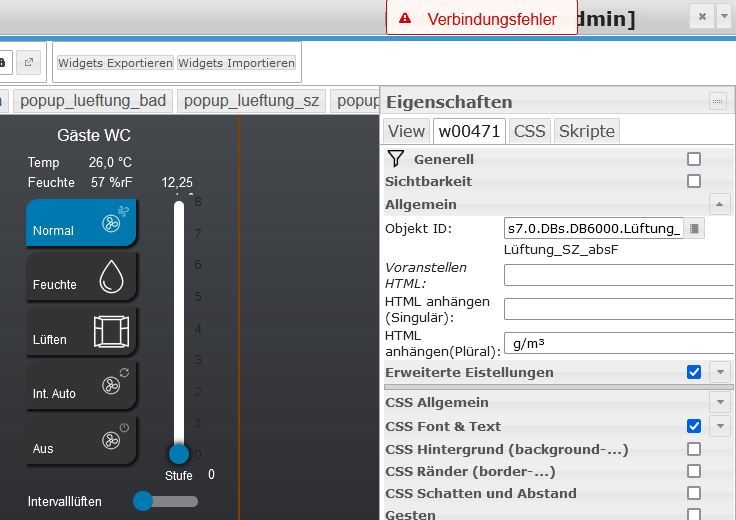
iob diag ergibt folgendes:
======== Start marking the full check here =========


Skript v.2023-04-16

*** BASE SYSTEM ***
Architecture    : x86_64
Docker          : v8.0.1
Virtualization  : Unknown (buanet/Synology?)
Distributor ID: Debian
Description:    Debian GNU/Linux 11 (bullseye)
Release:        11
Codename:       bullseye

PRETTY_NAME="Debian GNU/Linux 11 (bullseye)"
NAME="Debian GNU/Linux"
VERSION_ID="11"
VERSION="11 (bullseye)"
VERSION_CODENAME=bullseye
ID=debian
HOME_URL="https://www.debian.org/"
SUPPORT_URL="https://www.debian.org/support"
BUG_REPORT_URL="https://bugs.debian.org/"

Systemuptime and Load:
 13:25:26 up 6 days, 10:35,  0 users,  load average: 0.41, 0.20, 0.14
CPU threads: 2


*** Time and Time Zones ***
Fri Jun 23 11:25:26 UTC 2023
Fri Jun 23 13:25:26 CEST 2023
CEST +0200
Etc/UTC

*** User and Groups ***
root
/root
root

*** X-Server-Setup ***
X-Server:       false
Desktop:
Terminal:


*** MEMORY ***
               total        used        free      shared  buff/cache   available
Mem:            1.8G        1.4G         99M        1.0M        294M        193M
Swap:           3.1G        1.5G        1.6G
Total:          4.9G        2.9G        1.7G

         1753 M total memory
         1359 M used memory
          531 M active memory
          525 M inactive memory
           99 M free memory
            0 M buffer memory
          293 M swap cache
         3101 M total swap
         1545 M used swap
         1556 M free swap

*** FILESYSTEM ***
Filesystem        Type   Size  Used Avail Use% Mounted on
/dev/vg1/volume_1 btrfs  889G  5.4G  884G   1% /
tmpfs             tmpfs   64M     0   64M   0% /dev
tmpfs             tmpfs  877M     0  877M   0% /sys/fs/cgroup
shm               tmpfs   64M     0   64M   0% /dev/shm
/dev/vg1/volume_1 btrfs  889G  5.4G  884G   1% /opt/iobroker
tmpfs             tmpfs  877M     0  877M   0% /proc/acpi
tmpfs             tmpfs  877M     0  877M   0% /proc/scsi
tmpfs             tmpfs  877M     0  877M   0% /sys/firmware

Messages concerning ext4 filesystem in dmesg:
[Sat Jun 17 02:50:03 2023] EXT4-fs (md0): couldn't mount as ext3 due to feature incompatibilities
[Sat Jun 17 02:50:03 2023] EXT4-fs (md0): mounted filesystem with ordered data mode. Opts: (null)
[Sat Jun 17 02:50:04 2023] EXT4-fs (md0): couldn't mount as ext3 due to feature incompatibilities
[Sat Jun 17 02:50:04 2023] EXT4-fs (md0): mounted filesystem with ordered data mode. Opts: (null)
[Sat Jun 17 02:50:09 2023] EXT4-fs (md0): couldn't mount as ext3 due to feature incompatibilities
[Sat Jun 17 02:50:09 2023] EXT4-fs (md0): mounted filesystem with ordered data mode. Opts: (null)
[Sat Jun 17 02:50:10 2023] EXT4-fs (md0): couldn't mount as ext3 due to feature incompatibilities
[Sat Jun 17 02:50:10 2023] EXT4-fs (md0): mounted filesystem with ordered data mode. Opts: barrier=1
[Sat Jun 17 02:50:46 2023] EXT4-fs (loop0): mounted filesystem with ordered data mode. Opts: (null)

Show mounted filesystems (real ones only):
TARGET             SOURCE                                                                                                                    FSTYPE OPTIONS
/                  /dev/vg1/volume_1[/@syno/@docker/btrfs/subvolumes/96abe3365b486341f937c50329452ff1a999250b362c2487cca8a6be80dee044]       btrfs  rw,nodev,relatime,ssd,synoacl,space_cache=v2,auto_reclaim_space,metadata_ratio=50,block_group_cache_tree,syno_allocator,subvolid=302,subvol=/@syno/@docker/btrfs/subvolumes/96abe3365b486341f937c50329452ff1a999250b362c2487cca8a6be80dee044
|-/opt/iobroker    /dev/vg1/volume_1[/@syno/@docker/volumes/4e009e52d4c8c9014dd9b3c5f83c32ade2e66d1daa8b143becec6333d21fc9c3/_data]          btrfs  rw,nodev,relatime,ssd,synoacl,space_cache=v2,auto_reclaim_space,metadata_ratio=50,block_group_cache_tree,syno_allocator,subvolid=256,subvol=/@syno/@docker/volumes/4e009e52d4c8c9014dd9b3c5f83c32ade2e66d1daa8b143becec6333d21fc9c3/_data
|-/etc/resolv.conf /dev/vg1/volume_1[/@syno/@docker/containers/20447e8ee1f4b8a252285c6eb4bc9e291a442963cc2c9aa59419cb6e87a22455/resolv.conf] btrfs  rw,nodev,relatime,ssd,synoacl,space_cache=v2,auto_reclaim_space,metadata_ratio=50,block_group_cache_tree,syno_allocator,subvolid=256,subvol=/@syno/@docker/containers/20447e8ee1f4b8a252285c6eb4bc9e291a442963cc2c9aa59419cb6e87a22455/resolv.conf
|-/etc/hostname    /dev/vg1/volume_1[/@syno/@docker/containers/20447e8ee1f4b8a252285c6eb4bc9e291a442963cc2c9aa59419cb6e87a22455/hostname]    btrfs  rw,nodev,relatime,ssd,synoacl,space_cache=v2,auto_reclaim_space,metadata_ratio=50,block_group_cache_tree,syno_allocator,subvolid=256,subvol=/@syno/@docker/containers/20447e8ee1f4b8a252285c6eb4bc9e291a442963cc2c9aa59419cb6e87a22455/hostname
`-/etc/hosts       /dev/vg1/volume_1[/@syno/@docker/containers/20447e8ee1f4b8a252285c6eb4bc9e291a442963cc2c9aa59419cb6e87a22455/hosts]       btrfs  rw,nodev,relatime,ssd,synoacl,space_cache=v2,auto_reclaim_space,metadata_ratio=50,block_group_cache_tree,syno_allocator,subvolid=256,subvol=/@syno/@docker/containers/20447e8ee1f4b8a252285c6eb4bc9e291a442963cc2c9aa59419cb6e87a22455/hosts

Files in neuralgic directories:

/var:
16M     /var/
13M     /var/lib/dpkg
13M     /var/lib
12M     /var/lib/dpkg/info
1.9M    /var/cache/debconf


/opt/iobroker/backups:
46M     /opt/iobroker/backups/

/opt/iobroker/iobroker-data:
299M    /opt/iobroker/iobroker-data/
190M    /opt/iobroker/iobroker-data/files
58M     /opt/iobroker/iobroker-data/backup-objects
52M     /opt/iobroker/iobroker-data/files/javascript.admin
45M     /opt/iobroker/iobroker-data/files/devices.admin

The five largest files in iobroker-data are:
35M     /opt/iobroker/iobroker-data/files/devices.admin/static/js/main.24f2bb56.js.map
18M     /opt/iobroker/iobroker-data/files/s7.admin/static/js/main.59233a80.js.map
16M     /opt/iobroker/iobroker-data/states.jsonl
13M     /opt/iobroker/iobroker-data/objects.jsonl
8.6M    /opt/iobroker/iobroker-data/files/devices.admin/static/js/main.24f2bb56.js

*** NodeJS-Installation ***

/usr/bin/nodejs         v18.16.0
/usr/bin/node           v18.16.0
/usr/bin/npm            9.5.1
/usr/bin/npx            9.5.1


nodejs:
  Installed: 18.16.0-deb-1nodesource1
  Candidate: 18.16.0-deb-1nodesource1
  Version table:
 *** 18.16.0-deb-1nodesource1 100
        100 /var/lib/dpkg/status

Temp directories causing npm8 problem: 0
No problems detected

*** ioBroker-Installation ***

ioBroker Status
iobroker is running on this host.


Objects type: jsonl
States  type: jsonl

MULTIHOSTSERVICE/enabled: false

Core adapters versions
js-controller:  4.0.24
admin:          6.3.5
javascript:     7.0.3
Vielleicht sieht einer der Profis ja was hier nicht rundläuft.
Danke fürs Helfen
-
Und das hat jetzt genau an welcher Stelle mit deinem Betriebssystem zu tun?
nichts. Ich mag linux und will es besser kennenlernen.
Aber wieder zum Thema:
Ich hab mich wohl zu früh gefreut:
zum Einen gibt es seit der Wiederherstellung probleme mit dem Speicher:
Aber wenn ich auf den Host gehe sieht das nciht nach einem Speicherprobelm aus:
zum Anderen hab ich noch Probelme bei der VIS: Verbindungsfehler
iob diag ergibt folgendes:
======== Start marking the full check here =========


Skript v.2023-04-16

*** BASE SYSTEM ***
Architecture    : x86_64
Docker          : v8.0.1
Virtualization  : Unknown (buanet/Synology?)
Distributor ID: Debian
Description:    Debian GNU/Linux 11 (bullseye)
Release:        11
Codename:       bullseye

PRETTY_NAME="Debian GNU/Linux 11 (bullseye)"
NAME="Debian GNU/Linux"
VERSION_ID="11"
VERSION="11 (bullseye)"
VERSION_CODENAME=bullseye
ID=debian
HOME_URL="https://www.debian.org/"
SUPPORT_URL="https://www.debian.org/support"
BUG_REPORT_URL="https://bugs.debian.org/"

Systemuptime and Load:
 13:25:26 up 6 days, 10:35,  0 users,  load average: 0.41, 0.20, 0.14
CPU threads: 2


*** Time and Time Zones ***
Fri Jun 23 11:25:26 UTC 2023
Fri Jun 23 13:25:26 CEST 2023
CEST +0200
Etc/UTC

*** User and Groups ***
root
/root
root

*** X-Server-Setup ***
X-Server:       false
Desktop:
Terminal:


*** MEMORY ***
               total        used        free      shared  buff/cache   available
Mem:            1.8G        1.4G         99M        1.0M        294M        193M
Swap:           3.1G        1.5G        1.6G
Total:          4.9G        2.9G        1.7G

         1753 M total memory
         1359 M used memory
          531 M active memory
          525 M inactive memory
           99 M free memory
            0 M buffer memory
          293 M swap cache
         3101 M total swap
         1545 M used swap
         1556 M free swap

*** FILESYSTEM ***
Filesystem        Type   Size  Used Avail Use% Mounted on
/dev/vg1/volume_1 btrfs  889G  5.4G  884G   1% /
tmpfs             tmpfs   64M     0   64M   0% /dev
tmpfs             tmpfs  877M     0  877M   0% /sys/fs/cgroup
shm               tmpfs   64M     0   64M   0% /dev/shm
/dev/vg1/volume_1 btrfs  889G  5.4G  884G   1% /opt/iobroker
tmpfs             tmpfs  877M     0  877M   0% /proc/acpi
tmpfs             tmpfs  877M     0  877M   0% /proc/scsi
tmpfs             tmpfs  877M     0  877M   0% /sys/firmware

Messages concerning ext4 filesystem in dmesg:
[Sat Jun 17 02:50:03 2023] EXT4-fs (md0): couldn't mount as ext3 due to feature incompatibilities
[Sat Jun 17 02:50:03 2023] EXT4-fs (md0): mounted filesystem with ordered data mode. Opts: (null)
[Sat Jun 17 02:50:04 2023] EXT4-fs (md0): couldn't mount as ext3 due to feature incompatibilities
[Sat Jun 17 02:50:04 2023] EXT4-fs (md0): mounted filesystem with ordered data mode. Opts: (null)
[Sat Jun 17 02:50:09 2023] EXT4-fs (md0): couldn't mount as ext3 due to feature incompatibilities
[Sat Jun 17 02:50:09 2023] EXT4-fs (md0): mounted filesystem with ordered data mode. Opts: (null)
[Sat Jun 17 02:50:10 2023] EXT4-fs (md0): couldn't mount as ext3 due to feature incompatibilities
[Sat Jun 17 02:50:10 2023] EXT4-fs (md0): mounted filesystem with ordered data mode. Opts: barrier=1
[Sat Jun 17 02:50:46 2023] EXT4-fs (loop0): mounted filesystem with ordered data mode. Opts: (null)

Show mounted filesystems (real ones only):
TARGET             SOURCE                                                                                                                    FSTYPE OPTIONS
/                  /dev/vg1/volume_1[/@syno/@docker/btrfs/subvolumes/96abe3365b486341f937c50329452ff1a999250b362c2487cca8a6be80dee044]       btrfs  rw,nodev,relatime,ssd,synoacl,space_cache=v2,auto_reclaim_space,metadata_ratio=50,block_group_cache_tree,syno_allocator,subvolid=302,subvol=/@syno/@docker/btrfs/subvolumes/96abe3365b486341f937c50329452ff1a999250b362c2487cca8a6be80dee044
|-/opt/iobroker    /dev/vg1/volume_1[/@syno/@docker/volumes/4e009e52d4c8c9014dd9b3c5f83c32ade2e66d1daa8b143becec6333d21fc9c3/_data]          btrfs  rw,nodev,relatime,ssd,synoacl,space_cache=v2,auto_reclaim_space,metadata_ratio=50,block_group_cache_tree,syno_allocator,subvolid=256,subvol=/@syno/@docker/volumes/4e009e52d4c8c9014dd9b3c5f83c32ade2e66d1daa8b143becec6333d21fc9c3/_data
|-/etc/resolv.conf /dev/vg1/volume_1[/@syno/@docker/containers/20447e8ee1f4b8a252285c6eb4bc9e291a442963cc2c9aa59419cb6e87a22455/resolv.conf] btrfs  rw,nodev,relatime,ssd,synoacl,space_cache=v2,auto_reclaim_space,metadata_ratio=50,block_group_cache_tree,syno_allocator,subvolid=256,subvol=/@syno/@docker/containers/20447e8ee1f4b8a252285c6eb4bc9e291a442963cc2c9aa59419cb6e87a22455/resolv.conf
|-/etc/hostname    /dev/vg1/volume_1[/@syno/@docker/containers/20447e8ee1f4b8a252285c6eb4bc9e291a442963cc2c9aa59419cb6e87a22455/hostname]    btrfs  rw,nodev,relatime,ssd,synoacl,space_cache=v2,auto_reclaim_space,metadata_ratio=50,block_group_cache_tree,syno_allocator,subvolid=256,subvol=/@syno/@docker/containers/20447e8ee1f4b8a252285c6eb4bc9e291a442963cc2c9aa59419cb6e87a22455/hostname
`-/etc/hosts       /dev/vg1/volume_1[/@syno/@docker/containers/20447e8ee1f4b8a252285c6eb4bc9e291a442963cc2c9aa59419cb6e87a22455/hosts]       btrfs  rw,nodev,relatime,ssd,synoacl,space_cache=v2,auto_reclaim_space,metadata_ratio=50,block_group_cache_tree,syno_allocator,subvolid=256,subvol=/@syno/@docker/containers/20447e8ee1f4b8a252285c6eb4bc9e291a442963cc2c9aa59419cb6e87a22455/hosts

Files in neuralgic directories:

/var:
16M     /var/
13M     /var/lib/dpkg
13M     /var/lib
12M     /var/lib/dpkg/info
1.9M    /var/cache/debconf


/opt/iobroker/backups:
46M     /opt/iobroker/backups/

/opt/iobroker/iobroker-data:
299M    /opt/iobroker/iobroker-data/
190M    /opt/iobroker/iobroker-data/files
58M     /opt/iobroker/iobroker-data/backup-objects
52M     /opt/iobroker/iobroker-data/files/javascript.admin
45M     /opt/iobroker/iobroker-data/files/devices.admin

The five largest files in iobroker-data are:
35M     /opt/iobroker/iobroker-data/files/devices.admin/static/js/main.24f2bb56.js.map
18M     /opt/iobroker/iobroker-data/files/s7.admin/static/js/main.59233a80.js.map
16M     /opt/iobroker/iobroker-data/states.jsonl
13M     /opt/iobroker/iobroker-data/objects.jsonl
8.6M    /opt/iobroker/iobroker-data/files/devices.admin/static/js/main.24f2bb56.js

*** NodeJS-Installation ***

/usr/bin/nodejs         v18.16.0
/usr/bin/node           v18.16.0
/usr/bin/npm            9.5.1
/usr/bin/npx            9.5.1


nodejs:
  Installed: 18.16.0-deb-1nodesource1
  Candidate: 18.16.0-deb-1nodesource1
  Version table:
 *** 18.16.0-deb-1nodesource1 100
        100 /var/lib/dpkg/status

Temp directories causing npm8 problem: 0
No problems detected

*** ioBroker-Installation ***

ioBroker Status
iobroker is running on this host.


Objects type: jsonl
States  type: jsonl

MULTIHOSTSERVICE/enabled: false

Core adapters versions
js-controller:  4.0.24
admin:          6.3.5
javascript:     7.0.3
Vielleicht sieht einer der Profis ja was hier nicht rundläuft.
Danke fürs Helfen
@frosch-23 sagte in vis funktioniert Nicht nach Update von node.js:
Mem: 1.8G 1.4G 99M 1.0M 294M 193M
deine Meinung
@frosch-23 sagte in vis funktioniert Nicht nach Update von node.js:
sieht das nciht nach einem Speicherprobelm aus:
kann ich nicht teilen.
Kenne die Docker Installationen nicht, aber knapp 2 GB RAM erscheinen mir sehr wenig
kein Support per PN! - Fragen im Forum stellen - Benutzt das Voting rechts unten im Beitrag wenn er euch geholfen hat.
Das Forum freut sich über eine Spende. Benutzt dazu den Spendenbutton oben rechts. Danke!
der Installationsfixer: curl -fsL https://iobroker.net/fix.sh | bash - -
@frosch-23 sagte in vis funktioniert Nicht nach Update von node.js:
Mem: 1.8G 1.4G 99M 1.0M 294M 193M
deine Meinung
@frosch-23 sagte in vis funktioniert Nicht nach Update von node.js:
sieht das nciht nach einem Speicherprobelm aus:
kann ich nicht teilen.
Kenne die Docker Installationen nicht, aber knapp 2 GB RAM erscheinen mir sehr wenig
-
@frosch-23 sagte in vis funktioniert Nicht nach Update von node.js:
Mem: 1.8G 1.4G 99M 1.0M 294M 193M
deine Meinung
@frosch-23 sagte in vis funktioniert Nicht nach Update von node.js:
sieht das nciht nach einem Speicherprobelm aus:
kann ich nicht teilen.
Kenne die Docker Installationen nicht, aber knapp 2 GB RAM erscheinen mir sehr wenig
@homoran said in vis funktioniert Nicht nach Update von node.js:
@frosch-23 sagte in vis funktioniert Nicht nach Update von node.js:
Mem: 1.8G 1.4G 99M 1.0M 294M 193M
deine Meinung
@frosch-23 sagte in vis funktioniert Nicht nach Update von node.js:
sieht das nciht nach einem Speicherprobelm aus:
kann ich nicht teilen.
Kenne die Docker Installationen nicht, aber knapp 2 GB RAM erscheinen mir sehr wenig
hm, ich frag mich zwar warum in ioBroker -> Host nur ~14% als benutzt stehen. Aber ich muss euch Recht geben. 99MB frei ist wenig.
Liegt das an meinem Synology Nas DS220+, der Installation im Docker oder an irgendwelchen Einstellungen? (Dockker installation über Portainer) Wenn ich das richtig weiß (bitte korrigiert mich) kann ich auf 8GB erweitern. Braucht die Installation so viel und das ist dann die Lösung oder ist bei der Wiederherstellung etwas schief gelaufen? Vorher kam keine Melddung. Kann aber heute nicht mehr sagen ob es vielleicht knapp war.
-
@homoran said in vis funktioniert Nicht nach Update von node.js:
@frosch-23 sagte in vis funktioniert Nicht nach Update von node.js:
Mem: 1.8G 1.4G 99M 1.0M 294M 193M
deine Meinung
@frosch-23 sagte in vis funktioniert Nicht nach Update von node.js:
sieht das nciht nach einem Speicherprobelm aus:
kann ich nicht teilen.
Kenne die Docker Installationen nicht, aber knapp 2 GB RAM erscheinen mir sehr wenig
hm, ich frag mich zwar warum in ioBroker -> Host nur ~14% als benutzt stehen. Aber ich muss euch Recht geben. 99MB frei ist wenig.
Liegt das an meinem Synology Nas DS220+, der Installation im Docker oder an irgendwelchen Einstellungen? (Dockker installation über Portainer) Wenn ich das richtig weiß (bitte korrigiert mich) kann ich auf 8GB erweitern. Braucht die Installation so viel und das ist dann die Lösung oder ist bei der Wiederherstellung etwas schief gelaufen? Vorher kam keine Melddung. Kann aber heute nicht mehr sagen ob es vielleicht knapp war.
@frosch-23 sagte in vis funktioniert Nicht nach Update von node.js:
warum in ioBroker -> Host nur ~14% als benutzt stehen.
wohl eher als frei!





Hey! Du scheinst an dieser Unterhaltung interessiert zu sein, hast aber noch kein Konto.
Hast du es satt, bei jedem Besuch durch die gleichen Beiträge zu scrollen? Wenn du dich für ein Konto anmeldest, kommst du immer genau dorthin zurück, wo du zuvor warst, und kannst dich über neue Antworten benachrichtigen lassen (entweder per E-Mail oder Push-Benachrichtigung). Du kannst auch Lesezeichen speichern und Beiträge positiv bewerten, um anderen Community-Mitgliedern deine Wertschätzung zu zeigen.
Mit deinem Input könnte dieser Beitrag noch besser werden 💗
Registrieren AnmeldenSupport us
318
Online33.0k
Benutzer83.6k
Themen1.3m
Beiträge