Skip to content

Node-Red

Hilfe für Skripterstellung mit Node-RED

953 Topics 13.1k Posts

NEWS

  • Probleme mit johnny five und raspi-io

    1
    0 Votes
    1 Posts
    194 Views
    No one has replied
  • Problem bei Node-red installation

    1
    1
    0 Votes
    1 Posts
    226 Views
    No one has replied
  • Node Red "Schaltflächen" und Geräte einbinden

    14
    0 Votes
    14 Posts
    2k Views
    F
    Hallo, den Sonoff Basic möchte ich nicht verwenden, da er momentan nicht meinem Projektzweck entspricht. So wie ich das sehe, gibt es keine Hardware von der Stange und deshalb habe ich mich nun für einen ESP8266-ESP12F und Arduino entschieden. Damit werde ich beginnen und mal sehn, wie ich das als Anfänger umgesetzt bekomme. Vielen Dank für all die Tipps und Infos aus diesem Beitrag vor allem von Ralla66 SY Falke07
  • Node Red: Zeit Badfenster offen

    20
    0 Votes
    20 Posts
    5k Views
    R
    @HomeSweetHome sagte in Node Red: Zeit Badfenster offen: Wo bekomme ich die Zeit her, bzw. die steckt doch nicht in msg.payload.lc oder? genau. Ist die Unix-Zeit. Die Umrechnung in Sekunden geschieht dann hier: // (gespeicherte UNIX Zeit in ms - aktuelle Zeit in ms) / 1000 = Differenz in Sekunden ... Math.floor((msg.payload.lc - flow.get("FensterAufStart"))/1000) Beim Schließen wird die Funktion immer hier beendet "if (typeof flow.get("FensterAufStart") === "undefined") return false;" und Debug Node noch dahinter wird nicht "stimuliert" Dass passiert, wenn die Flow-Variable "FensterAufStart" noch nicht angelegt ist, was wiederum dann der Fall ist, wenn beim ersten feuern des ioBroker-in-nodes das Fender schließt. Weil die Variable ja beim Öffnen angelegt wird. Kann es sein, dass dein ioBroker-In-Node nicht auf Object steht?[image: 1575215186496-2019-12-01_16-43-22.png]
  • Schalter schalten nicht

    6
    2
    0 Votes
    6 Posts
    682 Views
    G
    @Stefan3107 danke nettes Spielzeug jetzt ;)
  • Probleme mit A/D Wandler 3008 und Node-Red

    2
    0 Votes
    2 Posts
    259 Views
    S
    Hallo Ich habe auch dieses Note in Verwendung, bei mir Funktioniert es nur dann wenn ich nach einer Änderung den Raspi neu starte, erst dann werden mir die Werte angezeigt, Habe einen 3204 in Verwendung. LG Stefan
  • node-red Visualisierung nach Startup

    node-red communication
    5
    0 Votes
    5 Posts
    2k Views
    R
    @smarthome-tricks-de Dann wirst du aber immer noch das Problem haben, dass deine View nicht aktualisiert, wenn der Browser/Fenster neu aufgerufen wird.
  • Problem mit der Trigger Node

    2
    0 Votes
    2 Posts
    706 Views
    V
    Ich habe es hingekriegt. Nach der Trigger Node habe ich eine Switch Node gesetzt die nur eine "1" ausgeben kann. Nicht schön aber es funktioniert
  • Node-Red Fernzugriff

    5
    0 Votes
    5 Posts
    944 Views
    T
    werde ich machen. Danke Gruß Thomas
  • (gelöst) Node-Red "Alexa local" nicht mehr möglich

    86
    2
    0 Votes
    86 Posts
    13k Views
    R
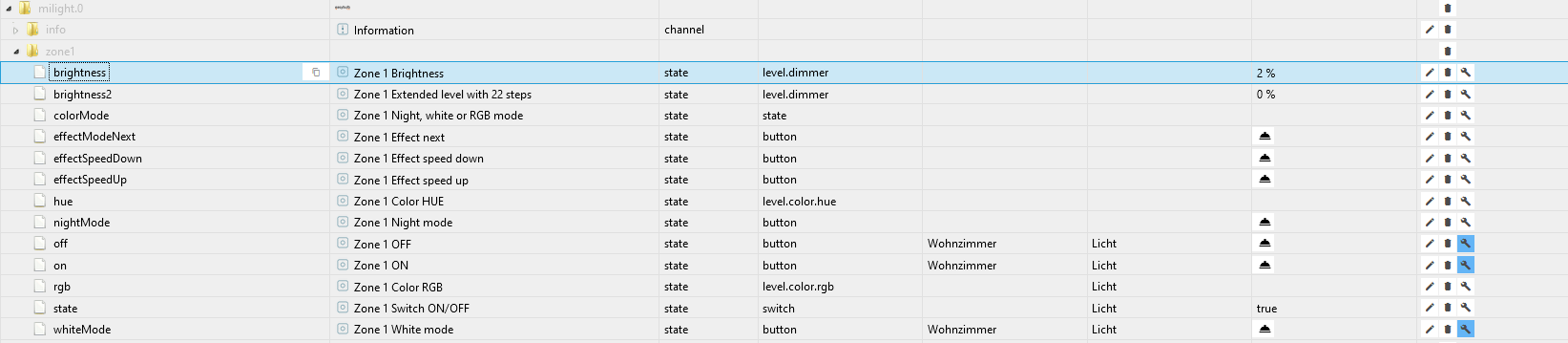
    So klappt es mit Node Red bei mir. Mit whitemode und RGB und Helligkeit bei Milight LEDs [image: 1573912559219-2019-11-16-14_49_40-microsoft-store.png] [ { "id": "bb6a24a9.7a0648", "type": "tab", "label": "Flow 2", "disabled": false, "info": "" }, { "id": "4edc288f.fb8d2", "type": "ioBroker out", "z": "bb6a24a9.7a0648", "name": "Zone 1 ON", "topic": "milight.0.zone1.on", "ack": "false", "autoCreate": "false", "x": 870, "y": 340, "wires": [] }, { "id": "c7a3f1a9.66d89", "type": "ioBroker out", "z": "bb6a24a9.7a0648", "name": "Zone 1 OFF", "topic": "milight.0.zone1.off", "ack": "false", "autoCreate": "false", "x": 1570, "y": 460, "wires": [] }, { "id": "b32b2e08.f13fa", "type": "amazon-echo-device", "z": "bb6a24a9.7a0648", "name": "Led Licht", "topic": "Led Licht", "x": 460, "y": 220, "wires": [ [ "eebe38ee.e7fba8" ] ] }, { "id": "972a82a4.7286a", "type": "change", "z": "bb6a24a9.7a0648", "name": "", "rules": [ { "t": "change", "p": "payload", "pt": "msg", "from": "off", "fromt": "str", "to": "true", "tot": "str" } ], "action": "", "property": "", "from": "", "to": "", "reg": false, "x": 900, "y": 400, "wires": [ [ "c7a3f1a9.66d89" ] ] }, { "id": "eebe38ee.e7fba8", "type": "switch", "z": "bb6a24a9.7a0648", "name": "", "property": "payload", "propertyType": "msg", "rules": [ { "t": "eq", "v": "on", "vt": "str" }, { "t": "eq", "v": "off", "vt": "str" } ], "checkall": "true", "repair": false, "outputs": 2, "x": 640, "y": 240, "wires": [ [ "4edc288f.fb8d2", "feaa5ed5.336b9", "47531e52.0c6bb8", "d1daa37a.6f41a" ], [ "972a82a4.7286a" ] ] }, { "id": "feaa5ed5.336b9", "type": "function", "z": "bb6a24a9.7a0648", "name": "Dimmer", "func": "var newMsg = { payload: Math.round (msg.bri*100/254) } ;\nreturn newMsg;", "outputs": 1, "noerr": 0, "x": 840, "y": 160, "wires": [ [ "99fac24d.8cb9" ] ] }, { "id": "99fac24d.8cb9", "type": "ioBroker out", "z": "bb6a24a9.7a0648", "name": "Zone 1 Brightness", "topic": "milight.0.zone1.brightness", "ack": "false", "autoCreate": "true", "x": 1050, "y": 160, "wires": [] }, { "id": "ffe043eb.210e5", "type": "ioBroker out", "z": "bb6a24a9.7a0648", "name": "Zone 1 Color RGB", "topic": "milight.0.zone1.rgb", "ack": "false", "autoCreate": "false", "x": 1550, "y": 140, "wires": [] }, { "id": "3f9207a4.c2f028", "type": "amazon-echo-device", "z": "bb6a24a9.7a0648", "name": "Led Lampe", "topic": "Led Lampe", "x": 450, "y": 280, "wires": [ [ "eebe38ee.e7fba8" ] ] }, { "id": "47531e52.0c6bb8", "type": "change", "z": "bb6a24a9.7a0648", "name": "", "rules": [ { "t": "set", "p": "payload", "pt": "msg", "to": "rgb", "tot": "msg" } ], "action": "", "property": "", "from": "", "to": "", "reg": false, "x": 1050, "y": 220, "wires": [ [ "ffe043eb.210e5" ] ] }, { "id": "b1acd561.57c8c8", "type": "ioBroker out", "z": "bb6a24a9.7a0648", "name": "Zone 1 Brightness", "topic": "milight.0.zone1.brightness", "ack": "false", "autoCreate": "true", "x": 1550, "y": 240, "wires": [] }, { "id": "d1daa37a.6f41a", "type": "function", "z": "bb6a24a9.7a0648", "name": "", "func": "var newMsg = { payload: Math.round (msg.bri*100/254) } ;\nvar new2Msg = {payload: true};\n\nif (msg.colormode == \"ct\") {\n return [ null, new2Msg ];\n} else {\n return [ newMsg, null ];\n}", "outputs": 2, "noerr": 0, "x": 1290, "y": 280, "wires": [ [ "b1acd561.57c8c8" ], [ "cdea20f1.8b3c98" ] ] }, { "id": "cdea20f1.8b3c98", "type": "ioBroker out", "z": "bb6a24a9.7a0648", "name": "Zone 1 White mode", "topic": "milight.0.zone1.whiteMode", "ack": "false", "autoCreate": "false", "x": 1520, "y": 340, "wires": [] }, { "id": "be63c33e.43c8f8", "type": "amazon-echo-hub", "z": "bb6a24a9.7a0648", "port": "80", "processinput": 0, "x": 220, "y": 220, "wires": [ [ "b32b2e08.f13fa", "3f9207a4.c2f028" ] ] } ]
  • Status von Geräten in Homekit anzeigen

    3
    1
    0 Votes
    3 Posts
    1k Views
    B
    @oberfragger Ja da gebe ich dir recht. Also gelöst habe ich es folgendermaßen: In der dummy Funktion steht jetzt nun folgendes: var value = (msg.payload == "true"); msg.payload = {On: value} return msg; Damit war ich nun in der Lage den Status des Schalter in HomeKit zu aktualisieren, wenn ich die Taster physikalisch betätigt habe. (Darum ging es mir auch hier) Bei dem Schalter handelt sich hier um einen Lonsonho Wifi Smart Switch, darunter läuft ebenfalls Tuya welches ich easy mit tuya-convert flashen konnte. So sieht der Schalter aus: [image: 1573636753791-bildschirmfoto-2019-11-13-um-10.18.56.png] In Tasmoto habe ich diese Belegung: [image: 1573636837736-bildschirmfoto-2019-11-11-um-21.07.49.png] Jetzt funktioniert nun auch alles :)
  • Wert in Influxdb schreiben

    2
    1
    0 Votes
    2 Posts
    901 Views
    B
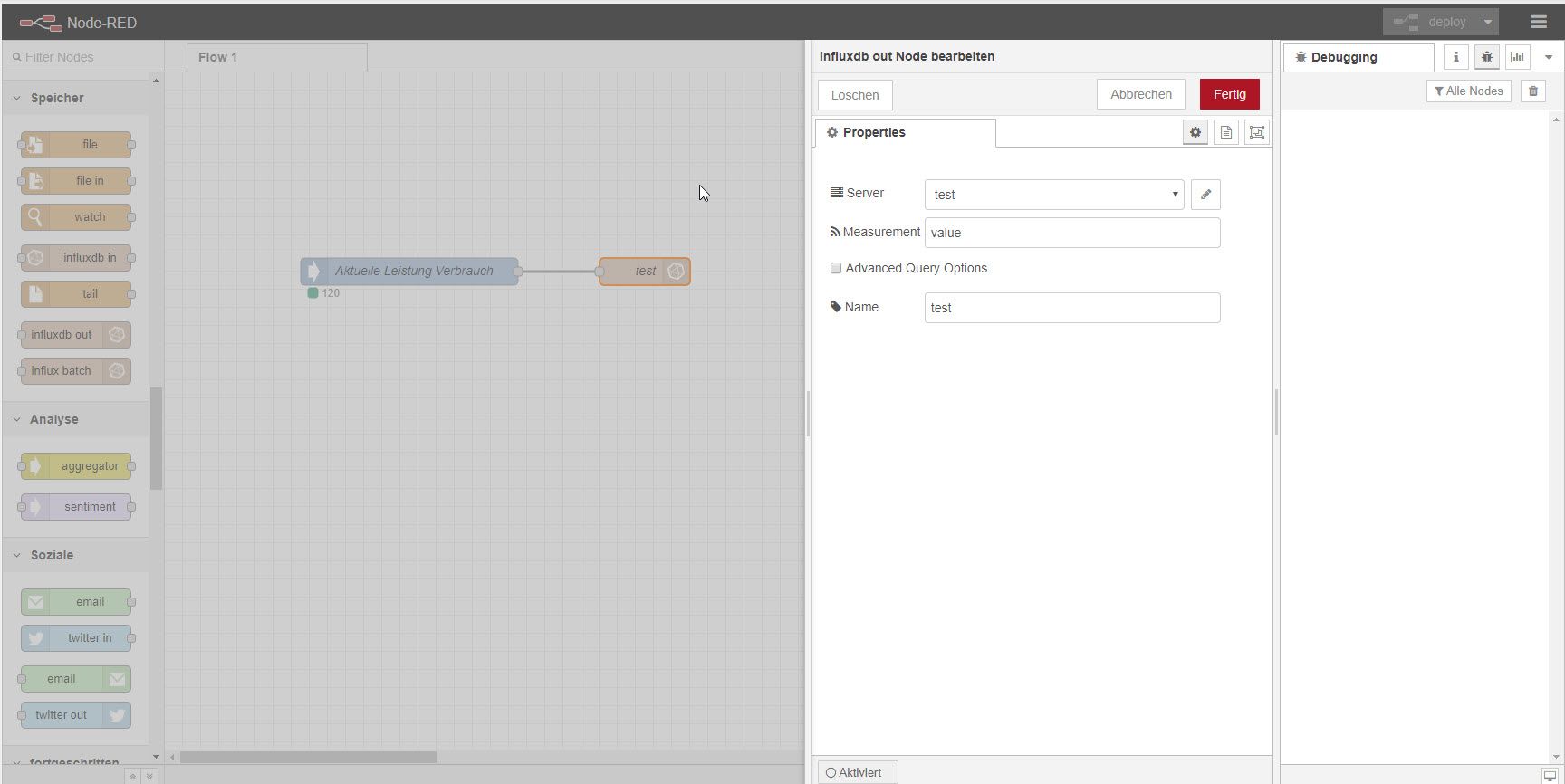
    Nutze das schon eine ganze weile, genau so - ohne Probleme. Wenn Du in die influxdb direkt auf der Shell mal schaust ? Anmelden mit deinen hinterlegten Daten von NodeRed und dann mal alle Messurements ausgeben. Mal sehen ob da was kommt.
  • failed to Open Vchiq instance

    1
    0 Votes
    1 Posts
    197 Views
    No one has replied
  • node-red-contrib-amazon-echo Dimmer reagiert nicht

    node-red
    2
    3
    0 Votes
    2 Posts
    1k Views
    R
    Hmmm habe schonmal ein Teil der Lösung selbst gefunden. Wenn es jemanden interessiert. Die Lösung war ein anderes Objekt. Damit kann man die Lampen dimmen und aus und einschalten. Die Farben sind auch nicht besonders schwer gewesen: im msg.rgb sind diese enthalten und müssen nur dem Objekt zugeordnet werden. Jetzt kämpfe ich noch mit dem umschalten auf weiss. Dafür wäre eigentlich RGB 255,0,0 zuständig. klappt aber nicht. Vielleicht hat jemand da einen Tip für mich. Weiss gibt es als extra Datenpunkt. Er nennt isch whiteMode. Aber wie kann ich ihn setzen abhängig von dem was Alexa liefert wenn ich "Schalte LED Licht auf weiss" sage. Payload ist [255,255,0] Hmmm hier habe ich keine Idee. Gelb klappt leider auch nicht :( [image: 1573330853276-2019-11-09-21_20_31-window.png] [image: 1573330653847-2019-11-09-21_17_04-window.png] Hier der Code: [ { "id": "53be16c5.4b5df8", "type": "tab", "label": "Flow 1", "disabled": false, "info": "" }, { "id": "60346ca3.879a8c", "type": "ioBroker out", "z": "53be16c5.4b5df8", "name": "Schalter2An", "topic": "broadlink2.0.RM:Broadlink-RMPROPLUS-d0-a1-a4.L.Schalter2AN", "ack": "false", "autoCreate": "true", "x": 1050, "y": 40, "wires": [] }, { "id": "b78d10ca.35874", "type": "ioBroker out", "z": "53be16c5.4b5df8", "name": "Zone 1 ON", "topic": "milight.0.zone1.on", "ack": "false", "autoCreate": "false", "x": 1210, "y": 320, "wires": [] }, { "id": "e0e7e759.4c9cd8", "type": "ioBroker out", "z": "53be16c5.4b5df8", "name": "Zone 1 OFF", "topic": "milight.0.zone1.off", "ack": "false", "autoCreate": "false", "x": 1210, "y": 380, "wires": [] }, { "id": "4fc21184.520f9", "type": "ioBroker out", "z": "53be16c5.4b5df8", "name": "Schalter2Aus", "topic": "broadlink2.0.RM:Broadlink-RMPROPLUS-d0-a1-a4.L.Schalter2AUS", "ack": "false", "autoCreate": "true", "x": 1060, "y": 100, "wires": [] }, { "id": "6e7ed367.3275ec", "type": "amazon-echo-device", "z": "53be16c5.4b5df8", "name": "kleines Licht", "topic": "kleines Licht", "x": 380, "y": 40, "wires": [ [ "163001df.df0626" ] ] }, { "id": "83458182.dcaf88", "type": "amazon-echo-device", "z": "53be16c5.4b5df8", "name": "Led Licht", "topic": "Led Licht", "x": 360, "y": 220, "wires": [ [ "67a7c038.55e108", "522aff17.2a956" ] ] }, { "id": "1975f4dc.9f505b", "type": "change", "z": "53be16c5.4b5df8", "name": "", "rules": [ { "t": "change", "p": "payload", "pt": "msg", "from": "on", "fromt": "str", "to": "true", "tot": "str" } ], "action": "", "property": "", "from": "", "to": "", "reg": false, "x": 800, "y": 240, "wires": [ [ "b78d10ca.35874" ] ] }, { "id": "d0bd6544.092dc8", "type": "change", "z": "53be16c5.4b5df8", "name": "", "rules": [ { "t": "change", "p": "payload", "pt": "msg", "from": "off", "fromt": "str", "to": "true", "tot": "str" } ], "action": "", "property": "", "from": "", "to": "", "reg": false, "x": 800, "y": 300, "wires": [ [ "e0e7e759.4c9cd8" ] ] }, { "id": "67a7c038.55e108", "type": "switch", "z": "53be16c5.4b5df8", "name": "", "property": "payload", "propertyType": "msg", "rules": [ { "t": "eq", "v": "on", "vt": "str" }, { "t": "eq", "v": "off", "vt": "str" } ], "checkall": "true", "repair": false, "outputs": 2, "x": 540, "y": 300, "wires": [ [ "1975f4dc.9f505b", "d5e35e4e.b96ff" ], [ "d0bd6544.092dc8" ] ] }, { "id": "163001df.df0626", "type": "switch", "z": "53be16c5.4b5df8", "name": "", "property": "payload", "propertyType": "msg", "rules": [ { "t": "eq", "v": "on", "vt": "str" }, { "t": "eq", "v": "off", "vt": "str" } ], "checkall": "true", "repair": false, "outputs": 2, "x": 560, "y": 60, "wires": [ [ "87a22a64.1843b8" ], [ "9fd5efc2.216c38" ] ] }, { "id": "87a22a64.1843b8", "type": "change", "z": "53be16c5.4b5df8", "name": "", "rules": [ { "t": "change", "p": "payload", "pt": "msg", "from": "on", "fromt": "str", "to": "true", "tot": "str" } ], "action": "", "property": "", "from": "", "to": "", "reg": false, "x": 770, "y": 40, "wires": [ [ "60346ca3.879a8c" ] ] }, { "id": "9fd5efc2.216c38", "type": "change", "z": "53be16c5.4b5df8", "name": "", "rules": [ { "t": "change", "p": "payload", "pt": "msg", "from": "on", "fromt": "str", "to": "true", "tot": "str" } ], "action": "", "property": "", "from": "", "to": "", "reg": false, "x": 780, "y": 80, "wires": [ [ "4fc21184.520f9" ] ] }, { "id": "9d4acb7d.b75bc", "type": "amazon-echo-hub", "z": "53be16c5.4b5df8", "port": "80", "processinput": 0, "x": 120, "y": 60, "wires": [ [ "6e7ed367.3275ec", "83458182.dcaf88", "cfe5816a.9e2c5" ] ] }, { "id": "cfe5816a.9e2c5", "type": "amazon-echo-device", "z": "53be16c5.4b5df8", "name": "kleine Lampe", "topic": "kleine Lampe", "x": 380, "y": 100, "wires": [ [ "163001df.df0626" ] ] }, { "id": "d5e35e4e.b96ff", "type": "function", "z": "53be16c5.4b5df8", "name": "Dimmer", "func": "var newMsg = { payload: Math.round (msg.bri*100/254) } ;\nreturn newMsg;", "outputs": 1, "noerr": 0, "x": 760, "y": 180, "wires": [ [ "a0522704.1810f", "38b7b4e7.d8f324" ] ] }, { "id": "a0522704.1810f", "type": "ioBroker out", "z": "53be16c5.4b5df8", "name": "Zone 1 Brightness", "topic": "milight.0.zone1.brightness", "ack": "false", "autoCreate": "true", "x": 1230, "y": 180, "wires": [] }, { "id": "38b7b4e7.d8f324", "type": "ioBroker out", "z": "53be16c5.4b5df8", "name": "Zone 1 Extended level with 22 steps", "topic": "milight.0.zone1.brightness2", "ack": "false", "autoCreate": "true", "x": 1290, "y": 240, "wires": [] }, { "id": "522aff17.2a956", "type": "change", "z": "53be16c5.4b5df8", "name": "", "rules": [ { "t": "set", "p": "payload", "pt": "msg", "to": "rgb", "tot": "msg" } ], "action": "", "property": "", "from": "", "to": "", "reg": false, "x": 570, "y": 360, "wires": [ [ "de6c0884.a83658" ] ] }, { "id": "de6c0884.a83658", "type": "ioBroker out", "z": "53be16c5.4b5df8", "name": "Zone 1 Color RGB", "topic": "milight.0.zone1.rgb", "ack": "false", "autoCreate": "false", "x": 1230, "y": 460, "wires": [] }, { "id": "aa3c4562.4aa8e", "type": "function", "z": "53be16c5.4b5df8", "name": "", "func": "msg.payload = msg.payload;\nmsg.payload = msg.payload.toString();\nreturn msg;", "outputs": 1, "noerr": 0, "x": 650, "y": 460, "wires": [ [ "626eb162.d74ce8" ] ] }, { "id": "da86a305.ee2d", "type": "ioBroker out", "z": "53be16c5.4b5df8", "name": "Zone 1 Night, white or RGB mode", "topic": "milight.0.zone1.colorMode", "ack": "false", "autoCreate": "false", "x": 1440, "y": 540, "wires": [] }, { "id": "626eb162.d74ce8", "type": "function", "z": "53be16c5.4b5df8", "name": "", "func": "if(msg.payload==\"255,212,0\"){\t\nvar INFO = {payload:\"true\"}\n return INFO;\t\n}else{\nvar INFO2 = {payload:\"false\"}\n return INFO2;\n}", "outputs": 1, "noerr": 0, "x": 780, "y": 540, "wires": [ [ "da86a305.ee2d" ] ] } ]
  • Object wird im Flow "durchgeleitet" -

    1
    0 Votes
    1 Posts
    156 Views
    No one has replied
  • Node-Red mit Alexa

    Unsolved node-red
    24
    0 Votes
    24 Posts
    4k Views
    HALH
    Lösung in einem anderen Eintrag gefunden: [image: 1572983003086-dimmer.jpg] var newMsg = { payload: msg.bri*100/254 } ; return newMsg
  • Verschiedene Dashboards

    4
    0 Votes
    4 Posts
    2k Views
    V
    :+1: Danke!
  • NodeRed und Schalter

    1
    0 Votes
    1 Posts
    792 Views
    No one has replied
  • Alexa Smart Home v3 Responce

    1
    0 Votes
    1 Posts
    329 Views
    No one has replied
  • IOBroker und NodeRed - Fehlende Objekte

    3
    0 Votes
    3 Posts
    660 Views
    D
    Danke das war die Lösung:-)

332

Online

32.6k

Users

82.1k

Topics

1.3m

Posts