Skip to content
  • Home
  • Recent
  • Tags
  • 0 Unread 0
  • Categories
  • Unreplied
  • Popular
  • GitHub
  • Docu
  • Hilfe
Skins
  • Light
  • Brite
  • Cerulean
  • Cosmo
  • Flatly
  • Journal
  • Litera
  • Lumen
  • Lux
  • Materia
  • Minty
  • Morph
  • Pulse
  • Sandstone
  • Simplex
  • Sketchy
  • Spacelab
  • United
  • Yeti
  • Zephyr
  • Dark
  • Cyborg
  • Darkly
  • Quartz
  • Slate
  • Solar
  • Superhero
  • Vapor

  • Default (No Skin)
  • No Skin
Collapse
ioBroker Logo

Community Forum

donate donate
  1. ioBroker Community Home
  2. Deutsch
  3. ioBroker Allgemein
  4. WLAN-Steckdose Gintenco (Sonoff): Problem beim flashen mit Tasmota

NEWS

  • Monatsrückblick Januar/Februar 2026 ist online!
    BluefoxB
    Bluefox
    17
    1
    563

  • Jahresrückblick 2025 – unser neuer Blogbeitrag ist online! ✨
    BluefoxB
    Bluefox
    17
    1
    5.5k

  • Neuer Blogbeitrag: Monatsrückblick - Dezember 2025 🎄
    BluefoxB
    Bluefox
    13
    1
    1.4k

WLAN-Steckdose Gintenco (Sonoff): Problem beim flashen mit Tasmota

Scheduled Pinned Locked Moved ioBroker Allgemein
46 Posts 7 Posters 8.9k Views
  • Oldest to Newest
  • Newest to Oldest
  • Most Votes
Reply
  • Reply as topic
Log in to reply
This topic has been deleted. Only users with topic management privileges can see it.
  • S Offline
    S Offline
    s0nus
    wrote on last edited by
    #18

    @knopers1: Das Tool läßt sich unter Win10 nicht starten. Es schließt sich immer sofort.

    1 Reply Last reply
    0
    • SmarthomeMFS Offline
      SmarthomeMFS Offline
      SmarthomeMF
      wrote on last edited by
      #19

      Hallo zusammen

      Hatte auch meine Schwierigkeiten mit den Dingern….

      ich habe schon fast alles hin geschmissen.

      Ich bin dann zu diesem Typen gekommen der das perfekt erklärt

      https://www.youtube.com/user/SchimmerMediaHD/videos

      Der hat fast alles geflasht....

      Nur flashen tu ich mit Atom mit Ardoino kann ich es nicht....bin zu blöd dafür :D

      die von CREATIONX sind da auch voll gut drauf

      https://www.youtube.com/watch?v=Ps6u22o ... oCr0uVztgA

      https://www.youtube.com/watch?v=KI9NXFrqK7M

      Ich bin damit durch gekommen und habe schon 10 Sonoffs am laufen.

      Vielleicht hilft es dir.

      Max

      ioBroker auf einem NUC ,16GB RAM, 120GB SSD) mit Proxmox
      Cloud Pro, iot, Alexa, Sonos, sonoff, Fronius, Harmony, Doorbird, Shelly, Hue, Loxone, Mihome, …

      1 Reply Last reply
      0
      • K Offline
        K Offline
        knopers1
        wrote on last edited by
        #20

        in der Zip Datei hast den den Flasher, bitte aber vorerst im Ordner, da wo die ESPeasy Firmware drauf liegt, deine Tasmota firmware dazu kopieren.
        1526_espeasy_r120.zip

        HP Microserver Gen8, RPI-4, IoBroker,

        1 Reply Last reply
        0
        • S Offline
          S Offline
          s0nus
          wrote on last edited by
          #21

          @knopers1: Wenn ich unter Win10 das Flashtool starten will, klappt das Fenster sofort wieder zu.

          @SmarthomeMF: Die Anleitungen hatte bereits alle schon versucht.

          Ich verzweifle hier langsam. Entweder ist es doch kein Sonoff oder das Teil befindet sich nicht wirklich im Flashmodus. Bei der Erstinbetriebnahme gab es auch massive Probleme beim Anlernen. Ich habe es nun versucht mit:

          Taste drucken > Einstecken > Loslassen = LED blinke noch nicht

          Taste drucken > Einstecken > halten bis LED langsam blinkt > Loslassen

          Taste drucken > Einstecken > halten bis LED schnell blinkt > Loslassen

          aber alles hat nix gebracht. Der ESP wird nicht gefunden.

          1 Reply Last reply
          0
          • SmarthomeMFS Offline
            SmarthomeMFS Offline
            SmarthomeMF
            wrote on last edited by
            #22

            mit welchem Programm machst du den flash

            Max

            ioBroker auf einem NUC ,16GB RAM, 120GB SSD) mit Proxmox
            Cloud Pro, iot, Alexa, Sonos, sonoff, Fronius, Harmony, Doorbird, Shelly, Hue, Loxone, Mihome, …

            1 Reply Last reply
            0
            • SmarthomeMFS Offline
              SmarthomeMFS Offline
              SmarthomeMF
              wrote on last edited by
              #23

              Geht der flash vorgang durch oder bekommst du einen Error

              Max

              ioBroker auf einem NUC ,16GB RAM, 120GB SSD) mit Proxmox
              Cloud Pro, iot, Alexa, Sonos, sonoff, Fronius, Harmony, Doorbird, Shelly, Hue, Loxone, Mihome, …

              1 Reply Last reply
              0
              • S Offline
                S Offline
                s0nus
                wrote on last edited by
                #24

                Ich habe es mit allen möglichen schon versucht. Arduino, Atom/Platformio, espflasher, Nodemcu-Flasher und seit möglich unter Win10 und OSX. Es wird nie die Steckdose gefunden.

                1 Reply Last reply
                0
                • S Offline
                  S Offline
                  s0nus
                  wrote on last edited by
                  #25

                  Kompilieren funktioniert noch (Atom), aber der Upload funzt nicht.

                  z.B. kommt da folgende Fehlermeldung:

                  Looking for upload port…

                  Auto-detected: /dev/cu.SLAB_USBtoUART

                  Uploading .pioenvs/sonoff/firmware.bin

                  warning: espcomm_sync failed

                  error: espcomm_open failed

                  error: espcom_upload_mem failed

                  *** (upload) Error 255

                  1 Reply Last reply
                  0
                  • K Offline
                    K Offline
                    knopers1
                    wrote on last edited by
                    #26

                    warte

                    Du startest FlashESP8266.exe

                    ich lasse Dir gleich irgendwo meine Sammlung als zip

                    edit:

                    nimm die sonoff.bin- das ist die Tasmota Firmware.
                    1526_unbenannt.png

                    HP Microserver Gen8, RPI-4, IoBroker,

                    1 Reply Last reply
                    0
                    • K Offline
                      K Offline
                      knopers1
                      wrote on last edited by
                      #27

                      vorher kannst Du das blank Image 1>M flashen, es überschreibt dein flash mit nullen…

                      HP Microserver Gen8, RPI-4, IoBroker,

                      1 Reply Last reply
                      0
                      • S Offline
                        S Offline
                        s0nus
                        wrote on last edited by
                        #28

                        Das wird auch nix "Flash failed" kommt als Meldung.

                        Das läuft in der Konsole durch:

                        trying to connect

                        flush start

                        setting serial port timeouts to 1 ms

                        setting serial port timeouts to 1000 ms

                        flush complete

                        espcomm_send_command: sending command header

                        espcomm_send_command: sending command payload

                        serialport_receive_C0: 8C instead of C0

                        trying to connect

                        flush start

                        setting serial port timeouts to 1 ms

                        flush start

                        setting serial port timeouts to 1 ms

                        setting serial port timeouts to 1000 ms

                        flush complete

                        espcomm_send_command: sending command header

                        espcomm_send_command: sending command payload

                        serialport_receive_C0: 72 instead of C0

                        trying to connect

                        flush start

                        setting serial port timeouts to 1 ms

                        setting serial port timeouts to 1000 ms

                        flush complete

                        espcomm_send_command: sending command header

                        espcomm_send_command: sending command payload

                        serialport_receive_C0: 8C instead of C0

                        trying to connect

                        flush start

                        setting serial port timeouts to 1 ms

                        1 Reply Last reply
                        0
                        • K Offline
                          K Offline
                          knopers1
                          wrote on last edited by
                          #29

                          Kannst Du seriellen Monitor mit der Arduino Software öffnen?

                          Wenn die RX und TX Schnittstelle bei dem Sonoff Stecker i.O sind, müßte beim Booten etwas in der Konsole kommen. Die richtige Baudrahte muß eingestellt sein, sonnst kommen komische hieroglyphen. Unten recht stellt Du die Baudrahte ein.
                          1526_unbenannt.png

                          HP Microserver Gen8, RPI-4, IoBroker,

                          1 Reply Last reply
                          0
                          • K Offline
                            K Offline
                            knopers1
                            wrote on last edited by
                            #30

                            Sonst hat jemand dort die Schnittstelle gekappt. Kannst Du ein Foto der Platine von der anderen Seite machen?

                            Man müßte evtl. direckt an den Pin am Flashbaustein heran gehen.

                            HP Microserver Gen8, RPI-4, IoBroker,

                            1 Reply Last reply
                            0
                            • S Offline
                              S Offline
                              s0nus
                              wrote on last edited by
                              #31

                              Es kommen nur kryptische Zeichen.

                              1 Reply Last reply
                              0
                              • K Offline
                                K Offline
                                knopers1
                                wrote on last edited by
                                #32

                                dann ändere doch die Baudrahte auf eine andere bis du etwas normales lesen kannst. Hast Du 3.3V oder 5 V genommem? Hast Du versucht die RX und TX zu tauschen? Ist die Com-Schnittstelle richtig unter Windows installiert?

                                HP Microserver Gen8, RPI-4, IoBroker,

                                1 Reply Last reply
                                0
                                • S Offline
                                  S Offline
                                  s0nus
                                  wrote on last edited by
                                  #33

                                  Baudraten teste ich jetzt. 3.3V habe ich eingestellt, da 5V ja die Steckdose grillt. RX und TX habe ich auch schon gedrht. Die COM wird sauber als COM3 erkannt.
                                  4382_leiterplatte.jpg

                                  1 Reply Last reply
                                  0
                                  • S Offline
                                    S Offline
                                    s0nus
                                    wrote on last edited by
                                    #34

                                    Bei 74880 Baud kamwas sinnvolles raus.

                                    rf cal sector: 251

                                    rf[112⸮

                                    ets Jan 8 2013, rst cause:2, boot mode:(3,6)

                                    load 0x40100000, len 2408, room 16

                                    tail 8

                                    chksum 0xe5

                                    load 0x3ffe8000, len 776, room 0

                                    tail 8

                                    chksum 0x84

                                    load 0x3ffe8310, len 632, room 0

                                    tail 8

                                    chksum 0xd8

                                    csum 0xd8

                                    2nd boot version : 1.6

                                    SPI Speed : 40MHz

                                    SPI Mode : DOUT

                                    SPI Flash Size & Map: 8MBit(512KB+512KB)

                                    jump to run userl @ 1000

                                    und das wiederholt sich laufend

                                    1 Reply Last reply
                                    0
                                    • K Offline
                                      K Offline
                                      knopers1
                                      wrote on last edited by
                                      #35

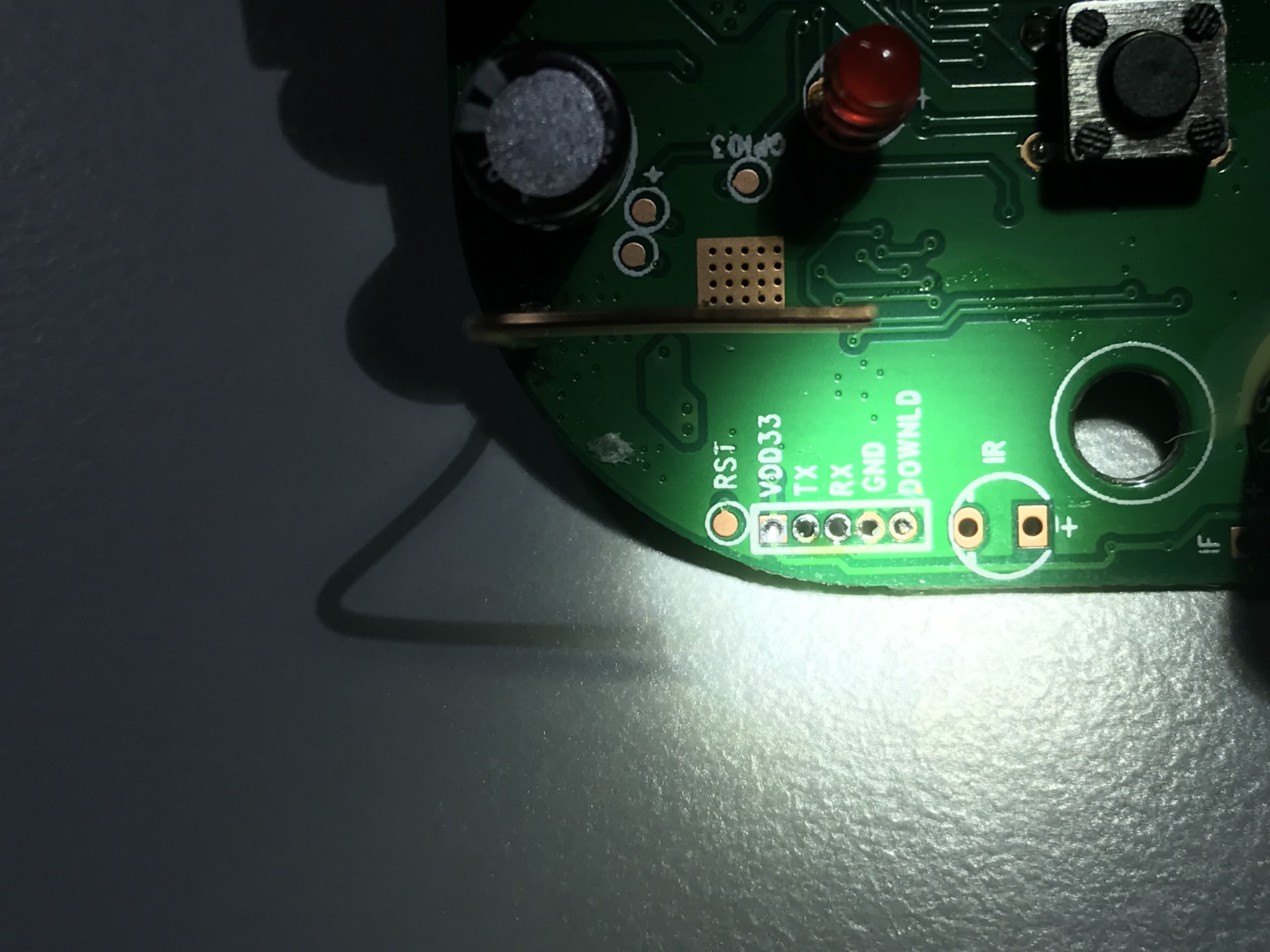
                                      hej, das Foto ist nicht so gut… sehe ich da nur drei Lötpunkte?

                                      Ein ESP8266 sitzt schon mal drauf, es sieht dem Sonoff s20 ähnlich...

                                      Du solltest VDD33 als 3,3V nehmen, tx rx und GND. Wenn ich halbwegs die Lötpunkte deuten kann, sind sie falsch...

                                      HP Microserver Gen8, RPI-4, IoBroker,

                                      1 Reply Last reply
                                      0
                                      • S Offline
                                        S Offline
                                        s0nus
                                        wrote on last edited by
                                        #36

                                        Ich habe da eine Buchsenleiste draufgelegter, die aber viel kleiner als die sonst verbaute ist. Die Pins haben einen Abstand von 1,27mm, deshalb ist es schwer erkennbar.
                                        4382_b9fad1e7-fb81-41f9-b62e-96f5e9a19390.jpeg

                                        1 Reply Last reply
                                        0
                                        • S Offline
                                          S Offline
                                          s0nus
                                          wrote on last edited by
                                          #37

                                          Ich hoffe, daß man es hier etwas besser erkennt.
                                          4382_img_8500.jpg

                                          1 Reply Last reply
                                          0
                                          Reply
                                          • Reply as topic
                                          Log in to reply
                                          • Oldest to Newest
                                          • Newest to Oldest
                                          • Most Votes


                                          Support us

                                          ioBroker
                                          Community Adapters
                                          Donate
                                          FAQ Cloud / IOT
                                          HowTo: Node.js-Update
                                          HowTo: Backup/Restore
                                          Downloads
                                          BLOG

                                          368

                                          Online

                                          32.7k

                                          Users

                                          82.6k

                                          Topics

                                          1.3m

                                          Posts
                                          Community
                                          Impressum | Datenschutz-Bestimmungen | Nutzungsbedingungen | Einwilligungseinstellungen
                                          ioBroker Community 2014-2025
                                          logo
                                          • Login

                                          • Don't have an account? Register

                                          • Login or register to search.
                                          • First post
                                            Last post
                                          0
                                          • Home
                                          • Recent
                                          • Tags
                                          • Unread 0
                                          • Categories
                                          • Unreplied
                                          • Popular
                                          • GitHub
                                          • Docu
                                          • Hilfe