




Backitup Grafana Option sieht komisch aus
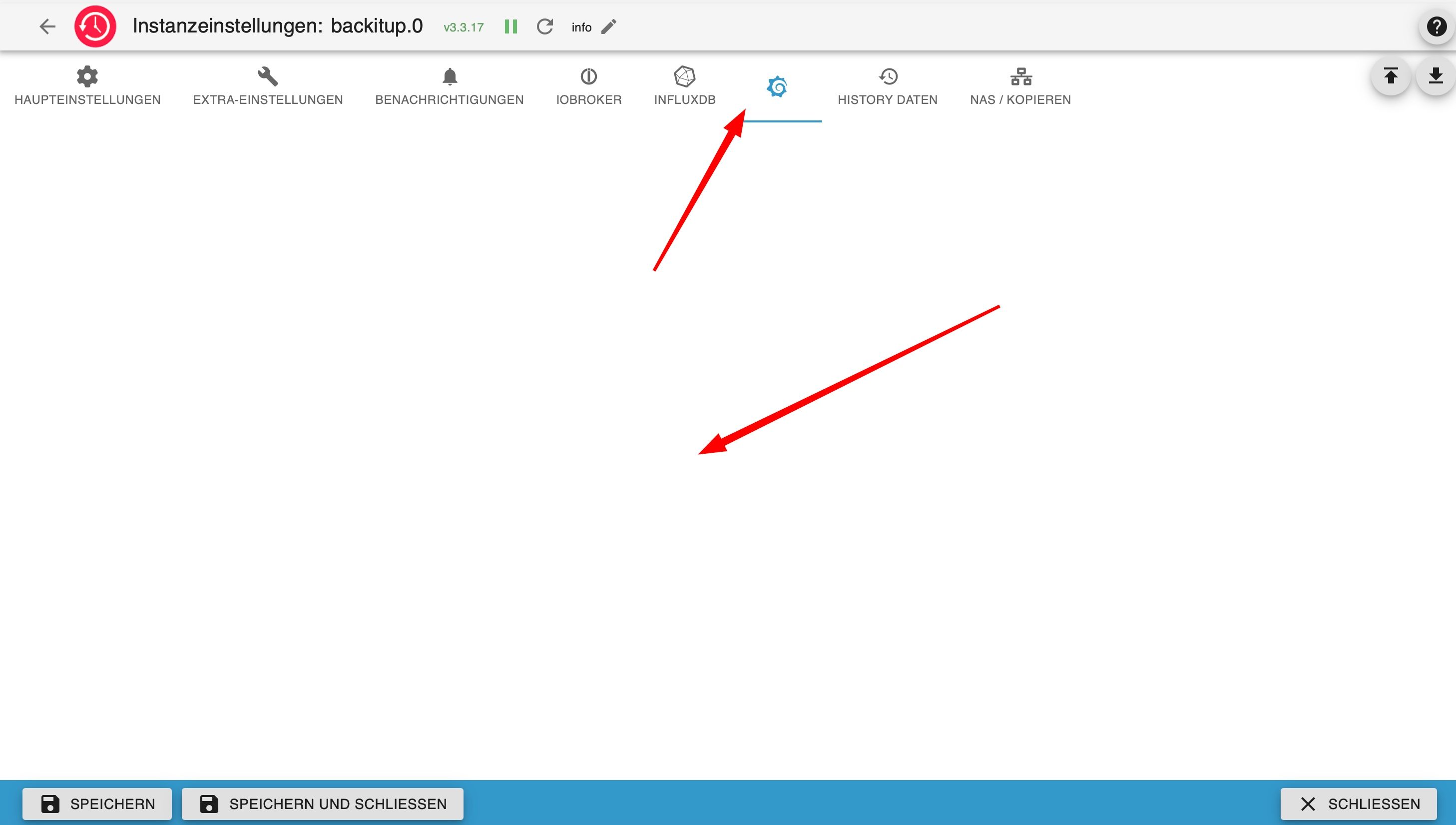
-
Der Befehl hat nichts geholfen. Reboot habe ich auch noch gemacht.
Hier mal der iob Diag. Ich konnte nichts erkennen.
========== Start marking the full check here =========== ```bash Script v.2026-01-31 *** BASE SYSTEM *** Operating System: Debian GNU/Linux 13 (trixie) Static hostname: iobroker Icon name: computer-container Chassis: container ☐ Virtualization: lxc Kernel: Linux 6.17.13-4-pve Architecture: x86-64 OS is similar to: model name : Intel(R) Core(TM) i5-9400T CPU @ 1.80GHz Docker : false Virtualization : lxc Kernel : x86_64 Userland : 64 bit Systemuptime and Load: 17:12:55 up 20:39, 1 user, load average: 0.59, 0.32, 0.29 CPU threads: 2 *** LIFE CYCLE STATUS *** Operating System is the current Debian stable version codenamed 'trixie'! *** TIME AND TIMEZONES *** Local time: Sun 2026-04-26 17:12:55 CEST Universal time: Sun 2026-04-26 15:12:55 UTC RTC time: n/a Time zone: Europe/Berlin (CEST, +0200) System clock synchronized: yes NTP service: inactive RTC in local TZ: no *** Users and Groups *** User that called 'iob diag': marcus HOME=/home/marcus GROUPS=marcus sudo users iobroker User that is running 'js-controller': iobroker HOME=/home/iobroker SUDO_HOME=/home/marcus GROUPS=iobroker tty dialout audio video plugdev *** DISPLAY-SERVER SETUP *** Display-Server: false Unit display-manager.service could not be found. Display-Manager: Desktop: Session: tty *** MEMORY *** total used free shared buff/cache available Mem: 4.3G 2.8G 563M 2.8M 937M 1.5G Swap: 1.1G 51M 1.0G Total: 5.4G 2.8G 1.6G Active iob-Instances: 22 4096 M total memory 2667 M used memory 898 M active memory 2496 M inactive memory 537 M free memory 0 M buffer memory 894 M swap cache 1024 M total swap 49 M used swap 974 M free swap *** top - Table Of Processes *** top - 17:12:56 up 20:39, 1 user, load average: 0.54, 0.32, 0.29 Tasks: 55 total, 1 running, 54 sleeping, 0 stopped, 0 zombie %Cpu(s): 5.0 us, 0.0 sy, 0.0 ni, 95.0 id, 0.0 wa, 0.0 hi, 0.0 si, 0.0 st MiB Mem : 4096.0 total, 536.3 free, 2667.8 used, 894.5 buff/cache MiB Swap: 1024.0 total, 974.4 free, 49.6 used. 1428.2 avail Mem *** FAILED SERVICES *** UNIT LOAD ACTIVE SUB DESCRIPTION 0 loaded units listed. *** DMESG CRITICAL ERRORS *** No critical errors detected *** FILESYSTEM *** Filesystem Type Size Used Avail Use% Mounted on /dev/mapper/pve-vm--100--disk--0 ext4 246G 6.5G 227G 3% / none tmpfs 492K 4.0K 488K 1% /dev udev devtmpfs 16G 0 16G 0% /dev/fuse tmpfs tmpfs 16G 0 16G 0% /dev/shm tmpfs tmpfs 6.3G 132K 6.3G 1% /run tmpfs tmpfs 16G 2.6M 16G 1% /tmp tmpfs tmpfs 5.0M 0 5.0M 0% /run/lock tmpfs tmpfs 1.0M 0 1.0M 0% /run/credentials/systemd-journald.service tmpfs tmpfs 1.0M 0 1.0M 0% /run/credentials/systemd-networkd.service tmpfs tmpfs 1.0M 0 1.0M 0% /run/credentials/console-getty.service tmpfs tmpfs 1.0M 0 1.0M 0% /run/credentials/container-getty@2.service tmpfs tmpfs 1.0M 0 1.0M 0% /run/credentials/container-getty@1.service tmpfs tmpfs 3.2G 4.0K 3.2G 1% /run/user/1000 Messages concerning ext4 filesystem in dmesg: [Sat Apr 25 14:27:29 2026] EXT4-fs (dm-1): orphan cleanup on readonly fs [Sat Apr 25 14:27:29 2026] EXT4-fs (dm-1): mounted filesystem f94d879d-03ef-44cc-ade8-039c52fd2a1e ro with ordered data mode. Quota mode: none. [Sat Apr 25 14:27:30 2026] EXT4-fs (dm-1): re-mounted f94d879d-03ef-44cc-ade8-039c52fd2a1e r/w. [Sat Apr 25 14:27:41 2026] EXT4-fs warning (device dm-6): ext4_multi_mount_protect:328: MMP interval 42 higher than expected, please wait. [Sat Apr 25 14:28:23 2026] EXT4-fs (dm-6): 1 orphan inode deleted [Sat Apr 25 14:28:23 2026] EXT4-fs (dm-6): recovery complete [Sat Apr 25 14:28:23 2026] EXT4-fs (dm-6): mounted filesystem 296045ff-9ce4-46cb-87ab-6443c1da9556 r/w with ordered data mode. Quota mode: none. [Sat Apr 25 15:25:05 2026] EXT4-fs (dm-7): mounted filesystem 2bd84c92-5767-4d12-a4c9-c9ce8cca5e62 r/w with ordered data mode. Quota mode: none. [Sat Apr 25 15:25:08 2026] EXT4-fs (dm-7): unmounting filesystem 2bd84c92-5767-4d12-a4c9-c9ce8cca5e62. [Sat Apr 25 15:26:23 2026] EXT4-fs (dm-7): mounted filesystem 2bd84c92-5767-4d12-a4c9-c9ce8cca5e62 r/w with ordered data mode. Quota mode: none. [Sat Apr 25 15:27:57 2026] EXT4-fs (dm-7): unmounting filesystem 2bd84c92-5767-4d12-a4c9-c9ce8cca5e62. [Sat Apr 25 15:28:02 2026] EXT4-fs (dm-7): mounted filesystem 2bd84c92-5767-4d12-a4c9-c9ce8cca5e62 r/w with ordered data mode. Quota mode: none. [Sat Apr 25 15:28:30 2026] EXT4-fs (dm-7): unmounting filesystem 2bd84c92-5767-4d12-a4c9-c9ce8cca5e62. [Sat Apr 25 15:30:09 2026] EXT4-fs (dm-7): mounted filesystem 2bd84c92-5767-4d12-a4c9-c9ce8cca5e62 r/w with ordered data mode. Quota mode: none. [Sat Apr 25 16:07:34 2026] EXT4-fs (dm-7): unmounting filesystem 2bd84c92-5767-4d12-a4c9-c9ce8cca5e62. [Sat Apr 25 16:08:15 2026] EXT4-fs (dm-7): mounted filesystem 2bd84c92-5767-4d12-a4c9-c9ce8cca5e62 r/w with ordered data mode. Quota mode: none. [Sat Apr 25 16:15:51 2026] EXT4-fs (dm-7): unmounting filesystem 2bd84c92-5767-4d12-a4c9-c9ce8cca5e62. [Sat Apr 25 16:15:53 2026] EXT4-fs (dm-7): mounted filesystem 2bd84c92-5767-4d12-a4c9-c9ce8cca5e62 r/w with ordered data mode. Quota mode: none. [Sat Apr 25 16:22:35 2026] EXT4-fs (dm-7): unmounting filesystem 2bd84c92-5767-4d12-a4c9-c9ce8cca5e62. [Sat Apr 25 16:22:36 2026] EXT4-fs (dm-7): mounted filesystem 2bd84c92-5767-4d12-a4c9-c9ce8cca5e62 r/w with ordered data mode. Quota mode: none. [Sat Apr 25 16:57:56 2026] EXT4-fs (dm-7): unmounting filesystem 2bd84c92-5767-4d12-a4c9-c9ce8cca5e62. [Sat Apr 25 16:58:45 2026] EXT4-fs (dm-7): orphan cleanup on readonly fs [Sat Apr 25 16:58:45 2026] EXT4-fs (dm-7): mounted filesystem 2bd84c92-5767-4d12-a4c9-c9ce8cca5e62 ro with ordered data mode. Quota mode: none. [Sat Apr 25 16:58:46 2026] EXT4-fs (dm-8): mounted filesystem f1ccaa6b-8462-4fc4-9847-f91facaed85c r/w with ordered data mode. Quota mode: none. [Sat Apr 25 16:58:50 2026] EXT4-fs (dm-8): unmounting filesystem f1ccaa6b-8462-4fc4-9847-f91facaed85c. [Sat Apr 25 16:58:50 2026] EXT4-fs (dm-7): unmounting filesystem 2bd84c92-5767-4d12-a4c9-c9ce8cca5e62. [Sat Apr 25 16:58:50 2026] EXT4-fs (dm-8): mounted filesystem f1ccaa6b-8462-4fc4-9847-f91facaed85c r/w with ordered data mode. Quota mode: none. [Sat Apr 25 16:58:51 2026] EXT4-fs (dm-8): unmounting filesystem f1ccaa6b-8462-4fc4-9847-f91facaed85c. [Sat Apr 25 17:00:32 2026] EXT4-fs (dm-8): mounted filesystem f1ccaa6b-8462-4fc4-9847-f91facaed85c r/w with ordered data mode. Quota mode: none. [Sat Apr 25 17:03:41 2026] EXT4-fs (dm-8): unmounting filesystem f1ccaa6b-8462-4fc4-9847-f91facaed85c. [Sat Apr 25 17:03:42 2026] EXT4-fs (dm-8): mounted filesystem f1ccaa6b-8462-4fc4-9847-f91facaed85c r/w with ordered data mode. Quota mode: none. [Sat Apr 25 17:06:24 2026] EXT4-fs (dm-7): mounted filesystem 2bd84c92-5767-4d12-a4c9-c9ce8cca5e62 r/w with ordered data mode. Quota mode: none. [Sat Apr 25 17:09:48 2026] EXT4-fs (dm-7): unmounting filesystem 2bd84c92-5767-4d12-a4c9-c9ce8cca5e62. [Sat Apr 25 17:09:49 2026] EXT4-fs (dm-7): mounted filesystem 2bd84c92-5767-4d12-a4c9-c9ce8cca5e62 r/w with ordered data mode. Quota mode: none. [Sat Apr 25 17:59:47 2026] EXT4-fs (dm-7): unmounting filesystem 2bd84c92-5767-4d12-a4c9-c9ce8cca5e62. [Sat Apr 25 17:59:48 2026] EXT4-fs (dm-7): mounted filesystem 2bd84c92-5767-4d12-a4c9-c9ce8cca5e62 r/w with ordered data mode. Quota mode: none. [Sat Apr 25 18:26:17 2026] EXT4-fs (dm-7): unmounting filesystem 2bd84c92-5767-4d12-a4c9-c9ce8cca5e62. [Sat Apr 25 18:26:18 2026] EXT4-fs (dm-7): mounted filesystem 2bd84c92-5767-4d12-a4c9-c9ce8cca5e62 r/w with ordered data mode. Quota mode: none. [Sat Apr 25 20:03:31 2026] EXT4-fs (dm-6): unmounting filesystem 296045ff-9ce4-46cb-87ab-6443c1da9556. [Sat Apr 25 20:03:32 2026] EXT4-fs (dm-6): mounted filesystem 296045ff-9ce4-46cb-87ab-6443c1da9556 r/w with ordered data mode. Quota mode: none. [Sat Apr 25 20:33:41 2026] EXT4-fs (dm-6): unmounting filesystem 296045ff-9ce4-46cb-87ab-6443c1da9556. [Sat Apr 25 20:33:41 2026] EXT4-fs (dm-6): mounted filesystem 296045ff-9ce4-46cb-87ab-6443c1da9556 r/w with ordered data mode. Quota mode: none. Show mounted filesystems: TARGET SOURCE FSTYPE OPTIONS / /dev/mapper/pve-vm--100--disk--0 ext4 rw,relatime,stripe=16 Files in neuralgic directories: /var: 682M /var/ 314M /var/cache 310M /var/cache/apt 220M /var/cache/apt/archives 206M /var/log Hint: You are currently not seeing messages from other users and the system. Users in groups 'adm', 'systemd-journal' can see all messages. Pass -q to turn off this notice. Archived and active journals take up 8M in the file system. /opt/iobroker/backups: 1.4G /opt/iobroker/backups/ /opt/iobroker/iobroker-data: 432M /opt/iobroker/iobroker-data/ 184M /opt/iobroker/iobroker-data/files 111M /opt/iobroker/iobroker-data/backup-objects 47M /opt/iobroker/iobroker-data/files/admin.admin 46M /opt/iobroker/iobroker-data/files/admin.admin/custom/assets The five largest files in iobroker-data are: 55M /opt/iobroker/iobroker-data/objects.jsonl 30M /opt/iobroker/iobroker-data/states.jsonl 19M /opt/iobroker/iobroker-data/files/matter.admin/assets/index-DMt8RVCF.js 8.2M /opt/iobroker/iobroker-data/files/modbus.admin/assets/index-Blv_5nFZ.js 7.5M /opt/iobroker/iobroker-data/files/backitup.admin/assets/index-BeQV_TGa.js USB-Devices by-id: USB-Sticks - Avoid direct links to /dev/tty* in your adapter setups, please always prefer the links 'by-id': No Devices found 'by-id' No nvbackup.json found. *** NodeJS-Installation *** /usr/bin/nodejs v22.22.2 /usr/bin/node v22.22.2 /usr/bin/npm 10.9.7 /usr/bin/npx 10.9.7 ✓ Node.js installation is correct nodejs: Installed: 22.22.2-1nodesource1 Candidate: 22.22.2-1nodesource1 Version table: *** 22.22.2-1nodesource1 1001 500 https://deb.nodesource.com/node_22.x nodistro/main amd64 Packages 100 /var/lib/dpkg/status 22.22.1-1nodesource1 1001 500 https://deb.nodesource.com/node_22.x nodistro/main amd64 Packages 22.22.0-1nodesource1 1001 500 https://deb.nodesource.com/node_22.x nodistro/main amd64 Packages 22.21.0-1nodesource1 1001 500 https://deb.nodesource.com/node_22.x nodistro/main amd64 Packages 22.20.0-1nodesource1 1001 500 https://deb.nodesource.com/node_22.x nodistro/main amd64 Packages 22.19.0-1nodesource1 1001 500 https://deb.nodesource.com/node_22.x nodistro/main amd64 Packages 22.18.0-1nodesource1 1001 500 https://deb.nodesource.com/node_22.x nodistro/main amd64 Packages 22.17.1-1nodesource1 1001 500 https://deb.nodesource.com/node_22.x nodistro/main amd64 Packages 22.17.0-1nodesource1 1001 500 https://deb.nodesource.com/node_22.x nodistro/main amd64 Packages 22.16.0-1nodesource1 1001 500 https://deb.nodesource.com/node_22.x nodistro/main amd64 Packages 22.15.1-1nodesource1 1001 500 https://deb.nodesource.com/node_22.x nodistro/main amd64 Packages 22.15.0-1nodesource1 1001 500 https://deb.nodesource.com/node_22.x nodistro/main amd64 Packages 22.14.0-1nodesource1 1001 500 https://deb.nodesource.com/node_22.x nodistro/main amd64 Packages 22.13.1-1nodesource1 1001 500 https://deb.nodesource.com/node_22.x nodistro/main amd64 Packages 22.13.0-1nodesource1 1001 500 https://deb.nodesource.com/node_22.x nodistro/main amd64 Packages 22.12.0-1nodesource1 1001 500 https://deb.nodesource.com/node_22.x nodistro/main amd64 Packages 22.11.0-1nodesource1 1001 500 https://deb.nodesource.com/node_22.x nodistro/main amd64 Packages 22.10.0-1nodesource1 1001 500 https://deb.nodesource.com/node_22.x nodistro/main amd64 Packages 22.9.0-1nodesource1 1001 500 https://deb.nodesource.com/node_22.x nodistro/main amd64 Packages 22.8.0-1nodesource1 1001 500 https://deb.nodesource.com/node_22.x nodistro/main amd64 Packages 22.7.0-1nodesource1 1001 500 https://deb.nodesource.com/node_22.x nodistro/main amd64 Packages 22.6.0-1nodesource1 1001 500 https://deb.nodesource.com/node_22.x nodistro/main amd64 Packages 22.5.1-1nodesource1 1001 500 https://deb.nodesource.com/node_22.x nodistro/main amd64 Packages 22.5.0-1nodesource1 1001 500 https://deb.nodesource.com/node_22.x nodistro/main amd64 Packages 22.4.1-1nodesource1 1001 500 https://deb.nodesource.com/node_22.x nodistro/main amd64 Packages 22.4.0-1nodesource1 1001 500 https://deb.nodesource.com/node_22.x nodistro/main amd64 Packages 22.3.0-1nodesource1 1001 500 https://deb.nodesource.com/node_22.x nodistro/main amd64 Packages 22.2.0-1nodesource1 1001 500 https://deb.nodesource.com/node_22.x nodistro/main amd64 Packages 22.1.0-1nodesource1 1001 500 https://deb.nodesource.com/node_22.x nodistro/main amd64 Packages 22.0.0-1nodesource1 1001 500 https://deb.nodesource.com/node_22.x nodistro/main amd64 Packages 20.19.2+dfsg-1+deb13u2 500 500 http://security.debian.org trixie-security/main amd64 Packages 20.19.2+dfsg-1 500 500 http://deb.debian.org/debian trixie/main amd64 Packages Temp directories causing deletion problem: 0 No problems detected Errors in npm tree: 0 No problems detected Checking for nodejs vulnerability: █████ ██ ██ ██████ ██████ ██████ ██████ ██ ██ ██ ██ ██ ██ ██ ██ ██ ██ ██ ██ ██ ██ ███████ ██ ██ ██ ███ ██ ██ ██ ██ ██ ██ ██ ██ ██ ██ ██ ██ ██ ██ ██ ██ ██ ██ ██ ██ ██ ██ ██ ███████ ███████ ██████ ██████ ██████ ██████ ██ *** ioBroker-Installation *** ioBroker Status iobroker is running on this host. Objects type: jsonl States type: jsonl Hosts: iobroker iobroker (version: 7.1.1, hostname: iobroker , alive, uptime: 74345) Core adapters versions js-controller: 7.1.1 admin: 7.8.20 javascript: 9.2.0 nodejs modules from github: 1 +-- iobroker.jarvis@4.0.0-alpha.13 (git+ssh://git@github.com/Zefau/ioBroker.jarvis.git#56f23ff400d6411cd23a4cf9e61790dc38fb288c) Adapter State + system.adapter.admin.0 : admin : iobroker - enabled, port: 8081, bind: 0.0.0.0, run as: admin + system.adapter.alexa2.0 : alexa2 : iobroker - enabled + system.adapter.backitup.0 : backitup : iobroker - enabled + system.adapter.discovery.0 : discovery : iobroker - enabled system.adapter.dwd.0 : dwd : iobroker - enabled + system.adapter.email.0 : email : iobroker - enabled + system.adapter.energiefluss-erweitert.0 : energiefluss-erweitert: iobroker - enabled system.adapter.feiertage.0 : feiertage : iobroker - enabled system.adapter.ical.0 : ical : iobroker - enabled + system.adapter.influxdb.0 : influxdb : iobroker - enabled, port: 8086 + system.adapter.iot.0 : iot : iobroker - enabled + system.adapter.jarvis.0 : jarvis : iobroker - enabled + system.adapter.javascript.0 : javascript : iobroker - enabled + system.adapter.matter.0 : matter : iobroker - enabled + system.adapter.modbus.0 : modbus : iobroker - enabled + system.adapter.mqtt.0 : mqtt : iobroker - enabled, port: 1883, bind: 0.0.0.0 + system.adapter.node-red.0 : node-red : iobroker - enabled, port: 1880, bind: 0.0.0.0 + system.adapter.ping.0 : ping : iobroker - enabled + system.adapter.proxmox.0 : proxmox : iobroker - enabled + system.adapter.pushover.0 : pushover : iobroker - enabled + system.adapter.simple-api.0 : simple-api : iobroker - enabled, port: 8087, bind: 0.0.0.0, run as: admin + system.adapter.sma-em.0 : sma-em : iobroker - enabled system.adapter.solarwetter.0 : solarwetter : iobroker - enabled + system.adapter.trashschedule.0 : trashschedule : iobroker - enabled system.adapter.vis.0 : vis : iobroker - disabled system.adapter.weatherunderground.0 : weatherunderground : iobroker - enabled + system.adapter.web.0 : web : iobroker - enabled, port: 8082, bind: 0.0.0.0, run as: admin + instance is alive Enabled adapters with bindings + system.adapter.admin.0 : admin : iobroker - enabled, port: 8081, bind: 0.0.0.0, run as: admin + system.adapter.influxdb.0 : influxdb : iobroker - enabled, port: 8086 + system.adapter.mqtt.0 : mqtt : iobroker - enabled, port: 1883, bind: 0.0.0.0 + system.adapter.node-red.0 : node-red : iobroker - enabled, port: 1880, bind: 0.0.0.0 + system.adapter.simple-api.0 : simple-api : iobroker - enabled, port: 8087, bind: 0.0.0.0, run as: admin + system.adapter.web.0 : web : iobroker - enabled, port: 8082, bind: 0.0.0.0, run as: admin ioBroker-Repositories ┌─────────┬──────────┬─────────────────────────────────────────────────────────┬──────────────┐ │ (index) │ name │ url │ auto upgrade │ ├─────────┼──────────┼─────────────────────────────────────────────────────────┼──────────────┤ │ 0 │ 'stable' │ 'http://download.iobroker.net/sources-dist.json' │ false │ │ 1 │ 'beta' │ 'http://download.iobroker.net/sources-dist-latest.json' │ false │ └─────────┴──────────┴─────────────────────────────────────────────────────────┴──────────────┘ Active repo(s): beta Upgrade policy: none Installed ioBroker-Adapters Used repository: beta Adapter "admin" : 7.8.20 , installed 7.8.20 Adapter "alexa2" : 3.27.4 , installed 3.27.4 Adapter "backitup" : 3.3.17 , installed 3.3.17 Adapter "discovery" : 5.0.0 , installed 5.0.0 Adapter "dwd" : 2.8.5 , installed 2.8.5 Adapter "email" : 2.0.4 , installed 2.0.4 Adapter "energiefluss-erweitert": 0.8.2, installed 0.8.2 Adapter "feiertage" : 1.3.0 , installed 1.3.0 Adapter "ical" : 1.20.0 , installed 1.20.0 Adapter "influxdb" : 4.0.2 , installed 4.0.2 Adapter "iot" : 6.0.3 , installed 6.0.3 Adapter "jarvis" : 3.1.8 , installed 4.0.0-alpha.13 Adapter "javascript" : 9.2.0 , installed 9.2.0 Controller "js-controller": 7.1.1 , installed 7.1.1 Adapter "matter" : 1.0.0 , installed 1.0.0 Adapter "modbus" : 8.1.3 , installed 8.1.3 Adapter "mqtt" : 6.1.4 , installed 6.1.4 Adapter "node-red" : 6.0.7 , installed 6.0.7 Adapter "ping" : 2.1.0 , installed 2.1.0 Adapter "proxmox" : 2.5.3 , installed 2.5.3 Adapter "pushover" : 5.0.0 , installed 5.0.0 Adapter "simple-api" : 3.0.7 , installed 3.0.7 Adapter "sma-em" : 1.3.1 , installed 1.3.1 Adapter "socketio" : 7.1.3 , installed 7.1.3 Adapter "solarwetter" : 1.2.0 , installed 1.2.0 Adapter "trashschedule": 5.3.0 , installed 5.3.0 Adapter "vis" : 1.5.6 , installed 1.5.6 Adapter "weatherunderground": 3.7.0, installed 3.7.0 Adapter "web" : 8.1.0 , installed 8.1.0 Adapter "ws" : 4.1.0 , installed 4.1.0 Objects and States Please stand by - This may take a while Objects: 5320 States: 4392 *** OS-Repositories and Updates *** Hit:1 http://deb.debian.org/debian trixie InRelease Hit:2 http://deb.debian.org/debian trixie-updates InRelease Hit:3 http://security.debian.org trixie-security InRelease Hit:4 https://deb.nodesource.com/node_22.x nodistro InRelease Reading package lists... Pending systemupdates: 0 *** Listening Ports *** Active Internet connections (only servers) Proto Recv-Q Send-Q Local Address Foreign Address State User Inode PID/Program name tcp 0 0 127.0.0.1:8088 0.0.0.0:* LISTEN 105 3754260 8743/influxd tcp 0 0 127.0.0.1:25 0.0.0.0:* LISTEN 0 1137943 288/master tcp 0 0 0.0.0.0:1880 0.0.0.0:* LISTEN 1001 1137320 470/node-red tcp 0 0 0.0.0.0:1883 0.0.0.0:* LISTEN 104 1137708 131/mosquitto tcp 0 0 127.0.0.1:9000 0.0.0.0:* LISTEN 1001 1138112 90/iobroker.js-cont tcp 0 0 127.0.0.1:9001 0.0.0.0:* LISTEN 1001 1138812 90/iobroker.js-cont tcp 0 0 0.0.0.0:111 0.0.0.0:* LISTEN 0 1135899 1/init tcp6 0 0 :::8400 :::* LISTEN 1001 1141217 775/io.jarvis.0 tcp6 0 0 :::8087 :::* LISTEN 1001 1140368 808/io.simple-api.0 tcp6 0 0 :::8086 :::* LISTEN 105 3754265 8743/influxd tcp6 0 0 :::8081 :::* LISTEN 1001 1138890 332/io.admin.0 tcp6 0 0 :::8082 :::* LISTEN 1001 3825157 9164/io.web.0 tcp6 0 0 ::1:25 :::* LISTEN 0 1137944 288/master tcp6 0 0 :::1883 :::* LISTEN 104 1137709 131/mosquitto tcp6 0 0 :::111 :::* LISTEN 0 1135901 1/init tcp6 0 0 :::22 :::* LISTEN 0 1133444 1/init udp 0 0 0.0.0.0:9522 0.0.0.0:* 1001 1140955 659/io.sma-em.0 udp 0 0 0.0.0.0:111 0.0.0.0:* 0 1135900 1/init udp 0 0 0.0.0.0:5353 0.0.0.0:* 1001 1140278 791/io.matter.0 udp 0 0 0.0.0.0:54747 0.0.0.0:* 1001 1140281 791/io.matter.0 udp6 0 0 :::43296 :::* 1001 1140279 791/io.matter.0 udp6 0 0 :::111 :::* 0 1135902 1/init udp6 0 0 :::5353 :::* 1001 1140280 791/io.matter.0 *** Log File - Last 25 Lines *** 2026-04-26 17:11:48.535 - info: host.iobroker "system.adapter.web.0" disabled 2026-04-26 17:11:48.536 - info: host.iobroker stopInstance system.adapter.web.0 (force=false, process=true) 2026-04-26 17:11:48.540 - info: host.iobroker "system.adapter.web.0" enabled 2026-04-26 17:11:48.540 - info: host.iobroker stopInstance system.adapter.web.0 (force=false, process=true) 2026-04-26 17:11:48.551 - info: host.iobroker stopInstance system.adapter.web.0 send kill signal 2026-04-26 17:11:48.597 - info: host.iobroker stopInstance system.adapter.web.0 send kill signal 2026-04-26 17:11:48.766 - info: web.0 (9146) Got terminate signal TERMINATE_YOURSELF 2026-04-26 17:11:48.766 - info: web.0 (9146) Got terminate signal TERMINATE_YOURSELF 2026-04-26 17:11:48.875 - info: web.0 (9146) starting. Version 8.1.0 in /opt/iobroker/node_modules/iobroker.web, node: v22.22.2, js-controller: 7.1.1 2026-04-26 17:11:49.267 - info: web.0 (9146) terminating 2026-04-26 17:11:49.267 - info: web.0 (9146) terminating 2026-04-26 17:11:49.268 - info: web.0 (9146) Terminated (ADAPTER_REQUESTED_TERMINATION): Without reason 2026-04-26 17:11:49.551 - info: host.iobroker stopInstance timeout system.adapter.web.0 killing pid 9146 2026-04-26 17:11:49.572 - warn: host.iobroker instance system.adapter.web.0 terminated due to SIGKILL 2026-04-26 17:11:49.573 - info: host.iobroker instance system.adapter.web.0 terminated with code null () 2026-04-26 17:11:50.558 - info: host.iobroker "system.adapter.web.0" disabled 2026-04-26 17:11:50.561 - info: host.iobroker "system.adapter.web.0" enabled 2026-04-26 17:11:50.860 - info: host.iobroker instance system.adapter.web.0 in version "8.1.0" started with pid 9164 2026-04-26 17:11:52.094 - info: web.0 (9164) starting. Version 8.1.0 in /opt/iobroker/node_modules/iobroker.web, node: v22.22.2, js-controller: 7.1.1 2026-04-26 17:11:52.181 - info: web.0 (9164) http server listening on port 8082 2026-04-26 17:11:52.204 - info: web.0 (9164) socket.io server listening on port 8082 2026-04-26 17:11:52.263 - info: web.0 (9164) Connecting extension "energiefluss-erweitert/lib/web.js" 2026-04-26 17:11:52.264 - info: web.0 (9164) [energiefluss-erweitert.0] Sharp was found and can be used for image processing! 2026-04-26 17:12:03.438 - info: admin.0 (332) ==> Connected system.user.admin from ::ffff:192.168.1.171 2026-04-26 17:12:06.503 - info: admin.0 (332) <== Disconnect system.user.admin from ::ffff:192.168.1.171 backitup============ Mark until here for C&P ============
CPU threads: 2
Gib der Kiste mal mehr Hubraum.
Dein Dateisystem hat 'nen Schuß:
1 orphan inode deleted
-
Der Befehl hat nichts geholfen. Reboot habe ich auch noch gemacht.
Hier mal der iob Diag. Ich konnte nichts erkennen.
========== Start marking the full check here =========== ```bash Script v.2026-01-31 *** BASE SYSTEM *** Operating System: Debian GNU/Linux 13 (trixie) Static hostname: iobroker Icon name: computer-container Chassis: container ☐ Virtualization: lxc Kernel: Linux 6.17.13-4-pve Architecture: x86-64 OS is similar to: model name : Intel(R) Core(TM) i5-9400T CPU @ 1.80GHz Docker : false Virtualization : lxc Kernel : x86_64 Userland : 64 bit Systemuptime and Load: 17:12:55 up 20:39, 1 user, load average: 0.59, 0.32, 0.29 CPU threads: 2 *** LIFE CYCLE STATUS *** Operating System is the current Debian stable version codenamed 'trixie'! *** TIME AND TIMEZONES *** Local time: Sun 2026-04-26 17:12:55 CEST Universal time: Sun 2026-04-26 15:12:55 UTC RTC time: n/a Time zone: Europe/Berlin (CEST, +0200) System clock synchronized: yes NTP service: inactive RTC in local TZ: no *** Users and Groups *** User that called 'iob diag': marcus HOME=/home/marcus GROUPS=marcus sudo users iobroker User that is running 'js-controller': iobroker HOME=/home/iobroker SUDO_HOME=/home/marcus GROUPS=iobroker tty dialout audio video plugdev *** DISPLAY-SERVER SETUP *** Display-Server: false Unit display-manager.service could not be found. Display-Manager: Desktop: Session: tty *** MEMORY *** total used free shared buff/cache available Mem: 4.3G 2.8G 563M 2.8M 937M 1.5G Swap: 1.1G 51M 1.0G Total: 5.4G 2.8G 1.6G Active iob-Instances: 22 4096 M total memory 2667 M used memory 898 M active memory 2496 M inactive memory 537 M free memory 0 M buffer memory 894 M swap cache 1024 M total swap 49 M used swap 974 M free swap *** top - Table Of Processes *** top - 17:12:56 up 20:39, 1 user, load average: 0.54, 0.32, 0.29 Tasks: 55 total, 1 running, 54 sleeping, 0 stopped, 0 zombie %Cpu(s): 5.0 us, 0.0 sy, 0.0 ni, 95.0 id, 0.0 wa, 0.0 hi, 0.0 si, 0.0 st MiB Mem : 4096.0 total, 536.3 free, 2667.8 used, 894.5 buff/cache MiB Swap: 1024.0 total, 974.4 free, 49.6 used. 1428.2 avail Mem *** FAILED SERVICES *** UNIT LOAD ACTIVE SUB DESCRIPTION 0 loaded units listed. *** DMESG CRITICAL ERRORS *** No critical errors detected *** FILESYSTEM *** Filesystem Type Size Used Avail Use% Mounted on /dev/mapper/pve-vm--100--disk--0 ext4 246G 6.5G 227G 3% / none tmpfs 492K 4.0K 488K 1% /dev udev devtmpfs 16G 0 16G 0% /dev/fuse tmpfs tmpfs 16G 0 16G 0% /dev/shm tmpfs tmpfs 6.3G 132K 6.3G 1% /run tmpfs tmpfs 16G 2.6M 16G 1% /tmp tmpfs tmpfs 5.0M 0 5.0M 0% /run/lock tmpfs tmpfs 1.0M 0 1.0M 0% /run/credentials/systemd-journald.service tmpfs tmpfs 1.0M 0 1.0M 0% /run/credentials/systemd-networkd.service tmpfs tmpfs 1.0M 0 1.0M 0% /run/credentials/console-getty.service tmpfs tmpfs 1.0M 0 1.0M 0% /run/credentials/container-getty@2.service tmpfs tmpfs 1.0M 0 1.0M 0% /run/credentials/container-getty@1.service tmpfs tmpfs 3.2G 4.0K 3.2G 1% /run/user/1000 Messages concerning ext4 filesystem in dmesg: [Sat Apr 25 14:27:29 2026] EXT4-fs (dm-1): orphan cleanup on readonly fs [Sat Apr 25 14:27:29 2026] EXT4-fs (dm-1): mounted filesystem f94d879d-03ef-44cc-ade8-039c52fd2a1e ro with ordered data mode. Quota mode: none. [Sat Apr 25 14:27:30 2026] EXT4-fs (dm-1): re-mounted f94d879d-03ef-44cc-ade8-039c52fd2a1e r/w. [Sat Apr 25 14:27:41 2026] EXT4-fs warning (device dm-6): ext4_multi_mount_protect:328: MMP interval 42 higher than expected, please wait. [Sat Apr 25 14:28:23 2026] EXT4-fs (dm-6): 1 orphan inode deleted [Sat Apr 25 14:28:23 2026] EXT4-fs (dm-6): recovery complete [Sat Apr 25 14:28:23 2026] EXT4-fs (dm-6): mounted filesystem 296045ff-9ce4-46cb-87ab-6443c1da9556 r/w with ordered data mode. Quota mode: none. [Sat Apr 25 15:25:05 2026] EXT4-fs (dm-7): mounted filesystem 2bd84c92-5767-4d12-a4c9-c9ce8cca5e62 r/w with ordered data mode. Quota mode: none. [Sat Apr 25 15:25:08 2026] EXT4-fs (dm-7): unmounting filesystem 2bd84c92-5767-4d12-a4c9-c9ce8cca5e62. [Sat Apr 25 15:26:23 2026] EXT4-fs (dm-7): mounted filesystem 2bd84c92-5767-4d12-a4c9-c9ce8cca5e62 r/w with ordered data mode. Quota mode: none. [Sat Apr 25 15:27:57 2026] EXT4-fs (dm-7): unmounting filesystem 2bd84c92-5767-4d12-a4c9-c9ce8cca5e62. [Sat Apr 25 15:28:02 2026] EXT4-fs (dm-7): mounted filesystem 2bd84c92-5767-4d12-a4c9-c9ce8cca5e62 r/w with ordered data mode. Quota mode: none. [Sat Apr 25 15:28:30 2026] EXT4-fs (dm-7): unmounting filesystem 2bd84c92-5767-4d12-a4c9-c9ce8cca5e62. [Sat Apr 25 15:30:09 2026] EXT4-fs (dm-7): mounted filesystem 2bd84c92-5767-4d12-a4c9-c9ce8cca5e62 r/w with ordered data mode. Quota mode: none. [Sat Apr 25 16:07:34 2026] EXT4-fs (dm-7): unmounting filesystem 2bd84c92-5767-4d12-a4c9-c9ce8cca5e62. [Sat Apr 25 16:08:15 2026] EXT4-fs (dm-7): mounted filesystem 2bd84c92-5767-4d12-a4c9-c9ce8cca5e62 r/w with ordered data mode. Quota mode: none. [Sat Apr 25 16:15:51 2026] EXT4-fs (dm-7): unmounting filesystem 2bd84c92-5767-4d12-a4c9-c9ce8cca5e62. [Sat Apr 25 16:15:53 2026] EXT4-fs (dm-7): mounted filesystem 2bd84c92-5767-4d12-a4c9-c9ce8cca5e62 r/w with ordered data mode. Quota mode: none. [Sat Apr 25 16:22:35 2026] EXT4-fs (dm-7): unmounting filesystem 2bd84c92-5767-4d12-a4c9-c9ce8cca5e62. [Sat Apr 25 16:22:36 2026] EXT4-fs (dm-7): mounted filesystem 2bd84c92-5767-4d12-a4c9-c9ce8cca5e62 r/w with ordered data mode. Quota mode: none. [Sat Apr 25 16:57:56 2026] EXT4-fs (dm-7): unmounting filesystem 2bd84c92-5767-4d12-a4c9-c9ce8cca5e62. [Sat Apr 25 16:58:45 2026] EXT4-fs (dm-7): orphan cleanup on readonly fs [Sat Apr 25 16:58:45 2026] EXT4-fs (dm-7): mounted filesystem 2bd84c92-5767-4d12-a4c9-c9ce8cca5e62 ro with ordered data mode. Quota mode: none. [Sat Apr 25 16:58:46 2026] EXT4-fs (dm-8): mounted filesystem f1ccaa6b-8462-4fc4-9847-f91facaed85c r/w with ordered data mode. Quota mode: none. [Sat Apr 25 16:58:50 2026] EXT4-fs (dm-8): unmounting filesystem f1ccaa6b-8462-4fc4-9847-f91facaed85c. [Sat Apr 25 16:58:50 2026] EXT4-fs (dm-7): unmounting filesystem 2bd84c92-5767-4d12-a4c9-c9ce8cca5e62. [Sat Apr 25 16:58:50 2026] EXT4-fs (dm-8): mounted filesystem f1ccaa6b-8462-4fc4-9847-f91facaed85c r/w with ordered data mode. Quota mode: none. [Sat Apr 25 16:58:51 2026] EXT4-fs (dm-8): unmounting filesystem f1ccaa6b-8462-4fc4-9847-f91facaed85c. [Sat Apr 25 17:00:32 2026] EXT4-fs (dm-8): mounted filesystem f1ccaa6b-8462-4fc4-9847-f91facaed85c r/w with ordered data mode. Quota mode: none. [Sat Apr 25 17:03:41 2026] EXT4-fs (dm-8): unmounting filesystem f1ccaa6b-8462-4fc4-9847-f91facaed85c. [Sat Apr 25 17:03:42 2026] EXT4-fs (dm-8): mounted filesystem f1ccaa6b-8462-4fc4-9847-f91facaed85c r/w with ordered data mode. Quota mode: none. [Sat Apr 25 17:06:24 2026] EXT4-fs (dm-7): mounted filesystem 2bd84c92-5767-4d12-a4c9-c9ce8cca5e62 r/w with ordered data mode. Quota mode: none. [Sat Apr 25 17:09:48 2026] EXT4-fs (dm-7): unmounting filesystem 2bd84c92-5767-4d12-a4c9-c9ce8cca5e62. [Sat Apr 25 17:09:49 2026] EXT4-fs (dm-7): mounted filesystem 2bd84c92-5767-4d12-a4c9-c9ce8cca5e62 r/w with ordered data mode. Quota mode: none. [Sat Apr 25 17:59:47 2026] EXT4-fs (dm-7): unmounting filesystem 2bd84c92-5767-4d12-a4c9-c9ce8cca5e62. [Sat Apr 25 17:59:48 2026] EXT4-fs (dm-7): mounted filesystem 2bd84c92-5767-4d12-a4c9-c9ce8cca5e62 r/w with ordered data mode. Quota mode: none. [Sat Apr 25 18:26:17 2026] EXT4-fs (dm-7): unmounting filesystem 2bd84c92-5767-4d12-a4c9-c9ce8cca5e62. [Sat Apr 25 18:26:18 2026] EXT4-fs (dm-7): mounted filesystem 2bd84c92-5767-4d12-a4c9-c9ce8cca5e62 r/w with ordered data mode. Quota mode: none. [Sat Apr 25 20:03:31 2026] EXT4-fs (dm-6): unmounting filesystem 296045ff-9ce4-46cb-87ab-6443c1da9556. [Sat Apr 25 20:03:32 2026] EXT4-fs (dm-6): mounted filesystem 296045ff-9ce4-46cb-87ab-6443c1da9556 r/w with ordered data mode. Quota mode: none. [Sat Apr 25 20:33:41 2026] EXT4-fs (dm-6): unmounting filesystem 296045ff-9ce4-46cb-87ab-6443c1da9556. [Sat Apr 25 20:33:41 2026] EXT4-fs (dm-6): mounted filesystem 296045ff-9ce4-46cb-87ab-6443c1da9556 r/w with ordered data mode. Quota mode: none. Show mounted filesystems: TARGET SOURCE FSTYPE OPTIONS / /dev/mapper/pve-vm--100--disk--0 ext4 rw,relatime,stripe=16 Files in neuralgic directories: /var: 682M /var/ 314M /var/cache 310M /var/cache/apt 220M /var/cache/apt/archives 206M /var/log Hint: You are currently not seeing messages from other users and the system. Users in groups 'adm', 'systemd-journal' can see all messages. Pass -q to turn off this notice. Archived and active journals take up 8M in the file system. /opt/iobroker/backups: 1.4G /opt/iobroker/backups/ /opt/iobroker/iobroker-data: 432M /opt/iobroker/iobroker-data/ 184M /opt/iobroker/iobroker-data/files 111M /opt/iobroker/iobroker-data/backup-objects 47M /opt/iobroker/iobroker-data/files/admin.admin 46M /opt/iobroker/iobroker-data/files/admin.admin/custom/assets The five largest files in iobroker-data are: 55M /opt/iobroker/iobroker-data/objects.jsonl 30M /opt/iobroker/iobroker-data/states.jsonl 19M /opt/iobroker/iobroker-data/files/matter.admin/assets/index-DMt8RVCF.js 8.2M /opt/iobroker/iobroker-data/files/modbus.admin/assets/index-Blv_5nFZ.js 7.5M /opt/iobroker/iobroker-data/files/backitup.admin/assets/index-BeQV_TGa.js USB-Devices by-id: USB-Sticks - Avoid direct links to /dev/tty* in your adapter setups, please always prefer the links 'by-id': No Devices found 'by-id' No nvbackup.json found. *** NodeJS-Installation *** /usr/bin/nodejs v22.22.2 /usr/bin/node v22.22.2 /usr/bin/npm 10.9.7 /usr/bin/npx 10.9.7 ✓ Node.js installation is correct nodejs: Installed: 22.22.2-1nodesource1 Candidate: 22.22.2-1nodesource1 Version table: *** 22.22.2-1nodesource1 1001 500 https://deb.nodesource.com/node_22.x nodistro/main amd64 Packages 100 /var/lib/dpkg/status 22.22.1-1nodesource1 1001 500 https://deb.nodesource.com/node_22.x nodistro/main amd64 Packages 22.22.0-1nodesource1 1001 500 https://deb.nodesource.com/node_22.x nodistro/main amd64 Packages 22.21.0-1nodesource1 1001 500 https://deb.nodesource.com/node_22.x nodistro/main amd64 Packages 22.20.0-1nodesource1 1001 500 https://deb.nodesource.com/node_22.x nodistro/main amd64 Packages 22.19.0-1nodesource1 1001 500 https://deb.nodesource.com/node_22.x nodistro/main amd64 Packages 22.18.0-1nodesource1 1001 500 https://deb.nodesource.com/node_22.x nodistro/main amd64 Packages 22.17.1-1nodesource1 1001 500 https://deb.nodesource.com/node_22.x nodistro/main amd64 Packages 22.17.0-1nodesource1 1001 500 https://deb.nodesource.com/node_22.x nodistro/main amd64 Packages 22.16.0-1nodesource1 1001 500 https://deb.nodesource.com/node_22.x nodistro/main amd64 Packages 22.15.1-1nodesource1 1001 500 https://deb.nodesource.com/node_22.x nodistro/main amd64 Packages 22.15.0-1nodesource1 1001 500 https://deb.nodesource.com/node_22.x nodistro/main amd64 Packages 22.14.0-1nodesource1 1001 500 https://deb.nodesource.com/node_22.x nodistro/main amd64 Packages 22.13.1-1nodesource1 1001 500 https://deb.nodesource.com/node_22.x nodistro/main amd64 Packages 22.13.0-1nodesource1 1001 500 https://deb.nodesource.com/node_22.x nodistro/main amd64 Packages 22.12.0-1nodesource1 1001 500 https://deb.nodesource.com/node_22.x nodistro/main amd64 Packages 22.11.0-1nodesource1 1001 500 https://deb.nodesource.com/node_22.x nodistro/main amd64 Packages 22.10.0-1nodesource1 1001 500 https://deb.nodesource.com/node_22.x nodistro/main amd64 Packages 22.9.0-1nodesource1 1001 500 https://deb.nodesource.com/node_22.x nodistro/main amd64 Packages 22.8.0-1nodesource1 1001 500 https://deb.nodesource.com/node_22.x nodistro/main amd64 Packages 22.7.0-1nodesource1 1001 500 https://deb.nodesource.com/node_22.x nodistro/main amd64 Packages 22.6.0-1nodesource1 1001 500 https://deb.nodesource.com/node_22.x nodistro/main amd64 Packages 22.5.1-1nodesource1 1001 500 https://deb.nodesource.com/node_22.x nodistro/main amd64 Packages 22.5.0-1nodesource1 1001 500 https://deb.nodesource.com/node_22.x nodistro/main amd64 Packages 22.4.1-1nodesource1 1001 500 https://deb.nodesource.com/node_22.x nodistro/main amd64 Packages 22.4.0-1nodesource1 1001 500 https://deb.nodesource.com/node_22.x nodistro/main amd64 Packages 22.3.0-1nodesource1 1001 500 https://deb.nodesource.com/node_22.x nodistro/main amd64 Packages 22.2.0-1nodesource1 1001 500 https://deb.nodesource.com/node_22.x nodistro/main amd64 Packages 22.1.0-1nodesource1 1001 500 https://deb.nodesource.com/node_22.x nodistro/main amd64 Packages 22.0.0-1nodesource1 1001 500 https://deb.nodesource.com/node_22.x nodistro/main amd64 Packages 20.19.2+dfsg-1+deb13u2 500 500 http://security.debian.org trixie-security/main amd64 Packages 20.19.2+dfsg-1 500 500 http://deb.debian.org/debian trixie/main amd64 Packages Temp directories causing deletion problem: 0 No problems detected Errors in npm tree: 0 No problems detected Checking for nodejs vulnerability: █████ ██ ██ ██████ ██████ ██████ ██████ ██ ██ ██ ██ ██ ██ ██ ██ ██ ██ ██ ██ ██ ██ ███████ ██ ██ ██ ███ ██ ██ ██ ██ ██ ██ ██ ██ ██ ██ ██ ██ ██ ██ ██ ██ ██ ██ ██ ██ ██ ██ ██ ███████ ███████ ██████ ██████ ██████ ██████ ██ *** ioBroker-Installation *** ioBroker Status iobroker is running on this host. Objects type: jsonl States type: jsonl Hosts: iobroker iobroker (version: 7.1.1, hostname: iobroker , alive, uptime: 74345) Core adapters versions js-controller: 7.1.1 admin: 7.8.20 javascript: 9.2.0 nodejs modules from github: 1 +-- iobroker.jarvis@4.0.0-alpha.13 (git+ssh://git@github.com/Zefau/ioBroker.jarvis.git#56f23ff400d6411cd23a4cf9e61790dc38fb288c) Adapter State + system.adapter.admin.0 : admin : iobroker - enabled, port: 8081, bind: 0.0.0.0, run as: admin + system.adapter.alexa2.0 : alexa2 : iobroker - enabled + system.adapter.backitup.0 : backitup : iobroker - enabled + system.adapter.discovery.0 : discovery : iobroker - enabled system.adapter.dwd.0 : dwd : iobroker - enabled + system.adapter.email.0 : email : iobroker - enabled + system.adapter.energiefluss-erweitert.0 : energiefluss-erweitert: iobroker - enabled system.adapter.feiertage.0 : feiertage : iobroker - enabled system.adapter.ical.0 : ical : iobroker - enabled + system.adapter.influxdb.0 : influxdb : iobroker - enabled, port: 8086 + system.adapter.iot.0 : iot : iobroker - enabled + system.adapter.jarvis.0 : jarvis : iobroker - enabled + system.adapter.javascript.0 : javascript : iobroker - enabled + system.adapter.matter.0 : matter : iobroker - enabled + system.adapter.modbus.0 : modbus : iobroker - enabled + system.adapter.mqtt.0 : mqtt : iobroker - enabled, port: 1883, bind: 0.0.0.0 + system.adapter.node-red.0 : node-red : iobroker - enabled, port: 1880, bind: 0.0.0.0 + system.adapter.ping.0 : ping : iobroker - enabled + system.adapter.proxmox.0 : proxmox : iobroker - enabled + system.adapter.pushover.0 : pushover : iobroker - enabled + system.adapter.simple-api.0 : simple-api : iobroker - enabled, port: 8087, bind: 0.0.0.0, run as: admin + system.adapter.sma-em.0 : sma-em : iobroker - enabled system.adapter.solarwetter.0 : solarwetter : iobroker - enabled + system.adapter.trashschedule.0 : trashschedule : iobroker - enabled system.adapter.vis.0 : vis : iobroker - disabled system.adapter.weatherunderground.0 : weatherunderground : iobroker - enabled + system.adapter.web.0 : web : iobroker - enabled, port: 8082, bind: 0.0.0.0, run as: admin + instance is alive Enabled adapters with bindings + system.adapter.admin.0 : admin : iobroker - enabled, port: 8081, bind: 0.0.0.0, run as: admin + system.adapter.influxdb.0 : influxdb : iobroker - enabled, port: 8086 + system.adapter.mqtt.0 : mqtt : iobroker - enabled, port: 1883, bind: 0.0.0.0 + system.adapter.node-red.0 : node-red : iobroker - enabled, port: 1880, bind: 0.0.0.0 + system.adapter.simple-api.0 : simple-api : iobroker - enabled, port: 8087, bind: 0.0.0.0, run as: admin + system.adapter.web.0 : web : iobroker - enabled, port: 8082, bind: 0.0.0.0, run as: admin ioBroker-Repositories ┌─────────┬──────────┬─────────────────────────────────────────────────────────┬──────────────┐ │ (index) │ name │ url │ auto upgrade │ ├─────────┼──────────┼─────────────────────────────────────────────────────────┼──────────────┤ │ 0 │ 'stable' │ 'http://download.iobroker.net/sources-dist.json' │ false │ │ 1 │ 'beta' │ 'http://download.iobroker.net/sources-dist-latest.json' │ false │ └─────────┴──────────┴─────────────────────────────────────────────────────────┴──────────────┘ Active repo(s): beta Upgrade policy: none Installed ioBroker-Adapters Used repository: beta Adapter "admin" : 7.8.20 , installed 7.8.20 Adapter "alexa2" : 3.27.4 , installed 3.27.4 Adapter "backitup" : 3.3.17 , installed 3.3.17 Adapter "discovery" : 5.0.0 , installed 5.0.0 Adapter "dwd" : 2.8.5 , installed 2.8.5 Adapter "email" : 2.0.4 , installed 2.0.4 Adapter "energiefluss-erweitert": 0.8.2, installed 0.8.2 Adapter "feiertage" : 1.3.0 , installed 1.3.0 Adapter "ical" : 1.20.0 , installed 1.20.0 Adapter "influxdb" : 4.0.2 , installed 4.0.2 Adapter "iot" : 6.0.3 , installed 6.0.3 Adapter "jarvis" : 3.1.8 , installed 4.0.0-alpha.13 Adapter "javascript" : 9.2.0 , installed 9.2.0 Controller "js-controller": 7.1.1 , installed 7.1.1 Adapter "matter" : 1.0.0 , installed 1.0.0 Adapter "modbus" : 8.1.3 , installed 8.1.3 Adapter "mqtt" : 6.1.4 , installed 6.1.4 Adapter "node-red" : 6.0.7 , installed 6.0.7 Adapter "ping" : 2.1.0 , installed 2.1.0 Adapter "proxmox" : 2.5.3 , installed 2.5.3 Adapter "pushover" : 5.0.0 , installed 5.0.0 Adapter "simple-api" : 3.0.7 , installed 3.0.7 Adapter "sma-em" : 1.3.1 , installed 1.3.1 Adapter "socketio" : 7.1.3 , installed 7.1.3 Adapter "solarwetter" : 1.2.0 , installed 1.2.0 Adapter "trashschedule": 5.3.0 , installed 5.3.0 Adapter "vis" : 1.5.6 , installed 1.5.6 Adapter "weatherunderground": 3.7.0, installed 3.7.0 Adapter "web" : 8.1.0 , installed 8.1.0 Adapter "ws" : 4.1.0 , installed 4.1.0 Objects and States Please stand by - This may take a while Objects: 5320 States: 4392 *** OS-Repositories and Updates *** Hit:1 http://deb.debian.org/debian trixie InRelease Hit:2 http://deb.debian.org/debian trixie-updates InRelease Hit:3 http://security.debian.org trixie-security InRelease Hit:4 https://deb.nodesource.com/node_22.x nodistro InRelease Reading package lists... Pending systemupdates: 0 *** Listening Ports *** Active Internet connections (only servers) Proto Recv-Q Send-Q Local Address Foreign Address State User Inode PID/Program name tcp 0 0 127.0.0.1:8088 0.0.0.0:* LISTEN 105 3754260 8743/influxd tcp 0 0 127.0.0.1:25 0.0.0.0:* LISTEN 0 1137943 288/master tcp 0 0 0.0.0.0:1880 0.0.0.0:* LISTEN 1001 1137320 470/node-red tcp 0 0 0.0.0.0:1883 0.0.0.0:* LISTEN 104 1137708 131/mosquitto tcp 0 0 127.0.0.1:9000 0.0.0.0:* LISTEN 1001 1138112 90/iobroker.js-cont tcp 0 0 127.0.0.1:9001 0.0.0.0:* LISTEN 1001 1138812 90/iobroker.js-cont tcp 0 0 0.0.0.0:111 0.0.0.0:* LISTEN 0 1135899 1/init tcp6 0 0 :::8400 :::* LISTEN 1001 1141217 775/io.jarvis.0 tcp6 0 0 :::8087 :::* LISTEN 1001 1140368 808/io.simple-api.0 tcp6 0 0 :::8086 :::* LISTEN 105 3754265 8743/influxd tcp6 0 0 :::8081 :::* LISTEN 1001 1138890 332/io.admin.0 tcp6 0 0 :::8082 :::* LISTEN 1001 3825157 9164/io.web.0 tcp6 0 0 ::1:25 :::* LISTEN 0 1137944 288/master tcp6 0 0 :::1883 :::* LISTEN 104 1137709 131/mosquitto tcp6 0 0 :::111 :::* LISTEN 0 1135901 1/init tcp6 0 0 :::22 :::* LISTEN 0 1133444 1/init udp 0 0 0.0.0.0:9522 0.0.0.0:* 1001 1140955 659/io.sma-em.0 udp 0 0 0.0.0.0:111 0.0.0.0:* 0 1135900 1/init udp 0 0 0.0.0.0:5353 0.0.0.0:* 1001 1140278 791/io.matter.0 udp 0 0 0.0.0.0:54747 0.0.0.0:* 1001 1140281 791/io.matter.0 udp6 0 0 :::43296 :::* 1001 1140279 791/io.matter.0 udp6 0 0 :::111 :::* 0 1135902 1/init udp6 0 0 :::5353 :::* 1001 1140280 791/io.matter.0 *** Log File - Last 25 Lines *** 2026-04-26 17:11:48.535 - info: host.iobroker "system.adapter.web.0" disabled 2026-04-26 17:11:48.536 - info: host.iobroker stopInstance system.adapter.web.0 (force=false, process=true) 2026-04-26 17:11:48.540 - info: host.iobroker "system.adapter.web.0" enabled 2026-04-26 17:11:48.540 - info: host.iobroker stopInstance system.adapter.web.0 (force=false, process=true) 2026-04-26 17:11:48.551 - info: host.iobroker stopInstance system.adapter.web.0 send kill signal 2026-04-26 17:11:48.597 - info: host.iobroker stopInstance system.adapter.web.0 send kill signal 2026-04-26 17:11:48.766 - info: web.0 (9146) Got terminate signal TERMINATE_YOURSELF 2026-04-26 17:11:48.766 - info: web.0 (9146) Got terminate signal TERMINATE_YOURSELF 2026-04-26 17:11:48.875 - info: web.0 (9146) starting. Version 8.1.0 in /opt/iobroker/node_modules/iobroker.web, node: v22.22.2, js-controller: 7.1.1 2026-04-26 17:11:49.267 - info: web.0 (9146) terminating 2026-04-26 17:11:49.267 - info: web.0 (9146) terminating 2026-04-26 17:11:49.268 - info: web.0 (9146) Terminated (ADAPTER_REQUESTED_TERMINATION): Without reason 2026-04-26 17:11:49.551 - info: host.iobroker stopInstance timeout system.adapter.web.0 killing pid 9146 2026-04-26 17:11:49.572 - warn: host.iobroker instance system.adapter.web.0 terminated due to SIGKILL 2026-04-26 17:11:49.573 - info: host.iobroker instance system.adapter.web.0 terminated with code null () 2026-04-26 17:11:50.558 - info: host.iobroker "system.adapter.web.0" disabled 2026-04-26 17:11:50.561 - info: host.iobroker "system.adapter.web.0" enabled 2026-04-26 17:11:50.860 - info: host.iobroker instance system.adapter.web.0 in version "8.1.0" started with pid 9164 2026-04-26 17:11:52.094 - info: web.0 (9164) starting. Version 8.1.0 in /opt/iobroker/node_modules/iobroker.web, node: v22.22.2, js-controller: 7.1.1 2026-04-26 17:11:52.181 - info: web.0 (9164) http server listening on port 8082 2026-04-26 17:11:52.204 - info: web.0 (9164) socket.io server listening on port 8082 2026-04-26 17:11:52.263 - info: web.0 (9164) Connecting extension "energiefluss-erweitert/lib/web.js" 2026-04-26 17:11:52.264 - info: web.0 (9164) [energiefluss-erweitert.0] Sharp was found and can be used for image processing! 2026-04-26 17:12:03.438 - info: admin.0 (332) ==> Connected system.user.admin from ::ffff:192.168.1.171 2026-04-26 17:12:06.503 - info: admin.0 (332) <== Disconnect system.user.admin from ::ffff:192.168.1.171 backitup============ Mark until here for C&P ============
Sat Apr 25 14:28:23 2026] EXT4-fs (dm-6): 1 orphan inode deleted
Dateisystem ist marode
-
CPU threads: 2
Gib der Kiste mal mehr Hubraum.
Dein Dateisystem hat 'nen Schuß:
1 orphan inode deleted
CPU threads: 2
Gib der Kiste mal mehr Hubraum.
Dein Dateisystem hat 'nen Schuß:
1 orphan inode deleted
Mehr Hubraum also mehr CPUs zuweisen? 4 wäre passend?
Was kann ich gegen das Problem im Dateisystem unternehmen?
-
CPU threads: 2
Gib der Kiste mal mehr Hubraum.
Dein Dateisystem hat 'nen Schuß:
1 orphan inode deleted
Mehr Hubraum also mehr CPUs zuweisen? 4 wäre passend?
Was kann ich gegen das Problem im Dateisystem unternehmen?
4 wäre passend?
Der immer gerne als 'zu schwach' angesehene RaspberryPi 4 hat schon
CPU threads: 4
Was kann ich gegen das Problem im Dateisystem unternehmen?
Nix, die Daten, die in dem gelöschten inode lagen konnten nicht mehr zugewiesen werden und sind daher gelöscht worden.
-
Dann weisse ich mal in Proxmox vier CPUs zu. Danke für den Tipp.
Kann ich dann noch was tun um den BackitUP Adapter zum laufen zu bringen? Mir sind bisher noch keine weiteren Ausfälle aufgefallen am iobroker.
Wie schaut den ein 'Kaltstart' des Adapters im Log aus?
Und versuch es mal mit der stabilen Version und nicht mit einer Beta. -
Hallo,
hier das Log.
2026-04-26 18:02:54.605 - info: backitup.0 (1213) Got terminate signal TERMINATE_YOURSELF
2026-04-26 18:02:54.606 - info: backitup.0 (1213) cleaned everything up...
2026-04-26 18:02:54.606 - info: backitup.0 (1213) terminating
2026-04-26 18:02:54.606 - info: backitup.0 (1213) Terminated (ADAPTER_REQUESTED_TERMINATION): Without reason
2026-04-26 18:02:54.646 - info: host.iobroker stopInstance system.adapter.backitup.0 send kill signal
2026-04-26 18:02:55.107 - info: backitup.0 (1213) terminating
2026-04-26 18:02:55.108 - info: backitup.0 (1213) terminating
2026-04-26 18:02:55.133 - info: host.iobroker instance system.adapter.backitup.0 terminated with code 11 (ADAPTER_REQUESTED_TERMINATION)
2026-04-26 18:02:58.410 - info: host.iobroker instance system.adapter.backitup.0 in version "3.3.17" started with pid 1260
2026-04-26 18:02:59.557 - info: backitup.0 (1260) starting. Version 3.3.17 in /opt/iobroker/node_modules/iobroker.backitup, node: v22.22.2, js-controller: 7.1.1
2026-04-26 18:02:59.578 - info: backitup.0 (1260) [iobroker] backup will be activated at 9:00 every 1 day(s)
Mit der Beta hast Du Recht, dachte mir ich frag trotzdem mal. Aber wir könn. es dann auch gerne lassen. Verstehe ich komplett.
-
Hallo,
hier das Log.
2026-04-26 18:02:54.605 - info: backitup.0 (1213) Got terminate signal TERMINATE_YOURSELF
2026-04-26 18:02:54.606 - info: backitup.0 (1213) cleaned everything up...
2026-04-26 18:02:54.606 - info: backitup.0 (1213) terminating
2026-04-26 18:02:54.606 - info: backitup.0 (1213) Terminated (ADAPTER_REQUESTED_TERMINATION): Without reason
2026-04-26 18:02:54.646 - info: host.iobroker stopInstance system.adapter.backitup.0 send kill signal
2026-04-26 18:02:55.107 - info: backitup.0 (1213) terminating
2026-04-26 18:02:55.108 - info: backitup.0 (1213) terminating
2026-04-26 18:02:55.133 - info: host.iobroker instance system.adapter.backitup.0 terminated with code 11 (ADAPTER_REQUESTED_TERMINATION)
2026-04-26 18:02:58.410 - info: host.iobroker instance system.adapter.backitup.0 in version "3.3.17" started with pid 1260
2026-04-26 18:02:59.557 - info: backitup.0 (1260) starting. Version 3.3.17 in /opt/iobroker/node_modules/iobroker.backitup, node: v22.22.2, js-controller: 7.1.1
2026-04-26 18:02:59.578 - info: backitup.0 (1260) [iobroker] backup will be activated at 9:00 every 1 day(s)
Mit der Beta hast Du Recht, dachte mir ich frag trotzdem mal. Aber wir könn. es dann auch gerne lassen. Verstehe ich komplett.
Das testen auf Regressionen ist aber ja gerade Teil deines beta-testings. Daher musst du checken, ob die Beobachtung auch unter der stabilen Version nachzustellen ist. Und mit der Erkenntnis und einem Auszug aus dem Logfile kannst du dann bei GitHub ein Issue anlegen.
-
Ich würde gerne Grafana Backups (von einem separaten Server auf proxmox) mit Backitup machen.
Hmm - Wenn Grafana auf einem separaten Server läuft - wie soll Backitup an die zu sichernden Daten kommen?
Intel(R) Celeron(R) CPU N3000 @1.04GHz 8G RAM 480G SSD * Virtualization : unprivileged lxc container on Proxmox * 6 GByte RAM für den iobroker Container * Remote-Access über Wireguard meiner Fritzbox
-
Ich würde gerne Grafana Backups (von einem separaten Server auf proxmox) mit Backitup machen.
Hmm - Wenn Grafana auf einem separaten Server läuft - wie soll Backitup an die zu sichernden Daten kommen?
kein Support per PN! - Fragen im Forum stellen - Benutzt das Voting rechts unten im Beitrag wenn er euch geholfen hat.
Das Forum freut sich über eine Spende. Benutzt dazu den Spendenbutton oben rechts. Danke!
der Installationsfixer: curl -fsL https://iobroker.net/fix.sh | bash - -
Das testen auf Regressionen ist aber ja gerade Teil deines beta-testings. Daher musst du checken, ob die Beobachtung auch unter der stabilen Version nachzustellen ist. Und mit der Erkenntnis und einem Auszug aus dem Logfile kannst du dann bei GitHub ein Issue anlegen.
Das testen auf Regressionen ist aber ja gerade Teil deines beta-testings. Daher musst du checken, ob die Beobachtung auch unter der stabilen Version nachzustellen ist. Und mit der Erkenntnis und einem Auszug aus dem Logfile kannst du dann bei GitHub ein Issue anlegen.
Ich verwende 3.3.17 das scheint gar keine Beta zu sein, oder? Ich habe jetzt mal ein Bug aufgemacht in Github. Ich kann sonst keine Ursache finden. Nach ein paar Checks scheint das Dateisystem grundsätzlich in Ordnung zu sein.
-
Das testen auf Regressionen ist aber ja gerade Teil deines beta-testings. Daher musst du checken, ob die Beobachtung auch unter der stabilen Version nachzustellen ist. Und mit der Erkenntnis und einem Auszug aus dem Logfile kannst du dann bei GitHub ein Issue anlegen.
Ich verwende 3.3.17 das scheint gar keine Beta zu sein, oder? Ich habe jetzt mal ein Bug aufgemacht in Github. Ich kann sonst keine Ursache finden. Nach ein paar Checks scheint das Dateisystem grundsätzlich in Ordnung zu sein.
Nach ein paar Checks scheint das Dateisystem grundsätzlich in Ordnung zu sein.
Deswegen fehlen trotzdem irgendwo ein paar bytes.
-
Das testen auf Regressionen ist aber ja gerade Teil deines beta-testings. Daher musst du checken, ob die Beobachtung auch unter der stabilen Version nachzustellen ist. Und mit der Erkenntnis und einem Auszug aus dem Logfile kannst du dann bei GitHub ein Issue anlegen.
Ich verwende 3.3.17 das scheint gar keine Beta zu sein, oder? Ich habe jetzt mal ein Bug aufgemacht in Github. Ich kann sonst keine Ursache finden. Nach ein paar Checks scheint das Dateisystem grundsätzlich in Ordnung zu sein.
Das ist aber sowas von eine Beta...
backitup
latest:	3.3.17 for 11 days
stable:	3.3.14 for 66 days
Latest = BETA.
Du turnst ja auch auf dem BETA-Repository herum:Active repo(s): beta
Upgrade policy: none -
Passt. Hab's auch gerade gemerkt. 3.3.14 ist die stable. Ich habe die Stable draufgemacht, dann war das Problem weg. Bin wieder auf 3.3.17 und jetzt funktioniert es auch da wieder. Geb ich mal in Github einfach so weiter.
Dann würde ich an deiner Stelle aber auch vom Beta-Repo absteigen und die stabilen Versionen verwenden.
-
wie soll Backitup an die zu sichernden Daten kommen?
Mit Pfad und token!??
Er schrieb doch, dass Grafana auf einem anderen Server läuft..... Das hast Du geflissentlich beim Zitieren weggelassen...
Welches Protokoll unterstützt Backitup beim Remote Zugriff auf Daten von einem anderen Server?Intel(R) Celeron(R) CPU N3000 @1.04GHz 8G RAM 480G SSD * Virtualization : unprivileged lxc container on Proxmox * 6 GByte RAM für den iobroker Container * Remote-Access über Wireguard meiner Fritzbox
-
wie soll Backitup an die zu sichernden Daten kommen?
Mit Pfad und token!??
Er schrieb doch, dass Grafana auf einem anderen Server läuft..... Das hast Du geflissentlich beim Zitieren weggelassen...
Welches Protokoll unterstützt Backitup beim Remote Zugriff auf Daten von einem anderen Server?



Hey! Du scheinst an dieser Unterhaltung interessiert zu sein, hast aber noch kein Konto.
Hast du es satt, bei jedem Besuch durch die gleichen Beiträge zu scrollen? Wenn du dich für ein Konto anmeldest, kommst du immer genau dorthin zurück, wo du zuvor warst, und kannst dich über neue Antworten benachrichtigen lassen (entweder per E-Mail oder Push-Benachrichtigung). Du kannst auch Lesezeichen speichern und Beiträge positiv bewerten, um anderen Community-Mitgliedern deine Wertschätzung zu zeigen.
Mit deinem Input könnte dieser Beitrag noch besser werden 💗
Registrieren Anmelden300
Online33.0k
Benutzer83.6k
Themen1.3m
Beiträge