Skip to content
  • Home
  • Recent
  • Tags
  • 0 Unread 0
  • Categories
  • Unreplied
  • Popular
  • GitHub
  • Docu
  • Hilfe
Skins
  • Light
  • Brite
  • Cerulean
  • Cosmo
  • Flatly
  • Journal
  • Litera
  • Lumen
  • Lux
  • Materia
  • Minty
  • Morph
  • Pulse
  • Sandstone
  • Simplex
  • Sketchy
  • Spacelab
  • United
  • Yeti
  • Zephyr
  • Dark
  • Cyborg
  • Darkly
  • Quartz
  • Slate
  • Solar
  • Superhero
  • Vapor

  • Default (No Skin)
  • No Skin
Collapse
ioBroker Logo

Community Forum

donate donate
  1. ioBroker Community Home
  2. Deutsch
  3. Einsteigerfragen
  4. Installation
  5. Lizenz CC-BY-NC-4.0 ??

NEWS

  • Weihnachtsangebot 2025! 🎄
    BluefoxB
    Bluefox
    15
    1
    408

  • UPDATE 31.10.: Amazon Alexa - ioBroker Skill läuft aus ?
    apollon77A
    apollon77
    48
    3
    9.0k

  • Monatsrückblick – September 2025
    BluefoxB
    Bluefox
    14
    1
    2.3k

Lizenz CC-BY-NC-4.0 ??

Scheduled Pinned Locked Moved Installation
15 Posts 6 Posters 889 Views 6 Watching
  • Oldest to Newest
  • Newest to Oldest
  • Most Votes
Reply
  • Reply as topic
Log in to reply
This topic has been deleted. Only users with topic management privileges can see it.
  • L Offline
    L Offline
    looxx
    wrote on last edited by
    #6

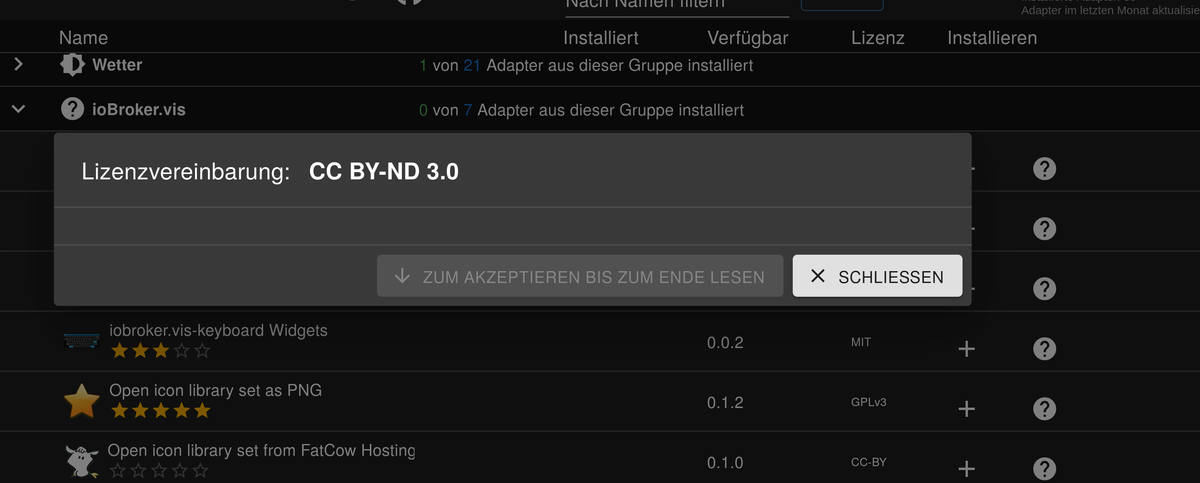
    ja Version v7.4.10 habe ich und ich kann die Lizenz nicht bestätigen da geht nichts zu lesen, da ist kein Text

    ? 1 Reply Last reply
    0
    • L looxx

      ja Version v7.4.10 habe ich und ich kann die Lizenz nicht bestätigen da geht nichts zu lesen, da ist kein Text

      ? Offline
      ? Offline
      A Former User
      wrote on last edited by
      #7

      @looxx zeig mal n Screenshot, damit wir wissen, was du da meinst.. bitte.

      1 Reply Last reply
      0
      • L Offline
        L Offline
        looxx
        wrote on last edited by
        #8

        b98d6d53-cd3a-4e79-a6b2-ac2ca6030a2a-Bildschirmfoto vom 2025-02-26 08-37-40.png /media/jenlin/ArchivX260/Cloud Technik Bauen/Photovoltaik/Bildschirmfoto vom 2025-02-26 08-37-40.png

        so sieht das aus

        ? 1 Reply Last reply
        0
        • L looxx

          b98d6d53-cd3a-4e79-a6b2-ac2ca6030a2a-Bildschirmfoto vom 2025-02-26 08-37-40.png /media/jenlin/ArchivX260/Cloud Technik Bauen/Photovoltaik/Bildschirmfoto vom 2025-02-26 08-37-40.png

          so sieht das aus

          ? Offline
          ? Offline
          A Former User
          wrote on last edited by
          #9

          @looxx

          das Popup ist wohl im Hintergrund? Ansonsten einfach mal ein upload des Adapters machen, dann poppt die Vereinbarung neu auf.
          Dann zu ende lesen und zustimmen.

          mcm1957M 1 Reply Last reply
          0
          • ? A Former User

            @looxx

            das Popup ist wohl im Hintergrund? Ansonsten einfach mal ein upload des Adapters machen, dann poppt die Vereinbarung neu auf.
            Dann zu ende lesen und zustimmen.

            mcm1957M Online
            mcm1957M Online
            mcm1957
            wrote on last edited by mcm1957
            #10

            @looxx
            Welchen Adapter versuchst du zu installieren?

            Und die Langfassung von iob diag wär ev. auch nicht schlecht. Da sieht man dann u.a. was du derzeit installiert hast.

            Entwicklung u Betreuung: envertech-pv, hoymiles-ms, ns-client, pid, snmp Adapter;
            Support Repositoryverwaltung.

            Wer Danke sagen will, kann nen Kaffee spendieren: https://paypal.me/mcm1957atiobroker

            LESEN - gute Forenbeitrage

            1 Reply Last reply
            0
            • L Offline
              L Offline
              looxx
              wrote on last edited by
              #11

              das passiert bei allen Adaptern außer der Lizenz MIT, bei allen anderen passiert das gleich. Es ist auch kein anderer Aufruf möglich, es ist nur möglich auf "schließen" zu drücken, alles andere ist nicht aktivierbar.

              iob diag muss ich im Terminal aufrufen?

              ? 1 Reply Last reply
              0
              • L looxx

                das passiert bei allen Adaptern außer der Lizenz MIT, bei allen anderen passiert das gleich. Es ist auch kein anderer Aufruf möglich, es ist nur möglich auf "schließen" zu drücken, alles andere ist nicht aktivierbar.

                iob diag muss ich im Terminal aufrufen?

                ? Offline
                ? Offline
                A Former User
                wrote on last edited by
                #12

                @looxx

                ja iob diag im Terminal aufrufen, und die komplette Ausgabe hier in Codetags bitte posten.

                L 1 Reply Last reply
                0
                • ? A Former User

                  @looxx

                  ja iob diag im Terminal aufrufen, und die komplette Ausgabe hier in Codetags bitte posten.

                  L Offline
                  L Offline
                  looxx
                  wrote on last edited by
                  #13

                  @neuschwansteini sagte in Lizenz CC-BY-NC-4.0 ??:

                  iob diag

                  Copy text starting here:

                  ======================= SUMMARY =======================
                  			v.2025-02-23
                  
                  
                   Static hostname: em680-Mercury
                         Icon name: computer-desktop
                           Chassis: desktop 🖥️
                  Operating System: Linux Mint 22
                            Kernel: Linux 6.8.0-54-generic
                      Architecture: x86-64
                   Hardware Vendor: Micro Computer _HK_ Tech Limited
                    Hardware Model: Mercury series
                  Firmware Version: 2.17
                     Firmware Date: Thu 2023-08-24
                      Firmware Age: 1y 6month 4d
                  
                  Installation: 		native
                  Kernel: 		x86_64
                  Userland: 		64 bit
                  Timezone: 		Europe/Berlin (CET, +0100)
                  igured to read the RTC time in the local time zone.
                  nges and daylight saving time adjustments. The RTC
                  User-ID: 		1000
                  Display-Server: 	false
                  Boot Target: 		multi-user.target
                  
                  Pending OS-Updates: 	0
                  Pending iob updates: 	1
                  
                  Nodejs-Installation:
                  /usr/bin/nodejs 	v20.18.3
                  /usr/bin/node 		v20.18.3
                  /usr/bin/npm 		10.8.2
                  /usr/bin/npx 		10.8.2
                  /usr/bin/corepack 	0.30.0
                  
                  Recommended versions are nodejs 20.18.3 and npm 10.8.2
                  nodeJS installation is correct
                  
                  MEMORY: 
                                 total        used        free      shared  buff/cache   available
                  Mem:             29G        6.0G        1.4G        188M         22G         23G
                  Swap:           2.1G        524K        2.1G
                  Total:           31G        6.0G        3.6G
                  
                  Active iob-Instances: 	14
                  Upgrade policy: none
                  
                  ioBroker Core: 		js-controller 		7.0.6
                  			admin 			7.4.10
                  
                  ioBroker Status: 	iobroker is running on this host.
                  
                  
                  Objects type: jsonl
                  States  type: jsonl
                  
                  Status admin and web instance:
                  + system.adapter.admin.0                  : admin                 : em680-Mercury                            -  enabled, port: 8081, bind: 0.0.0.0, run as: admin
                  + system.adapter.web.0                    : web                   : em680-Mercury                            -  enabled, port: 8082, bind: 0.0.0.0, run as: admin
                  
                  Objects: 		1643
                  States: 		1235
                  
                  Size of iob-Database:
                  
                  33M	/opt/iobroker/iobroker-data/objects.jsonl
                  6.1M	/opt/iobroker/iobroker-data/states.jsonl
                  
                  
                  Unknown release codenamed 'wilma'. Please check yourself if the Operating System is actively maintained.
                  
                  =================== END OF SUMMARY ====================
                  
                  mcm1957M 1 Reply Last reply
                  0
                  • L looxx

                    @neuschwansteini sagte in Lizenz CC-BY-NC-4.0 ??:

                    iob diag

                    Copy text starting here:

                    ======================= SUMMARY =======================
                    			v.2025-02-23
                    
                    
                     Static hostname: em680-Mercury
                           Icon name: computer-desktop
                             Chassis: desktop 🖥️
                    Operating System: Linux Mint 22
                              Kernel: Linux 6.8.0-54-generic
                        Architecture: x86-64
                     Hardware Vendor: Micro Computer _HK_ Tech Limited
                      Hardware Model: Mercury series
                    Firmware Version: 2.17
                       Firmware Date: Thu 2023-08-24
                        Firmware Age: 1y 6month 4d
                    
                    Installation: 		native
                    Kernel: 		x86_64
                    Userland: 		64 bit
                    Timezone: 		Europe/Berlin (CET, +0100)
                    igured to read the RTC time in the local time zone.
                    nges and daylight saving time adjustments. The RTC
                    User-ID: 		1000
                    Display-Server: 	false
                    Boot Target: 		multi-user.target
                    
                    Pending OS-Updates: 	0
                    Pending iob updates: 	1
                    
                    Nodejs-Installation:
                    /usr/bin/nodejs 	v20.18.3
                    /usr/bin/node 		v20.18.3
                    /usr/bin/npm 		10.8.2
                    /usr/bin/npx 		10.8.2
                    /usr/bin/corepack 	0.30.0
                    
                    Recommended versions are nodejs 20.18.3 and npm 10.8.2
                    nodeJS installation is correct
                    
                    MEMORY: 
                                   total        used        free      shared  buff/cache   available
                    Mem:             29G        6.0G        1.4G        188M         22G         23G
                    Swap:           2.1G        524K        2.1G
                    Total:           31G        6.0G        3.6G
                    
                    Active iob-Instances: 	14
                    Upgrade policy: none
                    
                    ioBroker Core: 		js-controller 		7.0.6
                    			admin 			7.4.10
                    
                    ioBroker Status: 	iobroker is running on this host.
                    
                    
                    Objects type: jsonl
                    States  type: jsonl
                    
                    Status admin and web instance:
                    + system.adapter.admin.0                  : admin                 : em680-Mercury                            -  enabled, port: 8081, bind: 0.0.0.0, run as: admin
                    + system.adapter.web.0                    : web                   : em680-Mercury                            -  enabled, port: 8082, bind: 0.0.0.0, run as: admin
                    
                    Objects: 		1643
                    States: 		1235
                    
                    Size of iob-Database:
                    
                    33M	/opt/iobroker/iobroker-data/objects.jsonl
                    6.1M	/opt/iobroker/iobroker-data/states.jsonl
                    
                    
                    Unknown release codenamed 'wilma'. Please check yourself if the Operating System is actively maintained.
                    
                    =================== END OF SUMMARY ====================
                    
                    mcm1957M Online
                    mcm1957M Online
                    mcm1957
                    wrote on last edited by
                    #14

                    @looxx

                    SUMMARY

                    Da ist die Zusammenfassung. Bitt um die LANGFASSUNG (kommt vor der Summary)

                    Entwicklung u Betreuung: envertech-pv, hoymiles-ms, ns-client, pid, snmp Adapter;
                    Support Repositoryverwaltung.

                    Wer Danke sagen will, kann nen Kaffee spendieren: https://paypal.me/mcm1957atiobroker

                    LESEN - gute Forenbeitrage

                    1 Reply Last reply
                    0
                    • L Offline
                      L Offline
                      looxx
                      wrote on last edited by
                      #15

                      ========== Start marking the full check here ===========

                      Script v.2025-02-23
                      
                      *** BASE SYSTEM ***
                       Static hostname: em680-Mercury
                             Icon name: computer-desktop
                               Chassis: desktop 🖥️
                      Operating System: Linux Mint 22
                                Kernel: Linux 6.8.0-54-generic
                          Architecture: x86-64
                       Hardware Vendor: Micro Computer _HK_ Tech Limited
                        Hardware Model: Mercury series
                      Firmware Version: 2.17
                         Firmware Date: Thu 2023-08-24
                          Firmware Age: 1y 6month 5d
                      OS is similar to: ubuntu debian
                      
                      model name	: AMD Ryzen 7 6800U with Radeon Graphics
                      Docker          : false
                      Virtualization  : none
                      Kernel          : x86_64
                      Userland        : 64 bit
                      
                      Systemuptime and Load:
                       09:41:27 up 1 day, 16:52,  2 users,  load average: 0.31, 0.20, 0.13
                      CPU threads: 16
                      
                      
                      *** LIFE CYCLE STATUS ***
                      Unknown release codenamed 'wilma'. Please check yourself if the Operating System is actively maintained.
                      
                      *** TIME AND TIMEZONES ***
                                     Local time: Thu 2025-02-27 09:41:27 CET
                                 Universal time: Thu 2025-02-27 08:41:27 UTC
                                       RTC time: Thu 2025-02-27 08:36:54
                                      Time zone: Europe/Berlin (CET, +0100)
                      System clock synchronized: yes
                                    NTP service: active
                                RTC in local TZ: yes
                      
                      Warning: The system is configured to read the RTC time in the local time zone.
                               This mode cannot be fully supported. It will create various problems
                               with time zone changes and daylight saving time adjustments. The RTC
                               time is never updated, it relies on external facilities to maintain it.
                               If at all possible, use RTC in UTC by calling
                               'timedatectl set-local-rtc 0'.
                      
                      *** Users and Groups ***
                      User that called 'iob diag':
                      em680
                      HOME=/home/em680
                      GROUPS=em680 adm voice cdrom sudo audio dip video plugdev users lpadmin bluetooth sambashare clamav mythtv vboxusers iobroker
                      
                      User that is running 'js-controller':
                      iobroker
                      HOME=/home/iobroker
                      GROUPS=iobroker tty dialout audio video plugdev bluetooth
                      
                      *** DISPLAY-SERVER SETUP ***
                      Display-Server: false
                      Desktop: 	cinnamon
                      Terminal: 	x11
                      
                      *** MEMORY ***
                                     total        used        free      shared  buff/cache   available
                      Mem:             29G        6.9G        2.0G        183M         20G         22G
                      Swap:           2.1G        524K        2.1G
                      Total:           31G        6.9G        4.1G
                      
                      Active iob-Instances: 	14
                      
                              27801 M total memory
                               6539 M used memory
                               7934 M active memory
                              13028 M inactive memory
                               1886 M free memory
                               3254 M buffer memory
                              16719 M swap cache
                               2047 M total swap
                                  0 M used swap
                               2047 M free swap
                      
                      *** top - Table Of Processes  ***
                      top - 09:41:28 up 1 day, 16:52,  2 users,  load average: 0.31, 0.20, 0.13
                      Tasks: 433 total,   1 running, 431 sleeping,   0 stopped,   1 zombie
                      %Cpu(s):  0.6 us,  0.6 sy,  0.0 ni, 98.9 id,  0.0 wa,  0.0 hi,  0.0 si,  0.0 st 
                      MiB Mem :  27801.1 total,   1884.1 free,   6541.1 used,  19974.4 buff/cache     
                      MiB Swap:   2048.0 total,   2047.5 free,      0.5 used.  21260.0 avail Mem 
                      
                      *** FAILED SERVICES ***
                      
                        UNIT                    LOAD   ACTIVE SUB    DESCRIPTION
                      * casper-md5check.service loaded failed failed casper-md5check Verify Live ISO checksums
                      * virtualbox.service      loaded failed failed LSB: VirtualBox Linux kernel module
                      
                      Legend: LOAD   -> Reflects whether the unit definition was properly loaded.
                              ACTIVE -> The high-level unit activation state, i.e. generalization of SUB.
                              SUB    -> The low-level unit activation state, values depend on unit type.
                      
                      2 loaded units listed.
                      
                      
                      *** DMESG CRITICAL ERRORS ***
                      No critical errors detected
                      
                      *** FILESYSTEM ***
                      Filesystem     Type      Size  Used Avail Use% Mounted on
                      tmpfs          tmpfs     2.8G  5.0M  2.8G   1% /run
                      efivarfs       efivarfs  128K   43K   81K  35% /sys/firmware/efi/efivars
                      /dev/nvme0n1p2 ext4      468G   69G  377G  16% /
                      tmpfs          tmpfs      14G  4.0K   14G   1% /dev/shm
                      tmpfs          tmpfs     5.0M   12K  5.0M   1% /run/lock
                      /dev/nvme0n1p1 vfat      511M  6.2M  505M   2% /boot/efi
                      tmpfs          tmpfs     2.8G  2.7M  2.8G   1% /run/user/1000
                      /dev/sda1      exfat     932G  335G  598G  36% /media/em680/Archiv EM68
                      /dev/sdb3      ntfs3     459G   61G  398G  14% /media/em680/HD 500GB
                      
                      Messages concerning ext4 filesystem in dmesg:
                      
                      Show mounted filesystems:
                      TARGET                     SOURCE         FSTYPE      OPTIONS
                      /                          /dev/nvme0n1p2 ext4        rw,relatime,errors=remount-ro
                      |-/run/user/1000/doc       portal         fuse.portal rw,nosuid,nodev,relatime,user_id=1000,group_id=1000
                      |-/boot/efi                /dev/nvme0n1p1 vfat        rw,relatime,fmask=0077,dmask=0077,codepage=437,iocharset=iso8859-1,shortname=mixed,errors=remount-ro
                      |-/media/em680/Archiv EM68 /dev/sda1      exfat       rw,nosuid,nodev,relatime,uid=1000,gid=1000,fmask=0022,dmask=0022,iocharset=utf8,errors=remount-ro
                      `-/media/em680/HD 500GB    /dev/sdb3      ntfs3       rw,nosuid,nodev,relatime,uid=1000,gid=1000,iocharset=utf8
                      
                      Files in neuralgic directories:
                      
                      /var:
                      9.5G	/var/
                      8.2G	/var/lib
                      7.0G	/var/lib/flatpak
                      6.9G	/var/lib/flatpak/repo/objects
                      6.9G	/var/lib/flatpak/repo
                      
                      Archived and active journals take up 535.6M in the file system.
                      
                      /opt/iobroker/backups:
                      322M	/opt/iobroker/backups/
                      
                      /opt/iobroker/iobroker-data:
                      521M	/opt/iobroker/iobroker-data/
                      416M	/opt/iobroker/iobroker-data/files
                      158M	/opt/iobroker/iobroker-data/files/admin.admin
                      157M	/opt/iobroker/iobroker-data/files/admin.admin/custom/static/js
                      157M	/opt/iobroker/iobroker-data/files/admin.admin/custom/static
                      
                      The five largest files in iobroker-data are:
                      19M	/opt/iobroker/iobroker-data/files/web.admin/static/js/main.6964fae2.js.map
                      19M	/opt/iobroker/iobroker-data/files/cameras.admin/static/js/main.b371dc6f.js.map
                      12M	/opt/iobroker/iobroker-data/objects.jsonl
                      7.5M	/opt/iobroker/iobroker-data/states.jsonl
                      7.5M	/opt/iobroker/iobroker-data/files/web.admin/static/js/main.6964fae2.js
                      
                      USB-Devices by-id:
                      USB-Sticks -  Avoid direct links to /dev/tty* in your adapter setups, please always prefer the links 'by-id':
                      
                      No Devices found 'by-id'
                      
                      Zigbee Network Settings on your coordinator/in nvbackup are:
                      
                      zigbee.X
                      Extended Pan ID:
                      *** MASKED ***
                      Pan ID:
                      *** MASKED ***
                      Channel:
                      *** MASKED ***
                      Network Key:
                      *** MASKED ***
                      
                      To unmask the settings run 'iob diag --unmask'
                      
                      
                      *** NodeJS-Installation ***
                      
                      /usr/bin/nodejs 	v20.18.3
                      /usr/bin/node 		v20.18.3
                      /usr/bin/npm 		10.8.2
                      /usr/bin/npx 		10.8.2
                      /usr/bin/corepack 	0.30.0
                      
                      nodejs:
                        Installed: 20.18.3-1nodesource1
                        Candidate: 20.18.3-1nodesource1
                        Version table:
                       *** 20.18.3-1nodesource1 1001
                              500 https://deb.nodesource.com/node_20.x nodistro/main amd64 Packages
                              100 /var/lib/dpkg/status
                           20.18.2-1nodesource1 1001
                              500 https://deb.nodesource.com/node_20.x nodistro/main amd64 Packages
                           20.18.1-1nodesource1 1001
                              500 https://deb.nodesource.com/node_20.x nodistro/main amd64 Packages
                           20.18.0-1nodesource1 1001
                              500 https://deb.nodesource.com/node_20.x nodistro/main amd64 Packages
                           20.17.0-1nodesource1 1001
                              500 https://deb.nodesource.com/node_20.x nodistro/main amd64 Packages
                           20.16.0-1nodesource1 1001
                              500 https://deb.nodesource.com/node_20.x nodistro/main amd64 Packages
                           20.15.1-1nodesource1 1001
                              500 https://deb.nodesource.com/node_20.x nodistro/main amd64 Packages
                           20.15.0-1nodesource1 1001
                              500 https://deb.nodesource.com/node_20.x nodistro/main amd64 Packages
                           20.14.0-1nodesource1 1001
                              500 https://deb.nodesource.com/node_20.x nodistro/main amd64 Packages
                           20.13.1-1nodesource1 1001
                              500 https://deb.nodesource.com/node_20.x nodistro/main amd64 Packages
                           20.13.0-1nodesource1 1001
                              500 https://deb.nodesource.com/node_20.x nodistro/main amd64 Packages
                           20.12.2-1nodesource1 1001
                              500 https://deb.nodesource.com/node_20.x nodistro/main amd64 Packages
                           20.12.1-1nodesource1 1001
                              500 https://deb.nodesource.com/node_20.x nodistro/main amd64 Packages
                           20.12.0-1nodesource1 1001
                              500 https://deb.nodesource.com/node_20.x nodistro/main amd64 Packages
                           20.11.1-1nodesource1 1001
                              500 https://deb.nodesource.com/node_20.x nodistro/main amd64 Packages
                           20.11.0-1nodesource1 1001
                              500 https://deb.nodesource.com/node_20.x nodistro/main amd64 Packages
                           20.10.0-1nodesource1 1001
                              500 https://deb.nodesource.com/node_20.x nodistro/main amd64 Packages
                           20.9.0-1nodesource1 1001
                              500 https://deb.nodesource.com/node_20.x nodistro/main amd64 Packages
                           20.8.1-1nodesource1 1001
                              500 https://deb.nodesource.com/node_20.x nodistro/main amd64 Packages
                           20.8.0-1nodesource1 1001
                              500 https://deb.nodesource.com/node_20.x nodistro/main amd64 Packages
                           20.7.0-1nodesource1 1001
                              500 https://deb.nodesource.com/node_20.x nodistro/main amd64 Packages
                           20.6.1-1nodesource1 1001
                              500 https://deb.nodesource.com/node_20.x nodistro/main amd64 Packages
                           20.6.0-1nodesource1 1001
                              500 https://deb.nodesource.com/node_20.x nodistro/main amd64 Packages
                           20.5.1-1nodesource1 1001
                              500 https://deb.nodesource.com/node_20.x nodistro/main amd64 Packages
                           20.5.0-1nodesource1 1001
                              500 https://deb.nodesource.com/node_20.x nodistro/main amd64 Packages
                           20.4.0-1nodesource1 1001
                              500 https://deb.nodesource.com/node_20.x nodistro/main amd64 Packages
                           20.3.1-1nodesource1 1001
                              500 https://deb.nodesource.com/node_20.x nodistro/main amd64 Packages
                           20.3.0-1nodesource1 1001
                              500 https://deb.nodesource.com/node_20.x nodistro/main amd64 Packages
                           20.2.0-1nodesource1 1001
                              500 https://deb.nodesource.com/node_20.x nodistro/main amd64 Packages
                           20.1.0-1nodesource1 1001
                              500 https://deb.nodesource.com/node_20.x nodistro/main amd64 Packages
                           20.0.0-1nodesource1 1001
                              500 https://deb.nodesource.com/node_20.x nodistro/main amd64 Packages
                           18.19.1+dfsg-6ubuntu5 500
                              500 https://mirror.informatik.tu-freiberg.de/ubuntu noble/universe amd64 Packages
                      
                      Temp directories causing deletion problem: 0
                      No problems detected
                      
                      Errors in npm tree: 0
                      No problems detected
                      
                      *** ioBroker-Installation ***
                      
                      ioBroker Status
                      iobroker is running on this host.
                      
                      
                      Objects type: jsonl
                      States  type: jsonl
                      
                      Hosts:
                      em680-Mercury       em680-Mercury (version: 7.0.6, hostname: em680-Mercury , alive, uptime: 147143)
                      
                      Core adapters versions
                      js-controller: 	7.0.6
                      admin: 		7.4.10
                      javascript: 	8.9.1
                      
                      nodejs modules from github: 	1
                      +-- iobroker.deyeidc@0.2.0 (git+ssh://git@github.com/raschy/ioBroker.deyeidc.git#0504bb34191750e47bfb509c3c9fb08aef980eb2)
                      
                      Adapter State
                      + system.adapter.admin.0                  : admin                 : em680-Mercury                            -  enabled, port: 8081, bind: 0.0.0.0, run as: admin
                      + system.adapter.artnet.0                 : artnet                : em680-Mercury                            -  enabled, port: 6454
                      + system.adapter.backitup.0               : backitup              : em680-Mercury                            -  enabled
                        system.adapter.cameras.0                : cameras               : em680-Mercury                            - disabled, port: 8200, bind: 127.0.0.1
                        system.adapter.canbus.0                 : canbus                : em680-Mercury                            - disabled
                      + system.adapter.cloud.0                  : cloud                 : em680-Mercury                            -  enabled
                      + system.adapter.deyeidc.0                : deyeidc               : em680-Mercury                            -  enabled, port: 8899
                      + system.adapter.deyeidc.1                : deyeidc               : em680-Mercury                            -  enabled, port: 8899
                        system.adapter.deyeidc.2                : deyeidc               : em680-Mercury                            - disabled, port: 8899
                        system.adapter.deyeidc.3                : deyeidc               : em680-Mercury                            - disabled, port: 8899
                      + system.adapter.discovery.0              : discovery             : em680-Mercury                            -  enabled
                        system.adapter.dwd.0                    : dwd                   : em680-Mercury                            - disabled
                        system.adapter.icons-mfd-svg.0          : icons-mfd-svg         : em680-Mercury                            -  enabled
                      + system.adapter.javascript.0             : javascript            : em680-Mercury                            -  enabled
                        system.adapter.lgtv.0                   : lgtv                  : em680-Mercury                            - disabled
                        system.adapter.modbus.0                 : modbus                : em680-Mercury                            - disabled
                        system.adapter.mqtt-client.0            : mqtt-client           : em680-Mercury                            - disabled, port: 1883
                        system.adapter.ping.0                   : ping                  : em680-Mercury                            - disabled
                      + system.adapter.pvforecast.0             : pvforecast            : em680-Mercury                            -  enabled
                        system.adapter.smartmeter.0             : smartmeter            : em680-Mercury                            - disabled
                        system.adapter.solarmanpv.0             : solarmanpv            : em680-Mercury                            - disabled
                      + system.adapter.systeminfo.0             : systeminfo            : em680-Mercury                            -  enabled
                      + system.adapter.tibberlink.0             : tibberlink            : em680-Mercury                            -  enabled
                      + system.adapter.tr-064.1                 : tr-064                : em680-Mercury                            -  enabled
                        system.adapter.vis-material-advanced.0  : vis-material-advanced : em680-Mercury                            -  enabled
                        system.adapter.vis-materialdesign.0     : vis-materialdesign    : em680-Mercury                            -  enabled
                        system.adapter.vis.0                    : vis                   : em680-Mercury                            -  enabled
                      + system.adapter.web.0                    : web                   : em680-Mercury                            -  enabled, port: 8082, bind: 0.0.0.0, run as: admin
                        system.adapter.wireguard.0              : wireguard             : em680-Mercury                            - disabled
                      
                      + instance is alive
                      
                      Enabled adapters with bindings
                      + system.adapter.admin.0                  : admin                 : em680-Mercury                            -  enabled, port: 8081, bind: 0.0.0.0, run as: admin
                      + system.adapter.artnet.0                 : artnet                : em680-Mercury                            -  enabled, port: 6454
                      + system.adapter.deyeidc.0                : deyeidc               : em680-Mercury                            -  enabled, port: 8899
                      + system.adapter.deyeidc.1                : deyeidc               : em680-Mercury                            -  enabled, port: 8899
                      + system.adapter.web.0                    : web                   : em680-Mercury                            -  enabled, port: 8082, bind: 0.0.0.0, run as: admin
                      
                      ioBroker-Repositories
                      ┌─────────┬──────────┬─────────────────────────────────────────────────────────┬──────────────┐
                      │ (index) │ name     │ url                                                     │ auto upgrade │
                      ├─────────┼──────────┼─────────────────────────────────────────────────────────┼──────────────┤
                      │ 0       │ 'stable' │ 'http://download.iobroker.net/sources-dist.json'        │ true         │
                      │ 1       │ 'beta'   │ 'http://download.iobroker.net/sources-dist-latest.json' │ true         │
                      └─────────┴──────────┴─────────────────────────────────────────────────────────┴──────────────┘
                      
                      Active repo(s): stable
                      Upgrade policy: none
                      
                      Installed ioBroker-Adapters
                      Used repository: stable
                      Adapter    "admin"        : 7.4.10   , installed 7.4.10
                      Adapter    "artnet"       : 1.2.2    , installed 1.2.2
                      Adapter    "backitup"     : 3.0.31   , installed 3.0.31
                      Adapter    "cameras"      : 2.1.2    , installed 2.1.2
                      Adapter    "canbus"       : 1.3.1    , installed 1.3.1
                      Adapter    "cloud"        : 5.0.1    , installed 5.0.1
                      Adapter    "deyeidc"      : 0.1.1    , installed 0.2.0
                      Adapter    "discovery"    : 5.0.0    , installed 5.0.0
                      Adapter    "dwd"          : 2.8.5    , installed 2.8.5
                      Adapter    "hass"         : 1.4.0    , installed 1.4.0
                      Adapter    "icons-mfd-svg": 1.2.0    , installed 1.2.0
                      Adapter    "javascript"   : 8.8.3    , installed 8.9.1
                      Controller "js-controller": 7.0.6    , installed 7.0.6
                      Adapter    "lg-thinq"     : 1.0.7    , installed 1.0.7
                      Adapter    "lgtv"         : 2.4.0    , installed 2.4.0
                      Adapter    "modbus"       : 6.3.2    , installed 6.4.0
                      Adapter    "mqtt-client"  : 3.0.0    , installed 2.1.0  [Updatable]
                      Adapter    "ping"         : 1.6.2    , installed 1.7.9
                      Adapter    "pvforecast"   : 4.1.0    , installed 4.1.0
                      Adapter    "simple-api"   : 2.8.0    , installed 2.8.0
                      Adapter    "smartmeter"   : 3.4.0    , installed 3.4.0
                      Adapter    "socketio"     : 6.7.1    , installed 7.0.1
                      Adapter    "solarmanpv"   : 0.6.2    , installed 0.6.4
                      Adapter    "systeminfo"   : 1.2.0    , installed 1.2.0
                      Adapter    "tibberlink"   : 4.3.0    , installed 4.3.0
                      Adapter    "tr-064"       : 4.3.0    , installed 4.3.0
                      Adapter    "vis"          : 1.5.6    , installed 1.5.6
                      Adapter    "vis-2-widgets-material": 1.4.10, installed 1.4.10
                      Adapter    "vis-2-widgets-weather-and-heating": 0.9.1, installed 0.9.1
                      Adapter    "vis-colorpicker": 2.0.3  , installed 2.0.3
                      Adapter    "vis-hqwidgets": 1.5.1    , installed 1.5.1
                      Adapter    "vis-icontwo"  : 1.11.0   , installed 1.11.0
                      Adapter    "vis-lcars"    : 1.1.1    , installed 1.1.1
                      Adapter    "vis-material-advanced": 1.7.4, installed 1.7.4
                      Adapter    "vis-materialdesign": 0.5.9, installed 0.5.9
                      Adapter    "vis-players"  : 0.1.6    , installed 0.1.6
                      Adapter    "vis-weather"  : 2.5.9    , installed 2.5.9
                      Adapter    "web"          : 6.2.5    , installed 6.3.1
                      Adapter    "wireguard"    : 1.7.0    , installed 1.8.0
                      Adapter    "ws"           : 2.6.2    , installed 3.0.5
                      
                      Objects and States
                      Please stand by - This may take a while
                      Objects: 	1643
                      States: 	1235
                      
                      *** OS-Repositories and Updates ***
                      Hit:1 https://deb.nodesource.com/node_20.x nodistro InRelease
                      Hit:2 https://mirror.informatik.tu-freiberg.de/ubuntu noble InRelease
                      Hit:3 http://security.ubuntu.com/ubuntu noble-security InRelease
                      Hit:4 https://mirror.informatik.tu-freiberg.de/ubuntu noble-updates InRelease
                      Hit:5 https://mirror.informatik.tu-freiberg.de/ubuntu noble-backports InRelease
                      Ign:6 http://packages.linuxmint.com wilma InRelease
                      Hit:7 http://packages.linuxmint.com wilma Release
                      Reading package lists...
                      Pending Updates: 18
                      
                      *** Listening Ports ***
                      Active Internet connections (only servers)
                      Proto Recv-Q Send-Q Local Address           Foreign Address         State       User       Inode      PID/Program name    
                      tcp        0      0 127.0.0.54:53           0.0.0.0:*               LISTEN      991        14735      1064/systemd-resolv 
                      tcp        0      0 127.0.0.1:3306          0.0.0.0:*               LISTEN      122        7046       1412/mysqld         
                      tcp        0      0 127.0.0.1:33060         0.0.0.0:*               LISTEN      122        7044       1412/mysqld         
                      tcp        0      0 127.0.0.1:631           0.0.0.0:*               LISTEN      0          480266     50265/cupsd         
                      tcp        0      0 0.0.0.0:111             0.0.0.0:*               LISTEN      0          17515      1/init              
                      tcp        0      0 0.0.0.0:25              0.0.0.0:*               LISTEN      0          15793      1809/master         
                      tcp        0      0 0.0.0.0:139             0.0.0.0:*               LISTEN      0          12733      1498/smbd           
                      tcp        0      0 0.0.0.0:445             0.0.0.0:*               LISTEN      0          12732      1498/smbd           
                      tcp        0      0 127.0.0.53:53           0.0.0.0:*               LISTEN      991        14733      1064/systemd-resolv 
                      tcp        0      0 127.0.0.1:8384          0.0.0.0:*               LISTEN      1000       16016      3191/syncthing      
                      tcp        0      0 127.0.0.1:9001          0.0.0.0:*               LISTEN      1001       14949      1363/iobroker.js-co 
                      tcp        0      0 127.0.0.1:9000          0.0.0.0:*               LISTEN      1001       19935      1363/iobroker.js-co 
                      tcp6       0      0 :::111                  :::*                    LISTEN      0          905        1/init              
                      tcp6       0      0 :::80                   :::*                    LISTEN      0          19835      1407/apache2        
                      tcp6       0      0 :::25                   :::*                    LISTEN      0          15794      1809/master         
                      tcp6       0      0 :::139                  :::*                    LISTEN      0          12731      1498/smbd           
                      tcp6       0      0 :::445                  :::*                    LISTEN      0          12730      1498/smbd           
                      tcp6       0      0 ::1:631                 :::*                    LISTEN      0          480265     50265/cupsd         
                      tcp6       0      0 :::8081                 :::*                    LISTEN      1001       6045       1874/io.admin.0     
                      tcp6       0      0 :::8082                 :::*                    LISTEN      1001       22579      2640/io.web.0       
                      tcp6       0      0 :::22000                :::*                    LISTEN      1000       21030      3191/syncthing      
                      udp        0      0 192.168.178.66:5353     0.0.0.0:*                           1001       20176      2073/io.tr-064.1    
                      udp        0      0 0.0.0.0:5353            0.0.0.0:*                           111        2835       1097/avahi-daemon:  
                      udp        0      0 127.0.0.54:53           0.0.0.0:*                           991        14734      1064/systemd-resolv 
                      udp        0      0 127.0.0.53:53           0.0.0.0:*                           991        14732      1064/systemd-resolv 
                      udp        0      0 0.0.0.0:111             0.0.0.0:*                           0          2404       1/init              
                      udp        0      0 192.168.178.255:137     0.0.0.0:*                           0          14910      1463/nmbd           
                      udp        0      0 192.168.178.66:137      0.0.0.0:*                           0          14909      1463/nmbd           
                      udp        0      0 0.0.0.0:137             0.0.0.0:*                           0          14897      1463/nmbd           
                      udp        0      0 192.168.178.255:138     0.0.0.0:*                           0          14912      1463/nmbd           
                      udp        0      0 192.168.178.66:138      0.0.0.0:*                           0          14911      1463/nmbd           
                      udp        0      0 0.0.0.0:138             0.0.0.0:*                           0          14898      1463/nmbd           
                      udp        0      0 0.0.0.0:33722           0.0.0.0:*                           111        2837       1097/avahi-daemon:  
                      udp        0      0 0.0.0.0:51057           0.0.0.0:*                           1000       29701      3191/syncthing      
                      udp        0      0 0.0.0.0:21027           0.0.0.0:*                           1000       28789      3191/syncthing      
                      udp6       0      0 :::5353                 :::*                                111        2836       1097/avahi-daemon:  
                      udp6       0      0 :::22000                :::*                                1000       30728      3191/syncthing      
                      udp6       0      0 :::56926                :::*                                1000       11738      3191/syncthing      
                      udp6       0      0 :::111                  :::*                                0          8240       1/init              
                      udp6       0      0 fe80::6d64:3838:138:546 :::*                                0          12820      1293/NetworkManager 
                      udp6       0      0 :::37237                :::*                                111        2838       1097/avahi-daemon:  
                      udp6       0      0 :::21027                :::*                                1000       11739      3191/syncthing      
                      
                      *** Log File - Last 25 Lines ***
                      
                      2025-02-27 09:08:59.516  - warn: deyeidc.0 (8254) Compute Key1 'DV1' not found!
                      2025-02-27 09:09:59.512  - warn: deyeidc.0 (8254) Compute Key1 'DV1' not found!
                      2025-02-27 09:10:59.512  - warn: deyeidc.0 (8254) Compute Key1 'DV1' not found!
                      2025-02-27 09:11:59.514  - warn: deyeidc.0 (8254) Compute Key1 'DV1' not found!
                      2025-02-27 09:12:59.512  - warn: deyeidc.0 (8254) Compute Key1 'DV1' not found!
                      2025-02-27 09:13:59.516  - warn: deyeidc.0 (8254) Compute Key1 'DV1' not found!
                      2025-02-27 09:14:59.520  - warn: deyeidc.0 (8254) Compute Key1 'DV1' not found!
                      2025-02-27 09:15:59.873  - warn: deyeidc.0 (8254) Compute Key1 'DV1' not found!
                      2025-02-27 09:17:59.518  - warn: deyeidc.0 (8254) Compute Key1 'DV1' not found!
                      2025-02-27 09:18:59.521  - warn: deyeidc.0 (8254) Compute Key1 'DV1' not found!
                      2025-02-27 09:19:59.515  - warn: deyeidc.0 (8254) Compute Key1 'DV1' not found!
                      2025-02-27 09:21:59.518  - warn: deyeidc.0 (8254) Compute Key1 'DV1' not found!
                      2025-02-27 09:22:59.515  - warn: deyeidc.0 (8254) Compute Key1 'DV1' not found!
                      2025-02-27 09:23:59.528  - warn: deyeidc.0 (8254) Compute Key1 'DV1' not found!
                      2025-02-27 09:24:59.517  - warn: deyeidc.0 (8254) Compute Key1 'DV1' not found!
                      2025-02-27 09:25:59.520  - warn: deyeidc.0 (8254) Compute Key1 'DV1' not found!
                      2025-02-27 09:27:59.522  - warn: deyeidc.0 (8254) Compute Key1 'DV1' not found!
                      2025-02-27 09:28:59.828  - warn: deyeidc.0 (8254) Compute Key1 'DV1' not found!
                      2025-02-27 09:29:59.525  - warn: deyeidc.0 (8254) Compute Key1 'DV1' not found!
                      2025-02-27 09:32:59.526  - warn: deyeidc.0 (8254) Compute Key1 'DV1' not found!
                      2025-02-27 09:33:59.524  - warn: deyeidc.0 (8254) Compute Key1 'DV1' not found!
                      2025-02-27 09:35:59.525  - warn: deyeidc.0 (8254) Compute Key1 'DV1' not found!
                      2025-02-27 09:36:59.523  - warn: deyeidc.0 (8254) Compute Key1 'DV1' not found!
                      2025-02-27 09:37:59.530  - warn: deyeidc.0 (8254) Compute Key1 'DV1' not found!
                      2025-02-27 09:39:59.527  - warn: deyeidc.0 (8254) Compute Key1 'DV1' not found!


                      ============ Mark until here for C&P =============

                      iob diag has finished.

                      ist es das?

                      1 Reply Last reply
                      1
                      Reply
                      • Reply as topic
                      Log in to reply
                      • Oldest to Newest
                      • Newest to Oldest
                      • Most Votes


                      Support us

                      ioBroker
                      Community Adapters
                      Donate

                      509

                      Online

                      32.5k

                      Users

                      81.6k

                      Topics

                      1.3m

                      Posts
                      Community
                      Impressum | Datenschutz-Bestimmungen | Nutzungsbedingungen | Einwilligungseinstellungen
                      ioBroker Community 2014-2025
                      logo
                      • Login

                      • Don't have an account? Register

                      • Login or register to search.
                      • First post
                        Last post
                      0
                      • Home
                      • Recent
                      • Tags
                      • Unread 0
                      • Categories
                      • Unreplied
                      • Popular
                      • GitHub
                      • Docu
                      • Hilfe