




Motion eye startet nicht
-
@haselchen ich musste den motion eye nochmals deinstallieren und neu aufsetzten, weil er zu viele Fehler hatte.
Nun konnte ich meinen Iobroker nicht mehr wie gewohnt auf dem Port 8081 erreichen, sondern auf dem 8082.
in der Iobroker list instance zeigt er mir jedoch den 8081 an:system.adapter.admin.0 : admin : iobroker-pi - enabled, compact disabled, port: 8081, bind: 0.0.0.0, run as: adminDie Ports von motion und motion eye sind in der config auf 8765 gesetzt. Das passt.
Jedoch hab ich unternetstart -n -a -p TCPso viele Dienste drin - teilweise auch doppelt. Kann das zusammenhängen mit dem neuen Iobroker Port 8082?@line sagte in Motion eye startet nicht:
Nun konnte ich meinen Iobroker nicht mehr wie gewohnt auf dem Port 8081 erreichen
weil du dadurch den Port belegt hast
@line sagte in Motion eye startet nicht:
Die Ports von motion und motion eye sind in der config auf 8765 gesetzt. Das passt
hat damit nichts zu tun, sondern jede Cam bekommt einen Port zugeteilt, cam1 Port 8081, cam2 8082, cam3 8083...usw
zu sehen, hier
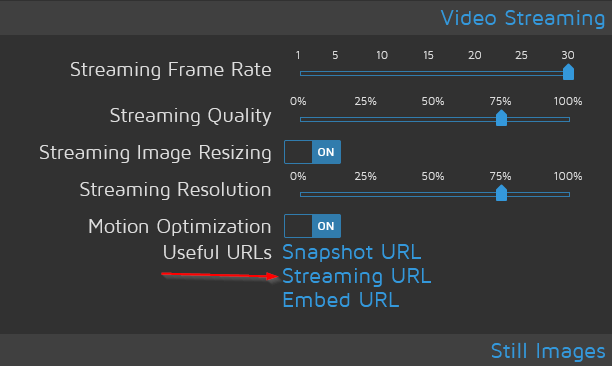
du kannst die Ports der cams in motioneye ändern
-
@line sagte in Motion eye startet nicht:
Nun konnte ich meinen Iobroker nicht mehr wie gewohnt auf dem Port 8081 erreichen
weil du dadurch den Port belegt hast
@line sagte in Motion eye startet nicht:
Die Ports von motion und motion eye sind in der config auf 8765 gesetzt. Das passt
hat damit nichts zu tun, sondern jede Cam bekommt einen Port zugeteilt, cam1 Port 8081, cam2 8082, cam3 8083...usw
zu sehen, hier
du kannst die Ports der cams in motioneye ändern
@crunchip das habe ich schon abgeändert
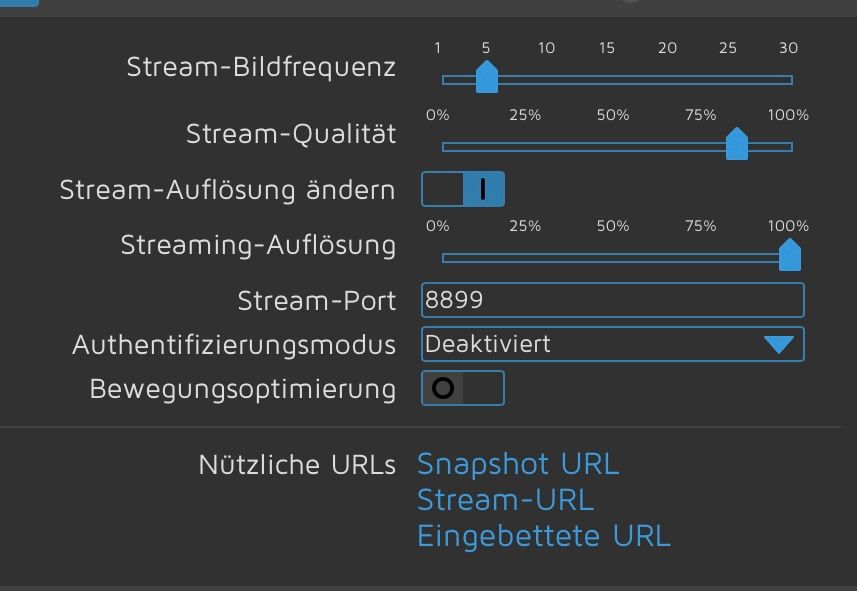
Trotzdem wird die 8081 von irgendetwas anderes blockiertWenn ich auf den stream url klicke, passiert nichts. Gebe ich die ip mit dem Port ein, sehe ich das Kamara. Aber er zeigt mir keine snapshot url, stream url, eingebettete url - aber das ist ein anderes Thema :-)
-
@crunchip das habe ich schon abgeändert
Trotzdem wird die 8081 von irgendetwas anderes blockiertWenn ich auf den stream url klicke, passiert nichts. Gebe ich die ip mit dem Port ein, sehe ich das Kamara. Aber er zeigt mir keine snapshot url, stream url, eingebettete url - aber das ist ein anderes Thema :-)
@line sagte in Motion eye startet nicht:
wird die 8081 von irgendetwas anderes blockiert
auch neu durchgestartet?
dann seh nach was für Ports belegt sindsudo netstat -tulpn -
@line sagte in Motion eye startet nicht:
wird die 8081 von irgendetwas anderes blockiert
auch neu durchgestartet?
dann seh nach was für Ports belegt sindsudo netstat -tulpn@crunchip der zeigt an, dass ich 4 Kamaras habe - aber es sind nur 2 mit Port 8898 und 8899
Active Internet connections (only servers)
Proto Recv-Q Send-Q Local Address           Foreign Address         State       PID/Program name
tcp        0      0 0.0.0.0:1883            0.0.0.0:*               LISTEN      494/mosquitto
tcp        0      0 127.0.0.1:9001          0.0.0.0:*               LISTEN      7379/iobroker.js-co
tcp        0      0 127.0.0.1:9000          0.0.0.0:*               LISTEN      7379/iobroker.js-co
tcp        0      0 0.0.0.0:8765            0.0.0.0:*               LISTEN      483/python3
tcp        0      0 0.0.0.0:8899            0.0.0.0:*               LISTEN      10788/motion
tcp        0      0 0.0.0.0:8898            0.0.0.0:*               LISTEN      10788/motion
tcp        0      0 0.0.0.0:22              0.0.0.0:*               LISTEN      525/sshd: /usr/sbin
tcp        0      0 127.0.0.1:8081          0.0.0.0:*               LISTEN      492/motion
tcp        0      0 127.0.0.1:8080          0.0.0.0:*               LISTEN      492/motion
tcp        0      0 127.0.0.1:6999          0.0.0.0:*               LISTEN      10788/motion
tcp        0      0 192.168.178.69:1882     0.0.0.0:*               LISTEN      7700/io.shelly.0
tcp6       0      0 :::1883                 :::*                    LISTEN      494/mosquitto
tcp6       0      0 :::4712                 :::*                    LISTEN      859/evcc
tcp6       0      0 :::22                   :::*                    LISTEN      525/sshd: /usr/sbin
tcp6       0      0 :::8095                 :::*                    LISTEN      10200/io.onvif.0
tcp6       0      0 :::8084                 :::*                    LISTEN      7926/io.socketio.0
tcp6       0      0 :::8083                 :::*                    LISTEN      7995/io.web.0
tcp6       0      0 :::8082                 :::*                    LISTEN      7428/io.admin.0
tcp6       0      0 :::3389                 :::*                    LISTEN      530/xrdp
tcp6       0      0 :::7070                 :::*                    LISTEN      859/evcc
tcp6       0      0 ::1:3350                :::*                    LISTEN      498/xrdp-sesman
udp        0      0 0.0.0.0:1902            0.0.0.0:*                           7892/io.mediola-gat
udp        0      0 0.0.0.0:60841           0.0.0.0:*                           370/avahi-daemon: r
udp        0      0 0.0.0.0:67              0.0.0.0:*                           7685/io.radar2.0
udp        0      0 0.0.0.0:68              0.0.0.0:*                           853/dhcpcd
udp        0      0 0.0.0.0:53460           0.0.0.0:*                           7892/io.mediola-gat
udp        0      0 0.0.0.0:5353            0.0.0.0:*                           859/evcc
udp        0      0 0.0.0.0:5353            0.0.0.0:*                           370/avahi-daemon: r
udp        0      0 0.0.0.0:5683            0.0.0.0:*                           7735/io.shelly.1
udp6       0      0 :::51464                :::*                                370/avahi-daemon: r
udp6       0      0 :::546                  :::*                                853/dhcpcd
udp6       0      0 :::5353                 :::*                                859/evcc
udp6       0      0 :::5353                 :::*                                370/avahi-daemon: r
Evt. Noch von der 1. Installation? Kann ich die 8080 und 8081 dann rauskicken?
-
@crunchip der zeigt an, dass ich 4 Kamaras habe - aber es sind nur 2 mit Port 8898 und 8899
Active Internet connections (only servers)
Proto Recv-Q Send-Q Local Address           Foreign Address         State       PID/Program name
tcp        0      0 0.0.0.0:1883            0.0.0.0:*               LISTEN      494/mosquitto
tcp        0      0 127.0.0.1:9001          0.0.0.0:*               LISTEN      7379/iobroker.js-co
tcp        0      0 127.0.0.1:9000          0.0.0.0:*               LISTEN      7379/iobroker.js-co
tcp        0      0 0.0.0.0:8765            0.0.0.0:*               LISTEN      483/python3
tcp        0      0 0.0.0.0:8899            0.0.0.0:*               LISTEN      10788/motion
tcp        0      0 0.0.0.0:8898            0.0.0.0:*               LISTEN      10788/motion
tcp        0      0 0.0.0.0:22              0.0.0.0:*               LISTEN      525/sshd: /usr/sbin
tcp        0      0 127.0.0.1:8081          0.0.0.0:*               LISTEN      492/motion
tcp        0      0 127.0.0.1:8080          0.0.0.0:*               LISTEN      492/motion
tcp        0      0 127.0.0.1:6999          0.0.0.0:*               LISTEN      10788/motion
tcp        0      0 192.168.178.69:1882     0.0.0.0:*               LISTEN      7700/io.shelly.0
tcp6       0      0 :::1883                 :::*                    LISTEN      494/mosquitto
tcp6       0      0 :::4712                 :::*                    LISTEN      859/evcc
tcp6       0      0 :::22                   :::*                    LISTEN      525/sshd: /usr/sbin
tcp6       0      0 :::8095                 :::*                    LISTEN      10200/io.onvif.0
tcp6       0      0 :::8084                 :::*                    LISTEN      7926/io.socketio.0
tcp6       0      0 :::8083                 :::*                    LISTEN      7995/io.web.0
tcp6       0      0 :::8082                 :::*                    LISTEN      7428/io.admin.0
tcp6       0      0 :::3389                 :::*                    LISTEN      530/xrdp
tcp6       0      0 :::7070                 :::*                    LISTEN      859/evcc
tcp6       0      0 ::1:3350                :::*                    LISTEN      498/xrdp-sesman
udp        0      0 0.0.0.0:1902            0.0.0.0:*                           7892/io.mediola-gat
udp        0      0 0.0.0.0:60841           0.0.0.0:*                           370/avahi-daemon: r
udp        0      0 0.0.0.0:67              0.0.0.0:*                           7685/io.radar2.0
udp        0      0 0.0.0.0:68              0.0.0.0:*                           853/dhcpcd
udp        0      0 0.0.0.0:53460           0.0.0.0:*                           7892/io.mediola-gat
udp        0      0 0.0.0.0:5353            0.0.0.0:*                           859/evcc
udp        0      0 0.0.0.0:5353            0.0.0.0:*                           370/avahi-daemon: r
udp        0      0 0.0.0.0:5683            0.0.0.0:*                           7735/io.shelly.1
udp6       0      0 :::51464                :::*                                370/avahi-daemon: r
udp6       0      0 :::546                  :::*                                853/dhcpcd
udp6       0      0 :::5353                 :::*                                859/evcc
udp6       0      0 :::5353                 :::*                                370/avahi-daemon: r
Evt. Noch von der 1. Installation? Kann ich die 8080 und 8081 dann rauskicken?
kill 492 -
kill 492 -
@thomas-braun dass war’s! Hoffentlich bleibt es so. Danke
Keine Ahnung wieviel RAM Du hast bei Deinem Raspi , aber mit Iobroker und vielleicht anderer Software zusammen , hast Du keinen Spaß mit MotionEye. Wenn dann noch 1-2 Cams dazukommen haste nur noch Daumenkino.
Ich rate Dir zu separater Hardware und dem MotionEye Image.
Hab nen Raspi 4 mit dem Image laufen und läuft ohne Neustart seit Monaten .
Durch das Image brauchste auch nichts installieren und verwurschtelst vielleicht was dadurch , sondern haste sogar noch zusätzliche Einstellmöglichkeiten in der Software/ in der GUI.



568
Online32.7k
Users82.5k
Topics1.3m
Posts