Skip to content
  • Home
  • Recent
  • Tags
  • 0 Unread 0
  • Categories
  • Unreplied
  • Popular
  • GitHub
  • Docu
  • Hilfe
Skins
  • Light
  • Brite
  • Cerulean
  • Cosmo
  • Flatly
  • Journal
  • Litera
  • Lumen
  • Lux
  • Materia
  • Minty
  • Morph
  • Pulse
  • Sandstone
  • Simplex
  • Sketchy
  • Spacelab
  • United
  • Yeti
  • Zephyr
  • Dark
  • Cyborg
  • Darkly
  • Quartz
  • Slate
  • Solar
  • Superhero
  • Vapor

  • Default (No Skin)
  • No Skin
Collapse
ioBroker Logo

Community Forum

donate donate
  1. ioBroker Community Home
  2. Deutsch
  3. Tester
  4. Test Adapter flexcharts - Stapeldiagramme und mehr
NEWS

  • Monatsrückblick Januar/Februar 2026 ist online!
    BluefoxB
    Bluefox
    17
    1
    396

  • Jahresrückblick 2025 – unser neuer Blogbeitrag ist online! ✨
    BluefoxB
    Bluefox
    17
    1
    4.9k

  • Neuer Blogbeitrag: Monatsrückblick - Dezember 2025 🎄
    BluefoxB
    Bluefox
    13
    1
    1.3k

Test Adapter flexcharts - Stapeldiagramme und mehr
Scheduled Pinned Locked Moved Tester
chartchartsdiagrammeechartsvisualisierungvisualization
276 Posts 20 Posters 54.3k Views 22 Watching
  • Oldest to Newest
  • Newest to Oldest
  • Most Votes
Reply
  • Reply as topic
Log in to reply
This topic has been deleted. Only users with topic management privileges can see it.
  • jrbwhJ jrbwh

    @merlin123 sagte in Test Adapter flexcharts - Stapeldiagramme und mehr:

    Bei Hourly macht das Format der Zeit keinen Sinn

    Stimmt. Hab ich auch gleich geändert. Minuten finde ich aber schon sinnvoll. Kannst Du leicht entfernen, wenn Du den Eintrag , minute: '2-digit' löscht.

    Merlin123M Offline
    Merlin123M Offline
    Merlin123
    wrote on last edited by Merlin123
    #181

    @jrbwh Funktioniert :) Minuten sind optisch schöner, stimmt

    Muss jetzt nur die Änderungen in meinem angepassten Script als nachziehen :D Hab die Farben angepasst, da ich keinen weißen Hintergrund habe.

    Mir ist noch was aufgefallen, keine Ahnung wo man das anpasst:
    Es wird z,B. "1,234.56 kWh" angezeigt. Im Deutschen müsste das aber "1.234,56" heißen.

    Idee:
    Farben für die einzelnen Sachen als Variable am Anfang deklarieren...
    Aber das ist eher der Goldrand, den man nicht unbedingt braucht ;)

    Beta-Tester

    jrbwhJ 1 Reply Last reply
    0
    • Merlin123M Merlin123

      @jrbwh Funktioniert :) Minuten sind optisch schöner, stimmt

      Muss jetzt nur die Änderungen in meinem angepassten Script als nachziehen :D Hab die Farben angepasst, da ich keinen weißen Hintergrund habe.

      Mir ist noch was aufgefallen, keine Ahnung wo man das anpasst:
      Es wird z,B. "1,234.56 kWh" angezeigt. Im Deutschen müsste das aber "1.234,56" heißen.

      Idee:
      Farben für die einzelnen Sachen als Variable am Anfang deklarieren...
      Aber das ist eher der Goldrand, den man nicht unbedingt braucht ;)

      jrbwhJ Offline
      jrbwhJ Offline
      jrbwh
      wrote on last edited by
      #182

      @merlin123 sagte in Test Adapter flexcharts - Stapeldiagramme und mehr:

      Farben für die einzelnen Sachen als Variable am Anfang deklarieren...

      Ja, auch eine gute Idee. Man könnte auch in der Konstante IDS für jeden Chart-Typ eigene Farben vorsehen und im Skript passend zuweisen.

      Es soll ja aber eigentlich eine Vorlage sein und auch zu eigenen Experimenten anregen. Deshalb werde ich es jetzt erstmal so lassen. Du kannst natürlich gerne Weiterentwicklungen in der Diskussion posten.

      Merlin123M 1 Reply Last reply
      1
      • jrbwhJ jrbwh

        @merlin123 sagte in Test Adapter flexcharts - Stapeldiagramme und mehr:

        Farben für die einzelnen Sachen als Variable am Anfang deklarieren...

        Ja, auch eine gute Idee. Man könnte auch in der Konstante IDS für jeden Chart-Typ eigene Farben vorsehen und im Skript passend zuweisen.

        Es soll ja aber eigentlich eine Vorlage sein und auch zu eigenen Experimenten anregen. Deshalb werde ich es jetzt erstmal so lassen. Du kannst natürlich gerne Weiterentwicklungen in der Diskussion posten.

        Merlin123M Offline
        Merlin123M Offline
        Merlin123
        wrote on last edited by
        #183

        @jrbwh Muss mal schauen, was ich da noch anpasse, aktuell passt es erstmal.
        Weißt zu zufällig, wie man die Darstellung der Tausender anpassen kann?

        Beta-Tester

        jrbwhJ 1 Reply Last reply
        0
        • icebearI Online
          icebearI Online
          icebear
          wrote on last edited by
          #184

          Was mir noch nicht so ganz klar ist, wie bekomme ich den die Daten aus den DP's z.B. Heizung (VLT, AT, RLT) in ein Array so das ich es dann als Datenreihe im Fexchart verarbeiten kann?

          Also ich hab die drei DP's in denen die Werte stehen und die auch in InfluxDB gespeichert werden. So wie ich es Vertsanden hab müssen die ja irgendwie in ein Daten Array kommen z.B. Tägliche, Wöchentlich oder Monatliche Werte. Wie stell ich das an.

          jrbwhJ L 2 Replies Last reply
          0
          • Merlin123M Merlin123

            @jrbwh Muss mal schauen, was ich da noch anpasse, aktuell passt es erstmal.
            Weißt zu zufällig, wie man die Darstellung der Tausender anpassen kann?

            jrbwhJ Offline
            jrbwhJ Offline
            jrbwh
            wrote on last edited by
            #185

            @merlin123 Meinst Du die Darstellung im Tooltip? Das geht, ist aber nicht ganz einfach. Schau Dir mal dieses Issue an und den Abschnitt zu "Functions" im Readme an.

            Merlin123M 1 Reply Last reply
            0
            • icebearI icebear

              Was mir noch nicht so ganz klar ist, wie bekomme ich den die Daten aus den DP's z.B. Heizung (VLT, AT, RLT) in ein Array so das ich es dann als Datenreihe im Fexchart verarbeiten kann?

              Also ich hab die drei DP's in denen die Werte stehen und die auch in InfluxDB gespeichert werden. So wie ich es Vertsanden hab müssen die ja irgendwie in ein Daten Array kommen z.B. Tägliche, Wöchentlich oder Monatliche Werte. Wie stell ich das an.

              jrbwhJ Offline
              jrbwhJ Offline
              jrbwh
              wrote on last edited by
              #186

              @icebear Das geht nur über ein Skript (Blockly oder Javascript). Schau Dir mal die Templates (siehe im Readme) an, oder z.B. diesen oder diesen Beitrag in Discussions.

              1 Reply Last reply
              0
              • jrbwhJ jrbwh

                @merlin123 Meinst Du die Darstellung im Tooltip? Das geht, ist aber nicht ganz einfach. Schau Dir mal dieses Issue an und den Abschnitt zu "Functions" im Readme an.

                Merlin123M Offline
                Merlin123M Offline
                Merlin123
                wrote on last edited by Merlin123
                #187

                @jrbwh Danke für den Link. Muss ich mir heute Mittag mal anschauen.
                Hab hier noch was gefunden. Muss ich mal testen. Da hatte jemand das gleiche Problem

                Beta-Tester

                1 Reply Last reply
                0
                • icebearI icebear

                  Was mir noch nicht so ganz klar ist, wie bekomme ich den die Daten aus den DP's z.B. Heizung (VLT, AT, RLT) in ein Array so das ich es dann als Datenreihe im Fexchart verarbeiten kann?

                  Also ich hab die drei DP's in denen die Werte stehen und die auch in InfluxDB gespeichert werden. So wie ich es Vertsanden hab müssen die ja irgendwie in ein Daten Array kommen z.B. Tägliche, Wöchentlich oder Monatliche Werte. Wie stell ich das an.

                  L Offline
                  L Offline
                  legro
                  wrote on last edited by
                  #188

                  @icebear sagte in Test Adapter flexcharts - Stapeldiagramme und mehr:

                  Was mir noch nicht so ganz klar ist, wie bekomme ich den die Daten aus den DP's z.B. Heizung (VLT, AT, RLT) in ein Array so das ich es dann als Datenreihe im Fexchart verarbeiten kann?

                  Schau mal hier vorbei! Dort findest du alle Techniken, die du benötigst und wie man sie handhabt.

                  Raspberry Pi 5 mit 8GB + 120GB SSD + Coordinator COD-m + ioBroker ..

                  1 Reply Last reply
                  0
                  • Merlin123M Merlin123

                    @jrbwh Jup... sehen bei mir auch so aus:

                    const IDS = { hourly:  'tibberlink.0.Homes.xxx.Consumption.jsonHourly',  // hourly data
                                  daily:   'tibberlink.0.Homes.xxx.Consumption.jsonDaily',  // daily data
                                  weekly:  'tibberlink.0.Homes.xxx.Consumption.jsonWeekly',  // weekly data
                                  monthly: 'tibberlink.0.Homes.xxx.Consumption.jsonMonthly'   // monthly data
                                };
                    

                    Aktualisierung:
                    Das hab ich überlesen.
                    Wenn die aber beim Laden des Frames aktualisiert werden, reicht mir das auch :)

                    M-A HuebM Offline
                    M-A HuebM Offline
                    M-A Hueb
                    wrote on last edited by
                    #189

                    @merlin123 wenn ich das Richtig gesehn hab bei deinem TestSkript wird unter dem DP flexcharts.0.info kein Punkt angelegt.
                    könnte man das noch mit rein machen?
                    Woher bekomme ich die URL die bei dir im Kommentar steht?

                    iobroker unter Win10. NPM 10.9.3 Node.js v22.18.0 js-controller 7.0.7

                    Merlin123M 1 Reply Last reply
                    0
                    • M-A HuebM M-A Hueb

                      @merlin123 wenn ich das Richtig gesehn hab bei deinem TestSkript wird unter dem DP flexcharts.0.info kein Punkt angelegt.
                      könnte man das noch mit rein machen?
                      Woher bekomme ich die URL die bei dir im Kommentar steht?

                      Merlin123M Offline
                      Merlin123M Offline
                      Merlin123
                      wrote on last edited by
                      #190

                      @m-a-hueb Welches Script von mir meinst Du?

                      Beta-Tester

                      M-A HuebM 1 Reply Last reply
                      0
                      • Merlin123M Merlin123

                        @m-a-hueb Welches Script von mir meinst Du?

                        M-A HuebM Offline
                        M-A HuebM Offline
                        M-A Hueb
                        wrote on last edited by
                        #191

                        @merlin123 von dem hier:

                        
                        //
                        // Create chart for Tibber data. To be used with flexcharts.
                        //
                        // Sample http request for hourly data chart:
                        // http://localhost:8082/flexcharts/echarts.html?source=script&message=tibber&chart=hourly
                        //
                         
                        // Replace 'MY-TOKEN' with your own token:
                        const ID_TIBBER = 'tibberLink.0.Homes.MY-TOKEN.Consumption';
                         
                        const IDS = { hourly:  '.jsonHourly',  // hourly data
                                      daily:   '.jsonDaily',   // daily data
                                      weekly:  '.jsonWeekly',  // weekly data
                                      monthly: '.jsonMonthly'  // monthly data
                                    };
                         
                        onMessage('tibber', (httpParams, callback) => {
                            // Use hourly data in case of invalid chart type
                            const id = (httpParams.chart && httpParams.chart in IDS ? ID_TIBBER+IDS[httpParams.chart] : ID_TIBBER+IDS['hourly']);
                            if (existsState(id)) { 
                                evalTibberData(httpParams.chart, id, result => callback(result));
                            } else {
                                console.log('Requested state is not available >>'+id+'<<');
                                callback({title: { left: "center", textStyle: { color: "#ff0000" }, text: "REQUESTED STATE IS NOT AVAILABLE: >>" + id +"<<" }});
                            }
                        });
                         
                        function evalTibberData(myChart, id, callback) {
                            const tibber = JSON.parse(getState(id).val);  // Read tibber data
                            const chart = {
                                            tooltip: { trigger: "axis", axisPointer: { type: "cross" }},
                                            legend: { show: true, orient: "horizontal", left: "center", top: 25 },
                                            title: { left: "center", text: "Tibber " },
                                            grid: { right: "20%" },
                                            toolbox: { feature: { dataView: { show: true, readOnly: false }, restore: { show: true }, saveAsImage: { show: true }}},
                                            xAxis: [{ type: "category", axisTick: { alignWithLabel: true }, data: []}],
                                            yAxis: [{ type: "value", position: "left",  alignTicks: true, axisLine: { show: true, lineStyle: { color: "#5470C6" }}, axisLabel: { formatter: "{value} kWh" }},
                                                    { type: "value", position: "right", alignTicks: true, axisLine: { show: true, lineStyle: { color: "#91CC75" }}, axisLabel: { formatter: "{value} €" }}],
                                            series: [{ name: "Consumption", type: "bar", yAxisIndex: 0, data: []},
                                                     { name: "Cost",        type: "bar", yAxisIndex: 1, data: []}]
                                           };
                            const xAxis  = [];
                            const yAxis0 = [];
                            const yAxis1 = [];
                            for (const data of Object.values(tibber)) {
                                const isHourly = (myChart == 'hourly');  // Hourly data?
                                const xValue = (isHourly ? new Date(data.from).toLocaleTimeString() : new Date(data.from).toLocaleDateString());
                                xAxis.push(xValue);
                                yAxis0.push((data.consumption ? data.consumption.toFixed(2) : 0));  // push 0 on null values
                                yAxis1.push((data.cost ? data.cost.toFixed(2) : 0));                // push 0 on null values
                            }
                            chart.xAxis[0].data  = xAxis;       // Set chart x-axis data
                            chart.series[0].data = yAxis0;      // Set chart y-values consumption
                            chart.series[1].data = yAxis1;      // Set chart y-values cost
                            chart.title.text += myChart;             // Add type of chart to title
                            console.log('Evaluation of tibber '+myChart+' data done.');
                            callback(chart);
                        }


                        iobroker unter Win10. NPM 10.9.3 Node.js v22.18.0 js-controller 7.0.7

                        Merlin123M 1 Reply Last reply
                        0
                        • M-A HuebM Offline
                          M-A HuebM Offline
                          M-A Hueb
                          wrote on last edited by M-A Hueb
                          #192

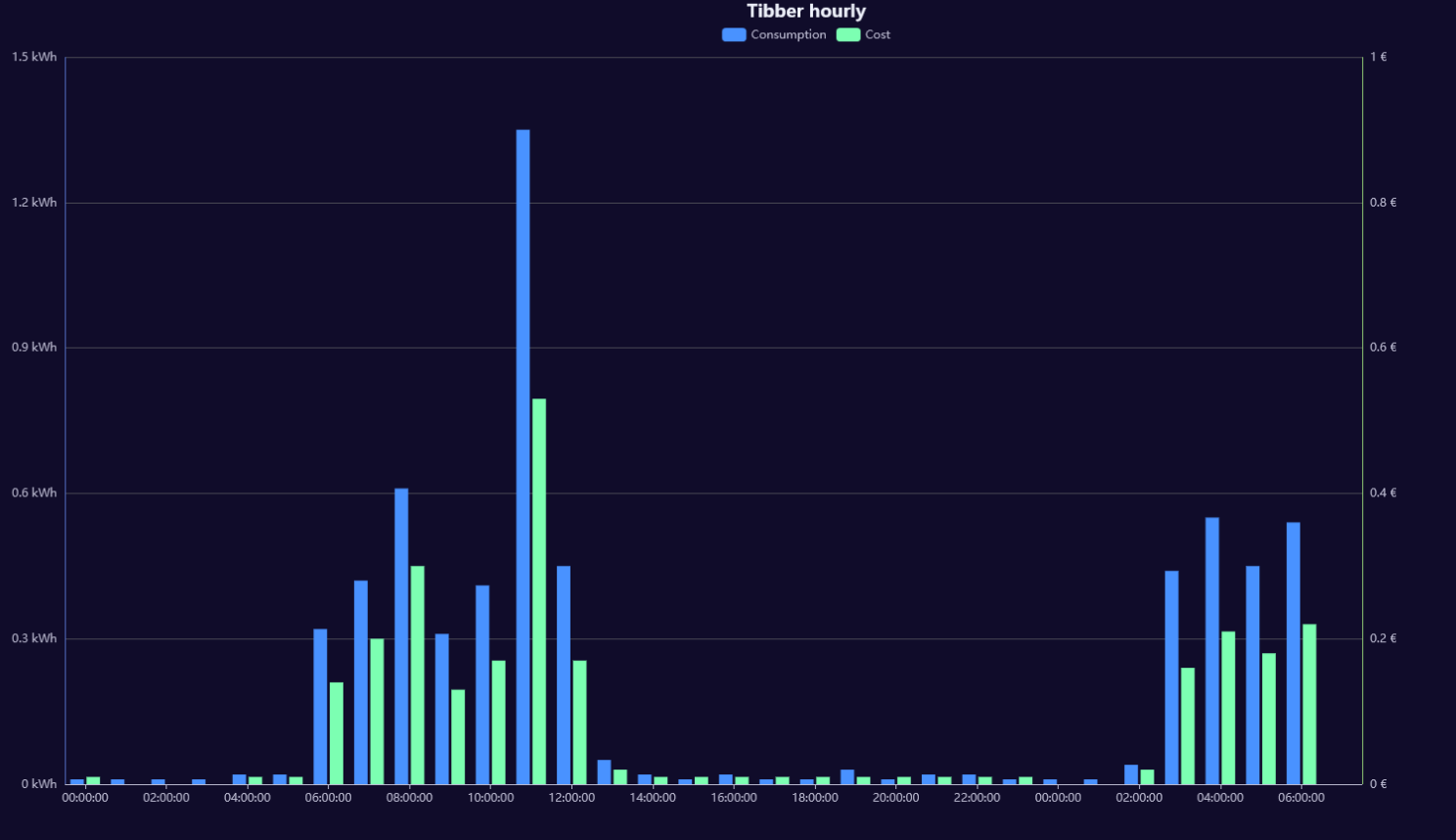
                          hab hier mal 2 Charts gebaut. Dank geht an
                          @jrbwh für die Grundidee und ChatGPT:


                          //
                          // Create chart for Tibber data. To be used with flexcharts.
                          //
                          // Sample http request for hourly data chart:
                          // http://localhost:8082/flexcharts/echarts.html?source=script&message=tibber&chart=hourly
                          //
                           
                          // Replace 'MY-TOKEN' with your own token:
                          const ID_TIBBER = 'tibberlink.0.Homes.MY-TOKEN.Consumption';
                           
                          const IDS = { hourly:  '.jsonHourly',  // hourly data
                                        daily:   '.jsonDaily',   // daily data
                                        weekly:  '.jsonWeekly',  // weekly data
                                        monthly: '.jsonMonthly'  // monthly data
                                      };
                           
                          onMessage('tibber', (httpParams, callback) => {
                              // Use hourly data in case of invalid chart type
                              const id = (httpParams.chart && httpParams.chart in IDS ? ID_TIBBER+IDS[httpParams.chart] : ID_TIBBER+IDS['hourly']);
                              if (existsState(id)) { 
                                  evalTibberData(httpParams.chart, id, result => callback(result));
                              } else {
                                  console.log('Requested state is not available >>'+id+'<<');
                                  callback({title: { left: "center", textStyle: { color: "#ff0000" }, text: "REQUESTED STATE IS NOT AVAILABLE: >>" + id +"<<" }});
                              }
                          });
                           
                          function evalTibberData(myChart, id, callback) {
                              const tibber = JSON.parse(getState(id).val);  // Read tibber data
                              const chart = {
                                              tooltip: { trigger: "axis", axisPointer: { type: "cross" }},
                                              legend: { show: true, orient: "horizontal", left: "center", top: 25 },
                                              title: { left: "center", text: "Tibber " },
                                              grid: { right: "20%" },
                                              toolbox: { feature: { dataView: { show: true, readOnly: false }, restore: { show: true }, saveAsImage: { show: true }}},
                                              xAxis: [{ type: "category", axisTick: { alignWithLabel: true }, data: []}],
                                              yAxis: [{ type: "value", position: "left",  alignTicks: true, axisLine: { show: true, lineStyle: { color: "#5470C6" }}, axisLabel: { formatter: "{value} kWh" }},
                                                      { type: "value", position: "right", alignTicks: true, axisLine: { show: true, lineStyle: { color: "#91CC75" }}, axisLabel: { formatter: "{value} €" }}],
                                              series: [{ name: "Consumption", type: "bar", yAxisIndex: 0, data: []},
                                                       { name: "Cost",        type: "bar", yAxisIndex: 1, data: []}]
                                             };
                              const xAxis  = [];
                              const yAxis0 = [];
                              const yAxis1 = [];
                              for (const data of Object.values(tibber)) {
                                  const isHourly = (myChart == 'hourly');  // Hourly data?
                                  const xValue = (isHourly ? new Date(data.from).toLocaleTimeString() : new Date(data.from).toLocaleDateString());
                                  xAxis.push(xValue);
                                  yAxis0.push((data.consumption ? data.consumption.toFixed(2) : 0));  // push 0 on null values
                                  yAxis1.push((data.cost ? data.cost.toFixed(2) : 0));                // push 0 on null values
                              }
                              chart.xAxis[0].data  = xAxis;       // Set chart x-axis data
                              chart.series[0].data = yAxis0;      // Set chart y-values consumption
                              chart.series[1].data = yAxis1;      // Set chart y-values cost
                              chart.title.text = "Tibber stündliche Kosten";             // Add type of chart to title
                              console.log('Evaluation of tibber '+myChart+' data done.');
                              callback(chart);
                          }
                          

                          94944cd3-bb2b-4465-8141-29187309cfb3-grafik.png

                          und das hier:


                          //http://localhost:8082/flexcharts/echarts.html?source=script&message=tibberpreis&chart=hourly&darkmode
                          const ID_TIBBER = 'tibberlink.0.Homes.MY-HOME-ID.PricesToday';
                          
                          onMessage('tibberpreis', (httpParams, callback) => {
                              console.log("Anfrage für Tibber-Daten:", httpParams);
                          
                              const id = ID_TIBBER + '.json'; // Stündliche Daten für heute
                          
                              if (existsState(id)) { 
                                  evalTibberData(id, result => callback(result));
                              } else {
                                  console.warn('Datenpunkt nicht verfügbar:', id);
                                  callback({
                                      title: {
                                          left: "center",
                                          textStyle: { color: "#ff0000" },
                                          text: "Daten nicht verfügbar: >>" + id + "<<"
                                      }
                                  });
                              }
                          });
                          
                          function evalTibberData(id, callback) {
                              console.log("Lese Tibber-Daten:", id);
                          
                              let tibber;
                              try {
                                  tibber = JSON.parse(getState(id).val);
                                  console.log("Tibber-Daten geladen:", tibber);
                              } catch (error) {
                                  console.error("Fehler beim Parsen:", error);
                                  callback({
                                      title: { left: "center", textStyle: { color: "#ff0000" }, text: "FEHLER BEIM PARSEN" }
                                  });
                                  return;
                              }
                          
                              if (!Array.isArray(tibber) || tibber.length === 0) {
                                  console.error("Keine gültigen Daten:", tibber);
                                  callback({
                                      title: { left: "center", textStyle: { color: "#ff0000" }, text: "KEINE GÜLTIGEN DATEN VERFÜGBAR" }
                                  });
                                  return;
                              }
                          
                              console.log("Verarbeite", tibber.length, "Einträge.");
                          
                              const currentHour = new Date().getHours(); // Aktuelle Stunde holen
                              console.log("Aktuelle Stunde:", currentHour);
                          
                              const chart = {
                                  tooltip: {
                                      trigger: "axis",
                                      axisPointer: { type: "shadow" },
                                      formatter: function (params) {
                                          let energyPrice = 0;
                                          let taxPrice = 0;
                                          let totalPrice = 0;
                          
                                          // Berechne die Werte von Energiepreis, Steuern und Gesamtkosten aus den aktuellen Tooltip-Elementen
                                          params.forEach(function (item) {
                                              if (item.seriesName === "Energiepreis") {
                                                  energyPrice = item.value;
                                              } else if (item.seriesName === "Steuern") {
                                                  taxPrice = item.value;
                                              } else if (item.seriesName === "Gesamtkosten") {
                                                  totalPrice = item.value;
                                              }
                                          });
                          
                                          // Zeige die Summe von Energiepreis und Steuern im Tooltip an
                                          return `
                                              <div>
                                                  <strong>${params[0].name}</strong><br />
                                                  Energiepreis: ${energyPrice} €/kWh<br />
                                                  Steuern: ${taxPrice} €/kWh<br />
                                                  <strong>Gesamtkosten: ${totalPrice} €/kWh</strong>
                                              </div>
                                          `;
                                      }
                                  },
                                  legend: { show: true, left: "center", top: 25 },
                                  title: { left: "center", text: "Tibberpreis heute" }, // Neuer Titel
                                  grid: { right: "10%" },
                                  toolbox: {
                                      feature: {
                                          dataView: { show: true, readOnly: false },
                                          restore: { show: true },
                                          saveAsImage: { show: true }
                                      }
                                  },
                                  xAxis: [{ type: "category", axisTick: { alignWithLabel: true }, data: [] }],
                                  yAxis: [{ type: "value", position: "left", axisLabel: { formatter: "{value} €/kWh" }}],
                                  series: [
                                      { name: "Energiepreis", type: "bar", stack: "cost", data: [] },
                                      { name: "Steuern", type: "bar", stack: "cost", data: [] },
                                      { name: "Gesamtkosten", type: "bar", data: [], itemStyle: { color: "green", borderColor: "black", borderWidth: 2 } } // Separate Serie für Gesamtkosten
                                  ]
                              };
                          
                              const xAxis = [];
                              const energyPrices = [];
                              const taxPrices = [];
                              const totalPrices = []; // Neues Array für Gesamtkosten
                          
                              for (const data of tibber) {
                                  if (!data.startsAt || typeof data.energy === "undefined" || typeof data.tax === "undefined") {
                                      console.warn("Fehlende Werte:", data);
                                      continue;
                                  }
                          
                                  const date = new Date(data.startsAt);
                                  const hour = date.getHours();
                                  const xValue = date.toLocaleTimeString('de-DE', { hour: '2-digit', minute: '2-digit' });
                          
                                  console.log(`Zeit: ${xValue}, Energie: ${data.energy}, Steuern: ${data.tax}`);
                          
                                  xAxis.push(xValue);
                                  energyPrices.push(Number(data.energy).toFixed(4)); // Netto-Energiepreis
                                  taxPrices.push(Number(data.tax).toFixed(4)); // Steuern
                          
                                  // Berechne die Gesamtkosten (Energiepreis + Steuern) und füge sie zu totalPrices hinzu
                                  const totalPrice = (Number(data.energy) + Number(data.tax)).toFixed(4);
                                  totalPrices.push(totalPrice); // Gesamtkosten als neuer Balken
                              }
                          
                              // Ändere die Farbe des Gesamtkostenbalkens für die aktuelle Stunde zu rot
                              chart.series[2].data = totalPrices.map((totalPrice, index) => {
                                  const hour = new Date(tibber[index].startsAt).getHours();
                                  return {
                                      value: totalPrice,
                                      itemStyle: {
                                          color: hour === currentHour ? 'red' : 'green', // Rot für aktuelle Stunde, sonst grün
                                          borderColor: "black",
                                          borderWidth: 2
                                      }
                                  };
                              });
                          
                              chart.xAxis[0].data = xAxis;
                              chart.series[0].data = energyPrices;
                              chart.series[1].data = taxPrices;
                          
                              console.log("Finales Chart-Objekt:", JSON.stringify(chart, null, 2));
                              console.log("Chart für Tibberpreis heute fertig.");
                          
                              callback(chart);
                          }
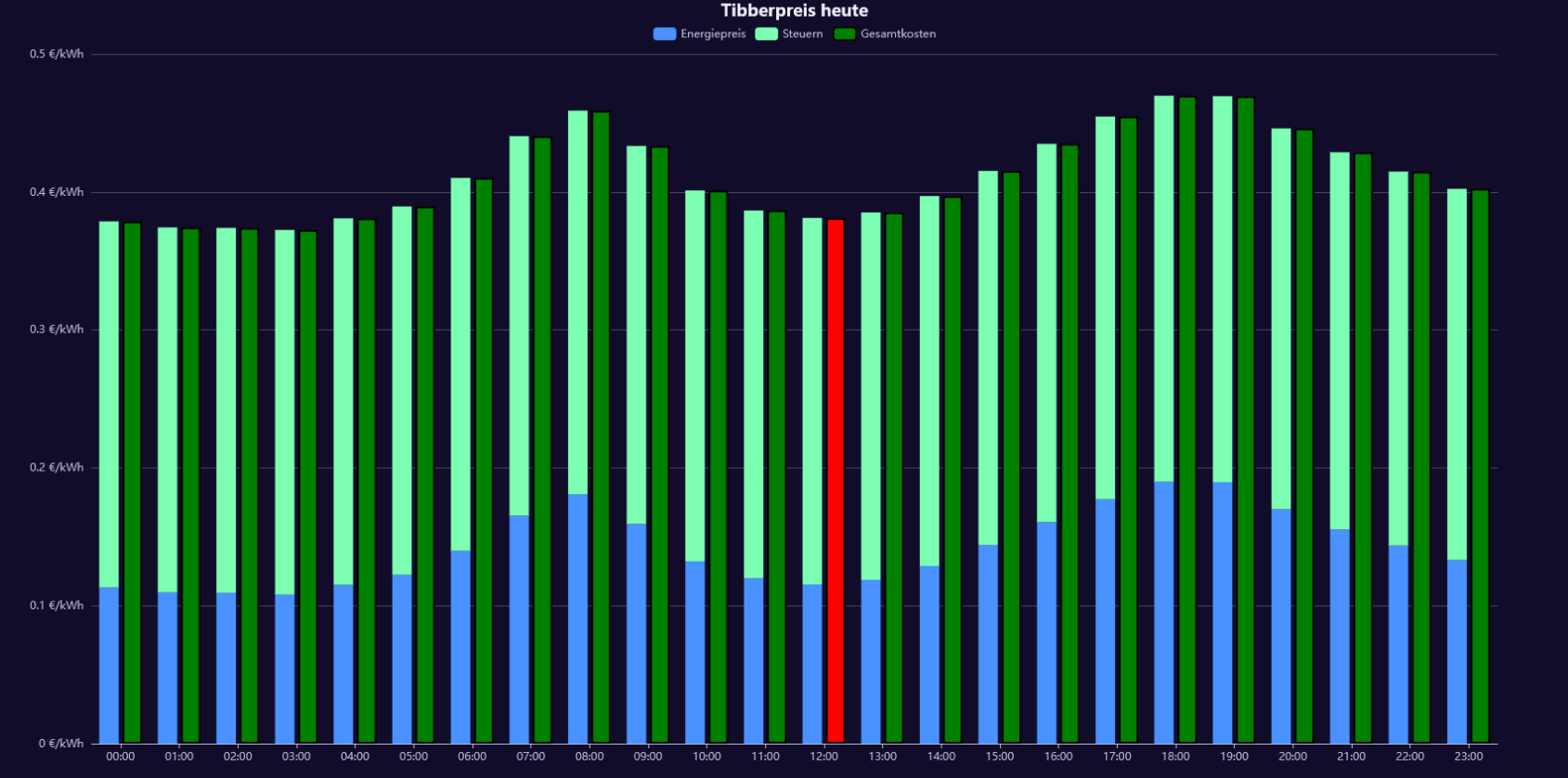


                          377d7b18-c88d-43ad-9c95-5490660e080e-grafik.png

                          iobroker unter Win10. NPM 10.9.3 Node.js v22.18.0 js-controller 7.0.7

                          jrbwhJ icebearI 2 Replies Last reply
                          0
                          • M-A HuebM M-A Hueb

                            hab hier mal 2 Charts gebaut. Dank geht an
                            @jrbwh für die Grundidee und ChatGPT:


                            //
                            // Create chart for Tibber data. To be used with flexcharts.
                            //
                            // Sample http request for hourly data chart:
                            // http://localhost:8082/flexcharts/echarts.html?source=script&message=tibber&chart=hourly
                            //
                             
                            // Replace 'MY-TOKEN' with your own token:
                            const ID_TIBBER = 'tibberlink.0.Homes.MY-TOKEN.Consumption';
                             
                            const IDS = { hourly:  '.jsonHourly',  // hourly data
                                          daily:   '.jsonDaily',   // daily data
                                          weekly:  '.jsonWeekly',  // weekly data
                                          monthly: '.jsonMonthly'  // monthly data
                                        };
                             
                            onMessage('tibber', (httpParams, callback) => {
                                // Use hourly data in case of invalid chart type
                                const id = (httpParams.chart && httpParams.chart in IDS ? ID_TIBBER+IDS[httpParams.chart] : ID_TIBBER+IDS['hourly']);
                                if (existsState(id)) { 
                                    evalTibberData(httpParams.chart, id, result => callback(result));
                                } else {
                                    console.log('Requested state is not available >>'+id+'<<');
                                    callback({title: { left: "center", textStyle: { color: "#ff0000" }, text: "REQUESTED STATE IS NOT AVAILABLE: >>" + id +"<<" }});
                                }
                            });
                             
                            function evalTibberData(myChart, id, callback) {
                                const tibber = JSON.parse(getState(id).val);  // Read tibber data
                                const chart = {
                                                tooltip: { trigger: "axis", axisPointer: { type: "cross" }},
                                                legend: { show: true, orient: "horizontal", left: "center", top: 25 },
                                                title: { left: "center", text: "Tibber " },
                                                grid: { right: "20%" },
                                                toolbox: { feature: { dataView: { show: true, readOnly: false }, restore: { show: true }, saveAsImage: { show: true }}},
                                                xAxis: [{ type: "category", axisTick: { alignWithLabel: true }, data: []}],
                                                yAxis: [{ type: "value", position: "left",  alignTicks: true, axisLine: { show: true, lineStyle: { color: "#5470C6" }}, axisLabel: { formatter: "{value} kWh" }},
                                                        { type: "value", position: "right", alignTicks: true, axisLine: { show: true, lineStyle: { color: "#91CC75" }}, axisLabel: { formatter: "{value} €" }}],
                                                series: [{ name: "Consumption", type: "bar", yAxisIndex: 0, data: []},
                                                         { name: "Cost",        type: "bar", yAxisIndex: 1, data: []}]
                                               };
                                const xAxis  = [];
                                const yAxis0 = [];
                                const yAxis1 = [];
                                for (const data of Object.values(tibber)) {
                                    const isHourly = (myChart == 'hourly');  // Hourly data?
                                    const xValue = (isHourly ? new Date(data.from).toLocaleTimeString() : new Date(data.from).toLocaleDateString());
                                    xAxis.push(xValue);
                                    yAxis0.push((data.consumption ? data.consumption.toFixed(2) : 0));  // push 0 on null values
                                    yAxis1.push((data.cost ? data.cost.toFixed(2) : 0));                // push 0 on null values
                                }
                                chart.xAxis[0].data  = xAxis;       // Set chart x-axis data
                                chart.series[0].data = yAxis0;      // Set chart y-values consumption
                                chart.series[1].data = yAxis1;      // Set chart y-values cost
                                chart.title.text = "Tibber stündliche Kosten";             // Add type of chart to title
                                console.log('Evaluation of tibber '+myChart+' data done.');
                                callback(chart);
                            }
                            

                            94944cd3-bb2b-4465-8141-29187309cfb3-grafik.png

                            und das hier:


                            //http://localhost:8082/flexcharts/echarts.html?source=script&message=tibberpreis&chart=hourly&darkmode
                            const ID_TIBBER = 'tibberlink.0.Homes.MY-HOME-ID.PricesToday';
                            
                            onMessage('tibberpreis', (httpParams, callback) => {
                                console.log("Anfrage für Tibber-Daten:", httpParams);
                            
                                const id = ID_TIBBER + '.json'; // Stündliche Daten für heute
                            
                                if (existsState(id)) { 
                                    evalTibberData(id, result => callback(result));
                                } else {
                                    console.warn('Datenpunkt nicht verfügbar:', id);
                                    callback({
                                        title: {
                                            left: "center",
                                            textStyle: { color: "#ff0000" },
                                            text: "Daten nicht verfügbar: >>" + id + "<<"
                                        }
                                    });
                                }
                            });
                            
                            function evalTibberData(id, callback) {
                                console.log("Lese Tibber-Daten:", id);
                            
                                let tibber;
                                try {
                                    tibber = JSON.parse(getState(id).val);
                                    console.log("Tibber-Daten geladen:", tibber);
                                } catch (error) {
                                    console.error("Fehler beim Parsen:", error);
                                    callback({
                                        title: { left: "center", textStyle: { color: "#ff0000" }, text: "FEHLER BEIM PARSEN" }
                                    });
                                    return;
                                }
                            
                                if (!Array.isArray(tibber) || tibber.length === 0) {
                                    console.error("Keine gültigen Daten:", tibber);
                                    callback({
                                        title: { left: "center", textStyle: { color: "#ff0000" }, text: "KEINE GÜLTIGEN DATEN VERFÜGBAR" }
                                    });
                                    return;
                                }
                            
                                console.log("Verarbeite", tibber.length, "Einträge.");
                            
                                const currentHour = new Date().getHours(); // Aktuelle Stunde holen
                                console.log("Aktuelle Stunde:", currentHour);
                            
                                const chart = {
                                    tooltip: {
                                        trigger: "axis",
                                        axisPointer: { type: "shadow" },
                                        formatter: function (params) {
                                            let energyPrice = 0;
                                            let taxPrice = 0;
                                            let totalPrice = 0;
                            
                                            // Berechne die Werte von Energiepreis, Steuern und Gesamtkosten aus den aktuellen Tooltip-Elementen
                                            params.forEach(function (item) {
                                                if (item.seriesName === "Energiepreis") {
                                                    energyPrice = item.value;
                                                } else if (item.seriesName === "Steuern") {
                                                    taxPrice = item.value;
                                                } else if (item.seriesName === "Gesamtkosten") {
                                                    totalPrice = item.value;
                                                }
                                            });
                            
                                            // Zeige die Summe von Energiepreis und Steuern im Tooltip an
                                            return `
                                                <div>
                                                    <strong>${params[0].name}</strong><br />
                                                    Energiepreis: ${energyPrice} €/kWh<br />
                                                    Steuern: ${taxPrice} €/kWh<br />
                                                    <strong>Gesamtkosten: ${totalPrice} €/kWh</strong>
                                                </div>
                                            `;
                                        }
                                    },
                                    legend: { show: true, left: "center", top: 25 },
                                    title: { left: "center", text: "Tibberpreis heute" }, // Neuer Titel
                                    grid: { right: "10%" },
                                    toolbox: {
                                        feature: {
                                            dataView: { show: true, readOnly: false },
                                            restore: { show: true },
                                            saveAsImage: { show: true }
                                        }
                                    },
                                    xAxis: [{ type: "category", axisTick: { alignWithLabel: true }, data: [] }],
                                    yAxis: [{ type: "value", position: "left", axisLabel: { formatter: "{value} €/kWh" }}],
                                    series: [
                                        { name: "Energiepreis", type: "bar", stack: "cost", data: [] },
                                        { name: "Steuern", type: "bar", stack: "cost", data: [] },
                                        { name: "Gesamtkosten", type: "bar", data: [], itemStyle: { color: "green", borderColor: "black", borderWidth: 2 } } // Separate Serie für Gesamtkosten
                                    ]
                                };
                            
                                const xAxis = [];
                                const energyPrices = [];
                                const taxPrices = [];
                                const totalPrices = []; // Neues Array für Gesamtkosten
                            
                                for (const data of tibber) {
                                    if (!data.startsAt || typeof data.energy === "undefined" || typeof data.tax === "undefined") {
                                        console.warn("Fehlende Werte:", data);
                                        continue;
                                    }
                            
                                    const date = new Date(data.startsAt);
                                    const hour = date.getHours();
                                    const xValue = date.toLocaleTimeString('de-DE', { hour: '2-digit', minute: '2-digit' });
                            
                                    console.log(`Zeit: ${xValue}, Energie: ${data.energy}, Steuern: ${data.tax}`);
                            
                                    xAxis.push(xValue);
                                    energyPrices.push(Number(data.energy).toFixed(4)); // Netto-Energiepreis
                                    taxPrices.push(Number(data.tax).toFixed(4)); // Steuern
                            
                                    // Berechne die Gesamtkosten (Energiepreis + Steuern) und füge sie zu totalPrices hinzu
                                    const totalPrice = (Number(data.energy) + Number(data.tax)).toFixed(4);
                                    totalPrices.push(totalPrice); // Gesamtkosten als neuer Balken
                                }
                            
                                // Ändere die Farbe des Gesamtkostenbalkens für die aktuelle Stunde zu rot
                                chart.series[2].data = totalPrices.map((totalPrice, index) => {
                                    const hour = new Date(tibber[index].startsAt).getHours();
                                    return {
                                        value: totalPrice,
                                        itemStyle: {
                                            color: hour === currentHour ? 'red' : 'green', // Rot für aktuelle Stunde, sonst grün
                                            borderColor: "black",
                                            borderWidth: 2
                                        }
                                    };
                                });
                            
                                chart.xAxis[0].data = xAxis;
                                chart.series[0].data = energyPrices;
                                chart.series[1].data = taxPrices;
                            
                                console.log("Finales Chart-Objekt:", JSON.stringify(chart, null, 2));
                                console.log("Chart für Tibberpreis heute fertig.");
                            
                                callback(chart);
                            }


                            377d7b18-c88d-43ad-9c95-5490660e080e-grafik.png

                            jrbwhJ Offline
                            jrbwhJ Offline
                            jrbwh
                            wrote on last edited by
                            #193

                            @m-a-hueb Top! Würde mich freuen, wenn Du es auch als Beitrag auf der flexcharts-Seite postest, also hier.

                            M-A HuebM 1 Reply Last reply
                            0
                            • jrbwhJ jrbwh

                              @m-a-hueb Top! Würde mich freuen, wenn Du es auch als Beitrag auf der flexcharts-Seite postest, also hier.

                              M-A HuebM Offline
                              M-A HuebM Offline
                              M-A Hueb
                              wrote on last edited by
                              #194

                              @jrbwh habs dort auch reingestellt

                              iobroker unter Win10. NPM 10.9.3 Node.js v22.18.0 js-controller 7.0.7

                              1 Reply Last reply
                              0
                              • M-A HuebM M-A Hueb

                                hab hier mal 2 Charts gebaut. Dank geht an
                                @jrbwh für die Grundidee und ChatGPT:


                                //
                                // Create chart for Tibber data. To be used with flexcharts.
                                //
                                // Sample http request for hourly data chart:
                                // http://localhost:8082/flexcharts/echarts.html?source=script&message=tibber&chart=hourly
                                //
                                 
                                // Replace 'MY-TOKEN' with your own token:
                                const ID_TIBBER = 'tibberlink.0.Homes.MY-TOKEN.Consumption';
                                 
                                const IDS = { hourly:  '.jsonHourly',  // hourly data
                                              daily:   '.jsonDaily',   // daily data
                                              weekly:  '.jsonWeekly',  // weekly data
                                              monthly: '.jsonMonthly'  // monthly data
                                            };
                                 
                                onMessage('tibber', (httpParams, callback) => {
                                    // Use hourly data in case of invalid chart type
                                    const id = (httpParams.chart && httpParams.chart in IDS ? ID_TIBBER+IDS[httpParams.chart] : ID_TIBBER+IDS['hourly']);
                                    if (existsState(id)) { 
                                        evalTibberData(httpParams.chart, id, result => callback(result));
                                    } else {
                                        console.log('Requested state is not available >>'+id+'<<');
                                        callback({title: { left: "center", textStyle: { color: "#ff0000" }, text: "REQUESTED STATE IS NOT AVAILABLE: >>" + id +"<<" }});
                                    }
                                });
                                 
                                function evalTibberData(myChart, id, callback) {
                                    const tibber = JSON.parse(getState(id).val);  // Read tibber data
                                    const chart = {
                                                    tooltip: { trigger: "axis", axisPointer: { type: "cross" }},
                                                    legend: { show: true, orient: "horizontal", left: "center", top: 25 },
                                                    title: { left: "center", text: "Tibber " },
                                                    grid: { right: "20%" },
                                                    toolbox: { feature: { dataView: { show: true, readOnly: false }, restore: { show: true }, saveAsImage: { show: true }}},
                                                    xAxis: [{ type: "category", axisTick: { alignWithLabel: true }, data: []}],
                                                    yAxis: [{ type: "value", position: "left",  alignTicks: true, axisLine: { show: true, lineStyle: { color: "#5470C6" }}, axisLabel: { formatter: "{value} kWh" }},
                                                            { type: "value", position: "right", alignTicks: true, axisLine: { show: true, lineStyle: { color: "#91CC75" }}, axisLabel: { formatter: "{value} €" }}],
                                                    series: [{ name: "Consumption", type: "bar", yAxisIndex: 0, data: []},
                                                             { name: "Cost",        type: "bar", yAxisIndex: 1, data: []}]
                                                   };
                                    const xAxis  = [];
                                    const yAxis0 = [];
                                    const yAxis1 = [];
                                    for (const data of Object.values(tibber)) {
                                        const isHourly = (myChart == 'hourly');  // Hourly data?
                                        const xValue = (isHourly ? new Date(data.from).toLocaleTimeString() : new Date(data.from).toLocaleDateString());
                                        xAxis.push(xValue);
                                        yAxis0.push((data.consumption ? data.consumption.toFixed(2) : 0));  // push 0 on null values
                                        yAxis1.push((data.cost ? data.cost.toFixed(2) : 0));                // push 0 on null values
                                    }
                                    chart.xAxis[0].data  = xAxis;       // Set chart x-axis data
                                    chart.series[0].data = yAxis0;      // Set chart y-values consumption
                                    chart.series[1].data = yAxis1;      // Set chart y-values cost
                                    chart.title.text = "Tibber stündliche Kosten";             // Add type of chart to title
                                    console.log('Evaluation of tibber '+myChart+' data done.');
                                    callback(chart);
                                }
                                

                                94944cd3-bb2b-4465-8141-29187309cfb3-grafik.png

                                und das hier:


                                //http://localhost:8082/flexcharts/echarts.html?source=script&message=tibberpreis&chart=hourly&darkmode
                                const ID_TIBBER = 'tibberlink.0.Homes.MY-HOME-ID.PricesToday';
                                
                                onMessage('tibberpreis', (httpParams, callback) => {
                                    console.log("Anfrage für Tibber-Daten:", httpParams);
                                
                                    const id = ID_TIBBER + '.json'; // Stündliche Daten für heute
                                
                                    if (existsState(id)) { 
                                        evalTibberData(id, result => callback(result));
                                    } else {
                                        console.warn('Datenpunkt nicht verfügbar:', id);
                                        callback({
                                            title: {
                                                left: "center",
                                                textStyle: { color: "#ff0000" },
                                                text: "Daten nicht verfügbar: >>" + id + "<<"
                                            }
                                        });
                                    }
                                });
                                
                                function evalTibberData(id, callback) {
                                    console.log("Lese Tibber-Daten:", id);
                                
                                    let tibber;
                                    try {
                                        tibber = JSON.parse(getState(id).val);
                                        console.log("Tibber-Daten geladen:", tibber);
                                    } catch (error) {
                                        console.error("Fehler beim Parsen:", error);
                                        callback({
                                            title: { left: "center", textStyle: { color: "#ff0000" }, text: "FEHLER BEIM PARSEN" }
                                        });
                                        return;
                                    }
                                
                                    if (!Array.isArray(tibber) || tibber.length === 0) {
                                        console.error("Keine gültigen Daten:", tibber);
                                        callback({
                                            title: { left: "center", textStyle: { color: "#ff0000" }, text: "KEINE GÜLTIGEN DATEN VERFÜGBAR" }
                                        });
                                        return;
                                    }
                                
                                    console.log("Verarbeite", tibber.length, "Einträge.");
                                
                                    const currentHour = new Date().getHours(); // Aktuelle Stunde holen
                                    console.log("Aktuelle Stunde:", currentHour);
                                
                                    const chart = {
                                        tooltip: {
                                            trigger: "axis",
                                            axisPointer: { type: "shadow" },
                                            formatter: function (params) {
                                                let energyPrice = 0;
                                                let taxPrice = 0;
                                                let totalPrice = 0;
                                
                                                // Berechne die Werte von Energiepreis, Steuern und Gesamtkosten aus den aktuellen Tooltip-Elementen
                                                params.forEach(function (item) {
                                                    if (item.seriesName === "Energiepreis") {
                                                        energyPrice = item.value;
                                                    } else if (item.seriesName === "Steuern") {
                                                        taxPrice = item.value;
                                                    } else if (item.seriesName === "Gesamtkosten") {
                                                        totalPrice = item.value;
                                                    }
                                                });
                                
                                                // Zeige die Summe von Energiepreis und Steuern im Tooltip an
                                                return `
                                                    <div>
                                                        <strong>${params[0].name}</strong><br />
                                                        Energiepreis: ${energyPrice} €/kWh<br />
                                                        Steuern: ${taxPrice} €/kWh<br />
                                                        <strong>Gesamtkosten: ${totalPrice} €/kWh</strong>
                                                    </div>
                                                `;
                                            }
                                        },
                                        legend: { show: true, left: "center", top: 25 },
                                        title: { left: "center", text: "Tibberpreis heute" }, // Neuer Titel
                                        grid: { right: "10%" },
                                        toolbox: {
                                            feature: {
                                                dataView: { show: true, readOnly: false },
                                                restore: { show: true },
                                                saveAsImage: { show: true }
                                            }
                                        },
                                        xAxis: [{ type: "category", axisTick: { alignWithLabel: true }, data: [] }],
                                        yAxis: [{ type: "value", position: "left", axisLabel: { formatter: "{value} €/kWh" }}],
                                        series: [
                                            { name: "Energiepreis", type: "bar", stack: "cost", data: [] },
                                            { name: "Steuern", type: "bar", stack: "cost", data: [] },
                                            { name: "Gesamtkosten", type: "bar", data: [], itemStyle: { color: "green", borderColor: "black", borderWidth: 2 } } // Separate Serie für Gesamtkosten
                                        ]
                                    };
                                
                                    const xAxis = [];
                                    const energyPrices = [];
                                    const taxPrices = [];
                                    const totalPrices = []; // Neues Array für Gesamtkosten
                                
                                    for (const data of tibber) {
                                        if (!data.startsAt || typeof data.energy === "undefined" || typeof data.tax === "undefined") {
                                            console.warn("Fehlende Werte:", data);
                                            continue;
                                        }
                                
                                        const date = new Date(data.startsAt);
                                        const hour = date.getHours();
                                        const xValue = date.toLocaleTimeString('de-DE', { hour: '2-digit', minute: '2-digit' });
                                
                                        console.log(`Zeit: ${xValue}, Energie: ${data.energy}, Steuern: ${data.tax}`);
                                
                                        xAxis.push(xValue);
                                        energyPrices.push(Number(data.energy).toFixed(4)); // Netto-Energiepreis
                                        taxPrices.push(Number(data.tax).toFixed(4)); // Steuern
                                
                                        // Berechne die Gesamtkosten (Energiepreis + Steuern) und füge sie zu totalPrices hinzu
                                        const totalPrice = (Number(data.energy) + Number(data.tax)).toFixed(4);
                                        totalPrices.push(totalPrice); // Gesamtkosten als neuer Balken
                                    }
                                
                                    // Ändere die Farbe des Gesamtkostenbalkens für die aktuelle Stunde zu rot
                                    chart.series[2].data = totalPrices.map((totalPrice, index) => {
                                        const hour = new Date(tibber[index].startsAt).getHours();
                                        return {
                                            value: totalPrice,
                                            itemStyle: {
                                                color: hour === currentHour ? 'red' : 'green', // Rot für aktuelle Stunde, sonst grün
                                                borderColor: "black",
                                                borderWidth: 2
                                            }
                                        };
                                    });
                                
                                    chart.xAxis[0].data = xAxis;
                                    chart.series[0].data = energyPrices;
                                    chart.series[1].data = taxPrices;
                                
                                    console.log("Finales Chart-Objekt:", JSON.stringify(chart, null, 2));
                                    console.log("Chart für Tibberpreis heute fertig.");
                                
                                    callback(chart);
                                }


                                377d7b18-c88d-43ad-9c95-5490660e080e-grafik.png

                                icebearI Online
                                icebearI Online
                                icebear
                                wrote on last edited by
                                #195

                                @m-a-hueb said in Test Adapter flexcharts - Stapeldiagramme und mehr:

                                hab hier mal 2 Charts gebaut. Dank geht an

                                Kann man die Farben der Balken auch verändern?

                                jrbwhJ 1 Reply Last reply
                                0
                                • icebearI icebear

                                  @m-a-hueb said in Test Adapter flexcharts - Stapeldiagramme und mehr:

                                  hab hier mal 2 Charts gebaut. Dank geht an

                                  Kann man die Farben der Balken auch verändern?

                                  jrbwhJ Offline
                                  jrbwhJ Offline
                                  jrbwh
                                  wrote on last edited by
                                  #196

                                  @icebear Die Farben der Balken ändert man bei der Definition der Datenreihen (series), z.B. so:

                                                      series: [{ name: "Consumption", type: "bar", color: "#ff0000", yAxisIndex: 0, data: []},
                                                               { name: "Cost",        type: "bar", color: "#00ff00", yAxisIndex: 1, data: []}]
                                  

                                  Die Referenz zu Chart-Definitionen findest Du hier. Wenn Du da die Option "series" aufklappst, findest Du den Parameter "color".

                                  1 Reply Last reply
                                  0
                                  • M-A HuebM M-A Hueb

                                    @merlin123 von dem hier:

                                    
                                    //
                                    // Create chart for Tibber data. To be used with flexcharts.
                                    //
                                    // Sample http request for hourly data chart:
                                    // http://localhost:8082/flexcharts/echarts.html?source=script&message=tibber&chart=hourly
                                    //
                                     
                                    // Replace 'MY-TOKEN' with your own token:
                                    const ID_TIBBER = 'tibberLink.0.Homes.MY-TOKEN.Consumption';
                                     
                                    const IDS = { hourly:  '.jsonHourly',  // hourly data
                                                  daily:   '.jsonDaily',   // daily data
                                                  weekly:  '.jsonWeekly',  // weekly data
                                                  monthly: '.jsonMonthly'  // monthly data
                                                };
                                     
                                    onMessage('tibber', (httpParams, callback) => {
                                        // Use hourly data in case of invalid chart type
                                        const id = (httpParams.chart && httpParams.chart in IDS ? ID_TIBBER+IDS[httpParams.chart] : ID_TIBBER+IDS['hourly']);
                                        if (existsState(id)) { 
                                            evalTibberData(httpParams.chart, id, result => callback(result));
                                        } else {
                                            console.log('Requested state is not available >>'+id+'<<');
                                            callback({title: { left: "center", textStyle: { color: "#ff0000" }, text: "REQUESTED STATE IS NOT AVAILABLE: >>" + id +"<<" }});
                                        }
                                    });
                                     
                                    function evalTibberData(myChart, id, callback) {
                                        const tibber = JSON.parse(getState(id).val);  // Read tibber data
                                        const chart = {
                                                        tooltip: { trigger: "axis", axisPointer: { type: "cross" }},
                                                        legend: { show: true, orient: "horizontal", left: "center", top: 25 },
                                                        title: { left: "center", text: "Tibber " },
                                                        grid: { right: "20%" },
                                                        toolbox: { feature: { dataView: { show: true, readOnly: false }, restore: { show: true }, saveAsImage: { show: true }}},
                                                        xAxis: [{ type: "category", axisTick: { alignWithLabel: true }, data: []}],
                                                        yAxis: [{ type: "value", position: "left",  alignTicks: true, axisLine: { show: true, lineStyle: { color: "#5470C6" }}, axisLabel: { formatter: "{value} kWh" }},
                                                                { type: "value", position: "right", alignTicks: true, axisLine: { show: true, lineStyle: { color: "#91CC75" }}, axisLabel: { formatter: "{value} €" }}],
                                                        series: [{ name: "Consumption", type: "bar", yAxisIndex: 0, data: []},
                                                                 { name: "Cost",        type: "bar", yAxisIndex: 1, data: []}]
                                                       };
                                        const xAxis  = [];
                                        const yAxis0 = [];
                                        const yAxis1 = [];
                                        for (const data of Object.values(tibber)) {
                                            const isHourly = (myChart == 'hourly');  // Hourly data?
                                            const xValue = (isHourly ? new Date(data.from).toLocaleTimeString() : new Date(data.from).toLocaleDateString());
                                            xAxis.push(xValue);
                                            yAxis0.push((data.consumption ? data.consumption.toFixed(2) : 0));  // push 0 on null values
                                            yAxis1.push((data.cost ? data.cost.toFixed(2) : 0));                // push 0 on null values
                                        }
                                        chart.xAxis[0].data  = xAxis;       // Set chart x-axis data
                                        chart.series[0].data = yAxis0;      // Set chart y-values consumption
                                        chart.series[1].data = yAxis1;      // Set chart y-values cost
                                        chart.title.text += myChart;             // Add type of chart to title
                                        console.log('Evaluation of tibber '+myChart+' data done.');
                                        callback(chart);
                                    }
                                    
                                    
                                    Merlin123M Offline
                                    Merlin123M Offline
                                    Merlin123
                                    wrote on last edited by
                                    #197

                                    @m-a-hueb sagte in Test Adapter flexcharts - Stapeldiagramme und mehr:

                                    @merlin123 von dem hier:

                                    
                                    //
                                    // Create chart for Tibber data. To be used with flexcharts.
                                    //
                                    // Sample http request for hourly data chart:
                                    // http://localhost:8082/flexcharts/echarts.html?source=script&message=tibber&chart=hourly
                                    //
                                     
                                    // Replace 'MY-TOKEN' with your own token:
                                    const ID_TIBBER = 'tibberLink.0.Homes.MY-TOKEN.Consumption';
                                     
                                    const IDS = { hourly:  '.jsonHourly',  // hourly data
                                                  daily:   '.jsonDaily',   // daily data
                                                  weekly:  '.jsonWeekly',  // weekly data
                                                  monthly: '.jsonMonthly'  // monthly data
                                                };
                                     
                                    onMessage('tibber', (httpParams, callback) => {
                                        // Use hourly data in case of invalid chart type
                                        const id = (httpParams.chart && httpParams.chart in IDS ? ID_TIBBER+IDS[httpParams.chart] : ID_TIBBER+IDS['hourly']);
                                        if (existsState(id)) { 
                                            evalTibberData(httpParams.chart, id, result => callback(result));
                                        } else {
                                            console.log('Requested state is not available >>'+id+'<<');
                                            callback({title: { left: "center", textStyle: { color: "#ff0000" }, text: "REQUESTED STATE IS NOT AVAILABLE: >>" + id +"<<" }});
                                        }
                                    });
                                     
                                    function evalTibberData(myChart, id, callback) {
                                        const tibber = JSON.parse(getState(id).val);  // Read tibber data
                                        const chart = {
                                                        tooltip: { trigger: "axis", axisPointer: { type: "cross" }},
                                                        legend: { show: true, orient: "horizontal", left: "center", top: 25 },
                                                        title: { left: "center", text: "Tibber " },
                                                        grid: { right: "20%" },
                                                        toolbox: { feature: { dataView: { show: true, readOnly: false }, restore: { show: true }, saveAsImage: { show: true }}},
                                                        xAxis: [{ type: "category", axisTick: { alignWithLabel: true }, data: []}],
                                                        yAxis: [{ type: "value", position: "left",  alignTicks: true, axisLine: { show: true, lineStyle: { color: "#5470C6" }}, axisLabel: { formatter: "{value} kWh" }},
                                                                { type: "value", position: "right", alignTicks: true, axisLine: { show: true, lineStyle: { color: "#91CC75" }}, axisLabel: { formatter: "{value} €" }}],
                                                        series: [{ name: "Consumption", type: "bar", yAxisIndex: 0, data: []},
                                                                 { name: "Cost",        type: "bar", yAxisIndex: 1, data: []}]
                                                       };
                                        const xAxis  = [];
                                        const yAxis0 = [];
                                        const yAxis1 = [];
                                        for (const data of Object.values(tibber)) {
                                            const isHourly = (myChart == 'hourly');  // Hourly data?
                                            const xValue = (isHourly ? new Date(data.from).toLocaleTimeString() : new Date(data.from).toLocaleDateString());
                                            xAxis.push(xValue);
                                            yAxis0.push((data.consumption ? data.consumption.toFixed(2) : 0));  // push 0 on null values
                                            yAxis1.push((data.cost ? data.cost.toFixed(2) : 0));                // push 0 on null values
                                        }
                                        chart.xAxis[0].data  = xAxis;       // Set chart x-axis data
                                        chart.series[0].data = yAxis0;      // Set chart y-values consumption
                                        chart.series[1].data = yAxis1;      // Set chart y-values cost
                                        chart.title.text += myChart;             // Add type of chart to title
                                        console.log('Evaluation of tibber '+myChart+' data done.');
                                        callback(chart);
                                    }


                                    Das ist nicht von mir ;)

                                    Beta-Tester

                                    1 Reply Last reply
                                    0
                                    • jrbwhJ jrbwh

                                      @ullij Ja, daran liegt es. Wenn ich 'echarts-gl' zusätzlich importiere, funktioniert es:
                                      b86c513c-5fb3-4d17-b7be-68cdd3a80a4c-image.png

                                      Habe gleich mal ein Issue angelegt.

                                      Bin diese Woche unterwegs. Werde das am WE oder nächste Woche einbauen und ein Release machen.

                                      L Offline
                                      L Offline
                                      legro
                                      wrote on last edited by legro
                                      #198

                                      @jrbwh

                                      Nachdem ich mir nunmehr viele Wünsche mit deinem flexcharts-Adapter erfüllt habe - vielen Dank für diesen hervorragenden Adapter - habe ich gestern das neueste Update 3.2 installiert. Da wurde mir etwas à al echart-gl angezeigt. Ist diese Library mittlerweile in deinem Adapter integriert?

                                      Mutig begab ich mich ans Testen und probierte das nachfolgende, einfache Chart aus ..

                                      {
                                        "series": [{
                                          "type": "pie3D",
                                          "data": [
                                            45,20,56,80
                                          ],
                                          "depth": 45,
                                          "angle": 40
                                        }]
                                      }
                                      

                                      Leider erscheint keine Anzeige. Mache ich etwas falsch oder fehlt noch echart-gl?

                                      Raspberry Pi 5 mit 8GB + 120GB SSD + Coordinator COD-m + ioBroker ..

                                      jrbwhJ 1 Reply Last reply
                                      0
                                      • L legro

                                        @jrbwh

                                        Nachdem ich mir nunmehr viele Wünsche mit deinem flexcharts-Adapter erfüllt habe - vielen Dank für diesen hervorragenden Adapter - habe ich gestern das neueste Update 3.2 installiert. Da wurde mir etwas à al echart-gl angezeigt. Ist diese Library mittlerweile in deinem Adapter integriert?

                                        Mutig begab ich mich ans Testen und probierte das nachfolgende, einfache Chart aus ..

                                        {
                                          "series": [{
                                            "type": "pie3D",
                                            "data": [
                                              45,20,56,80
                                            ],
                                            "depth": 45,
                                            "angle": 40
                                          }]
                                        }
                                        

                                        Leider erscheint keine Anzeige. Mache ich etwas falsch oder fehlt noch echart-gl?

                                        jrbwhJ Offline
                                        jrbwhJ Offline
                                        jrbwh
                                        wrote on last edited by
                                        #199

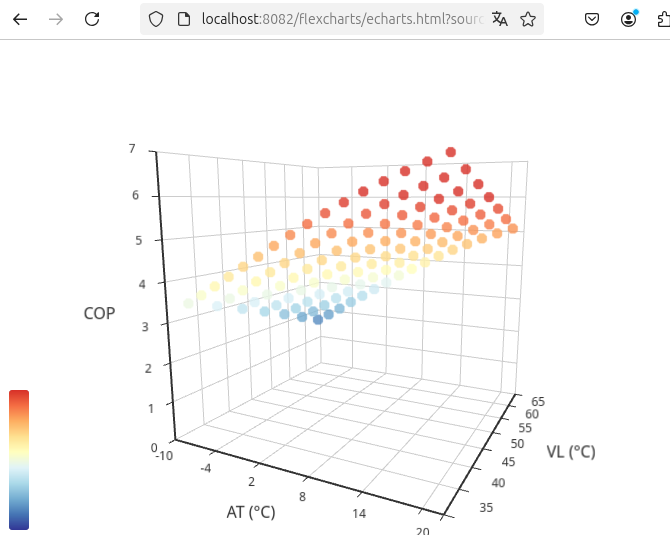
                                        @legro Ja, ab 0.3.1 werden 3D-Charts unterstützt. Probier mal diese Chart-Definition, die sollte funktionieren:

                                        {"tooltip":{},"visualMap":{"min":1,"max":6,"dimension":2,"inRange":{"color":["#313695","#4575b4","#74add1","#abd9e9","#e0f3f8","#ffffbf","#fee090","#fdae61","#f46d43","#d73027"]}},"xAxis3D":{"type":"category","name":"AT (°C)"},"yAxis3D":{"type":"category","name":"VL (°C)"},"zAxis3D":{"type":"value","name":"COP"},"grid3D":{"boxWidth":100,"boxDepth":100,"viewControl":{"projection":"perspective"}},"series":[{"type":"scatter3D","symbolSize":10,"data":[[-10,35,3.43],[-10,40,3.18],[-10,45,2.92],[-10,50,2.65],[-10,55,2.37],[-10,60,2.08],[-10,65,1.78],[-8,35,3.67],[-8,40,3.42],[-8,45,3.15],[-8,50,2.88],[-8,55,2.6],[-8,60,2.31],[-8,65,2.01],[-6,35,3.92],[-6,40,3.67],[-6,45,3.4],[-6,50,3.13],[-6,55,2.85],[-6,60,2.56],[-6,65,2.26],[-4,35,4.18],[-4,40,3.93],[-4,45,3.67],[-4,50,3.4],[-4,55,3.12],[-4,60,2.83],[-4,65,2.53],[-2,35,4.44],[-2,40,4.19],[-2,45,3.92],[-2,50,3.65],[-2,55,3.37],[-2,60,3.08],[-2,65,2.78],[0,35,4.69],[0,40,4.44],[0,45,4.18],[0,50,3.91],[0,55,3.63],[0,60,3.34],[0,65,3.04],[2,35,4.95],[2,40,4.7],[2,45,4.43],[2,50,4.16],[2,55,3.88],[2,60,3.59],[2,65,3.29],[4,35,5.2],[4,40,4.95],[4,45,4.69],[4,50,4.42],[4,55,4.14],[4,60,3.85],[4,65,3.55],[6,35,5.44],[6,40,5.19],[6,45,4.93],[6,50,4.66],[6,55,4.38],[6,60,4.09],[6,65,3.79],[8,35,5.67],[8,40,5.42],[8,45,5.16],[8,50,4.89],[8,55,4.61],[8,60,4.32],[8,65,4.02],[10,35,5.89],[10,40,5.64],[10,45,5.38],[10,50,5.11],[10,55,4.83],[10,60,4.54],[10,65,4.24],[12,35,6.1],[12,40,5.85],[12,45,5.59],[12,50,5.32],[12,55,5.04],[12,60,4.75],[12,65,4.45],[14,35,6.29],[14,40,6.04],[14,45,5.78],[14,50,5.51],[14,55,5.23],[14,60,4.94],[14,65,4.64],[16,35,6.47],[16,40,6.22],[16,45,5.96],[16,50,5.69],[16,55,5.41],[16,60,5.12],[16,65,4.82],[18,35,6.63],[18,40,6.38],[18,45,6.12],[18,50,5.85],[18,55,5.57],[18,60,5.28],[18,65,4.98],[20,35,6.78],[20,40,6.53],[20,45,6.27],[20,50,6],[20,55,5.72],[20,60,5.43],[20,65,5.13]]}]}
                                        
                                        L 1 Reply Last reply
                                        0
                                        • jrbwhJ jrbwh

                                          @legro Ja, ab 0.3.1 werden 3D-Charts unterstützt. Probier mal diese Chart-Definition, die sollte funktionieren:

                                          {"tooltip":{},"visualMap":{"min":1,"max":6,"dimension":2,"inRange":{"color":["#313695","#4575b4","#74add1","#abd9e9","#e0f3f8","#ffffbf","#fee090","#fdae61","#f46d43","#d73027"]}},"xAxis3D":{"type":"category","name":"AT (°C)"},"yAxis3D":{"type":"category","name":"VL (°C)"},"zAxis3D":{"type":"value","name":"COP"},"grid3D":{"boxWidth":100,"boxDepth":100,"viewControl":{"projection":"perspective"}},"series":[{"type":"scatter3D","symbolSize":10,"data":[[-10,35,3.43],[-10,40,3.18],[-10,45,2.92],[-10,50,2.65],[-10,55,2.37],[-10,60,2.08],[-10,65,1.78],[-8,35,3.67],[-8,40,3.42],[-8,45,3.15],[-8,50,2.88],[-8,55,2.6],[-8,60,2.31],[-8,65,2.01],[-6,35,3.92],[-6,40,3.67],[-6,45,3.4],[-6,50,3.13],[-6,55,2.85],[-6,60,2.56],[-6,65,2.26],[-4,35,4.18],[-4,40,3.93],[-4,45,3.67],[-4,50,3.4],[-4,55,3.12],[-4,60,2.83],[-4,65,2.53],[-2,35,4.44],[-2,40,4.19],[-2,45,3.92],[-2,50,3.65],[-2,55,3.37],[-2,60,3.08],[-2,65,2.78],[0,35,4.69],[0,40,4.44],[0,45,4.18],[0,50,3.91],[0,55,3.63],[0,60,3.34],[0,65,3.04],[2,35,4.95],[2,40,4.7],[2,45,4.43],[2,50,4.16],[2,55,3.88],[2,60,3.59],[2,65,3.29],[4,35,5.2],[4,40,4.95],[4,45,4.69],[4,50,4.42],[4,55,4.14],[4,60,3.85],[4,65,3.55],[6,35,5.44],[6,40,5.19],[6,45,4.93],[6,50,4.66],[6,55,4.38],[6,60,4.09],[6,65,3.79],[8,35,5.67],[8,40,5.42],[8,45,5.16],[8,50,4.89],[8,55,4.61],[8,60,4.32],[8,65,4.02],[10,35,5.89],[10,40,5.64],[10,45,5.38],[10,50,5.11],[10,55,4.83],[10,60,4.54],[10,65,4.24],[12,35,6.1],[12,40,5.85],[12,45,5.59],[12,50,5.32],[12,55,5.04],[12,60,4.75],[12,65,4.45],[14,35,6.29],[14,40,6.04],[14,45,5.78],[14,50,5.51],[14,55,5.23],[14,60,4.94],[14,65,4.64],[16,35,6.47],[16,40,6.22],[16,45,5.96],[16,50,5.69],[16,55,5.41],[16,60,5.12],[16,65,4.82],[18,35,6.63],[18,40,6.38],[18,45,6.12],[18,50,5.85],[18,55,5.57],[18,60,5.28],[18,65,4.98],[20,35,6.78],[20,40,6.53],[20,45,6.27],[20,50,6],[20,55,5.72],[20,60,5.43],[20,65,5.13]]}]}
                                          
                                          L Offline
                                          L Offline
                                          legro
                                          wrote on last edited by legro
                                          #200

                                          @jrbwh

                                          Beeindruckend!:+1:

                                          Meine bisher gepflegte Strategie: Ganz klein anfangen! Ich möchte Stück für Stück jeden Schritt verstehen. Nur so kann ich dann hoffentlich irgendwann einmal meine Wünsche in die Tat umsetzen.

                                          Aber meine Wünsche sind noch viel bescheidener. Was ist an meinem Beispiel wohlmöglich falsch?

                                          Raspberry Pi 5 mit 8GB + 120GB SSD + Coordinator COD-m + ioBroker ..

                                          jrbwhJ 1 Reply Last reply
                                          0
                                          Reply
                                          • Reply as topic
                                          Log in to reply
                                          • Oldest to Newest
                                          • Newest to Oldest
                                          • Most Votes


                                          Support us

                                          ioBroker
                                          Community Adapters
                                          Donate

                                          682

                                          Online

                                          32.7k

                                          Users

                                          82.5k

                                          Topics

                                          1.3m

                                          Posts
                                          Community
                                          Impressum | Datenschutz-Bestimmungen | Nutzungsbedingungen | Einwilligungseinstellungen
                                          ioBroker Community 2014-2025
                                          logo
                                          • Login

                                          • Don't have an account? Register

                                          • Login or register to search.
                                          • First post
                                            Last post
                                          0
                                          • Home
                                          • Recent
                                          • Tags
                                          • Unread 0
                                          • Categories
                                          • Unreplied
                                          • Popular
                                          • GitHub
                                          • Docu
                                          • Hilfe