




Test Adapter flexcharts - Stapeldiagramme und mehr
-
@sms Ja, JS ist richtig. Aber Du hast die Funktion evalTibberData() jetzt zweimal definiert. Das ist falsch. Jede Funktion darf nur einmal definiert werden. Durch die Übergabe der Parameter arbeitet die Funktion ja jeweils mit den gewünschten Daten. Bei charthourly hast Du einen Schreibfehler drin. Das H muss groß geschrieben sein!
Alle Datenpunkte müssen das Format "JSON" haben.@jrbwh Einen Schreibfehler habe ich gefunden. Aber irgendwas passt immer noch nicht:
//
// Create chart for Tibber hourly data to be used with flexcharts
//

const ID_TIBBER_HOURLY = '0_userdata.0.flexcharts.tibberLink.tibberHourly';    // State id containing tibber data (json format)
const ID_CHART_HOURLY  = '0_userdata.0.flexcharts.tibberLink.chartHourly';     // State id containing template for chart data (json format)
const TITLE_HOURLY     = 'Tibber hourly';                                                             // Title of chart

evalTibberData(ID_TIBBER_HOURLY, ID_CHART_HOURLY, TITLE_HOURLY);    // Convert data on start of script

on({id: ID_TIBBER_HOURLY, change: "any"}, function (obj) {
    evalTibberData(ID_TIBBER_HOURLY, ID_CHART_HOURLY, TITLE_HOURLY);
});

function evalTibberData(idTibber, idChart, title) {
    const tibber = JSON.parse(getState(idTibber).val);  // Read tibber data
    const chart = JSON.parse(getState(idChart).val);    // Read chart template
    const xAxis  = [];
    const yAxis0 = [];
    const yAxis1 = [];
    for (const data of Object.values(tibber)) {
        xAxis.push(new Date(data.from).toLocaleDateString());
        yAxis0.push(data.consumption.toFixed(2));
        yAxis1.push(data.cost.toFixed(2));
    }
    chart.title.text = title;           // Set chart title
    chart.xAxis[0].data  = xAxis;       // Set chart x-axis data
    chart.series[0].data = yAxis0;      // Set chart y-values consumption
    chart.series[1].data = yAxis1;      // Set chart y-values cost
    setState(idChart, JSON.stringify(chart), true); // Write changed chart data to state
    console.log('Evaluation of tibber hourly data done. Title: '+title);
}
Geändert habe ich weekly oder WEEKLY auf hourly oder HOURLY, also eigentlich genauso geschrieben (Groß- und Kleinbuchstaben). Da finde ich jetzt keinen Fehler mehr. Komischerweise hat es bei daily funktioniert. Außer das ich noch nicht weiß ob die Seite aktualisiert wird, da es heute morgen nicht geklappt hat.
Jede Abfrage hat jetzt ein eigenes Skript.
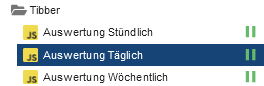
Kann es was mit der Uhrzeit zu tun haben?
In chartHourly steht:{ "tooltip": { "trigger": "axis", "axisPointer": { "type": "cross" } }, "legend": { "show": true, "orient": "horizontal", "left": "center", "top": 25 }, "title": { "left": "center", "text": "Tibber hourly" }, "grid": { "right": "20%" }, "toolbox": { "feature": { "dataView": { "show": true, "readOnly": false }, "restore": { "show": true }, "saveAsImage": { "show": true } } }, "xAxis": [ { "type": "category", "axisTick": { "alignWithLabel": true }, "data": [ "14:00", "15:00", "16:00" ] } ], "yAxis": [ { "type": "value", "position": "left", "alignTicks": true, "axisLine": { "show": true, "lineStyle": { "color": "#5470C6" } }, "axisLabel": { "formatter": "{value} kWh" } }, { "type": "value", "position": "right", "alignTicks": true, "axisLine": { "show": true, "lineStyle": { "color": "#91CC75" } }, "axisLabel": { "formatter": "{value} €" } } ], "series": [ { "name": "Consumption", "type": "bar", "data": [ "0.081", "0.096", "0.086" ] }, { "name": "Cost", "type": "bar", "yAxisIndex": 1, "data": [ "0.03", "0.03", "0.03" ] } ] }Wobei ich die Uhrzeiten selbst eingetragen habe.
In tibberHourly steht:[ { "from": "2025-01-29T09:00:00.000+01:00", "to": "2025-01-29T10:00:00.000+01:00", "cost": 0.029134056, "unitPrice": 0.3641757, "unitPriceVAT": 0.0581457, "consumption": 0.08, "consumptionUnit": "kWh", "totalCost": 0.02616991475, "unitCost": 0.029134056, "currency": "EUR" }, { "from": "2025-01-29T10:00:00.000+01:00", "to": "2025-01-29T11:00:00.000+01:00", "cost": 0.0497585053, "unitPrice": 0.3339497, "unitPriceVAT": 0.0533197, "consumption": 0.149, "consumptionUnit": "kWh", "totalCost": 0.04679436405, "unitCost": 0.0497585053, "currency": "EUR" }, { "from": "2025-01-29T11:00:00.000+01:00", "to": "2025-01-29T12:00:00.000+01:00", "cost": 0.0412843487, "unitPrice": 0.3151477, "unitPriceVAT": 0.0503177, "consumption": 0.131, "consumptionUnit": "kWh", "totalCost": 0.03832020745, "unitCost": 0.0412843487, "currency": "EUR" }, { "from": "2025-01-29T12:00:00.000+01:00", "to": "2025-01-29T13:00:00.000+01:00", "cost": 0.021706314, "unitPrice": 0.3100902, "unitPriceVAT": 0.0495102, "consumption": 0.07, "consumptionUnit": "kWh", "totalCost": 0.01874217275, "unitCost": 0.021706314, "currency": "EUR" }, { "from": "2025-01-29T13:00:00.000+01:00", "to": "2025-01-29T14:00:00.000+01:00", "cost": 0.0307613691, "unitPrice": 0.3107209, "unitPriceVAT": 0.0496109, "consumption": 0.099, "consumptionUnit": "kWh", "totalCost": 0.02779722785, "unitCost": 0.0307613691, "currency": "EUR" }, { "from": "2025-01-29T14:00:00.000+01:00", "to": "2025-01-29T15:00:00.000+01:00", "cost": 0.0253746675, "unitPrice": 0.3132675, "unitPriceVAT": 0.0500175, "consumption": 0.081, "consumptionUnit": "kWh", "totalCost": 0.02241052625, "unitCost": 0.0253746675, "currency": "EUR" }, { "from": "2025-01-29T15:00:00.000+01:00", "to": "2025-01-29T16:00:00.000+01:00", "cost": 0.0317964192, "unitPrice": 0.3312127, "unitPriceVAT": 0.0528827, "consumption": 0.096, "consumptionUnit": "kWh", "totalCost": 0.02883227795, "unitCost": 0.0317964192, "currency": "EUR" }, { "from": "2025-01-29T16:00:00.000+01:00", "to": "2025-01-29T17:00:00.000+01:00", "cost": 0.0315452816, "unitPrice": 0.3668056, "unitPriceVAT": 0.0585656, "consumption": 0.086, "consumptionUnit": "kWh", "totalCost": 0.02858114035, "unitCost": 0.0315452816, "currency": "EUR" }, { "from": "2025-01-29T17:00:00.000+01:00", "to": "2025-01-29T18:00:00.000+01:00", "cost": 0.0228287815, "unitPrice": 0.3869285, "unitPriceVAT": 0.0617785, "consumption": 0.059, "consumptionUnit": "kWh", "totalCost": 0.01986464025, "unitCost": 0.0228287815, "currency": "EUR" }, { "from": "2025-01-29T18:00:00.000+01:00", "to": "2025-01-29T19:00:00.000+01:00", "cost": 0.0112388717, "unitPrice": 0.3875473, "unitPriceVAT": 0.0618773, "consumption": 0.029, "consumptionUnit": "kWh", "totalCost": 0.00827473045, "unitCost": 0.0112388717, "currency": "EUR" }, { "from": "2025-01-29T19:00:00.000+01:00", "to": "2025-01-29T20:00:00.000+01:00", "cost": 0.007660744, "unitPrice": 0.3830372, "unitPriceVAT": 0.0611572, "consumption": 0.02, "consumptionUnit": "kWh", "totalCost": 0.00469660275, "unitCost": 0.007660744, "currency": "EUR" }, { "from": "2025-01-29T20:00:00.000+01:00", "to": "2025-01-29T21:00:00.000+01:00", "cost": 0.0065872926, "unitPrice": 0.3659607, "unitPriceVAT": 0.0584307, "consumption": 0.018, "consumptionUnit": "kWh", "totalCost": 0.00362315135, "unitCost": 0.0065872926, "currency": "EUR" }, { "from": "2025-01-29T21:00:00.000+01:00", "to": "2025-01-29T22:00:00.000+01:00", "cost": 0.0063238266, "unitPrice": 0.3513237, "unitPriceVAT": 0.0560937, "consumption": 0.018, "consumptionUnit": "kWh", "totalCost": 0.00335968535, "unitCost": 0.0063238266, "currency": "EUR" }, { "from": "2025-01-29T22:00:00.000+01:00", "to": "2025-01-29T23:00:00.000+01:00", "cost": 0.0065019577, "unitPrice": 0.3422083, "unitPriceVAT": 0.0546383, "consumption": 0.019, "consumptionUnit": "kWh", "totalCost": 0.00353781645, "unitCost": 0.0065019577, "currency": "EUR" }, { "from": "2025-01-29T23:00:00.000+01:00", "to": "2025-01-30T00:00:00.000+01:00", "cost": 1.1309330053, "unitPrice": 0.3271429, "unitPriceVAT": 0.0522329, "consumption": 3.457, "consumptionUnit": "kWh", "totalCost": 1.12796886405, "unitCost": 1.1309330053, "currency": "EUR" }, { "from": "2025-01-30T00:00:00.000+01:00", "to": "2025-01-30T01:00:00.000+01:00", "cost": 0.1119367431, "unitPrice": 0.3189081, "unitPriceVAT": 0.0509181, "consumption": 0.351, "consumptionUnit": "kWh", "totalCost": 0.10897260185, "unitCost": 0.1119367431, "currency": "EUR" }, { "from": "2025-01-30T01:00:00.000+01:00", "to": "2025-01-30T02:00:00.000+01:00", "cost": 0.1058853908, "unitPrice": 0.3189319, "unitPriceVAT": 0.0509219, "consumption": 0.332, "consumptionUnit": "kWh", "totalCost": 0.10292124955, "unitCost": 0.1058853908, "currency": "EUR" }, { "from": "2025-01-30T02:00:00.000+01:00", "to": "2025-01-30T03:00:00.000+01:00", "cost": 0.0892808091, "unitPrice": 0.3200029, "unitPriceVAT": 0.0510929, "consumption": 0.279, "consumptionUnit": "kWh", "totalCost": 0.08631666785, "unitCost": 0.0892808091, "currency": "EUR" }, { "from": "2025-01-30T03:00:00.000+01:00", "to": "2025-01-30T04:00:00.000+01:00", "cost": 0.089474196, "unitPrice": 0.3195507, "unitPriceVAT": 0.0510207, "consumption": 0.28, "consumptionUnit": "kWh", "totalCost": 0.08651005475, "unitCost": 0.089474196, "currency": "EUR" }, { "from": "2025-01-30T04:00:00.000+01:00", "to": "2025-01-30T05:00:00.000+01:00", "cost": 0.1077989822, "unitPrice": 0.3189319, "unitPriceVAT": 0.0509219, "consumption": 0.338, "consumptionUnit": "kWh", "totalCost": 0.10483484095, "unitCost": 0.1077989822, "currency": "EUR" }, { "from": "2025-01-30T05:00:00.000+01:00", "to": "2025-01-30T06:00:00.000+01:00", "cost": 0.1200729635, "unitPrice": 0.3382337, "unitPriceVAT": 0.0540037, "consumption": 0.355, "consumptionUnit": "kWh", "totalCost": 0.11710882225, "unitCost": 0.1200729635, "currency": "EUR" }, { "from": "2025-01-30T06:00:00.000+01:00", "to": "2025-01-30T07:00:00.000+01:00", "cost": 0.0240216256, "unitPrice": 0.3753379, "unitPriceVAT": 0.0599279, "consumption": 0.064, "consumptionUnit": "kWh", "totalCost": 0.02105748435, "unitCost": 0.0240216256, "currency": "EUR" }, { "from": "2025-01-30T07:00:00.000+01:00", "to": "2025-01-30T08:00:00.000+01:00", "cost": 0.0121080358, "unitPrice": 0.3905818, "unitPriceVAT": 0.0623618, "consumption": 0.031, "consumptionUnit": "kWh", "totalCost": 0.00914389455, "unitCost": 0.0121080358, "currency": "EUR" }, { "from": "2025-01-30T08:00:00.000+01:00", "to": "2025-01-30T09:00:00.000+01:00", "cost": null, "unitPrice": 0.3996972, "unitPriceVAT": 0.0638172, "consumption": null, "consumptionUnit": "kWh", "totalCost": null, "unitCost": null, "currency": "EUR" } ]Bez. wenn ich auf den Stift gehe unter Objektdaten bei chartHourly:
{
  "common": {
    "name": "chartHourly",
    "desc": "Manuell erzeugt",
    "role": "state",
    "type": "json",
    "read": true,
    "write": true
  },
  "type": "state",
  "native": {},
  "from": "system.adapter.admin.0",
  "user": "system.user.admin",
  "ts": 1738172595401,
  "_id": "0_userdata.0.flexcharts.tibberLink.chartHourly",
  "acl": {
    "object": 1638,
    "state": 1638,
    "owner": "system.user.admin",
    "ownerGroup": "system.group.administrator"
  }
}
und bei tibberHourly:
{ "common": { "name": "tibberHourly", "desc": "Manuell erzeugt", "role": "state", "type": "json", "read": true, "write": true }, "type": "state", "native": {}, "from": "system.adapter.admin.0", "user": "system.user.admin", "ts": 1738172636549, "_id": "0_userdata.0.flexcharts.tibberLink.tibberHourly", "acl": { "object": 1638, "state": 1638, "owner": "system.user.admin", "ownerGroup": "system.group.administrator" } } -
@jrbwh Einen Schreibfehler habe ich gefunden. Aber irgendwas passt immer noch nicht:
//
// Create chart for Tibber hourly data to be used with flexcharts
//

const ID_TIBBER_HOURLY = '0_userdata.0.flexcharts.tibberLink.tibberHourly';    // State id containing tibber data (json format)
const ID_CHART_HOURLY  = '0_userdata.0.flexcharts.tibberLink.chartHourly';     // State id containing template for chart data (json format)
const TITLE_HOURLY     = 'Tibber hourly';                                                             // Title of chart

evalTibberData(ID_TIBBER_HOURLY, ID_CHART_HOURLY, TITLE_HOURLY);    // Convert data on start of script

on({id: ID_TIBBER_HOURLY, change: "any"}, function (obj) {
    evalTibberData(ID_TIBBER_HOURLY, ID_CHART_HOURLY, TITLE_HOURLY);
});

function evalTibberData(idTibber, idChart, title) {
    const tibber = JSON.parse(getState(idTibber).val);  // Read tibber data
    const chart = JSON.parse(getState(idChart).val);    // Read chart template
    const xAxis  = [];
    const yAxis0 = [];
    const yAxis1 = [];
    for (const data of Object.values(tibber)) {
        xAxis.push(new Date(data.from).toLocaleDateString());
        yAxis0.push(data.consumption.toFixed(2));
        yAxis1.push(data.cost.toFixed(2));
    }
    chart.title.text = title;           // Set chart title
    chart.xAxis[0].data  = xAxis;       // Set chart x-axis data
    chart.series[0].data = yAxis0;      // Set chart y-values consumption
    chart.series[1].data = yAxis1;      // Set chart y-values cost
    setState(idChart, JSON.stringify(chart), true); // Write changed chart data to state
    console.log('Evaluation of tibber hourly data done. Title: '+title);
}
Geändert habe ich weekly oder WEEKLY auf hourly oder HOURLY, also eigentlich genauso geschrieben (Groß- und Kleinbuchstaben). Da finde ich jetzt keinen Fehler mehr. Komischerweise hat es bei daily funktioniert. Außer das ich noch nicht weiß ob die Seite aktualisiert wird, da es heute morgen nicht geklappt hat.
Jede Abfrage hat jetzt ein eigenes Skript.
Kann es was mit der Uhrzeit zu tun haben?
In chartHourly steht:{ "tooltip": { "trigger": "axis", "axisPointer": { "type": "cross" } }, "legend": { "show": true, "orient": "horizontal", "left": "center", "top": 25 }, "title": { "left": "center", "text": "Tibber hourly" }, "grid": { "right": "20%" }, "toolbox": { "feature": { "dataView": { "show": true, "readOnly": false }, "restore": { "show": true }, "saveAsImage": { "show": true } } }, "xAxis": [ { "type": "category", "axisTick": { "alignWithLabel": true }, "data": [ "14:00", "15:00", "16:00" ] } ], "yAxis": [ { "type": "value", "position": "left", "alignTicks": true, "axisLine": { "show": true, "lineStyle": { "color": "#5470C6" } }, "axisLabel": { "formatter": "{value} kWh" } }, { "type": "value", "position": "right", "alignTicks": true, "axisLine": { "show": true, "lineStyle": { "color": "#91CC75" } }, "axisLabel": { "formatter": "{value} €" } } ], "series": [ { "name": "Consumption", "type": "bar", "data": [ "0.081", "0.096", "0.086" ] }, { "name": "Cost", "type": "bar", "yAxisIndex": 1, "data": [ "0.03", "0.03", "0.03" ] } ] }Wobei ich die Uhrzeiten selbst eingetragen habe.
In tibberHourly steht:[ { "from": "2025-01-29T09:00:00.000+01:00", "to": "2025-01-29T10:00:00.000+01:00", "cost": 0.029134056, "unitPrice": 0.3641757, "unitPriceVAT": 0.0581457, "consumption": 0.08, "consumptionUnit": "kWh", "totalCost": 0.02616991475, "unitCost": 0.029134056, "currency": "EUR" }, { "from": "2025-01-29T10:00:00.000+01:00", "to": "2025-01-29T11:00:00.000+01:00", "cost": 0.0497585053, "unitPrice": 0.3339497, "unitPriceVAT": 0.0533197, "consumption": 0.149, "consumptionUnit": "kWh", "totalCost": 0.04679436405, "unitCost": 0.0497585053, "currency": "EUR" }, { "from": "2025-01-29T11:00:00.000+01:00", "to": "2025-01-29T12:00:00.000+01:00", "cost": 0.0412843487, "unitPrice": 0.3151477, "unitPriceVAT": 0.0503177, "consumption": 0.131, "consumptionUnit": "kWh", "totalCost": 0.03832020745, "unitCost": 0.0412843487, "currency": "EUR" }, { "from": "2025-01-29T12:00:00.000+01:00", "to": "2025-01-29T13:00:00.000+01:00", "cost": 0.021706314, "unitPrice": 0.3100902, "unitPriceVAT": 0.0495102, "consumption": 0.07, "consumptionUnit": "kWh", "totalCost": 0.01874217275, "unitCost": 0.021706314, "currency": "EUR" }, { "from": "2025-01-29T13:00:00.000+01:00", "to": "2025-01-29T14:00:00.000+01:00", "cost": 0.0307613691, "unitPrice": 0.3107209, "unitPriceVAT": 0.0496109, "consumption": 0.099, "consumptionUnit": "kWh", "totalCost": 0.02779722785, "unitCost": 0.0307613691, "currency": "EUR" }, { "from": "2025-01-29T14:00:00.000+01:00", "to": "2025-01-29T15:00:00.000+01:00", "cost": 0.0253746675, "unitPrice": 0.3132675, "unitPriceVAT": 0.0500175, "consumption": 0.081, "consumptionUnit": "kWh", "totalCost": 0.02241052625, "unitCost": 0.0253746675, "currency": "EUR" }, { "from": "2025-01-29T15:00:00.000+01:00", "to": "2025-01-29T16:00:00.000+01:00", "cost": 0.0317964192, "unitPrice": 0.3312127, "unitPriceVAT": 0.0528827, "consumption": 0.096, "consumptionUnit": "kWh", "totalCost": 0.02883227795, "unitCost": 0.0317964192, "currency": "EUR" }, { "from": "2025-01-29T16:00:00.000+01:00", "to": "2025-01-29T17:00:00.000+01:00", "cost": 0.0315452816, "unitPrice": 0.3668056, "unitPriceVAT": 0.0585656, "consumption": 0.086, "consumptionUnit": "kWh", "totalCost": 0.02858114035, "unitCost": 0.0315452816, "currency": "EUR" }, { "from": "2025-01-29T17:00:00.000+01:00", "to": "2025-01-29T18:00:00.000+01:00", "cost": 0.0228287815, "unitPrice": 0.3869285, "unitPriceVAT": 0.0617785, "consumption": 0.059, "consumptionUnit": "kWh", "totalCost": 0.01986464025, "unitCost": 0.0228287815, "currency": "EUR" }, { "from": "2025-01-29T18:00:00.000+01:00", "to": "2025-01-29T19:00:00.000+01:00", "cost": 0.0112388717, "unitPrice": 0.3875473, "unitPriceVAT": 0.0618773, "consumption": 0.029, "consumptionUnit": "kWh", "totalCost": 0.00827473045, "unitCost": 0.0112388717, "currency": "EUR" }, { "from": "2025-01-29T19:00:00.000+01:00", "to": "2025-01-29T20:00:00.000+01:00", "cost": 0.007660744, "unitPrice": 0.3830372, "unitPriceVAT": 0.0611572, "consumption": 0.02, "consumptionUnit": "kWh", "totalCost": 0.00469660275, "unitCost": 0.007660744, "currency": "EUR" }, { "from": "2025-01-29T20:00:00.000+01:00", "to": "2025-01-29T21:00:00.000+01:00", "cost": 0.0065872926, "unitPrice": 0.3659607, "unitPriceVAT": 0.0584307, "consumption": 0.018, "consumptionUnit": "kWh", "totalCost": 0.00362315135, "unitCost": 0.0065872926, "currency": "EUR" }, { "from": "2025-01-29T21:00:00.000+01:00", "to": "2025-01-29T22:00:00.000+01:00", "cost": 0.0063238266, "unitPrice": 0.3513237, "unitPriceVAT": 0.0560937, "consumption": 0.018, "consumptionUnit": "kWh", "totalCost": 0.00335968535, "unitCost": 0.0063238266, "currency": "EUR" }, { "from": "2025-01-29T22:00:00.000+01:00", "to": "2025-01-29T23:00:00.000+01:00", "cost": 0.0065019577, "unitPrice": 0.3422083, "unitPriceVAT": 0.0546383, "consumption": 0.019, "consumptionUnit": "kWh", "totalCost": 0.00353781645, "unitCost": 0.0065019577, "currency": "EUR" }, { "from": "2025-01-29T23:00:00.000+01:00", "to": "2025-01-30T00:00:00.000+01:00", "cost": 1.1309330053, "unitPrice": 0.3271429, "unitPriceVAT": 0.0522329, "consumption": 3.457, "consumptionUnit": "kWh", "totalCost": 1.12796886405, "unitCost": 1.1309330053, "currency": "EUR" }, { "from": "2025-01-30T00:00:00.000+01:00", "to": "2025-01-30T01:00:00.000+01:00", "cost": 0.1119367431, "unitPrice": 0.3189081, "unitPriceVAT": 0.0509181, "consumption": 0.351, "consumptionUnit": "kWh", "totalCost": 0.10897260185, "unitCost": 0.1119367431, "currency": "EUR" }, { "from": "2025-01-30T01:00:00.000+01:00", "to": "2025-01-30T02:00:00.000+01:00", "cost": 0.1058853908, "unitPrice": 0.3189319, "unitPriceVAT": 0.0509219, "consumption": 0.332, "consumptionUnit": "kWh", "totalCost": 0.10292124955, "unitCost": 0.1058853908, "currency": "EUR" }, { "from": "2025-01-30T02:00:00.000+01:00", "to": "2025-01-30T03:00:00.000+01:00", "cost": 0.0892808091, "unitPrice": 0.3200029, "unitPriceVAT": 0.0510929, "consumption": 0.279, "consumptionUnit": "kWh", "totalCost": 0.08631666785, "unitCost": 0.0892808091, "currency": "EUR" }, { "from": "2025-01-30T03:00:00.000+01:00", "to": "2025-01-30T04:00:00.000+01:00", "cost": 0.089474196, "unitPrice": 0.3195507, "unitPriceVAT": 0.0510207, "consumption": 0.28, "consumptionUnit": "kWh", "totalCost": 0.08651005475, "unitCost": 0.089474196, "currency": "EUR" }, { "from": "2025-01-30T04:00:00.000+01:00", "to": "2025-01-30T05:00:00.000+01:00", "cost": 0.1077989822, "unitPrice": 0.3189319, "unitPriceVAT": 0.0509219, "consumption": 0.338, "consumptionUnit": "kWh", "totalCost": 0.10483484095, "unitCost": 0.1077989822, "currency": "EUR" }, { "from": "2025-01-30T05:00:00.000+01:00", "to": "2025-01-30T06:00:00.000+01:00", "cost": 0.1200729635, "unitPrice": 0.3382337, "unitPriceVAT": 0.0540037, "consumption": 0.355, "consumptionUnit": "kWh", "totalCost": 0.11710882225, "unitCost": 0.1200729635, "currency": "EUR" }, { "from": "2025-01-30T06:00:00.000+01:00", "to": "2025-01-30T07:00:00.000+01:00", "cost": 0.0240216256, "unitPrice": 0.3753379, "unitPriceVAT": 0.0599279, "consumption": 0.064, "consumptionUnit": "kWh", "totalCost": 0.02105748435, "unitCost": 0.0240216256, "currency": "EUR" }, { "from": "2025-01-30T07:00:00.000+01:00", "to": "2025-01-30T08:00:00.000+01:00", "cost": 0.0121080358, "unitPrice": 0.3905818, "unitPriceVAT": 0.0623618, "consumption": 0.031, "consumptionUnit": "kWh", "totalCost": 0.00914389455, "unitCost": 0.0121080358, "currency": "EUR" }, { "from": "2025-01-30T08:00:00.000+01:00", "to": "2025-01-30T09:00:00.000+01:00", "cost": null, "unitPrice": 0.3996972, "unitPriceVAT": 0.0638172, "consumption": null, "consumptionUnit": "kWh", "totalCost": null, "unitCost": null, "currency": "EUR" } ]Bez. wenn ich auf den Stift gehe unter Objektdaten bei chartHourly:
{
  "common": {
    "name": "chartHourly",
    "desc": "Manuell erzeugt",
    "role": "state",
    "type": "json",
    "read": true,
    "write": true
  },
  "type": "state",
  "native": {},
  "from": "system.adapter.admin.0",
  "user": "system.user.admin",
  "ts": 1738172595401,
  "_id": "0_userdata.0.flexcharts.tibberLink.chartHourly",
  "acl": {
    "object": 1638,
    "state": 1638,
    "owner": "system.user.admin",
    "ownerGroup": "system.group.administrator"
  }
}
und bei tibberHourly:
{ "common": { "name": "tibberHourly", "desc": "Manuell erzeugt", "role": "state", "type": "json", "read": true, "write": true }, "type": "state", "native": {}, "from": "system.adapter.admin.0", "user": "system.user.admin", "ts": 1738172636549, "_id": "0_userdata.0.flexcharts.tibberLink.tibberHourly", "acl": { "object": 1638, "state": 1638, "owner": "system.user.admin", "ownerGroup": "system.group.administrator" } }@sms Die Fehlermeldung kommt, weil Deine Daten keine gültigen Zahlenwerte, sondern
nullenthalten. Außerdem sollte bei stündlichen Werten an der x-Achse die Uhrzeit und nicht das Datum stehen.Ich habe das Skript entsprechend erweitert.
nullWerte werden jetzt als 0 gespeichert.Wenn du die Funktion
evalTibberData()in Deinem Skript durch die geänderte Version ersetzt, sollte es funktionieren. -
@jrbwh sagte in Test Adapter flexcharts - Stapeldiagramme und mehr:
Werde das am WE oder nächste Woche einbauen und ein Release machen.
Super, danke und gute Reise
@ullij Ich habe eine Version im Branch develop erstellt, kann im Moment aber nur eingeschränkt testen. Bei mir sieht's gut aus. Falls Du es ausprobieren möchtest:
Im Expertenmodus im Adapter-Installationsdialog unter "Custom" folgende Adresse verwenden:
https://github.com/MyHomeMyData/ioBroker.flexcharts/tree/develop -
@sms Die Fehlermeldung kommt, weil Deine Daten keine gültigen Zahlenwerte, sondern
nullenthalten. Außerdem sollte bei stündlichen Werten an der x-Achse die Uhrzeit und nicht das Datum stehen.Ich habe das Skript entsprechend erweitert.
nullWerte werden jetzt als 0 gespeichert.Wenn du die Funktion
evalTibberData()in Deinem Skript durch die geänderte Version ersetzt, sollte es funktionieren.@jrbwh Muss ich in dem Skript noch irgendwas anpassen? Irgendeine ID?
Leider hat es jetzt nach der letzten Stunde nicht funktioniert. Der Zeitstempel vom DP tibberlink ändert bzw. aktualisiert sich, aber beim DP flexchart ändert sich nichts.Hier Zeitstempel tibberlink nach Neustart des Adapters:

Und hier von den angelegten DP's:

-
@ullij Ich habe eine Version im Branch develop erstellt, kann im Moment aber nur eingeschränkt testen. Bei mir sieht's gut aus. Falls Du es ausprobieren möchtest:
Im Expertenmodus im Adapter-Installationsdialog unter "Custom" folgende Adresse verwenden:
https://github.com/MyHomeMyData/ioBroker.flexcharts/tree/develop@jrbwh sagte in Test Adapter flexcharts - Stapeldiagramme und mehr:
Bei mir sieht's gut aus
bei mir noch nicht:cry: Habe irgendwo eine Fehlermeldung vom web-Adapter gesehen, bin noch am suchen
-
@jrbwh Muss ich in dem Skript noch irgendwas anpassen? Irgendeine ID?
Leider hat es jetzt nach der letzten Stunde nicht funktioniert. Der Zeitstempel vom DP tibberlink ändert bzw. aktualisiert sich, aber beim DP flexchart ändert sich nichts.Hier Zeitstempel tibberlink nach Neustart des Adapters:
Und hier von den angelegten DP's:
-
@jrbwh sagte in Test Adapter flexcharts - Stapeldiagramme und mehr:
Bei mir sieht's gut aus
bei mir noch nicht:cry: Habe irgendwo eine Fehlermeldung vom web-Adapter gesehen, bin noch am suchen
-
@sms Wenn die IDs der Datenpunkte im Skript stimmen, sollte es funktionieren. Im Log siehst Du ja, ob das Skript läuft, wenn Du den DP änderst.
@jrbwh Dann würde ich sagen funktioniert es nicht! Das hier steht im Skript:
//
// Create chart for Tibber hourly data to be used with flexcharts
//

const ID_TIBBER_HOURLY = '0_userdata.0.flexcharts.tibberLink.tibberHourly';       // State id containing tibber data (json format)
const ID_CHART_HOURLY  = '0_userdata.0.flexcharts.tibberLink.chartHourly';        // State id containing template for chart data (json format)
const TITLE_HOURLY     = 'Tibber hourly';

evalTibberData(ID_TIBBER_HOURLY, ID_CHART_HOURLY, TITLE_HOURLY);    // Convert data on start of script

on({id: ID_TIBBER_HOURLY, change: "any"}, function (obj) {
    evalTibberData(ID_TIBBER_HOURLY, ID_CHART_HOURLY, TITLE_HOURLY);
});

function evalTibberData(idTibber, idChart, title) {
    const tibber = JSON.parse(getState(idTibber).val);  // Read tibber data
    const chart = JSON.parse(getState(idChart).val);    // Read chart template
    const xAxis  = [];
    const yAxis0 = [];
    const yAxis1 = [];
    for (const data of Object.values(tibber)) {
        const isHourly = (new Date(data.from).getHours() != new Date(data.to).getHours());  // Hourly data?
        const xValue = (isHourly ? new Date(data.from).toLocaleTimeString() : new Date(data.from).toLocaleDateString());
        xAxis.push(xValue);
        yAxis0.push((data.consumption ? data.consumption.toFixed(2) : 0));  // push 0 on null values
        yAxis1.push((data.cost ? data.cost.toFixed(2) : 0));                // push 0 on null values
    }
    chart.title.text = title;           // Set chart title
    chart.xAxis[0].data  = xAxis;       // Set chart x-axis data
    chart.series[0].data = yAxis0;      // Set chart y-values consumption
    chart.series[1].data = yAxis1;      // Set chart y-values cost
    setState(idChart, JSON.stringify(chart), true); // Write changed chart data to state
    console.log('Evaluation of tibber hourly data done. Title: '+title);
}
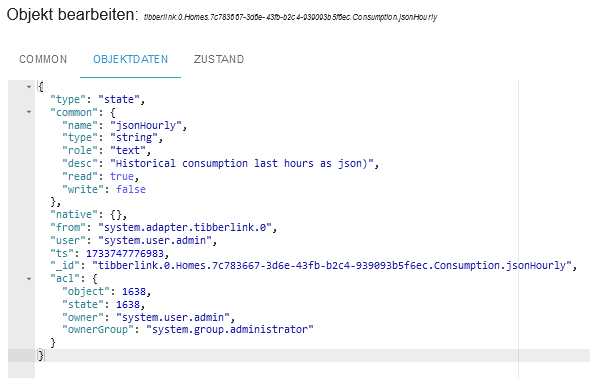
Das hier ist die ID vom tibberHourly:
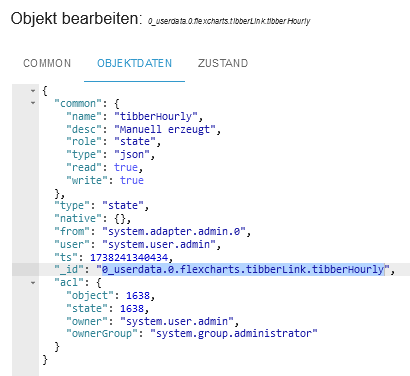
Und hier vom chartHourly:
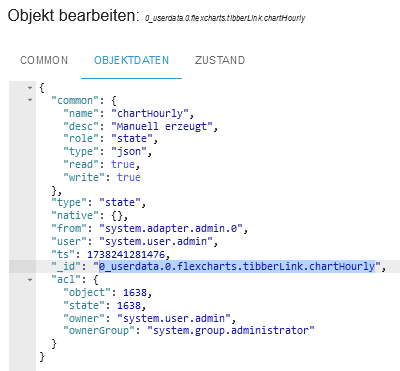
Muss noch irgendwo die ID von tibberlink rein?
-
@jrbwh Dann würde ich sagen funktioniert es nicht! Das hier steht im Skript:
//
// Create chart for Tibber hourly data to be used with flexcharts
//

const ID_TIBBER_HOURLY = '0_userdata.0.flexcharts.tibberLink.tibberHourly';       // State id containing tibber data (json format)
const ID_CHART_HOURLY  = '0_userdata.0.flexcharts.tibberLink.chartHourly';        // State id containing template for chart data (json format)
const TITLE_HOURLY     = 'Tibber hourly';

evalTibberData(ID_TIBBER_HOURLY, ID_CHART_HOURLY, TITLE_HOURLY);    // Convert data on start of script

on({id: ID_TIBBER_HOURLY, change: "any"}, function (obj) {
    evalTibberData(ID_TIBBER_HOURLY, ID_CHART_HOURLY, TITLE_HOURLY);
});

function evalTibberData(idTibber, idChart, title) {
    const tibber = JSON.parse(getState(idTibber).val);  // Read tibber data
    const chart = JSON.parse(getState(idChart).val);    // Read chart template
    const xAxis  = [];
    const yAxis0 = [];
    const yAxis1 = [];
    for (const data of Object.values(tibber)) {
        const isHourly = (new Date(data.from).getHours() != new Date(data.to).getHours());  // Hourly data?
        const xValue = (isHourly ? new Date(data.from).toLocaleTimeString() : new Date(data.from).toLocaleDateString());
        xAxis.push(xValue);
        yAxis0.push((data.consumption ? data.consumption.toFixed(2) : 0));  // push 0 on null values
        yAxis1.push((data.cost ? data.cost.toFixed(2) : 0));                // push 0 on null values
    }
    chart.title.text = title;           // Set chart title
    chart.xAxis[0].data  = xAxis;       // Set chart x-axis data
    chart.series[0].data = yAxis0;      // Set chart y-values consumption
    chart.series[1].data = yAxis1;      // Set chart y-values cost
    setState(idChart, JSON.stringify(chart), true); // Write changed chart data to state
    console.log('Evaluation of tibber hourly data done. Title: '+title);
}
Das hier ist die ID vom tibberHourly:
Und hier vom chartHourly:
Muss noch irgendwo die ID von tibberlink rein?
-
Aller Anfang ist schwer. Am Ende hilft jedoch nur, sich selbst in die Materie einzuarbeiten. Meine Leidens- und vor allem Erfolgsgeschichten kannst du hier in Teilen nachlesen. Dort findest du viele Ideen und Techniken, wie du dein Vorhaben weitestgehend selbst in die Tat umsetzen kannst.
Nicht erschrecken! Aber ohne sich durch derartige Gedanken hindurch zu kämpfen, wirst du mit FlexCharts nicht glücklich. Aber sei versichert: Es lohnt sich.
-
@ullij Ich habe eine Version im Branch develop erstellt, kann im Moment aber nur eingeschränkt testen. Bei mir sieht's gut aus. Falls Du es ausprobieren möchtest:
Im Expertenmodus im Adapter-Installationsdialog unter "Custom" folgende Adresse verwenden:
https://github.com/MyHomeMyData/ioBroker.flexcharts/tree/develop@jrbwh sagte in Test Adapter flexcharts - Stapeldiagramme und mehr:
Ich habe eine Version im Branch develop erstellt, kann im Moment aber nur eingeschränkt testen. Bei mir sieht's gut aus. Falls Du es ausprobieren möchtest:
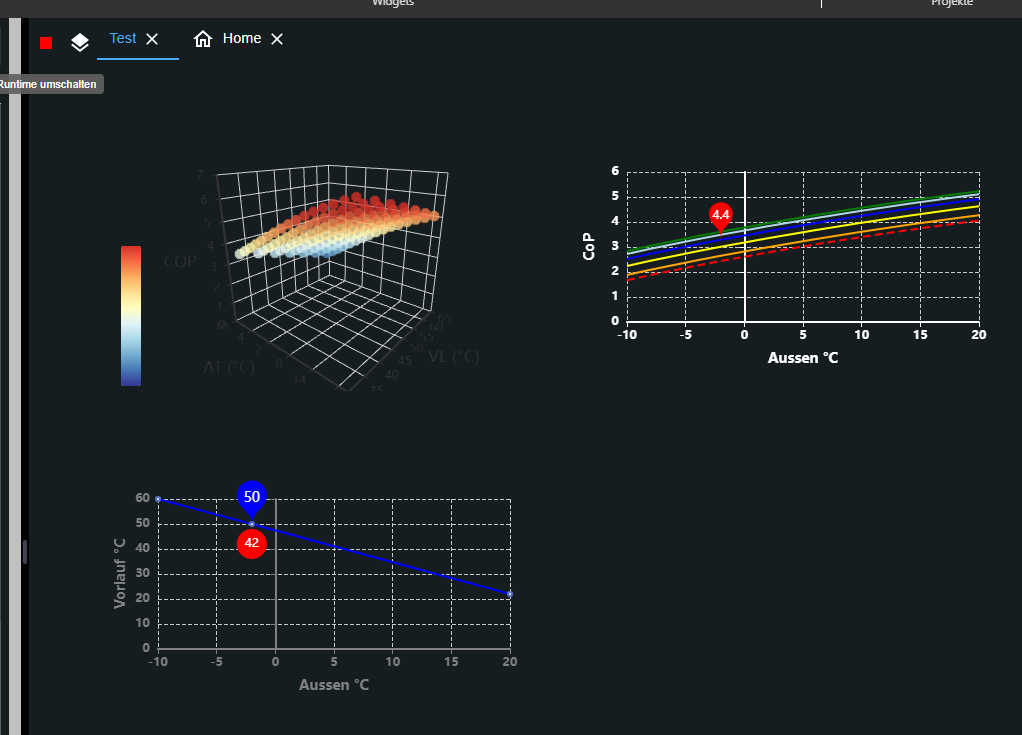
nach Neuinstallation sieht das so aus:+1:
Proxmox auf iNuc, lxc für IoB, InfluxDB2, Grafana, u.a. *** Homematic & Homematic IP, Shellies, Zigbee etc
-
@jrbwh sagte in Test Adapter flexcharts - Stapeldiagramme und mehr:
Ich habe eine Version im Branch develop erstellt, kann im Moment aber nur eingeschränkt testen. Bei mir sieht's gut aus. Falls Du es ausprobieren möchtest:
nach Neuinstallation sieht das so aus:+1:
-
@jrbwh Einen Schreibfehler habe ich gefunden. Aber irgendwas passt immer noch nicht:
//
// Create chart for Tibber hourly data to be used with flexcharts
//

const ID_TIBBER_HOURLY = '0_userdata.0.flexcharts.tibberLink.tibberHourly';    // State id containing tibber data (json format)
const ID_CHART_HOURLY  = '0_userdata.0.flexcharts.tibberLink.chartHourly';     // State id containing template for chart data (json format)
const TITLE_HOURLY     = 'Tibber hourly';                                                             // Title of chart

evalTibberData(ID_TIBBER_HOURLY, ID_CHART_HOURLY, TITLE_HOURLY);    // Convert data on start of script

on({id: ID_TIBBER_HOURLY, change: "any"}, function (obj) {
    evalTibberData(ID_TIBBER_HOURLY, ID_CHART_HOURLY, TITLE_HOURLY);
});

function evalTibberData(idTibber, idChart, title) {
    const tibber = JSON.parse(getState(idTibber).val);  // Read tibber data
    const chart = JSON.parse(getState(idChart).val);    // Read chart template
    const xAxis  = [];
    const yAxis0 = [];
    const yAxis1 = [];
    for (const data of Object.values(tibber)) {
        xAxis.push(new Date(data.from).toLocaleDateString());
        yAxis0.push(data.consumption.toFixed(2));
        yAxis1.push(data.cost.toFixed(2));
    }
    chart.title.text = title;           // Set chart title
    chart.xAxis[0].data  = xAxis;       // Set chart x-axis data
    chart.series[0].data = yAxis0;      // Set chart y-values consumption
    chart.series[1].data = yAxis1;      // Set chart y-values cost
    setState(idChart, JSON.stringify(chart), true); // Write changed chart data to state
    console.log('Evaluation of tibber hourly data done. Title: '+title);
}
Geändert habe ich weekly oder WEEKLY auf hourly oder HOURLY, also eigentlich genauso geschrieben (Groß- und Kleinbuchstaben). Da finde ich jetzt keinen Fehler mehr. Komischerweise hat es bei daily funktioniert. Außer das ich noch nicht weiß ob die Seite aktualisiert wird, da es heute morgen nicht geklappt hat.
Jede Abfrage hat jetzt ein eigenes Skript.
Kann es was mit der Uhrzeit zu tun haben?
In chartHourly steht:{ "tooltip": { "trigger": "axis", "axisPointer": { "type": "cross" } }, "legend": { "show": true, "orient": "horizontal", "left": "center", "top": 25 }, "title": { "left": "center", "text": "Tibber hourly" }, "grid": { "right": "20%" }, "toolbox": { "feature": { "dataView": { "show": true, "readOnly": false }, "restore": { "show": true }, "saveAsImage": { "show": true } } }, "xAxis": [ { "type": "category", "axisTick": { "alignWithLabel": true }, "data": [ "14:00", "15:00", "16:00" ] } ], "yAxis": [ { "type": "value", "position": "left", "alignTicks": true, "axisLine": { "show": true, "lineStyle": { "color": "#5470C6" } }, "axisLabel": { "formatter": "{value} kWh" } }, { "type": "value", "position": "right", "alignTicks": true, "axisLine": { "show": true, "lineStyle": { "color": "#91CC75" } }, "axisLabel": { "formatter": "{value} €" } } ], "series": [ { "name": "Consumption", "type": "bar", "data": [ "0.081", "0.096", "0.086" ] }, { "name": "Cost", "type": "bar", "yAxisIndex": 1, "data": [ "0.03", "0.03", "0.03" ] } ] }Wobei ich die Uhrzeiten selbst eingetragen habe.
In tibberHourly steht:[ { "from": "2025-01-29T09:00:00.000+01:00", "to": "2025-01-29T10:00:00.000+01:00", "cost": 0.029134056, "unitPrice": 0.3641757, "unitPriceVAT": 0.0581457, "consumption": 0.08, "consumptionUnit": "kWh", "totalCost": 0.02616991475, "unitCost": 0.029134056, "currency": "EUR" }, { "from": "2025-01-29T10:00:00.000+01:00", "to": "2025-01-29T11:00:00.000+01:00", "cost": 0.0497585053, "unitPrice": 0.3339497, "unitPriceVAT": 0.0533197, "consumption": 0.149, "consumptionUnit": "kWh", "totalCost": 0.04679436405, "unitCost": 0.0497585053, "currency": "EUR" }, { "from": "2025-01-29T11:00:00.000+01:00", "to": "2025-01-29T12:00:00.000+01:00", "cost": 0.0412843487, "unitPrice": 0.3151477, "unitPriceVAT": 0.0503177, "consumption": 0.131, "consumptionUnit": "kWh", "totalCost": 0.03832020745, "unitCost": 0.0412843487, "currency": "EUR" }, { "from": "2025-01-29T12:00:00.000+01:00", "to": "2025-01-29T13:00:00.000+01:00", "cost": 0.021706314, "unitPrice": 0.3100902, "unitPriceVAT": 0.0495102, "consumption": 0.07, "consumptionUnit": "kWh", "totalCost": 0.01874217275, "unitCost": 0.021706314, "currency": "EUR" }, { "from": "2025-01-29T13:00:00.000+01:00", "to": "2025-01-29T14:00:00.000+01:00", "cost": 0.0307613691, "unitPrice": 0.3107209, "unitPriceVAT": 0.0496109, "consumption": 0.099, "consumptionUnit": "kWh", "totalCost": 0.02779722785, "unitCost": 0.0307613691, "currency": "EUR" }, { "from": "2025-01-29T14:00:00.000+01:00", "to": "2025-01-29T15:00:00.000+01:00", "cost": 0.0253746675, "unitPrice": 0.3132675, "unitPriceVAT": 0.0500175, "consumption": 0.081, "consumptionUnit": "kWh", "totalCost": 0.02241052625, "unitCost": 0.0253746675, "currency": "EUR" }, { "from": "2025-01-29T15:00:00.000+01:00", "to": "2025-01-29T16:00:00.000+01:00", "cost": 0.0317964192, "unitPrice": 0.3312127, "unitPriceVAT": 0.0528827, "consumption": 0.096, "consumptionUnit": "kWh", "totalCost": 0.02883227795, "unitCost": 0.0317964192, "currency": "EUR" }, { "from": "2025-01-29T16:00:00.000+01:00", "to": "2025-01-29T17:00:00.000+01:00", "cost": 0.0315452816, "unitPrice": 0.3668056, "unitPriceVAT": 0.0585656, "consumption": 0.086, "consumptionUnit": "kWh", "totalCost": 0.02858114035, "unitCost": 0.0315452816, "currency": "EUR" }, { "from": "2025-01-29T17:00:00.000+01:00", "to": "2025-01-29T18:00:00.000+01:00", "cost": 0.0228287815, "unitPrice": 0.3869285, "unitPriceVAT": 0.0617785, "consumption": 0.059, "consumptionUnit": "kWh", "totalCost": 0.01986464025, "unitCost": 0.0228287815, "currency": "EUR" }, { "from": "2025-01-29T18:00:00.000+01:00", "to": "2025-01-29T19:00:00.000+01:00", "cost": 0.0112388717, "unitPrice": 0.3875473, "unitPriceVAT": 0.0618773, "consumption": 0.029, "consumptionUnit": "kWh", "totalCost": 0.00827473045, "unitCost": 0.0112388717, "currency": "EUR" }, { "from": "2025-01-29T19:00:00.000+01:00", "to": "2025-01-29T20:00:00.000+01:00", "cost": 0.007660744, "unitPrice": 0.3830372, "unitPriceVAT": 0.0611572, "consumption": 0.02, "consumptionUnit": "kWh", "totalCost": 0.00469660275, "unitCost": 0.007660744, "currency": "EUR" }, { "from": "2025-01-29T20:00:00.000+01:00", "to": "2025-01-29T21:00:00.000+01:00", "cost": 0.0065872926, "unitPrice": 0.3659607, "unitPriceVAT": 0.0584307, "consumption": 0.018, "consumptionUnit": "kWh", "totalCost": 0.00362315135, "unitCost": 0.0065872926, "currency": "EUR" }, { "from": "2025-01-29T21:00:00.000+01:00", "to": "2025-01-29T22:00:00.000+01:00", "cost": 0.0063238266, "unitPrice": 0.3513237, "unitPriceVAT": 0.0560937, "consumption": 0.018, "consumptionUnit": "kWh", "totalCost": 0.00335968535, "unitCost": 0.0063238266, "currency": "EUR" }, { "from": "2025-01-29T22:00:00.000+01:00", "to": "2025-01-29T23:00:00.000+01:00", "cost": 0.0065019577, "unitPrice": 0.3422083, "unitPriceVAT": 0.0546383, "consumption": 0.019, "consumptionUnit": "kWh", "totalCost": 0.00353781645, "unitCost": 0.0065019577, "currency": "EUR" }, { "from": "2025-01-29T23:00:00.000+01:00", "to": "2025-01-30T00:00:00.000+01:00", "cost": 1.1309330053, "unitPrice": 0.3271429, "unitPriceVAT": 0.0522329, "consumption": 3.457, "consumptionUnit": "kWh", "totalCost": 1.12796886405, "unitCost": 1.1309330053, "currency": "EUR" }, { "from": "2025-01-30T00:00:00.000+01:00", "to": "2025-01-30T01:00:00.000+01:00", "cost": 0.1119367431, "unitPrice": 0.3189081, "unitPriceVAT": 0.0509181, "consumption": 0.351, "consumptionUnit": "kWh", "totalCost": 0.10897260185, "unitCost": 0.1119367431, "currency": "EUR" }, { "from": "2025-01-30T01:00:00.000+01:00", "to": "2025-01-30T02:00:00.000+01:00", "cost": 0.1058853908, "unitPrice": 0.3189319, "unitPriceVAT": 0.0509219, "consumption": 0.332, "consumptionUnit": "kWh", "totalCost": 0.10292124955, "unitCost": 0.1058853908, "currency": "EUR" }, { "from": "2025-01-30T02:00:00.000+01:00", "to": "2025-01-30T03:00:00.000+01:00", "cost": 0.0892808091, "unitPrice": 0.3200029, "unitPriceVAT": 0.0510929, "consumption": 0.279, "consumptionUnit": "kWh", "totalCost": 0.08631666785, "unitCost": 0.0892808091, "currency": "EUR" }, { "from": "2025-01-30T03:00:00.000+01:00", "to": "2025-01-30T04:00:00.000+01:00", "cost": 0.089474196, "unitPrice": 0.3195507, "unitPriceVAT": 0.0510207, "consumption": 0.28, "consumptionUnit": "kWh", "totalCost": 0.08651005475, "unitCost": 0.089474196, "currency": "EUR" }, { "from": "2025-01-30T04:00:00.000+01:00", "to": "2025-01-30T05:00:00.000+01:00", "cost": 0.1077989822, "unitPrice": 0.3189319, "unitPriceVAT": 0.0509219, "consumption": 0.338, "consumptionUnit": "kWh", "totalCost": 0.10483484095, "unitCost": 0.1077989822, "currency": "EUR" }, { "from": "2025-01-30T05:00:00.000+01:00", "to": "2025-01-30T06:00:00.000+01:00", "cost": 0.1200729635, "unitPrice": 0.3382337, "unitPriceVAT": 0.0540037, "consumption": 0.355, "consumptionUnit": "kWh", "totalCost": 0.11710882225, "unitCost": 0.1200729635, "currency": "EUR" }, { "from": "2025-01-30T06:00:00.000+01:00", "to": "2025-01-30T07:00:00.000+01:00", "cost": 0.0240216256, "unitPrice": 0.3753379, "unitPriceVAT": 0.0599279, "consumption": 0.064, "consumptionUnit": "kWh", "totalCost": 0.02105748435, "unitCost": 0.0240216256, "currency": "EUR" }, { "from": "2025-01-30T07:00:00.000+01:00", "to": "2025-01-30T08:00:00.000+01:00", "cost": 0.0121080358, "unitPrice": 0.3905818, "unitPriceVAT": 0.0623618, "consumption": 0.031, "consumptionUnit": "kWh", "totalCost": 0.00914389455, "unitCost": 0.0121080358, "currency": "EUR" }, { "from": "2025-01-30T08:00:00.000+01:00", "to": "2025-01-30T09:00:00.000+01:00", "cost": null, "unitPrice": 0.3996972, "unitPriceVAT": 0.0638172, "consumption": null, "consumptionUnit": "kWh", "totalCost": null, "unitCost": null, "currency": "EUR" } ]Bez. wenn ich auf den Stift gehe unter Objektdaten bei chartHourly:
{
  "common": {
    "name": "chartHourly",
    "desc": "Manuell erzeugt",
    "role": "state",
    "type": "json",
    "read": true,
    "write": true
  },
  "type": "state",
  "native": {},
  "from": "system.adapter.admin.0",
  "user": "system.user.admin",
  "ts": 1738172595401,
  "_id": "0_userdata.0.flexcharts.tibberLink.chartHourly",
  "acl": {
    "object": 1638,
    "state": 1638,
    "owner": "system.user.admin",
    "ownerGroup": "system.group.administrator"
  }
}
und bei tibberHourly:
{ "common": { "name": "tibberHourly", "desc": "Manuell erzeugt", "role": "state", "type": "json", "read": true, "write": true }, "type": "state", "native": {}, "from": "system.adapter.admin.0", "user": "system.user.admin", "ts": 1738172636549, "_id": "0_userdata.0.flexcharts.tibberLink.tibberHourly", "acl": { "object": 1638, "state": 1638, "owner": "system.user.admin", "ownerGroup": "system.group.administrator" } }@sms Ich habe eine "Variante 2" des Skripts erstellt. Das benötigt keine zusätzlichen Datenpunkte und kann stündliche, tägliche, wöchentliche und monatliche Daten direkt verarbeiten. Man muss lediglich die IDs der tibberLink-Datenpunkte ("tibberLink.0.Homes...") im Skript bei "IDS" korrekt eintragen, dann sollte es funktioniert. Die Auswahl der Daten erfolgt dann im http-Aufruf.
Wäre super, wenn Du das mal ausprobieren könntest. Ich kann es selber nicht gut testen, da ich keine tibberLink-Daten habe. -
@jrbwh Bei Fragen können sich die Leute gerne melden. Hab da auch genug Fragen gestellt, bis ich das halbwegs verstanden habe :)
@merlin123 Ich habe ein Skript erstellt, um ein einfaches Chart für Verbrauch und Kosten zu generieren. Passt für Dich vermutlich nicht, aber es wäre klasse, wenn Du "Variante 2" mal ausprobieren könntest. Mein Problem ist, dass ich ohne Tibber-Daten nur sehr grob testen kann.
-
@sms Ich habe eine "Variante 2" des Skripts erstellt. Das benötigt keine zusätzlichen Datenpunkte und kann stündliche, tägliche, wöchentliche und monatliche Daten direkt verarbeiten. Man muss lediglich die IDs der tibberLink-Datenpunkte ("tibberLink.0.Homes...") im Skript bei "IDS" korrekt eintragen, dann sollte es funktioniert. Die Auswahl der Daten erfolgt dann im http-Aufruf.
Wäre super, wenn Du das mal ausprobieren könntest. Ich kann es selber nicht gut testen, da ich keine tibberLink-Daten habe. -
@jrbwh JA, vielen Dank dafür!
Wo kann ich denn die Balkenfarbe ändern?
Das hier ändert mir nur die seitlichen Achsen:xAxis: [{ type: "category", axisTick: { alignWithLabel: true }, data: []}], yAxis: [{ type: "value", position: "left", alignTicks: true, axisLine: { show: true, lineStyle: { color: "#5470C6" }}, axisLabel: { formatter: "{value} kWh" }}, { type: "value", position: "right", alignTicks: true, axisLine: { show: true, lineStyle: { color: "#91CC75" }}, axisLabel: { formatter: "{value} €" }}], series: [{ name: "Consumption", type: "bar", yAxisIndex: 0, data: []}, { name: "Cost", type: "bar", yAxisIndex: 1, data: []}]Die Schriftfarbe müsste ich auch ändern, da ich einen dunklen Hintergrund habe. Eine Veränderung hier ändert abernichts:
} else { console.log('Invalid chart type >>'+myChart+'<<'); callback({title: { left: "center", textStyle: { color: "#ff0000" }, text: "INVALID -
@jrbwh JA, vielen Dank dafür!
Wo kann ich denn die Balkenfarbe ändern?
Das hier ändert mir nur die seitlichen Achsen:xAxis: [{ type: "category", axisTick: { alignWithLabel: true }, data: []}], yAxis: [{ type: "value", position: "left", alignTicks: true, axisLine: { show: true, lineStyle: { color: "#5470C6" }}, axisLabel: { formatter: "{value} kWh" }}, { type: "value", position: "right", alignTicks: true, axisLine: { show: true, lineStyle: { color: "#91CC75" }}, axisLabel: { formatter: "{value} €" }}], series: [{ name: "Consumption", type: "bar", yAxisIndex: 0, data: []}, { name: "Cost", type: "bar", yAxisIndex: 1, data: []}]Die Schriftfarbe müsste ich auch ändern, da ich einen dunklen Hintergrund habe. Eine Veränderung hier ändert abernichts:
} else { console.log('Invalid chart type >>'+myChart+'<<'); callback({title: { left: "center", textStyle: { color: "#ff0000" }, text: "INVALID@sms Wenn Du die Farben der Balken ändern möchtest, musst auch in deren Definition was ändern. Z.B. so:
                    series: [{ name: "Consumption", type: "bar", color: "#ff0000", yAxisIndex: 0, data: []},
                             { name: "Cost",        type: "bar", color: "#00ff00", yAxisIndex: 1, data: []}]
Der "else"-Zweig sorgt nur dafür, dass eine Fehlermeldung angezeigt wird, wenn Du einen ungültigen Chart-Type anforderst, z.B. mit
&chart=Käse. Das hat mit dem eigentlichen Chart überhaupt nichts zu tun.
Generell solltest Du - wie auch schon von @legro empfohlen - versuchen, zu verstehen was du tust. Da helfen Readme, Dokus, Tutorials, Youtube-Videos wirklich weiter. Probier's mal!Die Referenz zu Chart-Definitionen findest Du übrigens hier. Wenn Du da die Option "series" aufklappst, findest Du den Parameter "color".
-
@merlin123 Ich habe ein Skript erstellt, um ein einfaches Chart für Verbrauch und Kosten zu generieren. Passt für Dich vermutlich nicht, aber es wäre klasse, wenn Du "Variante 2" mal ausprobieren könntest. Mein Problem ist, dass ich ohne Tibber-Daten nur sehr grob testen kann.
@jrbwh Script funktioniert super! Gefällt mir sehr gut :) Mal schauen, wie ich das in meiner VIS einbauen kann.
Kleiner Verbesserungsvorschlag:
Statt die 4 einzelnen DPs im Script eintragen zu müssen könnte man eine Variable mit der HomeID machen und die 4 anderen DPs daraus automatisch erzeugen.Und blöde Frage: Werden die Charts automatisch aktualisiert? Ich sehe im Scrips nichts, aber meine JS Fähigkeiten sind "limitiert" ;)
Beta-Tester



Support us
550
Online32.7k
Users82.4k
Topics1.3m
Posts