Skip to content
  • Home
  • Recent
  • Tags
  • 0 Unread 0
  • Categories
  • Unreplied
  • Popular
  • GitHub
  • Docu
  • Hilfe
Skins
  • Light
  • Brite
  • Cerulean
  • Cosmo
  • Flatly
  • Journal
  • Litera
  • Lumen
  • Lux
  • Materia
  • Minty
  • Morph
  • Pulse
  • Sandstone
  • Simplex
  • Sketchy
  • Spacelab
  • United
  • Yeti
  • Zephyr
  • Dark
  • Cyborg
  • Darkly
  • Quartz
  • Slate
  • Solar
  • Superhero
  • Vapor

  • Default (No Skin)
  • No Skin
Collapse
ioBroker Logo

Community Forum

donate donate
  1. ioBroker Community Home
  2. Deutsch
  3. ioBroker Allgemein
  4. Ubuntu update libldap-2.5-0

NEWS

  • Neuer Blogbeitrag: Monatsrückblick - Dezember 2025 🎄
    BluefoxB
    Bluefox
    5
    1
    42

  • Weihnachtsangebot 2025! 🎄
    BluefoxB
    Bluefox
    24
    1
    1.4k

  • UPDATE 31.10.: Amazon Alexa - ioBroker Skill läuft aus ?
    apollon77A
    apollon77
    48
    3
    9.3k

Ubuntu update libldap-2.5-0

Scheduled Pinned Locked Moved ioBroker Allgemein
14 Posts 8 Posters 1.6k Views 6 Watching
  • Oldest to Newest
  • Newest to Oldest
  • Most Votes
Reply
  • Reply as topic
Log in to reply
This topic has been deleted. Only users with topic management privileges can see it.
  • G Offline
    G Offline
    GreySkoda91
    wrote on last edited by
    #1

    Hallo,

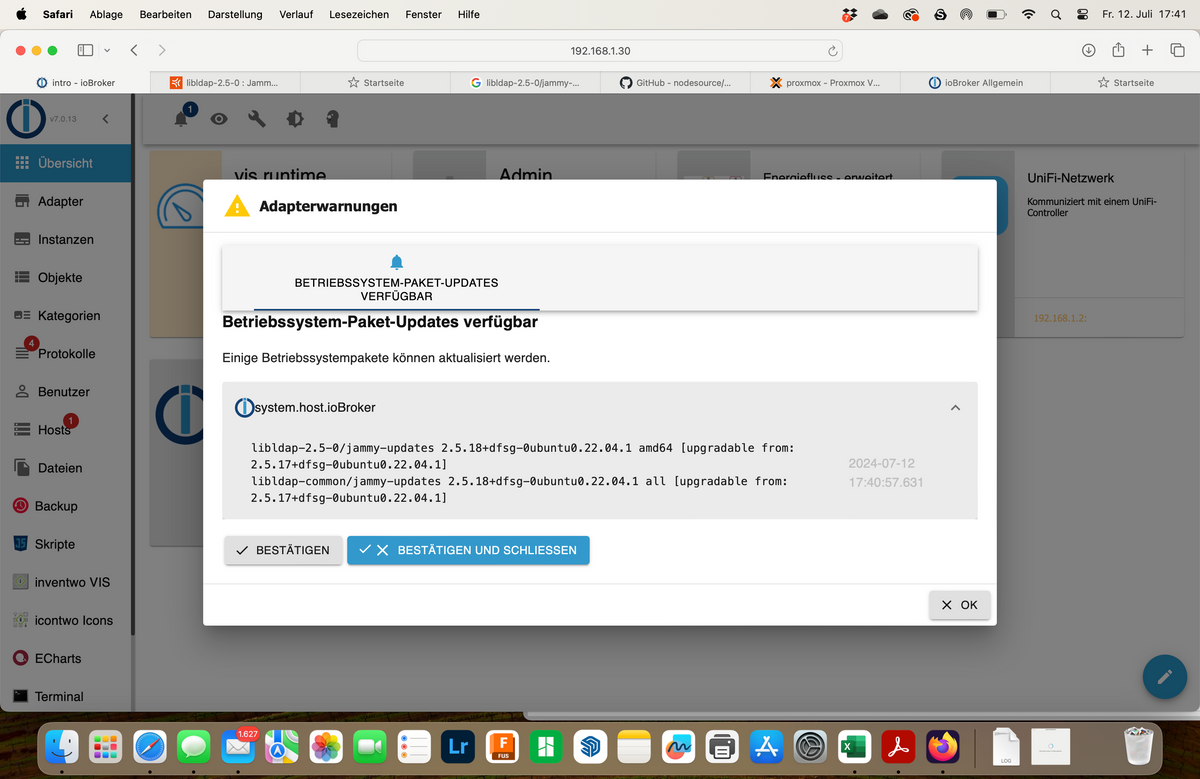
    habe folgendes problem ich kriege beim Login auf dem Iobroker folgende Meldungen.

    wie kann ich das beheben ?
    Bildschirmfoto 2024-07-12 um 17.41.01.png

    Meister MopperM Thomas BraunT V 3 Replies Last reply
    0
    • G GreySkoda91

      Hallo,

      habe folgendes problem ich kriege beim Login auf dem Iobroker folgende Meldungen.

      wie kann ich das beheben ?

      Bildschirmfoto 2024-07-12 um 17.41.01.png

      Meister MopperM Online
      Meister MopperM Online
      Meister Mopper
      wrote on last edited by
      #2

      @greyskoda91

      Einfach: "Bestätigen und schließen".

      Besser, anstatt Ubuntu eine aktuelle Debian Distribution wählen (ist aber nur ein kosmetischer Tipp :grin: )

      Proxmox und HA

      mcm1957M 1 Reply Last reply
      0
      • G GreySkoda91

        Hallo,

        habe folgendes problem ich kriege beim Login auf dem Iobroker folgende Meldungen.

        wie kann ich das beheben ?

        Bildschirmfoto 2024-07-12 um 17.41.01.png

        Thomas BraunT Online
        Thomas BraunT Online
        Thomas Braun
        Most Active
        wrote on last edited by
        #3

        @greyskoda91

        Dein Betriebssystem meldet sich und möchte aktualisiert werden.

        sudo apt update
        sudo apt full-upgrade
        

        in dein Terminal hacken.

        Linux-Werkzeugkasten:
        https://forum.iobroker.net/topic/42952/der-kleine-iobroker-linux-werkzeugkasten
        NodeJS Fixer Skript:
        https://forum.iobroker.net/topic/68035/iob-node-fix-skript
        iob_diag: curl -sLf -o diag.sh https://iobroker.net/diag.sh && bash diag.sh

        1 Reply Last reply
        0
        • Meister MopperM Meister Mopper

          @greyskoda91

          Einfach: "Bestätigen und schließen".

          Besser, anstatt Ubuntu eine aktuelle Debian Distribution wählen (ist aber nur ein kosmetischer Tipp :grin: )

          mcm1957M Online
          mcm1957M Online
          mcm1957
          wrote on last edited by
          #4

          @meister-mopper said in Ubuntu update libldap-2.5-0:

          @greyskoda91

          Einfach: "Bestätigen und schließen".

          Damit wird aber das verfügbare Update nicht installiert.

          Entwicklung u Betreuung: envertech-pv, hoymiles-ms, ns-client, pid, snmp Adapter;
          Support Repositoryverwaltung.

          Wer Danke sagen will, kann nen Kaffee spendieren: https://paypal.me/mcm1957atiobroker

          LESEN - gute Forenbeitrage

          MartinPM 1 Reply Last reply
          0
          • mcm1957M mcm1957

            @meister-mopper said in Ubuntu update libldap-2.5-0:

            @greyskoda91

            Einfach: "Bestätigen und schließen".

            Damit wird aber das verfügbare Update nicht installiert.

            MartinPM Online
            MartinPM Online
            MartinP
            wrote on last edited by
            #5

            @mcm1957 bei mir hat sich das LDAP Update einige Tage geziert. Scheint eines von denen zu sein, die in Wellen ausgerollt werden

            Intel(R) Celeron(R) CPU N3000 @ 1.04GHz 8G RAM 480G SSD
            Virtualization : unprivileged lxc container (debian 12 on Proxmox 8.4.14)
            Linux pve 6.8.12-16-pve
            6 GByte RAM für den Container
            Fritzbox 6591 FW 8.03 (Vodafone Leih-Box)
            Remote-Access über Wireguard der Fritzbox

            Thomas BraunT 1 Reply Last reply
            0
            • MartinPM MartinP

              @mcm1957 bei mir hat sich das LDAP Update einige Tage geziert. Scheint eines von denen zu sein, die in Wellen ausgerollt werden

              Thomas BraunT Online
              Thomas BraunT Online
              Thomas Braun
              Most Active
              wrote on last edited by
              #6

              @martinp

              Möglich. Aber das wird soweit ich weiß auch entsprechend gekennzeichnet. Jedenfalls in der Kommandozeile.

              Linux-Werkzeugkasten:
              https://forum.iobroker.net/topic/42952/der-kleine-iobroker-linux-werkzeugkasten
              NodeJS Fixer Skript:
              https://forum.iobroker.net/topic/68035/iob-node-fix-skript
              iob_diag: curl -sLf -o diag.sh https://iobroker.net/diag.sh && bash diag.sh

              1 Reply Last reply
              0
              • G Offline
                G Offline
                GreySkoda91
                wrote on last edited by
                #7

                Funktioniert leider nicht, das kommt bei rum

                root@ioBroker:~# sudo apt update
                Hit:1 http://archive.ubuntu.com/ubuntu jammy InRelease
                Hit:2 http://archive.ubuntu.com/ubuntu jammy-updates InRelease
                Hit:3 http://archive.ubuntu.com/ubuntu jammy-security InRelease
                Ign:4 https://deb.nodesource.com/node_20. nodistro InRelease
                Err:5 https://deb.nodesource.com/node_20. nodistro Release
                  404  Not Found [IP: 104.22.5.26 443]
                Reading package lists... Done
                E: The repository 'https://deb.nodesource.com/node_20. nodistro Release' does not have a Release file.
                N: Updating from such a repository can't be done securely, and is therefore disabled by default.
                N: See apt-secure(8) manpage for repository creation and user configuration details.
                root@ioBroker:~# 
                

                und das bei sudo apt full-upgrade

                root@ioBroker:~# sudo apt full-upgrade
                Reading package lists... Done
                Building dependency tree... Done
                Reading state information... Done
                Calculating upgrade... Done
                Get more security updates through Ubuntu Pro with 'esm-apps' enabled:
                  libavdevice58 ffmpeg libpostproc55 libavcodec58 libavutil56 libswscale5
                  libswresample3 libavformat58 libavfilter7
                Learn more about Ubuntu Pro at https://ubuntu.com/pro
                The following packages have been kept back:
                  libldap-2.5-0 libldap-common
                0 upgraded, 0 newly installed, 0 to remove and 2 not upgraded.
                root@ioBroker:~# 
                

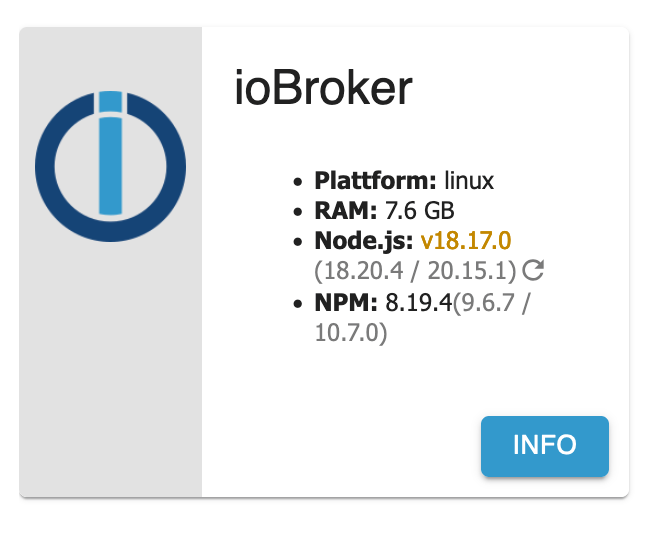
                auch wird mir gezeigt, dass für den node js einige updates anliegen, ich kann auf aktualisieren klicken, dann sagt er mir das was aktualisiert wird es passiert aber nix.
                version bleibt leider die 18.x :(
                Bildschirmfoto 2024-07-13 um 08.15.01.png

                DolomitiD 1 Reply Last reply
                0
                • G GreySkoda91

                  Funktioniert leider nicht, das kommt bei rum

                  root@ioBroker:~# sudo apt update
                  Hit:1 http://archive.ubuntu.com/ubuntu jammy InRelease
                  Hit:2 http://archive.ubuntu.com/ubuntu jammy-updates InRelease
                  Hit:3 http://archive.ubuntu.com/ubuntu jammy-security InRelease
                  Ign:4 https://deb.nodesource.com/node_20. nodistro InRelease
                  Err:5 https://deb.nodesource.com/node_20. nodistro Release
                    404  Not Found [IP: 104.22.5.26 443]
                  Reading package lists... Done
                  E: The repository 'https://deb.nodesource.com/node_20. nodistro Release' does not have a Release file.
                  N: Updating from such a repository can't be done securely, and is therefore disabled by default.
                  N: See apt-secure(8) manpage for repository creation and user configuration details.
                  root@ioBroker:~# 
                  

                  und das bei sudo apt full-upgrade

                  root@ioBroker:~# sudo apt full-upgrade
                  Reading package lists... Done
                  Building dependency tree... Done
                  Reading state information... Done
                  Calculating upgrade... Done
                  Get more security updates through Ubuntu Pro with 'esm-apps' enabled:
                    libavdevice58 ffmpeg libpostproc55 libavcodec58 libavutil56 libswscale5
                    libswresample3 libavformat58 libavfilter7
                  Learn more about Ubuntu Pro at https://ubuntu.com/pro
                  The following packages have been kept back:
                    libldap-2.5-0 libldap-common
                  0 upgraded, 0 newly installed, 0 to remove and 2 not upgraded.
                  root@ioBroker:~# 
                  

                  auch wird mir gezeigt, dass für den node js einige updates anliegen, ich kann auf aktualisieren klicken, dann sagt er mir das was aktualisiert wird es passiert aber nix.
                  version bleibt leider die 18.x :(

                  Bildschirmfoto 2024-07-13 um 08.15.01.png

                  DolomitiD Offline
                  DolomitiD Offline
                  Dolomiti
                  wrote on last edited by Dolomiti
                  #8

                  @greyskoda91

                  1. Warum root und dann noch sudo? Man marodiert in seinem System nicht als root rum.
                  2. Es sieht so aus, als wenn hinter node_20. noch ein x fehlt.

                  Benutzt das Voting rechts unten im Beitrag wenn er euch geholfen hat.
                  Intel N100 (32GB,256GB SSD), Proxmox -> Debian 12 in VM (Master) + Debian 12 in CT (Test) + Debmatic, HM-Aktoren, Wago 750-880, Shelly, Zigbee

                  G 1 Reply Last reply
                  0
                  • G GreySkoda91

                    Hallo,

                    habe folgendes problem ich kriege beim Login auf dem Iobroker folgende Meldungen.

                    wie kann ich das beheben ?

                    Bildschirmfoto 2024-07-12 um 17.41.01.png

                    V Offline
                    V Offline
                    vepman
                    wrote on last edited by
                    #9

                    @greyskoda91
                    Bei mir hat folgendes geholfen:
                    apt-get --only-upgrade install libldap-2.5-0
                    apt-get --only-upgrade install libldap-common

                    1 Reply Last reply
                    0
                    • FeuersturmF Online
                      FeuersturmF Online
                      Feuersturm
                      wrote on last edited by
                      #10

                      @greyskoda91 sagte in Ubuntu update libldap-2.5-0:

                      auch wird mir gezeigt, dass für den node js einige updates anliegen, ich kann auf aktualisieren klicken, dann sagt er mir das was aktualisiert wird es passiert aber nix.
                      version bleibt leider die 18.x

                      Das ist aktuelles Soll Verhalten, wird gerade im Thread zum js-controlller 6 diskutiert. Es findet kein major upgrade statt (von 18 auf 20), sondern Updates auf Basis der 18.x

                      1 Reply Last reply
                      0
                      • DolomitiD Dolomiti

                        @greyskoda91

                        1. Warum root und dann noch sudo? Man marodiert in seinem System nicht als root rum.
                        2. Es sieht so aus, als wenn hinter node_20. noch ein x fehlt.
                        G Offline
                        G Offline
                        GreySkoda91
                        wrote on last edited by
                        #11

                        @dolomiti bei der installation von iobroker legt er doch nichts anderes an meines Wissens nach oder ?

                        Thomas BraunT 1 Reply Last reply
                        0
                        • G GreySkoda91

                          @dolomiti bei der installation von iobroker legt er doch nichts anderes an meines Wissens nach oder ?

                          Thomas BraunT Online
                          Thomas BraunT Online
                          Thomas Braun
                          Most Active
                          wrote on last edited by
                          #12

                          @greyskoda91 sagte in Ubuntu update libldap-2.5-0:

                          bei der installation von iobroker legt er doch nichts anderes an meines Wissens nach oder ?

                          Der ioBroker ist ja auch nicht dafür verantwortlich dein Betriebssystem richtig aufzusetzen. Das muss der Administrator von der Kiste machen. Erste Amtshandlung ist es einen user für den täglichen Betrieb zu haben und NICHT als root durch das System zu stolpern.

                          Linux-Werkzeugkasten:
                          https://forum.iobroker.net/topic/42952/der-kleine-iobroker-linux-werkzeugkasten
                          NodeJS Fixer Skript:
                          https://forum.iobroker.net/topic/68035/iob-node-fix-skript
                          iob_diag: curl -sLf -o diag.sh https://iobroker.net/diag.sh && bash diag.sh

                          1 Reply Last reply
                          0
                          • G Offline
                            G Offline
                            GreySkoda91
                            wrote on last edited by
                            #13

                            habe jetzt alles wieder gerade gezogen :D

                            läuft alles wieder und ist alles aktuell, Thread kann geschlossen werden.

                            MartinPM 1 Reply Last reply
                            0
                            • G GreySkoda91

                              habe jetzt alles wieder gerade gezogen :D

                              läuft alles wieder und ist alles aktuell, Thread kann geschlossen werden.

                              MartinPM Online
                              MartinPM Online
                              MartinP
                              wrote on last edited by
                              #14

                              @greyskoda91 Die Überschrift ändern kannst nur Du - hänge doch bitte ein [gelöst] davor

                              Intel(R) Celeron(R) CPU N3000 @ 1.04GHz 8G RAM 480G SSD
                              Virtualization : unprivileged lxc container (debian 12 on Proxmox 8.4.14)
                              Linux pve 6.8.12-16-pve
                              6 GByte RAM für den Container
                              Fritzbox 6591 FW 8.03 (Vodafone Leih-Box)
                              Remote-Access über Wireguard der Fritzbox

                              1 Reply Last reply
                              0
                              Reply
                              • Reply as topic
                              Log in to reply
                              • Oldest to Newest
                              • Newest to Oldest
                              • Most Votes


                              Support us

                              ioBroker
                              Community Adapters
                              Donate
                              FAQ Cloud / IOT
                              HowTo: Node.js-Update
                              HowTo: Backup/Restore
                              Downloads
                              BLOG

                              523

                              Online

                              32.5k

                              Users

                              81.7k

                              Topics

                              1.3m

                              Posts
                              Community
                              Impressum | Datenschutz-Bestimmungen | Nutzungsbedingungen | Einwilligungseinstellungen
                              ioBroker Community 2014-2025
                              logo
                              • Login

                              • Don't have an account? Register

                              • Login or register to search.
                              • First post
                                Last post
                              0
                              • Home
                              • Recent
                              • Tags
                              • Unread 0
                              • Categories
                              • Unreplied
                              • Popular
                              • GitHub
                              • Docu
                              • Hilfe