
Skip to content
  • Home
  • Aktuell
  • Tags
  • 0 Ungelesen 0
  • Kategorien
  • Unreplied
  • Beliebt
  • GitHub
  • Docu
  • Hilfe
Skins
  • Light
  • Brite
  • Cerulean
  • Cosmo
  • Flatly
  • Journal
  • Litera
  • Lumen
  • Lux
  • Materia
  • Minty
  • Morph
  • Pulse
  • Sandstone
  • Simplex
  • Sketchy
  • Spacelab
  • United
  • Yeti
  • Zephyr
  • Dark
  • Cyborg
  • Darkly
  • Quartz
  • Slate
  • Solar
  • Superhero
  • Vapor

  • Standard: (Kein Skin)
  • Kein Skin
Einklappen
ioBroker Logo

Community Forum

donate donate
  1. ioBroker Community Home
  2. English
  3. Scripting / Logic
  4. JavaScript
  5. JavaScript adapter wont detect modbus-serial

NEWS

  • Weihnachtsangebot 2025! 🎄
    BluefoxB
    Bluefox
    22
    1
    1.2k

  • UPDATE 31.10.: Amazon Alexa - ioBroker Skill läuft aus ?
    apollon77A
    apollon77
    48
    3
    9.2k

  • Monatsrückblick – September 2025
    BluefoxB
    Bluefox
    14
    1
    2.5k

JavaScript adapter wont detect modbus-serial

Geplant Angeheftet Gesperrt Verschoben JavaScript
18 Beiträge 3 Kommentatoren 1.7k Aufrufe 3 Watching
  • Älteste zuerst
  • Neuste zuerst
  • Meiste Stimmen
Antworten
  • In einem neuen Thema antworten
Anmelden zum Antworten
Dieses Thema wurde gelöscht. Nur Nutzer mit entsprechenden Rechten können es sehen.
  • Jack 3J Offline
    Jack 3J Offline
    Jack 3
    schrieb am zuletzt editiert von
    #1

    I am trying to use the modbus-serial library so that I can automate the creation of new instances in iobroker when it detects a new TCP signal. However, for some reason it does not recognize that I have downloaded this module already. I have attached a screenshot for clarification. 7de54df8-6aa1-4254-8e0f-6df2af3913fe-image.png

    I am doing this in the JavaScript adapter.

    Any help would be greatly appreciated, thanks in advance.

    HomoranH F 2 Antworten Letzte Antwort
    0
    • Jack 3J Jack 3

      I am trying to use the modbus-serial library so that I can automate the creation of new instances in iobroker when it detects a new TCP signal. However, for some reason it does not recognize that I have downloaded this module already. I have attached a screenshot for clarification. 7de54df8-6aa1-4254-8e0f-6df2af3913fe-image.png

      I am doing this in the JavaScript adapter.

      Any help would be greatly appreciated, thanks in advance.

      HomoranH Nicht stören
      HomoranH Nicht stören
      Homoran
      Global Moderator Administrators
      schrieb am zuletzt editiert von
      #2

      @jack-3 sagte in JavaScript adapter wont detect modbus-serial:

      that I have downloaded this module already.

      how did you do this?

      @jack-3 sagte in JavaScript adapter wont detect modbus-serial:

      I am doing this in the JavaScript adapter.

      and added you the npm package via its instance?

      kein Support per PN! - Fragen im Forum stellen - es gibt fast nichts, was nicht auch für andere interessant ist.

      Benutzt das Voting rechts unten im Beitrag wenn er euch geholfen hat.

      der Installationsfixer: curl -fsL https://iobroker.net/fix.sh | bash -

      Jack 3J 1 Antwort Letzte Antwort
      0
      • HomoranH Homoran

        @jack-3 sagte in JavaScript adapter wont detect modbus-serial:

        that I have downloaded this module already.

        how did you do this?

        @jack-3 sagte in JavaScript adapter wont detect modbus-serial:

        I am doing this in the JavaScript adapter.

        and added you the npm package via its instance?

        Jack 3J Offline
        Jack 3J Offline
        Jack 3
        schrieb am zuletzt editiert von
        #3

        @homoran i did so by typing 'npm install modbus-serial' into the terminal in iobroker, im not sure what you mean by add the npm package via its instance.

        HomoranH 1 Antwort Letzte Antwort
        0
        • Jack 3J Jack 3

          @homoran i did so by typing 'npm install modbus-serial' into the terminal in iobroker, im not sure what you mean by add the npm package via its instance.

          HomoranH Nicht stören
          HomoranH Nicht stören
          Homoran
          Global Moderator Administrators
          schrieb am zuletzt editiert von Homoran
          #4

          @jack-3 sagte in JavaScript adapter wont detect modbus-serial:

          i did so by typing 'npm install modbus-serial' into the terminal in iobroker

          not ok!
          hopefully you did it in the correct directory at least.

          @jack-3 sagte in JavaScript adapter wont detect modbus-serial:

          what you mean by add the npm package via its instance.

          there is a line in the configuration of the javascript instance, where you just have to enter the name of the package(s) followed by <ENTER>
          that's all

          kein Support per PN! - Fragen im Forum stellen - es gibt fast nichts, was nicht auch für andere interessant ist.

          Benutzt das Voting rechts unten im Beitrag wenn er euch geholfen hat.

          der Installationsfixer: curl -fsL https://iobroker.net/fix.sh | bash -

          Jack 3J 1 Antwort Letzte Antwort
          1
          • HomoranH Homoran

            @jack-3 sagte in JavaScript adapter wont detect modbus-serial:

            i did so by typing 'npm install modbus-serial' into the terminal in iobroker

            not ok!
            hopefully you did it in the correct directory at least.

            @jack-3 sagte in JavaScript adapter wont detect modbus-serial:

            what you mean by add the npm package via its instance.

            there is a line in the configuration of the javascript instance, where you just have to enter the name of the package(s) followed by <ENTER>
            that's all

            Jack 3J Offline
            Jack 3J Offline
            Jack 3
            schrieb am zuletzt editiert von
            #5

            @homoran I did add it to the npm modules in the javascript instance but there is still the error, I think maybe its because I didnt download it to the correct directory , where do I need to download it to?

            HomoranH 1 Antwort Letzte Antwort
            0
            • Jack 3J Jack 3

              @homoran I did add it to the npm modules in the javascript instance but there is still the error, I think maybe its because I didnt download it to the correct directory , where do I need to download it to?

              HomoranH Nicht stören
              HomoranH Nicht stören
              Homoran
              Global Moderator Administrators
              schrieb am zuletzt editiert von
              #6

              @jack-3 sagte in JavaScript adapter wont detect modbus-serial:

              where do I need to download it to?

              nowhere!
              you just have to add it in the config.
              save and exit, the instance should restart and load it itself.

              kein Support per PN! - Fragen im Forum stellen - es gibt fast nichts, was nicht auch für andere interessant ist.

              Benutzt das Voting rechts unten im Beitrag wenn er euch geholfen hat.

              der Installationsfixer: curl -fsL https://iobroker.net/fix.sh | bash -

              Jack 3J 1 Antwort Letzte Antwort
              1
              • HomoranH Homoran

                @jack-3 sagte in JavaScript adapter wont detect modbus-serial:

                where do I need to download it to?

                nowhere!
                you just have to add it in the config.
                save and exit, the instance should restart and load it itself.

                Jack 3J Offline
                Jack 3J Offline
                Jack 3
                schrieb am zuletzt editiert von
                #7

                @homoran Im still getting this error even after adding modbus-serial to the instance, are there perhaps other steps I can take to troubleshoot this?

                HomoranH 1 Antwort Letzte Antwort
                0
                • Jack 3J Jack 3

                  @homoran Im still getting this error even after adding modbus-serial to the instance, are there perhaps other steps I can take to troubleshoot this?

                  HomoranH Nicht stören
                  HomoranH Nicht stören
                  Homoran
                  Global Moderator Administrators
                  schrieb am zuletzt editiert von Homoran
                  #8

                  @jack-3 sagte in JavaScript adapter wont detect modbus-serial:

                  are there perhaps other steps I can take to troubleshoot this?

                  I think so, but I cannot tell which ones.

                  maybe that @thomas-braun may help to find the issue if something went wrong by your installation method and is blocking the built in method

                  oooh!
                  is there a whitespace too much at the end? before the closing '

                  kein Support per PN! - Fragen im Forum stellen - es gibt fast nichts, was nicht auch für andere interessant ist.

                  Benutzt das Voting rechts unten im Beitrag wenn er euch geholfen hat.

                  der Installationsfixer: curl -fsL https://iobroker.net/fix.sh | bash -

                  1 Antwort Letzte Antwort
                  1
                  • Jack 3J Jack 3

                    I am trying to use the modbus-serial library so that I can automate the creation of new instances in iobroker when it detects a new TCP signal. However, for some reason it does not recognize that I have downloaded this module already. I have attached a screenshot for clarification. 7de54df8-6aa1-4254-8e0f-6df2af3913fe-image.png

                    I am doing this in the JavaScript adapter.

                    Any help would be greatly appreciated, thanks in advance.

                    F Offline
                    F Offline
                    fastfoot
                    schrieb am zuletzt editiert von
                    #9

                    @jack-3 do something with ModbusRTU, the error might only be visually(because of some restriction the sandbox has). Only if yo get additional errors when using the module you can tell the module is not loaded

                    iobroker läuft unter Docker auf QNAP TS-451+
                    SkriptRecovery: https://forum.iobroker.net/post/930558

                    Jack 3J 1 Antwort Letzte Antwort
                    2
                    • F fastfoot

                      @jack-3 do something with ModbusRTU, the error might only be visually(because of some restriction the sandbox has). Only if yo get additional errors when using the module you can tell the module is not loaded

                      Jack 3J Offline
                      Jack 3J Offline
                      Jack 3
                      schrieb am zuletzt editiert von
                      #10

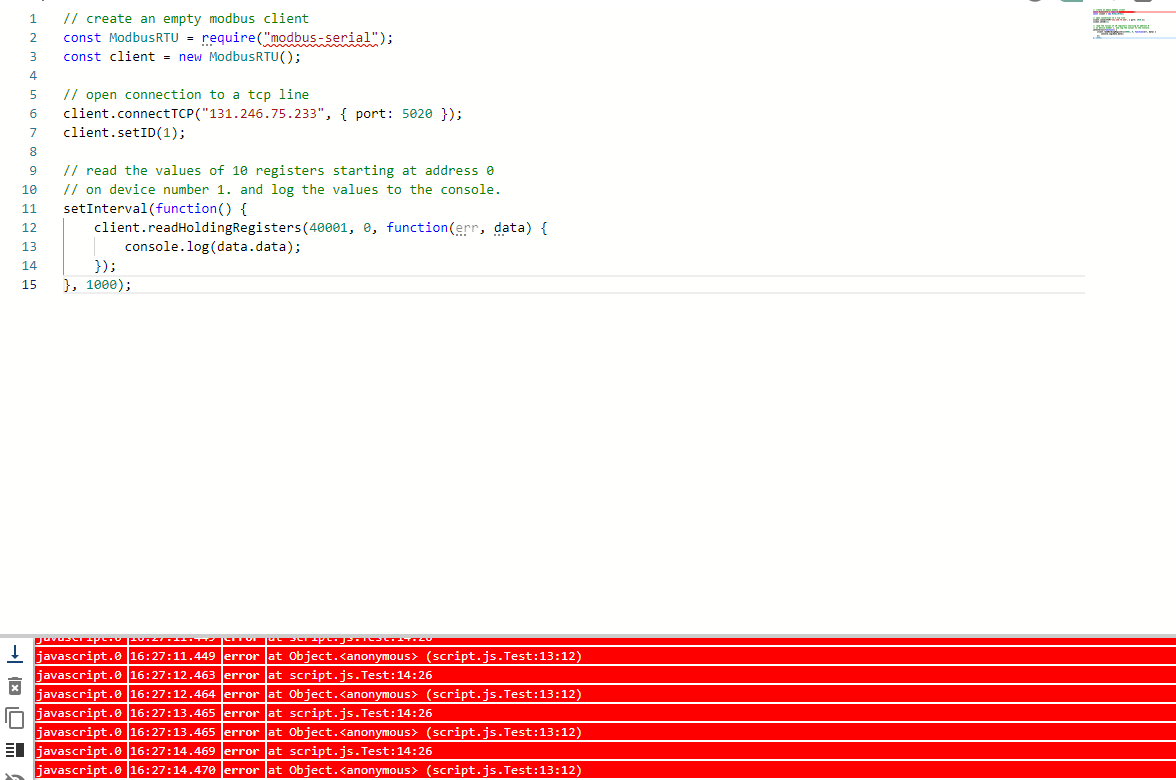
                      @fastfoot I tried this code which I copied and edited from the modbus serial documentation and I am getting these errors 48aac906-bd54-4c26-8cd4-eb3e6a7f5078-image.png
                      F 1 Antwort Letzte Antwort
                      0
                      • Jack 3J Jack 3

                        @fastfoot I tried this code which I copied and edited from the modbus serial documentation and I am getting these errors 48aac906-bd54-4c26-8cd4-eb3e6a7f5078-image.png

                        F Offline
                        F Offline
                        fastfoot
                        schrieb am zuletzt editiert von
                        #11

                        @jack-3 ok, thats a real error. Which version of JS-Adapter do you have? I think there is a bug in the newest Beta not installing modules that were entered in the instance config. Remove these lines, leave the config and enter them again. After leaving the config then have a look to the Log Tab, you schould see the that module(s) are getting installed.

                        Workaround on the cli:

                        • cd /opt/iobroker
                        • npm i modbus-serial
                        • js-adapter should recognize the module now, though the red underline might still be there

                        let us know, there should be no need to install module in /opt/iobroker/node_modules/iobroker.javascript instead of /opt/iobroker

                        iobroker läuft unter Docker auf QNAP TS-451+
                        SkriptRecovery: https://forum.iobroker.net/post/930558

                        Jack 3J 1 Antwort Letzte Antwort
                        0
                        • F fastfoot

                          @jack-3 ok, thats a real error. Which version of JS-Adapter do you have? I think there is a bug in the newest Beta not installing modules that were entered in the instance config. Remove these lines, leave the config and enter them again. After leaving the config then have a look to the Log Tab, you schould see the that module(s) are getting installed.

                          Workaround on the cli:

                          • cd /opt/iobroker
                          • npm i modbus-serial
                          • js-adapter should recognize the module now, though the red underline might still be there

                          let us know, there should be no need to install module in /opt/iobroker/node_modules/iobroker.javascript instead of /opt/iobroker

                          Jack 3J Offline
                          Jack 3J Offline
                          Jack 3
                          schrieb am zuletzt editiert von
                          #12

                          @fastfoot Thats the thing, I do not have an /opt/iobroker directory, it does not exist is what the terminal tells me

                          F 1 Antwort Letzte Antwort
                          0
                          • Jack 3J Jack 3

                            @fastfoot Thats the thing, I do not have an /opt/iobroker directory, it does not exist is what the terminal tells me

                            F Offline
                            F Offline
                            fastfoot
                            schrieb am zuletzt editiert von
                            #13

                            @jack-3 what system are you running iobroker, windows? There it schould be C:\iobroker. All Linux Systems use /opt/iobroker. Though not sure where tis is on a Mac

                            iobroker läuft unter Docker auf QNAP TS-451+
                            SkriptRecovery: https://forum.iobroker.net/post/930558

                            Jack 3J 2 Antworten Letzte Antwort
                            0
                            • F fastfoot

                              @jack-3 what system are you running iobroker, windows? There it schould be C:\iobroker. All Linux Systems use /opt/iobroker. Though not sure where tis is on a Mac

                              Jack 3J Offline
                              Jack 3J Offline
                              Jack 3
                              schrieb am zuletzt editiert von
                              #14

                              @fastfoot I use windows

                              F 1 Antwort Letzte Antwort
                              0
                              • F fastfoot

                                @jack-3 what system are you running iobroker, windows? There it schould be C:\iobroker. All Linux Systems use /opt/iobroker. Though not sure where tis is on a Mac

                                Jack 3J Offline
                                Jack 3J Offline
                                Jack 3
                                schrieb am zuletzt editiert von
                                #15

                                @fastfoot I ran the command again using the directory you said and Im still getting the same errors, I can even see in the node_modules directory that I do have Modbus-serial installed

                                1 Antwort Letzte Antwort
                                0
                                • Jack 3J Jack 3

                                  @fastfoot I use windows

                                  F Offline
                                  F Offline
                                  fastfoot
                                  schrieb am zuletzt editiert von
                                  #16

                                  @jack-3 the try cd C:\iobroker and then npm i modbus-serial

                                  iobroker läuft unter Docker auf QNAP TS-451+
                                  SkriptRecovery: https://forum.iobroker.net/post/930558

                                  F 1 Antwort Letzte Antwort
                                  0
                                  • F fastfoot

                                    @jack-3 the try cd C:\iobroker and then npm i modbus-serial

                                    F Offline
                                    F Offline
                                    fastfoot
                                    schrieb am zuletzt editiert von
                                    #17

                                    @fastfoot please log the error instead of the data, works fine here though i have no modbus hardware

                                    iobroker läuft unter Docker auf QNAP TS-451+
                                    SkriptRecovery: https://forum.iobroker.net/post/930558

                                    1 Antwort Letzte Antwort
                                    0
                                    • Jack 3J Offline
                                      Jack 3J Offline
                                      Jack 3
                                      schrieb am zuletzt editiert von Jack 3
                                      #18

                                      @fastfoot

                                      2024-07-09 09:07:46.559 - error: modbus.0 (604) Socket Error
                                      2024-07-09 09:07:46.564 - error: modbus.0 (604) Client in error state.
                                      2024-07-09 09:07:46.564 - warn: modbus.0 (604) On error: {"errno":-4039,"code":"ETIMEDOUT","syscall":"connect","address":"131.246.75.233","port":5020}
                                      2024-07-09 09:07:46.592 - error: modbus.1 (12848) Socket Error
                                      2024-07-09 09:07:46.601 - error: modbus.1 (12848) Client in error state.
                                      2024-07-09 09:07:46.601 - warn: modbus.1 (12848) On error: {"errno":-4078,"code":"ECONNREFUSED","syscall":"connect","address":"127.0.0.1","port":502}
                                      2024-07-09 09:08:47.615 - error: modbus.1 (12848) Socket Error
                                      2024-07-09 09:08:47.615 - error: modbus.1 (12848) Client in error state.
                                      2024-07-09 09:08:47.615 - warn: modbus.1 (12848) On error: {"errno":-4078,"code":"ECONNREFUSED","syscall":"connect","address":"127.0.0.1","port":502}
                                      2024-07-09 09:09:08.775 - error: modbus.0 (604) Socket Error
                                      2024-07-09 09:09:08.775 - error: modbus.0 (604) Client in error state.
                                      2024-07-09 09:09:08.775 - warn: modbus.0 (604) On error: {"errno":-4039,"code":"ETIMEDOUT","syscall":"connect","address":"131.246.75.233","port":5020}
                                      2024-07-09 09:09:12.133 - info: admin.0 (5516) ==> Connected system.user.admin from ::1
                                      2024-07-09 09:09:12.221 - error: host.PCRT49 cannot call visUtils: Not exists
                                      2024-07-09 09:09:18.930 - info: admin.0 (5516) ==> Connected system.user.admin from ::1
                                      2024-07-09 09:09:21.197 - info: javascript.0 (12652) Start JavaScript script.js.Test (Javascript/js)
                                      2024-07-09 09:09:21.206 - error: javascript.0 (12652) script.js.Test compile failed:
                                      at script.js.Test:4
                                      

                                      is that what you mean?

                                      1 Antwort Letzte Antwort
                                      0
                                      Antworten
                                      • In einem neuen Thema antworten
                                      Anmelden zum Antworten
                                      • Älteste zuerst
                                      • Neuste zuerst
                                      • Meiste Stimmen


                                      Support us

                                      ioBroker
                                      Community Adapters
                                      Donate

                                      817

                                      Online

                                      32.5k

                                      Benutzer

                                      81.7k

                                      Themen

                                      1.3m

                                      Beiträge
                                      Community
                                      Impressum | Datenschutz-Bestimmungen | Nutzungsbedingungen | Einwilligungseinstellungen
                                      ioBroker Community 2014-2025
                                      logo
                                      • Anmelden

                                      • Du hast noch kein Konto? Registrieren

                                      • Anmelden oder registrieren, um zu suchen
                                      • Erster Beitrag
                                        Letzter Beitrag
                                      0
                                      • Home
                                      • Aktuell
                                      • Tags
                                      • Ungelesen 0
                                      • Kategorien
                                      • Unreplied
                                      • Beliebt
                                      • GitHub
                                      • Docu
                                      • Hilfe
