Skip to content
  • Home
  • Recent
  • Tags
  • 0 Unread 0
  • Categories
  • Unreplied
  • Popular
  • GitHub
  • Docu
  • Hilfe
Skins
  • Light
  • Brite
  • Cerulean
  • Cosmo
  • Flatly
  • Journal
  • Litera
  • Lumen
  • Lux
  • Materia
  • Minty
  • Morph
  • Pulse
  • Sandstone
  • Simplex
  • Sketchy
  • Spacelab
  • United
  • Yeti
  • Zephyr
  • Dark
  • Cyborg
  • Darkly
  • Quartz
  • Slate
  • Solar
  • Superhero
  • Vapor

  • Default (No Skin)
  • No Skin
Collapse
ioBroker Logo

Community Forum

donate donate
  1. ioBroker Community Home
  2. Deutsch
  3. ioBroker Allgemein
  4. Homeconnect Fehlermeldung

NEWS

  • Jahresrückblick 2025 – unser neuer Blogbeitrag ist online! ✨
    BluefoxB
    Bluefox
    17
    1
    2.8k

  • Neuer Blogbeitrag: Monatsrückblick - Dezember 2025 🎄
    BluefoxB
    Bluefox
    13
    1
    1.1k

  • Weihnachtsangebot 2025! 🎄
    BluefoxB
    Bluefox
    25
    1
    2.4k

Homeconnect Fehlermeldung

Scheduled Pinned Locked Moved ioBroker Allgemein
55 Posts 5 Posters 5.5k Views 2 Watching
  • Oldest to Newest
  • Newest to Oldest
  • Most Votes
Reply
  • Reply as topic
Log in to reply
This topic has been deleted. Only users with topic management privileges can see it.
  • Thomas BraunT Thomas Braun

    @timowald

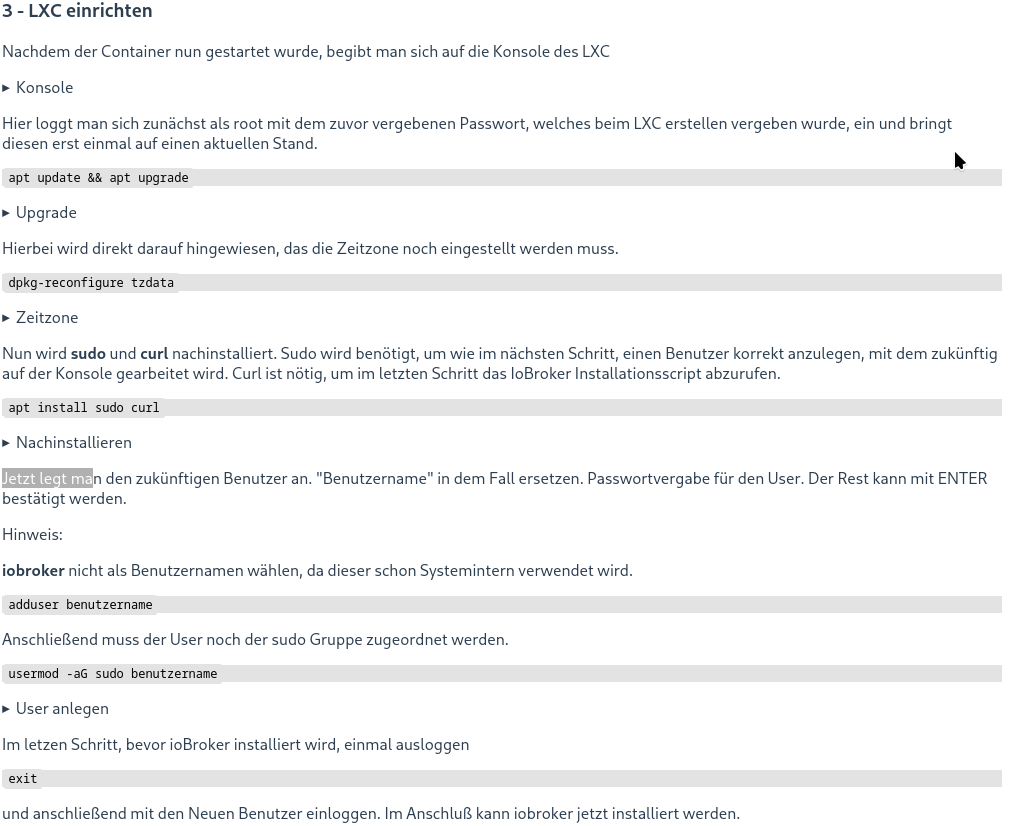
    Unter Punkt 3. LXC einrichten...

    6977d567-ce38-4c0d-8ced-a7273268c832-grafik.png

    T Offline
    T Offline
    TimoWald
    wrote on last edited by
    #26

    @thomas-braun f54b0c80-f4f2-4d89-9806-7872930bb9fa-grafik.png

    Thomas BraunT 1 Reply Last reply
    0
    • T TimoWald

      @thomas-braun f54b0c80-f4f2-4d89-9806-7872930bb9fa-grafik.png

      Thomas BraunT Online
      Thomas BraunT Online
      Thomas Braun
      Most Active
      wrote on last edited by Thomas Braun
      #27

      @timowald

      Bitte keine Bildchen von Text.

      Usernames immer OHNE Großbuchstaben.

      Linux-Werkzeugkasten:
      https://forum.iobroker.net/topic/42952/der-kleine-iobroker-linux-werkzeugkasten
      NodeJS Fixer Skript:
      https://forum.iobroker.net/topic/68035/iob-node-fix-skript
      iob_diag: curl -sLf -o diag.sh https://iobroker.net/diag.sh && bash diag.sh

      T 2 Replies Last reply
      0
      • Thomas BraunT Thomas Braun

        @timowald

        Bitte keine Bildchen von Text.

        Usernames immer OHNE Großbuchstaben.

        T Offline
        T Offline
        TimoWald
        wrote on last edited by
        #28

        @thomas-braun Jetzt habe ich es gepackt. Habe den Nutzernamen klein geschrieben.
        diesen Befehl

        iob nodejs-update 20
        

        konnte ich jetzt auch ausführen.

        1 Reply Last reply
        0
        • Thomas BraunT Thomas Braun

          @timowald

          Bitte keine Bildchen von Text.

          Usernames immer OHNE Großbuchstaben.

          T Offline
          T Offline
          TimoWald
          wrote on last edited by
          #29

          @thomas-braun Was ich jetzt noch für ein Problem habe ich das der Vis2 Adapter nicht grün wird. Aber die Visu und der Editor gehen. Ist das bekannt?

          Thomas BraunT 1 Reply Last reply
          0
          • T TimoWald

            @thomas-braun Was ich jetzt noch für ein Problem habe ich das der Vis2 Adapter nicht grün wird. Aber die Visu und der Editor gehen. Ist das bekannt?

            Thomas BraunT Online
            Thomas BraunT Online
            Thomas Braun
            Most Active
            wrote on last edited by
            #30

            @timowald sagte in Homeconnect Fehlermeldung:

            Ist das bekannt?

            Keine Ahnung. Hab keine vis laufen. Im Log steht aber oft was drin.

            iob fix
            

            jetzt mal als timo aufgerufen?

            Linux-Werkzeugkasten:
            https://forum.iobroker.net/topic/42952/der-kleine-iobroker-linux-werkzeugkasten
            NodeJS Fixer Skript:
            https://forum.iobroker.net/topic/68035/iob-node-fix-skript
            iob_diag: curl -sLf -o diag.sh https://iobroker.net/diag.sh && bash diag.sh

            1 Reply Last reply
            0
            • T Offline
              T Offline
              TimoWald
              wrote on last edited by
              #31

              @thomas-braun wie kann ich mich im iobroker abmelden? Finde da keinen Button.

              Thomas BraunT 1 Reply Last reply
              0
              • T TimoWald

                @thomas-braun wie kann ich mich im iobroker abmelden? Finde da keinen Button.

                Thomas BraunT Online
                Thomas BraunT Online
                Thomas Braun
                Most Active
                wrote on last edited by Thomas Braun
                #32

                @timowald sagte in Homeconnect Fehlermeldung:

                wie kann ich mich im iobroker abmelden?

                Was meinst du?

                In der Kommandozeile gibt es natürllich nix zu klicken, sondern nur Kommandos.

                exit
                

                z. B.

                Linux-Werkzeugkasten:
                https://forum.iobroker.net/topic/42952/der-kleine-iobroker-linux-werkzeugkasten
                NodeJS Fixer Skript:
                https://forum.iobroker.net/topic/68035/iob-node-fix-skript
                iob_diag: curl -sLf -o diag.sh https://iobroker.net/diag.sh && bash diag.sh

                T 1 Reply Last reply
                0
                • Thomas BraunT Thomas Braun

                  @timowald sagte in Homeconnect Fehlermeldung:

                  wie kann ich mich im iobroker abmelden?

                  Was meinst du?

                  In der Kommandozeile gibt es natürllich nix zu klicken, sondern nur Kommandos.

                  exit
                  

                  z. B.

                  T Offline
                  T Offline
                  TimoWald
                  wrote on last edited by
                  #33

                  @thomas-braun Na wie kann ich im iobroker den Benutzer wechseln?

                  Thomas BraunT 1 Reply Last reply
                  0
                  • T TimoWald

                    @thomas-braun Na wie kann ich im iobroker den Benutzer wechseln?

                    Thomas BraunT Online
                    Thomas BraunT Online
                    Thomas Braun
                    Most Active
                    wrote on last edited by
                    #34

                    @timowald sagte in Homeconnect Fehlermeldung:

                    Na wie kann ich im iobroker den Benutzer wechseln?

                    Was willste denn da wechseln? Du loggst dich AUSSCHLIEßLICH als timo ein. root und iobroker als username sind verboten.

                    Linux-Werkzeugkasten:
                    https://forum.iobroker.net/topic/42952/der-kleine-iobroker-linux-werkzeugkasten
                    NodeJS Fixer Skript:
                    https://forum.iobroker.net/topic/68035/iob-node-fix-skript
                    iob_diag: curl -sLf -o diag.sh https://iobroker.net/diag.sh && bash diag.sh

                    T 1 Reply Last reply
                    0
                    • Thomas BraunT Thomas Braun

                      @timowald sagte in Homeconnect Fehlermeldung:

                      Na wie kann ich im iobroker den Benutzer wechseln?

                      Was willste denn da wechseln? Du loggst dich AUSSCHLIEßLICH als timo ein. root und iobroker als username sind verboten.

                      T Offline
                      T Offline
                      TimoWald
                      wrote on last edited by
                      #35

                      @thomas-braun Ich bin als Admin eingeloggt. Finde aber keine button um much abzumelden.

                      T Thomas BraunT 2 Replies Last reply
                      0
                      • T TimoWald

                        @thomas-braun Ich bin als Admin eingeloggt. Finde aber keine button um much abzumelden.

                        T Offline
                        T Offline
                        TT-Tom
                        wrote on last edited by
                        #36

                        @timowald wo bist du als Admin eingeloggt??
                        In der Konsole oder der Proxmox Oberfläche??

                        Gruß Tom
                        https://github.com/tt-tom17
                        Wenn meine Hilfe erfolgreich war, benutze bitte das Voting unten rechts im Beitrag

                        NSPanel Script Wiki
                        https://github.com/joBr99/nspanel-lovelace-ui/wiki

                        NSPanel Adapter Wiki
                        https://github.com/ticaki/ioBroker.nspanel-lovelace-ui/wiki

                        1 Reply Last reply
                        0
                        • T TimoWald

                          @thomas-braun Ich bin als Admin eingeloggt. Finde aber keine button um much abzumelden.

                          Thomas BraunT Online
                          Thomas BraunT Online
                          Thomas Braun
                          Most Active
                          wrote on last edited by
                          #37

                          @timowald

                          In der Web-GUI (admin) des iobrokers?
                          Da bin ich immer als admin angemeldet.

                          Linux-Werkzeugkasten:
                          https://forum.iobroker.net/topic/42952/der-kleine-iobroker-linux-werkzeugkasten
                          NodeJS Fixer Skript:
                          https://forum.iobroker.net/topic/68035/iob-node-fix-skript
                          iob_diag: curl -sLf -o diag.sh https://iobroker.net/diag.sh && bash diag.sh

                          T 1 Reply Last reply
                          0
                          • Thomas BraunT Thomas Braun

                            @timowald

                            In der Web-GUI (admin) des iobrokers?
                            Da bin ich immer als admin angemeldet.

                            T Offline
                            T Offline
                            TimoWald
                            wrote on last edited by
                            #38

                            @thomas-braun Ok, dann ist das richtig. In Proxmox bin ich als root angemeldet.

                            1 Reply Last reply
                            0
                            • T TimoWald

                              @tt-tom Hier mal der LOG nach 3 Minuten.
                              Jede Minute passiert etwas.

                              2024-07-04 16:52:01.914 - info: host.iobroker "system.adapter.homeconnect.0" enabled
                              2024-07-04 16:52:02.309 - info: host.iobroker instance system.adapter.homeconnect.0 started with pid 101249
                              2024-07-04 16:52:03.207 - debug: homeconnect.0 (101249) Redis Objects: Use Redis connection: 127.0.0.1:9001
                              2024-07-04 16:52:03.275 - debug: homeconnect.0 (101249) Objects client ready ... initialize now
                              2024-07-04 16:52:03.277 - debug: homeconnect.0 (101249) Objects create System PubSub Client
                              2024-07-04 16:52:03.277 - debug: homeconnect.0 (101249) Objects create User PubSub Client
                              2024-07-04 16:52:03.441 - debug: homeconnect.0 (101249) Objects client initialize lua scripts
                              2024-07-04 16:52:03.446 - debug: homeconnect.0 (101249) Objects connected to redis: 127.0.0.1:9001
                              2024-07-04 16:52:03.535 - debug: homeconnect.0 (101249) Redis States: Use Redis connection: 127.0.0.1:9000
                              2024-07-04 16:52:03.638 - debug: homeconnect.0 (101249) States create System PubSub Client
                              2024-07-04 16:52:03.639 - debug: homeconnect.0 (101249) States create User PubSub Client
                              2024-07-04 16:52:03.768 - debug: homeconnect.0 (101249) States connected to redis: 127.0.0.1:9000
                              2024-07-04 16:52:03.837 - debug: homeconnect.0 (101249) Plugin sentry Initialize Plugin (enabled=true)
                              2024-07-04 16:52:04.158 - info: homeconnect.0 (101249) starting. Version 1.4.1 in /opt/iobroker/node_modules/iobroker.homeconnect, node: v18.17.1, js-controller: 5.0.19
                              2024-07-04 16:52:04.231 - debug: homeconnect.0 (101249) Found current session
                              2024-07-04 16:52:04.232 - debug: homeconnect.0 (101249) Refresh Token
                              2024-07-04 16:52:04.554 - debug: homeconnect.0 (101249) {"access_token":"eyJ4LWVudiI6IlBSRCIsImFsZyI6IlJTMjU2IiwieC1yZWciOiJFVSIsImtpZCI6InJldS1wcm9kdWN0aW9uIn0.eyJmZ3JwIjpbXSwiY2x0eSI6InByaXZhdGUiLCJzdWIiOiIxYzQwMzQyZS1kMGNlLTQzYzktODcwOS05MmY5NDZmNGIxYjAiLCJhdWQiOiIwODI1MTJCREVCOEFGNDUyNjBBRUQ5Q0U1QjBDRjNCRTVDM0IxRUI4RkRGRDI2Q0FBNTRDNzZFN0UyRDhDNTJGIiwic3RhZ2UiOiJQUkQiLCJhenAiOiIwODI1MTJCREVCOEFGNDUyNjBBRUQ5Q0U1QjBDRjNCRTVDM0IxRUI4RkRGRDI2Q0FBNTRDNzZFN0UyRDhDNTJGIiwic2NvcGUiOlsiSWRlbnRpZnlBcHBsaWFuY2UiLCJNb25pdG9yIiwiU2V0dGluZ3MiLCJDb250cm9sIl0sImlzcyI6IkVVOlBSRDowIiwiZXhwIjoxNzIwMTkxMTI0LCJyZWdpb24iOiJFVSIsImlhdCI6MTcyMDEwNDcyNCwianRpIjoiNWEyMmMwZTAtOTE5Ni00MDNlLThiYjAtN2FmZTAxNDQ3NDBlIn0.h05vzbNvOhLkpk6CTBVW8QUDpCTpPUzI9tHoDJGyPFqpNtX-oifpS7gRj_5KGQAb7ifxkzM_etF_wuvUVIHPVSSkSO0UWHaxQRHw8DLgyUKLTVDM4T7FAJ8cHAz6YM-e4_cd1Fbg8bq_O3-OYyMuWIQ1_w7Gp3X3tkUYiT5F1YEhQxHANgGGAtjrUUuw1AEnhIAmzmmJiX_6tYLFunAJ69zXrdc-ilE-BdVuLN6Yo6bonvayzI265D4bmLwIww_4x7enGUsUoLlkNx3ZDf4dEV1SWrZn2M6lwoMqxwzgdLQgGKCUdO7bIwD1mxLRoJzgV3kE6gEpLOKSPSs4XlDQOA","expires_in":86400,"id_token":"eyJ4LWVudiI6IlBSRCIsImFsZyI6IlJTMjU2IiwieC1yZWciOiJFVSIsImtpZCI6InJldS1wcm9kdWN0aW9uIn0.eyJmZ3JwIjpbXSwiY2x0eSI6InByaXZhdGUiLCJzdWIiOiIxYzQwMzQyZS1kMGNlLTQzYzktODcwOS05MmY5NDZmNGIxYjAiLCJhdWQiOiIwODI1MTJCREVCOEFGNDUyNjBBRUQ5Q0U1QjBDRjNCRTVDM0IxRUI4RkRGRDI2Q0FBNTRDNzZFN0UyRDhDNTJGIiwic3RhZ2UiOiJQUkQiLCJhenAiOiIwODI1MTJCREVCOEFGNDUyNjBBRUQ5Q0U1QjBDRjNCRTVDM0IxRUI4RkRGRDI2Q0FBNTRDNzZFN0UyRDhDNTJGIiwic2NvcGUiOlsiSWRlbnRpZnlBcHBsaWFuY2UiLCJNb25pdG9yIiwiU2V0dGluZ3MiLCJDb250cm9sIl0sImlzcyI6IkVVOlBSRDowIiwiZXhwIjoxNzIwMTkxMTI0LCJyZWdpb24iOiJFVSIsImlhdCI6MTcyMDEwNDcyNCwianRpIjoiNWEyMmMwZTAtOTE5Ni00MDNlLThiYjAtN2FmZTAxNDQ3NDBlIn0.h05vzbNvOhLkpk6CTBVW8QUDpCTpPUzI9tHoDJGyPFqpNtX-oifpS7gRj_5KGQAb7ifxkzM_etF_wuvUVIHPVSSkSO0UWHaxQRHw8DLgyUKLTVDM4T7FAJ8cHAz6YM-e4_cd1Fbg8bq_O3-OYyMuWIQ1_w7Gp3X3tkUYiT5F1YEhQxHANgGGAtjrUUuw1AEnhIAmzmmJiX_6tYLFunAJ69zXrdc-ilE-BdVuLN6Yo6bonvayzI265D4bmLwIww_4x7enGUsUoLlkNx3ZDf4dEV1SWrZn2M6lwoMqxwzgdLQgGKCUdO7bIwD1mxLRoJzgV3kE6gEpLOKSPSs4XlDQOA","refresh_token":"eyJyZWdpb24iOiJFVSIsInN0YWdlIjoiUFJEIiwiY3JlZiI6IjA4MjUxMkJEIiwidG9rZW4iOiJiZThjOTA5OC1hYmZlLTQ3N2ItODAwMi1kMzQwYjJhYjVjZmQiLCJjbHR5IjoicHJpdmF0ZSIsIngtcmVnIjoiRVUiLCJ4LWVudiI6IlBSRCJ9","scope":"IdentifyAppliance Monitor Settings Control","token_type":"Bearer"}
                              2024-07-04 16:52:04.555 - debug: homeconnect.0 (101249) Get device list
                              2024-07-04 16:52:04.735 - error: homeconnect.0 (101249) AxiosError: Request failed with status code 429
                              2024-07-04 16:52:04.736 - error: homeconnect.0 (101249) {"error":{"description":"The rate limit \"1000 calls in 1 day\" was reached. Requests are blocked during the remaining period of 85880 seconds.","key":"429"}}
                              2024-07-04 16:52:04.737 - debug: homeconnect.0 (101249) Start EventStream
                              2024-07-04 16:52:04.838 - error: homeconnect.0 (101249) 429 Too Many Requests
                              2024-07-04 16:52:04.838 - error: homeconnect.0 (101249) Start Event Stream Error: {"type":"error","status":429,"message":"Too Many Requests"}
                              2024-07-04 16:52:04.838 - info: homeconnect.0 (101249) Too many requests. Please wait 24h.
                              2024-07-04 16:52:14.813 - error: wled.0 (22162) Sending command to WLED device + http://192.168.9.91/json failed with error Error: connect ETIMEDOUT 192.168.9.91:80
                              2024-07-04 16:52:14.814 - error: wled.0 (22162) Sending command to WLED device + http://192.168.9.91/json failed with error Error: connect ETIMEDOUT 192.168.9.91:80
                              2024-07-04 16:52:40.625 - info: solax.0 (21770) State value to set for "solax.0.data.json" has to be type "string" but received type "number"
                              2024-07-04 16:53:14.742 - info: homeconnect.0 (101249) Keep Alive failed Reconnect EventStream
                              2024-07-04 16:53:14.743 - debug: homeconnect.0 (101249) Start EventStream
                              2024-07-04 16:53:14.817 - error: homeconnect.0 (101249) 429 Too Many Requests
                              2024-07-04 16:53:14.818 - error: homeconnect.0 (101249) Start Event Stream Error: {"type":"error","status":429,"message":"Too Many Requests"}
                              2024-07-04 16:53:14.818 - info: homeconnect.0 (101249) Too many requests. Please wait 24h.
                              2024-07-04 16:53:16.253 - error: wled.0 (22162) Sending command to WLED device + http://192.168.9.91/json failed with error Error: connect ETIMEDOUT 192.168.9.91:80
                              2024-07-04 16:53:16.254 - error: wled.0 (22162) Sending command to WLED device + http://192.168.9.91/json failed with error Error: connect ETIMEDOUT 192.168.9.91:80
                              2024-07-04 16:54:13.597 - error: wled.0 (22162) Sending command to WLED device + http://192.168.9.91/json failed with error Error: connect ETIMEDOUT 192.168.9.91:80
                              2024-07-04 16:54:13.598 - error: wled.0 (22162) Sending command to WLED device + http://192.168.9.91/json failed with error Error: connect ETIMEDOUT 192.168.9.91:80
                              2024-07-04 16:54:24.749 - info: homeconnect.0 (101249) Keep Alive failed Reconnect EventStream
                              2024-07-04 16:54:24.750 - debug: homeconnect.0 (101249) Start EventStream
                              2024-07-04 16:54:24.826 - error: homeconnect.0 (101249) 429 Too Many Requests
                              2024-07-04 16:54:24.826 - error: homeconnect.0 (101249) Start Event Stream Error: {"type":"error","status":429,"message":"Too Many Requests"}
                              2024-07-04 16:54:24.826 - info: homeconnect.0 (101249) Too many requests. Please wait 24h.
                              2024-07-04 16:55:15.037 - error: wled.0 (22162) Sending command to WLED device + http://192.168.9.91/json failed with error Error: connect ETIMEDOUT 192.168.9.91:80
                              2024-07-04 16:55:15.038 - error: wled.0 (22162) Sending command to WLED device + http://192.168.9.91/json failed with error Error: connect ETIMEDOUT 192.168.9.91:80
                              2024-07-04 16:55:34.756 - info: homeconnect.0 (101249) Keep Alive failed Reconnect EventStream
                              2024-07-04 16:55:34.756 - debug: homeconnect.0 (101249) Start EventStream
                              2024-07-04 16:55:34.862 - error: homeconnect.0 (101249) 429 Too Many Requests
                              2024-07-04 16:55:34.862 - error: homeconnect.0 (101249) Start Event Stream Error: {"type":"error","status":429,"message":"Too Many Requests"}
                              2024-07-04 16:55:34.862 - info: homeconnect.0 (101249) Too many requests. Please wait 24h.
                              
                              haselchenH Offline
                              haselchenH Offline
                              haselchen
                              Most Active
                              wrote on last edited by
                              #39

                              @timowald

                              Wie lautet die Einstellung im Adapter für den Polling Intervall?

                              Synology DS218+ & 2 x Fujitsu Esprimo (VM/Container) + FritzBox7590 + 2 AVM 3000 Repeater & Homematic & HUE & Osram & Xiaomi, NPM 10.9.4, Nodejs 22.21.0 ,JS Controller 7.0.7 ,Admin 7.7.19

                              T T 2 Replies Last reply
                              0
                              • haselchenH haselchen

                                @timowald

                                Wie lautet die Einstellung im Adapter für den Polling Intervall?

                                T Offline
                                T Offline
                                TimoWald
                                wrote on last edited by
                                #40

                                @haselchen diese Einstellung habe ich im VIS2 Adapter nicht.

                                haselchenH 1 Reply Last reply
                                0
                                • T TimoWald

                                  @haselchen diese Einstellung habe ich im VIS2 Adapter nicht.

                                  haselchenH Offline
                                  haselchenH Offline
                                  haselchen
                                  Most Active
                                  wrote on last edited by haselchen
                                  #41

                                  @timowald

                                  Wieso VIS?

                                  Aber ich hab mich vertan. Hab an den HAM Adapter gedacht.
                                  Dann aber jetzt , Screenshot bitte von den Homeconnect Einstellungen im Adapter.

                                  Synology DS218+ & 2 x Fujitsu Esprimo (VM/Container) + FritzBox7590 + 2 AVM 3000 Repeater & Homematic & HUE & Osram & Xiaomi, NPM 10.9.4, Nodejs 22.21.0 ,JS Controller 7.0.7 ,Admin 7.7.19

                                  T 1 Reply Last reply
                                  0
                                  • haselchenH haselchen

                                    @timowald

                                    Wieso VIS?

                                    Aber ich hab mich vertan. Hab an den HAM Adapter gedacht.
                                    Dann aber jetzt , Screenshot bitte von den Homeconnect Einstellungen im Adapter.

                                    T Offline
                                    T Offline
                                    TimoWald
                                    wrote on last edited by
                                    #42

                                    @haselchen Hallo hier der Screenshot von meinem Homeconnect Adapter.
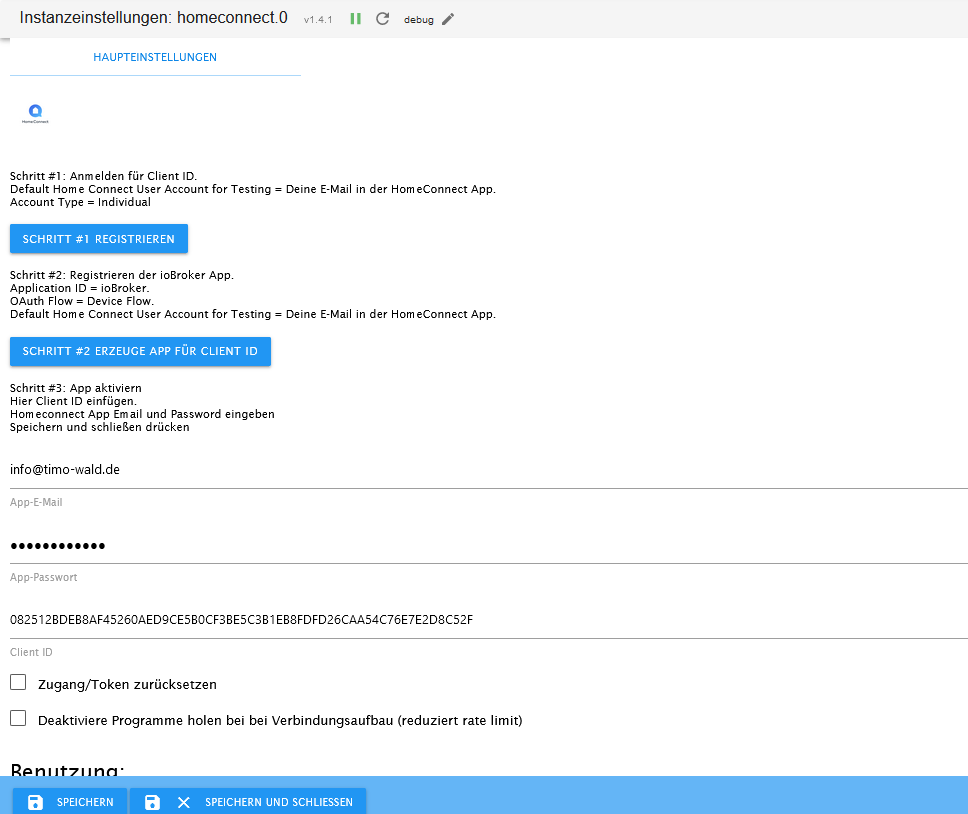
                                    be56fd08-52fd-45fe-acf5-85308ef5508e-grafik.png

                                    T 1 Reply Last reply
                                    0
                                    • haselchenH haselchen

                                      @timowald

                                      Wie lautet die Einstellung im Adapter für den Polling Intervall?

                                      T Offline
                                      T Offline
                                      TT-Tom
                                      wrote on last edited by
                                      #43

                                      @haselchen wo gibt es bei dem Adapter ein Polling Intervall zum einstellen?

                                      Gruß Tom
                                      https://github.com/tt-tom17
                                      Wenn meine Hilfe erfolgreich war, benutze bitte das Voting unten rechts im Beitrag

                                      NSPanel Script Wiki
                                      https://github.com/joBr99/nspanel-lovelace-ui/wiki

                                      NSPanel Adapter Wiki
                                      https://github.com/ticaki/ioBroker.nspanel-lovelace-ui/wiki

                                      1 Reply Last reply
                                      0
                                      • T TimoWald

                                        @haselchen Hallo hier der Screenshot von meinem Homeconnect Adapter.

                                        be56fd08-52fd-45fe-acf5-85308ef5508e-grafik.png

                                        T Offline
                                        T Offline
                                        TT-Tom
                                        wrote on last edited by
                                        #44

                                        @timowald

                                        wie ist jetzt der aktuelle Status vom Adapter? Setzte ihn mal jetzt auf debug und starte ihn einmal durch.

                                        Gruß Tom
                                        https://github.com/tt-tom17
                                        Wenn meine Hilfe erfolgreich war, benutze bitte das Voting unten rechts im Beitrag

                                        NSPanel Script Wiki
                                        https://github.com/joBr99/nspanel-lovelace-ui/wiki

                                        NSPanel Adapter Wiki
                                        https://github.com/ticaki/ioBroker.nspanel-lovelace-ui/wiki

                                        T 1 Reply Last reply
                                        0
                                        • T TT-Tom

                                          @timowald

                                          wie ist jetzt der aktuelle Status vom Adapter? Setzte ihn mal jetzt auf debug und starte ihn einmal durch.

                                          T Offline
                                          T Offline
                                          TimoWald
                                          wrote on last edited by
                                          #45

                                          @tt-tom So sieht der LOG nach dem Starten aus.

                                          2024-07-05 12:49:57.741 - info: admin.0 (17537) ==> Connected system.user.admin from ::ffff:192.168.9.241
                                          2024-07-05 12:49:59.994 - info: admin.0 (17537) <== Disconnect system.user.admin from ::ffff:192.168.9.241
                                          2024-07-05 12:50:03.903 - info: luxtronik2.0 (16839) Heatpump busy, will retry later
                                          2024-07-05 12:50:12.630 - info: host.iobroker "system.adapter.homeconnect.0" enabled
                                          2024-07-05 12:50:13.014 - info: host.iobroker instance system.adapter.homeconnect.0 started with pid 32710
                                          2024-07-05 12:50:13.903 - debug: homeconnect.0 (32710) Redis Objects: Use Redis connection: 127.0.0.1:9001
                                          2024-07-05 12:50:13.969 - debug: homeconnect.0 (32710) Objects client ready ... initialize now
                                          2024-07-05 12:50:13.970 - debug: homeconnect.0 (32710) Objects create System PubSub Client
                                          2024-07-05 12:50:13.971 - debug: homeconnect.0 (32710) Objects create User PubSub Client
                                          2024-07-05 12:50:14.125 - debug: homeconnect.0 (32710) Objects client initialize lua scripts
                                          2024-07-05 12:50:14.131 - debug: homeconnect.0 (32710) Objects connected to redis: 127.0.0.1:9001
                                          2024-07-05 12:50:14.239 - debug: homeconnect.0 (32710) Redis States: Use Redis connection: 127.0.0.1:9000
                                          2024-07-05 12:50:14.290 - debug: homeconnect.0 (32710) States create System PubSub Client
                                          2024-07-05 12:50:14.291 - debug: homeconnect.0 (32710) States create User PubSub Client
                                          2024-07-05 12:50:14.423 - debug: homeconnect.0 (32710) States connected to redis: 127.0.0.1:9000
                                          2024-07-05 12:50:14.511 - debug: homeconnect.0 (32710) Plugin sentry Initialize Plugin (enabled=true)
                                          2024-07-05 12:50:14.849 - info: homeconnect.0 (32710) starting. Version 1.4.1 in /opt/iobroker/node_modules/iobroker.homeconnect, node: v20.15.0, js-controller: 5.0.19
                                          2024-07-05 12:50:14.909 - debug: homeconnect.0 (32710) Found current session
                                          2024-07-05 12:50:14.910 - debug: homeconnect.0 (32710) Refresh Token
                                          2024-07-05 12:50:15.220 - debug: homeconnect.0 (32710)
                                          
                                          T 1 Reply Last reply
                                          0
                                          Reply
                                          • Reply as topic
                                          Log in to reply
                                          • Oldest to Newest
                                          • Newest to Oldest
                                          • Most Votes


                                          Support us

                                          ioBroker
                                          Community Adapters
                                          Donate
                                          FAQ Cloud / IOT
                                          HowTo: Node.js-Update
                                          HowTo: Backup/Restore
                                          Downloads
                                          BLOG

                                          704

                                          Online

                                          32.6k

                                          Users

                                          82.3k

                                          Topics

                                          1.3m

                                          Posts
                                          Community
                                          Impressum | Datenschutz-Bestimmungen | Nutzungsbedingungen | Einwilligungseinstellungen
                                          ioBroker Community 2014-2025
                                          logo
                                          • Login

                                          • Don't have an account? Register

                                          • Login or register to search.
                                          • First post
                                            Last post
                                          0
                                          • Home
                                          • Recent
                                          • Tags
                                          • Unread 0
                                          • Categories
                                          • Unreplied
                                          • Popular
                                          • GitHub
                                          • Docu
                                          • Hilfe