
NEWS




Beta Test js-controller Kiera (v6.0)
-
E-Charts (echarts) 1.7.2
host.ioBroker 2024-06-11 21:06:38.263 info Restart adapter system.adapter.echarts.0 because enabled host.ioBroker 2024-06-11 21:06:38.263 error instance system.adapter.echarts.0 terminated with code 1 (JS_CONTROLLER_STOPPED) host.ioBroker 2024-06-11 21:06:38.263 error Caught by controller[0]: Node.js v20.14.0 host.ioBroker 2024-06-11 21:06:38.263 error Caught by controller[0]: at node:internal/main/run_main_module:28:49 host.ioBroker 2024-06-11 21:06:38.263 error Caught by controller[0]: at Function.executeUserEntryPoint [as runMain] (node:internal/modules/run_main:174:12) host.ioBroker 2024-06-11 21:06:38.262 error Caught by controller[0]: at Module._load (node:internal/modules/cjs/loader:1024:12) host.ioBroker 2024-06-11 21:06:38.262 error Caught by controller[0]: at Module.load (node:internal/modules/cjs/loader:1208:32) host.ioBroker 2024-06-11 21:06:38.262 error Caught by controller[0]: at Module._extensions..js (node:internal/modules/cjs/loader:1416:10) host.ioBroker 2024-06-11 21:06:38.262 error Caught by controller[0]: at Module._compile (node:internal/modules/cjs/loader:1358:14) host.ioBroker 2024-06-11 21:06:38.262 error Caught by controller[0]: at Object.<anonymous> (/opt/iobroker/node_modules/iobroker.echarts/main.js:325:5) host.ioBroker 2024-06-11 21:06:38.262 error Caught by controller[0]: at startAdapter (/opt/iobroker/node_modules/iobroker.echarts/main.js:70:15) host.ioBroker 2024-06-11 21:06:38.262 error Caught by controller[0]: TypeError: utils.Adapter is not a constructor host.ioBroker 2024-06-11 21:06:38.262 error Caught by controller[0]: ^ host.ioBroker 2024-06-11 21:06:38.262 error Caught by controller[0]: adapter = new utils.Adapter(options); host.ioBroker 2024-06-11 21:06:38.262 error Caught by controller[0]: /opt/iobroker/node_modules/iobroker.echarts/main.js:70 host.ioBroker 2024-06-11 21:06:37.428 info instance system.adapter.echarts.0 started with pid 212103 host.ioBroker 2024-06-11 21:06:36.303 info "system.adapter.echarts.0" enabled -
Ist nur eine Info Meldung, aber seit dem Update auf den 6er Controller, wirft einer von 5! Shelly 3EM diese Meldung ins Log.
Alles Shellys sind gleich konfiguriert und auf Berlin konfiguriert, aber nur einer wirft diese Meldung.
Weder in den ioB Basiseinstellungen noch in den Shelly Adapter Einstellungen gibt es einen Punkt wo man UTC einstellen oder ändern könnte.
Hängt das ggf. mit dem 6er Controller zusammen?
shelly.0 11596 2024-06-11 20:59:21.019 info [Sys.timezone] 10.122.60.105 (shellyem3 / shellyem3-8CAAB561EFDE / SHEM-3#8CAAB561EFDE#1): Configured timezone "UTC-120" and system timezone "Europe/Berlin" do not match. Please check configuration -
Kalender (calendar) 1.2.0
host.ioBroker
2024-06-11 21:04:44.153	info	Restart adapter system.adapter.calendar.0 because enabled

host.ioBroker
2024-06-11 21:04:44.153	error	instance system.adapter.calendar.0 terminated with code 1 (JS_CONTROLLER_STOPPED)

host.ioBroker
2024-06-11 21:04:44.153	error	Caught by controller[0]: Node.js v20.14.0

host.ioBroker
2024-06-11 21:04:44.153	error	Caught by controller[0]: at node:internal/main/run_main_module:28:49

host.ioBroker
2024-06-11 21:04:44.153	error	Caught by controller[0]: at Function.executeUserEntryPoint [as runMain] (node:internal/modules/run_main:174:12)

host.ioBroker
2024-06-11 21:04:44.153	error	Caught by controller[0]: at Module._load (node:internal/modules/cjs/loader:1024:12)

host.ioBroker
2024-06-11 21:04:44.153	error	Caught by controller[0]: at Module.load (node:internal/modules/cjs/loader:1208:32)

host.ioBroker
2024-06-11 21:04:44.153	error	Caught by controller[0]: at Module._extensions..js (node:internal/modules/cjs/loader:1416:10)

host.ioBroker
2024-06-11 21:04:44.153	error	Caught by controller[0]: at Module._compile (node:internal/modules/cjs/loader:1358:14)

host.ioBroker
2024-06-11 21:04:44.153	error	Caught by controller[0]: at Object.<anonymous> (/opt/iobroker/node_modules/iobroker.calendar/main.js:17:30)

host.ioBroker
2024-06-11 21:04:44.153	error	Caught by controller[0]: TypeError: Class extends value #<Object> is not a constructor or null

host.ioBroker
2024-06-11 21:04:44.153	error	Caught by controller[0]: ^

host.ioBroker
2024-06-11 21:04:44.152	error	Caught by controller[0]: class Calendar extends utils.Adapter {

host.ioBroker
2024-06-11 21:04:44.152	error	Caught by controller[0]: /opt/iobroker/node_modules/iobroker.calendar/main.js:17
Vermutlich der gleiche Fehler...
@anwa said in Beta Test js-controller Kiera (v6.0):
Kalender (calendar) 1.2.0
Vermutlich der gleiche Fehler...
Bitte für calendar ein Issue im Adapter repo erstellen.
Adapter core @iobroker/adapter-core": "^2.3.1" ist inkompatibel.
Allerdings ist der Adapter schon Jahre nicht mehr gewartet. Ich kann derzeit nicht sagen ob dieser gefixed oder deprectaed wird. -
Ist nur eine Info Meldung, aber seit dem Update auf den 6er Controller, wirft einer von 5! Shelly 3EM diese Meldung ins Log.
Alles Shellys sind gleich konfiguriert und auf Berlin konfiguriert, aber nur einer wirft diese Meldung.
Weder in den ioB Basiseinstellungen noch in den Shelly Adapter Einstellungen gibt es einen Punkt wo man UTC einstellen oder ändern könnte.
Hängt das ggf. mit dem 6er Controller zusammen?
shelly.0 11596 2024-06-11 20:59:21.019 info [Sys.timezone] 10.122.60.105 (shellyem3 / shellyem3-8CAAB561EFDE / SHEM-3#8CAAB561EFDE#1): Configured timezone "UTC-120" and system timezone "Europe/Berlin" do not match. Please check configuration@jb_sullivan eher unwahrscheinlich also würde mich wundern..
-
@foxriver76 said in Beta Test js-controller Kiera (v6.0):
@mcm1957 Geht rflink in 2.1.7?
Sieht leider nicht so aus:
Siehe https://forum.iobroker.net/topic/75222/rflink-keine-serielle-schnittstelle/14host.GLT 2024-06-11 20:10:24.709 info Rebuild for adapter system.adapter.rflink.0 not successful in 3 tries. Adapter will not be restarted again. Please execute "npm install --production" in adapter directory manually. host.GLT 2024-06-11 20:10:24.709 error instance system.adapter.rflink.0 terminated with code 1 (JS_CONTROLLER_STOPPED) host.GLT 2024-06-11 20:10:24.709 error Caught by controller[1]: Node.js v20.14.0 host.GLT 2024-06-11 20:10:24.709 error Caught by controller[1]: host.GLT 2024-06-11 20:10:24.709 error Caught by controller[1]: at node:internal/main/run_main_module:28:49 host.GLT 2024-06-11 20:10:24.709 error Caught by controller[1]: at Function.executeUserEntryPoint [as runMain] (node:internal/modules/run_main:174:12) host.GLT 2024-06-11 20:10:24.709 error Caught by controller[1]: at Module._load (node:internal/modules/cjs/loader:1024:12) host.GLT 2024-06-11 20:10:24.709 error Caught by controller[1]: at Module.load (node:internal/modules/cjs/loader:1208:32) host.GLT 2024-06-11 20:10:24.709 error Caught by controller[1]: at Module._extensions..js (node:internal/modules/cjs/loader:1416:10) host.GLT 2024-06-11 20:10:24.709 error Caught by controller[1]: at Module._compile (node:internal/modules/cjs/loader:1358:14) host.GLT 2024-06-11 20:10:24.709 error Caught by controller[1]: at Object.<anonymous> (C:\ioBroker\GLT\node_modules\iobroker.rflink\main.js:17:17) host.GLT 2024-06-11 20:10:24.709 error Caught by controller[1]: TypeError: Cannot read properties of undefined (reading 'supportsFeature') host.GLT 2024-06-11 20:10:24.709 error Caught by controller[1]: host.GLT 2024-06-11 20:10:24.709 error Caught by controller[1]: ^ host.GLT 2024-06-11 20:10:24.709 error Caught by controller[1]: if (adapter.supportsFeature && !adapter.supportsFeature('CONTROLLER_NPM_AUTO_REBUILD')) { host.GLT 2024-06-11 20:10:24.709 error Caught by controller[1]: C:\ioBroker\GLT\node_modules\iobroker.rflink\main.js:17 host.GLT 2024-06-11 20:10:24.709 error Caught by controller[0]: → C:\ioBroker\GLT\node_modules\@serialport\bindings\lib\binding\node-v115-win32-x64\bindings.node host.GLT 2024-06-11 20:10:24.709 error Caught by controller[0]: → C:\ioBroker\GLT\node_modules\@serialport\bindings\addon-build\default\install-root\bindings.node host.GLT 2024-06-11 20:10:24.709 error Caught by controller[0]: → C:\ioBroker\GLT\node_modules\@serialport\bindings\addon-build\debug\install-root\bindings.node host.GLT 2024-06-11 20:10:24.708 error Caught by controller[0]: → C:\ioBroker\GLT\node_modules\@serialport\bindings\addon-build\release\install-root\bindings.node host.GLT 2024-06-11 20:10:24.708 error Caught by controller[0]: → C:\ioBroker\GLT\node_modules\@serialport\bindings\compiled\20.14.0\win32\x64\bindings.node host.GLT 2024-06-11 20:10:24.708 error Caught by controller[0]: → C:\ioBroker\GLT\node_modules\@serialport\bindings\build\default\bindings.node host.GLT 2024-06-11 20:10:24.708 error Caught by controller[0]: → C:\ioBroker\GLT\node_modules\@serialport\bindings\Release\bindings.node host.GLT 2024-06-11 20:10:24.708 error Caught by controller[0]: → C:\ioBroker\GLT\node_modules\@serialport\bindings\out\Release\bindings.node host.GLT 2024-06-11 20:10:24.708 error Caught by controller[0]: → C:\ioBroker\GLT\node_modules\@serialport\bindings\Debug\bindings.node host.GLT 2024-06-11 20:10:24.708 error Caught by controller[0]: → C:\ioBroker\GLT\node_modules\@serialport\bindings\out\Debug\bindings.node host.GLT 2024-06-11 20:10:24.708 error Caught by controller[0]: → C:\ioBroker\GLT\node_modules\@serialport\bindings\build\Release\bindings.node host.GLT 2024-06-11 20:10:24.708 error Caught by controller[0]: → C:\ioBroker\GLT\node_modules\@serialport\bindings\build\Debug\bindings.node host.GLT 2024-06-11 20:10:24.708 error Caught by controller[0]: → C:\ioBroker\GLT\node_modules\@serialport\bindings\build\bindings.node host.GLT 2024-06-11 20:10:24.707 error Caught by controller[0]: Cannot load serialport module : Error: Could not locate the bindings file. Tried: -
E-Charts (echarts) 1.7.2
host.ioBroker 2024-06-11 21:06:38.263 info Restart adapter system.adapter.echarts.0 because enabled host.ioBroker 2024-06-11 21:06:38.263 error instance system.adapter.echarts.0 terminated with code 1 (JS_CONTROLLER_STOPPED) host.ioBroker 2024-06-11 21:06:38.263 error Caught by controller[0]: Node.js v20.14.0 host.ioBroker 2024-06-11 21:06:38.263 error Caught by controller[0]: at node:internal/main/run_main_module:28:49 host.ioBroker 2024-06-11 21:06:38.263 error Caught by controller[0]: at Function.executeUserEntryPoint [as runMain] (node:internal/modules/run_main:174:12) host.ioBroker 2024-06-11 21:06:38.262 error Caught by controller[0]: at Module._load (node:internal/modules/cjs/loader:1024:12) host.ioBroker 2024-06-11 21:06:38.262 error Caught by controller[0]: at Module.load (node:internal/modules/cjs/loader:1208:32) host.ioBroker 2024-06-11 21:06:38.262 error Caught by controller[0]: at Module._extensions..js (node:internal/modules/cjs/loader:1416:10) host.ioBroker 2024-06-11 21:06:38.262 error Caught by controller[0]: at Module._compile (node:internal/modules/cjs/loader:1358:14) host.ioBroker 2024-06-11 21:06:38.262 error Caught by controller[0]: at Object.<anonymous> (/opt/iobroker/node_modules/iobroker.echarts/main.js:325:5) host.ioBroker 2024-06-11 21:06:38.262 error Caught by controller[0]: at startAdapter (/opt/iobroker/node_modules/iobroker.echarts/main.js:70:15) host.ioBroker 2024-06-11 21:06:38.262 error Caught by controller[0]: TypeError: utils.Adapter is not a constructor host.ioBroker 2024-06-11 21:06:38.262 error Caught by controller[0]: ^ host.ioBroker 2024-06-11 21:06:38.262 error Caught by controller[0]: adapter = new utils.Adapter(options); host.ioBroker 2024-06-11 21:06:38.262 error Caught by controller[0]: /opt/iobroker/node_modules/iobroker.echarts/main.js:70 host.ioBroker 2024-06-11 21:06:37.428 info instance system.adapter.echarts.0 started with pid 212103 host.ioBroker 2024-06-11 21:06:36.303 info "system.adapter.echarts.0" enabledBitte erstell in den Repositories für
- sourceanalytix
- calendar
- echarts
jeweils ein Issue
Bitte setz diese VIER Adapter auf die Liste der inkompatiblen Adapter
-
ad sourceanalytix
Auf Github ist adaptercore schon auf einer (alten) 3.x.x. Alldings wurden auch div. Dinge erweitert / geändert. Da sollte @Dutchman eine saubere Release mit aktuellem adapter-core erstellen -
ad calendar
Der Adapter ist verwaist. Dev ist seit langem inaktiv. Hier muss abgeklärt werden ob fullcalendar ein Ersatz wäre und / oder ob wir den Adapter in community verschieben wollen (und ihn dorr anpassen. Bitte ggF Bescheid geben, wenn ich ein Timeout Issue erstellen soll. -
ad echarts
Der hat in der letzen Release noch nicht mal adapter-core benutzt. Auf Github wurde allerdings alles mögliche incl. adapter-core gemerged. Tests sind allerdings rot. Da muss wer sanieren. (iobroker orga, Zugriff sollte also da sein) -
ad contact
Der contact Adapter ist ebenfalls von WLANkabel und verwaist. Benutzt @iobroker/adapter-core": "^2.2.1" - wird also ziemlich sicher auch nicht gehen.
-
@mcm1957 puh und ne alte Version geht mit alt Controller? Schaut eher nach serialport speziell aus.. Villt Zusammenhang mit Node 20? Ja das Ding braucht mal Tests …
@foxriver76 said in Beta Test js-controller Kiera (v6.0):
@mcm1957 puh und ne alte Version geht mit alt Controller? Schaut eher nach serialport speziell aus.. Villt Zusammenhang mit Node 20? Ja das Ding braucht mal Tests …
OK, Issue beim Adapter ist offen. Von mir aus kann der zunächst als offen liegen bleiben. Kann ihn mir ca. Mitte Juli ansehen. Oder wer andere hat vorher Zeit. Setz ihn halt mal auf inkompatibel
Entwicklung u Betreuung: envertech-pv, hoymiles-ms, ns-client, pid, snmp Adapter;
Support Repositoryverwaltung.Wer Danke sagen will, kann nen Kaffee spendieren: https://paypal.me/mcm1957atiobroker
-
@foxriver76 said in Beta Test js-controller Kiera (v6.0):
@mcm1957 puh und ne alte Version geht mit alt Controller? Schaut eher nach serialport speziell aus.. Villt Zusammenhang mit Node 20? Ja das Ding braucht mal Tests …
OK, Issue beim Adapter ist offen. Von mir aus kann der zunächst als offen liegen bleiben. Kann ihn mir ca. Mitte Juli ansehen. Oder wer andere hat vorher Zeit. Setz ihn halt mal auf inkompatibel
-
@mcm1957 ich habe eine 2.1.8 gemacht in der das Serialport geupdated wurde. Hoffe tut nun.
@foxriver76
Danke
Ich geh dann eher mal in standby modus. Muss morgen früh raus... -
@mcm1957 ich habe eine 2.1.8 gemacht in der das Serialport geupdated wurde. Hoffe tut nun.
Nicht ganz ......
rflink.0
15048	2024-06-11 22:00:56.233	error	Cannot open serial port "COM3": TypeError: SerialPort is not a constructor
ioBroker (since 2018) auf Intel Core i3-5005U NUC und Windwos10 Pro
-
Nicht ganz ......
rflink.0 15048 2024-06-11 22:00:56.233 error Cannot open serial port "COM3": TypeError: SerialPort is not a constructor@jb_sullivan dann 2.1.9 ansonsten muss es sich jemand anschauen der das testen kann,
Hier könnt ihr mich unterstützen.
-
gerade update auf 6.0.2 gemacht, smartcontrol 2.0.1 will nicht mehr starten.
https://github.com/iobroker-community-adapters/ioBroker.smartcontrol/issues/177 -
@mcm1957 sagte in Beta Test js-controller Kiera (v6.0):
Bitte erstell in den Repositories für
- sourceanalytix
- calendar
- echarts
jeweils ein Issue
- ad echarts
Der hat in der letzen Release noch nicht mal adapter-core benutzt. Auf Github wurde allerdings alles mögliche incl. adapter-core gemerged. Tests sind allerdings rot. Da muss wer sanieren. (iobroker orga, Zugriff sollte also da sein)
Ich nutze echarts selbst, läuft im Hintergrund. Nur die Einstellungen sind weg.
Ist mir erst jetzt aufgefallen. -
@bommel_030 Das mit javascript ist mit der nächsten Version vom Adapter (8.5.2 gerade auf dem Weg) gefixt, dann bleibt nur ein Sepcial Case wenn URLs genutzt werden https://github.com/ioBroker/ioBroker.js-controller/issues/2796 den ich heute oder morgen probiere im Controller zu fixen
@foxriver76 sagte in Beta Test js-controller Kiera (v6.0):
Das mit javascript ist mit der nächsten Version vom Adapter (8.5.2 gerade auf dem Weg) gefixt,
Also "moment" läuft wieder. Mit moment-duration-format hab ich noch so meine Probleme (https://www.npmjs.com/package/moment-duration-format)
Seit Update js-controller 6.x bekomme ich bei einem Skript noch folgende Fehlermeldung:
script.js.Online.VIS.IO_Adapterstatus: [adapterStatus] error: moment.duration(...).format is not a function, stack: TypeError: moment.duration(...).format is not a function at Object.adapterStatus (script.js.Online.VIS.IO_Adapterstatus:2584:115) at Job.job (/opt/iobroker/node_modules/iobroker.javascript/lib/sandbox.js:1802:34) at Job.invoke (/opt/iobroker/node_modules/node-schedule/lib/Job.js:171:15) at /opt/iobroker/node_modules/node-schedule/lib/Invocation.js:268:28 at Timeout._onTimeout (/opt/iobroker/node_modules/node-schedule/lib/Invocation.js:228:7) at listOnTimeout (node:internal/timers:573:17) at processTimers (node:internal/timers:514:7)Wenn ich das Paket, analaog zu "moment" aus dem Javascript-Adapter entferne erhalte ich im LOG auch die Info, dass es entfernt wurde. Trage ich es danach wieder ein kommt im LOG keine Meldung dass es installiert wurde oder ob es ein Fehler gab. Laut npm list ist es auch nicht installiert. Wenn ich, wie in deinem verlinkten Issue via
git+https://github.com/jsmreese/moment-duration-formateintrage bekomme ich die Fehlermeldung er findet das Modul nicht. Seitdem ich den Eintrag entfernt habe bekomme ich bei jeden Start die Meldung
Removed custom npm package: "gith"laut npm list ist es aber weiterhin installiert...
bommel@iobroker:/opt/iobroker$ npm list
iobroker.inst@3.0.0 /opt/iobroker
├── @iobroker-javascript.0/axios@npm:axios@1.7.2
├── @iobroker-javascript.0/chroma-js@npm:chroma-js@2.4.2
├── @iobroker-javascript.0/dateformat@npm:dateformat@5.0.3
├── @iobroker-javascript.0/dewpoint@npm:dewpoint@1.0.0
├── @iobroker-javascript.0/jquery@npm:jquery@3.7.1
├── @iobroker-javascript.0/moment-duration-format@npm:moment-duration-format@2.3.2 (git+ssh://git@github.com/jsmreese/moment-duration-format.git#796c9c8e11dfc043842c12785dadfb210f33f380)
├── @iobroker-javascript.0/moment-timezone@npm:moment-timezone@0.5.45
├── @iobroker-javascript.0/moment@npm:moment@2.30.1
├── @iobroker-javascript.0/net-snmp@npm:net-snmp@3.11.2
├── @iobroker-javascript.0/net@npm:net@1.0.2
├── @iobroker-javascript.0/request@npm:request@2.88.2
Dadurch stellen sich mir die Fragen, wie bekomme ich das "Removed custom npm package: "gith" " wieder weg, und wie bekomme ich moment-duration-format korrekt installiert.
-
@foxriver76 sagte in Beta Test js-controller Kiera (v6.0):
Das mit javascript ist mit der nächsten Version vom Adapter (8.5.2 gerade auf dem Weg) gefixt,
Also "moment" läuft wieder. Mit moment-duration-format hab ich noch so meine Probleme (https://www.npmjs.com/package/moment-duration-format)
Seit Update js-controller 6.x bekomme ich bei einem Skript noch folgende Fehlermeldung:
script.js.Online.VIS.IO_Adapterstatus: [adapterStatus] error: moment.duration(...).format is not a function, stack: TypeError: moment.duration(...).format is not a function at Object.adapterStatus (script.js.Online.VIS.IO_Adapterstatus:2584:115) at Job.job (/opt/iobroker/node_modules/iobroker.javascript/lib/sandbox.js:1802:34) at Job.invoke (/opt/iobroker/node_modules/node-schedule/lib/Job.js:171:15) at /opt/iobroker/node_modules/node-schedule/lib/Invocation.js:268:28 at Timeout._onTimeout (/opt/iobroker/node_modules/node-schedule/lib/Invocation.js:228:7) at listOnTimeout (node:internal/timers:573:17) at processTimers (node:internal/timers:514:7)Wenn ich das Paket, analaog zu "moment" aus dem Javascript-Adapter entferne erhalte ich im LOG auch die Info, dass es entfernt wurde. Trage ich es danach wieder ein kommt im LOG keine Meldung dass es installiert wurde oder ob es ein Fehler gab. Laut npm list ist es auch nicht installiert. Wenn ich, wie in deinem verlinkten Issue via
git+https://github.com/jsmreese/moment-duration-formateintrage bekomme ich die Fehlermeldung er findet das Modul nicht. Seitdem ich den Eintrag entfernt habe bekomme ich bei jeden Start die Meldung
Removed custom npm package: "gith"laut npm list ist es aber weiterhin installiert...
bommel@iobroker:/opt/iobroker$ npm list
iobroker.inst@3.0.0 /opt/iobroker
├── @iobroker-javascript.0/axios@npm:axios@1.7.2
├── @iobroker-javascript.0/chroma-js@npm:chroma-js@2.4.2
├── @iobroker-javascript.0/dateformat@npm:dateformat@5.0.3
├── @iobroker-javascript.0/dewpoint@npm:dewpoint@1.0.0
├── @iobroker-javascript.0/jquery@npm:jquery@3.7.1
├── @iobroker-javascript.0/moment-duration-format@npm:moment-duration-format@2.3.2 (git+ssh://git@github.com/jsmreese/moment-duration-format.git#796c9c8e11dfc043842c12785dadfb210f33f380)
├── @iobroker-javascript.0/moment-timezone@npm:moment-timezone@0.5.45
├── @iobroker-javascript.0/moment@npm:moment@2.30.1
├── @iobroker-javascript.0/net-snmp@npm:net-snmp@3.11.2
├── @iobroker-javascript.0/net@npm:net@1.0.2
├── @iobroker-javascript.0/request@npm:request@2.88.2
Dadurch stellen sich mir die Fragen, wie bekomme ich das "Removed custom npm package: "gith" " wieder weg, und wie bekomme ich moment-duration-format korrekt installiert.
@bommel_030 Das Paket möchtest du mit Absicht von GitHub installieren? Ist controller schon 6.0.2?
-
@bommel_030 Das Paket möchtest du mit Absicht von GitHub installieren? Ist controller schon 6.0.2?
@foxriver76
Ja, wollte ich absichtlich von GitHub installieren, da das Paket über den "normalen" NPM Eintrag im JavaScript Adapter (v8.5.2) nicht installiert wurde.
Keine Ahnung ob das an den beiden "-" liegen kann. Das Paket moment ließ sich nach dem update des JavaScript-Adapters ja wieder installieren.
controller ist bei 6.0.2 -
@jb_sullivan dann 2.1.9 ansonsten muss es sich jemand anschauen der das testen kann,
Es kommen noch diese beiden Meldungen. Für den Fall das es wichtig ist - ioB läuft auf einem Windows System bei mir und da hier von "path" gesprochen wird - hier die Pfad Angabe wo der serialport unter Win abgelegt ist - für den Fall das dass von Bedeutung sein könnte.
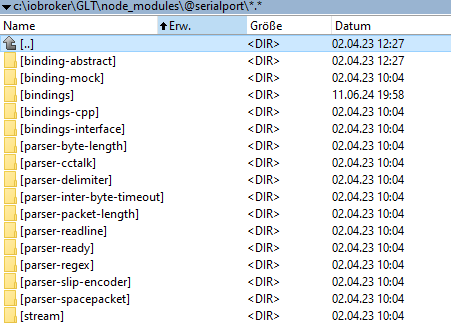
rflink.0
7132	2024-06-12 16:01:47.061	error	Cannot open serial port "COM3": TypeError: "path" is not defined: undefined

rflink.0
7132	2024-06-12 16:01:46.171	info	starting. Version 2.1.9 (non-npm: ioBroker/ioBroker.rflink) in C:/ioBroker/GLT/node_modules/iobroker.rflink, node: v20.14.0, js-controller: 6.0.2
ioBroker (since 2018) auf Intel Core i3-5005U NUC und Windwos10 Pro
-
Es kommen noch diese beiden Meldungen. Für den Fall das es wichtig ist - ioB läuft auf einem Windows System bei mir und da hier von "path" gesprochen wird - hier die Pfad Angabe wo der serialport unter Win abgelegt ist - für den Fall das dass von Bedeutung sein könnte.
rflink.0 7132 2024-06-12 16:01:47.061 error Cannot open serial port "COM3": TypeError: "path" is not defined: undefined rflink.0 7132 2024-06-12 16:01:46.171 info starting. Version 2.1.9 (non-npm: ioBroker/ioBroker.rflink) in C:/ioBroker/GLT/node_modules/iobroker.rflink, node: v20.14.0, js-controller: 6.0.2 -
@jb_sullivan 2.1.10 villt lol
Leider auch nicht - bis zur node Version 18.xxx hat das hier immer geholfen. Aber jetzt mit 20.xxx
npm install serialport --build-from-sourceAktuell sieht es so aus.
rflink.0 14800 2024-06-12 16:22:14.251 info Terminated (ADAPTER_REQUESTED_TERMINATION): Without reason rflink.0 14800 2024-06-12 16:22:14.250 info terminating rflink.0 14800 2024-06-12 16:22:14.248 info Got terminate signal TERMINATE_YOURSELF rflink.0 14800 2024-06-12 16:21:24.297 error Cannot open serial port "COM3": TypeError: "path" is not defined: undefined rflink.0 14800 2024-06-12 16:21:23.571 info starting. Version 2.1.10 (non-npm: ioBroker/ioBroker.rflink) in C:/ioBroker/GLT/node_modules/iobroker.rflink, node: v20.14.0, js-controller: 6.0.2 rflink.0 15064 2024-06-12 16:18:43.620 info terminating rflink.0 15064 2024-06-12 16:18:43.118 warn Terminated (UNCAUGHT_EXCEPTION): Without reason rflink.0 15064 2024-06-12 16:18:43.117 info terminating -
@jb_sullivan 2.1.10 villt lol
@foxriver76 Beim Upgrade auf 6.0.2 muss man aber schon vertrauen haben:
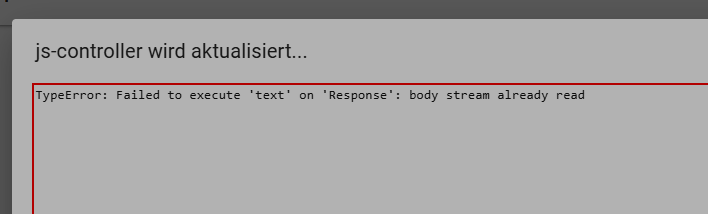
Hat aber offensichtlich funktioniert.
Host: Fujitsu Intel(R) Pentium(R) CPU G4560T, 32 GB RAM, Proxmox 8.x + lxc Ubuntu 22.04
ioBroker (8 GB RAM) Node.js: 20.19.1, NPM: 10.8.2, js-Controller: 7.0.6, Admin: 7.6.3
Wetterstation: Froggit WH3000SE V1.6.6





Support us
764
Online32.5k
Users81.7k
Topics1.3m
Posts