Skip to content
  • Home
  • Recent
  • Tags
  • 0 Unread 0
  • Categories
  • Unreplied
  • Popular
  • GitHub
  • Docu
  • Hilfe
Skins
  • Light
  • Brite
  • Cerulean
  • Cosmo
  • Flatly
  • Journal
  • Litera
  • Lumen
  • Lux
  • Materia
  • Minty
  • Morph
  • Pulse
  • Sandstone
  • Simplex
  • Sketchy
  • Spacelab
  • United
  • Yeti
  • Zephyr
  • Dark
  • Cyborg
  • Darkly
  • Quartz
  • Slate
  • Solar
  • Superhero
  • Vapor

  • Default (No Skin)
  • No Skin
Collapse
ioBroker Logo

Community Forum

donate donate
  1. ioBroker Community Home
  2. Deutsch
  3. ioBroker Allgemein
  4. Unifi Steuern ohne Adapter (Script,SSH)

NEWS

  • Jahresrückblick 2025 – unser neuer Blogbeitrag ist online! ✨
    BluefoxB
    Bluefox
    16
    1
    1.9k

  • Neuer Blogbeitrag: Monatsrückblick - Dezember 2025 🎄
    BluefoxB
    Bluefox
    13
    1
    910

  • Weihnachtsangebot 2025! 🎄
    BluefoxB
    Bluefox
    25
    1
    2.2k

Unifi Steuern ohne Adapter (Script,SSH)

Scheduled Pinned Locked Moved ioBroker Allgemein
152 Posts 16 Posters 28.9k Views 4 Watching
  • Oldest to Newest
  • Newest to Oldest
  • Most Votes
Reply
  • Reply as topic
Log in to reply
This topic has been deleted. Only users with topic management privileges can see it.
  • liv-in-skyL liv-in-sky

    @kmxak

    bei mir sind wohl noch alte vouchers im system

    mit diesem script sehe ich sie und könnte sie dann in der vis anzeigen ode rüber telegram versenden ...


    const Unifi = require('node-unifi');
    
    const unifi = new Unifi.Controller({hostname:"192.168.178.1xx",port:'8443', sslverify: false});
    
    (async () => {
     try {
       // LOGIN
       const loginData = await unifi.login('user', 'passw!');
       console.log('login: ' + loginData);


      const switchmac="b4:fb:e4:f3:96:63"
       // Get data from a specific unifi device based on MAC address
       const deviceData = await unifi.getAccessDevices(switchmac);
       // Console.log('getAccessDevices: ' + JSON.stringify(deviceData));
    
       // Get device id
       const deviceId = deviceData[0]._id;
       console.log('deviceId: ' + deviceId + ' ip: ' + deviceData[0].ip);
    
    // GET SITE STATS
      // const sites = await unifi.getSitesStats();
      // console.log('getSitesStats: ' + sites[0].name + ':' + sites.length);
      // console.log(JSON.stringify(sites));
    
       // GET SITE SYSINFO
      // const sysinfo = await unifi.getSiteSysinfo();
      // console.log('getSiteSysinfo: ' + sysinfo.length);
       //console.log(JSON.stringify(sysinfo));
    
       // GET CLIENT DEVICES
     //  const clientData = await unifi.getClientDevices();
      // console.log('getClientDevices: ' + clientData.length);
      // console.log(JSON.stringify(clientData));
    
       // GET ALL USERS EVER CONNECTED
       //const usersData = await unifi.getAllUsers();
       //console.log('getAllUsers: ' + usersData.length);
       //console.log(JSON.stringify(usersData));
    
    //   const clientVoucher = await unifi.createVouchers(123,1,0,"testthis");
    
       const myVouchers = await unifi.getVouchers();
       console.log("vouchers: "+ JSON.stringify(myVouchers))
    
       // LOGOUT
       const logoutData = await unifi.logout();
       console.log('logout: ' + JSON.stringify(logoutData));
     } catch (error) {
       console.log('ERROR: ' + error);
     }
    });


    log:

    script.js.MYSTUFF.ALLERLEI.AAAUNIFI.unifi-wlan-schalten3: vouchers: [{"duration":123,"qos_overwrite":false,"note":"testthis","code":"6566218181","for_hotspot":false,"create_time":1717058841,"quota":0,"site_id":"5cadc7f53b6a3967dd7e5369","_id":"66583d19108fed3b1dc7283c","admin_name":"e","used":0,"status":"VALID_MULTI","status_expires":0},{"duration":123,"qos_overwrite":false,"note":"testthis","code":"7113118220","for_hotspot":false,"create_time":1717058021,"quota":0,"site_id":"5cadc7f53b6a3967dd7e5369","_id":"665839e5108fed3b1dc72722","admin_name":"e","used":0,"status":"VALID_MULTI","status_expires":0},{"duration":123,"qos_overwrite":false,"note":"testthis","code":"4515536233","for_hotspot":false,"create_time":1717057059,"quota":0,"site_id":"5cadc7f53b6a3967dd7e5369","_id":"66583623108fed3b1dc725f0","admin_name":"e","used":0,"status":"VALID_MULTI","status_expires":0},{"duration":5760,"qos_overwrite":false,"note":null,"code":"8241421156","for_hotspot":false,"create_time":1650354689,"quota":1,"site_id":"5cadc7f53b6a3967dd7e5369","_id":"625e6a0197578402ac2db67c","admin_name":"e","used":0,"status":"VALID_ONE","status_expires":0},{"duration":5760,"qos_overwrite":false,"note":null,"code":"7446834263","for_hotspot":false,"create_time":1650354689,"quota":1,"site_id":"5cadc7f53b6a3967dd7e5369","_id":"625e6a0197578402ac2db67b","admin_name":"e","used":0,"status":"VALID_ONE","status_expires":0},{"duration":525600,"qos_overwrite":false,"note":null,"code":"7358319725","for_hotspot":false,"create_time":1650354660,"quota":1,"site_id":"5cadc7f53b6a3967dd7e5369","_id":"625e69e497578402ac2db679","admin_name":"e","used":0,"status":"VALID_ONE","status_expires":0},{"duration":1440,"qos_overwrite":false,"note":null,"code":"2729460620","for_hotspot":false,"create_time":1627921177,"quota":1,"site_id":"5cadc7f53b6a3967dd7e5369","_id":"61081b1997578402177f7096","admin_name":"e","used":0,"status":"VALID_ONE","status_expires":0},{"duration":1440,"qos_overwrite":false,"note":null,"code":"1795017450","for_hotspot":false,"create_time":1627921177,"quota":1,"site_id":"5cadc7f53b6a3967dd7e5369","_id":"61081b1997578402177f7095","admin_name":"e","used":0,"status":"VALID_ONE","status_expires":0},{"duration":1440,"qos_overwrite":false,"note":null,"code":"2281225310","for_hotspot":false,"create_time":1627921177,"quota":1,"site_id":"5cadc7f53b6a3967dd7e5369","_id":"61081b1997578402177f7094","admin_name":"e","used":0,"status":"VALID_ONE","status_expires":0},{"duration":1440,"qos_overwrite":false,"note":null,"code":"0356279115","for_hotspot":false,"create_time":1627921177,"quota":1,"site_id":"5cadc7f53b6a3967dd7e5369","_id":"61081b1997578402177f7093","admin_name":"e","used":0,"status":"VALID_ONE","status_expires":0},{"duration":1440,"qos_overwrite":false,"note":null,"code":"3544056744","for_hotspot":false,"create_time":1627921177,"quota":1,"site_id":"5cadc7f53b6a3967dd7e5369","_id":"61081b1997578402177f7092","admin_name":"e","used":0,"status":"VALID_ONE","status_expires":0},{"duration":1440,"qos_overwrite":false,"note":null,"code":"6426769406","for_hotspot":false,"create_time":1627921177,"quota":1,"site_id":"5cadc7f53b6a3967dd7e5369","_id":"61081b1997578402177f7091","admin_name":"e","used":0,"status":"VALID_ONE","status_expires":0},{"duration":1440,"qos_overwrite":false,"note":null,"code":"2298091277","for_hotspot":false,"create_time":1627921177,"quota":1,"site_id":"5cadc7f53b6a3967dd7e5369","_id":"61081b1997578402177f7090","admin_name":"e","used":0,"status":"VALID_ONE","status_expires":0},{"duration":1440,"qos_overwrite":false,"note":null,"code":"8878654311","for_hotspot":false,"create_time":1627921177,"quota":1,"site_id":"5cadc7f53b6a3967dd7e5369","_id":"61081b1997578402177f708f","admin_name":"e","used":0,"status":"VALID_ONE","status_expires":0},{"duration":1440,"qos_overwrite":false,"note":null,"code":"6946187591","for_hotspot":false,"create_time":1627921177,"quota":1,"site_id":"5cadc7f53b6a3967dd7e5369","_id":"61081b1997578402177f708e","admin_name":"e","used":0,"status":"VALID_ONE","status_expires":0},{"duration":1440,"qos_overwrite":false,"note":null,"code":"0579279641","for_hotspot":false,"create_time":1627921177,"quota":1,"site_id":"5cadc7f53b6a3967dd7e5369","_id":"61081b1997578402177f708d","admin_name":"e","used":0,"status":"VALID_ONE","status_expires":0}]


    im log ist der erste eintrag ein test mit 123... - wurde wohl angelegt - damit funktioniert es wohl

    kmxakK Offline
    kmxakK Offline
    kmxak
    Most Active
    wrote on last edited by
    #35

    @liv-in-sky sagte in Adapter: ioBroker.unifi:

    @kmxak

    bei mir sind wohl noch alte vouchers im system

    mit diesem script sehe ich sie und könnte sie dann in der vis anzeigen ode rüber telegram versenden ...


    const Unifi = require('node-unifi');
    
    const unifi = new Unifi.Controller({hostname:"192.168.178.1xx",port:'8443', sslverify: false});
    
    (async () => {
     try {
       // LOGIN
       const loginData = await unifi.login('user', 'passw!');
       console.log('login: ' + loginData);


      const switchmac="b4:fb:e4:f3:96:63"
       // Get data from a specific unifi device based on MAC address
       const deviceData = await unifi.getAccessDevices(switchmac);
       // Console.log('getAccessDevices: ' + JSON.stringify(deviceData));
    
       // Get device id
       const deviceId = deviceData[0]._id;
       console.log('deviceId: ' + deviceId + ' ip: ' + deviceData[0].ip);
    
    // GET SITE STATS
      // const sites = await unifi.getSitesStats();
      // console.log('getSitesStats: ' + sites[0].name + ':' + sites.length);
      // console.log(JSON.stringify(sites));
    
       // GET SITE SYSINFO
      // const sysinfo = await unifi.getSiteSysinfo();
      // console.log('getSiteSysinfo: ' + sysinfo.length);
       //console.log(JSON.stringify(sysinfo));
    
       // GET CLIENT DEVICES
     //  const clientData = await unifi.getClientDevices();
      // console.log('getClientDevices: ' + clientData.length);
      // console.log(JSON.stringify(clientData));
    
       // GET ALL USERS EVER CONNECTED
       //const usersData = await unifi.getAllUsers();
       //console.log('getAllUsers: ' + usersData.length);
       //console.log(JSON.stringify(usersData));
    
    //   const clientVoucher = await unifi.createVouchers(123,1,0,"testthis");
    
       const myVouchers = await unifi.getVouchers();
       console.log("vouchers: "+ JSON.stringify(myVouchers))
    
       // LOGOUT
       const logoutData = await unifi.logout();
       console.log('logout: ' + JSON.stringify(logoutData));
     } catch (error) {
       console.log('ERROR: ' + error);
     }
    })();
    
    log(getObject('system.host.iobroker59').native.os.platform)


    log:

    script.js.MYSTUFF.ALLERLEI.AAAUNIFI.unifi-wlan-schalten3: vouchers: [{"duration":123,"qos_overwrite":false,"note":"testthis","code":"6566218181","for_hotspot":false,"create_time":1717058841,"quota":0,"site_id":"5cadc7f53b6a3967dd7e5369","_id":"66583d19108fed3b1dc7283c","admin_name":"e","used":0,"status":"VALID_MULTI","status_expires":0},{"duration":123,"qos_overwrite":false,"note":"testthis","code":"7113118220","for_hotspot":false,"create_time":1717058021,"quota":0,"site_id":"5cadc7f53b6a3967dd7e5369","_id":"665839e5108fed3b1dc72722","admin_name":"e","used":0,"status":"VALID_MULTI","status_expires":0},{"duration":123,"qos_overwrite":false,"note":"testthis","code":"4515536233","for_hotspot":false,"create_time":1717057059,"quota":0,"site_id":"5cadc7f53b6a3967dd7e5369","_id":"66583623108fed3b1dc725f0","admin_name":"e","used":0,"status":"VALID_MULTI","status_expires":0},{"duration":5760,"qos_overwrite":false,"note":null,"code":"8241421156","for_hotspot":false,"create_time":1650354689,"quota":1,"site_id":"5cadc7f53b6a3967dd7e5369","_id":"625e6a0197578402ac2db67c","admin_name":"e","used":0,"status":"VALID_ONE","status_expires":0},{"duration":5760,"qos_overwrite":false,"note":null,"code":"7446834263","for_hotspot":false,"create_time":1650354689,"quota":1,"site_id":"5cadc7f53b6a3967dd7e5369","_id":"625e6a0197578402ac2db67b","admin_name":"e","used":0,"status":"VALID_ONE","status_expires":0},{"duration":525600,"qos_overwrite":false,"note":null,"code":"7358319725","for_hotspot":false,"create_time":1650354660,"quota":1,"site_id":"5cadc7f53b6a3967dd7e5369","_id":"625e69e497578402ac2db679","admin_name":"e","used":0,"status":"VALID_ONE","status_expires":0},{"duration":1440,"qos_overwrite":false,"note":null,"code":"2729460620","for_hotspot":false,"create_time":1627921177,"quota":1,"site_id":"5cadc7f53b6a3967dd7e5369","_id":"61081b1997578402177f7096","admin_name":"e","used":0,"status":"VALID_ONE","status_expires":0},{"duration":1440,"qos_overwrite":false,"note":null,"code":"1795017450","for_hotspot":false,"create_time":1627921177,"quota":1,"site_id":"5cadc7f53b6a3967dd7e5369","_id":"61081b1997578402177f7095","admin_name":"e","used":0,"status":"VALID_ONE","status_expires":0},{"duration":1440,"qos_overwrite":false,"note":null,"code":"2281225310","for_hotspot":false,"create_time":1627921177,"quota":1,"site_id":"5cadc7f53b6a3967dd7e5369","_id":"61081b1997578402177f7094","admin_name":"e","used":0,"status":"VALID_ONE","status_expires":0},{"duration":1440,"qos_overwrite":false,"note":null,"code":"0356279115","for_hotspot":false,"create_time":1627921177,"quota":1,"site_id":"5cadc7f53b6a3967dd7e5369","_id":"61081b1997578402177f7093","admin_name":"e","used":0,"status":"VALID_ONE","status_expires":0},{"duration":1440,"qos_overwrite":false,"note":null,"code":"3544056744","for_hotspot":false,"create_time":1627921177,"quota":1,"site_id":"5cadc7f53b6a3967dd7e5369","_id":"61081b1997578402177f7092","admin_name":"e","used":0,"status":"VALID_ONE","status_expires":0},{"duration":1440,"qos_overwrite":false,"note":null,"code":"6426769406","for_hotspot":false,"create_time":1627921177,"quota":1,"site_id":"5cadc7f53b6a3967dd7e5369","_id":"61081b1997578402177f7091","admin_name":"e","used":0,"status":"VALID_ONE","status_expires":0},{"duration":1440,"qos_overwrite":false,"note":null,"code":"2298091277","for_hotspot":false,"create_time":1627921177,"quota":1,"site_id":"5cadc7f53b6a3967dd7e5369","_id":"61081b1997578402177f7090","admin_name":"e","used":0,"status":"VALID_ONE","status_expires":0},{"duration":1440,"qos_overwrite":false,"note":null,"code":"8878654311","for_hotspot":false,"create_time":1627921177,"quota":1,"site_id":"5cadc7f53b6a3967dd7e5369","_id":"61081b1997578402177f708f","admin_name":"e","used":0,"status":"VALID_ONE","status_expires":0},{"duration":1440,"qos_overwrite":false,"note":null,"code":"6946187591","for_hotspot":false,"create_time":1627921177,"quota":1,"site_id":"5cadc7f53b6a3967dd7e5369","_id":"61081b1997578402177f708e","admin_name":"e","used":0,"status":"VALID_ONE","status_expires":0},{"duration":1440,"qos_overwrite":false,"note":null,"code":"0579279641","for_hotspot":false,"create_time":1627921177,"quota":1,"site_id":"5cadc7f53b6a3967dd7e5369","_id":"61081b1997578402177f708d","admin_name":"e","used":0,"status":"VALID_ONE","status_expires":0}]


    im log ist der erste eintrag ein test mit 123... - wurde wohl angelegt - damit funktioniert es wohl

    dazu müsste ich erstmal den login fixen. ich habe ja noch andere sachen da laufen die können sich verbinden. auch der protect adapter kann sich verbinden... mal sehen wenn ich mal zeit habe ... lege es auf den haufen mit todo :grimacing:

    Gruß Alex

    1 Reply Last reply
    0
    • liv-in-skyL liv-in-sky

      @kmxak
      das weiß ich nicht :-( war einfach da - wie sieht es bei dir aus

      kmxakK Offline
      kmxakK Offline
      kmxak
      Most Active
      wrote on last edited by
      #36

      @liv-in-sky sagte in Adapter: ioBroker.unifi:

      @kmxak
      das weiß ich nicht :-( war einfach da - wie sieht es bei dir aus

      sorry mein fehler war mit dem browser nicht eingeloggt.

      Gruß Alex

      1 Reply Last reply
      0
      • kmxakK Offline
        kmxakK Offline
        kmxak
        Most Active
        wrote on last edited by kmxak
        #37

        ah, jetzt geht es... falscher port :face_palm:

        bekomme aber nur:

        javascript.0	11:50:46.998	info	script.js.User.Unifi.Unifi_Node: login: true
        javascript.0	11:50:47.064	info	script.js.User.Unifi.Unifi_Node: vouchers: [object Object],[object Object],[object Object],[object Object],[object Object]
        javascript.0	11:50:47.084	info	script.js.User.Unifi.Unifi_Node: logout: {"success":true}
        

        der hier funzt nicht mit deinem aus dem code geht es

        console.log("vouchers: "+ myVouchers)
        

        Gruß Alex

        liv-in-skyL 1 Reply Last reply
        0
        • kmxakK kmxak

          die info mit dem port dazu müsste ich ja den code ändern.

          die letzte info mit den funktionen ist nützlich. wie bekommst die anzeige hin? mir wird das in github nicht angezeigt

          liv-in-skyL Offline
          liv-in-skyL Offline
          liv-in-sky
          wrote on last edited by
          #38

          @kmxak sagte in Adapter: ioBroker.unifi:

          die info mit dem port dazu müsste ich ja den code ändern.

          kannst du ja machen - die datei unifi.js liegt ja im verzeichnis vom iobroker

          Image 060.png

          auf eigene verantwortung

          nach einem gelösten Thread wäre es sinnvoll dies in der Überschrift des ersten Posts einzutragen [gelöst]-... Bitte benutzt das Voting rechts unten im Beitrag wenn er euch geholfen hat. Forum-Tools: PicPick https://picpick.app/en/download/ und ScreenToGif https://www.screentogif.com/downloads.html

          1 Reply Last reply
          0
          • kmxakK kmxak

            ah, jetzt geht es... falscher port :face_palm:

            bekomme aber nur:

            javascript.0	11:50:46.998	info	script.js.User.Unifi.Unifi_Node: login: true
            javascript.0	11:50:47.064	info	script.js.User.Unifi.Unifi_Node: vouchers: [object Object],[object Object],[object Object],[object Object],[object Object]
            javascript.0	11:50:47.084	info	script.js.User.Unifi.Unifi_Node: logout: {"success":true}
            

            der hier funzt nicht mit deinem aus dem code geht es

            console.log("vouchers: "+ myVouchers)
            
            liv-in-skyL Offline
            liv-in-skyL Offline
            liv-in-sky
            wrote on last edited by
            #39

            @kmxak sagte in Adapter: ioBroker.unifi:

            console.log("vouchers: "+ myVouchers)

            mein fehler

            so muss es heißen

            console.log("vouchers: "+ JSON.stringify(myVouchers))
            

            nach einem gelösten Thread wäre es sinnvoll dies in der Überschrift des ersten Posts einzutragen [gelöst]-... Bitte benutzt das Voting rechts unten im Beitrag wenn er euch geholfen hat. Forum-Tools: PicPick https://picpick.app/en/download/ und ScreenToGif https://www.screentogif.com/downloads.html

            1 Reply Last reply
            0
            • kmxakK Offline
              kmxakK Offline
              kmxak
              Most Active
              wrote on last edited by
              #40

              ja danke damit ging es und es funktioniert.

              Damit kann ich ja weiterarbeiten.

              Gruß Alex

              ? 1 Reply Last reply
              1
              • kmxakK kmxak

                ja danke damit ging es und es funktioniert.

                Damit kann ich ja weiterarbeiten.

                ? Offline
                ? Offline
                A Former User
                wrote on last edited by
                #41

                @kmxak @liv-in-sky

                :+1: :+1:
                hab gerade mal mit euch getestet, funktioniert hier auch, guter Ansatz, vielleicht bekommt man damit noch mehr gebacken.. aber die Vouchers funktionieren schonmal, brauch ich zwar nicht.. aber man weiss ja nie..

                1 Reply Last reply
                1
                • liv-in-skyL Offline
                  liv-in-skyL Offline
                  liv-in-sky
                  wrote on last edited by
                  #42

                  es gibt auch ein beispiel, wie man einen poe prot abschaltet

                  https://github.com/jens-maus/node-unifi/blob/master/examples/poe-switch-onoff.js

                  nach einem gelösten Thread wäre es sinnvoll dies in der Überschrift des ersten Posts einzutragen [gelöst]-... Bitte benutzt das Voting rechts unten im Beitrag wenn er euch geholfen hat. Forum-Tools: PicPick https://picpick.app/en/download/ und ScreenToGif https://www.screentogif.com/downloads.html

                  ? 1 Reply Last reply
                  1
                  • liv-in-skyL liv-in-sky

                    es gibt auch ein beispiel, wie man einen poe prot abschaltet

                    https://github.com/jens-maus/node-unifi/blob/master/examples/poe-switch-onoff.js

                    ? Offline
                    ? Offline
                    A Former User
                    wrote on last edited by
                    #43

                    @liv-in-sky sagte in Adapter: ioBroker.unifi:

                    es gibt auch ein beispiel, wie man einen poe prot abschaltet

                    https://github.com/jens-maus/node-unifi/blob/master/examples/poe-switch-onoff.js

                    POE schalten kann der Adapter ja... einen ganzen Port disablen aber wohl nicht..

                    liv-in-skyL 1 Reply Last reply
                    0
                    • ? A Former User

                      @liv-in-sky sagte in Adapter: ioBroker.unifi:

                      es gibt auch ein beispiel, wie man einen poe prot abschaltet

                      https://github.com/jens-maus/node-unifi/blob/master/examples/poe-switch-onoff.js

                      POE schalten kann der Adapter ja... einen ganzen Port disablen aber wohl nicht..

                      liv-in-skyL Offline
                      liv-in-skyL Offline
                      liv-in-sky
                      wrote on last edited by
                      #44

                      @ilovegym

                      hab ich gelesen - aber evtl kann man daraus ableiten, wie man einen port blockiert oder disabled oder sowas

                      nach einem gelösten Thread wäre es sinnvoll dies in der Überschrift des ersten Posts einzutragen [gelöst]-... Bitte benutzt das Voting rechts unten im Beitrag wenn er euch geholfen hat. Forum-Tools: PicPick https://picpick.app/en/download/ und ScreenToGif https://www.screentogif.com/downloads.html

                      draexlerD 1 Reply Last reply
                      0
                      • liv-in-skyL liv-in-sky

                        @ilovegym

                        hab ich gelesen - aber evtl kann man daraus ableiten, wie man einen port blockiert oder disabled oder sowas

                        draexlerD Do not disturb
                        draexlerD Do not disturb
                        draexler
                        wrote on last edited by
                        #45

                        @liv-in-sky Habe mich jetzt mal kurz eingelesen. Der ioBroker Adapter baut ja genau auf diesen "node-unifi" auf. Kannst du Voucher erstellen? Die Abfrage ob es welche gibt funktioniert ja noch im Adapter... Nur die Anforderung nicht. Kann gerade nicht testen weil ich unterwegs bin und nur auf dem Handy schreiben kann :-(

                        liv-in-skyL 1 Reply Last reply
                        0
                        • draexlerD draexler

                          @liv-in-sky Habe mich jetzt mal kurz eingelesen. Der ioBroker Adapter baut ja genau auf diesen "node-unifi" auf. Kannst du Voucher erstellen? Die Abfrage ob es welche gibt funktioniert ja noch im Adapter... Nur die Anforderung nicht. Kann gerade nicht testen weil ich unterwegs bin und nur auf dem Handy schreiben kann :-(

                          liv-in-skyL Offline
                          liv-in-skyL Offline
                          liv-in-sky
                          wrote on last edited by
                          #46

                          @draexler nee - -beim anlegen über adapter kommt eine fehlermeldung im log

                          nach einem gelösten Thread wäre es sinnvoll dies in der Überschrift des ersten Posts einzutragen [gelöst]-... Bitte benutzt das Voting rechts unten im Beitrag wenn er euch geholfen hat. Forum-Tools: PicPick https://picpick.app/en/download/ und ScreenToGif https://www.screentogif.com/downloads.html

                          draexlerD 1 Reply Last reply
                          0
                          • liv-in-skyL liv-in-sky

                            @draexler nee - -beim anlegen über adapter kommt eine fehlermeldung im log

                            draexlerD Do not disturb
                            draexlerD Do not disturb
                            draexler
                            wrote on last edited by
                            #47

                            @liv-in-sky bekommst du über beide wege die Meldung? Also Adapter ODER/UND Javascript Instanz?

                            liv-in-skyL 1 Reply Last reply
                            0
                            • draexlerD draexler

                              @liv-in-sky bekommst du über beide wege die Meldung? Also Adapter ODER/UND Javascript Instanz?

                              liv-in-skyL Offline
                              liv-in-skyL Offline
                              liv-in-sky
                              wrote on last edited by
                              #48

                              @draexler fehler nur bei adapter beim anlegen von vouchers

                              nach einem gelösten Thread wäre es sinnvoll dies in der Überschrift des ersten Posts einzutragen [gelöst]-... Bitte benutzt das Voting rechts unten im Beitrag wenn er euch geholfen hat. Forum-Tools: PicPick https://picpick.app/en/download/ und ScreenToGif https://www.screentogif.com/downloads.html

                              1 Reply Last reply
                              0
                              • Meister MopperM Meister Mopper

                                @warp735 sagte in Adapter: ioBroker.unifi:

                                @meister-mopper sagte in Adapter: ioBroker.unifi:

                                Ich habe einen lokalen Zugang

                                Wo hast Du den eingerichtet? Hab MFA jetzt aktiviert und Adapter läuft nicht mehr. Geb ich die IP der UDM hier lokal ein, wird auch ein mfa Pin benötigt. Das muss ich doch dann irgendwo abstellen können?

                                Bei Admin & Users

                                6e6a099a-1e5b-4e68-ac4e-f70f491bfd70-grafik.png

                                Der obere ist cloud mit 2FA und der untere lokal mit pw.

                                A Offline
                                A Offline
                                andr3
                                wrote on last edited by
                                #49

                                @meister-mopper und im Adapter trage ich dann die UDM-PRO IP aber KENEN Port ein? (Irgendwo hier so gelesen), Benutzername und Passwort vom lokalen User?
                                Der Adapter startet dann, schaltet sogar auf grün, steuern kann ich via Objektebaum leider trotzdem nichts.

                                Absurderweise startet der Adapter auch ohne Fehlermeldungen, wenn ich einen falschen Namen/falsches Passwort angebe.

                                draexlerD 1 Reply Last reply
                                0
                                • A andr3

                                  @meister-mopper und im Adapter trage ich dann die UDM-PRO IP aber KENEN Port ein? (Irgendwo hier so gelesen), Benutzername und Passwort vom lokalen User?
                                  Der Adapter startet dann, schaltet sogar auf grün, steuern kann ich via Objektebaum leider trotzdem nichts.

                                  Absurderweise startet der Adapter auch ohne Fehlermeldungen, wenn ich einen falschen Namen/falsches Passwort angebe.

                                  draexlerD Do not disturb
                                  draexlerD Do not disturb
                                  draexler
                                  wrote on last edited by
                                  #50

                                  Wollte es jetzt auch mal ausprobieren. Scheitere aber schon bei dem Grundskript....
                                  Wo muss den bei der IP, Port, Benutzername, Passwort die Hockklammern etc. weg und wo müsse welche hin? Nicht das hier schon das Problem liegt....


                                  const Unifi = require('node-unifi');
                                  
                                  const unifi = new Unifi.Controller({hostname:"192.168.168.5",port:'8443', sslverify: false});
                                  
                                  (async () => {
                                   try {
                                     // LOGIN
                                     const loginData = await unifi.login('unifi-iobroker', '34523452345!');
                                     console.log('login: ' + loginData);
                                  
                                  //   const clientVoucher = await unifi.createVouchers(123,1,0,"testthis");
                                  
                                     // LOGOUT
                                     const logoutData = await unifi.logout();
                                     console.log('logout: ' + JSON.stringify(logoutData));
                                   } catch (error) {
                                     console.log('ERROR: ' + error);
                                   }
                                  })();
                                  
                                  log(getObject('system.host.iobroker59').native.os.platform)


                                  Im log steht nur:

                                  javascript.0	07:53:19.785	info	Start JavaScript script.js.common.Netzwerk.Voucher_erstellen (Javascript/js)
                                  javascript.0	07:53:19.804	warn	script.js.common.Netzwerk.Voucher_erstellen: Object "system.host.iobroker59" does not exist
                                  javascript.0	07:53:19.807	error	script.js.common.Netzwerk.Voucher_erstellen: TypeError: Cannot read properties of null (reading 'native')
                                  javascript.0	07:53:19.807	error	at script.js.common.Netzwerk.Voucher_erstellen:24:40
                                  javascript.0	07:53:19.807	error	at script.js.common.Netzwerk.Voucher_erstellen:33:3
                                  javascript.0	07:53:20.635	info	script.js.common.Netzwerk.Voucher_erstellen: ERROR: AxiosError: Request failed with status code 400
                                  javascript.0	07:53:23.368	info	Stopping script script.js.common.Netzwerk.Voucher_erstellen
                                  
                                  ? liv-in-skyL A 3 Replies Last reply
                                  0
                                  • draexlerD draexler

                                    Wollte es jetzt auch mal ausprobieren. Scheitere aber schon bei dem Grundskript....
                                    Wo muss den bei der IP, Port, Benutzername, Passwort die Hockklammern etc. weg und wo müsse welche hin? Nicht das hier schon das Problem liegt....


                                    const Unifi = require('node-unifi');
                                    
                                    const unifi = new Unifi.Controller({hostname:"192.168.168.5",port:'8443', sslverify: false});
                                    
                                    (async () => {
                                     try {
                                       // LOGIN
                                       const loginData = await unifi.login('unifi-iobroker', '34523452345!');
                                       console.log('login: ' + loginData);
                                    
                                    //   const clientVoucher = await unifi.createVouchers(123,1,0,"testthis");
                                    
                                       // LOGOUT
                                       const logoutData = await unifi.logout();
                                       console.log('logout: ' + JSON.stringify(logoutData));
                                     } catch (error) {
                                       console.log('ERROR: ' + error);
                                     }
                                    })();
                                    
                                    log(getObject('system.host.iobroker59').native.os.platform)


                                    Im log steht nur:

                                    javascript.0	07:53:19.785	info	Start JavaScript script.js.common.Netzwerk.Voucher_erstellen (Javascript/js)
                                    javascript.0	07:53:19.804	warn	script.js.common.Netzwerk.Voucher_erstellen: Object "system.host.iobroker59" does not exist
                                    javascript.0	07:53:19.807	error	script.js.common.Netzwerk.Voucher_erstellen: TypeError: Cannot read properties of null (reading 'native')
                                    javascript.0	07:53:19.807	error	at script.js.common.Netzwerk.Voucher_erstellen:24:40
                                    javascript.0	07:53:19.807	error	at script.js.common.Netzwerk.Voucher_erstellen:33:3
                                    javascript.0	07:53:20.635	info	script.js.common.Netzwerk.Voucher_erstellen: ERROR: AxiosError: Request failed with status code 400
                                    javascript.0	07:53:23.368	info	Stopping script script.js.common.Netzwerk.Voucher_erstellen
                                    
                                    ? Offline
                                    ? Offline
                                    A Former User
                                    wrote on last edited by
                                    #51

                                    @draexler

                                    zwei Sachen fallen mir auf:

                                    1. wenn du ne UDM Pro hast, mach aus dem Port 8443 nur 443
                                    2. in dem Script heisst der iobroker Host "iobroker59" - musste ich bei mir auf iobroker aendern, meiner heisst halt einfach nur iobroker..

                                    Probiers mal aus!
                                    :)

                                    draexlerD 1 Reply Last reply
                                    0
                                    • ? A Former User

                                      @draexler

                                      zwei Sachen fallen mir auf:

                                      1. wenn du ne UDM Pro hast, mach aus dem Port 8443 nur 443
                                      2. in dem Script heisst der iobroker Host "iobroker59" - musste ich bei mir auf iobroker aendern, meiner heisst halt einfach nur iobroker..

                                      Probiers mal aus!
                                      :)

                                      draexlerD Do not disturb
                                      draexlerD Do not disturb
                                      draexler
                                      wrote on last edited by
                                      #52

                                      @ilovegym Merce :-) Es war nur das Problem mit iobroker59. Das Basisscript läuft.
                                      Frage an alle: Gibts irgendeine Möglichkeit das PW nicht im Klartext anzuzeigen?

                                      1 Reply Last reply
                                      0
                                      • draexlerD draexler

                                        Wollte es jetzt auch mal ausprobieren. Scheitere aber schon bei dem Grundskript....
                                        Wo muss den bei der IP, Port, Benutzername, Passwort die Hockklammern etc. weg und wo müsse welche hin? Nicht das hier schon das Problem liegt....


                                        const Unifi = require('node-unifi');
                                        
                                        const unifi = new Unifi.Controller({hostname:"192.168.168.5",port:'8443', sslverify: false});
                                        
                                        (async () => {
                                         try {
                                           // LOGIN
                                           const loginData = await unifi.login('unifi-iobroker', '34523452345!');
                                           console.log('login: ' + loginData);
                                        
                                        //   const clientVoucher = await unifi.createVouchers(123,1,0,"testthis");
                                        
                                           // LOGOUT
                                           const logoutData = await unifi.logout();
                                           console.log('logout: ' + JSON.stringify(logoutData));
                                         } catch (error) {
                                           console.log('ERROR: ' + error);
                                         }
                                        })();
                                        
                                        log(getObject('system.host.iobroker59').native.os.platform)


                                        Im log steht nur:

                                        javascript.0	07:53:19.785	info	Start JavaScript script.js.common.Netzwerk.Voucher_erstellen (Javascript/js)
                                        javascript.0	07:53:19.804	warn	script.js.common.Netzwerk.Voucher_erstellen: Object "system.host.iobroker59" does not exist
                                        javascript.0	07:53:19.807	error	script.js.common.Netzwerk.Voucher_erstellen: TypeError: Cannot read properties of null (reading 'native')
                                        javascript.0	07:53:19.807	error	at script.js.common.Netzwerk.Voucher_erstellen:24:40
                                        javascript.0	07:53:19.807	error	at script.js.common.Netzwerk.Voucher_erstellen:33:3
                                        javascript.0	07:53:20.635	info	script.js.common.Netzwerk.Voucher_erstellen: ERROR: AxiosError: Request failed with status code 400
                                        javascript.0	07:53:23.368	info	Stopping script script.js.common.Netzwerk.Voucher_erstellen
                                        
                                        liv-in-skyL Offline
                                        liv-in-skyL Offline
                                        liv-in-sky
                                        wrote on last edited by liv-in-sky
                                        #53

                                        @draexler sagte in Adapter: ioBroker.unifi:

                                        log(getObject('system.host.iobroker59').native.os.platform)

                                        diese zeile (letzte) bitte löschen - war ein test für ganz was anderes und gehört nicht ins script - sorry

                                        nach einem gelösten Thread wäre es sinnvoll dies in der Überschrift des ersten Posts einzutragen [gelöst]-... Bitte benutzt das Voting rechts unten im Beitrag wenn er euch geholfen hat. Forum-Tools: PicPick https://picpick.app/en/download/ und ScreenToGif https://www.screentogif.com/downloads.html

                                        draexlerD 1 Reply Last reply
                                        0
                                        • liv-in-skyL liv-in-sky

                                          @draexler sagte in Adapter: ioBroker.unifi:

                                          log(getObject('system.host.iobroker59').native.os.platform)

                                          diese zeile (letzte) bitte löschen - war ein test für ganz was anderes und gehört nicht ins script - sorry

                                          draexlerD Do not disturb
                                          draexlerD Do not disturb
                                          draexler
                                          wrote on last edited by draexler
                                          #54

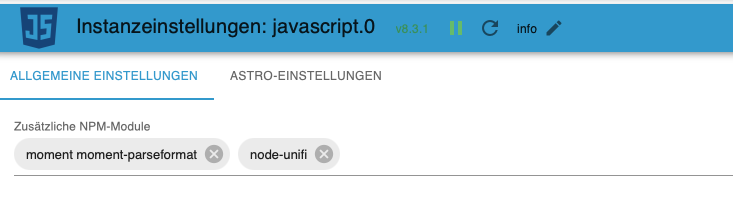
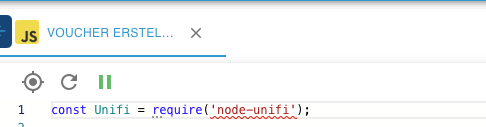
                                          @liv-in-sky Jetzt bin ich mir gerade unsicher ob das schon war oder nicht... Jetzt ist das node-unifi rot unterstrichen. In der Javascript Instanz ist es aber angegeben. Instanz wurde auch schon neu gestartet.
                                          64bb85f2-c853-45be-94e8-3595c5acec44-image.png
                                          85583475-31db-4d71-969e-60ef96f07cac-image.png

                                          Woran kann das liegen? Wo kann ich was prüfen?

                                          Jetzt kommt auch diese Fehlermeldung im Log...
                                          Bin mir sicher das es meiner Erfolgsmeldung vorher nicht drinstand....

                                          javascript.0	10:12:58.289	info	script.js.common.Netzwerk.Voucher_erstellen: ERROR: AxiosError: Request failed with status code 400

                                          
                                          liv-in-skyL 1 Reply Last reply
                                          0
                                          Reply
                                          • Reply as topic
                                          Log in to reply
                                          • Oldest to Newest
                                          • Newest to Oldest
                                          • Most Votes


                                          Support us

                                          ioBroker
                                          Community Adapters
                                          Donate
                                          FAQ Cloud / IOT
                                          HowTo: Node.js-Update
                                          HowTo: Backup/Restore
                                          Downloads
                                          BLOG

                                          784

                                          Online

                                          32.6k

                                          Users

                                          82.2k

                                          Topics

                                          1.3m

                                          Posts
                                          Community
                                          Impressum | Datenschutz-Bestimmungen | Nutzungsbedingungen | Einwilligungseinstellungen
                                          ioBroker Community 2014-2025
                                          logo
                                          • Login

                                          • Don't have an account? Register

                                          • Login or register to search.
                                          • First post
                                            Last post
                                          0
                                          • Home
                                          • Recent
                                          • Tags
                                          • Unread 0
                                          • Categories
                                          • Unreplied
                                          • Popular
                                          • GitHub
                                          • Docu
                                          • Hilfe