




(gelöst) Adapterinstallation geht nicht, Node/NPM Problem?
-
Hallo, bin ein Forum Newbie und kein sonderlich Linux affin.
Habe trotzdem schon eine ganze Weile IOB laufen. Habe dabei immer mal wieder auch die verwendeten Adapter upgedatet. Wollte ich jetzt auch wieder machen.
Die Updates laufen auch ohne Fehlermeldung durch.
Wenn ich danach aber den Rechner reboote sind die Updates alle wieder weg.
Dabei macht es kein Unterschied, ob ich es per Weboberfläche oder per SSH mache.
Habe jetzt festgestellt, das in der Weboberfläche und bei den Updates die Node v18.19.0 und NPM Version 10.2.3 angezeigt wird: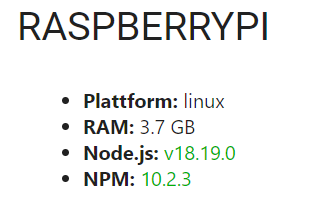 . Wenn ich im Terminal schaue kommen andere Versionen :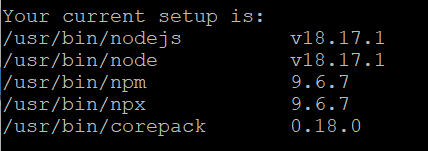
Kann das Problem daran liegen, das ich da irgendwie einen Knoten drin habe? Falls ja, wie kann ich das wieder korrigieren? Danke schon mal für Eure Hilfe. -
Hallo, bin ein Forum Newbie und kein sonderlich Linux affin.
Habe trotzdem schon eine ganze Weile IOB laufen. Habe dabei immer mal wieder auch die verwendeten Adapter upgedatet. Wollte ich jetzt auch wieder machen.
Die Updates laufen auch ohne Fehlermeldung durch.
Wenn ich danach aber den Rechner reboote sind die Updates alle wieder weg.
Dabei macht es kein Unterschied, ob ich es per Weboberfläche oder per SSH mache.
Habe jetzt festgestellt, das in der Weboberfläche und bei den Updates die Node v18.19.0 und NPM Version 10.2.3 angezeigt wird: . Wenn ich im Terminal schaue kommen andere Versionen :
Kann das Problem daran liegen, das ich da irgendwie einen Knoten drin habe? Falls ja, wie kann ich das wieder korrigieren? Danke schon mal für Eure Hilfe. -
@codierknecht
Hoffe, das ist das Gewünschte:======================= SUMMARY ======================= v.2023-10-10 SUB = The low-level unit activation state, values depend on unit type. 1 loaded units listed. *** FILESYSTEM *** Filesystem Type Size Used Avail Use% Mounted on /dev/root ext4 29G 5.1G 23G 19% / devtmpfs devtmpfs 1.7G 0 1.7G 0% /dev tmpfs tmpfs 1.9G 0 1.9G 0% /dev/shm tmpfs tmpfs 762M 1.2M 761M 1% /run tmpfs tmpfs 5.0M 4.0K 5.0M 1% /run/lock /dev/mmcblk0p1 vfat 255M 31M 225M 13% /boot tmpfs tmpfs 381M 0 381M 0% /run/user/1000 Messages concerning ext4 filesystem in dmesg: [Fri Feb 9 10:15:20 2024] Kernel command line: coherent_pool=1M 8250.nr_uarts=0 snd_bcm2835.enable_headphones=0 snd_bcm2835.enable_hdmi=1 snd_bcm2835.enable_hdmi=0 smsc95xx.macaddr=E4:5F:01:F2:45:E5 vc_mem.mem_base=0x3ec00000 vc_mem.mem_size=0x40000000 console=ttyS0,115200 root=PARTUUID=8b3e6f47-02 rootfstype=ext4 fsck.repair=yes rootwait [Fri Feb 9 10:15:21 2024] EXT4-fs (mmcblk0p2): INFO: recovery required on readonly filesystem [Fri Feb 9 10:15:21 2024] EXT4-fs (mmcblk0p2): write access will be enabled during recovery [Fri Feb 9 10:15:21 2024] EXT4-fs (mmcblk0p2): recovery complete [Fri Feb 9 10:15:21 2024] EXT4-fs (mmcblk0p2): mounted filesystem with ordered data mode. Quota mode: none. [Fri Feb 9 10:15:21 2024] VFS: Mounted root (ext4 filesystem) readonly on device 179:2. [Fri Feb 9 10:15:25 2024] EXT4-fs (mmcblk0p2): re-mounted. Quota mode: none. Show mounted filesystems \(real ones only\): TARGET SOURCE FSTYPE OPTIONS / /dev/mmcblk0p2 ext4 rw,noatime `-/boot /dev/mmcblk0p1 vfat rw,relatime,fmask=0022,dmask=0022,codepage=437,iocharset=ascii,shortname=mixed,errors=remount-ro Files in neuralgic directories: /var: 1.5G /var/ 851M /var/log 849M /var/log/journal/4dd66bbc4a99462281ac4bba88cf4a11 849M /var/log/journal 366M /var/cache Static hostname: raspberrypi Icon name: computer Operating System: Debian GNU/Linux 11 (bullseye) Kernel: Linux 6.1.21-v8+ Architecture: arm64 Installation: native Kernel: aarch64 Userland: arm64 Timezone: Europe/Berlin (CET, +0100) User-ID: 1000 X-Server: false Boot Target: multi-user.target Pending OS-Updates: 0 Pending iob updates: 0 Nodejs-Installation: /usr/bin/nodejs v18.19.0 /usr/bin/node v18.19.0 /usr/bin/npm 10.2.3 /usr/bin/npx 10.2.3 /usr/bin/corepack 0.22.0 Recommended versions are nodejs 18.19.0 and npm 10.2.3 Your nodejs installation is correct MEMORY: total used free shared buff/cache available Mem: 3.8G 1.2G 828M 1.0M 1.7G 2.5G Swap: 99M 0B 99M Total: 3.9G 1.2G 928M Active iob-Instances: 16 Active repo(s): stable ioBroker Core: js-controller 5.0.17 admin 6.13.16 ioBroker Status: iobroker is running on this host. Objects type: jsonl States type: jsonl Status admin and web instance: + system.adapter.admin.0 : admin : raspberrypi - enabled, port: 8081, bind: 0.0.0.0, run as: admin + system.adapter.web.0 : web : raspberrypi - enabled, port: 8082, bind: 0.0.0.0, run as: admin Objects: 2140 States: 1608 Size of iob-Database: 11M /opt/iobroker/iobroker-data/objects.jsonl 7.0M /opt/iobroker/iobroker-data/states.jsonl =================== END OF SUMMARY ==================== > Skript v.2023-10-10 > ystem. /opt/iobroker> *** BASE SYSTEM *** > Static hostname: raspberrypi > Icon name: computer > Operating System: Debian GNU/Linux 11 (bullseye) > Kernel: Linux 6.1.21-v8+ > Architecture: arm64 > j> Model : Raspberry Pi 400 Rev 1.1 > Docker : false > Virtualization : none > Kernel : aarch64 > Userland : arm64 > > Systemuptime and Load: > 12:16:40 up 2:01, 1 user, load average: 0.43, 0.58, 0.50 > CPU threads: 4 > > > *** RASPBERRY THROTTLING *** > Current issues: > No throttling issues detected. > > Previously detected issues: > No throttling issues detected. > > *** Time and Time Zones *** > Local time: Fri 2024-02-09 12:16:40 CET > Universal time: Fri 2024-02-09 11:16:40 UTC > RTC time: n/a > Time zone: Europe/Berlin (CET, +0100) > System clock synchronized: yes > NTP service: active > RTC in local TZ: no > > *** User and Groups *** > Ron > /home/Ron > Ron adm dialout cdrom sudo audio video plugdev games users input render netdev gpio i2c spi iobroker > > *** X-Server-Setup *** > X-Server: false > Desktop: > Terminal: tty > Boot Target: multi-user.target > > *** MEMORY *** > total used free shared buff/cache available > Mem: 3.8G 1.2G 828M 1.0M 1.7G 2.5G > Swap: 99M 0B 99M > Total: 3.9G 1.2G 928M > > 3806 M total memory > 1242 M used memory > 1244 M active memory > 1432 M inactive memory > 828 M free memory > 157 M buffer memory > 1578 M swap cache > 99 M total swap > 0 M used swap > 99 M free swap > > Raspberry only: > oom events: 0 > lifetime oom required: 0 Mbytes > total time in oom handler: 0 ms > max time spent in oom handler: 0 ms > > *** FAILED SERVICES *** > > UNIT LOAD ACTIVE SUB DESCRIPTION > * rc-local.service loaded failed failed /etc/rc.local Compatibility > > LOAD = Reflects whether the unit definition was properly loaded. > ACTIVE = The high-level unit activation state, i.e. generalization of SUB. > SUB = The low-level unit activation state, values depend on unit type. > 1 loaded units listed. > > *** FILESYSTEM *** > Filesystem Type Size Used Avail Use% Mounted on > /dev/root ext4 29G 5.1G 23G 19% / > devtmpfs devtmpfs 1.7G 0 1.7G 0% /dev > tmpfs tmpfs 1.9G 0 1.9G 0% /dev/shm > tmpfs tmpfs 762M 1.2M 761M 1% /run > tmpfs tmpfs 5.0M 4.0K 5.0M 1% /run/lock > /dev/mmcblk0p1 vfat 255M 31M 225M 13% /boot > tmpfs tmpfs 381M 0 381M 0% /run/user/1000 > > Messages concerning ext4 filesystem in dmesg: > [Fri Feb 9 10:15:20 2024] Kernel command line: coherent_pool=1M 8250.nr_uarts=0 snd_bcm2835.enable_headphones=0 snd_bcm2835.enable_hdmi=1 snd_bcm2835.enable_hdmi=0 smsc95xx.macaddr=E4:5F:01:F2:45:E5 vc_mem.mem_base=0x3ec00000 vc_mem.mem_size=0x40000000 console=ttyS0,115200 root=PARTUUID=8b3e6f47-02 rootfstype=ext4 fsck.repair=yes rootwait > [Fri Feb 9 10:15:21 2024] EXT4-fs (mmcblk0p2): INFO: recovery required on readonly filesystem > [Fri Feb 9 10:15:21 2024] EXT4-fs (mmcblk0p2): write access will be enabled during recovery > [Fri Feb 9 10:15:21 2024] EXT4-fs (mmcblk0p2): recovery complete > [Fri Feb 9 10:15:21 2024] EXT4-fs (mmcblk0p2): mounted filesystem with ordered data mode. Quota mode: none. > [Fri Feb 9 10:15:21 2024] VFS: Mounted root (ext4 filesystem) readonly on device 179:2. > [Fri Feb 9 10:15:25 2024] EXT4-fs (mmcblk0p2): re-mounted. Quota mode: none. > > Show mounted filesystems \(real ones only\): > TARGET SOURCE FSTYPE OPTIONS > / /dev/mmcblk0p2 ext4 rw,noatime > `-/boot /dev/mmcblk0p1 vfat rw,relatime,fmask=0022,dmask=0022,codepage=437,iocharset=ascii,shortname=mixed,errors=remount-ro -bash: Skript: command not found -bash: config: command not found -bash: Static: command not found -bash: Icon: command not found -bash: command substitution: line 7: syntax error near unexpected token `(' -bash: command substitution: line 7: ` Operating System: Debian GNU/Linux 11 (bullseye)' -bash: -/boot: No such file or directory Ron@raspberrypi:~ $ Ron@raspberrypi:~ $ Files in neuralgic directories: -bash: Files: command not found Ron@raspberrypi:~ $ Ron@raspberrypi:~ $ /var: -bash: /var:: No such file or directory Ron@raspberrypi:~ $ 1.5G /var/ -bash: 1.5G: command not found Ron@raspberrypi:~ $ 851M /var/log -bash: 851M: command not found Ron@raspberrypi:~ $ 849M /var/log/journal/4dd66bbc4a99462281ac4bba88cf4a11 -bash: 849M: command not found Ron@raspberrypi:~ $ 849M /var/log/journal -bash: 849M: command not found Ron@raspberrypi:~ $ 366M /var/cache -bash: 366M: command not found Ron@raspberrypi:~ $ Ron@raspberrypi:~ $ Archived and active journals take up 848.2M in the file system. -bash: Archived: command not found Ron@raspberrypi:~ $ Ron@raspberrypi:~ $ /opt/iobroker/backups: -bash: /opt/iobroker/backups:: No such file or directory Ron@raspberrypi:~ $ 94M /opt/iobroker/backups/ -bash: 94M: command not found Ron@raspberrypi:~ $ Ron@raspberrypi:~ $ /opt/iobroker/iobroker-data: -bash: /opt/iobroker/iobroker-data:: No such file or directory Ron@raspberrypi:~ $ 331M /opt/iobroker/iobroker-data/ -bash: 331M: command not found Ron@raspberrypi:~ $ 225M /opt/iobroker/iobroker-data/files -bash: 225M: command not found Ron@raspberrypi:~ $ 71M /opt/iobroker/iobroker-data/backup-objects -bash: 71M: command not found Ron@raspberrypi:~ $ 67M /opt/iobroker/iobroker-data/files/javascript.admin -bash: 67M: command not found Ron@raspberrypi:~ $ 48M /opt/iobroker/iobroker-data/files/javascript.admin/static -bash: 48M: command not found Ron@raspberrypi:~ $ Ron@raspberrypi:~ $ The five largest files in iobroker-data are: -bash: The: command not found Ron@raspberrypi:~ $ 22M /opt/iobroker/iobroker-data/files/web.admin/static/js/main.c05ba1d3.js.map -bash: 22M: command not found Ron@raspberrypi:~ $ 11M /opt/iobroker/iobroker-data/objects.jsonl -bash: 11M: command not found Ron@raspberrypi:~ $ 8.3M /opt/iobroker/iobroker-data/files/web.admin/static/js/main.c05ba1d3.js -bash: 8.3M: command not found Ron@raspberrypi:~ $ 7.5M /opt/iobroker/iobroker-data/files/javascript.admin/static/js/691.26ff76ce.chunk.js.map -bash: 7.5M: command not found Ron@raspberrypi:~ $ 7.1M /opt/iobroker/iobroker-data/files/javascript.admin/static/js/610.d3cce782.chunk.js.map -bash: 7.1M: command not found Ron@raspberrypi:~ $ Ron@raspberrypi:~ $ USB-Devices by-id: -bash: USB-Devices: command not found Ron@raspberrypi:~ $ USB-Sticks - Avoid direct links to /dev/* in your adapter setups, please always prefer the links 'by-id': -bash: USB-Sticks: command not found Ron@raspberrypi:~ $ Ron@raspberrypi:~ $ /dev/serial/by-id/usb-dresden_elektronik_ingenieurtechnik_GmbH_ConBee_II_DE2679738-if00 -bash: /dev/serial/by-id/usb-dresden_elektronik_ingenieurtechnik_GmbH_ConBee_II_DE2679738-if00: Permission denied Ron@raspberrypi:~ $ /dev/serial/by-id/usb-0658_0200-if00 -bash: /dev/serial/by-id/usb-0658_0200-if00: Permission denied Ron@raspberrypi:~ $ Ron@raspberrypi:~ $ *** NodeJS-Installation *** -bash: config: command not found Ron@raspberrypi:~ $ Ron@raspberrypi:~ $ /usr/bin/nodejs v18.19.0 node:internal/modules/cjs/loader:1137 throw err; ^ Error: Cannot find module '/home/Ron/v18.19.0' at Module._resolveFilename (node:internal/modules/cjs/loader:1134:15) at Module._load (node:internal/modules/cjs/loader:975:27) at Function.executeUserEntryPoint [as runMain] (node:internal/modules/run_main:128:12) at node:internal/main/run_main_module:28:49 { code: 'MODULE_NOT_FOUND', requireStack: [] } Node.js v18.19.0 Ron@raspberrypi:~ $ /usr/bin/node v18.19.0 - enabled +node:internal/modules/cjs/loader:1137 throw err; ^ Error: Cannot find module '/home/Ron/v18.19.0' at Module._resolveFilename (node:internal/modules/cjs/loader:1134:15) at Module._load (node:internal/modules/cjs/loader:975:27) at Function.executeUserEntryPoint [as runMain] (node:internal/modules/run_main:128:12) at node:internal/main/run_main_module:28:49 { code: 'MODULE_NOT_FOUND', requireStack: [] } Node.js v18.19.0 Ron@raspberrypi:~ $ /usr/bin/npm 10.2.3 system.adapter.discovery.0 Unknown command: "10.2.3" To see a list of supported npm commands, run: npm help Ron@raspberrypi:~ $ /usr/bin/npx 10.2.3 npm notice npm notice New minor version of npm available! 10.2.3 -> 10.4.0 npm notice Changelog: https://github.com/npm/cli/releases/tag/v10.4.0 npm notice Run npm install -g npm@10.4.0 to update! npm notice npm ERR! code E404 npm ERR! 404 Not Found - GET https://registry.npmjs.org/10.2.3 - Not found npm ERR! 404 npm ERR! 404 '10.2.3@*' is not in this registry. npm ERR! 404 npm ERR! 404 Note that you can also install from a npm ERR! 404 tarball, folder, http url, or git url. npm ERR! A complete log of this run can be found in: /home/Ron/.npm/_logs/2024-02-09T11_19_01_684Z-debug-0.log Ron@raspberrypi:~ $ /usr/bin/corepack 0.22.0 Unknown Syntax Error: Command not found; did you mean one of: 0. corepack -h 1. corepack -v 2. corepack disable [--install-directory #0] ... 3. corepack enable [--install-directory #0] ... 4. corepack install <-g,--global> [--all] [--cache-only] ... 5. corepack install 6. corepack pack [--all] [--json] [-o,--output #0] ... 7. corepack up 8. corepack use <pattern> 9. corepack hydrate [--activate] <fileName> 10. corepack prepare [--activate] [--all] [--json] [-o,--output] ... While running 0.22.0 Ron@raspberrypi:~ $ Ron@raspberrypi:~ $ Ron@raspberrypi:~ $ nodejs: -bash: nodejs:: command not found Ron@raspberrypi:~ $ Installed: 18.19.0-1nodesource1 -bash: Installed:: command not found Ron@raspberrypi:~ $ Candidate: 18.19.0-1nodesource1 -bash: Candidate:: command not found Ron@raspberrypi:~ $ Version table: -bash: Version: command not found Ron@raspberrypi:~ $ *** 18.19.0-1nodesource1 1001 -bash: config: command not found Ron@raspberrypi:~ $ 500 https://deb.nodesource.com/node_18.x nodistro/main arm64 Packages -bash: 500: command not found Ron@raspberrypi:~ $ 100 /var/lib/dpkg/status -bash: 100: command not found Ron@raspberrypi:~ $ 18.18.2-1nodesource1 1001 -bash: 18.18.2-1nodesource1: command not found Ron@raspberrypi:~ $ 500 https://deb.nodesource.com/node_18.x nodistro/main arm64 Packages -bash: 500: command not found Ron@raspberrypi:~ $ 18.18.1-1nodesource1 1001 -bash: 18.18.1-1nodesource1: command not found Ron@raspberrypi:~ $ 500 https://deb.nodesource.com/node_18.x nodistro/main arm64 Packages -bash: 500: command not found Ron@raspberrypi:~ $ 18.18.0-1nodesource1 1001 -bash: 18.18.0-1nodesource1: command not found Ron@raspberrypi:~ $ 500 https://deb.nodesource.com/node_18.x nodistro/main arm64 Packages -bash: 500: command not found Ron@raspberrypi:~ $ 18.17.1-1nodesource1 1001 -bash: 18.17.1-1nodesource1: command not found Ron@raspberrypi:~ $ 500 https://deb.nodesource.com/node_18.x nodistro/main arm64 Packages -bash: 500: command not found Ron@raspberrypi:~ $ 18.17.0-1nodesource1 1001 -bash: 18.17.0-1nodesource1: command not found Ron@raspberrypi:~ $ 500 https://deb.nodesource.com/node_18.x nodistro/main arm64 Packages -bash: 500: command not found Ron@raspberrypi:~ $ 18.16.1-1nodesource1 1001 -bash: 18.16.1-1nodesource1: command not found Ron@raspberrypi:~ $ 500 https://deb.nodesource.com/node_18.x nodistro/main arm64 Packages -bash: 500: command not found Ron@raspberrypi:~ $ 18.16.0-1nodesource1 1001 -bash: 18.16.0-1nodesource1: command not found Ron@raspberrypi:~ $ 500 https://deb.nodesource.com/node_18.x nodistro/main arm64 Packages -bash: 500: command not found Ron@raspberrypi:~ $ 18.15.0-1nodesource1 1001 -bash: 18.15.0-1nodesource1: command not found Ron@raspberrypi:~ $ 500 https://deb.nodesource.com/node_18.x nodistro/main arm64 Packages -bash: 500: command not found Ron@raspberrypi:~ $ 18.14.2-1nodesource1 1001 -bash: 18.14.2-1nodesource1: command not found Ron@raspberrypi:~ $ 500 https://deb.nodesource.com/node_18.x nodistro/main arm64 Packages -bash: 500: command not found Ron@raspberrypi:~ $ 18.14.1-1nodesource1 1001 -bash: 18.14.1-1nodesource1: command not found Ron@raspberrypi:~ $ 500 https://deb.nodesource.com/node_18.x nodistro/main arm64 Packages -bash: 500: command not found Ron@raspberrypi:~ $ 18.14.0-1nodesource1 1001 -bash: 18.14.0-1nodesource1: command not found Ron@raspberrypi:~ $ 500 https://deb.nodesource.com/node_18.x nodistro/main arm64 Packages -bash: 500: command not found Ron@raspberrypi:~ $ 18.13.0-1nodesource1 1001 -bash: 18.13.0-1nodesource1: command not found Ron@raspberrypi:~ $ 500 https://deb.nodesource.com/node_18.x nodistro/main arm64 Packages -bash: 500: command not found Ron@raspberrypi:~ $ 18.12.0-1nodesource1 1001 -bash: 18.12.0-1nodesource1: command not found Ron@raspberrypi:~ $ 500 https://deb.nodesource.com/node_18.x nodistro/main arm64 Packages -bash: 500: command not found Ron@raspberrypi:~ $ 18.11.0-1nodesource1 1001 -bash: 18.11.0-1nodesource1: command not found Ron@raspberrypi:~ $ 500 https://deb.nodesource.com/node_18.x nodistro/main arm64 Packages -bash: 500: command not found Ron@raspberrypi:~ $ 18.10.0-1nodesource1 1001 -bash: 18.10.0-1nodesource1: command not found Ron@raspberrypi:~ $ 500 https://deb.nodesource.com/node_18.x nodistro/main arm64 Packages -bash: 500: command not found Ron@raspberrypi:~ $ 18.9.1-1nodesource1 1001 -bash: 18.9.1-1nodesource1: command not found Ron@raspberrypi:~ $ 500 https://deb.nodesource.com/node_18.x nodistro/main arm64 Packages -bash: 500: command not found Ron@raspberrypi:~ $ 18.9.0-1nodesource1 1001 -bash: 18.9.0-1nodesource1: command not found Ron@raspberrypi:~ $ 500 https://deb.nodesource.com/node_18.x nodistro/main arm64 Packages -bash: 500: command not found Ron@raspberrypi:~ $ 18.8.0-1nodesource1 1001 -bash: 18.8.0-1nodesource1: command not found Ron@raspberrypi:~ $ 500 https://deb.nodesource.com/node_18.x nodistro/main arm64 Packages -bash: 500: command not found Ron@raspberrypi:~ $ 18.7.0-1nodesource1 1001 -bash: 18.7.0-1nodesource1: command not found Ron@raspberrypi:~ $ 500 https://deb.nodesource.com/node_18.x nodistro/main arm64 Packages -bash: 500: command not found Ron@raspberrypi:~ $ 18.6.0-1nodesource1 1001 -bash: 18.6.0-1nodesource1: command not found Ron@raspberrypi:~ $ 500 https://deb.nodesource.com/node_18.x nodistro/main arm64 Packages -bash: 500: command not found Ron@raspberrypi:~ $ 18.5.0-1nodesource1 1001 -bash: 18.5.0-1nodesource1: command not found Ron@raspberrypi:~ $ 500 https://deb.nodesource.com/node_18.x nodistro/main arm64 Packages -bash: 500: command not found Ron@raspberrypi:~ $ 18.4.0-1nodesource1 1001 -bash: 18.4.0-1nodesource1: command not found Ron@raspberrypi:~ $ 500 https://deb.nodesource.com/node_18.x nodistro/main arm64 Packages tance is alive-bash: 500: command not found Ron@raspberrypi:~ $ 18.3.0-1nodesource1 1001 -bash: 18.3.0-1nodesource1: command not found Ron@raspberrypi:~ $ 500 https://deb.nodesource.com/node_18.x nodistro/main arm64 Packages -bash: 500: command not found Ron@raspberrypi:~ $ 18.2.0-1nodesource1 1001 -bash: 18.2.0-1nodesource1: command not found Ron@raspberrypi:~ $ 500 https://deb.nodesource.com/node_18.x nodistro/main arm64 Packages -bash: 500: command not found Ron@raspberrypi:~ $ 18.1.0-1nodesource1 1001 -bash: 18.1.0-1nodesource1: command not found Ron@raspberrypi:~ $ 500 https://deb.nodesource.com/node_18.x nodistro/main arm64 Packages -bash: 500: command not found Ron@raspberrypi:~ $ 18.0.0-1nodesource1 1001 -bash: 18.0.0-1nodesource1: command not found Ron@raspberrypi:~ $ 500 https://deb.nodesource.com/node_18.x nodistro/main arm64 Packages -bash: 500: command not found Ron@raspberrypi:~ $ 12.22.12~dfsg-1~deb11u4 500 -bash: 12.22.12~dfsg-1~deb11u4: command not found Ron@raspberrypi:~ $ 500 http://deb.debian.org/debian bullseye/main arm64 Packages -bash: 500: command not found Ron@raspberrypi:~ $ 500 http://security.debian.org/debian-security bullseye-security/main arm64 Packages -bash: 500: command not found Ron@raspberrypi:~ $ sRon@raspberrypi:~ $ Temp directories causing npm8 problem: 0 -bash: Temp: command not found Ron@raspberrypi:~ $ No problems detected -bash: No: command not found Ron@raspberrypi:~ $ Ron@raspberrypi:~ $ Errors in npm tree: -bash: Errors: command not found Ron@raspberrypi:~ $ Ron@raspberrypi:~ $ *** ioBroker-Installation *** -bash: config: command not found Ron@raspberrypi:~ $ Ron@raspberrypi:~ $ ioBroker Status -bash: ioBroker: command not found Ron@raspberrypi:~ $ iobroker is running on this host. iobroker [command] Commands: iobroker setup Setup ioBroker iobroker start [all|<adapter>.<instance>|<adapter>] Starts the js-controller or a specified adapter instance or all instances of an adapter iobroker stop [<adapter>.<instance>|<adapter>] stops the js-controller or a specified adapter instance or all instances of an adapter iobroker restart [<adapter>.<instance>|<adapter>] Restarts js-controller or a specified adapter instance or all instances of an adapter [aliases: r] iobroker debug <adapter>[.<instance>] Starts a Node.js debugging session for the adapter instance iobroker info Shows the host info iobroker logs [<adapter>] Monitor log iobroker add <adapter> [desiredNumber] Add instance of adapter [aliases: a] iobroker install <adapter> Installs a specified adapter [aliases: i] iobroker rebuild [<module>] Rebuild all native modules or path iobroker url <url> [<name>] Install adapter from specified url, e.g. GitHub iobroker del <adapter> Remove adapter and all instances from this host [aliases: delete] iobroker del <adapter>.<instance> Remove adapter instance [aliases: delete] iobroker update [<repositoryUrl>] Update repository and list adapters iobroker upgrade Upgrade management iobroker upload [all|<adapter>] Upload management [aliases: u] iobroker object Object management [aliases: o] iobroker state State management [aliases: s] iobroker message <adapter>[.instance] <command> [<message>] Send message to adapter instance/s iobroker list <type> [<filter>] List all entries, like objects iobroker chmod <mode> <file> Change file rights iobroker chown <user> <group> <file> Change file ownership iobroker touch <file> Touch file iobroker rm <file> Remove file iobroker file File management iobroker user User commands iobroker group group management iobroker host <hostname> Set host to given hostname iobroker set <adapter>.<instance> Change settings of adapter config iobroker license <license.file or license.text> Update license by given file iobroker cert Certificate management iobroker clean <yes> Clears all objects and states iobroker backup Create backup iobroker restore <backup name or path> Restore a specified backup iobroker validate <backup name or path> Validate a specified backup iobroker status [all|<adapter>.<instance>] Status of ioBroker or adapter instance [aliases: isrun] iobroker repo [<name>] Show repo information iobroker uuid Show uuid of the installation [aliases: id] iobroker unsetup Reset license, installation secret and language iobroker fix Execute the installation fixer script, this updates your ioBroker installation iobroker nodejs-update [<major-version>] Upgrade the Node.JS installation to the current LTS iobroker multihost Multihost management iobroker compact compact group management iobroker plugin Plugin management iobroker vendor <passphrase> [<vendor.json>] Update the vendor information using given passphrase iobroker version [<adapter>] Show version of js-controller or specified adapter [aliases: v] Options: --help Show help [boolean] Ron@raspberrypi:~ $ Ron@raspberrypi:~ $ Ron@raspberrypi:~ $ Objects type: jsonl -bash: Objects: command not found Ron@raspberrypi:~ $ States type: jsonl -bash: States: command not found Ron@raspberrypi:~ $ Ron@raspberrypi:~ $ Core adapters versions -bash: Core: command not found Ron@raspberrypi:~ $ js-controller: 5.0.17 -bash: js-controller:: command not found Ron@raspberrypi:~ $ admin: 6.13.16 -bash: admin:: command not found Ron@raspberrypi:~ $ javascript: 7.1.6 -bash: javascript:: command not found Ron@raspberrypi:~ $ Ron@raspberrypi:~ $ Adapters from github: 1 -bash: Adapters: command not found Ron@raspberrypi:~ $ Ron@raspberrypi:~ $ Adapter State -bash: Adapter: command not found Ron@raspberrypi:~ $ + system.adapter.admin.0 : admin : raspberrypi - enabled, port: 8081, bind: 0.0.0.0, run as: admin -bash: +: command not found Ron@raspberrypi:~ $ + system.adapter.backitup.0 : backitup : raspberrypi - enabled -bash: +: command not found Ron@raspberrypi:~ $ + system.adapter.bluelink.0 : bluelink : raspberrypi - enabled -bash: +: command not found Ron@raspberrypi:~ $ + system.adapter.discovery.0 : discovery : raspberrypi - enabled -bash: +: command not found Ron@raspberrypi:~ $ + system.adapter.email.0 : email : raspberrypi - enabled -bash: +: command not found Ron@raspberrypi:~ $ system.adapter.energiefluss.0 : energiefluss : raspberrypi - disabled -bash: system.adapter.energiefluss.0: command not found Ron@raspberrypi:~ $ system.adapter.feiertage.0 : feiertage : raspberrypi - enabled -bash: system.adapter.feiertage.0: command not found Ron@raspberrypi:~ $ + system.adapter.go-e.0 : go-e : raspberrypi - enabled -bash: +: command not found Ron@raspberrypi:~ $ system.adapter.icons-mfd-png.0 : icons-mfd-png : raspberrypi - enabled -bash: system.adapter.icons-mfd-png.0: command not found Ron@raspberrypi:~ $ system.adapter.icons-ultimate-png.0 : icons-ultimate-png : raspberrypi - enabled -bash: system.adapter.icons-ultimate-png.0: command not found Ron@raspberrypi:~ $ + system.adapter.jarvis.0 : jarvis : raspberrypi - enabled -bash: +: command not found Ron@raspberrypi:~ $ + system.adapter.javascript.0 : javascript : raspberrypi - enabled -bash: +: command not found Ron@raspberrypi:~ $ + system.adapter.lg-ess-home.0 : lg-ess-home : raspberrypi - enabled -bash: +: command not found Ron@raspberrypi:~ $ + system.adapter.tr-064.0 : tr-064 : raspberrypi - enabled -bash: +: command not found Ron@raspberrypi:~ $ system.adapter.vis-canvas-gauges.0 : vis-canvas-gauges : raspberrypi - enabled -bash: system.adapter.vis-canvas-gauges.0: command not found Ron@raspberrypi:~ $ system.adapter.vis-hqwidgets.0 : vis-hqwidgets : raspberrypi - enabled -bash: system.adapter.vis-hqwidgets.0: command not found Ron@raspberrypi:~ $ system.adapter.vis-icontwo.0 : vis-icontwo : raspberrypi - enabled -bash: system.adapter.vis-icontwo.0: command not found Ron@raspberrypi:~ $ + system.adapter.vis-inventwo.0 : vis-inventwo : raspberrypi - enabled -bash: +: command not found Ron@raspberrypi:~ $ system.adapter.vis-metro.0 : vis-metro : raspberrypi - enabled -bash: system.adapter.vis-metro.0: command not found Ron@raspberrypi:~ $ system.adapter.vis-timeandweather.0 : vis-timeandweather : raspberrypi - enabled -bash: system.adapter.vis-timeandweather.0: command not found Ron@raspberrypi:~ $ system.adapter.vis.0 : vis : raspberrypi - enabled -bash: system.adapter.vis.0: command not found Ron@raspberrypi:~ $ + system.adapter.web.0 : web : raspberrypi - enabled, port: 8082, bind: 0.0.0.0, run as: admin -bash: +: command not found Ron@raspberrypi:~ $ + system.adapter.whatsapp-cmb.0 : whatsapp-cmb : raspberrypi - enabled -bash: +: command not found Ron@raspberrypi:~ $ + system.adapter.zigbee.0 : zigbee : raspberrypi - enabled, port: /dev/ttyACM0 -bash: +: command not found Ron@raspberrypi:~ $ + system.adapter.zwave2.0 : zwave2 : raspberrypi - enabled -bash: +: command not found Ron@raspberrypi:~ $ Ron@raspberrypi:~ $ + instance is alive -bash: +: command not found Ron@raspberrypi:~ $ Ron@raspberrypi:~ $ Enabled adapters with bindings -bash: Enabled: command not found Ron@raspberrypi:~ $ + system.adapter.admin.0 : admin : raspberrypi - enabled, port: 8081, bind: 0.0.0.0, run as: admin -bash: +: command not found Ron@raspberrypi:~ $ + system.adapter.web.0 : web : raspberrypi - enabled, port: 8082, bind: 0.0.0.0, run as: admin -bash: +: command not found Ron@raspberrypi:~ $ + system.adapter.zigbee.0 : zigbee : raspberrypi - enabled, port: /dev/ttyACM0 -bash: +: command not found Ron@raspberrypi:~ $ Ron@raspberrypi:~ $ ioBroker-Repositories -bash: ioBroker-Repositories: command not found Ron@raspberrypi:~ $ stable : http://download.iobroker.net/sources-dist.json -bash: stable: command not found Ron@raspberrypi:~ $ beta : http://download.iobroker.net/sources-dist-latest.json -bash: beta: command not found Ron@raspberrypi:~ $ Ron@raspberrypi:~ $ Active repo(s): stable -bash: syntax error near unexpected token `(' Ron@raspberrypi:~ $ Ron@raspberrypi:~ $ Installed ioBroker-Instances -bash: Installed: command not found Ron@raspberrypi:~ $ Used repository: stable -bash: Used: command not found Ron@raspberrypi:~ $ Adapter "admin" : 6.13.16 , installed 6.13.16 -bash: Adapter: command not found Ron@raspberrypi:~ $ Adapter "backitup" : 2.9.8 , installed 2.9.8 -bash: Adapter: command not found Ron@raspberrypi:~ $ Adapter "bluelink" : 2.3.6 , installed 2.3.6 -bash: Adapter: command not found Ron@raspberrypi:~ $ Adapter "discovery" : 4.2.0 , installed 4.2.0 -bash: Adapter: command not found Ron@raspberrypi:~ $ Adapter "email" : 1.2.2 , installed 1.2.2 -bash: Adapter: command not found Ron@raspberrypi:~ $ Adapter "energiefluss" : 3.6.0 , installed 3.6.0 -bash: Adapter: command not found Ron@raspberrypi:~ $ Adapter "feiertage" : 1.1.4 , installed 1.1.4 -bash: Adapter: command not found Ron@raspberrypi:~ $ Adapter "go-e" : 1.0.29 , installed 1.0.29 -bash: Adapter: command not found Ron@raspberrypi:~ $ Adapter "icons-mfd-png": 1.2.1 , installed 1.2.1 -bash: Adapter: command not found Ron@raspberrypi:~ $ Adapter "icons-ultimate-png": 1.0.1, installed 1.0.1 -bash: Adapter: command not found Ron@raspberrypi:~ $ Adapter "jarvis" : 3.1.8 , installed 3.1.8 -bash: Adapter: command not found Ron@raspberrypi:~ $ Adapter "javascript" : 7.1.6 , installed 7.1.6 -bash: Adapter: command not found Ron@raspberrypi:~ $ Controller "js-controller": 5.0.17 , installed 5.0.17 -bash: Controller: command not found Ron@raspberrypi:~ $ Adapter "lg-ess-home" : 0.2.3 , installed 0.2.3 -bash: Adapter: command not found Ron@raspberrypi:~ $ Adapter "simple-api" : 2.7.2 , installed 2.7.2 -bash: Adapter: command not found Ron@raspberrypi:~ $ Adapter "socketio" : 6.6.0 , installed 6.6.0 -bash: Adapter: command not found Ron@raspberrypi:~ $ Adapter "tr-064" : 4.2.18 , installed 4.2.18 -bash: Adapter: command not found Ron@raspberrypi:~ $ Adapter "vis" : 1.5.4 , installed 1.5.4 -bash: Adapter: command not found Ron@raspberrypi:~ $ Adapter "vis-canvas-gauges": 1.0.1, installed 1.0.1 -bash: Adapter: command not found Ron@raspberrypi:~ $ Adapter "vis-hqwidgets": 1.4.0 , installed 1.4.0 -bash: Adapter: command not found Ron@raspberrypi:~ $ Adapter "vis-icontwo" : 1.3.0 , installed 1.3.0 -bash: Adapter: command not found Ron@raspberrypi:~ $ Adapter "vis-inventwo" : 3.3.3 , installed 3.3.3 -bash: Adapter: command not found Ron@raspberrypi:~ $ Adapter "vis-metro" : 1.2.0 , installed 1.2.0 -bash: Adapter: command not found Ron@raspberrypi:~ $ Adapter "vis-timeandweather": 1.2.2, installed 1.2.2 -bash: Adapter: command not found Ron@raspberrypi:~ $ Adapter "web" : 6.2.3 , installed 6.2.3 -bash: Adapter: command not found Ron@raspberrypi:~ $ Adapter "whatsapp-cmb" : 0.2.3 , installed 0.2.3 -bash: Adapter: command not found Ron@raspberrypi:~ $ Adapter "ws" : 2.5.10 , installed 2.5.10 -bash: Adapter: command not found Ron@raspberrypi:~ $ Adapter "zigbee" : 1.10.1 , installed 1.10.1 -bash: Adapter: command not found Ron@raspberrypi:~ $ Adapter "zwave2" : 3.1.0 , installed 3.1.0 -bash: Adapter: command not found Ron@raspberrypi:~ $ Ron@raspberrypi:~ $ Objects and States -bash: Objects: command not found Ron@raspberrypi:~ $ Please stand by - This may take a while -bash: Please: command not found Ron@raspberrypi:~ $ Objects: 2140 -bash: Objects:: command not found Ron@raspberrypi:~ $ States: 1608 -bash: States:: command not found Ron@raspberrypi:~ $ Ron@raspberrypi:~ $ *** OS-Repositories and Updates *** -bash: config: command not found Ron@raspberrypi:~ $ Hit:1 http://security.debian.org/debian-security bullseye-security InRelease -bash: Hit:1: command not found Ron@raspberrypi:~ $ Hit:2 http://archive.raspberrypi.org/debian bullseye InRelease -bash: Hit:2: command not found Ron@raspberrypi:~ $ Hit:3 http://deb.debian.org/debian bullseye InRelease -bash: Hit:3: command not found Ron@raspberrypi:~ $ Hit:4 http://deb.debian.org/debian bullseye-updates InRelease -bash: Hit:4: command not found Ron@raspberrypi:~ $ Hit:5 https://deb.nodesource.com/node_18.x nodistro InRelease -bash: Hit:5: command not found Ron@raspberrypi:~ $ Reading package lists... -bash: Reading: command not found Ron@raspberrypi:~ $ Pending Updates: 0 -bash: Pending: command not found Ron@raspberrypi:~ $ yRon@raspberrypi:~ $ *** Listening Ports *** -bash: config: command not found Ron@raspberrypi:~ $ Active Internet connections (only servers) -bash: syntax error near unexpected token `(' Ron@raspberrypi:~ $ Proto Recv-Q Send-Q Local Address Foreign Address State User Inode PID/Program name -bash: Proto: command not found Ron@raspberrypi:~ $ tcp 0 0 127.0.0.1:9001 0.0.0.0:* LISTEN 1001 43877 5918/iobroker.js-co -bash: tcp: command not found Ron@raspberrypi:~ $ tcp 0 0 127.0.0.1:9000 0.0.0.0:* LISTEN 1001 43884 5918/iobroker.js-co -bash: tcp: command not found Ron@raspberrypi:~ $ tcp 0 0 0.0.0.0:8400 0.0.0.0:* LISTEN 1001 44889 6176/io.jarvis.0 -bash: tcp: command not found Ron@raspberrypi:~ $ tcp 0 0 0.0.0.0:22 0.0.0.0:* LISTEN 0 12730 552/sshd: /usr/sbin -bash: tcp: command not found Ron@raspberrypi:~ $ tcp6 0 0 :::8082 :::* LISTEN 1001 45411 6069/io.web.0 -bash: tcp6: command not found Ron@raspberrypi:~ $ tcp6 0 0 :::8081 :::* LISTEN 1001 42545 5936/io.admin.0 -bash: tcp6: command not found Ron@raspberrypi:~ $ tcp6 0 0 :::22 :::* LISTEN 0 12732 552/sshd: /usr/sbin -bash: tcp6: command not found Ron@raspberrypi:~ $ udp 0 0 0.0.0.0:68 0.0.0.0:* 0 12705 613/dhcpcd -bash: udp: command not found Ron@raspberrypi:~ $ udp 0 0 192.168.178.253:5353 0.0.0.0:* 1001 45346 6019/io.tr-064.0 -bash: udp: command not found Ron@raspberrypi:~ $ udp 0 0 0.0.0.0:5353 0.0.0.0:* 108 12685 401/avahi-daemon: r -bash: udp: command not found Ron@raspberrypi:~ $ udp 0 0 0.0.0.0:52894 0.0.0.0:* 108 12687 401/avahi-daemon: r -bash: udp: command not found Ron@raspberrypi:~ $ udp6 0 0 :::37754 :::* 108 12688 401/avahi-daemon: r -bash: udp6: command not found Ron@raspberrypi:~ $ udp6 0 0 :::5353 :::* 108 12686 401/avahi-daemon: r -bash: udp6: command not found Ron@raspberrypi:~ $ Ron@raspberrypi:~ $ *** Log File - Last 25 Lines *** -bash: config: command not found Ron@raspberrypi:~ $ Ron@raspberrypi:~ $ 2024-02-09 11:40:20.060 - info: jarvis.0 (6176) Connection: WebSocket opened on port 8400 using http... -bash: syntax error near unexpected token `(' Ron@raspberrypi:~ $ 2024-02-09 11:40:21.465 - info: zwave2.0 (6169) The driver is ready. Found 4 nodes. -bash: syntax error near unexpected token `(' Ron@raspberrypi:~ $ 2024-02-09 11:40:21.788 - info: zwave2.0 (6169) All nodes are ready to use -bash: syntax error near unexpected token `(' Ron@raspberrypi:~ $ 2024-02-09 11:40:21.790 - info: zwave2.0 (6169) Updating broadcast/multicast node states -bash: syntax error near unexpected token `(' Ron@raspberrypi:~ $ 2024-02-09 11:40:22.311 - info: zwave2.0 (6169) Node 1: ready to use -bash: syntax error near unexpected token `(' Ron@raspberrypi:~ $ 2024-02-09 11:40:22.382 - info: zwave2.0 (6169) Node 2: ready to use -bash: syntax error near unexpected token `(' Ron@raspberrypi:~ $ 2024-02-09 11:40:22.499 - info: zwave2.0 (6169) Node 3: ready to use -bash: syntax error near unexpected token `(' Ron@raspberrypi:~ $ 2024-02-09 11:40:22.694 - info: zwave2.0 (6169) Node 4: ready to use -bash: syntax error near unexpected token `(' Ron@raspberrypi:~ $ 2024-02-09 11:40:23.139 - info: feiertage.0 (6199) starting. Version 1.1.4 in /opt/iobroker/node_modules/iobroker.feiertage, node: v18.19.0, js-controller: 5.0.17 -bash: syntax error near unexpected token `(' Ron@raspberrypi:~ $ 2024-02-09 11:40:23.474 - info: feiertage.0 (6199) Next holiday: Karfreitag is in 49 days on 29.03.2024 -bash: syntax error near unexpected token `(' Ron@raspberrypi:~ $ 2024-02-09 11:40:23.518 - info: feiertage.0 (6199) all objects written -bash: syntax error near unexpected token `(' Ron@raspberrypi:~ $ 2024-02-09 11:40:23.567 - info: feiertage.0 (6199) Terminated (NO_ERROR): Without reason -bash: syntax error near unexpected token `(' Ron@raspberrypi:~ $ 2024-02-09 11:40:23.847 - info: host.raspberrypi instance system.adapter.bluelink.0 started with pid 6215 -bash: 2024-02-09: command not found Ron@raspberrypi:~ $ 2024-02-09 11:40:24.134 - info: host.raspberrypi instance system.adapter.feiertage.0 terminated with code 0 (NO_ERROR) -bash: syntax error near unexpected token `(' Ron@raspberrypi:~ $ 2024-02-09 11:40:26.396 - info: bluelink.0 (6215) starting. Version 2.3.6 in /opt/iobroker/node_modules/iobroker.bluelink, node: v18.19.0, js-controller: 5.0.17 -bash: syntax error near unexpected token `(' Ron@raspberrypi:~ $ 2024-02-09 11:40:26.429 - info: bluelink.0 (6215) Login to api -bash: syntax error near unexpected token `(' Ron@raspberrypi:~ $ 2024-02-09 11:40:29.859 - info: bluelink.0 (6215) 1 Vehicles found -bash: syntax error near unexpected token `(' Ron@raspberrypi:~ $ 2024-02-09 11:40:30.142 - info: bluelink.0 (6215) Read new update for KMHKR81EFPU177781 from the server -bash: syntax error near unexpected token `(' Ron@raspberrypi:~ $ 2024-02-09 11:40:35.039 - info: bluelink.0 (6215) Update for KMHKR81EFPU177781 successfull -bash: syntax error near unexpected token `(' Ron@raspberrypi:~ $ 2024-02-09 11:40:47.836 - info: admin.0 (5936) failed connection to socket.io from ::ffff:192.168.178.14: Passport was not initialized -bash: syntax error near unexpected token `(' Ron@raspberrypi:~ $ 2024-02-09 11:40:53.167 - info: admin.0 (5936) ==> Connected system.user.admin from ::ffff:192.168.178.14 -bash: syntax error near unexpected token `(' Ron@raspberrypi:~ $ 2024-02-09 11:40:55.185 - info: admin.0 (5936) <== Disconnect system.user.admin from ::ffff:192.168.178.14 admin -bash: syntax error near unexpected token `(' Ron@raspberrypi:~ $ 2024-02-09 11:40:57.809 - info: admin.0 (5936) ==> Connected system.user.admin from ::ffff:192.168.178.14 -bash: syntax error near unexpected token `(' Ron@raspberrypi:~ $ 2024-02-09 11:46:53.661 - info: admin.0 (5936) ==> Connected system.user.admin from ::ffff:192.168.178.14 -bash: syntax error near unexpected token `(' Ron@raspberrypi:~ $ 2024-02-09 11:46:54.036 - info: zigbee.0 (6008) List of port: [{"path":"/dev/ttyACM0","manufacturer":"dresden elektronik ingenieurtechnik GmbH","serialNumber":"DE2679738","pnpId":"usb-dresden_elektronik_ingenieurtechnik_GmbH_ConBee_II_DE2679738-if00","vendorId":"1cf1","productId":"0030"},{"path":"/dev/ttyACM1","manufacturer":"0658","pnpId":"usb-0658_0200-if00","vendorId":"0658","productId":"0200"},{"path":"/dev/ttyAMA0"}] -bash: syntax error near unexpected token `(' Ron@raspberrypi:~ $ Ron@raspberrypi:~ $ ``` > > ============ Mark until here for C&P ============= > > iob diag has finished. > > > ``` -
@codierknecht
Hoffe, das ist das Gewünschte:======================= SUMMARY ======================= v.2023-10-10 SUB = The low-level unit activation state, values depend on unit type. 1 loaded units listed. *** FILESYSTEM *** Filesystem Type Size Used Avail Use% Mounted on /dev/root ext4 29G 5.1G 23G 19% / devtmpfs devtmpfs 1.7G 0 1.7G 0% /dev tmpfs tmpfs 1.9G 0 1.9G 0% /dev/shm tmpfs tmpfs 762M 1.2M 761M 1% /run tmpfs tmpfs 5.0M 4.0K 5.0M 1% /run/lock /dev/mmcblk0p1 vfat 255M 31M 225M 13% /boot tmpfs tmpfs 381M 0 381M 0% /run/user/1000 Messages concerning ext4 filesystem in dmesg: [Fri Feb 9 10:15:20 2024] Kernel command line: coherent_pool=1M 8250.nr_uarts=0 snd_bcm2835.enable_headphones=0 snd_bcm2835.enable_hdmi=1 snd_bcm2835.enable_hdmi=0 smsc95xx.macaddr=E4:5F:01:F2:45:E5 vc_mem.mem_base=0x3ec00000 vc_mem.mem_size=0x40000000 console=ttyS0,115200 root=PARTUUID=8b3e6f47-02 rootfstype=ext4 fsck.repair=yes rootwait [Fri Feb 9 10:15:21 2024] EXT4-fs (mmcblk0p2): INFO: recovery required on readonly filesystem [Fri Feb 9 10:15:21 2024] EXT4-fs (mmcblk0p2): write access will be enabled during recovery [Fri Feb 9 10:15:21 2024] EXT4-fs (mmcblk0p2): recovery complete [Fri Feb 9 10:15:21 2024] EXT4-fs (mmcblk0p2): mounted filesystem with ordered data mode. Quota mode: none. [Fri Feb 9 10:15:21 2024] VFS: Mounted root (ext4 filesystem) readonly on device 179:2. [Fri Feb 9 10:15:25 2024] EXT4-fs (mmcblk0p2): re-mounted. Quota mode: none. Show mounted filesystems \(real ones only\): TARGET SOURCE FSTYPE OPTIONS / /dev/mmcblk0p2 ext4 rw,noatime `-/boot /dev/mmcblk0p1 vfat rw,relatime,fmask=0022,dmask=0022,codepage=437,iocharset=ascii,shortname=mixed,errors=remount-ro Files in neuralgic directories: /var: 1.5G /var/ 851M /var/log 849M /var/log/journal/4dd66bbc4a99462281ac4bba88cf4a11 849M /var/log/journal 366M /var/cache Static hostname: raspberrypi Icon name: computer Operating System: Debian GNU/Linux 11 (bullseye) Kernel: Linux 6.1.21-v8+ Architecture: arm64 Installation: native Kernel: aarch64 Userland: arm64 Timezone: Europe/Berlin (CET, +0100) User-ID: 1000 X-Server: false Boot Target: multi-user.target Pending OS-Updates: 0 Pending iob updates: 0 Nodejs-Installation: /usr/bin/nodejs v18.19.0 /usr/bin/node v18.19.0 /usr/bin/npm 10.2.3 /usr/bin/npx 10.2.3 /usr/bin/corepack 0.22.0 Recommended versions are nodejs 18.19.0 and npm 10.2.3 Your nodejs installation is correct MEMORY: total used free shared buff/cache available Mem: 3.8G 1.2G 828M 1.0M 1.7G 2.5G Swap: 99M 0B 99M Total: 3.9G 1.2G 928M Active iob-Instances: 16 Active repo(s): stable ioBroker Core: js-controller 5.0.17 admin 6.13.16 ioBroker Status: iobroker is running on this host. Objects type: jsonl States type: jsonl Status admin and web instance: + system.adapter.admin.0 : admin : raspberrypi - enabled, port: 8081, bind: 0.0.0.0, run as: admin + system.adapter.web.0 : web : raspberrypi - enabled, port: 8082, bind: 0.0.0.0, run as: admin Objects: 2140 States: 1608 Size of iob-Database: 11M /opt/iobroker/iobroker-data/objects.jsonl 7.0M /opt/iobroker/iobroker-data/states.jsonl =================== END OF SUMMARY ==================== > Skript v.2023-10-10 > ystem. /opt/iobroker> *** BASE SYSTEM *** > Static hostname: raspberrypi > Icon name: computer > Operating System: Debian GNU/Linux 11 (bullseye) > Kernel: Linux 6.1.21-v8+ > Architecture: arm64 > j> Model : Raspberry Pi 400 Rev 1.1 > Docker : false > Virtualization : none > Kernel : aarch64 > Userland : arm64 > > Systemuptime and Load: > 12:16:40 up 2:01, 1 user, load average: 0.43, 0.58, 0.50 > CPU threads: 4 > > > *** RASPBERRY THROTTLING *** > Current issues: > No throttling issues detected. > > Previously detected issues: > No throttling issues detected. > > *** Time and Time Zones *** > Local time: Fri 2024-02-09 12:16:40 CET > Universal time: Fri 2024-02-09 11:16:40 UTC > RTC time: n/a > Time zone: Europe/Berlin (CET, +0100) > System clock synchronized: yes > NTP service: active > RTC in local TZ: no > > *** User and Groups *** > Ron > /home/Ron > Ron adm dialout cdrom sudo audio video plugdev games users input render netdev gpio i2c spi iobroker > > *** X-Server-Setup *** > X-Server: false > Desktop: > Terminal: tty > Boot Target: multi-user.target > > *** MEMORY *** > total used free shared buff/cache available > Mem: 3.8G 1.2G 828M 1.0M 1.7G 2.5G > Swap: 99M 0B 99M > Total: 3.9G 1.2G 928M > > 3806 M total memory > 1242 M used memory > 1244 M active memory > 1432 M inactive memory > 828 M free memory > 157 M buffer memory > 1578 M swap cache > 99 M total swap > 0 M used swap > 99 M free swap > > Raspberry only: > oom events: 0 > lifetime oom required: 0 Mbytes > total time in oom handler: 0 ms > max time spent in oom handler: 0 ms > > *** FAILED SERVICES *** > > UNIT LOAD ACTIVE SUB DESCRIPTION > * rc-local.service loaded failed failed /etc/rc.local Compatibility > > LOAD = Reflects whether the unit definition was properly loaded. > ACTIVE = The high-level unit activation state, i.e. generalization of SUB. > SUB = The low-level unit activation state, values depend on unit type. > 1 loaded units listed. > > *** FILESYSTEM *** > Filesystem Type Size Used Avail Use% Mounted on > /dev/root ext4 29G 5.1G 23G 19% / > devtmpfs devtmpfs 1.7G 0 1.7G 0% /dev > tmpfs tmpfs 1.9G 0 1.9G 0% /dev/shm > tmpfs tmpfs 762M 1.2M 761M 1% /run > tmpfs tmpfs 5.0M 4.0K 5.0M 1% /run/lock > /dev/mmcblk0p1 vfat 255M 31M 225M 13% /boot > tmpfs tmpfs 381M 0 381M 0% /run/user/1000 > > Messages concerning ext4 filesystem in dmesg: > [Fri Feb 9 10:15:20 2024] Kernel command line: coherent_pool=1M 8250.nr_uarts=0 snd_bcm2835.enable_headphones=0 snd_bcm2835.enable_hdmi=1 snd_bcm2835.enable_hdmi=0 smsc95xx.macaddr=E4:5F:01:F2:45:E5 vc_mem.mem_base=0x3ec00000 vc_mem.mem_size=0x40000000 console=ttyS0,115200 root=PARTUUID=8b3e6f47-02 rootfstype=ext4 fsck.repair=yes rootwait > [Fri Feb 9 10:15:21 2024] EXT4-fs (mmcblk0p2): INFO: recovery required on readonly filesystem > [Fri Feb 9 10:15:21 2024] EXT4-fs (mmcblk0p2): write access will be enabled during recovery > [Fri Feb 9 10:15:21 2024] EXT4-fs (mmcblk0p2): recovery complete > [Fri Feb 9 10:15:21 2024] EXT4-fs (mmcblk0p2): mounted filesystem with ordered data mode. Quota mode: none. > [Fri Feb 9 10:15:21 2024] VFS: Mounted root (ext4 filesystem) readonly on device 179:2. > [Fri Feb 9 10:15:25 2024] EXT4-fs (mmcblk0p2): re-mounted. Quota mode: none. > > Show mounted filesystems \(real ones only\): > TARGET SOURCE FSTYPE OPTIONS > / /dev/mmcblk0p2 ext4 rw,noatime > `-/boot /dev/mmcblk0p1 vfat rw,relatime,fmask=0022,dmask=0022,codepage=437,iocharset=ascii,shortname=mixed,errors=remount-ro -bash: Skript: command not found -bash: config: command not found -bash: Static: command not found -bash: Icon: command not found -bash: command substitution: line 7: syntax error near unexpected token `(' -bash: command substitution: line 7: ` Operating System: Debian GNU/Linux 11 (bullseye)' -bash: -/boot: No such file or directory Ron@raspberrypi:~ $ Ron@raspberrypi:~ $ Files in neuralgic directories: -bash: Files: command not found Ron@raspberrypi:~ $ Ron@raspberrypi:~ $ /var: -bash: /var:: No such file or directory Ron@raspberrypi:~ $ 1.5G /var/ -bash: 1.5G: command not found Ron@raspberrypi:~ $ 851M /var/log -bash: 851M: command not found Ron@raspberrypi:~ $ 849M /var/log/journal/4dd66bbc4a99462281ac4bba88cf4a11 -bash: 849M: command not found Ron@raspberrypi:~ $ 849M /var/log/journal -bash: 849M: command not found Ron@raspberrypi:~ $ 366M /var/cache -bash: 366M: command not found Ron@raspberrypi:~ $ Ron@raspberrypi:~ $ Archived and active journals take up 848.2M in the file system. -bash: Archived: command not found Ron@raspberrypi:~ $ Ron@raspberrypi:~ $ /opt/iobroker/backups: -bash: /opt/iobroker/backups:: No such file or directory Ron@raspberrypi:~ $ 94M /opt/iobroker/backups/ -bash: 94M: command not found Ron@raspberrypi:~ $ Ron@raspberrypi:~ $ /opt/iobroker/iobroker-data: -bash: /opt/iobroker/iobroker-data:: No such file or directory Ron@raspberrypi:~ $ 331M /opt/iobroker/iobroker-data/ -bash: 331M: command not found Ron@raspberrypi:~ $ 225M /opt/iobroker/iobroker-data/files -bash: 225M: command not found Ron@raspberrypi:~ $ 71M /opt/iobroker/iobroker-data/backup-objects -bash: 71M: command not found Ron@raspberrypi:~ $ 67M /opt/iobroker/iobroker-data/files/javascript.admin -bash: 67M: command not found Ron@raspberrypi:~ $ 48M /opt/iobroker/iobroker-data/files/javascript.admin/static -bash: 48M: command not found Ron@raspberrypi:~ $ Ron@raspberrypi:~ $ The five largest files in iobroker-data are: -bash: The: command not found Ron@raspberrypi:~ $ 22M /opt/iobroker/iobroker-data/files/web.admin/static/js/main.c05ba1d3.js.map -bash: 22M: command not found Ron@raspberrypi:~ $ 11M /opt/iobroker/iobroker-data/objects.jsonl -bash: 11M: command not found Ron@raspberrypi:~ $ 8.3M /opt/iobroker/iobroker-data/files/web.admin/static/js/main.c05ba1d3.js -bash: 8.3M: command not found Ron@raspberrypi:~ $ 7.5M /opt/iobroker/iobroker-data/files/javascript.admin/static/js/691.26ff76ce.chunk.js.map -bash: 7.5M: command not found Ron@raspberrypi:~ $ 7.1M /opt/iobroker/iobroker-data/files/javascript.admin/static/js/610.d3cce782.chunk.js.map -bash: 7.1M: command not found Ron@raspberrypi:~ $ Ron@raspberrypi:~ $ USB-Devices by-id: -bash: USB-Devices: command not found Ron@raspberrypi:~ $ USB-Sticks - Avoid direct links to /dev/* in your adapter setups, please always prefer the links 'by-id': -bash: USB-Sticks: command not found Ron@raspberrypi:~ $ Ron@raspberrypi:~ $ /dev/serial/by-id/usb-dresden_elektronik_ingenieurtechnik_GmbH_ConBee_II_DE2679738-if00 -bash: /dev/serial/by-id/usb-dresden_elektronik_ingenieurtechnik_GmbH_ConBee_II_DE2679738-if00: Permission denied Ron@raspberrypi:~ $ /dev/serial/by-id/usb-0658_0200-if00 -bash: /dev/serial/by-id/usb-0658_0200-if00: Permission denied Ron@raspberrypi:~ $ Ron@raspberrypi:~ $ *** NodeJS-Installation *** -bash: config: command not found Ron@raspberrypi:~ $ Ron@raspberrypi:~ $ /usr/bin/nodejs v18.19.0 node:internal/modules/cjs/loader:1137 throw err; ^ Error: Cannot find module '/home/Ron/v18.19.0' at Module._resolveFilename (node:internal/modules/cjs/loader:1134:15) at Module._load (node:internal/modules/cjs/loader:975:27) at Function.executeUserEntryPoint [as runMain] (node:internal/modules/run_main:128:12) at node:internal/main/run_main_module:28:49 { code: 'MODULE_NOT_FOUND', requireStack: [] } Node.js v18.19.0 Ron@raspberrypi:~ $ /usr/bin/node v18.19.0 - enabled +node:internal/modules/cjs/loader:1137 throw err; ^ Error: Cannot find module '/home/Ron/v18.19.0' at Module._resolveFilename (node:internal/modules/cjs/loader:1134:15) at Module._load (node:internal/modules/cjs/loader:975:27) at Function.executeUserEntryPoint [as runMain] (node:internal/modules/run_main:128:12) at node:internal/main/run_main_module:28:49 { code: 'MODULE_NOT_FOUND', requireStack: [] } Node.js v18.19.0 Ron@raspberrypi:~ $ /usr/bin/npm 10.2.3 system.adapter.discovery.0 Unknown command: "10.2.3" To see a list of supported npm commands, run: npm help Ron@raspberrypi:~ $ /usr/bin/npx 10.2.3 npm notice npm notice New minor version of npm available! 10.2.3 -> 10.4.0 npm notice Changelog: https://github.com/npm/cli/releases/tag/v10.4.0 npm notice Run npm install -g npm@10.4.0 to update! npm notice npm ERR! code E404 npm ERR! 404 Not Found - GET https://registry.npmjs.org/10.2.3 - Not found npm ERR! 404 npm ERR! 404 '10.2.3@*' is not in this registry. npm ERR! 404 npm ERR! 404 Note that you can also install from a npm ERR! 404 tarball, folder, http url, or git url. npm ERR! A complete log of this run can be found in: /home/Ron/.npm/_logs/2024-02-09T11_19_01_684Z-debug-0.log Ron@raspberrypi:~ $ /usr/bin/corepack 0.22.0 Unknown Syntax Error: Command not found; did you mean one of: 0. corepack -h 1. corepack -v 2. corepack disable [--install-directory #0] ... 3. corepack enable [--install-directory #0] ... 4. corepack install <-g,--global> [--all] [--cache-only] ... 5. corepack install 6. corepack pack [--all] [--json] [-o,--output #0] ... 7. corepack up 8. corepack use <pattern> 9. corepack hydrate [--activate] <fileName> 10. corepack prepare [--activate] [--all] [--json] [-o,--output] ... While running 0.22.0 Ron@raspberrypi:~ $ Ron@raspberrypi:~ $ Ron@raspberrypi:~ $ nodejs: -bash: nodejs:: command not found Ron@raspberrypi:~ $ Installed: 18.19.0-1nodesource1 -bash: Installed:: command not found Ron@raspberrypi:~ $ Candidate: 18.19.0-1nodesource1 -bash: Candidate:: command not found Ron@raspberrypi:~ $ Version table: -bash: Version: command not found Ron@raspberrypi:~ $ *** 18.19.0-1nodesource1 1001 -bash: config: command not found Ron@raspberrypi:~ $ 500 https://deb.nodesource.com/node_18.x nodistro/main arm64 Packages -bash: 500: command not found Ron@raspberrypi:~ $ 100 /var/lib/dpkg/status -bash: 100: command not found Ron@raspberrypi:~ $ 18.18.2-1nodesource1 1001 -bash: 18.18.2-1nodesource1: command not found Ron@raspberrypi:~ $ 500 https://deb.nodesource.com/node_18.x nodistro/main arm64 Packages -bash: 500: command not found Ron@raspberrypi:~ $ 18.18.1-1nodesource1 1001 -bash: 18.18.1-1nodesource1: command not found Ron@raspberrypi:~ $ 500 https://deb.nodesource.com/node_18.x nodistro/main arm64 Packages -bash: 500: command not found Ron@raspberrypi:~ $ 18.18.0-1nodesource1 1001 -bash: 18.18.0-1nodesource1: command not found Ron@raspberrypi:~ $ 500 https://deb.nodesource.com/node_18.x nodistro/main arm64 Packages -bash: 500: command not found Ron@raspberrypi:~ $ 18.17.1-1nodesource1 1001 -bash: 18.17.1-1nodesource1: command not found Ron@raspberrypi:~ $ 500 https://deb.nodesource.com/node_18.x nodistro/main arm64 Packages -bash: 500: command not found Ron@raspberrypi:~ $ 18.17.0-1nodesource1 1001 -bash: 18.17.0-1nodesource1: command not found Ron@raspberrypi:~ $ 500 https://deb.nodesource.com/node_18.x nodistro/main arm64 Packages -bash: 500: command not found Ron@raspberrypi:~ $ 18.16.1-1nodesource1 1001 -bash: 18.16.1-1nodesource1: command not found Ron@raspberrypi:~ $ 500 https://deb.nodesource.com/node_18.x nodistro/main arm64 Packages -bash: 500: command not found Ron@raspberrypi:~ $ 18.16.0-1nodesource1 1001 -bash: 18.16.0-1nodesource1: command not found Ron@raspberrypi:~ $ 500 https://deb.nodesource.com/node_18.x nodistro/main arm64 Packages -bash: 500: command not found Ron@raspberrypi:~ $ 18.15.0-1nodesource1 1001 -bash: 18.15.0-1nodesource1: command not found Ron@raspberrypi:~ $ 500 https://deb.nodesource.com/node_18.x nodistro/main arm64 Packages -bash: 500: command not found Ron@raspberrypi:~ $ 18.14.2-1nodesource1 1001 -bash: 18.14.2-1nodesource1: command not found Ron@raspberrypi:~ $ 500 https://deb.nodesource.com/node_18.x nodistro/main arm64 Packages -bash: 500: command not found Ron@raspberrypi:~ $ 18.14.1-1nodesource1 1001 -bash: 18.14.1-1nodesource1: command not found Ron@raspberrypi:~ $ 500 https://deb.nodesource.com/node_18.x nodistro/main arm64 Packages -bash: 500: command not found Ron@raspberrypi:~ $ 18.14.0-1nodesource1 1001 -bash: 18.14.0-1nodesource1: command not found Ron@raspberrypi:~ $ 500 https://deb.nodesource.com/node_18.x nodistro/main arm64 Packages -bash: 500: command not found Ron@raspberrypi:~ $ 18.13.0-1nodesource1 1001 -bash: 18.13.0-1nodesource1: command not found Ron@raspberrypi:~ $ 500 https://deb.nodesource.com/node_18.x nodistro/main arm64 Packages -bash: 500: command not found Ron@raspberrypi:~ $ 18.12.0-1nodesource1 1001 -bash: 18.12.0-1nodesource1: command not found Ron@raspberrypi:~ $ 500 https://deb.nodesource.com/node_18.x nodistro/main arm64 Packages -bash: 500: command not found Ron@raspberrypi:~ $ 18.11.0-1nodesource1 1001 -bash: 18.11.0-1nodesource1: command not found Ron@raspberrypi:~ $ 500 https://deb.nodesource.com/node_18.x nodistro/main arm64 Packages -bash: 500: command not found Ron@raspberrypi:~ $ 18.10.0-1nodesource1 1001 -bash: 18.10.0-1nodesource1: command not found Ron@raspberrypi:~ $ 500 https://deb.nodesource.com/node_18.x nodistro/main arm64 Packages -bash: 500: command not found Ron@raspberrypi:~ $ 18.9.1-1nodesource1 1001 -bash: 18.9.1-1nodesource1: command not found Ron@raspberrypi:~ $ 500 https://deb.nodesource.com/node_18.x nodistro/main arm64 Packages -bash: 500: command not found Ron@raspberrypi:~ $ 18.9.0-1nodesource1 1001 -bash: 18.9.0-1nodesource1: command not found Ron@raspberrypi:~ $ 500 https://deb.nodesource.com/node_18.x nodistro/main arm64 Packages -bash: 500: command not found Ron@raspberrypi:~ $ 18.8.0-1nodesource1 1001 -bash: 18.8.0-1nodesource1: command not found Ron@raspberrypi:~ $ 500 https://deb.nodesource.com/node_18.x nodistro/main arm64 Packages -bash: 500: command not found Ron@raspberrypi:~ $ 18.7.0-1nodesource1 1001 -bash: 18.7.0-1nodesource1: command not found Ron@raspberrypi:~ $ 500 https://deb.nodesource.com/node_18.x nodistro/main arm64 Packages -bash: 500: command not found Ron@raspberrypi:~ $ 18.6.0-1nodesource1 1001 -bash: 18.6.0-1nodesource1: command not found Ron@raspberrypi:~ $ 500 https://deb.nodesource.com/node_18.x nodistro/main arm64 Packages -bash: 500: command not found Ron@raspberrypi:~ $ 18.5.0-1nodesource1 1001 -bash: 18.5.0-1nodesource1: command not found Ron@raspberrypi:~ $ 500 https://deb.nodesource.com/node_18.x nodistro/main arm64 Packages -bash: 500: command not found Ron@raspberrypi:~ $ 18.4.0-1nodesource1 1001 -bash: 18.4.0-1nodesource1: command not found Ron@raspberrypi:~ $ 500 https://deb.nodesource.com/node_18.x nodistro/main arm64 Packages tance is alive-bash: 500: command not found Ron@raspberrypi:~ $ 18.3.0-1nodesource1 1001 -bash: 18.3.0-1nodesource1: command not found Ron@raspberrypi:~ $ 500 https://deb.nodesource.com/node_18.x nodistro/main arm64 Packages -bash: 500: command not found Ron@raspberrypi:~ $ 18.2.0-1nodesource1 1001 -bash: 18.2.0-1nodesource1: command not found Ron@raspberrypi:~ $ 500 https://deb.nodesource.com/node_18.x nodistro/main arm64 Packages -bash: 500: command not found Ron@raspberrypi:~ $ 18.1.0-1nodesource1 1001 -bash: 18.1.0-1nodesource1: command not found Ron@raspberrypi:~ $ 500 https://deb.nodesource.com/node_18.x nodistro/main arm64 Packages -bash: 500: command not found Ron@raspberrypi:~ $ 18.0.0-1nodesource1 1001 -bash: 18.0.0-1nodesource1: command not found Ron@raspberrypi:~ $ 500 https://deb.nodesource.com/node_18.x nodistro/main arm64 Packages -bash: 500: command not found Ron@raspberrypi:~ $ 12.22.12~dfsg-1~deb11u4 500 -bash: 12.22.12~dfsg-1~deb11u4: command not found Ron@raspberrypi:~ $ 500 http://deb.debian.org/debian bullseye/main arm64 Packages -bash: 500: command not found Ron@raspberrypi:~ $ 500 http://security.debian.org/debian-security bullseye-security/main arm64 Packages -bash: 500: command not found Ron@raspberrypi:~ $ sRon@raspberrypi:~ $ Temp directories causing npm8 problem: 0 -bash: Temp: command not found Ron@raspberrypi:~ $ No problems detected -bash: No: command not found Ron@raspberrypi:~ $ Ron@raspberrypi:~ $ Errors in npm tree: -bash: Errors: command not found Ron@raspberrypi:~ $ Ron@raspberrypi:~ $ *** ioBroker-Installation *** -bash: config: command not found Ron@raspberrypi:~ $ Ron@raspberrypi:~ $ ioBroker Status -bash: ioBroker: command not found Ron@raspberrypi:~ $ iobroker is running on this host. iobroker [command] Commands: iobroker setup Setup ioBroker iobroker start [all|<adapter>.<instance>|<adapter>] Starts the js-controller or a specified adapter instance or all instances of an adapter iobroker stop [<adapter>.<instance>|<adapter>] stops the js-controller or a specified adapter instance or all instances of an adapter iobroker restart [<adapter>.<instance>|<adapter>] Restarts js-controller or a specified adapter instance or all instances of an adapter [aliases: r] iobroker debug <adapter>[.<instance>] Starts a Node.js debugging session for the adapter instance iobroker info Shows the host info iobroker logs [<adapter>] Monitor log iobroker add <adapter> [desiredNumber] Add instance of adapter [aliases: a] iobroker install <adapter> Installs a specified adapter [aliases: i] iobroker rebuild [<module>] Rebuild all native modules or path iobroker url <url> [<name>] Install adapter from specified url, e.g. GitHub iobroker del <adapter> Remove adapter and all instances from this host [aliases: delete] iobroker del <adapter>.<instance> Remove adapter instance [aliases: delete] iobroker update [<repositoryUrl>] Update repository and list adapters iobroker upgrade Upgrade management iobroker upload [all|<adapter>] Upload management [aliases: u] iobroker object Object management [aliases: o] iobroker state State management [aliases: s] iobroker message <adapter>[.instance] <command> [<message>] Send message to adapter instance/s iobroker list <type> [<filter>] List all entries, like objects iobroker chmod <mode> <file> Change file rights iobroker chown <user> <group> <file> Change file ownership iobroker touch <file> Touch file iobroker rm <file> Remove file iobroker file File management iobroker user User commands iobroker group group management iobroker host <hostname> Set host to given hostname iobroker set <adapter>.<instance> Change settings of adapter config iobroker license <license.file or license.text> Update license by given file iobroker cert Certificate management iobroker clean <yes> Clears all objects and states iobroker backup Create backup iobroker restore <backup name or path> Restore a specified backup iobroker validate <backup name or path> Validate a specified backup iobroker status [all|<adapter>.<instance>] Status of ioBroker or adapter instance [aliases: isrun] iobroker repo [<name>] Show repo information iobroker uuid Show uuid of the installation [aliases: id] iobroker unsetup Reset license, installation secret and language iobroker fix Execute the installation fixer script, this updates your ioBroker installation iobroker nodejs-update [<major-version>] Upgrade the Node.JS installation to the current LTS iobroker multihost Multihost management iobroker compact compact group management iobroker plugin Plugin management iobroker vendor <passphrase> [<vendor.json>] Update the vendor information using given passphrase iobroker version [<adapter>] Show version of js-controller or specified adapter [aliases: v] Options: --help Show help [boolean] Ron@raspberrypi:~ $ Ron@raspberrypi:~ $ Ron@raspberrypi:~ $ Objects type: jsonl -bash: Objects: command not found Ron@raspberrypi:~ $ States type: jsonl -bash: States: command not found Ron@raspberrypi:~ $ Ron@raspberrypi:~ $ Core adapters versions -bash: Core: command not found Ron@raspberrypi:~ $ js-controller: 5.0.17 -bash: js-controller:: command not found Ron@raspberrypi:~ $ admin: 6.13.16 -bash: admin:: command not found Ron@raspberrypi:~ $ javascript: 7.1.6 -bash: javascript:: command not found Ron@raspberrypi:~ $ Ron@raspberrypi:~ $ Adapters from github: 1 -bash: Adapters: command not found Ron@raspberrypi:~ $ Ron@raspberrypi:~ $ Adapter State -bash: Adapter: command not found Ron@raspberrypi:~ $ + system.adapter.admin.0 : admin : raspberrypi - enabled, port: 8081, bind: 0.0.0.0, run as: admin -bash: +: command not found Ron@raspberrypi:~ $ + system.adapter.backitup.0 : backitup : raspberrypi - enabled -bash: +: command not found Ron@raspberrypi:~ $ + system.adapter.bluelink.0 : bluelink : raspberrypi - enabled -bash: +: command not found Ron@raspberrypi:~ $ + system.adapter.discovery.0 : discovery : raspberrypi - enabled -bash: +: command not found Ron@raspberrypi:~ $ + system.adapter.email.0 : email : raspberrypi - enabled -bash: +: command not found Ron@raspberrypi:~ $ system.adapter.energiefluss.0 : energiefluss : raspberrypi - disabled -bash: system.adapter.energiefluss.0: command not found Ron@raspberrypi:~ $ system.adapter.feiertage.0 : feiertage : raspberrypi - enabled -bash: system.adapter.feiertage.0: command not found Ron@raspberrypi:~ $ + system.adapter.go-e.0 : go-e : raspberrypi - enabled -bash: +: command not found Ron@raspberrypi:~ $ system.adapter.icons-mfd-png.0 : icons-mfd-png : raspberrypi - enabled -bash: system.adapter.icons-mfd-png.0: command not found Ron@raspberrypi:~ $ system.adapter.icons-ultimate-png.0 : icons-ultimate-png : raspberrypi - enabled -bash: system.adapter.icons-ultimate-png.0: command not found Ron@raspberrypi:~ $ + system.adapter.jarvis.0 : jarvis : raspberrypi - enabled -bash: +: command not found Ron@raspberrypi:~ $ + system.adapter.javascript.0 : javascript : raspberrypi - enabled -bash: +: command not found Ron@raspberrypi:~ $ + system.adapter.lg-ess-home.0 : lg-ess-home : raspberrypi - enabled -bash: +: command not found Ron@raspberrypi:~ $ + system.adapter.tr-064.0 : tr-064 : raspberrypi - enabled -bash: +: command not found Ron@raspberrypi:~ $ system.adapter.vis-canvas-gauges.0 : vis-canvas-gauges : raspberrypi - enabled -bash: system.adapter.vis-canvas-gauges.0: command not found Ron@raspberrypi:~ $ system.adapter.vis-hqwidgets.0 : vis-hqwidgets : raspberrypi - enabled -bash: system.adapter.vis-hqwidgets.0: command not found Ron@raspberrypi:~ $ system.adapter.vis-icontwo.0 : vis-icontwo : raspberrypi - enabled -bash: system.adapter.vis-icontwo.0: command not found Ron@raspberrypi:~ $ + system.adapter.vis-inventwo.0 : vis-inventwo : raspberrypi - enabled -bash: +: command not found Ron@raspberrypi:~ $ system.adapter.vis-metro.0 : vis-metro : raspberrypi - enabled -bash: system.adapter.vis-metro.0: command not found Ron@raspberrypi:~ $ system.adapter.vis-timeandweather.0 : vis-timeandweather : raspberrypi - enabled -bash: system.adapter.vis-timeandweather.0: command not found Ron@raspberrypi:~ $ system.adapter.vis.0 : vis : raspberrypi - enabled -bash: system.adapter.vis.0: command not found Ron@raspberrypi:~ $ + system.adapter.web.0 : web : raspberrypi - enabled, port: 8082, bind: 0.0.0.0, run as: admin -bash: +: command not found Ron@raspberrypi:~ $ + system.adapter.whatsapp-cmb.0 : whatsapp-cmb : raspberrypi - enabled -bash: +: command not found Ron@raspberrypi:~ $ + system.adapter.zigbee.0 : zigbee : raspberrypi - enabled, port: /dev/ttyACM0 -bash: +: command not found Ron@raspberrypi:~ $ + system.adapter.zwave2.0 : zwave2 : raspberrypi - enabled -bash: +: command not found Ron@raspberrypi:~ $ Ron@raspberrypi:~ $ + instance is alive -bash: +: command not found Ron@raspberrypi:~ $ Ron@raspberrypi:~ $ Enabled adapters with bindings -bash: Enabled: command not found Ron@raspberrypi:~ $ + system.adapter.admin.0 : admin : raspberrypi - enabled, port: 8081, bind: 0.0.0.0, run as: admin -bash: +: command not found Ron@raspberrypi:~ $ + system.adapter.web.0 : web : raspberrypi - enabled, port: 8082, bind: 0.0.0.0, run as: admin -bash: +: command not found Ron@raspberrypi:~ $ + system.adapter.zigbee.0 : zigbee : raspberrypi - enabled, port: /dev/ttyACM0 -bash: +: command not found Ron@raspberrypi:~ $ Ron@raspberrypi:~ $ ioBroker-Repositories -bash: ioBroker-Repositories: command not found Ron@raspberrypi:~ $ stable : http://download.iobroker.net/sources-dist.json -bash: stable: command not found Ron@raspberrypi:~ $ beta : http://download.iobroker.net/sources-dist-latest.json -bash: beta: command not found Ron@raspberrypi:~ $ Ron@raspberrypi:~ $ Active repo(s): stable -bash: syntax error near unexpected token `(' Ron@raspberrypi:~ $ Ron@raspberrypi:~ $ Installed ioBroker-Instances -bash: Installed: command not found Ron@raspberrypi:~ $ Used repository: stable -bash: Used: command not found Ron@raspberrypi:~ $ Adapter "admin" : 6.13.16 , installed 6.13.16 -bash: Adapter: command not found Ron@raspberrypi:~ $ Adapter "backitup" : 2.9.8 , installed 2.9.8 -bash: Adapter: command not found Ron@raspberrypi:~ $ Adapter "bluelink" : 2.3.6 , installed 2.3.6 -bash: Adapter: command not found Ron@raspberrypi:~ $ Adapter "discovery" : 4.2.0 , installed 4.2.0 -bash: Adapter: command not found Ron@raspberrypi:~ $ Adapter "email" : 1.2.2 , installed 1.2.2 -bash: Adapter: command not found Ron@raspberrypi:~ $ Adapter "energiefluss" : 3.6.0 , installed 3.6.0 -bash: Adapter: command not found Ron@raspberrypi:~ $ Adapter "feiertage" : 1.1.4 , installed 1.1.4 -bash: Adapter: command not found Ron@raspberrypi:~ $ Adapter "go-e" : 1.0.29 , installed 1.0.29 -bash: Adapter: command not found Ron@raspberrypi:~ $ Adapter "icons-mfd-png": 1.2.1 , installed 1.2.1 -bash: Adapter: command not found Ron@raspberrypi:~ $ Adapter "icons-ultimate-png": 1.0.1, installed 1.0.1 -bash: Adapter: command not found Ron@raspberrypi:~ $ Adapter "jarvis" : 3.1.8 , installed 3.1.8 -bash: Adapter: command not found Ron@raspberrypi:~ $ Adapter "javascript" : 7.1.6 , installed 7.1.6 -bash: Adapter: command not found Ron@raspberrypi:~ $ Controller "js-controller": 5.0.17 , installed 5.0.17 -bash: Controller: command not found Ron@raspberrypi:~ $ Adapter "lg-ess-home" : 0.2.3 , installed 0.2.3 -bash: Adapter: command not found Ron@raspberrypi:~ $ Adapter "simple-api" : 2.7.2 , installed 2.7.2 -bash: Adapter: command not found Ron@raspberrypi:~ $ Adapter "socketio" : 6.6.0 , installed 6.6.0 -bash: Adapter: command not found Ron@raspberrypi:~ $ Adapter "tr-064" : 4.2.18 , installed 4.2.18 -bash: Adapter: command not found Ron@raspberrypi:~ $ Adapter "vis" : 1.5.4 , installed 1.5.4 -bash: Adapter: command not found Ron@raspberrypi:~ $ Adapter "vis-canvas-gauges": 1.0.1, installed 1.0.1 -bash: Adapter: command not found Ron@raspberrypi:~ $ Adapter "vis-hqwidgets": 1.4.0 , installed 1.4.0 -bash: Adapter: command not found Ron@raspberrypi:~ $ Adapter "vis-icontwo" : 1.3.0 , installed 1.3.0 -bash: Adapter: command not found Ron@raspberrypi:~ $ Adapter "vis-inventwo" : 3.3.3 , installed 3.3.3 -bash: Adapter: command not found Ron@raspberrypi:~ $ Adapter "vis-metro" : 1.2.0 , installed 1.2.0 -bash: Adapter: command not found Ron@raspberrypi:~ $ Adapter "vis-timeandweather": 1.2.2, installed 1.2.2 -bash: Adapter: command not found Ron@raspberrypi:~ $ Adapter "web" : 6.2.3 , installed 6.2.3 -bash: Adapter: command not found Ron@raspberrypi:~ $ Adapter "whatsapp-cmb" : 0.2.3 , installed 0.2.3 -bash: Adapter: command not found Ron@raspberrypi:~ $ Adapter "ws" : 2.5.10 , installed 2.5.10 -bash: Adapter: command not found Ron@raspberrypi:~ $ Adapter "zigbee" : 1.10.1 , installed 1.10.1 -bash: Adapter: command not found Ron@raspberrypi:~ $ Adapter "zwave2" : 3.1.0 , installed 3.1.0 -bash: Adapter: command not found Ron@raspberrypi:~ $ Ron@raspberrypi:~ $ Objects and States -bash: Objects: command not found Ron@raspberrypi:~ $ Please stand by - This may take a while -bash: Please: command not found Ron@raspberrypi:~ $ Objects: 2140 -bash: Objects:: command not found Ron@raspberrypi:~ $ States: 1608 -bash: States:: command not found Ron@raspberrypi:~ $ Ron@raspberrypi:~ $ *** OS-Repositories and Updates *** -bash: config: command not found Ron@raspberrypi:~ $ Hit:1 http://security.debian.org/debian-security bullseye-security InRelease -bash: Hit:1: command not found Ron@raspberrypi:~ $ Hit:2 http://archive.raspberrypi.org/debian bullseye InRelease -bash: Hit:2: command not found Ron@raspberrypi:~ $ Hit:3 http://deb.debian.org/debian bullseye InRelease -bash: Hit:3: command not found Ron@raspberrypi:~ $ Hit:4 http://deb.debian.org/debian bullseye-updates InRelease -bash: Hit:4: command not found Ron@raspberrypi:~ $ Hit:5 https://deb.nodesource.com/node_18.x nodistro InRelease -bash: Hit:5: command not found Ron@raspberrypi:~ $ Reading package lists... -bash: Reading: command not found Ron@raspberrypi:~ $ Pending Updates: 0 -bash: Pending: command not found Ron@raspberrypi:~ $ yRon@raspberrypi:~ $ *** Listening Ports *** -bash: config: command not found Ron@raspberrypi:~ $ Active Internet connections (only servers) -bash: syntax error near unexpected token `(' Ron@raspberrypi:~ $ Proto Recv-Q Send-Q Local Address Foreign Address State User Inode PID/Program name -bash: Proto: command not found Ron@raspberrypi:~ $ tcp 0 0 127.0.0.1:9001 0.0.0.0:* LISTEN 1001 43877 5918/iobroker.js-co -bash: tcp: command not found Ron@raspberrypi:~ $ tcp 0 0 127.0.0.1:9000 0.0.0.0:* LISTEN 1001 43884 5918/iobroker.js-co -bash: tcp: command not found Ron@raspberrypi:~ $ tcp 0 0 0.0.0.0:8400 0.0.0.0:* LISTEN 1001 44889 6176/io.jarvis.0 -bash: tcp: command not found Ron@raspberrypi:~ $ tcp 0 0 0.0.0.0:22 0.0.0.0:* LISTEN 0 12730 552/sshd: /usr/sbin -bash: tcp: command not found Ron@raspberrypi:~ $ tcp6 0 0 :::8082 :::* LISTEN 1001 45411 6069/io.web.0 -bash: tcp6: command not found Ron@raspberrypi:~ $ tcp6 0 0 :::8081 :::* LISTEN 1001 42545 5936/io.admin.0 -bash: tcp6: command not found Ron@raspberrypi:~ $ tcp6 0 0 :::22 :::* LISTEN 0 12732 552/sshd: /usr/sbin -bash: tcp6: command not found Ron@raspberrypi:~ $ udp 0 0 0.0.0.0:68 0.0.0.0:* 0 12705 613/dhcpcd -bash: udp: command not found Ron@raspberrypi:~ $ udp 0 0 192.168.178.253:5353 0.0.0.0:* 1001 45346 6019/io.tr-064.0 -bash: udp: command not found Ron@raspberrypi:~ $ udp 0 0 0.0.0.0:5353 0.0.0.0:* 108 12685 401/avahi-daemon: r -bash: udp: command not found Ron@raspberrypi:~ $ udp 0 0 0.0.0.0:52894 0.0.0.0:* 108 12687 401/avahi-daemon: r -bash: udp: command not found Ron@raspberrypi:~ $ udp6 0 0 :::37754 :::* 108 12688 401/avahi-daemon: r -bash: udp6: command not found Ron@raspberrypi:~ $ udp6 0 0 :::5353 :::* 108 12686 401/avahi-daemon: r -bash: udp6: command not found Ron@raspberrypi:~ $ Ron@raspberrypi:~ $ *** Log File - Last 25 Lines *** -bash: config: command not found Ron@raspberrypi:~ $ Ron@raspberrypi:~ $ 2024-02-09 11:40:20.060 - info: jarvis.0 (6176) Connection: WebSocket opened on port 8400 using http... -bash: syntax error near unexpected token `(' Ron@raspberrypi:~ $ 2024-02-09 11:40:21.465 - info: zwave2.0 (6169) The driver is ready. Found 4 nodes. -bash: syntax error near unexpected token `(' Ron@raspberrypi:~ $ 2024-02-09 11:40:21.788 - info: zwave2.0 (6169) All nodes are ready to use -bash: syntax error near unexpected token `(' Ron@raspberrypi:~ $ 2024-02-09 11:40:21.790 - info: zwave2.0 (6169) Updating broadcast/multicast node states -bash: syntax error near unexpected token `(' Ron@raspberrypi:~ $ 2024-02-09 11:40:22.311 - info: zwave2.0 (6169) Node 1: ready to use -bash: syntax error near unexpected token `(' Ron@raspberrypi:~ $ 2024-02-09 11:40:22.382 - info: zwave2.0 (6169) Node 2: ready to use -bash: syntax error near unexpected token `(' Ron@raspberrypi:~ $ 2024-02-09 11:40:22.499 - info: zwave2.0 (6169) Node 3: ready to use -bash: syntax error near unexpected token `(' Ron@raspberrypi:~ $ 2024-02-09 11:40:22.694 - info: zwave2.0 (6169) Node 4: ready to use -bash: syntax error near unexpected token `(' Ron@raspberrypi:~ $ 2024-02-09 11:40:23.139 - info: feiertage.0 (6199) starting. Version 1.1.4 in /opt/iobroker/node_modules/iobroker.feiertage, node: v18.19.0, js-controller: 5.0.17 -bash: syntax error near unexpected token `(' Ron@raspberrypi:~ $ 2024-02-09 11:40:23.474 - info: feiertage.0 (6199) Next holiday: Karfreitag is in 49 days on 29.03.2024 -bash: syntax error near unexpected token `(' Ron@raspberrypi:~ $ 2024-02-09 11:40:23.518 - info: feiertage.0 (6199) all objects written -bash: syntax error near unexpected token `(' Ron@raspberrypi:~ $ 2024-02-09 11:40:23.567 - info: feiertage.0 (6199) Terminated (NO_ERROR): Without reason -bash: syntax error near unexpected token `(' Ron@raspberrypi:~ $ 2024-02-09 11:40:23.847 - info: host.raspberrypi instance system.adapter.bluelink.0 started with pid 6215 -bash: 2024-02-09: command not found Ron@raspberrypi:~ $ 2024-02-09 11:40:24.134 - info: host.raspberrypi instance system.adapter.feiertage.0 terminated with code 0 (NO_ERROR) -bash: syntax error near unexpected token `(' Ron@raspberrypi:~ $ 2024-02-09 11:40:26.396 - info: bluelink.0 (6215) starting. Version 2.3.6 in /opt/iobroker/node_modules/iobroker.bluelink, node: v18.19.0, js-controller: 5.0.17 -bash: syntax error near unexpected token `(' Ron@raspberrypi:~ $ 2024-02-09 11:40:26.429 - info: bluelink.0 (6215) Login to api -bash: syntax error near unexpected token `(' Ron@raspberrypi:~ $ 2024-02-09 11:40:29.859 - info: bluelink.0 (6215) 1 Vehicles found -bash: syntax error near unexpected token `(' Ron@raspberrypi:~ $ 2024-02-09 11:40:30.142 - info: bluelink.0 (6215) Read new update for KMHKR81EFPU177781 from the server -bash: syntax error near unexpected token `(' Ron@raspberrypi:~ $ 2024-02-09 11:40:35.039 - info: bluelink.0 (6215) Update for KMHKR81EFPU177781 successfull -bash: syntax error near unexpected token `(' Ron@raspberrypi:~ $ 2024-02-09 11:40:47.836 - info: admin.0 (5936) failed connection to socket.io from ::ffff:192.168.178.14: Passport was not initialized -bash: syntax error near unexpected token `(' Ron@raspberrypi:~ $ 2024-02-09 11:40:53.167 - info: admin.0 (5936) ==> Connected system.user.admin from ::ffff:192.168.178.14 -bash: syntax error near unexpected token `(' Ron@raspberrypi:~ $ 2024-02-09 11:40:55.185 - info: admin.0 (5936) <== Disconnect system.user.admin from ::ffff:192.168.178.14 admin -bash: syntax error near unexpected token `(' Ron@raspberrypi:~ $ 2024-02-09 11:40:57.809 - info: admin.0 (5936) ==> Connected system.user.admin from ::ffff:192.168.178.14 -bash: syntax error near unexpected token `(' Ron@raspberrypi:~ $ 2024-02-09 11:46:53.661 - info: admin.0 (5936) ==> Connected system.user.admin from ::ffff:192.168.178.14 -bash: syntax error near unexpected token `(' Ron@raspberrypi:~ $ 2024-02-09 11:46:54.036 - info: zigbee.0 (6008) List of port: [{"path":"/dev/ttyACM0","manufacturer":"dresden elektronik ingenieurtechnik GmbH","serialNumber":"DE2679738","pnpId":"usb-dresden_elektronik_ingenieurtechnik_GmbH_ConBee_II_DE2679738-if00","vendorId":"1cf1","productId":"0030"},{"path":"/dev/ttyACM1","manufacturer":"0658","pnpId":"usb-0658_0200-if00","vendorId":"0658","productId":"0200"},{"path":"/dev/ttyAMA0"}] -bash: syntax error near unexpected token `(' Ron@raspberrypi:~ $ Ron@raspberrypi:~ $ ``` > > ============ Mark until here for C&P ============= > > iob diag has finished. > > > ```@ron-1 sagte in Adapterinstallation geht nicht, Node/NPM Problem?:
[Fri Feb 9 10:15:21 2024] EXT4-fs (mmcblk0p2): INFO: recovery required on readonly filesystem > [Fri Feb 9 10:15:21 2024] EXT4-fs (mmcblk0p2): write access will be enabled during recovery > [Fri Feb 9 10:15:21 2024] EXT4-fs (mmcblk0p2): recovery complete > [Fri Feb 9 10:15:21 2024] EXT4-fs (mmcblk0p2): mounted filesystem with ordered data mode. Quota mode: none. > [Fri Feb 9 10:15:21 2024] VFS: Mounted root (ext4 filesystem) readonly on device 179:2. > [Fri Feb 9 10:15:25 2024] EXT4-fs (mmcblk0p2): re-mounted. Quota mode: none.
Sieht nach einem defekten Datenträger aus.
Ro75.
SERVER = Beelink U59 16GB DDR4 RAM 512GB SSD, FB 7490, FritzDect 200+301+440, ConBee II, Zigbee Aqara Sensoren + NOUS A1Z, NOUS A1T, Philips Hue ** ioBroker, REDIS, influxdb2, Grafana, PiHole, Plex-Mediaserver, paperless-ngx (Docker), MariaDB + phpmyadmin *** VIS-Runtime = Intel NUC 8GB RAM 128GB SSD + 24" Touchscreen
-
@ron-1 sagte in Adapterinstallation geht nicht, Node/NPM Problem?:
[Fri Feb 9 10:15:21 2024] EXT4-fs (mmcblk0p2): INFO: recovery required on readonly filesystem > [Fri Feb 9 10:15:21 2024] EXT4-fs (mmcblk0p2): write access will be enabled during recovery > [Fri Feb 9 10:15:21 2024] EXT4-fs (mmcblk0p2): recovery complete > [Fri Feb 9 10:15:21 2024] EXT4-fs (mmcblk0p2): mounted filesystem with ordered data mode. Quota mode: none. > [Fri Feb 9 10:15:21 2024] VFS: Mounted root (ext4 filesystem) readonly on device 179:2. > [Fri Feb 9 10:15:25 2024] EXT4-fs (mmcblk0p2): re-mounted. Quota mode: none.
Sieht nach einem defekten Datenträger aus.
Ro75.
-
@codierknecht
Ja. Leider hatte sich Mal der FI ausgelöst.
Werde Mal eine andere SD Karte benutzen und schauen was dann passiert.
An was sieht man, das da der Datenträger einen Schaden hat?Sieht man daran:
[Fri Feb 9 10:15:21 2024] EXT4-fs (mmcblk0p2): INFO: recovery required on readonly filesystem [Fri Feb 9 10:15:21 2024] EXT4-fs (mmcblk0p2): write access will be enabled during recovery [Fri Feb 9 10:15:21 2024] EXT4-fs (mmcblk0p2): recovery complete -
Sieht man daran:
[Fri Feb 9 10:15:21 2024] EXT4-fs (mmcblk0p2): INFO: recovery required on readonly filesystem [Fri Feb 9 10:15:21 2024] EXT4-fs (mmcblk0p2): write access will be enabled during recovery [Fri Feb 9 10:15:21 2024] EXT4-fs (mmcblk0p2): recovery complete@thomas-braun Danke
Habe jetzt eine neue SD Karte genommen. Linux und IOB neu installiert. Restore drüber und jetzt geht es.



Hey! Du scheinst an dieser Unterhaltung interessiert zu sein, hast aber noch kein Konto.
Hast du es satt, bei jedem Besuch durch die gleichen Beiträge zu scrollen? Wenn du dich für ein Konto anmeldest, kommst du immer genau dorthin zurück, wo du zuvor warst, und kannst dich über neue Antworten benachrichtigen lassen (entweder per E-Mail oder Push-Benachrichtigung). Du kannst auch Lesezeichen speichern und Beiträge positiv bewerten, um anderen Community-Mitgliedern deine Wertschätzung zu zeigen.
Mit deinem Input könnte dieser Beitrag noch besser werden 💗
Registrieren AnmeldenSupport us
267
Online33.0k
Benutzer83.6k
Themen1.3m
Beiträge