




[gelöst]Plötzlich keine NPM Version mehr
-
Hallo Zusammen,
ich habe einen RaspberryPI vor einigen Wochen frisch aufgesetzt und bereite langsam einen Umzug auf die neue Hardware und auch Software vor. Bullseye naht ja dem Ende und ich wollte damit auch gleich auf Bookworm wechslen.
Bisher ist auf dem RaspberryPI 5 nur der Iobroker und quasi keine Adapter installiert. Ich starte diesen alle paar Tage und spiele dort etwas rum.
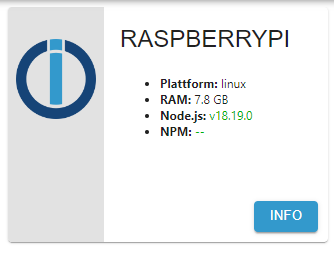
Heute ist mir augefallen, dass unter NPM Version plötzlich kein Eintrage mehr vorhanden ist. Auch der iob fix ändert nichts daran. Was genau ist denn da verloren gegangen?
iob diag sagt:
======== Start marking the full check here =========

Skript v.2023-10-10

*** BASE SYSTEM ***
 Static hostname: raspberrypi
       Icon name: computer
Operating System: Debian GNU/Linux 12 (bookworm)
          Kernel: Linux 6.1.0-rpi7-rpi-2712
    Architecture: arm64

Model           : Raspberry Pi 5 Model B Rev 1.0
Docker          : false
Virtualization  : none
Kernel          : aarch64
Userland        : arm64

Systemuptime and Load:
 23:11:54 up 8 min,  2 users,  load average: 0.07, 0.14, 0.12
CPU threads: 4


*** RASPBERRY THROTTLING ***
Current issues:
No throttling issues detected.

Previously detected issues:
No throttling issues detected.

*** Time and Time Zones ***
               Local time: Sat 2024-01-13 23:11:54 CET
           Universal time: Sat 2024-01-13 22:11:54 UTC
                 RTC time: Sat 2024-01-13 22:11:54
                Time zone: Europe/Berlin (CET, +0100)
System clock synchronized: yes
              NTP service: active
          RTC in local TZ: no

*** User and Groups ***
raspberrypi
/home/raspberrypi
raspberrypi adm dialout cdrom sudo audio video plugdev games users input render netdev gpio i2c spi iobroker

*** X-Server-Setup ***
X-Server:       false
Desktop:
Terminal:       tty
Boot Target:    multi-user.target

*** MEMORY ***
               total        used        free      shared  buff/cache   available
Mem:            8.4G        551M        7.4G        5.3M        578M        7.9G
Swap:           104M          0B        104M
Total:          8.5G        551M        7.5G

         8053 M total memory
          526 M used memory
          448 M active memory
          368 M inactive memory
         7075 M free memory
           38 M buffer memory
          513 M swap cache
           99 M total swap
            0 M used swap
           99 M free swap

Raspberry only:
vc_gencmd_read_response returned -1
error=1 error_msg="Command not registered"

*** FAILED SERVICES ***

  UNIT LOAD ACTIVE SUB DESCRIPTION
0 loaded units listed.

*** FILESYSTEM ***
Filesystem     Type      Size  Used Avail Use% Mounted on
udev           devtmpfs  3.8G     0  3.8G   0% /dev
tmpfs          tmpfs     806M  5.0M  801M   1% /run
/dev/mmcblk0p2 ext4       29G  3.1G   25G  12% /
tmpfs          tmpfs     4.0G     0  4.0G   0% /dev/shm
tmpfs          tmpfs     5.0M   48K  5.0M   1% /run/lock
/dev/mmcblk0p1 vfat      510M   61M  450M  12% /boot/firmware
tmpfs          tmpfs     806M     0  806M   0% /run/user/1000

Messages concerning ext4 filesystem in dmesg:
[Sat Jan 13 23:03:23 2024] Kernel command line: coherent_pool=1M 8250.nr_uarts=1 pci=pcie_bus_safe snd_bcm2835.enable_compat_alsa=0 snd_bcm2835.enable_hdmi=1  smsc95xx.macaddr=D8:3A:DD:9F:EC:6D vc_mem.mem_base=0x3fc00000 vc_mem.mem_size=0x40000000  console=ttyAMA10,115200 console=tty1 root=PARTUUID=5345508a-02 rootfstype=ext4 fsck.repair=yes rootwait
[Sat Jan 13 23:03:26 2024] EXT4-fs (mmcblk0p2): mounted filesystem with ordered data mode. Quota mode: none.
[Sat Jan 13 23:03:27 2024] EXT4-fs (mmcblk0p2): re-mounted. Quota mode: none.

Show mounted filesystems \(real ones only\):
TARGET           SOURCE         FSTYPE OPTIONS
/                /dev/mmcblk0p2 ext4   rw,noatime
`-/boot/firmware /dev/mmcblk0p1 vfat   rw,relatime,fmask=0022,dmask=0022,codepage=437,iocharset=ascii,shortname=mixed,errors=remount-ro

Files in neuralgic directories:

/var:
647M    /var/
201M    /var/cache
195M    /var/cache/apt
180M    /var/log/journal/a4011e8f7f8b4939ab0880dbe44464f0
180M    /var/log/journal

Archived and active journals take up 179.0M in the file system.

/opt/iobroker/backups:
4.0K    /opt/iobroker/backups/

/opt/iobroker/iobroker-data:
26M     /opt/iobroker/iobroker-data/
18M     /opt/iobroker/iobroker-data/files
13M     /opt/iobroker/iobroker-data/files/admin.admin/custom/static/js
13M     /opt/iobroker/iobroker-data/files/admin.admin/custom/static
13M     /opt/iobroker/iobroker-data/files/admin.admin/custom

The five largest files in iobroker-data are:
8.3M    /opt/iobroker/iobroker-data/objects.jsonl
6.3M    /opt/iobroker/iobroker-data/files/admin.admin/custom/static/js/vendors-node_modules_iobroker_adapter-react-v5_assets_devices_parseNames_js-node_modules_iobr-99c23e.847b8ad9.chunk.js.map
2.8M    /opt/iobroker/iobroker-data/files/admin.admin/custom/static/js/vendors-node_modules_iobroker_adapter-react-v5_assets_devices_parseNames_js-node_modules_iobr-99c23e.847b8ad9.chunk.js
1.6M    /opt/iobroker/iobroker-data/files/admin.admin/custom/static/js/vendors-node_modules_mui_material_Accordion_index_js-node_modules_mui_material_AccordionDetai-57e02d.0886b730.chunk.js.map
652K    /opt/iobroker/iobroker-data/files/admin.admin/custom/static/js/vendors-node_modules_mui_material_index_js.40e01f69.chunk.js.map

USB-Devices by-id:
USB-Sticks -  Avoid direct links to /dev/* in your adapter setups, please always prefer the links 'by-id':

find: '/dev/serial/by-id/': No such file or directory

*** NodeJS-Installation ***

/usr/bin/nodejs         v18.19.0
/usr/bin/node           v18.19.0
/home/iobroker/.diag.sh: line 279: npm: command not found

/home/iobroker/.diag.sh: line 280: npx: command not found

/home/iobroker/.diag.sh: line 281: corepack: command not found

/home/iobroker/.diag.sh: line 290: npm: command not found
/home/iobroker/.diag.sh: line 291: npx: command not found
*** nodejs is NOT correctly installed ***

nodejs:
  Installed: 18.19.0+dfsg-6~deb12u1
  Candidate: 18.19.0+dfsg-6~deb12u1
  Version table:
 *** 18.19.0+dfsg-6~deb12u1 500
        500 http://deb.debian.org/debian-security bookworm-security/main arm64 Packages
        100 /var/lib/dpkg/status
     18.19.0-1nodesource1 500
        500 https://deb.nodesource.com/node_18.x nodistro/main arm64 Packages
     18.18.2-1nodesource1 500
        500 https://deb.nodesource.com/node_18.x nodistro/main arm64 Packages
     18.18.1-1nodesource1 500
        500 https://deb.nodesource.com/node_18.x nodistro/main arm64 Packages
     18.18.0-1nodesource1 500
        500 https://deb.nodesource.com/node_18.x nodistro/main arm64 Packages
     18.17.1-1nodesource1 500
        500 https://deb.nodesource.com/node_18.x nodistro/main arm64 Packages
     18.17.0-1nodesource1 500
        500 https://deb.nodesource.com/node_18.x nodistro/main arm64 Packages
     18.16.1-1nodesource1 500
        500 https://deb.nodesource.com/node_18.x nodistro/main arm64 Packages
     18.16.0-1nodesource1 500
        500 https://deb.nodesource.com/node_18.x nodistro/main arm64 Packages
     18.15.0-1nodesource1 500
        500 https://deb.nodesource.com/node_18.x nodistro/main arm64 Packages
     18.14.2-1nodesource1 500
        500 https://deb.nodesource.com/node_18.x nodistro/main arm64 Packages
     18.14.1-1nodesource1 500
        500 https://deb.nodesource.com/node_18.x nodistro/main arm64 Packages
     18.14.0-1nodesource1 500
        500 https://deb.nodesource.com/node_18.x nodistro/main arm64 Packages
     18.13.0+dfsg1-1 500
        500 http://deb.debian.org/debian bookworm/main arm64 Packages
     18.13.0-1nodesource1 500
        500 https://deb.nodesource.com/node_18.x nodistro/main arm64 Packages
     18.12.0-1nodesource1 500
        500 https://deb.nodesource.com/node_18.x nodistro/main arm64 Packages
     18.11.0-1nodesource1 500
        500 https://deb.nodesource.com/node_18.x nodistro/main arm64 Packages
     18.10.0-1nodesource1 500
        500 https://deb.nodesource.com/node_18.x nodistro/main arm64 Packages
     18.9.1-1nodesource1 500
        500 https://deb.nodesource.com/node_18.x nodistro/main arm64 Packages
     18.9.0-1nodesource1 500
        500 https://deb.nodesource.com/node_18.x nodistro/main arm64 Packages
     18.8.0-1nodesource1 500
        500 https://deb.nodesource.com/node_18.x nodistro/main arm64 Packages
     18.7.0-1nodesource1 500
        500 https://deb.nodesource.com/node_18.x nodistro/main arm64 Packages
     18.6.0-1nodesource1 500
        500 https://deb.nodesource.com/node_18.x nodistro/main arm64 Packages
     18.5.0-1nodesource1 500
        500 https://deb.nodesource.com/node_18.x nodistro/main arm64 Packages
     18.4.0-1nodesource1 500
        500 https://deb.nodesource.com/node_18.x nodistro/main arm64 Packages
     18.3.0-1nodesource1 500
        500 https://deb.nodesource.com/node_18.x nodistro/main arm64 Packages
     18.2.0-1nodesource1 500
        500 https://deb.nodesource.com/node_18.x nodistro/main arm64 Packages
     18.1.0-1nodesource1 500
        500 https://deb.nodesource.com/node_18.x nodistro/main arm64 Packages
     18.0.0-1nodesource1 500
        500 https://deb.nodesource.com/node_18.x nodistro/main arm64 Packages

Temp directories causing npm8 problem: 0
No problems detected

/home/iobroker/.diag.sh: line 360: npm: command not found
Errors in npm tree:

*** ioBroker-Installation ***

ioBroker Status
iobroker is running on this host.


Objects type: jsonl
States  type: jsonl

Core adapters versions
js-controller:  5.0.17
admin:          6.12.0
javascript:     "javascript" not found

/home/iobroker/.diag.sh: line 375: npm: command not found
Adapters from github:   0

Adapter State
+ system.adapter.admin.0                  : admin                 : raspberrypi                              -  enabled, port: 8081, bind: 0.0.0.0, run as: admin
  system.adapter.backitup.0               : backitup              : raspberrypi                              - disabled
+ system.adapter.discovery.0              : discovery             : raspberrypi                              -  enabled
  system.adapter.info.0                   : info                  : raspberrypi                              - disabled
+ system.adapter.rpi2.0                   : rpi2                  : raspberrypi                              -  enabled
  system.adapter.systeminfo.0             : systeminfo            : raspberrypi                              - disabled

+ instance is alive

Enabled adapters with bindings
+ system.adapter.admin.0                  : admin                 : raspberrypi                              -  enabled, port: 8081, bind: 0.0.0.0, run as: admin

ioBroker-Repositories
stable        : http://download.iobroker.net/sources-dist.json
beta          : http://download.iobroker.net/sources-dist-latest.json

Active repo(s): stable

Installed ioBroker-Instances
Used repository: stable
Adapter    "admin"        : 6.12.0   , installed 6.12.0
Adapter    "backitup"     : 2.9.8    , installed 2.9.8
Adapter    "discovery"    : 4.2.0    , installed 4.2.0
Adapter    "info"         : 2.0.0    , installed 2.0.0
Controller "js-controller": 5.0.17   , installed 5.0.17
Adapter    "rpi2"         : 1.3.2    , installed 1.3.2
Adapter    "systeminfo"   : 1.1.0    , installed 1.1.0

Objects and States
Please stand by - This may take a while
Objects:        317
States:         144

*** OS-Repositories and Updates ***
Hit:1 http://deb.debian.org/debian bookworm InRelease
Hit:2 http://deb.debian.org/debian-security bookworm-security InRelease
Hit:3 http://deb.debian.org/debian bookworm-updates InRelease
Hit:4 http://archive.raspberrypi.com/debian bookworm InRelease
Hit:5 https://deb.nodesource.com/node_18.x nodistro InRelease
Reading package lists...
Pending Updates: 0

*** Listening Ports ***
Active Internet connections (only servers)
Proto Recv-Q Send-Q Local Address           Foreign Address         State       User       Inode      PID/Program name
tcp        0      0 0.0.0.0:22              0.0.0.0:*               LISTEN      0          16484      792/sshd: /usr/sbin
tcp        0      0 127.0.0.1:9000          0.0.0.0:*               LISTEN      1001       19865      2050/iobroker.js-co
tcp        0      0 127.0.0.1:9001          0.0.0.0:*               LISTEN      1001       19858      2050/iobroker.js-co
tcp6       0      0 :::22                   :::*                    LISTEN      0          16486      792/sshd: /usr/sbin
tcp6       0      0 :::8081                 :::*                    LISTEN      1001       19927      2068/io.admin.0
udp        0      0 0.0.0.0:52881           0.0.0.0:*                           104        13678      671/avahi-daemon: r
udp        0      0 0.0.0.0:5353            0.0.0.0:*                           104        13676      671/avahi-daemon: r
udp6       0      0 fe80::316b:9f15:ce4:546 :::*                                0          887        753/NetworkManager
udp6       0      0 :::5353                 :::*                                104        13677      671/avahi-daemon: r
udp6       0      0 :::50673                :::*                                104        13679      671/avahi-daemon: r

*** Log File - Last 25 Lines ***

2024-01-13 23:07:15.941  - info: host.raspberrypi connected to Objects and States
2024-01-13 23:07:15.955  - info: host.raspberrypi added notifications configuration of host
2024-01-13 23:07:16.179  - info: host.raspberrypi 6 instances found
2024-01-13 23:07:16.186  - info: host.raspberrypi starting 3 instances
2024-01-13 23:07:16.212  - info: host.raspberrypi instance system.adapter.admin.0 started with pid 2068
2024-01-13 23:07:17.345  - info: admin.0 (2068) starting. Version 6.12.0 in /opt/iobroker/node_modules/iobroker.admin, node: v18.19.0, js-controller: 5.0.17
2024-01-13 23:07:17.367  - info: admin.0 (2068) requesting all objects
2024-01-13 23:07:17.720  - info: admin.0 (2068) received all objects
2024-01-13 23:07:17.817  - info: admin.0 (2068) Request actual repository...
2024-01-13 23:07:17.828  - info: admin.0 (2068) socket.io server listening on port 8081
2024-01-13 23:07:17.831  - info: admin.0 (2068) http server listening on port 8081
2024-01-13 23:07:17.831  - info: admin.0 (2068) Use link "http://127.0.0.1:8081" to configure.
2024-01-13 23:07:18.017  - info: admin.0 (2068) ==> Connected system.user.admin from ::ffff:192.168.178.46
2024-01-13 23:07:18.044  - info: host.raspberrypi Updating repository "stable" under "http://download.iobroker.net/sources-dist.json"
2024-01-13 23:07:18.371  - warn: admin.0 (2068) Cannot check node.js/npm version
2024-01-13 23:07:19.136  - info: admin.0 (2068) Repository received successfully.
2024-01-13 23:07:20.206  - info: host.raspberrypi instance system.adapter.rpi2.0 started with pid 2085
2024-01-13 23:07:21.058  - info: rpi2.0 (2085) starting. Version 1.3.2 in /opt/iobroker/node_modules/iobroker.rpi2, node: v18.19.0, js-controller: 5.0.17
2024-01-13 23:07:24.199  - info: host.raspberrypi instance system.adapter.discovery.0 started with pid 2128
2024-01-13 23:07:25.091  - info: discovery.0 (2128) starting. Version 4.2.0 in /opt/iobroker/node_modules/iobroker.discovery, node: v18.19.0, js-controller: 5.0.17
2024-01-13 23:07:26.770  - info: admin.0 (2068) <== Disconnect system.user.admin from ::ffff:192.168.178.46 admin
2024-01-13 23:07:27.497  - info: admin.0 (2068) ==> Connected system.user.admin from ::ffff:192.168.178.46
2024-01-13 23:09:00.042  - info: admin.0 (2068) ==> Connected system.user.admin from ::ffff:192.168.178.46
2024-01-13 23:09:01.003  - info: host.raspberrypi Updating repository "stable" under "http://download.iobroker.net/sources-dist.json"
2024-01-13 23:09:08.942  - info: admin.0 (2068) <== Disconnect system.user.admin from ::ffff:192.168.178.46

============ Mark until here for C&P =============
und
======================= SUMMARY =======================
                        v.2023-10-10


 Static hostname: raspberrypi
       Icon name: computer
Operating System: Debian GNU/Linux 12 (bookworm)
          Kernel: Linux 6.1.0-rpi7-rpi-2712
    Architecture: arm64

Installation:           native
Kernel:                 aarch64
Userland:               arm64
Timezone:               Europe/Berlin (CET, +0100)
User-ID:                1000
X-Server:               false
Boot Target:            multi-user.target

Pending OS-Updates:     0
Pending iob updates:    0

Nodejs-Installation:    /usr/bin/nodejs         v18.19.0
                        /usr/bin/node           v18.19.0
/home/iobroker/.diag.sh: line 488: npm: command not found

/home/iobroker/.diag.sh: line 489: npx: command not found

/home/iobroker/.diag.sh: line 490: corepack: command not found


Recommended versions are nodejs 18.19.0 and npm 10.2.3
*** nodejs is NOT correctly installed ***
Wrong installation path detected. This needs to be fixed.

Please check
https://forum.iobroker.net/topic/35090/howto-nodejs-installation-und-upgrades-unter-debian
for more information on how to fix these errors.

MEMORY:
               total        used        free      shared  buff/cache   available
Mem:            8.4G        574M        7.4G        5.3M        591M        7.9G
Swap:           104M          0B        104M
Total:          8.5G        574M        7.5G

Active iob-Instances:   4
Active repo(s): stable

ioBroker Core:          js-controller           5.0.17
                        admin                   6.12.0

ioBroker Status:        iobroker is running on this host.


Objects type: jsonl
States  type: jsonl

Status admin and web instance:
+ system.adapter.admin.0                  : admin                 : raspberrypi                              -  enabled, port: 8081, bind: 0.0.0.0, run as: admin

Objects:                317
States:                 144

Size of iob-Database:

8.3M    /opt/iobroker/iobroker-data/objects.jsonl
408K    /opt/iobroker/iobroker-data/states.jsonl


=================== END OF SUMMARY ====================
Scheint also tatsächlich ein Problem zu geben. Allderdings frage ich mich woher das kommt. Bisher ist da wie gesagt quasi nichts gelaufen und es wurden die updates immer über "sudo apt update && sudo apt full-upgrade" installiert.
Die Installationspafde (dachte ich zumindest) sollten doch bei einer Neusinstallation korrekt sein oder? Oder muss hier auch das ReperaturSkript drüber laufen?
Danke vorab für die Hilfe.
-
Hallo Zusammen,
ich habe einen RaspberryPI vor einigen Wochen frisch aufgesetzt und bereite langsam einen Umzug auf die neue Hardware und auch Software vor. Bullseye naht ja dem Ende und ich wollte damit auch gleich auf Bookworm wechslen.
Bisher ist auf dem RaspberryPI 5 nur der Iobroker und quasi keine Adapter installiert. Ich starte diesen alle paar Tage und spiele dort etwas rum.
Heute ist mir augefallen, dass unter NPM Version plötzlich kein Eintrage mehr vorhanden ist. Auch der iob fix ändert nichts daran. Was genau ist denn da verloren gegangen?
iob diag sagt:
======== Start marking the full check here =========

Skript v.2023-10-10

*** BASE SYSTEM ***
 Static hostname: raspberrypi
       Icon name: computer
Operating System: Debian GNU/Linux 12 (bookworm)
          Kernel: Linux 6.1.0-rpi7-rpi-2712
    Architecture: arm64

Model           : Raspberry Pi 5 Model B Rev 1.0
Docker          : false
Virtualization  : none
Kernel          : aarch64
Userland        : arm64

Systemuptime and Load:
 23:11:54 up 8 min,  2 users,  load average: 0.07, 0.14, 0.12
CPU threads: 4


*** RASPBERRY THROTTLING ***
Current issues:
No throttling issues detected.

Previously detected issues:
No throttling issues detected.

*** Time and Time Zones ***
               Local time: Sat 2024-01-13 23:11:54 CET
           Universal time: Sat 2024-01-13 22:11:54 UTC
                 RTC time: Sat 2024-01-13 22:11:54
                Time zone: Europe/Berlin (CET, +0100)
System clock synchronized: yes
              NTP service: active
          RTC in local TZ: no

*** User and Groups ***
raspberrypi
/home/raspberrypi
raspberrypi adm dialout cdrom sudo audio video plugdev games users input render netdev gpio i2c spi iobroker

*** X-Server-Setup ***
X-Server:       false
Desktop:
Terminal:       tty
Boot Target:    multi-user.target

*** MEMORY ***
               total        used        free      shared  buff/cache   available
Mem:            8.4G        551M        7.4G        5.3M        578M        7.9G
Swap:           104M          0B        104M
Total:          8.5G        551M        7.5G

         8053 M total memory
          526 M used memory
          448 M active memory
          368 M inactive memory
         7075 M free memory
           38 M buffer memory
          513 M swap cache
           99 M total swap
            0 M used swap
           99 M free swap

Raspberry only:
vc_gencmd_read_response returned -1
error=1 error_msg="Command not registered"

*** FAILED SERVICES ***

  UNIT LOAD ACTIVE SUB DESCRIPTION
0 loaded units listed.

*** FILESYSTEM ***
Filesystem     Type      Size  Used Avail Use% Mounted on
udev           devtmpfs  3.8G     0  3.8G   0% /dev
tmpfs          tmpfs     806M  5.0M  801M   1% /run
/dev/mmcblk0p2 ext4       29G  3.1G   25G  12% /
tmpfs          tmpfs     4.0G     0  4.0G   0% /dev/shm
tmpfs          tmpfs     5.0M   48K  5.0M   1% /run/lock
/dev/mmcblk0p1 vfat      510M   61M  450M  12% /boot/firmware
tmpfs          tmpfs     806M     0  806M   0% /run/user/1000

Messages concerning ext4 filesystem in dmesg:
[Sat Jan 13 23:03:23 2024] Kernel command line: coherent_pool=1M 8250.nr_uarts=1 pci=pcie_bus_safe snd_bcm2835.enable_compat_alsa=0 snd_bcm2835.enable_hdmi=1  smsc95xx.macaddr=D8:3A:DD:9F:EC:6D vc_mem.mem_base=0x3fc00000 vc_mem.mem_size=0x40000000  console=ttyAMA10,115200 console=tty1 root=PARTUUID=5345508a-02 rootfstype=ext4 fsck.repair=yes rootwait
[Sat Jan 13 23:03:26 2024] EXT4-fs (mmcblk0p2): mounted filesystem with ordered data mode. Quota mode: none.
[Sat Jan 13 23:03:27 2024] EXT4-fs (mmcblk0p2): re-mounted. Quota mode: none.

Show mounted filesystems \(real ones only\):
TARGET           SOURCE         FSTYPE OPTIONS
/                /dev/mmcblk0p2 ext4   rw,noatime
`-/boot/firmware /dev/mmcblk0p1 vfat   rw,relatime,fmask=0022,dmask=0022,codepage=437,iocharset=ascii,shortname=mixed,errors=remount-ro

Files in neuralgic directories:

/var:
647M    /var/
201M    /var/cache
195M    /var/cache/apt
180M    /var/log/journal/a4011e8f7f8b4939ab0880dbe44464f0
180M    /var/log/journal

Archived and active journals take up 179.0M in the file system.

/opt/iobroker/backups:
4.0K    /opt/iobroker/backups/

/opt/iobroker/iobroker-data:
26M     /opt/iobroker/iobroker-data/
18M     /opt/iobroker/iobroker-data/files
13M     /opt/iobroker/iobroker-data/files/admin.admin/custom/static/js
13M     /opt/iobroker/iobroker-data/files/admin.admin/custom/static
13M     /opt/iobroker/iobroker-data/files/admin.admin/custom

The five largest files in iobroker-data are:
8.3M    /opt/iobroker/iobroker-data/objects.jsonl
6.3M    /opt/iobroker/iobroker-data/files/admin.admin/custom/static/js/vendors-node_modules_iobroker_adapter-react-v5_assets_devices_parseNames_js-node_modules_iobr-99c23e.847b8ad9.chunk.js.map
2.8M    /opt/iobroker/iobroker-data/files/admin.admin/custom/static/js/vendors-node_modules_iobroker_adapter-react-v5_assets_devices_parseNames_js-node_modules_iobr-99c23e.847b8ad9.chunk.js
1.6M    /opt/iobroker/iobroker-data/files/admin.admin/custom/static/js/vendors-node_modules_mui_material_Accordion_index_js-node_modules_mui_material_AccordionDetai-57e02d.0886b730.chunk.js.map
652K    /opt/iobroker/iobroker-data/files/admin.admin/custom/static/js/vendors-node_modules_mui_material_index_js.40e01f69.chunk.js.map

USB-Devices by-id:
USB-Sticks -  Avoid direct links to /dev/* in your adapter setups, please always prefer the links 'by-id':

find: '/dev/serial/by-id/': No such file or directory

*** NodeJS-Installation ***

/usr/bin/nodejs         v18.19.0
/usr/bin/node           v18.19.0
/home/iobroker/.diag.sh: line 279: npm: command not found

/home/iobroker/.diag.sh: line 280: npx: command not found

/home/iobroker/.diag.sh: line 281: corepack: command not found

/home/iobroker/.diag.sh: line 290: npm: command not found
/home/iobroker/.diag.sh: line 291: npx: command not found
*** nodejs is NOT correctly installed ***

nodejs:
  Installed: 18.19.0+dfsg-6~deb12u1
  Candidate: 18.19.0+dfsg-6~deb12u1
  Version table:
 *** 18.19.0+dfsg-6~deb12u1 500
        500 http://deb.debian.org/debian-security bookworm-security/main arm64 Packages
        100 /var/lib/dpkg/status
     18.19.0-1nodesource1 500
        500 https://deb.nodesource.com/node_18.x nodistro/main arm64 Packages
     18.18.2-1nodesource1 500
        500 https://deb.nodesource.com/node_18.x nodistro/main arm64 Packages
     18.18.1-1nodesource1 500
        500 https://deb.nodesource.com/node_18.x nodistro/main arm64 Packages
     18.18.0-1nodesource1 500
        500 https://deb.nodesource.com/node_18.x nodistro/main arm64 Packages
     18.17.1-1nodesource1 500
        500 https://deb.nodesource.com/node_18.x nodistro/main arm64 Packages
     18.17.0-1nodesource1 500
        500 https://deb.nodesource.com/node_18.x nodistro/main arm64 Packages
     18.16.1-1nodesource1 500
        500 https://deb.nodesource.com/node_18.x nodistro/main arm64 Packages
     18.16.0-1nodesource1 500
        500 https://deb.nodesource.com/node_18.x nodistro/main arm64 Packages
     18.15.0-1nodesource1 500
        500 https://deb.nodesource.com/node_18.x nodistro/main arm64 Packages
     18.14.2-1nodesource1 500
        500 https://deb.nodesource.com/node_18.x nodistro/main arm64 Packages
     18.14.1-1nodesource1 500
        500 https://deb.nodesource.com/node_18.x nodistro/main arm64 Packages
     18.14.0-1nodesource1 500
        500 https://deb.nodesource.com/node_18.x nodistro/main arm64 Packages
     18.13.0+dfsg1-1 500
        500 http://deb.debian.org/debian bookworm/main arm64 Packages
     18.13.0-1nodesource1 500
        500 https://deb.nodesource.com/node_18.x nodistro/main arm64 Packages
     18.12.0-1nodesource1 500
        500 https://deb.nodesource.com/node_18.x nodistro/main arm64 Packages
     18.11.0-1nodesource1 500
        500 https://deb.nodesource.com/node_18.x nodistro/main arm64 Packages
     18.10.0-1nodesource1 500
        500 https://deb.nodesource.com/node_18.x nodistro/main arm64 Packages
     18.9.1-1nodesource1 500
        500 https://deb.nodesource.com/node_18.x nodistro/main arm64 Packages
     18.9.0-1nodesource1 500
        500 https://deb.nodesource.com/node_18.x nodistro/main arm64 Packages
     18.8.0-1nodesource1 500
        500 https://deb.nodesource.com/node_18.x nodistro/main arm64 Packages
     18.7.0-1nodesource1 500
        500 https://deb.nodesource.com/node_18.x nodistro/main arm64 Packages
     18.6.0-1nodesource1 500
        500 https://deb.nodesource.com/node_18.x nodistro/main arm64 Packages
     18.5.0-1nodesource1 500
        500 https://deb.nodesource.com/node_18.x nodistro/main arm64 Packages
     18.4.0-1nodesource1 500
        500 https://deb.nodesource.com/node_18.x nodistro/main arm64 Packages
     18.3.0-1nodesource1 500
        500 https://deb.nodesource.com/node_18.x nodistro/main arm64 Packages
     18.2.0-1nodesource1 500
        500 https://deb.nodesource.com/node_18.x nodistro/main arm64 Packages
     18.1.0-1nodesource1 500
        500 https://deb.nodesource.com/node_18.x nodistro/main arm64 Packages
     18.0.0-1nodesource1 500
        500 https://deb.nodesource.com/node_18.x nodistro/main arm64 Packages

Temp directories causing npm8 problem: 0
No problems detected

/home/iobroker/.diag.sh: line 360: npm: command not found
Errors in npm tree:

*** ioBroker-Installation ***

ioBroker Status
iobroker is running on this host.


Objects type: jsonl
States  type: jsonl

Core adapters versions
js-controller:  5.0.17
admin:          6.12.0
javascript:     "javascript" not found

/home/iobroker/.diag.sh: line 375: npm: command not found
Adapters from github:   0

Adapter State
+ system.adapter.admin.0                  : admin                 : raspberrypi                              -  enabled, port: 8081, bind: 0.0.0.0, run as: admin
  system.adapter.backitup.0               : backitup              : raspberrypi                              - disabled
+ system.adapter.discovery.0              : discovery             : raspberrypi                              -  enabled
  system.adapter.info.0                   : info                  : raspberrypi                              - disabled
+ system.adapter.rpi2.0                   : rpi2                  : raspberrypi                              -  enabled
  system.adapter.systeminfo.0             : systeminfo            : raspberrypi                              - disabled

+ instance is alive

Enabled adapters with bindings
+ system.adapter.admin.0                  : admin                 : raspberrypi                              -  enabled, port: 8081, bind: 0.0.0.0, run as: admin

ioBroker-Repositories
stable        : http://download.iobroker.net/sources-dist.json
beta          : http://download.iobroker.net/sources-dist-latest.json

Active repo(s): stable

Installed ioBroker-Instances
Used repository: stable
Adapter    "admin"        : 6.12.0   , installed 6.12.0
Adapter    "backitup"     : 2.9.8    , installed 2.9.8
Adapter    "discovery"    : 4.2.0    , installed 4.2.0
Adapter    "info"         : 2.0.0    , installed 2.0.0
Controller "js-controller": 5.0.17   , installed 5.0.17
Adapter    "rpi2"         : 1.3.2    , installed 1.3.2
Adapter    "systeminfo"   : 1.1.0    , installed 1.1.0

Objects and States
Please stand by - This may take a while
Objects:        317
States:         144

*** OS-Repositories and Updates ***
Hit:1 http://deb.debian.org/debian bookworm InRelease
Hit:2 http://deb.debian.org/debian-security bookworm-security InRelease
Hit:3 http://deb.debian.org/debian bookworm-updates InRelease
Hit:4 http://archive.raspberrypi.com/debian bookworm InRelease
Hit:5 https://deb.nodesource.com/node_18.x nodistro InRelease
Reading package lists...
Pending Updates: 0

*** Listening Ports ***
Active Internet connections (only servers)
Proto Recv-Q Send-Q Local Address           Foreign Address         State       User       Inode      PID/Program name
tcp        0      0 0.0.0.0:22              0.0.0.0:*               LISTEN      0          16484      792/sshd: /usr/sbin
tcp        0      0 127.0.0.1:9000          0.0.0.0:*               LISTEN      1001       19865      2050/iobroker.js-co
tcp        0      0 127.0.0.1:9001          0.0.0.0:*               LISTEN      1001       19858      2050/iobroker.js-co
tcp6       0      0 :::22                   :::*                    LISTEN      0          16486      792/sshd: /usr/sbin
tcp6       0      0 :::8081                 :::*                    LISTEN      1001       19927      2068/io.admin.0
udp        0      0 0.0.0.0:52881           0.0.0.0:*                           104        13678      671/avahi-daemon: r
udp        0      0 0.0.0.0:5353            0.0.0.0:*                           104        13676      671/avahi-daemon: r
udp6       0      0 fe80::316b:9f15:ce4:546 :::*                                0          887        753/NetworkManager
udp6       0      0 :::5353                 :::*                                104        13677      671/avahi-daemon: r
udp6       0      0 :::50673                :::*                                104        13679      671/avahi-daemon: r

*** Log File - Last 25 Lines ***

2024-01-13 23:07:15.941  - info: host.raspberrypi connected to Objects and States
2024-01-13 23:07:15.955  - info: host.raspberrypi added notifications configuration of host
2024-01-13 23:07:16.179  - info: host.raspberrypi 6 instances found
2024-01-13 23:07:16.186  - info: host.raspberrypi starting 3 instances
2024-01-13 23:07:16.212  - info: host.raspberrypi instance system.adapter.admin.0 started with pid 2068
2024-01-13 23:07:17.345  - info: admin.0 (2068) starting. Version 6.12.0 in /opt/iobroker/node_modules/iobroker.admin, node: v18.19.0, js-controller: 5.0.17
2024-01-13 23:07:17.367  - info: admin.0 (2068) requesting all objects
2024-01-13 23:07:17.720  - info: admin.0 (2068) received all objects
2024-01-13 23:07:17.817  - info: admin.0 (2068) Request actual repository...
2024-01-13 23:07:17.828  - info: admin.0 (2068) socket.io server listening on port 8081
2024-01-13 23:07:17.831  - info: admin.0 (2068) http server listening on port 8081
2024-01-13 23:07:17.831  - info: admin.0 (2068) Use link "http://127.0.0.1:8081" to configure.
2024-01-13 23:07:18.017  - info: admin.0 (2068) ==> Connected system.user.admin from ::ffff:192.168.178.46
2024-01-13 23:07:18.044  - info: host.raspberrypi Updating repository "stable" under "http://download.iobroker.net/sources-dist.json"
2024-01-13 23:07:18.371  - warn: admin.0 (2068) Cannot check node.js/npm version
2024-01-13 23:07:19.136  - info: admin.0 (2068) Repository received successfully.
2024-01-13 23:07:20.206  - info: host.raspberrypi instance system.adapter.rpi2.0 started with pid 2085
2024-01-13 23:07:21.058  - info: rpi2.0 (2085) starting. Version 1.3.2 in /opt/iobroker/node_modules/iobroker.rpi2, node: v18.19.0, js-controller: 5.0.17
2024-01-13 23:07:24.199  - info: host.raspberrypi instance system.adapter.discovery.0 started with pid 2128
2024-01-13 23:07:25.091  - info: discovery.0 (2128) starting. Version 4.2.0 in /opt/iobroker/node_modules/iobroker.discovery, node: v18.19.0, js-controller: 5.0.17
2024-01-13 23:07:26.770  - info: admin.0 (2068) <== Disconnect system.user.admin from ::ffff:192.168.178.46 admin
2024-01-13 23:07:27.497  - info: admin.0 (2068) ==> Connected system.user.admin from ::ffff:192.168.178.46
2024-01-13 23:09:00.042  - info: admin.0 (2068) ==> Connected system.user.admin from ::ffff:192.168.178.46
2024-01-13 23:09:01.003  - info: host.raspberrypi Updating repository "stable" under "http://download.iobroker.net/sources-dist.json"
2024-01-13 23:09:08.942  - info: admin.0 (2068) <== Disconnect system.user.admin from ::ffff:192.168.178.46

============ Mark until here for C&P =============
und
======================= SUMMARY =======================
                        v.2023-10-10


 Static hostname: raspberrypi
       Icon name: computer
Operating System: Debian GNU/Linux 12 (bookworm)
          Kernel: Linux 6.1.0-rpi7-rpi-2712
    Architecture: arm64

Installation:           native
Kernel:                 aarch64
Userland:               arm64
Timezone:               Europe/Berlin (CET, +0100)
User-ID:                1000
X-Server:               false
Boot Target:            multi-user.target

Pending OS-Updates:     0
Pending iob updates:    0

Nodejs-Installation:    /usr/bin/nodejs         v18.19.0
                        /usr/bin/node           v18.19.0
/home/iobroker/.diag.sh: line 488: npm: command not found

/home/iobroker/.diag.sh: line 489: npx: command not found

/home/iobroker/.diag.sh: line 490: corepack: command not found


Recommended versions are nodejs 18.19.0 and npm 10.2.3
*** nodejs is NOT correctly installed ***
Wrong installation path detected. This needs to be fixed.

Please check
https://forum.iobroker.net/topic/35090/howto-nodejs-installation-und-upgrades-unter-debian
for more information on how to fix these errors.

MEMORY:
               total        used        free      shared  buff/cache   available
Mem:            8.4G        574M        7.4G        5.3M        591M        7.9G
Swap:           104M          0B        104M
Total:          8.5G        574M        7.5G

Active iob-Instances:   4
Active repo(s): stable

ioBroker Core:          js-controller           5.0.17
                        admin                   6.12.0

ioBroker Status:        iobroker is running on this host.


Objects type: jsonl
States  type: jsonl

Status admin and web instance:
+ system.adapter.admin.0                  : admin                 : raspberrypi                              -  enabled, port: 8081, bind: 0.0.0.0, run as: admin

Objects:                317
States:                 144

Size of iob-Database:

8.3M    /opt/iobroker/iobroker-data/objects.jsonl
408K    /opt/iobroker/iobroker-data/states.jsonl


=================== END OF SUMMARY ====================
Scheint also tatsächlich ein Problem zu geben. Allderdings frage ich mich woher das kommt. Bisher ist da wie gesagt quasi nichts gelaufen und es wurden die updates immer über "sudo apt update && sudo apt full-upgrade" installiert.
Die Installationspafde (dachte ich zumindest) sollten doch bei einer Neusinstallation korrekt sein oder? Oder muss hier auch das ReperaturSkript drüber laufen?
Danke vorab für die Hilfe.


Hey! Du scheinst an dieser Unterhaltung interessiert zu sein, hast aber noch kein Konto.
Hast du es satt, bei jedem Besuch durch die gleichen Beiträge zu scrollen? Wenn du dich für ein Konto anmeldest, kommst du immer genau dorthin zurück, wo du zuvor warst, und kannst dich über neue Antworten benachrichtigen lassen (entweder per E-Mail oder Push-Benachrichtigung). Du kannst auch Lesezeichen speichern und Beiträge positiv bewerten, um anderen Community-Mitgliedern deine Wertschätzung zu zeigen.
Mit deinem Input könnte dieser Beitrag noch besser werden 💗
Registrieren Anmelden448
Online33.0k
Benutzende83.7k
Themen1.3m
Beiträge