Skip to content
  • Home
  • Recent
  • Tags
  • 0 Unread 0
  • Categories
  • Unreplied
  • Popular
  • GitHub
  • Docu
  • Hilfe
Skins
  • Light
  • Brite
  • Cerulean
  • Cosmo
  • Flatly
  • Journal
  • Litera
  • Lumen
  • Lux
  • Materia
  • Minty
  • Morph
  • Pulse
  • Sandstone
  • Simplex
  • Sketchy
  • Spacelab
  • United
  • Yeti
  • Zephyr
  • Dark
  • Cyborg
  • Darkly
  • Quartz
  • Slate
  • Solar
  • Superhero
  • Vapor

  • Default (No Skin)
  • No Skin
Collapse
ioBroker Logo

Community Forum

donate donate
  1. ioBroker Community Home
  2. Deutsch
  3. ioBroker Allgemein
  4. [gelöst] Shelly über VIS schalten

NEWS

  • Neuer ioBroker-Blog online: Monatsrückblick März/April 2026
    BluefoxB
    Bluefox
    5
    1
    150

  • Verwendung von KI bitte immer deutlich kennzeichnen
    HomoranH
    Homoran
    8
    1
    176

  • Monatsrückblick Januar/Februar 2026 ist online!
    BluefoxB
    Bluefox
    18
    1
    875

[gelöst] Shelly über VIS schalten

Scheduled Pinned Locked Moved ioBroker Allgemein
36 Posts 3 Posters 3.3k Views 1 Watching
  • Oldest to Newest
  • Newest to Oldest
  • Most Votes
Reply
  • Reply as topic
Log in to reply
This topic has been deleted. Only users with topic management privileges can see it.
  • W woupi

    @paul53

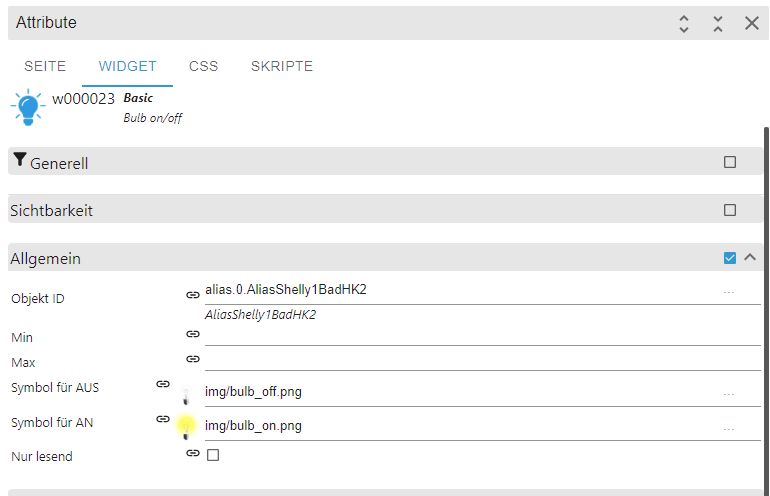
    Widget zeigt auf den Alias:
    950eb413-d7d0-42d7-8d3e-195bed1273ff-image.png

    Alias erstellt:

    {
      "common": {
        "name": "AliasShelly1BadHK2",
        "desc": "Manuell erzeugt",
        "role": "switch",
        "type": "boolean",
        "read": true,
        "write": true,
        "def": false,
        "alias": {
          "id": {
            "read": "mqtt.0.shellies.shelly1-349454734A8E.relay.0",
            "write": "mqtt.0.shellies.shelly1-349454734A8E.relay.0.command"
          },
          "write": "val ? 'on' : 'off'"
        }
      },
      "type": "state",
      "native": {},
      "_id": "alias.0.AliasShelly1BadHK2",
      "acl": {
        "object": 1636,
        "state": 1636,
        "owner": "system.user.admin",
        "ownerGroup": "system.group.administrator"
      },
      "from": "system.adapter.admin.0",
      "user": "system.user.admin",
      "ts": 1707141785818
    }
    

    Leider kein Unterschied:
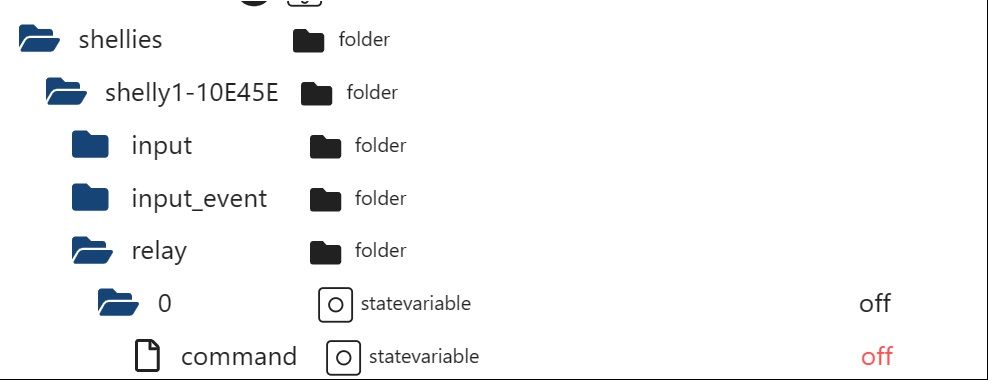
    Im Datenpunkt "mqtt.0.shellies.shelly1-349454734A8E.relay.0" wird 1 oder 0 geschrieben und nicht on oder off.

    Im Datenpunkt "mqtt.0.shellies.shelly1-349454734A8E.relay.0.command" passiert nichts.

    paul53P Offline
    paul53P Offline
    paul53
    wrote on last edited by paul53
    #21

    @woupi sagte: Im Datenpunkt "mqtt.0.shellies.shelly1-349454734A8E.relay.0.command" passiert nichts.

    Verstehe ich nicht. Trage mal im Widget bei "Min" false und bei "Max" true ein.

    Bitte verzichtet auf Chat-Nachrichten, denn die Handhabung ist grauenhaft !
    Produktiv: RPi 2 mit S.USV, HM-MOD-RPI und SLC-USB-Stick mit root fs

    W 1 Reply Last reply
    0
    • paul53P paul53

      @woupi sagte: Im Datenpunkt "mqtt.0.shellies.shelly1-349454734A8E.relay.0.command" passiert nichts.

      Verstehe ich nicht. Trage mal im Widget bei "Min" false und bei "Max" true ein.

      W Offline
      W Offline
      woupi
      wrote on last edited by
      #22

      @paul53

      Verstehe ich nicht.

      Ich leider schon lange nicht mehr.

      Trage mal im Widget bei "Min" false und bei "Max" true ein.

      Habe ich gemacht:
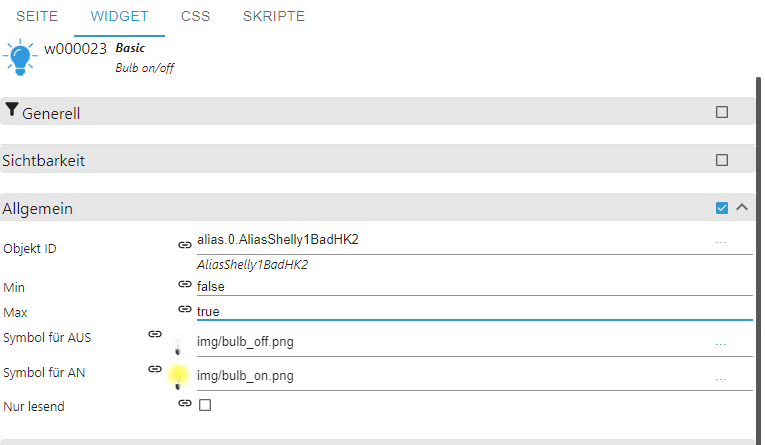
      59c71470-d1c3-4986-ba27-d8e208753dcf-image.png

      Leider das gleiche Ergebnis:

      ab808832-cb49-4d0b-bdee-0be28f834159-image.png

      NUC10i3, Proxmox, VM Ubuntu iobroker, lxc ubuntu influxdb, grafana, lxc ubuntu SAE, lxc ubuntu MotionEye, WP Panasonic Jeisha 5kW mit Heishamon, Shelly 2.5 und 2pm Rolladensteuerung, OpenWB Wallbox

      paul53P 1 Reply Last reply
      0
      • W woupi

        @paul53

        Verstehe ich nicht.

        Ich leider schon lange nicht mehr.

        Trage mal im Widget bei "Min" false und bei "Max" true ein.

        Habe ich gemacht:

        59c71470-d1c3-4986-ba27-d8e208753dcf-image.png

        Leider das gleiche Ergebnis:

        ab808832-cb49-4d0b-bdee-0be28f834159-image.png

        paul53P Offline
        paul53P Offline
        paul53
        wrote on last edited by paul53
        #23

        @woupi sagte: Leider das gleiche Ergebnis:

        Es muss ein Skript geben, das die 1 unbestätigt in den Datenpunkt schreibt?
        Ich habe es mit dem Widget (ohne Min, Max) und einer Emulation

        const idCommand = 'mqtt.0.shellies.Ventilator.relay.0.command';
        const idStatus = 'mqtt.0.shellies.Ventilator.relay.0';
        
        on(idCommand, function(dp) {
            setTimeout(function() {
                setState(idStatus, dp.state.val, true);
            }, 50)
        });
        

        des Shelly getestet: Es funktioniert wie es soll.

        Bitte verzichtet auf Chat-Nachrichten, denn die Handhabung ist grauenhaft !
        Produktiv: RPi 2 mit S.USV, HM-MOD-RPI und SLC-USB-Stick mit root fs

        W 1 Reply Last reply
        0
        • paul53P paul53

          @woupi sagte: Leider das gleiche Ergebnis:

          Es muss ein Skript geben, das die 1 unbestätigt in den Datenpunkt schreibt?
          Ich habe es mit dem Widget (ohne Min, Max) und einer Emulation

          const idCommand = 'mqtt.0.shellies.Ventilator.relay.0.command';
          const idStatus = 'mqtt.0.shellies.Ventilator.relay.0';
          
          on(idCommand, function(dp) {
              setTimeout(function() {
                  setState(idStatus, dp.state.val, true);
              }, 50)
          });
          

          des Shelly getestet: Es funktioniert wie es soll.

          W Offline
          W Offline
          woupi
          wrote on last edited by
          #24

          @paul53

          Ich habe tatsächlich ein Skript, aber:
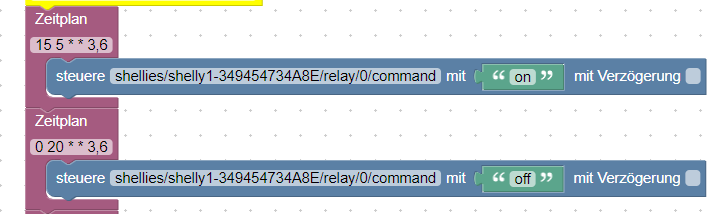
          ff65560c-94ad-49a9-9bb4-b7fdc26765e2-image.png

          Das schreibt zu festen Zeiten Mittwoch und Samstag Morgens um 5:15 ON und Abends um 20 Uhr off.

          Das kann das nicht sein, oder?

          Ein anderes Skript gibt es nicht.

          NUC10i3, Proxmox, VM Ubuntu iobroker, lxc ubuntu influxdb, grafana, lxc ubuntu SAE, lxc ubuntu MotionEye, WP Panasonic Jeisha 5kW mit Heishamon, Shelly 2.5 und 2pm Rolladensteuerung, OpenWB Wallbox

          paul53P 1 Reply Last reply
          0
          • W woupi

            @paul53

            Ich habe tatsächlich ein Skript, aber:
            ff65560c-94ad-49a9-9bb4-b7fdc26765e2-image.png

            Das schreibt zu festen Zeiten Mittwoch und Samstag Morgens um 5:15 ON und Abends um 20 Uhr off.

            Das kann das nicht sein, oder?

            Ein anderes Skript gibt es nicht.

            paul53P Offline
            paul53P Offline
            paul53
            wrote on last edited by paul53
            #25

            @woupi sagte: Ein anderes Skript gibt es nicht.

            Irgendwo muss die unbestätigte 1 im Status-DP herkommen.
            Logge mal alle Aktionen auf dem DP:

            on({id: 'mqtt.0.shellies.shelly1-349454734A8E.relay.0'}, function(dp) {
                log('Shelly1BadHK2: ' + dp.state.val + ', Quelle: ' + dp.state.from);
            });
            

            Bitte verzichtet auf Chat-Nachrichten, denn die Handhabung ist grauenhaft !
            Produktiv: RPi 2 mit S.USV, HM-MOD-RPI und SLC-USB-Stick mit root fs

            W 2 Replies Last reply
            0
            • paul53P paul53

              @woupi sagte: Ein anderes Skript gibt es nicht.

              Irgendwo muss die unbestätigte 1 im Status-DP herkommen.
              Logge mal alle Aktionen auf dem DP:

              on({id: 'mqtt.0.shellies.shelly1-349454734A8E.relay.0'}, function(dp) {
                  log('Shelly1BadHK2: ' + dp.state.val + ', Quelle: ' + dp.state.from);
              });
              
              W Offline
              W Offline
              woupi
              wrote on last edited by
              #26

              @paul53
              Danke, werde ich machen. Sitze gerade im Auto auf dem weg nach Hause, wird leider etwas dauern. Melde mich dann direkt wieder. Vielen Dank nochmal für deine Ausdauer.
              Vg

              NUC10i3, Proxmox, VM Ubuntu iobroker, lxc ubuntu influxdb, grafana, lxc ubuntu SAE, lxc ubuntu MotionEye, WP Panasonic Jeisha 5kW mit Heishamon, Shelly 2.5 und 2pm Rolladensteuerung, OpenWB Wallbox

              1 Reply Last reply
              0
              • W Offline
                W Offline
                woupi
                wrote on last edited by
                #27

                @paul53
                Ich gehe davon aus, dass ich den code als neues JS Skript ausführen soll, richtig?

                Ich frage des halb, weil da ein Fehler kommt.

                javascript.0 (1041) script.js.Testskripte.LogShelly1Dp compile failed: at script.js.Testskripte.LogShelly1Dp:6
                

                NUC10i3, Proxmox, VM Ubuntu iobroker, lxc ubuntu influxdb, grafana, lxc ubuntu SAE, lxc ubuntu MotionEye, WP Panasonic Jeisha 5kW mit Heishamon, Shelly 2.5 und 2pm Rolladensteuerung, OpenWB Wallbox

                paul53P 1 Reply Last reply
                0
                • W woupi

                  @paul53
                  Ich gehe davon aus, dass ich den code als neues JS Skript ausführen soll, richtig?

                  Ich frage des halb, weil da ein Fehler kommt.

                  javascript.0 (1041) script.js.Testskripte.LogShelly1Dp compile failed: at script.js.Testskripte.LogShelly1Dp:6
                  
                  paul53P Offline
                  paul53P Offline
                  paul53
                  wrote on last edited by
                  #28

                  @woupi sagte: code als neues JS Skript ausführen soll, richtig?

                  Richtig.

                  @woupi sagte in [gelöst] Shelly über VIS schalten:

                  Fehler kommt.

                  Bitte Skript zeigen (in Code tags). Es hat doch nur 3 Zeilen. Sind im Tab "Protokolle" weitere Informationen zum Fehler enthalten?

                  Bitte verzichtet auf Chat-Nachrichten, denn die Handhabung ist grauenhaft !
                  Produktiv: RPi 2 mit S.USV, HM-MOD-RPI und SLC-USB-Stick mit root fs

                  W 1 Reply Last reply
                  0
                  • paul53P paul53

                    @woupi sagte: code als neues JS Skript ausführen soll, richtig?

                    Richtig.

                    @woupi sagte in [gelöst] Shelly über VIS schalten:

                    Fehler kommt.

                    Bitte Skript zeigen (in Code tags). Es hat doch nur 3 Zeilen. Sind im Tab "Protokolle" weitere Informationen zum Fehler enthalten?

                    W Offline
                    W Offline
                    woupi
                    wrote on last edited by woupi
                    #29

                    @paul53
                    habs gefunden, beim kopieren das ";" nicht mit kopiert, sorry.

                    Man sollte sowas nicht mit dem Handy versuchen.

                    NUC10i3, Proxmox, VM Ubuntu iobroker, lxc ubuntu influxdb, grafana, lxc ubuntu SAE, lxc ubuntu MotionEye, WP Panasonic Jeisha 5kW mit Heishamon, Shelly 2.5 und 2pm Rolladensteuerung, OpenWB Wallbox

                    paul53P 1 Reply Last reply
                    0
                    • W woupi

                      @paul53
                      habs gefunden, beim kopieren das ";" nicht mit kopiert, sorry.

                      Man sollte sowas nicht mit dem Handy versuchen.

                      paul53P Offline
                      paul53P Offline
                      paul53
                      wrote on last edited by paul53
                      #30

                      @woupi sagte: beim kopieren das ";" nicht mit kopiert

                      Das sollte nicht zu einem Fehler führen. Allerdings eine fehlende Klammer.

                      Bitte verzichtet auf Chat-Nachrichten, denn die Handhabung ist grauenhaft !
                      Produktiv: RPi 2 mit S.USV, HM-MOD-RPI und SLC-USB-Stick mit root fs

                      1 Reply Last reply
                      0
                      • paul53P paul53

                        @woupi sagte: Ein anderes Skript gibt es nicht.

                        Irgendwo muss die unbestätigte 1 im Status-DP herkommen.
                        Logge mal alle Aktionen auf dem DP:

                        on({id: 'mqtt.0.shellies.shelly1-349454734A8E.relay.0'}, function(dp) {
                            log('Shelly1BadHK2: ' + dp.state.val + ', Quelle: ' + dp.state.from);
                        });
                        
                        W Offline
                        W Offline
                        woupi
                        wrote on last edited by
                        #31

                        @paul53
                        Ich habe jetzt 3 mal geschaltet:

                        
                        javascript.0
                        2024-02-05 19:09:35.631	info	script.js.Testskripte.LogShelly1Dp: Shelly1BadHK2: off, Quelle: system.adapter.mqtt.0
                        
                        javascript.0
                        2024-02-05 19:09:05.628	info	script.js.Testskripte.LogShelly1Dp: Shelly1BadHK2: off, Quelle: system.adapter.mqtt.0
                        
                        javascript.0
                        2024-02-05 19:08:35.628	info	script.js.Testskripte.LogShelly1Dp: Shelly1BadHK2: off, Quelle: system.adapter.mqtt.0
                        

                        NUC10i3, Proxmox, VM Ubuntu iobroker, lxc ubuntu influxdb, grafana, lxc ubuntu SAE, lxc ubuntu MotionEye, WP Panasonic Jeisha 5kW mit Heishamon, Shelly 2.5 und 2pm Rolladensteuerung, OpenWB Wallbox

                        paul53P 1 Reply Last reply
                        0
                        • W woupi

                          @paul53
                          Ich habe jetzt 3 mal geschaltet:

                          
                          javascript.0
                          2024-02-05 19:09:35.631	info	script.js.Testskripte.LogShelly1Dp: Shelly1BadHK2: off, Quelle: system.adapter.mqtt.0
                          
                          javascript.0
                          2024-02-05 19:09:05.628	info	script.js.Testskripte.LogShelly1Dp: Shelly1BadHK2: off, Quelle: system.adapter.mqtt.0
                          
                          javascript.0
                          2024-02-05 19:08:35.628	info	script.js.Testskripte.LogShelly1Dp: Shelly1BadHK2: off, Quelle: system.adapter.mqtt.0
                          
                          paul53P Offline
                          paul53P Offline
                          paul53
                          wrote on last edited by paul53
                          #32

                          @woupi sagte: 3 mal geschaltet:

                          Ich sehe keine 1 wie im Bild oben.
                          Wurde nicht mal eingeschaltet?

                          Bitte verzichtet auf Chat-Nachrichten, denn die Handhabung ist grauenhaft !
                          Produktiv: RPi 2 mit S.USV, HM-MOD-RPI und SLC-USB-Stick mit root fs

                          W 1 Reply Last reply
                          0
                          • paul53P paul53

                            @woupi sagte: 3 mal geschaltet:

                            Ich sehe keine 1 wie im Bild oben.
                            Wurde nicht mal eingeschaltet?

                            W Offline
                            W Offline
                            woupi
                            wrote on last edited by
                            #33

                            @paul53
                            Ich auch nicht.
                            Die logs werden allerdings auch ohne das etwas geschaltet wird geschrieben. Immer die gleichen.

                            NUC10i3, Proxmox, VM Ubuntu iobroker, lxc ubuntu influxdb, grafana, lxc ubuntu SAE, lxc ubuntu MotionEye, WP Panasonic Jeisha 5kW mit Heishamon, Shelly 2.5 und 2pm Rolladensteuerung, OpenWB Wallbox

                            paul53P 1 Reply Last reply
                            0
                            • W woupi

                              @paul53
                              Ich auch nicht.
                              Die logs werden allerdings auch ohne das etwas geschaltet wird geschrieben. Immer die gleichen.

                              paul53P Offline
                              paul53P Offline
                              paul53
                              wrote on last edited by paul53
                              #34

                              @woupi sagte: Die logs werden allerdings auch ohne das etwas geschaltet wird geschrieben. Immer die gleichen.

                              Offenbar wird zyklisch (alle 30 s) abgefragt.
                              Dann ändere mal den Trigger auf Wertänderung.

                              on('mqtt.0.shellies.shelly1-349454734A8E.relay.0', function(dp) {
                                  log('Shelly1BadHK2: ' + dp.state.val + ', Quelle: ' + dp.state.from);
                              });
                              

                              Bitte verzichtet auf Chat-Nachrichten, denn die Handhabung ist grauenhaft !
                              Produktiv: RPi 2 mit S.USV, HM-MOD-RPI und SLC-USB-Stick mit root fs

                              W 1 Reply Last reply
                              0
                              • paul53P paul53

                                @woupi sagte: Die logs werden allerdings auch ohne das etwas geschaltet wird geschrieben. Immer die gleichen.

                                Offenbar wird zyklisch (alle 30 s) abgefragt.
                                Dann ändere mal den Trigger auf Wertänderung.

                                on('mqtt.0.shellies.shelly1-349454734A8E.relay.0', function(dp) {
                                    log('Shelly1BadHK2: ' + dp.state.val + ', Quelle: ' + dp.state.from);
                                });
                                
                                W Offline
                                W Offline
                                woupi
                                wrote on last edited by
                                #35

                                @paul53 sagte in [gelöst] Shelly über VIS schalten:

                                Warum auch immer da jetzt plötzlich was anderes steht, verstehe ich nicht.
                                Jetzt steht da bei command on und bei relay.o off.

                                Es kann auch nicht mehr über die VIS geschaltet werden.
                                Es passiert nichts mehr.

                                Und das weiß ich auch, kann nichts mit dem log skript zu tun haben.

                                Irgendwie ist da der Wurm drin.

                                b0597c50-6d33-4607-9856-22fb2392744e-image.png

                                NUC10i3, Proxmox, VM Ubuntu iobroker, lxc ubuntu influxdb, grafana, lxc ubuntu SAE, lxc ubuntu MotionEye, WP Panasonic Jeisha 5kW mit Heishamon, Shelly 2.5 und 2pm Rolladensteuerung, OpenWB Wallbox

                                1 Reply Last reply
                                0
                                • W Offline
                                  W Offline
                                  woupi
                                  wrote on last edited by woupi
                                  #36

                                  Ich habe jetzt mal auf ein anderen screen ein neunen blub on/off gezogen und auf den alias gesetzt.

                                  Der geht 😕

                                  Ach so, vorher habe ich den command einfach auch ein off gegeben.

                                  Der andere geht jetzt auch. Ich habe das false und true bei min und max wieder raus genomen.

                                  Erklärt mir zwar nicht, warum das vorher, also vor dem log skript, nicht funktioniert hat, aber das ist müßig, da jetzt nach zu suchen.

                                  Irgend etwas habe ich falsch gemacht.

                                  Sorry nochmal und nochmal ganz lieben Dank. Bin echt immer froh, das hier immer einer ist der versucht zu Helfen, Vielen lieben Dank.

                                  NUC10i3, Proxmox, VM Ubuntu iobroker, lxc ubuntu influxdb, grafana, lxc ubuntu SAE, lxc ubuntu MotionEye, WP Panasonic Jeisha 5kW mit Heishamon, Shelly 2.5 und 2pm Rolladensteuerung, OpenWB Wallbox

                                  1 Reply Last reply
                                  0

                                  Hello! It looks like you're interested in this conversation, but you don't have an account yet.

                                  Getting fed up of having to scroll through the same posts each visit? When you register for an account, you'll always come back to exactly where you were before, and choose to be notified of new replies (either via email, or push notification). You'll also be able to save bookmarks and upvote posts to show your appreciation to other community members.

                                  With your input, this post could be even better 💗

                                  Register Login
                                  Reply
                                  • Reply as topic
                                  Log in to reply
                                  • Oldest to Newest
                                  • Newest to Oldest
                                  • Most Votes


                                  Support us

                                  ioBroker
                                  Community Adapters
                                  Donate
                                  FAQ Cloud / IOT
                                  HowTo: Node.js-Update
                                  HowTo: Backup/Restore
                                  Downloads
                                  BLOG

                                  537

                                  Online

                                  32.8k

                                  Users

                                  82.7k

                                  Topics

                                  1.3m

                                  Posts
                                  Community
                                  Impressum | Datenschutz-Bestimmungen | Nutzungsbedingungen | Einwilligungseinstellungen
                                  ioBroker Community 2014-2025
                                  logo
                                  • Login

                                  • Don't have an account? Register

                                  • Login or register to search.
                                  • First post
                                    Last post
                                  0
                                  • Home
                                  • Recent
                                  • Tags
                                  • Unread 0
                                  • Categories
                                  • Unreplied
                                  • Popular
                                  • GitHub
                                  • Docu
                                  • Hilfe