




js controller update nicht möglich
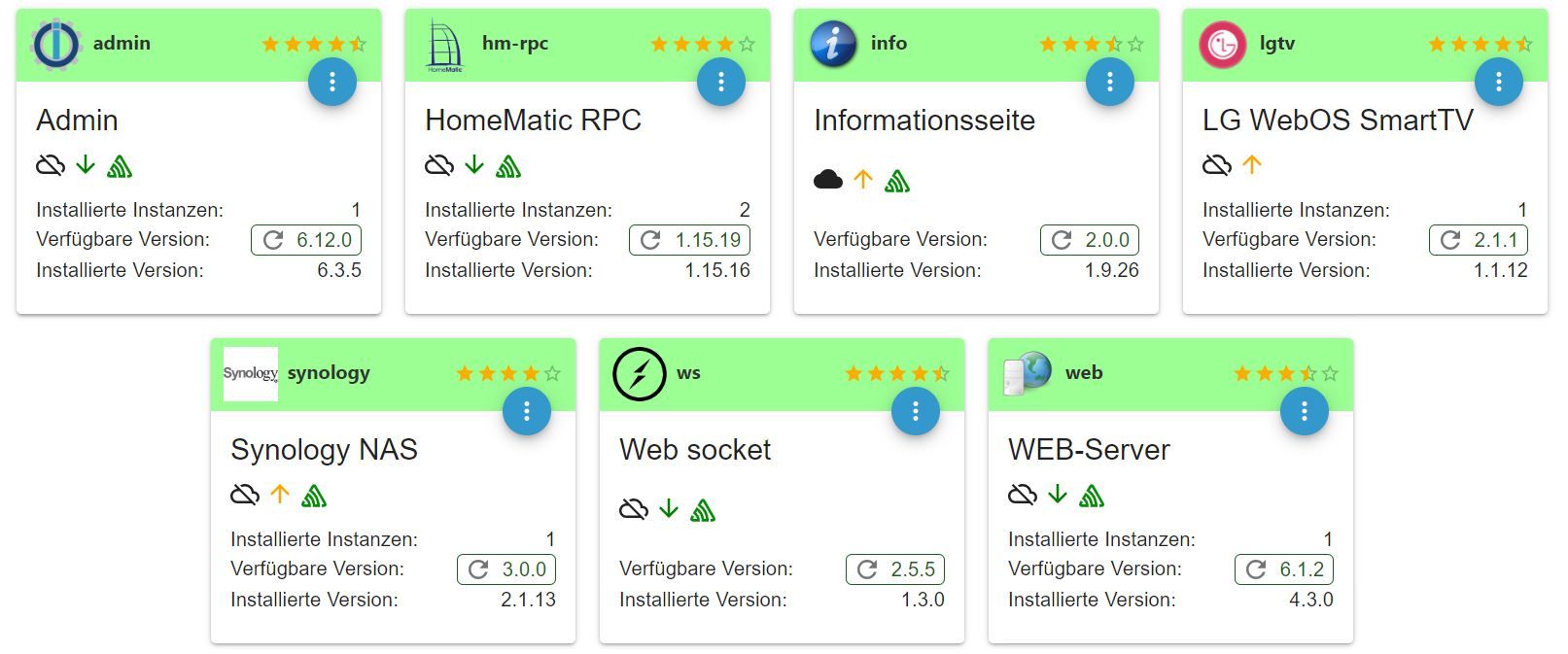
-
cd /opt/iobroker/ && npm lspi@raspberrypi:~ $ cd /opt/iobroker/ && npm ls npm ERR! code ELSPROBLEMS npm ERR! invalid: iobroker.samsung_tizen@1.0.0 /opt/iobroker/node_modules/iobroker.samsung_tizen npm ERR! invalid: iobroker.samsung2016@0.0.2 /opt/iobroker/node_modules/iobroker.samsung2016 iobroker.inst@2.0.3 /opt/iobroker ├── colors@1.3.3 ├── fs-extra@7.0.1 ├── iobroker.admin@6.12.0 ├── iobroker.bmw@2.5.7 ├── iobroker.discovery@3.1.0 ├── iobroker.fritzbox@0.5.0 ├── iobroker.hm-rega@3.0.47 ├── iobroker.hm-rpc@1.15.19 ├── iobroker.info@2.0.0 ├── iobroker.javascript@7.1.4 ├── iobroker.js-controller@5.0.12 ├── iobroker.lgtv@2.1.1 ├── iobroker.onkyo@2.1.2 ├── iobroker.parser@1.3.2 ├── iobroker.samsung_tizen@1.0.0 invalid: "github:iobroker-community-adapters/ioBroker.samsung_tizen#40841b79aaaafcb86c59482dc0d8b47bc4b56751" from the root project ├── iobroker.samsung@0.5.11 ├── iobroker.samsung2016@0.0.2 invalid: "github:Stefan0875/iobroker.samsung2016#1cacc9041ea38eae6d55023dcc9c23d2921fc5f0" from the root project ├── iobroker.simple-api@2.7.2 ├── iobroker.sonos@2.3.1 ├── iobroker.synology@3.0.0 ├── iobroker.vis-bars@0.1.4 ├── iobroker.vis-fancyswitch@1.1.0 ├── iobroker.vis-hqwidgets@1.4.0 ├── iobroker.vis-jqui-mfd@1.0.12 ├── iobroker.vis-keyboard@0.0.2 ├── iobroker.vis-metro@1.2.0 ├── iobroker.vis-players@0.1.6 ├── iobroker.vis@1.4.16 ├── iobroker.web@6.1.2 ├── iobroker.ws@2.5.5 ├── iobroker.zwave@2.0.1 ├── iobroker@2.0.3 ├── semver@5.7.0 └── yargs@7.1.0 npm ERR! A complete log of this run can be found in: /home/iobroker/.npm/_logs/2023-11-01T21_16_40_538Z-debug-0.log -
pi@raspberrypi:~ $ cd /opt/iobroker/ && npm ls npm ERR! code ELSPROBLEMS npm ERR! invalid: iobroker.samsung_tizen@1.0.0 /opt/iobroker/node_modules/iobroker.samsung_tizen npm ERR! invalid: iobroker.samsung2016@0.0.2 /opt/iobroker/node_modules/iobroker.samsung2016 iobroker.inst@2.0.3 /opt/iobroker ├── colors@1.3.3 ├── fs-extra@7.0.1 ├── iobroker.admin@6.12.0 ├── iobroker.bmw@2.5.7 ├── iobroker.discovery@3.1.0 ├── iobroker.fritzbox@0.5.0 ├── iobroker.hm-rega@3.0.47 ├── iobroker.hm-rpc@1.15.19 ├── iobroker.info@2.0.0 ├── iobroker.javascript@7.1.4 ├── iobroker.js-controller@5.0.12 ├── iobroker.lgtv@2.1.1 ├── iobroker.onkyo@2.1.2 ├── iobroker.parser@1.3.2 ├── iobroker.samsung_tizen@1.0.0 invalid: "github:iobroker-community-adapters/ioBroker.samsung_tizen#40841b79aaaafcb86c59482dc0d8b47bc4b56751" from the root project ├── iobroker.samsung@0.5.11 ├── iobroker.samsung2016@0.0.2 invalid: "github:Stefan0875/iobroker.samsung2016#1cacc9041ea38eae6d55023dcc9c23d2921fc5f0" from the root project ├── iobroker.simple-api@2.7.2 ├── iobroker.sonos@2.3.1 ├── iobroker.synology@3.0.0 ├── iobroker.vis-bars@0.1.4 ├── iobroker.vis-fancyswitch@1.1.0 ├── iobroker.vis-hqwidgets@1.4.0 ├── iobroker.vis-jqui-mfd@1.0.12 ├── iobroker.vis-keyboard@0.0.2 ├── iobroker.vis-metro@1.2.0 ├── iobroker.vis-players@0.1.6 ├── iobroker.vis@1.4.16 ├── iobroker.web@6.1.2 ├── iobroker.ws@2.5.5 ├── iobroker.zwave@2.0.1 ├── iobroker@2.0.3 ├── semver@5.7.0 └── yargs@7.1.0 npm ERR! A complete log of this run can be found in: /home/iobroker/.npm/_logs/2023-11-01T21_16_40_538Z-debug-0.log@spaddel sagte in js controller update nicht möglich:
iob del samsung2016 -
@spaddel sagte in js controller update nicht möglich:
iob del samsung2016pi@raspberrypi:/opt/iobroker $ iob del samsung2016 Delete adapter "samsung2016" host.raspberrypi Counted 1 adapter for samsung2016 host.raspberrypi Counted 1 states of system.adapter.samsung2016 host.raspberrypi Counted 1 states (system.adapter.samsung2016.*) from states host.raspberrypi file samsung2016 deleted host.raspberrypi file samsung2016.admin deleted host.raspberrypi object samsung2016 deleted host.raspberrypi object samsung2016.admin deleted host.raspberrypi Deleting 2 object(s). host.raspberrypi Deleting 1 state(s). removed 5 packages, and changed 5 packages in 35s 36 packages are looking for funding run `npm fund` for details -
pi@raspberrypi:/opt/iobroker $ iob del samsung2016 Delete adapter "samsung2016" host.raspberrypi Counted 1 adapter for samsung2016 host.raspberrypi Counted 1 states of system.adapter.samsung2016 host.raspberrypi Counted 1 states (system.adapter.samsung2016.*) from states host.raspberrypi file samsung2016 deleted host.raspberrypi file samsung2016.admin deleted host.raspberrypi object samsung2016 deleted host.raspberrypi object samsung2016.admin deleted host.raspberrypi Deleting 2 object(s). host.raspberrypi Deleting 1 state(s). removed 5 packages, and changed 5 packages in 35s 36 packages are looking for funding run `npm fund` for detailspi@raspberrypi:/opt/iobroker $ cd /opt/iobroker/ && npm ls iobroker.inst@2.0.3 /opt/iobroker ├── colors@1.3.3 ├── fs-extra@7.0.1 ├── iobroker.admin@6.12.0 ├── iobroker.bmw@2.5.7 ├── iobroker.discovery@3.1.0 ├── iobroker.fritzbox@0.5.0 ├── iobroker.hm-rega@3.0.47 ├── iobroker.hm-rpc@1.15.19 ├── iobroker.info@2.0.0 ├── iobroker.javascript@7.1.4 ├── iobroker.js-controller@5.0.12 ├── iobroker.lgtv@2.1.1 ├── iobroker.onkyo@2.1.2 ├── iobroker.parser@1.3.2 ├── iobroker.samsung_tizen@1.0.0 (git+ssh://git@github.com/iobroker-community-adapters/ioBroker.samsung_tizen.git#40841b79aaaafcb86c59482dc0d8b47bc4b56751) ├── iobroker.samsung@0.5.11 ├── iobroker.simple-api@2.7.2 ├── iobroker.sonos@2.3.1 ├── iobroker.synology@3.0.0 ├── iobroker.vis-bars@0.1.4 ├── iobroker.vis-fancyswitch@1.1.0 ├── iobroker.vis-hqwidgets@1.4.0 ├── iobroker.vis-jqui-mfd@1.0.12 ├── iobroker.vis-keyboard@0.0.2 ├── iobroker.vis-metro@1.2.0 ├── iobroker.vis-players@0.1.6 ├── iobroker.vis@1.4.16 ├── iobroker.web@6.1.2 ├── iobroker.ws@2.5.5 ├── iobroker.zwave@2.0.1 ├── iobroker@2.0.3 ├── semver@5.7.0 └── yargs@7.1.0 -
pi@raspberrypi:/opt/iobroker $ cd /opt/iobroker/ && npm ls iobroker.inst@2.0.3 /opt/iobroker ├── colors@1.3.3 ├── fs-extra@7.0.1 ├── iobroker.admin@6.12.0 ├── iobroker.bmw@2.5.7 ├── iobroker.discovery@3.1.0 ├── iobroker.fritzbox@0.5.0 ├── iobroker.hm-rega@3.0.47 ├── iobroker.hm-rpc@1.15.19 ├── iobroker.info@2.0.0 ├── iobroker.javascript@7.1.4 ├── iobroker.js-controller@5.0.12 ├── iobroker.lgtv@2.1.1 ├── iobroker.onkyo@2.1.2 ├── iobroker.parser@1.3.2 ├── iobroker.samsung_tizen@1.0.0 (git+ssh://git@github.com/iobroker-community-adapters/ioBroker.samsung_tizen.git#40841b79aaaafcb86c59482dc0d8b47bc4b56751) ├── iobroker.samsung@0.5.11 ├── iobroker.simple-api@2.7.2 ├── iobroker.sonos@2.3.1 ├── iobroker.synology@3.0.0 ├── iobroker.vis-bars@0.1.4 ├── iobroker.vis-fancyswitch@1.1.0 ├── iobroker.vis-hqwidgets@1.4.0 ├── iobroker.vis-jqui-mfd@1.0.12 ├── iobroker.vis-keyboard@0.0.2 ├── iobroker.vis-metro@1.2.0 ├── iobroker.vis-players@0.1.6 ├── iobroker.vis@1.4.16 ├── iobroker.web@6.1.2 ├── iobroker.ws@2.5.5 ├── iobroker.zwave@2.0.1 ├── iobroker@2.0.3 ├── semver@5.7.0 └── yargs@7.1.0Ja, jetzt schaut es gut aus.
Ich würde jetzt, wenn das System robust läuft, davon ein Backup ziehen und dann auf ein aktuelles Betriebssystem (64Bit 'Bookworm) mit Sack und Pack umziehen.
Was Backups von anderen Dingen angeht musst du bei denen mal schauen, wie das funktioniert. -
Ja, jetzt schaut es gut aus.
Ich würde jetzt, wenn das System robust läuft, davon ein Backup ziehen und dann auf ein aktuelles Betriebssystem (64Bit 'Bookworm) mit Sack und Pack umziehen.
Was Backups von anderen Dingen angeht musst du bei denen mal schauen, wie das funktioniert. -
@thomas-braun
Hallo Thomas,ich bin gerade dabei Sicherungen von allen Einstellungen zu machen.
Wie kann ich am besten umziehen? Nach der u.g. Anleitung ein komplett neues System aufsetzen und meine Adapter etc. installieren?Gruß
ChristianKomplette Neuinstallation.
https://forum.iobroker.net/topic/51869/installation-auf-raspi-einfacher-geht-s-nicht
Backup via Backitup-Adapter wieder einspielen.
Was diese angeht:
Hit:5 https://apt.pivccu.de/piVCCU stable InRelease
Hit:3 https://dl.ui.com/unifi/debian stable InReleaseMusst du selber schauen wie da Backups gezogen werden können/müssen/dürfen.
-
Komplette Neuinstallation.
https://forum.iobroker.net/topic/51869/installation-auf-raspi-einfacher-geht-s-nicht
Backup via Backitup-Adapter wieder einspielen.
Was diese angeht:
Hit:5 https://apt.pivccu.de/piVCCU stable InRelease
Hit:3 https://dl.ui.com/unifi/debian stable InReleaseMusst du selber schauen wie da Backups gezogen werden können/müssen/dürfen.
@thomas-braun
Danke. Das werde ich in naher Zukunft in Angriff nehmen.Gruß
Christian

Hello! It looks like you're interested in this conversation, but you don't have an account yet.
Getting fed up of having to scroll through the same posts each visit? When you register for an account, you'll always come back to exactly where you were before, and choose to be notified of new replies (either via email, or push notification). You'll also be able to save bookmarks and upvote posts to show your appreciation to other community members.
With your input, this post could be even better 💗
Register LoginSupport us
258
Online32.8k
Users82.8k
Topics1.3m
Posts