



Skip to content
  • Home
  • Recent
  • Tags
  • 0 Unread 0
  • Categories
  • Unreplied
  • Popular
  • GitHub
  • Docu
  • Hilfe
Skins
  • Light
  • Brite
  • Cerulean
  • Cosmo
  • Flatly
  • Journal
  • Litera
  • Lumen
  • Lux
  • Materia
  • Minty
  • Morph
  • Pulse
  • Sandstone
  • Simplex
  • Sketchy
  • Spacelab
  • United
  • Yeti
  • Zephyr
  • Dark
  • Cyborg
  • Darkly
  • Quartz
  • Slate
  • Solar
  • Superhero
  • Vapor

  • Default (No Skin)
  • No Skin
Collapse
ioBroker Logo

Community Forum

donate donate
  1. ioBroker Community Home
  2. Deutsch
  3. ioBroker Allgemein
  4. [gelöst] backitup /bin/sh: 1: influx: not found
NEWS

  • Monatsrückblick Januar/Februar 2026 ist online!
    BluefoxB
    Bluefox
    16
    1
    332

  • Jahresrückblick 2025 – unser neuer Blogbeitrag ist online! ✨
    BluefoxB
    Bluefox
    17
    1
    4.8k

  • Neuer Blogbeitrag: Monatsrückblick - Dezember 2025 🎄
    BluefoxB
    Bluefox
    13
    1
    1.3k

[gelöst] backitup /bin/sh: 1: influx: not found

Scheduled Pinned Locked Moved ioBroker Allgemein
55 Posts 7 Posters 5.3k Views 6 Watching
  • Oldest to Newest
  • Newest to Oldest
  • Most Votes
Reply
  • Reply as topic
Log in to reply
This topic has been deleted. Only users with topic management privileges can see it.
  • A Alero

    @homoran
    nein . ich habe mich am server mit dem user juergen angemeldet

    A Offline
    A Offline
    Alero
    wrote on last edited by
    #21

    So,
    habe iobroker noch mal zurückgesetzt (Snapshot) und habe mich noch einmal neu angemeldet mit User juergen.
    Jetzt muss ich noch einmal alles durchgehen.
    Als erstens mach ich jetzt noch einmal das:

    sudo apt update
    apt policy influx*
    
    
    HomoranH Thomas BraunT 2 Replies Last reply
    0
    • A Alero

      So,
      habe iobroker noch mal zurückgesetzt (Snapshot) und habe mich noch einmal neu angemeldet mit User juergen.
      Jetzt muss ich noch einmal alles durchgehen.
      Als erstens mach ich jetzt noch einmal das:

      sudo apt update
      apt policy influx*
      
      
      HomoranH Do not disturb
      HomoranH Do not disturb
      Homoran
      Global Moderator Administrators
      wrote on last edited by
      #22

      @alero wo ist die Eingabezeile???

      kein Support per PN! - Fragen im Forum stellen -
      Benutzt das Voting rechts unten im Beitrag wenn er euch geholfen hat.
      Das Forum freut sich über eine Spende. Benutzt dazu den Spendenbutton im Header. Danke!
      der Installationsfixer: curl -fsL https://iobroker.net/fix.sh | bash -

      1 Reply Last reply
      0
      • A Alero

        So,
        habe iobroker noch mal zurückgesetzt (Snapshot) und habe mich noch einmal neu angemeldet mit User juergen.
        Jetzt muss ich noch einmal alles durchgehen.
        Als erstens mach ich jetzt noch einmal das:

        sudo apt update
        apt policy influx*
        
        
        Thomas BraunT Online
        Thomas BraunT Online
        Thomas Braun
        Most Active
        wrote on last edited by
        #23

        @alero sagte in backitup /bin/sh: 1: influx: not found:

        habe iobroker noch mal zurückgesetzt (Snapshot)

        Warum denn das??

        Linux-Werkzeugkasten:
        https://forum.iobroker.net/topic/42952/der-kleine-iobroker-linux-werkzeugkasten
        NodeJS Fixer Skript:
        https://forum.iobroker.net/topic/68035/iob-node-fix-skript
        iob_diag: curl -sLf -o diag.sh https://iobroker.net/diag.sh && bash diag.sh

        A 1 Reply Last reply
        0
        • Thomas BraunT Thomas Braun

          @alero sagte in backitup /bin/sh: 1: influx: not found:

          habe iobroker noch mal zurückgesetzt (Snapshot)

          Warum denn das??

          A Offline
          A Offline
          Alero
          wrote on last edited by Alero
          #24

          so,
          der Fehler ist natürlich immer noch da. kein repository.
          dann kommt jetzt das:

          wget -q https://repos.influxdata.com/influxdata-archive_compat.key
          echo '393e8779c89ac8d958f81f942f9ad7fb82a25e133faddaf92e15b16e6ac9ce4c influxdata-archive_compat.key' | sha256sum -c && cat influxdata-archive_compat.key | gpg --dearmor | sudo tee /usr/share/keyrings/influxdata-archive_compat.gpg > /dev/null
          echo 'deb [signed-by=/usr/share/keyrings/influxdata-archive_compat.gpg] https://repos.influxdata.com/debian stable main' | sudo tee /etc/apt/sources.list.d/influxdata.list
          

          richtig? kopiert ausd deinem link phantastische Repositories

          P.S. Homeverzeichnis mit sudo mkhomedir_helper juergen angelegt

          A Thomas BraunT 2 Replies Last reply
          0
          • A Alero

            so,
            der Fehler ist natürlich immer noch da. kein repository.
            dann kommt jetzt das:

            wget -q https://repos.influxdata.com/influxdata-archive_compat.key
            echo '393e8779c89ac8d958f81f942f9ad7fb82a25e133faddaf92e15b16e6ac9ce4c influxdata-archive_compat.key' | sha256sum -c && cat influxdata-archive_compat.key | gpg --dearmor | sudo tee /usr/share/keyrings/influxdata-archive_compat.gpg > /dev/null
            echo 'deb [signed-by=/usr/share/keyrings/influxdata-archive_compat.gpg] https://repos.influxdata.com/debian stable main' | sudo tee /etc/apt/sources.list.d/influxdata.list
            

            richtig? kopiert ausd deinem link phantastische Repositories

            P.S. Homeverzeichnis mit sudo mkhomedir_helper juergen angelegt

            A Offline
            A Offline
            Alero
            wrote on last edited by
            #25

            bekomme schon eine FM beim eingeben der folgenden Spalte

            echo '393e8779c89ac8d958f81f942f9ad7fb82a25e133faddaf92e15b16e6ac9ce4c influxdata-archive_compat.key' | sha256sum -c && cat influxdata-archive_compat.key | gpg --dearmor | sudo tee /usr/share/keyrings/influxdata-archive_compat.gpg > /dev/null
            

            FM:

            juergen@iobroker-prod-12:/home$ echo '393e8779c89ac8d958f81f942f9ad7fb82a25e133faddaf92e15b16e6ac9ce4c influxdata-archive_compat.key' | sha256sum -c && cat influxdata-archive_compat.key | gpg --dearmor | sudo tee /usr/share/keyrings/influxdata-archive_compat.gpg > /dev/null
            sha256sum: influxdata-archive_compat.key: No such file or directory
            influxdata-archive_compat.key: FAILED open or read
            sha256sum: WARNING: 1 listed file could not be read
            
            A 1 Reply Last reply
            0
            • A Alero

              bekomme schon eine FM beim eingeben der folgenden Spalte

              echo '393e8779c89ac8d958f81f942f9ad7fb82a25e133faddaf92e15b16e6ac9ce4c influxdata-archive_compat.key' | sha256sum -c && cat influxdata-archive_compat.key | gpg --dearmor | sudo tee /usr/share/keyrings/influxdata-archive_compat.gpg > /dev/null
              

              FM:

              juergen@iobroker-prod-12:/home$ echo '393e8779c89ac8d958f81f942f9ad7fb82a25e133faddaf92e15b16e6ac9ce4c influxdata-archive_compat.key' | sha256sum -c && cat influxdata-archive_compat.key | gpg --dearmor | sudo tee /usr/share/keyrings/influxdata-archive_compat.gpg > /dev/null
              sha256sum: influxdata-archive_compat.key: No such file or directory
              influxdata-archive_compat.key: FAILED open or read
              sha256sum: WARNING: 1 listed file could not be read
              
              A Offline
              A Offline
              Alero
              wrote on last edited by
              #26

              FM beseitigt:

              echo '393e8779c89ac8d958f81f942f9ad7fb82a25e133faddaf92e15b16e6ac9ce4c influxdata-archive_compat.key' | sha256sum -c && cat influxdata-archive_compat.key | gpg --dearmor | sudo tee /usr/share/keyrings/influxdata-archive_compat.gpg > /dev/null
              
              A 1 Reply Last reply
              0
              • A Alero

                FM beseitigt:

                echo '393e8779c89ac8d958f81f942f9ad7fb82a25e133faddaf92e15b16e6ac9ce4c influxdata-archive_compat.key' | sha256sum -c && cat influxdata-archive_compat.key | gpg --dearmor | sudo tee /usr/share/keyrings/influxdata-archive_compat.gpg > /dev/null
                
                A Offline
                A Offline
                Alero
                wrote on last edited by
                #27

                Nächster Befehl auch abgesetzt und ANtwort:

                juergen@iobroker-prod-12:/home$ echo 'deb [signed-by=/usr/share/keyrings/influxdata-archive_compat.gpg] https://repos.influxdata.com/debian stable main' | sudo tee /etc/apt/sources.list.d/influxdata.list
                deb [signed-by=/usr/share/keyrings/influxdata-archive_compat.gpg] https://repos.influxdata.com/debian stable main
                
                1 Reply Last reply
                0
                • A Alero

                  so,
                  der Fehler ist natürlich immer noch da. kein repository.
                  dann kommt jetzt das:

                  wget -q https://repos.influxdata.com/influxdata-archive_compat.key
                  echo '393e8779c89ac8d958f81f942f9ad7fb82a25e133faddaf92e15b16e6ac9ce4c influxdata-archive_compat.key' | sha256sum -c && cat influxdata-archive_compat.key | gpg --dearmor | sudo tee /usr/share/keyrings/influxdata-archive_compat.gpg > /dev/null
                  echo 'deb [signed-by=/usr/share/keyrings/influxdata-archive_compat.gpg] https://repos.influxdata.com/debian stable main' | sudo tee /etc/apt/sources.list.d/influxdata.list
                  

                  richtig? kopiert ausd deinem link phantastische Repositories

                  P.S. Homeverzeichnis mit sudo mkhomedir_helper juergen angelegt

                  Thomas BraunT Online
                  Thomas BraunT Online
                  Thomas Braun
                  Most Active
                  wrote on last edited by
                  #28

                  @alero sagte in backitup /bin/sh: 1: influx: not found:

                  P.S. Homeverzeichnis mit sudo mkhomedir_helper juergen angelegt

                  Aber falsch. Du steht in /home , solltest aber in ~ bzw. /home/juergen stehen.

                  Und wo ist die VOLLSTÄNDIGE Ein- wie Ausgabe?

                  Mach es nochmal, vollständig...

                  wget -q https://repos.influxdata.com/influxdata-archive_compat.key
                  
                  echo '393e8779c89ac8d958f81f942f9ad7fb82a25e133faddaf92e15b16e6ac9ce4c influxdata-archive_compat.key' | sha256sum -c && cat influxdata-archive_compat.key | gpg --dearmor | sudo tee /usr/share/keyrings/influxdata-archive_compat.gpg > /dev/null
                  
                  echo 'deb [signed-by=/usr/share/keyrings/influxdata-archive_compat.gpg] https://repos.influxdata.com/debian stable main' | sudo tee /etc/apt/sources.list.d/influxdata.list
                  
                  rm influxdata-archive_compat.key
                  

                  Linux-Werkzeugkasten:
                  https://forum.iobroker.net/topic/42952/der-kleine-iobroker-linux-werkzeugkasten
                  NodeJS Fixer Skript:
                  https://forum.iobroker.net/topic/68035/iob-node-fix-skript
                  iob_diag: curl -sLf -o diag.sh https://iobroker.net/diag.sh && bash diag.sh

                  A 1 Reply Last reply
                  0
                  • Thomas BraunT Thomas Braun

                    @alero sagte in backitup /bin/sh: 1: influx: not found:

                    P.S. Homeverzeichnis mit sudo mkhomedir_helper juergen angelegt

                    Aber falsch. Du steht in /home , solltest aber in ~ bzw. /home/juergen stehen.

                    Und wo ist die VOLLSTÄNDIGE Ein- wie Ausgabe?

                    Mach es nochmal, vollständig...

                    wget -q https://repos.influxdata.com/influxdata-archive_compat.key
                    
                    echo '393e8779c89ac8d958f81f942f9ad7fb82a25e133faddaf92e15b16e6ac9ce4c influxdata-archive_compat.key' | sha256sum -c && cat influxdata-archive_compat.key | gpg --dearmor | sudo tee /usr/share/keyrings/influxdata-archive_compat.gpg > /dev/null
                    
                    echo 'deb [signed-by=/usr/share/keyrings/influxdata-archive_compat.gpg] https://repos.influxdata.com/debian stable main' | sudo tee /etc/apt/sources.list.d/influxdata.list
                    
                    rm influxdata-archive_compat.key
                    
                    A Offline
                    A Offline
                    Alero
                    wrote on last edited by
                    #29

                    @thomas-braun

                    so habs noch einmal gemacht.

                    juergen@iobroker-prod-12:/$ cd home/
                    juergen@iobroker-prod-12:/home$ ls
                    influxdata-archive_compat.key  iobroker  juergen
                    juergen@iobroker-prod-12:/home$ cd juergen
                    juergen@iobroker-prod-12:~$ wget -q https://repos.influxdata.com/influxdata-archive_compat.key
                    juergen@iobroker-prod-12:~$ echo '393e8779c89ac8d958f81f942f9ad7fb82a25e133faddaf92e15b16e6ac9ce4c influxdata-archive_compat.key' | sha256sum -c && cat influxdata-archive_compat.key | gpg --dearmor | sudo tee /usr/share/keyrings/influxdata-archive_compat.gpg > /dev/null
                    influxdata-archive_compat.key: OK
                    juergen@iobroker-prod-12:~$ echo 'deb [signed-by=/usr/share/keyrings/influxdata-archive_compat.gpg] https://repos.influxdata.com/debian stable main' | sudo tee /etc/apt/sources.list.d/influxdata.list
                    deb [signed-by=/usr/share/keyrings/influxdata-archive_compat.gpg] https://repos.influxdata.com/debian stable main
                    juergen@iobroker-prod-12:~$ rm influxdata-archive_compat.key
                    juergen@iobroker-prod-12:~$ 
                    
                    A 1 Reply Last reply
                    0
                    • A Alero

                      @thomas-braun

                      so habs noch einmal gemacht.

                      juergen@iobroker-prod-12:/$ cd home/
                      juergen@iobroker-prod-12:/home$ ls
                      influxdata-archive_compat.key  iobroker  juergen
                      juergen@iobroker-prod-12:/home$ cd juergen
                      juergen@iobroker-prod-12:~$ wget -q https://repos.influxdata.com/influxdata-archive_compat.key
                      juergen@iobroker-prod-12:~$ echo '393e8779c89ac8d958f81f942f9ad7fb82a25e133faddaf92e15b16e6ac9ce4c influxdata-archive_compat.key' | sha256sum -c && cat influxdata-archive_compat.key | gpg --dearmor | sudo tee /usr/share/keyrings/influxdata-archive_compat.gpg > /dev/null
                      influxdata-archive_compat.key: OK
                      juergen@iobroker-prod-12:~$ echo 'deb [signed-by=/usr/share/keyrings/influxdata-archive_compat.gpg] https://repos.influxdata.com/debian stable main' | sudo tee /etc/apt/sources.list.d/influxdata.list
                      deb [signed-by=/usr/share/keyrings/influxdata-archive_compat.gpg] https://repos.influxdata.com/debian stable main
                      juergen@iobroker-prod-12:~$ rm influxdata-archive_compat.key
                      juergen@iobroker-prod-12:~$ 
                      
                      A Offline
                      A Offline
                      Alero
                      wrote on last edited by
                      #30

                      jetzt sieht mein apt policy influx* so aus:

                      juergen@iobroker-prod-12:~$ apt policy influx*
                      influxdb2-cli:
                        Installed: (none)
                        Candidate: 2.7.3-1
                        Version table:
                           2.7.3-1 500
                              500 https://repos.influxdata.com/debian stable/main amd64 Packages
                           2.7.1-2 500
                              500 https://repos.influxdata.com/debian stable/main amd64 Packages
                           2.6.1 500
                              500 https://repos.influxdata.com/debian stable/main amd64 Packages
                           2.6.0 500
                              500 https://repos.influxdata.com/debian stable/main amd64 Packages
                           2.5.0 500
                              500 https://repos.influxdata.com/debian stable/main amd64 Packages
                           2.4.0 500
                              500 https://repos.influxdata.com/debian stable/main amd64 Packages
                           2.3.0 500
                              500 https://repos.influxdata.com/debian stable/main amd64 Packages
                      influxdb-client:
                        Installed: (none)
                        Candidate: 1.6.7~rc0-1+b13
                        Version table:
                           1.6.7~rc0-1+b13 500
                              500 http://deb.debian.org/debian bookworm/main amd64 Packages
                      influxdb-dev:
                        Installed: (none)
                        Candidate: (none)
                        Version table:
                      influxdb2-client:
                        Installed: (none)
                        Candidate: 2.7.1-1
                        Version table:
                           2.7.1-1 500
                              500 https://repos.influxdata.com/debian stable/main amd64 Packages
                      influxdb:
                        Installed: (none)
                        Candidate: 1.8.10-1
                        Version table:
                           1.8.10-1 500
                              500 https://repos.influxdata.com/debian stable/main amd64 Packages
                           1.6.7~rc0-1+b13 500
                              500 http://deb.debian.org/debian bookworm/main amd64 Packages
                      influxctl:
                        Installed: (none)
                        Candidate: 2.0.4
                        Version table:
                           2.0.4 500
                              500 https://repos.influxdata.com/debian stable/main amd64 Packages
                           2.0.3 500
                              500 https://repos.influxdata.com/debian stable/main amd64 Packages
                           2.0.2 500
                              500 https://repos.influxdata.com/debian stable/main amd64 Packages
                           2.0.1 500
                              500 https://repos.influxdata.com/debian stable/main amd64 Packages
                           2.0.0 500
                              500 https://repos.influxdata.com/debian stable/main amd64 Packages
                      influxdb2:
                        Installed: (none)
                        Candidate: 2.7.1-1
                        Version table:
                           2.7.1-1 500
                              500 https://repos.influxdata.com/debian stable/main amd64 Packages
                           2.7.0-1 500
                              500 https://repos.influxdata.com/debian stable/main amd64 Packages
                           2.6.1-1 500
                              500 https://repos.influxdata.com/debian stable/main amd64 Packages
                           2.6.0-1 500
                              500 https://repos.influxdata.com/debian stable/main amd64 Packages
                           2.5.1-1 500
                              500 https://repos.influxdata.com/debian stable/main amd64 Packages
                           2.4.0-1 500
                              500 https://repos.influxdata.com/debian stable/main amd64 Packages
                           2.3.0-1 500
                              500 https://repos.influxdata.com/debian stable/main amd64 Packages
                           2.2.0 500
                              500 https://repos.influxdata.com/debian stable/main amd64 Packages
                      juergen@iobroker-prod-12:~$ 
                      
                      Thomas BraunT 1 Reply Last reply
                      0
                      • A Alero

                        jetzt sieht mein apt policy influx* so aus:

                        juergen@iobroker-prod-12:~$ apt policy influx*
                        influxdb2-cli:
                          Installed: (none)
                          Candidate: 2.7.3-1
                          Version table:
                             2.7.3-1 500
                                500 https://repos.influxdata.com/debian stable/main amd64 Packages
                             2.7.1-2 500
                                500 https://repos.influxdata.com/debian stable/main amd64 Packages
                             2.6.1 500
                                500 https://repos.influxdata.com/debian stable/main amd64 Packages
                             2.6.0 500
                                500 https://repos.influxdata.com/debian stable/main amd64 Packages
                             2.5.0 500
                                500 https://repos.influxdata.com/debian stable/main amd64 Packages
                             2.4.0 500
                                500 https://repos.influxdata.com/debian stable/main amd64 Packages
                             2.3.0 500
                                500 https://repos.influxdata.com/debian stable/main amd64 Packages
                        influxdb-client:
                          Installed: (none)
                          Candidate: 1.6.7~rc0-1+b13
                          Version table:
                             1.6.7~rc0-1+b13 500
                                500 http://deb.debian.org/debian bookworm/main amd64 Packages
                        influxdb-dev:
                          Installed: (none)
                          Candidate: (none)
                          Version table:
                        influxdb2-client:
                          Installed: (none)
                          Candidate: 2.7.1-1
                          Version table:
                             2.7.1-1 500
                                500 https://repos.influxdata.com/debian stable/main amd64 Packages
                        influxdb:
                          Installed: (none)
                          Candidate: 1.8.10-1
                          Version table:
                             1.8.10-1 500
                                500 https://repos.influxdata.com/debian stable/main amd64 Packages
                             1.6.7~rc0-1+b13 500
                                500 http://deb.debian.org/debian bookworm/main amd64 Packages
                        influxctl:
                          Installed: (none)
                          Candidate: 2.0.4
                          Version table:
                             2.0.4 500
                                500 https://repos.influxdata.com/debian stable/main amd64 Packages
                             2.0.3 500
                                500 https://repos.influxdata.com/debian stable/main amd64 Packages
                             2.0.2 500
                                500 https://repos.influxdata.com/debian stable/main amd64 Packages
                             2.0.1 500
                                500 https://repos.influxdata.com/debian stable/main amd64 Packages
                             2.0.0 500
                                500 https://repos.influxdata.com/debian stable/main amd64 Packages
                        influxdb2:
                          Installed: (none)
                          Candidate: 2.7.1-1
                          Version table:
                             2.7.1-1 500
                                500 https://repos.influxdata.com/debian stable/main amd64 Packages
                             2.7.0-1 500
                                500 https://repos.influxdata.com/debian stable/main amd64 Packages
                             2.6.1-1 500
                                500 https://repos.influxdata.com/debian stable/main amd64 Packages
                             2.6.0-1 500
                                500 https://repos.influxdata.com/debian stable/main amd64 Packages
                             2.5.1-1 500
                                500 https://repos.influxdata.com/debian stable/main amd64 Packages
                             2.4.0-1 500
                                500 https://repos.influxdata.com/debian stable/main amd64 Packages
                             2.3.0-1 500
                                500 https://repos.influxdata.com/debian stable/main amd64 Packages
                             2.2.0 500
                                500 https://repos.influxdata.com/debian stable/main amd64 Packages
                        juergen@iobroker-prod-12:~$ 
                        
                        Thomas BraunT Online
                        Thomas BraunT Online
                        Thomas Braun
                        Most Active
                        wrote on last edited by
                        #31

                        @alero sagte in backitup /bin/sh: 1: influx: not found:

                        influxdb2-client

                        Den willst du haben.

                        sudo apt install influxdb2-client
                        

                        Linux-Werkzeugkasten:
                        https://forum.iobroker.net/topic/42952/der-kleine-iobroker-linux-werkzeugkasten
                        NodeJS Fixer Skript:
                        https://forum.iobroker.net/topic/68035/iob-node-fix-skript
                        iob_diag: curl -sLf -o diag.sh https://iobroker.net/diag.sh && bash diag.sh

                        A 1 Reply Last reply
                        0
                        • Thomas BraunT Thomas Braun

                          @alero sagte in backitup /bin/sh: 1: influx: not found:

                          influxdb2-client

                          Den willst du haben.

                          sudo apt install influxdb2-client
                          
                          A Offline
                          A Offline
                          Alero
                          wrote on last edited by
                          #32

                          @thomas-braun
                          den habe ich jetzt auch installiert.

                          juergen@iobroker-prod-12:~$ sudo apt install influxdb2-client
                          Reading package lists... Done
                          Building dependency tree... Done
                          Reading state information... Done
                          The following packages were automatically installed and are no longer required:
                            ntpsec-ntpdate ntpsec-ntpdig
                          Use 'sudo apt autoremove' to remove them.
                          The following NEW packages will be installed:
                            influxdb2-client
                          0 upgraded, 1 newly installed, 0 to remove and 6 not upgraded.
                          Need to get 11.3 MB of archives.
                          After this operation, 25.0 MB of additional disk space will be used.
                          Get:1 https://repos.influxdata.com/debian stable/main amd64 influxdb2-client amd64 2.7.1-1 [11.3 MB]
                          Fetched 11.3 MB in 1s (11.2 MB/s)           
                          Selecting previously unselected package influxdb2-client.
                          (Reading database ... 37821 files and directories currently installed.)
                          

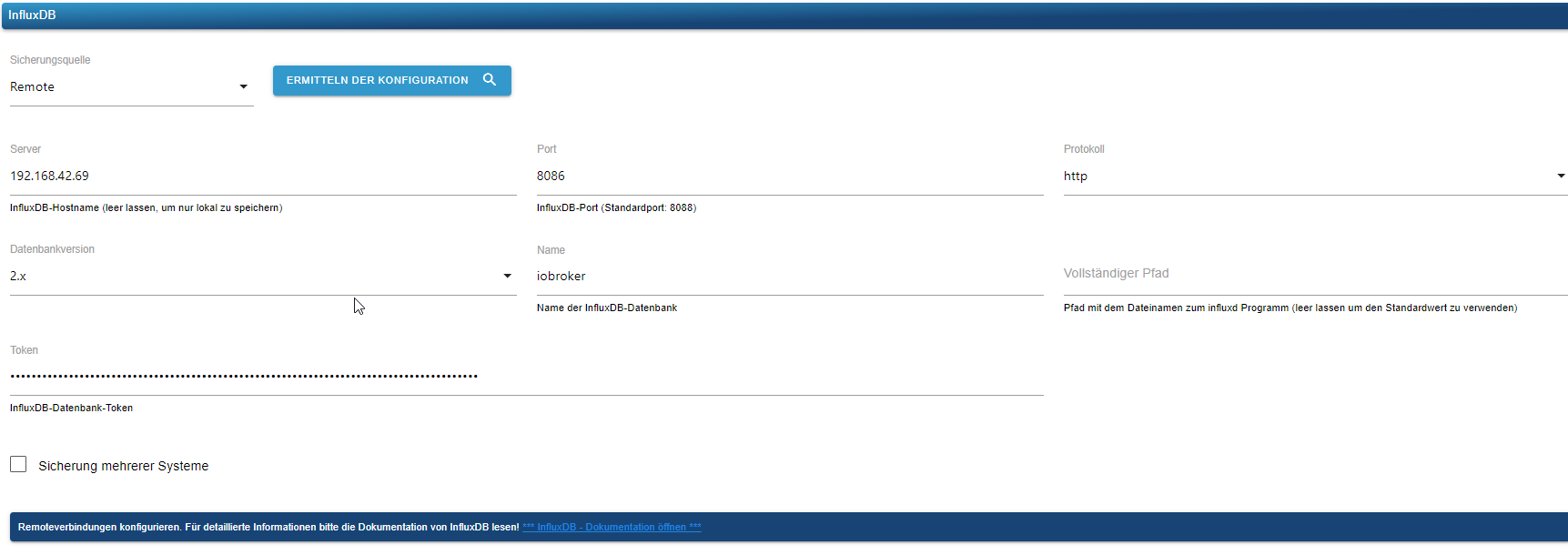
                          beim Backitup bekomme ich aber noch eine FM:

                          [DEBUG] [influxDB] - InfluxDB-Backup started ...
                          [DEBUG] [influxDB] - Start InfluxDB Backup ...
                          [DEBUG] [influxDB] - InfluxDB Backup tmp directory created 
                          [DEBUG] [influxDB] - Try deleting the InfluxDB tmp directory: "/opt/iobroker/backups/influxDB_2023_10_05-10_54_33_backupiobroker"
                          [DEBUG] [influxDB] - InfluxDB tmp directory "/opt/iobroker/backups/influxDB_2023_10_05-10_54_33_backupiobroker" successfully deleted
                          [DEBUG] [influxDB] - 
                          [ERROR] [influxDB] - Error: Command failed: influx backup --bucket iobroker --host http://192.168.42.69:8086 -t CiOIz_JIz-0T_u2EkcBIkHEUTV5jbpm5WgaWhLmVbFEuk0ac3i5PwYW-ogS7eLA8I9V97Ft9H1hnDs_5== "/opt/iobroker/backups/influxDB_2023_10_05-10_54_33_backupiobroker"
                          2023/10/05 10:54:33 INFO: Downloading metadata snapshot
                          Error: failed to backup metadata: failed to download metadata snapshot: 401 Unauthorized: read:authorizations is unauthorized
                          
                          Thomas BraunT 1 Reply Last reply
                          0
                          • A Alero

                            @thomas-braun
                            den habe ich jetzt auch installiert.

                            juergen@iobroker-prod-12:~$ sudo apt install influxdb2-client
                            Reading package lists... Done
                            Building dependency tree... Done
                            Reading state information... Done
                            The following packages were automatically installed and are no longer required:
                              ntpsec-ntpdate ntpsec-ntpdig
                            Use 'sudo apt autoremove' to remove them.
                            The following NEW packages will be installed:
                              influxdb2-client
                            0 upgraded, 1 newly installed, 0 to remove and 6 not upgraded.
                            Need to get 11.3 MB of archives.
                            After this operation, 25.0 MB of additional disk space will be used.
                            Get:1 https://repos.influxdata.com/debian stable/main amd64 influxdb2-client amd64 2.7.1-1 [11.3 MB]
                            Fetched 11.3 MB in 1s (11.2 MB/s)           
                            Selecting previously unselected package influxdb2-client.
                            (Reading database ... 37821 files and directories currently installed.)
                            

                            beim Backitup bekomme ich aber noch eine FM:

                            [DEBUG] [influxDB] - InfluxDB-Backup started ...
                            [DEBUG] [influxDB] - Start InfluxDB Backup ...
                            [DEBUG] [influxDB] - InfluxDB Backup tmp directory created 
                            [DEBUG] [influxDB] - Try deleting the InfluxDB tmp directory: "/opt/iobroker/backups/influxDB_2023_10_05-10_54_33_backupiobroker"
                            [DEBUG] [influxDB] - InfluxDB tmp directory "/opt/iobroker/backups/influxDB_2023_10_05-10_54_33_backupiobroker" successfully deleted
                            [DEBUG] [influxDB] - 
                            [ERROR] [influxDB] - Error: Command failed: influx backup --bucket iobroker --host http://192.168.42.69:8086 -t CiOIz_JIz-0T_u2EkcBIkHEUTV5jbpm5WgaWhLmVbFEuk0ac3i5PwYW-ogS7eLA8I9V97Ft9H1hnDs_5== "/opt/iobroker/backups/influxDB_2023_10_05-10_54_33_backupiobroker"
                            2023/10/05 10:54:33 INFO: Downloading metadata snapshot
                            Error: failed to backup metadata: failed to download metadata snapshot: 401 Unauthorized: read:authorizations is unauthorized
                            
                            Thomas BraunT Online
                            Thomas BraunT Online
                            Thomas Braun
                            Most Active
                            wrote on last edited by
                            #33

                            @alero sagte in backitup /bin/sh: 1: influx: not found:

                            401 Unauthorized

                            Da fehlen die Rechte auf die db zuzugreifen. Kann ich dir aber nix zu sagen, hab kein influxdb2 im Einsatz.

                            Aber schmeiß die "and 6 not upgraded" Pakete auf das System. Da dürfte ein wichtiges Update der libc dabei sein.

                            Linux-Werkzeugkasten:
                            https://forum.iobroker.net/topic/42952/der-kleine-iobroker-linux-werkzeugkasten
                            NodeJS Fixer Skript:
                            https://forum.iobroker.net/topic/68035/iob-node-fix-skript
                            iob_diag: curl -sLf -o diag.sh https://iobroker.net/diag.sh && bash diag.sh

                            A 1 Reply Last reply
                            0
                            • Thomas BraunT Thomas Braun

                              @alero sagte in backitup /bin/sh: 1: influx: not found:

                              401 Unauthorized

                              Da fehlen die Rechte auf die db zuzugreifen. Kann ich dir aber nix zu sagen, hab kein influxdb2 im Einsatz.

                              Aber schmeiß die "and 6 not upgraded" Pakete auf das System. Da dürfte ein wichtiges Update der libc dabei sein.

                              A Offline
                              A Offline
                              Alero
                              wrote on last edited by
                              #34

                              @thomas-braun
                              wie bekomme ich die 6 fehlenden Pakete heraus die ich installieren muss?

                              Thomas BraunT 1 Reply Last reply
                              0
                              • A Alero

                                @thomas-braun
                                wie bekomme ich die 6 fehlenden Pakete heraus die ich installieren muss?

                                Thomas BraunT Online
                                Thomas BraunT Online
                                Thomas Braun
                                Most Active
                                wrote on last edited by
                                #35

                                @alero

                                Mit der üblichen Systempflege:

                                sudo apt update
                                sudo apt full-upgrade
                                

                                Linux-Werkzeugkasten:
                                https://forum.iobroker.net/topic/42952/der-kleine-iobroker-linux-werkzeugkasten
                                NodeJS Fixer Skript:
                                https://forum.iobroker.net/topic/68035/iob-node-fix-skript
                                iob_diag: curl -sLf -o diag.sh https://iobroker.net/diag.sh && bash diag.sh

                                A 1 Reply Last reply
                                0
                                • Thomas BraunT Thomas Braun

                                  @alero

                                  Mit der üblichen Systempflege:

                                  sudo apt update
                                  sudo apt full-upgrade
                                  
                                  A Offline
                                  A Offline
                                  Alero
                                  wrote on last edited by
                                  #36

                                  @thomas-braun
                                  hi, danke
                                  hab den Befehl gerade gegoogelt.

                                  sudo sudo apt list --upgradable 
                                  Listing... Done
                                  libc-bin/stable-security 2.36-9+deb12u3 amd64 [upgradable from: 2.36-9+deb12u1]
                                  libc-dev-bin/stable-security 2.36-9+deb12u3 amd64 [upgradable from: 2.36-9+deb12u1]
                                  libc-l10n/stable-security 2.36-9+deb12u3 all [upgradable from: 2.36-9+deb12u1]
                                  libc6-dev/stable-security 2.36-9+deb12u3 amd64 [upgradable from: 2.36-9+deb12u1]
                                  libc6/stable-security 2.36-9+deb12u3 amd64 [upgradable from: 2.36-9+deb12u1]
                                  locales/stable-security 2.36-9+deb12u3 all [upgradable from: 2.36-9+deb12u1]
                                  juergen@iobroker-prod-12:~$ sudo apt install influxdb2-client
                                  

                                  werde ich nach installieren.

                                  Thomas BraunT 1 Reply Last reply
                                  0
                                  • A Alero

                                    @thomas-braun
                                    hi, danke
                                    hab den Befehl gerade gegoogelt.

                                    sudo sudo apt list --upgradable 
                                    Listing... Done
                                    libc-bin/stable-security 2.36-9+deb12u3 amd64 [upgradable from: 2.36-9+deb12u1]
                                    libc-dev-bin/stable-security 2.36-9+deb12u3 amd64 [upgradable from: 2.36-9+deb12u1]
                                    libc-l10n/stable-security 2.36-9+deb12u3 all [upgradable from: 2.36-9+deb12u1]
                                    libc6-dev/stable-security 2.36-9+deb12u3 amd64 [upgradable from: 2.36-9+deb12u1]
                                    libc6/stable-security 2.36-9+deb12u3 amd64 [upgradable from: 2.36-9+deb12u1]
                                    locales/stable-security 2.36-9+deb12u3 all [upgradable from: 2.36-9+deb12u1]
                                    juergen@iobroker-prod-12:~$ sudo apt install influxdb2-client
                                    

                                    werde ich nach installieren.

                                    Thomas BraunT Online
                                    Thomas BraunT Online
                                    Thomas Braun
                                    Most Active
                                    wrote on last edited by
                                    #37

                                    @alero sagte in backitup /bin/sh: 1: influx: not found:

                                    werde ich nach installieren.

                                    Dringend. Wie erwartet die libc.

                                    Linux-Werkzeugkasten:
                                    https://forum.iobroker.net/topic/42952/der-kleine-iobroker-linux-werkzeugkasten
                                    NodeJS Fixer Skript:
                                    https://forum.iobroker.net/topic/68035/iob-node-fix-skript
                                    iob_diag: curl -sLf -o diag.sh https://iobroker.net/diag.sh && bash diag.sh

                                    A 1 Reply Last reply
                                    0
                                    • Thomas BraunT Thomas Braun

                                      @alero sagte in backitup /bin/sh: 1: influx: not found:

                                      werde ich nach installieren.

                                      Dringend. Wie erwartet die libc.

                                      A Offline
                                      A Offline
                                      Alero
                                      wrote on last edited by
                                      #38

                                      @thomas-braun
                                      so den Fehler auch beseitigt.
                                      mit dem Befehl :

                                      influx auth list --user admin
                                      

                                      auf dem influxdb server zeigt er mir die ganzen Token an. ich brauchte das erswte welches beim Erstellen des influxdb sevrers erstellt wurde. mit dem Token hat die Sicherung dann geklappt.

                                      Muss ich die repositories auch für Grafana auf dem iobroker installieren? (dein Link https://forum.iobroker.net/topic/59231/phantastische-repositories-und-wo-sie-zu-finden-sind)

                                      Thomas BraunT 1 Reply Last reply
                                      0
                                      • A Alero

                                        @thomas-braun
                                        so den Fehler auch beseitigt.
                                        mit dem Befehl :

                                        influx auth list --user admin
                                        

                                        auf dem influxdb server zeigt er mir die ganzen Token an. ich brauchte das erswte welches beim Erstellen des influxdb sevrers erstellt wurde. mit dem Token hat die Sicherung dann geklappt.

                                        Muss ich die repositories auch für Grafana auf dem iobroker installieren? (dein Link https://forum.iobroker.net/topic/59231/phantastische-repositories-und-wo-sie-zu-finden-sind)

                                        Thomas BraunT Online
                                        Thomas BraunT Online
                                        Thomas Braun
                                        Most Active
                                        wrote on last edited by
                                        #39

                                        @alero sagte in backitup /bin/sh: 1: influx: not found:

                                        Muss ich die repositories auch für Grafana auf dem iobroker installieren?

                                        Auf dem Host, wo grafana laufen soll. Da gibt es keine client-Version, falls du das meinen solltest.

                                        Linux-Werkzeugkasten:
                                        https://forum.iobroker.net/topic/42952/der-kleine-iobroker-linux-werkzeugkasten
                                        NodeJS Fixer Skript:
                                        https://forum.iobroker.net/topic/68035/iob-node-fix-skript
                                        iob_diag: curl -sLf -o diag.sh https://iobroker.net/diag.sh && bash diag.sh

                                        A 2 Replies Last reply
                                        0
                                        • Thomas BraunT Thomas Braun

                                          @alero sagte in backitup /bin/sh: 1: influx: not found:

                                          Muss ich die repositories auch für Grafana auf dem iobroker installieren?

                                          Auf dem Host, wo grafana laufen soll. Da gibt es keine client-Version, falls du das meinen solltest.

                                          A Offline
                                          A Offline
                                          Alero
                                          wrote on last edited by
                                          #40

                                          @thomas-braun
                                          auch hier habe ich zur Zeit einen eigenen Grafanaserver.
                                          In Zukunft soll es einen "Integra server" geben der Influxdb, telegraf und grafana beinhaltet.
                                          Daher will ich jetzt meine Sicherungen machen damit ich sie dann auf das neue System restoren kann.
                                          Der neue Server mit debian 12 ist soweit schon fertig.

                                          Also muss ich auf iobroker jetzt auch die repositories für grafana installieren

                                          simatecS 1 Reply Last reply
                                          0
                                          Reply
                                          • Reply as topic
                                          Log in to reply
                                          • Oldest to Newest
                                          • Newest to Oldest
                                          • Most Votes


                                          Support us

                                          ioBroker
                                          Community Adapters
                                          Donate
                                          FAQ Cloud / IOT
                                          HowTo: Node.js-Update
                                          HowTo: Backup/Restore
                                          Downloads
                                          BLOG

                                          614

                                          Online

                                          32.7k

                                          Users

                                          82.5k

                                          Topics

                                          1.3m

                                          Posts
                                          Community
                                          Impressum | Datenschutz-Bestimmungen | Nutzungsbedingungen | Einwilligungseinstellungen
                                          ioBroker Community 2014-2025
                                          logo
                                          • Login

                                          • Don't have an account? Register

                                          • Login or register to search.
                                          • First post
                                            Last post
                                          0
                                          • Home
                                          • Recent
                                          • Tags
                                          • Unread 0
                                          • Categories
                                          • Unreplied
                                          • Popular
                                          • GitHub
                                          • Docu
                                          • Hilfe
