
NEWS




jarvis v3.2.x - just another remarkable vis
-
Moin,
ich hab ein Problem, ein Script einzufügen, wie hier schon angesprochen.Nach dem Speichern und neu aufrufen der Konfiguration ist unter Scripts Editor wieder alles leer und natürlich wird das Script auch nicht ausgeführt.
Ein Downgrade auf die beta.49, wie von @MCU vorgeschlagen, hat leider keinen Erfolg gebracht...
Gibt es da noch Ideen, woran es liegen könnte?
-
Moin,
ich hab ein Problem, ein Script einzufügen, wie hier schon angesprochen.Nach dem Speichern und neu aufrufen der Konfiguration ist unter Scripts Editor wieder alles leer und natürlich wird das Script auch nicht ausgeführt.
Ein Downgrade auf die beta.49, wie von @MCU vorgeschlagen, hat leider keinen Erfolg gebracht...
Gibt es da noch Ideen, woran es liegen könnte?
-
@holofury Hast du mal ein Upload gemacht?
Browser-Cache gelöscht?
Meldungen in der Browser-Console (F12)?@mcu
Was für einen Upload meinst du?
Browser Cache ist gelöscht.
Console hat Fehlermeldung:App Welcome to jarvis v3.2.0-beta.49 index-cc169059.js:97 Socket Connected to ws://192.168.178.62:8400. index-cc169059.js:97 Socket Listen for messages.. index-cc169059.js:108 App using instance 0 and namespace "jarvis.#4862020447449798". index-cc169059.js:97 Pro Valid Pro User: XXX index.html#/6859bc86…202-8500ab52e307:14 Uncaught SyntaxError: Unexpected identifier 'Object' at useCustomTag (index-cc169059.js:108:4108) at index-cc169059.js:108:75834 index-cc169059.js:121 Authenticate for configuration... index-cc169059.js:121 Authenticated for configuration. index-cc169059.js:16 TypeError: v.trim is not a function at u (index-cc169059.js:1578:2440) at setup (index-cc169059.js:1578:2461) at callWithErrorHandling (index-cc169059.js:16:788) at setupStatefulComponent (index-cc169059.js:16:60621) at setupComponent (index-cc169059.js:16:60280) at re (index-cc169059.js:16:38821) at ie (index-cc169059.js:16:38657) at Y (index-cc169059.js:16:34643) at ReactiveEffect.be [as fn] (index-cc169059.js:16:39720) at ReactiveEffect.run (index-cc169059.js:9:1918) -
@mcu
Was für einen Upload meinst du?
Browser Cache ist gelöscht.
Console hat Fehlermeldung:App Welcome to jarvis v3.2.0-beta.49 index-cc169059.js:97 Socket Connected to ws://192.168.178.62:8400. index-cc169059.js:97 Socket Listen for messages.. index-cc169059.js:108 App using instance 0 and namespace "jarvis.#4862020447449798". index-cc169059.js:97 Pro Valid Pro User: XXX index.html#/6859bc86…202-8500ab52e307:14 Uncaught SyntaxError: Unexpected identifier 'Object' at useCustomTag (index-cc169059.js:108:4108) at index-cc169059.js:108:75834 index-cc169059.js:121 Authenticate for configuration... index-cc169059.js:121 Authenticated for configuration. index-cc169059.js:16 TypeError: v.trim is not a function at u (index-cc169059.js:1578:2440) at setup (index-cc169059.js:1578:2461) at callWithErrorHandling (index-cc169059.js:16:788) at setupStatefulComponent (index-cc169059.js:16:60621) at setupComponent (index-cc169059.js:16:60280) at re (index-cc169059.js:16:38821) at ie (index-cc169059.js:16:38657) at Y (index-cc169059.js:16:34643) at ReactiveEffect.be [as fn] (index-cc169059.js:16:39720) at ReactiveEffect.run (index-cc169059.js:9:1918) -
@mcu
Hat leider auch keine Besserung gebracht.Wenn ich ein Reload der Scripts-Seite mache, taucht noch "Enable Scripts" auf:
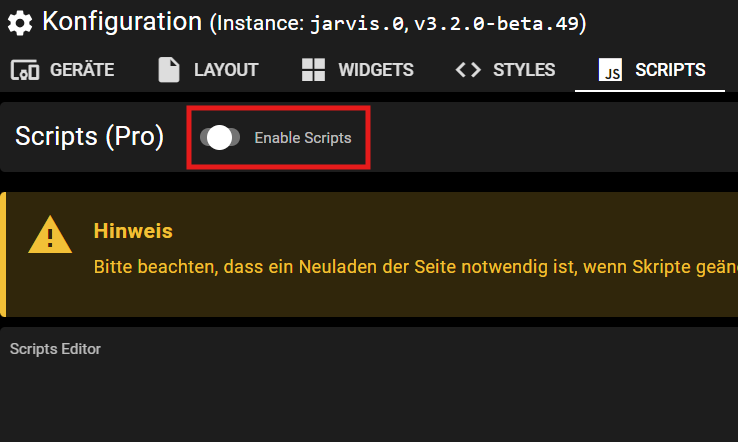
Hat aber auch keine Auswirkungen, egal ob ich ihn ein- oder ausschalte.
Der DP ist auf jeden Fall auf true.@holofury
https://github.com/Zefau/ioBroker.jarvis/issues/2757Die Einträge kamen aber erst mit beta.60, also ist anscheinend bei Dir noch was im Cache.
Nimm mal einen anderen Browser und zeig mal bitte die jarvis-DPs insbesondere scripts.

Man kann auch im Browser nachschauen, was im Cache ist ->
localStoragemuss man in der Browser-console eingeben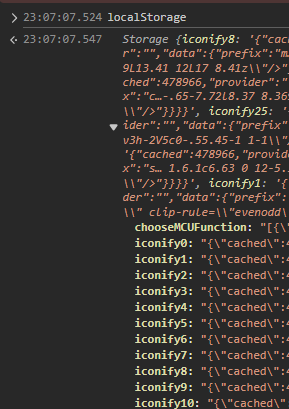
-
@holofury
https://github.com/Zefau/ioBroker.jarvis/issues/2757Die Einträge kamen aber erst mit beta.60, also ist anscheinend bei Dir noch was im Cache.
Nimm mal einen anderen Browser und zeig mal bitte die jarvis-DPs insbesondere scripts.
Man kann auch im Browser nachschauen, was im Cache ist ->
localStoragemuss man in der Browser-console eingeben@mcu
Hatte in Firefox den Cache gelöscht, aber in Chrome die Console geöffnet.
Hab aber auch in Firefox Fehlermeldungen:TypeError: v.trim is not a function u http://192.168.178.62:8400/jarvis/js/index-cc169059.js:1578 setup http://192.168.178.62:8400/jarvis/js/index-cc169059.js:1578 callWithErrorHandling http://192.168.178.62:8400/jarvis/js/index-cc169059.js:16 setupStatefulComponent http://192.168.178.62:8400/jarvis/js/index-cc169059.js:16 setupComponent http://192.168.178.62:8400/jarvis/js/index-cc169059.js:16 re http://192.168.178.62:8400/jarvis/js/index-cc169059.js:16 ie http://192.168.178.62:8400/jarvis/js/index-cc169059.js:16 Y http://192.168.178.62:8400/jarvis/js/index-cc169059.js:16 be http://192.168.178.62:8400/jarvis/js/index-cc169059.js:16 run http://192.168.178.62:8400/jarvis/js/index-cc169059.js:9 update http://192.168.178.62:8400/jarvis/js/index-cc169059.js:16 fe http://192.168.178.62:8400/jarvis/js/index-cc169059.js:16 re http://192.168.178.62:8400/jarvis/js/index-cc169059.js:16 ie http://192.168.178.62:8400/jarvis/js/index-cc169059.js:16 Y http://192.168.178.62:8400/jarvis/js/index-cc169059.js:16 ye http://192.168.178.62:8400/jarvis/js/index-cc169059.js:16 pe http://192.168.178.62:8400/jarvis/js/index-cc169059.js:16 ne http://192.168.178.62:8400/jarvis/js/index-cc169059.js:16 X http://192.168.178.62:8400/jarvis/js/index-cc169059.js:16 Y http://192.168.178.62:8400/jarvis/js/index-cc169059.js:16 be http://192.168.178.62:8400/jarvis/js/index-cc169059.js:16 run http://192.168.178.62:8400/jarvis/js/index-cc169059.js:9 update http://192.168.178.62:8400/jarvis/js/index-cc169059.js:16 he http://192.168.178.62:8400/jarvis/js/index-cc169059.js:16 ie http://192.168.178.62:8400/jarvis/js/index-cc169059.js:16 Y http://192.168.178.62:8400/jarvis/js/index-cc169059.js:16 ye http://192.168.178.62:8400/jarvis/js/index-cc169059.js:16 pe http://192.168.178.62:8400/jarvis/js/index-cc169059.js:16 ne http://192.168.178.62:8400/jarvis/js/index-cc169059.js:16 X http://192.168.178.62:8400/jarvis/js/index-cc169059.js:16 Y http://192.168.178.62:8400/jarvis/js/index-cc169059.js:16 be http://192.168.178.62:8400/jarvis/js/index-cc169059.js:16 run http://192.168.178.62:8400/jarvis/js/index-cc169059.js:9 update http://192.168.178.62:8400/jarvis/js/index-cc169059.js:16 callWithErrorHandling http://192.168.178.62:8400/jarvis/js/index-cc169059.js:16 flushJobs http://192.168.178.62:8400/jarvis/js/index-cc169059.js:16Uncaught SyntaxError: missing ] after element list useCustomTag http://192.168.178.62:8400/jarvis/js/index-cc169059.js:108 onConnect http://192.168.178.62:8400/jarvis/js/index-cc169059.js:108 192.168.178.62:8400:14:30note: [ opened at line 14, column 22Hier die Datenpunkte:
CSS:
{ "version": 3.2, "signature": null, "styles": ".q-page-container {\n\tpadding-top: 0px !important;\n}\n\n.jarvis-tabs-container .tabIcon {\n\ttransform: scale(1.5, 1.5);\n}\n\n.jarvis-tabs-container {\n\theight: 50px;\n\t/* man kann auch 60px nehmen */\n\t/* -> Icon weiter runter zur Auswahllinie */\n\tbackground-color: rgba(0,0,0,0.45) !important;\n}\n\n.jarvis-tabs-container .q-tab__content {\n\t/* Klickbereich */\n\tmin-width: 40px!important;\n\tmin-height: 50px;\n\t/* wenn man oben bei tabs-container die height ändert */\n\t/* dann auch hier 60px */\n\tvertical-align: inherit;\n}\n\n.jarvis-page-container {\n\tbackground-image: url(\"https://w.forfun.com/fetch/3d/3dc71baf5d8da82a1246c24c940ee10b.jpeg\");\n}\n\n.body--dark .jarvis-header {\n\tbackground-color: rgba(0,0,0,0.45) !important;\n}\n\n.jarvis-widget-container {\n\tbackground-color: rgba(0,0,0,0.45) !important;\n}\n\n.body--dark .jarvis-widget {\n\tbackground: rgba(0,0,0,0.45);\n}\n\n.body--light .jarvis-widget {\n\tbackground: rgba(255,255,255,1);\n}\n\n.body--dark .jarvis-tabs-container {\n\tbackground-color: rgba(0,0,0,0.45) !important;\n}\n\n/* für JsonTable ergänzt @mcu */\n\n.q-table__container {\n\tbackground-color: transparent !important;\n}\n\n/* für Trennstrich für TABs ergänzt @mcu */\n\n.q-header--bordered {\n\tborder: 1px solid transparent !important;\n}\n\n/* MediaControl in transparentem Design @mcu */\n\n.cover {\n\tbackground-color: transparent !important;\n}\n\n.controls {\n\tbackground-color: transparent !important;\n}\n\n.track-information {\n\tbackground: rgba(25, 118, 210, 0) !important;\n}\n\n.track-duration {\n\tbackground-color: white;\n}\n\n.track-progress {\n\tbackground-color: blue;\n}\n\n.controls .jarvis-icon svg {\n\tcolor: white;\n}\n\n.controls .controlsLeft .q-btn__wrapper {\n\tbackground-color: transparent !important;\n}\n\n.controls .q-btn-group >.q-btn-item {\n\tbackground-color: transparent !important;\n}\n\n/* Bei JsonTable in Vergrößerung anderer Hintergrund nicht transparent @MCU */\n\n.fullscreen.scroll.jarvis-JsonTable.sticky-table-header {\n\tbackground-image: url(\"https://w.forfun.com/fetch/3d/3dc71baf5d8da82a1246c24c940ee10b.jpeg\") !important;\n}" } -
@mcu
Hatte in Firefox den Cache gelöscht, aber in Chrome die Console geöffnet.
Hab aber auch in Firefox Fehlermeldungen:TypeError: v.trim is not a function u http://192.168.178.62:8400/jarvis/js/index-cc169059.js:1578 setup http://192.168.178.62:8400/jarvis/js/index-cc169059.js:1578 callWithErrorHandling http://192.168.178.62:8400/jarvis/js/index-cc169059.js:16 setupStatefulComponent http://192.168.178.62:8400/jarvis/js/index-cc169059.js:16 setupComponent http://192.168.178.62:8400/jarvis/js/index-cc169059.js:16 re http://192.168.178.62:8400/jarvis/js/index-cc169059.js:16 ie http://192.168.178.62:8400/jarvis/js/index-cc169059.js:16 Y http://192.168.178.62:8400/jarvis/js/index-cc169059.js:16 be http://192.168.178.62:8400/jarvis/js/index-cc169059.js:16 run http://192.168.178.62:8400/jarvis/js/index-cc169059.js:9 update http://192.168.178.62:8400/jarvis/js/index-cc169059.js:16 fe http://192.168.178.62:8400/jarvis/js/index-cc169059.js:16 re http://192.168.178.62:8400/jarvis/js/index-cc169059.js:16 ie http://192.168.178.62:8400/jarvis/js/index-cc169059.js:16 Y http://192.168.178.62:8400/jarvis/js/index-cc169059.js:16 ye http://192.168.178.62:8400/jarvis/js/index-cc169059.js:16 pe http://192.168.178.62:8400/jarvis/js/index-cc169059.js:16 ne http://192.168.178.62:8400/jarvis/js/index-cc169059.js:16 X http://192.168.178.62:8400/jarvis/js/index-cc169059.js:16 Y http://192.168.178.62:8400/jarvis/js/index-cc169059.js:16 be http://192.168.178.62:8400/jarvis/js/index-cc169059.js:16 run http://192.168.178.62:8400/jarvis/js/index-cc169059.js:9 update http://192.168.178.62:8400/jarvis/js/index-cc169059.js:16 he http://192.168.178.62:8400/jarvis/js/index-cc169059.js:16 ie http://192.168.178.62:8400/jarvis/js/index-cc169059.js:16 Y http://192.168.178.62:8400/jarvis/js/index-cc169059.js:16 ye http://192.168.178.62:8400/jarvis/js/index-cc169059.js:16 pe http://192.168.178.62:8400/jarvis/js/index-cc169059.js:16 ne http://192.168.178.62:8400/jarvis/js/index-cc169059.js:16 X http://192.168.178.62:8400/jarvis/js/index-cc169059.js:16 Y http://192.168.178.62:8400/jarvis/js/index-cc169059.js:16 be http://192.168.178.62:8400/jarvis/js/index-cc169059.js:16 run http://192.168.178.62:8400/jarvis/js/index-cc169059.js:9 update http://192.168.178.62:8400/jarvis/js/index-cc169059.js:16 callWithErrorHandling http://192.168.178.62:8400/jarvis/js/index-cc169059.js:16 flushJobs http://192.168.178.62:8400/jarvis/js/index-cc169059.js:16Uncaught SyntaxError: missing ] after element list useCustomTag http://192.168.178.62:8400/jarvis/js/index-cc169059.js:108 onConnect http://192.168.178.62:8400/jarvis/js/index-cc169059.js:108 192.168.178.62:8400:14:30note: [ opened at line 14, column 22Hier die Datenpunkte:
CSS:
{ "version": 3.2, "signature": null, "styles": ".q-page-container {\n\tpadding-top: 0px !important;\n}\n\n.jarvis-tabs-container .tabIcon {\n\ttransform: scale(1.5, 1.5);\n}\n\n.jarvis-tabs-container {\n\theight: 50px;\n\t/* man kann auch 60px nehmen */\n\t/* -> Icon weiter runter zur Auswahllinie */\n\tbackground-color: rgba(0,0,0,0.45) !important;\n}\n\n.jarvis-tabs-container .q-tab__content {\n\t/* Klickbereich */\n\tmin-width: 40px!important;\n\tmin-height: 50px;\n\t/* wenn man oben bei tabs-container die height ändert */\n\t/* dann auch hier 60px */\n\tvertical-align: inherit;\n}\n\n.jarvis-page-container {\n\tbackground-image: url(\"https://w.forfun.com/fetch/3d/3dc71baf5d8da82a1246c24c940ee10b.jpeg\");\n}\n\n.body--dark .jarvis-header {\n\tbackground-color: rgba(0,0,0,0.45) !important;\n}\n\n.jarvis-widget-container {\n\tbackground-color: rgba(0,0,0,0.45) !important;\n}\n\n.body--dark .jarvis-widget {\n\tbackground: rgba(0,0,0,0.45);\n}\n\n.body--light .jarvis-widget {\n\tbackground: rgba(255,255,255,1);\n}\n\n.body--dark .jarvis-tabs-container {\n\tbackground-color: rgba(0,0,0,0.45) !important;\n}\n\n/* für JsonTable ergänzt @mcu */\n\n.q-table__container {\n\tbackground-color: transparent !important;\n}\n\n/* für Trennstrich für TABs ergänzt @mcu */\n\n.q-header--bordered {\n\tborder: 1px solid transparent !important;\n}\n\n/* MediaControl in transparentem Design @mcu */\n\n.cover {\n\tbackground-color: transparent !important;\n}\n\n.controls {\n\tbackground-color: transparent !important;\n}\n\n.track-information {\n\tbackground: rgba(25, 118, 210, 0) !important;\n}\n\n.track-duration {\n\tbackground-color: white;\n}\n\n.track-progress {\n\tbackground-color: blue;\n}\n\n.controls .jarvis-icon svg {\n\tcolor: white;\n}\n\n.controls .controlsLeft .q-btn__wrapper {\n\tbackground-color: transparent !important;\n}\n\n.controls .q-btn-group >.q-btn-item {\n\tbackground-color: transparent !important;\n}\n\n/* Bei JsonTable in Vergrößerung anderer Hintergrund nicht transparent @MCU */\n\n.fullscreen.scroll.jarvis-JsonTable.sticky-table-header {\n\tbackground-image: url(\"https://w.forfun.com/fetch/3d/3dc71baf5d8da82a1246c24c940ee10b.jpeg\") !important;\n}" } -
@mcu
Hatte in Firefox den Cache gelöscht, aber in Chrome die Console geöffnet.
Hab aber auch in Firefox Fehlermeldungen:TypeError: v.trim is not a function u http://192.168.178.62:8400/jarvis/js/index-cc169059.js:1578 setup http://192.168.178.62:8400/jarvis/js/index-cc169059.js:1578 callWithErrorHandling http://192.168.178.62:8400/jarvis/js/index-cc169059.js:16 setupStatefulComponent http://192.168.178.62:8400/jarvis/js/index-cc169059.js:16 setupComponent http://192.168.178.62:8400/jarvis/js/index-cc169059.js:16 re http://192.168.178.62:8400/jarvis/js/index-cc169059.js:16 ie http://192.168.178.62:8400/jarvis/js/index-cc169059.js:16 Y http://192.168.178.62:8400/jarvis/js/index-cc169059.js:16 be http://192.168.178.62:8400/jarvis/js/index-cc169059.js:16 run http://192.168.178.62:8400/jarvis/js/index-cc169059.js:9 update http://192.168.178.62:8400/jarvis/js/index-cc169059.js:16 fe http://192.168.178.62:8400/jarvis/js/index-cc169059.js:16 re http://192.168.178.62:8400/jarvis/js/index-cc169059.js:16 ie http://192.168.178.62:8400/jarvis/js/index-cc169059.js:16 Y http://192.168.178.62:8400/jarvis/js/index-cc169059.js:16 ye http://192.168.178.62:8400/jarvis/js/index-cc169059.js:16 pe http://192.168.178.62:8400/jarvis/js/index-cc169059.js:16 ne http://192.168.178.62:8400/jarvis/js/index-cc169059.js:16 X http://192.168.178.62:8400/jarvis/js/index-cc169059.js:16 Y http://192.168.178.62:8400/jarvis/js/index-cc169059.js:16 be http://192.168.178.62:8400/jarvis/js/index-cc169059.js:16 run http://192.168.178.62:8400/jarvis/js/index-cc169059.js:9 update http://192.168.178.62:8400/jarvis/js/index-cc169059.js:16 he http://192.168.178.62:8400/jarvis/js/index-cc169059.js:16 ie http://192.168.178.62:8400/jarvis/js/index-cc169059.js:16 Y http://192.168.178.62:8400/jarvis/js/index-cc169059.js:16 ye http://192.168.178.62:8400/jarvis/js/index-cc169059.js:16 pe http://192.168.178.62:8400/jarvis/js/index-cc169059.js:16 ne http://192.168.178.62:8400/jarvis/js/index-cc169059.js:16 X http://192.168.178.62:8400/jarvis/js/index-cc169059.js:16 Y http://192.168.178.62:8400/jarvis/js/index-cc169059.js:16 be http://192.168.178.62:8400/jarvis/js/index-cc169059.js:16 run http://192.168.178.62:8400/jarvis/js/index-cc169059.js:9 update http://192.168.178.62:8400/jarvis/js/index-cc169059.js:16 callWithErrorHandling http://192.168.178.62:8400/jarvis/js/index-cc169059.js:16 flushJobs http://192.168.178.62:8400/jarvis/js/index-cc169059.js:16Uncaught SyntaxError: missing ] after element list useCustomTag http://192.168.178.62:8400/jarvis/js/index-cc169059.js:108 onConnect http://192.168.178.62:8400/jarvis/js/index-cc169059.js:108 192.168.178.62:8400:14:30note: [ opened at line 14, column 22Hier die Datenpunkte:
CSS:
{ "version": 3.2, "signature": null, "styles": ".q-page-container {\n\tpadding-top: 0px !important;\n}\n\n.jarvis-tabs-container .tabIcon {\n\ttransform: scale(1.5, 1.5);\n}\n\n.jarvis-tabs-container {\n\theight: 50px;\n\t/* man kann auch 60px nehmen */\n\t/* -> Icon weiter runter zur Auswahllinie */\n\tbackground-color: rgba(0,0,0,0.45) !important;\n}\n\n.jarvis-tabs-container .q-tab__content {\n\t/* Klickbereich */\n\tmin-width: 40px!important;\n\tmin-height: 50px;\n\t/* wenn man oben bei tabs-container die height ändert */\n\t/* dann auch hier 60px */\n\tvertical-align: inherit;\n}\n\n.jarvis-page-container {\n\tbackground-image: url(\"https://w.forfun.com/fetch/3d/3dc71baf5d8da82a1246c24c940ee10b.jpeg\");\n}\n\n.body--dark .jarvis-header {\n\tbackground-color: rgba(0,0,0,0.45) !important;\n}\n\n.jarvis-widget-container {\n\tbackground-color: rgba(0,0,0,0.45) !important;\n}\n\n.body--dark .jarvis-widget {\n\tbackground: rgba(0,0,0,0.45);\n}\n\n.body--light .jarvis-widget {\n\tbackground: rgba(255,255,255,1);\n}\n\n.body--dark .jarvis-tabs-container {\n\tbackground-color: rgba(0,0,0,0.45) !important;\n}\n\n/* für JsonTable ergänzt @mcu */\n\n.q-table__container {\n\tbackground-color: transparent !important;\n}\n\n/* für Trennstrich für TABs ergänzt @mcu */\n\n.q-header--bordered {\n\tborder: 1px solid transparent !important;\n}\n\n/* MediaControl in transparentem Design @mcu */\n\n.cover {\n\tbackground-color: transparent !important;\n}\n\n.controls {\n\tbackground-color: transparent !important;\n}\n\n.track-information {\n\tbackground: rgba(25, 118, 210, 0) !important;\n}\n\n.track-duration {\n\tbackground-color: white;\n}\n\n.track-progress {\n\tbackground-color: blue;\n}\n\n.controls .jarvis-icon svg {\n\tcolor: white;\n}\n\n.controls .controlsLeft .q-btn__wrapper {\n\tbackground-color: transparent !important;\n}\n\n.controls .q-btn-group >.q-btn-item {\n\tbackground-color: transparent !important;\n}\n\n/* Bei JsonTable in Vergrößerung anderer Hintergrund nicht transparent @MCU */\n\n.fullscreen.scroll.jarvis-JsonTable.sticky-table-header {\n\tbackground-image: url(\"https://w.forfun.com/fetch/3d/3dc71baf5d8da82a1246c24c940ee10b.jpeg\") !important;\n}" }{ "version": 3.2, "signature": 7813676603462119, "scripts": {} }devices.txt scripts:
widgets.txtnotifications und theme sind leer
-
{
  "version": 3.2,
  "signature": 7813676603462119,
  "scripts": {}
}
devices.txt scripts:
widgets.txtnotifications und theme sind leer
-
@holofury CSS ist schon mal falsch.

Es muss dort eine Zahl stehen.
Und scripts?Zeig mal die Übersicht, so wie ich es gezeigt habe.
-
@mcu Jetzt hat signature auch bei css einen Inhalt:
{
  "version": 3.2,
  "signature": 3460953447826435,
  "styles": ".q-page-container {\n\tpadding-top: 0px !important;\n}\n\n.jarvis-tabs-container .tabIcon {\n\ttransform: scale(1.5, 1.5);\n}\n\n.jarvis-tabs-container {\n\theight: 50px;\n\t/* man kann auch 60px nehmen */\n\t/* -> Icon weiter runter zur Auswahllinie */\n\tbackground-color: rgba(0,0,0,0.45) !important;\n}\n\n.jarvis-tabs-container .q-tab__content {\n\t/* Klickbereich */\n\tmin-width: 40px!important;\n\tmin-height: 50px;\n\t/* wenn man oben bei tabs-container die height ändert */\n\t/* dann auch hier 60px */\n\tvertical-align: inherit;\n}\n\n.jarvis-page-container {\n\tbackground-image: url(\"https://w.forfun.com/fetch/3d/3dc71baf5d8da82a1246c24c940ee10b.jpeg\");\n}\n\n.body--dark .jarvis-header {\n\tbackground-color: rgba(0,0,0,0.45) !important;\n}\n\n.jarvis-widget-container {\n\tbackground-color: rgba(0,0,0,0.45) !important;\n}\n\n.body--dark .jarvis-widget {\n\tbackground: rgba(0,0,0,0.45);\n}\n\n.body--light .jarvis-widget {\n\tbackground: rgba(255,255,255,1);\n}\n\n.body--dark .jarvis-tabs-container {\n\tbackground-color: rgba(0,0,0,0.45) !important;\n}\n\n/* für JsonTable ergänzt @mcu */\n\n.q-table__container {\n\tbackground-color: transparent !important;\n}\n\n/* für Trennstrich für TABs ergänzt @mcu */\n\n.q-header--bordered {\n\tborder: 1px solid transparent !important;\n}\n\n/* MediaControl in transparentem Design @mcu */\n\n.cover {\n\tbackground-color: transparent !important;\n}\n\n.controls {\n\tbackground-color: transparent !important;\n}\n\n.track-information {\n\tbackground: rgba(25, 118, 210, 0) !important;\n}\n\n.track-duration {\n\tbackground-color: white;\n}\n\n.track-progress {\n\tbackground-color: blue;\n}\n\n.controls .jarvis-icon svg {\n\tcolor: white;\n}\n\n.controls .controlsLeft .q-btn__wrapper {\n\tbackground-color: transparent !important;\n}\n\n.controls .q-btn-group >.q-btn-item {\n\tbackground-color: transparent !important;\n}\n\n/* Bei JsonTable in Vergrößerung anderer Hintergrund nicht transparent @MCU */\n\n.fullscreen.scroll.jarvis-JsonTable.sticky-table-header {\n\tbackground-image: url(\"https://w.forfun.com/fetch/3d/3dc71baf5d8da82a1246c24c940ee10b.jpeg\") !important;\n}"
}
Hat aber keine Verbesserung gebracht.
-
@mcu Jetzt hat signature auch bei css einen Inhalt:
{
  "version": 3.2,
  "signature": 3460953447826435,
  "styles": ".q-page-container {\n\tpadding-top: 0px !important;\n}\n\n.jarvis-tabs-container .tabIcon {\n\ttransform: scale(1.5, 1.5);\n}\n\n.jarvis-tabs-container {\n\theight: 50px;\n\t/* man kann auch 60px nehmen */\n\t/* -> Icon weiter runter zur Auswahllinie */\n\tbackground-color: rgba(0,0,0,0.45) !important;\n}\n\n.jarvis-tabs-container .q-tab__content {\n\t/* Klickbereich */\n\tmin-width: 40px!important;\n\tmin-height: 50px;\n\t/* wenn man oben bei tabs-container die height ändert */\n\t/* dann auch hier 60px */\n\tvertical-align: inherit;\n}\n\n.jarvis-page-container {\n\tbackground-image: url(\"https://w.forfun.com/fetch/3d/3dc71baf5d8da82a1246c24c940ee10b.jpeg\");\n}\n\n.body--dark .jarvis-header {\n\tbackground-color: rgba(0,0,0,0.45) !important;\n}\n\n.jarvis-widget-container {\n\tbackground-color: rgba(0,0,0,0.45) !important;\n}\n\n.body--dark .jarvis-widget {\n\tbackground: rgba(0,0,0,0.45);\n}\n\n.body--light .jarvis-widget {\n\tbackground: rgba(255,255,255,1);\n}\n\n.body--dark .jarvis-tabs-container {\n\tbackground-color: rgba(0,0,0,0.45) !important;\n}\n\n/* für JsonTable ergänzt @mcu */\n\n.q-table__container {\n\tbackground-color: transparent !important;\n}\n\n/* für Trennstrich für TABs ergänzt @mcu */\n\n.q-header--bordered {\n\tborder: 1px solid transparent !important;\n}\n\n/* MediaControl in transparentem Design @mcu */\n\n.cover {\n\tbackground-color: transparent !important;\n}\n\n.controls {\n\tbackground-color: transparent !important;\n}\n\n.track-information {\n\tbackground: rgba(25, 118, 210, 0) !important;\n}\n\n.track-duration {\n\tbackground-color: white;\n}\n\n.track-progress {\n\tbackground-color: blue;\n}\n\n.controls .jarvis-icon svg {\n\tcolor: white;\n}\n\n.controls .controlsLeft .q-btn__wrapper {\n\tbackground-color: transparent !important;\n}\n\n.controls .q-btn-group >.q-btn-item {\n\tbackground-color: transparent !important;\n}\n\n/* Bei JsonTable in Vergrößerung anderer Hintergrund nicht transparent @MCU */\n\n.fullscreen.scroll.jarvis-JsonTable.sticky-table-header {\n\tbackground-image: url(\"https://w.forfun.com/fetch/3d/3dc71baf5d8da82a1246c24c940ee10b.jpeg\") !important;\n}"
}
Hat aber keine Verbesserung gebracht.
-
@holofury
Zeig mal bitte den Inhalt von localStorage
Also in den Browser gehen F12 -> console -> localStorage eingeben und Return drückenUm die Einträge zu löschen gibt man dies ein. danach F5
localStorage.clear() -
@holofury Ja ist normal dann F5 dann ist der Speicher wieder neu
Und da kann man erkennen,dass du 2 Version drin hast / Hattest.


Wenn du das jetzt gemacht hast sollte es laufen



Support us
536
Online32.6k
Users82.3k
Topics1.3m
Posts