Skip to content
  • Home
  • Aktuell
  • Tags
  • 0 Ungelesen 0
  • Kategorien
  • Unreplied
  • Beliebt
  • GitHub
  • Docu
  • Hilfe
Skins
  • Light
  • Brite
  • Cerulean
  • Cosmo
  • Flatly
  • Journal
  • Litera
  • Lumen
  • Lux
  • Materia
  • Minty
  • Morph
  • Pulse
  • Sandstone
  • Simplex
  • Sketchy
  • Spacelab
  • United
  • Yeti
  • Zephyr
  • Dark
  • Cyborg
  • Darkly
  • Quartz
  • Slate
  • Solar
  • Superhero
  • Vapor

  • Standard: (Kein Skin)
  • Kein Skin
Einklappen
ioBroker Logo

Community Forum

donate donate
  1. ioBroker Community Home
  2. Deutsch
  3. Tester
  4. Speicherprobleme - Absturz?

NEWS

  • UPDATE 31.10.: Amazon Alexa - ioBroker Skill läuft aus ?
    apollon77A
    apollon77
    48
    3
    8.7k

  • Monatsrückblick – September 2025
    BluefoxB
    Bluefox
    13
    1
    2.2k

  • Neues Video "KI im Smart Home" - ioBroker plus n8n
    BluefoxB
    Bluefox
    16
    1
    3.2k

Speicherprobleme - Absturz?

Geplant Angeheftet Gesperrt Verschoben Tester
22 Beiträge 3 Kommentatoren 1.9k Aufrufe 2 Watching
  • Älteste zuerst
  • Neuste zuerst
  • Meiste Stimmen
Antworten
  • In einem neuen Thema antworten
Anmelden zum Antworten
Dieses Thema wurde gelöscht. Nur Nutzer mit entsprechenden Rechten können es sehen.
  • HomoranH Homoran

    @schandmann sagte in Test Adapter Energiefluss-erweitert v0.0.x GitHub/Latest:

    iob diag ist bei mir anscheinend nicht installiert. Kann ich zumindest nicht ausführen...

    zeigen!
    als Text in code-tags

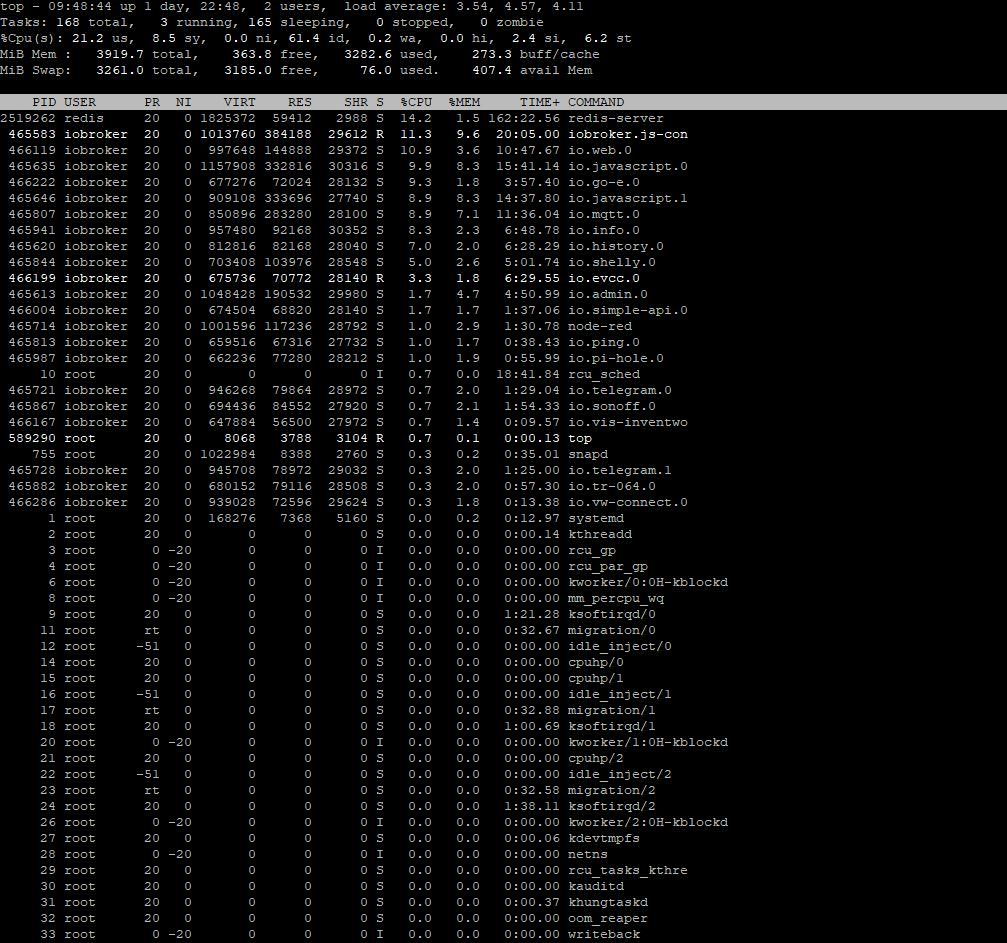
    dito mit top, allerdings ausnahmsweise als Screenshot
    load ist vieeel zu hoch und RAM ist fast verbraucht, war es sogar schon, da Swap verwendet wurde

    S Offline
    S Offline
    Schandmann
    schrieb am zuletzt editiert von
    #6

    @homoran

    iob diag:

    root@iobroker:/opt/iobroker# iob diag
    iobroker [command]
    
    Commands:
      iobroker setup                                               Setup ioBroker
      iobroker start [all|<adapter>.<instance>]                    Starts the js-controller or a specified adapter instance
      iobroker stop [<adapter>.<instance>]                         stops the js-controller or a specified adapter instance
      iobroker restart [<adapter>.<instance>]                      Restarts js-controller or a specified adapter instance  [aliases: r]
      iobroker debug <adapter>[.<instance>]                        Starts a Node.js debugging session for the adapter instance
      iobroker info                                                Shows the host info
      iobroker logs [<adapter>]                                    Monitor log
      iobroker add <adapter> [desiredNumber]                       Add instance of adapter  [aliases: a]
      iobroker install <adapter>                                   Installs a specified adapter  [aliases: i]
      iobroker rebuild [<module>]                                  Rebuild all native modules or path
      iobroker url <url> [<name>]                                  Install adapter from specified url, e.g. GitHub
      iobroker del <adapter>                                       Remove adapter and all instances from this host  [aliases: delete]
      iobroker del <adapter>.<instance>                            Remove adapter instance  [aliases: delete]
      iobroker update [<repositoryUrl>]                            Update repository and list adapters
      iobroker upgrade                                             Upgrade management
      iobroker upload [all|<adapter>]                              Upload management  [aliases: u]
      iobroker object                                              Object management  [aliases: o]
      iobroker state                                               State management  [aliases: s]
      iobroker message <adapter>[.instance] <command> [<message>]  Send message to adapter instance/s
      iobroker list <type> [<filter>]                              List all entries, like objects
      iobroker chmod <mode> <file>                                 Change file rights
      iobroker chown <user> <group> <file>                         Change file ownership
      iobroker touch <file>                                        Touch file
      iobroker rm <file>                                           Remove file
      iobroker file                                                File management
      iobroker user                                                User commands
      iobroker group                                               group management
      iobroker host <hostname>                                     Set host to given hostname
      iobroker set <adapter>.<instance>                            Change settings of adapter config
      iobroker license <license.file or license.text>              Update license by given file
      iobroker cert                                                Certificate management
      iobroker clean <yes>                                         Clears all objects and states
      iobroker backup                                              Create backup
      iobroker restore <backup name or path>                       Restore a specified backup
      iobroker validate <backup name or path>                      Validate a specified backup
      iobroker status [all|<adapter>.<instance>]                   Status of ioBroker or adapter instance  [aliases: isrun]
      iobroker repo [<name>]                                       Show repo information
      iobroker uuid                                                Show uuid of the installation  [aliases: id]
      iobroker unsetup                                             Reset license, installation secret and language
      iobroker fix                                                 Execute the installation fixer script, this updates your ioBroker installation
      iobroker multihost                                           Multihost management
      iobroker compact                                             compact group management
      iobroker plugin                                              Plugin management
      iobroker version [<adapter>]                                 Show version of js-controller or specified adapter  [aliases: v]
    
    Options:
      --help  Show help  [boolean]


    top:


    top.JPG

    HomoranH 1 Antwort Letzte Antwort
    0
    • S Schandmann

      @homoran

      iob diag:

      root@iobroker:/opt/iobroker# iob diag
      iobroker [command]
      
      Commands:
        iobroker setup                                               Setup ioBroker
        iobroker start [all|<adapter>.<instance>]                    Starts the js-controller or a specified adapter instance
        iobroker stop [<adapter>.<instance>]                         stops the js-controller or a specified adapter instance
        iobroker restart [<adapter>.<instance>]                      Restarts js-controller or a specified adapter instance  [aliases: r]
        iobroker debug <adapter>[.<instance>]                        Starts a Node.js debugging session for the adapter instance
        iobroker info                                                Shows the host info
        iobroker logs [<adapter>]                                    Monitor log
        iobroker add <adapter> [desiredNumber]                       Add instance of adapter  [aliases: a]
        iobroker install <adapter>                                   Installs a specified adapter  [aliases: i]
        iobroker rebuild [<module>]                                  Rebuild all native modules or path
        iobroker url <url> [<name>]                                  Install adapter from specified url, e.g. GitHub
        iobroker del <adapter>                                       Remove adapter and all instances from this host  [aliases: delete]
        iobroker del <adapter>.<instance>                            Remove adapter instance  [aliases: delete]
        iobroker update [<repositoryUrl>]                            Update repository and list adapters
        iobroker upgrade                                             Upgrade management
        iobroker upload [all|<adapter>]                              Upload management  [aliases: u]
        iobroker object                                              Object management  [aliases: o]
        iobroker state                                               State management  [aliases: s]
        iobroker message <adapter>[.instance] <command> [<message>]  Send message to adapter instance/s
        iobroker list <type> [<filter>]                              List all entries, like objects
        iobroker chmod <mode> <file>                                 Change file rights
        iobroker chown <user> <group> <file>                         Change file ownership
        iobroker touch <file>                                        Touch file
        iobroker rm <file>                                           Remove file
        iobroker file                                                File management
        iobroker user                                                User commands
        iobroker group                                               group management
        iobroker host <hostname>                                     Set host to given hostname
        iobroker set <adapter>.<instance>                            Change settings of adapter config
        iobroker license <license.file or license.text>              Update license by given file
        iobroker cert                                                Certificate management
        iobroker clean <yes>                                         Clears all objects and states
        iobroker backup                                              Create backup
        iobroker restore <backup name or path>                       Restore a specified backup
        iobroker validate <backup name or path>                      Validate a specified backup
        iobroker status [all|<adapter>.<instance>]                   Status of ioBroker or adapter instance  [aliases: isrun]
        iobroker repo [<name>]                                       Show repo information
        iobroker uuid                                                Show uuid of the installation  [aliases: id]
        iobroker unsetup                                             Reset license, installation secret and language
        iobroker fix                                                 Execute the installation fixer script, this updates your ioBroker installation
        iobroker multihost                                           Multihost management
        iobroker compact                                             compact group management
        iobroker plugin                                              Plugin management
        iobroker version [<adapter>]                                 Show version of js-controller or specified adapter  [aliases: v]
      
      Options:
        --help  Show help  [boolean]


      top:


      top.JPG

      HomoranH Nicht stören
      HomoranH Nicht stören
      Homoran
      Global Moderator Administrators
      schrieb am zuletzt editiert von
      #7

      @schandmann sagte in Test Adapter Energiefluss-erweitert v0.0.x GitHub/Latest:

      iob diag
      da ist aber einiges faul

      iob stop
      iob fix
      iob start
      iob diag
      

      @schandmann sagte in Test Adapter Energiefluss-erweitert v0.0.x GitHub/Latest:

      top:

      redis ist IMHO auch hyperaktiv

      Mach mal den fix und den diag, ich glieder das hier aus

      kein Support per PN! - Fragen im Forum stellen - es gibt fast nichts, was nicht auch für andere interessant ist.

      Benutzt das Voting rechts unten im Beitrag wenn er euch geholfen hat.

      der Installationsfixer: curl -fsL https://iobroker.net/fix.sh | bash -

      1 Antwort Letzte Antwort
      0
      • S Schandmann

        @SKB @Homoran

        Guten Morgen,
        nochmal zu dem Absturz-Problem von gestern...

        Mit dem Begriff OOM-Reaper kann ich nichts anfangen.
        Der Datenpunkt für die Batterie-Prozent ist: 0_userdata.0.Huawei.Wichtig.Batteriefüllstand

        Habe heute morgen die Berechnung für die Akkulaufzeit und für den Verbrauch rausgenommen und den Energiefluss-erweitert-Adapter gestartet. Iobroker hat sich dann wieder ein paar Minuten aufgehangen und alle laufenden Instanzen/Adapter gekillt. Die Werte, die der Energiefluss-erweitert-Adapter abgreift schienen im vorfeld plausibel. Auch die Fabelwerte von gestern (Akkuladung /-entladung) habe ich in Node-Red gefiltert, so dass nur plausible Werte geschrieben werden. Der Akku wurde zu dem Zeitpunkt aber eh bereits minimal geladen mit 76W.

        Hier das Logfile aus dem Iobroker:

        2023-09-14 08:28:32.869 - info: host.iobroker "system.adapter.energiefluss-erweitert.0" enabled
        2023-09-14 08:28:34.009 - info: host.iobroker instance system.adapter.energiefluss-erweitert.0 started with pid 460773
        2023-09-14 08:28:38.909 - info: energiefluss-erweitert.0 (460773) starting. Version 0.0.2-alpha.18 (non-npm: SKB-CGN/ioBroker.energiefluss-erweitert#d3bd48eb3b875ee87924f1761153f71fed5ae6fb) in /opt/iobroker/node_modules/iobroker.energiefluss-erweitert, node: v16.20.1, js-controller: 4.0.24
        2023-09-14 08:28:39.053 - info: energiefluss-erweitert.0 (460773) Adapter started. Loading config!
        2023-09-14 08:28:39.614 - info: energiefluss-erweitert.0 (460773) Configuration loaded!
        2023-09-14 08:28:39.616 - info: energiefluss-erweitert.0 (460773) Requesting the following states: energiefluss-erweitert.0.configuration,0_userdata.0.Huawei.Wichtig.PV Leistung,0_userdata.0.Huawei.Wichtig.PV West Leistung,0_userdata.0.Huawei.Wichtig.Batteriefüllstand,0_userdata.0.Huawei.Wichtig.Verbrauch,evcc.0.loadpoint.1.status.vehicleSoc,evcc.0.loadpoint.1.status.chargePower,0_userdata.0.Huawei.Wichtig.Batterie Lade und Entladeleistung,sonoff.0.Stromzaehler.Power_Power_curr,evcc.0.status.homePower,shelly.0.SHSW-PM#34945472C362#1.Relay0.Power,sonoff.0.DVES_4AC6DE.ENERGY_Power,shelly.0.SHPLG2-1#2844E2#1.Relay0.Power,shelly.0.SHPLG2-1#2846E5#1.Relay0.Power,0_userdata.0.Huawei.Wichtig.PV Tagesertrag,mqtt.0.Hoymiles1500.Hoymiles1500.ch0.YieldDay,javascript.0.Haus.Stromzähler.Einspeisung.heute/aktuell,javascript.0.Haus.Stromzähler.Einspeisung.heute/aktuell_in_Euro,evcc.0.status.tariffEffectivePrice,evcc.0.loadpoint.1.status.sessionEnergy,evcc.0.loadpoint.1.status.sessionPrice,javascript.0.Photovoltaik.Gesamtertrag_heute/aktuell,javascript.0.Haus.Stromverbrauch.Tagesverbrauch
        2023-09-14 08:29:56.725 - info: admin.0 (2524484) <== Disconnect system.user.admin from ::ffff:192.168.178.9 admin
        2023-09-14 08:30:02.709 - info: admin.0 (2524484) <== Disconnect system.user.admin from ::ffff:192.168.178.9 admin
        2023-09-14 08:30:03.133 - info: admin.0 (2524484) <== Disconnect system.user.admin from ::ffff:192.168.178.9 admin
        2023-09-14 08:30:51.670 - info: admin.0 (2524484) ==> Connected system.user.admin from undefined
        2023-09-14 08:30:53.524 - info: admin.0 (2524484) ==> Connected system.user.admin from ::ffff:192.168.178.9
        2023-09-14 08:30:53.541 - info: admin.0 (2524484) ==> Connected system.user.admin from ::ffff:192.168.178.9
        2023-09-14 08:30:53.545 - info: admin.0 (2524484) ==> Connected system.user.admin from ::ffff:192.168.178.9
        2023-09-14 08:30:53.549 - info: admin.0 (2524484) ==> Connected system.user.admin from ::ffff:192.168.178.9
        2023-09-14 08:30:53.554 - info: admin.0 (2524484) ==> Connected system.user.admin from ::ffff:192.168.178.9
        2023-09-14 08:30:53.562 - info: admin.0 (2524484) ==> Connected system.user.admin from ::ffff:192.168.178.9
        2023-09-14 08:30:53.571 - info: admin.0 (2524484) ==> Connected system.user.admin from ::ffff:192.168.178.9
        2023-09-14 08:30:53.578 - info: admin.0 (2524484) ==> Connected system.user.admin from ::ffff:192.168.178.9
        2023-09-14 08:30:53.583 - info: admin.0 (2524484) ==> Connected system.user.admin from ::ffff:192.168.178.9
        2023-09-14 08:30:53.588 - info: admin.0 (2524484) ==> Connected system.user.admin from ::ffff:192.168.178.9
        2023-09-14 08:30:53.662 - info: admin.0 (2524484) <== Disconnect system.user.admin from ::ffff:192.168.178.9 admin
        2023-09-14 08:30:53.663 - info: admin.0 (2524484) <== Disconnect system.user.admin from ::ffff:192.168.178.9 admin
        2023-09-14 08:30:53.665 - info: admin.0 (2524484) <== Disconnect system.user.admin from ::ffff:192.168.178.9 admin
        2023-09-14 08:30:53.666 - info: admin.0 (2524484) <== Disconnect system.user.admin from ::ffff:192.168.178.9 admin
        2023-09-14 08:30:53.668 - info: admin.0 (2524484) <== Disconnect system.user.admin from ::ffff:192.168.178.9 admin
        2023-09-14 08:30:53.669 - info: admin.0 (2524484) <== Disconnect system.user.admin from ::ffff:192.168.178.9 admin
        2023-09-14 08:30:53.670 - info: admin.0 (2524484) <== Disconnect system.user.admin from ::ffff:192.168.178.9 admin
        2023-09-14 08:30:53.672 - info: admin.0 (2524484) <== Disconnect system.user.admin from ::ffff:192.168.178.9 admin
        2023-09-14 08:30:53.751 - info: admin.0 (2524484) <== Disconnect system.user.admin from ::ffff:192.168.178.9 admin
        2023-09-14 08:30:53.752 - info: admin.0 (2524484) <== Disconnect system.user.admin from ::ffff:192.168.178.9 admin
        2023-09-14 08:30:53.754 - info: admin.0 (2524484) <== Disconnect system.user.admin from undefined admin
        2023-09-14 08:30:53.913 - info: admin.0 (2524484) ==> Connected system.user.admin from ::ffff:192.168.178.9
        2023-09-14 08:30:53.914 - info: admin.0 (2524484) ==> Connected system.user.admin from ::ffff:192.168.178.9
        2023-09-14 08:30:53.920 - info: admin.0 (2524484) ==> Connected system.user.admin from ::ffff:192.168.178.9
        2023-09-14 08:30:53.921 - info: admin.0 (2524484) ==> Connected system.user.admin from ::ffff:192.168.178.9
        2023-09-14 08:30:53.923 - info: admin.0 (2524484) ==> Connected system.user.admin from ::ffff:192.168.178.9
        2023-09-14 08:30:53.924 - info: admin.0 (2524484) ==> Connected system.user.admin from ::ffff:192.168.178.9
        2023-09-14 08:30:53.925 - info: admin.0 (2524484) ==> Connected system.user.admin from ::ffff:192.168.178.9
        2023-09-14 08:30:53.927 - info: admin.0 (2524484) <== Disconnect system.user.admin from ::ffff:192.168.178.9 admin
        2023-09-14 08:30:53.928 - info: admin.0 (2524484) <== Disconnect system.user.admin from ::ffff:192.168.178.9 admin
        2023-09-14 08:30:53.939 - info: admin.0 (2524484) <== Disconnect system.user.admin from ::ffff:192.168.178.9 admin
        2023-09-14 08:30:53.940 - info: admin.0 (2524484) <== Disconnect system.user.admin from ::ffff:192.168.178.9 admin
        2023-09-14 08:30:53.943 - info: admin.0 (2524484) <== Disconnect system.user.admin from ::ffff:192.168.178.9 admin
        2023-09-14 08:30:53.944 - info: admin.0 (2524484) <== Disconnect system.user.admin from ::ffff:192.168.178.9 admin
        2023-09-14 08:30:53.948 - info: admin.0 (2524484) <== Disconnect system.user.admin from ::ffff:192.168.178.9 admin
        2023-09-14 08:30:54.151 - info: admin.0 (2524484) ==> Connected system.user.admin from ::ffff:192.168.178.9
        2023-09-14 08:30:54.196 - info: admin.0 (2524484) ==> Connected system.user.admin from ::ffff:192.168.178.9
        2023-09-14 08:31:06.197 - info: admin.0 (2524484) ==> Connected system.user.admin from ::ffff:192.168.178.9
        2023-09-14 08:31:06.211 - info: admin.0 (2524484) ==> Connected system.user.admin from ::ffff:192.168.178.9
        2023-09-14 08:31:06.215 - info: admin.0 (2524484) <== Disconnect system.user.admin from ::ffff:192.168.178.9 admin
        2023-09-14 08:31:06.869 - info: admin.0 (2524484) <== Disconnect system.user.admin from ::ffff:192.168.178.9 admin
        2023-09-14 08:31:19.027 - info: admin.0 (2524484) ==> Connected system.user.admin from ::ffff:192.168.178.9
        2023-09-14 08:31:41.153 - info: admin.0 (2524484) <== Disconnect system.user.admin from ::ffff:192.168.178.9 admin
        2023-09-14 08:31:41.155 - info: admin.0 (2524484) <== Disconnect system.user.admin from ::ffff:192.168.178.9 admin
        2023-09-14 08:31:43.183 - info: admin.0 (2524484) ==> Connected system.user.admin from ::ffff:192.168.178.9
        2023-09-14 08:31:43.222 - info: admin.0 (2524484) ==> Connected system.user.admin from ::ffff:192.168.178.9
        2023-09-14 08:32:00.372 - info: admin.0 (2524484) ==> Connected system.user.admin from ::ffff:192.168.178.9
        2023-09-14 08:32:10.457 - info: admin.0 (2524484) <== Disconnect system.user.admin from ::ffff:192.168.178.9 admin
        2023-09-14 08:32:15.169 - info: admin.0 (2524484) ==> Connected system.user.admin from ::ffff:192.168.178.9
        2023-09-14 08:32:36.306 - warn: web.0 (2525058) Timeout by termination of web-extensions!
        2023-09-14 08:32:38.294 - info: admin.0 (2524484) <== Disconnect system.user.admin from ::ffff:192.168.178.9 admin
        2023-09-14 08:32:37.743 - info: web.0 (2525058) <== Disconnect system.user.admin from ::ffff:192.168.178.9 vis.0
        2023-09-14 08:32:37.784 - info: web.0 (2525058) <== Disconnect system.user.admin from ::ffff:192.168.178.9 vis.0
        2023-09-14 08:32:38.044 - info: web.0 (2525058) terminated http server on port 8082
        2023-09-14 08:32:38.815 - info: energiefluss-erweitert.0 (460773) Cleared interval for relative values!
        2023-09-14 08:32:38.297 - info: admin.0 (2524484) <== Disconnect system.user.admin from ::ffff:192.168.178.9 admin
        2023-09-14 08:32:39.230 - info: admin.0 (2524484) <== Disconnect system.user.admin from ::ffff:192.168.178.9 admin
        2023-09-14 08:32:39.231 - info: admin.0 (2524484) <== Disconnect system.user.admin from ::ffff:192.168.178.9 admin
        2023-09-14 08:32:40.324 - info: energiefluss-erweitert.0 (460773) Terminated (START_IMMEDIATELY_AFTER_STOP): Without reason
        2023-09-14 08:32:40.182 - info: admin.0 (2524484) terminating http server on port 8081
        2023-09-14 08:32:41.124 - info: web.0 (2525058) Terminated (START_IMMEDIATELY_AFTER_STOP): Without reason
        2023-09-14 08:32:43.983 - info: info.0 (2524876) cleaned everything up...
        2023-09-14 08:32:45.443 - info: admin.0 (2524484) Terminated (START_IMMEDIATELY_AFTER_STOP): Without reason
        2023-09-14 08:32:46.824 - info: info.0 (2524876) Terminated (START_IMMEDIATELY_AFTER_STOP): Without reason
        2023-09-14 08:32:44.655 - info: alexa2.0 (2524842) Terminated (START_IMMEDIATELY_AFTER_STOP): Without reason
        2023-09-14 08:32:43.171 - info: tr-064.0 (2524776) Terminated (START_IMMEDIATELY_AFTER_STOP): Without reason
        2023-09-14 08:32:46.692 - info: iot.0 (2524892) Connection changed: disconnect
        2023-09-14 08:32:48.642 - info: iot.0 (2524892) Connection lost
        2023-09-14 08:32:48.690 - info: iot.0 (2524892) Terminated (START_IMMEDIATELY_AFTER_STOP): Without  reason
        2023-09-14 08:32:40.850 - info: terminal.0 (2525000) terminated http server on port 8088
        2023-09-14 08:33:06.875 - info: terminal.0 (2525000) Terminated (START_IMMEDIATELY_AFTER_STOP): Without reason
        2023-09-14 08:32:36.036 - info: pi-hole.0 (2524929) cleaned everything up...
        2023-09-14 08:33:03.920 - info: evcc.0 (2525125) Terminated (START_IMMEDIATELY_AFTER_STOP): Without reason
        2023-09-14 08:33:11.854 - info: pi-hole.0 (2524929) Terminated (START_IMMEDIATELY_AFTER_STOP): Without reason
        2023-09-14 08:32:59.974 - info: tankerkoenig.0 (2524983) Terminated (START_IMMEDIATELY_AFTER_STOP): Without reason
        2023-09-14 08:32:57.505 - info: backitup.0 (2524801) cleaned everything up...
        2023-09-14 08:32:43.894 - info: go-e.0 (2525132) Terminated (START_IMMEDIATELY_AFTER_STOP): Without reason
        2023-09-14 08:33:30.373 - info: backitup.0 (2524801) Terminated (START_IMMEDIATELY_AFTER_STOP): Without reason
        2023-09-14 08:32:56.664 - info: hs100.0 (2524861) cleaned everything up...
        2023-09-14 08:32:56.452 - info: simple-api.0 (2524968) terminating http server on port 8087
        2023-09-14 08:32:52.552 - info: trashschedule.0 (2525110) cleaned everything up...
        2023-09-14 08:32:49.958 - info: vis-inventwo.0 (2525089) cleaned everything up...
        2023-09-14 08:33:33.639 - info: trashschedule.0 (2525110) Terminated (START_IMMEDIATELY_AFTER_STOP): Without reason
        2023-09-14 08:33:24.690 - info: mclighting.0 (2525154) Terminated (START_IMMEDIATELY_AFTER_STOP): Without reason
        2023-09-14 08:33:35.849 - info: hs100.0 (2524861) Terminated (START_IMMEDIATELY_AFTER_STOP): Without reason
        2023-09-14 08:33:37.315 - info: simple-api.0 (2524968) Terminated (START_IMMEDIATELY_AFTER_STOP): Without reason
        2023-09-14 08:33:00.181 - info: hm-rpc.1 (2524627) xmlrpc -> 192.168.178.50:42001/ init ["http://192.168.178.47:42001",""]
        2023-09-14 08:33:54.145 - info: vis-inventwo.0 (2525089) Terminated (START_IMMEDIATELY_AFTER_STOP): Without reason
        2023-09-14 08:33:55.674 - info: hm-rpc.1 (2524627) Terminated (START_IMMEDIATELY_AFTER_STOP): Without reason
        2023-09-14 08:33:51.572 - info: sonoff.0 (2524769) Client [GartenleuchteVorn] connection closed: closed
        2023-09-14 08:33:04.931 - info: hm-rpc.2 (2524650) xmlrpc -> 192.168.178.50:42010/ init ["http://192.168.178.47:42010",""]
        2023-09-14 08:33:59.530 - info: hm-rpc.2 (2524650) Terminated (START_IMMEDIATELY_AFTER_STOP): Without reason
        2023-09-14 08:33:40.514 - info: tado.0 (2525147) cleaned everything up...
        2023-09-14 08:33:12.585 - info: vw-connect.0 (2525193) cleaned everything up...
        2023-09-14 08:34:22.500 - info: host.iobroker iobroker.js-controller version 4.0.24 js-controller starting
        2023-09-14 08:34:22.508 - info: host.iobroker Copyright (c) 2014-2022 bluefox, 2014 hobbyquaker
        2023-09-14 08:34:22.520 - info: host.iobroker hostname: iobroker, node: v16.20.1
        2023-09-14 08:34:27.063 - info: host.iobroker connected to Objects and States
        2023-09-14 08:34:27.233 - info: host.iobroker added notifications configuration of host
        2023-09-14 08:34:34.091 - info: host.iobroker Delete state "system.host.iobroker.versions.nodeCurrent"
        2023-09-14 08:34:34.094 - info: host.iobroker 59 instances found
        2023-09-14 08:34:34.656 - info: host.iobroker starting 44 instances
        2023-09-14 08:34:36.579 - info: host.iobroker Delete state "system.host.iobroker.versions.nodeNewest"
        2023-09-14 08:34:36.615 - info: host.iobroker Delete state "system.host.iobroker.versions.nodeNewestNext"
        2023-09-14 08:34:36.654 - info: host.iobroker instance system.adapter.admin.0 started with pid 465613
        2023-09-14 08:34:36.680 - info: host.iobroker Delete state "system.host.iobroker.versions.npmCurrent"
        2023-09-14 08:34:36.703 - info: host.iobroker Delete state "system.host.iobroker.versions.npmNewest"
        2023-09-14 08:34:36.725 - info: host.iobroker Delete state "system.host.iobroker.versions.npmNewestNext"
        2023-09-14 08:34:36.743 - info: host.iobroker Some obsolete host states deleted.
        2023-09-14 08:34:39.001 - info: host.iobroker instance system.adapter.history.0 started with pid 465620
        2023-09-14 08:34:42.100 - info: history.0 (465620) starting. Version 2.2.6 in /opt/iobroker/node_modules/iobroker.history, node: v16.20.1, js-controller: 4.0.24
        2023-09-14 08:34:44.071 - info: host.iobroker instance system.adapter.javascript.0 started with pid 465635
        2023-09-14 08:34:47.052 - info: host.iobroker instance system.adapter.javascript.1 started with pid 465646
        2023-09-14 08:34:47.657 - info: admin.0 (465613) starting. Version 6.6.1 in /opt/iobroker/node_modules/iobroker.admin, node: v16.20.1, js-controller: 4.0.24
        2023-09-14 08:34:47.760 - info: admin.0 (465613) requesting all states
        2023-09-14 08:34:47.763 - info: admin.0 (465613) requesting all objects
        2023-09-14 08:34:51.451 - info: host.iobroker instance system.adapter.node-red.0 started with pid 465666
        2023-09-14 08:34:53.019 - info: admin.0 (465613) received all objects
        2023-09-14 08:34:55.474 - info: host.iobroker instance system.adapter.scenes.0 started with pid 465686
        2023-09-14 08:34:56.020 - info: javascript.0 (465635) starting. Version 7.0.3 in /opt/iobroker/node_modules/iobroker.javascript, node: v16.20.1, js-controller: 4.0.24
        2023-09-14 08:34:56.083 - info: javascript.1 (465646) starting. Version 7.0.3 in /opt/iobroker/node_modules/iobroker.javascript, node: v16.20.1, js-controller: 4.0.24
        2023-09-14 08:34:59.277 - info: admin.0 (465613) Request actual repository...
        2023-09-14 08:34:59.523 - info: admin.0 (465613) socket.io server listening on port 8081
        2023-09-14 08:34:59.528 - info: admin.0 (465613) http server listening on port 8081
        2023-09-14 08:34:59.530 - info: admin.0 (465613) Use link "http://127.0.0.1:8081" to configure.
        2023-09-14 08:35:00.069 - info: admin.0 (465613) ==> Connected system.user.admin from ::ffff:192.168.178.9
        2023-09-14 08:35:03.385 - info: admin.0 (465613) ==> Connected system.user.admin from ::ffff:192.168.178.9
        2023-09-14 08:35:05.384 - info: admin.0 (465613) ==> Connected system.user.admin from ::ffff:192.168.178.9
        2023-09-14 08:35:10.163 - info: host.iobroker instance system.adapter.telegram.0 started with pid 465721
        2023-09-14 08:35:11.138 - info: host.iobroker instance system.adapter.telegram.1 started with pid 465728
        2023-09-14 08:35:11.287 - info: host.iobroker instance system.adapter.alexa2.0 started with pid 465734
        2023-09-14 08:35:13.012 - info: admin.0 (465613) <== Disconnect system.user.admin from ::ffff:192.168.178.9 admin
        2023-09-14 08:35:13.987 - info: admin.0 (465613) ==> Connected system.user.admin from ::ffff:192.168.178.9
        2023-09-14 08:35:20.292 - info: admin.0 (465613) <== Disconnect system.user.admin from ::ffff:192.168.178.9 admin
        2023-09-14 08:35:25.980 - warn: alexa2.0 (465734) slow connection to objects DB. Still waiting ...
        2023-09-14 08:35:27.636 - info: admin.0 (465613) ==> Connected system.user.admin from ::ffff:192.168.178.9
        2023-09-14 08:35:28.952 - info: javascript.1 (465646) requesting all states
        2023-09-14 08:35:28.956 - info: javascript.0 (465635) requesting all states
        2023-09-14 08:35:28.959 - info: javascript.1 (465646) requesting all objects
        2023-09-14 08:35:28.959 - info: javascript.0 (465635) requesting all objects
        2023-09-14 08:35:31.815 - warn: telegram.0 (465721) slow connection to objects DB. Still waiting ...
        2023-09-14 08:35:31.846 - warn: telegram.1 (465728) slow connection to objects DB. Still waiting ...
        2023-09-14 08:35:37.064 - info: host.iobroker instance system.adapter.hm-rega.0 started with pid 465772
        2023-09-14 08:35:40.144 - info: host.iobroker instance scheduled system.adapter.ical.0 1 1,4,7,10,13,16,19,22 * * *
        2023-09-14 08:35:40.197 - info: host.iobroker instance system.adapter.ical.0 started with pid 465779
        2023-09-14 08:35:40.989 - info: javascript.1 (465646) received all objects
        2023-09-14 08:35:41.074 - info: javascript.0 (465635) received all objects
        2023-09-14 08:35:41.401 - info: host.iobroker instance system.adapter.hm-rpc.0 started with pid 465786
        2023-09-14 08:35:41.873 - info: admin.0 (465613) <== Disconnect system.user.admin from ::ffff:192.168.178.9 admin
        2023-09-14 08:35:41.551 - info: host.iobroker instance system.adapter.hm-rpc.2 started with pid 465792
        2023-09-14 08:35:41.689 - info: host.iobroker instance system.adapter.hm-rpc.1 started with pid 465799
        2023-09-14 08:35:42.640 - info: host.iobroker instance system.adapter.mqtt.0 started with pid 465807
        2023-09-14 08:35:42.869 - info: host.iobroker instance system.adapter.ping.0 started with pid 465813
        2023-09-14 08:35:44.643 - info: host.iobroker instance system.adapter.radar2.0 started with pid 465825
        2023-09-14 08:35:44.748 - info: admin.0 (465613) ==> Connected system.user.admin from ::ffff:192.168.178.9
        2023-09-14 08:35:48.099 - info: admin.0 (465613) <== Disconnect system.user.admin from ::ffff:192.168.178.9 admin
        2023-09-14 08:35:48.335 - info: host.iobroker instance system.adapter.shelly.0 started with pid 465844
        2023-09-14 08:35:53.479 - info: host.iobroker instance system.adapter.sonoff.0 started with pid 465867
        2023-09-14 08:35:56.559 - info: admin.0 (465613) ==> Connected system.user.admin from ::ffff:192.168.178.9
        2023-09-14 08:35:58.316 - info: host.iobroker instance system.adapter.tr-064.0 started with pid 465882
        2023-09-14 08:36:02.271 - info: scenes.0 (465686) starting. Version 2.3.9 in /opt/iobroker/node_modules/iobroker.scenes, node: v16.20.1, js-controller: 4.0.24
        2023-09-14 08:36:02.471 - info: host.iobroker instance system.adapter.backitup.0 started with pid 465899
        2023-09-14 08:36:05.345 - info: host.iobroker instance system.adapter.bring.0 started with pid 465908
        2023-09-14 08:36:07.674 - info: host.iobroker instance system.adapter.fritzbox.0 started with pid 465919
        2023-09-14 08:36:10.600 - info: host.iobroker instance system.adapter.hs100.0 started with pid 465934
        2023-09-14 08:36:13.301 - info: host.iobroker Updating repository "Stable (default)" under "http://download.iobroker.net/sources-dist.json"
        2023-09-14 08:36:13.833 - info: host.iobroker instance system.adapter.info.0 started with pid 465941
        2023-09-14 08:36:13.925 - info: admin.0 (465613) Repository received successfully.
        2023-09-14 08:36:16.647 - info: host.iobroker instance system.adapter.iot.0 started with pid 465959
        2023-09-14 08:36:16.767 - info: admin.0 (465613) <== Disconnect system.user.admin from ::ffff:192.168.178.9 admin
        2023-09-14 08:36:24.401 - info: javascript.0 (465635) received all states
        2023-09-14 08:36:24.560 - info: host.iobroker instance system.adapter.pi-hole.0 started with pid 465987
        2023-09-14 08:36:24.965 - info: javascript.1 (465646) received all states
        2023-09-14 08:36:25.952 - info: javascript.0 (465635) Start javascript script.js.3DDrucker.Display
        2023-09-14 08:36:26.208 - info: admin.0 (465613) ==> Connected system.user.admin from ::ffff:192.168.178.9
        

        Eine Info noch, vorgestern Vormittag hatte ich mal alle Adapter händisch gestoppt und dann den Energiefluss-Adapter (allein) gestartet. Das hat soweit geklappt. Danach dann die anderen Adapter nach und nach auch wieder gestartet. Dann lief das System so bis irgendwann Abends. Als ich dann von der Spätschicht kam, hatte sich das System wieder aufgehangen.

        S Offline
        S Offline
        Schandmann
        schrieb am zuletzt editiert von
        #8

        @Homoran

        Hat jetzt mit iob diag geklappt...

        ======================= SUMMARY =======================
                            v.2023-04-16
        
        
        Operatingsystem:        Ubuntu 20.04.4 LTS
        Kernel:                 5.4.0-162-generic
        Installation:           microsoft
        Timezone:               Europe/Berlin (CEST, +0200)
        User-ID:                0
        X-Server:               false
        Boot Target:            graphical.target
        
        Pending OS-Updates:     95
        Pending iob updates:    0
        
        Nodejs-Installation:    /usr/bin/nodejs         v16.20.1
                               /usr/bin/node           v16.20.1
                               /usr/bin/npm            8.19.4
                               /usr/bin/npx            8.19.4
        
        Recommended versions are nodejs 18.x.y and npm 9.x.y
        Your nodejs installation is correct
        
        MEMORY:
                     total        used        free      shared  buff/cache   available
        Mem:           3.9G        3.5G        259M        0.0K        170M        223M
        Swap:          3.3G        738M        2.5G
        Total:         7.2G        4.2G        2.8G
        
        Active iob-Instances:   38
        Active repo(s): Stable (default)
        
        ioBroker Core:          js-controller           4.0.24
                               admin                   6.6.1
        
        /opt/iobroker/node_modules/standard-as-callback/built/index.js:6
               throw e;
               ^
        
        Error: Connection is closed.
           at close (/opt/iobroker/node_modules/ioredis/built/redis/event_handler.js:184:25)
           at Socket.<anonymous> (/opt/iobroker/node_modules/ioredis/built/redis/event_handler.js:151:20)
           at Object.onceWrapper (node:events:628:26)
           at Socket.emit (node:events:513:28)
           at TCP.<anonymous> (node:net:301:12)
        Emitted 'error' event on ScanStream instance at:
           at /opt/iobroker/node_modules/ioredis/built/ScanStream.js:38:22
           at tryCatcher (/opt/iobroker/node_modules/standard-as-callback/built/utils.js:12:23)
           at /opt/iobroker/node_modules/standard-as-callback/built/index.js:33:51
           at processTicksAndRejections (node:internal/process/task_queues:96:5)
        ioBroker Status:
        
        Status admin and web instance:
        + system.adapter.admin.0                  : admin                 : iobroker                                 -  enabled, port: 8081, bind: 0.0.0.0, run as: admin
        + system.adapter.web.0                    : web                   : iobroker                                 -  enabled, port: 8082, bind: 0.0.0.0, run as: admin
        
        Objects:                28968
        States:                 24818
        
        Size of iob-Database:
        
        31M     /opt/iobroker/iobroker-data/objects.jsonl
        18M     /opt/iobroker/iobroker-data/objects.json.migrated
        18M     /opt/iobroker/iobroker-data/objects.json.bak.migrated
        4.2M    /opt/iobroker/iobroker-data/states.json.bak
        4.2M    /opt/iobroker/iobroker-data/states.json


        =================== END OF SUMMARY ====================


        HomoranH Thomas BraunT 2 Antworten Letzte Antwort
        0
        • S Schandmann

          @Homoran

          Hat jetzt mit iob diag geklappt...

          ======================= SUMMARY =======================
                              v.2023-04-16
          
          
          Operatingsystem:        Ubuntu 20.04.4 LTS
          Kernel:                 5.4.0-162-generic
          Installation:           microsoft
          Timezone:               Europe/Berlin (CEST, +0200)
          User-ID:                0
          X-Server:               false
          Boot Target:            graphical.target
          
          Pending OS-Updates:     95
          Pending iob updates:    0
          
          Nodejs-Installation:    /usr/bin/nodejs         v16.20.1
                                 /usr/bin/node           v16.20.1
                                 /usr/bin/npm            8.19.4
                                 /usr/bin/npx            8.19.4
          
          Recommended versions are nodejs 18.x.y and npm 9.x.y
          Your nodejs installation is correct
          
          MEMORY:
                       total        used        free      shared  buff/cache   available
          Mem:           3.9G        3.5G        259M        0.0K        170M        223M
          Swap:          3.3G        738M        2.5G
          Total:         7.2G        4.2G        2.8G
          
          Active iob-Instances:   38
          Active repo(s): Stable (default)
          
          ioBroker Core:          js-controller           4.0.24
                                 admin                   6.6.1
          
          /opt/iobroker/node_modules/standard-as-callback/built/index.js:6
                 throw e;
                 ^
          
          Error: Connection is closed.
             at close (/opt/iobroker/node_modules/ioredis/built/redis/event_handler.js:184:25)
             at Socket.<anonymous> (/opt/iobroker/node_modules/ioredis/built/redis/event_handler.js:151:20)
             at Object.onceWrapper (node:events:628:26)
             at Socket.emit (node:events:513:28)
             at TCP.<anonymous> (node:net:301:12)
          Emitted 'error' event on ScanStream instance at:
             at /opt/iobroker/node_modules/ioredis/built/ScanStream.js:38:22
             at tryCatcher (/opt/iobroker/node_modules/standard-as-callback/built/utils.js:12:23)
             at /opt/iobroker/node_modules/standard-as-callback/built/index.js:33:51
             at processTicksAndRejections (node:internal/process/task_queues:96:5)
          ioBroker Status:
          
          Status admin and web instance:
          + system.adapter.admin.0                  : admin                 : iobroker                                 -  enabled, port: 8081, bind: 0.0.0.0, run as: admin
          + system.adapter.web.0                    : web                   : iobroker                                 -  enabled, port: 8082, bind: 0.0.0.0, run as: admin
          
          Objects:                28968
          States:                 24818
          
          Size of iob-Database:
          
          31M     /opt/iobroker/iobroker-data/objects.jsonl
          18M     /opt/iobroker/iobroker-data/objects.json.migrated
          18M     /opt/iobroker/iobroker-data/objects.json.bak.migrated
          4.2M    /opt/iobroker/iobroker-data/states.json.bak
          4.2M    /opt/iobroker/iobroker-data/states.json


          =================== END OF SUMMARY ====================


          HomoranH Nicht stören
          HomoranH Nicht stören
          Homoran
          Global Moderator Administrators
          schrieb am zuletzt editiert von Homoran
          #9

          @schandmann sagte in Speicherprobleme - Absturz?:

          Installation: microsoft

          ach du grüne Neune

          @schandmann sagte in Speicherprobleme - Absturz?:

          Pending OS-Updates: 95

          und das bei Windows??

          oder wie passt das Ganze zu Ubuntu?

          @schandmann sagte in Speicherprobleme - Absturz?:

          =================== END OF SUMMARY ====================

          bitte

          @homoran sagte in Speicherprobleme - Absturz?:

          besser iob diag komplett

          kein Support per PN! - Fragen im Forum stellen - es gibt fast nichts, was nicht auch für andere interessant ist.

          Benutzt das Voting rechts unten im Beitrag wenn er euch geholfen hat.

          der Installationsfixer: curl -fsL https://iobroker.net/fix.sh | bash -

          S 1 Antwort Letzte Antwort
          0
          • HomoranH Homoran

            @schandmann sagte in Speicherprobleme - Absturz?:

            Installation: microsoft

            ach du grüne Neune

            @schandmann sagte in Speicherprobleme - Absturz?:

            Pending OS-Updates: 95

            und das bei Windows??

            oder wie passt das Ganze zu Ubuntu?

            @schandmann sagte in Speicherprobleme - Absturz?:

            =================== END OF SUMMARY ====================

            bitte

            @homoran sagte in Speicherprobleme - Absturz?:

            besser iob diag komplett

            S Offline
            S Offline
            Schandmann
            schrieb am zuletzt editiert von
            #10

            @homoran

            das mit Microsoft könnte daran liegen, dass ich womöglich vor Jahren mal zu testzwecken dort gestartet bin. Bin ansonsten schon über einige Systeme gezogen (RockPI,RaspberryPi und nun Synology)

            Werde die Updates für Ubuntu mal fahren....

            diag komplett muss ich mal schauen wie das geht...

            HomoranH Thomas BraunT 2 Antworten Letzte Antwort
            0
            • S Schandmann

              @homoran

              das mit Microsoft könnte daran liegen, dass ich womöglich vor Jahren mal zu testzwecken dort gestartet bin. Bin ansonsten schon über einige Systeme gezogen (RockPI,RaspberryPi und nun Synology)

              Werde die Updates für Ubuntu mal fahren....

              diag komplett muss ich mal schauen wie das geht...

              HomoranH Nicht stören
              HomoranH Nicht stören
              Homoran
              Global Moderator Administrators
              schrieb am zuletzt editiert von Homoran
              #11

              @schandmann sagte in Speicherprobleme - Absturz?:

              das mit Microsoft könnte daran liegen, dass ich womöglich vor Jahren mal zu testzwecken dort gestartet bin.

              dann hast du aber eine ganz krumme Installation.

              auch wenn @thomas-Braun sich ebenso wie ich nicht mit den Tiefen vom M$ aukennt, kann er diese Information vielleicht auflösen

              und Synology heisst womöglich auch noch Docker!???

              kein Support per PN! - Fragen im Forum stellen - es gibt fast nichts, was nicht auch für andere interessant ist.

              Benutzt das Voting rechts unten im Beitrag wenn er euch geholfen hat.

              der Installationsfixer: curl -fsL https://iobroker.net/fix.sh | bash -

              S 1 Antwort Letzte Antwort
              0
              • HomoranH Homoran

                @schandmann sagte in Speicherprobleme - Absturz?:

                das mit Microsoft könnte daran liegen, dass ich womöglich vor Jahren mal zu testzwecken dort gestartet bin.

                dann hast du aber eine ganz krumme Installation.

                auch wenn @thomas-Braun sich ebenso wie ich nicht mit den Tiefen vom M$ aukennt, kann er diese Information vielleicht auflösen

                und Synology heisst womöglich auch noch Docker!???

                S Offline
                S Offline
                Schandmann
                schrieb am zuletzt editiert von
                #12

                @homoran

                auf der Synology läuft Ubuntu als VM und darauf dann Iobroker.
                also nicht Docker.
                Docker ist der Teufel. :-)

                1 Antwort Letzte Antwort
                0
                • S Schandmann

                  @Homoran

                  Hat jetzt mit iob diag geklappt...

                  ======================= SUMMARY =======================
                                      v.2023-04-16
                  
                  
                  Operatingsystem:        Ubuntu 20.04.4 LTS
                  Kernel:                 5.4.0-162-generic
                  Installation:           microsoft
                  Timezone:               Europe/Berlin (CEST, +0200)
                  User-ID:                0
                  X-Server:               false
                  Boot Target:            graphical.target
                  
                  Pending OS-Updates:     95
                  Pending iob updates:    0
                  
                  Nodejs-Installation:    /usr/bin/nodejs         v16.20.1
                                         /usr/bin/node           v16.20.1
                                         /usr/bin/npm            8.19.4
                                         /usr/bin/npx            8.19.4
                  
                  Recommended versions are nodejs 18.x.y and npm 9.x.y
                  Your nodejs installation is correct
                  
                  MEMORY:
                               total        used        free      shared  buff/cache   available
                  Mem:           3.9G        3.5G        259M        0.0K        170M        223M
                  Swap:          3.3G        738M        2.5G
                  Total:         7.2G        4.2G        2.8G
                  
                  Active iob-Instances:   38
                  Active repo(s): Stable (default)
                  
                  ioBroker Core:          js-controller           4.0.24
                                         admin                   6.6.1
                  
                  /opt/iobroker/node_modules/standard-as-callback/built/index.js:6
                         throw e;
                         ^
                  
                  Error: Connection is closed.
                     at close (/opt/iobroker/node_modules/ioredis/built/redis/event_handler.js:184:25)
                     at Socket.<anonymous> (/opt/iobroker/node_modules/ioredis/built/redis/event_handler.js:151:20)
                     at Object.onceWrapper (node:events:628:26)
                     at Socket.emit (node:events:513:28)
                     at TCP.<anonymous> (node:net:301:12)
                  Emitted 'error' event on ScanStream instance at:
                     at /opt/iobroker/node_modules/ioredis/built/ScanStream.js:38:22
                     at tryCatcher (/opt/iobroker/node_modules/standard-as-callback/built/utils.js:12:23)
                     at /opt/iobroker/node_modules/standard-as-callback/built/index.js:33:51
                     at processTicksAndRejections (node:internal/process/task_queues:96:5)
                  ioBroker Status:
                  
                  Status admin and web instance:
                  + system.adapter.admin.0                  : admin                 : iobroker                                 -  enabled, port: 8081, bind: 0.0.0.0, run as: admin
                  + system.adapter.web.0                    : web                   : iobroker                                 -  enabled, port: 8082, bind: 0.0.0.0, run as: admin
                  
                  Objects:                28968
                  States:                 24818
                  
                  Size of iob-Database:
                  
                  31M     /opt/iobroker/iobroker-data/objects.jsonl
                  18M     /opt/iobroker/iobroker-data/objects.json.migrated
                  18M     /opt/iobroker/iobroker-data/objects.json.bak.migrated
                  4.2M    /opt/iobroker/iobroker-data/states.json.bak
                  4.2M    /opt/iobroker/iobroker-data/states.json


                  =================== END OF SUMMARY ====================


                  Thomas BraunT Online
                  Thomas BraunT Online
                  Thomas Braun
                  Most Active
                  schrieb am zuletzt editiert von
                  #13

                  @schandmann

                  Zu iob_diag:

                  Nie als root agieren. Leg dir einen user mit sudo-Recht an und spring damit durch das System.

                  Pending OS-Updates: 95

                  Updates einspielen.

                  /opt/iobroker/node_modules/standard-as-callback/built/index.js:6

                     throw e;
                  
                     ^
                  

                  Error: Connection is closed.

                  Komischer Fehler.

                  Linux-Werkzeugkasten:
                  https://forum.iobroker.net/topic/42952/der-kleine-iobroker-linux-werkzeugkasten
                  NodeJS Fixer Skript:
                  https://forum.iobroker.net/topic/68035/iob-node-fix-skript
                  iob_diag: curl -sLf -o diag.sh https://iobroker.net/diag.sh && bash diag.sh

                  S 1 Antwort Letzte Antwort
                  0
                  • Thomas BraunT Thomas Braun

                    @schandmann

                    Zu iob_diag:

                    Nie als root agieren. Leg dir einen user mit sudo-Recht an und spring damit durch das System.

                    Pending OS-Updates: 95

                    Updates einspielen.

                    /opt/iobroker/node_modules/standard-as-callback/built/index.js:6

                       throw e;
                    
                       ^
                    

                    Error: Connection is closed.

                    Komischer Fehler.

                    S Offline
                    S Offline
                    Schandmann
                    schrieb am zuletzt editiert von
                    #14

                    @thomas-braun

                    Updates fahre ich noch. Muss gleich wieder zur Schicht. Melde mich!

                    1 Antwort Letzte Antwort
                    0
                    • S Schandmann

                      @homoran

                      das mit Microsoft könnte daran liegen, dass ich womöglich vor Jahren mal zu testzwecken dort gestartet bin. Bin ansonsten schon über einige Systeme gezogen (RockPI,RaspberryPi und nun Synology)

                      Werde die Updates für Ubuntu mal fahren....

                      diag komplett muss ich mal schauen wie das geht...

                      Thomas BraunT Online
                      Thomas BraunT Online
                      Thomas Braun
                      Most Active
                      schrieb am zuletzt editiert von
                      #15

                      @schandmann sagte in Speicherprobleme - Absturz?:

                      das mit Microsoft könnte daran liegen, dass ich womöglich vor Jahren mal zu testzwecken dort gestartet bin

                      Und dann immer stumpf Verzeichnisse hin- und herkopiert?
                      Das kann nicht vernünftig funktionieren.

                      Linux-Werkzeugkasten:
                      https://forum.iobroker.net/topic/42952/der-kleine-iobroker-linux-werkzeugkasten
                      NodeJS Fixer Skript:
                      https://forum.iobroker.net/topic/68035/iob-node-fix-skript
                      iob_diag: curl -sLf -o diag.sh https://iobroker.net/diag.sh && bash diag.sh

                      S 1 Antwort Letzte Antwort
                      0
                      • Thomas BraunT Thomas Braun

                        @schandmann sagte in Speicherprobleme - Absturz?:

                        das mit Microsoft könnte daran liegen, dass ich womöglich vor Jahren mal zu testzwecken dort gestartet bin

                        Und dann immer stumpf Verzeichnisse hin- und herkopiert?
                        Das kann nicht vernünftig funktionieren.

                        S Offline
                        S Offline
                        Schandmann
                        schrieb am zuletzt editiert von
                        #16

                        @thomas-braun

                        habe immer Backups eingespielt. Habe nie stumpf Verzeichnisse kopiert.

                        HomoranH Thomas BraunT 2 Antworten Letzte Antwort
                        0
                        • S Schandmann

                          @thomas-braun

                          habe immer Backups eingespielt. Habe nie stumpf Verzeichnisse kopiert.

                          HomoranH Nicht stören
                          HomoranH Nicht stören
                          Homoran
                          Global Moderator Administrators
                          schrieb am zuletzt editiert von
                          #17

                          @schandmann sagte in Speicherprobleme - Absturz?:

                          @thomas-braun

                          habe immer Backups eingespielt. Habe nie stumpf Verzeichnisse kopiert.

                          dann ist da aber irgendwann ein Wurm mit den Backups reingekommen.

                          kein Support per PN! - Fragen im Forum stellen - es gibt fast nichts, was nicht auch für andere interessant ist.

                          Benutzt das Voting rechts unten im Beitrag wenn er euch geholfen hat.

                          der Installationsfixer: curl -fsL https://iobroker.net/fix.sh | bash -

                          1 Antwort Letzte Antwort
                          0
                          • S Schandmann

                            @thomas-braun

                            habe immer Backups eingespielt. Habe nie stumpf Verzeichnisse kopiert.

                            Thomas BraunT Online
                            Thomas BraunT Online
                            Thomas Braun
                            Most Active
                            schrieb am zuletzt editiert von
                            #18

                            @schandmann

                            Installation: microsoft

                            kommt auch aus der Betriebssystem-Ebene (genauer von systemd), nicht vom ioBroker.

                            Linux-Werkzeugkasten:
                            https://forum.iobroker.net/topic/42952/der-kleine-iobroker-linux-werkzeugkasten
                            NodeJS Fixer Skript:
                            https://forum.iobroker.net/topic/68035/iob-node-fix-skript
                            iob_diag: curl -sLf -o diag.sh https://iobroker.net/diag.sh && bash diag.sh

                            HomoranH 1 Antwort Letzte Antwort
                            0
                            • Thomas BraunT Thomas Braun

                              @schandmann

                              Installation: microsoft

                              kommt auch aus der Betriebssystem-Ebene (genauer von systemd), nicht vom ioBroker.

                              HomoranH Nicht stören
                              HomoranH Nicht stören
                              Homoran
                              Global Moderator Administrators
                              schrieb am zuletzt editiert von
                              #19

                              @thomas-braun sagte in Speicherprobleme - Absturz?:

                              aus der Betriebssystem-Ebene (genauer von systemd)

                              wäre es dann möglich dass

                              @schandmann sagte in Speicherprobleme - Absturz?:

                              auf der Synology läuft Ubuntu als VM

                              die anscheinend verwendete Virtualization Station (???) mit einem MS Produkt unter der Haube arbeitet?
                              leider hatte @Schandmann diese Aussage nicht näher spezifiziert wie due VM eingebunden ist.

                              kein Support per PN! - Fragen im Forum stellen - es gibt fast nichts, was nicht auch für andere interessant ist.

                              Benutzt das Voting rechts unten im Beitrag wenn er euch geholfen hat.

                              der Installationsfixer: curl -fsL https://iobroker.net/fix.sh | bash -

                              Thomas BraunT 1 Antwort Letzte Antwort
                              0
                              • HomoranH Homoran

                                @thomas-braun sagte in Speicherprobleme - Absturz?:

                                aus der Betriebssystem-Ebene (genauer von systemd)

                                wäre es dann möglich dass

                                @schandmann sagte in Speicherprobleme - Absturz?:

                                auf der Synology läuft Ubuntu als VM

                                die anscheinend verwendete Virtualization Station (???) mit einem MS Produkt unter der Haube arbeitet?
                                leider hatte @Schandmann diese Aussage nicht näher spezifiziert wie due VM eingebunden ist.

                                Thomas BraunT Online
                                Thomas BraunT Online
                                Thomas Braun
                                Most Active
                                schrieb am zuletzt editiert von
                                #20

                                @homoran sagte in Speicherprobleme - Absturz?:

                                die anscheinend verwendete Virtualization Station (???) mit einem MS Produkt unter der Haube arbeitet?

                                Keine Ahnung was da werkelt.

                                Linux-Werkzeugkasten:
                                https://forum.iobroker.net/topic/42952/der-kleine-iobroker-linux-werkzeugkasten
                                NodeJS Fixer Skript:
                                https://forum.iobroker.net/topic/68035/iob-node-fix-skript
                                iob_diag: curl -sLf -o diag.sh https://iobroker.net/diag.sh && bash diag.sh

                                1 Antwort Letzte Antwort
                                0
                                • S Offline
                                  S Offline
                                  Schandmann
                                  schrieb am zuletzt editiert von
                                  #21

                                  Moin Leute,

                                  habe noch einige Versuche gestartet um herauszufinden, warum sich Iobroker immer übernommen hat.

                                  Fazit:
                                  -Ohne den aktiven Energieflussadapter lief das System stabil (trotz knappem RAM-Speicher).
                                  -habe der VM (auf der Iobroker läuft) noch 1,5 GB RAM extra freigegeben, keine Verbesserung.
                                  -habe dann auf der Vis vom Energieflussadapter angefangen alle Datenquellen in den Elementen rauszunehmen und auch die Datenquellen unter "verfügbare Datenquellen" zu löschen.
                                  -Dann bin ich darauf gestoßen, dass ich eine Datenquelle nicht löschen kann, da diese noch benutzt wird.
                                  -Habe dann alle Elemente durchgeklickt und tatsächlich ein Rechteck gefunden (mit der Datenquelle), dass mir visuell nicht angezeigt wurde, ebenfalls war die Datenquelle in dem Dropdownmenu der Elemente nicht ersichtlich. Das Rechteck habe ich dann gelöscht.
                                  -Schlussendlich habe ich wieder alle Datenquellen nach und nach angelegt und zwischendurch den Adapter neu gestartet um die Performance zu testen.
                                  -Es scheint, als sei das Problem behoben.

                                  Sollt es dennoch Probleme geben, würde ich mich wieder melden!

                                  Bis hierhin, vielen Dank an alle die geholfen haben!!!

                                  Habt ein schönes Wochenende!!!

                                  mfG

                                  HomoranH 1 Antwort Letzte Antwort
                                  0
                                  • S Schandmann

                                    Moin Leute,

                                    habe noch einige Versuche gestartet um herauszufinden, warum sich Iobroker immer übernommen hat.

                                    Fazit:
                                    -Ohne den aktiven Energieflussadapter lief das System stabil (trotz knappem RAM-Speicher).
                                    -habe der VM (auf der Iobroker läuft) noch 1,5 GB RAM extra freigegeben, keine Verbesserung.
                                    -habe dann auf der Vis vom Energieflussadapter angefangen alle Datenquellen in den Elementen rauszunehmen und auch die Datenquellen unter "verfügbare Datenquellen" zu löschen.
                                    -Dann bin ich darauf gestoßen, dass ich eine Datenquelle nicht löschen kann, da diese noch benutzt wird.
                                    -Habe dann alle Elemente durchgeklickt und tatsächlich ein Rechteck gefunden (mit der Datenquelle), dass mir visuell nicht angezeigt wurde, ebenfalls war die Datenquelle in dem Dropdownmenu der Elemente nicht ersichtlich. Das Rechteck habe ich dann gelöscht.
                                    -Schlussendlich habe ich wieder alle Datenquellen nach und nach angelegt und zwischendurch den Adapter neu gestartet um die Performance zu testen.
                                    -Es scheint, als sei das Problem behoben.

                                    Sollt es dennoch Probleme geben, würde ich mich wieder melden!

                                    Bis hierhin, vielen Dank an alle die geholfen haben!!!

                                    Habt ein schönes Wochenende!!!

                                    mfG

                                    HomoranH Nicht stören
                                    HomoranH Nicht stören
                                    Homoran
                                    Global Moderator Administrators
                                    schrieb am zuletzt editiert von
                                    #22

                                    @schandmann danke für das Feedback

                                    da hatte sich dann ggf. was verschluckt, möglicherweise als du viele Daten gespeichert hast.
                                    @skb hat das gerade gefixt

                                    kein Support per PN! - Fragen im Forum stellen - es gibt fast nichts, was nicht auch für andere interessant ist.

                                    Benutzt das Voting rechts unten im Beitrag wenn er euch geholfen hat.

                                    der Installationsfixer: curl -fsL https://iobroker.net/fix.sh | bash -

                                    1 Antwort Letzte Antwort
                                    0
                                    Antworten
                                    • In einem neuen Thema antworten
                                    Anmelden zum Antworten
                                    • Älteste zuerst
                                    • Neuste zuerst
                                    • Meiste Stimmen


                                    Support us

                                    ioBroker
                                    Community Adapters
                                    Donate

                                    838

                                    Online

                                    32.4k

                                    Benutzer

                                    81.5k

                                    Themen

                                    1.3m

                                    Beiträge
                                    Community
                                    Impressum | Datenschutz-Bestimmungen | Nutzungsbedingungen | Einwilligungseinstellungen
                                    ioBroker Community 2014-2025
                                    logo
                                    • Anmelden

                                    • Du hast noch kein Konto? Registrieren

                                    • Anmelden oder registrieren, um zu suchen
                                    • Erster Beitrag
                                      Letzter Beitrag
                                    0
                                    • Home
                                    • Aktuell
                                    • Tags
                                    • Ungelesen 0
                                    • Kategorien
                                    • Unreplied
                                    • Beliebt
                                    • GitHub
                                    • Docu
                                    • Hilfe