




SQL-Adapter Error: connect ECONNREFUSED
-
Hallo zusammen,
Mein SQL-Adapter startet nicht mehr. Als Ausgabe kommt
Error: connect ECONNREFUSED 127.0.0.1:3306
Hier die Einstellungen:
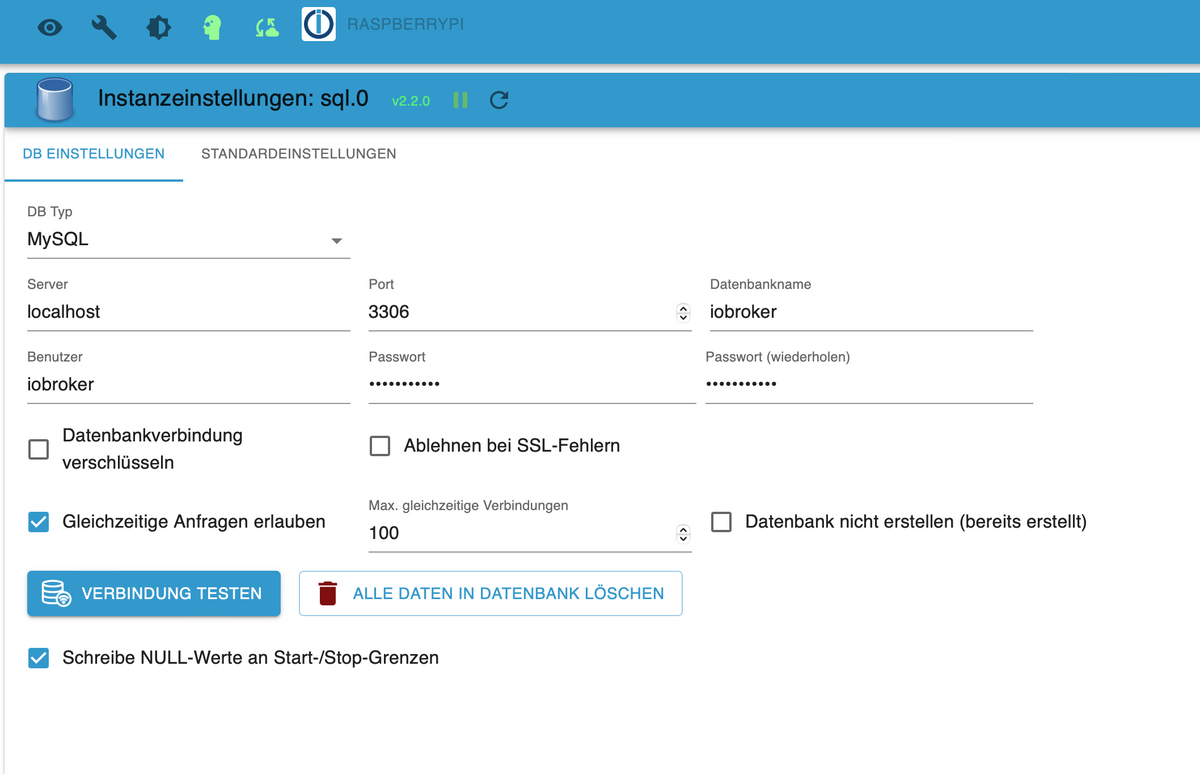
Bewusst verändert habe ich nichts. Die IP sieht allerdings seltsam aus - der Raspi hat die IP 192.168.188.92. Wenn ich die eintrage funktioniert die Verbindung aber auch nicht.
Hat jemand eine Idee?
-
Hallo zusammen,
Mein SQL-Adapter startet nicht mehr. Als Ausgabe kommt
Error: connect ECONNREFUSED 127.0.0.1:3306
Hier die Einstellungen:
Bewusst verändert habe ich nichts. Die IP sieht allerdings seltsam aus - der Raspi hat die IP 192.168.188.92. Wenn ich die eintrage funktioniert die Verbindung aber auch nicht.
Hat jemand eine Idee?
@guitardoc sagte in SQL-Adapter Error: connect ECONNREFUSED:
Die IP sieht allerdings seltsam aus
das ist localhost.
funktioniert aber nur auf dem selben Rechner -
@guitardoc sagte in SQL-Adapter Error: connect ECONNREFUSED:
Die IP sieht allerdings seltsam aus
das ist localhost.
funktioniert aber nur auf dem selben Rechner -
Hallo zusammen,
Mein SQL-Adapter startet nicht mehr. Als Ausgabe kommt
Error: connect ECONNREFUSED 127.0.0.1:3306
Hier die Einstellungen:
Bewusst verändert habe ich nichts. Die IP sieht allerdings seltsam aus - der Raspi hat die IP 192.168.188.92. Wenn ich die eintrage funktioniert die Verbindung aber auch nicht.
Hat jemand eine Idee?
@guitardoc sagte in SQL-Adapter Error: connect ECONNREFUSED:
Hat jemand eine Idee?
Moin,
wie @Homoran schon fragte, läuft alles auf demselben RasPI?
Was sagt uns
systemctl status mysql.serviceOder wenn es
mariaDBistsystemctl status mariadb.serviceDen Datenbankmanager geupdatet und dabei die Konfiguration überschrieben?
VG
Bernd -
@guitardoc sagte in SQL-Adapter Error: connect ECONNREFUSED:
Hat jemand eine Idee?
Moin,
wie @Homoran schon fragte, läuft alles auf demselben RasPI?
Was sagt uns
systemctl status mysql.serviceOder wenn es
mariaDBistsystemctl status mariadb.serviceDen Datenbankmanager geupdatet und dabei die Konfiguration überschrieben?
VG
Bernd@dp20eic said in SQL-Adapter Error: connect ECONNREFUSED:
Den Datenbankmanager geupdatet und dabei die Konfiguration überschrieben?
Ahhh - da haben wir vermutlich schon das Problem:
pi@raspberrypi:~ $ systemctl status mariadb.service
● mariadb.service
     Loaded: masked (Reason: Unit mariadb.service is masked.)
     Active: inactive (dead)
pi@raspberrypi:~ $
Aber wie bekommt man die nun wieder gestartet? Ich hab da doch keine Ahnung... Und wieso ist die aus? Fragen über Fragen... :-)
-
@dp20eic said in SQL-Adapter Error: connect ECONNREFUSED:
Den Datenbankmanager geupdatet und dabei die Konfiguration überschrieben?
Ahhh - da haben wir vermutlich schon das Problem:
pi@raspberrypi:~ $ systemctl status mariadb.service
● mariadb.service
     Loaded: masked (Reason: Unit mariadb.service is masked.)
     Active: inactive (dead)
pi@raspberrypi:~ $
Aber wie bekommt man die nun wieder gestartet? Ich hab da doch keine Ahnung... Und wieso ist die aus? Fragen über Fragen... :-)
@guitardoc sagte in SQL-Adapter Error: connect ECONNREFUSED:
Aber wie bekommt man die nun wieder gestartet? Ich hab da doch keine Ahnung... Und wieso ist die aus? Fragen über Fragen...
Moin,
na, die erste Frage ist ja, was hast Du gemacht, denn wenn es lief, schaltet sich das ja nicht von alleine aus!
Hast Du noch genug Speicher, Memory, wie auch Platte/SD-Karte.
Zeig mal die lange Version von
iob diagVG
Bernd -
@guitardoc sagte in SQL-Adapter Error: connect ECONNREFUSED:
Aber wie bekommt man die nun wieder gestartet? Ich hab da doch keine Ahnung... Und wieso ist die aus? Fragen über Fragen...
Moin,
na, die erste Frage ist ja, was hast Du gemacht, denn wenn es lief, schaltet sich das ja nicht von alleine aus!
Hast Du noch genug Speicher, Memory, wie auch Platte/SD-Karte.
Zeig mal die lange Version von
iob diagVG
Bernd@dp20eic
Tja, was habe ich gemacht - diverse Updates per apt (die man immer mal machen sollte), ansonsten nichts woran ich mich erinnere...
======== Start marking the full check here ========= Skript v.2023-04-16 *** BASE SYSTEM *** Model : Raspberry Pi 4 Model B Rev 1.1 Architecture : aarch64 Docker : false Virtualization : none Distributor ID: Debian Description: Debian GNU/Linux 11 (bullseye) Release: 11 Codename: bullseye PRETTY_NAME="Debian GNU/Linux 11 (bullseye)" NAME="Debian GNU/Linux" VERSION_ID="11" VERSION="11 (bullseye)" VERSION_CODENAME=bullseye ID=debian HOME_URL="https://www.debian.org/" SUPPORT_URL="https://www.debian.org/support" BUG_REPORT_URL="https://bugs.debian.org/" Systemuptime and Load: 14:26:23 up 12:26, 1 user, load average: 3.21, 2.53, 2.22 CPU threads: 4 Raspberry only: throttled=0x0 Other values than 0x0 hint to temperature/voltage problems temp=67.6'C volt=0.8500V *** Time and Time Zones *** Local time: Fri 2023-07-14 14:26:23 CEST Universal time: Fri 2023-07-14 12:26:23 UTC RTC time: n/a Time zone: Europe/Berlin (CEST, +0200) System clock synchronized: yes NTP service: active RTC in local TZ: no *** User and Groups *** pi /home/pi pi adm dialout cdrom sudo audio video plugdev games users input render netdev gpio i2c spi iobroker *** X-Server-Setup *** X-Server: false Desktop: Terminal: tty Boot Target: multi-user.target *** MEMORY *** total used free shared buff/cache available Mem: 3.7G 2.4G 97M 0.0K 1.3G 1.3G Swap: 99M 1.0M 98M Total: 3.8G 2.4G 196M 3743 M total memory 2364 M used memory 2879 M active memory 471 M inactive memory 96 M free memory 45 M buffer memory 1236 M swap cache 99 M total swap 1 M used swap 98 M free swap Raspberry only: oom events: 0 lifetime oom required: 0 Mbytes total time in oom handler: 0 ms max time spent in oom handler: 0 ms *** FILESYSTEM *** Filesystem Type Size Used Avail Use% Mounted on /dev/root ext4 235G 8.0G 218G 4% / devtmpfs devtmpfs 1.6G 0 1.6G 0% /dev tmpfs tmpfs 1.9G 0 1.9G 0% /dev/shm tmpfs tmpfs 749M 1.2M 748M 1% /run tmpfs tmpfs 5.0M 4.0K 5.0M 1% /run/lock /dev/sda1 vfat 255M 32M 224M 13% /boot tmpfs tmpfs 375M 4.0K 375M 1% /run/user/1000 Messages concerning ext4 filesystem in dmesg: [Fri Jul 14 02:00:21 2023] Kernel command line: coherent_pool=1M 8250.nr_uarts=0 snd_bcm2835.enable_headphones=0 snd_bcm2835.enable_headphones=1 snd_bcm2835.enable_hdmi=1 snd_bcm2835.enable_hdmi=0 smsc95xx.macaddr=DC:A6:32:3E:50:C8 vc_mem.mem_base=0x3eb00000 vc_mem.mem_size=0x3ff00000 console=ttyS0,115200 console=tty1 root=PARTUUID=c4fcad63-02 rootfstype=ext4 fsck.repair=yes rootwait [Fri Jul 14 02:00:23 2023] EXT4-fs (sda2): mounted filesystem with ordered data mode. Quota mode: none. [Fri Jul 14 02:00:23 2023] VFS: Mounted root (ext4 filesystem) readonly on device 8:2. [Fri Jul 14 02:00:25 2023] EXT4-fs (sda2): re-mounted. Quota mode: none. Show mounted filesystems (real ones only): TARGET SOURCE FSTYPE OPTIONS / /dev/sda2 ext4 rw,noatime `-/boot /dev/sda1 vfat rw,relatime,fmask=0022,dmask=0022,codepage=437,iocharset=ascii,shortname=mixed,errors=remount-ro Files in neuralgic directories: /var: 3.6G /var/ 1.7G /var/log 1.6G /var/log/journal/694251d2e85b40cfbf382e56db08597d 1.6G /var/log/journal 1.3G /var/cache/apt Archived and active journals take up 1.5G in the file system. /opt/iobroker/backups: 40K /opt/iobroker/backups/ /opt/iobroker/iobroker-data: 312M /opt/iobroker/iobroker-data/ 175M /opt/iobroker/iobroker-data/files 94M /opt/iobroker/iobroker-data/backup-objects 52M /opt/iobroker/iobroker-data/files/javascript.admin 48M /opt/iobroker/iobroker-data/files/telegram.admin The five largest files in iobroker-data are: 25M /opt/iobroker/iobroker-data/objects.jsonl 18M /opt/iobroker/iobroker-data/states.jsonl 15M /opt/iobroker/iobroker-data/files/telegram.admin/rules/static/js/vendors-node_modules_iobroker_adapter-react-v5_assets_devices_parseNames_d_ts-node_modules_io-1d9f06.44fe4a3f.chunk.js.map 7.2M /opt/iobroker/iobroker-data/files/telegram.admin/rules/static/js/vendors-node_modules_iobroker_adapter-react-v5_assets_devices_parseNames_d_ts-node_modules_io-1d9f06.44fe4a3f.chunk.js 6.9M /opt/iobroker/iobroker-data/files/telegram.admin/custom/static/js/vendors-node_modules_mui_icons-material_esm_index_js.8fdf8cb7.chunk.js.map *** NodeJS-Installation *** /usr/bin/nodejs v18.16.1 /usr/bin/node v18.16.1 /usr/bin/npm 9.5.1 /usr/bin/npx 9.5.1 nodejs: Installed: 18.16.1-deb-1nodesource1 Candidate: 18.16.1-deb-1nodesource1 Version table: *** 18.16.1-deb-1nodesource1 500 500 https://deb.nodesource.com/node_18.x bullseye/main arm64 Packages 100 /var/lib/dpkg/status 12.22.12~dfsg-1~deb11u4 500 500 http://security.debian.org/debian-security bullseye-security/main arm64 Packages 500 http://deb.debian.org/debian bullseye-proposed-updates/main arm64 Packages 12.22.12~dfsg-1~deb11u3 500 500 http://deb.debian.org/debian bullseye/main arm64 Packages Temp directories causing npm8 problem: 0 No problems detected *** ioBroker-Installation *** ioBroker Status iobroker is running on this host. Objects type: jsonl States type: jsonl MULTIHOSTSERVICE/enabled: false Core adapters versions js-controller: 4.0.24 admin: 6.3.5 javascript: 7.0.3 Adapters from github: 0 Adapter State + system.adapter.admin.0 : admin : raspberrypi - enabled, port: 8081, bind: 0.0.0.0, run as: admin + system.adapter.backitup.0 : backitup : raspberrypi - enabled + system.adapter.cloud.0 : cloud : raspberrypi - enabled + system.adapter.deconz.0 : deconz : raspberrypi - enabled, port: 80 + system.adapter.discovery.0 : discovery : raspberrypi - enabled + system.adapter.eusec.0 : eusec : raspberrypi - enabled system.adapter.feiertage.0 : feiertage : raspberrypi - enabled system.adapter.flot.0 : flot : raspberrypi - enabled + system.adapter.followthesun.0 : followthesun : raspberrypi - enabled + system.adapter.info.0 : info : raspberrypi - enabled + system.adapter.javascript.0 : javascript : raspberrypi - enabled + system.adapter.logparser.0 : logparser : raspberrypi - enabled + system.adapter.modbus.0 : modbus : raspberrypi - enabled + system.adapter.shelly.0 : shelly : raspberrypi - enabled, port: 1882, bind: 0.0.0.0 + system.adapter.shuttercontrol.0 : shuttercontrol : raspberrypi - enabled + system.adapter.simple-api.0 : simple-api : raspberrypi - enabled, port: 8087, bind: 0.0.0.0, run as: admin + system.adapter.sql.0 : sql : raspberrypi - enabled, port: 3306 + system.adapter.telegram.0 : telegram : raspberrypi - enabled, port: 8443, bind: 0.0.0.0 + system.adapter.tuya.0 : tuya : raspberrypi - enabled system.adapter.vis-map.0 : vis-map : raspberrypi - enabled system.adapter.vis-materialdesign.0 : vis-materialdesign : raspberrypi - enabled system.adapter.vis.0 : vis : raspberrypi - enabled + system.adapter.vw-connect.0 : vw-connect : raspberrypi - enabled + system.adapter.web.0 : web : raspberrypi - enabled, port: 8082, bind: 0.0.0.0, run as: admin + system.adapter.wiffi-wz.0 : wiffi-wz : raspberrypi - enabled + system.adapter.yahka.0 : yahka : raspberrypi - enabled + instance is alive Enabled adapters with bindings + system.adapter.admin.0 : admin : raspberrypi - enabled, port: 8081, bind: 0.0.0.0, run as: admin + system.adapter.deconz.0 : deconz : raspberrypi - enabled, port: 80 + system.adapter.shelly.0 : shelly : raspberrypi - enabled, port: 1882, bind: 0.0.0.0 + system.adapter.simple-api.0 : simple-api : raspberrypi - enabled, port: 8087, bind: 0.0.0.0, run as: admin + system.adapter.sql.0 : sql : raspberrypi - enabled, port: 3306 + system.adapter.telegram.0 : telegram : raspberrypi - enabled, port: 8443, bind: 0.0.0.0 + system.adapter.web.0 : web : raspberrypi - enabled, port: 8082, bind: 0.0.0.0, run as: admin ioBroker-Repositories Stable (default): http://iobroker.live/repo/sources-dist.json Latest : http://iobroker.live/repo/sources-dist-latest.json Active repo(s): Stable (default) Installed ioBroker-Instances Used repository: Stable (default) Adapter "admin" : 6.3.5 , installed 6.3.5 Adapter "backitup" : 2.6.23 , installed 2.6.23 Adapter "cloud" : 4.4.1 , installed 4.4.1 Adapter "deconz" : 1.3.21 , installed 1.3.21 Adapter "discovery" : 3.1.0 , installed 3.1.0 Adapter "eusec" : 1.0.0 , installed 1.0.0 Adapter "feiertage" : 1.1.0 , installed 1.1.0 Adapter "flot" : 1.12.0 , installed 1.12.0 Adapter "followthesun" : 0.4.1 , installed 0.4.1 Adapter "info" : 1.9.26 , installed 1.9.26 Adapter "javascript" : 7.0.3 , installed 7.0.3 Controller "js-controller": 4.0.24 , installed 4.0.24 Adapter "logparser" : 2.2.0 , installed 2.2.0 Adapter "modbus" : 5.0.11 , installed 5.0.11 Adapter "shelly" : 6.4.1 , installed 6.4.1 Adapter "shuttercontrol": 1.5.0 , installed 1.5.0 Adapter "simple-api" : 2.7.2 , installed 2.7.2 Adapter "socketio" : 4.2.0 , installed 6.1.9 Adapter "sql" : 2.2.0 , installed 2.2.0 Adapter "telegram" : 1.15.6 , installed 1.15.6 Adapter "tuya" : 3.14.2 , installed 3.14.2 Adapter "vis" : 1.4.16 , installed 1.4.16 Adapter "vis-map" : 1.0.4 , installed 1.0.4 Adapter "vw-connect" : 0.0.67 , installed 0.0.67 Adapter "web" : 4.3.0 , installed 5.2.5 Adapter "wiffi-wz" : 2.2.1 , installed 2.2.1 Adapter "ws" : 1.3.0 , installed 2.1.4 Adapter "yahka" : 0.17.0 , installed 0.17.0 Objects and States Please stand by - This may take a while Objects: 9362 States: 7628 *** OS-Repositories and Updates *** Hit:1 http://deb.debian.org/debian bullseye InRelease Hit:2 http://deb.debian.org/debian bullseye-updates InRelease Hit:3 http://deb.debian.org/debian bullseye-proposed-updates InRelease Hit:4 http://security.debian.org/debian-security bullseye-security InRelease Hit:5 http://phoscon.de/apt/deconz bullseye InRelease Hit:6 http://archive.raspberrypi.org/debian bullseye InRelease Hit:7 https://deb.nodesource.com/node_18.x bullseye InRelease Hit:8 https://repo.homebridge.io stable InRelease Get:9 https://pkgs.tailscale.com/stable/debian bullseye InRelease Fetched 6525 B in 3s (1990 B/s) Reading package lists... Pending Updates: 0 *** Listening Ports *** Active Internet connections (only servers) Proto Recv-Q Send-Q Local Address Foreign Address State User Inode PID/Program name tcp 0 0 127.0.0.1:38085 0.0.0.0:* LISTEN 110 20351 2147/chromium tcp 0 0 127.0.0.1:38225 0.0.0.0:* LISTEN 110 17844 1676/homebridge tcp 0 0 127.0.0.1:38379 0.0.0.0:* LISTEN 110 16304 1776/homebridge: ho tcp 0 0 0.0.0.0:22 0.0.0.0:* LISTEN 0 1825 597/sshd: /usr/sbin tcp 0 0 127.0.0.1:42565 0.0.0.0:* LISTEN 110 19674 1768/homebridge: @m tcp 0 0 127.0.0.1:36461 0.0.0.0:* LISTEN 1001 2751770 227283/io.yahka.0 tcp 0 0 0.0.0.0:80 0.0.0.0:* LISTEN 1000 11861 401/deCONZ tcp 0 0 127.0.0.1:46707 0.0.0.0:* LISTEN 110 20730 1769/homebridge: ho tcp 0 0 127.0.0.1:44793 0.0.0.0:* LISTEN 110 2754906 1776/homebridge: ho tcp 0 0 0.0.0.0:443 0.0.0.0:* LISTEN 1000 15584 401/deCONZ tcp 0 0 127.0.0.1:36837 0.0.0.0:* LISTEN 110 19694 1776/homebridge: ho tcp 0 0 127.0.0.1:41043 0.0.0.0:* LISTEN 110 19747 1771/homebridge: ho tcp 0 0 0.0.0.0:8182 0.0.0.0:* LISTEN 1001 2752872 226752/io.wiffi-wz. tcp 0 0 127.0.0.1:9000 0.0.0.0:* LISTEN 1001 2742215 225641/iobroker.js- tcp 0 0 127.0.0.1:9001 0.0.0.0:* LISTEN 1001 2740156 225641/iobroker.js- tcp 0 0 100.89.105.61:53458 0.0.0.0:* LISTEN 0 15981 604/tailscaled tcp6 0 0 :::43877 :::* LISTEN 110 19657 1776/homebridge: ho tcp6 0 0 :::31670 :::* LISTEN 110 17873 1768/homebridge: @m tcp6 0 0 :::39846 :::* LISTEN 110 19652 1776/homebridge: ho tcp6 0 0 :::22 :::* LISTEN 0 1827 597/sshd: /usr/sbin tcp6 0 0 :::51391 :::* LISTEN 110 16271 1676/homebridge tcp6 0 0 :::8555 :::* LISTEN 1001 2744209 226351/go2rtc tcp6 0 0 :::8554 :::* LISTEN 1001 2744200 226351/go2rtc tcp6 0 0 :::8581 :::* LISTEN 110 19524 1445/hb-service tcp6 0 0 :::52764 :::* LISTEN 110 17896 1769/homebridge: ho tcp6 0 0 :::40681 :::* LISTEN 1001 2751763 227283/io.yahka.0 tcp6 0 0 fd7a:115c:a1e0:ab:53458 :::* LISTEN 0 15982 604/tailscaled tcp6 0 0 :::8087 :::* LISTEN 1001 2747637 226306/io.simple-ap tcp6 0 0 :::8081 :::* LISTEN 1001 2741031 225659/io.admin.0 tcp6 0 0 :::8082 :::* LISTEN 1001 2750138 226536/io.web.0 tcp6 0 0 :::8181 :::* LISTEN 110 16270 1676/homebridge tcp6 0 0 :::30690 :::* LISTEN 110 19661 1771/homebridge: ho tcp6 0 0 :::1984 :::* LISTEN 1001 2744197 226351/go2rtc udp 0 0 0.0.0.0:5353 0.0.0.0:* 110 17927 1769/homebridge: ho udp 0 0 0.0.0.0:5353 0.0.0.0:* 110 19712 1769/homebridge: ho udp 0 0 0.0.0.0:5353 0.0.0.0:* 110 19662 1771/homebridge: ho udp 0 0 0.0.0.0:5353 0.0.0.0:* 110 19658 1776/homebridge: ho udp 0 0 0.0.0.0:5353 0.0.0.0:* 110 19654 1776/homebridge: ho udp 0 0 0.0.0.0:5353 0.0.0.0:* 110 17874 1768/homebridge: @m udp 0 0 0.0.0.0:5353 0.0.0.0:* 110 16273 1676/homebridge udp 0 0 0.0.0.0:5353 0.0.0.0:* 110 19521 1445/hb-service udp 0 0 0.0.0.0:5353 0.0.0.0:* 108 1711 396/avahi-daemon: r udp 0 0 0.0.0.0:50480 0.0.0.0:* 1001 2746269 226125/io.eusec.0 udp 0 0 0.0.0.0:34309 0.0.0.0:* 108 1713 396/avahi-daemon: r udp 0 0 0.0.0.0:5683 0.0.0.0:* 1001 2741221 225829/io.shelly.0 udp 0 0 0.0.0.0:5683 0.0.0.0:* 110 16276 1676/homebridge udp 0 0 0.0.0.0:1900 0.0.0.0:* 1001 2746495 226058/io.deconz.0 udp 0 0 0.0.0.0:1900 0.0.0.0:* 1001 2746492 226058/io.deconz.0 udp 0 0 0.0.0.0:1900 0.0.0.0:* 1001 2746489 226058/io.deconz.0 udp 0 0 0.0.0.0:1900 0.0.0.0:* 1000 17103 401/deCONZ udp 0 0 0.0.0.0:46987 0.0.0.0:* 1001 2746264 226125/io.eusec.0 udp 0 0 0.0.0.0:68 0.0.0.0:* 0 12047 1040/dhcpcd udp 0 0 0.0.0.0:6666 0.0.0.0:* 1001 2745431 225866/io.tuya.0 udp 0 0 0.0.0.0:6667 0.0.0.0:* 1001 2745432 225866/io.tuya.0 udp 0 0 0.0.0.0:41641 0.0.0.0:* 0 2802033 604/tailscaled udp6 0 0 :::5353 :::* 108 1712 396/avahi-daemon: r udp6 0 0 :::1900 :::* 1001 2746497 226058/io.deconz.0 udp6 0 0 :::1900 :::* 1001 2746496 226058/io.deconz.0 udp6 0 0 :::1900 :::* 1001 2746494 226058/io.deconz.0 udp6 0 0 :::1900 :::* 1001 2746493 226058/io.deconz.0 udp6 0 0 :::1900 :::* 1001 2746491 226058/io.deconz.0 udp6 0 0 :::1900 :::* 1001 2746490 226058/io.deconz.0 udp6 0 0 :::8443 :::* 1001 2744201 226351/go2rtc udp6 0 0 :::8555 :::* 1001 2744203 226351/go2rtc udp6 0 0 :::546 :::* 0 12114 1040/dhcpcd udp6 0 0 :::51801 :::* 108 1714 396/avahi-daemon: r udp6 0 0 :::41641 :::* 0 2802032 604/tailscaled *** Log File - Last 25 Lines *** 2023-07-14 14:16:56.021 - info: shelly.0 (225829) [CoAP] Device 192.168.188.69 (shellydw2 / shellydw2-A9A87A / SHDW-2#A9A87A#1) connected! Polltime set to 3600 sec. 2023-07-14 14:17:01.235 - error: sql.0 (229660) Error: connect ECONNREFUSED 127.0.0.1:3306 2023-07-14 14:17:31.240 - error: sql.0 (229660) Error: connect ECONNREFUSED 127.0.0.1:3306 2023-07-14 14:18:01.248 - error: sql.0 (229660) Error: connect ECONNREFUSED 127.0.0.1:3306 2023-07-14 14:18:31.253 - error: sql.0 (229660) Error: connect ECONNREFUSED 127.0.0.1:3306 2023-07-14 14:19:01.258 - error: sql.0 (229660) Error: connect ECONNREFUSED 127.0.0.1:3306 2023-07-14 14:19:31.263 - error: sql.0 (229660) Error: connect ECONNREFUSED 127.0.0.1:3306 2023-07-14 14:20:01.268 - error: sql.0 (229660) Error: connect ECONNREFUSED 127.0.0.1:3306 2023-07-14 14:20:31.272 - error: sql.0 (229660) Error: connect ECONNREFUSED 127.0.0.1:3306 2023-07-14 14:21:01.277 - error: sql.0 (229660) Error: connect ECONNREFUSED 127.0.0.1:3306 2023-07-14 14:21:31.282 - error: sql.0 (229660) Error: connect ECONNREFUSED 127.0.0.1:3306 2023-07-14 14:22:01.292 - error: sql.0 (229660) Error: connect ECONNREFUSED 127.0.0.1:3306 2023-07-14 14:22:31.297 - error: sql.0 (229660) Error: connect ECONNREFUSED 127.0.0.1:3306 2023-07-14 14:23:01.304 - error: sql.0 (229660) Error: connect ECONNREFUSED 127.0.0.1:3306 2023-07-14 14:23:31.310 - error: sql.0 (229660) Error: connect ECONNREFUSED 127.0.0.1:3306 2023-07-14 14:24:01.316 - error: sql.0 (229660) Error: connect ECONNREFUSED 127.0.0.1:3306 2023-07-14 14:24:31.322 - error: sql.0 (229660) Error: connect ECONNREFUSED 127.0.0.1:3306 2023-07-14 14:25:01.328 - error: sql.0 (229660) Error: connect ECONNREFUSED 127.0.0.1:3306 2023-07-14 14:25:09.912 - info: shuttercontrol.0 (226230) Sunprotect #415 Set ID: Wohnzimmer Südostseite value: 100% 2023-07-14 14:25:09.985 - info: javascript.0 (225719) script.js.common.Initialisiere_Service.Initialisiere_Shuttercontrol: Alle Jalousien stehen auf 100% (offen): false 2023-07-14 14:25:31.336 - error: sql.0 (229660) Error: connect ECONNREFUSED 127.0.0.1:3306 2023-07-14 14:26:01.353 - error: sql.0 (229660) Error: connect ECONNREFUSED 127.0.0.1:3306 2023-07-14 14:26:31.361 - error: sql.0 (229660) Error: connect ECONNREFUSED 127.0.0.1:3306 2023-07-14 14:27:01.379 - error: sql.0 (229660) Error: connect ECONNREFUSED 127.0.0.1:3306 2023-07-14 14:27:31.391 - error: sql.0 (229660) Error: connect ECONNREFUSED 127.0.0.1:3306 ============ Mark until here for C&P ==================================== SUMMARY ======================= v.2023-04-16 Operatingsystem: Debian GNU/Linux 11 (bullseye) Kernel: 6.1.21-v8+ Installation: Native Timezone: Europe/Berlin (CEST, +0200) User-ID: 1000 X-Server: false Boot Target: multi-user.target Pending OS-Updates: 0 Pending iob updates: 0 Nodejs-Installation: /usr/bin/nodejs v18.16.1 /usr/bin/node v18.16.1 /usr/bin/npm 9.5.1 /usr/bin/npx 9.5.1 Recommended versions are nodejs 18.x.y and npm 9.x.y Your nodejs installation is correct MEMORY: total used free shared buff/cache available Mem: 3.7G 2.3G 171M 0.0K 1.3G 1.4G Swap: 99M 1.0M 98M Total: 3.8G 2.3G 270M Active iob-Instances: 22 Active repo(s): Stable (default) ioBroker Core: js-controller 4.0.24 admin 6.3.5 ioBroker Status: iobroker is running on this host. Objects type: jsonl States type: jsonl Status admin and web instance: + system.adapter.admin.0 : admin : raspberrypi - enabled, port: 8081, bind: 0.0.0.0, run as: admin + system.adapter.web.0 : web : raspberrypi - enabled, port: 8082, bind: 0.0.0.0, run as: admin Objects: 9362 States: 7628 Size of iob-Database: 25M /opt/iobroker/iobroker-data/objects.jsonl 18M /opt/iobroker/iobroker-data/states.jsonl =================== END OF SUMMARY ==================== -
@dp20eic
Tja, was habe ich gemacht - diverse Updates per apt (die man immer mal machen sollte), ansonsten nichts woran ich mich erinnere...
======== Start marking the full check here ========= Skript v.2023-04-16 *** BASE SYSTEM *** Model : Raspberry Pi 4 Model B Rev 1.1 Architecture : aarch64 Docker : false Virtualization : none Distributor ID: Debian Description: Debian GNU/Linux 11 (bullseye) Release: 11 Codename: bullseye PRETTY_NAME="Debian GNU/Linux 11 (bullseye)" NAME="Debian GNU/Linux" VERSION_ID="11" VERSION="11 (bullseye)" VERSION_CODENAME=bullseye ID=debian HOME_URL="https://www.debian.org/" SUPPORT_URL="https://www.debian.org/support" BUG_REPORT_URL="https://bugs.debian.org/" Systemuptime and Load: 14:26:23 up 12:26, 1 user, load average: 3.21, 2.53, 2.22 CPU threads: 4 Raspberry only: throttled=0x0 Other values than 0x0 hint to temperature/voltage problems temp=67.6'C volt=0.8500V *** Time and Time Zones *** Local time: Fri 2023-07-14 14:26:23 CEST Universal time: Fri 2023-07-14 12:26:23 UTC RTC time: n/a Time zone: Europe/Berlin (CEST, +0200) System clock synchronized: yes NTP service: active RTC in local TZ: no *** User and Groups *** pi /home/pi pi adm dialout cdrom sudo audio video plugdev games users input render netdev gpio i2c spi iobroker *** X-Server-Setup *** X-Server: false Desktop: Terminal: tty Boot Target: multi-user.target *** MEMORY *** total used free shared buff/cache available Mem: 3.7G 2.4G 97M 0.0K 1.3G 1.3G Swap: 99M 1.0M 98M Total: 3.8G 2.4G 196M 3743 M total memory 2364 M used memory 2879 M active memory 471 M inactive memory 96 M free memory 45 M buffer memory 1236 M swap cache 99 M total swap 1 M used swap 98 M free swap Raspberry only: oom events: 0 lifetime oom required: 0 Mbytes total time in oom handler: 0 ms max time spent in oom handler: 0 ms *** FILESYSTEM *** Filesystem Type Size Used Avail Use% Mounted on /dev/root ext4 235G 8.0G 218G 4% / devtmpfs devtmpfs 1.6G 0 1.6G 0% /dev tmpfs tmpfs 1.9G 0 1.9G 0% /dev/shm tmpfs tmpfs 749M 1.2M 748M 1% /run tmpfs tmpfs 5.0M 4.0K 5.0M 1% /run/lock /dev/sda1 vfat 255M 32M 224M 13% /boot tmpfs tmpfs 375M 4.0K 375M 1% /run/user/1000 Messages concerning ext4 filesystem in dmesg: [Fri Jul 14 02:00:21 2023] Kernel command line: coherent_pool=1M 8250.nr_uarts=0 snd_bcm2835.enable_headphones=0 snd_bcm2835.enable_headphones=1 snd_bcm2835.enable_hdmi=1 snd_bcm2835.enable_hdmi=0 smsc95xx.macaddr=DC:A6:32:3E:50:C8 vc_mem.mem_base=0x3eb00000 vc_mem.mem_size=0x3ff00000 console=ttyS0,115200 console=tty1 root=PARTUUID=c4fcad63-02 rootfstype=ext4 fsck.repair=yes rootwait [Fri Jul 14 02:00:23 2023] EXT4-fs (sda2): mounted filesystem with ordered data mode. Quota mode: none. [Fri Jul 14 02:00:23 2023] VFS: Mounted root (ext4 filesystem) readonly on device 8:2. [Fri Jul 14 02:00:25 2023] EXT4-fs (sda2): re-mounted. Quota mode: none. Show mounted filesystems (real ones only): TARGET SOURCE FSTYPE OPTIONS / /dev/sda2 ext4 rw,noatime `-/boot /dev/sda1 vfat rw,relatime,fmask=0022,dmask=0022,codepage=437,iocharset=ascii,shortname=mixed,errors=remount-ro Files in neuralgic directories: /var: 3.6G /var/ 1.7G /var/log 1.6G /var/log/journal/694251d2e85b40cfbf382e56db08597d 1.6G /var/log/journal 1.3G /var/cache/apt Archived and active journals take up 1.5G in the file system. /opt/iobroker/backups: 40K /opt/iobroker/backups/ /opt/iobroker/iobroker-data: 312M /opt/iobroker/iobroker-data/ 175M /opt/iobroker/iobroker-data/files 94M /opt/iobroker/iobroker-data/backup-objects 52M /opt/iobroker/iobroker-data/files/javascript.admin 48M /opt/iobroker/iobroker-data/files/telegram.admin The five largest files in iobroker-data are: 25M /opt/iobroker/iobroker-data/objects.jsonl 18M /opt/iobroker/iobroker-data/states.jsonl 15M /opt/iobroker/iobroker-data/files/telegram.admin/rules/static/js/vendors-node_modules_iobroker_adapter-react-v5_assets_devices_parseNames_d_ts-node_modules_io-1d9f06.44fe4a3f.chunk.js.map 7.2M /opt/iobroker/iobroker-data/files/telegram.admin/rules/static/js/vendors-node_modules_iobroker_adapter-react-v5_assets_devices_parseNames_d_ts-node_modules_io-1d9f06.44fe4a3f.chunk.js 6.9M /opt/iobroker/iobroker-data/files/telegram.admin/custom/static/js/vendors-node_modules_mui_icons-material_esm_index_js.8fdf8cb7.chunk.js.map *** NodeJS-Installation *** /usr/bin/nodejs v18.16.1 /usr/bin/node v18.16.1 /usr/bin/npm 9.5.1 /usr/bin/npx 9.5.1 nodejs: Installed: 18.16.1-deb-1nodesource1 Candidate: 18.16.1-deb-1nodesource1 Version table: *** 18.16.1-deb-1nodesource1 500 500 https://deb.nodesource.com/node_18.x bullseye/main arm64 Packages 100 /var/lib/dpkg/status 12.22.12~dfsg-1~deb11u4 500 500 http://security.debian.org/debian-security bullseye-security/main arm64 Packages 500 http://deb.debian.org/debian bullseye-proposed-updates/main arm64 Packages 12.22.12~dfsg-1~deb11u3 500 500 http://deb.debian.org/debian bullseye/main arm64 Packages Temp directories causing npm8 problem: 0 No problems detected *** ioBroker-Installation *** ioBroker Status iobroker is running on this host. Objects type: jsonl States type: jsonl MULTIHOSTSERVICE/enabled: false Core adapters versions js-controller: 4.0.24 admin: 6.3.5 javascript: 7.0.3 Adapters from github: 0 Adapter State + system.adapter.admin.0 : admin : raspberrypi - enabled, port: 8081, bind: 0.0.0.0, run as: admin + system.adapter.backitup.0 : backitup : raspberrypi - enabled + system.adapter.cloud.0 : cloud : raspberrypi - enabled + system.adapter.deconz.0 : deconz : raspberrypi - enabled, port: 80 + system.adapter.discovery.0 : discovery : raspberrypi - enabled + system.adapter.eusec.0 : eusec : raspberrypi - enabled system.adapter.feiertage.0 : feiertage : raspberrypi - enabled system.adapter.flot.0 : flot : raspberrypi - enabled + system.adapter.followthesun.0 : followthesun : raspberrypi - enabled + system.adapter.info.0 : info : raspberrypi - enabled + system.adapter.javascript.0 : javascript : raspberrypi - enabled + system.adapter.logparser.0 : logparser : raspberrypi - enabled + system.adapter.modbus.0 : modbus : raspberrypi - enabled + system.adapter.shelly.0 : shelly : raspberrypi - enabled, port: 1882, bind: 0.0.0.0 + system.adapter.shuttercontrol.0 : shuttercontrol : raspberrypi - enabled + system.adapter.simple-api.0 : simple-api : raspberrypi - enabled, port: 8087, bind: 0.0.0.0, run as: admin + system.adapter.sql.0 : sql : raspberrypi - enabled, port: 3306 + system.adapter.telegram.0 : telegram : raspberrypi - enabled, port: 8443, bind: 0.0.0.0 + system.adapter.tuya.0 : tuya : raspberrypi - enabled system.adapter.vis-map.0 : vis-map : raspberrypi - enabled system.adapter.vis-materialdesign.0 : vis-materialdesign : raspberrypi - enabled system.adapter.vis.0 : vis : raspberrypi - enabled + system.adapter.vw-connect.0 : vw-connect : raspberrypi - enabled + system.adapter.web.0 : web : raspberrypi - enabled, port: 8082, bind: 0.0.0.0, run as: admin + system.adapter.wiffi-wz.0 : wiffi-wz : raspberrypi - enabled + system.adapter.yahka.0 : yahka : raspberrypi - enabled + instance is alive Enabled adapters with bindings + system.adapter.admin.0 : admin : raspberrypi - enabled, port: 8081, bind: 0.0.0.0, run as: admin + system.adapter.deconz.0 : deconz : raspberrypi - enabled, port: 80 + system.adapter.shelly.0 : shelly : raspberrypi - enabled, port: 1882, bind: 0.0.0.0 + system.adapter.simple-api.0 : simple-api : raspberrypi - enabled, port: 8087, bind: 0.0.0.0, run as: admin + system.adapter.sql.0 : sql : raspberrypi - enabled, port: 3306 + system.adapter.telegram.0 : telegram : raspberrypi - enabled, port: 8443, bind: 0.0.0.0 + system.adapter.web.0 : web : raspberrypi - enabled, port: 8082, bind: 0.0.0.0, run as: admin ioBroker-Repositories Stable (default): http://iobroker.live/repo/sources-dist.json Latest : http://iobroker.live/repo/sources-dist-latest.json Active repo(s): Stable (default) Installed ioBroker-Instances Used repository: Stable (default) Adapter "admin" : 6.3.5 , installed 6.3.5 Adapter "backitup" : 2.6.23 , installed 2.6.23 Adapter "cloud" : 4.4.1 , installed 4.4.1 Adapter "deconz" : 1.3.21 , installed 1.3.21 Adapter "discovery" : 3.1.0 , installed 3.1.0 Adapter "eusec" : 1.0.0 , installed 1.0.0 Adapter "feiertage" : 1.1.0 , installed 1.1.0 Adapter "flot" : 1.12.0 , installed 1.12.0 Adapter "followthesun" : 0.4.1 , installed 0.4.1 Adapter "info" : 1.9.26 , installed 1.9.26 Adapter "javascript" : 7.0.3 , installed 7.0.3 Controller "js-controller": 4.0.24 , installed 4.0.24 Adapter "logparser" : 2.2.0 , installed 2.2.0 Adapter "modbus" : 5.0.11 , installed 5.0.11 Adapter "shelly" : 6.4.1 , installed 6.4.1 Adapter "shuttercontrol": 1.5.0 , installed 1.5.0 Adapter "simple-api" : 2.7.2 , installed 2.7.2 Adapter "socketio" : 4.2.0 , installed 6.1.9 Adapter "sql" : 2.2.0 , installed 2.2.0 Adapter "telegram" : 1.15.6 , installed 1.15.6 Adapter "tuya" : 3.14.2 , installed 3.14.2 Adapter "vis" : 1.4.16 , installed 1.4.16 Adapter "vis-map" : 1.0.4 , installed 1.0.4 Adapter "vw-connect" : 0.0.67 , installed 0.0.67 Adapter "web" : 4.3.0 , installed 5.2.5 Adapter "wiffi-wz" : 2.2.1 , installed 2.2.1 Adapter "ws" : 1.3.0 , installed 2.1.4 Adapter "yahka" : 0.17.0 , installed 0.17.0 Objects and States Please stand by - This may take a while Objects: 9362 States: 7628 *** OS-Repositories and Updates *** Hit:1 http://deb.debian.org/debian bullseye InRelease Hit:2 http://deb.debian.org/debian bullseye-updates InRelease Hit:3 http://deb.debian.org/debian bullseye-proposed-updates InRelease Hit:4 http://security.debian.org/debian-security bullseye-security InRelease Hit:5 http://phoscon.de/apt/deconz bullseye InRelease Hit:6 http://archive.raspberrypi.org/debian bullseye InRelease Hit:7 https://deb.nodesource.com/node_18.x bullseye InRelease Hit:8 https://repo.homebridge.io stable InRelease Get:9 https://pkgs.tailscale.com/stable/debian bullseye InRelease Fetched 6525 B in 3s (1990 B/s) Reading package lists... Pending Updates: 0 *** Listening Ports *** Active Internet connections (only servers) Proto Recv-Q Send-Q Local Address Foreign Address State User Inode PID/Program name tcp 0 0 127.0.0.1:38085 0.0.0.0:* LISTEN 110 20351 2147/chromium tcp 0 0 127.0.0.1:38225 0.0.0.0:* LISTEN 110 17844 1676/homebridge tcp 0 0 127.0.0.1:38379 0.0.0.0:* LISTEN 110 16304 1776/homebridge: ho tcp 0 0 0.0.0.0:22 0.0.0.0:* LISTEN 0 1825 597/sshd: /usr/sbin tcp 0 0 127.0.0.1:42565 0.0.0.0:* LISTEN 110 19674 1768/homebridge: @m tcp 0 0 127.0.0.1:36461 0.0.0.0:* LISTEN 1001 2751770 227283/io.yahka.0 tcp 0 0 0.0.0.0:80 0.0.0.0:* LISTEN 1000 11861 401/deCONZ tcp 0 0 127.0.0.1:46707 0.0.0.0:* LISTEN 110 20730 1769/homebridge: ho tcp 0 0 127.0.0.1:44793 0.0.0.0:* LISTEN 110 2754906 1776/homebridge: ho tcp 0 0 0.0.0.0:443 0.0.0.0:* LISTEN 1000 15584 401/deCONZ tcp 0 0 127.0.0.1:36837 0.0.0.0:* LISTEN 110 19694 1776/homebridge: ho tcp 0 0 127.0.0.1:41043 0.0.0.0:* LISTEN 110 19747 1771/homebridge: ho tcp 0 0 0.0.0.0:8182 0.0.0.0:* LISTEN 1001 2752872 226752/io.wiffi-wz. tcp 0 0 127.0.0.1:9000 0.0.0.0:* LISTEN 1001 2742215 225641/iobroker.js- tcp 0 0 127.0.0.1:9001 0.0.0.0:* LISTEN 1001 2740156 225641/iobroker.js- tcp 0 0 100.89.105.61:53458 0.0.0.0:* LISTEN 0 15981 604/tailscaled tcp6 0 0 :::43877 :::* LISTEN 110 19657 1776/homebridge: ho tcp6 0 0 :::31670 :::* LISTEN 110 17873 1768/homebridge: @m tcp6 0 0 :::39846 :::* LISTEN 110 19652 1776/homebridge: ho tcp6 0 0 :::22 :::* LISTEN 0 1827 597/sshd: /usr/sbin tcp6 0 0 :::51391 :::* LISTEN 110 16271 1676/homebridge tcp6 0 0 :::8555 :::* LISTEN 1001 2744209 226351/go2rtc tcp6 0 0 :::8554 :::* LISTEN 1001 2744200 226351/go2rtc tcp6 0 0 :::8581 :::* LISTEN 110 19524 1445/hb-service tcp6 0 0 :::52764 :::* LISTEN 110 17896 1769/homebridge: ho tcp6 0 0 :::40681 :::* LISTEN 1001 2751763 227283/io.yahka.0 tcp6 0 0 fd7a:115c:a1e0:ab:53458 :::* LISTEN 0 15982 604/tailscaled tcp6 0 0 :::8087 :::* LISTEN 1001 2747637 226306/io.simple-ap tcp6 0 0 :::8081 :::* LISTEN 1001 2741031 225659/io.admin.0 tcp6 0 0 :::8082 :::* LISTEN 1001 2750138 226536/io.web.0 tcp6 0 0 :::8181 :::* LISTEN 110 16270 1676/homebridge tcp6 0 0 :::30690 :::* LISTEN 110 19661 1771/homebridge: ho tcp6 0 0 :::1984 :::* LISTEN 1001 2744197 226351/go2rtc udp 0 0 0.0.0.0:5353 0.0.0.0:* 110 17927 1769/homebridge: ho udp 0 0 0.0.0.0:5353 0.0.0.0:* 110 19712 1769/homebridge: ho udp 0 0 0.0.0.0:5353 0.0.0.0:* 110 19662 1771/homebridge: ho udp 0 0 0.0.0.0:5353 0.0.0.0:* 110 19658 1776/homebridge: ho udp 0 0 0.0.0.0:5353 0.0.0.0:* 110 19654 1776/homebridge: ho udp 0 0 0.0.0.0:5353 0.0.0.0:* 110 17874 1768/homebridge: @m udp 0 0 0.0.0.0:5353 0.0.0.0:* 110 16273 1676/homebridge udp 0 0 0.0.0.0:5353 0.0.0.0:* 110 19521 1445/hb-service udp 0 0 0.0.0.0:5353 0.0.0.0:* 108 1711 396/avahi-daemon: r udp 0 0 0.0.0.0:50480 0.0.0.0:* 1001 2746269 226125/io.eusec.0 udp 0 0 0.0.0.0:34309 0.0.0.0:* 108 1713 396/avahi-daemon: r udp 0 0 0.0.0.0:5683 0.0.0.0:* 1001 2741221 225829/io.shelly.0 udp 0 0 0.0.0.0:5683 0.0.0.0:* 110 16276 1676/homebridge udp 0 0 0.0.0.0:1900 0.0.0.0:* 1001 2746495 226058/io.deconz.0 udp 0 0 0.0.0.0:1900 0.0.0.0:* 1001 2746492 226058/io.deconz.0 udp 0 0 0.0.0.0:1900 0.0.0.0:* 1001 2746489 226058/io.deconz.0 udp 0 0 0.0.0.0:1900 0.0.0.0:* 1000 17103 401/deCONZ udp 0 0 0.0.0.0:46987 0.0.0.0:* 1001 2746264 226125/io.eusec.0 udp 0 0 0.0.0.0:68 0.0.0.0:* 0 12047 1040/dhcpcd udp 0 0 0.0.0.0:6666 0.0.0.0:* 1001 2745431 225866/io.tuya.0 udp 0 0 0.0.0.0:6667 0.0.0.0:* 1001 2745432 225866/io.tuya.0 udp 0 0 0.0.0.0:41641 0.0.0.0:* 0 2802033 604/tailscaled udp6 0 0 :::5353 :::* 108 1712 396/avahi-daemon: r udp6 0 0 :::1900 :::* 1001 2746497 226058/io.deconz.0 udp6 0 0 :::1900 :::* 1001 2746496 226058/io.deconz.0 udp6 0 0 :::1900 :::* 1001 2746494 226058/io.deconz.0 udp6 0 0 :::1900 :::* 1001 2746493 226058/io.deconz.0 udp6 0 0 :::1900 :::* 1001 2746491 226058/io.deconz.0 udp6 0 0 :::1900 :::* 1001 2746490 226058/io.deconz.0 udp6 0 0 :::8443 :::* 1001 2744201 226351/go2rtc udp6 0 0 :::8555 :::* 1001 2744203 226351/go2rtc udp6 0 0 :::546 :::* 0 12114 1040/dhcpcd udp6 0 0 :::51801 :::* 108 1714 396/avahi-daemon: r udp6 0 0 :::41641 :::* 0 2802032 604/tailscaled *** Log File - Last 25 Lines *** 2023-07-14 14:16:56.021 - info: shelly.0 (225829) [CoAP] Device 192.168.188.69 (shellydw2 / shellydw2-A9A87A / SHDW-2#A9A87A#1) connected! Polltime set to 3600 sec. 2023-07-14 14:17:01.235 - error: sql.0 (229660) Error: connect ECONNREFUSED 127.0.0.1:3306 2023-07-14 14:17:31.240 - error: sql.0 (229660) Error: connect ECONNREFUSED 127.0.0.1:3306 2023-07-14 14:18:01.248 - error: sql.0 (229660) Error: connect ECONNREFUSED 127.0.0.1:3306 2023-07-14 14:18:31.253 - error: sql.0 (229660) Error: connect ECONNREFUSED 127.0.0.1:3306 2023-07-14 14:19:01.258 - error: sql.0 (229660) Error: connect ECONNREFUSED 127.0.0.1:3306 2023-07-14 14:19:31.263 - error: sql.0 (229660) Error: connect ECONNREFUSED 127.0.0.1:3306 2023-07-14 14:20:01.268 - error: sql.0 (229660) Error: connect ECONNREFUSED 127.0.0.1:3306 2023-07-14 14:20:31.272 - error: sql.0 (229660) Error: connect ECONNREFUSED 127.0.0.1:3306 2023-07-14 14:21:01.277 - error: sql.0 (229660) Error: connect ECONNREFUSED 127.0.0.1:3306 2023-07-14 14:21:31.282 - error: sql.0 (229660) Error: connect ECONNREFUSED 127.0.0.1:3306 2023-07-14 14:22:01.292 - error: sql.0 (229660) Error: connect ECONNREFUSED 127.0.0.1:3306 2023-07-14 14:22:31.297 - error: sql.0 (229660) Error: connect ECONNREFUSED 127.0.0.1:3306 2023-07-14 14:23:01.304 - error: sql.0 (229660) Error: connect ECONNREFUSED 127.0.0.1:3306 2023-07-14 14:23:31.310 - error: sql.0 (229660) Error: connect ECONNREFUSED 127.0.0.1:3306 2023-07-14 14:24:01.316 - error: sql.0 (229660) Error: connect ECONNREFUSED 127.0.0.1:3306 2023-07-14 14:24:31.322 - error: sql.0 (229660) Error: connect ECONNREFUSED 127.0.0.1:3306 2023-07-14 14:25:01.328 - error: sql.0 (229660) Error: connect ECONNREFUSED 127.0.0.1:3306 2023-07-14 14:25:09.912 - info: shuttercontrol.0 (226230) Sunprotect #415 Set ID: Wohnzimmer Südostseite value: 100% 2023-07-14 14:25:09.985 - info: javascript.0 (225719) script.js.common.Initialisiere_Service.Initialisiere_Shuttercontrol: Alle Jalousien stehen auf 100% (offen): false 2023-07-14 14:25:31.336 - error: sql.0 (229660) Error: connect ECONNREFUSED 127.0.0.1:3306 2023-07-14 14:26:01.353 - error: sql.0 (229660) Error: connect ECONNREFUSED 127.0.0.1:3306 2023-07-14 14:26:31.361 - error: sql.0 (229660) Error: connect ECONNREFUSED 127.0.0.1:3306 2023-07-14 14:27:01.379 - error: sql.0 (229660) Error: connect ECONNREFUSED 127.0.0.1:3306 2023-07-14 14:27:31.391 - error: sql.0 (229660) Error: connect ECONNREFUSED 127.0.0.1:3306 ============ Mark until here for C&P ==================================== SUMMARY ======================= v.2023-04-16 Operatingsystem: Debian GNU/Linux 11 (bullseye) Kernel: 6.1.21-v8+ Installation: Native Timezone: Europe/Berlin (CEST, +0200) User-ID: 1000 X-Server: false Boot Target: multi-user.target Pending OS-Updates: 0 Pending iob updates: 0 Nodejs-Installation: /usr/bin/nodejs v18.16.1 /usr/bin/node v18.16.1 /usr/bin/npm 9.5.1 /usr/bin/npx 9.5.1 Recommended versions are nodejs 18.x.y and npm 9.x.y Your nodejs installation is correct MEMORY: total used free shared buff/cache available Mem: 3.7G 2.3G 171M 0.0K 1.3G 1.4G Swap: 99M 1.0M 98M Total: 3.8G 2.3G 270M Active iob-Instances: 22 Active repo(s): Stable (default) ioBroker Core: js-controller 4.0.24 admin 6.3.5 ioBroker Status: iobroker is running on this host. Objects type: jsonl States type: jsonl Status admin and web instance: + system.adapter.admin.0 : admin : raspberrypi - enabled, port: 8081, bind: 0.0.0.0, run as: admin + system.adapter.web.0 : web : raspberrypi - enabled, port: 8082, bind: 0.0.0.0, run as: admin Objects: 9362 States: 7628 Size of iob-Database: 25M /opt/iobroker/iobroker-data/objects.jsonl 18M /opt/iobroker/iobroker-data/states.jsonl =================== END OF SUMMARY ====================@guitardoc sagte in SQL-Adapter Error: connect ECONNREFUSED:
Active Internet connections (only servers)
Ich sehe nichts was auf Port 3306 lauscht.
-
@dp20eic said in SQL-Adapter Error: connect ECONNREFUSED:
Den Datenbankmanager geupdatet und dabei die Konfiguration überschrieben?
Ahhh - da haben wir vermutlich schon das Problem:
pi@raspberrypi:~ $ systemctl status mariadb.service
● mariadb.service
     Loaded: masked (Reason: Unit mariadb.service is masked.)
     Active: inactive (dead)
pi@raspberrypi:~ $
Aber wie bekommt man die nun wieder gestartet? Ich hab da doch keine Ahnung... Und wieso ist die aus? Fragen über Fragen... :-)
@guitardoc sagte in SQL-Adapter Error: connect ECONNREFUSED:
mariadb.service
sudo systemctl unmask mariadb.service -
@guitardoc sagte in SQL-Adapter Error: connect ECONNREFUSED:
Active Internet connections (only servers)
Ich sehe nichts was auf Port 3306 lauscht.
@homoran sagte in SQL-Adapter Error: connect ECONNREFUSED:
@guitardoc sagte in SQL-Adapter Error: connect ECONNREFUSED:
Active Internet connections (only servers)
Ich sehe nichts was auf Port 3306 lauscht.
Moin,
wie @guitardoc schon weiter oben geschrieben hat, läuft der Service ja auch nicht ;)
@guitardoc
Eins ist wichtig, Du bist Dir ganz sicher, das DuMariaDBinstalliert hast, nichtMySQL?
Warum auch immer der Service aufmaskedsteht, kann ich nicht sagen, ohne dass man anfängt in den Logs zu wühlen.
Versuchen kannst Du es erst einmal sosudo systemctl unkask mariadb.service sudo systemctl start mariadb.service sudo systemctl status mariadb.serviceWenn ich mir aber das Log File vom
iob diaganschaue, wirst Du über kurz oder lang Probleme mit dem Speicher bekommen, das solltest Du im Auge behalten.VG
Bernd -
@homoran sagte in SQL-Adapter Error: connect ECONNREFUSED:
@guitardoc sagte in SQL-Adapter Error: connect ECONNREFUSED:
Active Internet connections (only servers)
Ich sehe nichts was auf Port 3306 lauscht.
Moin,
wie @guitardoc schon weiter oben geschrieben hat, läuft der Service ja auch nicht ;)
@guitardoc
Eins ist wichtig, Du bist Dir ganz sicher, das DuMariaDBinstalliert hast, nichtMySQL?
Warum auch immer der Service aufmaskedsteht, kann ich nicht sagen, ohne dass man anfängt in den Logs zu wühlen.
Versuchen kannst Du es erst einmal sosudo systemctl unkask mariadb.service sudo systemctl start mariadb.service sudo systemctl status mariadb.serviceWenn ich mir aber das Log File vom
iob diaganschaue, wirst Du über kurz oder lang Probleme mit dem Speicher bekommen, das solltest Du im Auge behalten.VG
Bernd@dp20eic sagte in SQL-Adapter Error: connect ECONNREFUSED:
wirst Du über kurz oder lang Probleme mit dem Speicher bekommen, das solltest Du im Auge behalten.
LOAD scheint mir auch recht hoch zu sein.
-
@dp20eic sagte in SQL-Adapter Error: connect ECONNREFUSED:
wirst Du über kurz oder lang Probleme mit dem Speicher bekommen, das solltest Du im Auge behalten.
LOAD scheint mir auch recht hoch zu sein.
pi@raspberrypi:~ $ sudo systemctl unmask mariadb.service
Removed /etc/systemd/system/mariadb.service.
pi@raspberrypi:~ $ sudo systemctl start mariadb.service
pi@raspberrypi:~ $ sudo systemctl status mariadb.service
● mariadb.service - LSB: Start and stop the mysql database server daemon
     Loaded: loaded (/etc/init.d/mariadb; generated)
     Active: active (exited) since Fri 2023-07-14 15:17:11 CEST; 8s ago
       Docs: man:systemd-sysv-generator(8)
    Process: 260279 ExecStart=/etc/init.d/mariadb start (code=exited, status=0/SUCCESS)
        CPU: 8ms

Jul 14 15:17:11 raspberrypi systemd[1]: Starting LSB: Start and stop the mysql database server daemon...
Jul 14 15:17:11 raspberrypi systemd[1]: Started LSB: Start and stop the mysql database server daemon.
MariaDB scheint jetzt zu laufen, aber in ioB ist immer noch keine Verbindung da...
Ich brauche die Datenbank nicht unbedingt. Vielleicht werde ich sie demnächst mal löschen. Das ist vielleicht auch einfacher wenn der Speicher sowieso schon zur Neige geht? Wie würde man das machen?
-
pi@raspberrypi:~ $ sudo systemctl unmask mariadb.service
Removed /etc/systemd/system/mariadb.service.
pi@raspberrypi:~ $ sudo systemctl start mariadb.service
pi@raspberrypi:~ $ sudo systemctl status mariadb.service
● mariadb.service - LSB: Start and stop the mysql database server daemon
     Loaded: loaded (/etc/init.d/mariadb; generated)
     Active: active (exited) since Fri 2023-07-14 15:17:11 CEST; 8s ago
       Docs: man:systemd-sysv-generator(8)
    Process: 260279 ExecStart=/etc/init.d/mariadb start (code=exited, status=0/SUCCESS)
        CPU: 8ms

Jul 14 15:17:11 raspberrypi systemd[1]: Starting LSB: Start and stop the mysql database server daemon...
Jul 14 15:17:11 raspberrypi systemd[1]: Started LSB: Start and stop the mysql database server daemon.
MariaDB scheint jetzt zu laufen, aber in ioB ist immer noch keine Verbindung da...
Ich brauche die Datenbank nicht unbedingt. Vielleicht werde ich sie demnächst mal löschen. Das ist vielleicht auch einfacher wenn der Speicher sowieso schon zur Neige geht? Wie würde man das machen?
@guitardoc sagte in SQL-Adapter Error: connect ECONNREFUSED:
aber in ioB ist immer noch keine Verbindung da...
immer zeigen!
am besten mit debug -
@guitardoc sagte in SQL-Adapter Error: connect ECONNREFUSED:
aber in ioB ist immer noch keine Verbindung da...
immer zeigen!
am besten mit debug -
@homoran
Ach ich werde sie einfach deinstallieren und den SQL-Adapter auch. Ich brauche das nicht wirklich und wenn die Auslastung schon recht hoch ist... Dann gleich weg damit.Danke an alle für die Hilfe!
@guitardoc sagte in SQL-Adapter Error: connect ECONNREFUSED:
wenn die Auslastung schon recht hoch ist.
ist sie das?
oder lag/liegt es nur an den Verbindungsversuchen?was sagt
topim Header? -
pi@raspberrypi:~ $ sudo systemctl unmask mariadb.service
Removed /etc/systemd/system/mariadb.service.
pi@raspberrypi:~ $ sudo systemctl start mariadb.service
pi@raspberrypi:~ $ sudo systemctl status mariadb.service
● mariadb.service - LSB: Start and stop the mysql database server daemon
     Loaded: loaded (/etc/init.d/mariadb; generated)
     Active: active (exited) since Fri 2023-07-14 15:17:11 CEST; 8s ago
       Docs: man:systemd-sysv-generator(8)
    Process: 260279 ExecStart=/etc/init.d/mariadb start (code=exited, status=0/SUCCESS)
        CPU: 8ms

Jul 14 15:17:11 raspberrypi systemd[1]: Starting LSB: Start and stop the mysql database server daemon...
Jul 14 15:17:11 raspberrypi systemd[1]: Started LSB: Start and stop the mysql database server daemon.
MariaDB scheint jetzt zu laufen, aber in ioB ist immer noch keine Verbindung da...
Ich brauche die Datenbank nicht unbedingt. Vielleicht werde ich sie demnächst mal löschen. Das ist vielleicht auch einfacher wenn der Speicher sowieso schon zur Neige geht? Wie würde man das machen?
@guitardoc sagte in SQL-Adapter Error: connect ECONNREFUSED:
MariaDB scheint jetzt zu laufen, aber in ioB ist immer noch keine Verbindung da.
Moin,
das ist doch erst die halbe Miete, Du musst auch schauen, ob Du den
mariadb-clientinstalliert hast, denn den braucht derioBrokerum sich mit der Datenbank zu verbinden.apt list --installed | grep -i maria*Wenn der Client nicht da ist, dann nachinstallieren.
sudo apt install mariadb-clientVG
Bernd -
@guitardoc sagte in SQL-Adapter Error: connect ECONNREFUSED:
MariaDB scheint jetzt zu laufen, aber in ioB ist immer noch keine Verbindung da.
Moin,
das ist doch erst die halbe Miete, Du musst auch schauen, ob Du den
mariadb-clientinstalliert hast, denn den braucht derioBrokerum sich mit der Datenbank zu verbinden.apt list --installed | grep -i maria*Wenn der Client nicht da ist, dann nachinstallieren.
sudo apt install mariadb-clientVG
Bernd@dp20eic
Ich hab mir noch mal angesehen wofür ich die Datenbank gebraucht hab - das sind alles alte Daten, die ich sowieso nicht mehr brauche. Hab die Datenbank schon komplett installiert und den Adapter auch. Kann ich ja bei Bedarf wieder installieren wenn ich mal wieder Daten sammeln möchte.
Danke an alle für die Hilfe!

Hey! Du scheinst an dieser Unterhaltung interessiert zu sein, hast aber noch kein Konto.
Hast du es satt, bei jedem Besuch durch die gleichen Beiträge zu scrollen? Wenn du dich für ein Konto anmeldest, kommst du immer genau dorthin zurück, wo du zuvor warst, und kannst dich über neue Antworten benachrichtigen lassen (entweder per E-Mail oder Push-Benachrichtigung). Du kannst auch Lesezeichen speichern und Beiträge positiv bewerten, um anderen Community-Mitgliedern deine Wertschätzung zu zeigen.
Mit deinem Input könnte dieser Beitrag noch besser werden 💗
Registrieren Anmelden211
Online33.0k
Benutzer83.5k
Themen1.3m
Beiträge