Skip to content
  • Home
  • Aktuell
  • Tags
  • 0 Ungelesen 0
  • Kategorien
  • Unreplied
  • Beliebt
  • GitHub
  • Docu
  • Hilfe
Skins
  • Light
  • Brite
  • Cerulean
  • Cosmo
  • Flatly
  • Journal
  • Litera
  • Lumen
  • Lux
  • Materia
  • Minty
  • Morph
  • Pulse
  • Sandstone
  • Simplex
  • Sketchy
  • Spacelab
  • United
  • Yeti
  • Zephyr
  • Dark
  • Cyborg
  • Darkly
  • Quartz
  • Slate
  • Solar
  • Superhero
  • Vapor

  • Standard: (Kein Skin)
  • Kein Skin
Einklappen
ioBroker Logo

Community Forum

donate donate
  1. ioBroker Community Home
  2. Deutsch
  3. Einsteigerfragen
  4. Ical - Google kalender Error Reading

NEWS

  • UPDATE 31.10.: Amazon Alexa - ioBroker Skill läuft aus ?
    apollon77A
    apollon77
    48
    3
    8.9k

  • Monatsrückblick – September 2025
    BluefoxB
    Bluefox
    13
    1
    2.3k

  • Neues Video "KI im Smart Home" - ioBroker plus n8n
    BluefoxB
    Bluefox
    16
    1
    3.5k

Ical - Google kalender Error Reading

Geplant Angeheftet Gesperrt Verschoben Einsteigerfragen
76 Beiträge 6 Kommentatoren 8.8k Aufrufe 3 Watching
  • Älteste zuerst
  • Neuste zuerst
  • Meiste Stimmen
Antworten
  • In einem neuen Thema antworten
Anmelden zum Antworten
Dieses Thema wurde gelöscht. Nur Nutzer mit entsprechenden Rechten können es sehen.
  • bahnuhrB bahnuhr

    @entraax

    @haselchen
    hat dir doch seine Einstellungen gezeigt.
    Warum stellst du diese nicht einfach mal nach ?
    Dann die richtige url rein und es läuft.

    Versteh ich nicht diese Vorgehensweise.

    E Offline
    E Offline
    Entraax
    schrieb am zuletzt editiert von
    #37

    @bahnuhr said in Ical - Google kalender Error Reading:

    @entraax

    @haselchen
    hat dir doch seine Einstellungen gezeigt.
    Warum stellst du diese nicht einfach mal nach ?
    Dann die richtige url rein und es läuft.

    Versteh ich nicht diese Vorgehensweise.

    Habe ich doch gemacht, hatte ich geschrieben.

    1 Antwort Letzte Antwort
    0
    • bahnuhrB bahnuhr

      @entraax

      @haselchen
      hat dir doch seine Einstellungen gezeigt.
      Warum stellst du diese nicht einfach mal nach ?
      Dann die richtige url rein und es läuft.

      Versteh ich nicht diese Vorgehensweise.

      haselchenH Offline
      haselchenH Offline
      haselchen
      Most Active
      schrieb am zuletzt editiert von
      #38

      @bahnuhr

      Sonst würde ich nicht fragen.
      Die Einstellungen bei Google beinhalten mehr als sein Screenshot zeigt

      Synology DS218+ & 2 x Fujitsu Esprimo (VM/Container) + FritzBox7590 + 2 AVM 3000 Repeater & Homematic & HUE & Osram & Xiaomi, NPM 10.9.4, Nodejs 22.21.0 ,JS Controller 7.0.7 ,Admin 7.7.19

      1 Antwort Letzte Antwort
      0
      • haselchenH haselchen

        @entraax

        Wie sehen deine Kalendereinstellungen komplett bei Google aus?
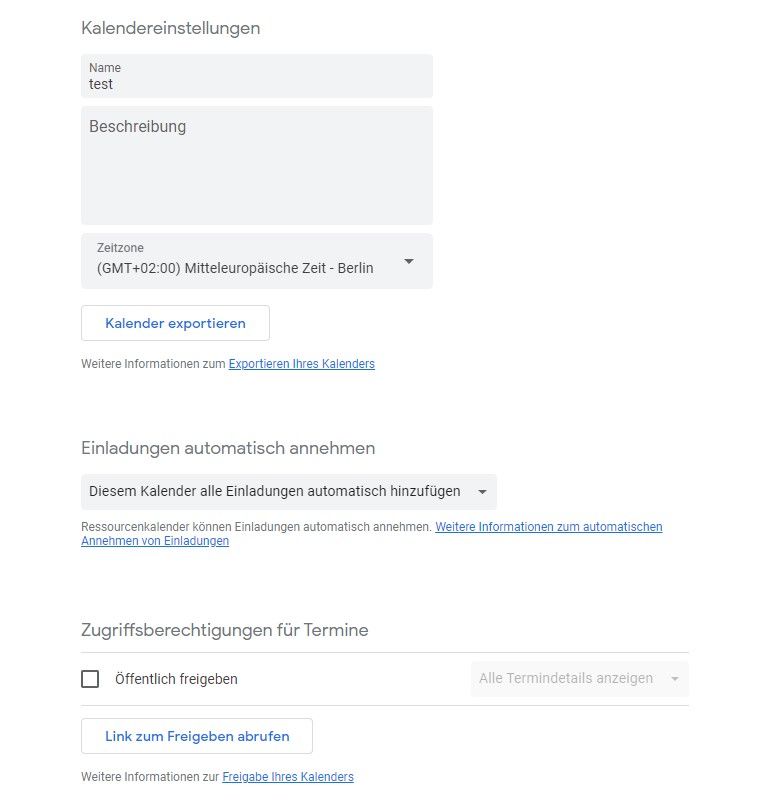
        E Offline
        E Offline
        Entraax
        schrieb am zuletzt editiert von
        #39

        @haselchen said in Ical - Google kalender Error Reading:

        @entraax

        Wie sehen deine Kalendereinstellungen komplett bei Google aus?
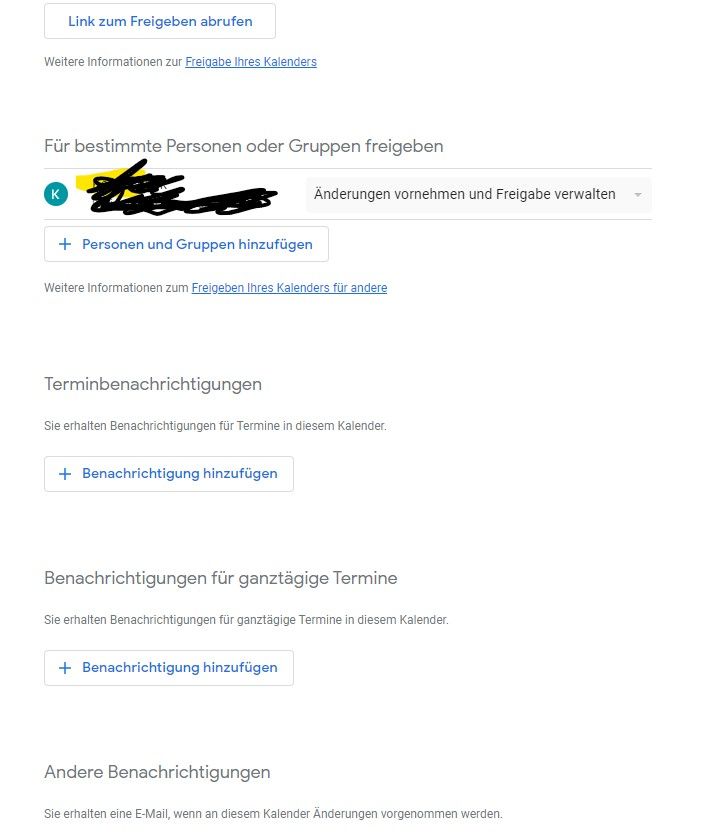
        Screenshot 2023-07-02 182221.jpg Screenshot 2023-07-02 190718.jpg Screenshot 2023-07-02 190904.jpg

        Ich hoffe ich habe keine Vergessen.

        haselchenH 1 Antwort Letzte Antwort
        0
        • E Entraax

          @haselchen said in Ical - Google kalender Error Reading:

          @entraax

          Wie sehen deine Kalendereinstellungen komplett bei Google aus?
          Screenshot 2023-07-02 182221.jpg Screenshot 2023-07-02 190718.jpg Screenshot 2023-07-02 190904.jpg

          Ich hoffe ich habe keine Vergessen.

          haselchenH Offline
          haselchenH Offline
          haselchen
          Most Active
          schrieb am zuletzt editiert von
          #40

          @entraax

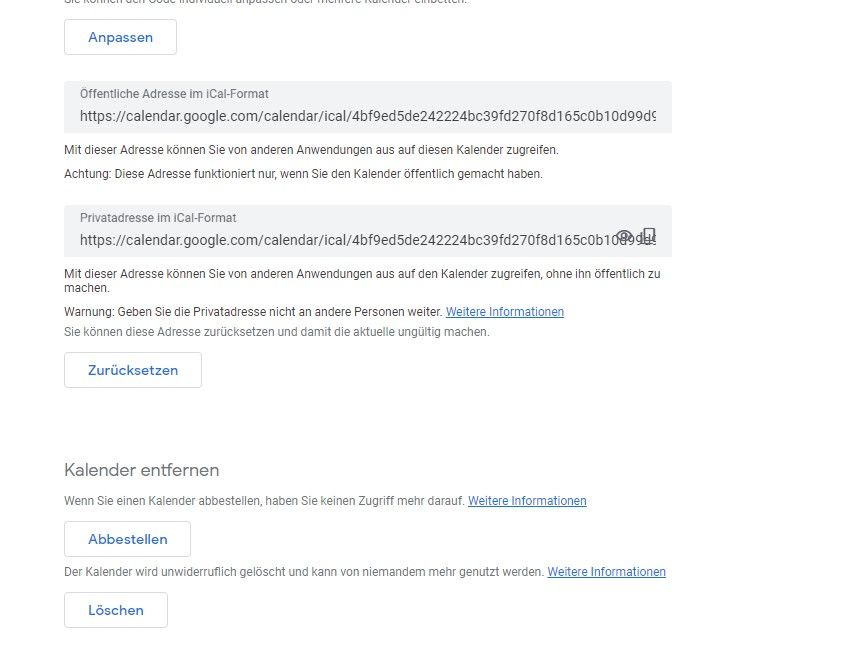
          Hast du es nach der Doku gemacht?

          Demnach musste auf das Auge klicken bei Private Ical Adresse.
          Und der Link kommt in den Adapter.

          Synology DS218+ & 2 x Fujitsu Esprimo (VM/Container) + FritzBox7590 + 2 AVM 3000 Repeater & Homematic & HUE & Osram & Xiaomi, NPM 10.9.4, Nodejs 22.21.0 ,JS Controller 7.0.7 ,Admin 7.7.19

          E 1 Antwort Letzte Antwort
          0
          • haselchenH haselchen

            @entraax

            Hast du es nach der Doku gemacht?

            Demnach musste auf das Auge klicken bei Private Ical Adresse.
            Und der Link kommt in den Adapter.

            E Offline
            E Offline
            Entraax
            schrieb am zuletzt editiert von Entraax
            #41

            @haselchen said in Ical - Google kalender Error Reading:

            @entraax

            Hast du es nach der Doku gemacht?

            Demnach musste auf das Auge klicken bei Private Ical Adresse.
            Und der Link kommt in den Adapter.

            Ja habe ich. Wenn ich dann im Log gucke, kommt die Fehlermeldung und die Datenpunkte bleiben leer

            haselchenH 1 Antwort Letzte Antwort
            0
            • crunchipC Abwesend
              crunchipC Abwesend
              crunchip
              Forum Testing Most Active
              schrieb am zuletzt editiert von crunchip
              #42

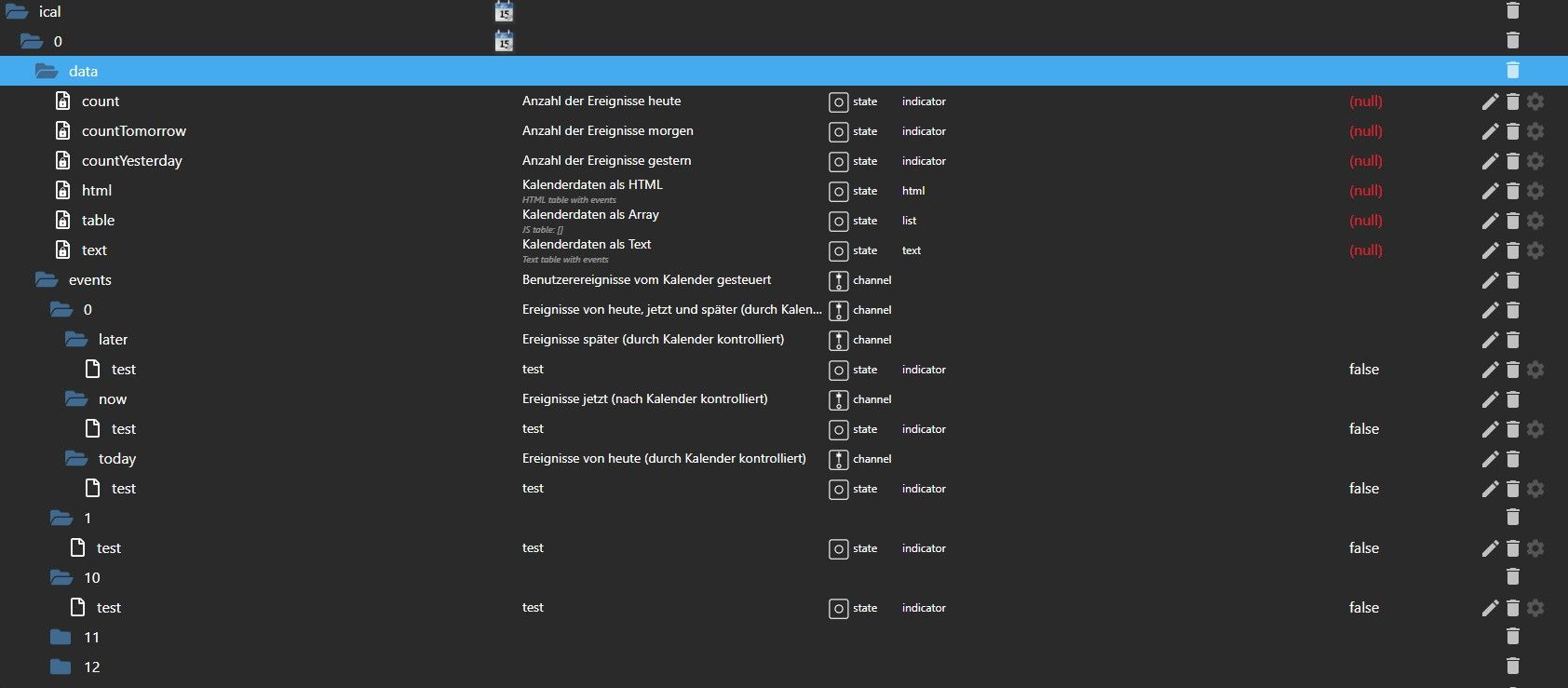
              also, ich habe nun bei mir einen neuen Kalender "test" angelegt, im kalender einen Termin "test" für morgen eingetragen, in der Instanz ebenfalls "test" hinterlegt und bekomme ebenfalls Error reading from URL "https://calendar.google.com/calendar/ical/.....calendar.google.com/public/basic.ics": 404
              allerdings taucht der Termin "test" in den Objekten auf

              umgestiegen von Proxmox auf Unraid

              E 1 Antwort Letzte Antwort
              0
              • E Entraax

                @haselchen said in Ical - Google kalender Error Reading:

                @entraax

                Hast du es nach der Doku gemacht?

                Demnach musste auf das Auge klicken bei Private Ical Adresse.
                Und der Link kommt in den Adapter.

                Ja habe ich. Wenn ich dann im Log gucke, kommt die Fehlermeldung und die Datenpunkte bleiben leer

                haselchenH Offline
                haselchenH Offline
                haselchen
                Most Active
                schrieb am zuletzt editiert von
                #43

                @entraax

                Dann hast du schon bei Google nen Fehler gemacht.
                Denn deine öffentlliche und private Adresse sind gleich.

                Synology DS218+ & 2 x Fujitsu Esprimo (VM/Container) + FritzBox7590 + 2 AVM 3000 Repeater & Homematic & HUE & Osram & Xiaomi, NPM 10.9.4, Nodejs 22.21.0 ,JS Controller 7.0.7 ,Admin 7.7.19

                E 1 Antwort Letzte Antwort
                0
                • haselchenH haselchen

                  @entraax

                  Dann hast du schon bei Google nen Fehler gemacht.
                  Denn deine öffentlliche und private Adresse sind gleich.

                  E Offline
                  E Offline
                  Entraax
                  schrieb am zuletzt editiert von
                  #44

                  @haselchen said in Ical - Google kalender Error Reading:

                  @entraax

                  Dann hast du schon bei Google nen Fehler gemacht.
                  Denn deine öffentlliche und private Adresse sind gleich.

                  Öffentlich:
                  https://calendar.google.com/calendar/ical/......%40group.calendar.google.com/public/basic.ics
                  Privat:
                  https://calendar.google.com/calendar/ical/....%40group.calendar.google.com/private-...../basic.ics

                  haselchenH 1 Antwort Letzte Antwort
                  0
                  • E Entraax

                    @haselchen said in Ical - Google kalender Error Reading:

                    @entraax

                    Dann hast du schon bei Google nen Fehler gemacht.
                    Denn deine öffentlliche und private Adresse sind gleich.

                    Öffentlich:
                    https://calendar.google.com/calendar/ical/......%40group.calendar.google.com/public/basic.ics
                    Privat:
                    https://calendar.google.com/calendar/ical/....%40group.calendar.google.com/private-...../basic.ics

                    haselchenH Offline
                    haselchenH Offline
                    haselchen
                    Most Active
                    schrieb am zuletzt editiert von haselchen
                    #45

                    @entraax

                    Da wird es aber haken. Deine URL sieht anders aus oder besser gesagt, ist anders aufgebaut als meine.

                    Synology DS218+ & 2 x Fujitsu Esprimo (VM/Container) + FritzBox7590 + 2 AVM 3000 Repeater & Homematic & HUE & Osram & Xiaomi, NPM 10.9.4, Nodejs 22.21.0 ,JS Controller 7.0.7 ,Admin 7.7.19

                    E 1 Antwort Letzte Antwort
                    0
                    • crunchipC crunchip

                      also, ich habe nun bei mir einen neuen Kalender "test" angelegt, im kalender einen Termin "test" für morgen eingetragen, in der Instanz ebenfalls "test" hinterlegt und bekomme ebenfalls Error reading from URL "https://calendar.google.com/calendar/ical/.....calendar.google.com/public/basic.ics": 404
                      allerdings taucht der Termin "test" in den Objekten auf

                      E Offline
                      E Offline
                      Entraax
                      schrieb am zuletzt editiert von
                      #46

                      @crunchip said in Ical - Google kalender Error Reading:

                      also, ich habe nun bei mir einen neuen Kalender "test" angelegt, im kalender einen Termin "test" für morgen eingetragen, in der Instanz ebenfalls "test" hinterlegt und bekomme ebenfalls Error reading from URL "https://calendar.google.com/calendar/ical/.....
                      allerdings taucht der Termin "test" in den Objekten auf

                      Okay in den Objekten bei mir:
                      Screenshot 2023-07-02 190904.jpg

                      bahnuhrB 1 Antwort Letzte Antwort
                      0
                      • E Entraax

                        @crunchip said in Ical - Google kalender Error Reading:

                        also, ich habe nun bei mir einen neuen Kalender "test" angelegt, im kalender einen Termin "test" für morgen eingetragen, in der Instanz ebenfalls "test" hinterlegt und bekomme ebenfalls Error reading from URL "https://calendar.google.com/calendar/ical/.....
                        allerdings taucht der Termin "test" in den Objekten auf

                        Okay in den Objekten bei mir:
                        Screenshot 2023-07-02 190904.jpg

                        bahnuhrB Online
                        bahnuhrB Online
                        bahnuhr
                        Forum Testing Most Active
                        schrieb am zuletzt editiert von bahnuhr
                        #47

                        @entraax
                        So nun auch mal probiert.

                        google Kalender
                        url kopiert:
                        https://calendar.google.com/calendar/ical/d.mabcde%40googlemail.com/private-abcdef...7c/basic.ics

                        Eingetragen als neuer Kalender in der Instanz.
                        Instanz neu gestartet.

                        Fazit:
                        keine Fehlermeldung
                        Einwandfrei gelesen.
                        alles ok.


                        Wenn ich helfen konnte, dann Daumen hoch (Pfeil nach oben)!
                        Danke.
                        gute Forenbeiträge: https://forum.iobroker.net/topic/51555/hinweise-f%C3%BCr-gute-forenbeitr%C3%A4ge
                        ScreenToGif :https://www.screentogif.com/downloads.html

                        E 1 Antwort Letzte Antwort
                        0
                        • haselchenH haselchen

                          @entraax

                          Da wird es aber haken. Deine URL sieht anders aus oder besser gesagt, ist anders aufgebaut als meine.

                          E Offline
                          E Offline
                          Entraax
                          schrieb am zuletzt editiert von
                          #48

                          @haselchen said in Ical - Google kalender Error Reading:

                          @entraax

                          Da wird es aber haken. Deine URL sieht anders aus oder besser gesagt, ist anders aufgebaut als meine.

                          Okay aber was kann ich anders machen?
                          Ich kann ja nur neuen Kalender anlegen und Kopieren, ohne Erfolg.
                          Neuen Account nehmen mit mit einem neuen Kalender und kopieren, ohne Erfolg

                          1 Antwort Letzte Antwort
                          0
                          • bahnuhrB bahnuhr

                            @entraax
                            So nun auch mal probiert.

                            google Kalender
                            url kopiert:
                            https://calendar.google.com/calendar/ical/d.mabcde%40googlemail.com/private-abcdef...7c/basic.ics

                            Eingetragen als neuer Kalender in der Instanz.
                            Instanz neu gestartet.

                            Fazit:
                            keine Fehlermeldung
                            Einwandfrei gelesen.
                            alles ok.

                            E Offline
                            E Offline
                            Entraax
                            schrieb am zuletzt editiert von
                            #49

                            @bahnuhr said in Ical - Google kalender Error Reading:

                            @entraax
                            So nun auch mal probiert.

                            google Kalender
                            url kopiert:
                            https://calendar.google.com/calendar/ical/d.mabcde%40googlemail.com/private-abcdef...7c/basic.ics

                            Eingetragen als neuer Kalender in der Instanz.
                            Instanz neu gestartet.

                            Fazit:
                            keine Fehlermeldung
                            Einwandfrei gelesen.
                            alles ok.

                            Es ist kein hexenwerk, bei mir geht einfach nicht. Ich werde wohl mal IoBroker neu auflegen in einer VM (Proxmox) und dann nochmal mit iCal testen....

                            bahnuhrB haselchenH 2 Antworten Letzte Antwort
                            0
                            • E Entraax

                              @bahnuhr said in Ical - Google kalender Error Reading:

                              @entraax
                              So nun auch mal probiert.

                              google Kalender
                              url kopiert:
                              https://calendar.google.com/calendar/ical/d.mabcde%40googlemail.com/private-abcdef...7c/basic.ics

                              Eingetragen als neuer Kalender in der Instanz.
                              Instanz neu gestartet.

                              Fazit:
                              keine Fehlermeldung
                              Einwandfrei gelesen.
                              alles ok.

                              Es ist kein hexenwerk, bei mir geht einfach nicht. Ich werde wohl mal IoBroker neu auflegen in einer VM (Proxmox) und dann nochmal mit iCal testen....

                              bahnuhrB Online
                              bahnuhrB Online
                              bahnuhr
                              Forum Testing Most Active
                              schrieb am zuletzt editiert von
                              #50

                              @entraax
                              was hast du für ein system.

                              iob diag
                              sagt ?


                              Wenn ich helfen konnte, dann Daumen hoch (Pfeil nach oben)!
                              Danke.
                              gute Forenbeiträge: https://forum.iobroker.net/topic/51555/hinweise-f%C3%BCr-gute-forenbeitr%C3%A4ge
                              ScreenToGif :https://www.screentogif.com/downloads.html

                              E 1 Antwort Letzte Antwort
                              0
                              • E Entraax

                                @bahnuhr said in Ical - Google kalender Error Reading:

                                @entraax
                                So nun auch mal probiert.

                                google Kalender
                                url kopiert:
                                https://calendar.google.com/calendar/ical/d.mabcde%40googlemail.com/private-abcdef...7c/basic.ics

                                Eingetragen als neuer Kalender in der Instanz.
                                Instanz neu gestartet.

                                Fazit:
                                keine Fehlermeldung
                                Einwandfrei gelesen.
                                alles ok.

                                Es ist kein hexenwerk, bei mir geht einfach nicht. Ich werde wohl mal IoBroker neu auflegen in einer VM (Proxmox) und dann nochmal mit iCal testen....

                                haselchenH Offline
                                haselchenH Offline
                                haselchen
                                Most Active
                                schrieb am zuletzt editiert von
                                #51

                                @entraax

                                Was ist dieses group.calendar.google.com?

                                Hat mich vorhin schon stutzig gemacht. In der URL ist die Googlemail Adresse mit drin.
                                Bei dir kommt das mit dem group.calendar.....

                                Synology DS218+ & 2 x Fujitsu Esprimo (VM/Container) + FritzBox7590 + 2 AVM 3000 Repeater & Homematic & HUE & Osram & Xiaomi, NPM 10.9.4, Nodejs 22.21.0 ,JS Controller 7.0.7 ,Admin 7.7.19

                                E crunchipC 2 Antworten Letzte Antwort
                                0
                                • bahnuhrB bahnuhr

                                  @entraax
                                  was hast du für ein system.

                                  iob diag
                                  sagt ?

                                  E Offline
                                  E Offline
                                  Entraax
                                  schrieb am zuletzt editiert von Entraax
                                  #52

                                  @bahnuhr said in Ical - Google kalender Error Reading:

                                  @entraax
                                  was hast du für ein system.

                                  iob diag
                                  sagt ?

                                  System: Proxmox auf einem Intel Nuc. In einer VM mit Ubuntu.

                                  iob diag

                                  ======================= SUMMARY =======================
                                                       v.2023-04-16
                                  
                                  
                                  Operatingsystem:        Ubuntu 22.04.2 LTS
                                  Kernel:                 5.15.0-75-generic
                                  Installation:           kvm
                                  Timezone:               Etc/UTC (UTC, +0000)
                                  User-ID:                1000
                                  X-Server:               false
                                  Boot Target:            graphical.target
                                  
                                  Pending OS-Updates:     34
                                  Pending iob updates:    0
                                  
                                  Nodejs-Installation:    /usr/bin/nodejs         v16.20.0
                                                          /usr/local/bin/node             v18.16.0
                                                          /usr/local/bin/npm              9.5.1
                                                          /usr/local/bin/npx              9.5.1
                                  
                                  Recommended versions are nodejs 18.x.y and npm 9.x.y
                                  *** nodejs is NOT correctly installed ***
                                  
                                  MEMORY:
                                                 total        used        free      shared  buff/cache   available
                                  Mem:            2.0G        945M        271M        0.0K        746M        843M
                                  Swap:           1.8G        168M        1.7G
                                  Total:          3.8G        1.1G        1.9G
                                  
                                  Active iob-Instances:   5
                                  Active repo(s): beta
                                  
                                  ioBroker Core:          js-controller           5.0.5
                                                          admin                   6.5.9
                                  
                                  ioBroker Status:        iobroker is running on this host.
                                  
                                  
                                  Objects type: jsonl
                                  States  type: jsonl
                                  
                                  Status admin and web instance:
                                  + system.adapter.admin.0                  : admin                 : iobroker                                 -  enabled, port: 8081, bind: 192.168.30.5 (SSL), run as: admin
                                  + system.adapter.web.0                    : web                   : iobroker                                 -  enabled, port: 8082, bind: 0.0.0.0, run as: admin
                                  
                                  Objects:                5149
                                  States:                 4493
                                  
                                  Size of iob-Database:
                                  
                                  52M     /opt/iobroker/iobroker-data/objects.jsonl
                                  6.1M    /opt/iobroker/iobroker-data/states.jsonl


                                  =================== END OF SUMMARY ====================
                                  
                                  bahnuhrB 1 Antwort Letzte Antwort
                                  0
                                  • E Entraax

                                    @bahnuhr said in Ical - Google kalender Error Reading:

                                    @entraax
                                    was hast du für ein system.

                                    iob diag
                                    sagt ?

                                    System: Proxmox auf einem Intel Nuc. In einer VM mit Ubuntu.

                                    iob diag

                                    ======================= SUMMARY =======================
                                                         v.2023-04-16
                                    
                                    
                                    Operatingsystem:        Ubuntu 22.04.2 LTS
                                    Kernel:                 5.15.0-75-generic
                                    Installation:           kvm
                                    Timezone:               Etc/UTC (UTC, +0000)
                                    User-ID:                1000
                                    X-Server:               false
                                    Boot Target:            graphical.target
                                    
                                    Pending OS-Updates:     34
                                    Pending iob updates:    0
                                    
                                    Nodejs-Installation:    /usr/bin/nodejs         v16.20.0
                                                            /usr/local/bin/node             v18.16.0
                                                            /usr/local/bin/npm              9.5.1
                                                            /usr/local/bin/npx              9.5.1
                                    
                                    Recommended versions are nodejs 18.x.y and npm 9.x.y
                                    *** nodejs is NOT correctly installed ***
                                    
                                    MEMORY:
                                                   total        used        free      shared  buff/cache   available
                                    Mem:            2.0G        945M        271M        0.0K        746M        843M
                                    Swap:           1.8G        168M        1.7G
                                    Total:          3.8G        1.1G        1.9G
                                    
                                    Active iob-Instances:   5
                                    Active repo(s): beta
                                    
                                    ioBroker Core:          js-controller           5.0.5
                                                            admin                   6.5.9
                                    
                                    ioBroker Status:        iobroker is running on this host.
                                    
                                    
                                    Objects type: jsonl
                                    States  type: jsonl
                                    
                                    Status admin and web instance:
                                    + system.adapter.admin.0                  : admin                 : iobroker                                 -  enabled, port: 8081, bind: 192.168.30.5 (SSL), run as: admin
                                    + system.adapter.web.0                    : web                   : iobroker                                 -  enabled, port: 8082, bind: 0.0.0.0, run as: admin
                                    
                                    Objects:                5149
                                    States:                 4493
                                    
                                    Size of iob-Database:
                                    
                                    52M     /opt/iobroker/iobroker-data/objects.jsonl
                                    6.1M    /opt/iobroker/iobroker-data/states.jsonl


                                    =================== END OF SUMMARY ====================
                                    
                                    bahnuhrB Online
                                    bahnuhrB Online
                                    bahnuhr
                                    Forum Testing Most Active
                                    schrieb am zuletzt editiert von
                                    #53

                                    @entraax

                                    Und wo ist der 1. Teil.
                                    Und warum bist du als beta unterwegs ?


                                    Wenn ich helfen konnte, dann Daumen hoch (Pfeil nach oben)!
                                    Danke.
                                    gute Forenbeiträge: https://forum.iobroker.net/topic/51555/hinweise-f%C3%BCr-gute-forenbeitr%C3%A4ge
                                    ScreenToGif :https://www.screentogif.com/downloads.html

                                    E 1 Antwort Letzte Antwort
                                    0
                                    • haselchenH haselchen

                                      @entraax

                                      Was ist dieses group.calendar.google.com?

                                      Hat mich vorhin schon stutzig gemacht. In der URL ist die Googlemail Adresse mit drin.
                                      Bei dir kommt das mit dem group.calendar.....

                                      E Offline
                                      E Offline
                                      Entraax
                                      schrieb am zuletzt editiert von
                                      #54

                                      @haselchen said in Ical - Google kalender Error Reading:

                                      @entraax

                                      Was ist dieses group.calendar.google.com?

                                      Hat mich vorhin schon stutzig gemacht. In der URL ist die Googlemail Adresse mit drin.
                                      Bei dir kommt das mit dem group.calendar.....

                                      Ja es kommt drauf an. Nimmt man den Kalender vom Account steht drin mit googlemail. Erstellt man im Account noch einen zweiten Kalender steht mit group.calendar drin.

                                      bahnuhrB 1 Antwort Letzte Antwort
                                      0
                                      • bahnuhrB bahnuhr

                                        @entraax

                                        Und wo ist der 1. Teil.
                                        Und warum bist du als beta unterwegs ?

                                        E Offline
                                        E Offline
                                        Entraax
                                        schrieb am zuletzt editiert von Entraax
                                        #55

                                        @bahnuhr said in Ical - Google kalender Error Reading:

                                        @entraax

                                        Und wo ist der 1. Teil.
                                        Und warum bist du als beta unterwegs ?

                                        Ich hatte es mal auf Beta gestellt, damit ich den vis2 adapter benutzen kann. Ich hatte gelesen, damit man ihn über Github einbinden kann, muss man auf Beta stellen. Es ist aktuell auch noch kein Live-System, dass kommt später. Ich wollte nur nach und nach alle Adapter einbinden und die Vis übernehmen.

                                        Skript v.2023-04-16
                                        
                                        *** BASE SYSTEM ***
                                        Architecture    : x86_64
                                        Docker          : false
                                        Virtualization  : kvm
                                        Distributor ID: Ubuntu
                                        Description:    Ubuntu 22.04.2 LTS
                                        Release:        22.04
                                        Codename:       jammy
                                        
                                        PRETTY_NAME="Ubuntu 22.04.2 LTS"
                                        NAME="Ubuntu"
                                        VERSION_ID="22.04"
                                        VERSION="22.04.2 LTS (Jammy Jellyfish)"
                                        VERSION_CODENAME=jammy
                                        ID=ubuntu
                                        ID_LIKE=debian
                                        HOME_URL="https://www.ubuntu.com/"
                                        SUPPORT_URL="https://help.ubuntu.com/"
                                        BUG_REPORT_URL="https://bugs.launchpad.net/ubuntu/"
                                        PRIVACY_POLICY_URL="https://www.ubuntu.com/legal/terms-and-policies/privacy-policy"
                                        UBUNTU_CODENAME=jammy
                                        
                                        Systemuptime and Load:
                                         17:49:10 up 11 days,  4:41,  3 users,  load average: 0.05, 0.23, 0.15
                                        CPU threads: 2
                                        
                                        
                                        *** Time and Time Zones ***
                                                       Local time: Sun 2023-07-02 17:49:10 UTC
                                                   Universal time: Sun 2023-07-02 17:49:10 UTC
                                                         RTC time: Sun 2023-07-02 17:49:10
                                                        Time zone: Etc/UTC (UTC, +0000)
                                        System clock synchronized: yes
                                                      NTP service: active
                                                  RTC in local TZ: no
                                        
                                        *** User and Groups ***
                                        admin123
                                        /home/admin123
                                        admin123 adm cdrom sudo dip plugdev lxd iobroker
                                        
                                        *** X-Server-Setup ***
                                        X-Server:       false
                                        Desktop:
                                        Terminal:       tty
                                        Boot Target:    graphical.target
                                        
                                        *** MEMORY ***
                                                       total        used        free      shared  buff/cache   available
                                        Mem:            2.0G        931M        285M        0.0K        746M        858M
                                        Swap:           1.8G        168M        1.7G
                                        Total:          3.8G        1.1G        2.0G
                                        
                                                 1963 M total memory
                                                  931 M used memory
                                                  847 M active memory
                                                  586 M inactive memory
                                                  285 M free memory
                                                  119 M buffer memory
                                                  627 M swap cache
                                                 1840 M total swap
                                                  168 M used swap
                                                 1672 M free swap
                                        
                                        *** FILESYSTEM ***
                                        Filesystem                        Type   Size  Used Avail Use% Mounted on
                                        tmpfs                             tmpfs  197M  1.1M  196M   1% /run
                                        /dev/mapper/ubuntu--vg-ubuntu--lv ext4    18G  8.2G  8.9G  49% /
                                        tmpfs                             tmpfs  982M     0  982M   0% /dev/shm
                                        tmpfs                             tmpfs  5.0M     0  5.0M   0% /run/lock
                                        /dev/sda2                         ext4   1.8G  253M  1.4G  16% /boot
                                        tmpfs                             tmpfs  197M  4.0K  197M   1% /run/user/1000
                                        
                                        Messages concerning ext4 filesystem in dmesg:
                                        [Wed Jun 21 13:07:27 2023] EXT4-fs (dm-0): mounted filesystem with ordered data mode. Opts: (null). Quota mode: none.
                                        [Wed Jun 21 13:07:27 2023] EXT4-fs (dm-0): re-mounted. Opts: (null). Quota mode: none.
                                        [Wed Jun 21 13:07:29 2023] EXT4-fs (sda2): mounted filesystem with ordered data mode. Opts: (null). Quota mode: none.
                                        
                                        Show mounted filesystems (real ones only):
                                        TARGET              SOURCE                            FSTYPE   OPTIONS
                                        /                   /dev/mapper/ubuntu--vg-ubuntu--lv ext4     rw,relatime
                                        |-/snap/core20/1950 /dev/loop0                        squashfs ro,nodev,relatime,errors=continue
                                        |-/snap/snapd/19457 /dev/loop4                        squashfs ro,nodev,relatime,errors=continue
                                        |-/snap/lxd/24322   /dev/loop2                        squashfs ro,nodev,relatime,errors=continue
                                        |-/snap/snapd/19361 /dev/loop3                        squashfs ro,nodev,relatime,errors=continue
                                        |-/snap/lxd/22923   /dev/loop5                        squashfs ro,nodev,relatime,errors=continue
                                        |-/snap/core20/1891 /dev/loop1                        squashfs ro,nodev,relatime,errors=continue
                                        `-/boot             /dev/sda2                         ext4     rw,relatime
                                        
                                        Files in neuralgic directories:
                                        
                                        /var:
                                        1.1G    /var/
                                        785M    /var/lib
                                        586M    /var/lib/snapd
                                        426M    /var/lib/snapd/snaps
                                        204M    /var/log
                                        
                                        Archived and active journals take up 200.0M in the file system.
                                        
                                        /opt/iobroker/backups:
                                        20M     /opt/iobroker/backups/
                                        
                                        /opt/iobroker/iobroker-data:
                                        329M    /opt/iobroker/iobroker-data/
                                        212M    /opt/iobroker/iobroker-data/files
                                        62M     /opt/iobroker/iobroker-data/files/vis-2-beta
                                        60M     /opt/iobroker/iobroker-data/backup-objects
                                        51M     /opt/iobroker/iobroker-data/files/javascript.admin
                                        
                                        The five largest files in iobroker-data are:
                                        52M     /opt/iobroker/iobroker-data/objects.jsonl
                                        20M     /opt/iobroker/iobroker-data/files/web.admin/static/js/main.becd2d7c.js.map
                                        9.7M    /opt/iobroker/iobroker-data/files/vis-2-beta/material-icons/knx-uf.json
                                        8.0M    /opt/iobroker/iobroker-data/files/web.admin/static/js/main.becd2d7c.js
                                        8.0M    /opt/iobroker/iobroker-data/files/vis-2-beta/static/js/main.384b5e1a.js
                                        
                                        *** NodeJS-Installation ***
                                        
                                        /usr/bin/nodejs         v16.20.0
                                        /usr/local/bin/node             v18.16.0
                                        /usr/local/bin/npm              9.5.1
                                        /usr/local/bin/npx              9.5.1
                                        *** nodejs is NOT correctly installed ***
                                        
                                        nodejs:
                                          Installed: 16.20.0-deb-1nodesource1
                                          Candidate: 16.20.1-deb-1nodesource1
                                          Version table:
                                             16.20.1-deb-1nodesource1 500
                                                500 https://deb.nodesource.com/node_16.x jammy/main amd64 Packages
                                         *** 16.20.0-deb-1nodesource1 100
                                                100 /var/lib/dpkg/status
                                             12.22.9~dfsg-1ubuntu3 500
                                                500 http://de.archive.ubuntu.com/ubuntu jammy/universe amd64 Packages
                                        
                                        Temp directories causing npm8 problem: 0
                                        No problems detected
                                        
                                        *** ioBroker-Installation ***
                                        
                                        ioBroker Status
                                        iobroker is running on this host.
                                        
                                        
                                        Objects type: jsonl
                                        States  type: jsonl
                                        
                                        MULTIHOSTSERVICE/enabled: false
                                        
                                        Core adapters versions
                                        js-controller:  5.0.5
                                        admin:          6.5.9
                                        javascript:     7.1.1
                                        
                                        Adapters from github:   0
                                        
                                        Adapter State
                                        + system.adapter.admin.0                  : admin                 : iobroker                                 -  enabled, port: 8081, bind: 192.168.30.5 (SSL), run as: admin
                                          system.adapter.alexa2.0                 : alexa2                : iobroker                                 - disabled
                                          system.adapter.backitup.0               : backitup              : iobroker                                 - disabled
                                          system.adapter.daswetter.0              : daswetter             : iobroker                                 -  enabled
                                          system.adapter.device-reminder.0        : device-reminder       : iobroker                                 - disabled
                                          system.adapter.discovery.0              : discovery             : iobroker                                 - disabled
                                          system.adapter.hm-rega.0                : hm-rega               : iobroker                                 - disabled
                                          system.adapter.hm-rpc.0                 : hm-rpc                : iobroker                                 - disabled, port: 0
                                          system.adapter.ical.0                   : ical                  : iobroker                                 -  enabled
                                          system.adapter.influxdb.0               : influxdb              : iobroker                                 - disabled, port: 8086
                                          system.adapter.javascript.0             : javascript            : iobroker                                 - disabled
                                          system.adapter.mihome-vacuum.0          : mihome-vacuum         : iobroker                                 - disabled, port: 54321
                                          system.adapter.mqtt.0                   : mqtt                  : iobroker                                 - disabled, port: 1883, bind: 0.0.0.0
                                          system.adapter.nuki.0                   : nuki                  : iobroker                                 - disabled
                                          system.adapter.shuttercontrol.0         : shuttercontrol        : iobroker                                 - disabled
                                          system.adapter.smartgarden.0            : smartgarden           : iobroker                                 - disabled
                                        + system.adapter.tankerkoenig.0           : tankerkoenig          : iobroker                                 -  enabled
                                          system.adapter.unifi.0                  : unifi                 : iobroker                                 - disabled
                                          system.adapter.vis-2-beta.0             : vis-2-beta            : iobroker                                 - disabled
                                          system.adapter.vis-icontwo.0            : vis-icontwo           : iobroker                                 -  enabled
                                        + system.adapter.vis-inventwo.0           : vis-inventwo          : iobroker                                 -  enabled
                                          system.adapter.vis-metro.0              : vis-metro             : iobroker                                 -  enabled
                                          system.adapter.vis-timeandweather.0     : vis-timeandweather    : iobroker                                 -  enabled
                                          system.adapter.vis.0                    : vis                   : iobroker                                 -  enabled
                                        + system.adapter.web.0                    : web                   : iobroker                                 -  enabled, port: 8082, bind: 0.0.0.0, run as: admin
                                        
                                        + instance is alive
                                        
                                        Enabled adapters with bindings
                                        + system.adapter.admin.0                  : admin                 : iobroker                                 -  enabled, port: 8081, bind: 192.168.30.5 (SSL), run as: admin
                                        + system.adapter.web.0                    : web                   : iobroker                                 -  enabled, port: 8082, bind: 0.0.0.0, run as: admin
                                        
                                        ioBroker-Repositories
                                        stable        : http://download.iobroker.net/sources-dist.json
                                        beta          : http://download.iobroker.net/sources-dist-latest.json
                                        
                                        Active repo(s): beta
                                        
                                        Installed ioBroker-Instances
                                        Used repository: beta
                                        Adapter    "admin"        : 6.5.9    , installed 6.5.9
                                        Adapter    "alexa2"       : 3.23.2   , installed 3.23.2
                                        Adapter    "backitup"     : 2.6.23   , installed 2.6.23
                                        Adapter    "daswetter"    : 3.1.8    , installed 3.1.8
                                        Adapter    "device-reminder": 1.2.9  , installed 1.2.9
                                        Adapter    "discovery"    : 3.2.0    , installed 3.2.0
                                        Adapter    "hm-rega"      : 3.0.46   , installed 3.0.46
                                        Adapter    "hm-rpc"       : 1.15.18  , installed 1.15.18
                                        Adapter    "ical"         : 1.13.3   , installed 1.13.3
                                        Adapter    "influxdb"     : 3.2.0    , installed 3.2.0
                                        Adapter    "javascript"   : 7.1.1    , installed 7.1.1
                                        Controller "js-controller": 5.0.5    , installed 5.0.5
                                        Adapter    "mihome-vacuum": 3.11.0   , installed 3.11.0
                                        Adapter    "mqtt"         : 4.1.1    , installed 4.1.1
                                        Adapter    "mqtt-client"  : 1.6.3    , installed 1.6.3
                                        Adapter    "nuki"         : 1.6.0    , installed 1.6.0
                                        Adapter    "shuttercontrol": 1.5.0   , installed 1.5.0
                                        Adapter    "simple-api"   : 2.7.2    , installed 2.7.2
                                        Adapter    "smartgarden"  : 2.0.0    , installed 2.0.0
                                        Adapter    "socketio"     : 6.3.5    , installed 6.3.5
                                        Adapter    "tankerkoenig" : 3.3.7    , installed 3.3.7
                                        Adapter    "trashschedule": 2.2.0    , installed 2.2.0
                                        Adapter    "unifi"        : 0.6.6    , installed 0.6.6
                                        Adapter    "vis"          : 1.4.16   , installed 1.4.16
                                        Adapter    "vis-icontwo"  : 0.96.0   , installed 0.96.0
                                        Adapter    "vis-inventwo" : 3.3.3    , installed 3.3.3
                                        Adapter    "vis-metro"    : 1.2.0    , installed 1.2.0
                                        Adapter    "vis-timeandweather": 1.2.2, installed 1.2.2
                                        Adapter    "web"          : 5.5.3    , installed 5.5.3
                                        Adapter    "ws"           : 2.3.6    , installed 2.3.6
                                        
                                        Objects and States
                                        Please stand by - This may take a while
                                        Objects:        5149
                                        States:         4492
                                        
                                        *** OS-Repositories and Updates ***
                                        Hit:1 http://de.archive.ubuntu.com/ubuntu jammy InRelease
                                        Hit:2 https://deb.nodesource.com/node_16.x jammy InRelease
                                        Hit:3 http://de.archive.ubuntu.com/ubuntu jammy-updates InRelease
                                        Hit:4 http://de.archive.ubuntu.com/ubuntu jammy-backports InRelease
                                        Hit:5 http://de.archive.ubuntu.com/ubuntu jammy-security InRelease
                                        Reading package lists...
                                        Pending Updates: 34
                                        
                                        *** Listening Ports ***
                                        Active Internet connections (only servers)
                                        Proto Recv-Q Send-Q Local Address           Foreign Address         State       User       Inode      PID/Program name
                                        tcp        0      0 0.0.0.0:111             0.0.0.0:*               LISTEN      0          17953      1/init
                                        tcp        0      0 0.0.0.0:22              0.0.0.0:*               LISTEN      0          21399      678/sshd: /usr/sbin
                                        tcp        0      0 192.168.30.5:8081       0.0.0.0:*               LISTEN      1001       22184      850/io.admin.0
                                        tcp        0      0 127.0.0.53:53           0.0.0.0:*               LISTEN      102        20822      607/systemd-resolve
                                        tcp        0      0 127.0.0.1:9000          0.0.0.0:*               LISTEN      1001       22042      626/iobroker.js-con
                                        tcp        0      0 127.0.0.1:9001          0.0.0.0:*               LISTEN      1001       21985      626/iobroker.js-con
                                        tcp6       0      0 :::111                  :::*                    LISTEN      0          17959      1/init
                                        tcp6       0      0 :::22                   :::*                    LISTEN      0          21413      678/sshd: /usr/sbin
                                        tcp6       0      0 :::8082                 :::*                    LISTEN      1001       242556     43696/io.web.0
                                        udp        0      0 127.0.0.53:53           0.0.0.0:*                           102        20821      607/systemd-resolve
                                        udp        0      0 0.0.0.0:111             0.0.0.0:*                           0          17956      1/init
                                        udp6       0      0 :::111                  :::*                                0          17962      1/init
                                        
                                        *** Log File - Last 25 Lines ***
                                        
                                        2023-07-02 17:42:55.903  - info: host.iobroker iobroker upload [7] ical.admin /opt/iobroker/node_modules/iobroker.ical/admin/i18n/pt/translations.json i18n/pt/translations.json application/json
                                        2023-07-02 17:42:55.907  - info: host.iobroker iobroker upload [6] ical.admin /opt/iobroker/node_modules/iobroker.ical/admin/i18n/ru/translations.json i18n/ru/translations.json application/json
                                        2023-07-02 17:42:55.911  - info: host.iobroker iobroker upload [5] ical.admin /opt/iobroker/node_modules/iobroker.ical/admin/i18n/uk/translations.json i18n/uk/translations.json application/json
                                        2023-07-02 17:42:55.914  - info: host.iobroker iobroker upload [4] ical.admin /opt/iobroker/node_modules/iobroker.ical/admin/i18n/zh-cn/translations.json i18n/zh-cn/translations.json application/json
                                        2023-07-02 17:42:55.917  - info: host.iobroker iobroker upload [3] ical.admin /opt/iobroker/node_modules/iobroker.ical/admin/ical.png ical.png image/png
                                        2023-07-02 17:42:55.920  - info: host.iobroker iobroker upload [2] ical.admin /opt/iobroker/node_modules/iobroker.ical/admin/img/info-big.png img/info-big.png image/png
                                        2023-07-02 17:42:55.924  - info: host.iobroker iobroker upload [1] ical.admin /opt/iobroker/node_modules/iobroker.ical/admin/jsonConfig.json jsonConfig.json application/json
                                        2023-07-02 17:42:55.927  - info: host.iobroker iobroker upload [0] ical.admin /opt/iobroker/node_modules/iobroker.ical/admin/words.js words.js application/javascript
                                        2023-07-02 17:42:56.979  - info: host.iobroker iobroker exit 0
                                        2023-07-02 17:42:58.823  - info: host.iobroker instance scheduled system.adapter.ical.0 0,30 * * * *
                                        2023-07-02 17:42:58.832  - info: host.iobroker instance system.adapter.ical.0 started with pid 50260
                                        2023-07-02 17:43:00.385  - info: ical.0 (50260) starting. Version 1.13.3 in /opt/iobroker/node_modules/iobroker.ical, node: v18.16.0, js-controller: 5.0.5
                                        2023-07-02 17:43:00.574  - warn: ical.0 (50260) Error reading from URL "https://calendar.google.com/calendar/ical/...%40group.calendar.google.com/private-.../basic.ics"
                                        2023-07-02 17:43:00.575  - warn: ical.0 (50260) Error reading "https://calendar.google.com/calendar/ical/.%40group.calendar.google.com/private-.../basic.ics": Cannot read URL: "https://calendar.google.com/calendar/ical/....%40group.calendar.google.com/private-.../basic.ics"
                                        2023-07-02 17:43:00.575  - info: ical.0 (50260) All calenders could not be processed, Do not clean up events
                                        2023-07-02 17:43:05.578  - info: ical.0 (50260) Terminated (NO_ERROR): Without reason
                                        2023-07-02 17:43:06.080  - warn: ical.0 (50260) get state error: Connection is closed.
                                        2023-07-02 17:43:06.099  - info: host.iobroker instance system.adapter.ical.0 terminated with code 0 (NO_ERROR)
                                        2023-07-02 17:43:22.971  - info: admin.0 (850) <== Disconnect system.user.admin from 192.168.1.74 admin
                                        2023-07-02 17:43:23.837  - info: admin.0 (850) ==> Connected system.user.admin from 192.168.1.74
                                        2023-07-02 17:45:00.014  - info: host.iobroker instance system.adapter.daswetter.0 started with pid 51738
                                        2023-07-02 17:45:00.718  - info: daswetter.0 (51738) starting. Version 3.1.8 in /opt/iobroker/node_modules/iobroker.daswetter, node: v18.16.0, js-controller: 5.0.5
                                        2023-07-02 17:45:03.575  - info: daswetter.0 (51738) Terminated (ADAPTER_REQUESTED_TERMINATION): All data handled, adapter stopped until next scheduled moment
                                        2023-07-02 17:45:04.080  - info: daswetter.0 (51738) cleaned everything up...
                                        2023-07-02 17:45:04.087  - info: host.iobroker instance system.adapter.daswetter.0 terminated with code 11 (ADAPTER_REQUESTED_TERMINATION)
                                        
                                        ============ Mark until here for C&P =============
                                        
                                        iob diag has finished.
                                        
                                        crunchipC 1 Antwort Letzte Antwort
                                        0
                                        • E Entraax

                                          @bahnuhr said in Ical - Google kalender Error Reading:

                                          @entraax

                                          Und wo ist der 1. Teil.
                                          Und warum bist du als beta unterwegs ?

                                          Ich hatte es mal auf Beta gestellt, damit ich den vis2 adapter benutzen kann. Ich hatte gelesen, damit man ihn über Github einbinden kann, muss man auf Beta stellen. Es ist aktuell auch noch kein Live-System, dass kommt später. Ich wollte nur nach und nach alle Adapter einbinden und die Vis übernehmen.

                                          Skript v.2023-04-16
                                          
                                          *** BASE SYSTEM ***
                                          Architecture    : x86_64
                                          Docker          : false
                                          Virtualization  : kvm
                                          Distributor ID: Ubuntu
                                          Description:    Ubuntu 22.04.2 LTS
                                          Release:        22.04
                                          Codename:       jammy
                                          
                                          PRETTY_NAME="Ubuntu 22.04.2 LTS"
                                          NAME="Ubuntu"
                                          VERSION_ID="22.04"
                                          VERSION="22.04.2 LTS (Jammy Jellyfish)"
                                          VERSION_CODENAME=jammy
                                          ID=ubuntu
                                          ID_LIKE=debian
                                          HOME_URL="https://www.ubuntu.com/"
                                          SUPPORT_URL="https://help.ubuntu.com/"
                                          BUG_REPORT_URL="https://bugs.launchpad.net/ubuntu/"
                                          PRIVACY_POLICY_URL="https://www.ubuntu.com/legal/terms-and-policies/privacy-policy"
                                          UBUNTU_CODENAME=jammy
                                          
                                          Systemuptime and Load:
                                           17:49:10 up 11 days,  4:41,  3 users,  load average: 0.05, 0.23, 0.15
                                          CPU threads: 2
                                          
                                          
                                          *** Time and Time Zones ***
                                                         Local time: Sun 2023-07-02 17:49:10 UTC
                                                     Universal time: Sun 2023-07-02 17:49:10 UTC
                                                           RTC time: Sun 2023-07-02 17:49:10
                                                          Time zone: Etc/UTC (UTC, +0000)
                                          System clock synchronized: yes
                                                        NTP service: active
                                                    RTC in local TZ: no
                                          
                                          *** User and Groups ***
                                          admin123
                                          /home/admin123
                                          admin123 adm cdrom sudo dip plugdev lxd iobroker
                                          
                                          *** X-Server-Setup ***
                                          X-Server:       false
                                          Desktop:
                                          Terminal:       tty
                                          Boot Target:    graphical.target
                                          
                                          *** MEMORY ***
                                                         total        used        free      shared  buff/cache   available
                                          Mem:            2.0G        931M        285M        0.0K        746M        858M
                                          Swap:           1.8G        168M        1.7G
                                          Total:          3.8G        1.1G        2.0G
                                          
                                                   1963 M total memory
                                                    931 M used memory
                                                    847 M active memory
                                                    586 M inactive memory
                                                    285 M free memory
                                                    119 M buffer memory
                                                    627 M swap cache
                                                   1840 M total swap
                                                    168 M used swap
                                                   1672 M free swap
                                          
                                          *** FILESYSTEM ***
                                          Filesystem                        Type   Size  Used Avail Use% Mounted on
                                          tmpfs                             tmpfs  197M  1.1M  196M   1% /run
                                          /dev/mapper/ubuntu--vg-ubuntu--lv ext4    18G  8.2G  8.9G  49% /
                                          tmpfs                             tmpfs  982M     0  982M   0% /dev/shm
                                          tmpfs                             tmpfs  5.0M     0  5.0M   0% /run/lock
                                          /dev/sda2                         ext4   1.8G  253M  1.4G  16% /boot
                                          tmpfs                             tmpfs  197M  4.0K  197M   1% /run/user/1000
                                          
                                          Messages concerning ext4 filesystem in dmesg:
                                          [Wed Jun 21 13:07:27 2023] EXT4-fs (dm-0): mounted filesystem with ordered data mode. Opts: (null). Quota mode: none.
                                          [Wed Jun 21 13:07:27 2023] EXT4-fs (dm-0): re-mounted. Opts: (null). Quota mode: none.
                                          [Wed Jun 21 13:07:29 2023] EXT4-fs (sda2): mounted filesystem with ordered data mode. Opts: (null). Quota mode: none.
                                          
                                          Show mounted filesystems (real ones only):
                                          TARGET              SOURCE                            FSTYPE   OPTIONS
                                          /                   /dev/mapper/ubuntu--vg-ubuntu--lv ext4     rw,relatime
                                          |-/snap/core20/1950 /dev/loop0                        squashfs ro,nodev,relatime,errors=continue
                                          |-/snap/snapd/19457 /dev/loop4                        squashfs ro,nodev,relatime,errors=continue
                                          |-/snap/lxd/24322   /dev/loop2                        squashfs ro,nodev,relatime,errors=continue
                                          |-/snap/snapd/19361 /dev/loop3                        squashfs ro,nodev,relatime,errors=continue
                                          |-/snap/lxd/22923   /dev/loop5                        squashfs ro,nodev,relatime,errors=continue
                                          |-/snap/core20/1891 /dev/loop1                        squashfs ro,nodev,relatime,errors=continue
                                          `-/boot             /dev/sda2                         ext4     rw,relatime
                                          
                                          Files in neuralgic directories:
                                          
                                          /var:
                                          1.1G    /var/
                                          785M    /var/lib
                                          586M    /var/lib/snapd
                                          426M    /var/lib/snapd/snaps
                                          204M    /var/log
                                          
                                          Archived and active journals take up 200.0M in the file system.
                                          
                                          /opt/iobroker/backups:
                                          20M     /opt/iobroker/backups/
                                          
                                          /opt/iobroker/iobroker-data:
                                          329M    /opt/iobroker/iobroker-data/
                                          212M    /opt/iobroker/iobroker-data/files
                                          62M     /opt/iobroker/iobroker-data/files/vis-2-beta
                                          60M     /opt/iobroker/iobroker-data/backup-objects
                                          51M     /opt/iobroker/iobroker-data/files/javascript.admin
                                          
                                          The five largest files in iobroker-data are:
                                          52M     /opt/iobroker/iobroker-data/objects.jsonl
                                          20M     /opt/iobroker/iobroker-data/files/web.admin/static/js/main.becd2d7c.js.map
                                          9.7M    /opt/iobroker/iobroker-data/files/vis-2-beta/material-icons/knx-uf.json
                                          8.0M    /opt/iobroker/iobroker-data/files/web.admin/static/js/main.becd2d7c.js
                                          8.0M    /opt/iobroker/iobroker-data/files/vis-2-beta/static/js/main.384b5e1a.js
                                          
                                          *** NodeJS-Installation ***
                                          
                                          /usr/bin/nodejs         v16.20.0
                                          /usr/local/bin/node             v18.16.0
                                          /usr/local/bin/npm              9.5.1
                                          /usr/local/bin/npx              9.5.1
                                          *** nodejs is NOT correctly installed ***
                                          
                                          nodejs:
                                            Installed: 16.20.0-deb-1nodesource1
                                            Candidate: 16.20.1-deb-1nodesource1
                                            Version table:
                                               16.20.1-deb-1nodesource1 500
                                                  500 https://deb.nodesource.com/node_16.x jammy/main amd64 Packages
                                           *** 16.20.0-deb-1nodesource1 100
                                                  100 /var/lib/dpkg/status
                                               12.22.9~dfsg-1ubuntu3 500
                                                  500 http://de.archive.ubuntu.com/ubuntu jammy/universe amd64 Packages
                                          
                                          Temp directories causing npm8 problem: 0
                                          No problems detected
                                          
                                          *** ioBroker-Installation ***
                                          
                                          ioBroker Status
                                          iobroker is running on this host.
                                          
                                          
                                          Objects type: jsonl
                                          States  type: jsonl
                                          
                                          MULTIHOSTSERVICE/enabled: false
                                          
                                          Core adapters versions
                                          js-controller:  5.0.5
                                          admin:          6.5.9
                                          javascript:     7.1.1
                                          
                                          Adapters from github:   0
                                          
                                          Adapter State
                                          + system.adapter.admin.0                  : admin                 : iobroker                                 -  enabled, port: 8081, bind: 192.168.30.5 (SSL), run as: admin
                                            system.adapter.alexa2.0                 : alexa2                : iobroker                                 - disabled
                                            system.adapter.backitup.0               : backitup              : iobroker                                 - disabled
                                            system.adapter.daswetter.0              : daswetter             : iobroker                                 -  enabled
                                            system.adapter.device-reminder.0        : device-reminder       : iobroker                                 - disabled
                                            system.adapter.discovery.0              : discovery             : iobroker                                 - disabled
                                            system.adapter.hm-rega.0                : hm-rega               : iobroker                                 - disabled
                                            system.adapter.hm-rpc.0                 : hm-rpc                : iobroker                                 - disabled, port: 0
                                            system.adapter.ical.0                   : ical                  : iobroker                                 -  enabled
                                            system.adapter.influxdb.0               : influxdb              : iobroker                                 - disabled, port: 8086
                                            system.adapter.javascript.0             : javascript            : iobroker                                 - disabled
                                            system.adapter.mihome-vacuum.0          : mihome-vacuum         : iobroker                                 - disabled, port: 54321
                                            system.adapter.mqtt.0                   : mqtt                  : iobroker                                 - disabled, port: 1883, bind: 0.0.0.0
                                            system.adapter.nuki.0                   : nuki                  : iobroker                                 - disabled
                                            system.adapter.shuttercontrol.0         : shuttercontrol        : iobroker                                 - disabled
                                            system.adapter.smartgarden.0            : smartgarden           : iobroker                                 - disabled
                                          + system.adapter.tankerkoenig.0           : tankerkoenig          : iobroker                                 -  enabled
                                            system.adapter.unifi.0                  : unifi                 : iobroker                                 - disabled
                                            system.adapter.vis-2-beta.0             : vis-2-beta            : iobroker                                 - disabled
                                            system.adapter.vis-icontwo.0            : vis-icontwo           : iobroker                                 -  enabled
                                          + system.adapter.vis-inventwo.0           : vis-inventwo          : iobroker                                 -  enabled
                                            system.adapter.vis-metro.0              : vis-metro             : iobroker                                 -  enabled
                                            system.adapter.vis-timeandweather.0     : vis-timeandweather    : iobroker                                 -  enabled
                                            system.adapter.vis.0                    : vis                   : iobroker                                 -  enabled
                                          + system.adapter.web.0                    : web                   : iobroker                                 -  enabled, port: 8082, bind: 0.0.0.0, run as: admin
                                          
                                          + instance is alive
                                          
                                          Enabled adapters with bindings
                                          + system.adapter.admin.0                  : admin                 : iobroker                                 -  enabled, port: 8081, bind: 192.168.30.5 (SSL), run as: admin
                                          + system.adapter.web.0                    : web                   : iobroker                                 -  enabled, port: 8082, bind: 0.0.0.0, run as: admin
                                          
                                          ioBroker-Repositories
                                          stable        : http://download.iobroker.net/sources-dist.json
                                          beta          : http://download.iobroker.net/sources-dist-latest.json
                                          
                                          Active repo(s): beta
                                          
                                          Installed ioBroker-Instances
                                          Used repository: beta
                                          Adapter    "admin"        : 6.5.9    , installed 6.5.9
                                          Adapter    "alexa2"       : 3.23.2   , installed 3.23.2
                                          Adapter    "backitup"     : 2.6.23   , installed 2.6.23
                                          Adapter    "daswetter"    : 3.1.8    , installed 3.1.8
                                          Adapter    "device-reminder": 1.2.9  , installed 1.2.9
                                          Adapter    "discovery"    : 3.2.0    , installed 3.2.0
                                          Adapter    "hm-rega"      : 3.0.46   , installed 3.0.46
                                          Adapter    "hm-rpc"       : 1.15.18  , installed 1.15.18
                                          Adapter    "ical"         : 1.13.3   , installed 1.13.3
                                          Adapter    "influxdb"     : 3.2.0    , installed 3.2.0
                                          Adapter    "javascript"   : 7.1.1    , installed 7.1.1
                                          Controller "js-controller": 5.0.5    , installed 5.0.5
                                          Adapter    "mihome-vacuum": 3.11.0   , installed 3.11.0
                                          Adapter    "mqtt"         : 4.1.1    , installed 4.1.1
                                          Adapter    "mqtt-client"  : 1.6.3    , installed 1.6.3
                                          Adapter    "nuki"         : 1.6.0    , installed 1.6.0
                                          Adapter    "shuttercontrol": 1.5.0   , installed 1.5.0
                                          Adapter    "simple-api"   : 2.7.2    , installed 2.7.2
                                          Adapter    "smartgarden"  : 2.0.0    , installed 2.0.0
                                          Adapter    "socketio"     : 6.3.5    , installed 6.3.5
                                          Adapter    "tankerkoenig" : 3.3.7    , installed 3.3.7
                                          Adapter    "trashschedule": 2.2.0    , installed 2.2.0
                                          Adapter    "unifi"        : 0.6.6    , installed 0.6.6
                                          Adapter    "vis"          : 1.4.16   , installed 1.4.16
                                          Adapter    "vis-icontwo"  : 0.96.0   , installed 0.96.0
                                          Adapter    "vis-inventwo" : 3.3.3    , installed 3.3.3
                                          Adapter    "vis-metro"    : 1.2.0    , installed 1.2.0
                                          Adapter    "vis-timeandweather": 1.2.2, installed 1.2.2
                                          Adapter    "web"          : 5.5.3    , installed 5.5.3
                                          Adapter    "ws"           : 2.3.6    , installed 2.3.6
                                          
                                          Objects and States
                                          Please stand by - This may take a while
                                          Objects:        5149
                                          States:         4492
                                          
                                          *** OS-Repositories and Updates ***
                                          Hit:1 http://de.archive.ubuntu.com/ubuntu jammy InRelease
                                          Hit:2 https://deb.nodesource.com/node_16.x jammy InRelease
                                          Hit:3 http://de.archive.ubuntu.com/ubuntu jammy-updates InRelease
                                          Hit:4 http://de.archive.ubuntu.com/ubuntu jammy-backports InRelease
                                          Hit:5 http://de.archive.ubuntu.com/ubuntu jammy-security InRelease
                                          Reading package lists...
                                          Pending Updates: 34
                                          
                                          *** Listening Ports ***
                                          Active Internet connections (only servers)
                                          Proto Recv-Q Send-Q Local Address           Foreign Address         State       User       Inode      PID/Program name
                                          tcp        0      0 0.0.0.0:111             0.0.0.0:*               LISTEN      0          17953      1/init
                                          tcp        0      0 0.0.0.0:22              0.0.0.0:*               LISTEN      0          21399      678/sshd: /usr/sbin
                                          tcp        0      0 192.168.30.5:8081       0.0.0.0:*               LISTEN      1001       22184      850/io.admin.0
                                          tcp        0      0 127.0.0.53:53           0.0.0.0:*               LISTEN      102        20822      607/systemd-resolve
                                          tcp        0      0 127.0.0.1:9000          0.0.0.0:*               LISTEN      1001       22042      626/iobroker.js-con
                                          tcp        0      0 127.0.0.1:9001          0.0.0.0:*               LISTEN      1001       21985      626/iobroker.js-con
                                          tcp6       0      0 :::111                  :::*                    LISTEN      0          17959      1/init
                                          tcp6       0      0 :::22                   :::*                    LISTEN      0          21413      678/sshd: /usr/sbin
                                          tcp6       0      0 :::8082                 :::*                    LISTEN      1001       242556     43696/io.web.0
                                          udp        0      0 127.0.0.53:53           0.0.0.0:*                           102        20821      607/systemd-resolve
                                          udp        0      0 0.0.0.0:111             0.0.0.0:*                           0          17956      1/init
                                          udp6       0      0 :::111                  :::*                                0          17962      1/init
                                          
                                          *** Log File - Last 25 Lines ***
                                          
                                          2023-07-02 17:42:55.903  - info: host.iobroker iobroker upload [7] ical.admin /opt/iobroker/node_modules/iobroker.ical/admin/i18n/pt/translations.json i18n/pt/translations.json application/json
                                          2023-07-02 17:42:55.907  - info: host.iobroker iobroker upload [6] ical.admin /opt/iobroker/node_modules/iobroker.ical/admin/i18n/ru/translations.json i18n/ru/translations.json application/json
                                          2023-07-02 17:42:55.911  - info: host.iobroker iobroker upload [5] ical.admin /opt/iobroker/node_modules/iobroker.ical/admin/i18n/uk/translations.json i18n/uk/translations.json application/json
                                          2023-07-02 17:42:55.914  - info: host.iobroker iobroker upload [4] ical.admin /opt/iobroker/node_modules/iobroker.ical/admin/i18n/zh-cn/translations.json i18n/zh-cn/translations.json application/json
                                          2023-07-02 17:42:55.917  - info: host.iobroker iobroker upload [3] ical.admin /opt/iobroker/node_modules/iobroker.ical/admin/ical.png ical.png image/png
                                          2023-07-02 17:42:55.920  - info: host.iobroker iobroker upload [2] ical.admin /opt/iobroker/node_modules/iobroker.ical/admin/img/info-big.png img/info-big.png image/png
                                          2023-07-02 17:42:55.924  - info: host.iobroker iobroker upload [1] ical.admin /opt/iobroker/node_modules/iobroker.ical/admin/jsonConfig.json jsonConfig.json application/json
                                          2023-07-02 17:42:55.927  - info: host.iobroker iobroker upload [0] ical.admin /opt/iobroker/node_modules/iobroker.ical/admin/words.js words.js application/javascript
                                          2023-07-02 17:42:56.979  - info: host.iobroker iobroker exit 0
                                          2023-07-02 17:42:58.823  - info: host.iobroker instance scheduled system.adapter.ical.0 0,30 * * * *
                                          2023-07-02 17:42:58.832  - info: host.iobroker instance system.adapter.ical.0 started with pid 50260
                                          2023-07-02 17:43:00.385  - info: ical.0 (50260) starting. Version 1.13.3 in /opt/iobroker/node_modules/iobroker.ical, node: v18.16.0, js-controller: 5.0.5
                                          2023-07-02 17:43:00.574  - warn: ical.0 (50260) Error reading from URL "https://calendar.google.com/calendar/ical/...%40group.calendar.google.com/private-.../basic.ics"
                                          2023-07-02 17:43:00.575  - warn: ical.0 (50260) Error reading "https://calendar.google.com/calendar/ical/.%40group.calendar.google.com/private-.../basic.ics": Cannot read URL: "https://calendar.google.com/calendar/ical/....%40group.calendar.google.com/private-.../basic.ics"
                                          2023-07-02 17:43:00.575  - info: ical.0 (50260) All calenders could not be processed, Do not clean up events
                                          2023-07-02 17:43:05.578  - info: ical.0 (50260) Terminated (NO_ERROR): Without reason
                                          2023-07-02 17:43:06.080  - warn: ical.0 (50260) get state error: Connection is closed.
                                          2023-07-02 17:43:06.099  - info: host.iobroker instance system.adapter.ical.0 terminated with code 0 (NO_ERROR)
                                          2023-07-02 17:43:22.971  - info: admin.0 (850) <== Disconnect system.user.admin from 192.168.1.74 admin
                                          2023-07-02 17:43:23.837  - info: admin.0 (850) ==> Connected system.user.admin from 192.168.1.74
                                          2023-07-02 17:45:00.014  - info: host.iobroker instance system.adapter.daswetter.0 started with pid 51738
                                          2023-07-02 17:45:00.718  - info: daswetter.0 (51738) starting. Version 3.1.8 in /opt/iobroker/node_modules/iobroker.daswetter, node: v18.16.0, js-controller: 5.0.5
                                          2023-07-02 17:45:03.575  - info: daswetter.0 (51738) Terminated (ADAPTER_REQUESTED_TERMINATION): All data handled, adapter stopped until next scheduled moment
                                          2023-07-02 17:45:04.080  - info: daswetter.0 (51738) cleaned everything up...
                                          2023-07-02 17:45:04.087  - info: host.iobroker instance system.adapter.daswetter.0 terminated with code 11 (ADAPTER_REQUESTED_TERMINATION)
                                          
                                          ============ Mark until here for C&P =============
                                          
                                          iob diag has finished.
                                          
                                          crunchipC Abwesend
                                          crunchipC Abwesend
                                          crunchip
                                          Forum Testing Most Active
                                          schrieb am zuletzt editiert von crunchip
                                          #56

                                          @entraax sagte in Ical - Google kalender Error Reading:

                                          *** NodeJS-Installation *** /usr/bin/nodejs v16.20.0 /usr/local/bin/node v18.16.0 /usr/local/bin/npm 9.5.1 /usr/local/bin/npx 9.5.1 *** nodejs is NOT correctly installed *** nodejs: Installed: 16.20.0-deb-1nodesource1 Candidate: 16.20.1-deb-1nodesource1 Version table: 16.20.1-deb-1nodesource1 500 500 https://deb.nodesource.com/node_16.x jammy/main amd64 Packages *** 16.20.0-deb-1nodesource1 100 100 /var/lib/dpkg/status 12.22.9~dfsg-1ubuntu3 500 500 http://de.archive.ubuntu.com/ubuntu jammy/universe amd64 Packages

                                          ist falsch installiert
                                          https://forum.iobroker.net/topic/35090/howto-nodejs-installation-und-upgrades-unter-debian/2?_=1688280686179


                                          umgestiegen von Proxmox auf Unraid

                                          E 2 Antworten Letzte Antwort
                                          0
                                          Antworten
                                          • In einem neuen Thema antworten
                                          Anmelden zum Antworten
                                          • Älteste zuerst
                                          • Neuste zuerst
                                          • Meiste Stimmen


                                          Support us

                                          ioBroker
                                          Community Adapters
                                          Donate

                                          683

                                          Online

                                          32.5k

                                          Benutzer

                                          81.6k

                                          Themen

                                          1.3m

                                          Beiträge
                                          Community
                                          Impressum | Datenschutz-Bestimmungen | Nutzungsbedingungen | Einwilligungseinstellungen
                                          ioBroker Community 2014-2025
                                          logo
                                          • Anmelden

                                          • Du hast noch kein Konto? Registrieren

                                          • Anmelden oder registrieren, um zu suchen
                                          • Erster Beitrag
                                            Letzter Beitrag
                                          0
                                          • Home
                                          • Aktuell
                                          • Tags
                                          • Ungelesen 0
                                          • Kategorien
                                          • Unreplied
                                          • Beliebt
                                          • GitHub
                                          • Docu
                                          • Hilfe