
NEWS




jarvis vs. vis
-
@homoran
Naja, das Rendern erfolgt im Frontend, aber das Bereitstellen der ggf. sehr umfangreichen Daten - womöglich auch noch Video-Streams - muss ja das Backend machen.
So'n paar 0815-Dinge sollte auch ein Pi hinkriegen - da gebe ich Dir Recht.
Aber der TE sprach vonview wechsel
Da stelle ich mir schon etwas umfangreicheres vor.
@codierknecht sagte in jarvis vs. vis:
womöglich auch noch Video-Streams
as I told!
@homoran sagte in jarvis vs. vis:
welche widgets, Kamerastreams?, wie der Web Adapt
Solche Datenmengen müssen dann aber auch durch das zu dünne WLAN-Kabel
-
@codierknecht sagte in jarvis vs. vis:
womöglich auch noch Video-Streams
as I told!
@homoran sagte in jarvis vs. vis:
welche widgets, Kamerastreams?, wie der Web Adapt
Solche Datenmengen müssen dann aber auch durch das zu dünne WLAN-Kabel
@homoran
Danke euch!
puh.....
Es ist kein videostream oder ähnliches enthalten.
Es läuft auch alles mit Lan Kabel.
ABER:
ich muss gestehen, dass es sich hier um einen 2Gb RAM Odroid handelt, also alles andere als Hochleistungsmaschine.
Als Anzeige dienst ein Lenovo Tablet M8. auch im eher Low Budget Bereich angesiedlet und mit seinen 2GB Ram ebenfalls kein Rechenwunder. Aber ich dachte für CSS, Html und JS in einem Browser sollte es reichen....Jedenfalls gibt das schonmal etliche Gedankenanstöße, aber ich möchte es eher kosten "gering" halten.
Dennoch hier noch mein ib diag======================= SUMMARY ======================= v.2023-04-16 Operatingsystem: Ubuntu 22.04.2 LTS Kernel: 6.2.0-rc3-meson64 Installation: Native Timezone: Europe/Vienna (CEST, +0200) User-ID: 1000 X-Server: true Boot Target: graphical.target Pending OS-Updates: 32 Pending iob updates: 1 Nodejs-Installation: /usr/bin/nodejs v16.20.0 /usr/bin/node v16.20.0 /usr/bin/npm 8.19.4 /usr/bin/npx 8.19.4 Recommended versions are nodejs 18.x.y and npm 9.x.y Your nodejs installation is correct MEMORY: total used free shared buff/cache available Mem: 1.9G 1.4G 93M 21M 387M 375M Swap: 965M 960M 5.0M Total: 2.9G 2.4G 98M Active iob-Instances: 11 Active repo(s): stable ioBroker Core: js-controller 4.0.24 admin 6.3.5 ioBroker Status: iobroker is running on this host. Objects type: jsonl =============== END OF SUMMARY ==================== : odroidc2 - enabled, port: 8082, bind: 0.0.0.0, run as: adminos ist Armbian, nicht ubuntu.
Ich danke euch jedenfalls!
-
@homoran
Danke euch!
puh.....
Es ist kein videostream oder ähnliches enthalten.
Es läuft auch alles mit Lan Kabel.
ABER:
ich muss gestehen, dass es sich hier um einen 2Gb RAM Odroid handelt, also alles andere als Hochleistungsmaschine.
Als Anzeige dienst ein Lenovo Tablet M8. auch im eher Low Budget Bereich angesiedlet und mit seinen 2GB Ram ebenfalls kein Rechenwunder. Aber ich dachte für CSS, Html und JS in einem Browser sollte es reichen....Jedenfalls gibt das schonmal etliche Gedankenanstöße, aber ich möchte es eher kosten "gering" halten.
Dennoch hier noch mein ib diag======================= SUMMARY ======================= v.2023-04-16 Operatingsystem: Ubuntu 22.04.2 LTS Kernel: 6.2.0-rc3-meson64 Installation: Native Timezone: Europe/Vienna (CEST, +0200) User-ID: 1000 X-Server: true Boot Target: graphical.target Pending OS-Updates: 32 Pending iob updates: 1 Nodejs-Installation: /usr/bin/nodejs v16.20.0 /usr/bin/node v16.20.0 /usr/bin/npm 8.19.4 /usr/bin/npx 8.19.4 Recommended versions are nodejs 18.x.y and npm 9.x.y Your nodejs installation is correct MEMORY: total used free shared buff/cache available Mem: 1.9G 1.4G 93M 21M 387M 375M Swap: 965M 960M 5.0M Total: 2.9G 2.4G 98M Active iob-Instances: 11 Active repo(s): stable ioBroker Core: js-controller 4.0.24 admin 6.3.5 ioBroker Status: iobroker is running on this host. Objects type: jsonl =============== END OF SUMMARY ==================== : odroidc2 - enabled, port: 8082, bind: 0.0.0.0, run as: adminos ist Armbian, nicht ubuntu.
Ich danke euch jedenfalls!
@jumbo125 sagte in jarvis vs. vis:
eher kosten "gering"
das klappt nicht.
smarthome != günstig.
Wenn du günstig und 2 GB Ram, dann
- max. 10 Instanzen
- kein css
- wenige bindings
- etc.
So wie du das vor hast klappt dies nicht.
-
@homoran
Danke euch!
puh.....
Es ist kein videostream oder ähnliches enthalten.
Es läuft auch alles mit Lan Kabel.
ABER:
ich muss gestehen, dass es sich hier um einen 2Gb RAM Odroid handelt, also alles andere als Hochleistungsmaschine.
Als Anzeige dienst ein Lenovo Tablet M8. auch im eher Low Budget Bereich angesiedlet und mit seinen 2GB Ram ebenfalls kein Rechenwunder. Aber ich dachte für CSS, Html und JS in einem Browser sollte es reichen....Jedenfalls gibt das schonmal etliche Gedankenanstöße, aber ich möchte es eher kosten "gering" halten.
Dennoch hier noch mein ib diag======================= SUMMARY ======================= v.2023-04-16 Operatingsystem: Ubuntu 22.04.2 LTS Kernel: 6.2.0-rc3-meson64 Installation: Native Timezone: Europe/Vienna (CEST, +0200) User-ID: 1000 X-Server: true Boot Target: graphical.target Pending OS-Updates: 32 Pending iob updates: 1 Nodejs-Installation: /usr/bin/nodejs v16.20.0 /usr/bin/node v16.20.0 /usr/bin/npm 8.19.4 /usr/bin/npx 8.19.4 Recommended versions are nodejs 18.x.y and npm 9.x.y Your nodejs installation is correct MEMORY: total used free shared buff/cache available Mem: 1.9G 1.4G 93M 21M 387M 375M Swap: 965M 960M 5.0M Total: 2.9G 2.4G 98M Active iob-Instances: 11 Active repo(s): stable ioBroker Core: js-controller 4.0.24 admin 6.3.5 ioBroker Status: iobroker is running on this host. Objects type: jsonl =============== END OF SUMMARY ==================== : odroidc2 - enabled, port: 8082, bind: 0.0.0.0, run as: adminos ist Armbian, nicht ubuntu.
Ich danke euch jedenfalls!
-
@homoran
Danke euch!
puh.....
Es ist kein videostream oder ähnliches enthalten.
Es läuft auch alles mit Lan Kabel.
ABER:
ich muss gestehen, dass es sich hier um einen 2Gb RAM Odroid handelt, also alles andere als Hochleistungsmaschine.
Als Anzeige dienst ein Lenovo Tablet M8. auch im eher Low Budget Bereich angesiedlet und mit seinen 2GB Ram ebenfalls kein Rechenwunder. Aber ich dachte für CSS, Html und JS in einem Browser sollte es reichen....Jedenfalls gibt das schonmal etliche Gedankenanstöße, aber ich möchte es eher kosten "gering" halten.
Dennoch hier noch mein ib diag======================= SUMMARY ======================= v.2023-04-16 Operatingsystem: Ubuntu 22.04.2 LTS Kernel: 6.2.0-rc3-meson64 Installation: Native Timezone: Europe/Vienna (CEST, +0200) User-ID: 1000 X-Server: true Boot Target: graphical.target Pending OS-Updates: 32 Pending iob updates: 1 Nodejs-Installation: /usr/bin/nodejs v16.20.0 /usr/bin/node v16.20.0 /usr/bin/npm 8.19.4 /usr/bin/npx 8.19.4 Recommended versions are nodejs 18.x.y and npm 9.x.y Your nodejs installation is correct MEMORY: total used free shared buff/cache available Mem: 1.9G 1.4G 93M 21M 387M 375M Swap: 965M 960M 5.0M Total: 2.9G 2.4G 98M Active iob-Instances: 11 Active repo(s): stable ioBroker Core: js-controller 4.0.24 admin 6.3.5 ioBroker Status: iobroker is running on this host. Objects type: jsonl =============== END OF SUMMARY ==================== : odroidc2 - enabled, port: 8082, bind: 0.0.0.0, run as: adminos ist Armbian, nicht ubuntu.
Ich danke euch jedenfalls!
@jumbo125 sagte in jarvis vs. vis:
dass es sich hier um einen 2Gb RAM Odroid handelt, also alles andere als Hochleistungsmaschine.
wenn es der C2 ist, ist der super geeignet.
Allerdings muss man bei 2GB RAM auch die Grenzen beachten.ich habe den sehr gerne benutzt, würde heute aber den C4 nehmen.
@jumbo125 sagte in jarvis vs. vis:
Als Anzeige dienst ein Lenovo Tablet M8. auch im eher Low Budget Bereich angesiedlet und mit seinen 2GB Ram ebenfalls kein Rechenwunder. Aber ich dachte für CSS, Html und JS in einem Browser sollte es reichen....
das ist eher das Nadelöhr.
Aber wo ist da der LAN Anschluss?
@jumbo125 sagte in jarvis vs. vis:
Recommended versions are nodejs 18.x.y and npm 9.x.y
könnte mal aktualisiert werden
@jumbo125 sagte in jarvis vs. vis:
X-Server: true
du solltest nicht auch noch einen Desktop mitschleppen!
@jumbo125 sagte in jarvis vs. vis:
os ist Armbian,
vernünftig!
und bitte die Langversion
-
- Desktop versuche ich gerade auszuschalten.
ist mir schon lange ein Dorn im Auge. Ich habe den heutigen Tag schon gesucht und dies gefunden:
sudo systemctl get-defaultgrapical.target
ich hoffe das ist korrekt:
Desktop ausschalten:sudo systemctl set-default multi-user.targetDesktop einschalten:
sudo systemctl set-default graphical.target- Ethernet: ich nutze einen Micor-USB Ethernet adapter. Ob ich bei dem bleibe, bezweifle ich jedoch, da das Laden und Ethernet gleichzeitig nicht funktioniert. Ist jedoch mit Wlan oder Lan kein Perfromance unterschied zu erkennen.
Die langversion noch:
======== Start marking the full check here =========
Skript v.2023-04-16 *** BASE SYSTEM *** Architecture : aarch64 Docker : false Virtualization : none Distributor ID: Ubuntu Description: Ubuntu 22.04.2 LTS Release: 22.04 Codename: jammy PRETTY_NAME="Armbian 23.02.2 Jammy" NAME="Ubuntu" VERSION_ID="22.04" VERSION="22.04.2 LTS (Jammy Jellyfish)" VERSION_CODENAME=jammy ID=ubuntu ID_LIKE=debian HOME_URL="https://www.ubuntu.com/" SUPPORT_URL="https://help.ubuntu.com/" BUG_REPORT_URL="https://bugs.launchpad.net/ubuntu/" PRIVACY_POLICY_URL="https://www.ubuntu.com/legal/terms-and-policies/privacy-policy" UBUNTU_CODENAME=jammy Systemuptime and Load: 17:20:50 up 4 days, 20:23, 2 users, load average: 0.26, 0.31, 0.42 CPU threads: 4 *** Time and Time Zones *** Local time: Mon 2023-05-08 17:20:51 CEST Universal time: Mon 2023-05-08 15:20:51 UTC RTC time: Mon 1970-01-05 20:23:40 Time zone: Europe/Vienna (CEST, +0200) System clock synchronized: yes NTP service: active RTC in local TZ: no *** User and Groups *** odroid /home/odroid odroid tty disk dialout sudo audio video plugdev games users systemd-journal input netdev bluetooth iobroker *** X-Server-Setup *** X-Server: true Desktop: Terminal: tty Boot Target: graphical.target *** MEMORY *** total used free shared buff/cache available Mem: 1.9G 1.5G 39M 20M 421M 356M Swap: 965M 952M 12M Total: 2.9G 2.4G 51M 1930 M total memory 1469 M used memory 1127 M active memory 310 M inactive memory 39 M free memory 65 M buffer memory 355 M swap cache 965 M total swap 952 M used swap 12 M free swap *** FILESYSTEM *** Filesystem Type Size Used Avail Use% Mounted on tmpfs tmpfs 194M 11M 183M 6% /run /dev/mmcblk0p1 ext4 57G 9.7G 47G 18% / tmpfs tmpfs 966M 0 966M 0% /dev/shm tmpfs tmpfs 5.0M 4.0K 5.0M 1% /run/lock tmpfs tmpfs 966M 12K 966M 1% /tmp /dev/zram1 ext4 47M 21M 23M 48% /var/log tmpfs tmpfs 194M 76K 193M 1% /run/user/109 tmpfs tmpfs 194M 76K 193M 1% /run/user/1000 overlaid overlay 194M 76K 193M 1% /run/user/1000/odroid-chromium Messages concerning ext4 filesystem in dmesg: Show mounted filesystems (real ones only): TARGET SOURCE FSTYPE OPTIONS / /dev/mmcblk0p1 ext4 rw,noatime,errors=remount-ro,commit=600 |-/snap/bare/5 /dev/loop0 squashfs ro,nodev,relatime,errors=continue |-/snap/core20/1856 /dev/loop1 squashfs ro,nodev,relatime,errors=continue |-/snap/firefox/2577 /dev/loop2 squashfs ro,nodev,relatime,errors=continue |-/snap/firefox/2606 /dev/loop3 squashfs ro,nodev,relatime,errors=continue |-/snap/gnome-3-38-2004/138 /dev/loop4 squashfs ro,nodev,relatime,errors=continue |-/snap/gnome-3-38-2004/141 /dev/loop5 squashfs ro,nodev,relatime,errors=continue |-/snap/gtk-common-themes/1535 /dev/loop6 squashfs ro,nodev,relatime,errors=continue |-/snap/snapd/18940 /dev/loop7 squashfs ro,nodev,relatime,errors=continue |-/snap/snapd/19127 /dev/loop8 squashfs ro,nodev,relatime,errors=continue |-/var/snap/firefox/common/host-hunspell /dev/mmcblk0p1[/usr/share/hunspell] ext4 ro,noexec,noatime,errors=remount-ro,commit=600 |-/var/log.hdd /dev/mmcblk0p1[/var/log] ext4 rw,noatime,errors=remount-ro,commit=600 |-/var/log /dev/zram1 ext4 rw,relatime,discard `-/snap/core20/1883 /dev/loop9 squashfs ro,nodev,relatime,errors=continue Files in neuralgic directories: /var: 4.0G /var/ 2.9G /var/lib 1.7G /var/lib/snapd 1.4G /var/lib/snapd/snaps 900M /var/cache Archived and active journals take up 9.6M in the file system. /opt/iobroker/backups: 122M /opt/iobroker/backups/ /opt/iobroker/iobroker-data: 141M /opt/iobroker/iobroker-data/ 101M /opt/iobroker/iobroker-data/files 51M /opt/iobroker/iobroker-data/files/javascript.admin 32M /opt/iobroker/iobroker-data/files/javascript.admin/static/js 32M /opt/iobroker/iobroker-data/files/javascript.admin/static The five largest files in iobroker-data are: 6.9M /opt/iobroker/iobroker-data/files/javascript.admin/static/js/610.de0231c9.chunk.js.map 6.7M /opt/iobroker/iobroker-data/objects.jsonl 6.5M /opt/iobroker/iobroker-data/states.jsonl 6.3M /opt/iobroker/iobroker-data/files/admin.admin/custom/static/js/vendors-node_modules_iobroker_adapter-react-v5_assets_devices_parseNames_js-node_modules_iobr-99c23e.847b8ad9.chunk.js.map 4.9M /opt/iobroker/iobroker-data/files/javascript.admin/static/js/848.7424922d.chunk.js.map *** NodeJS-Installation *** /usr/bin/nodejs v16.20.0 /usr/bin/node v16.20.0 /usr/bin/npm 8.19.4 /usr/bin/npx 8.19.4 nodejs: Installed: 16.20.0-deb-1nodesource1 Candidate: 16.20.0-deb-1nodesource1 Version table: *** 16.20.0-deb-1nodesource1 500 500 https://deb.nodesource.com/node_16.x jammy/main arm64 Packages 100 /var/lib/dpkg/status 12.22.9~dfsg-1ubuntu3 500 500 http://ports.ubuntu.com jammy/universe arm64 Packages Temp directories causing npm8 problem: 0 No problems detected *** ioBroker-Installation *** ioBroker Status iobroker is running on this host. Objects type: jsonl States type: jsonl MULTIHOSTSERVICE/enabled: false Core adapters versions js-controller: 4.0.24 admin: 6.3.5 javascript: 6.1.4 Adapters from github: 0 Adapter State + system.adapter.admin.0 : admin : odroidc2 - enabled, port: 8081, bind: 0.0.0.0, run as: admin + system.adapter.backitup.0 : backitup : odroidc2 - enabled system.adapter.cloud.0 : cloud : odroidc2 - disabled + system.adapter.discovery.0 : discovery : odroidc2 - enabled + system.adapter.history.0 : history : odroidc2 - enabled + system.adapter.jarvis.0 : jarvis : odroidc2 - enabled + system.adapter.javascript.0 : javascript : odroidc2 - enabled system.adapter.net-tools.0 : net-tools : odroidc2 - disabled system.adapter.ping.0 : ping : odroidc2 - disabled + system.adapter.simple-api.0 : simple-api : odroidc2 - enabled, port: 8087, bind: 0.0.0.0, run as: admin + system.adapter.sql.0 : sql : odroidc2 - enabled + system.adapter.tahoma.0 : tahoma : odroidc2 - enabled system.adapter.vis-hqwidgets.0 : vis-hqwidgets : odroidc2 - enabled system.adapter.vis.0 : vis : odroidc2 - enabled + system.adapter.web.0 : web : odroidc2 - enabled, port: 8082, bind: 0.0.0.0, run as: admin + instance is alive Enabled adapters with bindings + system.adapter.admin.0 : admin : odroidc2 - enabled, port: 8081, bind: 0.0.0.0, run as: admin + system.adapter.simple-api.0 : simple-api : odroidc2 - enabled, port: 8087, bind: 0.0.0.0, run as: admin + system.adapter.web.0 : web : odroidc2 - enabled, port: 8082, bind: 0.0.0.0, run as: admin ioBroker-Repositories stable : http://download.iobroker.net/sources-dist.json beta : http://download.iobroker.net/sources-dist-latest.json Active repo(s): stable Installed ioBroker-Instances Used repository: stable Adapter "admin" : 6.3.5 , installed 6.3.5 Adapter "backitup" : 2.6.19 , installed 2.6.16 [Updatable] Adapter "cloud" : 4.3.0 , installed 4.3.0 Adapter "discovery" : 3.1.0 , installed 3.1.0 Adapter "history" : 2.2.4 , installed 2.2.4 Adapter "jarvis" : 3.1.2 , installed 3.1.2 Adapter "javascript" : 6.1.4 , installed 6.1.4 Controller "js-controller": 4.0.24 , installed 4.0.24 Adapter "net-tools" : 0.2.0 , installed 0.2.0 Adapter "ping" : 1.5.3 , installed 1.5.3 Adapter "simple-api" : 2.7.2 , installed 2.7.2 Adapter "socketio" : 4.2.0 , installed 4.2.0 Adapter "sql" : 2.2.0 , installed 2.2.0 Adapter "tahoma" : 0.10.0 , installed 0.10.0 Adapter "vis" : 1.4.16 , installed 1.4.16 Adapter "vis-hqwidgets": 1.3.0 , installed 1.3.0 Adapter "web" : 4.3.0 , installed 4.3.0 Adapter "ws" : 1.3.0 , installed 1.3.0 Objects and States Please stand by - This may take a while Objects: 1051 States: 959 *** OS-Repositories and Updates *** Hit:1 http://ports.ubuntu.com jammy InRelease Hit:2 http://ppa.launchpadcontent.net/saiarcot895/chromium-beta/ubuntu jammy InRelease Hit:3 http://ppa.launchpadcontent.net/mozillateam/ppa/ubuntu jammy InRelease Hit:4 http://ports.ubuntu.com jammy-security InRelease Hit:5 http://ports.ubuntu.com jammy-updates InRelease Hit:6 http://ports.ubuntu.com jammy-backports InRelease Hit:8 https://apt.grafana.com stable InRelease Hit:9 http://deb.volian.org/volian scar InRelease Hit:10 https://deb.nodesource.com/node_16.x jammy InRelease Hit:7 http://imola.armbian.com/apt jammy InRelease Reading package lists... Pending Updates: 32 *** Listening Ports *** Active Internet connections (only servers) Proto Recv-Q Send-Q Local Address Foreign Address State User Inode PID/Program name tcp 0 0 127.0.0.1:33060 0.0.0.0:* LISTEN 117 12378 2312/mysqld tcp 0 0 0.0.0.0:111 0.0.0.0:* LISTEN 0 4898 1/init tcp 0 0 0.0.0.0:22 0.0.0.0:* LISTEN 0 11381 2211/sshd: /usr/sbi tcp 0 0 0.0.0.0:8400 0.0.0.0:* LISTEN 1002 16264 4212/io.jarvis.0 tcp 0 0 127.0.0.53:53 0.0.0.0:* LISTEN 101 6093 1510/systemd-resolv tcp 0 0 127.0.0.1:3306 0.0.0.0:* LISTEN 117 12052 2312/mysqld tcp 0 0 127.0.0.1:9001 0.0.0.0:* LISTEN 1002 14980 2059/iobroker.js-co tcp 0 0 127.0.0.1:9000 0.0.0.0:* LISTEN 1002 16584 2059/iobroker.js-co tcp 0 0 0.0.0.0:51821 0.0.0.0:* LISTEN 0 14490 3355/docker-proxy tcp 0 0 0.0.0.0:5801 0.0.0.0:* LISTEN 1000 10362 2089/Xtightvnc tcp 0 0 127.0.0.1:37391 0.0.0.0:* LISTEN 0 8975 2126/containerd tcp 0 0 0.0.0.0:6001 0.0.0.0:* LISTEN 1000 10359 2089/Xtightvnc tcp 0 0 0.0.0.0:5901 0.0.0.0:* LISTEN 1000 10361 2089/Xtightvnc tcp 0 0 127.0.0.1:631 0.0.0.0:* LISTEN 0 9783 2057/cupsd tcp6 0 0 :::80 :::* LISTEN 0 10516 2320/apache2 tcp6 0 0 :::111 :::* LISTEN 0 4899 1/init tcp6 0 0 :::22 :::* LISTEN 0 11383 2211/sshd: /usr/sbi tcp6 0 0 ::1:631 :::* LISTEN 0 9782 2057/cupsd tcp6 0 0 :::51821 :::* LISTEN 0 14493 3363/docker-proxy tcp6 0 0 :::8082 :::* LISTEN 1002 16913 4169/io.web.0 tcp6 0 0 :::8081 :::* LISTEN 1002 15289 4001/io.admin.0 tcp6 0 0 :::8087 :::* LISTEN 1002 18469 4235/io.simple-api. tcp6 0 0 :::3000 :::* LISTEN 119 2959567 713125/grafana udp 0 0 127.0.0.53:53 0.0.0.0:* 101 6092 1510/systemd-resolv udp 0 0 0.0.0.0:111 0.0.0.0:* 0 5426 1/init udp 0 0 127.0.0.1:323 0.0.0.0:* 0 8843 2125/chronyd udp 0 0 0.0.0.0:51820 0.0.0.0:* 0 13096 3378/docker-proxy udp6 0 0 :::111 :::* 0 5427 1/init udp6 0 0 ::1:323 :::* 0 8844 2125/chronyd udp6 0 0 fe80::d5c9:d24:8b4::546 :::* 0 10558 1591/NetworkManager udp6 0 0 :::51820 :::* 0 14501 3385/docker-proxy *** Log File - Last 25 Lines *** 2023-05-08 09:14:55.800 - info: web.0 (4169) ==> Connected system.user.admin from ::ffff:10.0.0.145 2023-05-08 10:14:51.517 - info: web.0 (4169) <== Disconnect system.user.admin from ::ffff:10.0.0.145 vis.0 2023-05-08 10:14:55.457 - info: web.0 (4169) ==> Connected system.user.admin from ::ffff:10.0.0.145 2023-05-08 10:49:53.185 - info: admin.0 (4001) ==> Connected system.user.admin from ::ffff:172.17.0.2 2023-05-08 10:50:18.189 - info: admin.0 (4001) <== Disconnect system.user.admin from ::ffff:172.17.0.2 admin 2023-05-08 11:04:39.879 - info: admin.0 (4001) ==> Connected system.user.admin from ::ffff:172.17.0.2 2023-05-08 11:04:42.645 - info: admin.0 (4001) <== Disconnect system.user.admin from ::ffff:172.17.0.2 admin 2023-05-08 11:04:45.374 - info: admin.0 (4001) ==> Connected system.user.admin from ::ffff:172.17.0.2 2023-05-08 11:04:46.948 - info: admin.0 (4001) <== Disconnect system.user.admin from ::ffff:172.17.0.2 admin 2023-05-08 11:14:51.675 - info: web.0 (4169) <== Disconnect system.user.admin from ::ffff:10.0.0.145 vis.0 2023-05-08 11:14:55.518 - info: web.0 (4169) ==> Connected system.user.admin from ::ffff:10.0.0.145 2023-05-08 12:14:51.734 - info: web.0 (4169) <== Disconnect system.user.admin from ::ffff:10.0.0.145 vis.0 2023-05-08 12:14:56.078 - info: web.0 (4169) ==> Connected system.user.admin from ::ffff:10.0.0.145 2023-05-08 13:14:51.919 - info: web.0 (4169) <== Disconnect system.user.admin from ::ffff:10.0.0.145 vis.0 2023-05-08 13:14:55.720 - info: web.0 (4169) ==> Connected system.user.admin from ::ffff:10.0.0.145 2023-05-08 14:14:51.900 - info: web.0 (4169) <== Disconnect system.user.admin from ::ffff:10.0.0.145 vis.0 2023-05-08 14:14:56.132 - info: web.0 (4169) ==> Connected system.user.admin from ::ffff:10.0.0.145 2023-05-08 15:14:52.166 - info: web.0 (4169) <== Disconnect system.user.admin from ::ffff:10.0.0.145 vis.0 2023-05-08 15:14:55.944 - info: web.0 (4169) ==> Connected system.user.admin from ::ffff:10.0.0.145 2023-05-08 16:14:51.943 - info: web.0 (4169) <== Disconnect system.user.admin from ::ffff:10.0.0.145 vis.0 2023-05-08 16:14:55.960 - info: web.0 (4169) ==> Connected system.user.admin from ::ffff:10.0.0.145 2023-05-08 17:14:52.340 - info: web.0 (4169) <== Disconnect system.user.admin from ::ffff:10.0.0.145 vis.0 2023-05-08 17:14:56.064 - info: web.0 (4169) ==> Connected system.user.admin from ::ffff:10.0.0.145 2023-05-08 17:22:48.178 - info: web.0 (4169) ==> Connected system.user.admin from ::ffff:10.0.0.59 2023-05-08 17:23:01.470 - info: admin.0 (4001) ==> Connected system.user.admin from ::ffff:10.0.0.59 - Desktop versuche ich gerade auszuschalten.
-
- Desktop versuche ich gerade auszuschalten.
ist mir schon lange ein Dorn im Auge. Ich habe den heutigen Tag schon gesucht und dies gefunden:
sudo systemctl get-defaultgrapical.target
ich hoffe das ist korrekt:
Desktop ausschalten:sudo systemctl set-default multi-user.targetDesktop einschalten:
sudo systemctl set-default graphical.target- Ethernet: ich nutze einen Micor-USB Ethernet adapter. Ob ich bei dem bleibe, bezweifle ich jedoch, da das Laden und Ethernet gleichzeitig nicht funktioniert. Ist jedoch mit Wlan oder Lan kein Perfromance unterschied zu erkennen.
Die langversion noch:
======== Start marking the full check here =========
Skript v.2023-04-16 *** BASE SYSTEM *** Architecture : aarch64 Docker : false Virtualization : none Distributor ID: Ubuntu Description: Ubuntu 22.04.2 LTS Release: 22.04 Codename: jammy PRETTY_NAME="Armbian 23.02.2 Jammy" NAME="Ubuntu" VERSION_ID="22.04" VERSION="22.04.2 LTS (Jammy Jellyfish)" VERSION_CODENAME=jammy ID=ubuntu ID_LIKE=debian HOME_URL="https://www.ubuntu.com/" SUPPORT_URL="https://help.ubuntu.com/" BUG_REPORT_URL="https://bugs.launchpad.net/ubuntu/" PRIVACY_POLICY_URL="https://www.ubuntu.com/legal/terms-and-policies/privacy-policy" UBUNTU_CODENAME=jammy Systemuptime and Load: 17:20:50 up 4 days, 20:23, 2 users, load average: 0.26, 0.31, 0.42 CPU threads: 4 *** Time and Time Zones *** Local time: Mon 2023-05-08 17:20:51 CEST Universal time: Mon 2023-05-08 15:20:51 UTC RTC time: Mon 1970-01-05 20:23:40 Time zone: Europe/Vienna (CEST, +0200) System clock synchronized: yes NTP service: active RTC in local TZ: no *** User and Groups *** odroid /home/odroid odroid tty disk dialout sudo audio video plugdev games users systemd-journal input netdev bluetooth iobroker *** X-Server-Setup *** X-Server: true Desktop: Terminal: tty Boot Target: graphical.target *** MEMORY *** total used free shared buff/cache available Mem: 1.9G 1.5G 39M 20M 421M 356M Swap: 965M 952M 12M Total: 2.9G 2.4G 51M 1930 M total memory 1469 M used memory 1127 M active memory 310 M inactive memory 39 M free memory 65 M buffer memory 355 M swap cache 965 M total swap 952 M used swap 12 M free swap *** FILESYSTEM *** Filesystem Type Size Used Avail Use% Mounted on tmpfs tmpfs 194M 11M 183M 6% /run /dev/mmcblk0p1 ext4 57G 9.7G 47G 18% / tmpfs tmpfs 966M 0 966M 0% /dev/shm tmpfs tmpfs 5.0M 4.0K 5.0M 1% /run/lock tmpfs tmpfs 966M 12K 966M 1% /tmp /dev/zram1 ext4 47M 21M 23M 48% /var/log tmpfs tmpfs 194M 76K 193M 1% /run/user/109 tmpfs tmpfs 194M 76K 193M 1% /run/user/1000 overlaid overlay 194M 76K 193M 1% /run/user/1000/odroid-chromium Messages concerning ext4 filesystem in dmesg: Show mounted filesystems (real ones only): TARGET SOURCE FSTYPE OPTIONS / /dev/mmcblk0p1 ext4 rw,noatime,errors=remount-ro,commit=600 |-/snap/bare/5 /dev/loop0 squashfs ro,nodev,relatime,errors=continue |-/snap/core20/1856 /dev/loop1 squashfs ro,nodev,relatime,errors=continue |-/snap/firefox/2577 /dev/loop2 squashfs ro,nodev,relatime,errors=continue |-/snap/firefox/2606 /dev/loop3 squashfs ro,nodev,relatime,errors=continue |-/snap/gnome-3-38-2004/138 /dev/loop4 squashfs ro,nodev,relatime,errors=continue |-/snap/gnome-3-38-2004/141 /dev/loop5 squashfs ro,nodev,relatime,errors=continue |-/snap/gtk-common-themes/1535 /dev/loop6 squashfs ro,nodev,relatime,errors=continue |-/snap/snapd/18940 /dev/loop7 squashfs ro,nodev,relatime,errors=continue |-/snap/snapd/19127 /dev/loop8 squashfs ro,nodev,relatime,errors=continue |-/var/snap/firefox/common/host-hunspell /dev/mmcblk0p1[/usr/share/hunspell] ext4 ro,noexec,noatime,errors=remount-ro,commit=600 |-/var/log.hdd /dev/mmcblk0p1[/var/log] ext4 rw,noatime,errors=remount-ro,commit=600 |-/var/log /dev/zram1 ext4 rw,relatime,discard `-/snap/core20/1883 /dev/loop9 squashfs ro,nodev,relatime,errors=continue Files in neuralgic directories: /var: 4.0G /var/ 2.9G /var/lib 1.7G /var/lib/snapd 1.4G /var/lib/snapd/snaps 900M /var/cache Archived and active journals take up 9.6M in the file system. /opt/iobroker/backups: 122M /opt/iobroker/backups/ /opt/iobroker/iobroker-data: 141M /opt/iobroker/iobroker-data/ 101M /opt/iobroker/iobroker-data/files 51M /opt/iobroker/iobroker-data/files/javascript.admin 32M /opt/iobroker/iobroker-data/files/javascript.admin/static/js 32M /opt/iobroker/iobroker-data/files/javascript.admin/static The five largest files in iobroker-data are: 6.9M /opt/iobroker/iobroker-data/files/javascript.admin/static/js/610.de0231c9.chunk.js.map 6.7M /opt/iobroker/iobroker-data/objects.jsonl 6.5M /opt/iobroker/iobroker-data/states.jsonl 6.3M /opt/iobroker/iobroker-data/files/admin.admin/custom/static/js/vendors-node_modules_iobroker_adapter-react-v5_assets_devices_parseNames_js-node_modules_iobr-99c23e.847b8ad9.chunk.js.map 4.9M /opt/iobroker/iobroker-data/files/javascript.admin/static/js/848.7424922d.chunk.js.map *** NodeJS-Installation *** /usr/bin/nodejs v16.20.0 /usr/bin/node v16.20.0 /usr/bin/npm 8.19.4 /usr/bin/npx 8.19.4 nodejs: Installed: 16.20.0-deb-1nodesource1 Candidate: 16.20.0-deb-1nodesource1 Version table: *** 16.20.0-deb-1nodesource1 500 500 https://deb.nodesource.com/node_16.x jammy/main arm64 Packages 100 /var/lib/dpkg/status 12.22.9~dfsg-1ubuntu3 500 500 http://ports.ubuntu.com jammy/universe arm64 Packages Temp directories causing npm8 problem: 0 No problems detected *** ioBroker-Installation *** ioBroker Status iobroker is running on this host. Objects type: jsonl States type: jsonl MULTIHOSTSERVICE/enabled: false Core adapters versions js-controller: 4.0.24 admin: 6.3.5 javascript: 6.1.4 Adapters from github: 0 Adapter State + system.adapter.admin.0 : admin : odroidc2 - enabled, port: 8081, bind: 0.0.0.0, run as: admin + system.adapter.backitup.0 : backitup : odroidc2 - enabled system.adapter.cloud.0 : cloud : odroidc2 - disabled + system.adapter.discovery.0 : discovery : odroidc2 - enabled + system.adapter.history.0 : history : odroidc2 - enabled + system.adapter.jarvis.0 : jarvis : odroidc2 - enabled + system.adapter.javascript.0 : javascript : odroidc2 - enabled system.adapter.net-tools.0 : net-tools : odroidc2 - disabled system.adapter.ping.0 : ping : odroidc2 - disabled + system.adapter.simple-api.0 : simple-api : odroidc2 - enabled, port: 8087, bind: 0.0.0.0, run as: admin + system.adapter.sql.0 : sql : odroidc2 - enabled + system.adapter.tahoma.0 : tahoma : odroidc2 - enabled system.adapter.vis-hqwidgets.0 : vis-hqwidgets : odroidc2 - enabled system.adapter.vis.0 : vis : odroidc2 - enabled + system.adapter.web.0 : web : odroidc2 - enabled, port: 8082, bind: 0.0.0.0, run as: admin + instance is alive Enabled adapters with bindings + system.adapter.admin.0 : admin : odroidc2 - enabled, port: 8081, bind: 0.0.0.0, run as: admin + system.adapter.simple-api.0 : simple-api : odroidc2 - enabled, port: 8087, bind: 0.0.0.0, run as: admin + system.adapter.web.0 : web : odroidc2 - enabled, port: 8082, bind: 0.0.0.0, run as: admin ioBroker-Repositories stable : http://download.iobroker.net/sources-dist.json beta : http://download.iobroker.net/sources-dist-latest.json Active repo(s): stable Installed ioBroker-Instances Used repository: stable Adapter "admin" : 6.3.5 , installed 6.3.5 Adapter "backitup" : 2.6.19 , installed 2.6.16 [Updatable] Adapter "cloud" : 4.3.0 , installed 4.3.0 Adapter "discovery" : 3.1.0 , installed 3.1.0 Adapter "history" : 2.2.4 , installed 2.2.4 Adapter "jarvis" : 3.1.2 , installed 3.1.2 Adapter "javascript" : 6.1.4 , installed 6.1.4 Controller "js-controller": 4.0.24 , installed 4.0.24 Adapter "net-tools" : 0.2.0 , installed 0.2.0 Adapter "ping" : 1.5.3 , installed 1.5.3 Adapter "simple-api" : 2.7.2 , installed 2.7.2 Adapter "socketio" : 4.2.0 , installed 4.2.0 Adapter "sql" : 2.2.0 , installed 2.2.0 Adapter "tahoma" : 0.10.0 , installed 0.10.0 Adapter "vis" : 1.4.16 , installed 1.4.16 Adapter "vis-hqwidgets": 1.3.0 , installed 1.3.0 Adapter "web" : 4.3.0 , installed 4.3.0 Adapter "ws" : 1.3.0 , installed 1.3.0 Objects and States Please stand by - This may take a while Objects: 1051 States: 959 *** OS-Repositories and Updates *** Hit:1 http://ports.ubuntu.com jammy InRelease Hit:2 http://ppa.launchpadcontent.net/saiarcot895/chromium-beta/ubuntu jammy InRelease Hit:3 http://ppa.launchpadcontent.net/mozillateam/ppa/ubuntu jammy InRelease Hit:4 http://ports.ubuntu.com jammy-security InRelease Hit:5 http://ports.ubuntu.com jammy-updates InRelease Hit:6 http://ports.ubuntu.com jammy-backports InRelease Hit:8 https://apt.grafana.com stable InRelease Hit:9 http://deb.volian.org/volian scar InRelease Hit:10 https://deb.nodesource.com/node_16.x jammy InRelease Hit:7 http://imola.armbian.com/apt jammy InRelease Reading package lists... Pending Updates: 32 *** Listening Ports *** Active Internet connections (only servers) Proto Recv-Q Send-Q Local Address Foreign Address State User Inode PID/Program name tcp 0 0 127.0.0.1:33060 0.0.0.0:* LISTEN 117 12378 2312/mysqld tcp 0 0 0.0.0.0:111 0.0.0.0:* LISTEN 0 4898 1/init tcp 0 0 0.0.0.0:22 0.0.0.0:* LISTEN 0 11381 2211/sshd: /usr/sbi tcp 0 0 0.0.0.0:8400 0.0.0.0:* LISTEN 1002 16264 4212/io.jarvis.0 tcp 0 0 127.0.0.53:53 0.0.0.0:* LISTEN 101 6093 1510/systemd-resolv tcp 0 0 127.0.0.1:3306 0.0.0.0:* LISTEN 117 12052 2312/mysqld tcp 0 0 127.0.0.1:9001 0.0.0.0:* LISTEN 1002 14980 2059/iobroker.js-co tcp 0 0 127.0.0.1:9000 0.0.0.0:* LISTEN 1002 16584 2059/iobroker.js-co tcp 0 0 0.0.0.0:51821 0.0.0.0:* LISTEN 0 14490 3355/docker-proxy tcp 0 0 0.0.0.0:5801 0.0.0.0:* LISTEN 1000 10362 2089/Xtightvnc tcp 0 0 127.0.0.1:37391 0.0.0.0:* LISTEN 0 8975 2126/containerd tcp 0 0 0.0.0.0:6001 0.0.0.0:* LISTEN 1000 10359 2089/Xtightvnc tcp 0 0 0.0.0.0:5901 0.0.0.0:* LISTEN 1000 10361 2089/Xtightvnc tcp 0 0 127.0.0.1:631 0.0.0.0:* LISTEN 0 9783 2057/cupsd tcp6 0 0 :::80 :::* LISTEN 0 10516 2320/apache2 tcp6 0 0 :::111 :::* LISTEN 0 4899 1/init tcp6 0 0 :::22 :::* LISTEN 0 11383 2211/sshd: /usr/sbi tcp6 0 0 ::1:631 :::* LISTEN 0 9782 2057/cupsd tcp6 0 0 :::51821 :::* LISTEN 0 14493 3363/docker-proxy tcp6 0 0 :::8082 :::* LISTEN 1002 16913 4169/io.web.0 tcp6 0 0 :::8081 :::* LISTEN 1002 15289 4001/io.admin.0 tcp6 0 0 :::8087 :::* LISTEN 1002 18469 4235/io.simple-api. tcp6 0 0 :::3000 :::* LISTEN 119 2959567 713125/grafana udp 0 0 127.0.0.53:53 0.0.0.0:* 101 6092 1510/systemd-resolv udp 0 0 0.0.0.0:111 0.0.0.0:* 0 5426 1/init udp 0 0 127.0.0.1:323 0.0.0.0:* 0 8843 2125/chronyd udp 0 0 0.0.0.0:51820 0.0.0.0:* 0 13096 3378/docker-proxy udp6 0 0 :::111 :::* 0 5427 1/init udp6 0 0 ::1:323 :::* 0 8844 2125/chronyd udp6 0 0 fe80::d5c9:d24:8b4::546 :::* 0 10558 1591/NetworkManager udp6 0 0 :::51820 :::* 0 14501 3385/docker-proxy *** Log File - Last 25 Lines *** 2023-05-08 09:14:55.800 - info: web.0 (4169) ==> Connected system.user.admin from ::ffff:10.0.0.145 2023-05-08 10:14:51.517 - info: web.0 (4169) <== Disconnect system.user.admin from ::ffff:10.0.0.145 vis.0 2023-05-08 10:14:55.457 - info: web.0 (4169) ==> Connected system.user.admin from ::ffff:10.0.0.145 2023-05-08 10:49:53.185 - info: admin.0 (4001) ==> Connected system.user.admin from ::ffff:172.17.0.2 2023-05-08 10:50:18.189 - info: admin.0 (4001) <== Disconnect system.user.admin from ::ffff:172.17.0.2 admin 2023-05-08 11:04:39.879 - info: admin.0 (4001) ==> Connected system.user.admin from ::ffff:172.17.0.2 2023-05-08 11:04:42.645 - info: admin.0 (4001) <== Disconnect system.user.admin from ::ffff:172.17.0.2 admin 2023-05-08 11:04:45.374 - info: admin.0 (4001) ==> Connected system.user.admin from ::ffff:172.17.0.2 2023-05-08 11:04:46.948 - info: admin.0 (4001) <== Disconnect system.user.admin from ::ffff:172.17.0.2 admin 2023-05-08 11:14:51.675 - info: web.0 (4169) <== Disconnect system.user.admin from ::ffff:10.0.0.145 vis.0 2023-05-08 11:14:55.518 - info: web.0 (4169) ==> Connected system.user.admin from ::ffff:10.0.0.145 2023-05-08 12:14:51.734 - info: web.0 (4169) <== Disconnect system.user.admin from ::ffff:10.0.0.145 vis.0 2023-05-08 12:14:56.078 - info: web.0 (4169) ==> Connected system.user.admin from ::ffff:10.0.0.145 2023-05-08 13:14:51.919 - info: web.0 (4169) <== Disconnect system.user.admin from ::ffff:10.0.0.145 vis.0 2023-05-08 13:14:55.720 - info: web.0 (4169) ==> Connected system.user.admin from ::ffff:10.0.0.145 2023-05-08 14:14:51.900 - info: web.0 (4169) <== Disconnect system.user.admin from ::ffff:10.0.0.145 vis.0 2023-05-08 14:14:56.132 - info: web.0 (4169) ==> Connected system.user.admin from ::ffff:10.0.0.145 2023-05-08 15:14:52.166 - info: web.0 (4169) <== Disconnect system.user.admin from ::ffff:10.0.0.145 vis.0 2023-05-08 15:14:55.944 - info: web.0 (4169) ==> Connected system.user.admin from ::ffff:10.0.0.145 2023-05-08 16:14:51.943 - info: web.0 (4169) <== Disconnect system.user.admin from ::ffff:10.0.0.145 vis.0 2023-05-08 16:14:55.960 - info: web.0 (4169) ==> Connected system.user.admin from ::ffff:10.0.0.145 2023-05-08 17:14:52.340 - info: web.0 (4169) <== Disconnect system.user.admin from ::ffff:10.0.0.145 vis.0 2023-05-08 17:14:56.064 - info: web.0 (4169) ==> Connected system.user.admin from ::ffff:10.0.0.145 2023-05-08 17:22:48.178 - info: web.0 (4169) ==> Connected system.user.admin from ::ffff:10.0.0.59 2023-05-08 17:23:01.470 - info: admin.0 (4001) ==> Connected system.user.admin from ::ffff:10.0.0.59@jumbo125 16 Instanzen sollten mit 2GB nicht wirklich ein Problem darstellen.
@jumbo125 sagte in jarvis vs. vis:
Pending Updates: 32
solltest du auch "beheben", wird aber wahrscheinlich nichts an der Geschwindigkeit ändern
@jumbo125 sagte in jarvis vs. vis:
load average: 0.26, 0.31, 0.42
der Odroid hat nicht wirklich was zu tun. der dümpelt im Halbschlaf herum
Wenn du noch etwas RAM durch due Deaktivierung des Desktops freischaufeln kannst, sollte serverseitig alles weitestgehend passen.
sieh mal mit
sudo armbian-configob es da per Menü geht.@jumbo125 sagte in jarvis vs. vis:
Ethernet: ich nutze einen Micor-USB Ethernet adapter. Ob ich bei dem bleibe, bezweifle ich jedoch, da das Laden und Ethernet gleichzeitig nicht funktioniert. Ist jedoch mit Wlan oder Lan kein Perfromance unterschied zu erkennen.
dann sollte ein begrenzter Traffic auch nicht das Problem sein (außer die identische Geschwindigkeit liegt daran, dass das LAN über den Adapter ist genauso schlecht wie das WLAN ist)
- Desktop versuche ich gerade auszuschalten.
-
@jumbo125 16 Instanzen sollten mit 2GB nicht wirklich ein Problem darstellen.
@jumbo125 sagte in jarvis vs. vis:
Pending Updates: 32
solltest du auch "beheben", wird aber wahrscheinlich nichts an der Geschwindigkeit ändern
@jumbo125 sagte in jarvis vs. vis:
load average: 0.26, 0.31, 0.42
der Odroid hat nicht wirklich was zu tun. der dümpelt im Halbschlaf herum
Wenn du noch etwas RAM durch due Deaktivierung des Desktops freischaufeln kannst, sollte serverseitig alles weitestgehend passen.
sieh mal mit
sudo armbian-configob es da per Menü geht.@jumbo125 sagte in jarvis vs. vis:
Ethernet: ich nutze einen Micor-USB Ethernet adapter. Ob ich bei dem bleibe, bezweifle ich jedoch, da das Laden und Ethernet gleichzeitig nicht funktioniert. Ist jedoch mit Wlan oder Lan kein Perfromance unterschied zu erkennen.
dann sollte ein begrenzter Traffic auch nicht das Problem sein (außer die identische Geschwindigkeit liegt daran, dass das LAN über den Adapter ist genauso schlecht wie das WLAN ist)
-
@homoran
Danke dir vielmals.
ich habe mittels armbian-config den desktop deaktiviert und mittels sudo systemctl set-default multi-user.target dann noch einen systempunkt gesetzt.
jetzt sind rund 21%-20% frei anstatt 15-16%@jumbo125 bis auf das ein oder andere update/upgrade solltest du den Server jetzt weitestgehend optimiert haben.
bleiben die Fragen
@mcu sagte in jarvis vs. vis:
Langsam ist subjektiv, wieviel Sekundendauert der Wechsel
@mcu sagte in jarvis vs. vis:
was ist auf der Seite?
und in Abwandlung von
@mcu sagte in jarvis vs. vis:
auf welchen Systemen wird die Vis angezeigt?
...ist es überall gleich langsam?
dann ist die Frage danach
@homoran sagte in jarvis vs. vis:
wie der Web Adapter konfiguriert ist,
von großem Interesse
-
@jumbo125 bis auf das ein oder andere update/upgrade solltest du den Server jetzt weitestgehend optimiert haben.
bleiben die Fragen
@mcu sagte in jarvis vs. vis:
Langsam ist subjektiv, wieviel Sekundendauert der Wechsel
@mcu sagte in jarvis vs. vis:
was ist auf der Seite?
und in Abwandlung von
@mcu sagte in jarvis vs. vis:
auf welchen Systemen wird die Vis angezeigt?
...ist es überall gleich langsam?
dann ist die Frage danach
@homoran sagte in jarvis vs. vis:
wie der Web Adapter konfiguriert ist,
von großem Interesse
@homoran
Danke das ihr mir derart weiter helft.Langsam:
2-3s bis die view geladen ist.
(bspw. sind 5 fenster abgebildet, welche nur die Außen-Rollo Stellung abbilden )Prinzipiell ist jeder View-Wechsel gleich langsam
meine Web einstellung:
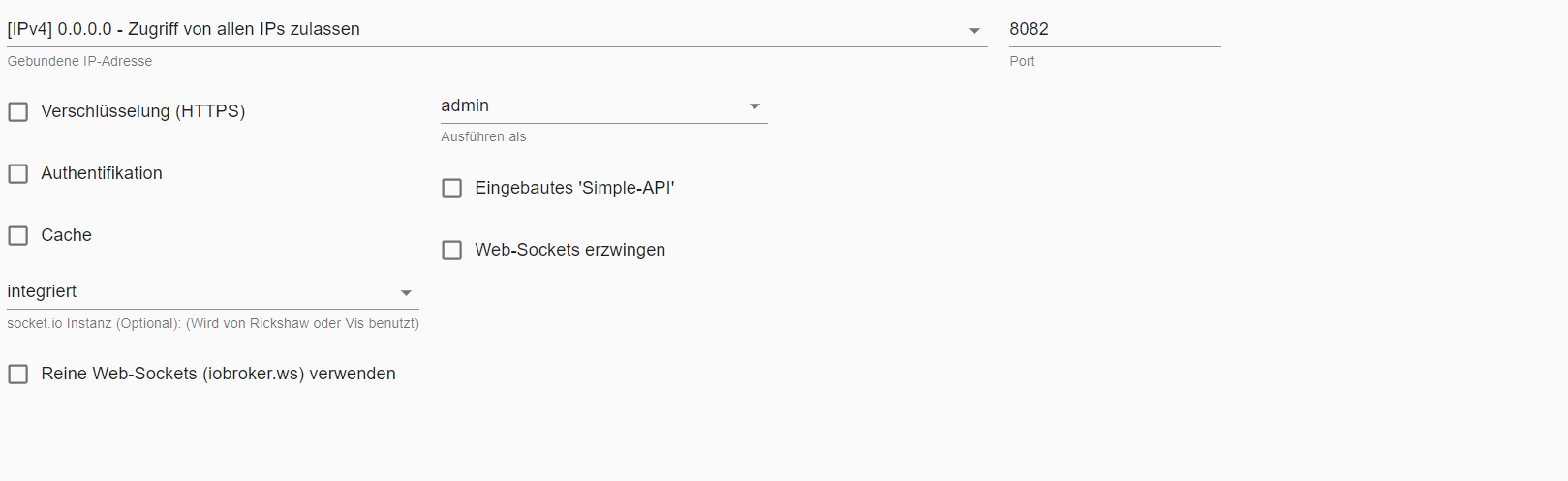
-
@homoran
Danke das ihr mir derart weiter helft.Langsam:
2-3s bis die view geladen ist.
(bspw. sind 5 fenster abgebildet, welche nur die Außen-Rollo Stellung abbilden )Prinzipiell ist jeder View-Wechsel gleich langsam
meine Web einstellung:
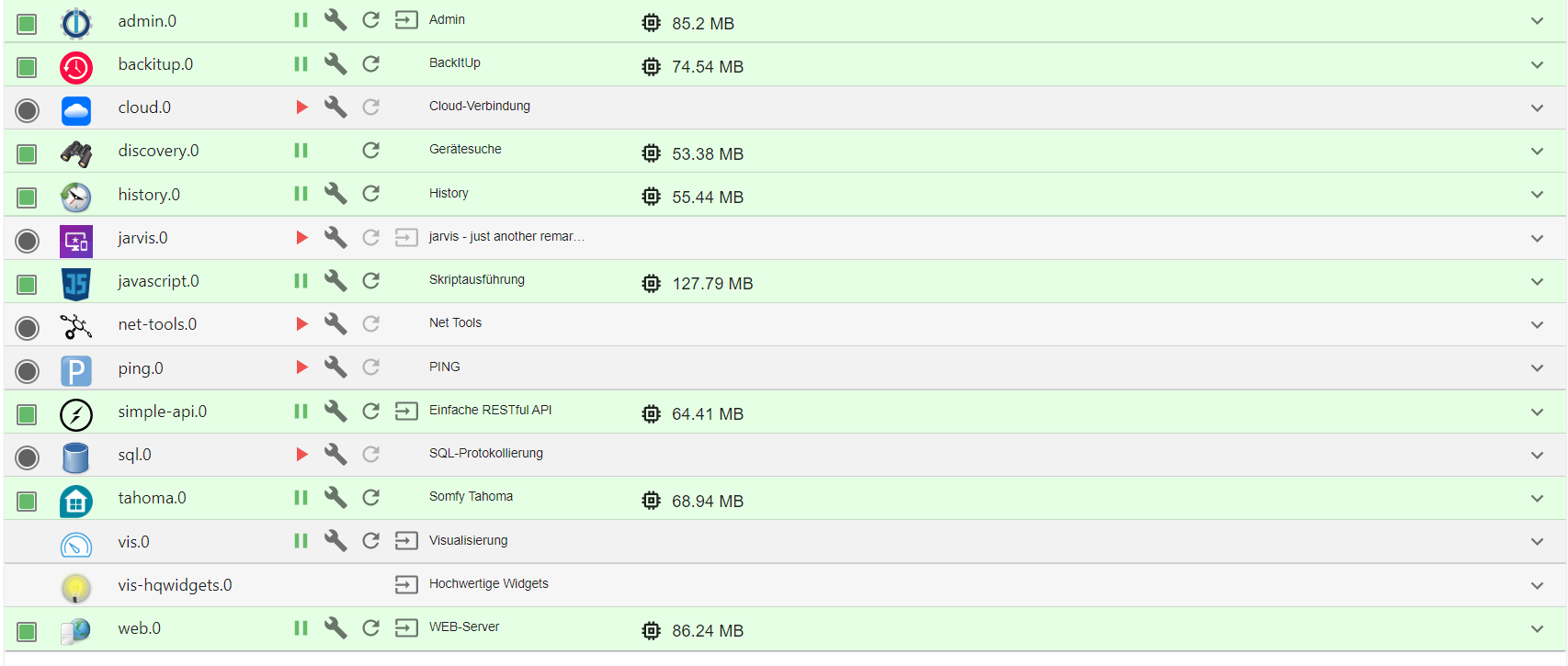
ich habe mir jetzt nochmals meine instanzen angeshen und festgestellt, das ich anscheinend jarvis installiert ist und läuft, sowie sql
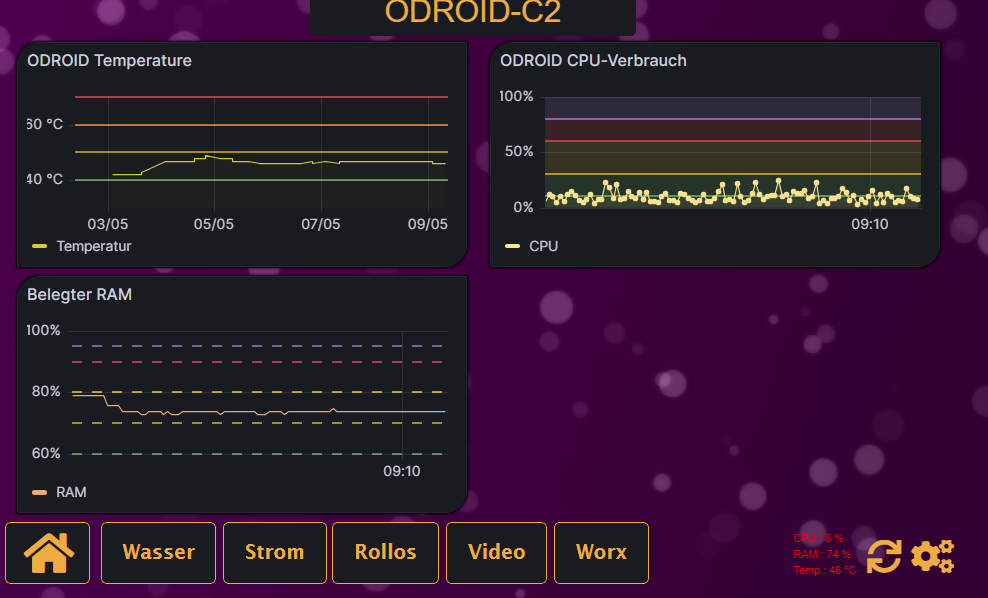
da ich die sql sachen sowieso über meinen mysql server abhandle habe ich diese mal deaktiviert. siehe da, plötzlich sind knapp 70 % Ram nur mehr belegt.
Also der Odorid reicht vollkommen denke ich
-
ich habe mir jetzt nochmals meine instanzen angeshen und festgestellt, das ich anscheinend jarvis installiert ist und läuft, sowie sql
da ich die sql sachen sowieso über meinen mysql server abhandle habe ich diese mal deaktiviert. siehe da, plötzlich sind knapp 70 % Ram nur mehr belegt.
Also der Odorid reicht vollkommen denke ich
@jumbo125 sagte in jarvis vs. vis:
da ich die sql sachen sowieso über meinen mysql server
Moin,
den verstehe ich nicht, den
SQL Adapterbrauchst Du doch um die Datenpunkte in dieMySQLzu schreiben oder machst Du das alles über Skripte?VG
BerndP.S.: sehe gerade, dass Du noch den
History Adapterinstalliert hast und die DP sicherlich da speicherst. -
@homoran
Danke das ihr mir derart weiter helft.Langsam:
2-3s bis die view geladen ist.
(bspw. sind 5 fenster abgebildet, welche nur die Außen-Rollo Stellung abbilden )Prinzipiell ist jeder View-Wechsel gleich langsam
meine Web einstellung:
@jumbo125 sagte in jarvis vs. vis:
2-3s bis die view geladen ist.
ist bei dem Tablet für mich nicht wirklich langsam
@jumbo125 sagte in jarvis vs. vis:
Prinzipiell ist jeder View-Wechsel gleich langsam
die Frage ging danach, ob das auch auf anderen Geräten so "langsam" ist
-
@jumbo125 sagte in jarvis vs. vis:
da ich die sql sachen sowieso über meinen mysql server
Moin,
den verstehe ich nicht, den
SQL Adapterbrauchst Du doch um die Datenpunkte in dieMySQLzu schreiben oder machst Du das alles über Skripte?VG
BerndP.S.: sehe gerade, dass Du noch den
History Adapterinstalliert hast und die DP sicherlich da speicherst.@dp20eic
Ich schreibe meine Daten alle manuell (php skripte) in meine mysql datenbank
schreibt der iobroker standarmäßig auch etwas in eine datenbank? dachte die Datenpunkte sind die "iobroker Datenbank".
braucht man den history adapter? habe ihn noch nie benutzt. der war schon installiert -
@dp20eic
Ich schreibe meine Daten alle manuell (php skripte) in meine mysql datenbank
schreibt der iobroker standarmäßig auch etwas in eine datenbank? dachte die Datenpunkte sind die "iobroker Datenbank".
braucht man den history adapter? habe ihn noch nie benutzt. der war schon installiert@jumbo125 sagte in jarvis vs. vis:
schreibt der iobroker standarmäßig auch etwas in eine datenbank?
nein!
er weiß ja nicht ob du eine hast, welche das ist und wo die liegt.@jumbo125 sagte in jarvis vs. vis:
dachte die Datenpunkte sind die "iobroker Datenbank".
und den "historischen" Verlauf dieser Werte kann man über History-Adapter in Datenbanken wie SQL oder InfluxDB loggen.
@jumbo125 sagte in jarvis vs. vis:
braucht man den history adapter?
wenn man keine externe Datenbank für das loggen der historischen Daten nutzen will, ja! sonst nicht.
@jumbo125 sagte in jarvis vs. vis:
der war schon installiert
Eigentlich nicht.
Mag sein dass das in uralten Images vor 2018 enthalten war, aber aktuell ist History kein vorinstallierter Adapter. -
@jumbo125 sagte in jarvis vs. vis:
schreibt der iobroker standarmäßig auch etwas in eine datenbank?
nein!
er weiß ja nicht ob du eine hast, welche das ist und wo die liegt.@jumbo125 sagte in jarvis vs. vis:
dachte die Datenpunkte sind die "iobroker Datenbank".
und den "historischen" Verlauf dieser Werte kann man über History-Adapter in Datenbanken wie SQL oder InfluxDB loggen.
@jumbo125 sagte in jarvis vs. vis:
braucht man den history adapter?
wenn man keine externe Datenbank für das loggen der historischen Daten nutzen will, ja! sonst nicht.
@jumbo125 sagte in jarvis vs. vis:
der war schon installiert
Eigentlich nicht.
Mag sein dass das in uralten Images vor 2018 enthalten war, aber aktuell ist History kein vorinstallierter Adapter. -
Hätte da noch eine frage.
ich stelle mir gerade eine etwas detailreiche Wetteranzeige zusammen. Da kommen schon sehr schnell eine Menge an datenpunkte zusammen. vorallem auch jene, welche ich mittels javascript einblenden und ausblenden möchte (7 tages wettervorschau) usw.....
Ist es ein Performance Killer, wenn man eine große Anzahl an Datenpunkte in der view nutzt bzw. im hintergrund "rein ladet". (html display:none.....)




Support us
824
Online32.4k
Users81.5k
Topics1.3m
Posts