



Skip to content
  • Home
  • Recent
  • Tags
  • 0 Unread 0
  • Categories
  • Unreplied
  • Popular
  • GitHub
  • Docu
  • Hilfe
Skins
  • Light
  • Brite
  • Cerulean
  • Cosmo
  • Flatly
  • Journal
  • Litera
  • Lumen
  • Lux
  • Materia
  • Minty
  • Morph
  • Pulse
  • Sandstone
  • Simplex
  • Sketchy
  • Spacelab
  • United
  • Yeti
  • Zephyr
  • Dark
  • Cyborg
  • Darkly
  • Quartz
  • Slate
  • Solar
  • Superhero
  • Vapor

  • Default (No Skin)
  • No Skin
Collapse
ioBroker Logo

Community Forum

donate donate
  1. ioBroker Community Home
  2. Deutsch
  3. ioBroker Allgemein
  4. Migration Pi4 > Synology Docker

NEWS

  • Neuer Blogbeitrag: Monatsrückblick - Dezember 2025 🎄
    BluefoxB
    Bluefox
    9
    1
    80

  • Weihnachtsangebot 2025! 🎄
    BluefoxB
    Bluefox
    24
    1
    1.4k

  • UPDATE 31.10.: Amazon Alexa - ioBroker Skill läuft aus ?
    apollon77A
    apollon77
    48
    3
    9.3k

Migration Pi4 > Synology Docker

Scheduled Pinned Locked Moved ioBroker Allgemein
21 Posts 3 Posters 2.4k Views 2 Watching
  • Oldest to Newest
  • Newest to Oldest
  • Most Votes
Reply
  • Reply as topic
Log in to reply
This topic has been deleted. Only users with topic management privileges can see it.
  • HomoranH Homoran

    @basti81 sagte in Migration Pi4 > Synology Docker:

    Restore war aber erfolgreich lt. shell:

    nein, nur die Konfigurationsdateien wurden erfolgreich wieder hergestellt.
    Anhand derer wird dann das gesamte System neu gebaut, was je nach Hardware und Umfang auch gerne mal 1h dauern jann.
    In dieser Zeit darf nichts am System verändert werden damit es nicht zu einer Störungvder Prozesse und damit ggf. zu einem undefinierten Zustand kommt.

    B Offline
    B Offline
    Basti81
    wrote on last edited by
    #8

    @homoran nach dem restore mit Backitup startet der Container durch. Dann sehe ich im Protokoll folgendes:

    --------------------------------------
    -----                   Step 1 of 5: Preparing container                   -----
    --------------------------------------------------------------------------------
     
    This is not the first run of this container. Skipping first run preparation.
     
    --------------------------------------------------------------------------------
    -----             Step 2 of 5: Detecting ioBroker installation             -----
    --------------------------------------------------------------------------------
     
    Existing installation of ioBroker detected in "/opt/iobroker".
     
    --------------------------------------------------------------------------------
    -----             Step 3 of 5: Checking ioBroker installation              -----
    --------------------------------------------------------------------------------
     
    (Re)setting permissions (This might take a while! Please be patient!)... Done.
     
    Fixing "sudo-bug" by replacing sudo with gosu... Done.
     
    Checking Database connection... Failed.
    Please check your configuration and try again.
    For more information see ioBroker Docker Image Docs (https://docs.buanet.de/iobroker-docker-image/docs).
     
    This Script will exit now.
    
    GlasfaserG 1 Reply Last reply
    0
    • B Basti81

      @homoran nach dem restore mit Backitup startet der Container durch. Dann sehe ich im Protokoll folgendes:

      --------------------------------------
      -----                   Step 1 of 5: Preparing container                   -----
      --------------------------------------------------------------------------------
       
      This is not the first run of this container. Skipping first run preparation.
       
      --------------------------------------------------------------------------------
      -----             Step 2 of 5: Detecting ioBroker installation             -----
      --------------------------------------------------------------------------------
       
      Existing installation of ioBroker detected in "/opt/iobroker".
       
      --------------------------------------------------------------------------------
      -----             Step 3 of 5: Checking ioBroker installation              -----
      --------------------------------------------------------------------------------
       
      (Re)setting permissions (This might take a while! Please be patient!)... Done.
       
      Fixing "sudo-bug" by replacing sudo with gosu... Done.
       
      Checking Database connection... Failed.
      Please check your configuration and try again.
      For more information see ioBroker Docker Image Docs (https://docs.buanet.de/iobroker-docker-image/docs).
       
      This Script will exit now.
      
      GlasfaserG Offline
      GlasfaserG Offline
      Glasfaser
      wrote on last edited by Glasfaser
      #9

      @basti81 sagte in Migration Pi4 > Synology Docker:

      Dann sehe ich im Protokoll folgendes:

      Der Anfang fehlt .

      Zeige mal eine DEBUG Ausgabe :

      Eintrag in Environment Variables ( ENV )

      DEBUG:               true
      

      und dann das Log hier posten

      Synology 918+ 16GB - ioBroker in Docker v9 , VISO auf Trekstor Primebook C13 13,3" , Hikvision Domkameras mit Surveillance Station .. CCU RaspberryMatic in Synology VM .. Zigbee CC2538+CC2592 .. Sonoff .. KNX .. Modbus ..

      B 1 Reply Last reply
      0
      • GlasfaserG Glasfaser

        @basti81 sagte in Migration Pi4 > Synology Docker:

        Dann sehe ich im Protokoll folgendes:

        Der Anfang fehlt .

        Zeige mal eine DEBUG Ausgabe :

        Eintrag in Environment Variables ( ENV )

        DEBUG:               true
        

        und dann das Log hier posten

        B Offline
        B Offline
        Basti81
        wrote on last edited by Basti81
        #10

        @glasfaser ah ok, anbei das Log:

        --------------------------------------------------
        -----                   Step 1 of 5: Preparing container                   -----
        --------------------------------------------------------------------------------
         
        This is not the first run of this container. Skipping first run preparation.
         
        --------------------------------------------------------------------------------
        -----             Step 2 of 5: Detecting ioBroker installation             -----
        --------------------------------------------------------------------------------
         
        Existing installation of ioBroker detected in "/opt/iobroker".
         
        --------------------------------------------------------------------------------
        -----             Step 3 of 5: Checking ioBroker installation              -----
        --------------------------------------------------------------------------------
         
        (Re)setting permissions (This might take a while! Please be patient!)... Done.
         
        Fixing "sudo-bug" by replacing sudo with gosu... Done.
         
        [DEBUG] Checking multihost settings... 
        [DEBUG] No multihost settings detected.
        [DEBUG] Done.
         
        [DEBUG] Checking custom objects db settings... 
        [DEBUG] No custom objects db settings detected.
        [DEBUG] Done.
         
        [DEBUG] Checking custom states db settings... 
        [DEBUG] No custom states db settings detected.
        [DEBUG] Done.
         
        Checking Database connection... Failed.
        [DEBUG] Error message: 
        [DEBUG] No connection to states 0.0.0.0:6379[redis]
        Please check your configuration and try again.
        For more information see ioBroker Docker Image Docs (https://docs.buanet.de/iobroker-docker-image/docs).
         
        [DEBUG] Debug mode prevents the container from exiting on errors.
        [DEBUG] This enables you to investigate or fix your issue on the command line.
        [DEBUG] If you want to stop or restart your container you have to do it manually.
        [DEBUG] IoBroker is not running!
        
        GlasfaserG 1 Reply Last reply
        0
        • B Basti81

          @glasfaser ah ok, anbei das Log:

          --------------------------------------------------
          -----                   Step 1 of 5: Preparing container                   -----
          --------------------------------------------------------------------------------
           
          This is not the first run of this container. Skipping first run preparation.
           
          --------------------------------------------------------------------------------
          -----             Step 2 of 5: Detecting ioBroker installation             -----
          --------------------------------------------------------------------------------
           
          Existing installation of ioBroker detected in "/opt/iobroker".
           
          --------------------------------------------------------------------------------
          -----             Step 3 of 5: Checking ioBroker installation              -----
          --------------------------------------------------------------------------------
           
          (Re)setting permissions (This might take a while! Please be patient!)... Done.
           
          Fixing "sudo-bug" by replacing sudo with gosu... Done.
           
          [DEBUG] Checking multihost settings... 
          [DEBUG] No multihost settings detected.
          [DEBUG] Done.
           
          [DEBUG] Checking custom objects db settings... 
          [DEBUG] No custom objects db settings detected.
          [DEBUG] Done.
           
          [DEBUG] Checking custom states db settings... 
          [DEBUG] No custom states db settings detected.
          [DEBUG] Done.
           
          Checking Database connection... Failed.
          [DEBUG] Error message: 
          [DEBUG] No connection to states 0.0.0.0:6379[redis]
          Please check your configuration and try again.
          For more information see ioBroker Docker Image Docs (https://docs.buanet.de/iobroker-docker-image/docs).
           
          [DEBUG] Debug mode prevents the container from exiting on errors.
          [DEBUG] This enables you to investigate or fix your issue on the command line.
          [DEBUG] If you want to stop or restart your container you have to do it manually.
          [DEBUG] IoBroker is not running!
          
          GlasfaserG Offline
          GlasfaserG Offline
          Glasfaser
          wrote on last edited by
          #11

          @basti81 sagte in Migration Pi4 > Synology Docker:

          [DEBUG] No connection to states 0.0.0.0:6379[redis]

          Redis:

          Hast du das so auf der Pi !?

          Synology 918+ 16GB - ioBroker in Docker v9 , VISO auf Trekstor Primebook C13 13,3" , Hikvision Domkameras mit Surveillance Station .. CCU RaspberryMatic in Synology VM .. Zigbee CC2538+CC2592 .. Sonoff .. KNX .. Modbus ..

          B 1 Reply Last reply
          0
          • GlasfaserG Glasfaser

            @basti81 sagte in Migration Pi4 > Synology Docker:

            [DEBUG] No connection to states 0.0.0.0:6379[redis]

            Redis:

            Hast du das so auf der Pi !?

            B Offline
            B Offline
            Basti81
            wrote on last edited by
            #12

            @glasfaser auf dem Pi:

            pi@iobrokerpi:~ $ sudo redis-server -v
            Redis server v=5.0.14 sha=00000000:0 malloc=libc bits=32 build=ddd3b1f304a7d4d5
            

            In dem Container:

            root@iobrokerpi:/opt/iobroker# redis-server -v                                                        
            bash: redis-server: command not found
            
            GlasfaserG 1 Reply Last reply
            0
            • B Basti81

              @glasfaser auf dem Pi:

              pi@iobrokerpi:~ $ sudo redis-server -v
              Redis server v=5.0.14 sha=00000000:0 malloc=libc bits=32 build=ddd3b1f304a7d4d5
              

              In dem Container:

              root@iobrokerpi:/opt/iobroker# redis-server -v                                                        
              bash: redis-server: command not found
              
              GlasfaserG Offline
              GlasfaserG Offline
              Glasfaser
              wrote on last edited by
              #13

              @basti81

              https://github.com/buanet/ioBroker.docker/issues/136#issuecomment-710220772

              Synology 918+ 16GB - ioBroker in Docker v9 , VISO auf Trekstor Primebook C13 13,3" , Hikvision Domkameras mit Surveillance Station .. CCU RaspberryMatic in Synology VM .. Zigbee CC2538+CC2592 .. Sonoff .. KNX .. Modbus ..

              B 1 Reply Last reply
              0
              • GlasfaserG Glasfaser

                @basti81

                https://github.com/buanet/ioBroker.docker/issues/136#issuecomment-710220772

                B Offline
                B Offline
                Basti81
                wrote on last edited by
                #14

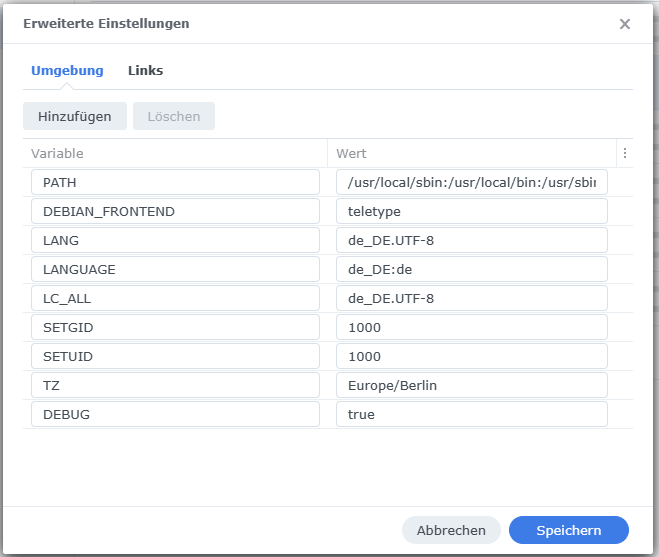
                @glasfaser den Container habe ich über die GUI aktiviert und das gibt es nur diese ENV:
                Unbenannt.png

                GlasfaserG 1 Reply Last reply
                0
                • B Basti81

                  @glasfaser den Container habe ich über die GUI aktiviert und das gibt es nur diese ENV:
                  Unbenannt.png

                  GlasfaserG Offline
                  GlasfaserG Offline
                  Glasfaser
                  wrote on last edited by
                  #15

                  @basti81 sagte in Migration Pi4 > Synology Docker:

                  das gibt es nur diese ENV:

                  Ja das ist der Standart ,

                  extras siehe hier unter :

                  Configuration via environment variables

                  https://hub.docker.com/r/buanet/iobroker

                  Synology 918+ 16GB - ioBroker in Docker v9 , VISO auf Trekstor Primebook C13 13,3" , Hikvision Domkameras mit Surveillance Station .. CCU RaspberryMatic in Synology VM .. Zigbee CC2538+CC2592 .. Sonoff .. KNX .. Modbus ..

                  B 1 Reply Last reply
                  0
                  • GlasfaserG Glasfaser

                    @basti81 sagte in Migration Pi4 > Synology Docker:

                    das gibt es nur diese ENV:

                    Ja das ist der Standart ,

                    extras siehe hier unter :

                    Configuration via environment variables

                    https://hub.docker.com/r/buanet/iobroker

                    B Offline
                    B Offline
                    Basti81
                    wrote on last edited by
                    #16

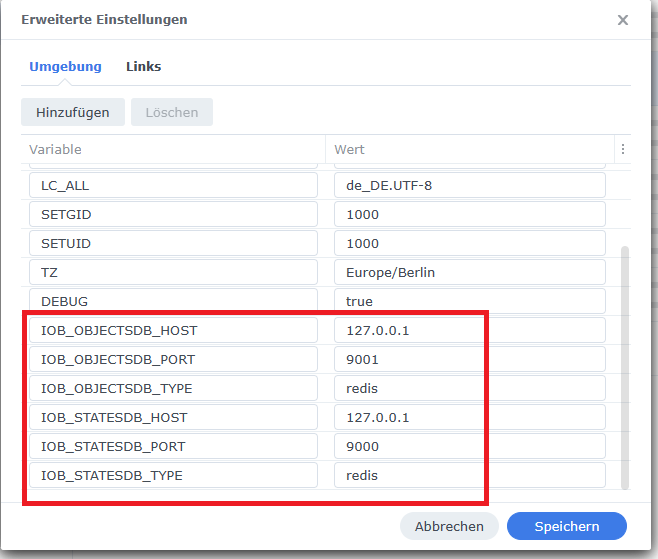
                    @glasfaser wir kommen der Sache näher :-)

                    -------------------------------------------------
                    -----             Step 3 of 5: Checking ioBroker installation              -----
                    --------------------------------------------------------------------------------
                     
                    (Re)setting permissions (This might take a while! Please be patient!)... Done.
                     
                    Fixing "sudo-bug" by replacing sudo with gosu... Done.
                     
                    [DEBUG] Checking multihost settings... 
                    [DEBUG] No multihost settings detected.
                    [DEBUG] Done.
                     
                    Configuring custom objects db...
                    IOB_OBJECTSDB_TYPE is available and value meets detected ioBroker installation.
                    IOB_OBJECTSDB_HOST is available and value meets detected ioBroker installation.
                    IOB_OBJECTSDB_PORT is available and value meets detected ioBroker installation.
                    Done.
                     
                    Configuring custom states db...
                    IOB_STATESDB_TYPE is available and value meets detected ioBroker installation.
                    IOB_STATESDB_HOST is available and value meets detected ioBroker installation.
                    IOB_STATESDB_PORT is available but value is different from detected ioBroker installation.
                    Setting port of states db to "9000"... Done.
                    Done.
                     
                    Checking Database connection... Failed.
                    [DEBUG] Error message: 
                    [DEBUG] No connection to objects 127.0.0.1:9001[redis]
                    Please check your configuration and try again.
                    For more information see ioBroker Docker Image Docs (https://docs.buanet.de/iobroker-docker-image/docs).
                     
                    [DEBUG] Debug mode prevents the container from exiting on errors.
                    [DEBUG] This enables you to investigate or fix your issue on the command line.
                    [DEBUG] If you want to stop or restart your container you have to do it manually.
                    [DEBUG] IoBroker is not running!
                    

                    Unbenannt2.png

                    GlasfaserG 2 Replies Last reply
                    0
                    • B Basti81

                      @glasfaser wir kommen der Sache näher :-)

                      -------------------------------------------------
                      -----             Step 3 of 5: Checking ioBroker installation              -----
                      --------------------------------------------------------------------------------
                       
                      (Re)setting permissions (This might take a while! Please be patient!)... Done.
                       
                      Fixing "sudo-bug" by replacing sudo with gosu... Done.
                       
                      [DEBUG] Checking multihost settings... 
                      [DEBUG] No multihost settings detected.
                      [DEBUG] Done.
                       
                      Configuring custom objects db...
                      IOB_OBJECTSDB_TYPE is available and value meets detected ioBroker installation.
                      IOB_OBJECTSDB_HOST is available and value meets detected ioBroker installation.
                      IOB_OBJECTSDB_PORT is available and value meets detected ioBroker installation.
                      Done.
                       
                      Configuring custom states db...
                      IOB_STATESDB_TYPE is available and value meets detected ioBroker installation.
                      IOB_STATESDB_HOST is available and value meets detected ioBroker installation.
                      IOB_STATESDB_PORT is available but value is different from detected ioBroker installation.
                      Setting port of states db to "9000"... Done.
                      Done.
                       
                      Checking Database connection... Failed.
                      [DEBUG] Error message: 
                      [DEBUG] No connection to objects 127.0.0.1:9001[redis]
                      Please check your configuration and try again.
                      For more information see ioBroker Docker Image Docs (https://docs.buanet.de/iobroker-docker-image/docs).
                       
                      [DEBUG] Debug mode prevents the container from exiting on errors.
                      [DEBUG] This enables you to investigate or fix your issue on the command line.
                      [DEBUG] If you want to stop or restart your container you have to do it manually.
                      [DEBUG] IoBroker is not running!
                      

                      Unbenannt2.png

                      GlasfaserG Offline
                      GlasfaserG Offline
                      Glasfaser
                      wrote on last edited by Glasfaser
                      #17

                      @basti81 sagte in Migration Pi4 > Synology Docker:

                      No connection to objects 127.0.0.1:9001[redis]

                      Warum 9001

                      @basti81 sagte in Migration Pi4 > Synology Docker:
                      [DEBUG] No connection to states 0.0.0.0:6379[redis]

                      Synology 918+ 16GB - ioBroker in Docker v9 , VISO auf Trekstor Primebook C13 13,3" , Hikvision Domkameras mit Surveillance Station .. CCU RaspberryMatic in Synology VM .. Zigbee CC2538+CC2592 .. Sonoff .. KNX .. Modbus ..

                      B 1 Reply Last reply
                      0
                      • B Basti81

                        @glasfaser wir kommen der Sache näher :-)

                        -------------------------------------------------
                        -----             Step 3 of 5: Checking ioBroker installation              -----
                        --------------------------------------------------------------------------------
                         
                        (Re)setting permissions (This might take a while! Please be patient!)... Done.
                         
                        Fixing "sudo-bug" by replacing sudo with gosu... Done.
                         
                        [DEBUG] Checking multihost settings... 
                        [DEBUG] No multihost settings detected.
                        [DEBUG] Done.
                         
                        Configuring custom objects db...
                        IOB_OBJECTSDB_TYPE is available and value meets detected ioBroker installation.
                        IOB_OBJECTSDB_HOST is available and value meets detected ioBroker installation.
                        IOB_OBJECTSDB_PORT is available and value meets detected ioBroker installation.
                        Done.
                         
                        Configuring custom states db...
                        IOB_STATESDB_TYPE is available and value meets detected ioBroker installation.
                        IOB_STATESDB_HOST is available and value meets detected ioBroker installation.
                        IOB_STATESDB_PORT is available but value is different from detected ioBroker installation.
                        Setting port of states db to "9000"... Done.
                        Done.
                         
                        Checking Database connection... Failed.
                        [DEBUG] Error message: 
                        [DEBUG] No connection to objects 127.0.0.1:9001[redis]
                        Please check your configuration and try again.
                        For more information see ioBroker Docker Image Docs (https://docs.buanet.de/iobroker-docker-image/docs).
                         
                        [DEBUG] Debug mode prevents the container from exiting on errors.
                        [DEBUG] This enables you to investigate or fix your issue on the command line.
                        [DEBUG] If you want to stop or restart your container you have to do it manually.
                        [DEBUG] IoBroker is not running!
                        

                        Unbenannt2.png

                        GlasfaserG Offline
                        GlasfaserG Offline
                        Glasfaser
                        wrote on last edited by
                        #18

                        @basti81

                        zu Redis auch :

                        https://smarthome.buanet.de/2020/12/iobroker-docker-container-mit-redis-db-verbinden/

                        Synology 918+ 16GB - ioBroker in Docker v9 , VISO auf Trekstor Primebook C13 13,3" , Hikvision Domkameras mit Surveillance Station .. CCU RaspberryMatic in Synology VM .. Zigbee CC2538+CC2592 .. Sonoff .. KNX .. Modbus ..

                        1 Reply Last reply
                        0
                        • GlasfaserG Glasfaser

                          @basti81 sagte in Migration Pi4 > Synology Docker:

                          No connection to objects 127.0.0.1:9001[redis]

                          Warum 9001

                          @basti81 sagte in Migration Pi4 > Synology Docker:
                          [DEBUG] No connection to states 0.0.0.0:6379[redis]

                          B Offline
                          B Offline
                          Basti81
                          wrote on last edited by
                          #19

                          @glasfaser hab jetzt den 6379 versucht und ich bekomme den gleichen Fehler:

                          -----------------------------------------------
                          -----             Step 3 of 5: Checking ioBroker installation              -----
                          --------------------------------------------------------------------------------
                           
                          (Re)setting permissions (This might take a while! Please be patient!)... Done.
                           
                          Fixing "sudo-bug" by replacing sudo with gosu... Done.
                           
                          [DEBUG] Checking multihost settings... 
                          [DEBUG] No multihost settings detected.
                          [DEBUG] Done.
                           
                          Configuring custom objects db...
                          IOB_OBJECTSDB_TYPE is available and value meets detected ioBroker installation.
                          IOB_OBJECTSDB_HOST is available and value meets detected ioBroker installation.
                          IOB_OBJECTSDB_PORT is available but value is different from detected ioBroker installation.
                          Setting port of objects db to "6379"... Done.
                          Done.
                           
                          Configuring custom states db...
                          IOB_STATESDB_TYPE is available and value meets detected ioBroker installation.
                          IOB_STATESDB_HOST is available and value meets detected ioBroker installation.
                          IOB_STATESDB_PORT is available but value is different from detected ioBroker installation.
                          Setting port of states db to "6379"... Done.
                          Done.
                           
                          Checking Database connection... Failed.
                          [DEBUG] Error message: 
                          [DEBUG] No connection to objects 127.0.0.1:6379[redis]
                          Please check your configuration and try again.
                          For more information see ioBroker Docker Image Docs (https://docs.buanet.de/iobroker-docker-image/docs).
                           
                          [DEBUG] Debug mode prevents the container from exiting on errors.
                          [DEBUG] This enables you to investigate or fix your issue on the command line.
                          [DEBUG] If you want to stop or restart your container you have to do it manually.
                          [DEBUG] IoBroker is not running!
                          

                          Soll ich mal:
                          apt-get install redis-sentinel

                          im Container ausführen? Mich wundert das hier im Container:

                          root@iobrokerpi:/opt/iobroker# redis-server -v                                                        
                          bash: redis-server: command not found
                          
                          GlasfaserG 1 Reply Last reply
                          0
                          • B Basti81

                            @glasfaser hab jetzt den 6379 versucht und ich bekomme den gleichen Fehler:

                            -----------------------------------------------
                            -----             Step 3 of 5: Checking ioBroker installation              -----
                            --------------------------------------------------------------------------------
                             
                            (Re)setting permissions (This might take a while! Please be patient!)... Done.
                             
                            Fixing "sudo-bug" by replacing sudo with gosu... Done.
                             
                            [DEBUG] Checking multihost settings... 
                            [DEBUG] No multihost settings detected.
                            [DEBUG] Done.
                             
                            Configuring custom objects db...
                            IOB_OBJECTSDB_TYPE is available and value meets detected ioBroker installation.
                            IOB_OBJECTSDB_HOST is available and value meets detected ioBroker installation.
                            IOB_OBJECTSDB_PORT is available but value is different from detected ioBroker installation.
                            Setting port of objects db to "6379"... Done.
                            Done.
                             
                            Configuring custom states db...
                            IOB_STATESDB_TYPE is available and value meets detected ioBroker installation.
                            IOB_STATESDB_HOST is available and value meets detected ioBroker installation.
                            IOB_STATESDB_PORT is available but value is different from detected ioBroker installation.
                            Setting port of states db to "6379"... Done.
                            Done.
                             
                            Checking Database connection... Failed.
                            [DEBUG] Error message: 
                            [DEBUG] No connection to objects 127.0.0.1:6379[redis]
                            Please check your configuration and try again.
                            For more information see ioBroker Docker Image Docs (https://docs.buanet.de/iobroker-docker-image/docs).
                             
                            [DEBUG] Debug mode prevents the container from exiting on errors.
                            [DEBUG] This enables you to investigate or fix your issue on the command line.
                            [DEBUG] If you want to stop or restart your container you have to do it manually.
                            [DEBUG] IoBroker is not running!
                            

                            Soll ich mal:
                            apt-get install redis-sentinel

                            im Container ausführen? Mich wundert das hier im Container:

                            root@iobrokerpi:/opt/iobroker# redis-server -v                                                        
                            bash: redis-server: command not found
                            
                            GlasfaserG Offline
                            GlasfaserG Offline
                            Glasfaser
                            wrote on last edited by Glasfaser
                            #20

                            @basti81 sagte in Migration Pi4 > Synology Docker:

                            im Container ausführen?

                            kannst du machen ... aber beim nächsten Image wechsel ist er weg !

                            siehe meinen Link , da ist redis seperat als Container !

                            Synology 918+ 16GB - ioBroker in Docker v9 , VISO auf Trekstor Primebook C13 13,3" , Hikvision Domkameras mit Surveillance Station .. CCU RaspberryMatic in Synology VM .. Zigbee CC2538+CC2592 .. Sonoff .. KNX .. Modbus ..

                            B 1 Reply Last reply
                            0
                            • GlasfaserG Glasfaser

                              @basti81 sagte in Migration Pi4 > Synology Docker:

                              im Container ausführen?

                              kannst du machen ... aber beim nächsten Image wechsel ist er weg !

                              siehe meinen Link , da ist redis seperat als Container !

                              B Offline
                              B Offline
                              Basti81
                              wrote on last edited by
                              #21

                              @glasfaser danke dir. Habe die Container sauber neu aufgesetzt wie hier erläutert:
                              https://smarthome.buanet.de/2020/12/iobroker-docker-container-mit-redis-db-verbinden/

                              Alles läuft nun wie es soll und der Restore hat geklappt da die redis Verbindung von Anfang an funktionierte. Bridged Network war hier der Schlüssel. Mit Host network hat es nicht geklappt.

                              Danke dir!!!

                              1 Reply Last reply
                              0
                              Reply
                              • Reply as topic
                              Log in to reply
                              • Oldest to Newest
                              • Newest to Oldest
                              • Most Votes


                              Support us

                              ioBroker
                              Community Adapters
                              Donate
                              FAQ Cloud / IOT
                              HowTo: Node.js-Update
                              HowTo: Backup/Restore
                              Downloads
                              BLOG

                              732

                              Online

                              32.5k

                              Users

                              81.7k

                              Topics

                              1.3m

                              Posts
                              Community
                              Impressum | Datenschutz-Bestimmungen | Nutzungsbedingungen | Einwilligungseinstellungen
                              ioBroker Community 2014-2025
                              logo
                              • Login

                              • Don't have an account? Register

                              • Login or register to search.
                              • First post
                                Last post
                              0
                              • Home
                              • Recent
                              • Tags
                              • Unread 0
                              • Categories
                              • Unreplied
                              • Popular
                              • GitHub
                              • Docu
                              • Hilfe
