Weiter zum Inhalt
  • Home
  • Aktuell
  • Tags
  • 0 Ungelesen 0
  • Kategorien
  • Unreplied
  • Beliebt
  • GitHub
  • Docu
  • Hilfe
Skins
  • Hell
  • Brite
  • Cerulean
  • Cosmo
  • Flatly
  • Journal
  • Litera
  • Lumen
  • Lux
  • Materia
  • Minty
  • Morph
  • Pulse
  • Sandstone
  • Simplex
  • Sketchy
  • Spacelab
  • United
  • Yeti
  • Zephyr
  • Dunkel
  • Cyborg
  • Darkly
  • Quartz
  • Slate
  • Solar
  • Superhero
  • Vapor

  • Standard: (Kein Skin)
  • Kein Skin
Einklappen
ioBroker Logo

Community Forum

donate donate
  1. ioBroker Community Home
  2. Deutsch
  3. ioBroker Allgemein
  4. Influxdb2 Backitup

NEWS

  • Neuer ioBroker-Blog online: Monatsrückblick März/April 2026
    BluefoxB
    Bluefox
    8
    1
    834

  • Verwendung von KI bitte immer deutlich kennzeichnen
    HomoranH
    Homoran
    10
    1
    627

  • Monatsrückblick Januar/Februar 2026 ist online!
    BluefoxB
    Bluefox
    18
    1
    1.1k

Influxdb2 Backitup

Geplant Angeheftet Gesperrt Verschoben ioBroker Allgemein
214 Beiträge 7 Kommentatoren 26.8k Aufrufe 5 Beobachtet
  • Älteste zuerst
  • Neuste zuerst
  • Meiste Stimmen
Antworten
  • In einem neuen Thema antworten
Anmelden zum Antworten
Dieses Thema wurde gelöscht. Nur Nutzer mit entsprechenden Rechten können es sehen.
  • keksnK keksn

    @marc-berg ja soweit das mit meinen begrenzten Fähigkeiten möglich ist.Es erklärt natürlich dann warum es im selben Container funktioniert hat

    Marc BergM Online
    Marc BergM Online
    Marc Berg
    Most Active
    schrieb am zuletzt editiert von
    #55

    @keksn sagte in Influxdb2 Backitup:

    @marc-berg ja soweit das mit meinen begrenzten Fähigkeiten möglich ist.Es erklärt natürlich dann warum es im selben Container funktioniert hat

    Ich würde es so machen:

    wget -q https://repos.influxdata.com/influxdata-archive_compat.key
    cat influxdata-archive_compat.key | gpg --dearmor | sudo tee /etc/apt/trusted.gpg.d/influxdata-archive_compat.gpg > /dev/null
    echo 'deb [signed-by=/etc/apt/trusted.gpg.d/influxdata-archive_compat.gpg] https://repos.influxdata.com/debian stable main' | sudo tee /etc/apt/sources.list.d/influxdata.list
    sudo apt update
    sudo apt install influxdb2-cli
    

    NUC10I3+Ubuntu+Docker+ioBroker+influxDB2+Node Red+EMQX+Grafana

    Pi-hole, Traefik, Checkmk, Conbee II+Zigbee2MQTT, ESPSomfy-RTS, LoRaWAN, Arduino, KiCad

    Benutzt das Voting im Beitrag, wenn er euch geholfen hat.

    keksnK 2 Antworten Letzte Antwort
    1
    • Marc BergM Marc Berg

      @keksn sagte in Influxdb2 Backitup:

      @marc-berg ja soweit das mit meinen begrenzten Fähigkeiten möglich ist.Es erklärt natürlich dann warum es im selben Container funktioniert hat

      Ich würde es so machen:

      wget -q https://repos.influxdata.com/influxdata-archive_compat.key
      cat influxdata-archive_compat.key | gpg --dearmor | sudo tee /etc/apt/trusted.gpg.d/influxdata-archive_compat.gpg > /dev/null
      echo 'deb [signed-by=/etc/apt/trusted.gpg.d/influxdata-archive_compat.gpg] https://repos.influxdata.com/debian stable main' | sudo tee /etc/apt/sources.list.d/influxdata.list
      sudo apt update
      sudo apt install influxdb2-cli
      
      keksnK Offline
      keksnK Offline
      keksn
      schrieb am zuletzt editiert von
      #56

      @marc-berg danke verkürzt die Recherche

      1 Antwort Letzte Antwort
      0
      • Marc BergM Marc Berg

        @keksn sagte in Influxdb2 Backitup:

        @marc-berg ja soweit das mit meinen begrenzten Fähigkeiten möglich ist.Es erklärt natürlich dann warum es im selben Container funktioniert hat

        Ich würde es so machen:

        wget -q https://repos.influxdata.com/influxdata-archive_compat.key
        cat influxdata-archive_compat.key | gpg --dearmor | sudo tee /etc/apt/trusted.gpg.d/influxdata-archive_compat.gpg > /dev/null
        echo 'deb [signed-by=/etc/apt/trusted.gpg.d/influxdata-archive_compat.gpg] https://repos.influxdata.com/debian stable main' | sudo tee /etc/apt/sources.list.d/influxdata.list
        sudo apt update
        sudo apt install influxdb2-cli
        
        keksnK Offline
        keksnK Offline
        keksn
        schrieb am zuletzt editiert von
        #57

        @marc-berg sagte in Influxdb2 Backitup:

        @keksn sagte in Influxdb2 Backitup:

        @marc-berg ja soweit das mit meinen begrenzten Fähigkeiten möglich ist.Es erklärt natürlich dann warum es im selben Container funktioniert hat

        Ich würde es so machen:

        wget -q https://repos.influxdata.com/influxdata-archive_compat.key
        cat influxdata-archive_compat.key | gpg --dearmor | sudo tee /etc/apt/trusted.gpg.d/influxdata-archive_compat.gpg > /dev/null
        echo 'deb [signed-by=/etc/apt/trusted.gpg.d/influxdata-archive_compat.gpg] https://repos.influxdata.com/debian stable main' | sudo tee /etc/apt/sources.list.d/influxdata.list
        sudo apt update
        sudo apt install influxdb2-cli
        
        [DEBUG] [influxDB] - InfluxDB-Backup started ...
        [DEBUG] [influxDB] - Start InfluxDB Backup ...
        [DEBUG] [influxDB] - InfluxDB Backup tmp directory created 
        [DEBUG] [influxDB] - Try deleting the InfluxDB tmp directory: "/opt/iobroker/backups/influxDB_2023_04_16-16_35_19_backupiobroker"
        [DEBUG] [influxDB] - InfluxDB tmp directory "/opt/iobroker/backups/influxDB_2023_04_16-16_35_19_backupiobroker" successfully deleted
        [DEBUG] [influxDB] - 
        [ERROR] [influxDB] - Error: Command failed: influx backup --bucket iobrokerneu --host http://192.168.1.180:8088 -t MnAMLBIYNXn0e3Jmq07UKhQGbbgIOI706dB4oVS5D3GEDufcNVyiqQEEAqmALEvoKyxNaE8lHNfLp0WrsSJpWg== "/opt/iobroker/backups/influxDB_2023_04_16-16_35_19_backupiobroker"
        Error: API compatibility check failed: Get "http://192.168.1.180:8088/health": dial tcp 192.168.1.180:8088: connect: connection refused
        
        
        Marc BergM 1 Antwort Letzte Antwort
        0
        • keksnK keksn

          @marc-berg sagte in Influxdb2 Backitup:

          @keksn sagte in Influxdb2 Backitup:

          @marc-berg ja soweit das mit meinen begrenzten Fähigkeiten möglich ist.Es erklärt natürlich dann warum es im selben Container funktioniert hat

          Ich würde es so machen:

          wget -q https://repos.influxdata.com/influxdata-archive_compat.key
          cat influxdata-archive_compat.key | gpg --dearmor | sudo tee /etc/apt/trusted.gpg.d/influxdata-archive_compat.gpg > /dev/null
          echo 'deb [signed-by=/etc/apt/trusted.gpg.d/influxdata-archive_compat.gpg] https://repos.influxdata.com/debian stable main' | sudo tee /etc/apt/sources.list.d/influxdata.list
          sudo apt update
          sudo apt install influxdb2-cli
          
          [DEBUG] [influxDB] - InfluxDB-Backup started ...
          [DEBUG] [influxDB] - Start InfluxDB Backup ...
          [DEBUG] [influxDB] - InfluxDB Backup tmp directory created 
          [DEBUG] [influxDB] - Try deleting the InfluxDB tmp directory: "/opt/iobroker/backups/influxDB_2023_04_16-16_35_19_backupiobroker"
          [DEBUG] [influxDB] - InfluxDB tmp directory "/opt/iobroker/backups/influxDB_2023_04_16-16_35_19_backupiobroker" successfully deleted
          [DEBUG] [influxDB] - 
          [ERROR] [influxDB] - Error: Command failed: influx backup --bucket iobrokerneu --host http://192.168.1.180:8088 -t MnAMLBIYNXn0e3Jmq07UKhQGbbgIOI706dB4oVS5D3GEDufcNVyiqQEEAqmALEvoKyxNaE8lHNfLp0WrsSJpWg== "/opt/iobroker/backups/influxDB_2023_04_16-16_35_19_backupiobroker"
          Error: API compatibility check failed: Get "http://192.168.1.180:8088/health": dial tcp 192.168.1.180:8088: connect: connection refused
          
          
          Marc BergM Online
          Marc BergM Online
          Marc Berg
          Most Active
          schrieb am zuletzt editiert von Marc Berg
          #58

          @keksn sagte in Influxdb2 Backitup:

          tcp 192.168.1.180:8088: connect: connection refused

          Jo, cli ist jetzt richtig installiert, allerdings hast Du jetzt ein Netzwerk Problem. Bei Proxmox bin ich da aber raus.

          tcp 192.168.1.180:8088: connect: connection refused
          

          NUC10I3+Ubuntu+Docker+ioBroker+influxDB2+Node Red+EMQX+Grafana

          Pi-hole, Traefik, Checkmk, Conbee II+Zigbee2MQTT, ESPSomfy-RTS, LoRaWAN, Arduino, KiCad

          Benutzt das Voting im Beitrag, wenn er euch geholfen hat.

          keksnK 1 Antwort Letzte Antwort
          0
          • GlasfaserG Glasfaser

            @keksn sagte in

            es kommt bei mir da immer zu Fehlern.

            denke aber nicht Du hast sooo viel Zeit mit mir die Installationsfehler durchzugehen

            und ohne grundlegenen Infos wie Logs kann man dir nicht helfen !

            keksnK Offline
            keksnK Offline
            keksn
            schrieb am zuletzt editiert von
            #59

            @glasfaser sagte in Influxdb2 Backitup:

            @keksn sagte in

            es kommt bei mir da immer zu Fehlern.

            denke aber nicht Du hast sooo viel Zeit mit mir die Installationsfehler durchzugehen

            und ohne grundlegenen Infos wie Logs kann man dir nicht helfen !

            So geht schon mal los im neuen Container beim Begin der Installation lt. Influxdb

            keksn@influxdb3:~$ wget https://dl.influxdata.com/influxdb/releases/influxdb2-2.7.0-xxx.deb
            sudo dpkg -i influxdb2-2.7.0-amd64.deb
            --2023-04-16 14:37:17--  https://dl.influxdata.com/influxdb/releases/influxdb2-2.7.0-xxx.deb
            Resolving dl.influxdata.com (dl.influxdata.com)... 13.32.110.116, 13.32.110.90, 13.32.110.87, ...
            Connecting to dl.influxdata.com (dl.influxdata.com)|13.32.110.116|:443... connected.
            HTTP request sent, awaiting response... 404 Not Found
            2023-04-16 14:37:18 ERROR 404: Not Found.
            
            
            We trust you have received the usual lecture from the local System
            Administrator. It usually boils down to these three things:
            
                #1) Respect the privacy of others.
                #2) Think before you type.
                #3) With great power comes great responsibility.
            
            
            Thomas BraunT 1 Antwort Letzte Antwort
            0
            • Marc BergM Marc Berg

              @keksn sagte in Influxdb2 Backitup:

              tcp 192.168.1.180:8088: connect: connection refused

              Jo, cli ist jetzt richtig installiert, allerdings hast Du jetzt ein Netzwerk Problem. Bei Proxmox bin ich da aber raus.

              tcp 192.168.1.180:8088: connect: connection refused
              
              keksnK Offline
              keksnK Offline
              keksn
              schrieb am zuletzt editiert von
              #60

              @marc-berg sagte in Influxdb2 Backitup:

              ei Proxmox bin ich da aber raus.

              Hab schon gesehen das ich da in das nächste Problem geschlittert bin. Danke für Deine Hilfe!

              1 Antwort Letzte Antwort
              0
              • keksnK keksn

                @glasfaser sagte in Influxdb2 Backitup:

                @keksn sagte in

                es kommt bei mir da immer zu Fehlern.

                denke aber nicht Du hast sooo viel Zeit mit mir die Installationsfehler durchzugehen

                und ohne grundlegenen Infos wie Logs kann man dir nicht helfen !

                So geht schon mal los im neuen Container beim Begin der Installation lt. Influxdb

                keksn@influxdb3:~$ wget https://dl.influxdata.com/influxdb/releases/influxdb2-2.7.0-xxx.deb
                sudo dpkg -i influxdb2-2.7.0-amd64.deb
                --2023-04-16 14:37:17--  https://dl.influxdata.com/influxdb/releases/influxdb2-2.7.0-xxx.deb
                Resolving dl.influxdata.com (dl.influxdata.com)... 13.32.110.116, 13.32.110.90, 13.32.110.87, ...
                Connecting to dl.influxdata.com (dl.influxdata.com)|13.32.110.116|:443... connected.
                HTTP request sent, awaiting response... 404 Not Found
                2023-04-16 14:37:18 ERROR 404: Not Found.
                
                
                We trust you have received the usual lecture from the local System
                Administrator. It usually boils down to these three things:
                
                    #1) Respect the privacy of others.
                    #2) Think before you type.
                    #3) With great power comes great responsibility.
                
                
                Thomas BraunT Online
                Thomas BraunT Online
                Thomas Braun
                Most Active
                schrieb am zuletzt editiert von
                #61

                @keksn sagte in Influxdb2 Backitup:

                wget https://dl.influxdata.com/influxdb/releases/influxdb2-2.7.0-xxx.deb

                Sorry...
                Aber hast du eben nicht gelernt, das man Software so eben NICHT installiert sondern NUR und AUSSCHLIESSLICH über den Paketmanager?

                Kannste direkt wieder wie oben reparieren. Ich bin da aber jetzt raus...

                Linux-Werkzeugkasten:
                https://forum.iobroker.net/topic/42952/der-kleine-iobroker-linux-werkzeugkasten
                NodeJS Fixer Skript:
                https://forum.iobroker.net/topic/68035/iob-node-fix-skript
                iob_diag: curl -sLf -o diag.sh https://iobroker.net/diag.sh && bash diag.sh

                keksnK 1 Antwort Letzte Antwort
                0
                • Thomas BraunT Thomas Braun

                  @keksn sagte in Influxdb2 Backitup:

                  wget https://dl.influxdata.com/influxdb/releases/influxdb2-2.7.0-xxx.deb

                  Sorry...
                  Aber hast du eben nicht gelernt, das man Software so eben NICHT installiert sondern NUR und AUSSCHLIESSLICH über den Paketmanager?

                  Kannste direkt wieder wie oben reparieren. Ich bin da aber jetzt raus...

                  keksnK Offline
                  keksnK Offline
                  keksn
                  schrieb am zuletzt editiert von
                  #62

                  @thomas-braun sagte in Influxdb2 Backitup:

                  h bin da aber jetzt raus...

                  Wie installiert man über den Paketmanager ? Ich habe einen CT mit einem Debian Template in Proxmox erstellt und lt. der Beschreibung auf der Influxdb Homepage begonnen zu Installieren... das zum Thema es ist einfach

                  Thomas BraunT 1 Antwort Letzte Antwort
                  0
                  • keksnK keksn

                    @thomas-braun sagte in Influxdb2 Backitup:

                    h bin da aber jetzt raus...

                    Wie installiert man über den Paketmanager ? Ich habe einen CT mit einem Debian Template in Proxmox erstellt und lt. der Beschreibung auf der Influxdb Homepage begonnen zu Installieren... das zum Thema es ist einfach

                    Thomas BraunT Online
                    Thomas BraunT Online
                    Thomas Braun
                    Most Active
                    schrieb am zuletzt editiert von
                    #63

                    @keksn

                    Siehe oben.

                    Linux-Werkzeugkasten:
                    https://forum.iobroker.net/topic/42952/der-kleine-iobroker-linux-werkzeugkasten
                    NodeJS Fixer Skript:
                    https://forum.iobroker.net/topic/68035/iob-node-fix-skript
                    iob_diag: curl -sLf -o diag.sh https://iobroker.net/diag.sh && bash diag.sh

                    keksnK 1 Antwort Letzte Antwort
                    0
                    • Thomas BraunT Thomas Braun

                      @keksn

                      Siehe oben.

                      keksnK Offline
                      keksnK Offline
                      keksn
                      schrieb am zuletzt editiert von
                      #64

                      @thomas-braun

                      Der "*" bleibt bei Influx oder ist der durch "2" zu ersetzen?

                      sudo apt update
                      apt policy influxdb*
                      
                      
                      Thomas BraunT 1 Antwort Letzte Antwort
                      0
                      • keksnK keksn

                        @thomas-braun

                        Der "*" bleibt bei Influx oder ist der durch "2" zu ersetzen?

                        sudo apt update
                        apt policy influxdb*
                        
                        
                        Thomas BraunT Online
                        Thomas BraunT Online
                        Thomas Braun
                        Most Active
                        schrieb am zuletzt editiert von
                        #65

                        @keksn

                        Mit apt policy schaust du nur, was da jetzt in den Repos liegt.
                        Dürfte nur die debian-Version des Paketes sein, weil ja das influx-Repo wohl noch nicht angelegt wurde.

                        Linux-Werkzeugkasten:
                        https://forum.iobroker.net/topic/42952/der-kleine-iobroker-linux-werkzeugkasten
                        NodeJS Fixer Skript:
                        https://forum.iobroker.net/topic/68035/iob-node-fix-skript
                        iob_diag: curl -sLf -o diag.sh https://iobroker.net/diag.sh && bash diag.sh

                        keksnK 1 Antwort Letzte Antwort
                        0
                        • Thomas BraunT Thomas Braun

                          @keksn

                          Mit apt policy schaust du nur, was da jetzt in den Repos liegt.
                          Dürfte nur die debian-Version des Paketes sein, weil ja das influx-Repo wohl noch nicht angelegt wurde.

                          keksnK Offline
                          keksnK Offline
                          keksn
                          schrieb am zuletzt editiert von
                          #66

                          @thomas-braun

                          ich habe jetzt wieder einen neuen Container mit Debian 11.

                          Ich beginne jetzt mit

                          rm influxdb2*
                          rm /etc/apt/sources.list.d/influx*
                          sudo apt update
                          

                          ?

                          Thomas BraunT 1 Antwort Letzte Antwort
                          0
                          • keksnK keksn

                            @thomas-braun

                            ich habe jetzt wieder einen neuen Container mit Debian 11.

                            Ich beginne jetzt mit

                            rm influxdb2*
                            rm /etc/apt/sources.list.d/influx*
                            sudo apt update
                            

                            ?

                            Thomas BraunT Online
                            Thomas BraunT Online
                            Thomas Braun
                            Most Active
                            schrieb am zuletzt editiert von Thomas Braun
                            #67

                            @keksn sagte in Influxdb2 Backitup:

                            rm /etc/apt/sources.list.d/influx*

                            Dann gibt es da diese Dateien auch noch nicht. Kannste also weglassen.
                            Das Repo legt man so an (Übrigens von der influxdb-Webseite kopiert):

                            wget -q https://repos.influxdata.com/influxdata-archive_compat.key
                            echo '393e8779c89ac8d958f81f942f9ad7fb82a25e133faddaf92e15b16e6ac9ce4c influxdata-archive_compat.key' | sha256sum -c && cat influxdata-archive_compat.key | gpg --dearmor | sudo tee /etc/apt/trusted.gpg.d/influxdata-archive_compat.gpg > /dev/null
                            echo 'deb [signed-by=/etc/apt/trusted.gpg.d/influxdata-archive_compat.gpg] https://repos.influxdata.com/debian stable main' | sudo tee /etc/apt/sources.list.d/influxdata.list
                            sudo apt update
                            

                            Dann sollte auch bei

                            apt policy influxdb*
                            

                            neues im Regal liegen.

                            Linux-Werkzeugkasten:
                            https://forum.iobroker.net/topic/42952/der-kleine-iobroker-linux-werkzeugkasten
                            NodeJS Fixer Skript:
                            https://forum.iobroker.net/topic/68035/iob-node-fix-skript
                            iob_diag: curl -sLf -o diag.sh https://iobroker.net/diag.sh && bash diag.sh

                            keksnK 2 Antworten Letzte Antwort
                            0
                            • Thomas BraunT Thomas Braun

                              @keksn sagte in Influxdb2 Backitup:

                              rm /etc/apt/sources.list.d/influx*

                              Dann gibt es da diese Dateien auch noch nicht. Kannste also weglassen.
                              Das Repo legt man so an (Übrigens von der influxdb-Webseite kopiert):

                              wget -q https://repos.influxdata.com/influxdata-archive_compat.key
                              echo '393e8779c89ac8d958f81f942f9ad7fb82a25e133faddaf92e15b16e6ac9ce4c influxdata-archive_compat.key' | sha256sum -c && cat influxdata-archive_compat.key | gpg --dearmor | sudo tee /etc/apt/trusted.gpg.d/influxdata-archive_compat.gpg > /dev/null
                              echo 'deb [signed-by=/etc/apt/trusted.gpg.d/influxdata-archive_compat.gpg] https://repos.influxdata.com/debian stable main' | sudo tee /etc/apt/sources.list.d/influxdata.list
                              sudo apt update
                              

                              Dann sollte auch bei

                              apt policy influxdb*
                              

                              neues im Regal liegen.

                              keksnK Offline
                              keksnK Offline
                              keksn
                              schrieb am zuletzt editiert von
                              #68

                              @thomas-braun

                              ja das hab ich auch schon gemacht...

                              keksn@influxdb3:~$ wget -q https://repos.influxdata.com/influxdata-archive_compat.key
                              echo '393e8779c89ac8d958f81f942f9ad7fb82a25e133faddaf92e15b16e6ac9ce4c influxdata-archive_compat.key' | sha256sum -c && cat influxdata-archive_compat.key | gpg --dearmor | sudo tee /etc/apt/trusted.gpg.d/influxdata-archive_compat.gpg > /dev/null
                              echo 'deb [signed-by=/etc/apt/trusted.gpg.d/influxdata-archive_compat.gpg] https://repos.influxdata.com/debian stable main' | sudo tee /etc/apt/sources.list.d/influxdata.list
                              sudo apt update
                              influxdata-archive_compat.key: OK
                              -bash: gpg: command not found
                              deb [signed-by=/etc/apt/trusted.gpg.d/influxdata-archive_compat.gpg] https://repos.influxdata.com/debian stable main
                              Hit:1 http://security.debian.org bullseye-security InRelease
                              Get:2 https://repos.influxdata.com/debian stable InRelease [6883 B]                          
                              Hit:3 http://deb.debian.org/debian bullseye InRelease                                        
                              Hit:4 http://deb.debian.org/debian bullseye-updates InRelease
                              Err:2 https://repos.influxdata.com/debian stable InRelease
                                The following signatures couldn't be verified because the public key is not available: NO_PUBKEY D8FF8E1F7DF8B07E
                              Reading package lists... Done
                              W: GPG error: https://repos.influxdata.com/debian stable InRelease: The following signatures couldn't be verified because the public key is not available: NO_PUBKEY D8FF8E1F7DF8B07E
                              E: The repository 'https://repos.influxdata.com/debian stable InRelease' is not signed.
                              N: Updating from such a repository can't be done securely, and is therefore disabled by default.
                              N: See apt-secure(8) manpage for repository creation and user configuration details.
                              keksn@influxdb3:~$ 
                              
                              1 Antwort Letzte Antwort
                              0
                              • Thomas BraunT Thomas Braun

                                @keksn sagte in Influxdb2 Backitup:

                                rm /etc/apt/sources.list.d/influx*

                                Dann gibt es da diese Dateien auch noch nicht. Kannste also weglassen.
                                Das Repo legt man so an (Übrigens von der influxdb-Webseite kopiert):

                                wget -q https://repos.influxdata.com/influxdata-archive_compat.key
                                echo '393e8779c89ac8d958f81f942f9ad7fb82a25e133faddaf92e15b16e6ac9ce4c influxdata-archive_compat.key' | sha256sum -c && cat influxdata-archive_compat.key | gpg --dearmor | sudo tee /etc/apt/trusted.gpg.d/influxdata-archive_compat.gpg > /dev/null
                                echo 'deb [signed-by=/etc/apt/trusted.gpg.d/influxdata-archive_compat.gpg] https://repos.influxdata.com/debian stable main' | sudo tee /etc/apt/sources.list.d/influxdata.list
                                sudo apt update
                                

                                Dann sollte auch bei

                                apt policy influxdb*
                                

                                neues im Regal liegen.

                                keksnK Offline
                                keksnK Offline
                                keksn
                                schrieb am zuletzt editiert von
                                #69

                                @thomas-braun

                                so wurde es vorher installiert

                                wget -q https://repos.influxdata.com/influxdata-archive_compat.key
                                
                                
                                echo 'deb [signed-by=/etc/apt/trusted.gpg.d/influxdata-archive_compat.gpg] https://repos.influxdata.com/debian stable main' | sudo tee /etc/apt/sources.list.d/influxdata.list
                                
                                
                                cat influxdata-archive_compat.key | gpg --dearmor | sudo tee /etc/apt/trusted.gpg.d/influxdata-archive_compat.gpg > /dev/null 
                                
                                apt update && apt install influxdb2
                                
                                Thomas BraunT 1 Antwort Letzte Antwort
                                0
                                • keksnK keksn

                                  @thomas-braun

                                  so wurde es vorher installiert

                                  wget -q https://repos.influxdata.com/influxdata-archive_compat.key
                                  
                                  
                                  echo 'deb [signed-by=/etc/apt/trusted.gpg.d/influxdata-archive_compat.gpg] https://repos.influxdata.com/debian stable main' | sudo tee /etc/apt/sources.list.d/influxdata.list
                                  
                                  
                                  cat influxdata-archive_compat.key | gpg --dearmor | sudo tee /etc/apt/trusted.gpg.d/influxdata-archive_compat.gpg > /dev/null 
                                  
                                  apt update && apt install influxdb2
                                  
                                  Thomas BraunT Online
                                  Thomas BraunT Online
                                  Thomas Braun
                                  Most Active
                                  schrieb am zuletzt editiert von
                                  #70

                                  @keksn

                                  Dann mach es danach nochmal.

                                  Linux-Werkzeugkasten:
                                  https://forum.iobroker.net/topic/42952/der-kleine-iobroker-linux-werkzeugkasten
                                  NodeJS Fixer Skript:
                                  https://forum.iobroker.net/topic/68035/iob-node-fix-skript
                                  iob_diag: curl -sLf -o diag.sh https://iobroker.net/diag.sh && bash diag.sh

                                  keksnK 1 Antwort Letzte Antwort
                                  0
                                  • Thomas BraunT Thomas Braun

                                    @keksn

                                    Dann mach es danach nochmal.

                                    keksnK Offline
                                    keksnK Offline
                                    keksn
                                    schrieb am zuletzt editiert von
                                    #71

                                    @thomas-braun

                                    dachte es war falsch installiert....

                                    1 Antwort Letzte Antwort
                                    -1
                                    • Damrak2022D Offline
                                      Damrak2022D Offline
                                      Damrak2022
                                      schrieb am zuletzt editiert von Damrak2022
                                      #72

                                      @thomas-braun Ich habe gerade bei meinem Backitup alles eingerichtet und ein manuelles Backup angestoßen. Nun bekomme ich da aber folgenden Fehler:

                                      Started iobroker ...
                                      [DEBUG] [iobroker] - host.homebridge 18347 states saved
                                      
                                      [DEBUG] [iobroker] - host.homebridge 24913 objects saved
                                      
                                      [DEBUG] [iobroker] - Backup created: /opt/iobroker/backups/iobroker_2023_04_19-18_33_26_backupiobroker.tar.gz
                                      
                                      [DEBUG] [iobroker] - done
                                      [DEBUG] [influxDB] - InfluxDB-Backup started ...
                                      [DEBUG] [influxDB] - Start InfluxDB Backup ...
                                      [DEBUG] [influxDB] - InfluxDB Backup tmp directory created 
                                      [DEBUG] [influxDB] - Try deleting the InfluxDB tmp directory: "/opt/iobroker/backups/influxDB_2023_04_19-18_33_52_backupiobroker"
                                      [DEBUG] [influxDB] - InfluxDB tmp directory "/opt/iobroker/backups/influxDB_2023_04_19-18_33_52_backupiobroker" successfully deleted
                                      [DEBUG] [influxDB] - 
                                      [ERROR] [influxDB] - Error: Command failed: influxd backup -portable -database iobroker "/opt/iobroker/backups/influxDB_2023_04_19-18_33_52_backupiobroker"
                                      Error: unknown shorthand flag: 'p' in -portable
                                      See 'influxd -h' for help
                                      

                                      Hier die Einstellungen des Adapters:
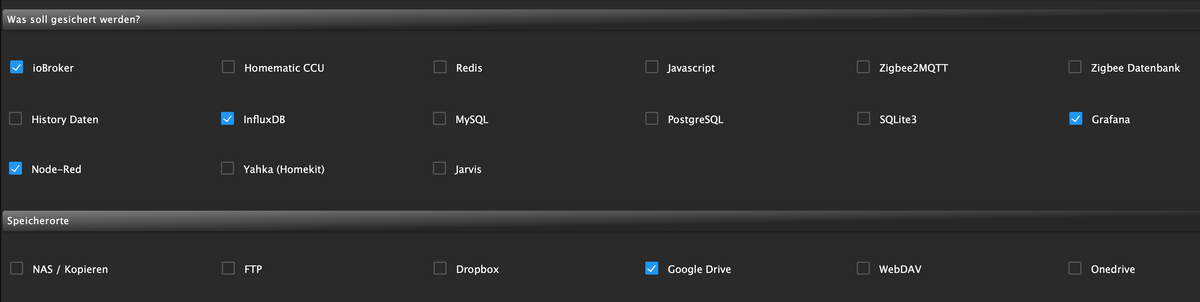
                                      Bildschirmfoto 2023-04-19 um 18.40.49.png

                                      Mit besten Grüßen
                                      Andy

                                      Thomas BraunT 1 Antwort Letzte Antwort
                                      0
                                      • Damrak2022D Damrak2022

                                        @thomas-braun Ich habe gerade bei meinem Backitup alles eingerichtet und ein manuelles Backup angestoßen. Nun bekomme ich da aber folgenden Fehler:

                                        Started iobroker ...
                                        [DEBUG] [iobroker] - host.homebridge 18347 states saved
                                        
                                        [DEBUG] [iobroker] - host.homebridge 24913 objects saved
                                        
                                        [DEBUG] [iobroker] - Backup created: /opt/iobroker/backups/iobroker_2023_04_19-18_33_26_backupiobroker.tar.gz
                                        
                                        [DEBUG] [iobroker] - done
                                        [DEBUG] [influxDB] - InfluxDB-Backup started ...
                                        [DEBUG] [influxDB] - Start InfluxDB Backup ...
                                        [DEBUG] [influxDB] - InfluxDB Backup tmp directory created 
                                        [DEBUG] [influxDB] - Try deleting the InfluxDB tmp directory: "/opt/iobroker/backups/influxDB_2023_04_19-18_33_52_backupiobroker"
                                        [DEBUG] [influxDB] - InfluxDB tmp directory "/opt/iobroker/backups/influxDB_2023_04_19-18_33_52_backupiobroker" successfully deleted
                                        [DEBUG] [influxDB] - 
                                        [ERROR] [influxDB] - Error: Command failed: influxd backup -portable -database iobroker "/opt/iobroker/backups/influxDB_2023_04_19-18_33_52_backupiobroker"
                                        Error: unknown shorthand flag: 'p' in -portable
                                        See 'influxd -h' for help
                                        

                                        Hier die Einstellungen des Adapters:
                                        Bildschirmfoto 2023-04-19 um 18.40.49.png

                                        Thomas BraunT Online
                                        Thomas BraunT Online
                                        Thomas Braun
                                        Most Active
                                        schrieb am zuletzt editiert von
                                        #73

                                        @damrak2022

                                        sudo apt update
                                        apt policy influxdb*
                                        

                                        sagt?

                                        Linux-Werkzeugkasten:
                                        https://forum.iobroker.net/topic/42952/der-kleine-iobroker-linux-werkzeugkasten
                                        NodeJS Fixer Skript:
                                        https://forum.iobroker.net/topic/68035/iob-node-fix-skript
                                        iob_diag: curl -sLf -o diag.sh https://iobroker.net/diag.sh && bash diag.sh

                                        Damrak2022D 1 Antwort Letzte Antwort
                                        0
                                        • Thomas BraunT Thomas Braun

                                          @damrak2022

                                          sudo apt update
                                          apt policy influxdb*
                                          

                                          sagt?

                                          Damrak2022D Offline
                                          Damrak2022D Offline
                                          Damrak2022
                                          schrieb am zuletzt editiert von
                                          #74

                                          @thomas-braun sagte in Influxdb2 Backitup:

                                          apt policy influxdb*

                                          Andy@homebridge:~ $ sudo apt update
                                          Holen:1 http://security.debian.org/debian-security bullseye-security InRelease [48,4 kB]
                                          OK:2 http://deb.debian.org/debian bullseye InRelease
                                          Holen:3 http://deb.debian.org/debian bullseye-updates InRelease [44,1 kB]
                                          Holen:4 http://archive.raspberrypi.org/debian bullseye InRelease [23,6 kB]
                                          OK:5 https://repos.influxdata.com/debian stable InRelease
                                          OK:6 https://repos.influxdata.com/debian stretch InRelease
                                          Holen:7 https://packages.grafana.com/oss/deb stable InRelease [5.984 B]
                                          Holen:8 https://deb.nodesource.com/node_16.x bullseye InRelease [4.586 B]
                                          Holen:9 http://security.debian.org/debian-security bullseye-security/main arm64 Packages [233 kB]
                                          Holen:11 http://archive.raspberrypi.org/debian bullseye/main armhf Packages [316 kB]
                                          OK:10 https://packagecloud.io/ookla/speedtest-cli/debian bullseye InRelease
                                          Holen:12 http://archive.raspberrypi.org/debian bullseye/main arm64 Packages [308 kB]
                                          Holen:13 https://packages.grafana.com/oss/deb stable/main arm64 Packages [77,0 kB]
                                          Holen:14 https://deb.nodesource.com/node_16.x bullseye/main armhf Packages [782 B]
                                          Holen:15 https://deb.nodesource.com/node_16.x bullseye/main arm64 Packages [777 B]
                                          Es wurden 1.062 kB in 3 s geholt (378 kB/s).
                                          Paketlisten werden gelesen… Fertig
                                          Abhängigkeitsbaum wird aufgebaut… Fertig
                                          Statusinformationen werden eingelesen… Fertig
                                          Aktualisierung für 1 Paket verfügbar. Führen Sie »apt list --upgradable« aus, um es anzuzeigen.
                                          Andy@homebridge:~ $ apt policy influxdb*
                                          influxdb2-cli:
                                            Installiert:           2.7.1-2
                                            Installationskandidat: 2.7.1-2
                                            Versionstabelle:
                                           *** 2.7.1-2 500
                                                  500 https://repos.influxdata.com/debian stable/main arm64 Packages
                                                  500 https://repos.influxdata.com/debian stretch/stable arm64 Packages
                                                  100 /var/lib/dpkg/status
                                               2.6.1 500
                                                  500 https://repos.influxdata.com/debian stable/main arm64 Packages
                                                  500 https://repos.influxdata.com/debian stretch/stable arm64 Packages
                                               2.6.0 500
                                                  500 https://repos.influxdata.com/debian stable/main arm64 Packages
                                                  500 https://repos.influxdata.com/debian stretch/stable arm64 Packages
                                               2.5.0 500
                                                  500 https://repos.influxdata.com/debian stable/main arm64 Packages
                                                  500 https://repos.influxdata.com/debian stretch/stable arm64 Packages
                                               2.4.0 500
                                                  500 https://repos.influxdata.com/debian stable/main arm64 Packages
                                                  500 https://repos.influxdata.com/debian stretch/stable arm64 Packages
                                               2.3.0 500
                                                  500 https://repos.influxdata.com/debian stable/main arm64 Packages
                                                  500 https://repos.influxdata.com/debian stretch/stable arm64 Packages
                                          influxdb-client:
                                            Installiert:           (keine)
                                            Installationskandidat: 1.6.7~rc0-1+b5
                                            Versionstabelle:
                                               1.6.7~rc0-1+b5 500
                                                  500 http://deb.debian.org/debian bullseye/main arm64 Packages
                                          influxdb-dev:
                                            Installiert:           (keine)
                                            Installationskandidat: (keine)
                                            Versionstabelle:
                                          influxdb2-client:
                                            Installiert:           (keine)
                                            Installationskandidat: 2.7.1-1
                                            Versionstabelle:
                                               2.7.1-1 500
                                                  500 https://repos.influxdata.com/debian stable/main arm64 Packages
                                                  500 https://repos.influxdata.com/debian stretch/stable arm64 Packages
                                          influxdb:
                                            Installiert:           (keine)
                                            Installationskandidat: 1.8.10-1
                                            Versionstabelle:
                                               1.8.10-1 500
                                                  500 https://repos.influxdata.com/debian stable/main arm64 Packages
                                                  500 https://repos.influxdata.com/debian stretch/stable arm64 Packages
                                               1.6.7~rc0-1+b5 500
                                                  500 http://deb.debian.org/debian bullseye/main arm64 Packages
                                          influxdb2:
                                            Installiert:           2.7.0-1
                                            Installationskandidat: 2.7.0-1
                                            Versionstabelle:
                                           *** 2.7.0-1 500
                                                  500 https://repos.influxdata.com/debian stable/main arm64 Packages
                                                  500 https://repos.influxdata.com/debian stretch/stable arm64 Packages
                                                  100 /var/lib/dpkg/status
                                               2.6.1-1 500
                                                  500 https://repos.influxdata.com/debian stable/main arm64 Packages
                                                  500 https://repos.influxdata.com/debian stretch/stable arm64 Packages
                                               2.6.0-1 500
                                                  500 https://repos.influxdata.com/debian stable/main arm64 Packages
                                                  500 https://repos.influxdata.com/debian stretch/stable arm64 Packages
                                               2.5.1-1 500
                                                  500 https://repos.influxdata.com/debian stable/main arm64 Packages
                                                  500 https://repos.influxdata.com/debian stretch/stable arm64 Packages
                                               2.4.0-1 500
                                                  500 https://repos.influxdata.com/debian stable/main arm64 Packages
                                                  500 https://repos.influxdata.com/debian stretch/stable arm64 Packages
                                               2.3.0-1 500
                                                  500 https://repos.influxdata.com/debian stable/main arm64 Packages
                                                  500 https://repos.influxdata.com/debian stretch/stable arm64 Packages
                                               2.2.0 500
                                                  500 https://repos.influxdata.com/debian stable/main arm64 Packages
                                                  500 https://repos.influxdata.com/debian stretch/stable arm64 Packages
                                          Andy@homebridge:~ $

                                          

                                          Mit besten Grüßen
                                          Andy

                                          1 Antwort Letzte Antwort
                                          0

                                          Hey! Du scheinst an dieser Unterhaltung interessiert zu sein, hast aber noch kein Konto.

                                          Hast du es satt, bei jedem Besuch durch die gleichen Beiträge zu scrollen? Wenn du dich für ein Konto anmeldest, kommst du immer genau dorthin zurück, wo du zuvor warst, und kannst dich über neue Antworten benachrichtigen lassen (entweder per E-Mail oder Push-Benachrichtigung). Du kannst auch Lesezeichen speichern und Beiträge positiv bewerten, um anderen Community-Mitgliedern deine Wertschätzung zu zeigen.

                                          Mit deinem Input könnte dieser Beitrag noch besser werden 💗

                                          Registrieren Anmelden
                                          Antworten
                                          • In einem neuen Thema antworten
                                          Anmelden zum Antworten
                                          • Älteste zuerst
                                          • Neuste zuerst
                                          • Meiste Stimmen


                                          Support us

                                          ioBroker
                                          Community Adapters
                                          Donate
                                          FAQ Cloud / IOT
                                          HowTo: Node.js-Update
                                          HowTo: Backup/Restore
                                          Downloads
                                          BLOG

                                          350

                                          Online

                                          32.8k

                                          Benutzer

                                          82.9k

                                          Themen

                                          1.3m

                                          Beiträge
                                          Community
                                          Impressum | Datenschutz-Bestimmungen | Nutzungsbedingungen | Einwilligungseinstellungen
                                          ioBroker Community 2014-2025
                                          logo
                                          • Anmelden

                                          • Du hast noch kein Konto? Registrieren

                                          • Anmelden oder registrieren, um zu suchen
                                          • Erster Beitrag
                                            Letzter Beitrag
                                          0
                                          • Home
                                          • Aktuell
                                          • Tags
                                          • Ungelesen 0
                                          • Kategorien
                                          • Unreplied
                                          • Beliebt
                                          • GitHub
                                          • Docu
                                          • Hilfe