




Solaredge Adapter (Photovoltaikanlage)
-
@chrisl sagte in Solaredge Adapter (Photovoltaikanlage):
Modbus auf Port 502 aktiviert
Bist du sicher das Port 502 richtig ist ? bei mir und vielen anderen ist das Port 1502
@lisalisa sagte in Solaredge Adapter (Photovoltaikanlage):
@chrisl sagte in Solaredge Adapter (Photovoltaikanlage):
Modbus auf Port 502 aktiviert
Bist du sicher das Port 502 richtig ist ? bei mir und vielen anderen ist das Port 1502
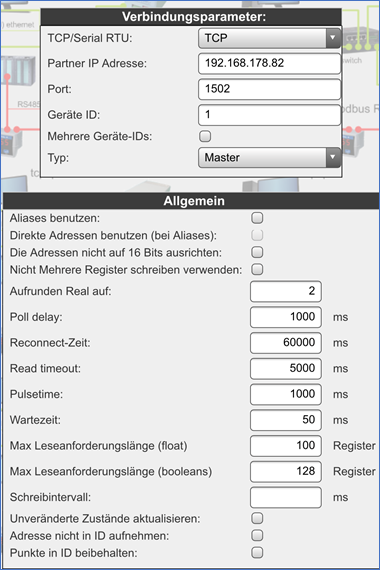
Genau die Konfigurationseinstellung hab ich in meinem Thread auch beschrieben:
https://forum.iobroker.net/assets/uploads/files/1604487719957-659a1f77-527a-417b-ba4f-0e6d08ac6cef-grafik.png -
Hallo zusammen,
ich bin zwar hier im Forum ganz neu, heisst aber nicht, dass ich nicht schon Stunden gelesen und gegoogelt habe ;)
Folgende Situation, wir haben einen SolarEdge SE15k Wechselrichter.
Dieser ist per LAN Angebunden - fixe IP via UDM-Pro zugewiesen, Modbus auf Port 502 aktiviert, soweit alles gut, ping reagiert er, Daten in der SolardEdge Smartphone App alle da, inkl. live Verbrauch, Produktion etc.
Nur im ioBroker mit dem Modbus Adapter kriege ich das auf biegen und brechen nicht hin an die Daten zu kommen... :( Und ja, SunSpec PDF etc. durchforstet - jedoch bleibt der Modbus Adapter immer auf Orange, "Verbunden mit Host, Lebenszeichen grün, VErbunden mit Gerät oder Dienst, rot"
Ich habe unten mal 2 Bilder eingestellt - kann mir hier evtl. jemand helfen?
(und ja, die Adressen habe ich auch durchprobiert, da ja diese auch um 1-2 versetzt sein können...).Schlussendlich brauche ich die Daten im ioBroker, um den Überschussstrom gezielt zu verbrauchen, so kommen z.B. in ein paar Wochen zwei go-e Ladestationen für ein EV sowie ein PHEV.
Auch ein Ansteuern der LWP und Warmwassererzeugung wäre dann noch geplant.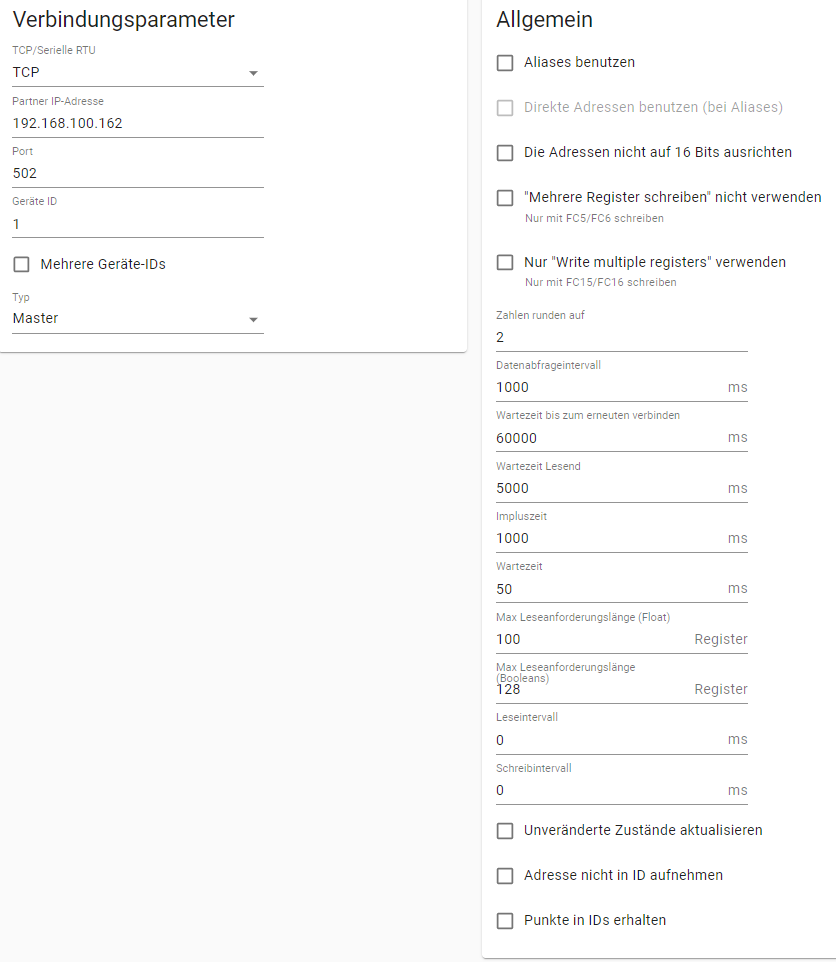

@chrisl sagte in Solaredge Adapter (Photovoltaikanlage):
jedoch bleibt der Modbus Adapter immer auf Orange, "Verbunden mit Host, Lebenszeichen grün, VErbunden mit Gerät oder Dienst, rot"
Die Aussage bringt nicht viel , was steht im LOG ( Logstufe der Instanz auf DEBUG )
ping reagiert er,
von wo aus ,von ioBroker !?
Was sagt :
nmap -sU -p 502 192.168.xxx.xx@lisalisa sagte in Solaredge Adapter (Photovoltaikanlage):
Bist du sicher das Port 502 richtig ist ? bei mir und vielen anderen ist das Port 1502Das kann man inviduell im Installateur Menue einstellen/ ändern.
Ich habe es auch auf 502 geändert.
-
@chrisl sagte in Solaredge Adapter (Photovoltaikanlage):
jedoch bleibt der Modbus Adapter immer auf Orange, "Verbunden mit Host, Lebenszeichen grün, VErbunden mit Gerät oder Dienst, rot"
Die Aussage bringt nicht viel , was steht im LOG ( Logstufe der Instanz auf DEBUG )
ping reagiert er,
von wo aus ,von ioBroker !?
Was sagt :
nmap -sU -p 502 192.168.xxx.xx@lisalisa sagte in Solaredge Adapter (Photovoltaikanlage):
Bist du sicher das Port 502 richtig ist ? bei mir und vielen anderen ist das Port 1502Das kann man inviduell im Installateur Menue einstellen/ ändern.
Ich habe es auch auf 502 geändert.
@glasfaser sagte in Solaredge Adapter (Photovoltaikanlage):
Das kann man inviduell im Installateur Menue einstellen/ ändern.
wenn man Installateurs Zugang hat....
-
@glasfaser sagte in Solaredge Adapter (Photovoltaikanlage):
Das kann man inviduell im Installateur Menue einstellen/ ändern.
wenn man Installateurs Zugang hat....
-
@lisalisa sagte in Solaredge Adapter (Photovoltaikanlage):
wenn man Installateurs Zugang hat....
Nein muss man nicht .... ( Es gibt ein Zugang über WLAN ... Google mal danach ..)
@glasfaser sagte in Solaredge Adapter (Photovoltaikanlage):
@lisalisa sagte in Solaredge Adapter (Photovoltaikanlage):
wenn man Installateurs Zugang hat....
Nein muss man nicht .... ( Es gibt ein Zugang über WLAN ... Google mal danach ..)
Zugang über Wlan ist bekannt, sollte nur nicht öffentlich ausposaunt werden, des halb habe ich chrisl schon eine PN geschrieben !
Und leider kann man über den Wlan Zugang kein Firmware update starten
-
@glasfaser sagte in Solaredge Adapter (Photovoltaikanlage):
@lisalisa sagte in Solaredge Adapter (Photovoltaikanlage):
wenn man Installateurs Zugang hat....
Nein muss man nicht .... ( Es gibt ein Zugang über WLAN ... Google mal danach ..)
Zugang über Wlan ist bekannt, sollte nur nicht öffentlich ausposaunt werden, des halb habe ich chrisl schon eine PN geschrieben !
Und leider kann man über den Wlan Zugang kein Firmware update starten
Danke schon mal allen für die schnellen Antworten!
@hennerich - den Thread hatte ich gefunden, und war/ist meine Vorlage - leider bisher ohne Erfolg :(
@lisalisa - ja, Port 502, Status "klar", wird so auf dem SolarEdge angezeigt // betreffend Zugang schreibe ich dir gleich noch zurück :)
@Glasfaser - siehe anbei einen Screenshot aus dem Log - ping geht vom PC aus als auch von Linux Host wo ioBroker drauf läuft - aktuell sind die Netze fürs normale "Home Netzwerk" sowie das "Smart Home Netzwerk" nicht getrenntEdit, ich sehe jetzt gerade, dass die App keinen Verbrauch mehr anzeigt - auch aus der Vergangenheit nicht mehr... (was sie bis vor kurzem garantiert noch tat... kA was ich da nun gemacht habe :()
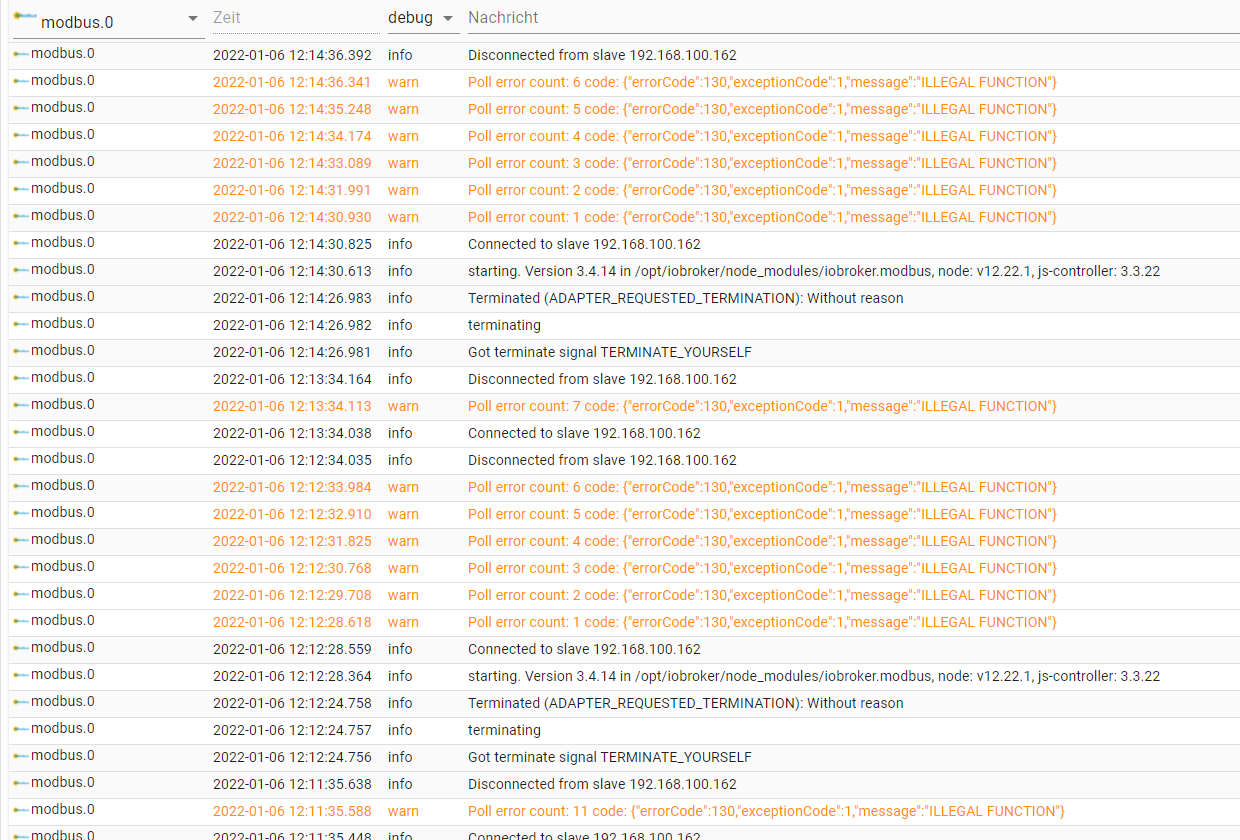
-
Danke schon mal allen für die schnellen Antworten!
@hennerich - den Thread hatte ich gefunden, und war/ist meine Vorlage - leider bisher ohne Erfolg :(
@lisalisa - ja, Port 502, Status "klar", wird so auf dem SolarEdge angezeigt // betreffend Zugang schreibe ich dir gleich noch zurück :)
@Glasfaser - siehe anbei einen Screenshot aus dem Log - ping geht vom PC aus als auch von Linux Host wo ioBroker drauf läuft - aktuell sind die Netze fürs normale "Home Netzwerk" sowie das "Smart Home Netzwerk" nicht getrenntEdit, ich sehe jetzt gerade, dass die App keinen Verbrauch mehr anzeigt - auch aus der Vergangenheit nicht mehr... (was sie bis vor kurzem garantiert noch tat... kA was ich da nun gemacht habe :()
@chrisl sagte in Solaredge Adapter (Photovoltaikanlage):
siehe anbei einen Screenshot aus dem Log
Bitte keine Log´s als Screenshot , sondern die Ausgabe in Code-Tags </> setzen .
und du solltest :
@glasfaser sagte in Solaredge Adapter (Photovoltaikanlage):
was steht im LOG ( Logstufe der Instanz auf DEBUG )Expertenmodus einschalten , in der Adapter Instanz Modbus gehen , dann die Logstufe auf DEBUG stellen :
BEISPIEL :

-
@chrisl sagte in Solaredge Adapter (Photovoltaikanlage):
siehe anbei einen Screenshot aus dem Log
Bitte keine Log´s als Screenshot , sondern die Ausgabe in Code-Tags </> setzen .
und du solltest :
@glasfaser sagte in Solaredge Adapter (Photovoltaikanlage):
was steht im LOG ( Logstufe der Instanz auf DEBUG )Expertenmodus einschalten , in der Adapter Instanz Modbus gehen , dann die Logstufe auf DEBUG stellen :
BEISPIEL :
@glasfaser Salü, so, hoffe ist jetzt korrekt :)
Was mich gearde wirklich auch noch etwas beunruhigt ist eben die Tatsache, dass die SolardEdge App nun auch kein Verbrauch mehr anzeigt... Habe ich da evtl. dummerweise irgendwie beim Rumdrückem am SolardEdge den "Stromzähler" abgehängt...? :(
2022-01-06 12:38:03.126 - warn: modbus.0 (240342) Poll error count: 8 code: {"errorCode":130,"exceptionCode":1,"message":"ILLEGAL FUNCTION"} 2022-01-06 12:38:03.177 - info: modbus.0 (240342) Disconnected from slave 192.168.100.162 2022-01-06 12:38:27.778 - error: go-e.0 (206653) getaddrinfo EAI_AGAIN go-echarger 2022-01-06 12:38:30.812 - info: shelly.0 (206154) State value to set for "shelly.0.SHSW-PM#E8DB84D2FAB6#1.Relay0.longpush" has to be type "string" but received type "boolean" 2022-01-06 12:38:45.814 - info: shelly.0 (206154) State value to set for "shelly.0.SHSW-PM#E8DB84D2FAB6#1.Relay0.longpush" has to be type "string" but received type "boolean" 2022-01-06 12:39:00.815 - info: shelly.0 (206154) State value to set for "shelly.0.SHSW-PM#E8DB84D2FAB6#1.Relay0.longpush" has to be type "string" but received type "boolean" 2022-01-06 12:39:03.178 - info: modbus.0 (240342) Connected to slave 192.168.100.162 2022-01-06 12:39:03.318 - warn: modbus.0 (240342) Poll error count: 9 code: {"errorCode":130,"exceptionCode":1,"message":"ILLEGAL FUNCTION"} 2022-01-06 12:39:03.369 - info: modbus.0 (240342) Disconnected from slave 192.168.100.162 2022-01-06 12:39:27.778 - error: go-e.0 (206653) getaddrinfo EAI_AGAIN go-echarger 2022-01-06 12:39:38.947 - info: host.iobroker01 stopInstance system.adapter.modbus.0 (force=false, process=true) 2022-01-06 12:39:38.950 - info: host.iobroker01 stopInstance system.adapter.modbus.0 send kill signal 2022-01-06 12:39:38.950 - info: modbus.0 (240342) Got terminate signal TERMINATE_YOURSELF 2022-01-06 12:39:38.952 - info: modbus.0 (240342) terminating 2022-01-06 12:39:38.953 - info: modbus.0 (240342) Terminated (ADAPTER_REQUESTED_TERMINATION): Without reason 2022-01-06 12:39:39.487 - info: host.iobroker01 instance system.adapter.modbus.0 terminated with code 11 (ADAPTER_REQUESTED_TERMINATION) 2022-01-06 12:39:41.980 - info: host.iobroker01 instance system.adapter.modbus.0 started with pid 240363 2022-01-06 12:39:42.368 - debug: modbus.0 (240363) Redis Objects: Use Redis connection: 127.0.0.1:9001 2022-01-06 12:39:42.394 - debug: modbus.0 (240363) Objects client ready ... initialize now 2022-01-06 12:39:42.395 - debug: modbus.0 (240363) Objects create System PubSub Client 2022-01-06 12:39:42.398 - debug: modbus.0 (240363) Objects create User PubSub Client 2022-01-06 12:39:42.399 - debug: modbus.0 (240363) Objects client initialize lua scripts 2022-01-06 12:39:42.405 - debug: modbus.0 (240363) Objects connected to redis: 127.0.0.1:9001 2022-01-06 12:39:42.409 - debug: modbus.0 (240363) objectDB connected 2022-01-06 12:39:42.410 - debug: modbus.0 (240363) Redis States: Use Redis connection: 127.0.0.1:9000 2022-01-06 12:39:42.413 - debug: modbus.0 (240363) States create System PubSub Client 2022-01-06 12:39:42.414 - debug: modbus.0 (240363) States create User PubSub Client 2022-01-06 12:39:42.417 - debug: modbus.0 (240363) States connected to redis: 127.0.0.1:9000 2022-01-06 12:39:42.418 - debug: modbus.0 (240363) statesDB connected 2022-01-06 12:39:42.497 - debug: modbus.0 (240363) Plugin sentry Initialize Plugin (enabled=true) 2022-01-06 12:39:42.591 - info: modbus.0 (240363) starting. Version 3.4.14 in /opt/iobroker/node_modules/iobroker.modbus, node: v12.22.1, js-controller: 3.3.22 2022-01-06 12:39:42.641 - debug: modbus.0 (240363) Initialize Objects for disInputs: [{"_address":0,"name":"","description":"","formula":"","role":"level","room":"","cw":"","isScale":"","address":0,"deviceId":1,"id":"discreteInputs.0","len":1}] 2022-01-06 12:39:42.642 - debug: modbus.0 (240363) Add discreteInputs.0: {"_id":"discreteInputs.0","type":"state","common":{"name":"","role":"level","type":"boolean","read":true,"write":false,"def":false},"native":{"regType":"disInputs","address":0,"deviceId":1}} 2022-01-06 12:39:42.642 - debug: modbus.0 (240363) Initialize Objects for coils: [{"_address":0,"name":"","description":"","formula":"","role":"level","room":"","poll":"","wp":"","cw":"","isScale":"","address":0,"deviceId":1,"id":"coils.0"}] 2022-01-06 12:39:42.642 - debug: modbus.0 (240363) Add coils.0: {"_id":"coils.0","type":"state","common":{"name":"","role":"level","type":"boolean","read":false,"write":true,"def":false},"native":{"regType":"coils","address":0,"deviceId":1,"poll":"","wp":""}} 2022-01-06 12:39:42.642 - debug: modbus.0 (240363) Initialize Objects for inputRegs: [{"_address":0,"name":"","description":"","unit":"","type":"uint16be","len":1,"factor":1,"offset":0,"formula":"","role":"level","room":"","cw":"","isScale":"","address":0,"deviceId":1,"id":"inputRegisters.0"}] 2022-01-06 12:39:42.642 - debug: modbus.0 (240363) Add inputRegisters.0: {"_id":"inputRegisters.0","type":"state","common":{"name":"","role":"level","type":"number","read":true,"write":false,"def":0,"unit":""},"native":{"regType":"inputRegs","address":0,"deviceId":1,"type":"uint16be","len":1,"offset":0,"factor":1}} 2022-01-06 12:39:42.643 - debug: modbus.0 (240363) Initialize Objects for holdingRegs: [{"_address":"40071","name":"I_AC_Current","description":"AC-Verbrauch gesamt","unit":"Amp","type":"uint16be","len":1,"factor":1,"offset":0,"formula":"","role":"value","room":"","poll":true,"wp":"","cw":false,"isScale":"","address":40071,"deviceId":1,"id":"holdingRegisters.40071_I_AC_Current"}] 2022-01-06 12:39:42.643 - debug: modbus.0 (240363) Add holdingRegisters.40071_I_AC_Current: {"_id":"holdingRegisters.40071_I_AC_Current","type":"state","common":{"name":"AC-Verbrauch gesamt","role":"value","type":"number","read":true,"write":true,"def":0,"unit":"Amp"},"native":{"regType":"holdingRegs","address":40071,"deviceId":1,"type":"uint16be","len":1,"offset":0,"factor":1,"poll":true}} 2022-01-06 12:39:42.792 - info: modbus.0 (240363) Connected to slave 192.168.100.162 2022-01-06 12:39:42.793 - debug: modbus.0 (240363) [DevID_1] Poll start --------------------- 2022-01-06 12:39:42.793 - debug: modbus.0 (240363) [DevID_1/disInputs] Poll address 0 - 16 bits 2022-01-06 12:39:42.886 - debug: modbus.0 (240363) Received pdu describes an error. 2022-01-06 12:39:42.887 - warn: modbus.0 (240363) Poll error count: 1 code: {"errorCode":130,"exceptionCode":1,"message":"ILLEGAL FUNCTION"} 2022-01-06 12:39:43.938 - debug: modbus.0 (240363) [DevID_1] Poll start --------------------- 2022-01-06 12:39:43.939 - debug: modbus.0 (240363) [DevID_1/disInputs] Poll address 0 - 16 bits 2022-01-06 12:39:43.984 - debug: modbus.0 (240363) Received pdu describes an error. 2022-01-06 12:39:43.984 - warn: modbus.0 (240363) Poll error count: 2 code: {"errorCode":130,"exceptionCode":1,"message":"ILLEGAL FUNCTION"} 2022-01-06 12:39:45.036 - debug: modbus.0 (240363) [DevID_1] Poll start --------------------- 2022-01-06 12:39:45.036 - debug: modbus.0 (240363) [DevID_1/disInputs] Poll address 0 - 16 bits 2022-01-06 12:39:45.073 - debug: modbus.0 (240363) Received pdu describes an error. 2022-01-06 12:39:45.074 - warn: modbus.0 (240363) Poll error count: 3 code: {"errorCode":130,"exceptionCode":1,"message":"ILLEGAL FUNCTION"} 2022-01-06 12:39:46.124 - debug: modbus.0 (240363) [DevID_1] Poll start --------------------- 2022-01-06 12:39:46.125 - debug: modbus.0 (240363) [DevID_1/disInputs] Poll address 0 - 16 bits 2022-01-06 12:39:46.130 - debug: modbus.0 (240363) Received pdu describes an error. 2022-01-06 12:39:46.131 - warn: modbus.0 (240363) Poll error count: 4 code: {"errorCode":130,"exceptionCode":1,"message":"ILLEGAL FUNCTION"} 2022-01-06 12:39:47.181 - debug: modbus.0 (240363) [DevID_1] Poll start --------------------- 2022-01-06 12:39:47.182 - debug: modbus.0 (240363) [DevID_1/disInputs] Poll address 0 - 16 bits 2022-01-06 12:39:47.292 - debug: modbus.0 (240363) Received pdu describes an error. 2022-01-06 12:39:47.293 - warn: modbus.0 (240363) Poll error count: 5 code: {"errorCode":130,"exceptionCode":1,"message":"ILLEGAL FUNCTION"} 2022-01-06 12:39:48.343 - debug: modbus.0 (240363) [DevID_1] Poll start --------------------- 2022-01-06 12:39:48.345 - debug: modbus.0 (240363) [DevID_1/disInputs] Poll address 0 - 16 bits 2022-01-06 12:39:48.393 - debug: modbus.0 (240363) Received pdu describes an error. 2022-01-06 12:39:48.393 - warn: modbus.0 (240363) Poll error count: 6 code: {"errorCode":130,"exceptionCode":1,"message":"ILLEGAL FUNCTION"} 2022-01-06 12:39:48.444 - debug: modbus.0 (240363) Closing client on purpose. 2022-01-06 12:39:48.444 - info: modbus.0 (240363) Disconnected from slave 192.168.100.162 2022-01-06 12:39:48.550 - debug: modbus.0 (240363) Socket closed with error 2022-01-06 12:39:48.550 - debug: modbus.0 (240363) Cleaning up request fifo. 2022-01-06 12:39:49.552 - debug: modbus.0 (240363) Closing client on purpose. -
@glasfaser Salü, so, hoffe ist jetzt korrekt :)
Was mich gearde wirklich auch noch etwas beunruhigt ist eben die Tatsache, dass die SolardEdge App nun auch kein Verbrauch mehr anzeigt... Habe ich da evtl. dummerweise irgendwie beim Rumdrückem am SolardEdge den "Stromzähler" abgehängt...? :(
2022-01-06 12:38:03.126 - warn: modbus.0 (240342) Poll error count: 8 code: {"errorCode":130,"exceptionCode":1,"message":"ILLEGAL FUNCTION"} 2022-01-06 12:38:03.177 - info: modbus.0 (240342) Disconnected from slave 192.168.100.162 2022-01-06 12:38:27.778 - error: go-e.0 (206653) getaddrinfo EAI_AGAIN go-echarger 2022-01-06 12:38:30.812 - info: shelly.0 (206154) State value to set for "shelly.0.SHSW-PM#E8DB84D2FAB6#1.Relay0.longpush" has to be type "string" but received type "boolean" 2022-01-06 12:38:45.814 - info: shelly.0 (206154) State value to set for "shelly.0.SHSW-PM#E8DB84D2FAB6#1.Relay0.longpush" has to be type "string" but received type "boolean" 2022-01-06 12:39:00.815 - info: shelly.0 (206154) State value to set for "shelly.0.SHSW-PM#E8DB84D2FAB6#1.Relay0.longpush" has to be type "string" but received type "boolean" 2022-01-06 12:39:03.178 - info: modbus.0 (240342) Connected to slave 192.168.100.162 2022-01-06 12:39:03.318 - warn: modbus.0 (240342) Poll error count: 9 code: {"errorCode":130,"exceptionCode":1,"message":"ILLEGAL FUNCTION"} 2022-01-06 12:39:03.369 - info: modbus.0 (240342) Disconnected from slave 192.168.100.162 2022-01-06 12:39:27.778 - error: go-e.0 (206653) getaddrinfo EAI_AGAIN go-echarger 2022-01-06 12:39:38.947 - info: host.iobroker01 stopInstance system.adapter.modbus.0 (force=false, process=true) 2022-01-06 12:39:38.950 - info: host.iobroker01 stopInstance system.adapter.modbus.0 send kill signal 2022-01-06 12:39:38.950 - info: modbus.0 (240342) Got terminate signal TERMINATE_YOURSELF 2022-01-06 12:39:38.952 - info: modbus.0 (240342) terminating 2022-01-06 12:39:38.953 - info: modbus.0 (240342) Terminated (ADAPTER_REQUESTED_TERMINATION): Without reason 2022-01-06 12:39:39.487 - info: host.iobroker01 instance system.adapter.modbus.0 terminated with code 11 (ADAPTER_REQUESTED_TERMINATION) 2022-01-06 12:39:41.980 - info: host.iobroker01 instance system.adapter.modbus.0 started with pid 240363 2022-01-06 12:39:42.368 - debug: modbus.0 (240363) Redis Objects: Use Redis connection: 127.0.0.1:9001 2022-01-06 12:39:42.394 - debug: modbus.0 (240363) Objects client ready ... initialize now 2022-01-06 12:39:42.395 - debug: modbus.0 (240363) Objects create System PubSub Client 2022-01-06 12:39:42.398 - debug: modbus.0 (240363) Objects create User PubSub Client 2022-01-06 12:39:42.399 - debug: modbus.0 (240363) Objects client initialize lua scripts 2022-01-06 12:39:42.405 - debug: modbus.0 (240363) Objects connected to redis: 127.0.0.1:9001 2022-01-06 12:39:42.409 - debug: modbus.0 (240363) objectDB connected 2022-01-06 12:39:42.410 - debug: modbus.0 (240363) Redis States: Use Redis connection: 127.0.0.1:9000 2022-01-06 12:39:42.413 - debug: modbus.0 (240363) States create System PubSub Client 2022-01-06 12:39:42.414 - debug: modbus.0 (240363) States create User PubSub Client 2022-01-06 12:39:42.417 - debug: modbus.0 (240363) States connected to redis: 127.0.0.1:9000 2022-01-06 12:39:42.418 - debug: modbus.0 (240363) statesDB connected 2022-01-06 12:39:42.497 - debug: modbus.0 (240363) Plugin sentry Initialize Plugin (enabled=true) 2022-01-06 12:39:42.591 - info: modbus.0 (240363) starting. Version 3.4.14 in /opt/iobroker/node_modules/iobroker.modbus, node: v12.22.1, js-controller: 3.3.22 2022-01-06 12:39:42.641 - debug: modbus.0 (240363) Initialize Objects for disInputs: [{"_address":0,"name":"","description":"","formula":"","role":"level","room":"","cw":"","isScale":"","address":0,"deviceId":1,"id":"discreteInputs.0","len":1}] 2022-01-06 12:39:42.642 - debug: modbus.0 (240363) Add discreteInputs.0: {"_id":"discreteInputs.0","type":"state","common":{"name":"","role":"level","type":"boolean","read":true,"write":false,"def":false},"native":{"regType":"disInputs","address":0,"deviceId":1}} 2022-01-06 12:39:42.642 - debug: modbus.0 (240363) Initialize Objects for coils: [{"_address":0,"name":"","description":"","formula":"","role":"level","room":"","poll":"","wp":"","cw":"","isScale":"","address":0,"deviceId":1,"id":"coils.0"}] 2022-01-06 12:39:42.642 - debug: modbus.0 (240363) Add coils.0: {"_id":"coils.0","type":"state","common":{"name":"","role":"level","type":"boolean","read":false,"write":true,"def":false},"native":{"regType":"coils","address":0,"deviceId":1,"poll":"","wp":""}} 2022-01-06 12:39:42.642 - debug: modbus.0 (240363) Initialize Objects for inputRegs: [{"_address":0,"name":"","description":"","unit":"","type":"uint16be","len":1,"factor":1,"offset":0,"formula":"","role":"level","room":"","cw":"","isScale":"","address":0,"deviceId":1,"id":"inputRegisters.0"}] 2022-01-06 12:39:42.642 - debug: modbus.0 (240363) Add inputRegisters.0: {"_id":"inputRegisters.0","type":"state","common":{"name":"","role":"level","type":"number","read":true,"write":false,"def":0,"unit":""},"native":{"regType":"inputRegs","address":0,"deviceId":1,"type":"uint16be","len":1,"offset":0,"factor":1}} 2022-01-06 12:39:42.643 - debug: modbus.0 (240363) Initialize Objects for holdingRegs: [{"_address":"40071","name":"I_AC_Current","description":"AC-Verbrauch gesamt","unit":"Amp","type":"uint16be","len":1,"factor":1,"offset":0,"formula":"","role":"value","room":"","poll":true,"wp":"","cw":false,"isScale":"","address":40071,"deviceId":1,"id":"holdingRegisters.40071_I_AC_Current"}] 2022-01-06 12:39:42.643 - debug: modbus.0 (240363) Add holdingRegisters.40071_I_AC_Current: {"_id":"holdingRegisters.40071_I_AC_Current","type":"state","common":{"name":"AC-Verbrauch gesamt","role":"value","type":"number","read":true,"write":true,"def":0,"unit":"Amp"},"native":{"regType":"holdingRegs","address":40071,"deviceId":1,"type":"uint16be","len":1,"offset":0,"factor":1,"poll":true}} 2022-01-06 12:39:42.792 - info: modbus.0 (240363) Connected to slave 192.168.100.162 2022-01-06 12:39:42.793 - debug: modbus.0 (240363) [DevID_1] Poll start --------------------- 2022-01-06 12:39:42.793 - debug: modbus.0 (240363) [DevID_1/disInputs] Poll address 0 - 16 bits 2022-01-06 12:39:42.886 - debug: modbus.0 (240363) Received pdu describes an error. 2022-01-06 12:39:42.887 - warn: modbus.0 (240363) Poll error count: 1 code: {"errorCode":130,"exceptionCode":1,"message":"ILLEGAL FUNCTION"} 2022-01-06 12:39:43.938 - debug: modbus.0 (240363) [DevID_1] Poll start --------------------- 2022-01-06 12:39:43.939 - debug: modbus.0 (240363) [DevID_1/disInputs] Poll address 0 - 16 bits 2022-01-06 12:39:43.984 - debug: modbus.0 (240363) Received pdu describes an error. 2022-01-06 12:39:43.984 - warn: modbus.0 (240363) Poll error count: 2 code: {"errorCode":130,"exceptionCode":1,"message":"ILLEGAL FUNCTION"} 2022-01-06 12:39:45.036 - debug: modbus.0 (240363) [DevID_1] Poll start --------------------- 2022-01-06 12:39:45.036 - debug: modbus.0 (240363) [DevID_1/disInputs] Poll address 0 - 16 bits 2022-01-06 12:39:45.073 - debug: modbus.0 (240363) Received pdu describes an error. 2022-01-06 12:39:45.074 - warn: modbus.0 (240363) Poll error count: 3 code: {"errorCode":130,"exceptionCode":1,"message":"ILLEGAL FUNCTION"} 2022-01-06 12:39:46.124 - debug: modbus.0 (240363) [DevID_1] Poll start --------------------- 2022-01-06 12:39:46.125 - debug: modbus.0 (240363) [DevID_1/disInputs] Poll address 0 - 16 bits 2022-01-06 12:39:46.130 - debug: modbus.0 (240363) Received pdu describes an error. 2022-01-06 12:39:46.131 - warn: modbus.0 (240363) Poll error count: 4 code: {"errorCode":130,"exceptionCode":1,"message":"ILLEGAL FUNCTION"} 2022-01-06 12:39:47.181 - debug: modbus.0 (240363) [DevID_1] Poll start --------------------- 2022-01-06 12:39:47.182 - debug: modbus.0 (240363) [DevID_1/disInputs] Poll address 0 - 16 bits 2022-01-06 12:39:47.292 - debug: modbus.0 (240363) Received pdu describes an error. 2022-01-06 12:39:47.293 - warn: modbus.0 (240363) Poll error count: 5 code: {"errorCode":130,"exceptionCode":1,"message":"ILLEGAL FUNCTION"} 2022-01-06 12:39:48.343 - debug: modbus.0 (240363) [DevID_1] Poll start --------------------- 2022-01-06 12:39:48.345 - debug: modbus.0 (240363) [DevID_1/disInputs] Poll address 0 - 16 bits 2022-01-06 12:39:48.393 - debug: modbus.0 (240363) Received pdu describes an error. 2022-01-06 12:39:48.393 - warn: modbus.0 (240363) Poll error count: 6 code: {"errorCode":130,"exceptionCode":1,"message":"ILLEGAL FUNCTION"} 2022-01-06 12:39:48.444 - debug: modbus.0 (240363) Closing client on purpose. 2022-01-06 12:39:48.444 - info: modbus.0 (240363) Disconnected from slave 192.168.100.162 2022-01-06 12:39:48.550 - debug: modbus.0 (240363) Socket closed with error 2022-01-06 12:39:48.550 - debug: modbus.0 (240363) Cleaning up request fifo. 2022-01-06 12:39:49.552 - debug: modbus.0 (240363) Closing client on purpose.Du hast aber nur im Holding etwas eingetragen !?...,, schau mal bei den anderen , Direct Input usw. hast du da was drin stehen .
Was ergibt jetzt , von ioBroker aus :
@glasfaser sagte in Solaredge Adapter (Photovoltaikanlage):
Was sagt :
nmap -sU -p 502 192.168.xxx.xxBzw.
auch die Ausgabe :
nmap -Pn 192.168.xxx.xxWieviel Teilnehmer Fragen den Modbus zum WR per Lan ab !?
-
Du hast aber nur im Holding etwas eingetragen !?...,, schau mal bei den anderen , Direct Input usw. hast du da was drin stehen .
Was ergibt jetzt , von ioBroker aus :
@glasfaser sagte in Solaredge Adapter (Photovoltaikanlage):
Was sagt :
nmap -sU -p 502 192.168.xxx.xxBzw.
auch die Ausgabe :
nmap -Pn 192.168.xxx.xxWieviel Teilnehmer Fragen den Modbus zum WR per Lan ab !?
@glasfaser said in Solaredge Adapter (Photovoltaikanlage):
nmap -sU -p 502 192.168.xxx.xx
ich nehme an, ausgeführt einfach von der Commandline vom Host, oder?
Siehe below.Es dürfte niemand sonst mit dem SolarEdge abfragen...
Ja, nur der eine Eintrag im Holding, die anderen sind leer.
ioadmin@iobroker01:~$ sudo nmap -sU -p 502 192.168.100.163 Starting Nmap 7.92 ( https://nmap.org ) at 2022-01-06 13:00 UTC dnet: Failed to open device ens3 QUITTING! ioadmin@iobroker01:~$ sudo nmap -Pn 192.168.100.163 Starting Nmap 7.92 ( https://nmap.org ) at 2022-01-06 13:01 UTC dnet: Failed to open device ens3 QUITTING! ioadmin@iobroker01:~$ -
@glasfaser said in Solaredge Adapter (Photovoltaikanlage):
nmap -sU -p 502 192.168.xxx.xx
ich nehme an, ausgeführt einfach von der Commandline vom Host, oder?
Siehe below.Es dürfte niemand sonst mit dem SolarEdge abfragen...
Ja, nur der eine Eintrag im Holding, die anderen sind leer.
ioadmin@iobroker01:~$ sudo nmap -sU -p 502 192.168.100.163 Starting Nmap 7.92 ( https://nmap.org ) at 2022-01-06 13:00 UTC dnet: Failed to open device ens3 QUITTING! ioadmin@iobroker01:~$ sudo nmap -Pn 192.168.100.163 Starting Nmap 7.92 ( https://nmap.org ) at 2022-01-06 13:01 UTC dnet: Failed to open device ens3 QUITTING! ioadmin@iobroker01:~$ -
@glasfaser said in Solaredge Adapter (Photovoltaikanlage):
nmap -sU -p 502 192.168.xxx.xx
ich nehme an, ausgeführt einfach von der Commandline vom Host, oder?
Siehe below.Es dürfte niemand sonst mit dem SolarEdge abfragen...
Ja, nur der eine Eintrag im Holding, die anderen sind leer.
ioadmin@iobroker01:~$ sudo nmap -sU -p 502 192.168.100.163 Starting Nmap 7.92 ( https://nmap.org ) at 2022-01-06 13:00 UTC dnet: Failed to open device ens3 QUITTING! ioadmin@iobroker01:~$ sudo nmap -Pn 192.168.100.163 Starting Nmap 7.92 ( https://nmap.org ) at 2022-01-06 13:01 UTC dnet: Failed to open device ens3 QUITTING! ioadmin@iobroker01:~$ -
@glasfaser ok, ascha auf mein Haupt, hatte mich in der IP vertippt (im ioBroker ist aber die richtige eingetragen!)
ioadmin@iobroker01:~$ sudo nmap -sU -p 502 192.168.100.162 Starting Nmap 7.92 ( https://nmap.org ) at 2022-01-06 13:19 UTC dnet: Failed to open device ens3 QUITTING! ioadmin@iobroker01:~$ sudo nmap -Pn 192.168.100.162 Starting Nmap 7.92 ( https://nmap.org ) at 2022-01-06 13:19 UTC dnet: Failed to open device ens3 QUITTING! ioadmin@iobroker01:~$ ping 192.168.100.162 PING 192.168.100.162 (192.168.100.162) 56(84) bytes of data. 64 bytes from 192.168.100.162: icmp_seq=1 ttl=64 time=0.537 ms 64 bytes from 192.168.100.162: icmp_seq=2 ttl=64 time=0.428 ms 64 bytes from 192.168.100.162: icmp_seq=3 ttl=64 time=0.480 ms 64 bytes from 192.168.100.162: icmp_seq=4 ttl=64 time=0.436 ms 64 bytes from 192.168.100.162: icmp_seq=5 ttl=64 time=0.438 ms ^[64 bytes from 192.168.100.162: icmp_seq=6 ttl=64 time=0.568 ms 64 bytes from 192.168.100.162: icmp_seq=7 ttl=64 time=0.626 ms ^C --- 192.168.100.162 ping statistics --- 7 packets transmitted, 7 received, 0% packet loss, time 6126ms rtt min/avg/max/mdev = 0.428/0.501/0.626/0.071 ms -
@glasfaser - als ich das erste mal probierte motze mit das Terminal an, nmap brauche sudo... jetzt gehts auch ohne...
ioadmin@iobroker01:~$ nmap -Pn 192.168.100.162 Starting Nmap 7.92 ( https://nmap.org ) at 2022-01-06 13:20 UTC Nmap scan report for 192.168.100.162 Host is up (0.00087s latency). All 1000 scanned ports on 192.168.100.162 are in ignored states. Not shown: 1000 closed tcp ports (conn-refused) Nmap done: 1 IP address (1 host up) scanned in 4.24 seconds ioadmin@iobroker01:~$ nmap -Pn 192.168.100.162 Starting Nmap 7.92 ( https://nmap.org ) at 2022-01-06 13:20 UTC Nmap scan report for 192.168.100.162 Host is up (0.00075s latency). All 1000 scanned ports on 192.168.100.162 are in ignored states. Not shown: 1000 closed tcp ports (conn-refused) Nmap done: 1 IP address (1 host up) scanned in 5.02 seconds -
@glasfaser - als ich das erste mal probierte motze mit das Terminal an, nmap brauche sudo... jetzt gehts auch ohne...
ioadmin@iobroker01:~$ nmap -Pn 192.168.100.162 Starting Nmap 7.92 ( https://nmap.org ) at 2022-01-06 13:20 UTC Nmap scan report for 192.168.100.162 Host is up (0.00087s latency). All 1000 scanned ports on 192.168.100.162 are in ignored states. Not shown: 1000 closed tcp ports (conn-refused) Nmap done: 1 IP address (1 host up) scanned in 4.24 seconds ioadmin@iobroker01:~$ nmap -Pn 192.168.100.162 Starting Nmap 7.92 ( https://nmap.org ) at 2022-01-06 13:20 UTC Nmap scan report for 192.168.100.162 Host is up (0.00075s latency). All 1000 scanned ports on 192.168.100.162 are in ignored states. Not shown: 1000 closed tcp ports (conn-refused) Nmap done: 1 IP address (1 host up) scanned in 5.02 seconds -
@glasfaser - dann kommt das hier, deswegen bin ich wohl auf sudo umgestiegen vorher :)
ioadmin@iobroker01:~$ nmap -sU -p 502 192.168.100.162 You requested a scan type which requires root privileges. QUITTING! -
@glasfaser wenn ich es mit sudo ausführe, kommt das hier raus... :(
ioadmin@iobroker01:~$ sudo nmap -sU -p 502 192.168.100.162 Starting Nmap 7.92 ( https://nmap.org ) at 2022-01-06 13:29 UTC dnet: Failed to open device ens3 QUITTING! -
@chrisl sagte in Solaredge Adapter (Photovoltaikanlage):
dnet: Failed to open device ens3
Und da ist mein ? .... auch schon oben gewesen
@glasfaser - ich komme etwas weiter...
Allerdings kann ich jetzt gerade nicht den Modbus Status am Wechselrichter anschauen gehen, da SolardEdge irgendwas zurück gesetzt hat - die Kommunikation mit dem Zähler geht nun wieder, aber auf dem Display ist er noch in irgendeinem Menü, wo ich ned einfach so raus komme... Stupide 1 Knopf Bedienung... -.-
ioadmin@iobroker01:~$ sudo snap connect nmap:network-control
ioadmin@iobroker01:~$ sudo nmap -sU -p 502 192.168.100.162
Starting Nmap 7.92 ( https://nmap.org ) at 2022-01-06 14:15 UTC
Nmap scan report for 192.168.100.162
Host is up (0.00058s latency).

PORT    STATE  SERVICE
502/udp closed mbap
MAC Address: 00:27:02:14:54:89 (SolarEdge Technologies)

Nmap done: 1 IP address (1 host up) scanned in 0.29 seconds
ioadmin@iobroker01:~$

743
Online32.7k
Users82.5k
Topics1.3m
Posts