




[Adapter] cloudfreie Auslesung von Deye-Invertern
-
@rene55 Sorry ich habe noch meine Nachricht um eine Warnung im Protokoll ergäntz. Muss leider nochmal auf Arbeit und schaue später nochmal rein. Danke
@sb Hab ich gesehen. Aber erst wieder testen wenn die Sonne scheint :cry:
Host: Fujitsu Intel(R) Pentium(R) CPU G4560T, 32 GB RAM, Proxmox 8.x + lxc Ubuntu 22.04
ioBroker (8 GB RAM) Node.js: 20.19.1, NPM: 10.8.2, js-Controller: 7.0.6, Admin: 7.6.3
Wetterstation: Froggit WH3000SE V1.6.6 -
@rene55 Also wie gehabt. Adapter grün aber keine Datenpunkte :face_with_rolling_eyes:
Kann es an einer VM liegen? Oder muss ich in der Gui vom Balkonkraftwerk noch etwas kontrollieren?
Ich habe auch 3 Seriennummern.
- Wechselrichter = 23091602FE (falsch / Adapter gelb)
- Device serial number = 2077546937 (sollte eigentlich die richtige sein da device serial / Adapter gelb)
- Eine in der SolarmanApp = 3810723804 (soll auch richtig sein anhand der Nummer (adapter grün)
Bin maximal verwirrt :expressionless:
-
@rene55 Also wie gehabt. Adapter grün aber keine Datenpunkte :face_with_rolling_eyes:
Kann es an einer VM liegen? Oder muss ich in der Gui vom Balkonkraftwerk noch etwas kontrollieren?
Ich habe auch 3 Seriennummern.
- Wechselrichter = 23091602FE (falsch / Adapter gelb)
- Device serial number = 2077546937 (sollte eigentlich die richtige sein da device serial / Adapter gelb)
- Eine in der SolarmanApp = 3810723804 (soll auch richtig sein anhand der Nummer (adapter grün)
Bin maximal verwirrt :expressionless:
@sb Was steht denn in der Weboberfläche vom WR? Unter Status > Device Information wir doch sicher eine "Device serial number" angezeigt werden. Das ist die richtige.
Host: Fujitsu Intel(R) Pentium(R) CPU G4560T, 32 GB RAM, Proxmox 8.x + lxc Ubuntu 22.04
ioBroker (8 GB RAM) Node.js: 20.19.1, NPM: 10.8.2, js-Controller: 7.0.6, Admin: 7.6.3
Wetterstation: Froggit WH3000SE V1.6.6 -
@sb Was steht denn in der Weboberfläche vom WR? Unter Status > Device Information wir doch sicher eine "Device serial number" angezeigt werden. Das ist die richtige.
-
@rene55 Habe oben alle aufgelistet. Das ist dei zweite (Device Serial Number). Wenn ich diese eingebe kommt falsche Logger Serial ...

@sb Wann hast du den Adapter installiert? Es gab wohl eine Änderung bei den Seriennummern seit es die M80er Reihe gibt. Versuch mal, direkt von Github zu installieren.
Host: Fujitsu Intel(R) Pentium(R) CPU G4560T, 32 GB RAM, Proxmox 8.x + lxc Ubuntu 22.04
ioBroker (8 GB RAM) Node.js: 20.19.1, NPM: 10.8.2, js-Controller: 7.0.6, Admin: 7.6.3
Wetterstation: Froggit WH3000SE V1.6.6 -
@sb Wann hast du den Adapter installiert? Es gab wohl eine Änderung bei den Seriennummern seit es die M80er Reihe gibt. Versuch mal, direkt von Github zu installieren.
-
@rene55 Probiere es seit 2 Tagen. Habe auch wie im ersten Post schon erwähnt von Github installiert. Trotzdem diese Meldung. Reicht es, wenn ich den Adapter deinstalliere, iobroker neustarte und neu installiere?
@sb Eigentlich reicht, im Expertenmodus direkt über "Benutzerdefiniert" neu drüberzubügeln. Alle Einstellungen sollten beibehalten werden.
Host: Fujitsu Intel(R) Pentium(R) CPU G4560T, 32 GB RAM, Proxmox 8.x + lxc Ubuntu 22.04
ioBroker (8 GB RAM) Node.js: 20.19.1, NPM: 10.8.2, js-Controller: 7.0.6, Admin: 7.6.3
Wetterstation: Froggit WH3000SE V1.6.6 -
@sb Eigentlich reicht, im Expertenmodus direkt über "Benutzerdefiniert" neu drüberzubügeln. Alle Einstellungen sollten beibehalten werden.
-
@rene55 Ich weiß nicht ganz genau was gehackt hat aber nun bekomme ich die Datenpunkte :dizzy_face:
Recht hezlichen Dank für den Adapter und deine Zeit!
-
@chrisbgl Danke dafür, dass du Versuchskaninchen spielen möchtest. So wie ich das sehe, stellt mich das vor große Herausforderungen, die ich beim Ansatz zu diesem Adapter so nicht vorhatte.
Selbst mit einem kompetenten Tester würde so eine Implementierung, die ich selbst nicht testen kann Wochen dauern. Als ersten Ansatz könntest du ja mal mit dem Modbus-Adapter - der ja auch in deinem zitierten Thread oft vorkommt - dein Vorhaben mal testen. Wenn du da Erfolg hast, würde ich mal ein POC für dich machen.@rene55 sagte in [Adapter] cloudfreie Auslesung von Deye-Invertern:
@chrisbgl Danke dafür, dass du Versuchskaninchen spielen möchtest. So wie ich das sehe, stellt mich das vor große Herausforderungen, die ich beim Ansatz zu diesem Adapter so nicht vorhatte.
Selbst mit einem kompetenten Tester würde so eine Implementierung, die ich selbst nicht testen kann Wochen dauern. Als ersten Ansatz könntest du ja mal mit dem Modbus-Adapter - der ja auch in deinem zitierten Thread oft vorkommt - dein Vorhaben mal testen. Wenn du da Erfolg hast, würde ich mal ein POC für dich machen.Ich habe jetzt mal versucht mit dem modbus Adapter eine Verbindung herzustellen, bekomme es aber nicht zum laufen. Allerdings wird von den Usern hier im Forum bei denen es klappt eine Verbindung per Kabel hergestellt und nicht über den WLAN Stick.
Wie stellt dein Adapter denn eine Verbindung her? Auch über das Modbus Protokoll?
-
@rene55 sagte in [Adapter] cloudfreie Auslesung von Deye-Invertern:
@chrisbgl Danke dafür, dass du Versuchskaninchen spielen möchtest. So wie ich das sehe, stellt mich das vor große Herausforderungen, die ich beim Ansatz zu diesem Adapter so nicht vorhatte.
Selbst mit einem kompetenten Tester würde so eine Implementierung, die ich selbst nicht testen kann Wochen dauern. Als ersten Ansatz könntest du ja mal mit dem Modbus-Adapter - der ja auch in deinem zitierten Thread oft vorkommt - dein Vorhaben mal testen. Wenn du da Erfolg hast, würde ich mal ein POC für dich machen.Ich habe jetzt mal versucht mit dem modbus Adapter eine Verbindung herzustellen, bekomme es aber nicht zum laufen. Allerdings wird von den Usern hier im Forum bei denen es klappt eine Verbindung per Kabel hergestellt und nicht über den WLAN Stick.
Wie stellt dein Adapter denn eine Verbindung her? Auch über das Modbus Protokoll?
@chrisbgl Nach meinen Erkenntnissen ist es wohl ein spezielles Format, in das die Modbusinformation eingepackt wird. Stichwort hierzu könnte sein, dass Solarman V5 ein proprietäres Protokoll ist, das von Solarman (IGEN-Tech) Solarwechselrichter-Datenloggern verwendet wird. Solarman V5 ist TCP-basiert und wird von den Datenloggern für die Kommunikation sowohl lokal als auch mit der Solarman Cloud verwendet.
-
@chrisbgl Danke dafür, dass du Versuchskaninchen spielen möchtest. So wie ich das sehe, stellt mich das vor große Herausforderungen, die ich beim Ansatz zu diesem Adapter so nicht vorhatte.
Selbst mit einem kompetenten Tester würde so eine Implementierung, die ich selbst nicht testen kann Wochen dauern. Als ersten Ansatz könntest du ja mal mit dem Modbus-Adapter - der ja auch in deinem zitierten Thread oft vorkommt - dein Vorhaben mal testen. Wenn du da Erfolg hast, würde ich mal ein POC für dich machen.@rene55 sagte in [Adapter] cloudfreie Auslesung von Deye-Invertern:
@chrisbgl Danke dafür, dass du Versuchskaninchen spielen möchtest. So wie ich das sehe, stellt mich das vor große Herausforderungen, die ich beim Ansatz zu diesem Adapter so nicht vorhatte.
Selbst mit einem kompetenten Tester würde so eine Implementierung, die ich selbst nicht testen kann Wochen dauern. Als ersten Ansatz könntest du ja mal mit dem Modbus-Adapter - der ja auch in deinem zitierten Thread oft vorkommt - dein Vorhaben mal testen. Wenn du da Erfolg hast, würde ich mal ein POC für dich machen.@Rene55 Ich plane eine Installation mit 2 Bezügern hinter separaten Zählern (gleicher Besitzer). Die grössere Anlage ist auf Scheunendächern ohne Batterie, die kleinere Anlage mit Batterie im Wohnhaus - die Distanz zwischen den 2 ist 200m.
- Das Wohnhaus soll NUR im Falle von Solarüberschuss Strom von den Scheunendächern beziehen.
- Desweiteren soll darf die Gesamteinspeisung ins Netz 30kW nicht überschreiten.
DAZU AUCH DAS BILD..
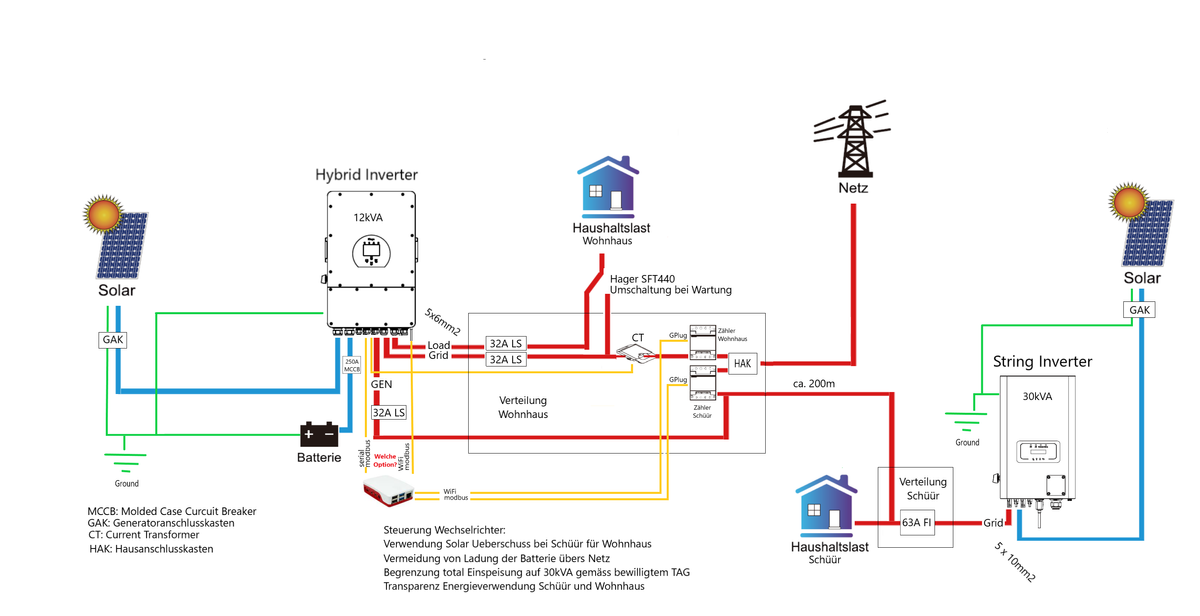
Angedachte Lösung:
- Der GEN Port des Hybrid Wechselrichters wird nur dazugeschaltet, wenn Solarüberschuss vorhanden ist (entweder über einen gesteuerten Schalter, oder über Abschaltung des GEN Ports in der WR Konfiguration - hier müsste man auch schreiben können). Der Zähler wird ja ausgelesen so dass bekannt ist, wann dies der Fall ist.
- Die Einspeisebegrenzung des Hybrid Wechselrichters (Solar Sell Wert - auch hier müsste man schreiben können) soll dazu geregelt werden mittels Berechnung aus den momentanen Einspeiseleistungen welche aus den beiden Zählern ausgelesen werden.
Ueber den Modbus Adapter im ioBroker sollte das gehen, aber die Lösung über den Solarman Logger fände ich eleganter.
Bin gespannt auf eure Feedback - Herzlichen Dank im Voraus.
-
Huhu, hat jemand nen Anstoß wie ich meinen Deye 800w WR mit dem mqtt client vom iobroer auslesen kann? Der Deye adapter lässt sich bei mir nicht installieren und endet mit Code 25.
-
Huhu, hat jemand nen Anstoß wie ich meinen Deye 800w WR mit dem mqtt client vom iobroer auslesen kann? Der Deye adapter lässt sich bei mir nicht installieren und endet mit Code 25.
@amnesia106 Welche Version von nodeJS, Admin und jsController?
-
@amnesia106 Welche Version von nodeJS, Admin und jsController?
iobroker add deyeidc auto --host DietPi --debug
Installing iobroker.deyeidc@0.0.14... (System call)
npm ERR! path /opt/iobroker/node_modules/bufferutil
npm ERR! command failednpm ERR! command sh -c node-gyp-buildnpm ERR! gyp info it worked if it ends with oknpm ERR! gyp info using node-gyp@7.1.2npm ERR! gyp info using node@18.19.0 | linux | arm64npm ERR! gyp info find Python using Python version 3.11.2 found at "/usr/bin/python3"npm ERR! (node:7702) [DEP0150] DeprecationWarning: Setting process.config is deprecated. In the future the property will be read-only.
npm ERR! (Use `node --trace-deprecation ...` to show where the warning was created)npm ERR! gyp info spawn /usr/bin/python3npm ERR! gyp info spawn args [npm ERR! gyp info spawn args '/opt/iobroker/node_modules/node-gyp/gyp/gyp_main.py',npm ERR! gyp info spawn args 'binding.gyp',npm ERR! gyp info spawn args '-f',
npm ERR! gyp info spawn args 'make',npm ERR! gyp info spawn args '-I',npm ERR! gyp info spawn args '/opt/iobroker/node_modules/bufferutil/build/config.gypi',npm ERR! gyp info spawn args '-I',npm ERR! gyp info spawn args '/opt/iobroker/node_modules/node-gyp/addon.gypi',npm ERR! gyp info spawn args '-I',npm ERR! gyp info spawn args '/home/iobroker/.cache/node-gyp/18.19.0/include/node/common.gypi',npm ERR! gyp info spawn args '-Dlibrary=shared_library',npm ERR! gyp info spawn args '-Dvisibility=default',npm ERR! gyp info spawn args '-Dnode_root_dir=/home/iobroker/.cache/node-gyp/18.19.0',
npm ERR! A complete log of this run can be found in: /home/iobroker/.npm/_logs/2024-02-15T12_23_14_202Z-debug-0.log
host.DietPi Cannot install iobroker.deyeidc@0.0.14: 1
ERROR: Process exited with code 25
Plattform: linux
RAM: 3.7 GB
Node.js: v18.19.0
NPM: 10.2.3 -
iobroker add deyeidc auto --host DietPi --debug
Installing iobroker.deyeidc@0.0.14... (System call)
npm ERR! path /opt/iobroker/node_modules/bufferutil
npm ERR! command failednpm ERR! command sh -c node-gyp-buildnpm ERR! gyp info it worked if it ends with oknpm ERR! gyp info using node-gyp@7.1.2npm ERR! gyp info using node@18.19.0 | linux | arm64npm ERR! gyp info find Python using Python version 3.11.2 found at "/usr/bin/python3"npm ERR! (node:7702) [DEP0150] DeprecationWarning: Setting process.config is deprecated. In the future the property will be read-only.
npm ERR! (Use `node --trace-deprecation ...` to show where the warning was created)npm ERR! gyp info spawn /usr/bin/python3npm ERR! gyp info spawn args [npm ERR! gyp info spawn args '/opt/iobroker/node_modules/node-gyp/gyp/gyp_main.py',npm ERR! gyp info spawn args 'binding.gyp',npm ERR! gyp info spawn args '-f',
npm ERR! gyp info spawn args 'make',npm ERR! gyp info spawn args '-I',npm ERR! gyp info spawn args '/opt/iobroker/node_modules/bufferutil/build/config.gypi',npm ERR! gyp info spawn args '-I',npm ERR! gyp info spawn args '/opt/iobroker/node_modules/node-gyp/addon.gypi',npm ERR! gyp info spawn args '-I',npm ERR! gyp info spawn args '/home/iobroker/.cache/node-gyp/18.19.0/include/node/common.gypi',npm ERR! gyp info spawn args '-Dlibrary=shared_library',npm ERR! gyp info spawn args '-Dvisibility=default',npm ERR! gyp info spawn args '-Dnode_root_dir=/home/iobroker/.cache/node-gyp/18.19.0',
npm ERR! A complete log of this run can be found in: /home/iobroker/.npm/_logs/2024-02-15T12_23_14_202Z-debug-0.log
host.DietPi Cannot install iobroker.deyeidc@0.0.14: 1
ERROR: Process exited with code 25
Plattform: linux
RAM: 3.7 GB
Node.js: v18.19.0
NPM: 10.2.3@amnesia106 Such mal
iobroker error process exited with code 25. Da ist sicher eine Vorgehensweise beschrieben, die dir helfen könnte. -
@rene55 ich hab den fehler auch nur bei dem Deye Adapter feststellen können, andere installieren ohne probleme
-
€: node-gyp neu installiert und bufferutil nachgeschoben hat den Fehler behoben... sry
Hab mal nen issue aufgemacht. Das komische: andere Adapter aus der repo laufen ohne Probleme durch. https://github.com/raschy/ioBroker.deyeidc/issues/81
irgendwas mit bufferutil schlägt da anfangs fehl, jedoch finde ich da nichts konkretes.
root@DietPi:~# npm ls bufferutil
root@ /root
├── bufferutil@4.0.8
└─┬ iobroker.deyeidc@0.0.14
  └─┬ websocket@1.0.34
    └── bufferutil@4.0.8 deduped
root@DietPi:/opt/iobroker/node_modules# npm i bufferutil@4.0.8 npm ERR! code 1 npm ERR! path /opt/iobroker/node_modules/bufferutil npm ERR! command failed npm ERR! command sh -c node-gyp-build npm ERR! gyp info it worked if it ends with ok npm ERR! gyp info using node-gyp@7.1.2 npm ERR! gyp info using node@18.19.1 | linux | arm64 npm ERR! gyp info find Python using Python version 3.11.2 found at "/usr/bin/python3" npm ERR! (node:3962) [DEP0150] DeprecationWarning: Setting process.config is deprecated. In the future the property will be read-only. npm ERR! (Use `node --trace-deprecation ...` to show where the warning was created) npm ERR! gyp info spawn /usr/bin/python3 npm ERR! gyp info spawn args [ npm ERR! gyp info spawn args '/opt/iobroker/node_modules/node-gyp/gyp/gyp_main.py', npm ERR! gyp info spawn args 'binding.gyp', npm ERR! gyp info spawn args '-f', npm ERR! gyp info spawn args 'make', npm ERR! gyp info spawn args '-I', npm ERR! gyp info spawn args '/opt/iobroker/node_modules/bufferutil/build/config.gypi', npm ERR! gyp info spawn args '-I', npm ERR! gyp info spawn args '/opt/iobroker/node_modules/node-gyp/addon.gypi', npm ERR! gyp info spawn args '-I', npm ERR! gyp info spawn args '/home/iobroker/.cache/node-gyp/18.19.1/include/node/common.gypi', npm ERR! gyp info spawn args '-Dlibrary=shared_library', npm ERR! gyp info spawn args '-Dvisibility=default', npm ERR! gyp info spawn args '-Dnode_root_dir=/home/iobroker/.cache/node-gyp/18.19.1', npm ERR! gyp info spawn args '-Dnode_gyp_dir=/opt/iobroker/node_modules/node-gyp', npm ERR! gyp info spawn args '-Dnode_lib_file=/home/iobroker/.cache/node-gyp/18.19.1/<(target_arch)/node.lib', npm ERR! gyp info spawn args '-Dmodule_root_dir=/opt/iobroker/node_modules/bufferutil', npm ERR! gyp info spawn args '-Dnode_engine=v8', npm ERR! gyp info spawn args '--depth=.', npm ERR! gyp info spawn args '--no-parallel', npm ERR! gyp info spawn args '--generator-output', npm ERR! gyp info spawn args 'build', npm ERR! gyp info spawn args '-Goutput_dir=.' npm ERR! gyp info spawn args ] npm ERR! Traceback (most recent call last): npm ERR! File "/opt/iobroker/node_modules/node-gyp/gyp/gyp_main.py", line 51, in <module> npm ERR! sys.exit(gyp.script_main()) npm ERR! ^^^^^^^^^^^^^^^^^ npm ERR! File "/opt/iobroker/node_modules/node-gyp/gyp/pylib/gyp/__init__.py", line 670, in script_main npm ERR! return main(sys.argv[1:]) npm ERR! ^^^^^^^^^^^^^^^^^^ npm ERR! File "/opt/iobroker/node_modules/node-gyp/gyp/pylib/gyp/__init__.py", line 662, in main npm ERR! return gyp_main(args) npm ERR! ^^^^^^^^^^^^^^ npm ERR! File "/opt/iobroker/node_modules/node-gyp/gyp/pylib/gyp/__init__.py", line 629, in gyp_main npm ERR! [generator, flat_list, targets, data] = Load( npm ERR! ^^^^^ npm ERR! File "/opt/iobroker/node_modules/node-gyp/gyp/pylib/gyp/__init__.py", line 150, in Load npm ERR! result = gyp.input.Load( npm ERR! ^^^^^^^^^^^^^^^ npm ERR! File "/opt/iobroker/node_modules/node-gyp/gyp/pylib/gyp/input.py", line 3021, in Load npm ERR! LoadTargetBuildFile( npm ERR! File "/opt/iobroker/node_modules/node-gyp/gyp/pylib/gyp/input.py", line 411, in LoadTargetBuildFile npm ERR! build_file_data = LoadOneBuildFile( npm ERR! ^^^^^^^^^^^^^^^^^ npm ERR! File "/opt/iobroker/node_modules/node-gyp/gyp/pylib/gyp/input.py", line 239, in LoadOneBuildFile npm ERR! build_file_contents = open(build_file_path, "rU").read() npm ERR! ^^^^^^^^^^^^^^^^^^^^^^^^^^^ npm ERR! ValueError: invalid mode: 'rU' while trying to load binding.gyp npm ERR! gyp ERR! configure error npm ERR! gyp ERR! stack Error: `gyp` failed with exit code: 1 npm ERR! gyp ERR! stack at ChildProcess.onCpExit (/opt/iobroker/node_modules/node-gyp/lib/configure.js:351:16) npm ERR! gyp ERR! stack at ChildProcess.emit (node:events:517:28) npm ERR! gyp ERR! stack at ChildProcess._handle.onexit (node:internal/child_process:292:12) npm ERR! gyp ERR! System Linux 6.1.21-v8+ npm ERR! gyp ERR! command "/usr/bin/node" "/opt/iobroker/node_modules/.bin/node-gyp" "rebuild" npm ERR! gyp ERR! cwd /opt/iobroker/node_modules/bufferutil npm ERR! gyp ERR! node -v v18.19.1 npm ERR! gyp ERR! node-gyp -v v7.1.2 npm ERR! gyp ERR! not ok -
€: node-gyp neu installiert und bufferutil nachgeschoben hat den Fehler behoben... sry
Hab mal nen issue aufgemacht. Das komische: andere Adapter aus der repo laufen ohne Probleme durch. https://github.com/raschy/ioBroker.deyeidc/issues/81
irgendwas mit bufferutil schlägt da anfangs fehl, jedoch finde ich da nichts konkretes.
root@DietPi:~# npm ls bufferutil
root@ /root
├── bufferutil@4.0.8
└─┬ iobroker.deyeidc@0.0.14
  └─┬ websocket@1.0.34
    └── bufferutil@4.0.8 deduped
root@DietPi:/opt/iobroker/node_modules# npm i bufferutil@4.0.8 npm ERR! code 1 npm ERR! path /opt/iobroker/node_modules/bufferutil npm ERR! command failed npm ERR! command sh -c node-gyp-build npm ERR! gyp info it worked if it ends with ok npm ERR! gyp info using node-gyp@7.1.2 npm ERR! gyp info using node@18.19.1 | linux | arm64 npm ERR! gyp info find Python using Python version 3.11.2 found at "/usr/bin/python3" npm ERR! (node:3962) [DEP0150] DeprecationWarning: Setting process.config is deprecated. In the future the property will be read-only. npm ERR! (Use `node --trace-deprecation ...` to show where the warning was created) npm ERR! gyp info spawn /usr/bin/python3 npm ERR! gyp info spawn args [ npm ERR! gyp info spawn args '/opt/iobroker/node_modules/node-gyp/gyp/gyp_main.py', npm ERR! gyp info spawn args 'binding.gyp', npm ERR! gyp info spawn args '-f', npm ERR! gyp info spawn args 'make', npm ERR! gyp info spawn args '-I', npm ERR! gyp info spawn args '/opt/iobroker/node_modules/bufferutil/build/config.gypi', npm ERR! gyp info spawn args '-I', npm ERR! gyp info spawn args '/opt/iobroker/node_modules/node-gyp/addon.gypi', npm ERR! gyp info spawn args '-I', npm ERR! gyp info spawn args '/home/iobroker/.cache/node-gyp/18.19.1/include/node/common.gypi', npm ERR! gyp info spawn args '-Dlibrary=shared_library', npm ERR! gyp info spawn args '-Dvisibility=default', npm ERR! gyp info spawn args '-Dnode_root_dir=/home/iobroker/.cache/node-gyp/18.19.1', npm ERR! gyp info spawn args '-Dnode_gyp_dir=/opt/iobroker/node_modules/node-gyp', npm ERR! gyp info spawn args '-Dnode_lib_file=/home/iobroker/.cache/node-gyp/18.19.1/<(target_arch)/node.lib', npm ERR! gyp info spawn args '-Dmodule_root_dir=/opt/iobroker/node_modules/bufferutil', npm ERR! gyp info spawn args '-Dnode_engine=v8', npm ERR! gyp info spawn args '--depth=.', npm ERR! gyp info spawn args '--no-parallel', npm ERR! gyp info spawn args '--generator-output', npm ERR! gyp info spawn args 'build', npm ERR! gyp info spawn args '-Goutput_dir=.' npm ERR! gyp info spawn args ] npm ERR! Traceback (most recent call last): npm ERR! File "/opt/iobroker/node_modules/node-gyp/gyp/gyp_main.py", line 51, in <module> npm ERR! sys.exit(gyp.script_main()) npm ERR! ^^^^^^^^^^^^^^^^^ npm ERR! File "/opt/iobroker/node_modules/node-gyp/gyp/pylib/gyp/__init__.py", line 670, in script_main npm ERR! return main(sys.argv[1:]) npm ERR! ^^^^^^^^^^^^^^^^^^ npm ERR! File "/opt/iobroker/node_modules/node-gyp/gyp/pylib/gyp/__init__.py", line 662, in main npm ERR! return gyp_main(args) npm ERR! ^^^^^^^^^^^^^^ npm ERR! File "/opt/iobroker/node_modules/node-gyp/gyp/pylib/gyp/__init__.py", line 629, in gyp_main npm ERR! [generator, flat_list, targets, data] = Load( npm ERR! ^^^^^ npm ERR! File "/opt/iobroker/node_modules/node-gyp/gyp/pylib/gyp/__init__.py", line 150, in Load npm ERR! result = gyp.input.Load( npm ERR! ^^^^^^^^^^^^^^^ npm ERR! File "/opt/iobroker/node_modules/node-gyp/gyp/pylib/gyp/input.py", line 3021, in Load npm ERR! LoadTargetBuildFile( npm ERR! File "/opt/iobroker/node_modules/node-gyp/gyp/pylib/gyp/input.py", line 411, in LoadTargetBuildFile npm ERR! build_file_data = LoadOneBuildFile( npm ERR! ^^^^^^^^^^^^^^^^^ npm ERR! File "/opt/iobroker/node_modules/node-gyp/gyp/pylib/gyp/input.py", line 239, in LoadOneBuildFile npm ERR! build_file_contents = open(build_file_path, "rU").read() npm ERR! ^^^^^^^^^^^^^^^^^^^^^^^^^^^ npm ERR! ValueError: invalid mode: 'rU' while trying to load binding.gyp npm ERR! gyp ERR! configure error npm ERR! gyp ERR! stack Error: `gyp` failed with exit code: 1 npm ERR! gyp ERR! stack at ChildProcess.onCpExit (/opt/iobroker/node_modules/node-gyp/lib/configure.js:351:16) npm ERR! gyp ERR! stack at ChildProcess.emit (node:events:517:28) npm ERR! gyp ERR! stack at ChildProcess._handle.onexit (node:internal/child_process:292:12) npm ERR! gyp ERR! System Linux 6.1.21-v8+ npm ERR! gyp ERR! command "/usr/bin/node" "/opt/iobroker/node_modules/.bin/node-gyp" "rebuild" npm ERR! gyp ERR! cwd /opt/iobroker/node_modules/bufferutil npm ERR! gyp ERR! node -v v18.19.1 npm ERR! gyp ERR! node-gyp -v v7.1.2 npm ERR! gyp ERR! not ok@amnesia106
root.... eiderdaus.. :-)das Issue kannst du auch gleich wieder zu machen, da du dir mit deinem root-account deine Rechte im System in Node und NPM geschossen hast... :-(
Log dich bitte mal als user ein, den du angelegt haben solltest, geh in /opt/iobroker und mach ein iobroker fix, das biegt hoffentlich die Rechte wieder gerade...
-
€: node-gyp neu installiert und bufferutil nachgeschoben hat den Fehler behoben... sry
Hab mal nen issue aufgemacht. Das komische: andere Adapter aus der repo laufen ohne Probleme durch. https://github.com/raschy/ioBroker.deyeidc/issues/81
irgendwas mit bufferutil schlägt da anfangs fehl, jedoch finde ich da nichts konkretes.
root@DietPi:~# npm ls bufferutil
root@ /root
├── bufferutil@4.0.8
└─┬ iobroker.deyeidc@0.0.14
  └─┬ websocket@1.0.34
    └── bufferutil@4.0.8 deduped
root@DietPi:/opt/iobroker/node_modules# npm i bufferutil@4.0.8 npm ERR! code 1 npm ERR! path /opt/iobroker/node_modules/bufferutil npm ERR! command failed npm ERR! command sh -c node-gyp-build npm ERR! gyp info it worked if it ends with ok npm ERR! gyp info using node-gyp@7.1.2 npm ERR! gyp info using node@18.19.1 | linux | arm64 npm ERR! gyp info find Python using Python version 3.11.2 found at "/usr/bin/python3" npm ERR! (node:3962) [DEP0150] DeprecationWarning: Setting process.config is deprecated. In the future the property will be read-only. npm ERR! (Use `node --trace-deprecation ...` to show where the warning was created) npm ERR! gyp info spawn /usr/bin/python3 npm ERR! gyp info spawn args [ npm ERR! gyp info spawn args '/opt/iobroker/node_modules/node-gyp/gyp/gyp_main.py', npm ERR! gyp info spawn args 'binding.gyp', npm ERR! gyp info spawn args '-f', npm ERR! gyp info spawn args 'make', npm ERR! gyp info spawn args '-I', npm ERR! gyp info spawn args '/opt/iobroker/node_modules/bufferutil/build/config.gypi', npm ERR! gyp info spawn args '-I', npm ERR! gyp info spawn args '/opt/iobroker/node_modules/node-gyp/addon.gypi', npm ERR! gyp info spawn args '-I', npm ERR! gyp info spawn args '/home/iobroker/.cache/node-gyp/18.19.1/include/node/common.gypi', npm ERR! gyp info spawn args '-Dlibrary=shared_library', npm ERR! gyp info spawn args '-Dvisibility=default', npm ERR! gyp info spawn args '-Dnode_root_dir=/home/iobroker/.cache/node-gyp/18.19.1', npm ERR! gyp info spawn args '-Dnode_gyp_dir=/opt/iobroker/node_modules/node-gyp', npm ERR! gyp info spawn args '-Dnode_lib_file=/home/iobroker/.cache/node-gyp/18.19.1/<(target_arch)/node.lib', npm ERR! gyp info spawn args '-Dmodule_root_dir=/opt/iobroker/node_modules/bufferutil', npm ERR! gyp info spawn args '-Dnode_engine=v8', npm ERR! gyp info spawn args '--depth=.', npm ERR! gyp info spawn args '--no-parallel', npm ERR! gyp info spawn args '--generator-output', npm ERR! gyp info spawn args 'build', npm ERR! gyp info spawn args '-Goutput_dir=.' npm ERR! gyp info spawn args ] npm ERR! Traceback (most recent call last): npm ERR! File "/opt/iobroker/node_modules/node-gyp/gyp/gyp_main.py", line 51, in <module> npm ERR! sys.exit(gyp.script_main()) npm ERR! ^^^^^^^^^^^^^^^^^ npm ERR! File "/opt/iobroker/node_modules/node-gyp/gyp/pylib/gyp/__init__.py", line 670, in script_main npm ERR! return main(sys.argv[1:]) npm ERR! ^^^^^^^^^^^^^^^^^^ npm ERR! File "/opt/iobroker/node_modules/node-gyp/gyp/pylib/gyp/__init__.py", line 662, in main npm ERR! return gyp_main(args) npm ERR! ^^^^^^^^^^^^^^ npm ERR! File "/opt/iobroker/node_modules/node-gyp/gyp/pylib/gyp/__init__.py", line 629, in gyp_main npm ERR! [generator, flat_list, targets, data] = Load( npm ERR! ^^^^^ npm ERR! File "/opt/iobroker/node_modules/node-gyp/gyp/pylib/gyp/__init__.py", line 150, in Load npm ERR! result = gyp.input.Load( npm ERR! ^^^^^^^^^^^^^^^ npm ERR! File "/opt/iobroker/node_modules/node-gyp/gyp/pylib/gyp/input.py", line 3021, in Load npm ERR! LoadTargetBuildFile( npm ERR! File "/opt/iobroker/node_modules/node-gyp/gyp/pylib/gyp/input.py", line 411, in LoadTargetBuildFile npm ERR! build_file_data = LoadOneBuildFile( npm ERR! ^^^^^^^^^^^^^^^^^ npm ERR! File "/opt/iobroker/node_modules/node-gyp/gyp/pylib/gyp/input.py", line 239, in LoadOneBuildFile npm ERR! build_file_contents = open(build_file_path, "rU").read() npm ERR! ^^^^^^^^^^^^^^^^^^^^^^^^^^^ npm ERR! ValueError: invalid mode: 'rU' while trying to load binding.gyp npm ERR! gyp ERR! configure error npm ERR! gyp ERR! stack Error: `gyp` failed with exit code: 1 npm ERR! gyp ERR! stack at ChildProcess.onCpExit (/opt/iobroker/node_modules/node-gyp/lib/configure.js:351:16) npm ERR! gyp ERR! stack at ChildProcess.emit (node:events:517:28) npm ERR! gyp ERR! stack at ChildProcess._handle.onexit (node:internal/child_process:292:12) npm ERR! gyp ERR! System Linux 6.1.21-v8+ npm ERR! gyp ERR! command "/usr/bin/node" "/opt/iobroker/node_modules/.bin/node-gyp" "rebuild" npm ERR! gyp ERR! cwd /opt/iobroker/node_modules/bufferutil npm ERR! gyp ERR! node -v v18.19.1 npm ERR! gyp ERR! node-gyp -v v7.1.2 npm ERR! gyp ERR! not ok@amnesia106 sagte in [Adapter] cloudfreie Auslesung von Deye-Invertern:
node-gyp neu installiert und bufferutil
Ich habe von diesen beiden Utilitys noch nie was gehört, geschweige denn installiert. Trotzdem viel Spaß mit dem Adapter.


Support us
590
Online32.7k
Users82.5k
Topics1.3m
Posts