Skip to content
  • Home
  • Recent
  • Tags
  • 0 Unread 0
  • Categories
  • Unreplied
  • Popular
  • GitHub
  • Docu
  • Hilfe
Skins
  • Light
  • Brite
  • Cerulean
  • Cosmo
  • Flatly
  • Journal
  • Litera
  • Lumen
  • Lux
  • Materia
  • Minty
  • Morph
  • Pulse
  • Sandstone
  • Simplex
  • Sketchy
  • Spacelab
  • United
  • Yeti
  • Zephyr
  • Dark
  • Cyborg
  • Darkly
  • Quartz
  • Slate
  • Solar
  • Superhero
  • Vapor

  • Default (No Skin)
  • No Skin
Collapse
ioBroker Logo

Community Forum

donate donate
  1. ioBroker Community Home
  2. Deutsch
  3. ioBroker Allgemein
  4. [gelöst] Brauche Hilfe beim NSPanel mit Tasmota
NEWS

  • Monatsrückblick Januar/Februar 2026 ist online!
    BluefoxB
    Bluefox
    18
    1
    720

  • Jahresrückblick 2025 – unser neuer Blogbeitrag ist online! ✨
    BluefoxB
    Bluefox
    18
    1
    5.9k

  • Neuer Blogbeitrag: Monatsrückblick - Dezember 2025 🎄
    BluefoxB
    Bluefox
    13
    1
    1.5k

[gelöst] Brauche Hilfe beim NSPanel mit Tasmota
Scheduled Pinned Locked Moved ioBroker Allgemein
nspanel mqtt sonoff
104 Posts 5 Posters 12.4k Views 4 Watching
  • Oldest to Newest
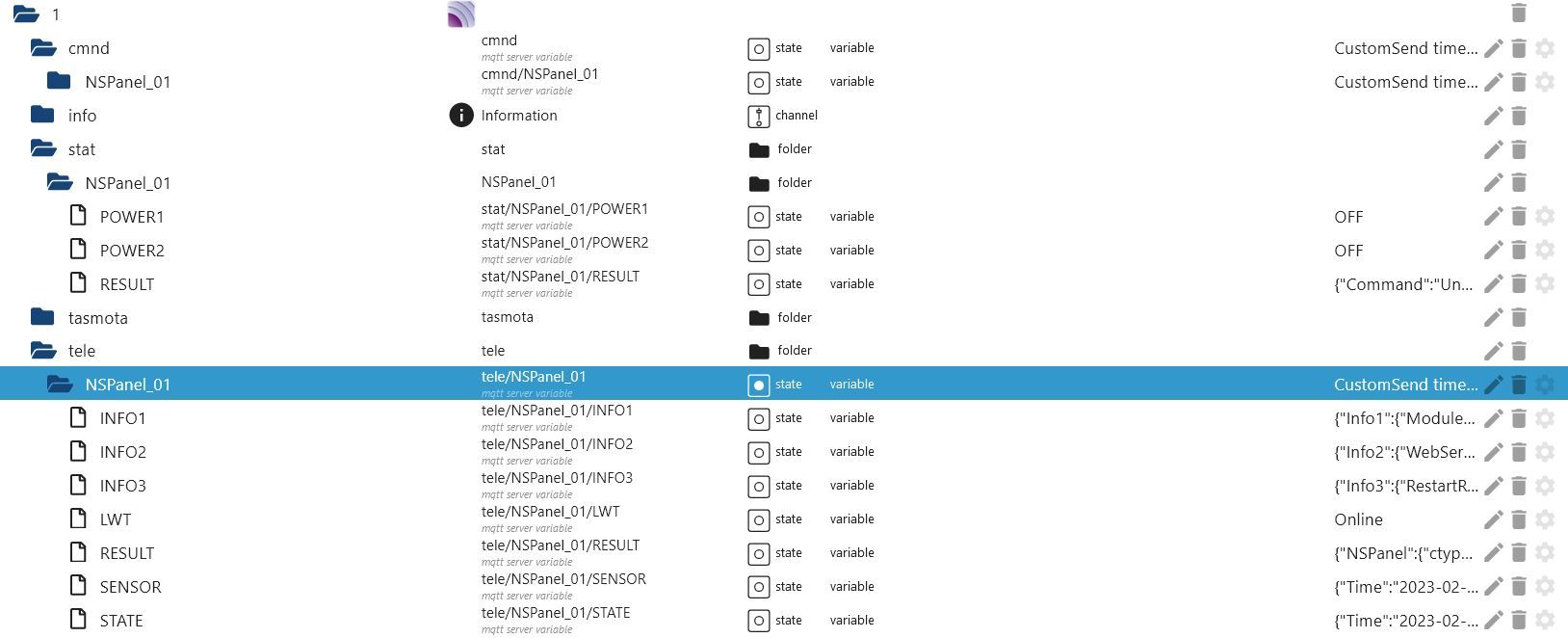
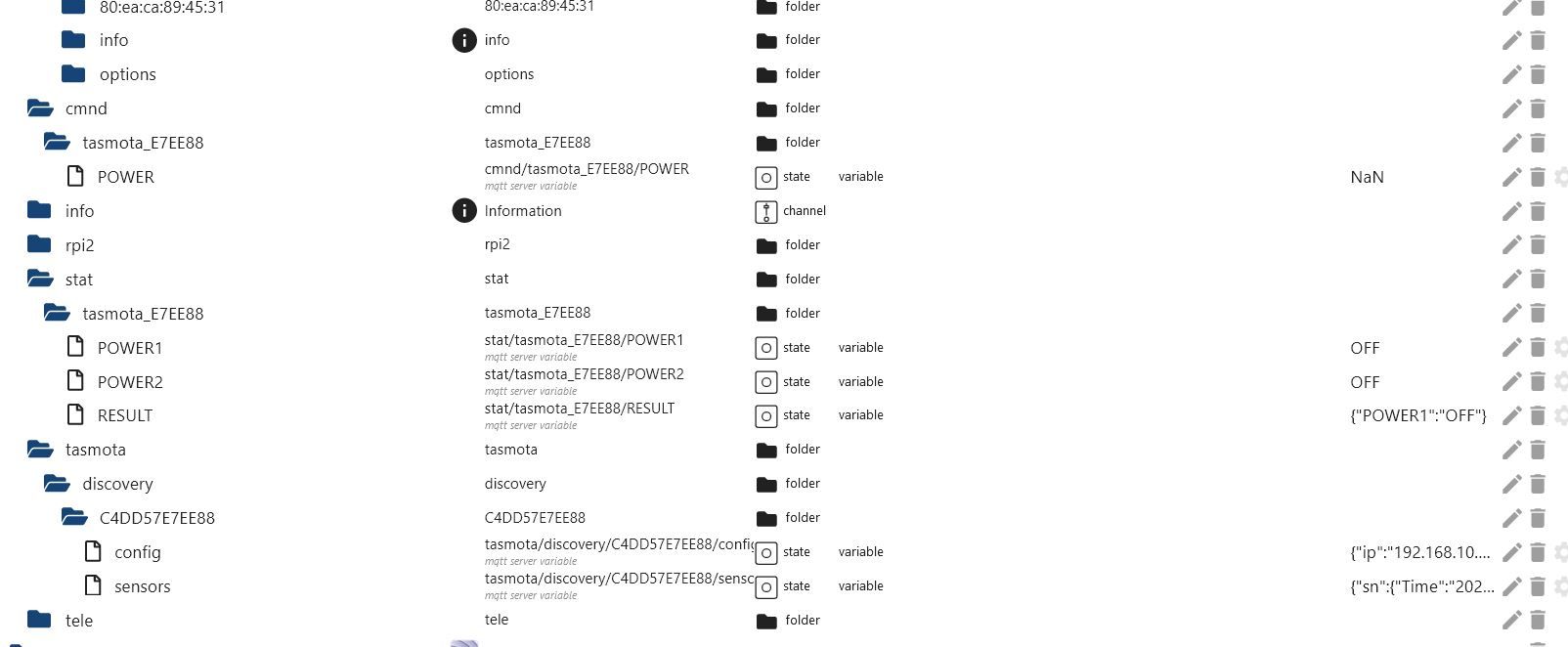
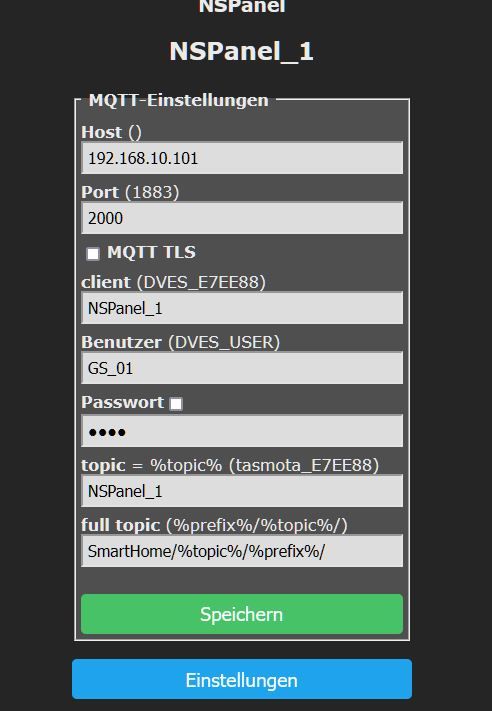
  • Newest to Oldest
  • Most Votes
Reply
  • Reply as topic
Log in to reply
This topic has been deleted. Only users with topic management privileges can see it.
  • GregorSG GregorS

    @tt-tom

    ja, laut der Anleitung.
    über die Konsole habe ich es zig mal probiert, aber er CustomSend wurde nicht angelegt.

    T Offline
    T Offline
    TT-Tom
    wrote on last edited by
    #55

    @gregors
    großer Fehler.

    der MQTT Broker muss ihn anlegen, sonst wird das nix. über die Konsole ist das auch ein Glücksspiel. Im Wiki sind verschiedene Möglichkeiten aufgezeigt

    Link Text

    bitte mal lesen

    Gruß Tom
    https://github.com/tt-tom17
    Wenn meine Hilfe erfolgreich war, benutze bitte das Voting unten rechts im Beitrag

    NSPanel Script Wiki
    https://github.com/joBr99/nspanel-lovelace-ui/wiki

    NSPanel Adapter Wiki
    https://github.com/ticaki/ioBroker.nspanel-lovelace-ui/wiki

    1 Reply Last reply
    1
    • ArmilarA Armilar

      @gregors

      Bei mir funktioniert der CustomSend am besten mit der Variante MQTT-Explorer

      Manuelles anlegen kann mein alter Broker irgendwie nicht und mit CustomSend über die Konsole bekommt er auch nichts zustande

      GregorSG Online
      GregorSG Online
      GregorS
      wrote on last edited by
      #56

      @armilar

      OK. dann lade ich mir en MQTT Explorer mal runter und versuche es damit mal.

      INTEL NUC i7, Sonoff, hmIP, AVM, Jeelink, T-Link, Alexa, Saia-Burgess, uvm.

      T ArmilarA matze55M 3 Replies Last reply
      0
      • GregorSG GregorS

        @armilar

        OK. dann lade ich mir en MQTT Explorer mal runter und versuche es damit mal.

        T Offline
        T Offline
        TT-Tom
        wrote on last edited by
        #57

        @gregors sagte in Brauche Hilfe beim NSPanel mit Tasmota:

        @armilar

        OK. dann lade ich mir en MQTT Explorer mal runter und versuche es damit mal.

        lösche aber bitte vorher den alten Datenpunkt, damit du sicher sein kannst, dass es funktioniert hat

        Gruß Tom
        https://github.com/tt-tom17
        Wenn meine Hilfe erfolgreich war, benutze bitte das Voting unten rechts im Beitrag

        NSPanel Script Wiki
        https://github.com/joBr99/nspanel-lovelace-ui/wiki

        NSPanel Adapter Wiki
        https://github.com/ticaki/ioBroker.nspanel-lovelace-ui/wiki

        1 Reply Last reply
        0
        • GregorSG GregorS

          @armilar

          OK. dann lade ich mir en MQTT Explorer mal runter und versuche es damit mal.

          ArmilarA Offline
          ArmilarA Offline
          Armilar
          Most Active Forum Testing
          wrote on last edited by
          #58

          @gregors

          Da hat @TT-Tom schon recht. Der MQTT-Broker muss den Topic anlegen.

          Variante 3...

          Installationsanleitung, Tipps, Alias-Definitionen, FAQ für das Sonoff NSPanel mit lovelace UI unter ioBroker
          https://github.com/joBr99/nspanel-lovelace-ui/wiki

          Benutzt das Voting rechts unten im Beitrag wenn er euch geholfen hat.

          GregorSG 1 Reply Last reply
          0
          • GregorSG GregorS

            @armilar

            OK. dann lade ich mir en MQTT Explorer mal runter und versuche es damit mal.

            matze55M Offline
            matze55M Offline
            matze55
            wrote on last edited by
            #59

            @gregors MQTT lass das mal lieber...da habe ich auch Probs gehabt......der flutscht ab..binzwar anfänger...aber lese viel....ich würde es lassen.....mein NAS...weint

            Homematic CCU3,-Synology NAS 4TB,- 2 Sonos One,- Gigabyte N4500 8GB DDR4 2TB
            Tapo C210 Cam
            WLED Steuerung über lcdwiki

            T ArmilarA 2 Replies Last reply
            0
            • matze55M matze55

              @gregors MQTT lass das mal lieber...da habe ich auch Probs gehabt......der flutscht ab..binzwar anfänger...aber lese viel....ich würde es lassen.....mein NAS...weint

              T Offline
              T Offline
              TT-Tom
              wrote on last edited by
              #60

              @matze55 sagte in Brauche Hilfe beim NSPanel mit Tasmota:

              @gregors MQTT lass das mal lieber...da habe ich auch Probs gehabt......der flutscht ab..binzwar anfänger...aber lese viel....ich würde es lassen.....mein NAS...weint

              Was soll uns das jetzt sagen, kann dir grade nicht folgen

              Gruß Tom
              https://github.com/tt-tom17
              Wenn meine Hilfe erfolgreich war, benutze bitte das Voting unten rechts im Beitrag

              NSPanel Script Wiki
              https://github.com/joBr99/nspanel-lovelace-ui/wiki

              NSPanel Adapter Wiki
              https://github.com/ticaki/ioBroker.nspanel-lovelace-ui/wiki

              1 Reply Last reply
              0
              • matze55M matze55

                @gregors MQTT lass das mal lieber...da habe ich auch Probs gehabt......der flutscht ab..binzwar anfänger...aber lese viel....ich würde es lassen.....mein NAS...weint

                ArmilarA Offline
                ArmilarA Offline
                Armilar
                Most Active Forum Testing
                wrote on last edited by
                #61

                @matze55

                Spaßvogel ;-)

                Welches Protokoll soll denn das sonst erledigen? Mein NAS lacht 😊

                Installationsanleitung, Tipps, Alias-Definitionen, FAQ für das Sonoff NSPanel mit lovelace UI unter ioBroker
                https://github.com/joBr99/nspanel-lovelace-ui/wiki

                Benutzt das Voting rechts unten im Beitrag wenn er euch geholfen hat.

                1 Reply Last reply
                0
                • ArmilarA Armilar

                  @gregors

                  Da hat @TT-Tom schon recht. Der MQTT-Broker muss den Topic anlegen.

                  Variante 3...

                  GregorSG Online
                  GregorSG Online
                  GregorS
                  wrote on last edited by GregorS
                  #62

                  @armilar

                  Habe CustomSend jetzt über MQTT-Explorer angelegt.

                  16:32:16.679 CMD: CustomSend time~11:11
                  16:32:16.701 MQT: SmartHome/NSPanel_1/stat/RESULT = {"CustomSend":"Done"}
                  

                  Es kommt nichts an

                  a1.JPG

                  Und es dreht sich immer noch
                  In CustomSend steht kurz eine Uhrzeit drin, danach wird sie von

                  entityUpd~Büro~button~bPrev~~65535~~~button~bNext~~65535~~~delete~~~~~~delete~~~~~~delete~~~~~~delete~~~~~
                  

                  überschrieben.

                  INTEL NUC i7, Sonoff, hmIP, AVM, Jeelink, T-Link, Alexa, Saia-Burgess, uvm.

                  T 1 Reply Last reply
                  0
                  • GregorSG GregorS

                    @armilar

                    Habe CustomSend jetzt über MQTT-Explorer angelegt.

                    16:32:16.679 CMD: CustomSend time~11:11
                    16:32:16.701 MQT: SmartHome/NSPanel_1/stat/RESULT = {"CustomSend":"Done"}
                    

                    Es kommt nichts an
                    a1.JPG

                    Und es dreht sich immer noch
                    In CustomSend steht kurz eine Uhrzeit drin, danach wird sie von

                    entityUpd~Büro~button~bPrev~~65535~~~button~bNext~~65535~~~delete~~~~~~delete~~~~~~delete~~~~~~delete~~~~~
                    

                    überschrieben.

                    T Offline
                    T Offline
                    TT-Tom
                    wrote on last edited by
                    #63

                    @gregors Zeige bitte mal die Config vom Script. den teil hier

                    export const config: Config = {
                        panelRecvTopic: 'mqtt.0.SmartHome.NSPanel_1.tele.RESULT',       // Bitte anpassen
                        panelSendTopic: 'mqtt.0.SmartHome.NSPanel_1.cmnd.CustomSend',   // Bitte anpassen


                    Gruß Tom
                    https://github.com/tt-tom17
                    Wenn meine Hilfe erfolgreich war, benutze bitte das Voting unten rechts im Beitrag

                    NSPanel Script Wiki
                    https://github.com/joBr99/nspanel-lovelace-ui/wiki

                    NSPanel Adapter Wiki
                    https://github.com/ticaki/ioBroker.nspanel-lovelace-ui/wiki

                    GregorSG 1 Reply Last reply
                    0
                    • T TT-Tom

                      @gregors Zeige bitte mal die Config vom Script. den teil hier

                      export const config: Config = {
                          panelRecvTopic: 'mqtt.0.SmartHome.NSPanel_1.tele.RESULT',       // Bitte anpassen
                          panelSendTopic: 'mqtt.0.SmartHome.NSPanel_1.cmnd.CustomSend',   // Bitte anpassen
                      
                      
                      GregorSG Online
                      GregorSG Online
                      GregorS
                      wrote on last edited by
                      #64

                      @tt-tom

                      export const config: Config = {
                          panelRecvTopic: 'mqtt.1.SmartHome.NSPanel_1.tele.RESULT',       // Bitte anpassen
                          panelSendTopic: 'mqtt.1.SmartHome.NSPanel_1.cmnd.CustomSend',   // Bitte anpassen


                      INTEL NUC i7, Sonoff, hmIP, AVM, Jeelink, T-Link, Alexa, Saia-Burgess, uvm.

                      T 1 Reply Last reply
                      0
                      • GregorSG GregorS

                        @tt-tom

                        export const config: Config = {
                            panelRecvTopic: 'mqtt.1.SmartHome.NSPanel_1.tele.RESULT',       // Bitte anpassen
                            panelSendTopic: 'mqtt.1.SmartHome.NSPanel_1.cmnd.CustomSend',   // Bitte anpassen
                        
                        
                        T Offline
                        T Offline
                        TT-Tom
                        wrote on last edited by
                        #65

                        @gregors okay das passt so. hast du in dem Script schon Sachen angepasst?

                        Gruß Tom
                        https://github.com/tt-tom17
                        Wenn meine Hilfe erfolgreich war, benutze bitte das Voting unten rechts im Beitrag

                        NSPanel Script Wiki
                        https://github.com/joBr99/nspanel-lovelace-ui/wiki

                        NSPanel Adapter Wiki
                        https://github.com/ticaki/ioBroker.nspanel-lovelace-ui/wiki

                        GregorSG 1 Reply Last reply
                        0
                        • T TT-Tom

                          @gregors okay das passt so. hast du in dem Script schon Sachen angepasst?

                          GregorSG Online
                          GregorSG Online
                          GregorS
                          wrote on last edited by
                          #66

                          @tt-tom
                          ja, einzelne Teile aus dem Video (Wetter) bis zum Punkt Geräteauswahl (Habe ich nicht).

                          INTEL NUC i7, Sonoff, hmIP, AVM, Jeelink, T-Link, Alexa, Saia-Burgess, uvm.

                          T 1 Reply Last reply
                          0
                          • GregorSG GregorS

                            @tt-tom
                            ja, einzelne Teile aus dem Video (Wetter) bis zum Punkt Geräteauswahl (Habe ich nicht).

                            T Offline
                            T Offline
                            TT-Tom
                            wrote on last edited by
                            #67

                            @gregors nimm bitte noch mal das Originalscript und setze es ein. bin langsam mit dem Latein am Ende.

                            Gruß Tom
                            https://github.com/tt-tom17
                            Wenn meine Hilfe erfolgreich war, benutze bitte das Voting unten rechts im Beitrag

                            NSPanel Script Wiki
                            https://github.com/joBr99/nspanel-lovelace-ui/wiki

                            NSPanel Adapter Wiki
                            https://github.com/ticaki/ioBroker.nspanel-lovelace-ui/wiki

                            GregorSG 1 Reply Last reply
                            0
                            • T TT-Tom

                              @gregors nimm bitte noch mal das Originalscript und setze es ein. bin langsam mit dem Latein am Ende.

                              GregorSG Online
                              GregorSG Online
                              GregorS
                              wrote on last edited by
                              #68

                              @tt-tom
                              Von hier?
                              https://raw.githubusercontent.com/joBr99/nspanel-lovelace-ui/main/ioBroker/NsPanelTs.ts

                              INTEL NUC i7, Sonoff, hmIP, AVM, Jeelink, T-Link, Alexa, Saia-Burgess, uvm.

                              T 1 Reply Last reply
                              0
                              • GregorSG GregorS

                                @tt-tom
                                Von hier?
                                https://raw.githubusercontent.com/joBr99/nspanel-lovelace-ui/main/ioBroker/NsPanelTs.ts

                                T Offline
                                T Offline
                                TT-Tom
                                wrote on last edited by
                                #69

                                @gregors ja von der Github Seite.

                                Gruß Tom
                                https://github.com/tt-tom17
                                Wenn meine Hilfe erfolgreich war, benutze bitte das Voting unten rechts im Beitrag

                                NSPanel Script Wiki
                                https://github.com/joBr99/nspanel-lovelace-ui/wiki

                                NSPanel Adapter Wiki
                                https://github.com/ticaki/ioBroker.nspanel-lovelace-ui/wiki

                                GregorSG 1 Reply Last reply
                                0
                                • T TT-Tom

                                  @gregors ja von der Github Seite.

                                  GregorSG Online
                                  GregorSG Online
                                  GregorS
                                  wrote on last edited by
                                  #70

                                  @tt-tom

                                  Habe ich gemacht und nur

                                  export const config: Config = {
                                     panelRecvTopic: 'mqtt.1.SmartHome.NSPanel_1.tele.RESULT',       // Bitte anpassen
                                     panelSendTopic: 'mqtt.1.SmartHome.NSPanel_1.cmnd.CustomSend',   // Bitte anpassen
                                  

                                  angepasst.
                                  Gleiche Ergebnis.

                                  Ich werde morgen mal das Display zurück setzten und es nochmal komplett von vorne Stück für Stück installieren und parametrieren.
                                  mqtt.1 und userdaten.0/NSPanel werde ich vorher löschen.

                                  INTEL NUC i7, Sonoff, hmIP, AVM, Jeelink, T-Link, Alexa, Saia-Burgess, uvm.

                                  T 1 Reply Last reply
                                  0
                                  • GregorSG GregorS

                                    @tt-tom

                                    Habe ich gemacht und nur

                                    export const config: Config = {
                                       panelRecvTopic: 'mqtt.1.SmartHome.NSPanel_1.tele.RESULT',       // Bitte anpassen
                                       panelSendTopic: 'mqtt.1.SmartHome.NSPanel_1.cmnd.CustomSend',   // Bitte anpassen
                                    

                                    angepasst.
                                    Gleiche Ergebnis.

                                    Ich werde morgen mal das Display zurück setzten und es nochmal komplett von vorne Stück für Stück installieren und parametrieren.
                                    mqtt.1 und userdaten.0/NSPanel werde ich vorher löschen.

                                    T Offline
                                    T Offline
                                    TT-Tom
                                    wrote on last edited by
                                    #71

                                    @gregors sagte in Brauche Hilfe beim NSPanel mit Tasmota:

                                    ch werde morgen mal das Display zurück setzten und es nochmal komplett von vorne Stück für Stück installieren und parametrieren.
                                    mqtt.1 und userdaten.0/NSPanel werde ich vorher löschen.

                                    denke auch an den Alias Pfad. nutze das Wiki, dort ist alles step by step

                                    Wiki

                                    Gruß Tom
                                    https://github.com/tt-tom17
                                    Wenn meine Hilfe erfolgreich war, benutze bitte das Voting unten rechts im Beitrag

                                    NSPanel Script Wiki
                                    https://github.com/joBr99/nspanel-lovelace-ui/wiki

                                    NSPanel Adapter Wiki
                                    https://github.com/ticaki/ioBroker.nspanel-lovelace-ui/wiki

                                    GregorSG 1 Reply Last reply
                                    0
                                    • T TT-Tom

                                      @gregors sagte in Brauche Hilfe beim NSPanel mit Tasmota:

                                      ch werde morgen mal das Display zurück setzten und es nochmal komplett von vorne Stück für Stück installieren und parametrieren.
                                      mqtt.1 und userdaten.0/NSPanel werde ich vorher löschen.

                                      denke auch an den Alias Pfad. nutze das Wiki, dort ist alles step by step

                                      Wiki

                                      GregorSG Online
                                      GregorSG Online
                                      GregorS
                                      wrote on last edited by
                                      #72

                                      @tt-tom
                                      Werde ich machen.
                                      Gebe dann Bescheid

                                      INTEL NUC i7, Sonoff, hmIP, AVM, Jeelink, T-Link, Alexa, Saia-Burgess, uvm.

                                      T 1 Reply Last reply
                                      0
                                      • GregorSG GregorS

                                        @tt-tom
                                        Werde ich machen.
                                        Gebe dann Bescheid

                                        T Offline
                                        T Offline
                                        TT-Tom
                                        wrote on last edited by
                                        #73

                                        @gregors okay viel Erfolg

                                        Gruß Tom
                                        https://github.com/tt-tom17
                                        Wenn meine Hilfe erfolgreich war, benutze bitte das Voting unten rechts im Beitrag

                                        NSPanel Script Wiki
                                        https://github.com/joBr99/nspanel-lovelace-ui/wiki

                                        NSPanel Adapter Wiki
                                        https://github.com/ticaki/ioBroker.nspanel-lovelace-ui/wiki

                                        GregorSG 1 Reply Last reply
                                        0
                                        • T TT-Tom

                                          @gregors okay viel Erfolg

                                          GregorSG Online
                                          GregorSG Online
                                          GregorS
                                          wrote on last edited by
                                          #74

                                          @tt-tom

                                          Habe das NSPanel anhand der Wiki komplett neu durchkonfiguriert.
                                          Bis zum Punkt 9, "Ab jetzt sollte der Startup-Screen „Waiting for Connection“ in den Sreensaver wechseln und minütlich die Uhrzeit an den Screensaver übertragen"

                                          Es dreht sich nur. Keine Änderung gegenüber früher.

                                          Aber dann ist mir was aufgefallen.
                                          Ich nutze für das NSPanel mqtt.1 mit dem Port 2000.
                                          Unter mqtt.1 hat er mir die Verzeichnisse angelegt und auch das CustomSend (via MQTT Explorer).

                                          Unter mqtt.0 (hat Port 6064) hat er mir ebenfalls Verzeichnisse angelegt.
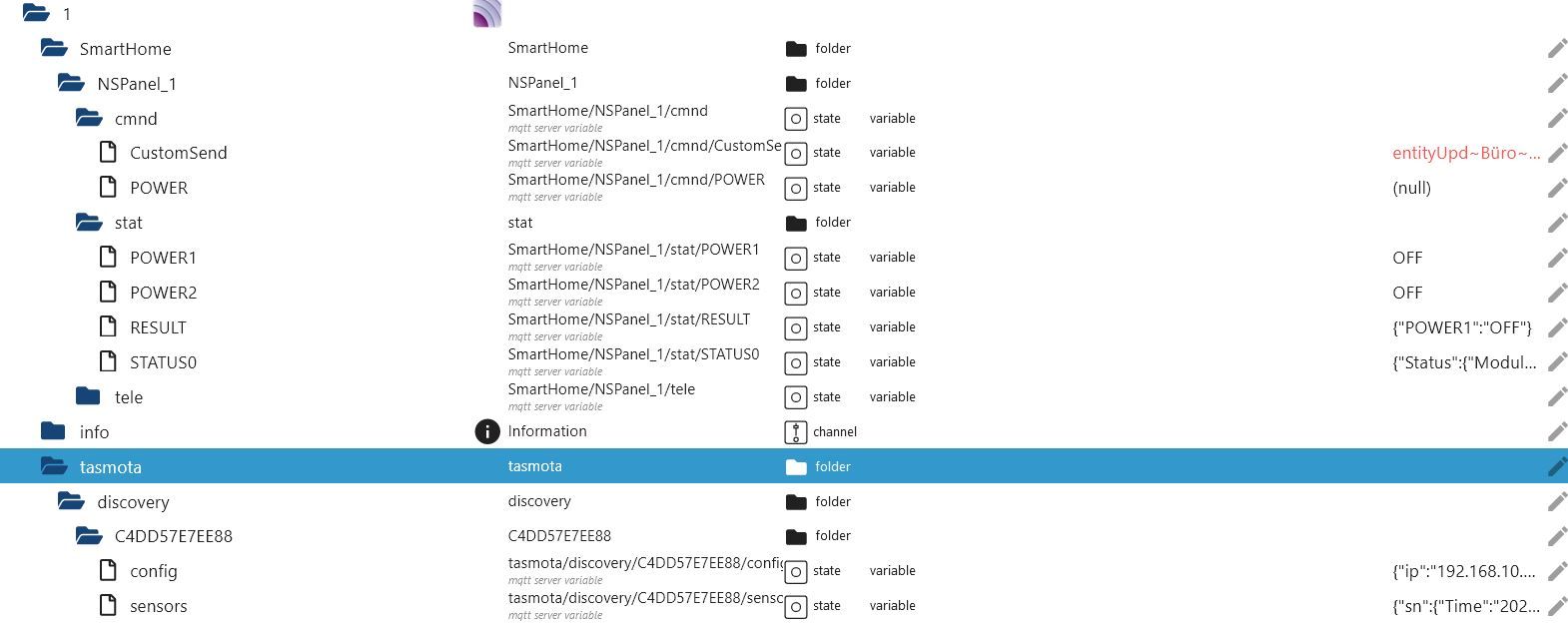
                                          a1.JPG
                                          Hier mqtt.1

                                          a2.JPG
                                          Hier mqtt.0

                                          a3.JPG

                                          INTEL NUC i7, Sonoff, hmIP, AVM, Jeelink, T-Link, Alexa, Saia-Burgess, uvm.

                                          T 1 Reply Last reply
                                          0

                                          Hello! It looks like you're interested in this conversation, but you don't have an account yet.

                                          Getting fed up of having to scroll through the same posts each visit? When you register for an account, you'll always come back to exactly where you were before, and choose to be notified of new replies (either via email, or push notification). You'll also be able to save bookmarks and upvote posts to show your appreciation to other community members.

                                          With your input, this post could be even better 💗

                                          Register Login
                                          Reply
                                          • Reply as topic
                                          Log in to reply
                                          • Oldest to Newest
                                          • Newest to Oldest
                                          • Most Votes


                                          Support us

                                          ioBroker
                                          Community Adapters
                                          Donate
                                          FAQ Cloud / IOT
                                          HowTo: Node.js-Update
                                          HowTo: Backup/Restore
                                          Downloads
                                          BLOG

                                          551

                                          Online

                                          32.7k

                                          Users

                                          82.6k

                                          Topics

                                          1.3m

                                          Posts
                                          Community
                                          Impressum | Datenschutz-Bestimmungen | Nutzungsbedingungen | Einwilligungseinstellungen
                                          ioBroker Community 2014-2025
                                          logo
                                          • Login

                                          • Don't have an account? Register

                                          • Login or register to search.
                                          • First post
                                            Last post
                                          0
                                          • Home
                                          • Recent
                                          • Tags
                                          • Unread 0
                                          • Categories
                                          • Unreplied
                                          • Popular
                                          • GitHub
                                          • Docu
                                          • Hilfe