




IOBroker startet nach zurückspielen des Backups nicht mehr
-
Hallo zusammen,
bei mir läuft der IOBroker seit einger Zeit auf meiner QNap über die Container Station/Docker. Da ich in ein andere IP Netz umgezogen bin und danach einiges nicht mehr gepasst hat, habe ich den Container neu aufgesetzt. Dazu habe ich im IOBroker zuvor nahezu alle Dienste beendet und eni Backup gemacht. Dieses habe ich rauskopiert und jetzt in meine neue Installation eingefügt. Gefunden hat er es und es wurde auch eine Erfolgsmeldung angezeigt. Anschließend war der Container gestoppt und ich musste ihn neu starten.
Die Prozedur habe ich jetzt schon 3 mal versucht und er bleibt immer wieder an der gleichen Stelle stehen. Hat jemand einen Tip?
------------------------- 2023-01-24 22:08:31 -------------------------
----- ██╗ ██████╗ ██████╗ ██████╗ ██████╗ ██╗ ██╗ ███████╗ ██████╗ -----
----- ██║ ██╔═══██╗ ██╔══██╗ ██╔══██╗ ██╔═══██╗ ██║ ██╔╝ ██╔════╝ ██╔══██╗ -----
----- ██║ ██║ ██║ ██████╔╝ ██████╔╝ ██║ ██║ █████╔╝ █████╗ ██████╔╝ -----
----- ██║ ██║ ██║ ██╔══██╗ ██╔══██╗ ██║ ██║ ██╔═██╗ ██╔══╝ ██╔══██╗ -----
----- ██║ ╚██████╔╝ ██████╔╝ ██║ ██║ ╚██████╔╝ ██║ ██╗ ███████╗ ██║ ██║ -----
----- ╚═╝ ╚═════╝ ╚═════╝ ╚═╝ ╚═╝ ╚═════╝ ╚═╝ ╚═╝ ╚══════╝ ╚═╝ ╚═╝ -----
----- Welcome to your ioBroker Docker container! -----
----- Startupscript is now running! -----
----- Please be patient! -----
----- System Information -----
----- arch: x86_64 -----
----- hostname: IOHost -----
----- Version Information -----
----- image: v7.2.0 -----
----- build: 2023-01-12T23:45:21+00:00 -----
----- node: v16.19.0 -----
----- npm: 8.19.3 -----
----- Environment Variables -----
----- SETGID: 1000 -----
----- SETUID: 1000 -----
----- Step 1 of 5: Preparing container -----
This is not the first run of this container. Skipping first run preparation.
----- Step 2 of 5: Detecting ioBroker installation -----
Existing installation of ioBroker detected in "/opt/iobroker".
----- Step 3 of 5: Checking ioBroker installation -----
(Re)setting permissions (This might take a while! Please be patient!)... Done.
Fixing "sudo-bug" by replacing sudo with gosu... Done.
Hostname in ioBroker matches the hostname of this container.
No action required.
----- Step 4 of 5: Applying special settings -----
Some adapters have special requirements/ settings which can be activated by the use of environment variables.
For more information see ioBroker Docker Image Docs (https://docs.buanet.de/iobroker-docker-image/docs/).
----- Step 5 of 5: ioBroker startup -----
Starting ioBroker...
#### ### ## # iobroker.js-controller log output # ## ### ####
================================== > LOG REDIRECT system.adapter.admin.0 => true [starting]
host.iobroker check instance "system.adapter.admin.0" for host "IOHost"
host.iobroker check instance "system.adapter.node-red.0" for host "IOHost"
host.iobroker check instance "system.adapter.onkyo.0" for host "IOHost"
host.iobroker check instance "system.adapter.openknx.0" for host "IOHost"
host.iobroker check instance "system.adapter.ping.0" for host "IOHost"
host.iobroker check instance "system.adapter.tr-064.0" for host "IOHost"
host.iobroker check instance "system.adapter.discovery.0" for host "IOHost"
host.iobroker check instance "system.adapter.backitup.0" for host "IOHost"
host.iobroker check instance "system.adapter.ecovacs-deebot.0" for host "IOHost"
host.iobroker check instance "system.adapter.net-tools.0" for host "IOHost"
host.iobroker check instance "system.adapter.tankerkoenig.0" for host "IOHost"
host.iobroker check instance "system.adapter.tvprogram.0" for host "IOHost"
host.iobroker check instance "system.adapter.vis-inventwo.0" for host "IOHost"
host.iobroker check instance "system.adapter.vis.0" for host "IOHost"
host.iobroker check instance "system.adapter.web.0" for host "IOHost"
host.iobroker check instance "system.adapter.wled.0" for host "IOHost"Danke euch bereits vielmals für die Hilfe
LG Basti
-
Hallo zusammen,
bei mir läuft der IOBroker seit einger Zeit auf meiner QNap über die Container Station/Docker. Da ich in ein andere IP Netz umgezogen bin und danach einiges nicht mehr gepasst hat, habe ich den Container neu aufgesetzt. Dazu habe ich im IOBroker zuvor nahezu alle Dienste beendet und eni Backup gemacht. Dieses habe ich rauskopiert und jetzt in meine neue Installation eingefügt. Gefunden hat er es und es wurde auch eine Erfolgsmeldung angezeigt. Anschließend war der Container gestoppt und ich musste ihn neu starten.
Die Prozedur habe ich jetzt schon 3 mal versucht und er bleibt immer wieder an der gleichen Stelle stehen. Hat jemand einen Tip?
------------------------- 2023-01-24 22:08:31 -------------------------
----- ██╗ ██████╗ ██████╗ ██████╗ ██████╗ ██╗ ██╗ ███████╗ ██████╗ -----
----- ██║ ██╔═══██╗ ██╔══██╗ ██╔══██╗ ██╔═══██╗ ██║ ██╔╝ ██╔════╝ ██╔══██╗ -----
----- ██║ ██║ ██║ ██████╔╝ ██████╔╝ ██║ ██║ █████╔╝ █████╗ ██████╔╝ -----
----- ██║ ██║ ██║ ██╔══██╗ ██╔══██╗ ██║ ██║ ██╔═██╗ ██╔══╝ ██╔══██╗ -----
----- ██║ ╚██████╔╝ ██████╔╝ ██║ ██║ ╚██████╔╝ ██║ ██╗ ███████╗ ██║ ██║ -----
----- ╚═╝ ╚═════╝ ╚═════╝ ╚═╝ ╚═╝ ╚═════╝ ╚═╝ ╚═╝ ╚══════╝ ╚═╝ ╚═╝ -----
----- Welcome to your ioBroker Docker container! -----
----- Startupscript is now running! -----
----- Please be patient! -----
----- System Information -----
----- arch: x86_64 -----
----- hostname: IOHost -----
----- Version Information -----
----- image: v7.2.0 -----
----- build: 2023-01-12T23:45:21+00:00 -----
----- node: v16.19.0 -----
----- npm: 8.19.3 -----
----- Environment Variables -----
----- SETGID: 1000 -----
----- SETUID: 1000 -----
----- Step 1 of 5: Preparing container -----
This is not the first run of this container. Skipping first run preparation.
----- Step 2 of 5: Detecting ioBroker installation -----
Existing installation of ioBroker detected in "/opt/iobroker".
----- Step 3 of 5: Checking ioBroker installation -----
(Re)setting permissions (This might take a while! Please be patient!)... Done.
Fixing "sudo-bug" by replacing sudo with gosu... Done.
Hostname in ioBroker matches the hostname of this container.
No action required.
----- Step 4 of 5: Applying special settings -----
Some adapters have special requirements/ settings which can be activated by the use of environment variables.
For more information see ioBroker Docker Image Docs (https://docs.buanet.de/iobroker-docker-image/docs/).
----- Step 5 of 5: ioBroker startup -----
Starting ioBroker...
#### ### ## # iobroker.js-controller log output # ## ### ####
================================== > LOG REDIRECT system.adapter.admin.0 => true [starting]
host.iobroker check instance "system.adapter.admin.0" for host "IOHost"
host.iobroker check instance "system.adapter.node-red.0" for host "IOHost"
host.iobroker check instance "system.adapter.onkyo.0" for host "IOHost"
host.iobroker check instance "system.adapter.openknx.0" for host "IOHost"
host.iobroker check instance "system.adapter.ping.0" for host "IOHost"
host.iobroker check instance "system.adapter.tr-064.0" for host "IOHost"
host.iobroker check instance "system.adapter.discovery.0" for host "IOHost"
host.iobroker check instance "system.adapter.backitup.0" for host "IOHost"
host.iobroker check instance "system.adapter.ecovacs-deebot.0" for host "IOHost"
host.iobroker check instance "system.adapter.net-tools.0" for host "IOHost"
host.iobroker check instance "system.adapter.tankerkoenig.0" for host "IOHost"
host.iobroker check instance "system.adapter.tvprogram.0" for host "IOHost"
host.iobroker check instance "system.adapter.vis-inventwo.0" for host "IOHost"
host.iobroker check instance "system.adapter.vis.0" for host "IOHost"
host.iobroker check instance "system.adapter.web.0" for host "IOHost"
host.iobroker check instance "system.adapter.wled.0" for host "IOHost"Danke euch bereits vielmals für die Hilfe
LG Basti
@basti17683
Ausgaben aus Terminal oder Log bitte in Code-Tags </> posten.Woran machst Du fest, dass der ioBroker nicht läuft?
Erreichst Du ihn nicht über Port 8081? Hast Du den Port denn durchgereicht?Edit: Wenn Du Vis aus dem Backup wiederherstellst, musst Du vorher Vis manuell installieren.
Da gibt's noch einen Bug."Any fool can write code that a computer can understand. Good programmers write code that humans can understand." (Martin Fowler, "Refactoring")
Proxmox 9.1.1 LXC|8 GB|Core i7-6700
HmIP|ZigBee|Tasmota|Unifi
Zabbix Certified Specialist
Konnte ich Dir helfen? Dann benutze bitte das Voting unten rechts im Beitrag -
@basti17683
Ausgaben aus Terminal oder Log bitte in Code-Tags </> posten.Woran machst Du fest, dass der ioBroker nicht läuft?
Erreichst Du ihn nicht über Port 8081? Hast Du den Port denn durchgereicht?Edit: Wenn Du Vis aus dem Backup wiederherstellst, musst Du vorher Vis manuell installieren.
Da gibt's noch einen Bug.@codierknecht Danke für deinen Tip wie ich künftig die Logs posten soll.
Ich mache es daran fest da, ich ihn jetzt unter seiner IP und dem Port 8081, wo er vor dem Backup ebenfalls gehabt hat, nicht erreiche.
Port muss ich neu durchreichen? Ich habe nach dem Backup nichts verändert und davor hat alles funktioniert. In der Visu habe ich Gott sei Dank noch nichts gemacht, die kann ich neu aufsetzen. Aber die Flows in Node Red wären sehr wichtig :-(
Ich hab gerade nochmal die IP des IOBroker Containers mittels Ping getestet. Da bekomme ich eine Antwort. Aber egal welchen Browser ich versuche, es melden alle "Verbindung fehlgeschlagen"
-
@codierknecht Danke für deinen Tip wie ich künftig die Logs posten soll.
Ich mache es daran fest da, ich ihn jetzt unter seiner IP und dem Port 8081, wo er vor dem Backup ebenfalls gehabt hat, nicht erreiche.
Port muss ich neu durchreichen? Ich habe nach dem Backup nichts verändert und davor hat alles funktioniert. In der Visu habe ich Gott sei Dank noch nichts gemacht, die kann ich neu aufsetzen. Aber die Flows in Node Red wären sehr wichtig :-(
Ich hab gerade nochmal die IP des IOBroker Containers mittels Ping getestet. Da bekomme ich eine Antwort. Aber egal welchen Browser ich versuche, es melden alle "Verbindung fehlgeschlagen"
@basti17683 sagte in IOBroker startet nach zurückspielen des Backups nicht mehr:
Port muss ich neu durchreichen?
Das musst Du im Container einstellen.
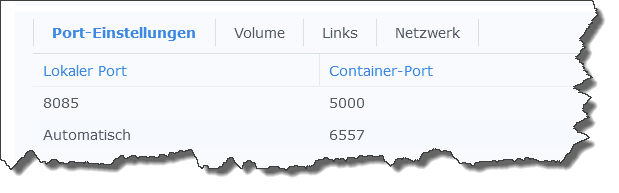
Du musst mindestens den Port 8081 von außen an Port 8081 des Containers durchreichen.
Wenn Du an die Vis willst, muss auch Port 8082 durchgereicht werden.
Es sei denn, Du betreibst den Container im Host-Mode - aber das ist nicht Standard und muss explizit angegeben werden.So sieht das prinzipiell aus (ist ein anderer Container, da ich meinen ioBroker im Host-Mode betreibe)
-
@codierknecht Ports konnte ich im Nachhinein im Container keine mehr verändern, da ich diese ja bereits angelegt und durchgereicht hatte.
Mit dem iobroker fix habe ich es wohl scheinbar hinbekommen :)Anbei der Log:
root@IOHost:/opt/iobroker# pkill -u iobroker
root@IOHost:/opt/iobroker# iobroker host this
Host "iobroker" successfully renamed to "IOHost".
The host for instance "system.adapter.admin.0" was changed from "IOHost" to "IOHost".
The host for instance "system.adapter.discovery.0" was changed from "IOHost" to "IOHost".
The host for instance "system.adapter.backitup.0" was changed from "IOHost" to "IOHost".
The host for instance "system.adapter.ecovacs-deebot.0" was changed from "IOHost" to "IOHost".
The host for instance "system.adapter.net-tools.0" was changed from "IOHost" to "IOHost".
The host for instance "system.adapter.node-red.0" was changed from "IOHost" to "IOHost".
The host for instance "system.adapter.onkyo.0" was changed from "IOHost" to "IOHost".
The host for instance "system.adapter.openknx.0" was changed from "IOHost" to "IOHost".
The host for instance "system.adapter.ping.0" was changed from "IOHost" to "IOHost".
The host for instance "system.adapter.tankerkoenig.0" was changed from "IOHost" to "IOHost".
The host for instance "system.adapter.tr-064.0" was changed from "IOHost" to "IOHost".
The host for instance "system.adapter.tvprogram.0" was changed from "IOHost" to "IOHost".
The host for instance "system.adapter.vis-inventwo.0" was changed from "IOHost" to "IOHost".
The host for instance "system.adapter.vis.0" was changed from "IOHost" to "IOHost".
The host for instance "system.adapter.web.0" was changed from "IOHost" to "IOHost".
The host for instance "system.adapter.wled.0" was changed from "IOHost" to "IOHost".
root@IOHost:/opt/iobroker# iobroker fix
library: loaded
Library version=2022-12-09

==========================================================================

    Welcome to the ioBroker installation fixer!
    Script version: 2022-12-22

==========================================================================


==========================================================================
    Installing prerequisites (1/4)
==========================================================================

Hit:1 http://deb.debian.org/debian bullseye InRelease
Get:2 http://deb.debian.org/debian-security bullseye-security InRelease [48,4 kB]
Hit:3 https://deb.nodesource.com/node_16.x bullseye InRelease
Hit:4 http://deb.debian.org/debian bullseye-updates InRelease
Fetched 48,4 kB in 1s (40,2 kB/s)
Reading package lists... Done
Installed gcc-c++

==========================================================================
    Checking ioBroker user and directory permissions (2/4)
==========================================================================

Created /etc/sudoers.d/iobroker
Fixing directory permissions...
This system does not support setting default permissions.
Do not use npm to manually install adapters unless you know what you are doing!

==========================================================================
    Database maintenance (3/4)
==========================================================================

Checking for uncompressed JSONL databases... This might take a while!

Compressing /opt/iobroker/iobroker-data/states.jsonl
Compressing /opt/iobroker/iobroker-data/objects.jsonl
Compressed 2 JSONL files. Done

==========================================================================
    Checking autostart (4/4)
==========================================================================

Unsupported init system, cannot enable autostart!

==========================================================================

    Your installation was fixed successfully
    Run iobroker start to start ioBroker again!

==========================================================================

root@IOHost:/opt/iobroker# iobroker start
Starting iobroker controller daemon...
iobroker controller daemon started. PID: 996
root@IOHost:/opt/iobroker#


Hey! Du scheinst an dieser Unterhaltung interessiert zu sein, hast aber noch kein Konto.
Hast du es satt, bei jedem Besuch durch die gleichen Beiträge zu scrollen? Wenn du dich für ein Konto anmeldest, kommst du immer genau dorthin zurück, wo du zuvor warst, und kannst dich über neue Antworten benachrichtigen lassen (entweder per E-Mail oder Push-Benachrichtigung). Du kannst auch Lesezeichen speichern und Beiträge positiv bewerten, um anderen Community-Mitgliedern deine Wertschätzung zu zeigen.
Mit deinem Input könnte dieser Beitrag noch besser werden 💗
Registrieren Anmelden452
Online33.0k
Benutzer83.5k
Themen1.3m
Beiträge