Skip to content
  • Home
  • Recent
  • Tags
  • 0 Unread 0
  • Categories
  • Unreplied
  • Popular
  • GitHub
  • Docu
  • Hilfe
Skins
  • Light
  • Brite
  • Cerulean
  • Cosmo
  • Flatly
  • Journal
  • Litera
  • Lumen
  • Lux
  • Materia
  • Minty
  • Morph
  • Pulse
  • Sandstone
  • Simplex
  • Sketchy
  • Spacelab
  • United
  • Yeti
  • Zephyr
  • Dark
  • Cyborg
  • Darkly
  • Quartz
  • Slate
  • Solar
  • Superhero
  • Vapor

  • Default (No Skin)
  • No Skin
Collapse
ioBroker Logo

Community Forum

donate donate
  1. ioBroker Community Home
  2. Deutsch
  3. ioBroker Allgemein
  4. Bool SVG Widge true/false geht nicht?

NEWS

  • Monatsrückblick Januar/Februar 2026 ist online!
    BluefoxB
    Bluefox
    12
    1
    132

  • Jahresrückblick 2025 – unser neuer Blogbeitrag ist online! ✨
    BluefoxB
    Bluefox
    17
    1
    4.3k

  • Neuer Blogbeitrag: Monatsrückblick - Dezember 2025 🎄
    BluefoxB
    Bluefox
    13
    1
    1.2k

Bool SVG Widge true/false geht nicht?

Scheduled Pinned Locked Moved ioBroker Allgemein
8 Posts 2 Posters 825 Views 3 Watching
  • Oldest to Newest
  • Newest to Oldest
  • Most Votes
Reply
  • Reply as topic
Log in to reply
This topic has been deleted. Only users with topic management privileges can see it.
  • B Offline
    B Offline
    bernd33-1
    wrote on last edited by
    #1

    Hi,

    ich spiel gerade mit dem Bool SVG Widget rum und muss sagen : Das ist ein sehr cooles Teil :-) :+1:

    Leider funktioniert die true/fals Umschaltung nicht. Oder ich habe das falsch verstanden. Ich dachte, je nach dem ob eine Objekt_ID true oder false ist, wird entweder der Code bei true oder bei false ausgeführt.
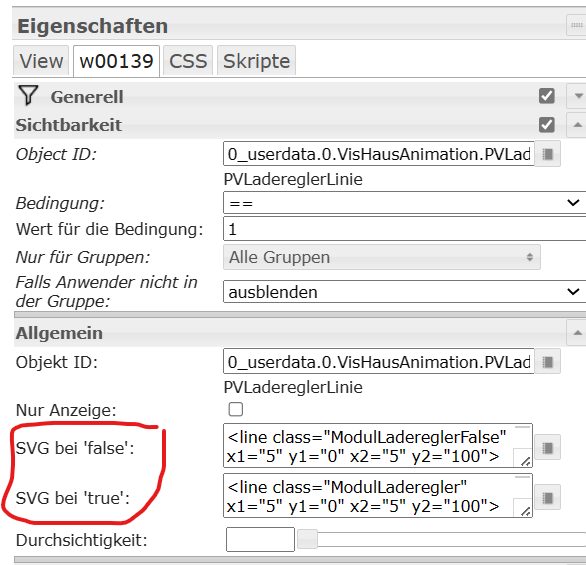
    095f7fcb-9581-44cf-8f93-c411057c1424-image.png

    Leider ist es aber so, dass wenn ich die besagte Objekt ID umschalte (egal von true nach false oder umgekehrt) das Widget dann leer wird und bleibt. Auch wenn man die Objekt ID wieder auf den ursprünglichen Wert zurück stellt.

    Kann man das iwi korrigieren? Oder gibt es ein alternatives Widget, welches funktioniert? Weil eigentlich möchte ich nur einmal die Linie animiert haben (true) und einmal die Linie statisch (false)
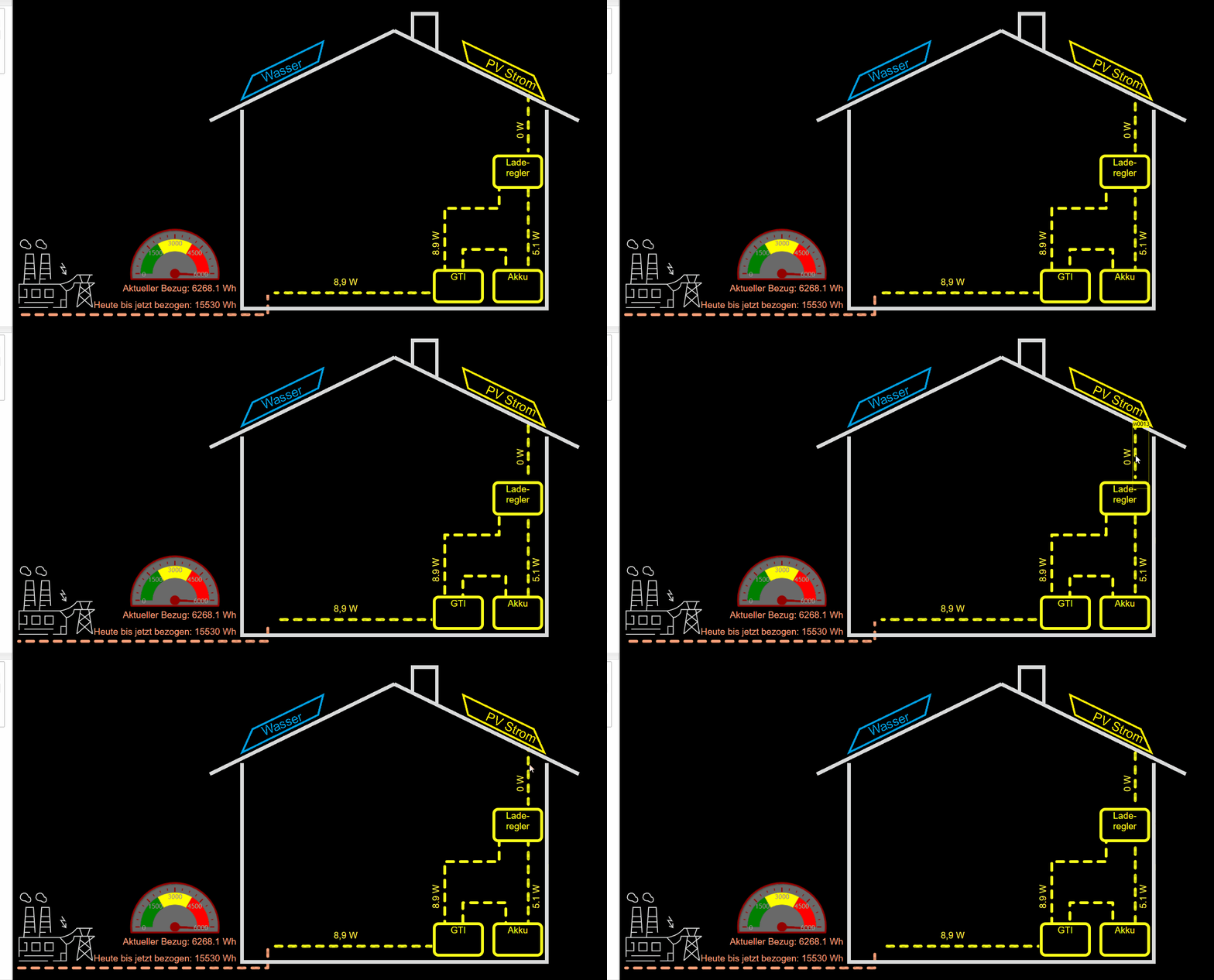
    SVG-Error.gif

    Danke und Grüße, Bernd

    Hier der SVG für True:

    <line class="ModulLaderegler" x1="5" y1="0" x2="5" y2="100"></line>
    
    <style>
    .ModulLaderegler {
       fill: none;
      stroke: #f8ff1a;
      stroke-width: 5px;
      stroke-dasharray: 12; 
      stroke-dashoffset: 18;
      stroke-linecap: round;
      stroke-linejoin: round;
      animation: ModulLadereglerAni 1.2s linear infinite;
      /*animation-direction: reverse;*/
    }
    
    @keyframes ModulLadereglerAni {
    	0% {
    		stroke-dashoffset: 48;
    	}
    	100% {
    		stroke-dashoffset: 0;
    	}
    }
    
    </style>
    

    Hier der SVG für false:

    <line class="ModulLadereglerFalse" x1="5" y1="0" x2="5" y2="100"></line>
    
    <style>
    .ModulLadereglerFalse {
      stroke: #b9bc52;
      stroke-width: 5px;
      stroke-dasharray: 12; 
      stroke-dashoffset: 18;
      stroke-linecap: round;
      stroke-linejoin: round;
    }
    </style>
    
    B 1 Reply Last reply
    0
    • B bernd33-1

      Hi,

      ich spiel gerade mit dem Bool SVG Widget rum und muss sagen : Das ist ein sehr cooles Teil :-) :+1:

      Leider funktioniert die true/fals Umschaltung nicht. Oder ich habe das falsch verstanden. Ich dachte, je nach dem ob eine Objekt_ID true oder false ist, wird entweder der Code bei true oder bei false ausgeführt.
      095f7fcb-9581-44cf-8f93-c411057c1424-image.png

      Leider ist es aber so, dass wenn ich die besagte Objekt ID umschalte (egal von true nach false oder umgekehrt) das Widget dann leer wird und bleibt. Auch wenn man die Objekt ID wieder auf den ursprünglichen Wert zurück stellt.

      Kann man das iwi korrigieren? Oder gibt es ein alternatives Widget, welches funktioniert? Weil eigentlich möchte ich nur einmal die Linie animiert haben (true) und einmal die Linie statisch (false)

      SVG-Error.gif

      Danke und Grüße, Bernd

      Hier der SVG für True:

      <line class="ModulLaderegler" x1="5" y1="0" x2="5" y2="100"></line>
      
      <style>
      .ModulLaderegler {
         fill: none;
        stroke: #f8ff1a;
        stroke-width: 5px;
        stroke-dasharray: 12; 
        stroke-dashoffset: 18;
        stroke-linecap: round;
        stroke-linejoin: round;
        animation: ModulLadereglerAni 1.2s linear infinite;
        /*animation-direction: reverse;*/
      }
      
      @keyframes ModulLadereglerAni {
      	0% {
      		stroke-dashoffset: 48;
      	}
      	100% {
      		stroke-dashoffset: 0;
      	}
      }
      
      </style>
      

      Hier der SVG für false:

      <line class="ModulLadereglerFalse" x1="5" y1="0" x2="5" y2="100"></line>
      
      <style>
      .ModulLadereglerFalse {
        stroke: #b9bc52;
        stroke-width: 5px;
        stroke-dasharray: 12; 
        stroke-dashoffset: 18;
        stroke-linecap: round;
        stroke-linejoin: round;
      }
      </style>
      
      B Offline
      B Offline
      bernd33-1
      wrote on last edited by
      #2

      Ich hab jetzt mal weiter rumgespielt mit dem SVG Widget und hier mal ein Beispiel, wie man ohne große Probleme in VIS nahezu alles animieren kann.

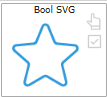
      Erst mal ein "Bool SVG" widget ins VIS ziehen
      cb0a24e2-32e1-4b8c-898f-c92fa798767b-image.png

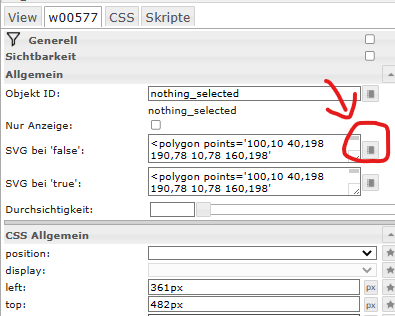
      Standardmäßig wird ein grünes 5-Eck angezeigt. In den Widget Eigenschaften bearbeitet man ausschließlich den Code bei "SVG bei 'false' "
      aab89d1e-bc57-4d75-bf7a-484574a24240-image.png

      Auf das markierte Symbol klicken und diesen Code eingeben:

      <svg xmlns="http://www.w3.org/2000/svg" xmlns:bx="https://boxy-svg.com">
        <defs>
          <bx:grid x="0" y="0" width="10" height="10"></bx:grid>
          <linearGradient gradientUnits="userSpaceOnUse" x1="390" y1="60" x2="390" y2="310" id="gradient-0">
            <stop offset="0" style="stop-color: rgb(255, 0, 0);"></stop>
            <stop offset="1" style="stop-color: rgba(11, 23, 255, 1)"></stop>
          </linearGradient>
        </defs>
        <rect x="100" y="60" width="90" height="50" style="stroke: rgb(0, 0, 0); fill: rgb(254, 191, 97);" id="Heizung"></rect>
        <rect style="stroke: rgb(0, 0, 0); fill: url(#gradient-0);" x="330" y="60" width="120" height="250" rx="10" ry="10" id="Tank"></rect>
        
        <g class="rotatable" transform="rotate(360)">
          <circle style="stroke: rgb(0, 0, 0); fill: none;" cx="230" cy="150" r="20" id="PumpeRing"></circle>
          <path style="stroke: rgb(0, 0, 0);" transform="matrix(0.588235, 0, 0, 0.588235, -14.117496, -175.2939)" d="M 415 587 A 34 34 0 0 1 381 553 L 415 553 Z" id="PumpeViertel1" bx:shape="pie 415 553 0 34 180 270 1@eeb874fc"></path>
          <path style="stroke: rgb(0, 0, 0);" transform="matrix(-0.588235, 0, 0, -0.588235, 474.117462, 475.293884)" d="M 415 587 A 34 34 0 0 1 381 553 L 415 553 Z" id="PumpeViertel2" bx:shape="pie 415 553 0 34 180 270 1@eeb874fc"></path>
            <animateTransform
              attributeName="transform"
              begin="0s"
              dur="{0_userdata.0.1_Test.PumpeAnimationszeit}s"
              type="rotate"
              from="360 230 150"
              to="0 230 150"
              repeatCount="indefinite"
            />
        </g>
        
        <polyline class="KaltWasserLinie" points="329.6 280.8 110 280 110 110" id="Kaltwasser"></polyline>
        
        <line class="WarmWasser" x1="330.2" y1="149.7" x2="250" y2="150" id="Warmwasser1"></line>
        <polyline class="WarmWasser" points="209.1 149.7 180 150 180 110" id="Warmwasser2"></polyline>
      </svg>
      
      
      <polyline class="GridToHome" style="fill: none;" points="5 35 300 35 300 0"></polyline>
      
      
      <style>
      .WarmWasser {
         fill: none;
        stroke: {0_userdata.0.1_Test.WarmwasserFarbe};
        stroke-width: 5px;
        stroke-dasharray: 12; 
        stroke-dashoffset: 18;
        stroke-linecap: round;
        stroke-linejoin: round;
        animation: WarmWasserAni {0_userdata.0.1_Test.WasserAnimationszeit}s linear infinite;
        /*animation-direction: reverse;*/
      }
      
      @keyframes WarmWasserAni {
      	0% {
      		stroke-dashoffset: 48;
      	}
      	100% {
      		stroke-dashoffset: 0;
      	}
      }
        
      <style>
      .KaltWasserLinie {
         fill: none;
        stroke: {0_userdata.0.1_Test.KaltWasserFarbe};
        stroke-width: 5px;
        stroke-dasharray: 12; 
        stroke-dashoffset: 18;
        stroke-linecap: round;
        stroke-linejoin: round;
        animation: KaltWasserAni {0_userdata.0.1_Test.WasserAnimationszeit}s linear infinite;
        animation-direction: reverse;
      }
      
      @keyframes KaltWasserAni {
      	0% {
      		stroke-dashoffset: 48;
      	}
      	100% {
      		stroke-dashoffset: 0;
      	}
      }
      
      </style>
      

      Dann folgende Objekte anlegen:
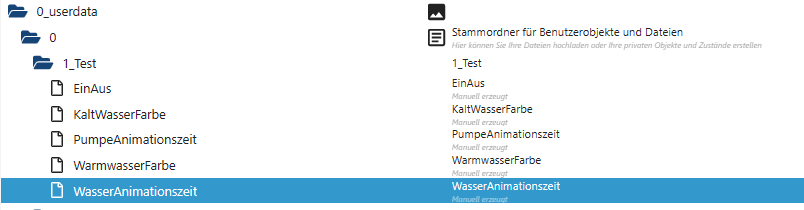
      67d64e50-9115-4146-95a8-2e06d2d9ae1a-image.png
      EinAus = Boolean
      KaltWasserFarbe, WarmWasserFarbe = String
      PumpeAnimationszeit, WasserAnimationszeit = Zahl

      Dann noch ein Blockly baune, dass z.B. auf einen Schalter reagiert:
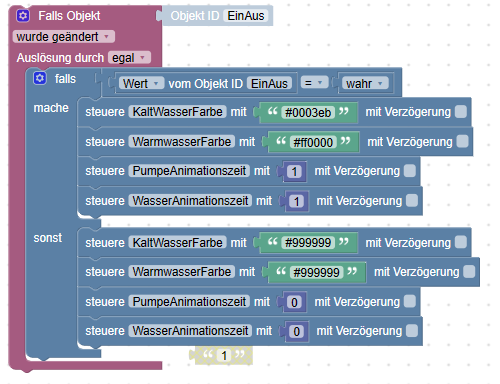
      b5933f7e-b7a5-4d89-8558-938e9dff2f22-image.png

      <xml xmlns="https://developers.google.com/blockly/xml">
       <block type="on_ext" id=".:-4{}6YVkdv^J8zV#w9" x="462" y="113">
         <mutation xmlns="http://www.w3.org/1999/xhtml" items="1"></mutation>
         <field name="CONDITION">ne</field>
         <field name="ACK_CONDITION"></field>
         <value name="OID0">
           <shadow type="field_oid" id="6a-~@a_.!pB|k]%AEH(b">
             <field name="oid">0_userdata.0.1_Test.EinAus</field>
           </shadow>
         </value>
         <statement name="STATEMENT">
           <block type="controls_if" id="Ii/rTF|,EyTz@bCOKKP{">
             <mutation else="1"></mutation>
             <value name="IF0">
               <block type="logic_compare" id="$.[rB|sSvb$3vw/;7:J-">
                 <field name="OP">EQ</field>
                 <value name="A">
                   <block type="get_value" id="y]#,iVqgHq5K.,Z8ABRl">
                     <field name="ATTR">val</field>
                     <field name="OID">0_userdata.0.1_Test.EinAus</field>
                   </block>
                 </value>
                 <value name="B">
                   <block type="logic_boolean" id="sVl=J,@`!?j9~6Xn=u6$">
                     <field name="BOOL">TRUE</field>
                   </block>
                 </value>
               </block>
             </value>
             <statement name="DO0">
               <block type="control" id=",mEe;Nu%(!(=Rn{)q*u/">
                 <mutation xmlns="http://www.w3.org/1999/xhtml" delay_input="false"></mutation>
                 <field name="OID">0_userdata.0.1_Test.KaltWasserFarbe</field>
                 <field name="WITH_DELAY">FALSE</field>
                 <value name="VALUE">
                   <block type="text" id="v6h1]iXTa:XJG)U2L[aX">
                     <field name="TEXT">#0003eb</field>
                   </block>
                 </value>
                 <next>
                   <block type="control" id="cIzle,Z=r:fjG$!_MJGy">
                     <mutation xmlns="http://www.w3.org/1999/xhtml" delay_input="false"></mutation>
                     <field name="OID">0_userdata.0.1_Test.WarmwasserFarbe</field>
                     <field name="WITH_DELAY">FALSE</field>
                     <value name="VALUE">
                       <block type="text" id="q`Ix9c;thiNLuX:R#6f.">
                         <field name="TEXT">#ff0000</field>
                       </block>
                     </value>
                     <next>
                       <block type="control" id="`0Y;{t.}{L5KFWCwobDg">
                         <mutation xmlns="http://www.w3.org/1999/xhtml" delay_input="false"></mutation>
                         <field name="OID">0_userdata.0.1_Test.PumpeAnimationszeit</field>
                         <field name="WITH_DELAY">FALSE</field>
                         <value name="VALUE">
                           <block type="math_number" id="WDgxU.UrmVn~iD|F+*j*">
                             <field name="NUM">1</field>
                           </block>
                         </value>
                         <next>
                           <block type="control" id="ZF~_lQ1(Qx#{2aZ!o/V*">
                             <mutation xmlns="http://www.w3.org/1999/xhtml" delay_input="false"></mutation>
                             <field name="OID">0_userdata.0.1_Test.WasserAnimationszeit</field>
                             <field name="WITH_DELAY">FALSE</field>
                             <value name="VALUE">
                               <block type="math_number" id=")%7nV|i6;;kp^wdsKPop">
                                 <field name="NUM">1</field>
                               </block>
                             </value>
                           </block>
                         </next>
                       </block>
                     </next>
                   </block>
                 </next>
               </block>
             </statement>
             <statement name="ELSE">
               <block type="control" id="vL,2uvHI2UBUESM3p]|N">
                 <mutation xmlns="http://www.w3.org/1999/xhtml" delay_input="false"></mutation>
                 <field name="OID">0_userdata.0.1_Test.KaltWasserFarbe</field>
                 <field name="WITH_DELAY">FALSE</field>
                 <value name="VALUE">
                   <block type="text" id="E(X;Hq9l`,q;m5(_|@?,">
                     <field name="TEXT">#999999</field>
                   </block>
                 </value>
                 <next>
                   <block type="control" id="B-$P+W77*4LlM/kSL[:c">
                     <mutation xmlns="http://www.w3.org/1999/xhtml" delay_input="false"></mutation>
                     <field name="OID">0_userdata.0.1_Test.WarmwasserFarbe</field>
                     <field name="WITH_DELAY">FALSE</field>
                     <value name="VALUE">
                       <block type="text" id="qquo;gmTkdD!-gI8M_=%">
                         <field name="TEXT">#999999</field>
                       </block>
                     </value>
                     <next>
                       <block type="control" id="OlD[,u561)~fMivV%*EP">
                         <mutation xmlns="http://www.w3.org/1999/xhtml" delay_input="false"></mutation>
                         <field name="OID">0_userdata.0.1_Test.PumpeAnimationszeit</field>
                         <field name="WITH_DELAY">FALSE</field>
                         <value name="VALUE">
                           <block type="math_number" id="JTM[OGt`3y:i]4{/(zD~">
                             <field name="NUM">0</field>
                           </block>
                         </value>
                         <next>
                           <block type="control" id="LjmeS@h!`/.q^~1SOd#D">
                             <mutation xmlns="http://www.w3.org/1999/xhtml" delay_input="false"></mutation>
                             <field name="OID">0_userdata.0.1_Test.WasserAnimationszeit</field>
                             <field name="WITH_DELAY">FALSE</field>
                             <value name="VALUE">
                               <block type="math_number" id=".K)dH3QfJF0#Fv#XBbZL">
                                 <field name="NUM">0</field>
                               </block>
                             </value>
                           </block>
                         </next>
                       </block>
                     </next>
                   </block>
                 </next>
               </block>
             </statement>
           </block>
         </statement>
       </block>
       <block type="text" id="uqMJcL~pst5;I5.N}A5(" disabled="true" x="687" y="538">
         <field name="TEXT">1</field>
       </block>
      </xml>```
      [/s]
      
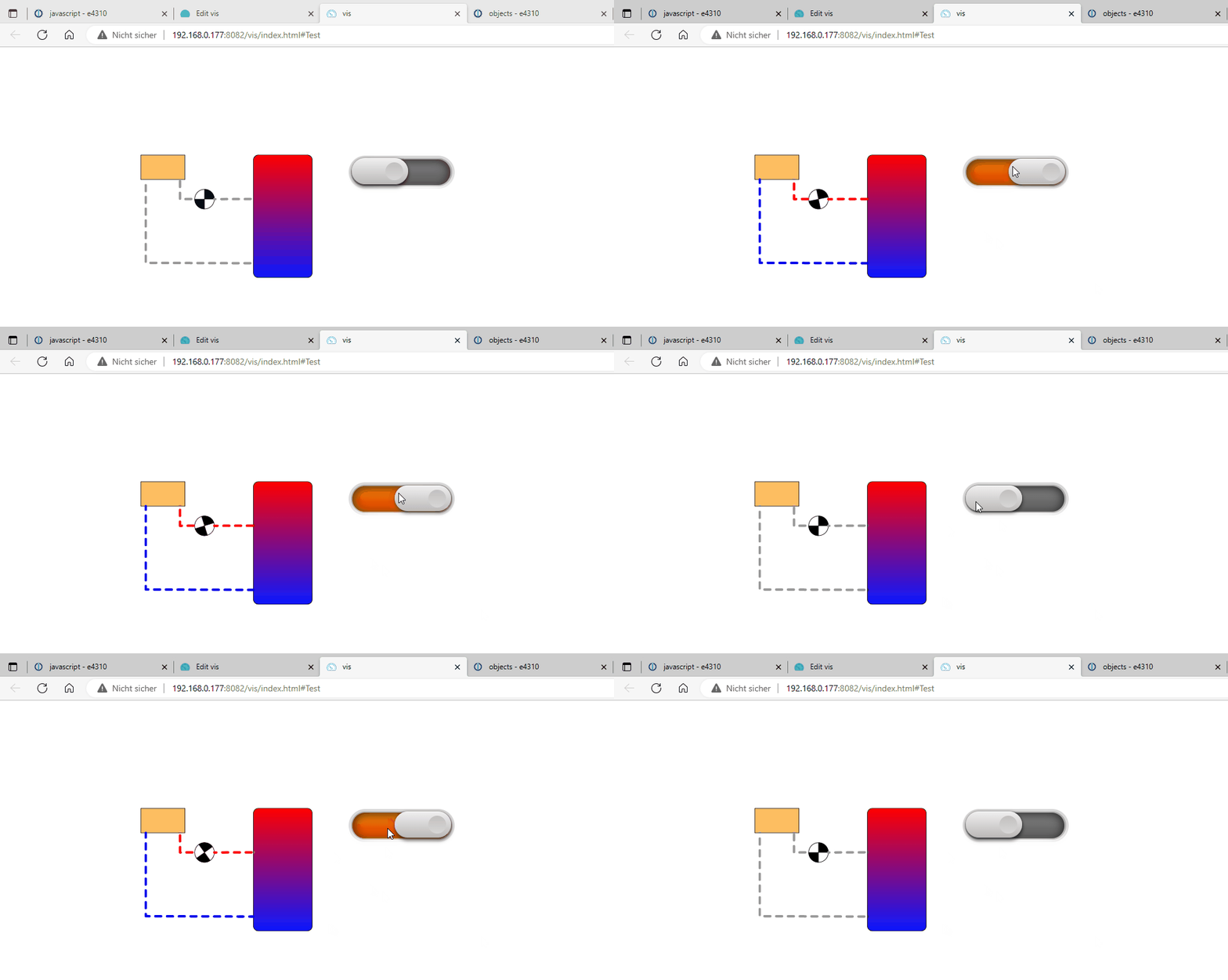
      Und Voila... fertig ist die animierte Heizung :-)
      ![HeizungSVG.gif](/assets/uploads/files/1674558186004-heizungsvg.gif) 
      
      Für SVG-Dateien gibt es hier https://boxy-svg.com/app einen sehr praktischen Online-Editor. Sieht zwar simpel aus aber mit dem kann man komplexe Grafiken erstellen. Ohne dass man händisch coden muss.
      B 1 Reply Last reply
      0
      • B bernd33-1

        Ich hab jetzt mal weiter rumgespielt mit dem SVG Widget und hier mal ein Beispiel, wie man ohne große Probleme in VIS nahezu alles animieren kann.

        Erst mal ein "Bool SVG" widget ins VIS ziehen

        cb0a24e2-32e1-4b8c-898f-c92fa798767b-image.png

        Standardmäßig wird ein grünes 5-Eck angezeigt. In den Widget Eigenschaften bearbeitet man ausschließlich den Code bei "SVG bei 'false' "
        aab89d1e-bc57-4d75-bf7a-484574a24240-image.png

        Auf das markierte Symbol klicken und diesen Code eingeben:

        <svg xmlns="http://www.w3.org/2000/svg" xmlns:bx="https://boxy-svg.com">
          <defs>
            <bx:grid x="0" y="0" width="10" height="10"></bx:grid>
            <linearGradient gradientUnits="userSpaceOnUse" x1="390" y1="60" x2="390" y2="310" id="gradient-0">
              <stop offset="0" style="stop-color: rgb(255, 0, 0);"></stop>
              <stop offset="1" style="stop-color: rgba(11, 23, 255, 1)"></stop>
            </linearGradient>
          </defs>
          <rect x="100" y="60" width="90" height="50" style="stroke: rgb(0, 0, 0); fill: rgb(254, 191, 97);" id="Heizung"></rect>
          <rect style="stroke: rgb(0, 0, 0); fill: url(#gradient-0);" x="330" y="60" width="120" height="250" rx="10" ry="10" id="Tank"></rect>
          
          <g class="rotatable" transform="rotate(360)">
            <circle style="stroke: rgb(0, 0, 0); fill: none;" cx="230" cy="150" r="20" id="PumpeRing"></circle>
            <path style="stroke: rgb(0, 0, 0);" transform="matrix(0.588235, 0, 0, 0.588235, -14.117496, -175.2939)" d="M 415 587 A 34 34 0 0 1 381 553 L 415 553 Z" id="PumpeViertel1" bx:shape="pie 415 553 0 34 180 270 1@eeb874fc"></path>
            <path style="stroke: rgb(0, 0, 0);" transform="matrix(-0.588235, 0, 0, -0.588235, 474.117462, 475.293884)" d="M 415 587 A 34 34 0 0 1 381 553 L 415 553 Z" id="PumpeViertel2" bx:shape="pie 415 553 0 34 180 270 1@eeb874fc"></path>
              <animateTransform
                attributeName="transform"
                begin="0s"
                dur="{0_userdata.0.1_Test.PumpeAnimationszeit}s"
                type="rotate"
                from="360 230 150"
                to="0 230 150"
                repeatCount="indefinite"
              />
          </g>
          
          <polyline class="KaltWasserLinie" points="329.6 280.8 110 280 110 110" id="Kaltwasser"></polyline>
          
          <line class="WarmWasser" x1="330.2" y1="149.7" x2="250" y2="150" id="Warmwasser1"></line>
          <polyline class="WarmWasser" points="209.1 149.7 180 150 180 110" id="Warmwasser2"></polyline>
        </svg>
        
        
        <polyline class="GridToHome" style="fill: none;" points="5 35 300 35 300 0"></polyline>
        
        
        <style>
        .WarmWasser {
           fill: none;
          stroke: {0_userdata.0.1_Test.WarmwasserFarbe};
          stroke-width: 5px;
          stroke-dasharray: 12; 
          stroke-dashoffset: 18;
          stroke-linecap: round;
          stroke-linejoin: round;
          animation: WarmWasserAni {0_userdata.0.1_Test.WasserAnimationszeit}s linear infinite;
          /*animation-direction: reverse;*/
        }
        
        @keyframes WarmWasserAni {
        	0% {
        		stroke-dashoffset: 48;
        	}
        	100% {
        		stroke-dashoffset: 0;
        	}
        }
          
        <style>
        .KaltWasserLinie {
           fill: none;
          stroke: {0_userdata.0.1_Test.KaltWasserFarbe};
          stroke-width: 5px;
          stroke-dasharray: 12; 
          stroke-dashoffset: 18;
          stroke-linecap: round;
          stroke-linejoin: round;
          animation: KaltWasserAni {0_userdata.0.1_Test.WasserAnimationszeit}s linear infinite;
          animation-direction: reverse;
        }
        
        @keyframes KaltWasserAni {
        	0% {
        		stroke-dashoffset: 48;
        	}
        	100% {
        		stroke-dashoffset: 0;
        	}
        }
        
        </style>
        

        Dann folgende Objekte anlegen:
        67d64e50-9115-4146-95a8-2e06d2d9ae1a-image.png
        EinAus = Boolean
        KaltWasserFarbe, WarmWasserFarbe = String
        PumpeAnimationszeit, WasserAnimationszeit = Zahl

        Dann noch ein Blockly baune, dass z.B. auf einen Schalter reagiert:
        b5933f7e-b7a5-4d89-8558-938e9dff2f22-image.png

        <xml xmlns="https://developers.google.com/blockly/xml">
         <block type="on_ext" id=".:-4{}6YVkdv^J8zV#w9" x="462" y="113">
           <mutation xmlns="http://www.w3.org/1999/xhtml" items="1"></mutation>
           <field name="CONDITION">ne</field>
           <field name="ACK_CONDITION"></field>
           <value name="OID0">
             <shadow type="field_oid" id="6a-~@a_.!pB|k]%AEH(b">
               <field name="oid">0_userdata.0.1_Test.EinAus</field>
             </shadow>
           </value>
           <statement name="STATEMENT">
             <block type="controls_if" id="Ii/rTF|,EyTz@bCOKKP{">
               <mutation else="1"></mutation>
               <value name="IF0">
                 <block type="logic_compare" id="$.[rB|sSvb$3vw/;7:J-">
                   <field name="OP">EQ</field>
                   <value name="A">
                     <block type="get_value" id="y]#,iVqgHq5K.,Z8ABRl">
                       <field name="ATTR">val</field>
                       <field name="OID">0_userdata.0.1_Test.EinAus</field>
                     </block>
                   </value>
                   <value name="B">
                     <block type="logic_boolean" id="sVl=J,@`!?j9~6Xn=u6$">
                       <field name="BOOL">TRUE</field>
                     </block>
                   </value>
                 </block>
               </value>
               <statement name="DO0">
                 <block type="control" id=",mEe;Nu%(!(=Rn{)q*u/">
                   <mutation xmlns="http://www.w3.org/1999/xhtml" delay_input="false"></mutation>
                   <field name="OID">0_userdata.0.1_Test.KaltWasserFarbe</field>
                   <field name="WITH_DELAY">FALSE</field>
                   <value name="VALUE">
                     <block type="text" id="v6h1]iXTa:XJG)U2L[aX">
                       <field name="TEXT">#0003eb</field>
                     </block>
                   </value>
                   <next>
                     <block type="control" id="cIzle,Z=r:fjG$!_MJGy">
                       <mutation xmlns="http://www.w3.org/1999/xhtml" delay_input="false"></mutation>
                       <field name="OID">0_userdata.0.1_Test.WarmwasserFarbe</field>
                       <field name="WITH_DELAY">FALSE</field>
                       <value name="VALUE">
                         <block type="text" id="q`Ix9c;thiNLuX:R#6f.">
                           <field name="TEXT">#ff0000</field>
                         </block>
                       </value>
                       <next>
                         <block type="control" id="`0Y;{t.}{L5KFWCwobDg">
                           <mutation xmlns="http://www.w3.org/1999/xhtml" delay_input="false"></mutation>
                           <field name="OID">0_userdata.0.1_Test.PumpeAnimationszeit</field>
                           <field name="WITH_DELAY">FALSE</field>
                           <value name="VALUE">
                             <block type="math_number" id="WDgxU.UrmVn~iD|F+*j*">
                               <field name="NUM">1</field>
                             </block>
                           </value>
                           <next>
                             <block type="control" id="ZF~_lQ1(Qx#{2aZ!o/V*">
                               <mutation xmlns="http://www.w3.org/1999/xhtml" delay_input="false"></mutation>
                               <field name="OID">0_userdata.0.1_Test.WasserAnimationszeit</field>
                               <field name="WITH_DELAY">FALSE</field>
                               <value name="VALUE">
                                 <block type="math_number" id=")%7nV|i6;;kp^wdsKPop">
                                   <field name="NUM">1</field>
                                 </block>
                               </value>
                             </block>
                           </next>
                         </block>
                       </next>
                     </block>
                   </next>
                 </block>
               </statement>
               <statement name="ELSE">
                 <block type="control" id="vL,2uvHI2UBUESM3p]|N">
                   <mutation xmlns="http://www.w3.org/1999/xhtml" delay_input="false"></mutation>
                   <field name="OID">0_userdata.0.1_Test.KaltWasserFarbe</field>
                   <field name="WITH_DELAY">FALSE</field>
                   <value name="VALUE">
                     <block type="text" id="E(X;Hq9l`,q;m5(_|@?,">
                       <field name="TEXT">#999999</field>
                     </block>
                   </value>
                   <next>
                     <block type="control" id="B-$P+W77*4LlM/kSL[:c">
                       <mutation xmlns="http://www.w3.org/1999/xhtml" delay_input="false"></mutation>
                       <field name="OID">0_userdata.0.1_Test.WarmwasserFarbe</field>
                       <field name="WITH_DELAY">FALSE</field>
                       <value name="VALUE">
                         <block type="text" id="qquo;gmTkdD!-gI8M_=%">
                           <field name="TEXT">#999999</field>
                         </block>
                       </value>
                       <next>
                         <block type="control" id="OlD[,u561)~fMivV%*EP">
                           <mutation xmlns="http://www.w3.org/1999/xhtml" delay_input="false"></mutation>
                           <field name="OID">0_userdata.0.1_Test.PumpeAnimationszeit</field>
                           <field name="WITH_DELAY">FALSE</field>
                           <value name="VALUE">
                             <block type="math_number" id="JTM[OGt`3y:i]4{/(zD~">
                               <field name="NUM">0</field>
                             </block>
                           </value>
                           <next>
                             <block type="control" id="LjmeS@h!`/.q^~1SOd#D">
                               <mutation xmlns="http://www.w3.org/1999/xhtml" delay_input="false"></mutation>
                               <field name="OID">0_userdata.0.1_Test.WasserAnimationszeit</field>
                               <field name="WITH_DELAY">FALSE</field>
                               <value name="VALUE">
                                 <block type="math_number" id=".K)dH3QfJF0#Fv#XBbZL">
                                   <field name="NUM">0</field>
                                 </block>
                               </value>
                             </block>
                           </next>
                         </block>
                       </next>
                     </block>
                   </next>
                 </block>
               </statement>
             </block>
           </statement>
         </block>
         <block type="text" id="uqMJcL~pst5;I5.N}A5(" disabled="true" x="687" y="538">
           <field name="TEXT">1</field>
         </block>
        </xml>```
        [/s]
        
        Und Voila... fertig ist die animierte Heizung :-)
        ![HeizungSVG.gif](/assets/uploads/files/1674558186004-heizungsvg.gif) 
        
        Für SVG-Dateien gibt es hier https://boxy-svg.com/app einen sehr praktischen Online-Editor. Sieht zwar simpel aus aber mit dem kann man komplexe Grafiken erstellen. Ohne dass man händisch coden muss.
        B Offline
        B Offline
        bernd33-1
        wrote on last edited by
        #3

        Und Voila... fertig ist die animierte Heizung :-)
        HeizungSVG.gif

        Für SVG-Dateien gibt es hier https://boxy-svg.com/app einen sehr praktischen Online-Editor. Sieht zwar simpel aus aber mit dem kann man komplexe Grafiken erstellen. Ohne dass man händisch coden muss.

        1 Reply Last reply
        1
        • B Offline
          B Offline
          bernd33-1
          wrote on last edited by
          #4

          Was mich an dieser Methode so begeistert ist, dass man quasi erst mal im Zeichenprogramm seine Grafik erzeugt. Dabei kann man von einer einfachen Linie bis zu einem komplexen Haus mit allem pi pa po alles entwerfen. Danach kann man dann step by step alles in ruhe animieren.

          hier ein paar Webseiten auf denen man schön sieht was machbar ist... und dass geht auch alles in VIS :-)

          https://www.mediaevent.de/tutorial/svg-css-transform.html

          https://www.cassie.codes/posts/creating-my-logo-animation/

          https://css-tricks.com/svg-line-animation-works/

          1 Reply Last reply
          0
          • SBorgS Offline
            SBorgS Offline
            SBorg
            Forum Testing Most Active
            wrote on last edited by
            #5

            Wenn ich mal endlich die Werte der Heizung in den ioB integrieren würde, sähe es bei mir auch schon anders aus: https://forum.iobroker.net/assets/uploads/files/1601886671515-heizung1.mp4

            Speicher und Rohre werden nach Temperatur gefärbt, Fließanimation auch nur wenn Pumpe läuft, Flamme in der Therme wenn sie heizt...
            Nur die dynamische Füllmenge des Gastanks habe ich partout nicht hinbekommen. Rechteckig ja, aber bei den Rundungen bin ich nicht weitergekommen.

            LG SBorg ( SBorg auf GitHub)
            Projekte: Lebensmittelwarnung.de | WLAN-Wetterstation | PimpMyStation

            B 1 Reply Last reply
            0
            • SBorgS SBorg

              Wenn ich mal endlich die Werte der Heizung in den ioB integrieren würde, sähe es bei mir auch schon anders aus: https://forum.iobroker.net/assets/uploads/files/1601886671515-heizung1.mp4

              Speicher und Rohre werden nach Temperatur gefärbt, Fließanimation auch nur wenn Pumpe läuft, Flamme in der Therme wenn sie heizt...
              Nur die dynamische Füllmenge des Gastanks habe ich partout nicht hinbekommen. Rechteckig ja, aber bei den Rundungen bin ich nicht weitergekommen.

              B Offline
              B Offline
              bernd33-1
              wrote on last edited by
              #6

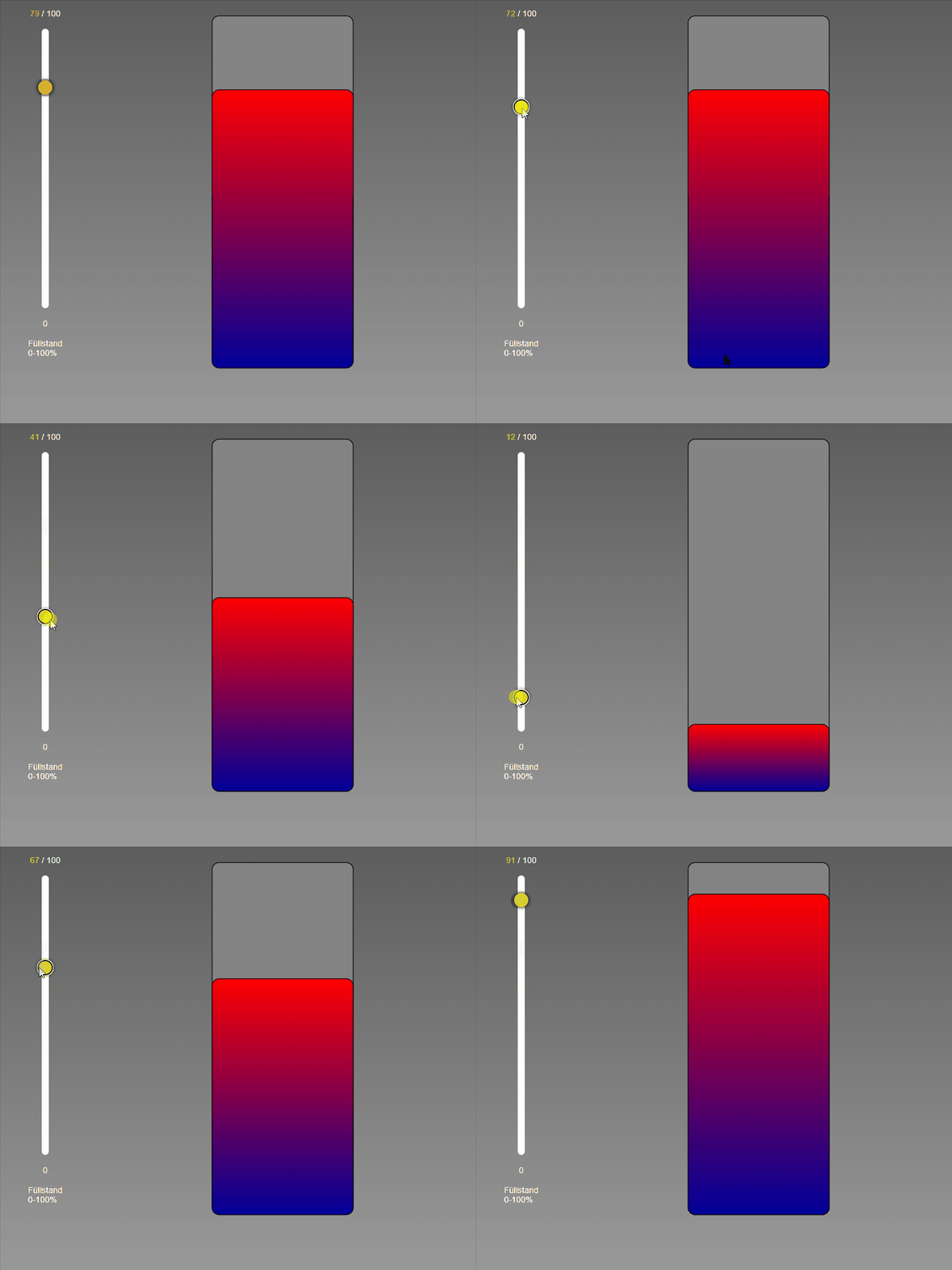
              Eine einfache Füllstandsanzeige geht:
              Fuellstand.gif

              Bei deinem Gastank: Den Gastank 2x übereinander legen. einmal voll und dann leer drüber. Dann mit "mask-composite" arbeiten? https://css-tricks.com/almanac/properties/m/mask-composite/

              SBorgS 1 Reply Last reply
              0
              • B bernd33-1

                Eine einfache Füllstandsanzeige geht:
                Fuellstand.gif

                Bei deinem Gastank: Den Gastank 2x übereinander legen. einmal voll und dann leer drüber. Dann mit "mask-composite" arbeiten? https://css-tricks.com/almanac/properties/m/mask-composite/

                SBorgS Offline
                SBorgS Offline
                SBorg
                Forum Testing Most Active
                wrote on last edited by
                #7

                @bernd33-1 Rechteckig kann ja jeder :grinning:

                Aber deine Idee hat mich, zumindest glaube ich dass es so funktionieren könnte, auf die richtige Spur gebracht.
                Bild des leeren Tanks, Bild nur des vollen Füllstandes (also ohne Tank) und Rechteck über die volle breite des Tanks. Das Rechteck wird nun auf die Größe des leeren Volumens skaliert und mittels "mask-composite subtract" vom Füllstandbild abgezogen.

                LG SBorg ( SBorg auf GitHub)
                Projekte: Lebensmittelwarnung.de | WLAN-Wetterstation | PimpMyStation

                B 1 Reply Last reply
                0
                • SBorgS SBorg

                  @bernd33-1 Rechteckig kann ja jeder :grinning:

                  Aber deine Idee hat mich, zumindest glaube ich dass es so funktionieren könnte, auf die richtige Spur gebracht.
                  Bild des leeren Tanks, Bild nur des vollen Füllstandes (also ohne Tank) und Rechteck über die volle breite des Tanks. Das Rechteck wird nun auf die Größe des leeren Volumens skaliert und mittels "mask-composite subtract" vom Füllstandbild abgezogen.

                  B Offline
                  B Offline
                  bernd33-1
                  wrote on last edited by
                  #8

                  Ich drück die Daumen :blush:

                  1 Reply Last reply
                  0
                  Reply
                  • Reply as topic
                  Log in to reply
                  • Oldest to Newest
                  • Newest to Oldest
                  • Most Votes


                  Support us

                  ioBroker
                  Community Adapters
                  Donate
                  FAQ Cloud / IOT
                  HowTo: Node.js-Update
                  HowTo: Backup/Restore
                  Downloads
                  BLOG

                  531

                  Online

                  32.7k

                  Users

                  82.4k

                  Topics

                  1.3m

                  Posts
                  Community
                  Impressum | Datenschutz-Bestimmungen | Nutzungsbedingungen | Einwilligungseinstellungen
                  ioBroker Community 2014-2025
                  logo
                  • Login

                  • Don't have an account? Register

                  • Login or register to search.
                  • First post
                    Last post
                  0
                  • Home
                  • Recent
                  • Tags
                  • Unread 0
                  • Categories
                  • Unreplied
                  • Popular
                  • GitHub
                  • Docu
                  • Hilfe