Skip to content
  • Home
  • Recent
  • Tags
  • 0 Unread 0
  • Categories
  • Unreplied
  • Popular
  • GitHub
  • Docu
  • Hilfe
Skins
  • Light
  • Brite
  • Cerulean
  • Cosmo
  • Flatly
  • Journal
  • Litera
  • Lumen
  • Lux
  • Materia
  • Minty
  • Morph
  • Pulse
  • Sandstone
  • Simplex
  • Sketchy
  • Spacelab
  • United
  • Yeti
  • Zephyr
  • Dark
  • Cyborg
  • Darkly
  • Quartz
  • Slate
  • Solar
  • Superhero
  • Vapor

  • Default (No Skin)
  • No Skin
Collapse
ioBroker Logo

Community Forum

donate donate
  1. ioBroker Community Home
  2. Deutsch
  3. Skripten / Logik
  4. JavaScript
  5. Wie nutze ich eine custom class / npm Modul?

NEWS

  • Neuer Blogbeitrag: Monatsrückblick - Dezember 2025 🎄
    BluefoxB
    Bluefox
    5
    1
    38

  • Weihnachtsangebot 2025! 🎄
    BluefoxB
    Bluefox
    24
    1
    1.4k

  • UPDATE 31.10.: Amazon Alexa - ioBroker Skill läuft aus ?
    apollon77A
    apollon77
    48
    3
    9.3k

Wie nutze ich eine custom class / npm Modul?

Scheduled Pinned Locked Moved JavaScript
65 Posts 7 Posters 7.5k Views 5 Watching
  • Oldest to Newest
  • Newest to Oldest
  • Most Votes
Reply
  • Reply as topic
Log in to reply
This topic has been deleted. Only users with topic management privileges can see it.
  • K Kentrath

    @wendy2702
    Ja, allerdings nicht im iob Verzeichnis, das sollte aber doch kein Problem sein oder?

    wendy2702W Offline
    wendy2702W Offline
    wendy2702
    wrote on last edited by
    #52

    @kentrath Dann jetzt mal die Instanz für WIZ…… auf Debug stellen, starten und das log zeigen.

    Bitte keine Fragen per PN, die gehören ins Forum!

    Benutzt das Voting rechts unten im Beitrag wenn er euch geholfen hat.

    1 Reply Last reply
    0
    • K Offline
      K Offline
      Kentrath
      wrote on last edited by
      #53

      @wendy2702
      Ich habe jetzt mal einen ganz frischen lxc gestartet und iob installiert (als user nicht als root). Danach habe ich nur den wiz Adapter installiert. Es kommt eine identische Fehlermeldung:

      host.ioBroker
      2023-02-23 19:30:28.583	info	Rebuild for adapter system.adapter.wizconnect.0 not successful in 3 tries. Adapter will not be restarted again. Please execute "npm install --production" in adapter directory manually.
      host.ioBroker
      2023-02-23 19:30:28.583	error	instance system.adapter.wizconnect.0 terminated with code 1 (JS_CONTROLLER_STOPPED)
      host.ioBroker
      2023-02-23 19:30:28.583	error	Caught by controller[0]: }
      host.ioBroker
      2023-02-23 19:30:28.583	error	Caught by controller[0]: requireStack: [ '/opt/iobroker/node_modules/iobroker.wizconnect/main.js' ]
      host.ioBroker
      2023-02-23 19:30:28.583	error	Caught by controller[0]: code: 'MODULE_NOT_FOUND',
      host.ioBroker
      2023-02-23 19:30:28.583	error	Caught by controller[0]: at Function.executeUserEntryPoint [as runMain] (node:internal/modules/run_main:81:12) {
      host.ioBroker
      2023-02-23 19:30:28.583	error	Caught by controller[0]: at Function.Module._load (node:internal/modules/cjs/loader:904:12)
      host.ioBroker
      2023-02-23 19:30:28.583	error	Caught by controller[0]: at Module.load (node:internal/modules/cjs/loader:1069:32)
      host.ioBroker
      2023-02-23 19:30:28.583	error	Caught by controller[0]: at Object.Module._extensions..js (node:internal/modules/cjs/loader:1245:10)
      host.ioBroker
      2023-02-23 19:30:28.583	error	Caught by controller[0]: at Module._compile (node:internal/modules/cjs/loader:1191:14)
      host.ioBroker
      2023-02-23 19:30:28.583	error	Caught by controller[0]: at Object.<anonymous> (/opt/iobroker/node_modules/iobroker.wizconnect/main.js:10:22)
      host.ioBroker
      2023-02-23 19:30:28.582	error	Caught by controller[0]: at require (node:internal/modules/cjs/helpers:108:18)
      host.ioBroker
      2023-02-23 19:30:28.582	error	Caught by controller[0]: at Module.require (node:internal/modules/cjs/loader:1093:19)
      host.ioBroker
      2023-02-23 19:30:28.582	error	Caught by controller[0]: at Function.Module._load (node:internal/modules/cjs/loader:866:27)
      host.ioBroker
      2023-02-23 19:30:28.582	error	Caught by controller[0]: at Function.Module._resolveFilename (node:internal/modules/cjs/loader:1021:15)
      host.ioBroker
      2023-02-23 19:30:28.582	error	Caught by controller[0]: - /opt/iobroker/node_modules/iobroker.wizconnect/main.js
      host.ioBroker
      2023-02-23 19:30:28.581	error	Caught by controller[0]: Require stack:
      host.ioBroker
      2023-02-23 19:30:28.581	error	Caught by controller[0]: Error: Cannot find module '@apollon/iobroker-tools'
      host.ioBroker
      2023-02-23 19:30:28.581	error	Caught by controller[0]: ^
      host.ioBroker
      2023-02-23 19:30:28.580	error	Caught by controller[0]: throw err;
      host.ioBroker
      2023-02-23 19:30:28.580	error	Caught by controller[0]: node:internal/modules/cjs/loader:1024
      host.ioBroker
      2023-02-23 19:30:28.347	info	instance system.adapter.wizconnect.0 started with pid 13195
      
      wendy2702W 1 Reply Last reply
      0
      • K Kentrath

        @wendy2702
        Ich habe jetzt mal einen ganz frischen lxc gestartet und iob installiert (als user nicht als root). Danach habe ich nur den wiz Adapter installiert. Es kommt eine identische Fehlermeldung:

        host.ioBroker
        2023-02-23 19:30:28.583	info	Rebuild for adapter system.adapter.wizconnect.0 not successful in 3 tries. Adapter will not be restarted again. Please execute "npm install --production" in adapter directory manually.
        host.ioBroker
        2023-02-23 19:30:28.583	error	instance system.adapter.wizconnect.0 terminated with code 1 (JS_CONTROLLER_STOPPED)
        host.ioBroker
        2023-02-23 19:30:28.583	error	Caught by controller[0]: }
        host.ioBroker
        2023-02-23 19:30:28.583	error	Caught by controller[0]: requireStack: [ '/opt/iobroker/node_modules/iobroker.wizconnect/main.js' ]
        host.ioBroker
        2023-02-23 19:30:28.583	error	Caught by controller[0]: code: 'MODULE_NOT_FOUND',
        host.ioBroker
        2023-02-23 19:30:28.583	error	Caught by controller[0]: at Function.executeUserEntryPoint [as runMain] (node:internal/modules/run_main:81:12) {
        host.ioBroker
        2023-02-23 19:30:28.583	error	Caught by controller[0]: at Function.Module._load (node:internal/modules/cjs/loader:904:12)
        host.ioBroker
        2023-02-23 19:30:28.583	error	Caught by controller[0]: at Module.load (node:internal/modules/cjs/loader:1069:32)
        host.ioBroker
        2023-02-23 19:30:28.583	error	Caught by controller[0]: at Object.Module._extensions..js (node:internal/modules/cjs/loader:1245:10)
        host.ioBroker
        2023-02-23 19:30:28.583	error	Caught by controller[0]: at Module._compile (node:internal/modules/cjs/loader:1191:14)
        host.ioBroker
        2023-02-23 19:30:28.583	error	Caught by controller[0]: at Object.<anonymous> (/opt/iobroker/node_modules/iobroker.wizconnect/main.js:10:22)
        host.ioBroker
        2023-02-23 19:30:28.582	error	Caught by controller[0]: at require (node:internal/modules/cjs/helpers:108:18)
        host.ioBroker
        2023-02-23 19:30:28.582	error	Caught by controller[0]: at Module.require (node:internal/modules/cjs/loader:1093:19)
        host.ioBroker
        2023-02-23 19:30:28.582	error	Caught by controller[0]: at Function.Module._load (node:internal/modules/cjs/loader:866:27)
        host.ioBroker
        2023-02-23 19:30:28.582	error	Caught by controller[0]: at Function.Module._resolveFilename (node:internal/modules/cjs/loader:1021:15)
        host.ioBroker
        2023-02-23 19:30:28.582	error	Caught by controller[0]: - /opt/iobroker/node_modules/iobroker.wizconnect/main.js
        host.ioBroker
        2023-02-23 19:30:28.581	error	Caught by controller[0]: Require stack:
        host.ioBroker
        2023-02-23 19:30:28.581	error	Caught by controller[0]: Error: Cannot find module '@apollon/iobroker-tools'
        host.ioBroker
        2023-02-23 19:30:28.581	error	Caught by controller[0]: ^
        host.ioBroker
        2023-02-23 19:30:28.580	error	Caught by controller[0]: throw err;
        host.ioBroker
        2023-02-23 19:30:28.580	error	Caught by controller[0]: node:internal/modules/cjs/loader:1024
        host.ioBroker
        2023-02-23 19:30:28.347	info	instance system.adapter.wizconnect.0 started with pid 13195
        
        wendy2702W Offline
        wendy2702W Offline
        wendy2702
        wrote on last edited by wendy2702
        #54

        @kentrath sagte in Wie nutze ich eine custom class / npm Modul?:

        nur den wiz Adapter installiert

        Wie genau? Will das mal testen

        EDIT: Läuft auch bei mir nicht. Denke da musst du dich am besten per Github an den Entwickler wenden wenn sonst niemandem etwas einfällt.

        Bitte keine Fragen per PN, die gehören ins Forum!

        Benutzt das Voting rechts unten im Beitrag wenn er euch geholfen hat.

        1Topf1 1 Reply Last reply
        0
        • wendy2702W wendy2702

          @kentrath sagte in Wie nutze ich eine custom class / npm Modul?:

          nur den wiz Adapter installiert

          Wie genau? Will das mal testen

          EDIT: Läuft auch bei mir nicht. Denke da musst du dich am besten per Github an den Entwickler wenden wenn sonst niemandem etwas einfällt.

          1Topf1 Offline
          1Topf1 Offline
          1Topf
          wrote on last edited by
          #55

          @wendy2702

          Ich hab ihn erst letzte Woche installiert und lief sofort.

          wendy2702W 1 Reply Last reply
          0
          • D Offline
            D Offline
            disaster123
            wrote on last edited by
            #56

            Sieht für mich nach nem nodejs / npm Problem aus. Ich installiere ihn normal via GUI und er läuft.

            1 Reply Last reply
            0
            • 1Topf1 1Topf

              @wendy2702

              Ich hab ihn erst letzte Woche installiert und lief sofort.

              wendy2702W Offline
              wendy2702W Offline
              wendy2702
              wrote on last edited by
              #57

              @1topf sagte in Wie nutze ich eine custom class / npm Modul?:

              @wendy2702

              Ich hab ihn erst letzte Woche installiert und lief sofort.

              @disaster123 sagte in Wie nutze ich eine custom class / npm Modul?:

              Sieht für mich nach nem nodejs / npm Problem aus. Ich installiere ihn normal via GUI und er läuft.

              Welche Versionen habt ihr denn für Node/NPM ?

              Und was bedeutet "normal via Gui" ?

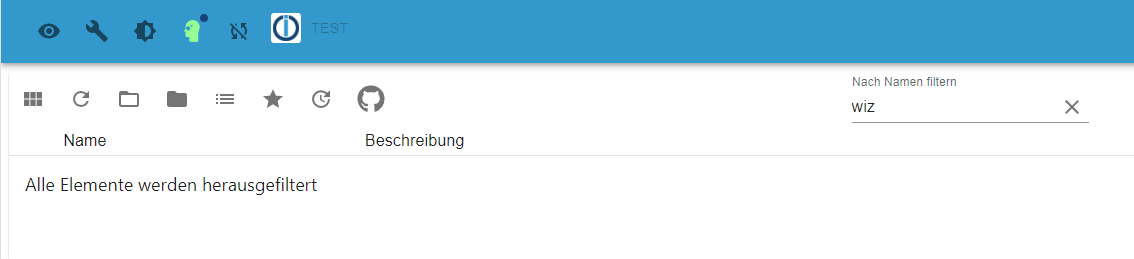
              Ich habe eine neue iobroker installation und befinde mich im latest:
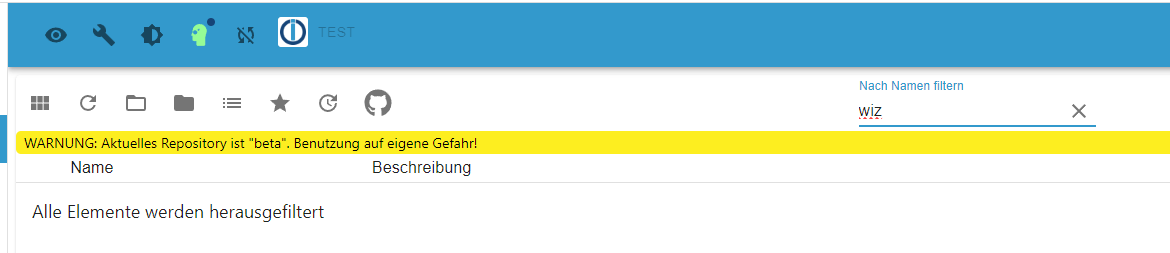
              cfdef048-947b-4efb-a9cc-03cb4ca66d23-grafik.png

              oder im Stable

              629d5d7e-664c-4620-bd52-084b0180620f-grafik.png

              Nix "wiz" oder wie heisst der Adapter?

              Bitte keine Fragen per PN, die gehören ins Forum!

              Benutzt das Voting rechts unten im Beitrag wenn er euch geholfen hat.

              1 Reply Last reply
              0
              • D Offline
                D Offline
                disaster123
                wrote on last edited by
                #58

                Über die Katze im Menü und dann die URL: https://github.com/disaster123/ioBroker.wizconnect

                wendy2702W 1 Reply Last reply
                0
                • D disaster123

                  Über die Katze im Menü und dann die URL: https://github.com/disaster123/ioBroker.wizconnect

                  wendy2702W Offline
                  wendy2702W Offline
                  wendy2702
                  wrote on last edited by
                  #59

                  @disaster123 Und welche NPM/Node Version läuft bei dir?

                  Das, ist übrigens nicht "normal über Gui" sondern wie du selber schreibst per GIthub Link im Expertenmodus.

                  Bitte keine Fragen per PN, die gehören ins Forum!

                  Benutzt das Voting rechts unten im Beitrag wenn er euch geholfen hat.

                  1Topf1 1 Reply Last reply
                  0
                  • D Offline
                    D Offline
                    disaster123
                    wrote on last edited by
                    #60

                    Muss ich nachher mal gucken bitte das Original docker image von iobroker. Die Versionen sind da quasi fest.

                    1 Reply Last reply
                    0
                    • wendy2702W wendy2702

                      @disaster123 Und welche NPM/Node Version läuft bei dir?

                      Das, ist übrigens nicht "normal über Gui" sondern wie du selber schreibst per GIthub Link im Expertenmodus.

                      1Topf1 Offline
                      1Topf1 Offline
                      1Topf
                      wrote on last edited by
                      #61

                      @wendy2702

                      Bei mir node.js 16.19.0 und npm 8.19.3.

                      K 1 Reply Last reply
                      0
                      • 1Topf1 1Topf

                        @wendy2702

                        Bei mir node.js 16.19.0 und npm 8.19.3.

                        K Offline
                        K Offline
                        Kentrath
                        wrote on last edited by
                        #62

                        @1topf
                        Bei mir ist es node 16.19.1

                        1 Reply Last reply
                        0
                        • wendy2702W Offline
                          wendy2702W Offline
                          wendy2702
                          wrote on last edited by
                          #63

                          Könnt ihr mal die Ausgabe davon zeigen:

                          cd/opt/iobroker/
                          npm list
                          

                          Bitte keine Fragen per PN, die gehören ins Forum!

                          Benutzt das Voting rechts unten im Beitrag wenn er euch geholfen hat.

                          1Topf1 1 Reply Last reply
                          0
                          • D Offline
                            D Offline
                            disaster123
                            wrote on last edited by
                            #64
                            Node.js:
                            v16.19.0
                            
                            NPM:
                            8.19.3
                            
                            1 Reply Last reply
                            0
                            • wendy2702W wendy2702

                              Könnt ihr mal die Ausgabe davon zeigen:

                              cd/opt/iobroker/
                              npm list
                              
                              1Topf1 Offline
                              1Topf1 Offline
                              1Topf
                              wrote on last edited by
                              #65

                              @wendy2702 sagte in Wie nutze ich eine custom class / npm Modul?:

                              Könnt ihr mal die Ausgabe davon zeigen:

                              cd/opt/iobroker/
                              npm list
                              
                              iobroker@ioBroker:/opt/iobroker$ npm list
                              iobroker.inst@3.0.0 /opt/iobroker
                              ├── iobroker.admin@6.3.5
                              ├── iobroker.alexa2@3.23.2
                              ├── iobroker.backitup@2.5.12
                              ├── iobroker.device-watcher@2.6.1
                              ├── iobroker.discovery@3.1.0
                              ├── iobroker.echarts@1.0.12
                              ├── iobroker.enigma2@1.3.3 (git+ssh://git@github.com/Matten-Matten/ioBroker.enigma2.git#975e828ab4595b81333bcca5b32af3cbf3c287bc)
                              ├── iobroker.flot@1.11.0
                              ├── iobroker.fullcalendar@1.2.0
                              ├── iobroker.habpanel@0.5.0
                              ├── iobroker.hiob@0.0.30
                              ├── iobroker.history@2.2.4
                              ├── iobroker.hs100@2.1.3 (git+ssh://git@github.com/arteck/ioBroker.hs100.git#bc5e7c89fe24cd4da1376a3e749e133bb564c4f6)
                              ├── iobroker.ical@1.13.2
                              ├── iobroker.icons-addictive-flavour-png@0.1.0
                              ├── iobroker.icons-fatcow-hosting@0.1.0
                              ├── iobroker.icons-icons8@0.0.1
                              ├── iobroker.icons-material-png@0.1.0
                              ├── iobroker.icons-material-svg@0.1.0
                              ├── iobroker.icons-mfd-png@1.1.0
                              ├── iobroker.icons-mfd-svg@1.1.0
                              ├── iobroker.icons-open-icon-library-png@0.1.3 (git+ssh://git@github.com/ioBroker/ioBroker.icons-open-icon-library-png.git#0847a79d713ee6725ccb6ccfb044c025b73ec946)
                              ├── iobroker.icons-ultimate-png@1.0.1
                              ├── iobroker.info@1.9.19
                              ├── iobroker.iot@1.14.2
                              ├── iobroker.jarvis@3.1.2
                              ├── iobroker.javascript@6.1.4
                              ├── iobroker.js-controller@4.0.24
                              ├── iobroker.lgtv@1.1.10
                              ├── iobroker.linux-control@1.1.3
                              ├── iobroker.minuvis@2.2.0
                              ├── iobroker.moma@1.2.9
                              ├── iobroker.mqtt@4.0.7
                              ├── iobroker.net-tools@0.2.0
                              ├── iobroker.onvif@1.0.0 (git+ssh://git@github.com/iobroker-community-adapters/ioBroker.onvif.git#a4cf207db3917eaa7f2f83bea79daf2b617d46a4)
                              ├── iobroker.ping@1.5.3
                              ├── iobroker.shelly@6.3.1
                              ├── iobroker.signal-cmb@0.3.0
                              ├── iobroker.smartstate@0.0.1
                              ├── iobroker.sonoff@2.5.1
                              ├── iobroker.statistics@2.3.0 (git+ssh://git@github.com/iobroker-community-adapters/ioBroker.statistics.git#b20bc874be5382f1eeaeeae4efa7f5dd23967e0b)
                              ├── iobroker.tr-064@4.2.17
                              ├── iobroker.tuya@3.13.1
                              ├── iobroker.vis-2-widgets-energy@0.1.3
                              ├── iobroker.vis-2-widgets-gauges@0.1.4
                              ├── iobroker.vis-2-widgets-material@0.2.1
                              ├── iobroker.vis-bars@0.1.4
                              ├── iobroker.vis-canvas-gauges@1.0.1
                              ├── iobroker.vis-colorpicker@1.2.0
                              ├── iobroker.vis-fancyswitch@1.1.0
                              ├── iobroker.vis-google-fonts@1.0.4
                              ├── iobroker.vis-history@1.0.0
                              ├── iobroker.vis-hqwidgets@1.3.0
                              ├── iobroker.vis-icontwo@0.90.0
                              ├── iobroker.vis-inventwo@3.3.1
                              ├── iobroker.vis-jqui-mfd@1.0.12
                              ├── iobroker.vis-justgage@1.0.2
                              ├── iobroker.vis-lcars@1.0.4
                              ├── iobroker.vis-material-advanced@1.7.2
                              ├── iobroker.vis-metro@1.2.0
                              ├── iobroker.vis-plumb@1.0.2
                              ├── iobroker.vis-rgraph@0.0.2
                              ├── iobroker.vis-timeandweather@1.2.2
                              ├── iobroker.vis-weather@2.5.6
                              ├── iobroker.vis@1.4.15
                              ├── iobroker.web@4.3.0
                              ├── iobroker.wizconnect@0.0.5 (git+ssh://git@github.com/disaster123/ioBroker.wizconnect.git#ad84f06e2e5e73de575ad53b91c9d7a24d8b9384)
                              ├── iobroker.zigbee@1.8.10
                              └── iobroker.zigbee2mqtt@2.7.3

                              
                              
                              1 Reply Last reply
                              0
                              Reply
                              • Reply as topic
                              Log in to reply
                              • Oldest to Newest
                              • Newest to Oldest
                              • Most Votes


                              Support us

                              ioBroker
                              Community Adapters
                              Donate

                              603

                              Online

                              32.5k

                              Users

                              81.7k

                              Topics

                              1.3m

                              Posts
                              Community
                              Impressum | Datenschutz-Bestimmungen | Nutzungsbedingungen | Einwilligungseinstellungen
                              ioBroker Community 2014-2025
                              logo
                              • Login

                              • Don't have an account? Register

                              • Login or register to search.
                              • First post
                                Last post
                              0
                              • Home
                              • Recent
                              • Tags
                              • Unread 0
                              • Categories
                              • Unreplied
                              • Popular
                              • GitHub
                              • Docu
                              • Hilfe