




Gelöst: Restore in neuem Docker funktioniert nicht
-
@skydream sagte in Restore in neuem Docker funktioniert nicht:
iobroker.admin@4.2.1
der ist aber schon ... sehr alt !
Wie alt ist denn das Backup oder warst du nie Up to Date !?
@glasfaser
Das Backup ist von gestern....
Aber das System....nun.....also.....das läuft halt und tut was es soll, also habe ich es auch nicht angefasst seit sehr langer Zeit.
:-)Den Rest versuche ich gleich mal
-
@skydream sagte in Restore in neuem Docker funktioniert nicht:
Kann mir eventuell jemand helfen?
ich versuche es mal mit dem Standardprocedere. mit Docker kenne ich mich nicht aus.
was kommt bei
iobroker list instances iobroker list adapters iobroker update -i -
@glasfaser
Das Backup ist von gestern....
Aber das System....nun.....also.....das läuft halt und tut was es soll, also habe ich es auch nicht angefasst seit sehr langer Zeit.
:-)Den Rest versuche ich gleich mal
@skydream sagte in Restore in neuem Docker funktioniert nicht:
@glasfaser
Das Backup ist von gestern....
also habe ich es auch nicht angefasst seit sehr langer Zeit.Also stimmt der Versionsstand vom ioBroker bzw. ist dann alles im alten Stand !?
Aber das System....nun.....also.....das läuft halt und tut was es soll,
Aud dauer wirst du damit nicht Glücklich !
-
@skydream sagte in Restore in neuem Docker funktioniert nicht:
also habe ich das Backup auf der Commandozeile erstellt.
pkill -u iobroker
iobroker host this
dann den Container neu starten
-
# iobroker host this Cannot read system.config: null (OK when migrating or restoring) Cannot find view "system" for search "host" An unknown error occurred: Cannot find view "system" # -
@skydream sagte in Restore in neuem Docker funktioniert nicht:
@glasfaser
Das Backup ist von gestern....
also habe ich es auch nicht angefasst seit sehr langer Zeit.Also stimmt der Versionsstand vom ioBroker bzw. ist dann alles im alten Stand !?
Aber das System....nun.....also.....das läuft halt und tut was es soll,
Aud dauer wirst du damit nicht Glücklich !
Deswegen will ich ja auch updaten und alles auf einen neuen stand bringen.
Nur ich mag das nicht im laufenden System mache....meine Frau Köpft mich wenn die ganzen kleine Gizmos im Hintergrund nicht mehr funktionieren. -
@skydream sagte in Restore in neuem Docker funktioniert nicht:
iobroker host this
welche Meldung kam nach dieser Befehlseingabe !?
-
Ähhh....habe ich doch oben gepostet:
An unknown error occurred: Cannot find view "system"
@skydream sagte in Restore in neuem Docker funktioniert nicht:
Ähhh....habe ich doch oben gepostet:
Das sind Bruchstücke ... einer Ausgabe
Bitte immer die Ein/ und Ausgabe hier komplett posten !
Bitte nochmal
pkill -u iobroker iobroker host this -
@skydream sagte in Restore in neuem Docker funktioniert nicht:
Ähhh....habe ich doch oben gepostet:
Das sind Bruchstücke ... einer Ausgabe
Bitte immer die Ein/ und Ausgabe hier komplett posten !
Bitte nochmal
pkill -u iobroker iobroker host this -
# # # pkill -u iobroker # iobroker host this Cannot read system.config: null (OK when migrating or restoring) Cannot find view "system" for search "host" An unknown error occurred: Cannot find view "system" # # -
Setze den Container neu auf und dann das Backup rein .
dann nochmal die Befehle in der Konsole .
OK
Melde mich wenn ich soweit bin. -
OK
Melde mich wenn ich soweit bin.So der Container ist ohne ein Backup Aufgesetzt und läuft. Ich kann mich anmelden und das System ist auf einem aktuell stand...denke ich:
# iobroker list instances
+ system.adapter.admin.0                  : admin                 : 190f42507de6                             -  enabled, port: 8081, bind: 0.0.0.0, run as: admin
+ system.adapter.backitup.0               : backitup              : 190f42507de6                             -  enabled
+ system.adapter.discovery.0              : discovery             : 190f42507de6                             -  enabled

+ instance is alive
# iobroker list adapters
system.adapter.admin                   : admin          - v6.2.22
system.adapter.backitup                : backitup       - v2.4.12
system.adapter.discovery               : discovery      - v3.0.3
#
Nun habe ich das Backup aus dem alten system in das neue unter "backups" kopiert damit der Adapter es findet.
Jetzt spiele ich über das WebInterface/Backup dieses Backup ein
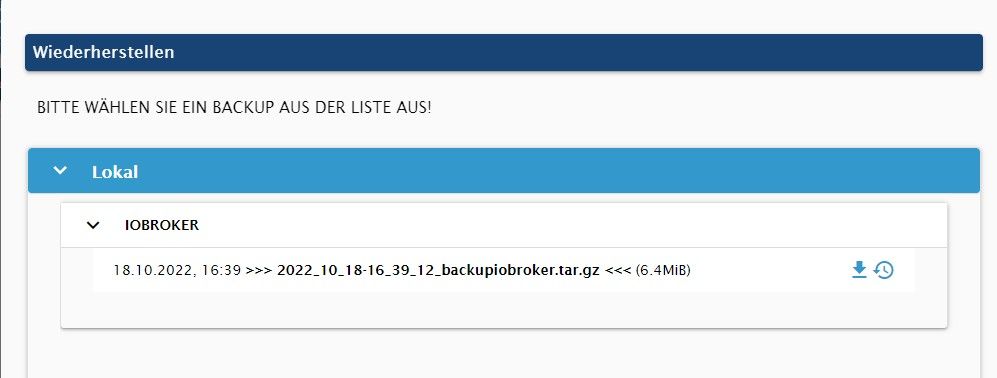
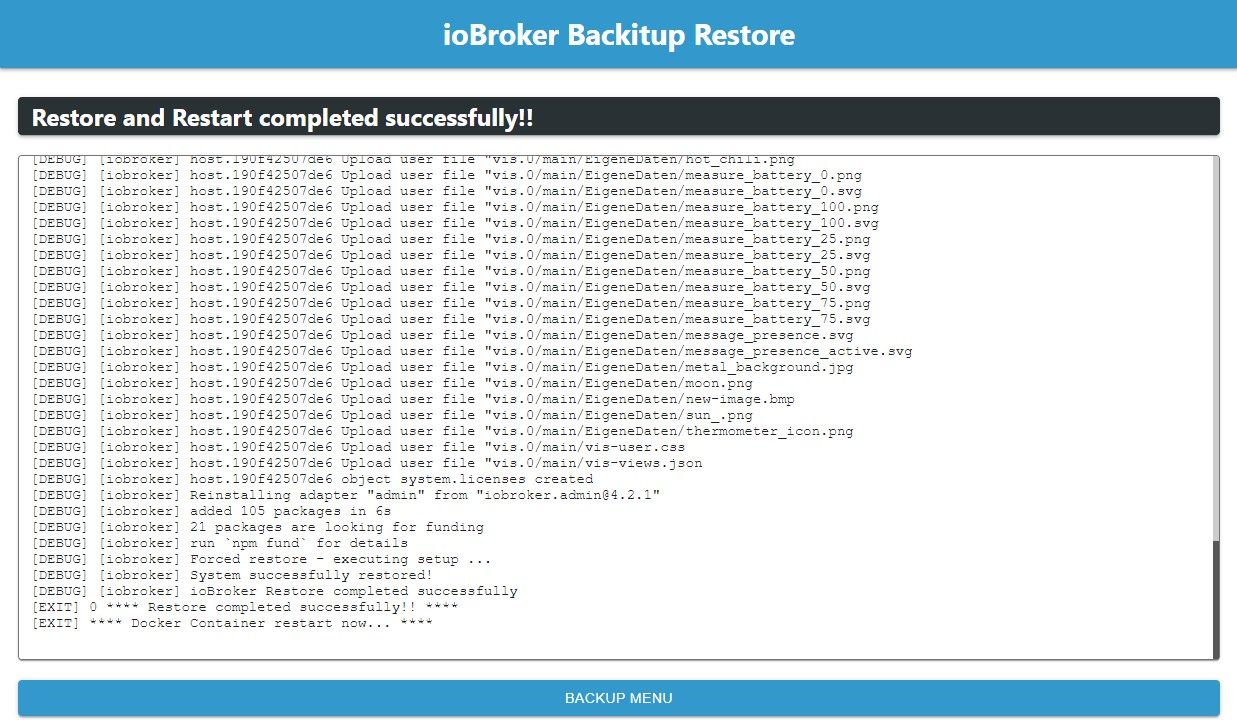
Ab hier ist die Adminoberfläche nicht mehr nutzbar...meine aber was gelesen zu haben das der BackupAdapter unter Docker das restart nicht hinbekommt. Da es auch kein Docker Konsole mehr gibt starte ich den Container neu.
Start Log
--------------------------------------------------------------------------------
------------------------- 2022-10-19 14:06:59 -------------------------
--------------------------------------------------------------------------------

--------------------------------------------------------------------------------
----- Welcome to your ioBroker-container! -----
----- Startupscript is now running. -----
----- Please be patient! -----
--------------------------------------------------------------------------------

--------------------------------------------------------------------------------
----- Debugging information -----
----- -----
----- System -----
----- arch: x86_64 -----
----- hostname: 190f42507de6 -----
----- -----
----- Docker-Image -----
----- image: v7.0.1 -----
----- build: 2022-10-13T23:57:48+00:00 -----
----- -----
----- Versions -----
----- node: v16.17.1 -----
----- npm: 8.15.0 -----
----- -----
----- ENV -----
----- SETGID: 16 -----
----- SETUID: 1000 -----
--------------------------------------------------------------------------------

--------------------------------------------------------------------------------
----- Step 1 of 5: Preparing container -----
--------------------------------------------------------------------------------

Updating Linux packages on first run...
dpkg-preconfigure: unable to re-open stdin:
Preparing to unpack .../tzdata_2021a-1+deb11u7_all.deb ...
Unpacking tzdata (2021a-1+deb11u7) over (2021a-1+deb11u6) ...
Preparing to unpack .../libksba8_1.5.0-3+deb11u1_amd64.deb ...
Unpacking libksba8:amd64 (1.5.0-3+deb11u1) over (1.5.0-3) ...
Preparing to unpack .../linux-libc-dev_5.10.149-1_amd64.deb ...
Unpacking linux-libc-dev:amd64 (5.10.149-1) over (5.10.140-1) ...
Preparing to unpack .../nodejs_16.18.0-deb-1nodesource1_amd64.deb ...
Unpacking nodejs (16.18.0-deb-1nodesource1) over (16.17.1-deb-1nodesource1) ...
Setting up libksba8:amd64 (1.5.0-3+deb11u1) ...
Setting up linux-libc-dev:amd64 (5.10.149-1) ...
Setting up nodejs (16.18.0-deb-1nodesource1) ...
Setting up tzdata (2021a-1+deb11u7) ...

Current default time zone: 'Etc/UTC'
Local time is now: Wed Oct 19 12:07:32 UTC 2022.
Universal Time is now: Wed Oct 19 12:07:32 UTC 2022.
Run 'dpkg-reconfigure tzdata' if you wish to change it.

Processing triggers for libc-bin (2.31-13+deb11u4) ...
Reading package lists...
Building dependency tree...
Reading state information...
Reading package lists...
Building dependency tree...
Reading state information...
0 upgraded, 0 newly installed, 0 to remove and 0 not upgraded.
Done.

Registering maintenance script as command... Done.

Installing additional packages is set by ENV.
Checking the following Packages: ...
Reading package lists...
Building dependency tree...
Reading state information...
Reading package lists...
Building dependency tree...
Reading state information...
0 upgraded, 0 newly installed, 0 to remove and 0 not upgraded.
Done.

Different UID and/ or GID is set by ENV.
Changing UID to 1000 and GID to 16... usermod: no changes
Done.

--------------------------------------------------------------------------------
----- Step 2 of 5: Detecting ioBroker installation -----
--------------------------------------------------------------------------------

There is no data detected in /opt/iobroker.
Restoring initial ioBroker installation... Done.

--------------------------------------------------------------------------------
----- Step 3 of 5: Checking ioBroker installation -----
--------------------------------------------------------------------------------

(Re)Setting folder permissions (This might take a while! Please be patient!)... Done.

Fixing "sudo-bug" by replacing sudo in iobroker with gosu... Done.

Hostname in ioBroker does not match the hostname of this container.
Updating hostname to 190f42507de6... The host for instance "system.adapter.admin.0" was changed from "buildkitsandbox" to "190f42507de6".
The host for instance "system.adapter.discovery.0" was changed from "buildkitsandbox" to "190f42507de6".
The host for instance "system.adapter.backitup.0" was changed from "buildkitsandbox" to "190f42507de6".
Done.

--------------------------------------------------------------------------------
----- Step 4 of 5: Applying special settings -----
--------------------------------------------------------------------------------

Some adapters have special requirements/ settings which can be activated by the use of environment variables.
For more information see ioBroker Docker Image Docs (https://docs.buanet.de/iobroker-docker-image/docs/).

--------------------------------------------------------------------------------
----- Step 5 of 5: ioBroker startup -----
--------------------------------------------------------------------------------

Starting ioBroker...

host.190f42507de6 check instance "system.adapter.admin.0" for host "190f42507de6"
host.190f42507de6 check instance "system.adapter.discovery.0" for host "190f42507de6"
host.190f42507de6 check instance "system.adapter.backitup.0" for host "190f42507de6"
object system.meta.uuid created: 684eff08-04b2-4af5-ba30-ea56a7b62c9a
================================== > LOG REDIRECT system.adapter.admin.0 => true [system.adapter.admin.0.logging]
Send diag info: {"uuid":"684eff08-04b2-4af5-ba30-ea56a7b62c9a","language":"de","country":"Germany","hosts":[{"version":"4.0.23","platform":"Javascript/Node.js","type":"linux"}],"node":"v16.18.0","arch":"x64","docker":true,"adapters":{"admin":{"version":"6.2.22","platform":"Javascript/Node.js"},"discovery":{"version":"3.0.3","platform":"Javascript/Node.js"},"backitup":{"version":"2.4.12","platform":"Javascript/Node.js"}},"statesType":"jsonl","objectsType":"jsonl","noInstances":3,"compactMode":false,"noCompactInstances":0,"model":"Intel(R) Xeon(R) CPU E3-1230 V2 @ 3.30GHz","cpus":8,"mem":21090963456,"ostype":"Linux","city":"Garbsen"}

================================== > LOG REDIRECT system.adapter.admin.0 => false [Process stopped]
================================== > LOG REDIRECT system.adapter.admin.0 => false [system.adapter.admin.0.logging]
Terminated

Recived termination signal (SIGTERM).
Shutting down ioBroker...

--------------------------------------------------------------------------------
------------------------- 2022-10-19 14:30:00 -------------------------
--------------------------------------------------------------------------------

--------------------------------------------------------------------------------
----- Welcome to your ioBroker-container! -----
----- Startupscript is now running. -----
----- Please be patient! -----
--------------------------------------------------------------------------------

--------------------------------------------------------------------------------
----- Debugging information -----
----- -----
----- System -----
----- arch: x86_64 -----
----- hostname: 190f42507de6 -----
----- -----
----- Docker-Image -----
----- image: v7.0.1 -----
----- build: 2022-10-13T23:57:48+00:00 -----
----- -----
----- Versions -----
----- node: v16.18.0 -----
----- npm: 8.19.2 -----
----- -----
----- ENV -----
----- SETGID: 16 -----
----- SETUID: 1000 -----
--------------------------------------------------------------------------------

--------------------------------------------------------------------------------
----- Step 1 of 5: Preparing container -----
--------------------------------------------------------------------------------

This is not the first run of this container. Skipping first run preparation.

Installing additional packages is set by ENV.
Checking the following Packages: ...
Reading package lists...
Building dependency tree...
Reading state information...
Reading package lists...
Building dependency tree...
Reading state information...
0 upgraded, 0 newly installed, 0 to remove and 0 not upgraded.
Done.

--------------------------------------------------------------------------------
----- Step 2 of 5: Detecting ioBroker installation -----
--------------------------------------------------------------------------------

Existing installation of ioBroker detected in /opt/iobroker.

--------------------------------------------------------------------------------
----- Step 3 of 5: Checking ioBroker installation -----
--------------------------------------------------------------------------------

(Re)Setting folder permissions (This might take a while! Please be patient!)... Done.

Fixing "sudo-bug" by replacing sudo in iobroker with gosu... Done.

--------------------------------------------------------------------------------
----- Step 4 of 5: Applying special settings -----
--------------------------------------------------------------------------------

Some adapters have special requirements/ settings which can be activated by the use of environment variables.
For more information see ioBroker Docker Image Docs (https://docs.buanet.de/iobroker-docker-image/docs/).

--------------------------------------------------------------------------------
----- Step 5 of 5: ioBroker startup -----
--------------------------------------------------------------------------------

Starting ioBroker...

host.3b1886e597ab check instance "system.adapter.admin.0" for host "190f42507de6"
host.3b1886e597ab check instance "system.adapter.mqtt.0" for host "190f42507de6"
host.3b1886e597ab check instance "system.adapter.tr-064.0" for host "190f42507de6"
host.3b1886e597ab check instance "system.adapter.daswetter.0" for host "190f42507de6"
host.3b1886e597ab check instance "system.adapter.influxdb.0" for host "190f42507de6"
host.3b1886e597ab check instance "system.adapter.web.0" for host "190f42507de6"
host.3b1886e597ab check instance "system.adapter.vis.0" for host "190f42507de6"
host.3b1886e597ab check instance "system.adapter.vis-colorpicker.0" for host "190f42507de6"
host.3b1886e597ab check instance "system.adapter.vis-history.0" for host "190f42507de6"
host.3b1886e597ab check instance "system.adapter.vis-timeandweather.0" for host "190f42507de6"
host.3b1886e597ab check instance "system.adapter.vis-players.0" for host "190f42507de6"
host.3b1886e597ab check instance "system.adapter.javascript.0" for host "190f42507de6"
host.3b1886e597ab check instance "system.adapter.vis-hqwidgets.0" for host "190f42507de6"
host.3b1886e597ab check instance "system.adapter.sayit.0" for host "190f42507de6"
host.3b1886e597ab check instance "system.adapter.vis-weather.0" for host "190f42507de6"
host.3b1886e597ab check instance "system.adapter.ical.0" for host "190f42507de6"
host.3b1886e597ab check instance "system.adapter.find-my-iphone.0" for host "190f42507de6"
host.3b1886e597ab check instance "system.adapter.vis-jqui-mfd.0" for host "190f42507de6"
host.3b1886e597ab check instance "system.adapter.vis-fancyswitch.0" for host "190f42507de6"
host.3b1886e597ab check instance "system.adapter.alexa2.0" for host "190f42507de6"
host.3b1886e597ab check instance "system.adapter.iot.0" for host "190f42507de6"
host.3b1886e597ab check instance "system.adapter.cloud.0" for host "190f42507de6"
host.3b1886e597ab check instance "system.adapter.hm-rpc.0" for host "190f42507de6"
host.3b1886e597ab check instance "system.adapter.simple-api.0" for host "190f42507de6"
host.3b1886e597ab check instance "system.adapter.sonoff.0" for host "190f42507de6"
host.3b1886e597ab check instance "system.adapter.mihome-vacuum.0" for host "190f42507de6"
host.3b1886e597ab check instance "system.adapter.scenes.0" for host "190f42507de6"
host.3b1886e597ab check instance "system.adapter.milight.0" for host "190f42507de6"
host.3b1886e597ab check instance "system.adapter.info.0" for host "190f42507de6"
host.3b1886e597ab check instance "system.adapter.hm-rpc.1" for host "190f42507de6"
host.3b1886e597ab check instance "system.adapter.vis-materialdesign.0" for host "190f42507de6"
host.3b1886e597ab check instance "system.adapter.hm-rpc.2" for host "190f42507de6"
host.3b1886e597ab check instance "system.adapter.phantomjs.0" for host "190f42507de6"
host.3b1886e597ab check instance "system.adapter.zigbee.0" for host "190f42507de6"
host.3b1886e597ab check instance "system.adapter.homeconnect.0" for host "190f42507de6"
host.3b1886e597ab check instance "system.adapter.squeezeboxrpc.0" for host "190f42507de6"
host.3b1886e597ab check instance "system.adapter.kodi.0" for host "190f42507de6"
host.3b1886e597ab check instance "system.adapter.jarvis.0" for host "190f42507de6"
host.3b1886e597ab check instance "system.adapter.pushsafer.0" for host "190f42507de6"
Das sieht schonmal anders aus..
# iobroker list instances
  system.adapter.admin.0                  : admin                 : 190f42507de6                             -  enabled, port: 8881, bind: 0.0.0.0, run as: admin
  system.adapter.alexa2.0                 : alexa2                : 190f42507de6                             - disabled
  system.adapter.cloud.0                  : cloud                 : 190f42507de6                             - disabled
  system.adapter.daswetter.0              : daswetter             : 190f42507de6                             - disabled
  system.adapter.find-my-iphone.0         : find-my-iphone        : 190f42507de6                             - disabled
  system.adapter.flot.0                   : flot                  : 190f42507de6                             - disabled
  system.adapter.hm-rpc.0                 : hm-rpc                : 190f42507de6                             - disabled, port: 20100
  system.adapter.hm-rpc.1                 : hm-rpc                : 190f42507de6                             - disabled, port: 20101
  system.adapter.hm-rpc.2                 : hm-rpc                : 190f42507de6                             - disabled, port: 20102
  system.adapter.homeconnect.0            : homeconnect           : 190f42507de6                             - disabled
  system.adapter.ical.0                   : ical                  : 190f42507de6                             - disabled
  system.adapter.icons-material-png.0     : icons-material-png    : 190f42507de6                             - disabled
  system.adapter.icons-material-svg.0     : icons-material-svg    : 190f42507de6                             - disabled
  system.adapter.icons-mfd-svg.0          : icons-mfd-svg         : 190f42507de6                             - disabled
  system.adapter.icons-ultimate-png.0     : icons-ultimate-png    : 190f42507de6                             - disabled
  system.adapter.influxdb.0               : influxdb              : 190f42507de6                             - disabled, port: 8086
  system.adapter.info.0                   : info                  : 190f42507de6                             - disabled
  system.adapter.iot.0                    : iot                   : 190f42507de6                             - disabled
  system.adapter.jarvis.0                 : jarvis                : 190f42507de6                             - disabled
  system.adapter.javascript.0             : javascript            : 190f42507de6                             - disabled
  system.adapter.kodi.0                   : kodi                  : 190f42507de6                             - disabled, port: 9090
  system.adapter.mihome-vacuum.0          : mihome-vacuum         : 190f42507de6                             - disabled, port: 54321
  system.adapter.milight.0                : milight               : 190f42507de6                             - disabled, port: 5987
  system.adapter.mqtt.0                   : mqtt                  : 190f42507de6                             - disabled, port: 1883, bind: 0.0.0.0
  system.adapter.phantomjs.0              : phantomjs             : 190f42507de6                             - disabled
  system.adapter.pushsafer.0              : pushsafer             : 190f42507de6                             - disabled
  system.adapter.sayit.0                  : sayit                 : 190f42507de6                             - disabled, port: 0
  system.adapter.scenes.0                 : scenes                : 190f42507de6                             - disabled
  system.adapter.simple-api.0             : simple-api            : 190f42507de6                             - disabled, port: 8887, bind: 0.0.0.0, run as: admin
  system.adapter.sonoff.0                 : sonoff                : 190f42507de6                             - disabled, port: 1885, bind: 0.0.0.0
  system.adapter.squeezeboxrpc.0          : squeezeboxrpc         : 190f42507de6                             - disabled, port: 9000
  system.adapter.tr-064.0                 : tr-064                : 190f42507de6                             - disabled
  system.adapter.vis-colorpicker.0        : vis-colorpicker       : 190f42507de6                             - disabled
  system.adapter.vis-fancyswitch.0        : vis-fancyswitch       : 190f42507de6                             - disabled
  system.adapter.vis-history.0            : vis-history           : 190f42507de6                             - disabled
  system.adapter.vis-hqwidgets.0          : vis-hqwidgets         : 190f42507de6                             - disabled
  system.adapter.vis-jqui-mfd.0           : vis-jqui-mfd          : 190f42507de6                             - disabled
  system.adapter.vis-materialdesign.0     : vis-materialdesign    : 190f42507de6                             - disabled
  system.adapter.vis-players.0            : vis-players           : 190f42507de6                             - disabled
  system.adapter.vis-timeandweather.0     : vis-timeandweather    : 190f42507de6                             - disabled
  system.adapter.vis-weather.0            : vis-weather           : 190f42507de6                             - disabled
  system.adapter.vis.0                    : vis                   : 190f42507de6                             - disabled
  system.adapter.web.0                    : web                   : 190f42507de6                             - disabled, port: 8882, bind: 0.0.0.0, run as: admin
  system.adapter.zigbee.0                 : zigbee                : 190f42507de6                             - disabled, port: /dev/ttyUSB0

+ instance is alive
# ^C
#
Er hat auch erkannt das der Admin Port wie vorher auf 8881 liegt
und die Adapter:# # iobroker list adapters system.adapter.admin : admin - v4.2.1 system.adapter.alexa2 : alexa2 - v3.8.1 system.adapter.cloud : cloud - v3.0.2 system.adapter.daswetter : daswetter - v3.0.4 system.adapter.discovery : discovery - v2.2.2 system.adapter.find-my-iphone : find-my-iphone - v0.2.15 system.adapter.flot : flot - v1.10.7 system.adapter.hm-rpc : hm-rpc - v1.12.10 system.adapter.homeconnect : homeconnect - v0.0.30 system.adapter.ical : ical - v1.7.0 system.adapter.icons-material-png : icons-material-png - v0.1.0 system.adapter.icons-material-svg : icons-material-svg - v0.1.0 system.adapter.icons-mfd-svg : icons-mfd-svg - v1.1.0 system.adapter.icons-ultimate-png : icons-ultimate-png - v1.0.1 system.adapter.influxdb : influxdb - v1.9.4 system.adapter.info : info - v1.5.6 system.adapter.iot : iot - v1.8.16 system.adapter.jarvis : jarvis - v3.0.11 system.adapter.javascript : javascript - v4.3.4 system.adapter.kodi : kodi - v2.0.4 system.adapter.lightify : lightify - v0.2.16 system.adapter.mihome-vacuum : mihome-vacuum - v2.0.9 system.adapter.milight : milight - v0.3.6 system.adapter.mqtt : mqtt - v2.4.0 system.adapter.phantomjs : phantomjs - v1.1.2 system.adapter.pushsafer : pushsafer - v1.0.3 system.adapter.sayit : sayit - v1.8.2 system.adapter.scenes : scenes - v1.1.0 system.adapter.simple-api : simple-api - v2.4.5 system.adapter.sonoff : sonoff - v2.4.0 system.adapter.squeezeboxrpc : squeezeboxrpc - v1.0.0 system.adapter.terminal : terminal - v0.1.2 system.adapter.tr-064 : tr-064 - v4.2.14 system.adapter.tr-064-community : tr-064-community - v1.1.0 system.adapter.tradfri : tradfri - v1.5.4 system.adapter.vis : vis - v1.3.8 system.adapter.vis-colorpicker : vis-colorpicker - v1.2.0 system.adapter.vis-fancyswitch : vis-fancyswitch - v1.1.0 system.adapter.vis-history : vis-history - v1.0.0 system.adapter.vis-hqwidgets : vis-hqwidgets - v1.1.4 system.adapter.vis-jqui-mfd : vis-jqui-mfd - v1.0.12 system.adapter.vis-materialdesign : vis-materialdesign - v0.2.61 system.adapter.vis-players : vis-players - v0.1.5 system.adapter.vis-timeandweather : vis-timeandweather - v1.1.7 system.adapter.vis-weather : vis-weather - v2.5.2 system.adapter.web : web - v3.3.0 system.adapter.zigbee : zigbee - v1.5.6Nur ich komme nicht auf das Admin interface.....
Weder direkt über die Dockerinterne IP
172.17.0.4:8881
172.17.0.4:8081
noch über die Gemappte des Server
192.168.1.1:8881aber er läuft...sagt er...
# iobroker status
iobroker is running on this host.


Objects type: jsonl
States  type: jsonl
Das iobroker log:
root@nas:/mnt/cache/appdata/iobroker/Update/log# more iobroker.current.log
2022-10-19 14:08:17.661  - info: host.190f42507de6 iobroker.js-controller version 4.0.23 js-controller starting
2022-10-19 14:08:17.663  - info: host.190f42507de6 Copyright (c) 2014-2022 bluefox, 2014 hobbyquaker
2022-10-19 14:08:17.663  - info: host.190f42507de6 hostname: 190f42507de6, node: v16.18.0
2022-10-19 14:08:17.664  - info: host.190f42507de6 ip addresses: 172.17.0.4
2022-10-19 14:08:17.922  - info: host.190f42507de6 connected to Objects and States
2022-10-19 14:08:17.932  - info: host.190f42507de6 Node.js version has changed from unknown to 16.18.0
2022-10-19 14:08:17.961  - info: host.190f42507de6 added notifications configuration of host
2022-10-19 14:08:18.093  - info: host.190f42507de6 3 instances found
2022-10-19 14:08:18.096  - info: host.190f42507de6 starting 3 instances
2022-10-19 14:08:18.113  - info: host.190f42507de6 instance system.adapter.admin.0 started with pid 861
2022-10-19 14:08:18.228  - info: host.190f42507de6 Created UUID: 684eff08-04b2-4af5-ba30-ea56a7b62c9a
2022-10-19 14:08:18.263  - info: host.190f42507de6 Successfully updated capabilities "cap_net_admin, cap_net_bind_service, cap_net_raw" for /usr/bin/node
2022-10-19 14:08:18.724  - info: admin.0 (861) starting. Version 6.2.22 in /opt/iobroker/node_modules/iobroker.admin, node: v16.18.0, js-controller: 4.0.23
2022-10-19 14:08:18.740  - info: admin.0 (861) requesting all states
2022-10-19 14:08:18.741  - info: admin.0 (861) requesting all objects
2022-10-19 14:08:18.773  - info: admin.0 (861) received all objects
2022-10-19 14:08:18.782  - info: admin.0 (861) Request actual repository...
2022-10-19 14:08:18.787  - info: host.190f42507de6 Updating repository "stable" under "http://download.iobroker.net/sources-dist.json"
2022-10-19 14:08:18.830  - info: admin.0 (861) http server listening on port 8081
2022-10-19 14:08:18.830  - info: admin.0 (861) Use link "http://localhost:8081" to configure.
2022-10-19 14:08:18.833  - info: admin.0 (861) socket.io server listening on port 8081
2022-10-19 14:08:18.922  - warn: admin.0 (861) Repository cannot be read: Active repo - stable
2022-10-19 14:08:18.923  - warn: admin.0 (861) Active repository "stable" cannot be read
2022-10-19 14:08:19.923  - info: admin.0 (861) Repository received successfully.
2022-10-19 14:08:22.106  - info: host.190f42507de6 instance system.adapter.discovery.0 started with pid 889
2022-10-19 14:08:22.606  - info: discovery.0 (889) starting. Version 3.0.3 in /opt/iobroker/node_modules/iobroker.discovery, node: v16.18.0, js-controller: 4.0.23
2022-10-19 14:08:26.106  - info: host.190f42507de6 instance system.adapter.backitup.0 started with pid 904
2022-10-19 14:08:26.670  - info: backitup.0 (904) starting. Version 2.4.12 in /opt/iobroker/node_modules/iobroker.backitup, node: v16.18.0, js-controller: 4.0.23
2022-10-19 14:08:26.692  - info: backitup.0 (904) [iobroker] backup was activated at 02:40 every 1 day(s)
2022-10-19 14:10:22.254  - info: admin.0 (861) ==> Connected system.user.admin from ::ffff:192.168.1.118
2022-10-19 14:16:59.018  - info: admin.0 (861) ==> Connected system.user.admin from ::ffff:192.168.1.118
2022-10-19 14:18:43.956  - info: admin.0 (861) <== Disconnect system.user.admin from ::ffff:192.168.1.118
2022-10-19 14:18:47.019  - info: admin.0 (861) ==> Connected system.user.admin from ::ffff:192.168.1.118
2022-10-19 14:21:32.396  - info: admin.0 (861) <== Disconnect system.user.admin from ::ffff:192.168.1.118
2022-10-19 14:21:39.167  - info: admin.0 (861) ==> Connected system.user.admin from ::ffff:192.168.1.118
2022-10-19 14:23:19.930  - info: host.190f42507de6 received SIGTERM
2022-10-19 14:23:19.932  - info: host.190f42507de6 stopInstance system.adapter.admin.0 (force=false, process=true)
2022-10-19 14:23:19.932  - info: host.190f42507de6 stopInstance system.adapter.discovery.0 (force=false, process=true)
2022-10-19 14:23:19.933  - info: host.190f42507de6 stopInstance system.adapter.backitup.0 (force=false, process=true)
2022-10-19 14:23:19.935  - info: admin.0 (861) Got terminate signal TERMINATE_YOURSELF
2022-10-19 14:23:19.936  - info: host.190f42507de6 stopInstance system.adapter.admin.0 send kill signal
2022-10-19 14:23:19.936  - info: host.190f42507de6 stopInstance system.adapter.discovery.0 send kill signal
2022-10-19 14:23:19.936  - info: discovery.0 (889) Got terminate signal TERMINATE_YOURSELF
2022-10-19 14:23:19.936  - info: backitup.0 (904) Got terminate signal TERMINATE_YOURSELF
2022-10-19 14:23:19.936  - info: host.190f42507de6 stopInstance system.adapter.backitup.0 send kill signal
2022-10-19 14:23:19.936  - info: admin.0 (861) terminating http server on port 8081
2022-10-19 14:23:19.937  - info: admin.0 (861) terminating
2022-10-19 14:23:19.937  - info: admin.0 (861) Terminated (ADAPTER_REQUESTED_TERMINATION): Without reason
2022-10-19 14:23:19.937  - info: discovery.0 (889) terminating
2022-10-19 14:23:19.937  - info: discovery.0 (889) Terminated (ADAPTER_REQUESTED_TERMINATION): Without reason
2022-10-19 14:23:19.937  - info: backitup.0 (904) cleaned everything up...
2022-10-19 14:23:19.937  - info: backitup.0 (904) terminating
2022-10-19 14:23:19.938  - info: backitup.0 (904) Terminated (ADAPTER_REQUESTED_TERMINATION): Without reason
2022-10-19 14:23:20.458  - info: host.190f42507de6 instance system.adapter.discovery.0 terminated with code 11 (ADAPTER_REQUESTED_TERMINATION)
2022-10-19 14:23:20.498  - info: host.190f42507de6 instance system.adapter.admin.0 terminated with code 11 (ADAPTER_REQUESTED_TERMINATION)
2022-10-19 14:23:20.500  - info: host.190f42507de6 instance system.adapter.backitup.0 terminated with code 11 (ADAPTER_REQUESTED_TERMINATION)
2022-10-19 14:23:20.500  - info: host.190f42507de6 All instances are stopped.
2022-10-19 14:23:20.546  - info: host.190f42507de6 terminated
2022-10-19 14:30:17.047  - info: host.3b1886e597ab iobroker.js-controller version 4.0.23 js-controller starting
2022-10-19 14:30:17.050  - info: host.3b1886e597ab Copyright (c) 2014-2022 bluefox, 2014 hobbyquaker
2022-10-19 14:30:17.050  - info: host.3b1886e597ab hostname: 3b1886e597ab, node: v16.18.0
2022-10-19 14:30:17.050  - info: host.3b1886e597ab ip addresses: 172.17.0.4
2022-10-19 14:30:17.340  - info: host.3b1886e597ab Sets unsupported
2022-10-19 14:30:17.609  - info: host.3b1886e597ab connected to Objects and States
2022-10-19 14:30:17.624  - info: host.3b1886e597ab added notifications configuration of host
2022-10-19 14:30:17.626  - info: host.3b1886e597ab Node.js version has changed from unknown to 16.18.0
2022-10-19 14:30:17.739  - info: host.3b1886e597ab Successfully updated capabilities "cap_net_admin, cap_net_bind_service, cap_net_raw" for /usr/bin/node
2022-10-19 14:30:17.917  - info: host.3b1886e597ab Delete host system.host.190f42507de6
2022-10-19 14:30:17.953  - info: host.3b1886e597ab 44 instances found
2022-10-19 14:30:17.960  - warn: host.3b1886e597ab does not start any instances on this host
Die letzte Zeile:
host.3b1886e597ab does not start any instances on this host

Ist der Patient noch zu retten?
-
So der Container ist ohne ein Backup Aufgesetzt und läuft. Ich kann mich anmelden und das System ist auf einem aktuell stand...denke ich:
# iobroker list instances
+ system.adapter.admin.0                  : admin                 : 190f42507de6                             -  enabled, port: 8081, bind: 0.0.0.0, run as: admin
+ system.adapter.backitup.0               : backitup              : 190f42507de6                             -  enabled
+ system.adapter.discovery.0              : discovery             : 190f42507de6                             -  enabled

+ instance is alive
# iobroker list adapters
system.adapter.admin                   : admin          - v6.2.22
system.adapter.backitup                : backitup       - v2.4.12
system.adapter.discovery               : discovery      - v3.0.3
#
Nun habe ich das Backup aus dem alten system in das neue unter "backups" kopiert damit der Adapter es findet.
Jetzt spiele ich über das WebInterface/Backup dieses Backup ein
Ab hier ist die Adminoberfläche nicht mehr nutzbar...meine aber was gelesen zu haben das der BackupAdapter unter Docker das restart nicht hinbekommt. Da es auch kein Docker Konsole mehr gibt starte ich den Container neu.
Start Log
--------------------------------------------------------------------------------
------------------------- 2022-10-19 14:06:59 -------------------------
--------------------------------------------------------------------------------

--------------------------------------------------------------------------------
----- Welcome to your ioBroker-container! -----
----- Startupscript is now running. -----
----- Please be patient! -----
--------------------------------------------------------------------------------

--------------------------------------------------------------------------------
----- Debugging information -----
----- -----
----- System -----
----- arch: x86_64 -----
----- hostname: 190f42507de6 -----
----- -----
----- Docker-Image -----
----- image: v7.0.1 -----
----- build: 2022-10-13T23:57:48+00:00 -----
----- -----
----- Versions -----
----- node: v16.17.1 -----
----- npm: 8.15.0 -----
----- -----
----- ENV -----
----- SETGID: 16 -----
----- SETUID: 1000 -----
--------------------------------------------------------------------------------

--------------------------------------------------------------------------------
----- Step 1 of 5: Preparing container -----
--------------------------------------------------------------------------------

Updating Linux packages on first run...
dpkg-preconfigure: unable to re-open stdin:
Preparing to unpack .../tzdata_2021a-1+deb11u7_all.deb ...
Unpacking tzdata (2021a-1+deb11u7) over (2021a-1+deb11u6) ...
Preparing to unpack .../libksba8_1.5.0-3+deb11u1_amd64.deb ...
Unpacking libksba8:amd64 (1.5.0-3+deb11u1) over (1.5.0-3) ...
Preparing to unpack .../linux-libc-dev_5.10.149-1_amd64.deb ...
Unpacking linux-libc-dev:amd64 (5.10.149-1) over (5.10.140-1) ...
Preparing to unpack .../nodejs_16.18.0-deb-1nodesource1_amd64.deb ...
Unpacking nodejs (16.18.0-deb-1nodesource1) over (16.17.1-deb-1nodesource1) ...
Setting up libksba8:amd64 (1.5.0-3+deb11u1) ...
Setting up linux-libc-dev:amd64 (5.10.149-1) ...
Setting up nodejs (16.18.0-deb-1nodesource1) ...
Setting up tzdata (2021a-1+deb11u7) ...

Current default time zone: 'Etc/UTC'
Local time is now: Wed Oct 19 12:07:32 UTC 2022.
Universal Time is now: Wed Oct 19 12:07:32 UTC 2022.
Run 'dpkg-reconfigure tzdata' if you wish to change it.

Processing triggers for libc-bin (2.31-13+deb11u4) ...
Reading package lists...
Building dependency tree...
Reading state information...
Reading package lists...
Building dependency tree...
Reading state information...
0 upgraded, 0 newly installed, 0 to remove and 0 not upgraded.
Done.

Registering maintenance script as command... Done.

Installing additional packages is set by ENV.
Checking the following Packages: ...
Reading package lists...
Building dependency tree...
Reading state information...
Reading package lists...
Building dependency tree...
Reading state information...
0 upgraded, 0 newly installed, 0 to remove and 0 not upgraded.
Done.

Different UID and/ or GID is set by ENV.
Changing UID to 1000 and GID to 16... usermod: no changes
Done.

--------------------------------------------------------------------------------
----- Step 2 of 5: Detecting ioBroker installation -----
--------------------------------------------------------------------------------

There is no data detected in /opt/iobroker.
Restoring initial ioBroker installation... Done.

--------------------------------------------------------------------------------
----- Step 3 of 5: Checking ioBroker installation -----
--------------------------------------------------------------------------------

(Re)Setting folder permissions (This might take a while! Please be patient!)... Done.

Fixing "sudo-bug" by replacing sudo in iobroker with gosu... Done.

Hostname in ioBroker does not match the hostname of this container.
Updating hostname to 190f42507de6... The host for instance "system.adapter.admin.0" was changed from "buildkitsandbox" to "190f42507de6".
The host for instance "system.adapter.discovery.0" was changed from "buildkitsandbox" to "190f42507de6".
The host for instance "system.adapter.backitup.0" was changed from "buildkitsandbox" to "190f42507de6".
Done.

--------------------------------------------------------------------------------
----- Step 4 of 5: Applying special settings -----
--------------------------------------------------------------------------------

Some adapters have special requirements/ settings which can be activated by the use of environment variables.
For more information see ioBroker Docker Image Docs (https://docs.buanet.de/iobroker-docker-image/docs/).

--------------------------------------------------------------------------------
----- Step 5 of 5: ioBroker startup -----
--------------------------------------------------------------------------------

Starting ioBroker...

host.190f42507de6 check instance "system.adapter.admin.0" for host "190f42507de6"
host.190f42507de6 check instance "system.adapter.discovery.0" for host "190f42507de6"
host.190f42507de6 check instance "system.adapter.backitup.0" for host "190f42507de6"
object system.meta.uuid created: 684eff08-04b2-4af5-ba30-ea56a7b62c9a
================================== > LOG REDIRECT system.adapter.admin.0 => true [system.adapter.admin.0.logging]
Send diag info: {"uuid":"684eff08-04b2-4af5-ba30-ea56a7b62c9a","language":"de","country":"Germany","hosts":[{"version":"4.0.23","platform":"Javascript/Node.js","type":"linux"}],"node":"v16.18.0","arch":"x64","docker":true,"adapters":{"admin":{"version":"6.2.22","platform":"Javascript/Node.js"},"discovery":{"version":"3.0.3","platform":"Javascript/Node.js"},"backitup":{"version":"2.4.12","platform":"Javascript/Node.js"}},"statesType":"jsonl","objectsType":"jsonl","noInstances":3,"compactMode":false,"noCompactInstances":0,"model":"Intel(R) Xeon(R) CPU E3-1230 V2 @ 3.30GHz","cpus":8,"mem":21090963456,"ostype":"Linux","city":"Garbsen"}

================================== > LOG REDIRECT system.adapter.admin.0 => false [Process stopped]
================================== > LOG REDIRECT system.adapter.admin.0 => false [system.adapter.admin.0.logging]
Terminated

Recived termination signal (SIGTERM).
Shutting down ioBroker...

--------------------------------------------------------------------------------
------------------------- 2022-10-19 14:30:00 -------------------------
--------------------------------------------------------------------------------

--------------------------------------------------------------------------------
----- Welcome to your ioBroker-container! -----
----- Startupscript is now running. -----
----- Please be patient! -----
--------------------------------------------------------------------------------

--------------------------------------------------------------------------------
----- Debugging information -----
----- -----
----- System -----
----- arch: x86_64 -----
----- hostname: 190f42507de6 -----
----- -----
----- Docker-Image -----
----- image: v7.0.1 -----
----- build: 2022-10-13T23:57:48+00:00 -----
----- -----
----- Versions -----
----- node: v16.18.0 -----
----- npm: 8.19.2 -----
----- -----
----- ENV -----
----- SETGID: 16 -----
----- SETUID: 1000 -----
--------------------------------------------------------------------------------

--------------------------------------------------------------------------------
----- Step 1 of 5: Preparing container -----
--------------------------------------------------------------------------------

This is not the first run of this container. Skipping first run preparation.

Installing additional packages is set by ENV.
Checking the following Packages: ...
Reading package lists...
Building dependency tree...
Reading state information...
Reading package lists...
Building dependency tree...
Reading state information...
0 upgraded, 0 newly installed, 0 to remove and 0 not upgraded.
Done.

--------------------------------------------------------------------------------
----- Step 2 of 5: Detecting ioBroker installation -----
--------------------------------------------------------------------------------

Existing installation of ioBroker detected in /opt/iobroker.

--------------------------------------------------------------------------------
----- Step 3 of 5: Checking ioBroker installation -----
--------------------------------------------------------------------------------

(Re)Setting folder permissions (This might take a while! Please be patient!)... Done.

Fixing "sudo-bug" by replacing sudo in iobroker with gosu... Done.

--------------------------------------------------------------------------------
----- Step 4 of 5: Applying special settings -----
--------------------------------------------------------------------------------

Some adapters have special requirements/ settings which can be activated by the use of environment variables.
For more information see ioBroker Docker Image Docs (https://docs.buanet.de/iobroker-docker-image/docs/).

--------------------------------------------------------------------------------
----- Step 5 of 5: ioBroker startup -----
--------------------------------------------------------------------------------

Starting ioBroker...

host.3b1886e597ab check instance "system.adapter.admin.0" for host "190f42507de6"
host.3b1886e597ab check instance "system.adapter.mqtt.0" for host "190f42507de6"
host.3b1886e597ab check instance "system.adapter.tr-064.0" for host "190f42507de6"
host.3b1886e597ab check instance "system.adapter.daswetter.0" for host "190f42507de6"
host.3b1886e597ab check instance "system.adapter.influxdb.0" for host "190f42507de6"
host.3b1886e597ab check instance "system.adapter.web.0" for host "190f42507de6"
host.3b1886e597ab check instance "system.adapter.vis.0" for host "190f42507de6"
host.3b1886e597ab check instance "system.adapter.vis-colorpicker.0" for host "190f42507de6"
host.3b1886e597ab check instance "system.adapter.vis-history.0" for host "190f42507de6"
host.3b1886e597ab check instance "system.adapter.vis-timeandweather.0" for host "190f42507de6"
host.3b1886e597ab check instance "system.adapter.vis-players.0" for host "190f42507de6"
host.3b1886e597ab check instance "system.adapter.javascript.0" for host "190f42507de6"
host.3b1886e597ab check instance "system.adapter.vis-hqwidgets.0" for host "190f42507de6"
host.3b1886e597ab check instance "system.adapter.sayit.0" for host "190f42507de6"
host.3b1886e597ab check instance "system.adapter.vis-weather.0" for host "190f42507de6"
host.3b1886e597ab check instance "system.adapter.ical.0" for host "190f42507de6"
host.3b1886e597ab check instance "system.adapter.find-my-iphone.0" for host "190f42507de6"
host.3b1886e597ab check instance "system.adapter.vis-jqui-mfd.0" for host "190f42507de6"
host.3b1886e597ab check instance "system.adapter.vis-fancyswitch.0" for host "190f42507de6"
host.3b1886e597ab check instance "system.adapter.alexa2.0" for host "190f42507de6"
host.3b1886e597ab check instance "system.adapter.iot.0" for host "190f42507de6"
host.3b1886e597ab check instance "system.adapter.cloud.0" for host "190f42507de6"
host.3b1886e597ab check instance "system.adapter.hm-rpc.0" for host "190f42507de6"
host.3b1886e597ab check instance "system.adapter.simple-api.0" for host "190f42507de6"
host.3b1886e597ab check instance "system.adapter.sonoff.0" for host "190f42507de6"
host.3b1886e597ab check instance "system.adapter.mihome-vacuum.0" for host "190f42507de6"
host.3b1886e597ab check instance "system.adapter.scenes.0" for host "190f42507de6"
host.3b1886e597ab check instance "system.adapter.milight.0" for host "190f42507de6"
host.3b1886e597ab check instance "system.adapter.info.0" for host "190f42507de6"
host.3b1886e597ab check instance "system.adapter.hm-rpc.1" for host "190f42507de6"
host.3b1886e597ab check instance "system.adapter.vis-materialdesign.0" for host "190f42507de6"
host.3b1886e597ab check instance "system.adapter.hm-rpc.2" for host "190f42507de6"
host.3b1886e597ab check instance "system.adapter.phantomjs.0" for host "190f42507de6"
host.3b1886e597ab check instance "system.adapter.zigbee.0" for host "190f42507de6"
host.3b1886e597ab check instance "system.adapter.homeconnect.0" for host "190f42507de6"
host.3b1886e597ab check instance "system.adapter.squeezeboxrpc.0" for host "190f42507de6"
host.3b1886e597ab check instance "system.adapter.kodi.0" for host "190f42507de6"
host.3b1886e597ab check instance "system.adapter.jarvis.0" for host "190f42507de6"
host.3b1886e597ab check instance "system.adapter.pushsafer.0" for host "190f42507de6"
Das sieht schonmal anders aus..
# iobroker list instances
  system.adapter.admin.0                  : admin                 : 190f42507de6                             -  enabled, port: 8881, bind: 0.0.0.0, run as: admin
  system.adapter.alexa2.0                 : alexa2                : 190f42507de6                             - disabled
  system.adapter.cloud.0                  : cloud                 : 190f42507de6                             - disabled
  system.adapter.daswetter.0              : daswetter             : 190f42507de6                             - disabled
  system.adapter.find-my-iphone.0         : find-my-iphone        : 190f42507de6                             - disabled
  system.adapter.flot.0                   : flot                  : 190f42507de6                             - disabled
  system.adapter.hm-rpc.0                 : hm-rpc                : 190f42507de6                             - disabled, port: 20100
  system.adapter.hm-rpc.1                 : hm-rpc                : 190f42507de6                             - disabled, port: 20101
  system.adapter.hm-rpc.2                 : hm-rpc                : 190f42507de6                             - disabled, port: 20102
  system.adapter.homeconnect.0            : homeconnect           : 190f42507de6                             - disabled
  system.adapter.ical.0                   : ical                  : 190f42507de6                             - disabled
  system.adapter.icons-material-png.0     : icons-material-png    : 190f42507de6                             - disabled
  system.adapter.icons-material-svg.0     : icons-material-svg    : 190f42507de6                             - disabled
  system.adapter.icons-mfd-svg.0          : icons-mfd-svg         : 190f42507de6                             - disabled
  system.adapter.icons-ultimate-png.0     : icons-ultimate-png    : 190f42507de6                             - disabled
  system.adapter.influxdb.0               : influxdb              : 190f42507de6                             - disabled, port: 8086
  system.adapter.info.0                   : info                  : 190f42507de6                             - disabled
  system.adapter.iot.0                    : iot                   : 190f42507de6                             - disabled
  system.adapter.jarvis.0                 : jarvis                : 190f42507de6                             - disabled
  system.adapter.javascript.0             : javascript            : 190f42507de6                             - disabled
  system.adapter.kodi.0                   : kodi                  : 190f42507de6                             - disabled, port: 9090
  system.adapter.mihome-vacuum.0          : mihome-vacuum         : 190f42507de6                             - disabled, port: 54321
  system.adapter.milight.0                : milight               : 190f42507de6                             - disabled, port: 5987
  system.adapter.mqtt.0                   : mqtt                  : 190f42507de6                             - disabled, port: 1883, bind: 0.0.0.0
  system.adapter.phantomjs.0              : phantomjs             : 190f42507de6                             - disabled
  system.adapter.pushsafer.0              : pushsafer             : 190f42507de6                             - disabled
  system.adapter.sayit.0                  : sayit                 : 190f42507de6                             - disabled, port: 0
  system.adapter.scenes.0                 : scenes                : 190f42507de6                             - disabled
  system.adapter.simple-api.0             : simple-api            : 190f42507de6                             - disabled, port: 8887, bind: 0.0.0.0, run as: admin
  system.adapter.sonoff.0                 : sonoff                : 190f42507de6                             - disabled, port: 1885, bind: 0.0.0.0
  system.adapter.squeezeboxrpc.0          : squeezeboxrpc         : 190f42507de6                             - disabled, port: 9000
  system.adapter.tr-064.0                 : tr-064                : 190f42507de6                             - disabled
  system.adapter.vis-colorpicker.0        : vis-colorpicker       : 190f42507de6                             - disabled
  system.adapter.vis-fancyswitch.0        : vis-fancyswitch       : 190f42507de6                             - disabled
  system.adapter.vis-history.0            : vis-history           : 190f42507de6                             - disabled
  system.adapter.vis-hqwidgets.0          : vis-hqwidgets         : 190f42507de6                             - disabled
  system.adapter.vis-jqui-mfd.0           : vis-jqui-mfd          : 190f42507de6                             - disabled
  system.adapter.vis-materialdesign.0     : vis-materialdesign    : 190f42507de6                             - disabled
  system.adapter.vis-players.0            : vis-players           : 190f42507de6                             - disabled
  system.adapter.vis-timeandweather.0     : vis-timeandweather    : 190f42507de6                             - disabled
  system.adapter.vis-weather.0            : vis-weather           : 190f42507de6                             - disabled
  system.adapter.vis.0                    : vis                   : 190f42507de6                             - disabled
  system.adapter.web.0                    : web                   : 190f42507de6                             - disabled, port: 8882, bind: 0.0.0.0, run as: admin
  system.adapter.zigbee.0                 : zigbee                : 190f42507de6                             - disabled, port: /dev/ttyUSB0

+ instance is alive
# ^C
#
Er hat auch erkannt das der Admin Port wie vorher auf 8881 liegt
und die Adapter:# # iobroker list adapters system.adapter.admin : admin - v4.2.1 system.adapter.alexa2 : alexa2 - v3.8.1 system.adapter.cloud : cloud - v3.0.2 system.adapter.daswetter : daswetter - v3.0.4 system.adapter.discovery : discovery - v2.2.2 system.adapter.find-my-iphone : find-my-iphone - v0.2.15 system.adapter.flot : flot - v1.10.7 system.adapter.hm-rpc : hm-rpc - v1.12.10 system.adapter.homeconnect : homeconnect - v0.0.30 system.adapter.ical : ical - v1.7.0 system.adapter.icons-material-png : icons-material-png - v0.1.0 system.adapter.icons-material-svg : icons-material-svg - v0.1.0 system.adapter.icons-mfd-svg : icons-mfd-svg - v1.1.0 system.adapter.icons-ultimate-png : icons-ultimate-png - v1.0.1 system.adapter.influxdb : influxdb - v1.9.4 system.adapter.info : info - v1.5.6 system.adapter.iot : iot - v1.8.16 system.adapter.jarvis : jarvis - v3.0.11 system.adapter.javascript : javascript - v4.3.4 system.adapter.kodi : kodi - v2.0.4 system.adapter.lightify : lightify - v0.2.16 system.adapter.mihome-vacuum : mihome-vacuum - v2.0.9 system.adapter.milight : milight - v0.3.6 system.adapter.mqtt : mqtt - v2.4.0 system.adapter.phantomjs : phantomjs - v1.1.2 system.adapter.pushsafer : pushsafer - v1.0.3 system.adapter.sayit : sayit - v1.8.2 system.adapter.scenes : scenes - v1.1.0 system.adapter.simple-api : simple-api - v2.4.5 system.adapter.sonoff : sonoff - v2.4.0 system.adapter.squeezeboxrpc : squeezeboxrpc - v1.0.0 system.adapter.terminal : terminal - v0.1.2 system.adapter.tr-064 : tr-064 - v4.2.14 system.adapter.tr-064-community : tr-064-community - v1.1.0 system.adapter.tradfri : tradfri - v1.5.4 system.adapter.vis : vis - v1.3.8 system.adapter.vis-colorpicker : vis-colorpicker - v1.2.0 system.adapter.vis-fancyswitch : vis-fancyswitch - v1.1.0 system.adapter.vis-history : vis-history - v1.0.0 system.adapter.vis-hqwidgets : vis-hqwidgets - v1.1.4 system.adapter.vis-jqui-mfd : vis-jqui-mfd - v1.0.12 system.adapter.vis-materialdesign : vis-materialdesign - v0.2.61 system.adapter.vis-players : vis-players - v0.1.5 system.adapter.vis-timeandweather : vis-timeandweather - v1.1.7 system.adapter.vis-weather : vis-weather - v2.5.2 system.adapter.web : web - v3.3.0 system.adapter.zigbee : zigbee - v1.5.6Nur ich komme nicht auf das Admin interface.....
Weder direkt über die Dockerinterne IP
172.17.0.4:8881
172.17.0.4:8081
noch über die Gemappte des Server
192.168.1.1:8881aber er läuft...sagt er...
# iobroker status
iobroker is running on this host.


Objects type: jsonl
States  type: jsonl
Das iobroker log:
root@nas:/mnt/cache/appdata/iobroker/Update/log# more iobroker.current.log
2022-10-19 14:08:17.661  - info: host.190f42507de6 iobroker.js-controller version 4.0.23 js-controller starting
2022-10-19 14:08:17.663  - info: host.190f42507de6 Copyright (c) 2014-2022 bluefox, 2014 hobbyquaker
2022-10-19 14:08:17.663  - info: host.190f42507de6 hostname: 190f42507de6, node: v16.18.0
2022-10-19 14:08:17.664  - info: host.190f42507de6 ip addresses: 172.17.0.4
2022-10-19 14:08:17.922  - info: host.190f42507de6 connected to Objects and States
2022-10-19 14:08:17.932  - info: host.190f42507de6 Node.js version has changed from unknown to 16.18.0
2022-10-19 14:08:17.961  - info: host.190f42507de6 added notifications configuration of host
2022-10-19 14:08:18.093  - info: host.190f42507de6 3 instances found
2022-10-19 14:08:18.096  - info: host.190f42507de6 starting 3 instances
2022-10-19 14:08:18.113  - info: host.190f42507de6 instance system.adapter.admin.0 started with pid 861
2022-10-19 14:08:18.228  - info: host.190f42507de6 Created UUID: 684eff08-04b2-4af5-ba30-ea56a7b62c9a
2022-10-19 14:08:18.263  - info: host.190f42507de6 Successfully updated capabilities "cap_net_admin, cap_net_bind_service, cap_net_raw" for /usr/bin/node
2022-10-19 14:08:18.724  - info: admin.0 (861) starting. Version 6.2.22 in /opt/iobroker/node_modules/iobroker.admin, node: v16.18.0, js-controller: 4.0.23
2022-10-19 14:08:18.740  - info: admin.0 (861) requesting all states
2022-10-19 14:08:18.741  - info: admin.0 (861) requesting all objects
2022-10-19 14:08:18.773  - info: admin.0 (861) received all objects
2022-10-19 14:08:18.782  - info: admin.0 (861) Request actual repository...
2022-10-19 14:08:18.787  - info: host.190f42507de6 Updating repository "stable" under "http://download.iobroker.net/sources-dist.json"
2022-10-19 14:08:18.830  - info: admin.0 (861) http server listening on port 8081
2022-10-19 14:08:18.830  - info: admin.0 (861) Use link "http://localhost:8081" to configure.
2022-10-19 14:08:18.833  - info: admin.0 (861) socket.io server listening on port 8081
2022-10-19 14:08:18.922  - warn: admin.0 (861) Repository cannot be read: Active repo - stable
2022-10-19 14:08:18.923  - warn: admin.0 (861) Active repository "stable" cannot be read
2022-10-19 14:08:19.923  - info: admin.0 (861) Repository received successfully.
2022-10-19 14:08:22.106  - info: host.190f42507de6 instance system.adapter.discovery.0 started with pid 889
2022-10-19 14:08:22.606  - info: discovery.0 (889) starting. Version 3.0.3 in /opt/iobroker/node_modules/iobroker.discovery, node: v16.18.0, js-controller: 4.0.23
2022-10-19 14:08:26.106  - info: host.190f42507de6 instance system.adapter.backitup.0 started with pid 904
2022-10-19 14:08:26.670  - info: backitup.0 (904) starting. Version 2.4.12 in /opt/iobroker/node_modules/iobroker.backitup, node: v16.18.0, js-controller: 4.0.23
2022-10-19 14:08:26.692  - info: backitup.0 (904) [iobroker] backup was activated at 02:40 every 1 day(s)
2022-10-19 14:10:22.254  - info: admin.0 (861) ==> Connected system.user.admin from ::ffff:192.168.1.118
2022-10-19 14:16:59.018  - info: admin.0 (861) ==> Connected system.user.admin from ::ffff:192.168.1.118
2022-10-19 14:18:43.956  - info: admin.0 (861) <== Disconnect system.user.admin from ::ffff:192.168.1.118
2022-10-19 14:18:47.019  - info: admin.0 (861) ==> Connected system.user.admin from ::ffff:192.168.1.118
2022-10-19 14:21:32.396  - info: admin.0 (861) <== Disconnect system.user.admin from ::ffff:192.168.1.118
2022-10-19 14:21:39.167  - info: admin.0 (861) ==> Connected system.user.admin from ::ffff:192.168.1.118
2022-10-19 14:23:19.930  - info: host.190f42507de6 received SIGTERM
2022-10-19 14:23:19.932  - info: host.190f42507de6 stopInstance system.adapter.admin.0 (force=false, process=true)
2022-10-19 14:23:19.932  - info: host.190f42507de6 stopInstance system.adapter.discovery.0 (force=false, process=true)
2022-10-19 14:23:19.933  - info: host.190f42507de6 stopInstance system.adapter.backitup.0 (force=false, process=true)
2022-10-19 14:23:19.935  - info: admin.0 (861) Got terminate signal TERMINATE_YOURSELF
2022-10-19 14:23:19.936  - info: host.190f42507de6 stopInstance system.adapter.admin.0 send kill signal
2022-10-19 14:23:19.936  - info: host.190f42507de6 stopInstance system.adapter.discovery.0 send kill signal
2022-10-19 14:23:19.936  - info: discovery.0 (889) Got terminate signal TERMINATE_YOURSELF
2022-10-19 14:23:19.936  - info: backitup.0 (904) Got terminate signal TERMINATE_YOURSELF
2022-10-19 14:23:19.936  - info: host.190f42507de6 stopInstance system.adapter.backitup.0 send kill signal
2022-10-19 14:23:19.936  - info: admin.0 (861) terminating http server on port 8081
2022-10-19 14:23:19.937  - info: admin.0 (861) terminating
2022-10-19 14:23:19.937  - info: admin.0 (861) Terminated (ADAPTER_REQUESTED_TERMINATION): Without reason
2022-10-19 14:23:19.937  - info: discovery.0 (889) terminating
2022-10-19 14:23:19.937  - info: discovery.0 (889) Terminated (ADAPTER_REQUESTED_TERMINATION): Without reason
2022-10-19 14:23:19.937  - info: backitup.0 (904) cleaned everything up...
2022-10-19 14:23:19.937  - info: backitup.0 (904) terminating
2022-10-19 14:23:19.938  - info: backitup.0 (904) Terminated (ADAPTER_REQUESTED_TERMINATION): Without reason
2022-10-19 14:23:20.458  - info: host.190f42507de6 instance system.adapter.discovery.0 terminated with code 11 (ADAPTER_REQUESTED_TERMINATION)
2022-10-19 14:23:20.498  - info: host.190f42507de6 instance system.adapter.admin.0 terminated with code 11 (ADAPTER_REQUESTED_TERMINATION)
2022-10-19 14:23:20.500  - info: host.190f42507de6 instance system.adapter.backitup.0 terminated with code 11 (ADAPTER_REQUESTED_TERMINATION)
2022-10-19 14:23:20.500  - info: host.190f42507de6 All instances are stopped.
2022-10-19 14:23:20.546  - info: host.190f42507de6 terminated
2022-10-19 14:30:17.047  - info: host.3b1886e597ab iobroker.js-controller version 4.0.23 js-controller starting
2022-10-19 14:30:17.050  - info: host.3b1886e597ab Copyright (c) 2014-2022 bluefox, 2014 hobbyquaker
2022-10-19 14:30:17.050  - info: host.3b1886e597ab hostname: 3b1886e597ab, node: v16.18.0
2022-10-19 14:30:17.050  - info: host.3b1886e597ab ip addresses: 172.17.0.4
2022-10-19 14:30:17.340  - info: host.3b1886e597ab Sets unsupported
2022-10-19 14:30:17.609  - info: host.3b1886e597ab connected to Objects and States
2022-10-19 14:30:17.624  - info: host.3b1886e597ab added notifications configuration of host
2022-10-19 14:30:17.626  - info: host.3b1886e597ab Node.js version has changed from unknown to 16.18.0
2022-10-19 14:30:17.739  - info: host.3b1886e597ab Successfully updated capabilities "cap_net_admin, cap_net_bind_service, cap_net_raw" for /usr/bin/node
2022-10-19 14:30:17.917  - info: host.3b1886e597ab Delete host system.host.190f42507de6
2022-10-19 14:30:17.953  - info: host.3b1886e597ab 44 instances found
2022-10-19 14:30:17.960  - warn: host.3b1886e597ab does not start any instances on this host
Die letzte Zeile:
host.3b1886e597ab does not start any instances on this host
Ist der Patient noch zu retten?
@skydream sagte in Restore in neuem Docker funktioniert nicht:
host.3b1886e597ab does not start any instances on this host
was ist jetzt dein host?
hier steht ein anderer
@skydream sagte in Restore in neuem Docker funktioniert nicht:
system.adapter.admin.0 : admin : 190f42507de6 - enabled, port: 8881, bind: 0.0.0.0, run as: admin
-
@skydream sagte in Restore in neuem Docker funktioniert nicht:
host.3b1886e597ab does not start any instances on this host
was ist jetzt dein host?
hier steht ein anderer
@skydream sagte in Restore in neuem Docker funktioniert nicht:
system.adapter.admin.0 : admin : 190f42507de6 - enabled, port: 8881, bind: 0.0.0.0, run as: admin
-
Also der Hostname ist
# hostname
190f42507de6
wenn du das mit host meinst.
Vermutlich ist die 3b1886e597ab der aus dem Backup?
@skydream sagte in Restore in neuem Docker funktioniert nicht:
Vermutlich ist die 3b1886e597ab der aus dem Backup?
sag du es mir! ich kenne die Namen deiner Hosts nicht.
-
Also der Hostname ist
# hostname
190f42507de6
wenn du das mit host meinst.
Vermutlich ist die 3b1886e597ab der aus dem Backup?
-
So der Container ist ohne ein Backup Aufgesetzt und läuft. Ich kann mich anmelden und das System ist auf einem aktuell stand...denke ich:
# iobroker list instances
+ system.adapter.admin.0                  : admin                 : 190f42507de6                             -  enabled, port: 8081, bind: 0.0.0.0, run as: admin
+ system.adapter.backitup.0               : backitup              : 190f42507de6                             -  enabled
+ system.adapter.discovery.0              : discovery             : 190f42507de6                             -  enabled

+ instance is alive
# iobroker list adapters
system.adapter.admin                   : admin          - v6.2.22
system.adapter.backitup                : backitup       - v2.4.12
system.adapter.discovery               : discovery      - v3.0.3
#
Nun habe ich das Backup aus dem alten system in das neue unter "backups" kopiert damit der Adapter es findet.
Jetzt spiele ich über das WebInterface/Backup dieses Backup ein
Ab hier ist die Adminoberfläche nicht mehr nutzbar...meine aber was gelesen zu haben das der BackupAdapter unter Docker das restart nicht hinbekommt. Da es auch kein Docker Konsole mehr gibt starte ich den Container neu.
Start Log
--------------------------------------------------------------------------------
------------------------- 2022-10-19 14:06:59 -------------------------
--------------------------------------------------------------------------------

--------------------------------------------------------------------------------
----- Welcome to your ioBroker-container! -----
----- Startupscript is now running. -----
----- Please be patient! -----
--------------------------------------------------------------------------------

--------------------------------------------------------------------------------
----- Debugging information -----
----- -----
----- System -----
----- arch: x86_64 -----
----- hostname: 190f42507de6 -----
----- -----
----- Docker-Image -----
----- image: v7.0.1 -----
----- build: 2022-10-13T23:57:48+00:00 -----
----- -----
----- Versions -----
----- node: v16.17.1 -----
----- npm: 8.15.0 -----
----- -----
----- ENV -----
----- SETGID: 16 -----
----- SETUID: 1000 -----
--------------------------------------------------------------------------------

--------------------------------------------------------------------------------
----- Step 1 of 5: Preparing container -----
--------------------------------------------------------------------------------

Updating Linux packages on first run...
dpkg-preconfigure: unable to re-open stdin:
Preparing to unpack .../tzdata_2021a-1+deb11u7_all.deb ...
Unpacking tzdata (2021a-1+deb11u7) over (2021a-1+deb11u6) ...
Preparing to unpack .../libksba8_1.5.0-3+deb11u1_amd64.deb ...
Unpacking libksba8:amd64 (1.5.0-3+deb11u1) over (1.5.0-3) ...
Preparing to unpack .../linux-libc-dev_5.10.149-1_amd64.deb ...
Unpacking linux-libc-dev:amd64 (5.10.149-1) over (5.10.140-1) ...
Preparing to unpack .../nodejs_16.18.0-deb-1nodesource1_amd64.deb ...
Unpacking nodejs (16.18.0-deb-1nodesource1) over (16.17.1-deb-1nodesource1) ...
Setting up libksba8:amd64 (1.5.0-3+deb11u1) ...
Setting up linux-libc-dev:amd64 (5.10.149-1) ...
Setting up nodejs (16.18.0-deb-1nodesource1) ...
Setting up tzdata (2021a-1+deb11u7) ...

Current default time zone: 'Etc/UTC'
Local time is now: Wed Oct 19 12:07:32 UTC 2022.
Universal Time is now: Wed Oct 19 12:07:32 UTC 2022.
Run 'dpkg-reconfigure tzdata' if you wish to change it.

Processing triggers for libc-bin (2.31-13+deb11u4) ...
Reading package lists...
Building dependency tree...
Reading state information...
Reading package lists...
Building dependency tree...
Reading state information...
0 upgraded, 0 newly installed, 0 to remove and 0 not upgraded.
Done.

Registering maintenance script as command... Done.

Installing additional packages is set by ENV.
Checking the following Packages: ...
Reading package lists...
Building dependency tree...
Reading state information...
Reading package lists...
Building dependency tree...
Reading state information...
0 upgraded, 0 newly installed, 0 to remove and 0 not upgraded.
Done.

Different UID and/ or GID is set by ENV.
Changing UID to 1000 and GID to 16... usermod: no changes
Done.

--------------------------------------------------------------------------------
----- Step 2 of 5: Detecting ioBroker installation -----
--------------------------------------------------------------------------------

There is no data detected in /opt/iobroker.
Restoring initial ioBroker installation... Done.

--------------------------------------------------------------------------------
----- Step 3 of 5: Checking ioBroker installation -----
--------------------------------------------------------------------------------

(Re)Setting folder permissions (This might take a while! Please be patient!)... Done.

Fixing "sudo-bug" by replacing sudo in iobroker with gosu... Done.

Hostname in ioBroker does not match the hostname of this container.
Updating hostname to 190f42507de6... The host for instance "system.adapter.admin.0" was changed from "buildkitsandbox" to "190f42507de6".
The host for instance "system.adapter.discovery.0" was changed from "buildkitsandbox" to "190f42507de6".
The host for instance "system.adapter.backitup.0" was changed from "buildkitsandbox" to "190f42507de6".
Done.

--------------------------------------------------------------------------------
----- Step 4 of 5: Applying special settings -----
--------------------------------------------------------------------------------

Some adapters have special requirements/ settings which can be activated by the use of environment variables.
For more information see ioBroker Docker Image Docs (https://docs.buanet.de/iobroker-docker-image/docs/).

--------------------------------------------------------------------------------
----- Step 5 of 5: ioBroker startup -----
--------------------------------------------------------------------------------

Starting ioBroker...

host.190f42507de6 check instance "system.adapter.admin.0" for host "190f42507de6"
host.190f42507de6 check instance "system.adapter.discovery.0" for host "190f42507de6"
host.190f42507de6 check instance "system.adapter.backitup.0" for host "190f42507de6"
object system.meta.uuid created: 684eff08-04b2-4af5-ba30-ea56a7b62c9a
================================== > LOG REDIRECT system.adapter.admin.0 => true [system.adapter.admin.0.logging]
Send diag info: {"uuid":"684eff08-04b2-4af5-ba30-ea56a7b62c9a","language":"de","country":"Germany","hosts":[{"version":"4.0.23","platform":"Javascript/Node.js","type":"linux"}],"node":"v16.18.0","arch":"x64","docker":true,"adapters":{"admin":{"version":"6.2.22","platform":"Javascript/Node.js"},"discovery":{"version":"3.0.3","platform":"Javascript/Node.js"},"backitup":{"version":"2.4.12","platform":"Javascript/Node.js"}},"statesType":"jsonl","objectsType":"jsonl","noInstances":3,"compactMode":false,"noCompactInstances":0,"model":"Intel(R) Xeon(R) CPU E3-1230 V2 @ 3.30GHz","cpus":8,"mem":21090963456,"ostype":"Linux","city":"Garbsen"}

================================== > LOG REDIRECT system.adapter.admin.0 => false [Process stopped]
================================== > LOG REDIRECT system.adapter.admin.0 => false [system.adapter.admin.0.logging]
Terminated

Recived termination signal (SIGTERM).
Shutting down ioBroker...

--------------------------------------------------------------------------------
------------------------- 2022-10-19 14:30:00 -------------------------
--------------------------------------------------------------------------------

--------------------------------------------------------------------------------
----- Welcome to your ioBroker-container! -----
----- Startupscript is now running. -----
----- Please be patient! -----
--------------------------------------------------------------------------------

--------------------------------------------------------------------------------
----- Debugging information -----
----- -----
----- System -----
----- arch: x86_64 -----
----- hostname: 190f42507de6 -----
----- -----
----- Docker-Image -----
----- image: v7.0.1 -----
----- build: 2022-10-13T23:57:48+00:00 -----
----- -----
----- Versions -----
----- node: v16.18.0 -----
----- npm: 8.19.2 -----
----- -----
----- ENV -----
----- SETGID: 16 -----
----- SETUID: 1000 -----
--------------------------------------------------------------------------------

--------------------------------------------------------------------------------
----- Step 1 of 5: Preparing container -----
--------------------------------------------------------------------------------

This is not the first run of this container. Skipping first run preparation.

Installing additional packages is set by ENV.
Checking the following Packages: ...
Reading package lists...
Building dependency tree...
Reading state information...
Reading package lists...
Building dependency tree...
Reading state information...
0 upgraded, 0 newly installed, 0 to remove and 0 not upgraded.
Done.

--------------------------------------------------------------------------------
----- Step 2 of 5: Detecting ioBroker installation -----
--------------------------------------------------------------------------------

Existing installation of ioBroker detected in /opt/iobroker.

--------------------------------------------------------------------------------
----- Step 3 of 5: Checking ioBroker installation -----
--------------------------------------------------------------------------------

(Re)Setting folder permissions (This might take a while! Please be patient!)... Done.

Fixing "sudo-bug" by replacing sudo in iobroker with gosu... Done.

--------------------------------------------------------------------------------
----- Step 4 of 5: Applying special settings -----
--------------------------------------------------------------------------------

Some adapters have special requirements/ settings which can be activated by the use of environment variables.
For more information see ioBroker Docker Image Docs (https://docs.buanet.de/iobroker-docker-image/docs/).

--------------------------------------------------------------------------------
----- Step 5 of 5: ioBroker startup -----
--------------------------------------------------------------------------------

Starting ioBroker...

host.3b1886e597ab check instance "system.adapter.admin.0" for host "190f42507de6"
host.3b1886e597ab check instance "system.adapter.mqtt.0" for host "190f42507de6"
host.3b1886e597ab check instance "system.adapter.tr-064.0" for host "190f42507de6"
host.3b1886e597ab check instance "system.adapter.daswetter.0" for host "190f42507de6"
host.3b1886e597ab check instance "system.adapter.influxdb.0" for host "190f42507de6"
host.3b1886e597ab check instance "system.adapter.web.0" for host "190f42507de6"
host.3b1886e597ab check instance "system.adapter.vis.0" for host "190f42507de6"
host.3b1886e597ab check instance "system.adapter.vis-colorpicker.0" for host "190f42507de6"
host.3b1886e597ab check instance "system.adapter.vis-history.0" for host "190f42507de6"
host.3b1886e597ab check instance "system.adapter.vis-timeandweather.0" for host "190f42507de6"
host.3b1886e597ab check instance "system.adapter.vis-players.0" for host "190f42507de6"
host.3b1886e597ab check instance "system.adapter.javascript.0" for host "190f42507de6"
host.3b1886e597ab check instance "system.adapter.vis-hqwidgets.0" for host "190f42507de6"
host.3b1886e597ab check instance "system.adapter.sayit.0" for host "190f42507de6"
host.3b1886e597ab check instance "system.adapter.vis-weather.0" for host "190f42507de6"
host.3b1886e597ab check instance "system.adapter.ical.0" for host "190f42507de6"
host.3b1886e597ab check instance "system.adapter.find-my-iphone.0" for host "190f42507de6"
host.3b1886e597ab check instance "system.adapter.vis-jqui-mfd.0" for host "190f42507de6"
host.3b1886e597ab check instance "system.adapter.vis-fancyswitch.0" for host "190f42507de6"
host.3b1886e597ab check instance "system.adapter.alexa2.0" for host "190f42507de6"
host.3b1886e597ab check instance "system.adapter.iot.0" for host "190f42507de6"
host.3b1886e597ab check instance "system.adapter.cloud.0" for host "190f42507de6"
host.3b1886e597ab check instance "system.adapter.hm-rpc.0" for host "190f42507de6"
host.3b1886e597ab check instance "system.adapter.simple-api.0" for host "190f42507de6"
host.3b1886e597ab check instance "system.adapter.sonoff.0" for host "190f42507de6"
host.3b1886e597ab check instance "system.adapter.mihome-vacuum.0" for host "190f42507de6"
host.3b1886e597ab check instance "system.adapter.scenes.0" for host "190f42507de6"
host.3b1886e597ab check instance "system.adapter.milight.0" for host "190f42507de6"
host.3b1886e597ab check instance "system.adapter.info.0" for host "190f42507de6"
host.3b1886e597ab check instance "system.adapter.hm-rpc.1" for host "190f42507de6"
host.3b1886e597ab check instance "system.adapter.vis-materialdesign.0" for host "190f42507de6"
host.3b1886e597ab check instance "system.adapter.hm-rpc.2" for host "190f42507de6"
host.3b1886e597ab check instance "system.adapter.phantomjs.0" for host "190f42507de6"
host.3b1886e597ab check instance "system.adapter.zigbee.0" for host "190f42507de6"
host.3b1886e597ab check instance "system.adapter.homeconnect.0" for host "190f42507de6"
host.3b1886e597ab check instance "system.adapter.squeezeboxrpc.0" for host "190f42507de6"
host.3b1886e597ab check instance "system.adapter.kodi.0" for host "190f42507de6"
host.3b1886e597ab check instance "system.adapter.jarvis.0" for host "190f42507de6"
host.3b1886e597ab check instance "system.adapter.pushsafer.0" for host "190f42507de6"
Das sieht schonmal anders aus..
# iobroker list instances
  system.adapter.admin.0                  : admin                 : 190f42507de6                             -  enabled, port: 8881, bind: 0.0.0.0, run as: admin
  system.adapter.alexa2.0                 : alexa2                : 190f42507de6                             - disabled
  system.adapter.cloud.0                  : cloud                 : 190f42507de6                             - disabled
  system.adapter.daswetter.0              : daswetter             : 190f42507de6                             - disabled
  system.adapter.find-my-iphone.0         : find-my-iphone        : 190f42507de6                             - disabled
  system.adapter.flot.0                   : flot                  : 190f42507de6                             - disabled
  system.adapter.hm-rpc.0                 : hm-rpc                : 190f42507de6                             - disabled, port: 20100
  system.adapter.hm-rpc.1                 : hm-rpc                : 190f42507de6                             - disabled, port: 20101
  system.adapter.hm-rpc.2                 : hm-rpc                : 190f42507de6                             - disabled, port: 20102
  system.adapter.homeconnect.0            : homeconnect           : 190f42507de6                             - disabled
  system.adapter.ical.0                   : ical                  : 190f42507de6                             - disabled
  system.adapter.icons-material-png.0     : icons-material-png    : 190f42507de6                             - disabled
  system.adapter.icons-material-svg.0     : icons-material-svg    : 190f42507de6                             - disabled
  system.adapter.icons-mfd-svg.0          : icons-mfd-svg         : 190f42507de6                             - disabled
  system.adapter.icons-ultimate-png.0     : icons-ultimate-png    : 190f42507de6                             - disabled
  system.adapter.influxdb.0               : influxdb              : 190f42507de6                             - disabled, port: 8086
  system.adapter.info.0                   : info                  : 190f42507de6                             - disabled
  system.adapter.iot.0                    : iot                   : 190f42507de6                             - disabled
  system.adapter.jarvis.0                 : jarvis                : 190f42507de6                             - disabled
  system.adapter.javascript.0             : javascript            : 190f42507de6                             - disabled
  system.adapter.kodi.0                   : kodi                  : 190f42507de6                             - disabled, port: 9090
  system.adapter.mihome-vacuum.0          : mihome-vacuum         : 190f42507de6                             - disabled, port: 54321
  system.adapter.milight.0                : milight               : 190f42507de6                             - disabled, port: 5987
  system.adapter.mqtt.0                   : mqtt                  : 190f42507de6                             - disabled, port: 1883, bind: 0.0.0.0
  system.adapter.phantomjs.0              : phantomjs             : 190f42507de6                             - disabled
  system.adapter.pushsafer.0              : pushsafer             : 190f42507de6                             - disabled
  system.adapter.sayit.0                  : sayit                 : 190f42507de6                             - disabled, port: 0
  system.adapter.scenes.0                 : scenes                : 190f42507de6                             - disabled
  system.adapter.simple-api.0             : simple-api            : 190f42507de6                             - disabled, port: 8887, bind: 0.0.0.0, run as: admin
  system.adapter.sonoff.0                 : sonoff                : 190f42507de6                             - disabled, port: 1885, bind: 0.0.0.0
  system.adapter.squeezeboxrpc.0          : squeezeboxrpc         : 190f42507de6                             - disabled, port: 9000
  system.adapter.tr-064.0                 : tr-064                : 190f42507de6                             - disabled
  system.adapter.vis-colorpicker.0        : vis-colorpicker       : 190f42507de6                             - disabled
  system.adapter.vis-fancyswitch.0        : vis-fancyswitch       : 190f42507de6                             - disabled
  system.adapter.vis-history.0            : vis-history           : 190f42507de6                             - disabled
  system.adapter.vis-hqwidgets.0          : vis-hqwidgets         : 190f42507de6                             - disabled
  system.adapter.vis-jqui-mfd.0           : vis-jqui-mfd          : 190f42507de6                             - disabled
  system.adapter.vis-materialdesign.0     : vis-materialdesign    : 190f42507de6                             - disabled
  system.adapter.vis-players.0            : vis-players           : 190f42507de6                             - disabled
  system.adapter.vis-timeandweather.0     : vis-timeandweather    : 190f42507de6                             - disabled
  system.adapter.vis-weather.0            : vis-weather           : 190f42507de6                             - disabled
  system.adapter.vis.0                    : vis                   : 190f42507de6                             - disabled
  system.adapter.web.0                    : web                   : 190f42507de6                             - disabled, port: 8882, bind: 0.0.0.0, run as: admin
  system.adapter.zigbee.0                 : zigbee                : 190f42507de6                             - disabled, port: /dev/ttyUSB0

+ instance is alive
# ^C
#
Er hat auch erkannt das der Admin Port wie vorher auf 8881 liegt
und die Adapter:# # iobroker list adapters system.adapter.admin : admin - v4.2.1 system.adapter.alexa2 : alexa2 - v3.8.1 system.adapter.cloud : cloud - v3.0.2 system.adapter.daswetter : daswetter - v3.0.4 system.adapter.discovery : discovery - v2.2.2 system.adapter.find-my-iphone : find-my-iphone - v0.2.15 system.adapter.flot : flot - v1.10.7 system.adapter.hm-rpc : hm-rpc - v1.12.10 system.adapter.homeconnect : homeconnect - v0.0.30 system.adapter.ical : ical - v1.7.0 system.adapter.icons-material-png : icons-material-png - v0.1.0 system.adapter.icons-material-svg : icons-material-svg - v0.1.0 system.adapter.icons-mfd-svg : icons-mfd-svg - v1.1.0 system.adapter.icons-ultimate-png : icons-ultimate-png - v1.0.1 system.adapter.influxdb : influxdb - v1.9.4 system.adapter.info : info - v1.5.6 system.adapter.iot : iot - v1.8.16 system.adapter.jarvis : jarvis - v3.0.11 system.adapter.javascript : javascript - v4.3.4 system.adapter.kodi : kodi - v2.0.4 system.adapter.lightify : lightify - v0.2.16 system.adapter.mihome-vacuum : mihome-vacuum - v2.0.9 system.adapter.milight : milight - v0.3.6 system.adapter.mqtt : mqtt - v2.4.0 system.adapter.phantomjs : phantomjs - v1.1.2 system.adapter.pushsafer : pushsafer - v1.0.3 system.adapter.sayit : sayit - v1.8.2 system.adapter.scenes : scenes - v1.1.0 system.adapter.simple-api : simple-api - v2.4.5 system.adapter.sonoff : sonoff - v2.4.0 system.adapter.squeezeboxrpc : squeezeboxrpc - v1.0.0 system.adapter.terminal : terminal - v0.1.2 system.adapter.tr-064 : tr-064 - v4.2.14 system.adapter.tr-064-community : tr-064-community - v1.1.0 system.adapter.tradfri : tradfri - v1.5.4 system.adapter.vis : vis - v1.3.8 system.adapter.vis-colorpicker : vis-colorpicker - v1.2.0 system.adapter.vis-fancyswitch : vis-fancyswitch - v1.1.0 system.adapter.vis-history : vis-history - v1.0.0 system.adapter.vis-hqwidgets : vis-hqwidgets - v1.1.4 system.adapter.vis-jqui-mfd : vis-jqui-mfd - v1.0.12 system.adapter.vis-materialdesign : vis-materialdesign - v0.2.61 system.adapter.vis-players : vis-players - v0.1.5 system.adapter.vis-timeandweather : vis-timeandweather - v1.1.7 system.adapter.vis-weather : vis-weather - v2.5.2 system.adapter.web : web - v3.3.0 system.adapter.zigbee : zigbee - v1.5.6Nur ich komme nicht auf das Admin interface.....
Weder direkt über die Dockerinterne IP
172.17.0.4:8881
172.17.0.4:8081
noch über die Gemappte des Server
192.168.1.1:8881aber er läuft...sagt er...
# iobroker status
iobroker is running on this host.


Objects type: jsonl
States  type: jsonl
Das iobroker log:
root@nas:/mnt/cache/appdata/iobroker/Update/log# more iobroker.current.log
2022-10-19 14:08:17.661  - info: host.190f42507de6 iobroker.js-controller version 4.0.23 js-controller starting
2022-10-19 14:08:17.663  - info: host.190f42507de6 Copyright (c) 2014-2022 bluefox, 2014 hobbyquaker
2022-10-19 14:08:17.663  - info: host.190f42507de6 hostname: 190f42507de6, node: v16.18.0
2022-10-19 14:08:17.664  - info: host.190f42507de6 ip addresses: 172.17.0.4
2022-10-19 14:08:17.922  - info: host.190f42507de6 connected to Objects and States
2022-10-19 14:08:17.932  - info: host.190f42507de6 Node.js version has changed from unknown to 16.18.0
2022-10-19 14:08:17.961  - info: host.190f42507de6 added notifications configuration of host
2022-10-19 14:08:18.093  - info: host.190f42507de6 3 instances found
2022-10-19 14:08:18.096  - info: host.190f42507de6 starting 3 instances
2022-10-19 14:08:18.113  - info: host.190f42507de6 instance system.adapter.admin.0 started with pid 861
2022-10-19 14:08:18.228  - info: host.190f42507de6 Created UUID: 684eff08-04b2-4af5-ba30-ea56a7b62c9a
2022-10-19 14:08:18.263  - info: host.190f42507de6 Successfully updated capabilities "cap_net_admin, cap_net_bind_service, cap_net_raw" for /usr/bin/node
2022-10-19 14:08:18.724  - info: admin.0 (861) starting. Version 6.2.22 in /opt/iobroker/node_modules/iobroker.admin, node: v16.18.0, js-controller: 4.0.23
2022-10-19 14:08:18.740  - info: admin.0 (861) requesting all states
2022-10-19 14:08:18.741  - info: admin.0 (861) requesting all objects
2022-10-19 14:08:18.773  - info: admin.0 (861) received all objects
2022-10-19 14:08:18.782  - info: admin.0 (861) Request actual repository...
2022-10-19 14:08:18.787  - info: host.190f42507de6 Updating repository "stable" under "http://download.iobroker.net/sources-dist.json"
2022-10-19 14:08:18.830  - info: admin.0 (861) http server listening on port 8081
2022-10-19 14:08:18.830  - info: admin.0 (861) Use link "http://localhost:8081" to configure.
2022-10-19 14:08:18.833  - info: admin.0 (861) socket.io server listening on port 8081
2022-10-19 14:08:18.922  - warn: admin.0 (861) Repository cannot be read: Active repo - stable
2022-10-19 14:08:18.923  - warn: admin.0 (861) Active repository "stable" cannot be read
2022-10-19 14:08:19.923  - info: admin.0 (861) Repository received successfully.
2022-10-19 14:08:22.106  - info: host.190f42507de6 instance system.adapter.discovery.0 started with pid 889
2022-10-19 14:08:22.606  - info: discovery.0 (889) starting. Version 3.0.3 in /opt/iobroker/node_modules/iobroker.discovery, node: v16.18.0, js-controller: 4.0.23
2022-10-19 14:08:26.106  - info: host.190f42507de6 instance system.adapter.backitup.0 started with pid 904
2022-10-19 14:08:26.670  - info: backitup.0 (904) starting. Version 2.4.12 in /opt/iobroker/node_modules/iobroker.backitup, node: v16.18.0, js-controller: 4.0.23
2022-10-19 14:08:26.692  - info: backitup.0 (904) [iobroker] backup was activated at 02:40 every 1 day(s)
2022-10-19 14:10:22.254  - info: admin.0 (861) ==> Connected system.user.admin from ::ffff:192.168.1.118
2022-10-19 14:16:59.018  - info: admin.0 (861) ==> Connected system.user.admin from ::ffff:192.168.1.118
2022-10-19 14:18:43.956  - info: admin.0 (861) <== Disconnect system.user.admin from ::ffff:192.168.1.118
2022-10-19 14:18:47.019  - info: admin.0 (861) ==> Connected system.user.admin from ::ffff:192.168.1.118
2022-10-19 14:21:32.396  - info: admin.0 (861) <== Disconnect system.user.admin from ::ffff:192.168.1.118
2022-10-19 14:21:39.167  - info: admin.0 (861) ==> Connected system.user.admin from ::ffff:192.168.1.118
2022-10-19 14:23:19.930  - info: host.190f42507de6 received SIGTERM
2022-10-19 14:23:19.932  - info: host.190f42507de6 stopInstance system.adapter.admin.0 (force=false, process=true)
2022-10-19 14:23:19.932  - info: host.190f42507de6 stopInstance system.adapter.discovery.0 (force=false, process=true)
2022-10-19 14:23:19.933  - info: host.190f42507de6 stopInstance system.adapter.backitup.0 (force=false, process=true)
2022-10-19 14:23:19.935  - info: admin.0 (861) Got terminate signal TERMINATE_YOURSELF
2022-10-19 14:23:19.936  - info: host.190f42507de6 stopInstance system.adapter.admin.0 send kill signal
2022-10-19 14:23:19.936  - info: host.190f42507de6 stopInstance system.adapter.discovery.0 send kill signal
2022-10-19 14:23:19.936  - info: discovery.0 (889) Got terminate signal TERMINATE_YOURSELF
2022-10-19 14:23:19.936  - info: backitup.0 (904) Got terminate signal TERMINATE_YOURSELF
2022-10-19 14:23:19.936  - info: host.190f42507de6 stopInstance system.adapter.backitup.0 send kill signal
2022-10-19 14:23:19.936  - info: admin.0 (861) terminating http server on port 8081
2022-10-19 14:23:19.937  - info: admin.0 (861) terminating
2022-10-19 14:23:19.937  - info: admin.0 (861) Terminated (ADAPTER_REQUESTED_TERMINATION): Without reason
2022-10-19 14:23:19.937  - info: discovery.0 (889) terminating
2022-10-19 14:23:19.937  - info: discovery.0 (889) Terminated (ADAPTER_REQUESTED_TERMINATION): Without reason
2022-10-19 14:23:19.937  - info: backitup.0 (904) cleaned everything up...
2022-10-19 14:23:19.937  - info: backitup.0 (904) terminating
2022-10-19 14:23:19.938  - info: backitup.0 (904) Terminated (ADAPTER_REQUESTED_TERMINATION): Without reason
2022-10-19 14:23:20.458  - info: host.190f42507de6 instance system.adapter.discovery.0 terminated with code 11 (ADAPTER_REQUESTED_TERMINATION)
2022-10-19 14:23:20.498  - info: host.190f42507de6 instance system.adapter.admin.0 terminated with code 11 (ADAPTER_REQUESTED_TERMINATION)
2022-10-19 14:23:20.500  - info: host.190f42507de6 instance system.adapter.backitup.0 terminated with code 11 (ADAPTER_REQUESTED_TERMINATION)
2022-10-19 14:23:20.500  - info: host.190f42507de6 All instances are stopped.
2022-10-19 14:23:20.546  - info: host.190f42507de6 terminated
2022-10-19 14:30:17.047  - info: host.3b1886e597ab iobroker.js-controller version 4.0.23 js-controller starting
2022-10-19 14:30:17.050  - info: host.3b1886e597ab Copyright (c) 2014-2022 bluefox, 2014 hobbyquaker
2022-10-19 14:30:17.050  - info: host.3b1886e597ab hostname: 3b1886e597ab, node: v16.18.0
2022-10-19 14:30:17.050  - info: host.3b1886e597ab ip addresses: 172.17.0.4
2022-10-19 14:30:17.340  - info: host.3b1886e597ab Sets unsupported
2022-10-19 14:30:17.609  - info: host.3b1886e597ab connected to Objects and States
2022-10-19 14:30:17.624  - info: host.3b1886e597ab added notifications configuration of host
2022-10-19 14:30:17.626  - info: host.3b1886e597ab Node.js version has changed from unknown to 16.18.0
2022-10-19 14:30:17.739  - info: host.3b1886e597ab Successfully updated capabilities "cap_net_admin, cap_net_bind_service, cap_net_raw" for /usr/bin/node
2022-10-19 14:30:17.917  - info: host.3b1886e597ab Delete host system.host.190f42507de6
2022-10-19 14:30:17.953  - info: host.3b1886e597ab 44 instances found
2022-10-19 14:30:17.960  - warn: host.3b1886e597ab does not start any instances on this host
Die letzte Zeile:
host.3b1886e597ab does not start any instances on this host
Ist der Patient noch zu retten?
@skydream sagte in Restore in neuem Docker funktioniert nicht:
2022-10-19 14:30:17.960 - warn: host.3b1886e597ab does not start any instances on this host
Ist das aktuell ...
Also hast du nur ein Backup über den Adapter eingespielt !?
Dann mach nochmal
pkill -u iobroker

iobroker host this
Container danach neu starten
-
@skydream sagte in Restore in neuem Docker funktioniert nicht:
2022-10-19 14:30:17.960 - warn: host.3b1886e597ab does not start any instances on this host
Ist das aktuell ...
Also hast du nur ein Backup über den Adapter eingespielt !?
Dann mach nochmal
pkill -u iobroker

iobroker host this
Container danach neu starten
# pkill -u iobroker
# iobroker host this
Host "3b1886e597ab" successfully renamed to "190f42507de6".
The host for instance "system.adapter.admin.0" was changed from "190f42507de6" to "190f42507de6".
The host for instance "system.adapter.daswetter.0" was changed from "190f42507de6" to "190f42507de6".
The host for instance "system.adapter.influxdb.0" was changed from "190f42507de6" to "190f42507de6".
The host for instance "system.adapter.web.0" was changed from "190f42507de6" to "190f42507de6".
The host for instance "system.adapter.vis.0" was changed from "190f42507de6" to "190f42507de6".
The host for instance "system.adapter.vis-colorpicker.0" was changed from "190f42507de6" to "190f42507de6".
The host for instance "system.adapter.vis-history.0" was changed from "190f42507de6" to "190f42507de6".
The host for instance "system.adapter.vis-timeandweather.0" was changed from "190f42507de6" to "190f42507de6".
The host for instance "system.adapter.vis-players.0" was changed from "190f42507de6" to "190f42507de6".
The host for instance "system.adapter.javascript.0" was changed from "190f42507de6" to "190f42507de6".
The host for instance "system.adapter.flot.0" was changed from "190f42507de6" to "190f42507de6".
The host for instance "system.adapter.vis-hqwidgets.0" was changed from "190f42507de6" to "190f42507de6".
The host for instance "system.adapter.sayit.0" was changed from "190f42507de6" to "190f42507de6".
The host for instance "system.adapter.vis-weather.0" was changed from "190f42507de6" to "190f42507de6".
The host for instance "system.adapter.ical.0" was changed from "190f42507de6" to "190f42507de6".
The host for instance "system.adapter.find-my-iphone.0" was changed from "190f42507de6" to "190f42507de6".
The host for instance "system.adapter.vis-jqui-mfd.0" was changed from "190f42507de6" to "190f42507de6".
The host for instance "system.adapter.icons-ultimate-png.0" was changed from "190f42507de6" to "190f42507de6".
The host for instance "system.adapter.vis-fancyswitch.0" was changed from "190f42507de6" to "190f42507de6".
The host for instance "system.adapter.alexa2.0" was changed from "190f42507de6" to "190f42507de6".
The host for instance "system.adapter.iot.0" was changed from "190f42507de6" to "190f42507de6".
The host for instance "system.adapter.cloud.0" was changed from "190f42507de6" to "190f42507de6".
The host for instance "system.adapter.hm-rpc.0" was changed from "190f42507de6" to "190f42507de6".
The host for instance "system.adapter.simple-api.0" was changed from "190f42507de6" to "190f42507de6".
The host for instance "system.adapter.mqtt.0" was changed from "190f42507de6" to "190f42507de6".
The host for instance "system.adapter.sonoff.0" was changed from "190f42507de6" to "190f42507de6".
The host for instance "system.adapter.mihome-vacuum.0" was changed from "190f42507de6" to "190f42507de6".
The host for instance "system.adapter.scenes.0" was changed from "190f42507de6" to "190f42507de6".
The host for instance "system.adapter.milight.0" was changed from "190f42507de6" to "190f42507de6".
The host for instance "system.adapter.info.0" was changed from "190f42507de6" to "190f42507de6".
The host for instance "system.adapter.hm-rpc.1" was changed from "190f42507de6" to "190f42507de6".
The host for instance "system.adapter.vis-materialdesign.0" was changed from "190f42507de6" to "190f42507de6".
The host for instance "system.adapter.hm-rpc.2" was changed from "190f42507de6" to "190f42507de6".
The host for instance "system.adapter.tr-064.0" was changed from "190f42507de6" to "190f42507de6".
The host for instance "system.adapter.icons-material-svg.0" was changed from "190f42507de6" to "190f42507de6".
The host for instance "system.adapter.icons-mfd-svg.0" was changed from "190f42507de6" to "190f42507de6".
The host for instance "system.adapter.phantomjs.0" was changed from "190f42507de6" to "190f42507de6".
The host for instance "system.adapter.zigbee.0" was changed from "190f42507de6" to "190f42507de6".
The host for instance "system.adapter.homeconnect.0" was changed from "190f42507de6" to "190f42507de6".
The host for instance "system.adapter.icons-material-png.0" was changed from "190f42507de6" to "190f42507de6".
The host for instance "system.adapter.squeezeboxrpc.0" was changed from "190f42507de6" to "190f42507de6".
The host for instance "system.adapter.kodi.0" was changed from "190f42507de6" to "190f42507de6".
The host for instance "system.adapter.jarvis.0" was changed from "190f42507de6" to "190f42507de6".
The host for instance "system.adapter.pushsafer.0" was changed from "190f42507de6" to "190f42507de6".
#
Besser wie beim letzten mal :-)
Nach dem neustart komme ich auch wieder an den Admin!
--------------------------------------------------------------------------------
------------------------- 2022-10-19 15:56:19 -------------------------
--------------------------------------------------------------------------------

--------------------------------------------------------------------------------
----- Welcome to your ioBroker-container! -----
----- Startupscript is now running. -----
----- Please be patient! -----
--------------------------------------------------------------------------------

--------------------------------------------------------------------------------
----- Debugging information -----
----- -----
----- System -----
----- arch: x86_64 -----
----- hostname: 190f42507de6 -----
----- -----
----- Docker-Image -----
----- image: v7.0.1 -----
----- build: 2022-10-13T23:57:48+00:00 -----
----- -----
----- Versions -----
----- node: v16.18.0 -----
----- npm: 8.19.2 -----
----- -----
----- ENV -----
----- SETGID: 16 -----
----- SETUID: 1000 -----
--------------------------------------------------------------------------------

--------------------------------------------------------------------------------
----- Step 1 of 5: Preparing container -----
--------------------------------------------------------------------------------

This is not the first run of this container. Skipping first run preparation.

Installing additional packages is set by ENV.
Checking the following Packages: ...
Reading package lists...
Building dependency tree...
Reading state information...
Reading package lists...
Building dependency tree...
Reading state information...
0 upgraded, 0 newly installed, 0 to remove and 0 not upgraded.
Done.

--------------------------------------------------------------------------------
----- Step 2 of 5: Detecting ioBroker installation -----
--------------------------------------------------------------------------------

Existing installation of ioBroker detected in /opt/iobroker.

--------------------------------------------------------------------------------
----- Step 3 of 5: Checking ioBroker installation -----
--------------------------------------------------------------------------------

(Re)Setting folder permissions (This might take a while! Please be patient!)... Done.

Fixing "sudo-bug" by replacing sudo in iobroker with gosu... Done.

--------------------------------------------------------------------------------
----- Step 4 of 5: Applying special settings -----
--------------------------------------------------------------------------------

Some adapters have special requirements/ settings which can be activated by the use of environment variables.
For more information see ioBroker Docker Image Docs (https://docs.buanet.de/iobroker-docker-image/docs/).

--------------------------------------------------------------------------------
----- Step 5 of 5: ioBroker startup -----
--------------------------------------------------------------------------------

Starting ioBroker...

host.190f42507de6 check instance "system.adapter.admin.0" for host "190f42507de6"
host.190f42507de6 check instance "system.adapter.mqtt.0" for host "190f42507de6"
host.190f42507de6 check instance "system.adapter.tr-064.0" for host "190f42507de6"
host.190f42507de6 check instance "system.adapter.daswetter.0" for host "190f42507de6"
host.190f42507de6 check instance "system.adapter.influxdb.0" for host "190f42507de6"
host.190f42507de6 check instance "system.adapter.web.0" for host "190f42507de6"
host.190f42507de6 check instance "system.adapter.vis.0" for host "190f42507de6"
host.190f42507de6 check instance "system.adapter.vis-colorpicker.0" for host "190f42507de6"
host.190f42507de6 check instance "system.adapter.vis-history.0" for host "190f42507de6"
host.190f42507de6 check instance "system.adapter.vis-timeandweather.0" for host "190f42507de6"
host.190f42507de6 check instance "system.adapter.vis-players.0" for host "190f42507de6"
host.190f42507de6 check instance "system.adapter.javascript.0" for host "190f42507de6"
host.190f42507de6 check instance "system.adapter.vis-hqwidgets.0" for host "190f42507de6"
host.190f42507de6 check instance "system.adapter.sayit.0" for host "190f42507de6"
host.190f42507de6 check instance "system.adapter.vis-weather.0" for host "190f42507de6"
host.190f42507de6 check instance "system.adapter.ical.0" for host "190f42507de6"
host.190f42507de6 check instance "system.adapter.find-my-iphone.0" for host "190f42507de6"
host.190f42507de6 check instance "system.adapter.vis-jqui-mfd.0" for host "190f42507de6"
host.190f42507de6 check instance "system.adapter.vis-fancyswitch.0" for host "190f42507de6"
host.190f42507de6 check instance "system.adapter.alexa2.0" for host "190f42507de6"
host.190f42507de6 check instance "system.adapter.iot.0" for host "190f42507de6"
host.190f42507de6 check instance "system.adapter.cloud.0" for host "190f42507de6"
host.190f42507de6 check instance "system.adapter.hm-rpc.0" for host "190f42507de6"
host.190f42507de6 check instance "system.adapter.simple-api.0" for host "190f42507de6"
host.190f42507de6 check instance "system.adapter.sonoff.0" for host "190f42507de6"
host.190f42507de6 check instance "system.adapter.mihome-vacuum.0" for host "190f42507de6"
host.190f42507de6 check instance "system.adapter.scenes.0" for host "190f42507de6"
host.190f42507de6 check instance "system.adapter.milight.0" for host "190f42507de6"
host.190f42507de6 check instance "system.adapter.info.0" for host "190f42507de6"
host.190f42507de6 check instance "system.adapter.hm-rpc.1" for host "190f42507de6"
host.190f42507de6 check instance "system.adapter.vis-materialdesign.0" for host "190f42507de6"
host.190f42507de6 check instance "system.adapter.hm-rpc.2" for host "190f42507de6"
host.190f42507de6 check instance "system.adapter.phantomjs.0" for host "190f42507de6"
host.190f42507de6 check instance "system.adapter.zigbee.0" for host "190f42507de6"
host.190f42507de6 check instance "system.adapter.homeconnect.0" for host "190f42507de6"
host.190f42507de6 check instance "system.adapter.squeezeboxrpc.0" for host "190f42507de6"
host.190f42507de6 check instance "system.adapter.kodi.0" for host "190f42507de6"
host.190f42507de6 check instance "system.adapter.jarvis.0" for host "190f42507de6"
host.190f42507de6 check instance "system.adapter.pushsafer.0" for host "190f42507de6"
Send diag info: {"uuid":"5082480c-44b8-4eeb-9d6d-3f558b0dbf00","language":"de","country":"Germany","hosts":[{"version":"4.0.23","platform":"Javascript/Node.js","type":"linux"}],"node":"v16.18.0","arch":"x64","docker":true,"adapters":{"admin":{"version":"4.2.1","platform":"Javascript/Node.js"},"discovery":{"version":"2.2.2","platform":"Javascript/Node.js"},"lightify":{"version":"0.2.16","platform":"Javascript/Node.js"},"daswetter":{"version":"3.0.4","platform":"Javascript/Node.js"},"influxdb":{"version":"1.9.4","platform":"Javascript/Node.js"},"web":{"version":"3.3.0","platform":"Javascript/Node.js"},"vis":{"version":"1.3.8","platform":"Javascript/Node.js"},"vis-colorpicker":{"version":"1.2.0","platform":"Javascript/Node.js"},"vis-history":{"version":"1.0.0","platform":"Javascript/Node.js"},"vis-timeandweather":{"version":"1.1.7","platform":"Javascript/Node.js"},"vis-players":{"version":"0.1.5","platform":"Javascript/Node.js"},"javascript":{"version":"4.3.4","platform":"Javascript/Node.js"},"flot":{"version":"1.10.7","platform":"javascript/Node.js"},"vis-hqwidgets":{"version":"1.1.4","platform":"Javascript/Node.js"},"kodi":{"version":"2.0.4","platform":"Javascript/Node.js"},"cloud":{"version":"3.0.2","platform":"Javascript/Node.js"},"sayit":{"version":"1.8.2","platform":"Javascript/Node.js"},"vis-weather":{"version":"2.5.2","platform":"Javascript/Node.js"},"ical":{"version":"1.7.0","platform":"Javascript/Node.js"},"find-my-iphone":{"version":"0.2.15","platform":"Javascript/Node.js"},"tradfri":{"version":"1.5.4","platform":"Javascript/Node.js"},"vis-jqui-mfd":{"version":"1.0.12","platform":"Javascript/Node.js"},"icons-ultimate-png":{"version":"1.0.1","platform":"javascript/Node.js"},"vis-fancyswitch":{"version":"1.1.0","platform":"Javascript/Node.js"},"alexa2":{"version":"3.8.1","platform":"Javascript/Node.js"},"terminal":{"version":"0.1.2","platform":"Javascript/Node.js"},"homeconnect":{"version":"0.0.30","platform":"Javascript/Node.js"},"iot":{"version":"1.8.16","platform":"Javascript/Node.js"},"hm-rpc":{"version":"1.12.10","platform":"Javascript/Node.js"},"simple-api":{"version":"2.4.5","platform":"Javascript/Node.js"},"mqtt":{"version":"2.4.0","platform":"Javascript/Node.js"},"zigbee":{"version":"1.5.6","platform":"Javascript/Node.js"},"sonoff":{"version":"2.4.0","platform":"Javascript/Node.js"},"mihome-vacuum":{"version":"2.0.9","platform":"Javascript/Node.js"},"scenes":{"version":"1.1.0","platform":"Javascript/Node.js"},"milight":{"version":"0.3.6","platform":"Javascript/Node.js"},"info":{"version":"1.5.6","platform":"Javascript/Node.js"},"tr-064-community":{"version":"1.1.0","platform":"Javascript/Node.js"},"vis-materialdesign":{"version":"0.2.61","platform":"Javascript/Node.js"},"tr-064":{"version":"4.2.14","platform":"Javascript/Node.js"},"icons-material-svg":{"version":"0.1.0","platform":"javascript/Node.js"},"icons-mfd-svg":{"version":"1.1.0","platform":"Javascript/Node.js"},"phantomjs":{"version":"1.1.2","platform":"Javascript/Node.js"},"icons-material-png":{"version":"0.1.0","platform":"javascript/Node.js"},"squeezeboxrpc":{"version":"1.0.0","platform":"Javascript/Node.js"},"jarvis":{"version":"3.0.11","platform":"Javascript/Node.js"},"pushsafer":{"version":"1.0.3","platform":"Javascript/Node.js"}},"statesType":"jsonl","objectsType":"jsonl","noInstances":44,"noCompactInstances":0,"model":"Intel(R) Xeon(R) CPU E3-1230 V2 @ 3.30GHz","cpus":8,"mem":21090963456,"ostype":"Linux","vis":196}
Aktuell scheint nur die admin Instanz zu laufen aber ich sehe im Log das er per "npm-install" versuche Adapter Installieren. Ich denke ich warte jetzt erstmal bis sich alles beruhig hat.
Vielen lieben dank für die Hilfe!!!!
Ich werde später nochmal feedback geben
-
# pkill -u iobroker
# iobroker host this
Host "3b1886e597ab" successfully renamed to "190f42507de6".
The host for instance "system.adapter.admin.0" was changed from "190f42507de6" to "190f42507de6".
The host for instance "system.adapter.daswetter.0" was changed from "190f42507de6" to "190f42507de6".
The host for instance "system.adapter.influxdb.0" was changed from "190f42507de6" to "190f42507de6".
The host for instance "system.adapter.web.0" was changed from "190f42507de6" to "190f42507de6".
The host for instance "system.adapter.vis.0" was changed from "190f42507de6" to "190f42507de6".
The host for instance "system.adapter.vis-colorpicker.0" was changed from "190f42507de6" to "190f42507de6".
The host for instance "system.adapter.vis-history.0" was changed from "190f42507de6" to "190f42507de6".
The host for instance "system.adapter.vis-timeandweather.0" was changed from "190f42507de6" to "190f42507de6".
The host for instance "system.adapter.vis-players.0" was changed from "190f42507de6" to "190f42507de6".
The host for instance "system.adapter.javascript.0" was changed from "190f42507de6" to "190f42507de6".
The host for instance "system.adapter.flot.0" was changed from "190f42507de6" to "190f42507de6".
The host for instance "system.adapter.vis-hqwidgets.0" was changed from "190f42507de6" to "190f42507de6".
The host for instance "system.adapter.sayit.0" was changed from "190f42507de6" to "190f42507de6".
The host for instance "system.adapter.vis-weather.0" was changed from "190f42507de6" to "190f42507de6".
The host for instance "system.adapter.ical.0" was changed from "190f42507de6" to "190f42507de6".
The host for instance "system.adapter.find-my-iphone.0" was changed from "190f42507de6" to "190f42507de6".
The host for instance "system.adapter.vis-jqui-mfd.0" was changed from "190f42507de6" to "190f42507de6".
The host for instance "system.adapter.icons-ultimate-png.0" was changed from "190f42507de6" to "190f42507de6".
The host for instance "system.adapter.vis-fancyswitch.0" was changed from "190f42507de6" to "190f42507de6".
The host for instance "system.adapter.alexa2.0" was changed from "190f42507de6" to "190f42507de6".
The host for instance "system.adapter.iot.0" was changed from "190f42507de6" to "190f42507de6".
The host for instance "system.adapter.cloud.0" was changed from "190f42507de6" to "190f42507de6".
The host for instance "system.adapter.hm-rpc.0" was changed from "190f42507de6" to "190f42507de6".
The host for instance "system.adapter.simple-api.0" was changed from "190f42507de6" to "190f42507de6".
The host for instance "system.adapter.mqtt.0" was changed from "190f42507de6" to "190f42507de6".
The host for instance "system.adapter.sonoff.0" was changed from "190f42507de6" to "190f42507de6".
The host for instance "system.adapter.mihome-vacuum.0" was changed from "190f42507de6" to "190f42507de6".
The host for instance "system.adapter.scenes.0" was changed from "190f42507de6" to "190f42507de6".
The host for instance "system.adapter.milight.0" was changed from "190f42507de6" to "190f42507de6".
The host for instance "system.adapter.info.0" was changed from "190f42507de6" to "190f42507de6".
The host for instance "system.adapter.hm-rpc.1" was changed from "190f42507de6" to "190f42507de6".
The host for instance "system.adapter.vis-materialdesign.0" was changed from "190f42507de6" to "190f42507de6".
The host for instance "system.adapter.hm-rpc.2" was changed from "190f42507de6" to "190f42507de6".
The host for instance "system.adapter.tr-064.0" was changed from "190f42507de6" to "190f42507de6".
The host for instance "system.adapter.icons-material-svg.0" was changed from "190f42507de6" to "190f42507de6".
The host for instance "system.adapter.icons-mfd-svg.0" was changed from "190f42507de6" to "190f42507de6".
The host for instance "system.adapter.phantomjs.0" was changed from "190f42507de6" to "190f42507de6".
The host for instance "system.adapter.zigbee.0" was changed from "190f42507de6" to "190f42507de6".
The host for instance "system.adapter.homeconnect.0" was changed from "190f42507de6" to "190f42507de6".
The host for instance "system.adapter.icons-material-png.0" was changed from "190f42507de6" to "190f42507de6".
The host for instance "system.adapter.squeezeboxrpc.0" was changed from "190f42507de6" to "190f42507de6".
The host for instance "system.adapter.kodi.0" was changed from "190f42507de6" to "190f42507de6".
The host for instance "system.adapter.jarvis.0" was changed from "190f42507de6" to "190f42507de6".
The host for instance "system.adapter.pushsafer.0" was changed from "190f42507de6" to "190f42507de6".
#
Besser wie beim letzten mal :-)
Nach dem neustart komme ich auch wieder an den Admin!
--------------------------------------------------------------------------------
------------------------- 2022-10-19 15:56:19 -------------------------
--------------------------------------------------------------------------------

--------------------------------------------------------------------------------
----- Welcome to your ioBroker-container! -----
----- Startupscript is now running. -----
----- Please be patient! -----
--------------------------------------------------------------------------------

--------------------------------------------------------------------------------
----- Debugging information -----
----- -----
----- System -----
----- arch: x86_64 -----
----- hostname: 190f42507de6 -----
----- -----
----- Docker-Image -----
----- image: v7.0.1 -----
----- build: 2022-10-13T23:57:48+00:00 -----
----- -----
----- Versions -----
----- node: v16.18.0 -----
----- npm: 8.19.2 -----
----- -----
----- ENV -----
----- SETGID: 16 -----
----- SETUID: 1000 -----
--------------------------------------------------------------------------------

--------------------------------------------------------------------------------
----- Step 1 of 5: Preparing container -----
--------------------------------------------------------------------------------

This is not the first run of this container. Skipping first run preparation.

Installing additional packages is set by ENV.
Checking the following Packages: ...
Reading package lists...
Building dependency tree...
Reading state information...
Reading package lists...
Building dependency tree...
Reading state information...
0 upgraded, 0 newly installed, 0 to remove and 0 not upgraded.
Done.

--------------------------------------------------------------------------------
----- Step 2 of 5: Detecting ioBroker installation -----
--------------------------------------------------------------------------------

Existing installation of ioBroker detected in /opt/iobroker.

--------------------------------------------------------------------------------
----- Step 3 of 5: Checking ioBroker installation -----
--------------------------------------------------------------------------------

(Re)Setting folder permissions (This might take a while! Please be patient!)... Done.

Fixing "sudo-bug" by replacing sudo in iobroker with gosu... Done.

--------------------------------------------------------------------------------
----- Step 4 of 5: Applying special settings -----
--------------------------------------------------------------------------------

Some adapters have special requirements/ settings which can be activated by the use of environment variables.
For more information see ioBroker Docker Image Docs (https://docs.buanet.de/iobroker-docker-image/docs/).

--------------------------------------------------------------------------------
----- Step 5 of 5: ioBroker startup -----
--------------------------------------------------------------------------------

Starting ioBroker...

host.190f42507de6 check instance "system.adapter.admin.0" for host "190f42507de6"
host.190f42507de6 check instance "system.adapter.mqtt.0" for host "190f42507de6"
host.190f42507de6 check instance "system.adapter.tr-064.0" for host "190f42507de6"
host.190f42507de6 check instance "system.adapter.daswetter.0" for host "190f42507de6"
host.190f42507de6 check instance "system.adapter.influxdb.0" for host "190f42507de6"
host.190f42507de6 check instance "system.adapter.web.0" for host "190f42507de6"
host.190f42507de6 check instance "system.adapter.vis.0" for host "190f42507de6"
host.190f42507de6 check instance "system.adapter.vis-colorpicker.0" for host "190f42507de6"
host.190f42507de6 check instance "system.adapter.vis-history.0" for host "190f42507de6"
host.190f42507de6 check instance "system.adapter.vis-timeandweather.0" for host "190f42507de6"
host.190f42507de6 check instance "system.adapter.vis-players.0" for host "190f42507de6"
host.190f42507de6 check instance "system.adapter.javascript.0" for host "190f42507de6"
host.190f42507de6 check instance "system.adapter.vis-hqwidgets.0" for host "190f42507de6"
host.190f42507de6 check instance "system.adapter.sayit.0" for host "190f42507de6"
host.190f42507de6 check instance "system.adapter.vis-weather.0" for host "190f42507de6"
host.190f42507de6 check instance "system.adapter.ical.0" for host "190f42507de6"
host.190f42507de6 check instance "system.adapter.find-my-iphone.0" for host "190f42507de6"
host.190f42507de6 check instance "system.adapter.vis-jqui-mfd.0" for host "190f42507de6"
host.190f42507de6 check instance "system.adapter.vis-fancyswitch.0" for host "190f42507de6"
host.190f42507de6 check instance "system.adapter.alexa2.0" for host "190f42507de6"
host.190f42507de6 check instance "system.adapter.iot.0" for host "190f42507de6"
host.190f42507de6 check instance "system.adapter.cloud.0" for host "190f42507de6"
host.190f42507de6 check instance "system.adapter.hm-rpc.0" for host "190f42507de6"
host.190f42507de6 check instance "system.adapter.simple-api.0" for host "190f42507de6"
host.190f42507de6 check instance "system.adapter.sonoff.0" for host "190f42507de6"
host.190f42507de6 check instance "system.adapter.mihome-vacuum.0" for host "190f42507de6"
host.190f42507de6 check instance "system.adapter.scenes.0" for host "190f42507de6"
host.190f42507de6 check instance "system.adapter.milight.0" for host "190f42507de6"
host.190f42507de6 check instance "system.adapter.info.0" for host "190f42507de6"
host.190f42507de6 check instance "system.adapter.hm-rpc.1" for host "190f42507de6"
host.190f42507de6 check instance "system.adapter.vis-materialdesign.0" for host "190f42507de6"
host.190f42507de6 check instance "system.adapter.hm-rpc.2" for host "190f42507de6"
host.190f42507de6 check instance "system.adapter.phantomjs.0" for host "190f42507de6"
host.190f42507de6 check instance "system.adapter.zigbee.0" for host "190f42507de6"
host.190f42507de6 check instance "system.adapter.homeconnect.0" for host "190f42507de6"
host.190f42507de6 check instance "system.adapter.squeezeboxrpc.0" for host "190f42507de6"
host.190f42507de6 check instance "system.adapter.kodi.0" for host "190f42507de6"
host.190f42507de6 check instance "system.adapter.jarvis.0" for host "190f42507de6"
host.190f42507de6 check instance "system.adapter.pushsafer.0" for host "190f42507de6"
Send diag info: {"uuid":"5082480c-44b8-4eeb-9d6d-3f558b0dbf00","language":"de","country":"Germany","hosts":[{"version":"4.0.23","platform":"Javascript/Node.js","type":"linux"}],"node":"v16.18.0","arch":"x64","docker":true,"adapters":{"admin":{"version":"4.2.1","platform":"Javascript/Node.js"},"discovery":{"version":"2.2.2","platform":"Javascript/Node.js"},"lightify":{"version":"0.2.16","platform":"Javascript/Node.js"},"daswetter":{"version":"3.0.4","platform":"Javascript/Node.js"},"influxdb":{"version":"1.9.4","platform":"Javascript/Node.js"},"web":{"version":"3.3.0","platform":"Javascript/Node.js"},"vis":{"version":"1.3.8","platform":"Javascript/Node.js"},"vis-colorpicker":{"version":"1.2.0","platform":"Javascript/Node.js"},"vis-history":{"version":"1.0.0","platform":"Javascript/Node.js"},"vis-timeandweather":{"version":"1.1.7","platform":"Javascript/Node.js"},"vis-players":{"version":"0.1.5","platform":"Javascript/Node.js"},"javascript":{"version":"4.3.4","platform":"Javascript/Node.js"},"flot":{"version":"1.10.7","platform":"javascript/Node.js"},"vis-hqwidgets":{"version":"1.1.4","platform":"Javascript/Node.js"},"kodi":{"version":"2.0.4","platform":"Javascript/Node.js"},"cloud":{"version":"3.0.2","platform":"Javascript/Node.js"},"sayit":{"version":"1.8.2","platform":"Javascript/Node.js"},"vis-weather":{"version":"2.5.2","platform":"Javascript/Node.js"},"ical":{"version":"1.7.0","platform":"Javascript/Node.js"},"find-my-iphone":{"version":"0.2.15","platform":"Javascript/Node.js"},"tradfri":{"version":"1.5.4","platform":"Javascript/Node.js"},"vis-jqui-mfd":{"version":"1.0.12","platform":"Javascript/Node.js"},"icons-ultimate-png":{"version":"1.0.1","platform":"javascript/Node.js"},"vis-fancyswitch":{"version":"1.1.0","platform":"Javascript/Node.js"},"alexa2":{"version":"3.8.1","platform":"Javascript/Node.js"},"terminal":{"version":"0.1.2","platform":"Javascript/Node.js"},"homeconnect":{"version":"0.0.30","platform":"Javascript/Node.js"},"iot":{"version":"1.8.16","platform":"Javascript/Node.js"},"hm-rpc":{"version":"1.12.10","platform":"Javascript/Node.js"},"simple-api":{"version":"2.4.5","platform":"Javascript/Node.js"},"mqtt":{"version":"2.4.0","platform":"Javascript/Node.js"},"zigbee":{"version":"1.5.6","platform":"Javascript/Node.js"},"sonoff":{"version":"2.4.0","platform":"Javascript/Node.js"},"mihome-vacuum":{"version":"2.0.9","platform":"Javascript/Node.js"},"scenes":{"version":"1.1.0","platform":"Javascript/Node.js"},"milight":{"version":"0.3.6","platform":"Javascript/Node.js"},"info":{"version":"1.5.6","platform":"Javascript/Node.js"},"tr-064-community":{"version":"1.1.0","platform":"Javascript/Node.js"},"vis-materialdesign":{"version":"0.2.61","platform":"Javascript/Node.js"},"tr-064":{"version":"4.2.14","platform":"Javascript/Node.js"},"icons-material-svg":{"version":"0.1.0","platform":"javascript/Node.js"},"icons-mfd-svg":{"version":"1.1.0","platform":"Javascript/Node.js"},"phantomjs":{"version":"1.1.2","platform":"Javascript/Node.js"},"icons-material-png":{"version":"0.1.0","platform":"javascript/Node.js"},"squeezeboxrpc":{"version":"1.0.0","platform":"Javascript/Node.js"},"jarvis":{"version":"3.0.11","platform":"Javascript/Node.js"},"pushsafer":{"version":"1.0.3","platform":"Javascript/Node.js"}},"statesType":"jsonl","objectsType":"jsonl","noInstances":44,"noCompactInstances":0,"model":"Intel(R) Xeon(R) CPU E3-1230 V2 @ 3.30GHz","cpus":8,"mem":21090963456,"ostype":"Linux","vis":196}
Aktuell scheint nur die admin Instanz zu laufen aber ich sehe im Log das er per "npm-install" versuche Adapter Installieren. Ich denke ich warte jetzt erstmal bis sich alles beruhig hat.
Vielen lieben dank für die Hilfe!!!!
Ich werde später nochmal feedback geben
-
Er schreibt ja auch im log:
info: host.3b1886e597ab Delete host system.host.190f42507de6
Nochmal reboot?
Oder lieber auf weitere Tipps warten?@skydream sagte in Restore in neuem Docker funktioniert nicht:
Oder lieber auf weitere Tipps warten?
Tip von mir: Nicht als root herumturnen, auch nicht in einem Container.


Hey! Du scheinst an dieser Unterhaltung interessiert zu sein, hast aber noch kein Konto.
Hast du es satt, bei jedem Besuch durch die gleichen Beiträge zu scrollen? Wenn du dich für ein Konto anmeldest, kommst du immer genau dorthin zurück, wo du zuvor warst, und kannst dich über neue Antworten benachrichtigen lassen (entweder per E-Mail oder Push-Benachrichtigung). Du kannst auch Lesezeichen speichern und Beiträge positiv bewerten, um anderen Community-Mitgliedern deine Wertschätzung zu zeigen.
Mit deinem Input könnte dieser Beitrag noch besser werden 💗
Registrieren Anmelden390
Online33.0k
Benutzer83.5k
Themen1.3m
Beiträge