Skip to content
  • Home
  • Recent
  • Tags
  • 0 Unread 0
  • Categories
  • Unreplied
  • Popular
  • GitHub
  • Docu
  • Hilfe
Skins
  • Light
  • Brite
  • Cerulean
  • Cosmo
  • Flatly
  • Journal
  • Litera
  • Lumen
  • Lux
  • Materia
  • Minty
  • Morph
  • Pulse
  • Sandstone
  • Simplex
  • Sketchy
  • Spacelab
  • United
  • Yeti
  • Zephyr
  • Dark
  • Cyborg
  • Darkly
  • Quartz
  • Slate
  • Solar
  • Superhero
  • Vapor

  • Default (No Skin)
  • No Skin
Collapse
ioBroker Logo

Community Forum

donate donate
  1. ioBroker Community Home
  2. Deutsch
  3. Hardware
  4. SONOFF NSPanel mit Lovelace UI (TypeScript Version)
NEWS

  • Monatsrückblick Januar/Februar 2026 ist online!
    BluefoxB
    Bluefox
    13
    1
    146

  • Jahresrückblick 2025 – unser neuer Blogbeitrag ist online! ✨
    BluefoxB
    Bluefox
    17
    1
    4.3k

  • Neuer Blogbeitrag: Monatsrückblick - Dezember 2025 🎄
    BluefoxB
    Bluefox
    13
    1
    1.3k

SONOFF NSPanel mit Lovelace UI (TypeScript Version)
Scheduled Pinned Locked Moved Hardware
lovelace uinspanelsonoff
8.0k Posts 277 Posters 7.2m Views 262 Watching
  • Oldest to Newest
  • Newest to Oldest
  • Most Votes
Reply
  • Reply as topic
Log in to reply
This topic has been deleted. Only users with topic management privileges can see it.
  • T TT-Tom

    @alfredtetzlaff

    bitte gewöhne dir an Codezeilen in die Codetaks </> zu schreiben, dass lässt sich besser lesen. findest du oben in der Menüleiste 5te Icon.

    A Offline
    A Offline
    AlfredTetzlaff
    wrote on last edited by
    #2456

    @tt-tom
    Jo, mache ich. In Hitze des Gefechts ,,,einfach übersehen...

    1 Reply Last reply
    0
    • A AlfredTetzlaff

      @armilar
      Kenne ich, und bestimmt 10x durchgelesen,,habe vl. was übersehen???
      https://github.com/joBr99/nspanel-lovelace-ui/wiki/ioBroker-Card-Definitionen-(Seiten)
      Ein cardGrid müsste doch für diesen Zweck ausreichend sein....Sind die Aliase falsch??

      T Offline
      T Offline
      TT-Tom
      wrote on last edited by
      #2457

      @alfredtetzlaff

      Du hast einen Fehler bei dem PageItem

      'items': [
      <PageItem>{ id: 'growatt.0.343892.devices.DJE3A1318D.deviceData.eTotal'},
      <PageItem>{ id: 'alias.0.Growatt-Solar.Energie-Gesamt.ACTUAL', icon: 'radio', name: 'Radio BOB', onColor: colorRadio},
      <PageItem>{ id: 'alias.0.Growatt-Solar.Energie-Heute.ACTUAL', icon: 'timer-outline', name: 'Timer', onColor: White}
      ]
      

      Das Actual kommt da nicht mit hin. Dein erstes PageItem ist falsch angelegt, ist kein Alias.

      Gruß Tom
      https://github.com/tt-tom17
      Wenn meine Hilfe erfolgreich war, benutze bitte das Voting unten rechts im Beitrag

      NSPanel Script Wiki
      https://github.com/joBr99/nspanel-lovelace-ui/wiki

      NSPanel Adapter Wiki
      https://github.com/ticaki/ioBroker.nspanel-lovelace-ui/wiki

      A 1 Reply Last reply
      0
      • T TT-Tom

        @alfredtetzlaff

        Du hast einen Fehler bei dem PageItem

        'items': [
        <PageItem>{ id: 'growatt.0.343892.devices.DJE3A1318D.deviceData.eTotal'},
        <PageItem>{ id: 'alias.0.Growatt-Solar.Energie-Gesamt.ACTUAL', icon: 'radio', name: 'Radio BOB', onColor: colorRadio},
        <PageItem>{ id: 'alias.0.Growatt-Solar.Energie-Heute.ACTUAL', icon: 'timer-outline', name: 'Timer', onColor: White}
        ]
        

        Das Actual kommt da nicht mit hin. Dein erstes PageItem ist falsch angelegt, ist kein Alias.

        A Offline
        A Offline
        AlfredTetzlaff
        wrote on last edited by
        #2458

        @tt-tom
        Okay, Den ersten PageItem hatte ich später hinzugefügt, nur als Test.
        Vorher waren nur die alias-Item drin......Aber ich schmeiss den ersten gleich raus. und starte neu...

        A T 2 Replies Last reply
        0
        • A AlfredTetzlaff

          @tt-tom
          Okay, Den ersten PageItem hatte ich später hinzugefügt, nur als Test.
          Vorher waren nur die alias-Item drin......Aber ich schmeiss den ersten gleich raus. und starte neu...

          A Offline
          A Offline
          AlfredTetzlaff
          wrote on last edited by
          #2459

          @alfredtetzlaff
          So sieht es jetzt aus....trotzdem keine Werte oder auch Icons:

          //-- Anfang der Beispiele für Seitengestaltung -- Selbstdefinierte Aliase erforderlich ----------------
          
          let PV = <PageGrid>
          {
              'type': 'cardGrid',
              'heading': 'Growatt',
              'useColor': true,
              'items': [
                  
                  <PageItem>{ id: 'alias.0.Growatt-Solar.Energie-Gesamt.ACTUAL', icon: 'radio', name: 'Radio BOB', onColor: colorRadio},
                  <PageItem>{ id: 'alias.0.Growatt-Solar.Energie-Heute.ACTUAL', icon: 'timer-outline', name: 'Timer', onColor: White}
              ]
          
          ArmilarA 1 Reply Last reply
          0
          • A AlfredTetzlaff

            @tt-tom
            Okay, Den ersten PageItem hatte ich später hinzugefügt, nur als Test.
            Vorher waren nur die alias-Item drin......Aber ich schmeiss den ersten gleich raus. und starte neu...

            T Offline
            T Offline
            TT-Tom
            wrote on last edited by
            #2460

            @alfredtetzlaff

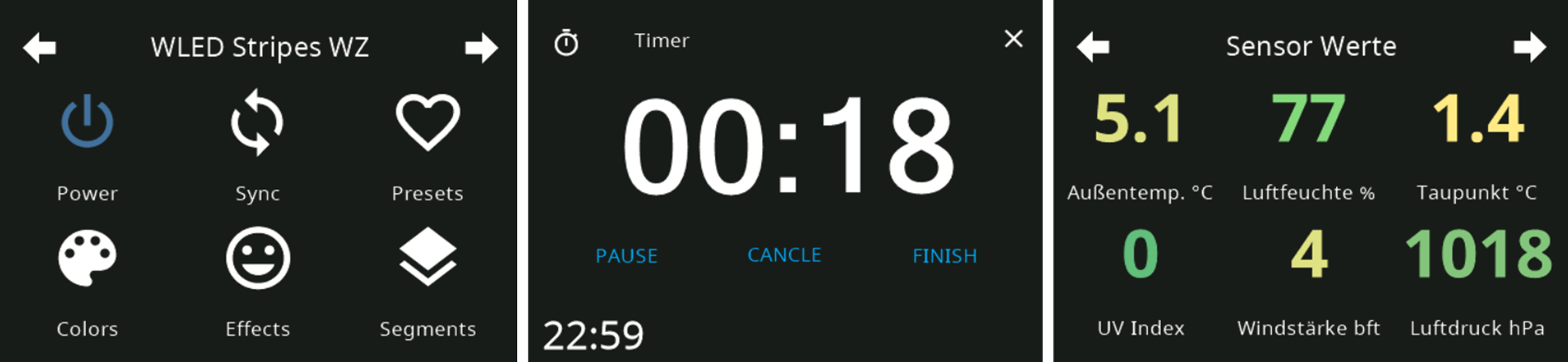
            Hier ein Beispiel für eine Page mit Werten. Ist auch im Script vorgestellt.

            let SensorGrid = <PageGrid>
            {
                'type': 'cardGrid',
                'heading': 'Sensor Werte',
                'useColor': true,
                'items': [
                    <PageItem>{ id: 'alias.0.NSPanel_1.TestTemperatur', name: 'Außentemp. °C', offColor: MSRed, onColor: MSGreen, useValue: true, colorScale: {'val_min': -20, 'val_max': 40, 'val_best': 20} },
                    <PageItem>{ id: 'alias.0.NSPanel_1.TestFeuchtigkeit', name: 'Luftfeuchte %', offColor: MSYellow, onColor: MSYellow , useValue: true, colorScale: {'val_min': 0, 'val_max': 100, 'val_best': 65} },
                    <PageItem>{ id: 'alias.0.NSPanel_1.Taupunkt', name: 'Taupunkt °C', offColor: MSRed, onColor: MSGreen, useValue: true, colorScale: {'val_min': -20, 'val_max': 40, 'val_best': 20} },
                    <PageItem>{ id: 'alias.0.NSPanel_1.UV_Index', name: 'UV Index', offColor: White , onColor: White, useValue: true, colorScale: {'val_min': 0, 'val_max': 12} },
                    <PageItem>{ id: 'alias.0.NSPanel_1.Windstaerke', name: 'Windstärke bft', offColor: White , onColor: White, useValue: true, colorScale: {'val_min': 0, 'val_max': 9} },
                    <PageItem>{ id: 'alias.0.NSPanel_1.Luftdruck', name: 'Luftdruck hPa', offColor: White , onColor: White, useValue: true, colorScale: {'val_min': 950, 'val_max': 1050, 'val_best': 1013} },
                ]
            };
            

            Gruß Tom
            https://github.com/tt-tom17
            Wenn meine Hilfe erfolgreich war, benutze bitte das Voting unten rechts im Beitrag

            NSPanel Script Wiki
            https://github.com/joBr99/nspanel-lovelace-ui/wiki

            NSPanel Adapter Wiki
            https://github.com/ticaki/ioBroker.nspanel-lovelace-ui/wiki

            A 1 Reply Last reply
            0
            • T TT-Tom

              @alfredtetzlaff

              Hier ein Beispiel für eine Page mit Werten. Ist auch im Script vorgestellt.

              let SensorGrid = <PageGrid>
              {
                  'type': 'cardGrid',
                  'heading': 'Sensor Werte',
                  'useColor': true,
                  'items': [
                      <PageItem>{ id: 'alias.0.NSPanel_1.TestTemperatur', name: 'Außentemp. °C', offColor: MSRed, onColor: MSGreen, useValue: true, colorScale: {'val_min': -20, 'val_max': 40, 'val_best': 20} },
                      <PageItem>{ id: 'alias.0.NSPanel_1.TestFeuchtigkeit', name: 'Luftfeuchte %', offColor: MSYellow, onColor: MSYellow , useValue: true, colorScale: {'val_min': 0, 'val_max': 100, 'val_best': 65} },
                      <PageItem>{ id: 'alias.0.NSPanel_1.Taupunkt', name: 'Taupunkt °C', offColor: MSRed, onColor: MSGreen, useValue: true, colorScale: {'val_min': -20, 'val_max': 40, 'val_best': 20} },
                      <PageItem>{ id: 'alias.0.NSPanel_1.UV_Index', name: 'UV Index', offColor: White , onColor: White, useValue: true, colorScale: {'val_min': 0, 'val_max': 12} },
                      <PageItem>{ id: 'alias.0.NSPanel_1.Windstaerke', name: 'Windstärke bft', offColor: White , onColor: White, useValue: true, colorScale: {'val_min': 0, 'val_max': 9} },
                      <PageItem>{ id: 'alias.0.NSPanel_1.Luftdruck', name: 'Luftdruck hPa', offColor: White , onColor: White, useValue: true, colorScale: {'val_min': 950, 'val_max': 1050, 'val_best': 1013} },
                  ]
              };
              
              A Offline
              A Offline
              AlfredTetzlaff
              wrote on last edited by
              #2461

              @tt-tom
              Danke, ich schmeiss das gleich rein....

              A 1 Reply Last reply
              0
              • A AlfredTetzlaff

                @tt-tom
                Danke, ich schmeiss das gleich rein....

                A Offline
                A Offline
                AlfredTetzlaff
                wrote on last edited by
                #2462

                @alfredtetzlaff
                Habs reinkopiert aus dem Beispiel-Script und gleich noch eine zweite Seite generiert. Die zweite ist da, kann auch navigieren, aber auf beiden Seiten keine Werte. Es kann also nur der alias fehlerhaft sein.
                Ist vielleich das Minuszeichen im Alias-wort der fehler? Ich korrigiere das gleich...

                T 1 Reply Last reply
                0
                • A AlfredTetzlaff

                  @alfredtetzlaff
                  Habs reinkopiert aus dem Beispiel-Script und gleich noch eine zweite Seite generiert. Die zweite ist da, kann auch navigieren, aber auf beiden Seiten keine Werte. Es kann also nur der alias fehlerhaft sein.
                  Ist vielleich das Minuszeichen im Alias-wort der fehler? Ich korrigiere das gleich...

                  T Offline
                  T Offline
                  TT-Tom
                  wrote on last edited by
                  #2463

                  @alfredtetzlaff zeige mal bitte deine Alias.

                  Gruß Tom
                  https://github.com/tt-tom17
                  Wenn meine Hilfe erfolgreich war, benutze bitte das Voting unten rechts im Beitrag

                  NSPanel Script Wiki
                  https://github.com/joBr99/nspanel-lovelace-ui/wiki

                  NSPanel Adapter Wiki
                  https://github.com/ticaki/ioBroker.nspanel-lovelace-ui/wiki

                  A 1 Reply Last reply
                  0
                  • T TT-Tom

                    @alfredtetzlaff zeige mal bitte deine Alias.

                    A Offline
                    A Offline
                    AlfredTetzlaff
                    wrote on last edited by
                    #2464

                    @tt-tom
                    20230308_153328.jpg

                    T 1 Reply Last reply
                    0
                    • A AlfredTetzlaff

                      @tt-tom
                      20230308_153328.jpg

                      T Offline
                      T Offline
                      TT-Tom
                      wrote on last edited by
                      #2465

                      @alfredtetzlaff aus dem Objekte Tab und wenn möglich keine Fotos. Bitte Screenshots posten.

                      Gruß Tom
                      https://github.com/tt-tom17
                      Wenn meine Hilfe erfolgreich war, benutze bitte das Voting unten rechts im Beitrag

                      NSPanel Script Wiki
                      https://github.com/joBr99/nspanel-lovelace-ui/wiki

                      NSPanel Adapter Wiki
                      https://github.com/ticaki/ioBroker.nspanel-lovelace-ui/wiki

                      A 1 Reply Last reply
                      0
                      • T TT-Tom

                        @alfredtetzlaff aus dem Objekte Tab und wenn möglich keine Fotos. Bitte Screenshots posten.

                        A Offline
                        A Offline
                        AlfredTetzlaff
                        wrote on last edited by
                        #2466

                        @tt-tom
                        ScreenShot ist schwierig zZ...

                        Ich lege die Aliasse neu an ohne Minuszeichen....Ich denke, daran liegt es...
                        Melde mich wieder ....Danke...

                        A 1 Reply Last reply
                        0
                        • A AlfredTetzlaff

                          @tt-tom
                          ScreenShot ist schwierig zZ...

                          Ich lege die Aliasse neu an ohne Minuszeichen....Ich denke, daran liegt es...
                          Melde mich wieder ....Danke...

                          A Offline
                          A Offline
                          AlfredTetzlaff
                          wrote on last edited by
                          #2467

                          @alfredtetzlaff
                          5a613cee-50e6-45cb-a02a-3ac4767655af-grafik.png
                          Neue Aliase sind angelegt worden. Kompiler bringt auch keine Fehler.

                          //-- Anfang der Beispiele für Seitengestaltung -- Selbstdefinierte Aliase erforderlich ----------------
                          let SensorGrid = <PageGrid>
                          {
                              'type': 'cardGrid',
                              'heading': 'Sensor Werte',
                              'useColor': true,
                              'items': [
                                  <PageItem>{ id: 'alias.0.GrowattSolar.EnergieGesamt.ACTUAL', name: 'Außentemp. °C', offColor: MSRed, onColor: MSGreen, useValue: true, colorScale: {'val_min': -20, 'val_max': 40, 'val_best': 20} },
                                  <PageItem>{ id: 'alias.0.GrowattSolar.EnergieGesamt.ACTUAL', name: 'Luftfeuchte %', offColor: MSYellow, onColor: MSYellow , useValue: true, colorScale: {'val_min': 0, 'val_max': 100, 'val_best': 65} },
                                  <PageItem>{ id: 'alias.0.GrowattSolar.EnergieGesamt.ACTUAL', name: 'Taupunkt °C', offColor: MSRed, onColor: MSGreen, useValue: true, colorScale: {'val_min': -20, 'val_max': 40, 'val_best': 20} },
                                  <PageItem>{ id: 'alias.0.GrowattSolar.EnergieGesamt.ACTUALL', name: 'UV Index', offColor: White , onColor: White, useValue: true, colorScale: {'val_min': 0, 'val_max': 12} },
                                  <PageItem>{ id: 'alias.0.GrowattSolar.EnergieGesamt.ACTUAL', name: 'Windstärke bft', offColor: White , onColor: White, useValue: true, colorScale: {'val_min': 0, 'val_max': 9} },
                                  <PageItem>{ id: 'alias.0.GrowattSolar.EnergieGesamt.ACTUAL', name: 'Luftdruck hPa', offColor: White , onColor: White, useValue: true, colorScale: {'val_min': 950, 'val_max': 1050, 'val_best': 1013} },
                              ]
                          };
                          let PV = <PageGrid>
                          {
                              'type': 'cardGrid',
                              'heading': 'Growatt',
                              'useColor': true,
                              'items': [
                                  
                                  <PageItem>{ id: 'alias.0.GrowattSolar.EnergieGesamt.ACTUAL', icon: 'radio', name: 'Radio BOB', onColor: colorRadio},
                                  <PageItem>{ id: 'alias.0.GrowattSolar.EnergieHeute.ACTUAL', icon: 'timer-outline', name: 'Timer', onColor: White}
                              ]
                          };
                          //-- ENDE der Beispiele für Seitengestaltung -- Selbstdefinierte Aliase erforderlich ------------------
                          

                          Die beiden Seite sind da, aber keine Werte und Icons. Komisch.

                          T 1 Reply Last reply
                          0
                          • A AlfredTetzlaff

                            @alfredtetzlaff
                            5a613cee-50e6-45cb-a02a-3ac4767655af-grafik.png
                            Neue Aliase sind angelegt worden. Kompiler bringt auch keine Fehler.

                            //-- Anfang der Beispiele für Seitengestaltung -- Selbstdefinierte Aliase erforderlich ----------------
                            let SensorGrid = <PageGrid>
                            {
                                'type': 'cardGrid',
                                'heading': 'Sensor Werte',
                                'useColor': true,
                                'items': [
                                    <PageItem>{ id: 'alias.0.GrowattSolar.EnergieGesamt.ACTUAL', name: 'Außentemp. °C', offColor: MSRed, onColor: MSGreen, useValue: true, colorScale: {'val_min': -20, 'val_max': 40, 'val_best': 20} },
                                    <PageItem>{ id: 'alias.0.GrowattSolar.EnergieGesamt.ACTUAL', name: 'Luftfeuchte %', offColor: MSYellow, onColor: MSYellow , useValue: true, colorScale: {'val_min': 0, 'val_max': 100, 'val_best': 65} },
                                    <PageItem>{ id: 'alias.0.GrowattSolar.EnergieGesamt.ACTUAL', name: 'Taupunkt °C', offColor: MSRed, onColor: MSGreen, useValue: true, colorScale: {'val_min': -20, 'val_max': 40, 'val_best': 20} },
                                    <PageItem>{ id: 'alias.0.GrowattSolar.EnergieGesamt.ACTUALL', name: 'UV Index', offColor: White , onColor: White, useValue: true, colorScale: {'val_min': 0, 'val_max': 12} },
                                    <PageItem>{ id: 'alias.0.GrowattSolar.EnergieGesamt.ACTUAL', name: 'Windstärke bft', offColor: White , onColor: White, useValue: true, colorScale: {'val_min': 0, 'val_max': 9} },
                                    <PageItem>{ id: 'alias.0.GrowattSolar.EnergieGesamt.ACTUAL', name: 'Luftdruck hPa', offColor: White , onColor: White, useValue: true, colorScale: {'val_min': 950, 'val_max': 1050, 'val_best': 1013} },
                                ]
                            };
                            let PV = <PageGrid>
                            {
                                'type': 'cardGrid',
                                'heading': 'Growatt',
                                'useColor': true,
                                'items': [
                                    
                                    <PageItem>{ id: 'alias.0.GrowattSolar.EnergieGesamt.ACTUAL', icon: 'radio', name: 'Radio BOB', onColor: colorRadio},
                                    <PageItem>{ id: 'alias.0.GrowattSolar.EnergieHeute.ACTUAL', icon: 'timer-outline', name: 'Timer', onColor: White}
                                ]
                            };
                            //-- ENDE der Beispiele für Seitengestaltung -- Selbstdefinierte Aliase erforderlich ------------------
                            

                            Die beiden Seite sind da, aber keine Werte und Icons. Komisch.

                            T Offline
                            T Offline
                            TT-Tom
                            wrote on last edited by
                            #2468

                            @alfredtetzlaff

                            LASS das ACTUAL weg.

                            Gruß Tom
                            https://github.com/tt-tom17
                            Wenn meine Hilfe erfolgreich war, benutze bitte das Voting unten rechts im Beitrag

                            NSPanel Script Wiki
                            https://github.com/joBr99/nspanel-lovelace-ui/wiki

                            NSPanel Adapter Wiki
                            https://github.com/ticaki/ioBroker.nspanel-lovelace-ui/wiki

                            A 1 Reply Last reply
                            0
                            • T TT-Tom

                              @tklein sagte in SONOFF NSPanel mit Lovelace UI:

                              Was/wie in welcher Reihenfolge müsste ich updaten, damit ich wieder uptodate bin?

                              als erstes solltest du Tasmota auf den aktuellen Stand bringen.
                              Panel neu starten
                              Berry Driver

                              Backlog UpdateDriverVersion https://raw.githubusercontent.com/joBr99/nspanel-lovelace-ui/main/tasmota/autoexec.be; Restart 1
                              

                              in der Tasmota Console die TFT-Firmware aktualisieren.

                              FlashNextion http://nspanel.pky.eu/lovelace-ui/github/nspanel-v4.0.4.tft
                              

                              und dann das neue Script von Github laden.

                              Es haben sich viele Schreibweisen im laufe der Zeit geändert. Lese im Wiki einfach mal nach, das ist es sehr gut dokumentiert.

                              Wichtig bevor du das neue Script startest, lösche deine PanelObjekte "NSPanel.1." unter 0_userdata.0. und alias.0.

                              Gibt es mittlerweile einen eigenen Adapter dazu?

                              nein, gibt es nicht

                              T Offline
                              T Offline
                              tklein
                              wrote on last edited by tklein
                              #2469

                              UPDATE: hat geklappt

                              @tt-tom said in SONOFF NSPanel mit Lovelace UI:

                              Backlog UpdateDriverVersion https://raw.githubusercontent.com/joBr99/nspanel-lovelace-ui/main/tasmota/autoexec.be; Restart 1

                              thx, wo gebe ch das an/ein? auch in der Tasmota Console?

                              T 1 Reply Last reply
                              0
                              • T TT-Tom

                                @alfredtetzlaff

                                LASS das ACTUAL weg.

                                A Offline
                                A Offline
                                AlfredTetzlaff
                                wrote on last edited by
                                #2470

                                @tt-tom
                                Prima, danke....Fortschritt ist zu verzeichnen.....
                                Growatt-Seite zeigt jetzt zumindest zwei Icons an: Radio BOB & Timer.
                                Sensor-Werte-Seite zeigt 2 x 3 große Zahlenwerten an, aus dem Adapter "3200"...
                                Die Schrift bei den Zahlenwerten st SEHR groß, aber immerhin ein Groooosser Erfolg..

                                1 Reply Last reply
                                0
                                • A AlfredTetzlaff

                                  @alfredtetzlaff
                                  So sieht es jetzt aus....trotzdem keine Werte oder auch Icons:

                                  //-- Anfang der Beispiele für Seitengestaltung -- Selbstdefinierte Aliase erforderlich ----------------
                                  
                                  let PV = <PageGrid>
                                  {
                                      'type': 'cardGrid',
                                      'heading': 'Growatt',
                                      'useColor': true,
                                      'items': [
                                          
                                          <PageItem>{ id: 'alias.0.Growatt-Solar.Energie-Gesamt.ACTUAL', icon: 'radio', name: 'Radio BOB', onColor: colorRadio},
                                          <PageItem>{ id: 'alias.0.Growatt-Solar.Energie-Heute.ACTUAL', icon: 'timer-outline', name: 'Timer', onColor: White}
                                      ]
                                  
                                  ArmilarA Offline
                                  ArmilarA Offline
                                  Armilar
                                  Most Active Forum Testing
                                  wrote on last edited by
                                  #2471

                                  @alfredtetzlaff

                                  Da darf kein .ACTUAL in der id stehen

                                  Installationsanleitung, Tipps, Alias-Definitionen, FAQ für das Sonoff NSPanel mit lovelace UI unter ioBroker
                                  https://github.com/joBr99/nspanel-lovelace-ui/wiki

                                  Benutzt das Voting rechts unten im Beitrag wenn er euch geholfen hat.

                                  A 1 Reply Last reply
                                  0
                                  • T tklein

                                    UPDATE: hat geklappt

                                    @tt-tom said in SONOFF NSPanel mit Lovelace UI:

                                    Backlog UpdateDriverVersion https://raw.githubusercontent.com/joBr99/nspanel-lovelace-ui/main/tasmota/autoexec.be; Restart 1

                                    thx, wo gebe ch das an/ein? auch in der Tasmota Console?

                                    T Offline
                                    T Offline
                                    TT-Tom
                                    wrote on last edited by
                                    #2472

                                    @tklein Okay, wo stehst du jetzt??

                                    Gruß Tom
                                    https://github.com/tt-tom17
                                    Wenn meine Hilfe erfolgreich war, benutze bitte das Voting unten rechts im Beitrag

                                    NSPanel Script Wiki
                                    https://github.com/joBr99/nspanel-lovelace-ui/wiki

                                    NSPanel Adapter Wiki
                                    https://github.com/ticaki/ioBroker.nspanel-lovelace-ui/wiki

                                    T 1 Reply Last reply
                                    0
                                    • ArmilarA Armilar

                                      @alfredtetzlaff

                                      Da darf kein .ACTUAL in der id stehen

                                      A Offline
                                      A Offline
                                      AlfredTetzlaff
                                      wrote on last edited by
                                      #2473

                                      @armilar
                                      Jo, hatte den falschen Zweig im Alias stehen,,ohne ACTUAL geht es jetzt erstmal.
                                      In der Seite mit 2x3 anzeigen ist die Schriftgröße der angezeigten Werte einfach zu groß. Kann man die ändern.????

                                      T 1 Reply Last reply
                                      0
                                      • A AlfredTetzlaff

                                        @armilar
                                        Jo, hatte den falschen Zweig im Alias stehen,,ohne ACTUAL geht es jetzt erstmal.
                                        In der Seite mit 2x3 anzeigen ist die Schriftgröße der angezeigten Werte einfach zu groß. Kann man die ändern.????

                                        T Offline
                                        T Offline
                                        TT-Tom
                                        wrote on last edited by
                                        #2474

                                        @alfredtetzlaff
                                        Was möchtest du eigentlich darstellen. Du könntest auch eine CardEntiries erstellen, hast dann aber nur 4 Werte pro Seite.

                                        Gruß Tom
                                        https://github.com/tt-tom17
                                        Wenn meine Hilfe erfolgreich war, benutze bitte das Voting unten rechts im Beitrag

                                        NSPanel Script Wiki
                                        https://github.com/joBr99/nspanel-lovelace-ui/wiki

                                        NSPanel Adapter Wiki
                                        https://github.com/ticaki/ioBroker.nspanel-lovelace-ui/wiki

                                        A 1 Reply Last reply
                                        0
                                        • T TT-Tom

                                          @alfredtetzlaff
                                          Was möchtest du eigentlich darstellen. Du könntest auch eine CardEntiries erstellen, hast dann aber nur 4 Werte pro Seite.

                                          A Offline
                                          A Offline
                                          AlfredTetzlaff
                                          wrote on last edited by
                                          #2475

                                          @tt-tom
                                          Ja, 4 Werte würden mir schon ausreichen.
                                          Brauche aus der PV nur 4 Werte:
                                          Gesamt in kWh
                                          Heute in kWh
                                          Strom in A
                                          akt. Leistung in W

                                          T A 2 Replies Last reply
                                          0
                                          Reply
                                          • Reply as topic
                                          Log in to reply
                                          • Oldest to Newest
                                          • Newest to Oldest
                                          • Most Votes


                                          Support us

                                          ioBroker
                                          Community Adapters
                                          Donate

                                          552

                                          Online

                                          32.7k

                                          Users

                                          82.4k

                                          Topics

                                          1.3m

                                          Posts
                                          Community
                                          Impressum | Datenschutz-Bestimmungen | Nutzungsbedingungen | Einwilligungseinstellungen
                                          ioBroker Community 2014-2025
                                          logo
                                          • Login

                                          • Don't have an account? Register

                                          • Login or register to search.
                                          • First post
                                            Last post
                                          0
                                          • Home
                                          • Recent
                                          • Tags
                                          • Unread 0
                                          • Categories
                                          • Unreplied
                                          • Popular
                                          • GitHub
                                          • Docu
                                          • Hilfe