Skip to content
  • Home
  • Recent
  • Tags
  • 0 Unread 0
  • Categories
  • Unreplied
  • Popular
  • GitHub
  • Docu
  • Hilfe
Skins
  • Light
  • Brite
  • Cerulean
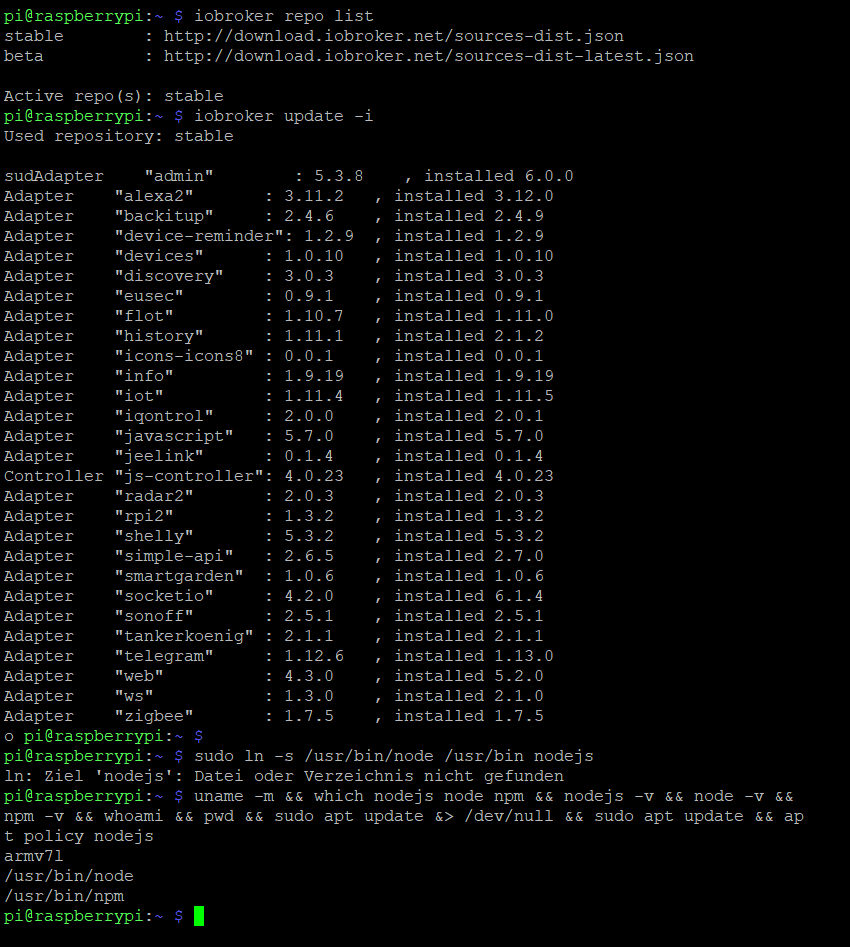
  • Cosmo
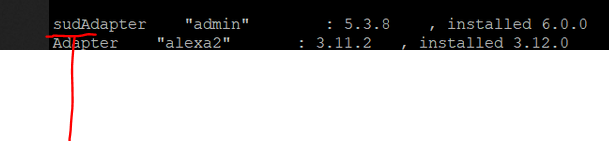
  • Flatly
  • Journal
  • Litera
  • Lumen
  • Lux
  • Materia
  • Minty
  • Morph
  • Pulse
  • Sandstone
  • Simplex
  • Sketchy
  • Spacelab
  • United
  • Yeti
  • Zephyr
  • Dark
  • Cyborg
  • Darkly
  • Quartz
  • Slate
  • Solar
  • Superhero
  • Vapor

  • Default (No Skin)
  • No Skin
Collapse
ioBroker Logo

Community Forum

donate donate
  1. ioBroker Community Home
  2. Deutsch
  3. Einsteigerfragen
  4. Installation
  5. (Erledigt) tr-064 lässt sich nicht installieren

NEWS

  • Monatsrückblick Januar/Februar 2026 ist online!
    BluefoxB
    Bluefox
    18
    1
    788

  • Jahresrückblick 2025 – unser neuer Blogbeitrag ist online! ✨
    BluefoxB
    Bluefox
    18
    1
    6.2k

  • Neuer Blogbeitrag: Monatsrückblick - Dezember 2025 🎄
    BluefoxB
    Bluefox
    13
    1
    1.5k

(Erledigt) tr-064 lässt sich nicht installieren

Scheduled Pinned Locked Moved Installation
35 Posts 6 Posters 1.6k Views 5 Watching
  • Oldest to Newest
  • Newest to Oldest
  • Most Votes
Reply
  • Reply as topic
Log in to reply
This topic has been deleted. Only users with topic management privileges can see it.
  • G Online
    G Online
    Gonzokalle
    wrote on last edited by Gonzokalle
    #1

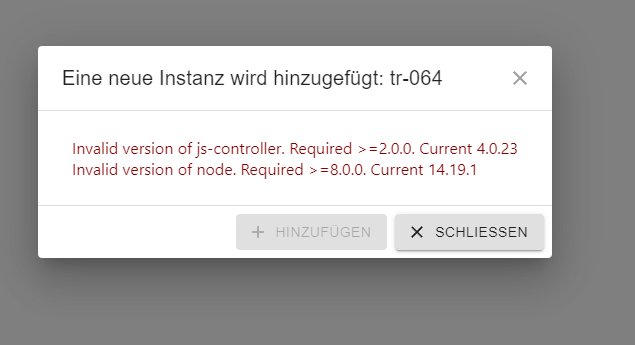
    Der tr-064 lässt sich nicht installieren.
    Was kann ich da machen?
    135fde56-2cbe-4cc2-bb56-7b84b30e390d-image.png

    GlasfaserG 1 Reply Last reply
    0
    • G Gonzokalle

      Der tr-064 lässt sich nicht installieren.
      Was kann ich da machen?
      135fde56-2cbe-4cc2-bb56-7b84b30e390d-image.png

      GlasfaserG Online
      GlasfaserG Online
      Glasfaser
      wrote on last edited by
      #2

      @gonzokalle sagte in tr-064 lässt sich nicht installieren:

      Was kann ich da machen?

      Hallo BETA Tester ..

      siehe hier :

      https://forum.iobroker.net/topic/55381/admin-6-0-neu-als-beta

      Synology 918+ 16GB - ioBroker in Docker v9 , VISO auf Trekstor Primebook C13 13,3" , Hikvision Domkameras mit Surveillance Station .. CCU RaspberryMatic in Synology VM .. Zigbee CC2538+CC2592 .. Sonoff .. KNX .. Modbus ..

      G 1 Reply Last reply
      0
      • GlasfaserG Glasfaser

        @gonzokalle sagte in tr-064 lässt sich nicht installieren:

        Was kann ich da machen?

        Hallo BETA Tester ..

        siehe hier :

        https://forum.iobroker.net/topic/55381/admin-6-0-neu-als-beta

        G Online
        G Online
        Gonzokalle
        wrote on last edited by
        #3

        @glasfaser
        Da hat einer scheinbar das gleiche Problem.
        Ist meine Version zu modern?
        Hast du eine Lösung dafür?

        GlasfaserG 2 Replies Last reply
        0
        • G Gonzokalle

          @glasfaser
          Da hat einer scheinbar das gleiche Problem.
          Ist meine Version zu modern?
          Hast du eine Lösung dafür?

          GlasfaserG Online
          GlasfaserG Online
          Glasfaser
          wrote on last edited by
          #4

          @gonzokalle sagte in tr-064 lässt sich nicht installieren:

          Ist meine Version zu modern?

          Wie schon oben gesagt .. du bist BETA Tester

          ( Verwahrungsort BETA /latest )

          Hast du eine Lösung dafür?

          in Stable dein System fahren ... und 5.3.8 ist aktuell.

          ff1126db-59e5-4b79-ae8d-64adcc6d8d35-grafik.png

          Synology 918+ 16GB - ioBroker in Docker v9 , VISO auf Trekstor Primebook C13 13,3" , Hikvision Domkameras mit Surveillance Station .. CCU RaspberryMatic in Synology VM .. Zigbee CC2538+CC2592 .. Sonoff .. KNX .. Modbus ..

          G 1 Reply Last reply
          0
          • GlasfaserG Glasfaser

            @gonzokalle sagte in tr-064 lässt sich nicht installieren:

            Ist meine Version zu modern?

            Wie schon oben gesagt .. du bist BETA Tester

            ( Verwahrungsort BETA /latest )

            Hast du eine Lösung dafür?

            in Stable dein System fahren ... und 5.3.8 ist aktuell.

            ff1126db-59e5-4b79-ae8d-64adcc6d8d35-grafik.png

            G Online
            G Online
            Gonzokalle
            wrote on last edited by
            #5

            @glasfaser
            Reicht es in Pepositories auf stable zu stellen und neu zu starten?

            haus-automatisierungH 1 Reply Last reply
            0
            • G Gonzokalle

              @glasfaser
              Reicht es in Pepositories auf stable zu stellen und neu zu starten?

              haus-automatisierungH Offline
              haus-automatisierungH Offline
              haus-automatisierung
              Developer Most Active
              wrote on last edited by
              #6

              @gonzokalle sagte in tr-064 lässt sich nicht installieren:

              Reicht es in Pepositories auf stable zu stellen und neu zu starten?

              Nein, Du musst dann noch die aktuelle Stable Version installieren über das Adapter-Tab. Durch die Umstellung des Repositories werden keine Versionen von installierten Adaptern geändert.

              🧑‍🎓 Autor des beliebten ioBroker-Master-Kurses
              🎥 Tutorials rund um das Thema DIY-Smart-Home: https://haus-automatisierung.com/
              📚 Meine inoffizielle ioBroker Dokumentation

              G 1 Reply Last reply
              0
              • haus-automatisierungH haus-automatisierung

                @gonzokalle sagte in tr-064 lässt sich nicht installieren:

                Reicht es in Pepositories auf stable zu stellen und neu zu starten?

                Nein, Du musst dann noch die aktuelle Stable Version installieren über das Adapter-Tab. Durch die Umstellung des Repositories werden keine Versionen von installierten Adaptern geändert.

                G Online
                G Online
                Gonzokalle
                wrote on last edited by
                #7

                @haus-automatisierung
                Das werde ich mal probieren. Danke

                G 1 Reply Last reply
                0
                • G Gonzokalle

                  @haus-automatisierung
                  Das werde ich mal probieren. Danke

                  G Online
                  G Online
                  Gonzokalle
                  wrote on last edited by
                  #8

                  @gonzokalle
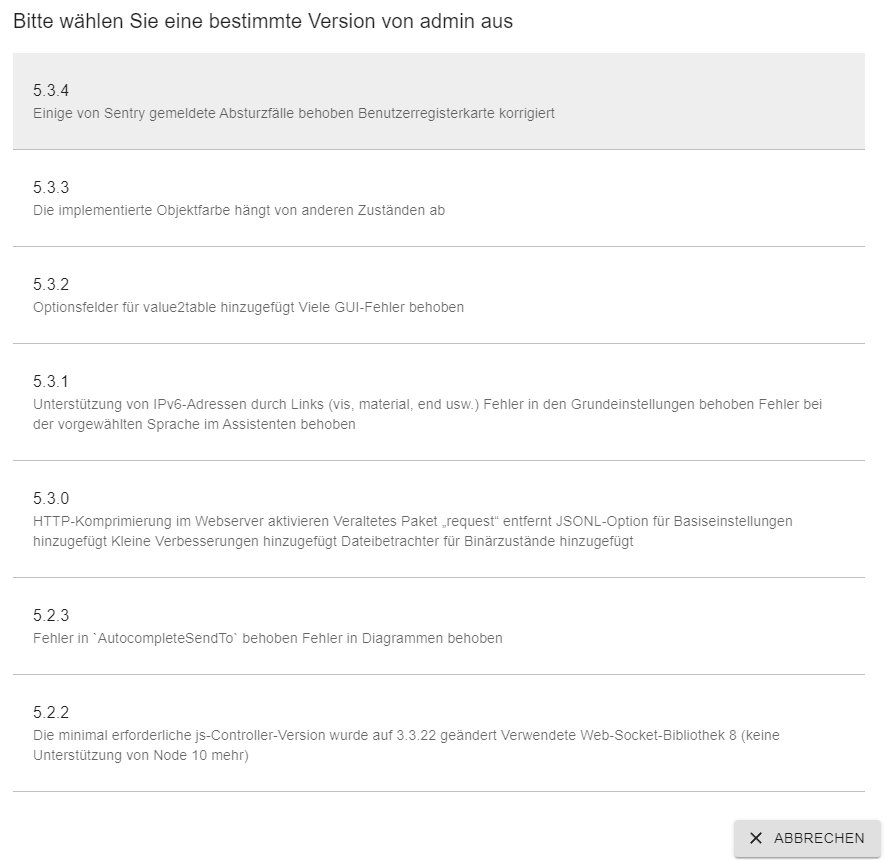
                  Da wird mir keine 5.3.8 angeboten.
                  678789e6-dbee-475b-97e5-82cd75d0e494-image.png

                  GlasfaserG 1 Reply Last reply
                  0
                  • G Gonzokalle

                    @gonzokalle
                    Da wird mir keine 5.3.8 angeboten.
                    678789e6-dbee-475b-97e5-82cd75d0e494-image.png

                    GlasfaserG Online
                    GlasfaserG Online
                    Glasfaser
                    wrote on last edited by Glasfaser
                    #9

                    @gonzokalle

                    Zeige mal ( Aus/Eingabe in Code-Tags </> )
                    :

                    iobroker repo list
                    iobroker update -i
                    sudo ln -s /usr/bin/node /usr/bin/nodejs
                    uname -m && which nodejs node npm && nodejs -v && node -v && npm -v && whoami && pwd && sudo apt update &> /dev/null && sudo apt update && apt policy nodejs
                    

                    Synology 918+ 16GB - ioBroker in Docker v9 , VISO auf Trekstor Primebook C13 13,3" , Hikvision Domkameras mit Surveillance Station .. CCU RaspberryMatic in Synology VM .. Zigbee CC2538+CC2592 .. Sonoff .. KNX .. Modbus ..

                    G 1 Reply Last reply
                    0
                    • GlasfaserG Glasfaser

                      @gonzokalle

                      Zeige mal ( Aus/Eingabe in Code-Tags </> )
                      :

                      iobroker repo list
                      iobroker update -i
                      sudo ln -s /usr/bin/node /usr/bin/nodejs
                      uname -m && which nodejs node npm && nodejs -v && node -v && npm -v && whoami && pwd && sudo apt update &> /dev/null && sudo apt update && apt policy nodejs
                      
                      G Online
                      G Online
                      Gonzokalle
                      wrote on last edited by
                      #10

                      @Glasfaser
                      So richtig?
                      344a73b7-f210-4434-b0d4-cd0a8e92df35-image.png

                      Thomas BraunT GlasfaserG 3 Replies Last reply
                      0
                      • G Gonzokalle

                        @Glasfaser
                        So richtig?
                        344a73b7-f210-4434-b0d4-cd0a8e92df35-image.png

                        Thomas BraunT Online
                        Thomas BraunT Online
                        Thomas Braun
                        Most Active
                        wrote on last edited by
                        #11

                        @gonzokalle

                        Bitte als Text in CodeTags eingebettet.

                        Linux-Werkzeugkasten:
                        https://forum.iobroker.net/topic/42952/der-kleine-iobroker-linux-werkzeugkasten
                        NodeJS Fixer Skript:
                        https://forum.iobroker.net/topic/68035/iob-node-fix-skript
                        iob_diag: curl -sLf -o diag.sh https://iobroker.net/diag.sh && bash diag.sh

                        G 1 Reply Last reply
                        0
                        • Thomas BraunT Thomas Braun

                          @gonzokalle

                          Bitte als Text in CodeTags eingebettet.

                          G Online
                          G Online
                          Gonzokalle
                          wrote on last edited by
                          #12

                          @thomas-braun
                          Wie geht das denn?

                          GlasfaserG 1 Reply Last reply
                          0
                          • G Gonzokalle

                            @thomas-braun
                            Wie geht das denn?

                            GlasfaserG Online
                            GlasfaserG Online
                            Glasfaser
                            wrote on last edited by
                            #13

                            @gonzokalle

                            zu Code-Tags ..

                            https://forum.iobroker.net/topic/51555/hinweise-für-gute-forenbeiträge

                            Synology 918+ 16GB - ioBroker in Docker v9 , VISO auf Trekstor Primebook C13 13,3" , Hikvision Domkameras mit Surveillance Station .. CCU RaspberryMatic in Synology VM .. Zigbee CC2538+CC2592 .. Sonoff .. KNX .. Modbus ..

                            1 Reply Last reply
                            0
                            • G Gonzokalle

                              @Glasfaser
                              So richtig?
                              344a73b7-f210-4434-b0d4-cd0a8e92df35-image.png

                              Thomas BraunT Online
                              Thomas BraunT Online
                              Thomas Braun
                              Most Active
                              wrote on last edited by Thomas Braun
                              #14

                              @gonzokalle

                              Da klemmt irgendwas bei dir.

                              sudo apt update
                              sudo apt full-upgrade
                              sudo reboot
                              

                              Und bitte das Eingeben, was gepostet wird. Am besten kopieren und in das Terminal pasten (Rechte Maustaste meist).

                              sudo ln -s /usr/bin/node /usr/bin/nodejs
                              uname -m && which nodejs node npm && nodejs -v && node -v && npm -v && whoami && pwd && sudo apt update &> /dev/null && sudo apt update && apt policy nodejs
                              

                              Linux-Werkzeugkasten:
                              https://forum.iobroker.net/topic/42952/der-kleine-iobroker-linux-werkzeugkasten
                              NodeJS Fixer Skript:
                              https://forum.iobroker.net/topic/68035/iob-node-fix-skript
                              iob_diag: curl -sLf -o diag.sh https://iobroker.net/diag.sh && bash diag.sh

                              G 1 Reply Last reply
                              0
                              • Thomas BraunT Thomas Braun

                                @gonzokalle

                                Da klemmt irgendwas bei dir.

                                sudo apt update
                                sudo apt full-upgrade
                                sudo reboot
                                

                                Und bitte das Eingeben, was gepostet wird. Am besten kopieren und in das Terminal pasten (Rechte Maustaste meist).

                                sudo ln -s /usr/bin/node /usr/bin/nodejs
                                uname -m && which nodejs node npm && nodejs -v && node -v && npm -v && whoami && pwd && sudo apt update &> /dev/null && sudo apt update && apt policy nodejs
                                
                                G Online
                                G Online
                                Gonzokalle
                                wrote on last edited by
                                #15

                                @thomas-braun
                                Wieder etwas gelernt

                                pi@raspberrypi:~ $ iobroker repo list
                                stable        : http://download.iobroker.net/sources-dist.json
                                beta          : http://download.iobroker.net/sources-dist-latest.json
                                
                                Active repo(s): stable
                                pi@raspberrypi:~ $ iobroker update -i
                                Used repository: stable
                                
                                sudAdapter    "admin"        : 5.3.8    , installed 6.0.0
                                Adapter    "alexa2"       : 3.11.2   , installed 3.12.0
                                Adapter    "backitup"     : 2.4.6    , installed 2.4.9
                                Adapter    "device-reminder": 1.2.9  , installed 1.2.9
                                Adapter    "devices"      : 1.0.10   , installed 1.0.10
                                Adapter    "discovery"    : 3.0.3    , installed 3.0.3
                                Adapter    "eusec"        : 0.9.1    , installed 0.9.1
                                Adapter    "flot"         : 1.10.7   , installed 1.11.0
                                Adapter    "history"      : 1.11.1   , installed 2.1.2
                                Adapter    "icons-icons8" : 0.0.1    , installed 0.0.1
                                Adapter    "info"         : 1.9.19   , installed 1.9.19
                                Adapter    "iot"          : 1.11.4   , installed 1.11.5
                                Adapter    "iqontrol"     : 2.0.0    , installed 2.0.1
                                Adapter    "javascript"   : 5.7.0    , installed 5.7.0
                                Adapter    "jeelink"      : 0.1.4    , installed 0.1.4
                                Controller "js-controller": 4.0.23   , installed 4.0.23
                                Adapter    "radar2"       : 2.0.3    , installed 2.0.3
                                Adapter    "rpi2"         : 1.3.2    , installed 1.3.2
                                Adapter    "shelly"       : 5.3.2    , installed 5.3.2
                                Adapter    "simple-api"   : 2.6.5    , installed 2.7.0
                                Adapter    "smartgarden"  : 1.0.6    , installed 1.0.6
                                Adapter    "socketio"     : 4.2.0    , installed 6.1.4
                                Adapter    "sonoff"       : 2.5.1    , installed 2.5.1
                                Adapter    "tankerkoenig" : 2.1.1    , installed 2.1.1
                                Adapter    "telegram"     : 1.12.6   , installed 1.13.0
                                Adapter    "web"          : 4.3.0    , installed 5.2.0
                                Adapter    "ws"           : 1.3.0    , installed 2.1.0
                                Adapter    "zigbee"       : 1.7.5    , installed 1.7.5
                                o pi@raspberrypi:~ $
                                pi@raspberrypi:~ $ sudo ln -s /usr/bin/node /usr/bin nodejs
                                ln: Ziel 'nodejs': Datei oder Verzeichnis nicht gefunden
                                pi@raspberrypi:~ $ uname -m && which nodejs node npm && nodejs -v && node -v &&                                                                                                                                                                              npm -v && whoami && pwd && sudo apt update &> /dev/null && sudo apt update && ap                                                                                                                                                                             t policy nodejs
                                armv7l
                                /usr/bin/node
                                /usr/bin/npm
                                pi@raspberrypi:~ $ pi@raspberrypi:~ $ iobroker repo list
                                stable        : http://download.iobroker.net/sources-dist.json
                                beta          : http://download.iobroker.net/sources-dist-latest.json
                                
                                
                                GlasfaserG Thomas BraunT 2 Replies Last reply
                                0
                                • G Gonzokalle

                                  @thomas-braun
                                  Wieder etwas gelernt

                                  pi@raspberrypi:~ $ iobroker repo list
                                  stable        : http://download.iobroker.net/sources-dist.json
                                  beta          : http://download.iobroker.net/sources-dist-latest.json
                                  
                                  Active repo(s): stable
                                  pi@raspberrypi:~ $ iobroker update -i
                                  Used repository: stable
                                  
                                  sudAdapter    "admin"        : 5.3.8    , installed 6.0.0
                                  Adapter    "alexa2"       : 3.11.2   , installed 3.12.0
                                  Adapter    "backitup"     : 2.4.6    , installed 2.4.9
                                  Adapter    "device-reminder": 1.2.9  , installed 1.2.9
                                  Adapter    "devices"      : 1.0.10   , installed 1.0.10
                                  Adapter    "discovery"    : 3.0.3    , installed 3.0.3
                                  Adapter    "eusec"        : 0.9.1    , installed 0.9.1
                                  Adapter    "flot"         : 1.10.7   , installed 1.11.0
                                  Adapter    "history"      : 1.11.1   , installed 2.1.2
                                  Adapter    "icons-icons8" : 0.0.1    , installed 0.0.1
                                  Adapter    "info"         : 1.9.19   , installed 1.9.19
                                  Adapter    "iot"          : 1.11.4   , installed 1.11.5
                                  Adapter    "iqontrol"     : 2.0.0    , installed 2.0.1
                                  Adapter    "javascript"   : 5.7.0    , installed 5.7.0
                                  Adapter    "jeelink"      : 0.1.4    , installed 0.1.4
                                  Controller "js-controller": 4.0.23   , installed 4.0.23
                                  Adapter    "radar2"       : 2.0.3    , installed 2.0.3
                                  Adapter    "rpi2"         : 1.3.2    , installed 1.3.2
                                  Adapter    "shelly"       : 5.3.2    , installed 5.3.2
                                  Adapter    "simple-api"   : 2.6.5    , installed 2.7.0
                                  Adapter    "smartgarden"  : 1.0.6    , installed 1.0.6
                                  Adapter    "socketio"     : 4.2.0    , installed 6.1.4
                                  Adapter    "sonoff"       : 2.5.1    , installed 2.5.1
                                  Adapter    "tankerkoenig" : 2.1.1    , installed 2.1.1
                                  Adapter    "telegram"     : 1.12.6   , installed 1.13.0
                                  Adapter    "web"          : 4.3.0    , installed 5.2.0
                                  Adapter    "ws"           : 1.3.0    , installed 2.1.0
                                  Adapter    "zigbee"       : 1.7.5    , installed 1.7.5
                                  o pi@raspberrypi:~ $
                                  pi@raspberrypi:~ $ sudo ln -s /usr/bin/node /usr/bin nodejs
                                  ln: Ziel 'nodejs': Datei oder Verzeichnis nicht gefunden
                                  pi@raspberrypi:~ $ uname -m && which nodejs node npm && nodejs -v && node -v &&                                                                                                                                                                              npm -v && whoami && pwd && sudo apt update &> /dev/null && sudo apt update && ap                                                                                                                                                                             t policy nodejs
                                  armv7l
                                  /usr/bin/node
                                  /usr/bin/npm
                                  pi@raspberrypi:~ $ pi@raspberrypi:~ $ iobroker repo list
                                  stable        : http://download.iobroker.net/sources-dist.json
                                  beta          : http://download.iobroker.net/sources-dist-latest.json
                                  
                                  
                                  GlasfaserG Online
                                  GlasfaserG Online
                                  Glasfaser
                                  wrote on last edited by
                                  #16

                                  @gonzokalle sagte in tr-064 lässt sich nicht installieren:

                                  sudAdapter "admin" : 5.3.8 , installed 6.0.0

                                  o pi@raspberrypi:~ $

                                  Veränderst du da was !?

                                  kenne kein sudAdapter
                                  und
                                  dann Benutzer o pi

                                  Synology 918+ 16GB - ioBroker in Docker v9 , VISO auf Trekstor Primebook C13 13,3" , Hikvision Domkameras mit Surveillance Station .. CCU RaspberryMatic in Synology VM .. Zigbee CC2538+CC2592 .. Sonoff .. KNX .. Modbus ..

                                  1 Reply Last reply
                                  0
                                  • G Gonzokalle

                                    @Glasfaser
                                    So richtig?
                                    344a73b7-f210-4434-b0d4-cd0a8e92df35-image.png

                                    GlasfaserG Online
                                    GlasfaserG Online
                                    Glasfaser
                                    wrote on last edited by
                                    #17

                                    @gonzokalle sagte in tr-064 lässt sich nicht installieren:

                                    So richtig?

                                    in deinem Screenshot ist es auch
                                    be01b55e-b4bf-4552-8ec3-9d9b2abf8903-grafik.png

                                    Synology 918+ 16GB - ioBroker in Docker v9 , VISO auf Trekstor Primebook C13 13,3" , Hikvision Domkameras mit Surveillance Station .. CCU RaspberryMatic in Synology VM .. Zigbee CC2538+CC2592 .. Sonoff .. KNX .. Modbus ..

                                    G 1 Reply Last reply
                                    0
                                    • GlasfaserG Glasfaser

                                      @gonzokalle sagte in tr-064 lässt sich nicht installieren:

                                      So richtig?

                                      in deinem Screenshot ist es auch

                                      be01b55e-b4bf-4552-8ec3-9d9b2abf8903-grafik.png

                                      G Online
                                      G Online
                                      Gonzokalle
                                      wrote on last edited by
                                      #18

                                      @glasfaser

                                      login as: pi
                                      pi@192.168.10.12's password:
                                      Linux raspberrypi 5.15.30-v7l+ #1536 SMP Mon Mar 28 13:51:42 BST 2022 armv7l
                                      
                                      The programs included with the Debian GNU/Linux system are free software;
                                      the exact distribution terms for each program are described in the
                                      individual files in /usr/share/doc/*/copyright.
                                      
                                      Debian GNU/Linux comes with ABSOLUTELY NO WARRANTY, to the extent
                                      permitted by applicable law.
                                      Last login: Sun Jun  5 19:55:10 2022 from 192.168.10.11
                                      
                                      Wi-Fi is currently blocked by rfkill.
                                      Use raspi-config to set the country before use.
                                      
                                      pi@raspberrypi:~ $ sudo apt update
                                      OK:1 http://raspbian.raspberrypi.org/raspbian bullseye InRelease
                                      OK:2 http://archive.raspberrypi.org/debian bullseye InRelease
                                      OK:3 https://phoscon.de/apt/deconz bullseye InRelease
                                      OK:4 https://deb.nodesource.com/node_14.x bullseye InRelease
                                      Paketlisten werden gelesen… Fertig
                                      Abhängigkeitsbaum wird aufgebaut… Fertig
                                      Statusinformationen werden eingelesen… Fertig
                                      Alle Pakete sind aktuell.
                                      pi@raspberrypi:~ $ sudo apt full-upgrade
                                      Paketlisten werden gelesen… Fertig
                                      Abhängigkeitsbaum wird aufgebaut… Fertig
                                      Statusinformationen werden eingelesen… Fertig
                                      Paketaktualisierung (Upgrade) wird berechnet… Fertig
                                      Die folgenden Pakete wurden automatisch installiert und werden nicht mehr benötigt:
                                        libegl-dev libgl-dev libgles-dev libglx-dev libqt5opengl5 libqt5opengl5-dev libqt5qml5 libqt5qmlmodels5
                                        libqt5qmlworkerscript5 libqt5quick5 libqt5quickparticles5 libqt5quickshapes5 libqt5quicktest5 libqt5quickwidgets5
                                        libqt5serialport5 libqt5serialport5-dev libqt5test5 libqt5websockets5 libqt5websockets5-dev libsqlite3-dev libssl-dev
                                        libvulkan-dev qt5-qmake qt5-qmake-bin qt5-qmltooling-plugins qtbase5-dev qtbase5-dev-tools qtchooser qtdeclarative5-dev
                                        qtdeclarative5-dev-tools sqlite3
                                      Verwenden Sie »sudo apt autoremove«, um sie zu entfernen.
                                      0 aktualisiert, 0 neu installiert, 0 zu entfernen und 0 nicht aktualisiert.
                                      pi@raspberrypi:~ $
                                      
                                      
                                      G 1 Reply Last reply
                                      0
                                      • G Gonzokalle

                                        @glasfaser

                                        login as: pi
                                        pi@192.168.10.12's password:
                                        Linux raspberrypi 5.15.30-v7l+ #1536 SMP Mon Mar 28 13:51:42 BST 2022 armv7l
                                        
                                        The programs included with the Debian GNU/Linux system are free software;
                                        the exact distribution terms for each program are described in the
                                        individual files in /usr/share/doc/*/copyright.
                                        
                                        Debian GNU/Linux comes with ABSOLUTELY NO WARRANTY, to the extent
                                        permitted by applicable law.
                                        Last login: Sun Jun  5 19:55:10 2022 from 192.168.10.11
                                        
                                        Wi-Fi is currently blocked by rfkill.
                                        Use raspi-config to set the country before use.
                                        
                                        pi@raspberrypi:~ $ sudo apt update
                                        OK:1 http://raspbian.raspberrypi.org/raspbian bullseye InRelease
                                        OK:2 http://archive.raspberrypi.org/debian bullseye InRelease
                                        OK:3 https://phoscon.de/apt/deconz bullseye InRelease
                                        OK:4 https://deb.nodesource.com/node_14.x bullseye InRelease
                                        Paketlisten werden gelesen… Fertig
                                        Abhängigkeitsbaum wird aufgebaut… Fertig
                                        Statusinformationen werden eingelesen… Fertig
                                        Alle Pakete sind aktuell.
                                        pi@raspberrypi:~ $ sudo apt full-upgrade
                                        Paketlisten werden gelesen… Fertig
                                        Abhängigkeitsbaum wird aufgebaut… Fertig
                                        Statusinformationen werden eingelesen… Fertig
                                        Paketaktualisierung (Upgrade) wird berechnet… Fertig
                                        Die folgenden Pakete wurden automatisch installiert und werden nicht mehr benötigt:
                                          libegl-dev libgl-dev libgles-dev libglx-dev libqt5opengl5 libqt5opengl5-dev libqt5qml5 libqt5qmlmodels5
                                          libqt5qmlworkerscript5 libqt5quick5 libqt5quickparticles5 libqt5quickshapes5 libqt5quicktest5 libqt5quickwidgets5
                                          libqt5serialport5 libqt5serialport5-dev libqt5test5 libqt5websockets5 libqt5websockets5-dev libsqlite3-dev libssl-dev
                                          libvulkan-dev qt5-qmake qt5-qmake-bin qt5-qmltooling-plugins qtbase5-dev qtbase5-dev-tools qtchooser qtdeclarative5-dev
                                          qtdeclarative5-dev-tools sqlite3
                                        Verwenden Sie »sudo apt autoremove«, um sie zu entfernen.
                                        0 aktualisiert, 0 neu installiert, 0 zu entfernen und 0 nicht aktualisiert.
                                        pi@raspberrypi:~ $
                                        
                                        
                                        G Online
                                        G Online
                                        Gonzokalle
                                        wrote on last edited by
                                        #19
                                        login as: pi
                                        pi@192.168.10.12's password:
                                        Linux raspberrypi 5.15.30-v7l+ #1536 SMP Mon Mar 28 13:51:42 BST 2022 armv7l
                                        
                                        The programs included with the Debian GNU/Linux system are free software;
                                        the exact distribution terms for each program are described in the
                                        individual files in /usr/share/doc/*/copyright.
                                        
                                        Debian GNU/Linux comes with ABSOLUTELY NO WARRANTY, to the extent
                                        permitted by applicable law.
                                        Last login: Sun Jun  5 19:55:10 2022 from 192.168.10.11
                                        
                                        Wi-Fi is currently blocked by rfkill.
                                        Use raspi-config to set the country before use.
                                        
                                        pi@raspberrypi:~ $ sudo apt update
                                        OK:1 http://raspbian.raspberrypi.org/raspbian bullseye InRelease
                                        OK:2 http://archive.raspberrypi.org/debian bullseye InRelease
                                        OK:3 https://phoscon.de/apt/deconz bullseye InRelease
                                        OK:4 https://deb.nodesource.com/node_14.x bullseye InRelease
                                        Paketlisten werden gelesen… Fertig
                                        Abhängigkeitsbaum wird aufgebaut… Fertig
                                        Statusinformationen werden eingelesen… Fertig
                                        Alle Pakete sind aktuell.
                                        pi@raspberrypi:~ $ sudo apt full-upgrade
                                        Paketlisten werden gelesen… Fertig
                                        Abhängigkeitsbaum wird aufgebaut… Fertig
                                        Statusinformationen werden eingelesen… Fertig
                                        Paketaktualisierung (Upgrade) wird berechnet… Fertig
                                        Die folgenden Pakete wurden automatisch installiert und werden nicht mehr benötigt:
                                          libegl-dev libgl-dev libgles-dev libglx-dev libqt5opengl5 libqt5opengl5-dev libqt5qml5 libqt5qmlmodels5
                                          libqt5qmlworkerscript5 libqt5quick5 libqt5quickparticles5 libqt5quickshapes5 libqt5quicktest5 libqt5quickwidgets5
                                          libqt5serialport5 libqt5serialport5-dev libqt5test5 libqt5websockets5 libqt5websockets5-dev libsqlite3-dev libssl-dev
                                          libvulkan-dev qt5-qmake qt5-qmake-bin qt5-qmltooling-plugins qtbase5-dev qtbase5-dev-tools qtchooser qtdeclarative5-dev
                                          qtdeclarative5-dev-tools sqlite3
                                        Verwenden Sie »sudo apt autoremove«, um sie zu entfernen.
                                        0 aktualisiert, 0 neu installiert, 0 zu entfernen und 0 nicht aktualisiert.
                                        pi@raspberrypi:~ $ sudo ln -s /usr/bin/node /usr/bin/nodejs
                                        uname -m && which nodejs node npm && nodejs -v && node -v && npm -v && whoami && pwd && sudo apt update &> /dev/null && sudo apt update && apt policy nodejs
                                        armv7l
                                        /usr/bin/nodejs
                                        /usr/bin/node
                                        /usr/bin/npm
                                        v14.19.3
                                        v14.19.3
                                        6.14.17
                                        pi
                                        /home/pi
                                        OK:1 http://raspbian.raspberrypi.org/raspbian bullseye InRelease
                                        OK:2 http://archive.raspberrypi.org/debian bullseye InRelease
                                        OK:3 https://phoscon.de/apt/deconz bullseye InRelease
                                        OK:4 https://deb.nodesource.com/node_14.x bullseye InRelease
                                        Paketlisten werden gelesen… Fertig
                                        Abhängigkeitsbaum wird aufgebaut… Fertig
                                        Statusinformationen werden eingelesen… Fertig
                                        Alle Pakete sind aktuell.
                                        nodejs:
                                          Installiert:           14.19.3-deb-1nodesource1
                                          Installationskandidat: 14.19.3-deb-1nodesource1
                                          Versionstabelle:
                                         *** 14.19.3-deb-1nodesource1 500
                                                500 https://deb.nodesource.com/node_14.x bullseye/main armhf Packages
                                                100 /var/lib/dpkg/status
                                             12.22.5~dfsg-2~11u1 500
                                                500 http://raspbian.raspberrypi.org/raspbian bullseye/main armhf Packages
                                        pi@raspberrypi:~ $
                                        
                                        
                                        G 1 Reply Last reply
                                        0
                                        • G Gonzokalle
                                          login as: pi
                                          pi@192.168.10.12's password:
                                          Linux raspberrypi 5.15.30-v7l+ #1536 SMP Mon Mar 28 13:51:42 BST 2022 armv7l
                                          
                                          The programs included with the Debian GNU/Linux system are free software;
                                          the exact distribution terms for each program are described in the
                                          individual files in /usr/share/doc/*/copyright.
                                          
                                          Debian GNU/Linux comes with ABSOLUTELY NO WARRANTY, to the extent
                                          permitted by applicable law.
                                          Last login: Sun Jun  5 19:55:10 2022 from 192.168.10.11
                                          
                                          Wi-Fi is currently blocked by rfkill.
                                          Use raspi-config to set the country before use.
                                          
                                          pi@raspberrypi:~ $ sudo apt update
                                          OK:1 http://raspbian.raspberrypi.org/raspbian bullseye InRelease
                                          OK:2 http://archive.raspberrypi.org/debian bullseye InRelease
                                          OK:3 https://phoscon.de/apt/deconz bullseye InRelease
                                          OK:4 https://deb.nodesource.com/node_14.x bullseye InRelease
                                          Paketlisten werden gelesen… Fertig
                                          Abhängigkeitsbaum wird aufgebaut… Fertig
                                          Statusinformationen werden eingelesen… Fertig
                                          Alle Pakete sind aktuell.
                                          pi@raspberrypi:~ $ sudo apt full-upgrade
                                          Paketlisten werden gelesen… Fertig
                                          Abhängigkeitsbaum wird aufgebaut… Fertig
                                          Statusinformationen werden eingelesen… Fertig
                                          Paketaktualisierung (Upgrade) wird berechnet… Fertig
                                          Die folgenden Pakete wurden automatisch installiert und werden nicht mehr benötigt:
                                            libegl-dev libgl-dev libgles-dev libglx-dev libqt5opengl5 libqt5opengl5-dev libqt5qml5 libqt5qmlmodels5
                                            libqt5qmlworkerscript5 libqt5quick5 libqt5quickparticles5 libqt5quickshapes5 libqt5quicktest5 libqt5quickwidgets5
                                            libqt5serialport5 libqt5serialport5-dev libqt5test5 libqt5websockets5 libqt5websockets5-dev libsqlite3-dev libssl-dev
                                            libvulkan-dev qt5-qmake qt5-qmake-bin qt5-qmltooling-plugins qtbase5-dev qtbase5-dev-tools qtchooser qtdeclarative5-dev
                                            qtdeclarative5-dev-tools sqlite3
                                          Verwenden Sie »sudo apt autoremove«, um sie zu entfernen.
                                          0 aktualisiert, 0 neu installiert, 0 zu entfernen und 0 nicht aktualisiert.
                                          pi@raspberrypi:~ $ sudo ln -s /usr/bin/node /usr/bin/nodejs
                                          uname -m && which nodejs node npm && nodejs -v && node -v && npm -v && whoami && pwd && sudo apt update &> /dev/null && sudo apt update && apt policy nodejs
                                          armv7l
                                          /usr/bin/nodejs
                                          /usr/bin/node
                                          /usr/bin/npm
                                          v14.19.3
                                          v14.19.3
                                          6.14.17
                                          pi
                                          /home/pi
                                          OK:1 http://raspbian.raspberrypi.org/raspbian bullseye InRelease
                                          OK:2 http://archive.raspberrypi.org/debian bullseye InRelease
                                          OK:3 https://phoscon.de/apt/deconz bullseye InRelease
                                          OK:4 https://deb.nodesource.com/node_14.x bullseye InRelease
                                          Paketlisten werden gelesen… Fertig
                                          Abhängigkeitsbaum wird aufgebaut… Fertig
                                          Statusinformationen werden eingelesen… Fertig
                                          Alle Pakete sind aktuell.
                                          nodejs:
                                            Installiert:           14.19.3-deb-1nodesource1
                                            Installationskandidat: 14.19.3-deb-1nodesource1
                                            Versionstabelle:
                                           *** 14.19.3-deb-1nodesource1 500
                                                  500 https://deb.nodesource.com/node_14.x bullseye/main armhf Packages
                                                  100 /var/lib/dpkg/status
                                               12.22.5~dfsg-2~11u1 500
                                                  500 http://raspbian.raspberrypi.org/raspbian bullseye/main armhf Packages
                                          pi@raspberrypi:~ $
                                          
                                          
                                          G Online
                                          G Online
                                          Gonzokalle
                                          wrote on last edited by
                                          #20

                                          @gonzokalle
                                          Ich habe da nichts bewusst verändert.

                                          pi@raspberrypi:~ $ iobroker update -i
                                          Used repository: stable
                                          Adapter    "admin"        : 5.3.8    , installed 6.0.0
                                          Adapter    "alexa2"       : 3.11.2   , installed 3.12.0
                                          Adapter    "backitup"     : 2.4.6    , installed 2.4.9
                                          Adapter    "device-reminder": 1.2.9  , installed 1.2.9
                                          Adapter    "devices"      : 1.0.10   , installed 1.0.10
                                          Adapter    "discovery"    : 3.0.3    , installed 3.0.3
                                          Adapter    "eusec"        : 0.9.1    , installed 0.9.1
                                          Adapter    "flot"         : 1.10.7   , installed 1.11.0
                                          Adapter    "history"      : 1.11.1   , installed 2.1.2
                                          Adapter    "icons-icons8" : 0.0.1    , installed 0.0.1
                                          Adapter    "info"         : 1.9.19   , installed 1.9.19
                                          Adapter    "iot"          : 1.11.4   , installed 1.11.5
                                          Adapter    "iqontrol"     : 2.0.0    , installed 2.0.1
                                          Adapter    "javascript"   : 5.7.0    , installed 5.7.0
                                          Adapter    "jeelink"      : 0.1.4    , installed 0.1.4
                                          Controller "js-controller": 4.0.23   , installed 4.0.23
                                          Adapter    "radar2"       : 2.0.3    , installed 2.0.3
                                          Adapter    "rpi2"         : 1.3.2    , installed 1.3.2
                                          Adapter    "shelly"       : 5.3.2    , installed 5.3.2
                                          Adapter    "simple-api"   : 2.6.5    , installed 2.7.0
                                          Adapter    "smartgarden"  : 1.0.6    , installed 1.0.6
                                          Adapter    "socketio"     : 4.2.0    , installed 6.1.4
                                          Adapter    "sonoff"       : 2.5.1    , installed 2.5.1
                                          Adapter    "tankerkoenig" : 2.1.1    , installed 2.1.1
                                          Adapter    "telegram"     : 1.12.6   , installed 1.13.0
                                          Adapter    "web"          : 4.3.0    , installed 5.2.0
                                          Adapter    "ws"           : 1.3.0    , installed 2.1.0
                                          Adapter    "zigbee"       : 1.7.5    , installed 1.7.5
                                          pi@raspberrypi:~ $

                                          
                                          
                                          G 1 Reply Last reply
                                          0

                                          Hello! It looks like you're interested in this conversation, but you don't have an account yet.

                                          Getting fed up of having to scroll through the same posts each visit? When you register for an account, you'll always come back to exactly where you were before, and choose to be notified of new replies (either via email, or push notification). You'll also be able to save bookmarks and upvote posts to show your appreciation to other community members.

                                          With your input, this post could be even better 💗

                                          Register Login
                                          Reply
                                          • Reply as topic
                                          Log in to reply
                                          • Oldest to Newest
                                          • Newest to Oldest
                                          • Most Votes


                                          Support us

                                          ioBroker
                                          Community Adapters
                                          Donate

                                          591

                                          Online

                                          32.8k

                                          Users

                                          82.7k

                                          Topics

                                          1.3m

                                          Posts
                                          Community
                                          Impressum | Datenschutz-Bestimmungen | Nutzungsbedingungen | Einwilligungseinstellungen
                                          ioBroker Community 2014-2025
                                          logo
                                          • Login

                                          • Don't have an account? Register

                                          • Login or register to search.
                                          • First post
                                            Last post
                                          0
                                          • Home
                                          • Recent
                                          • Tags
                                          • Unread 0
                                          • Categories
                                          • Unreplied
                                          • Popular
                                          • GitHub
                                          • Docu
                                          • Hilfe