



Skip to content
  • Home
  • Recent
  • Tags
  • 0 Unread 0
  • Categories
  • Unreplied
  • Popular
  • GitHub
  • Docu
  • Hilfe
Skins
  • Light
  • Brite
  • Cerulean
  • Cosmo
  • Flatly
  • Journal
  • Litera
  • Lumen
  • Lux
  • Materia
  • Minty
  • Morph
  • Pulse
  • Sandstone
  • Simplex
  • Sketchy
  • Spacelab
  • United
  • Yeti
  • Zephyr
  • Dark
  • Cyborg
  • Darkly
  • Quartz
  • Slate
  • Solar
  • Superhero
  • Vapor

  • Default (No Skin)
  • No Skin
Collapse
ioBroker Logo

Community Forum

donate donate
  1. ioBroker Community Home
  2. English
  3. ioBroker general
  4. Javascripts update 5.7 - scripts lost...?

NEWS

  • Weihnachtsangebot 2025! 🎄
    BluefoxB
    Bluefox
    23
    1
    1.3k

  • UPDATE 31.10.: Amazon Alexa - ioBroker Skill läuft aus ?
    apollon77A
    apollon77
    48
    3
    9.3k

  • Monatsrückblick – September 2025
    BluefoxB
    Bluefox
    14
    1
    2.5k

Javascripts update 5.7 - scripts lost...?

Scheduled Pinned Locked Moved ioBroker general
15 Posts 8 Posters 2.3k Views 8 Watching
  • Oldest to Newest
  • Newest to Oldest
  • Most Votes
Reply
  • Reply as topic
Log in to reply
This topic has been deleted. Only users with topic management privileges can see it.
  • Thomas BraunT Thomas Braun

    @erwinberlin

    JS
    

    is not a valid entry. Either put the correct full path to your skripts or leave it empty.

    E Offline
    E Offline
    erwinberlin
    wrote on last edited by
    #5

    @thomas-braun
    Leaving it empty does not result in my scripts appearing again.

    And the back up issue still exists. Backups are stored on the file server and can be read. However, when decompressing there seems to be an issue. Could be rights or location. Right now I am searching for the javascript folder.

    Thomas BraunT 1 Reply Last reply
    0
    • E erwinberlin

      @thomas-braun
      Leaving it empty does not result in my scripts appearing again.

      And the back up issue still exists. Backups are stored on the file server and can be read. However, when decompressing there seems to be an issue. Could be rights or location. Right now I am searching for the javascript folder.

      Thomas BraunT Online
      Thomas BraunT Online
      Thomas Braun
      Most Active
      wrote on last edited by
      #6

      @erwinberlin

      How do you create backups and how do you put the backup files back into your system?

      Linux-Werkzeugkasten:
      https://forum.iobroker.net/topic/42952/der-kleine-iobroker-linux-werkzeugkasten
      NodeJS Fixer Skript:
      https://forum.iobroker.net/topic/68035/iob-node-fix-skript
      iob_diag: curl -sLf -o diag.sh https://iobroker.net/diag.sh && bash diag.sh

      E 1 Reply Last reply
      0
      • Thomas BraunT Thomas Braun

        @erwinberlin

        How do you create backups and how do you put the backup files back into your system?

        E Offline
        E Offline
        erwinberlin
        wrote on last edited by
        #7

        @thomas-braun
        backups to a synology (SMB3.0). Restoring on a clean install works fine.

        Thomas BraunT 1 Reply Last reply
        0
        • E erwinberlin

          @thomas-braun
          backups to a synology (SMB3.0). Restoring on a clean install works fine.

          Thomas BraunT Online
          Thomas BraunT Online
          Thomas Braun
          Most Active
          wrote on last edited by
          #8

          @erwinberlin sagte in Javascripts update 5.7 - scripts lost...?:

          Restoring on a clean install works fine.

          Why don't you do this then?

          Linux-Werkzeugkasten:
          https://forum.iobroker.net/topic/42952/der-kleine-iobroker-linux-werkzeugkasten
          NodeJS Fixer Skript:
          https://forum.iobroker.net/topic/68035/iob-node-fix-skript
          iob_diag: curl -sLf -o diag.sh https://iobroker.net/diag.sh && bash diag.sh

          E 1 Reply Last reply
          0
          • Thomas BraunT Thomas Braun

            @erwinberlin sagte in Javascripts update 5.7 - scripts lost...?:

            Restoring on a clean install works fine.

            Why don't you do this then?

            E Offline
            E Offline
            erwinberlin
            wrote on last edited by
            #9

            @thomas-braun
            that is a last resort option. It is weird that the javascript update breaks the system.

            Thomas BraunT 1 Reply Last reply
            0
            • E erwinberlin

              @thomas-braun
              that is a last resort option. It is weird that the javascript update breaks the system.

              Thomas BraunT Online
              Thomas BraunT Online
              Thomas Braun
              Most Active
              wrote on last edited by
              #10

              @erwinberlin sagte in Javascripts update 5.7 - scripts lost...?:

              It is weird that the javascript update breaks the system.

              I think it's your faulty setup of the mirror directory.

              Linux-Werkzeugkasten:
              https://forum.iobroker.net/topic/42952/der-kleine-iobroker-linux-werkzeugkasten
              NodeJS Fixer Skript:
              https://forum.iobroker.net/topic/68035/iob-node-fix-skript
              iob_diag: curl -sLf -o diag.sh https://iobroker.net/diag.sh && bash diag.sh

              1 Reply Last reply
              0
              • E Offline
                E Offline
                erwinberlin
                wrote on last edited by
                #11

                @thomas-braun that may well be faulty. Now the question is how to fix it.

                Thomas BraunT 1 Reply Last reply
                0
                • E erwinberlin

                  @thomas-braun that may well be faulty. Now the question is how to fix it.

                  Thomas BraunT Online
                  Thomas BraunT Online
                  Thomas Braun
                  Most Active
                  wrote on last edited by
                  #12

                  @erwinberlin

                  iobroker stop
                  iobroker fix
                  iobroker start
                  

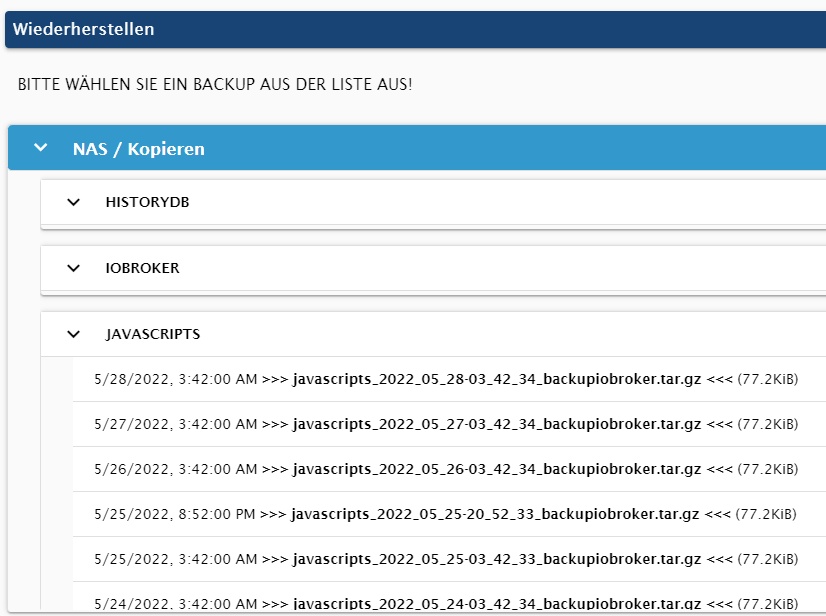
                  Then pull back in your javaskript-Backup:

                  814ff1bd-776a-4179-8fea-84dc440ccd1f-image.png

                  Linux-Werkzeugkasten:
                  https://forum.iobroker.net/topic/42952/der-kleine-iobroker-linux-werkzeugkasten
                  NodeJS Fixer Skript:
                  https://forum.iobroker.net/topic/68035/iob-node-fix-skript
                  iob_diag: curl -sLf -o diag.sh https://iobroker.net/diag.sh && bash diag.sh

                  E 1 Reply Last reply
                  0
                  • Thomas BraunT Thomas Braun

                    @erwinberlin

                    iobroker stop
                    iobroker fix
                    iobroker start
                    

                    Then pull back in your javaskript-Backup:

                    814ff1bd-776a-4179-8fea-84dc440ccd1f-image.png

                    E Offline
                    E Offline
                    erwinberlin
                    wrote on last edited by
                    #13

                    @thomas-braun I did that already. Unfortunately, it does not help.

                    E 1 Reply Last reply
                    0
                    • E erwinberlin

                      @thomas-braun I did that already. Unfortunately, it does not help.

                      E Offline
                      E Offline
                      erwinberlin
                      wrote on last edited by
                      #14

                      So I ended up doing a full clean install RPI4 3Gb with Bullseye 64 bit. Restoring worked for adapters and javascript; zigbee and history both came with errors:
                      {"errno":-1,"code":"EPERM","syscall":"utime","path":"/opt/iobroker/backups/tmpScripts/"}
                      Still it all worked, so it is just a finding.

                      1 Reply Last reply
                      0
                      • E Offline
                        E Offline
                        erwinberlin
                        wrote on last edited by
                        #15

                        My solution (which I did tried 4x today) is to do a clean install. And then do the following in this order:

                        1. restore history, java scripts and zigbee data
                        2. install VIS via the adapters
                        3. do an ioBroker restore

                        And then the history data is still missing unfortunately. at least the system is up and running again in 10 mins. Did it 4x to get the Tuya devices to connect. unfortunately to no avail... (separate thread)

                        BTW I changed from RPI to docker on Ubuntu server running on a Fujitsu Futro s740 with 8Gb and 128Gb SSD. That is a bit more stable and flexible than the RPi system.

                        1 Reply Last reply
                        0
                        Reply
                        • Reply as topic
                        Log in to reply
                        • Oldest to Newest
                        • Newest to Oldest
                        • Most Votes


                        Support us

                        ioBroker
                        Community Adapters
                        Donate

                        358

                        Online

                        32.5k

                        Users

                        81.7k

                        Topics

                        1.3m

                        Posts
                        Community
                        Impressum | Datenschutz-Bestimmungen | Nutzungsbedingungen | Einwilligungseinstellungen
                        ioBroker Community 2014-2025
                        logo
                        • Login

                        • Don't have an account? Register

                        • Login or register to search.
                        • First post
                          Last post
                        0
                        • Home
                        • Recent
                        • Tags
                        • Unread 0
                        • Categories
                        • Unreplied
                        • Popular
                        • GitHub
                        • Docu
                        • Hilfe