




ioBroker kaputt "gerettet"
-
Hi, ich bin Neuling bei ioBroker.
Hab ihn mir gestern auf einem PI aufgesetzt und ein paar Adapter installiert zum Testen. Funktionierte alles soweit.
Das ganze fand in einem "Test-LAN" statt.
In meinem eigenen LAN (Fritzbox 7490AX, feste IP für den PI) konnte ich nicht auf das Webif zugreifen (http://ip-iobroker:8081).
Hab dann über die Konsole diverse "Rettungsversuche" gamacht, aber jetzt listet mir "iobroker list instances" folgendes: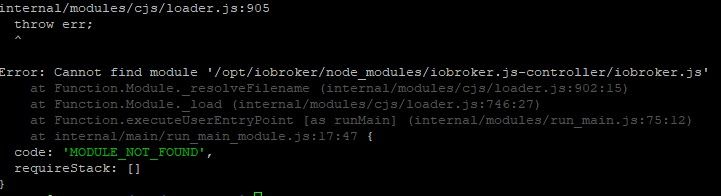
Ist da noch was zu retten?
@heavyd sagte in ioBroker kaputt "gerettet":
Ist da noch was zu retten?
iobroker fixprobieren.
Wenn das nicht hilft:
cd /opt/iobroker
sudo -H -u iobroker npm install iobroker.js-controller
iobroker update -i
iobroker upgrade
iobroker start
iobroker status
Und BITTE keine Screenshots aus der Konsole sondern als TEXT in CodeTags eingebettet hier rein.
Und bitte vollständige Ein- wie Ausgaben der Konsole, damit man sieht wo du da mit welchen Befehlen unterwegs bist. -
@heavyd sagte in ioBroker kaputt "gerettet":
Ist da noch was zu retten?
iobroker fixprobieren.
Wenn das nicht hilft:
cd /opt/iobroker
sudo -H -u iobroker npm install iobroker.js-controller
iobroker update -i
iobroker upgrade
iobroker start
iobroker status
Und BITTE keine Screenshots aus der Konsole sondern als TEXT in CodeTags eingebettet hier rein.
Und bitte vollständige Ein- wie Ausgaben der Konsole, damit man sieht wo du da mit welchen Befehlen unterwegs bist. -
@thomas-braun sieht schlecht aus! :grimacing:
library: loaded Library version=2022-02-10 ioBroker is not installed in /opt/iobroker! Cannot fix anything...Und bitte vollständige Ein- wie Ausgaben der Konsole, damit man sieht wo du da mit welchen Befehlen unterwegs bist.
-
Und bitte vollständige Ein- wie Ausgaben der Konsole, damit man sieht wo du da mit welchen Befehlen unterwegs bist.
login as: HeavyD HeavyD@192.168.1.90's password: Linux heavydpi 5.15.32-v8+ #1538 SMP PREEMPT Thu Mar 31 19:40:39 BST 2022 aarch6 4 The programs included with the Debian GNU/Linux system are free software; the exact distribution terms for each program are described in the individual files in /usr/share/doc/*/copyright. Debian GNU/Linux comes with ABSOLUTELY NO WARRANTY, to the extent permitted by applicable law. Last login: Sat Apr 16 16:16:25 2022 from 192.168.1.2 Wi-Fi is currently blocked by rfkill. Use raspi-config to set the country before use. HeavyD@heavydpi:~ $ iobroker fix library: loaded Library version=2022-02-10 ioBroker is not installed in /opt/iobroker! Cannot fix anything... -
login as: HeavyD HeavyD@192.168.1.90's password: Linux heavydpi 5.15.32-v8+ #1538 SMP PREEMPT Thu Mar 31 19:40:39 BST 2022 aarch6 4 The programs included with the Debian GNU/Linux system are free software; the exact distribution terms for each program are described in the individual files in /usr/share/doc/*/copyright. Debian GNU/Linux comes with ABSOLUTELY NO WARRANTY, to the extent permitted by applicable law. Last login: Sat Apr 16 16:16:25 2022 from 192.168.1.2 Wi-Fi is currently blocked by rfkill. Use raspi-config to set the country before use. HeavyD@heavydpi:~ $ iobroker fix library: loaded Library version=2022-02-10 ioBroker is not installed in /opt/iobroker! Cannot fix anything...Dann Plan B von oben.
-
Dann Plan B von oben.
Direkt beim ersten Befehl kommt:
HeavyD@heavydpi:~ $ cd /opt/iobroker HeavyD@heavydpi:/opt/iobroker $ sudo -H -u iobroker npm install iobroker.js-controller npm ERR! cb.apply is not a function npm ERR! A complete log of this run can be found in: npm ERR! /home/iobroker/.npm/_logs/2022-04-16T16_39_50_479Z-debug.log HeavyD@heavydpi:/opt/iobroker $ -
Direkt beim ersten Befehl kommt:
HeavyD@heavydpi:~ $ cd /opt/iobroker HeavyD@heavydpi:/opt/iobroker $ sudo -H -u iobroker npm install iobroker.js-controller npm ERR! cb.apply is not a function npm ERR! A complete log of this run can be found in: npm ERR! /home/iobroker/.npm/_logs/2022-04-16T16_39_50_479Z-debug.log HeavyD@heavydpi:/opt/iobroker $@heavyd sagte in ioBroker kaputt "gerettet":
cb.apply is not a function
Die Meldung hab ich noch nie gesehen...
Schau dir nodeJS an:
sudo ln -s /usr/bin/node /usr/bin/nodejs which nodejs node npm && nodejs -v && node -v && npm -v && whoami && pwd && sudo apt update &> /dev/null && sudo apt update && apt policy nodejs -
@heavyd sagte in ioBroker kaputt "gerettet":
cb.apply is not a function
Die Meldung hab ich noch nie gesehen...
Schau dir nodeJS an:
sudo ln -s /usr/bin/node /usr/bin/nodejs which nodejs node npm && nodejs -v && node -v && npm -v && whoami && pwd && sudo apt update &> /dev/null && sudo apt update && apt policy nodejsHeavyD@heavydpi:~ $ sudo ln -s /usr/bin/node /usr/bin/nodejs HeavyD@heavydpi:~ $ which nodejs node npm && nodejs -v && node -v && npm -v && whoami && pwd && sudo apt update &> /dev/null && sudo apt update && apt policy nodejs /usr/bin/nodejs /usr/bin/node /usr/bin/npm v14.19.1 v14.19.1 4.6.1 HeavyD /home/HeavyD Hit:1 http://security.debian.org/debian-security bullseye-security InRelease Hit:2 http://deb.debian.org/debian bullseye InRelease Hit:3 http://deb.debian.org/debian bullseye-updates InRelease Hit:4 http://archive.raspberrypi.org/debian bullseye InRelease Hit:5 https://deb.nodesource.com/node_14.x bullseye InRelease Reading package lists... Done Building dependency tree... Done Reading state information... Done All packages are up to date. nodejs: Installed: 14.19.1-deb-1nodesource1 Candidate: 14.19.1-deb-1nodesource1 Version table: *** 14.19.1-deb-1nodesource1 500 500 https://deb.nodesource.com/node_14.x bullseye/main arm64 Packages 100 /var/lib/dpkg/status 12.22.5~dfsg-2~11u1 500 500 http://deb.debian.org/debian bullseye/main arm64 Packages 500 http://security.debian.org/debian-security bullseye-security/main arm64 Packages HeavyD@heavydpi:~ $ -
HeavyD@heavydpi:~ $ sudo ln -s /usr/bin/node /usr/bin/nodejs HeavyD@heavydpi:~ $ which nodejs node npm && nodejs -v && node -v && npm -v && whoami && pwd && sudo apt update &> /dev/null && sudo apt update && apt policy nodejs /usr/bin/nodejs /usr/bin/node /usr/bin/npm v14.19.1 v14.19.1 4.6.1 HeavyD /home/HeavyD Hit:1 http://security.debian.org/debian-security bullseye-security InRelease Hit:2 http://deb.debian.org/debian bullseye InRelease Hit:3 http://deb.debian.org/debian bullseye-updates InRelease Hit:4 http://archive.raspberrypi.org/debian bullseye InRelease Hit:5 https://deb.nodesource.com/node_14.x bullseye InRelease Reading package lists... Done Building dependency tree... Done Reading state information... Done All packages are up to date. nodejs: Installed: 14.19.1-deb-1nodesource1 Candidate: 14.19.1-deb-1nodesource1 Version table: *** 14.19.1-deb-1nodesource1 500 500 https://deb.nodesource.com/node_14.x bullseye/main arm64 Packages 100 /var/lib/dpkg/status 12.22.5~dfsg-2~11u1 500 500 http://deb.debian.org/debian bullseye/main arm64 Packages 500 http://security.debian.org/debian-security bullseye-security/main arm64 Packages HeavyD@heavydpi:~ $@heavyd sagte in ioBroker kaputt "gerettet":
4.6.1
Wie kommt man zu einer npm -v 4.6.1?
Die passt nicht zu node14.apt policy npm sudo apt remove npm sudo apt install --reinstall nodejs -
@heavyd sagte in ioBroker kaputt "gerettet":
4.6.1
Wie kommt man zu einer npm -v 4.6.1?
Die passt nicht zu node14.apt policy npm sudo apt remove npm sudo apt install --reinstall nodejs@thomas-braun keine Ahnung! :man-shrugging:
HeavyD@heavydpi:~ $ apt policy npm npm: Installed: (none) Candidate: 7.5.2+ds-2 Version table: 7.5.2+ds-2 500 500 http://deb.debian.org/debian bullseye/main arm64 Packages 500 http://deb.debian.org/debian bullseye/main armhf Packages HeavyD@heavydpi:~ $ sudo apt remove npm Reading package lists... Done Building dependency tree... Done Reading state information... Done Package 'npm' is not installed, so not removed 0 upgraded, 0 newly installed, 0 to remove and 0 not upgraded. HeavyD@heavydpi:~ $ sudo apt install --reinstall nodejs Reading package lists... Done Building dependency tree... Done Reading state information... Done 0 upgraded, 0 newly installed, 1 reinstalled, 0 to remove and 0 not upgraded. Need to get 0 B/24.8 MB of archives. After this operation, 0 B of additional disk space will be used. (Reading database ... 48496 files and directories currently installed.) Preparing to unpack .../nodejs_14.19.1-deb-1nodesource1_arm64.deb ... Unpacking nodejs (14.19.1-deb-1nodesource1) over (14.19.1-deb-1nodesource1) ... Setting up nodejs (14.19.1-deb-1nodesource1) ... Processing triggers for man-db (2.9.4-2) ... HeavyD@heavydpi:~ $ iobroker fix library: loaded Library version=2022-02-10 ioBroker is not installed in /opt/iobroker! Cannot fix anything... HeavyD@heavydpi:~ $ cd /opt/iobroker HeavyD@heavydpi:/opt/iobroker $ sudo -H -u iobroker npm install iobroker.js-controller > iobroker.js-controller@4.0.21 preinstall /opt/iobroker/node_modules/iobroker.js-controller > node lib/preinstallCheck.js NPM version: 6.14.16 > unix-dgram@2.0.4 install /opt/iobroker/node_modules/unix-dgram > node-gyp rebuild make: Entering directory '/opt/iobroker/node_modules/unix-dgram/build' CXX(target) Release/obj.target/unix_dgram/src/unix_dgram.o In file included from ../../nan/nan.h:58, from ../src/unix_dgram.cc:5: /home/iobroker/.cache/node-gyp/14.19.1/include/node/node.h:793:7: warning: cast between incompatible function types from ‘void (*)(v8::Local<v8::Object>)’ to ‘node::addon_register_func’ {aka ‘void (*)(v8::Local<v8::Object>, v8::Local<v8::Value>, void*)’} [-Wcast-function-type] 793 | (node::addon_register_func) (regfunc), \ | ^~~~~~~~~~~~~~~~~~~~~~~~~~~~~~~~~~~~~ /home/iobroker/.cache/node-gyp/14.19.1/include/node/node.h:827:3: note: in expansion of macro ‘NODE_MODULE_X’ 827 | NODE_MODULE_X(modname, regfunc, NULL, 0) // NOLINT (readability/null_usage) | ^~~~~~~~~~~~~ ../src/unix_dgram.cc:404:1: note: in expansion of macro ‘NODE_MODULE’ 404 | NODE_MODULE(unix_dgram, Initialize) | ^~~~~~~~~~~ SOLINK_MODULE(target) Release/obj.target/unix_dgram.node COPY Release/unix_dgram.node make: Leaving directory '/opt/iobroker/node_modules/unix-dgram/build' > ursa-optional@0.9.10 install /opt/iobroker/node_modules/ursa-optional > node rebuild.js ursaNative bindings compilation fail. This is not an issue. Modules that depend on it will use fallbacks. > diskusage@1.1.3 install /opt/iobroker/node_modules/diskusage > node-gyp rebuild make: Entering directory '/opt/iobroker/node_modules/diskusage/build' CXX(target) Release/obj.target/diskusage/src/main.o In file included from ../../nan/nan.h:58, from ../src/main.cpp:3: /home/iobroker/.cache/node-gyp/14.19.1/include/node/node.h:793:7: warning: cast between incompatible function types from ‘void (*)(v8::Local<v8::Object>)’ to ‘node::addon_register_func’ {aka ‘void (*)(v8::Local<v8::Object>, v8::Local<v8::Value>, void*)’} [-Wcast-function-type] 793 | (node::addon_register_func) (regfunc), \ | ^~~~~~~~~~~~~~~~~~~~~~~~~~~~~~~~~~~~~ /home/iobroker/.cache/node-gyp/14.19.1/include/node/node.h:827:3: note: in expansion of macro ‘NODE_MODULE_X’ 827 | NODE_MODULE_X(modname, regfunc, NULL, 0) // NOLINT (readability/null_usage) | ^~~~~~~~~~~~~ ../src/main.cpp:42:1: note: in expansion of macro ‘NODE_MODULE’ 42 | NODE_MODULE(diskusage, Init) | ^~~~~~~~~~~ CXX(target) Release/obj.target/diskusage/src/diskusage_posix.o SOLINK_MODULE(target) Release/obj.target/diskusage.node COPY Release/diskusage.node make: Leaving directory '/opt/iobroker/node_modules/diskusage/build' > iobroker.js-controller@4.0.21 install /opt/iobroker/node_modules/iobroker.js-controller > node iobroker.js setup first Successfully migrated 4344 objects to Redis Sets object _design/system updated { "defaultPrivate": "-----BEGIN RSA PRIVATE KEY-----\r\nMIIEowIBAAKCAQEAvgjmkH9uBlfuygNofjcU77tP3wzbnRo0/dK1gkirX++jBK9i\r\nbdjWbYoRqNJX2Vy/DRkbbgtcNuQDrHVrkc8tcgcAzqWZfbWvLcYwQG4lDoKuGqLk\r\n+6UGbuMdOXhV7mzq4en+/nTJlkFPuF6SM+qDQDa7pfMkcYij7E3jSi656hOWQJ1r\r\n90xZ5FCVaT2oU0AMaIWchYRckhaRO0B5FvhJyvrny+KZWGkPjuP4enPt3VjzFy0a\r\nj65IelXo0Am6BHFB1PcCFV5x8yVLbQ5rczxqo5BORfPeXfptC/1Rqkzsz3ZKoZgr\r\ns3P9Ez1hx8pYPEmnp1Dgn1dRQKfyGY/xO3qpxQIDAQABAoIBAA7kg60vT2AP5BbQ\r\nzY+WoX1oIIpKZ6uYMi7yJGdhaozKKuxjEkOpiqRq/ZdNZLUUH6TXIt8s5L0ogWEy\r\nkouKwPT+t4F6WN0RL/lWXtGt0BmjBCHyQh+2fxqRkei/FXzp7D5oKCOo42NzGtxI\r\nDQ0kg8S0hWAr/d8n5jDOqdFWeBtv6ue7IsQTogIQoSMFEyHcts/nIQk9nDjkrlFI\r\nQtzqG5y2WucEBkGXsv79se69rY5mywW3ULlY6FCDbJ+rp9h5mT8xLd4DBVp54uMw\r\nTil7OPJZKxFPGVf9G8yJGE/rkn0JOqZcj65cD+zC+5SszydqIUO+W8X2B9TpCekE\r\nMzYZQsECgYEA6KnJBANNPVOyBVb9q/e50mmWuhN2akwYmPB9w1EDrLONuDb47fg1\r\nVNi/P6gxWXgwHXGk5/wu0aqNdh3/fyAUYG3GYiVzvC0r8Ccua7hhxdARl7nqgvyu\r\nGiiutF3ZUWLjxrhF0Cxevksx8mUSVJJGQINy4uvW26YnvPQPaevMiQMCgYEA0RiF\r\nuiK7BSc3hlG9r3N1C+i0nqORQ0uHlE5rkzjyl/dtmpQrM3g6rZ4vCyRsPBE0U9Or\r\nw7CGjxCX8VhOcOqrv3g3JsGd+0gBdoi03b8r3l4n6dzgJzBUHC07O42nUzgmd/gd\r\na7siF0ODcWV9mvrldmYUPuGq1lqoJEvgauKY85cCgYEAhCf9AISHmTAzTIkvKkFa\r\nkcRcU3G+r35t8mGYbhtUhQKwm1TObQ2x7XH4oEX/UhzM58ynqQY76eiA1fkQKbul\r\nF2kDaLhxVxAphw4adiGTl/MqKw71wFWa50z4f4dXa71KOJRvQ2IQpvK7ej4i/Vrh\r\nAMApv+/KaZWluNTA9J913NUCgYB5C1wm5AImOoyvKlTH4+vHSCB/kar/LRNArKEj\r\n6hyuEqOVj97ufdRiO6d6KMyrfT4wpOHTeDZ9TZrYMUm/nmpsfjhXLFC7bfTC3OLv\r\nV8MaiKFMhfwRU63tXdXjZN6Pk3rZin3lpsBWfVPzalBrToFVqERiHpuaWYLq+C3j\r\nUmg+4wKBgDvIIc0flok4X3oQgHCnfxyQzqTH/UssT4ManrqdtzZMRimMEv2ZEjtD\r\n9J3Buwsb40rG7a1pdRV21UobsHmzqtInQGQI8JDHka54PIo2peWevVMHEw8+nkAs\r\nEzQOwj4NxN8zwMKGJvzzqzDUYOh5g2eFq3C0gG8okyUH2odgNkvT\r\n-----END RSA PRIVATE KEY-----\r\n", "defaultPublic": "-----BEGIN CERTIFICATE-----\r\nMIIDfjCCAmagAwIBAgIJCBSbLmqdtSitMA0GCSqGSIb3DQEBCwUAMD4xETAPBgNV\r\nBAMTCGlvYnJva2VyMRYwFAYDVQQKEw1pb0Jyb2tlciBHbWJIMREwDwYDVQQLEwhp\r\nb2Jyb2tlcjAeFw0yMjA0MTYxNjU5MDlaFw0yMzA0MTYxNjU5MDlaMD4xETAPBgNV\r\nBAMTCGhlYXZ5ZHBpMRYwFAYDVQQKEw1pb0Jyb2tlciBHbWJIMREwDwYDVQQLEwhp\r\nb2Jyb2tlcjCCASIwDQYJKoZIhvcNAQEBBQADggEPADCCAQoCggEBAL4I5pB/bgZX\r\n7soDaH43FO+7T98M250aNP3StYJIq1/vowSvYm3Y1m2KEajSV9lcvw0ZG24LXDbk\r\nA6x1a5HPLXIHAM6lmX21ry3GMEBuJQ6Crhqi5PulBm7jHTl4Ve5s6uHp/v50yZZB\r\nT7hekjPqg0A2u6XzJHGIo+xN40ouueoTlkCda/dMWeRQlWk9qFNADGiFnIWEXJIW\r\nkTtAeRb4Scr658vimVhpD47j+Hpz7d1Y8xctGo+uSHpV6NAJugRxQdT3AhVecfMl\r\nS20Oa3M8aqOQTkXz3l36bQv9UapM7M92SqGYK7Nz/RM9YcfKWDxJp6dQ4J9XUUCn\r\n8hmP8Tt6qcUCAwEAAaN/MH0wDAYDVR0TAQH/BAIwADAPBgNVHQ8BAf8EBQMDB7+A\r\nMBMGA1UdEQQMMAqCCGhlYXZ5ZHBpMB0GA1UdDgQWBBRs59Aj9WtG+R15li8syiBw\r\nlEv6sjAdBgNVHSUEFjAUBggrBgEFBQcDAQYIKwYBBQUHAwIwCQYDVR0jBAIwADAN\r\nBgkqhkiG9w0BAQsFAAOCAQEAnTh2fCK6BHa80dtzooFVZKNaZ9CABVw9ov2+myBh\r\niqQut4vqRY5NBuy8yU+ngm4ERjJqJ59g4ujz1ifumuEZu9dTpzgKz6GNX806mOF1\r\n6VpMiscDzZ8KMIQJYFJQ3nYlLo/jioCI5nOMH1P0igAMtG8+d89UhYWnJsLnq7vL\r\nwdX1mOd6eP2DVsEU6oFYnoFenewn9QfYMf2ToSGyCgUzOks7MJ+gplWpF5VMKvQG\r\njjEQTdhZ5VLb6dzVuplOSDmkOJjWbH1ikaAtcwDYeI6icDQDtiSm0iE6tACrq46E\r\nMmyghqIkV4NjDcIDUIWSfgSpKF4hKS4/whMSRzq3VHVeBw==\r\n-----END CERTIFICATE-----\r\n" } Update certificate defaultPrivate The object "system.certificates" was updated successfully. Update certificate defaultPublic The object "system.certificates" was updated successfully. > @root/acme@3.1.0 postinstall /opt/iobroker/node_modules/@root/acme > node scripts/postinstall > esbuild@0.11.23 postinstall /opt/iobroker/node_modules/esbuild > node install.js npm WARN optional SKIPPING OPTIONAL DEPENDENCY: fsevents@~2.3.2 (node_modules/chokidar/node_modules/fsevents): npm WARN notsup SKIPPING OPTIONAL DEPENDENCY: Unsupported platform for fsevents@2.3.2: wanted {"os":"darwin","arch":"any"} (current: {"os":"linux","arch":"arm64"}) + iobroker.js-controller@4.0.21 added 225 packages from 182 contributors in 170.509s 49 packages are looking for funding run `npm fund` for details HeavyD@heavydpi:/opt/iobroker $ iobroker update -i internal/modules/cjs/loader.js:905 throw err; ^ Error: Cannot find module '/opt/iobroker/node_modules/iobroker.js-controller/iobroker.js' at Function.Module._resolveFilename (internal/modules/cjs/loader.js:902:15) at Function.Module._load (internal/modules/cjs/loader.js:746:27) at Function.executeUserEntryPoint [as runMain] (internal/modules/run_main.js:75:12) at internal/main/run_main_module.js:17:47 { code: 'MODULE_NOT_FOUND', requireStack: [] } HeavyD@heavydpi:/opt/iobroker $ -
@thomas-braun keine Ahnung! :man-shrugging:
HeavyD@heavydpi:~ $ apt policy npm npm: Installed: (none) Candidate: 7.5.2+ds-2 Version table: 7.5.2+ds-2 500 500 http://deb.debian.org/debian bullseye/main arm64 Packages 500 http://deb.debian.org/debian bullseye/main armhf Packages HeavyD@heavydpi:~ $ sudo apt remove npm Reading package lists... Done Building dependency tree... Done Reading state information... Done Package 'npm' is not installed, so not removed 0 upgraded, 0 newly installed, 0 to remove and 0 not upgraded. HeavyD@heavydpi:~ $ sudo apt install --reinstall nodejs Reading package lists... Done Building dependency tree... Done Reading state information... Done 0 upgraded, 0 newly installed, 1 reinstalled, 0 to remove and 0 not upgraded. Need to get 0 B/24.8 MB of archives. After this operation, 0 B of additional disk space will be used. (Reading database ... 48496 files and directories currently installed.) Preparing to unpack .../nodejs_14.19.1-deb-1nodesource1_arm64.deb ... Unpacking nodejs (14.19.1-deb-1nodesource1) over (14.19.1-deb-1nodesource1) ... Setting up nodejs (14.19.1-deb-1nodesource1) ... Processing triggers for man-db (2.9.4-2) ... HeavyD@heavydpi:~ $ iobroker fix library: loaded Library version=2022-02-10 ioBroker is not installed in /opt/iobroker! Cannot fix anything... HeavyD@heavydpi:~ $ cd /opt/iobroker HeavyD@heavydpi:/opt/iobroker $ sudo -H -u iobroker npm install iobroker.js-controller > iobroker.js-controller@4.0.21 preinstall /opt/iobroker/node_modules/iobroker.js-controller > node lib/preinstallCheck.js NPM version: 6.14.16 > unix-dgram@2.0.4 install /opt/iobroker/node_modules/unix-dgram > node-gyp rebuild make: Entering directory '/opt/iobroker/node_modules/unix-dgram/build' CXX(target) Release/obj.target/unix_dgram/src/unix_dgram.o In file included from ../../nan/nan.h:58, from ../src/unix_dgram.cc:5: /home/iobroker/.cache/node-gyp/14.19.1/include/node/node.h:793:7: warning: cast between incompatible function types from ‘void (*)(v8::Local<v8::Object>)’ to ‘node::addon_register_func’ {aka ‘void (*)(v8::Local<v8::Object>, v8::Local<v8::Value>, void*)’} [-Wcast-function-type] 793 | (node::addon_register_func) (regfunc), \ | ^~~~~~~~~~~~~~~~~~~~~~~~~~~~~~~~~~~~~ /home/iobroker/.cache/node-gyp/14.19.1/include/node/node.h:827:3: note: in expansion of macro ‘NODE_MODULE_X’ 827 | NODE_MODULE_X(modname, regfunc, NULL, 0) // NOLINT (readability/null_usage) | ^~~~~~~~~~~~~ ../src/unix_dgram.cc:404:1: note: in expansion of macro ‘NODE_MODULE’ 404 | NODE_MODULE(unix_dgram, Initialize) | ^~~~~~~~~~~ SOLINK_MODULE(target) Release/obj.target/unix_dgram.node COPY Release/unix_dgram.node make: Leaving directory '/opt/iobroker/node_modules/unix-dgram/build' > ursa-optional@0.9.10 install /opt/iobroker/node_modules/ursa-optional > node rebuild.js ursaNative bindings compilation fail. This is not an issue. Modules that depend on it will use fallbacks. > diskusage@1.1.3 install /opt/iobroker/node_modules/diskusage > node-gyp rebuild make: Entering directory '/opt/iobroker/node_modules/diskusage/build' CXX(target) Release/obj.target/diskusage/src/main.o In file included from ../../nan/nan.h:58, from ../src/main.cpp:3: /home/iobroker/.cache/node-gyp/14.19.1/include/node/node.h:793:7: warning: cast between incompatible function types from ‘void (*)(v8::Local<v8::Object>)’ to ‘node::addon_register_func’ {aka ‘void (*)(v8::Local<v8::Object>, v8::Local<v8::Value>, void*)’} [-Wcast-function-type] 793 | (node::addon_register_func) (regfunc), \ | ^~~~~~~~~~~~~~~~~~~~~~~~~~~~~~~~~~~~~ /home/iobroker/.cache/node-gyp/14.19.1/include/node/node.h:827:3: note: in expansion of macro ‘NODE_MODULE_X’ 827 | NODE_MODULE_X(modname, regfunc, NULL, 0) // NOLINT (readability/null_usage) | ^~~~~~~~~~~~~ ../src/main.cpp:42:1: note: in expansion of macro ‘NODE_MODULE’ 42 | NODE_MODULE(diskusage, Init) | ^~~~~~~~~~~ CXX(target) Release/obj.target/diskusage/src/diskusage_posix.o SOLINK_MODULE(target) Release/obj.target/diskusage.node COPY Release/diskusage.node make: Leaving directory '/opt/iobroker/node_modules/diskusage/build' > iobroker.js-controller@4.0.21 install /opt/iobroker/node_modules/iobroker.js-controller > node iobroker.js setup first Successfully migrated 4344 objects to Redis Sets object _design/system updated { "defaultPrivate": "-----BEGIN RSA PRIVATE KEY-----\r\nMIIEowIBAAKCAQEAvgjmkH9uBlfuygNofjcU77tP3wzbnRo0/dK1gkirX++jBK9i\r\nbdjWbYoRqNJX2Vy/DRkbbgtcNuQDrHVrkc8tcgcAzqWZfbWvLcYwQG4lDoKuGqLk\r\n+6UGbuMdOXhV7mzq4en+/nTJlkFPuF6SM+qDQDa7pfMkcYij7E3jSi656hOWQJ1r\r\n90xZ5FCVaT2oU0AMaIWchYRckhaRO0B5FvhJyvrny+KZWGkPjuP4enPt3VjzFy0a\r\nj65IelXo0Am6BHFB1PcCFV5x8yVLbQ5rczxqo5BORfPeXfptC/1Rqkzsz3ZKoZgr\r\ns3P9Ez1hx8pYPEmnp1Dgn1dRQKfyGY/xO3qpxQIDAQABAoIBAA7kg60vT2AP5BbQ\r\nzY+WoX1oIIpKZ6uYMi7yJGdhaozKKuxjEkOpiqRq/ZdNZLUUH6TXIt8s5L0ogWEy\r\nkouKwPT+t4F6WN0RL/lWXtGt0BmjBCHyQh+2fxqRkei/FXzp7D5oKCOo42NzGtxI\r\nDQ0kg8S0hWAr/d8n5jDOqdFWeBtv6ue7IsQTogIQoSMFEyHcts/nIQk9nDjkrlFI\r\nQtzqG5y2WucEBkGXsv79se69rY5mywW3ULlY6FCDbJ+rp9h5mT8xLd4DBVp54uMw\r\nTil7OPJZKxFPGVf9G8yJGE/rkn0JOqZcj65cD+zC+5SszydqIUO+W8X2B9TpCekE\r\nMzYZQsECgYEA6KnJBANNPVOyBVb9q/e50mmWuhN2akwYmPB9w1EDrLONuDb47fg1\r\nVNi/P6gxWXgwHXGk5/wu0aqNdh3/fyAUYG3GYiVzvC0r8Ccua7hhxdARl7nqgvyu\r\nGiiutF3ZUWLjxrhF0Cxevksx8mUSVJJGQINy4uvW26YnvPQPaevMiQMCgYEA0RiF\r\nuiK7BSc3hlG9r3N1C+i0nqORQ0uHlE5rkzjyl/dtmpQrM3g6rZ4vCyRsPBE0U9Or\r\nw7CGjxCX8VhOcOqrv3g3JsGd+0gBdoi03b8r3l4n6dzgJzBUHC07O42nUzgmd/gd\r\na7siF0ODcWV9mvrldmYUPuGq1lqoJEvgauKY85cCgYEAhCf9AISHmTAzTIkvKkFa\r\nkcRcU3G+r35t8mGYbhtUhQKwm1TObQ2x7XH4oEX/UhzM58ynqQY76eiA1fkQKbul\r\nF2kDaLhxVxAphw4adiGTl/MqKw71wFWa50z4f4dXa71KOJRvQ2IQpvK7ej4i/Vrh\r\nAMApv+/KaZWluNTA9J913NUCgYB5C1wm5AImOoyvKlTH4+vHSCB/kar/LRNArKEj\r\n6hyuEqOVj97ufdRiO6d6KMyrfT4wpOHTeDZ9TZrYMUm/nmpsfjhXLFC7bfTC3OLv\r\nV8MaiKFMhfwRU63tXdXjZN6Pk3rZin3lpsBWfVPzalBrToFVqERiHpuaWYLq+C3j\r\nUmg+4wKBgDvIIc0flok4X3oQgHCnfxyQzqTH/UssT4ManrqdtzZMRimMEv2ZEjtD\r\n9J3Buwsb40rG7a1pdRV21UobsHmzqtInQGQI8JDHka54PIo2peWevVMHEw8+nkAs\r\nEzQOwj4NxN8zwMKGJvzzqzDUYOh5g2eFq3C0gG8okyUH2odgNkvT\r\n-----END RSA PRIVATE KEY-----\r\n", "defaultPublic": "-----BEGIN CERTIFICATE-----\r\nMIIDfjCCAmagAwIBAgIJCBSbLmqdtSitMA0GCSqGSIb3DQEBCwUAMD4xETAPBgNV\r\nBAMTCGlvYnJva2VyMRYwFAYDVQQKEw1pb0Jyb2tlciBHbWJIMREwDwYDVQQLEwhp\r\nb2Jyb2tlcjAeFw0yMjA0MTYxNjU5MDlaFw0yMzA0MTYxNjU5MDlaMD4xETAPBgNV\r\nBAMTCGhlYXZ5ZHBpMRYwFAYDVQQKEw1pb0Jyb2tlciBHbWJIMREwDwYDVQQLEwhp\r\nb2Jyb2tlcjCCASIwDQYJKoZIhvcNAQEBBQADggEPADCCAQoCggEBAL4I5pB/bgZX\r\n7soDaH43FO+7T98M250aNP3StYJIq1/vowSvYm3Y1m2KEajSV9lcvw0ZG24LXDbk\r\nA6x1a5HPLXIHAM6lmX21ry3GMEBuJQ6Crhqi5PulBm7jHTl4Ve5s6uHp/v50yZZB\r\nT7hekjPqg0A2u6XzJHGIo+xN40ouueoTlkCda/dMWeRQlWk9qFNADGiFnIWEXJIW\r\nkTtAeRb4Scr658vimVhpD47j+Hpz7d1Y8xctGo+uSHpV6NAJugRxQdT3AhVecfMl\r\nS20Oa3M8aqOQTkXz3l36bQv9UapM7M92SqGYK7Nz/RM9YcfKWDxJp6dQ4J9XUUCn\r\n8hmP8Tt6qcUCAwEAAaN/MH0wDAYDVR0TAQH/BAIwADAPBgNVHQ8BAf8EBQMDB7+A\r\nMBMGA1UdEQQMMAqCCGhlYXZ5ZHBpMB0GA1UdDgQWBBRs59Aj9WtG+R15li8syiBw\r\nlEv6sjAdBgNVHSUEFjAUBggrBgEFBQcDAQYIKwYBBQUHAwIwCQYDVR0jBAIwADAN\r\nBgkqhkiG9w0BAQsFAAOCAQEAnTh2fCK6BHa80dtzooFVZKNaZ9CABVw9ov2+myBh\r\niqQut4vqRY5NBuy8yU+ngm4ERjJqJ59g4ujz1ifumuEZu9dTpzgKz6GNX806mOF1\r\n6VpMiscDzZ8KMIQJYFJQ3nYlLo/jioCI5nOMH1P0igAMtG8+d89UhYWnJsLnq7vL\r\nwdX1mOd6eP2DVsEU6oFYnoFenewn9QfYMf2ToSGyCgUzOks7MJ+gplWpF5VMKvQG\r\njjEQTdhZ5VLb6dzVuplOSDmkOJjWbH1ikaAtcwDYeI6icDQDtiSm0iE6tACrq46E\r\nMmyghqIkV4NjDcIDUIWSfgSpKF4hKS4/whMSRzq3VHVeBw==\r\n-----END CERTIFICATE-----\r\n" } Update certificate defaultPrivate The object "system.certificates" was updated successfully. Update certificate defaultPublic The object "system.certificates" was updated successfully. > @root/acme@3.1.0 postinstall /opt/iobroker/node_modules/@root/acme > node scripts/postinstall > esbuild@0.11.23 postinstall /opt/iobroker/node_modules/esbuild > node install.js npm WARN optional SKIPPING OPTIONAL DEPENDENCY: fsevents@~2.3.2 (node_modules/chokidar/node_modules/fsevents): npm WARN notsup SKIPPING OPTIONAL DEPENDENCY: Unsupported platform for fsevents@2.3.2: wanted {"os":"darwin","arch":"any"} (current: {"os":"linux","arch":"arm64"}) + iobroker.js-controller@4.0.21 added 225 packages from 182 contributors in 170.509s 49 packages are looking for funding run `npm fund` for details HeavyD@heavydpi:/opt/iobroker $ iobroker update -i internal/modules/cjs/loader.js:905 throw err; ^ Error: Cannot find module '/opt/iobroker/node_modules/iobroker.js-controller/iobroker.js' at Function.Module._resolveFilename (internal/modules/cjs/loader.js:902:15) at Function.Module._load (internal/modules/cjs/loader.js:746:27) at Function.executeUserEntryPoint [as runMain] (internal/modules/run_main.js:75:12) at internal/main/run_main_module.js:17:47 { code: 'MODULE_NOT_FOUND', requireStack: [] } HeavyD@heavydpi:/opt/iobroker $Ich muss jetzt nochmal
which nodejs node npm && nodejs -v && node -v && npm -v && whoami && pwd && sudo apt update &> /dev/null && sudo apt update && apt policy nodejsfrisch sehen.
-
Ich muss jetzt nochmal
which nodejs node npm && nodejs -v && node -v && npm -v && whoami && pwd && sudo apt update &> /dev/null && sudo apt update && apt policy nodejsfrisch sehen.
HeavyD@heavydpi:/opt/iobroker $ which nodejs node npm && nodejs -v && node -v && npm -v && whoami && pwd && sudo apt update &> /dev/null && sudo apt update && apt policy nodejs /usr/bin/nodejs /usr/bin/node /usr/bin/npm v14.19.1 v14.19.1 6.14.16 HeavyD /opt/iobroker Hit:1 http://security.debian.org/debian-security bullseye-security InRelease Hit:2 http://deb.debian.org/debian bullseye InRelease Hit:3 http://archive.raspberrypi.org/debian bullseye InRelease Hit:4 http://deb.debian.org/debian bullseye-updates InRelease Hit:5 https://deb.nodesource.com/node_14.x bullseye InRelease Reading package lists... Done Building dependency tree... Done Reading state information... Done All packages are up to date. nodejs: Installed: 14.19.1-deb-1nodesource1 Candidate: 14.19.1-deb-1nodesource1 Version table: *** 14.19.1-deb-1nodesource1 500 500 https://deb.nodesource.com/node_14.x bullseye/main arm64 Packages 100 /var/lib/dpkg/status 12.22.5~dfsg-2~11u1 500 500 http://deb.debian.org/debian bullseye/main arm64 Packages 500 http://security.debian.org/debian-security bullseye-security/main arm64 Packages HeavyD@heavydpi:/opt/iobroker $ -
Hi, ich bin Neuling bei ioBroker.
Hab ihn mir gestern auf einem PI aufgesetzt und ein paar Adapter installiert zum Testen. Funktionierte alles soweit.
Das ganze fand in einem "Test-LAN" statt.
In meinem eigenen LAN (Fritzbox 7490AX, feste IP für den PI) konnte ich nicht auf das Webif zugreifen (http://ip-iobroker:8081).
Hab dann über die Konsole diverse "Rettungsversuche" gamacht, aber jetzt listet mir "iobroker list instances" folgendes:Ist da noch was zu retten?
@heavyd sagte in ioBroker kaputt "gerettet":
Hab ihn mir gestern auf einem PI aufgesetzt und ein paar Adapter installiert zum Testen.
Hm und warum eierst jetzt so lange mit nem Rettungsversuch rum und machst das Bisschen nicht einfach noch mal neu und sauber?
Node und NPM sieht zumindest mal wieder vernünftig aus.
-
@heavyd sagte in ioBroker kaputt "gerettet":
Hab ihn mir gestern auf einem PI aufgesetzt und ein paar Adapter installiert zum Testen.
Hm und warum eierst jetzt so lange mit nem Rettungsversuch rum und machst das Bisschen nicht einfach noch mal neu und sauber?
Node und NPM sieht zumindest mal wieder vernünftig aus.
-
cd /opt/iobroker sudo -H -u iobroker npm install iobroker.js-controller iobroker start iobroker status -
cd /opt/iobroker sudo -H -u iobroker npm install iobroker.js-controller iobroker start iobroker status -
HeavyD@heavydpi:/opt/iobroker $ iobroker start HeavyD@heavydpi:/opt/iobroker $ iobroker status iobroker is running on this host. Objects type: jsonl States type: jsonl HeavyD@heavydpi:/opt/iobroker $ -
@jan1 ich hab ja nur gefragt ob da noch was zu retten ist? Wenn es halt zu aufwendig ist mach ich es neu.
@heavyd
Wenn man eh am Anfang steht, ist das eben am einfachsten und schneller gehts auch. Retten würde auch klappen und lernen wirst auch was dabei. Bleibt Dir überlassen. Die Frage ist immer nur, was hast noch so verbastelt und wird sich das später noch bemerkbar machen. -
-
ich habe wohl ähnliche Probleme wie mein Vorgänger aber leider wurden meine mit dem letzten Schritt nicht gelöst. Ich komme nicht auf die Adminseite meines iobroker.
Ich versuche mal den Codetag hier anzuwenden,ich hoffe es funktioniert,ist mein erster Versuch....
aktuell:
Linux raspberrypi 5.10.103-v7l+ #1529 SMP Tue Mar 8 12:24:00 GMT 2022 armv7l

The programs included with the Debian GNU/Linux system are free software;

pi@raspberrypi:~ $ npm -v
6.14.17

pi@raspberrypi:~ $ node -v
v14.20.0
Ergebnis des letzten Schrittes deiner Anleitung:
pi@raspberrypi:~ $ sudo -H -u iobroker npm install iobroker.js-controller
npm WARN read-shrinkwrap This version of npm is compatible with lockfileVersion@1, but package-lock.json was generated for lockfileVersion@2. I'll try to do my best with it!
npm WARN deprecated request@2.88.2: request has been deprecated, see https://github.com/request/request/issues/3142
npm WARN deprecated har-validator@5.1.5: this library is no longer supported
npm WARN checkPermissions Missing write access to /home/pi
npm WARN optional SKIPPING OPTIONAL DEPENDENCY: fsevents@~2.3.2 (node_modules/chokidar/node_modules/fsevents):
npm WARN notsup SKIPPING OPTIONAL DEPENDENCY: Unsupported platform for fsevents@2.3.2: wanted {"os":"darwin","arch":"any"} (current: {"os":"linux","arch":"arm"})
npm WARN pi No description
npm WARN pi No repository field.
npm WARN pi No license field.

npm ERR! code EACCES
npm ERR! syscall access
npm ERR! path /home/pi
npm ERR! errno -13
npm ERR! Error: EACCES: permission denied, access '/home/pi'
npm ERR!  [Error: EACCES: permission denied, access '/home/pi'] {
npm ERR!   errno: -13,
npm ERR!   code: 'EACCES',
npm ERR!   syscall: 'access',
npm ERR!   path: '/home/pi'
npm ERR! }
npm ERR!
npm ERR! The operation was rejected by your operating system.
npm ERR! It is likely you do not have the permissions to access this file as the current user
npm ERR!
npm ERR! If you believe this might be a permissions issue, please double-check the
npm ERR! permissions of the file and its containing directories, or try running
npm ERR! the command again as root/Administrator.

npm ERR! A complete log of this run can be found in:
npm ERR!     /home/iobroker/.npm/_logs/2022-09-10T22_20_09_875Z-debug.log
pi@raspberrypi:~ $ iobroker start
pi@raspberrypi:~ $ iobroker status
internal/modules/cjs/loader.js:905
  throw err;
  ^

Error: Cannot find module '/opt/iobroker/node_modules/iobroker.js-controller/iobroker.js'
    at Function.Module._resolveFilename (internal/modules/cjs/loader.js:902:15)
    at Function.Module._load (internal/modules/cjs/loader.js:746:27)
    at Function.executeUserEntryPoint [as runMain] (internal/modules/run_main.js:75:12)
    at internal/main/run_main_module.js:17:47 {
  code: 'MODULE_NOT_FOUND',
  requireStack: []
Es lief soweit alles stabil bis ich ein node update durchgeführt habe von v14 auf v16. npm war meine ich 8.1.5 als noch alles lief.
Ich wollte eigentlich nur den Shellyadapter updaten aber dafür musste ich Updates vom System durchführen.
Das hat auch ungefähr 10min funktioniert , alle Instanzen waren auch auch grün und dann wollte ich den Shellyadapter
updaten und seit dem komme ich nicht mehr auf die Benutzeroberfläche.Wie oben dargestellt , habe ich aktuell node auf 14.20.0 und npm 6.14.17 zurückgestellt aber das half noch nicht.
Ich sitz hier schon 5 Stunden dran und komm nicht weiter.Ich hoffe ihr könnt mir helfen,.
Besten Dank vorab,Gruss Peter


Support us
442
Online32.7k
Users82.6k
Topics1.3m
Posts