



Skip to content
  • Home
  • Recent
  • Tags
  • 0 Unread 0
  • Categories
  • Unreplied
  • Popular
  • GitHub
  • Docu
  • Hilfe
Skins
  • Light
  • Brite
  • Cerulean
  • Cosmo
  • Flatly
  • Journal
  • Litera
  • Lumen
  • Lux
  • Materia
  • Minty
  • Morph
  • Pulse
  • Sandstone
  • Simplex
  • Sketchy
  • Spacelab
  • United
  • Yeti
  • Zephyr
  • Dark
  • Cyborg
  • Darkly
  • Quartz
  • Slate
  • Solar
  • Superhero
  • Vapor

  • Default (No Skin)
  • No Skin
Collapse
ioBroker Logo

Community Forum

donate donate
  1. ioBroker Community Home
  2. Deutsch
  3. Hardware
  4. NUKI Hub

NEWS

  • Jahresrückblick 2025 – unser neuer Blogbeitrag ist online! ✨
    BluefoxB
    Bluefox
    17
    1
    3.3k

  • Neuer Blogbeitrag: Monatsrückblick - Dezember 2025 🎄
    BluefoxB
    Bluefox
    13
    1
    1.1k

  • Weihnachtsangebot 2025! 🎄
    BluefoxB
    Bluefox
    25
    1
    2.4k

NUKI Hub

Scheduled Pinned Locked Moved Hardware
259 Posts 23 Posters 48.6k Views 25 Watching
  • Oldest to Newest
  • Newest to Oldest
  • Most Votes
Reply
  • Reply as topic
Log in to reply
This topic has been deleted. Only users with topic management privileges can see it.
  • D da.phreak

    @frank-aus-essen Die aktuelle Firmware version vom NUKI Hub in einen Knoten zu packen ist sicher nicht schwer, ein automatisches Update hingegen ist schon etwas mehr Arbeit. Müßte ich drüber nachdenken, wie man das umsetzen kann. Einen eigenen Server, wie Shelly diesen wahrscheinlich hat, habe ich nicht, das müßte also alles über github laufen.

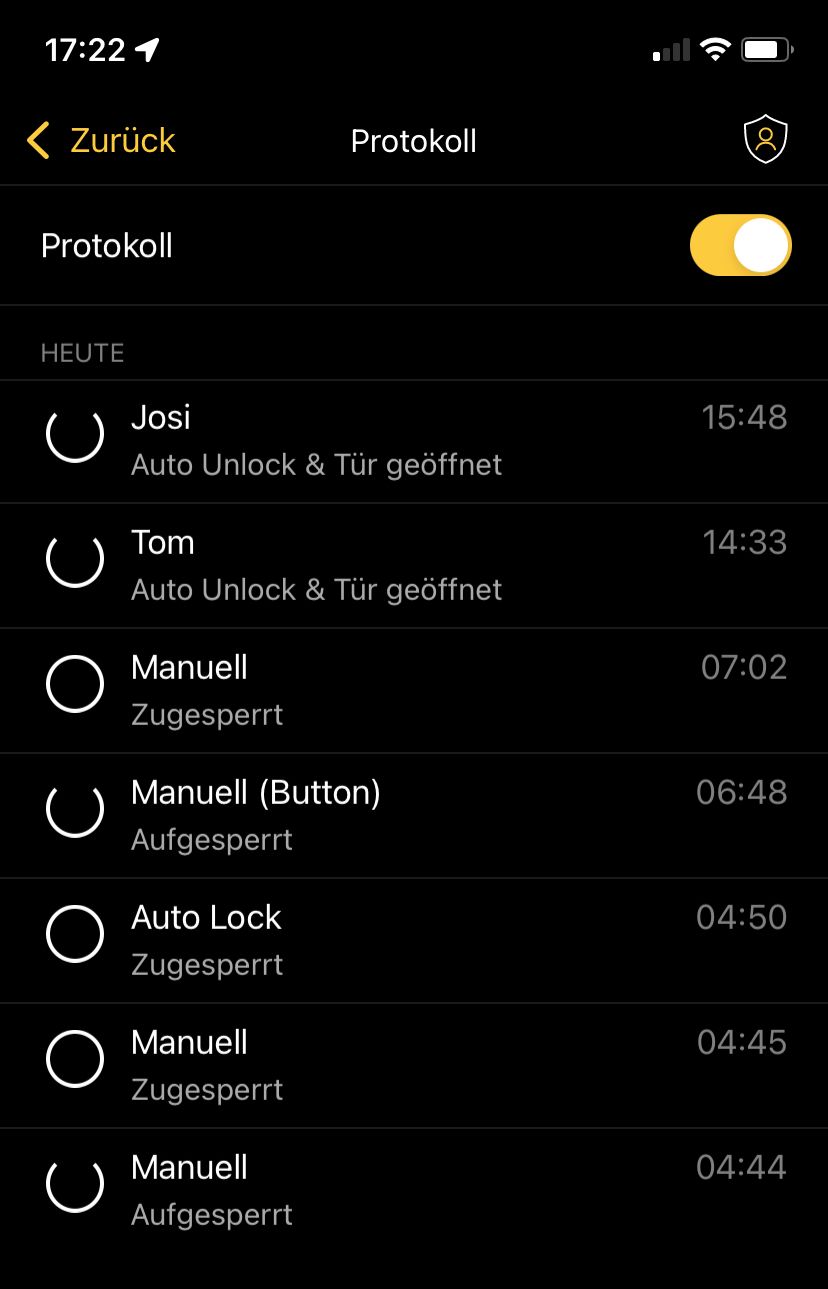
    @TT-Tom Also ich reiche da auch nur weiter was vom NUKI gesendet wird. Eigentlich sollte sich das mit dem Activity Log aus der App decken, was steht denn da bei Dir?
    T Offline
    T Offline
    TT-Tom
    wrote on last edited by TT-Tom
    #169

    @da-phreak sagte in NUKI Hub:

    @TT-Tom Also ich reiche da auch nur weiter was vom NUKI gesendet wird. Eigentlich sollte sich das mit dem Activity Log aus der App decken, was steht denn da bei Dir?

    IMG_7E2B31F0EEBD-1.jpeg

    und das sind die Daten, die ich mit meinem Script mit logge.

    2022-08-10 04:44:19.262 - info: javascript.0 (1273301) script.js.common.Nuki.Protokoll: Log durch nuki/lock/state ausgelöst -> id: 4294967295 - 22:59:43, Name: Nuki Lock - 22:59:43, Zustand: unlocked - 04:44:17, Auslöser: manual - 04:44:17
    2022-08-10 04:44:49.998 - info: javascript.0 (1273301) script.js.common.Nuki.Protokoll: Log durch nuki/lock/state ausgelöst -> id: 4294967295 - 22:59:43, Name: Nuki Lock - 22:59:43, Zustand: locked - 04:44:48, Auslöser: manual - 04:44:17
    2022-08-10 04:49:53.468 - info: javascript.0 (1273301) script.js.common.Nuki.Protokoll: Log durch nuki/lock/state ausgelöst -> id: 4294967295 - 22:59:43, Name: Nuki Lock - 22:59:43, Zustand: locked - 04:49:52, Auslöser: autoLock - 04:49:51
    2022-08-10 04:49:54.195 - info: javascript.0 (1273301) script.js.common.Nuki.Protokoll: Log durch nuki/lock/state ausgelöst -> id: 4294967295 - 22:59:43, Name: Nuki Lock - 22:59:43, Zustand: locked - 04:49:52, Auslöser: autoLock - 04:49:51
    2022-08-10 06:48:28.320 - info: javascript.0 (1273301) script.js.common.Nuki.Protokoll: Log durch nuki/lock/state ausgelöst -> id: 4294967295 - 22:59:43, Name: Nuki Lock - 22:59:43, Zustand: unlocked - 06:48:26, Auslöser: button - 06:48:26
    2022-08-10 07:01:49.887 - info: javascript.0 (1273301) script.js.common.Nuki.Protokoll: Log durch nuki/lock/state ausgelöst -> id: 4294967295 - 22:59:43, Name: Nuki Lock - 22:59:43, Zustand: locked - 07:01:48, Auslöser: manual - 07:01:48
    2022-08-10 14:32:55.988 - info: javascript.0 (1273301) script.js.common.Nuki.Protokoll: Log durch nuki/lock/state ausgelöst -> id: 3431645 - 14:32:55, Name: Tom - 14:32:55, Zustand: unlocked - 14:32:54, Auslöser: system - 14:32:54
    2022-08-10 14:32:56.664 - info: javascript.0 (1273301) script.js.common.Nuki.Protokoll: Log durch nuki/lock/authorizationName ausgelöst -> id: 3431645 - 14:32:55, Name: Tom - 14:32:55, Zustand: unlocked - 14:32:54, Auslöser: system - 14:32:54
    2022-08-10 15:48:13.565 - info: javascript.0 (1273301) script.js.common.Nuki.Protokoll: Log durch nuki/lock/authorizationName ausgelöst -> id: 3431648 - 15:48:12, Name: Josi - 15:48:12, Zustand: unlocked - 14:32:54, Auslöser: system - 14:32:54
    

    die Zeiten sind die Zeitstempel von den Topics

    Edit: An den Zeiten sieht man auch, dass nur die Topics aktualisiert werden, wo sich etwas ändert.

    Gruß Tom
    https://github.com/tt-tom17
    Wenn meine Hilfe erfolgreich war, benutze bitte das Voting unten rechts im Beitrag

    NSPanel Script Wiki
    https://github.com/joBr99/nspanel-lovelace-ui/wiki

    NSPanel Adapter Wiki
    https://github.com/ticaki/ioBroker.nspanel-lovelace-ui/wiki

    D 1 Reply Last reply
    0
    • T TT-Tom

      @da-phreak sagte in NUKI Hub:

      @TT-Tom Also ich reiche da auch nur weiter was vom NUKI gesendet wird. Eigentlich sollte sich das mit dem Activity Log aus der App decken, was steht denn da bei Dir?

      IMG_7E2B31F0EEBD-1.jpeg

      und das sind die Daten, die ich mit meinem Script mit logge.

      2022-08-10 04:44:19.262 - info: javascript.0 (1273301) script.js.common.Nuki.Protokoll: Log durch nuki/lock/state ausgelöst -> id: 4294967295 - 22:59:43, Name: Nuki Lock - 22:59:43, Zustand: unlocked - 04:44:17, Auslöser: manual - 04:44:17
      2022-08-10 04:44:49.998 - info: javascript.0 (1273301) script.js.common.Nuki.Protokoll: Log durch nuki/lock/state ausgelöst -> id: 4294967295 - 22:59:43, Name: Nuki Lock - 22:59:43, Zustand: locked - 04:44:48, Auslöser: manual - 04:44:17
      2022-08-10 04:49:53.468 - info: javascript.0 (1273301) script.js.common.Nuki.Protokoll: Log durch nuki/lock/state ausgelöst -> id: 4294967295 - 22:59:43, Name: Nuki Lock - 22:59:43, Zustand: locked - 04:49:52, Auslöser: autoLock - 04:49:51
      2022-08-10 04:49:54.195 - info: javascript.0 (1273301) script.js.common.Nuki.Protokoll: Log durch nuki/lock/state ausgelöst -> id: 4294967295 - 22:59:43, Name: Nuki Lock - 22:59:43, Zustand: locked - 04:49:52, Auslöser: autoLock - 04:49:51
      2022-08-10 06:48:28.320 - info: javascript.0 (1273301) script.js.common.Nuki.Protokoll: Log durch nuki/lock/state ausgelöst -> id: 4294967295 - 22:59:43, Name: Nuki Lock - 22:59:43, Zustand: unlocked - 06:48:26, Auslöser: button - 06:48:26
      2022-08-10 07:01:49.887 - info: javascript.0 (1273301) script.js.common.Nuki.Protokoll: Log durch nuki/lock/state ausgelöst -> id: 4294967295 - 22:59:43, Name: Nuki Lock - 22:59:43, Zustand: locked - 07:01:48, Auslöser: manual - 07:01:48
      2022-08-10 14:32:55.988 - info: javascript.0 (1273301) script.js.common.Nuki.Protokoll: Log durch nuki/lock/state ausgelöst -> id: 3431645 - 14:32:55, Name: Tom - 14:32:55, Zustand: unlocked - 14:32:54, Auslöser: system - 14:32:54
      2022-08-10 14:32:56.664 - info: javascript.0 (1273301) script.js.common.Nuki.Protokoll: Log durch nuki/lock/authorizationName ausgelöst -> id: 3431645 - 14:32:55, Name: Tom - 14:32:55, Zustand: unlocked - 14:32:54, Auslöser: system - 14:32:54
      2022-08-10 15:48:13.565 - info: javascript.0 (1273301) script.js.common.Nuki.Protokoll: Log durch nuki/lock/authorizationName ausgelöst -> id: 3431648 - 15:48:12, Name: Josi - 15:48:12, Zustand: unlocked - 14:32:54, Auslöser: system - 14:32:54
      

      die Zeiten sind die Zeitstempel von den Topics

      Edit: An den Zeiten sieht man auch, dass nur die Topics aktualisiert werden, wo sich etwas ändert.

      D Offline
      D Offline
      da.phreak
      wrote on last edited by
      #170

      @tt-tom Ich guck mir das bei Zeiten mal an.

      T 1 Reply Last reply
      0
      • D da.phreak

        @tt-tom Ich guck mir das bei Zeiten mal an.

        T Offline
        T Offline
        TT-Tom
        wrote on last edited by
        #171

        @da-phreak
        danke, hier nochmal das Script was ich nutze

        const debug = 1;
        const protokoll = 0;
        const anzahl_elemente = 14;
        const dp_protokoll_json_name = '0_userdata.0.Anwesenheit_Home.Nuki_Protokoll';
        const dp_protokoll_json_state = '0_userdata.0.Anwesenheit_Home.Nuki_Protokoll_State';
        const dp_nuki = 'mqtt.0.nuki.lock';


        // Trigger State
        on({ id: dp_nuki + '.state', change: 'any' }, async function (obj) {
           if (getState(dp_protokoll_json_state).val) {
               daten_loggen(dp_protokoll_json_state, obj.name);
           } else {
               neue_tabelle(dp_protokoll_json_state);
               daten_loggen(dp_protokoll_json_state, obj.name);
           };
        });
        
        // Trigger Name
        on({ id: dp_nuki + '.authorizationName', change: 'any' }, async function (obj) {
           if (getState(dp_protokoll_json_name).val) {
               daten_loggen(dp_protokoll_json_name, obj.name);
           } else {
               neue_tabelle(dp_protokoll_json_name);
               daten_loggen(dp_protokoll_json_name, obj.name);
           };
        
        });
        
        /**
        * @param {String} speicherort
        * @param {String} trigger
        */
        async function daten_loggen(speicherort, trigger) {
           var table = [];
           var element = [];
        
           await wait(1500);
        
           var log_id_state = getState(dp_nuki + '.authorizationId').val;
           var log_id_time = formatDate(getDateObject(getState('mqtt.0.nuki.lock.authorizationId').ts), "SS:mm:ss");
           var log_name_state = getState(dp_nuki + '.authorizationName').val;
           if (log_name_state == "") { log_name_state = "Nuki Lock" };
           var log_name_time = formatDate(getDateObject(getState(dp_nuki + '.authorizationName').ts), "SS:mm:ss");
           var log_state_state = getState(dp_nuki + '.state').val;
           var log_state_time = formatDate(getDateObject(getState(dp_nuki + '.state').ts), "SS:mm:ss");
           var log_trigger_state = getState(dp_nuki + '.trigger').val;
           var log_trigger_time = formatDate(getDateObject(getState(dp_nuki + '.trigger').ts), "SS:mm:ss");
        
        
           if (debug) log('Log durch ' + trigger + ' ausgelöst -> id: ' + log_id_state + ' - ' + log_id_time + ', Name: ' + log_name_state + ' - ' + log_name_time + ', Zustand: ' + log_state_state + ' - ' + log_state_time + ', Auslöser: ' + log_trigger_state + ' - ' + log_trigger_time);
        
        
           if (protokoll) {
               element[0] = {};
               element[0].Datum = formatDate(getDateObject(getState(dp_nuki + '.authorizationName').ts), 'TT.MM.JJ SS:mm');
               element[0].Name = log_name_state;
               element[0].Zustand = log_state_state
               element[0].Trigger = log_trigger_state
               element[0].id = log_id_state
               if (debug) log('Neuen Protokolleintrag erstellt');
        
        
               table = JSON.parse(getState(speicherort).val);
               table.pop();
               table.unshift(element[0]);
        
               setState(speicherort, JSON.stringify(table), true);
           };
        };
        
        
        /**
        * @param {string} speicherort
        */
        async function neue_tabelle(speicherort) {
           if (protokoll) {
               var new_table = [];
               if (debug) log('Neue Tabelle erzeugt');
               for (let i = 0; i < anzahl_elemente; i++) {
                   new_table[i] = {};
                   new_table[i].Datum = 0;
                   new_table[i].Name = 0;
                   new_table[i].Zustand = 0;
                   new_table[i].Trigger = 0;
                   new_table[i].id = 0;
               }
               if (debug) log(new_table);
               setState(speicherort, JSON.stringify(new_table), true);
               return new_table;
           };
        };
        

        Gruß Tom
        https://github.com/tt-tom17
        Wenn meine Hilfe erfolgreich war, benutze bitte das Voting unten rechts im Beitrag

        NSPanel Script Wiki
        https://github.com/joBr99/nspanel-lovelace-ui/wiki

        NSPanel Adapter Wiki
        https://github.com/ticaki/ioBroker.nspanel-lovelace-ui/wiki

        D 2 Replies Last reply
        0
        • T TT-Tom

          @da-phreak
          danke, hier nochmal das Script was ich nutze

          const debug = 1;
          const protokoll = 0;
          const anzahl_elemente = 14;
          const dp_protokoll_json_name = '0_userdata.0.Anwesenheit_Home.Nuki_Protokoll';
          const dp_protokoll_json_state = '0_userdata.0.Anwesenheit_Home.Nuki_Protokoll_State';
          const dp_nuki = 'mqtt.0.nuki.lock';


          // Trigger State
          on({ id: dp_nuki + '.state', change: 'any' }, async function (obj) {
             if (getState(dp_protokoll_json_state).val) {
                 daten_loggen(dp_protokoll_json_state, obj.name);
             } else {
                 neue_tabelle(dp_protokoll_json_state);
                 daten_loggen(dp_protokoll_json_state, obj.name);
             };
          });
          
          // Trigger Name
          on({ id: dp_nuki + '.authorizationName', change: 'any' }, async function (obj) {
             if (getState(dp_protokoll_json_name).val) {
                 daten_loggen(dp_protokoll_json_name, obj.name);
             } else {
                 neue_tabelle(dp_protokoll_json_name);
                 daten_loggen(dp_protokoll_json_name, obj.name);
             };
          
          });
          
          /**
          * @param {String} speicherort
          * @param {String} trigger
          */
          async function daten_loggen(speicherort, trigger) {
             var table = [];
             var element = [];
          
             await wait(1500);
          
             var log_id_state = getState(dp_nuki + '.authorizationId').val;
             var log_id_time = formatDate(getDateObject(getState('mqtt.0.nuki.lock.authorizationId').ts), "SS:mm:ss");
             var log_name_state = getState(dp_nuki + '.authorizationName').val;
             if (log_name_state == "") { log_name_state = "Nuki Lock" };
             var log_name_time = formatDate(getDateObject(getState(dp_nuki + '.authorizationName').ts), "SS:mm:ss");
             var log_state_state = getState(dp_nuki + '.state').val;
             var log_state_time = formatDate(getDateObject(getState(dp_nuki + '.state').ts), "SS:mm:ss");
             var log_trigger_state = getState(dp_nuki + '.trigger').val;
             var log_trigger_time = formatDate(getDateObject(getState(dp_nuki + '.trigger').ts), "SS:mm:ss");
          
          
             if (debug) log('Log durch ' + trigger + ' ausgelöst -> id: ' + log_id_state + ' - ' + log_id_time + ', Name: ' + log_name_state + ' - ' + log_name_time + ', Zustand: ' + log_state_state + ' - ' + log_state_time + ', Auslöser: ' + log_trigger_state + ' - ' + log_trigger_time);
          
          
             if (protokoll) {
                 element[0] = {};
                 element[0].Datum = formatDate(getDateObject(getState(dp_nuki + '.authorizationName').ts), 'TT.MM.JJ SS:mm');
                 element[0].Name = log_name_state;
                 element[0].Zustand = log_state_state
                 element[0].Trigger = log_trigger_state
                 element[0].id = log_id_state
                 if (debug) log('Neuen Protokolleintrag erstellt');
          
          
                 table = JSON.parse(getState(speicherort).val);
                 table.pop();
                 table.unshift(element[0]);
          
                 setState(speicherort, JSON.stringify(table), true);
             };
          };
          
          
          /**
          * @param {string} speicherort
          */
          async function neue_tabelle(speicherort) {
             if (protokoll) {
                 var new_table = [];
                 if (debug) log('Neue Tabelle erzeugt');
                 for (let i = 0; i < anzahl_elemente; i++) {
                     new_table[i] = {};
                     new_table[i].Datum = 0;
                     new_table[i].Name = 0;
                     new_table[i].Zustand = 0;
                     new_table[i].Trigger = 0;
                     new_table[i].id = 0;
                 }
                 if (debug) log(new_table);
                 setState(speicherort, JSON.stringify(new_table), true);
                 return new_table;
             };
          };
          

          D Offline
          D Offline
          da.phreak
          wrote on last edited by da.phreak
          #172

          Vielen Dank an alle, die meinen Referrer Code benutzt haben. Ich habe nun ein Keypad, das in der Version 5.8 auch unterstützt wird. Codes kann man hinzufügen, updaten und löschen.

          1 Reply Last reply
          0
          • T TT-Tom

            @da-phreak
            danke, hier nochmal das Script was ich nutze

            const debug = 1;
            const protokoll = 0;
            const anzahl_elemente = 14;
            const dp_protokoll_json_name = '0_userdata.0.Anwesenheit_Home.Nuki_Protokoll';
            const dp_protokoll_json_state = '0_userdata.0.Anwesenheit_Home.Nuki_Protokoll_State';
            const dp_nuki = 'mqtt.0.nuki.lock';


            // Trigger State
            on({ id: dp_nuki + '.state', change: 'any' }, async function (obj) {
               if (getState(dp_protokoll_json_state).val) {
                   daten_loggen(dp_protokoll_json_state, obj.name);
               } else {
                   neue_tabelle(dp_protokoll_json_state);
                   daten_loggen(dp_protokoll_json_state, obj.name);
               };
            });
            
            // Trigger Name
            on({ id: dp_nuki + '.authorizationName', change: 'any' }, async function (obj) {
               if (getState(dp_protokoll_json_name).val) {
                   daten_loggen(dp_protokoll_json_name, obj.name);
               } else {
                   neue_tabelle(dp_protokoll_json_name);
                   daten_loggen(dp_protokoll_json_name, obj.name);
               };
            
            });
            
            /**
            * @param {String} speicherort
            * @param {String} trigger
            */
            async function daten_loggen(speicherort, trigger) {
               var table = [];
               var element = [];
            
               await wait(1500);
            
               var log_id_state = getState(dp_nuki + '.authorizationId').val;
               var log_id_time = formatDate(getDateObject(getState('mqtt.0.nuki.lock.authorizationId').ts), "SS:mm:ss");
               var log_name_state = getState(dp_nuki + '.authorizationName').val;
               if (log_name_state == "") { log_name_state = "Nuki Lock" };
               var log_name_time = formatDate(getDateObject(getState(dp_nuki + '.authorizationName').ts), "SS:mm:ss");
               var log_state_state = getState(dp_nuki + '.state').val;
               var log_state_time = formatDate(getDateObject(getState(dp_nuki + '.state').ts), "SS:mm:ss");
               var log_trigger_state = getState(dp_nuki + '.trigger').val;
               var log_trigger_time = formatDate(getDateObject(getState(dp_nuki + '.trigger').ts), "SS:mm:ss");
            
            
               if (debug) log('Log durch ' + trigger + ' ausgelöst -> id: ' + log_id_state + ' - ' + log_id_time + ', Name: ' + log_name_state + ' - ' + log_name_time + ', Zustand: ' + log_state_state + ' - ' + log_state_time + ', Auslöser: ' + log_trigger_state + ' - ' + log_trigger_time);
            
            
               if (protokoll) {
                   element[0] = {};
                   element[0].Datum = formatDate(getDateObject(getState(dp_nuki + '.authorizationName').ts), 'TT.MM.JJ SS:mm');
                   element[0].Name = log_name_state;
                   element[0].Zustand = log_state_state
                   element[0].Trigger = log_trigger_state
                   element[0].id = log_id_state
                   if (debug) log('Neuen Protokolleintrag erstellt');
            
            
                   table = JSON.parse(getState(speicherort).val);
                   table.pop();
                   table.unshift(element[0]);
            
                   setState(speicherort, JSON.stringify(table), true);
               };
            };
            
            
            /**
            * @param {string} speicherort
            */
            async function neue_tabelle(speicherort) {
               if (protokoll) {
                   var new_table = [];
                   if (debug) log('Neue Tabelle erzeugt');
                   for (let i = 0; i < anzahl_elemente; i++) {
                       new_table[i] = {};
                       new_table[i].Datum = 0;
                       new_table[i].Name = 0;
                       new_table[i].Zustand = 0;
                       new_table[i].Trigger = 0;
                       new_table[i].id = 0;
                   }
                   if (debug) log(new_table);
                   setState(speicherort, JSON.stringify(new_table), true);
                   return new_table;
               };
            };
            

            D Offline
            D Offline
            da.phreak
            wrote on last edited by
            #173

            @tt-tom Das Release 5.9 ist raus. Die letzten 5 Log-Einträge werden dort als json übertragen. Zudem werden für die "alten" Nodes authorizationId und authorizationName alle DoorSensor events ignoriert, ich denke das ist der Grund, warum der Name oft leer ist. Dort stand dann als event nicht das unlatch-event, sondern daß der Sensor gemerkt hat, daß die Tür wieder zu ist ... dem ganzen ist dann kein Name zugeordnet.

            T 1 Reply Last reply
            0
            • D da.phreak

              @tt-tom Das Release 5.9 ist raus. Die letzten 5 Log-Einträge werden dort als json übertragen. Zudem werden für die "alten" Nodes authorizationId und authorizationName alle DoorSensor events ignoriert, ich denke das ist der Grund, warum der Name oft leer ist. Dort stand dann als event nicht das unlatch-event, sondern daß der Sensor gemerkt hat, daß die Tür wieder zu ist ... dem ganzen ist dann kein Name zugeordnet.

              T Offline
              T Offline
              TT-Tom
              wrote on last edited by TT-Tom
              #174

              @da-phreak

              Danke für die Info, werde es testen und dann berichten.
              Edit: einen DoorSensor habe ich nicht, ist dieser empfehlenswert ??

              Gruß Tom
              https://github.com/tt-tom17
              Wenn meine Hilfe erfolgreich war, benutze bitte das Voting unten rechts im Beitrag

              NSPanel Script Wiki
              https://github.com/joBr99/nspanel-lovelace-ui/wiki

              NSPanel Adapter Wiki
              https://github.com/ticaki/ioBroker.nspanel-lovelace-ui/wiki

              D 1 Reply Last reply
              0
              • T TT-Tom

                @da-phreak

                Danke für die Info, werde es testen und dann berichten.
                Edit: einen DoorSensor habe ich nicht, ist dieser empfehlenswert ??

                D Offline
                D Offline
                da.phreak
                wrote on last edited by
                #175

                @tt-tom Du solltest das log auswerten, nicht authId und authName, das ist nicht so zuverlässig.

                Naja der Sensor ist nicht so super-wichtig. Wenn man die Tür zumacht wird das unlatch gleich beendet, und man muß nicht die eingestellte Zeit abwarten, das ist ganz praktisch. Ansonsten weiß man halt ob die Tür auf oder zu ist, damit kann man dann in iobroker machen was man will ... das könnte aber auch jeder andere Türsensor.

                T 1 Reply Last reply
                0
                • D da.phreak

                  @tt-tom Du solltest das log auswerten, nicht authId und authName, das ist nicht so zuverlässig.

                  Naja der Sensor ist nicht so super-wichtig. Wenn man die Tür zumacht wird das unlatch gleich beendet, und man muß nicht die eingestellte Zeit abwarten, das ist ganz praktisch. Ansonsten weiß man halt ob die Tür auf oder zu ist, damit kann man dann in iobroker machen was man will ... das könnte aber auch jeder andere Türsensor.

                  T Offline
                  T Offline
                  TT-Tom
                  wrote on last edited by TT-Tom
                  #176

                  @da-phreak
                  is klar, ich sehe mir das Log vom NukiHub an. Kann es sein das die Stunden UTC sind? Aktuell sind es 2 Stunden die fehlen.

                  Den DoorSensor werde ich mir holen, wenn wir umgezogen sind.

                  Gruß Tom
                  https://github.com/tt-tom17
                  Wenn meine Hilfe erfolgreich war, benutze bitte das Voting unten rechts im Beitrag

                  NSPanel Script Wiki
                  https://github.com/joBr99/nspanel-lovelace-ui/wiki

                  NSPanel Adapter Wiki
                  https://github.com/ticaki/ioBroker.nspanel-lovelace-ui/wiki

                  D 1 Reply Last reply
                  0
                  • T TT-Tom

                    @da-phreak
                    is klar, ich sehe mir das Log vom NukiHub an. Kann es sein das die Stunden UTC sind? Aktuell sind es 2 Stunden die fehlen.

                    Den DoorSensor werde ich mir holen, wenn wir umgezogen sind.

                    D Offline
                    D Offline
                    da.phreak
                    wrote on last edited by
                    #177

                    @tt-tom Ja das ist UTC, das kommt so vom NUKI.

                    T 1 Reply Last reply
                    0
                    • D da.phreak

                      @tt-tom Ja das ist UTC, das kommt so vom NUKI.

                      T Offline
                      T Offline
                      TT-Tom
                      wrote on last edited by
                      #178

                      @da-phreak sagte in NUKI Hub:

                      @tt-tom Ja das ist UTC, das kommt so vom NUKI.

                      Dann rechne ich es um, alles klar. Danke

                      Gruß Tom
                      https://github.com/tt-tom17
                      Wenn meine Hilfe erfolgreich war, benutze bitte das Voting unten rechts im Beitrag

                      NSPanel Script Wiki
                      https://github.com/joBr99/nspanel-lovelace-ui/wiki

                      NSPanel Adapter Wiki
                      https://github.com/ticaki/ioBroker.nspanel-lovelace-ui/wiki

                      D 1 Reply Last reply
                      0
                      • T TT-Tom

                        @da-phreak sagte in NUKI Hub:

                        @tt-tom Ja das ist UTC, das kommt so vom NUKI.

                        Dann rechne ich es um, alles klar. Danke

                        D Offline
                        D Offline
                        da.phreak
                        wrote on last edited by
                        #179

                        Für alle, die einen NUKI Opener haben, ist das neueste Release interessant: Ein Klingeln an der Tür wird nun detektiert.

                        PhantomkommanderP 1 Reply Last reply
                        0
                        • D da.phreak

                          Für alle, die einen NUKI Opener haben, ist das neueste Release interessant: Ein Klingeln an der Tür wird nun detektiert.

                          PhantomkommanderP Offline
                          PhantomkommanderP Offline
                          Phantomkommander
                          wrote on last edited by
                          #180

                          @da-phreak über welchen datenpunkt machst du das?
                          mein alter datenpunkt nuki-extended.0.openers.haustür.state.ringStateUpdate wird mir nicht mehr angezeigt :(

                          T D 2 Replies Last reply
                          0
                          • PhantomkommanderP Phantomkommander

                            @da-phreak über welchen datenpunkt machst du das?
                            mein alter datenpunkt nuki-extended.0.openers.haustür.state.ringStateUpdate wird mir nicht mehr angezeigt :(

                            T Offline
                            T Offline
                            TT-Tom
                            wrote on last edited by
                            #181

                            @phantomkommander

                            das ist der falsche Adapter hier für dich. Der Nuki-Hub ist ein ESP32 Projekt und arbeitet mit MQTT.

                            Gruß Tom
                            https://github.com/tt-tom17
                            Wenn meine Hilfe erfolgreich war, benutze bitte das Voting unten rechts im Beitrag

                            NSPanel Script Wiki
                            https://github.com/joBr99/nspanel-lovelace-ui/wiki

                            NSPanel Adapter Wiki
                            https://github.com/ticaki/ioBroker.nspanel-lovelace-ui/wiki

                            1 Reply Last reply
                            0
                            • PhantomkommanderP Phantomkommander

                              @da-phreak über welchen datenpunkt machst du das?
                              mein alter datenpunkt nuki-extended.0.openers.haustür.state.ringStateUpdate wird mir nicht mehr angezeigt :(

                              D Offline
                              D Offline
                              da.phreak
                              wrote on last edited by
                              #182

                              @phantomkommander

                              • Wie @TT-Tom schon gesagt hat, der alte NUKI Adapter kann weg.
                              • Wenn noch nicht geschehen den MQTT Adapter installieren und als Broker konfigurieren
                              • Den ESP mit NUKI Hub konfigurieren, dort die IP-Adresse vom MQTT Broker angeben
                              • Für die ring detection den NUKI Opener aktivieren und anlernen
                              • Der Datenpunkt "mqtt.0.nukiopener.lock.state" wird für 2 Sekunden auf "ring" gesetzt, wenn es klingelt (Der Pfad kann leicht anders lauten ... kannst Du auf dem ESP konfurieren)
                              D 1 Reply Last reply
                              0
                              • D da.phreak

                                @phantomkommander

                                • Wie @TT-Tom schon gesagt hat, der alte NUKI Adapter kann weg.
                                • Wenn noch nicht geschehen den MQTT Adapter installieren und als Broker konfigurieren
                                • Den ESP mit NUKI Hub konfigurieren, dort die IP-Adresse vom MQTT Broker angeben
                                • Für die ring detection den NUKI Opener aktivieren und anlernen
                                • Der Datenpunkt "mqtt.0.nukiopener.lock.state" wird für 2 Sekunden auf "ring" gesetzt, wenn es klingelt (Der Pfad kann leicht anders lauten ... kannst Du auf dem ESP konfurieren)
                                D Offline
                                D Offline
                                da.phreak
                                wrote on last edited by
                                #183

                                Im neuesten Release werden die RSSI-Werte von WiFi und Bluetooth über MQTT übertragen ... vielleicht ganz praktisch um den optimalen Platz für den ESP zu finden.

                                victor kunstV 1 Reply Last reply
                                0
                                • D da.phreak

                                  Im neuesten Release werden die RSSI-Werte von WiFi und Bluetooth über MQTT übertragen ... vielleicht ganz praktisch um den optimalen Platz für den ESP zu finden.

                                  victor kunstV Offline
                                  victor kunstV Offline
                                  victor kunst
                                  wrote on last edited by
                                  #184

                                  @da-phreak
                                  Hallo Jan-Ole. Herzlichen Dank!

                                  Habe ohne Probleme ESP32 geflasht und mit meinem internen (Raspbery Mosquito) MQTT-Broker verbunden, danach auch mit NUKI 3 gekoppelt. Aber leider ich bin nicht so tief in der Materie. Ich verstehe nicht, wie ich die MQTT-Interface verwenden kann, wie in GitHub ( https://github.com/technyon/nuki_hub ) beschrieben. Ich freue mich über jede Anweisund. Alles gute!

                                  T D 2 Replies Last reply
                                  0
                                  • victor kunstV victor kunst

                                    @da-phreak
                                    Hallo Jan-Ole. Herzlichen Dank!

                                    Habe ohne Probleme ESP32 geflasht und mit meinem internen (Raspbery Mosquito) MQTT-Broker verbunden, danach auch mit NUKI 3 gekoppelt. Aber leider ich bin nicht so tief in der Materie. Ich verstehe nicht, wie ich die MQTT-Interface verwenden kann, wie in GitHub ( https://github.com/technyon/nuki_hub ) beschrieben. Ich freue mich über jede Anweisund. Alles gute!

                                    T Offline
                                    T Offline
                                    TT-Tom
                                    wrote on last edited by
                                    #185

                                    @victor-kunst

                                    mqtt.0.nuki.lock.action Kannst du auf lock bzw unlock setzen damit der Nuki auf bzw zuschließt.
                                    Des Weiteren kannst du unter mqtt.0.nuki.configuration dein Nuki auch konfigurieren, wie in der App.

                                    Gruß Tom
                                    https://github.com/tt-tom17
                                    Wenn meine Hilfe erfolgreich war, benutze bitte das Voting unten rechts im Beitrag

                                    NSPanel Script Wiki
                                    https://github.com/joBr99/nspanel-lovelace-ui/wiki

                                    NSPanel Adapter Wiki
                                    https://github.com/ticaki/ioBroker.nspanel-lovelace-ui/wiki

                                    victor kunstV 1 Reply Last reply
                                    0
                                    • victor kunstV victor kunst

                                      @da-phreak
                                      Hallo Jan-Ole. Herzlichen Dank!

                                      Habe ohne Probleme ESP32 geflasht und mit meinem internen (Raspbery Mosquito) MQTT-Broker verbunden, danach auch mit NUKI 3 gekoppelt. Aber leider ich bin nicht so tief in der Materie. Ich verstehe nicht, wie ich die MQTT-Interface verwenden kann, wie in GitHub ( https://github.com/technyon/nuki_hub ) beschrieben. Ich freue mich über jede Anweisund. Alles gute!

                                      D Offline
                                      D Offline
                                      da.phreak
                                      wrote on last edited by
                                      #186

                                      @victor-kunst Die Frage ist erstmal was Du machen möchtest. Das NUKI aus einem UI ansteuern (vis ?), über scripte automatisiert (javascript ?), generell was ist dein Anwendungsfall ?

                                      victor kunstV 1 Reply Last reply
                                      0
                                      • T TT-Tom

                                        @victor-kunst

                                        mqtt.0.nuki.lock.action Kannst du auf lock bzw unlock setzen damit der Nuki auf bzw zuschließt.
                                        Des Weiteren kannst du unter mqtt.0.nuki.configuration dein Nuki auch konfigurieren, wie in der App.

                                        victor kunstV Offline
                                        victor kunstV Offline
                                        victor kunst
                                        wrote on last edited by
                                        #187

                                        @tt-tom Vielen Dank, jetzt habe ich realisiert. Ich kann nicht nur lesen bei die MQTT Topics, sondern auch schreiben, und damit auch beim Bedarf steuern.
                                        Alles Gute.

                                        1 Reply Last reply
                                        0
                                        • D da.phreak

                                          @victor-kunst Die Frage ist erstmal was Du machen möchtest. Das NUKI aus einem UI ansteuern (vis ?), über scripte automatisiert (javascript ?), generell was ist dein Anwendungsfall ?

                                          victor kunstV Offline
                                          victor kunstV Offline
                                          victor kunst
                                          wrote on last edited by
                                          #188

                                          @da-phreak Vielen Dank für schnelle Antwort.
                                          Ich bin einen Schritt weiter. Wollte eigentlich mein Haus automatisieren, und deswegen bin ich hier. Nun, gestern habe ich alle MQTT NUKI/Topik mit ESP8266 gelesen. Ich bin mir noch nicht ganz sicher, was ich damit machen möchte, und bin noch am forschen. Jetzt möchte ich gerne verstehen, was über MQTT an NUKU gesendet werden kann, wie im vorherigen Beitrag TT-Tom über mqtt.0.nuki.lock.action sagte.
                                          Aber im Moment habe ich eine offene Frage. Es scheint mir, dass meine Nuki3 ist mit dem Web über ESP32 NICHT verbunden ist.

                                          Wie bereits erwähnt, meldet mein ESP32 im Webinterface:

                                          MQTT connected Yes
                                          NUKI Lock paired Yes
                                          Ich kann auch alle MQTT-Topics mit # lesen.

                                          Aber wenn ich in der APP auf dem Telefon auf Connection status gehe, wo Smartphone, Server, Bridge, Nuku und Bluetooth im Kreis angezeigt sind, fehlen hier die Verbindungen:

                                          Server - Brudge
                                          Bridge-Nuki

                                          Ich dachte, ESP32 soll die Bridge simulieren. Und wenn das Web Interface von ESP32 sagt, dass NUKI Lock paired ist, bedeutet es nicht, dass die Verbindung zwieschen ESP32(Brigde) und Nuki doch besteht? Lieder bin ich etwas verwirrt an der Stelle.
                                          Viellecht habe ich etwas falsch verstanden?

                                          ? 1 Reply Last reply
                                          0
                                          Reply
                                          • Reply as topic
                                          Log in to reply
                                          • Oldest to Newest
                                          • Newest to Oldest
                                          • Most Votes


                                          Support us

                                          ioBroker
                                          Community Adapters
                                          Donate

                                          655

                                          Online

                                          32.7k

                                          Users

                                          82.3k

                                          Topics

                                          1.3m

                                          Posts
                                          Community
                                          Impressum | Datenschutz-Bestimmungen | Nutzungsbedingungen | Einwilligungseinstellungen
                                          ioBroker Community 2014-2025
                                          logo
                                          • Login

                                          • Don't have an account? Register

                                          • Login or register to search.
                                          • First post
                                            Last post
                                          0
                                          • Home
                                          • Recent
                                          • Tags
                                          • Unread 0
                                          • Categories
                                          • Unreplied
                                          • Popular
                                          • GitHub
                                          • Docu
                                          • Hilfe