




node-red-contrib-face-recognition
-
Moin hat irgendjemand von euch schon den
node-red-contrib-face-recognitionoder node-red-contrib-facial-recognition
bereits zum laufen bekommen?ich bekomm es nicht hin!
in welchem Ordner muss ich dazu npm install @tensorflow/tfjs-node
ausführen?Ich hoffe hier kann mir jemand helfen!
Danke!
-
Moin hat irgendjemand von euch schon den
node-red-contrib-face-recognitionoder node-red-contrib-facial-recognition
bereits zum laufen bekommen?ich bekomm es nicht hin!
in welchem Ordner muss ich dazu npm install @tensorflow/tfjs-node
ausführen?Ich hoffe hier kann mir jemand helfen!
Danke!
@hohmannc Nutzt Du NodeRed als iobroker Adapter oder Standalone? Am Besten ist in beiden Fällen die Installation über den Palettenmanager und nichts mit npm zu machen - damit machst Du nur Dein System kaputt. Ich würde auch alle npm Befehle über remove wieder rückgängig machen. Werden die module mehrfach gefunden bekommst Du unter Umständen ganz komische Effekte.
-
@hohmannc Nutzt Du NodeRed als iobroker Adapter oder Standalone? Am Besten ist in beiden Fällen die Installation über den Palettenmanager und nichts mit npm zu machen - damit machst Du nur Dein System kaputt. Ich würde auch alle npm Befehle über remove wieder rückgängig machen. Werden die module mehrfach gefunden bekommst Du unter Umständen ganz komische Effekte.
-
@hohmannc sagte in node-red-contrib-face-recognition:
TensorFlow
Nein Tensor Flow ist ja keine Node-Red Node, sondern eine externe NodeJS Bibliothek. Die müsstest Du über npm installieren. Wo, das kann ich Dir nur sagen, ob Du NodeRed mit dem iobroker Adapter nutzt oder als Standalone Lösung.
-
@hohmannc sagte in node-red-contrib-face-recognition:
TensorFlow
Nein Tensor Flow ist ja keine Node-Red Node, sondern eine externe NodeJS Bibliothek. Die müsstest Du über npm installieren. Wo, das kann ich Dir nur sagen, ob Du NodeRed mit dem iobroker Adapter nutzt oder als Standalone Lösung.
-
@hohmannc Ich würde wie folgt vorgehen:
sudo -su iobroker cd /opt/iobroker/iobroker-data/node-red npm install @tensorflow/tfjs-node exit@mickym danke! dann bekomme ich
> > @tensorflow/tfjs-node@3.15.0 install /opt/iobroker/iobroker-data/node-red/node_modules/@tensorflow/tfjs-node
> > node scripts/install.js
>
> CPU-linux-3.15.0.tar.gz
> * Downloading libtensorflow
> (node:82949) UnhandledPromiseRejectionWarning: Error: Unsupported system: cpu-linux-arm64
>     at getPlatformLibtensorflowUri (/opt/iobroker/iobroker-data/node-red/node_modules/@tensorflow/tfjs-node/scripts/install.js:106:11)
>     at downloadLibtensorflow (/opt/iobroker/iobroker-data/node-red/node_modules/@tensorflow/tfjs-node/scripts/install.js:139:15)
>     at async run (/opt/iobroker/iobroker-data/node-red/node_modules/@tensorflow/tfjs-node/scripts/install.js:208:5)
> (Use `node --trace-warnings ...` to show where the warning was created)
> (node:82949) UnhandledPromiseRejectionWarning: Unhandled promise rejection. This error originated either by throwing inside of an async function without a catch block, or by rejecting a promise which was not handled with .catch(). To terminate the node process on unhandled promise rejection, use the CLI flag `--unhandled-rejections=strict` (see https://nodejs.org/api/cli.html#cli_unhandled_rejections_mode). (rejection id: 1)
> (node:82949) [DEP0018] DeprecationWarning: Unhandled promise rejections are deprecated. In the future, promise rejections that are not handled will terminate the Node.js process with a non-zero exit code.
> npm WARN node-red-contrib-face-recognition@2.0.4 requires a peer of @tensorflow/tfjs-node@1.2.11 but none is installed. You must install peer dependencies yourself.
> npm WARN @tensorflow/tfjs-backend-webgl@3.15.0 requires a peer of @tensorflow/tfjs-core@3.15.0 but none is installed. You must install peer dependencies yourself.
> npm WARN @tensorflow/tfjs-backend-cpu@3.15.0 requires a peer of @tensorflow/tfjs-core@3.15.0 but none is installed. You must install peer dependencies yourself.
> npm WARN @tensorflow/tfjs-data@3.15.0 requires a peer of @tensorflow/tfjs-core@3.15.0 but none is installed. You must install peer dependencies yourself.
> npm WARN @tensorflow/tfjs-converter@3.15.0 requires a peer of @tensorflow/tfjs-core@3.15.0 but none is installed. You must install peer dependencies yourself.
> npm WARN @tensorflow/tfjs-layers@3.15.0 requires a peer of @tensorflow/tfjs-core@3.15.0 but none is installed. You must install peer dependencies yourself.
> npm WARN optional SKIPPING OPTIONAL DEPENDENCY: fsevents@2.3.2 (node_modules/fsevents):
> npm WARN notsup SKIPPING OPTIONAL DEPENDENCY: Unsupported platform for fsevents@2.3.2: wanted {"os":"darwin","arch":"any"} (current: {"os":"linux","arch":"arm64"})
>
> + @tensorflow/tfjs-node@3.15.0
> updated 1 package and audited 410 packages in 27.976s
>
> 59 packages are looking for funding
>   run `npm fund` for details
>
> found 4 vulnerabilities (2 low, 2 high)
>   run `npm audit fix` to fix them, or `npm audit` for details
mist offensichtlich funktioniert es nicht mit 64 bit, die habe ich installiert, da ich auf DeepStack gewechselt bin und er dieses benötigt.
-
@mickym danke! dann bekomme ich
> > @tensorflow/tfjs-node@3.15.0 install /opt/iobroker/iobroker-data/node-red/node_modules/@tensorflow/tfjs-node
> > node scripts/install.js
>
> CPU-linux-3.15.0.tar.gz
> * Downloading libtensorflow
> (node:82949) UnhandledPromiseRejectionWarning: Error: Unsupported system: cpu-linux-arm64
>     at getPlatformLibtensorflowUri (/opt/iobroker/iobroker-data/node-red/node_modules/@tensorflow/tfjs-node/scripts/install.js:106:11)
>     at downloadLibtensorflow (/opt/iobroker/iobroker-data/node-red/node_modules/@tensorflow/tfjs-node/scripts/install.js:139:15)
>     at async run (/opt/iobroker/iobroker-data/node-red/node_modules/@tensorflow/tfjs-node/scripts/install.js:208:5)
> (Use `node --trace-warnings ...` to show where the warning was created)
> (node:82949) UnhandledPromiseRejectionWarning: Unhandled promise rejection. This error originated either by throwing inside of an async function without a catch block, or by rejecting a promise which was not handled with .catch(). To terminate the node process on unhandled promise rejection, use the CLI flag `--unhandled-rejections=strict` (see https://nodejs.org/api/cli.html#cli_unhandled_rejections_mode). (rejection id: 1)
> (node:82949) [DEP0018] DeprecationWarning: Unhandled promise rejections are deprecated. In the future, promise rejections that are not handled will terminate the Node.js process with a non-zero exit code.
> npm WARN node-red-contrib-face-recognition@2.0.4 requires a peer of @tensorflow/tfjs-node@1.2.11 but none is installed. You must install peer dependencies yourself.
> npm WARN @tensorflow/tfjs-backend-webgl@3.15.0 requires a peer of @tensorflow/tfjs-core@3.15.0 but none is installed. You must install peer dependencies yourself.
> npm WARN @tensorflow/tfjs-backend-cpu@3.15.0 requires a peer of @tensorflow/tfjs-core@3.15.0 but none is installed. You must install peer dependencies yourself.
> npm WARN @tensorflow/tfjs-data@3.15.0 requires a peer of @tensorflow/tfjs-core@3.15.0 but none is installed. You must install peer dependencies yourself.
> npm WARN @tensorflow/tfjs-converter@3.15.0 requires a peer of @tensorflow/tfjs-core@3.15.0 but none is installed. You must install peer dependencies yourself.
> npm WARN @tensorflow/tfjs-layers@3.15.0 requires a peer of @tensorflow/tfjs-core@3.15.0 but none is installed. You must install peer dependencies yourself.
> npm WARN optional SKIPPING OPTIONAL DEPENDENCY: fsevents@2.3.2 (node_modules/fsevents):
> npm WARN notsup SKIPPING OPTIONAL DEPENDENCY: Unsupported platform for fsevents@2.3.2: wanted {"os":"darwin","arch":"any"} (current: {"os":"linux","arch":"arm64"})
>
> + @tensorflow/tfjs-node@3.15.0
> updated 1 package and audited 410 packages in 27.976s
>
> 59 packages are looking for funding
>   run `npm fund` for details
>
> found 4 vulnerabilities (2 low, 2 high)
>   run `npm audit fix` to fix them, or `npm audit` for details
mist offensichtlich funktioniert es nicht mit 64 bit, die habe ich installiert, da ich auf DeepStack gewechselt bin und er dieses benötigt.
@hohmannc sagte in node-red-contrib-face-recognition:
(node:82949) UnhandledPromiseRejectionWarning: Error: Unsupported system: cpu-linux-arm64
Na wenn das so steht - dann wird es wohl so sein und kann da nicht weiterhelfen.
-
@hohmannc sagte in node-red-contrib-face-recognition:
(node:82949) UnhandledPromiseRejectionWarning: Error: Unsupported system: cpu-linux-arm64
Na wenn das so steht - dann wird es wohl so sein und kann da nicht weiterhelfen.
-
@hohmannc Hi, hast du die Node "node-red-contrib-face-recognition" überhaupt zum laufen bekommen, laut Beschreibung brauchst du TensorFlow ja nur um die ganze Sache schneller zu machen, für die Funktion ist es aber nicht unbedingt nötig.
https://flows.nodered.org/node/node-red-contrib-face-recognitionYou can also optionally install TensorFlow for Node.js to make this package run faster. If you do not, the node will still run albeit much slower. To install TensorFlow navigate to your .node-red folder and run the following command. This will install TensorFlow in your Node-Red directory for use by the node.
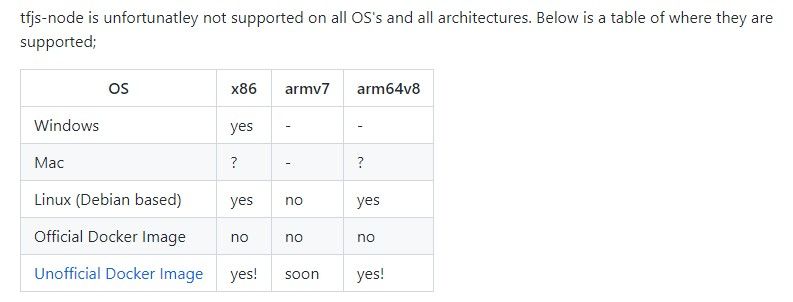
Mit der arm64 V8 soll TensorFlow übrigens kompatibel sein.
-
@hohmannc Hi, hast du die Node "node-red-contrib-face-recognition" überhaupt zum laufen bekommen, laut Beschreibung brauchst du TensorFlow ja nur um die ganze Sache schneller zu machen, für die Funktion ist es aber nicht unbedingt nötig.
https://flows.nodered.org/node/node-red-contrib-face-recognitionYou can also optionally install TensorFlow for Node.js to make this package run faster. If you do not, the node will still run albeit much slower. To install TensorFlow navigate to your .node-red folder and run the following command. This will install TensorFlow in your Node-Red directory for use by the node.
Mit der arm64 V8 soll TensorFlow übrigens kompatibel sein.
@frankyboy73 jo läuft:)

Hey! Du scheinst an dieser Unterhaltung interessiert zu sein, hast aber noch kein Konto.
Hast du es satt, bei jedem Besuch durch die gleichen Beiträge zu scrollen? Wenn du dich für ein Konto anmeldest, kommst du immer genau dorthin zurück, wo du zuvor warst, und kannst dich über neue Antworten benachrichtigen lassen (entweder per E-Mail oder Push-Benachrichtigung). Du kannst auch Lesezeichen speichern und Beiträge positiv bewerten, um anderen Community-Mitgliedern deine Wertschätzung zu zeigen.
Mit deinem Input könnte dieser Beitrag noch besser werden 💗
Registrieren AnmeldenSupport us
315
Online33.0k
Benutzer83.6k
Themen1.3m
Beiträge