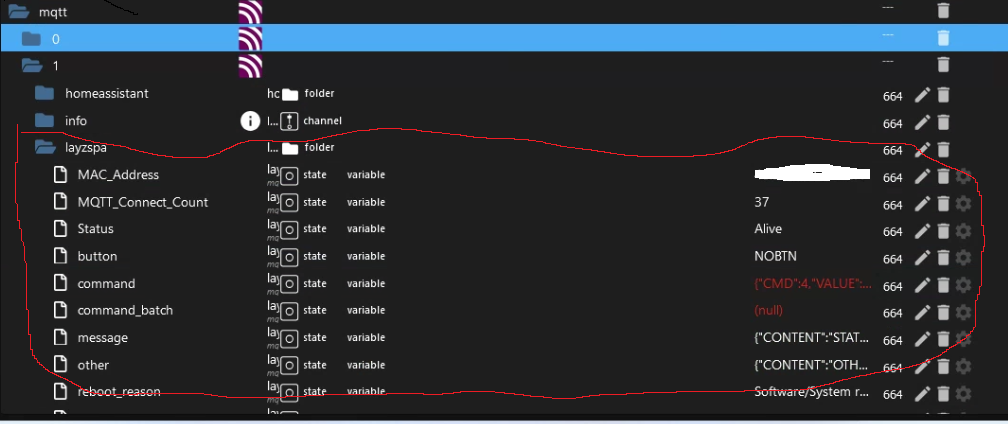
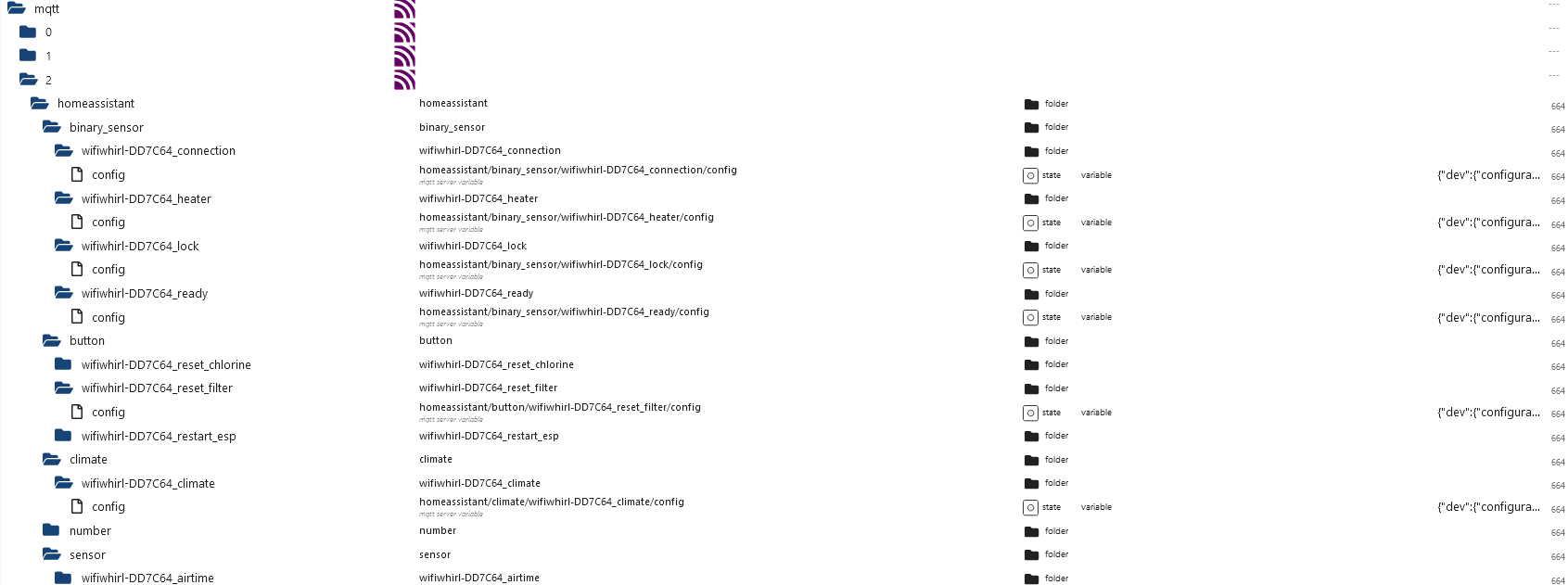
Skip to content
  • Home
  • Recent
  • Tags
  • 0 Unread 0
  • Categories
  • Unreplied
  • Popular
  • GitHub
  • Docu
  • Hilfe
Skins
  • Light
  • Brite
  • Cerulean
  • Cosmo
  • Flatly
  • Journal
  • Litera
  • Lumen
  • Lux
  • Materia
  • Minty
  • Morph
  • Pulse
  • Sandstone
  • Simplex
  • Sketchy
  • Spacelab
  • United
  • Yeti
  • Zephyr
  • Dark
  • Cyborg
  • Darkly
  • Quartz
  • Slate
  • Solar
  • Superhero
  • Vapor

  • Default (No Skin)
  • No Skin
Collapse
ioBroker Logo

Community Forum

donate donate
  1. ioBroker Community Home
  2. Deutsch
  3. Hardware
  4. Lay-Z-Spa Wifi Control

NEWS

  • Jahresrückblick 2025 – unser neuer Blogbeitrag ist online! ✨
    BluefoxB
    Bluefox
    17
    1
    4.2k

  • Neuer Blogbeitrag: Monatsrückblick - Dezember 2025 🎄
    BluefoxB
    Bluefox
    13
    1
    1.2k

  • Weihnachtsangebot 2025! 🎄
    BluefoxB
    Bluefox
    25
    1
    2.6k

Lay-Z-Spa Wifi Control

Scheduled Pinned Locked Moved Hardware
211 Posts 76 Posters 56.3k Views 72 Watching
  • Oldest to Newest
  • Newest to Oldest
  • Most Votes
Reply
  • Reply as topic
Log in to reply
This topic has been deleted. Only users with topic management privileges can see it.
  • Der-JetiD Der-Jeti

    @taurus80 ja, 7 Stück

    T Offline
    T Offline
    Taurus80
    wrote on last edited by
    #131

    @der-jeti
    Habe dir mal eine PN geschrieben. Solltest du eine loswerden wollen, würde ich mich über eine kurze Rückmeldung freuen.

    1 Reply Last reply
    0
    • Der-JetiD Der-Jeti

      @taurus80 ja, 7 Stück

      N Offline
      N Offline
      nonono
      wrote on last edited by
      #132

      @der-jeti Hallo Jeti, ich hätte auch Interesse an einer Platine. Hast du noch welche?

      Der-JetiD 1 Reply Last reply
      0
      • N nonono

        @der-jeti Hallo Jeti, ich hätte auch Interesse an einer Platine. Hast du noch welche?

        Der-JetiD Offline
        Der-JetiD Offline
        Der-Jeti
        wrote on last edited by Der-Jeti
        #133

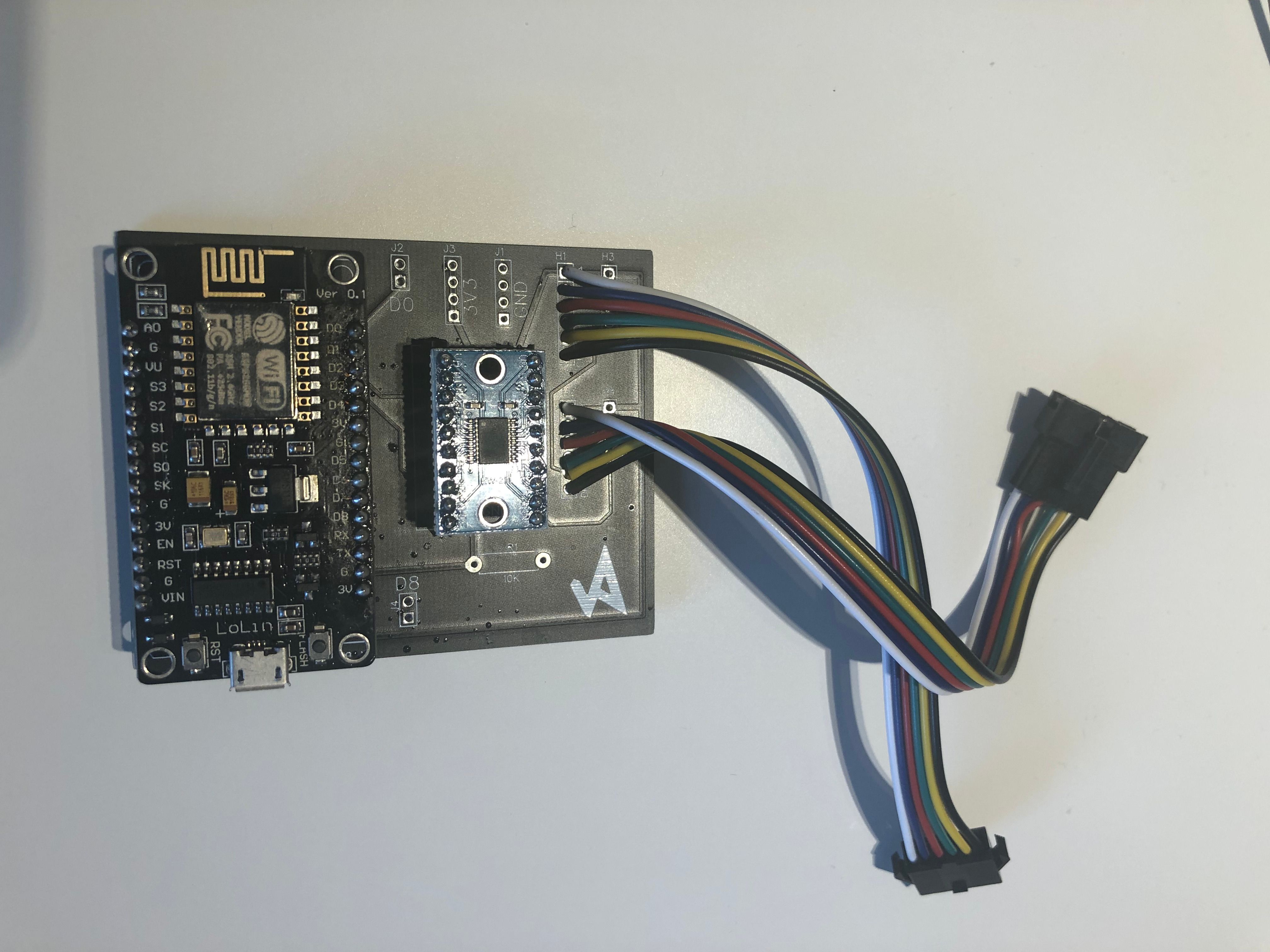
        @nonono ja, sind noch 6x da.

        01.07.24
        5x vorhanden

        T F 2 Replies Last reply
        0
        • Der-JetiD Der-Jeti

          @nonono ja, sind noch 6x da.

          01.07.24
          5x vorhanden

          T Online
          T Online
          TimoWald
          wrote on last edited by
          #134

          Habe jetzt mal hier mitgelesen aber wie bekomme ich die Datenpunkte wie oben beschrieben in meinen IOBroker?
          Würde diese gerne umsetzen:
          e6c54a36-34d4-43e4-8954-baa83429fdc6-grafik.png

          1 Reply Last reply
          0
          • Agria4800A Agria4800

            @agria4800 : Anbei das Script für die Leute mit dem Layz Hawaii oder Maldives (mit den Hydrojet Düsen) ;-)

            // https://forum.iobroker.net/topic/51603/lay-z-spa-wifi-control?_=1655490942180&lang=de
            
            /*Notes for me
            
            Last filter change was 0.00 day(s) ago.  RESET Button gedrückt!
            {"CMD":10,"VALUE":0,"XTIME":1658859596,"INTERVAL":0}
            
            
            Last chlorine add was 0.00 day(s) ago.
            {"CMD":9,"VALUE":0,"XTIME":1658859652,"INTERVAL":0}
            */
            
            const Messages =  
            {
             "CONTENT": "STATES",
             "LCK": 0,
             "PWR": 0,
             "UNT": 1,
             "AIR": 0,
             "GRN": 0,
             "RED": 0,
             "FLT": 0,
             "TGT": 22,
             "TMP": 13,
             "CH1": 32,
             "CH2": 49,
             "CH3": 51,
             "HJT": 0,
             "BRT": 7
            }
            const ID = '0_userdata.0.Layz-Hydro';
            const MQTTINSTANCE = 0;
            const debug = true;
            /*
            {
             "CONTENT": "TIMES",
             "TIME": 1650746370,
             "CLTIME": 1644734714,
             "FTIME": 1644734719,
             "UPTIME": 41660,
             "PUMPTIME": 50,
             "HEATINGTIME": 24,
             "AIRTIME": 512,
             "JETTIME": 4294966,
             "COST": 0,
             "FINT": 4294967295,
             "CLINT": 4294967295,
             "KWH": null,
             "TTTT": -74677
            }
            */
            const STATES=[
               {
                   _id: 'LCK',
                   type: 'state',
                   common: {
                       name: 'lock',
                       type: 'boolean',
                       role: 'switch',
                       read: true,
                       write: false,
                       desc: 'Lazy spa lock'
                   },
                   native: {}
               },
               {
                   _id: 'PWR',
                   type: 'state',
                   common: {
                       name: 'power',
                       type: 'boolean',
                       role: 'switch.power',
                       read: true,
                       write: true,
                       desc: 'Lazy spa power'
                   },
                   native: {}
               },
               {
               _id: 'UNT',
               type: 'state',
               common: {
                   name: 'unit',
                   type: 'number',
                   role: 'value',
                   read: true,
                   write: true,
                   max: 1,
                   desc: 'Lazy spa unit',
                   states: {
               			0: 'Farenheit',
               			1: 'Celsius'
               		}
               },
                  native: {}
               },
               {
               _id: 'HJT',
               type: 'state',
               common: {
                   name: 'Hydrojet',
                   type: 'boolean',
                   role: 'switch',
                   read: true,
                   write: true,
                   desc: 'Lazy spa Hydrojets state'
               },
                  native: {}
               },
               {
               _id: 'AIR',
               type: 'state',
               common: {
                   name: 'bubbles',
                   type: 'boolean',
                   role: 'switch',
                   read: true,
                   write: true,
                   desc: 'Lazy spa bubbles state'
               },
               native: {}
               },
               {
               _id: 'GRN',
               type: 'state',
               common: {
                   name: 'Heating green',
                   type: 'boolean',
                   role: 'switch',
                   read: true,
                   write: false,
                   desc: 'reached target temp.'
               },
               native: {}
               },
               {
               _id: 'RED',
               type: 'state',
               common: {
                   name: 'Heating red',
                   type: 'boolean',
                   role: 'switch',
                   read: true,
                   write: false,
                   desc: 'not reached target temp.'
               },
               native: {}
               },
               {
               _id: 'FLT',
               type: 'state',
               common: {
                   name: 'pump',
                   type: 'boolean',
                   role: 'switch',
                   read: true,
                   write: true,
                   desc: 'pump state'
               },    native: {}
               },
               {
               _id: 'HEATER',
               type: 'state',
               common: {
                   name: 'heater',
                   type: 'boolean',
                   role: 'switch',
                   read: true,
                   write: true,
                   desc: 'heater state'
               },
               native: {}
               },
               {
               _id: 'TGT',
               type: 'state',
               common: {
                   name: 'target temp',
                   type: 'number',
                   role: 'level.temperature',
                   min: 20,
                   max: 40,
                   steps: 1,
                   read: true,
                   write: true,
                   desc: 'taget temp.'
               },
               native: {}
               },
               {
               _id: 'TMP',
               type: 'state',
               common: {
                   name: 'temp',
                   type: 'number',
                   role: 'value.temperature',
                   read: true,
                   write: false,
                   unit: '°C',
                   desc: 'temp.'
               },
               native: {}
               },
            ]
            
            
            init();
            async function stateChange(obj){
               let id = obj.id
               let state = id.split('.').pop()
               let value = obj.state.val
               log('change Unit' + state)
               switch (state) {
                   case 'UNT':
                       setStateAsync('mqtt.'+ MQTTINSTANCE+'.layzspa.command','{"CMD":1,"VALUE":'+ value +',"XTIME":0,"INTERVAL":0}')
                       log('change Unit')
                   break;
                   case 'TGT':
                       setStateAsync('mqtt.'+ MQTTINSTANCE+'.layzspa.command','{"CMD":0,"VALUE":'+ value +',"XTIME":0,"INTERVAL":0}')
                       log('change target temp. to '+ value);
                   break;
                   case 'AIR':
                       value = value ? 1: 0 ;
                       setStateAsync('mqtt.'+ MQTTINSTANCE+'.layzspa.command','{"CMD":2,"VALUE":'+ value +',"XTIME":0,"INTERVAL":0}')
                       log('set bubbles to '+ value);
                   break;
                    case 'HJT':
                       value = value ? 1: 0 ;
                       setStateAsync('mqtt.'+ MQTTINSTANCE+'.layzspa.command','{"CMD":11,"VALUE":'+ value +',"XTIME":0,"INTERVAL":0}')
                       log('set Hydrojets to '+ value);
                   break;
                   case 'HEATER':
                       value = value ? 1: 0 ;
                       setStateAsync('mqtt.'+ MQTTINSTANCE+'.layzspa.command','{"CMD":3,"VALUE":'+ value +',"XTIME":0,"INTERVAL":0}')
                       log('set Heater to '+ value);
                   break;
                   case 'FLT':
                       value = value ? 1: 0 ;
                       setStateAsync('mqtt.'+ MQTTINSTANCE+'.layzspa.command','{"CMD":4,"VALUE":'+ value +',"XTIME":0,"INTERVAL":0}')
                       log('set pump to '+ value);
                   break;


             default:
               // Anweisungen werden ausgeführt,
               // falls keine der case-Klauseln mit expression übereinstimmt
               break;
            }


            }
            async function init(){
               await asyncForEach(STATES, async (obj, index) => {
                   let id = ID +'.'+ obj._id
                   if (!existsState(id)) {
                       log('create state '+ id)
                       await createStateAsync(id, obj.common)
                   }
                   else {
                       log('skip state '+ id)
                   }
                   //set subscription
                   if(obj.common.write){
                       on({id: id, change:"any"} , function(obj) {
                           if(!obj.state.ack){
                               log('change state! '+ JSON.stringify(obj))
                               stateChange(obj)
                           }
                       });
                   }       
               });
               log('init done!')
            }
            async function setLazyStates(obj){
               try{
                       let states = JSON.parse(obj)
                       for (const [key, value] of Object.entries(states)) {
                           let statevalue = value
                           const found = STATES.find(state => state._id === key);
                           if(found){                 
                               if (found.common.type === 'boolean'){
                                   statevalue = value === 1
                               }
                               await setStateAsync(ID +'.'+ key,statevalue,true)
                           }
                       }
                       //set heater state
                       await setStateAsync(ID +'.HEATER',(states.GRN || states.RED) === 1,true)    
               }
               catch(e){
                   console.log('Error in setting State '+ e)
               }
            
            }
            
            async function asyncForEach(array, callback) {
               for (let index = 0; index < array.length; index++) {
               	await callback(array[index], index, array);
               }
            }
            function log (msg){
               if(debug) console.log (msg)
            }
            
            on({id:'mqtt.'+ MQTTINSTANCE+'.layzspa.message', change:"ne"} , function(obj) {
               log('Lazyspa reached message! '+ JSON.stringify(obj.state))
               setLazyStates(obj.state.val)
            });


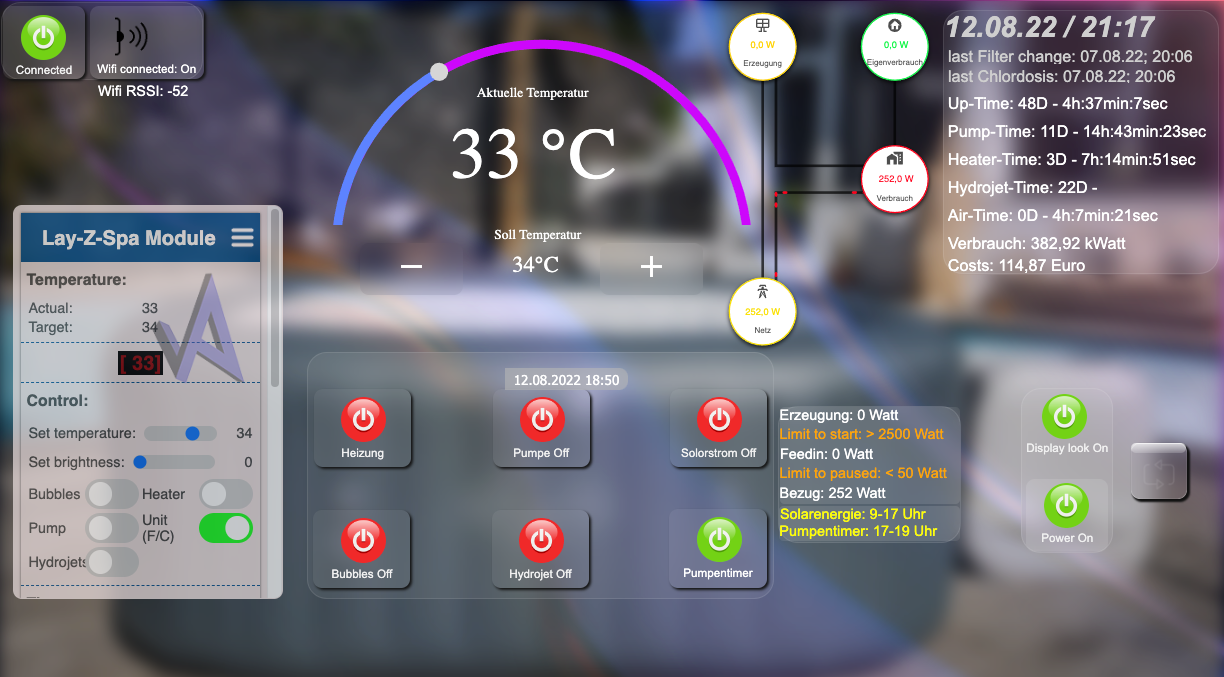
            Und so siehts dann aus...Bildschirmfoto 2022-08-12 um 21.17.52.png

            Grüße

            T Online
            T Online
            TimoWald
            wrote on last edited by
            #135

            @agria4800 Wo füge ich das Skipt ein damit es so aussieht?
            Habe auch den IOBroker per MQTT Adapter verbunden.

            Agria4800A 1 Reply Last reply
            0
            • T TimoWald

              @agria4800 Wo füge ich das Skipt ein damit es so aussieht?
              Habe auch den IOBroker per MQTT Adapter verbunden.

              Agria4800A Offline
              Agria4800A Offline
              Agria4800
              wrote on last edited by
              #136

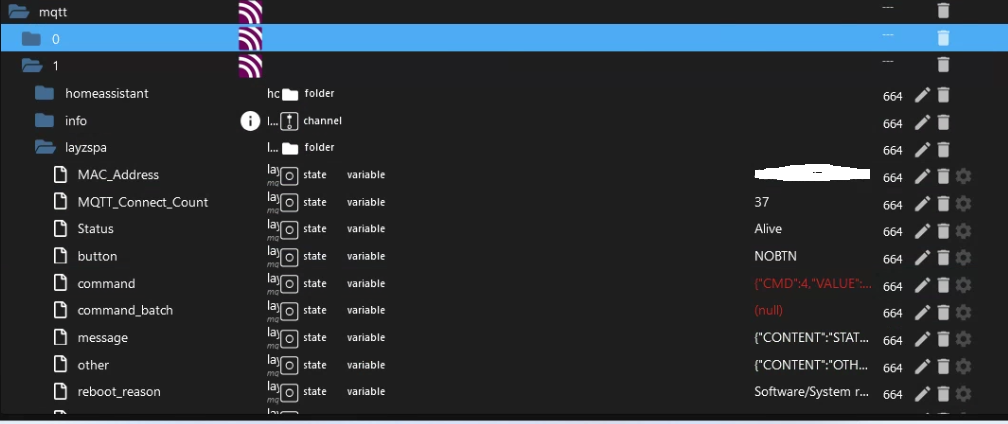
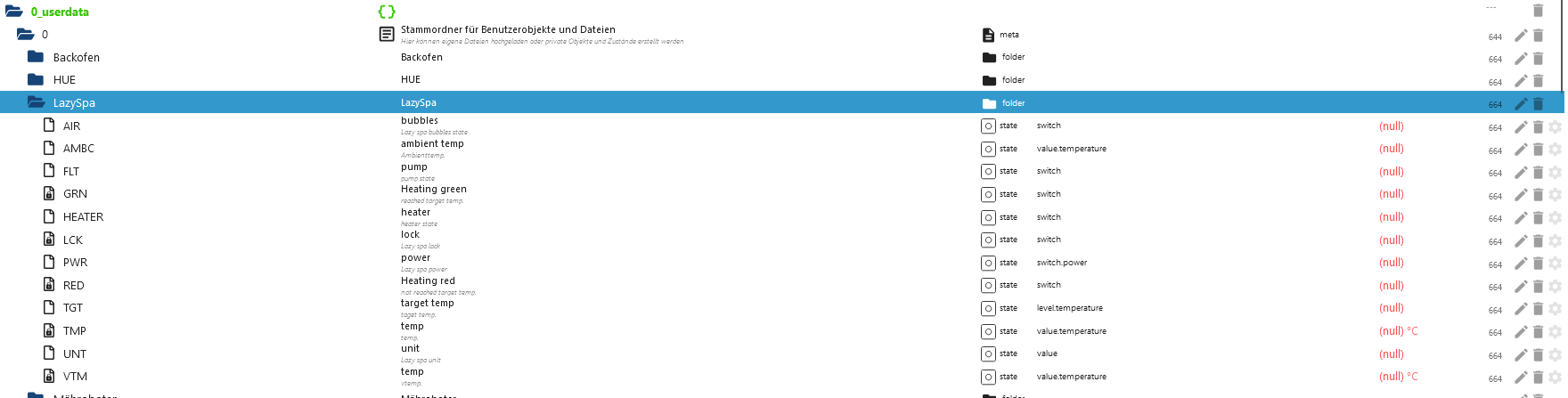
              @timowald Liefert dein Mqtt Adapter den die DP in der Ordnerstruktur von matt? Das script ließt diese Daten und wertet diese dann aus und schreibt diese dann unter 0_userdata !

              1 Reply Last reply
              0
              • T Online
                T Online
                TimoWald
                wrote on last edited by TimoWald
                #137

                @agria4800 wo und wie wende ich das Skript an? Ja Mqtt liefert Daten, zumindest sind datenpunkte angelegt.

                K 1 Reply Last reply
                0
                • T TimoWald

                  @agria4800 wo und wie wende ich das Skript an? Ja Mqtt liefert Daten, zumindest sind datenpunkte angelegt.

                  K Offline
                  K Offline
                  kukoratsch
                  wrote on last edited by kukoratsch
                  #138

                  @timowald
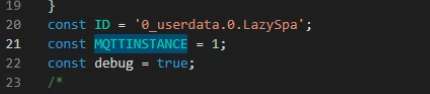
                  Hast du auch im Script MQTTINSTANCE angepasst
                  Screenshot 2024-07-09 134601.png
                  bei dir ist das 2

                  T K 2 Replies Last reply
                  0
                  • K kukoratsch

                    @timowald
                    Hast du auch im Script MQTTINSTANCE angepasst
                    Screenshot 2024-07-09 134601.png
                    bei dir ist das 2

                    T Online
                    T Online
                    TimoWald
                    wrote on last edited by TimoWald
                    #139

                    @kukoratsch wie wende ich das Skript an? Einfach neues JavaScript und einfügen?

                    1 Reply Last reply
                    0
                    • D dozwin81

                      @dozwin81 Hab es jetzt selber herausgefunden!

                      1. Skriptausführung Adapter installieren und starten
                      2. In der Linken Leiste auf das Blaue JS Symbol klicken
                      3. In common ein neues Javascript erstellen und dem einen Namen geben z.b Pool1
                      4. Dann dort den Script einfügen
                      5. Danach diesen Script starten
                      6. In Objekte unter 0_userdata sind die Werte hinterlegt.

                      Hoffe das war verständlich genug ;-)

                      K Offline
                      K Offline
                      kukoratsch
                      wrote on last edited by kukoratsch
                      #140

                      @timowald

                      @dozwin81 Hab es jetzt selber herausgefunden!

                      1. Skriptausführung Adapter installieren und starten
                      2. In der Linken Leiste auf das Blaue JS Symbol klicken
                      3. In common ein neues Javascript erstellen und dem einen Namen geben z.b Pool1
                      4. Dann dort den Script einfügen
                      5. Danach diesen Script starten
                      6. In Objekte unter 0_userdata sind die Werte hinterlegt.

                      Hoffe das war verständlich genug ;-)

                      Wenn du noch kein Script erstellt hast dann ja.

                      T 1 Reply Last reply
                      0
                      • K kukoratsch

                        @timowald

                        @dozwin81 Hab es jetzt selber herausgefunden!

                        1. Skriptausführung Adapter installieren und starten
                        2. In der Linken Leiste auf das Blaue JS Symbol klicken
                        3. In common ein neues Javascript erstellen und dem einen Namen geben z.b Pool1
                        4. Dann dort den Script einfügen
                        5. Danach diesen Script starten
                        6. In Objekte unter 0_userdata sind die Werte hinterlegt.

                        Hoffe das war verständlich genug ;-)

                        Wenn du noch kein Script erstellt hast dann ja.

                        T Online
                        T Online
                        TimoWald
                        wrote on last edited by
                        #141

                        @kukoratsch Das hat das Skript jetzt unter userdata erstellt.
                        Aber es kommen keine Werte.
                        Unter MQTT ändert sich glaube ich auch nix wenn ich am Pool was verstelle.

                        46053b1c-9821-4675-8f6c-c61f1ce271f3-grafik.png

                        1 Reply Last reply
                        0
                        • K kukoratsch

                          @timowald
                          Hast du auch im Script MQTTINSTANCE angepasst
                          Screenshot 2024-07-09 134601.png
                          bei dir ist das 2

                          K Offline
                          K Offline
                          kukoratsch
                          wrote on last edited by
                          #142

                          @kukoratsch sagte in Lay-Z-Spa Wifi Control:

                          @timowald
                          Hast du auch im Script MQTTINSTANCE angepasst
                          Screenshot 2024-07-09 134601.png
                          bei dir ist das 2

                          Hast du das auch gemacht

                          T 2 Replies Last reply
                          0
                          • K kukoratsch

                            @kukoratsch sagte in Lay-Z-Spa Wifi Control:

                            @timowald
                            Hast du auch im Script MQTTINSTANCE angepasst
                            Screenshot 2024-07-09 134601.png
                            bei dir ist das 2

                            Hast du das auch gemacht

                            T Online
                            T Online
                            TimoWald
                            wrote on last edited by
                            #143

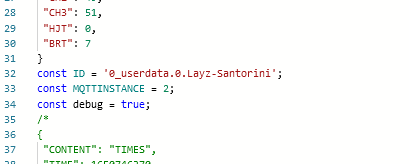
                            @kukoratsch Ja aber in Zeile 33 und nicht in der 21.
                            cc721e1f-f575-4512-8d6f-9ce114c66844-grafik.png

                            1 Reply Last reply
                            0
                            • K kukoratsch

                              @kukoratsch sagte in Lay-Z-Spa Wifi Control:

                              @timowald
                              Hast du auch im Script MQTTINSTANCE angepasst
                              Screenshot 2024-07-09 134601.png
                              bei dir ist das 2

                              Hast du das auch gemacht

                              T Online
                              T Online
                              TimoWald
                              wrote on last edited by
                              #144

                              @kukoratsch hast du noch einen Tip für mich?

                              K 1 Reply Last reply
                              0
                              • E emblitz

                                Hallo,

                                ich habe ebenfalls heute meinem Santorini smart gemacht. Super Projekt.
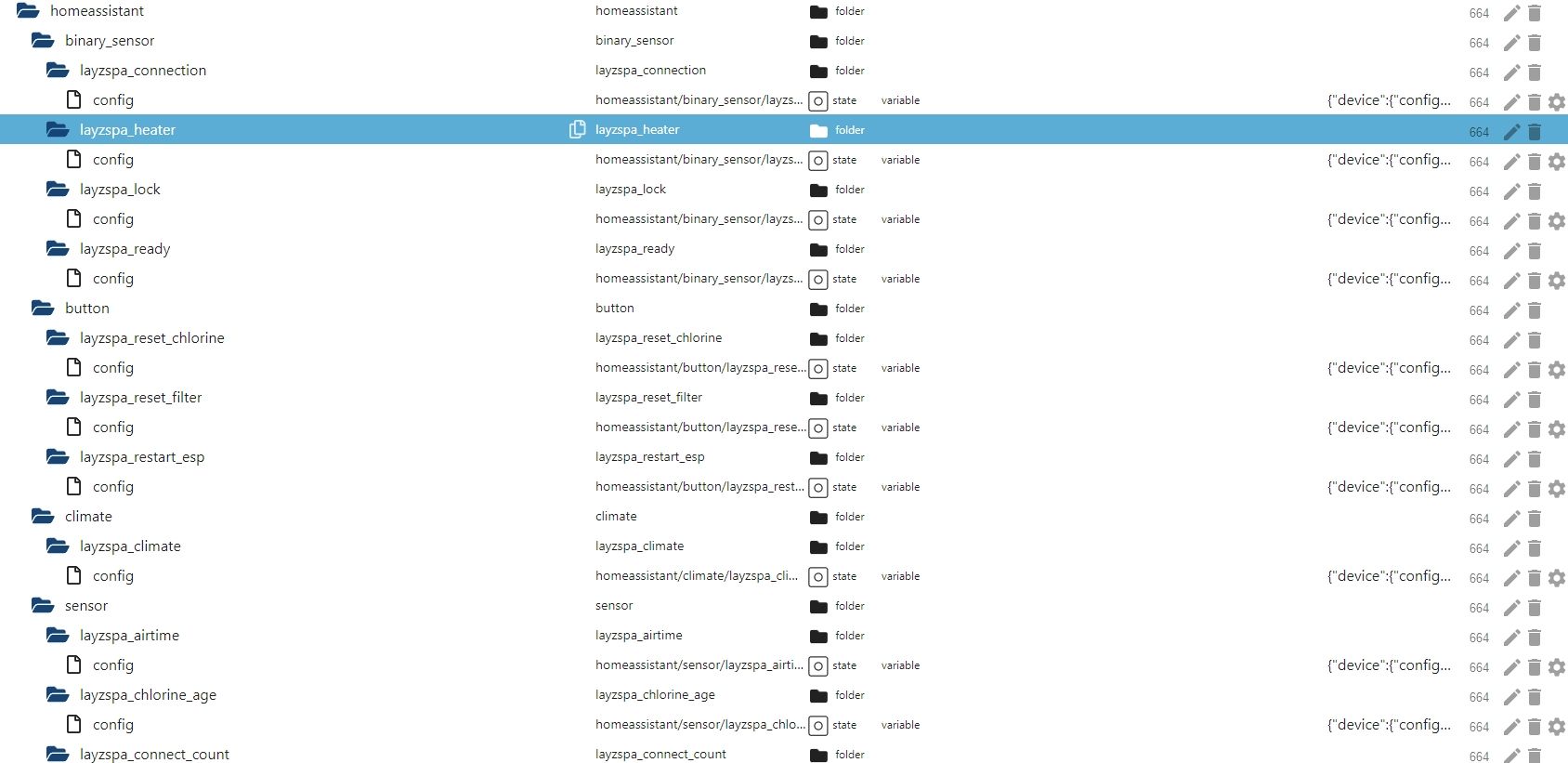
                                In IOBroker bekomme ich über MQTT zwar die Datenpunkte aber keine Werte.
                                Kann mir jemand verraten, was ich nun machen muss um die Werte angezeigt zu bekommen?
                                Wenn ich das o.g. Skript verwenden muss, ist mir nicht klar wie.
                                In den Objekten sieht es dann so aus:
                                2022-05-10-Image 001.jpg
                                LG
                                emblitz.

                                T Online
                                T Online
                                TimoWald
                                wrote on last edited by
                                #145

                                @emblitz Hallo hast du die Werte jetzt in Userdata? Ich habe auch den Santorini aber bekomme sie nicht in Userdata.
                                MQTTINSTANCE ist angepasst auf instant 2. Was mache ich noch falsch?

                                1 Reply Last reply
                                0
                                • T TimoWald

                                  @kukoratsch hast du noch einen Tip für mich?

                                  K Offline
                                  K Offline
                                  kukoratsch
                                  wrote on last edited by
                                  #146

                                  @timowald
                                  Zeig mal die drei screenshot von dir
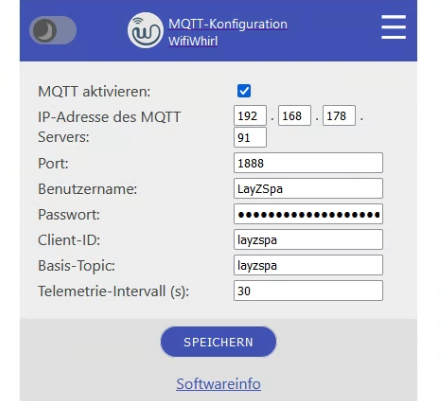
                                  Screenshot 2024-07-15 103551.png
                                  Screenshot 2024-07-15 103642.png
                                  Screenshot 2024-07-15 103823.png

                                  T 1 Reply Last reply
                                  0
                                  • K kukoratsch

                                    @timowald
                                    Zeig mal die drei screenshot von dir
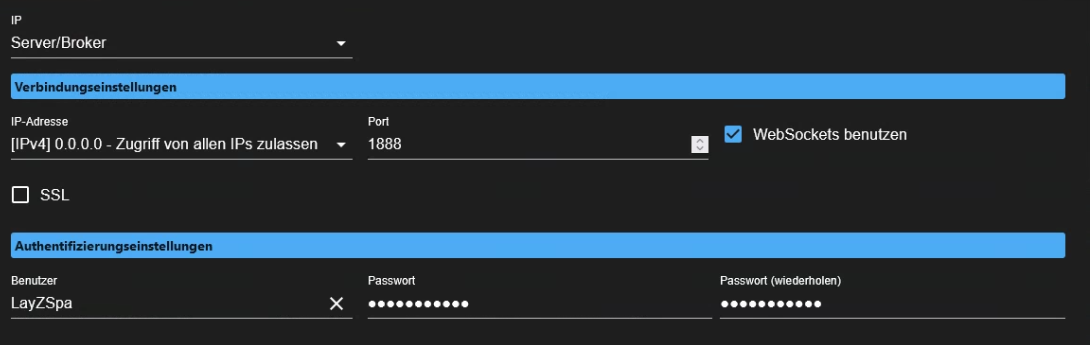
                                    Screenshot 2024-07-15 103551.png
                                    Screenshot 2024-07-15 103642.png
                                    Screenshot 2024-07-15 103823.png

                                    T Online
                                    T Online
                                    TimoWald
                                    wrote on last edited by
                                    #147

                                    @kukoratsch Hallo hier die gewünschten Screenshots
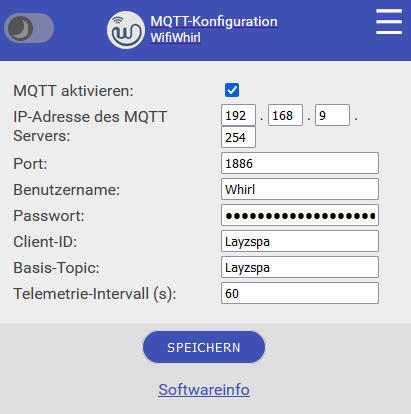
                                    f8ff55ce-1639-4e5a-b5f5-dcdc560f03db-grafik.png
                                    40a62c18-9651-4b25-9109-9d8c01520094-grafik.png
                                    1b9c9e5f-68f6-4535-93f5-f46fcafd66d4-grafik.png

                                    K 1 Reply Last reply
                                    0
                                    • T TimoWald

                                      @kukoratsch Hallo hier die gewünschten Screenshots
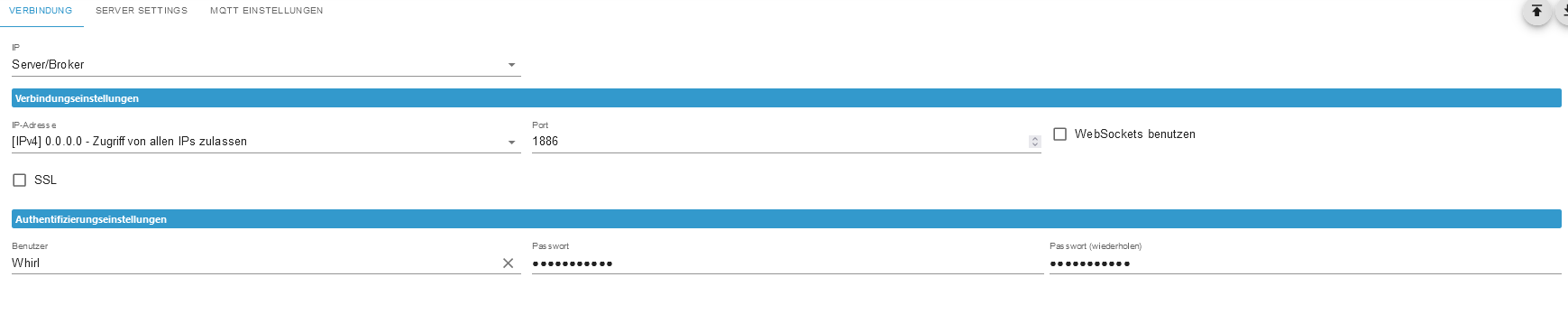
                                      f8ff55ce-1639-4e5a-b5f5-dcdc560f03db-grafik.png
                                      40a62c18-9651-4b25-9109-9d8c01520094-grafik.png
                                      1b9c9e5f-68f6-4535-93f5-f46fcafd66d4-grafik.png

                                      K Offline
                                      K Offline
                                      kukoratsch
                                      wrote on last edited by kukoratsch
                                      #148

                                      @timowald und Screenshots vom MQTT Adapter
                                      192.168.9.254 ist die IP ioBroker?

                                      T 1 Reply Last reply
                                      0
                                      • K kukoratsch

                                        @timowald und Screenshots vom MQTT Adapter
                                        192.168.9.254 ist die IP ioBroker?

                                        T Online
                                        T Online
                                        TimoWald
                                        wrote on last edited by
                                        #149

                                        @kukoratsch ja genau.

                                        K 1 Reply Last reply
                                        0
                                        • T TimoWald

                                          @kukoratsch ja genau.

                                          K Offline
                                          K Offline
                                          kukoratsch
                                          wrote on last edited by
                                          #150

                                          @timowald Screenshot 2024-07-15 103823.png
                                          und Screenshots vom MQTT Objekten?

                                          T 1 Reply Last reply
                                          0
                                          Reply
                                          • Reply as topic
                                          Log in to reply
                                          • Oldest to Newest
                                          • Newest to Oldest
                                          • Most Votes


                                          Support us

                                          ioBroker
                                          Community Adapters
                                          Donate

                                          556

                                          Online

                                          32.7k

                                          Users

                                          82.4k

                                          Topics

                                          1.3m

                                          Posts
                                          Community
                                          Impressum | Datenschutz-Bestimmungen | Nutzungsbedingungen | Einwilligungseinstellungen
                                          ioBroker Community 2014-2025
                                          logo
                                          • Login

                                          • Don't have an account? Register

                                          • Login or register to search.
                                          • First post
                                            Last post
                                          0
                                          • Home
                                          • Recent
                                          • Tags
                                          • Unread 0
                                          • Categories
                                          • Unreplied
                                          • Popular
                                          • GitHub
                                          • Docu
                                          • Hilfe