




[gelöst] Einloggen auf der ioBroker-Oberfläche nicht möglich
-
@hanswurst sagte in Einloggen auf der ioBroker-Oberfläche nicht mehr möglich:
Das einzige, das ich (unverständlicher Weise) nach aufgespielten Backup noch machen musste war, dass ich anschließend das WLAN-Interface konfigurieren musste. Obwohl es in diesem Backup bereits ganz sicher schon verwendet wurde
das iobroker backup hat keinerlei Einfluss auf die wlan Konfiguration!
dein admin läuft nicht, mach mal
iobroker start adminDie controller version ist nicht aktuell
@homoran sagte in Einloggen auf der ioBroker-Oberfläche nicht mehr möglich:
dein admin läuft nicht, mach mal iobroker start admin
Woran hast du das gesehen? Nach einem "iobroker stop admin" und anschließendem "iobroker start admin" schaut die Ausgabe von "iobroker list instances" noch genauso aus wie zuvor gezeigt. Auch, nachdem ich nun ein Upgrade auf die aktuelle Version 3.3.21 vom js-controller gemacht habe. (Ich frage nur nach, um zu verstehen worauf ich in Zukunft zu achten habe)
-
@homoran sagte in Einloggen auf der ioBroker-Oberfläche nicht mehr möglich:
dein admin läuft nicht, mach mal iobroker start admin
Woran hast du das gesehen? Nach einem "iobroker stop admin" und anschließendem "iobroker start admin" schaut die Ausgabe von "iobroker list instances" noch genauso aus wie zuvor gezeigt. Auch, nachdem ich nun ein Upgrade auf die aktuelle Version 3.3.21 vom js-controller gemacht habe. (Ich frage nur nach, um zu verstehen worauf ich in Zukunft zu achten habe)
@hanswurst sagte in Einloggen auf der ioBroker-Oberfläche nicht mehr möglich:
Woran hast du das gesehen?
Am fehlenden + vor der Instanz.
-
@homoran sagte in Einloggen auf der ioBroker-Oberfläche nicht mehr möglich:
dein admin läuft nicht, mach mal iobroker start admin
Woran hast du das gesehen? Nach einem "iobroker stop admin" und anschließendem "iobroker start admin" schaut die Ausgabe von "iobroker list instances" noch genauso aus wie zuvor gezeigt. Auch, nachdem ich nun ein Upgrade auf die aktuelle Version 3.3.21 vom js-controller gemacht habe. (Ich frage nur nach, um zu verstehen worauf ich in Zukunft zu achten habe)
@hanswurst sagte in Einloggen auf der ioBroker-Oberfläche nicht mehr möglich:
Nach einem "iobroker stop admin" und anschließendem "iobroker start admin" schaut die Ausgabe von "iobroker list instances" noch genauso aus wie zuvor gezeigt.
ist es wirklich so? Wahrscheinlich, aber bitte zeigen!
@hanswurst sagte in Einloggen auf der ioBroker-Oberfläche nicht mehr möglich:
Woran hast du das gesehen?
da fehlt vorne das +
immer noch?dann bitte nochmal nur
iobroker start adminausführen und im log nachsehen was passiert. -
@hanswurst sagte in Einloggen auf der ioBroker-Oberfläche nicht mehr möglich:
Nach einem "iobroker stop admin" und anschließendem "iobroker start admin" schaut die Ausgabe von "iobroker list instances" noch genauso aus wie zuvor gezeigt.
ist es wirklich so? Wahrscheinlich, aber bitte zeigen!
@hanswurst sagte in Einloggen auf der ioBroker-Oberfläche nicht mehr möglich:
Woran hast du das gesehen?
da fehlt vorne das +
immer noch?dann bitte nochmal nur
iobroker start adminausführen und im log nachsehen was passiert.Ok, das mit dem "+" habe ich dann nun verstanden.
Was mir nun aufgefallen ist, ist dass der Adapter Admin nach einem stop und anschließendem start kurz als laufend angezeigt wird. Nach ein paar Sekunden dann aber wieder gestoppt ist. Die Fehlermeldung ist dann wieder die gleiche wie im ersten Beitrag (read ECONNRESET at TCP.onStreamRead).
Hier die Ausgaben nach "iobroker stop admin" und anschließendem "iobroker start admin":
  system.adapter.admin.0                  : admin                 : raspberrypi                              - disabled, port: 8081, bind: 0.0.0.0, run as: admin
+ system.adapter.backitup.0               : backitup              : raspberrypi                              -  enabled
  system.adapter.discovery.0              : discovery             : raspberrypi                              -  enabled
  system.adapter.feiertage.0              : feiertage             : raspberrypi                              -  enabled
  system.adapter.flot.0                   : flot                  : raspberrypi                              - disabled
  system.adapter.fullcalendar.0           : fullcalendar          : raspberrypi                              -  enabled
  system.adapter.ical.0                   : ical                  : raspberrypi                              -  enabled
  system.adapter.icons-mfd-svg.0          : icons-mfd-svg         : raspberrypi                              - disabled
  system.adapter.info.0                   : info                  : raspberrypi                              -  enabled
  system.adapter.javascript.0             : javascript            : raspberrypi                              -  enabled
  system.adapter.knx.0                    : knx                   : raspberrypi                              -  enabled, bind: 192.168.178.44
+ system.adapter.luftdaten.0              : luftdaten             : raspberrypi                              -  enabled
  system.adapter.luftdaten.1              : luftdaten             : raspberrypi                              -  enabled
  system.adapter.luftdaten.2              : luftdaten             : raspberrypi                              -  enabled
+ system.adapter.rpi2.0                   : rpi2                  : raspberrypi                              -  enabled
+ system.adapter.shelly.0                 : shelly                : raspberrypi                              -  enabled, port: 1882, bind: 0.0.0.0
+ system.adapter.sql.0                    : sql                   : raspberrypi                              -  enabled, port: 3306
+ system.adapter.tankerkoenig.0           : tankerkoenig          : raspberrypi                              -  enabled
+ system.adapter.telegram.0               : telegram              : raspberrypi                              -  enabled, port: 8443, bind: 0.0.0.0
  system.adapter.vis-hqwidgets.0          : vis-hqwidgets         : raspberrypi                              - disabled
  system.adapter.vis-material-advanced.0  : vis-material-advanced : raspberrypi                              - disabled
  system.adapter.vis-materialdesign.0     : vis-materialdesign    : raspberrypi                              - disabled
  system.adapter.vis.0                    : vis                   : raspberrypi                              -  enabled
+ system.adapter.web.0                    : web                   : raspberrypi                              -  enabled, port: 8082, bind: 0.0.0.0, run as: admin
+ system.adapter.zigbee.0                 : zigbee                : raspberrypi                              -  enabled, port: /dev/serial/by-id/usb-1a86_USB2.0-Serial-if00-port0

+ instance is alive
2021-12-12 15:49:37.384 - info: admin.0 (1741) Plugin sentry Sentry Plugin disabled for this process because sending of statistic data is disabled for the system 2021-12-12 15:49:37.413 - info: admin.0 (1741) starting. Version 4.2.1 in /opt/iobroker/node_modules/iobroker.admin, node: v12.22.7, js-controller: 3.3.21 2021-12-12 15:49:37.501 - info: admin.0 (1741) requesting all states 2021-12-12 15:49:37.502 - info: admin.0 (1741) requesting all objects 2021-12-12 15:49:39.515 - info: admin.0 (1741) received all objects 2021-12-12 15:49:39.886 - info: admin.0 (1741) http server listening on port 8081 2021-12-12 15:49:39.887 - info: admin.0 (1741) Use link "http://localhost:8081" to configure. 2021-12-12 15:49:40.438 - info: admin.0 (1741) Request actual repository... 2021-12-12 15:49:41.578 - info: host.raspberrypi Updating repository "Stable (default)" under "http://download.iobroker.net/sources-dist.json" 2021-12-12 15:49:46.109 - info: admin.0 (1741) Repository received successfully. 2021-12-12 15:49:53.311 - error: admin.0 (1741) uncaught exception: read ECONNRESET 2021-12-12 15:49:53.313 - error: admin.0 (1741) Error: read ECONNRESET at TCP.onStreamRead (internal/stream_base_commons.js:209:20) 2021-12-12 15:49:53.315 - error: admin.0 (1741) Exception-Code: ECONNRESET: read ECONNRESET 2021-12-12 15:49:53.322 - info: admin.0 (1741) terminating http server on port 8081 2021-12-12 15:49:53.324 - info: admin.0 (1741) terminating 2021-12-12 15:49:53.327 - warn: admin.0 (1741) Terminated (UNCAUGHT_EXCEPTION): Without reason 2021-12-12 15:49:54.080 - error: host.raspberrypi instance system.adapter.admin.0 terminated with code 6 (UNCAUGHT_EXCEPTION) 2021-12-12 15:49:54.091 - info: host.raspberrypi Restart adapter system.adapter.admin.0 because enabled 2021-12-12 15:49:56.633 - info: rpi2.0 (1542) State value to set for "rpi2.0.cpu.load1" has to be type "number" but received type "string" 2021-12-12 15:49:56.636 - info: rpi2.0 (1542) State value to set for "rpi2.0.cpu.load5" has to be type "number" but received type "string" 2021-12-12 15:49:56.638 - info: rpi2.0 (1542) State value to set for "rpi2.0.cpu.load15" has to be type "number" but received type "string" 2021-12-12 15:50:24.142 - info: host.raspberrypi instance system.adapter.admin.0 started with pid 1823 2021-12-12 15:50:29.085 - info: admin.0 (1823) Plugin sentry Sentry Plugin disabled for this process because sending of statistic data is disabled for the system 2021-12-12 15:50:29.114 - info: admin.0 (1823) starting. Version 4.2.1 in /opt/iobroker/node_modules/iobroker.admin, node: v12.22.7, js-controller: 3.3.21 2021-12-12 15:50:29.202 - info: admin.0 (1823) requesting all states 2021-12-12 15:50:29.204 - info: admin.0 (1823) requesting all objects 2021-12-12 15:50:31.076 - info: admin.0 (1823) received all objects 2021-12-12 15:50:31.366 - info: admin.0 (1823) http server listening on port 8081 2021-12-12 15:50:31.368 - info: admin.0 (1823) Use link "http://localhost:8081" to configure. 2021-12-12 15:50:47.121 - info: knx.0 (1246) STATE_NOT_CONNECTED : Try to connect / reconnect : STATE_READY(7) to STATE_NOT_CONNECTED(0). 2021-12-12 15:50:47.128 - info: knx.0 (1246) STATE_NOT_CONNECTED : Stop connection : STATE_DISCONNECT_REQUEST(15) to STATE_NOT_CONNECTED(0). 2021-12-12 15:50:47.132 - info: knx.0 (1246) STATE_NOT_CONNECTED : Stop connection : STATE_DISCONNECT_RESPONSE(16) to STATE_NOT_CONNECTED(0). 2021-12-12 15:50:49.122 - info: knx.0 (1246) Using UDP with local IP: 192.168.178.44 2021-12-12 15:50:49.127 - info: knx.0 (1246) Event : UDP - listening 2021-12-12 15:50:49.130 - info: knx.0 (1246) Connected - local UDP Server listening on 192.168.178.44:57265 2021-12-12 15:50:50.469 - error: admin.0 (1823) uncaught exception: read ECONNRESET 2021-12-12 15:50:50.471 - error: admin.0 (1823) Error: read ECONNRESET at TCP.onStreamRead (internal/stream_base_commons.js:209:20) 2021-12-12 15:50:50.473 - error: admin.0 (1823) Exception-Code: ECONNRESET: read ECONNRESET 2021-12-12 15:50:50.485 - info: admin.0 (1823) terminating http server on port 8081 2021-12-12 15:50:50.487 - info: admin.0 (1823) terminating 2021-12-12 15:50:50.491 - warn: admin.0 (1823) Terminated (UNCAUGHT_EXCEPTION): Without reason 2021-12-12 15:50:51.174 - error: host.raspberrypi instance system.adapter.admin.0 terminated with code 6 (UNCAUGHT_EXCEPTION) 2021-12-12 15:50:51.182 - info: host.raspberrypi Restart adapter system.adapter.admin.0 because enabled 2021-12-12 15:50:56.583 - info: rpi2.0 (1542) State value to set for "rpi2.0.cpu.load1" has to be type "number" but received type "string" 2021-12-12 15:50:56.585 - info: rpi2.0 (1542) State value to set for "rpi2.0.cpu.load5" has to be type "number" but received type "string" 2021-12-12 15:50:56.587 - info: rpi2.0 (1542) State value to set for "rpi2.0.cpu.load15" has to be type "number" but received type "string" 2021-12-12 15:51:00.022 - warn: shelly.0 (1616) State value to set for "shelly.0.SHDM-2#E8DB84D313E7#1.temperatureF" has value "110.07" greater than max "100" 2021-12-12 15:51:21.265 - info: host.raspberrypi instance system.adapter.admin.0 started with pid 1874 2021-12-12 15:51:24.629 - info: admin.0 (1874) Plugin sentry Sentry Plugin disabled for this process because sending of statistic data is disabled for the system 2021-12-12 15:51:24.655 - info: admin.0 (1874) starting. Version 4.2.1 in /opt/iobroker/node_modules/iobroker.admin, node: v12.22.7, js-controller: 3.3.21 2021-12-12 15:51:24.737 - info: admin.0 (1874) requesting all states 2021-12-12 15:51:24.739 - info: admin.0 (1874) requesting all objects 2021-12-12 15:51:26.676 - info: admin.0 (1874) received all objects 2021-12-12 15:51:26.915 - info: admin.0 (1874) http server listening on port 8081 2021-12-12 15:51:26.917 - info: admin.0 (1874) Use link "http://localhost:8081" to configure. 2021-12-12 15:51:30.003 - warn: shelly.0 (1616) State value to set for "shelly.0.SHDM-2#E8DB84D313E7#1.temperatureF" has value "110.2" greater than max "100" 2021-12-12 15:51:51.513 - error: admin.0 (1874) uncaught exception: read ECONNRESET 2021-12-12 15:51:51.516 - error: admin.0 (1874) Error: read ECONNRESET at TCP.onStreamRead (internal/stream_base_commons.js:209:20) 2021-12-12 15:51:51.519 - error: admin.0 (1874) Exception-Code: ECONNRESET: read ECONNRESET 2021-12-12 15:51:51.533 - info: admin.0 (1874) terminating http server on port 8081 2021-12-12 15:51:51.536 - info: admin.0 (1874) terminating 2021-12-12 15:51:51.541 - warn: admin.0 (1874) Terminated (UNCAUGHT_EXCEPTION): Without reason 2021-12-12 15:51:52.262 - error: host.raspberrypi instance system.adapter.admin.0 terminated with code 6 (UNCAUGHT_EXCEPTION) 2021-12-12 15:51:52.270 - info: host.raspberrypi Restart adapter system.adapter.admin.0 because enabled 2021-12-12 15:51:52.271 - warn: host.raspberrypi Do not restart adapter system.adapter.admin.0 because restart loop detectedWenn ich nun anschließend nur iobroker start admin ausführe, dann ist kein weiterer/neuer Log-Eintrag zu sehen.
-
Ich hatte ein Problem, so dass ich auf ein älteres Backup zurück greifen muss. Bei diesem lässt sich ioBroker allerdings nicht richtig starten. Wie im Screenshot zu sehen, häng er sich beim Adapter admin auf. Mit der Fehlermeldung (read ECONNRESET at TCP.onStreamRead) kann ich aber leider nicht viel anfangen oder in Google finden.
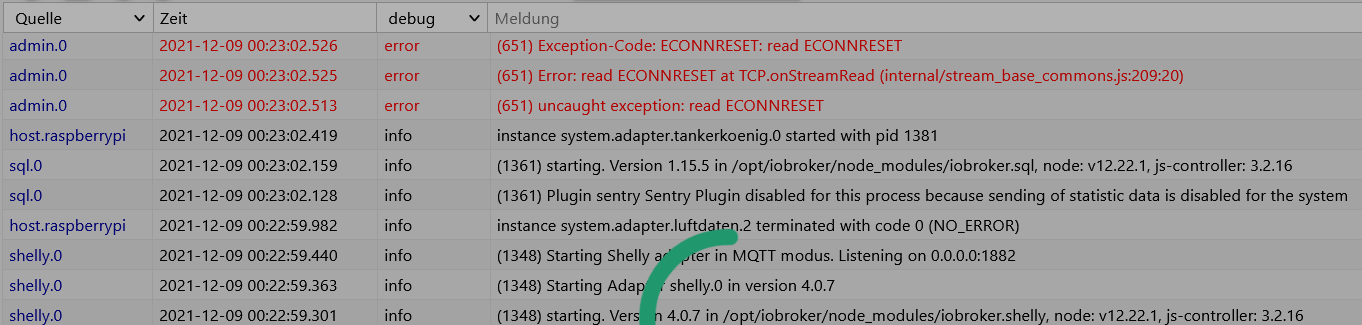
Das einzige, das ich (unverständlicher Weise) nach aufgespielten Backup noch machen musste war, dass ich anschließend das WLAN-Interface konfigurieren musste. Obwohl es in diesem Backup bereits ganz sicher schon verwendet wurde. Die nicht-Erreichbarkeit des Raspys war auch der Startgrund, warum ich überhaupt ein altes Bakup aufgespielt hatte.
Ich hoffe mir kann jemand einen Tipp geben was ich machen könnte. Hier ein paar Infos zum aktuellen Zustand:
$ node -v
v12.22.7

$ npm -v
6.14.15

$ iobroker version
3.2.16

$ iobroker version admin
4.2.1

$ iobroker list instances
  system.adapter.admin.0                  : admin                 : raspberrypi                              -  enabled, port: 8081, bind: 0.0.0.0, run as: admin
+ system.adapter.backitup.0               : backitup              : raspberrypi                              -  enabled
+ system.adapter.discovery.0              : discovery             : raspberrypi                              -  enabled
  system.adapter.feiertage.0              : feiertage             : raspberrypi                              -  enabled
  system.adapter.flot.0                   : flot                  : raspberrypi                              - disabled
+ system.adapter.fullcalendar.0           : fullcalendar          : raspberrypi                              -  enabled
  system.adapter.ical.0                   : ical                  : raspberrypi                              -  enabled
  system.adapter.icons-mfd-svg.0          : icons-mfd-svg         : raspberrypi                              - disabled
+ system.adapter.info.0                   : info                  : raspberrypi                              -  enabled
+ system.adapter.javascript.0             : javascript            : raspberrypi                              -  enabled
+ system.adapter.knx.0                    : knx                   : raspberrypi                              -  enabled, bind: ######_edit_######
  system.adapter.luftdaten.0              : luftdaten             : raspberrypi                              -  enabled
  system.adapter.luftdaten.1              : luftdaten             : raspberrypi                              -  enabled
  system.adapter.luftdaten.2              : luftdaten             : raspberrypi                              -  enabled
+ system.adapter.rpi2.0                   : rpi2                  : raspberrypi                              -  enabled
+ system.adapter.shelly.0                 : shelly                : raspberrypi                              -  enabled, port: ######_edit_######
+ system.adapter.sql.0                    : sql                   : raspberrypi                              -  enabled, port: ######_edit_######
+ system.adapter.tankerkoenig.0           : tankerkoenig          : raspberrypi                              -  enabled
+ system.adapter.telegram.0               : telegram              : raspberrypi                              -  enabled, port: ######_edit_######
  system.adapter.vis-hqwidgets.0          : vis-hqwidgets         : raspberrypi                              - disabled
  system.adapter.vis-material-advanced.0  : vis-material-advanced : raspberrypi                              - disabled
  system.adapter.vis-materialdesign.0     : vis-materialdesign    : raspberrypi                              - disabled
  system.adapter.vis.0                    : vis                   : raspberrypi                              -  enabled
+ system.adapter.web.0                    : web                   : raspberrypi                              -  enabled, port: ######_edit_######
+ system.adapter.zigbee.0                 : zigbee                : raspberrypi                              -  enabled, port: /dev/serial/by-id/usb-1a86_USB2.0-Serial-if00-port0
Ich habe auch mal versucht bis auf den Admin-Adapter alle anderen Adapter zu disablen. In diesem Fall komme ich allerdings nichteinmal dazu mich im ioBroker einzuloggen.
@hanswurst sagte in Einloggen auf der ioBroker-Oberfläche nicht mehr möglich:
Hier ein paar Infos zum aktuellen Zustand:
das Editieren hilft nicht zu sehen, ob ein Port doppelt vergeben ist
-
@hanswurst sagte in Einloggen auf der ioBroker-Oberfläche nicht mehr möglich:
Hier ein paar Infos zum aktuellen Zustand:
das Editieren hilft nicht zu sehen, ob ein Port doppelt vergeben ist
-
Ok, das mit dem "+" habe ich dann nun verstanden.
Was mir nun aufgefallen ist, ist dass der Adapter Admin nach einem stop und anschließendem start kurz als laufend angezeigt wird. Nach ein paar Sekunden dann aber wieder gestoppt ist. Die Fehlermeldung ist dann wieder die gleiche wie im ersten Beitrag (read ECONNRESET at TCP.onStreamRead).
Hier die Ausgaben nach "iobroker stop admin" und anschließendem "iobroker start admin":
  system.adapter.admin.0                  : admin                 : raspberrypi                              - disabled, port: 8081, bind: 0.0.0.0, run as: admin
+ system.adapter.backitup.0               : backitup              : raspberrypi                              -  enabled
  system.adapter.discovery.0              : discovery             : raspberrypi                              -  enabled
  system.adapter.feiertage.0              : feiertage             : raspberrypi                              -  enabled
  system.adapter.flot.0                   : flot                  : raspberrypi                              - disabled
  system.adapter.fullcalendar.0           : fullcalendar          : raspberrypi                              -  enabled
  system.adapter.ical.0                   : ical                  : raspberrypi                              -  enabled
  system.adapter.icons-mfd-svg.0          : icons-mfd-svg         : raspberrypi                              - disabled
  system.adapter.info.0                   : info                  : raspberrypi                              -  enabled
  system.adapter.javascript.0             : javascript            : raspberrypi                              -  enabled
  system.adapter.knx.0                    : knx                   : raspberrypi                              -  enabled, bind: 192.168.178.44
+ system.adapter.luftdaten.0              : luftdaten             : raspberrypi                              -  enabled
  system.adapter.luftdaten.1              : luftdaten             : raspberrypi                              -  enabled
  system.adapter.luftdaten.2              : luftdaten             : raspberrypi                              -  enabled
+ system.adapter.rpi2.0                   : rpi2                  : raspberrypi                              -  enabled
+ system.adapter.shelly.0                 : shelly                : raspberrypi                              -  enabled, port: 1882, bind: 0.0.0.0
+ system.adapter.sql.0                    : sql                   : raspberrypi                              -  enabled, port: 3306
+ system.adapter.tankerkoenig.0           : tankerkoenig          : raspberrypi                              -  enabled
+ system.adapter.telegram.0               : telegram              : raspberrypi                              -  enabled, port: 8443, bind: 0.0.0.0
  system.adapter.vis-hqwidgets.0          : vis-hqwidgets         : raspberrypi                              - disabled
  system.adapter.vis-material-advanced.0  : vis-material-advanced : raspberrypi                              - disabled
  system.adapter.vis-materialdesign.0     : vis-materialdesign    : raspberrypi                              - disabled
  system.adapter.vis.0                    : vis                   : raspberrypi                              -  enabled
+ system.adapter.web.0                    : web                   : raspberrypi                              -  enabled, port: 8082, bind: 0.0.0.0, run as: admin
+ system.adapter.zigbee.0                 : zigbee                : raspberrypi                              -  enabled, port: /dev/serial/by-id/usb-1a86_USB2.0-Serial-if00-port0

+ instance is alive
2021-12-12 15:49:37.384 - info: admin.0 (1741) Plugin sentry Sentry Plugin disabled for this process because sending of statistic data is disabled for the system 2021-12-12 15:49:37.413 - info: admin.0 (1741) starting. Version 4.2.1 in /opt/iobroker/node_modules/iobroker.admin, node: v12.22.7, js-controller: 3.3.21 2021-12-12 15:49:37.501 - info: admin.0 (1741) requesting all states 2021-12-12 15:49:37.502 - info: admin.0 (1741) requesting all objects 2021-12-12 15:49:39.515 - info: admin.0 (1741) received all objects 2021-12-12 15:49:39.886 - info: admin.0 (1741) http server listening on port 8081 2021-12-12 15:49:39.887 - info: admin.0 (1741) Use link "http://localhost:8081" to configure. 2021-12-12 15:49:40.438 - info: admin.0 (1741) Request actual repository... 2021-12-12 15:49:41.578 - info: host.raspberrypi Updating repository "Stable (default)" under "http://download.iobroker.net/sources-dist.json" 2021-12-12 15:49:46.109 - info: admin.0 (1741) Repository received successfully. 2021-12-12 15:49:53.311 - error: admin.0 (1741) uncaught exception: read ECONNRESET 2021-12-12 15:49:53.313 - error: admin.0 (1741) Error: read ECONNRESET at TCP.onStreamRead (internal/stream_base_commons.js:209:20) 2021-12-12 15:49:53.315 - error: admin.0 (1741) Exception-Code: ECONNRESET: read ECONNRESET 2021-12-12 15:49:53.322 - info: admin.0 (1741) terminating http server on port 8081 2021-12-12 15:49:53.324 - info: admin.0 (1741) terminating 2021-12-12 15:49:53.327 - warn: admin.0 (1741) Terminated (UNCAUGHT_EXCEPTION): Without reason 2021-12-12 15:49:54.080 - error: host.raspberrypi instance system.adapter.admin.0 terminated with code 6 (UNCAUGHT_EXCEPTION) 2021-12-12 15:49:54.091 - info: host.raspberrypi Restart adapter system.adapter.admin.0 because enabled 2021-12-12 15:49:56.633 - info: rpi2.0 (1542) State value to set for "rpi2.0.cpu.load1" has to be type "number" but received type "string" 2021-12-12 15:49:56.636 - info: rpi2.0 (1542) State value to set for "rpi2.0.cpu.load5" has to be type "number" but received type "string" 2021-12-12 15:49:56.638 - info: rpi2.0 (1542) State value to set for "rpi2.0.cpu.load15" has to be type "number" but received type "string" 2021-12-12 15:50:24.142 - info: host.raspberrypi instance system.adapter.admin.0 started with pid 1823 2021-12-12 15:50:29.085 - info: admin.0 (1823) Plugin sentry Sentry Plugin disabled for this process because sending of statistic data is disabled for the system 2021-12-12 15:50:29.114 - info: admin.0 (1823) starting. Version 4.2.1 in /opt/iobroker/node_modules/iobroker.admin, node: v12.22.7, js-controller: 3.3.21 2021-12-12 15:50:29.202 - info: admin.0 (1823) requesting all states 2021-12-12 15:50:29.204 - info: admin.0 (1823) requesting all objects 2021-12-12 15:50:31.076 - info: admin.0 (1823) received all objects 2021-12-12 15:50:31.366 - info: admin.0 (1823) http server listening on port 8081 2021-12-12 15:50:31.368 - info: admin.0 (1823) Use link "http://localhost:8081" to configure. 2021-12-12 15:50:47.121 - info: knx.0 (1246) STATE_NOT_CONNECTED : Try to connect / reconnect : STATE_READY(7) to STATE_NOT_CONNECTED(0). 2021-12-12 15:50:47.128 - info: knx.0 (1246) STATE_NOT_CONNECTED : Stop connection : STATE_DISCONNECT_REQUEST(15) to STATE_NOT_CONNECTED(0). 2021-12-12 15:50:47.132 - info: knx.0 (1246) STATE_NOT_CONNECTED : Stop connection : STATE_DISCONNECT_RESPONSE(16) to STATE_NOT_CONNECTED(0). 2021-12-12 15:50:49.122 - info: knx.0 (1246) Using UDP with local IP: 192.168.178.44 2021-12-12 15:50:49.127 - info: knx.0 (1246) Event : UDP - listening 2021-12-12 15:50:49.130 - info: knx.0 (1246) Connected - local UDP Server listening on 192.168.178.44:57265 2021-12-12 15:50:50.469 - error: admin.0 (1823) uncaught exception: read ECONNRESET 2021-12-12 15:50:50.471 - error: admin.0 (1823) Error: read ECONNRESET at TCP.onStreamRead (internal/stream_base_commons.js:209:20) 2021-12-12 15:50:50.473 - error: admin.0 (1823) Exception-Code: ECONNRESET: read ECONNRESET 2021-12-12 15:50:50.485 - info: admin.0 (1823) terminating http server on port 8081 2021-12-12 15:50:50.487 - info: admin.0 (1823) terminating 2021-12-12 15:50:50.491 - warn: admin.0 (1823) Terminated (UNCAUGHT_EXCEPTION): Without reason 2021-12-12 15:50:51.174 - error: host.raspberrypi instance system.adapter.admin.0 terminated with code 6 (UNCAUGHT_EXCEPTION) 2021-12-12 15:50:51.182 - info: host.raspberrypi Restart adapter system.adapter.admin.0 because enabled 2021-12-12 15:50:56.583 - info: rpi2.0 (1542) State value to set for "rpi2.0.cpu.load1" has to be type "number" but received type "string" 2021-12-12 15:50:56.585 - info: rpi2.0 (1542) State value to set for "rpi2.0.cpu.load5" has to be type "number" but received type "string" 2021-12-12 15:50:56.587 - info: rpi2.0 (1542) State value to set for "rpi2.0.cpu.load15" has to be type "number" but received type "string" 2021-12-12 15:51:00.022 - warn: shelly.0 (1616) State value to set for "shelly.0.SHDM-2#E8DB84D313E7#1.temperatureF" has value "110.07" greater than max "100" 2021-12-12 15:51:21.265 - info: host.raspberrypi instance system.adapter.admin.0 started with pid 1874 2021-12-12 15:51:24.629 - info: admin.0 (1874) Plugin sentry Sentry Plugin disabled for this process because sending of statistic data is disabled for the system 2021-12-12 15:51:24.655 - info: admin.0 (1874) starting. Version 4.2.1 in /opt/iobroker/node_modules/iobroker.admin, node: v12.22.7, js-controller: 3.3.21 2021-12-12 15:51:24.737 - info: admin.0 (1874) requesting all states 2021-12-12 15:51:24.739 - info: admin.0 (1874) requesting all objects 2021-12-12 15:51:26.676 - info: admin.0 (1874) received all objects 2021-12-12 15:51:26.915 - info: admin.0 (1874) http server listening on port 8081 2021-12-12 15:51:26.917 - info: admin.0 (1874) Use link "http://localhost:8081" to configure. 2021-12-12 15:51:30.003 - warn: shelly.0 (1616) State value to set for "shelly.0.SHDM-2#E8DB84D313E7#1.temperatureF" has value "110.2" greater than max "100" 2021-12-12 15:51:51.513 - error: admin.0 (1874) uncaught exception: read ECONNRESET 2021-12-12 15:51:51.516 - error: admin.0 (1874) Error: read ECONNRESET at TCP.onStreamRead (internal/stream_base_commons.js:209:20) 2021-12-12 15:51:51.519 - error: admin.0 (1874) Exception-Code: ECONNRESET: read ECONNRESET 2021-12-12 15:51:51.533 - info: admin.0 (1874) terminating http server on port 8081 2021-12-12 15:51:51.536 - info: admin.0 (1874) terminating 2021-12-12 15:51:51.541 - warn: admin.0 (1874) Terminated (UNCAUGHT_EXCEPTION): Without reason 2021-12-12 15:51:52.262 - error: host.raspberrypi instance system.adapter.admin.0 terminated with code 6 (UNCAUGHT_EXCEPTION) 2021-12-12 15:51:52.270 - info: host.raspberrypi Restart adapter system.adapter.admin.0 because enabled 2021-12-12 15:51:52.271 - warn: host.raspberrypi Do not restart adapter system.adapter.admin.0 because restart loop detectedWenn ich nun anschließend nur iobroker start admin ausführe, dann ist kein weiterer/neuer Log-Eintrag zu sehen.
@hanswurst sagte in Einloggen auf der ioBroker-Oberfläche nicht mehr möglich:
Was mir nun aufgefallen ist, ist dass der Adapter Admin nach einem stop und anschließendem start kurz als laufend angezeigt wird. Nach ein paar Sekunden dann aber wieder gestoppt ist
das hatte ich erwartet und deswegen das log sehen wollen.
Nur nutzt mir das log nicht, weil ich es nicht verstehe:@hanswurst sagte in Einloggen auf der ioBroker-Oberfläche nicht mehr möglich:
error: admin.0 (1741) uncaught exception: read ECONNRESET
vorher lief er aber und jetzt kann/darf er etwas nicht lesen.
und zwar, nachdem er das aktuelle Repository abgeholt hat
@hanswurst sagte in Einloggen auf der ioBroker-Oberfläche nicht mehr möglich:
2021-12-12 15:49:46.109 - info: admin.0 (1741) Repository received successfully.
Schuss ins blaue:
iobroker stop iobroker fix iobroker start -
@hanswurst sagte in Einloggen auf der ioBroker-Oberfläche nicht mehr möglich:
Was mir nun aufgefallen ist, ist dass der Adapter Admin nach einem stop und anschließendem start kurz als laufend angezeigt wird. Nach ein paar Sekunden dann aber wieder gestoppt ist
das hatte ich erwartet und deswegen das log sehen wollen.
Nur nutzt mir das log nicht, weil ich es nicht verstehe:@hanswurst sagte in Einloggen auf der ioBroker-Oberfläche nicht mehr möglich:
error: admin.0 (1741) uncaught exception: read ECONNRESET
vorher lief er aber und jetzt kann/darf er etwas nicht lesen.
und zwar, nachdem er das aktuelle Repository abgeholt hat
@hanswurst sagte in Einloggen auf der ioBroker-Oberfläche nicht mehr möglich:
2021-12-12 15:49:46.109 - info: admin.0 (1741) Repository received successfully.
Schuss ins blaue:
iobroker stop iobroker fix iobroker start@homoran sagte in Einloggen auf der ioBroker-Oberfläche nicht mehr möglich:
Schuss ins blaue: iobroker stop
iobroker fix
iobroker startHabe ich nun ausgeführt:
Die Fehlermeldung (warn: host.raspberrypi Do not restart adapter system.adapter.admin.0 because restart loop detected) kommt anschließend leider trotzdem noch. Auch nach System-Neustart.
-
Von einer kleinen Neuigkeit kann ich mitlerweile berichten. Wenn ich dem Raspi eine neue / andere IP-Adresse vergeben lasse, dann laufen zwar viele Adapter im Hintergrund nicht mehr richtig, dafür habe ich nun aber nicht mehr das Problem, dass der Adapter Admin ständig hängen bleibt.
Mein aktueller Plan ist nun erst mal alle Adapter auf den neuesten Stand upzudaten. Wenn das Problem danach immer noch besteht, dann kann ich sie ja alle stoppen und nach und nach wieder hinzu schalten, bis Admin wieder abschmiert.
-
Es läuft nun wieder. Abschließende Rückmeldung:
Nachdem ich dem Raspberry Pi (temporär) eine andere IP-Adresse vergeben hatte, konnte ich das System ohne "Aufhängen" bedienen. Somit habe ich, nachdem ich zuerst das JS-Controller Update (von v3.2.16 auf v3.3.21) gemacht hatte, anschließend auch alle Adapter aktualisiert. Danach anschließend noch Node.js Update (von v12.22.7 auf v14.18.2) gemacht.
Als ich zum Schluss wieder zurück auf die alte IP gewechselt habe, lief alles wieder normal. Ich habe zwar keine Ahnung warum der Umweg mit der IP-Vergabe, aber es hat als workaround funktioniert.
Danke an alle Mithelfer :)

Hey! Du scheinst an dieser Unterhaltung interessiert zu sein, hast aber noch kein Konto.
Hast du es satt, bei jedem Besuch durch die gleichen Beiträge zu scrollen? Wenn du dich für ein Konto anmeldest, kommst du immer genau dorthin zurück, wo du zuvor warst, und kannst dich über neue Antworten benachrichtigen lassen (entweder per E-Mail oder Push-Benachrichtigung). Du kannst auch Lesezeichen speichern und Beiträge positiv bewerten, um anderen Community-Mitgliedern deine Wertschätzung zu zeigen.
Mit deinem Input könnte dieser Beitrag noch besser werden 💗
Registrieren Anmelden458
Online33.0k
Benutzer83.6k
Themen1.3m
Beiträge