




ESP32 Daten per MQTT an ioBroker
-
Moin,
ich brauche mal einen Tipp, da das Programmieren absolut nicht meins ist.
Für das Logging meiner Heizung möchte ich gerne 10 Temperatursensoren mit einem ESP32 auslesen, dass funktioniert momentan soweit auch sehr gut, der Code ist folgender und das Ergebnis im seriellen Monitor ist auch alles korrekt.
Die Werte würde ich gerne alle 30 Sekunden an den ioBroker via MQTT senden und brauche da mal Hilfe.
Mein Problem ist (gefühlt), dass ich keinen richtig guten Ansatzpunkt finde.Mein ioBroker als MQTT Broker läuft auf 192.168.178.5.
Vielleicht hat ja jemand einen guten Tipp?
#include <OneWire.h>
#include <DallasTemperature.h>

// Data wire is plugged TO GPIO 4
#define ONE_WIRE_BUS 4

// Setup a oneWire instance to communicate with any OneWire devices (not just Maxim/Dallas temperature ICs)
OneWire oneWire(ONE_WIRE_BUS);

// Pass our oneWire reference to Dallas Temperature.
DallasTemperature sensors(&oneWire);

// Number of temperature devices found
int numberOfDevices;

// We'll use this variable to store a found device address
DeviceAddress tempDeviceAddress;

void setup(){
  // start serial port
  Serial.begin(115200);

  // Start up the library
  sensors.begin();

  // Grab a count of devices on the wire
  numberOfDevices = sensors.getDeviceCount();

  // locate devices on the bus
  Serial.print("Locating devices...");
  Serial.print("Found ");
  Serial.print(numberOfDevices, DEC);
  Serial.println(" devices.");

  // Loop through each device, print out address
  for(int i=0;i<numberOfDevices; i++){
    // Search the wire for address
    if(sensors.getAddress(tempDeviceAddress, i)){
      Serial.print("Found device ");
      Serial.print(i, DEC);
      Serial.print(" with address: ");
      printAddress(tempDeviceAddress);
      Serial.println();
    } else {
      Serial.print("Found ghost device at ");
      Serial.print(i, DEC);
      Serial.print(" but could not detect address. Check power and cabling");
    }
  }
}

void loop(){
  sensors.requestTemperatures(); // Send the command to get temperatures

  // Loop through each device, print out temperature data
  for(int i=0;i<numberOfDevices; i++){
    // Search the wire for address
    if(sensors.getAddress(tempDeviceAddress, i)){
      // Output the device ID
      Serial.print("Temperature for device: ");
      Serial.print(i,DEC);
      // Print the data
      float tempC = sensors.getTempC(tempDeviceAddress);
      Serial.print(" Temp C: ");
      Serial.println(tempC);
      //Serial.print(" Temp F: ");
      //Serial.println(DallasTemperature::toFahrenheit(tempC)); // Converts tempC to Fahrenheit
    }
  }
  delay(5000);
}

// function to print a device address
void printAddress(DeviceAddress deviceAddress) {
  for (uint8_t i = 0; i < 8; i++){
    if (deviceAddress[i] < 16) Serial.print("0");
      Serial.print(deviceAddress[i], HEX);
  }
}
Ergebnis ist folgendes:
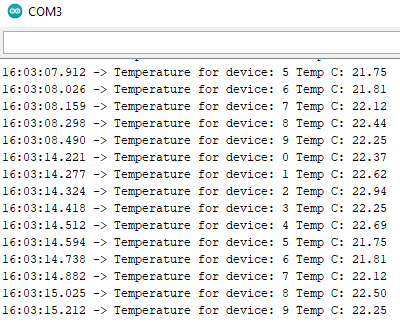
Ich würde gerne für jedes Device einen Datenpunkt im ioBroker in einem MQTT Topic anlegen.
Vielen Dank,
Moritz -
Moin,
ich brauche mal einen Tipp, da das Programmieren absolut nicht meins ist.
Für das Logging meiner Heizung möchte ich gerne 10 Temperatursensoren mit einem ESP32 auslesen, dass funktioniert momentan soweit auch sehr gut, der Code ist folgender und das Ergebnis im seriellen Monitor ist auch alles korrekt.
Die Werte würde ich gerne alle 30 Sekunden an den ioBroker via MQTT senden und brauche da mal Hilfe.
Mein Problem ist (gefühlt), dass ich keinen richtig guten Ansatzpunkt finde.Mein ioBroker als MQTT Broker läuft auf 192.168.178.5.
Vielleicht hat ja jemand einen guten Tipp?
#include <OneWire.h>
#include <DallasTemperature.h>

// Data wire is plugged TO GPIO 4
#define ONE_WIRE_BUS 4

// Setup a oneWire instance to communicate with any OneWire devices (not just Maxim/Dallas temperature ICs)
OneWire oneWire(ONE_WIRE_BUS);

// Pass our oneWire reference to Dallas Temperature.
DallasTemperature sensors(&oneWire);

// Number of temperature devices found
int numberOfDevices;

// We'll use this variable to store a found device address
DeviceAddress tempDeviceAddress;

void setup(){
  // start serial port
  Serial.begin(115200);

  // Start up the library
  sensors.begin();

  // Grab a count of devices on the wire
  numberOfDevices = sensors.getDeviceCount();

  // locate devices on the bus
  Serial.print("Locating devices...");
  Serial.print("Found ");
  Serial.print(numberOfDevices, DEC);
  Serial.println(" devices.");

  // Loop through each device, print out address
  for(int i=0;i<numberOfDevices; i++){
    // Search the wire for address
    if(sensors.getAddress(tempDeviceAddress, i)){
      Serial.print("Found device ");
      Serial.print(i, DEC);
      Serial.print(" with address: ");
      printAddress(tempDeviceAddress);
      Serial.println();
    } else {
      Serial.print("Found ghost device at ");
      Serial.print(i, DEC);
      Serial.print(" but could not detect address. Check power and cabling");
    }
  }
}

void loop(){
  sensors.requestTemperatures(); // Send the command to get temperatures

  // Loop through each device, print out temperature data
  for(int i=0;i<numberOfDevices; i++){
    // Search the wire for address
    if(sensors.getAddress(tempDeviceAddress, i)){
      // Output the device ID
      Serial.print("Temperature for device: ");
      Serial.print(i,DEC);
      // Print the data
      float tempC = sensors.getTempC(tempDeviceAddress);
      Serial.print(" Temp C: ");
      Serial.println(tempC);
      //Serial.print(" Temp F: ");
      //Serial.println(DallasTemperature::toFahrenheit(tempC)); // Converts tempC to Fahrenheit
    }
  }
  delay(5000);
}

// function to print a device address
void printAddress(DeviceAddress deviceAddress) {
  for (uint8_t i = 0; i < 8; i++){
    if (deviceAddress[i] < 16) Serial.print("0");
      Serial.print(deviceAddress[i], HEX);
  }
}
Ergebnis ist folgendes:
Ich würde gerne für jedes Device einen Datenpunkt im ioBroker in einem MQTT Topic anlegen.
Vielen Dank,
MoritzMoin,
ich bin ein kleines Stück weiter, sodass ich nun zumindest Werte in den ioBroker schreiben kann via MQTT.
Mein Problem ist aber noch, dass ich momentan nicht die Temperatur schreiben kann, sondern nur einen Text.
Wenn ich die Variable "TempC" ohne "" schreibe, dann wirft er mir den folgenden Fehler.Zudem schreibt er mir momentan alles in das gleiche Topic, ich würde aber gerne jeden Schleifendurchgang (i) als Topic haben, sodass er für jede Iteration auch das korrekte Topic beschreibt.
Hier einmal der Code:
#include <WiFi.h>
#include <PubSubClient.h>
#include <OneWire.h>
#include <DallasTemperature.h>

// Data wire is plugged TO GPIO 4
#define ONE_WIRE_BUS 4

// Setup a oneWire instance to communicate with any OneWire devices (not just Maxim/Dallas temperature ICs)
OneWire oneWire(ONE_WIRE_BUS);

// Pass our oneWire reference to Dallas Temperature.
DallasTemperature sensors(&oneWire);

// Number of temperature devices found
int numberOfDevices;

// We'll use this variable to store a found device address
DeviceAddress tempDeviceAddress;

// WiFi
const char *ssid = "Moes Taverne"; // Enter your WiFi name
const char *password = "Sageicheuchnicht";  // Enter WiFi password

// MQTT Broker
const char *mqtt_broker = "192.168.178.5";
const char *topic = "Heizung_OG";
const char *mqtt_username = "";
const char *mqtt_password = "";
const int mqtt_port = 1883;

WiFiClient espClient;
PubSubClient client(espClient);

void setup() {
 // Set software serial baud to 115200;
 Serial.begin(115200);

 // connecting to a WiFi network
 WiFi.begin(ssid, password);
 while (WiFi.status() != WL_CONNECTED) {
     delay(500);
     Serial.println("Connecting to WiFi..");
 }
 Serial.println("Connected to the WiFi network");
 //connecting to a mqtt broker
 client.setServer(mqtt_broker, mqtt_port);
 client.setCallback(callback);
 while (!client.connected()) {
     String client_id = "esp32-client-";
     client_id += String(WiFi.macAddress());
     Serial.printf("The client %s connects to the public mqtt broker\n", client_id.c_str());
     if (client.connect(client_id.c_str(), mqtt_username, mqtt_password)) {
         Serial.println("Public emqx mqtt broker connected");
     } else {
         Serial.print("failed with state ");
         Serial.print(client.state());
         delay(2000);
     }
 }
 // publish and subscribe
 client.publish(topic, "Hi EMQ X I'm ESP32 ^^");
 client.subscribe(topic);

  // Start up the library
  sensors.begin();

  // Grab a count of devices on the wire
  numberOfDevices = sensors.getDeviceCount();

  // locate devices on the bus
  Serial.print("Locating devices...");
  Serial.print("Found ");
  Serial.print(numberOfDevices, DEC);
  Serial.println(" devices.");

  // Loop through each device, print out address
  for(int i=0;i<numberOfDevices; i++){
    // Search the wire for address
    if(sensors.getAddress(tempDeviceAddress, i)){
      Serial.print("Found device ");
      Serial.print(i, DEC);
      Serial.print(" with address: ");
      printAddress(tempDeviceAddress);
      Serial.println();
    } else {
      Serial.print("Found ghost device at ");
      Serial.print(i, DEC);
      Serial.print(" but could not detect address. Check power and cabling");
    }
  }


}

void callback(char *topic, byte *payload, unsigned int length) {
 Serial.print("Message arrived in topic: ");
 Serial.println(topic);
 Serial.print("Message:");
 for (int i = 0; i < length; i++) {
     Serial.print((char) payload[i]);
 }
 Serial.println();
 Serial.println("-----------------------");
}

void loop() {
 client.loop();
   sensors.requestTemperatures(); // Send the command to get temperatures

 //client.publish(topic, "Hi EMQ X I'm ESP32 ^^");
 //client.subscribe(topic);


  // Loop through each device, print out temperature data
  for(int i=0;i<numberOfDevices; i++){
    // Search the wire for address
    if(sensors.getAddress(tempDeviceAddress, i)){
      // Output the device ID
      Serial.print("Temperature for device: ");
      Serial.print(i,DEC);
      // Print the data
      float tempC = sensors.getTempC(tempDeviceAddress);
      Serial.print(" Temp C: ");
      Serial.println(tempC);
      //Serial.print(" Temp F: ");
      //Serial.println(DallasTemperature::toFahrenheit(tempC)); // Converts tempC to Fahrenheit
       client.publish(topic, "tempC"); //<<<<<-------- Wenn ich hier die "" herausnehme, dann kommt der untenstehende Fehler.
      client.subscribe(topic);
    }
  }
  delay(5000);
}

// function to print a device address
void printAddress(DeviceAddress deviceAddress) {
  for (uint8_t i = 0; i < 8; i++){
    if (deviceAddress[i] < 16) Serial.print("0");
      Serial.print(deviceAddress[i], HEX);
  }
}
Es wird dann der folgende Fehler geworfen:
no matching function for call to 'PubSubClient::publish(const char*&, float&)'Da gibt es doch sicher eine gute Lösung, oder?
Danke,
MOritz -
Moin,
ich bin ein kleines Stück weiter, sodass ich nun zumindest Werte in den ioBroker schreiben kann via MQTT.
Mein Problem ist aber noch, dass ich momentan nicht die Temperatur schreiben kann, sondern nur einen Text.
Wenn ich die Variable "TempC" ohne "" schreibe, dann wirft er mir den folgenden Fehler.Zudem schreibt er mir momentan alles in das gleiche Topic, ich würde aber gerne jeden Schleifendurchgang (i) als Topic haben, sodass er für jede Iteration auch das korrekte Topic beschreibt.
Hier einmal der Code:
#include <WiFi.h>
#include <PubSubClient.h>
#include <OneWire.h>
#include <DallasTemperature.h>

// Data wire is plugged TO GPIO 4
#define ONE_WIRE_BUS 4

// Setup a oneWire instance to communicate with any OneWire devices (not just Maxim/Dallas temperature ICs)
OneWire oneWire(ONE_WIRE_BUS);

// Pass our oneWire reference to Dallas Temperature.
DallasTemperature sensors(&oneWire);

// Number of temperature devices found
int numberOfDevices;

// We'll use this variable to store a found device address
DeviceAddress tempDeviceAddress;

// WiFi
const char *ssid = "Moes Taverne"; // Enter your WiFi name
const char *password = "Sageicheuchnicht";  // Enter WiFi password

// MQTT Broker
const char *mqtt_broker = "192.168.178.5";
const char *topic = "Heizung_OG";
const char *mqtt_username = "";
const char *mqtt_password = "";
const int mqtt_port = 1883;

WiFiClient espClient;
PubSubClient client(espClient);

void setup() {
 // Set software serial baud to 115200;
 Serial.begin(115200);

 // connecting to a WiFi network
 WiFi.begin(ssid, password);
 while (WiFi.status() != WL_CONNECTED) {
     delay(500);
     Serial.println("Connecting to WiFi..");
 }
 Serial.println("Connected to the WiFi network");
 //connecting to a mqtt broker
 client.setServer(mqtt_broker, mqtt_port);
 client.setCallback(callback);
 while (!client.connected()) {
     String client_id = "esp32-client-";
     client_id += String(WiFi.macAddress());
     Serial.printf("The client %s connects to the public mqtt broker\n", client_id.c_str());
     if (client.connect(client_id.c_str(), mqtt_username, mqtt_password)) {
         Serial.println("Public emqx mqtt broker connected");
     } else {
         Serial.print("failed with state ");
         Serial.print(client.state());
         delay(2000);
     }
 }
 // publish and subscribe
 client.publish(topic, "Hi EMQ X I'm ESP32 ^^");
 client.subscribe(topic);

  // Start up the library
  sensors.begin();

  // Grab a count of devices on the wire
  numberOfDevices = sensors.getDeviceCount();

  // locate devices on the bus
  Serial.print("Locating devices...");
  Serial.print("Found ");
  Serial.print(numberOfDevices, DEC);
  Serial.println(" devices.");

  // Loop through each device, print out address
  for(int i=0;i<numberOfDevices; i++){
    // Search the wire for address
    if(sensors.getAddress(tempDeviceAddress, i)){
      Serial.print("Found device ");
      Serial.print(i, DEC);
      Serial.print(" with address: ");
      printAddress(tempDeviceAddress);
      Serial.println();
    } else {
      Serial.print("Found ghost device at ");
      Serial.print(i, DEC);
      Serial.print(" but could not detect address. Check power and cabling");
    }
  }


}

void callback(char *topic, byte *payload, unsigned int length) {
 Serial.print("Message arrived in topic: ");
 Serial.println(topic);
 Serial.print("Message:");
 for (int i = 0; i < length; i++) {
     Serial.print((char) payload[i]);
 }
 Serial.println();
 Serial.println("-----------------------");
}

void loop() {
 client.loop();
   sensors.requestTemperatures(); // Send the command to get temperatures

 //client.publish(topic, "Hi EMQ X I'm ESP32 ^^");
 //client.subscribe(topic);


  // Loop through each device, print out temperature data
  for(int i=0;i<numberOfDevices; i++){
    // Search the wire for address
    if(sensors.getAddress(tempDeviceAddress, i)){
      // Output the device ID
      Serial.print("Temperature for device: ");
      Serial.print(i,DEC);
      // Print the data
      float tempC = sensors.getTempC(tempDeviceAddress);
      Serial.print(" Temp C: ");
      Serial.println(tempC);
      //Serial.print(" Temp F: ");
      //Serial.println(DallasTemperature::toFahrenheit(tempC)); // Converts tempC to Fahrenheit
       client.publish(topic, "tempC"); //<<<<<-------- Wenn ich hier die "" herausnehme, dann kommt der untenstehende Fehler.
      client.subscribe(topic);
    }
  }
  delay(5000);
}

// function to print a device address
void printAddress(DeviceAddress deviceAddress) {
  for (uint8_t i = 0; i < 8; i++){
    if (deviceAddress[i] < 16) Serial.print("0");
      Serial.print(deviceAddress[i], HEX);
  }
}
Es wird dann der folgende Fehler geworfen:
no matching function for call to 'PubSubClient::publish(const char*&, float&)'Da gibt es doch sicher eine gute Lösung, oder?
Danke,
MOritz@dasmoritz sagte in ESP32 Daten per MQTT an ioBroker:
PubSubClient
du musst die zahl die sich in TempC befindet in einen String wandeln bevor du sie an publish weiter reichst.
A.
-
@dasmoritz sagte in ESP32 Daten per MQTT an ioBroker:
PubSubClient
du musst die zahl die sich in TempC befindet in einen String wandeln bevor du sie an publish weiter reichst.
A.
-
Das habe ich fast vermutet.
Wie geht das? -
@dasmoritz gute frage, nächste frage. welche Sprache nutzt du da ?
A.
Das ganze ist in Arduino programmiert.
#include <WiFi.h>
#include <PubSubClient.h>
#include <OneWire.h>
#include <DallasTemperature.h>

// Data wire is plugged TO GPIO 4
#define ONE_WIRE_BUS 4

// Setup a oneWire instance to communicate with any OneWire devices (not just Maxim/Dallas temperature ICs)
OneWire oneWire(ONE_WIRE_BUS);

// Pass our oneWire reference to Dallas Temperature.
DallasTemperature sensors(&oneWire);

// Number of temperature devices found
int numberOfDevices;

// We'll use this variable to store a found device address
DeviceAddress tempDeviceAddress;

// WiFi
const char *ssid = "Moes Taverne"; // Enter your WiFi name
const char *password = "2003198930a26127OL";  // Enter WiFi password

// MQTT Broker
const char *mqtt_broker = "192.168.178.5";
const char *topic = "Heizung_OG";
const char *mqtt_username = "";
const char *mqtt_password = "";
const int mqtt_port = 1883;

WiFiClient espClient;
PubSubClient client(espClient);

void setup() {
 // Set software serial baud to 115200;
 Serial.begin(115200);

 // connecting to a WiFi network
 WiFi.begin(ssid, password);
 while (WiFi.status() != WL_CONNECTED) {
     delay(500);
     Serial.println("Connecting to WiFi..");
 }
 Serial.println("Connected to the WiFi network");
 //connecting to a mqtt broker
 client.setServer(mqtt_broker, mqtt_port);
 client.setCallback(callback);
 while (!client.connected()) {
     String client_id = "esp32-client-";
     client_id += String(WiFi.macAddress());
     Serial.printf("The client %s connects to the public mqtt broker\n", client_id.c_str());
     if (client.connect(client_id.c_str(), mqtt_username, mqtt_password)) {
         Serial.println("Public emqx mqtt broker connected");
     } else {
         Serial.print("failed with state ");
         Serial.print(client.state());
         delay(2000);
     }
 }
 // publish and subscribe
 client.publish(topic, "Hi EMQ X I'm ESP32 ^^");
 client.subscribe(topic);

  // Start up the library
  sensors.begin();

  // Grab a count of devices on the wire
  numberOfDevices = sensors.getDeviceCount();

  // locate devices on the bus
  Serial.print("Locating devices...");
  Serial.print("Found ");
  Serial.print(numberOfDevices, DEC);
  Serial.println(" devices.");

  // Loop through each device, print out address
  for(int i=0;i<numberOfDevices; i++){
    // Search the wire for address
    if(sensors.getAddress(tempDeviceAddress, i)){
      Serial.print("Found device ");
      Serial.print(i, DEC);
      Serial.print(" with address: ");
      printAddress(tempDeviceAddress);
      Serial.println();
    } else {
      Serial.print("Found ghost device at ");
      Serial.print(i, DEC);
      Serial.print(" but could not detect address. Check power and cabling");
    }
  }


}

void callback(char *topic, byte *payload, unsigned int length) {
 Serial.print("Message arrived in topic: ");
 Serial.println(topic);
 Serial.print("Message:");
 for (int i = 0; i < length; i++) {
     Serial.print((char) payload[i]);
 }
 Serial.println();
 Serial.println("-----------------------");
}

void loop() {
 client.loop();
   sensors.requestTemperatures(); // Send the command to get temperatures

 //client.publish(topic, "Hi EMQ X I'm ESP32 ^^");
 //client.subscribe(topic);


  // Loop through each device, print out temperature data
  for(int i=0;i<numberOfDevices; i++){
    // Search the wire for address
    if(sensors.getAddress(tempDeviceAddress, i)){
      // Output the device ID
      Serial.print("Temperature for device: ");
      Serial.print(i,DEC);
      // Print the data
      float tempC = sensors.getTempC(tempDeviceAddress);
      Serial.print(" Temp C: ");
      Serial.println(tempC);
      //Serial.print(" Temp F: ");
      //Serial.println(DallasTemperature::toFahrenheit(tempC)); // Converts tempC to Fahrenheit

char temperatur[8];
char thema[8];
dtostrf(tempC, 3, 3, temperatur);
dtostrf(i, 4, 4, thema);

      Serial.print(" nach Umwandlung: ");
      Serial.println(temperatur);
      Serial.print(" Thema: ");
      Serial.println(thema);

       client.publish(thema, temperatur);
      client.subscribe(thema);
    }
  }
  delay(30000);
}

// function to print a device address
void printAddress(DeviceAddress deviceAddress) {
  for (uint8_t i = 0; i < 8; i++){
    if (deviceAddress[i] < 16) Serial.print("0");
      Serial.print(deviceAddress[i], HEX);
  }
}
Aber:
Die Daten werden leider nur "einmalig" an den MQTT Server versendet, im SerialMonitor werden die Daten hingegen alle 30 Sekunden aktualisiert.Was könnte das sein?
SerialMonitor:23:20:07.272 -> Thema: 0.0000 23:20:07.272 -> Temperature for device: 1 Temp C: 22.69 23:20:07.320 -> nach Umwandlung: 22.687 23:20:07.320 -> Thema: 1.0000 23:20:07.369 -> Temperature for device: 2 Temp C: 22.50 23:20:07.369 -> nach Umwandlung: 22.500 23:20:07.369 -> Thema: 2.0000 23:20:07.429 -> Temperature for device: 3 Temp C: 22.56 23:20:07.429 -> nach Umwandlung: 22.562 23:20:07.429 -> Thema: 3.0000 23:20:07.524 -> Temperature for device: 4 Temp C: 22.62 23:20:07.524 -> nach Umwandlung: 22.625 23:20:07.524 -> Thema: 4.0000 23:20:07.616 -> Temperature for device: 5 Temp C: 22.50 23:20:07.663 -> nach Umwandlung: 22.500 23:20:07.663 -> Thema: 5.0000 23:20:07.773 -> Temperature for device: 6 Temp C: 22.50 23:20:07.773 -> nach Umwandlung: 22.500 23:20:07.773 -> Thema: 6.0000 23:20:07.913 -> Temperature for device: 7 Temp C: 22.50 23:20:07.913 -> nach Umwandlung: 22.500 23:20:07.913 -> Thema: 7.0000 23:20:08.037 -> Temperature for device: 8 Temp C: 22.31 23:20:08.085 -> nach Umwandlung: 22.313 23:20:08.085 -> Thema: 8.0000 23:20:08.225 -> Temperature for device: 9 Temp C: 22.56 23:20:08.225 -> nach Umwandlung: 22.562 23:20:08.225 -> Thema: 9.0000Im ioBroker wird mir folgendes angezeigt:
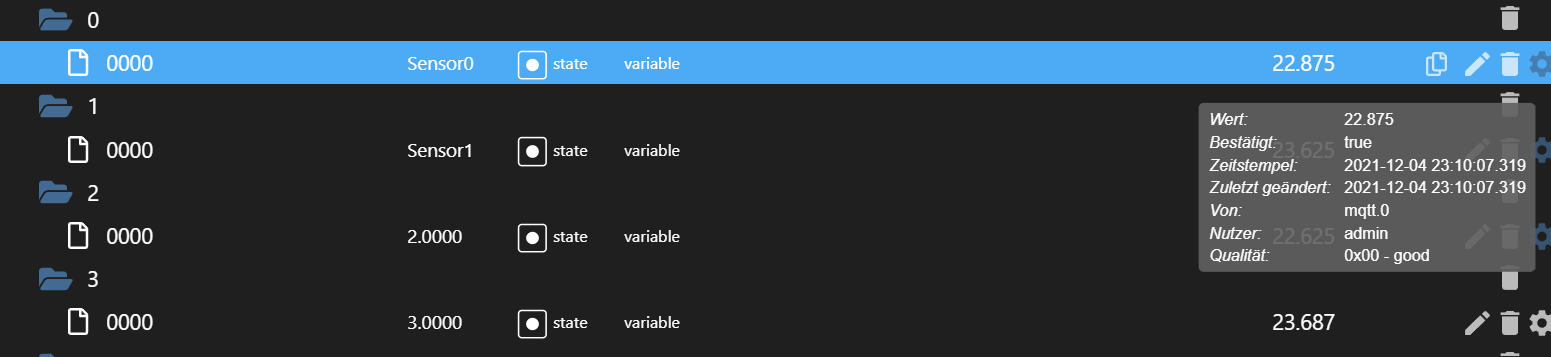
Ich kann den ESP32 jedoch permanent per Ping erreichen.
-
Das ganze ist in Arduino programmiert.
#include <WiFi.h>
#include <PubSubClient.h>
#include <OneWire.h>
#include <DallasTemperature.h>

// Data wire is plugged TO GPIO 4
#define ONE_WIRE_BUS 4

// Setup a oneWire instance to communicate with any OneWire devices (not just Maxim/Dallas temperature ICs)
OneWire oneWire(ONE_WIRE_BUS);

// Pass our oneWire reference to Dallas Temperature.
DallasTemperature sensors(&oneWire);

// Number of temperature devices found
int numberOfDevices;

// We'll use this variable to store a found device address
DeviceAddress tempDeviceAddress;

// WiFi
const char *ssid = "Moes Taverne"; // Enter your WiFi name
const char *password = "2003198930a26127OL";  // Enter WiFi password

// MQTT Broker
const char *mqtt_broker = "192.168.178.5";
const char *topic = "Heizung_OG";
const char *mqtt_username = "";
const char *mqtt_password = "";
const int mqtt_port = 1883;

WiFiClient espClient;
PubSubClient client(espClient);

void setup() {
 // Set software serial baud to 115200;
 Serial.begin(115200);

 // connecting to a WiFi network
 WiFi.begin(ssid, password);
 while (WiFi.status() != WL_CONNECTED) {
     delay(500);
     Serial.println("Connecting to WiFi..");
 }
 Serial.println("Connected to the WiFi network");
 //connecting to a mqtt broker
 client.setServer(mqtt_broker, mqtt_port);
 client.setCallback(callback);
 while (!client.connected()) {
     String client_id = "esp32-client-";
     client_id += String(WiFi.macAddress());
     Serial.printf("The client %s connects to the public mqtt broker\n", client_id.c_str());
     if (client.connect(client_id.c_str(), mqtt_username, mqtt_password)) {
         Serial.println("Public emqx mqtt broker connected");
     } else {
         Serial.print("failed with state ");
         Serial.print(client.state());
         delay(2000);
     }
 }
 // publish and subscribe
 client.publish(topic, "Hi EMQ X I'm ESP32 ^^");
 client.subscribe(topic);

  // Start up the library
  sensors.begin();

  // Grab a count of devices on the wire
  numberOfDevices = sensors.getDeviceCount();

  // locate devices on the bus
  Serial.print("Locating devices...");
  Serial.print("Found ");
  Serial.print(numberOfDevices, DEC);
  Serial.println(" devices.");

  // Loop through each device, print out address
  for(int i=0;i<numberOfDevices; i++){
    // Search the wire for address
    if(sensors.getAddress(tempDeviceAddress, i)){
      Serial.print("Found device ");
      Serial.print(i, DEC);
      Serial.print(" with address: ");
      printAddress(tempDeviceAddress);
      Serial.println();
    } else {
      Serial.print("Found ghost device at ");
      Serial.print(i, DEC);
      Serial.print(" but could not detect address. Check power and cabling");
    }
  }


}

void callback(char *topic, byte *payload, unsigned int length) {
 Serial.print("Message arrived in topic: ");
 Serial.println(topic);
 Serial.print("Message:");
 for (int i = 0; i < length; i++) {
     Serial.print((char) payload[i]);
 }
 Serial.println();
 Serial.println("-----------------------");
}

void loop() {
 client.loop();
   sensors.requestTemperatures(); // Send the command to get temperatures

 //client.publish(topic, "Hi EMQ X I'm ESP32 ^^");
 //client.subscribe(topic);


  // Loop through each device, print out temperature data
  for(int i=0;i<numberOfDevices; i++){
    // Search the wire for address
    if(sensors.getAddress(tempDeviceAddress, i)){
      // Output the device ID
      Serial.print("Temperature for device: ");
      Serial.print(i,DEC);
      // Print the data
      float tempC = sensors.getTempC(tempDeviceAddress);
      Serial.print(" Temp C: ");
      Serial.println(tempC);
      //Serial.print(" Temp F: ");
      //Serial.println(DallasTemperature::toFahrenheit(tempC)); // Converts tempC to Fahrenheit

char temperatur[8];
char thema[8];
dtostrf(tempC, 3, 3, temperatur);
dtostrf(i, 4, 4, thema);

      Serial.print(" nach Umwandlung: ");
      Serial.println(temperatur);
      Serial.print(" Thema: ");
      Serial.println(thema);

       client.publish(thema, temperatur);
      client.subscribe(thema);
    }
  }
  delay(30000);
}

// function to print a device address
void printAddress(DeviceAddress deviceAddress) {
  for (uint8_t i = 0; i < 8; i++){
    if (deviceAddress[i] < 16) Serial.print("0");
      Serial.print(deviceAddress[i], HEX);
  }
}
Aber:
Die Daten werden leider nur "einmalig" an den MQTT Server versendet, im SerialMonitor werden die Daten hingegen alle 30 Sekunden aktualisiert.Was könnte das sein?
SerialMonitor:23:20:07.272 -> Thema: 0.0000 23:20:07.272 -> Temperature for device: 1 Temp C: 22.69 23:20:07.320 -> nach Umwandlung: 22.687 23:20:07.320 -> Thema: 1.0000 23:20:07.369 -> Temperature for device: 2 Temp C: 22.50 23:20:07.369 -> nach Umwandlung: 22.500 23:20:07.369 -> Thema: 2.0000 23:20:07.429 -> Temperature for device: 3 Temp C: 22.56 23:20:07.429 -> nach Umwandlung: 22.562 23:20:07.429 -> Thema: 3.0000 23:20:07.524 -> Temperature for device: 4 Temp C: 22.62 23:20:07.524 -> nach Umwandlung: 22.625 23:20:07.524 -> Thema: 4.0000 23:20:07.616 -> Temperature for device: 5 Temp C: 22.50 23:20:07.663 -> nach Umwandlung: 22.500 23:20:07.663 -> Thema: 5.0000 23:20:07.773 -> Temperature for device: 6 Temp C: 22.50 23:20:07.773 -> nach Umwandlung: 22.500 23:20:07.773 -> Thema: 6.0000 23:20:07.913 -> Temperature for device: 7 Temp C: 22.50 23:20:07.913 -> nach Umwandlung: 22.500 23:20:07.913 -> Thema: 7.0000 23:20:08.037 -> Temperature for device: 8 Temp C: 22.31 23:20:08.085 -> nach Umwandlung: 22.313 23:20:08.085 -> Thema: 8.0000 23:20:08.225 -> Temperature for device: 9 Temp C: 22.56 23:20:08.225 -> nach Umwandlung: 22.562 23:20:08.225 -> Thema: 9.0000Im ioBroker wird mir folgendes angezeigt:
Ich kann den ESP32 jedoch permanent per Ping erreichen.
@dasmoritz
Ich sende mit einem WEMOS D1 Mini per MQTT eine Batteriespannung und einen RSSI-Wert per Zeitintervall (bei mir 70 Sekunden) und habe eine kurze Pause zwischen den publish-Befehlen:unsigned long interval=70000; // Sende-Intervall (70 seconds) unsigned long previousMillis=0; // millis() returns an unsigned long.Loop:
void loop() {

 client.loop(); // ####### wichtig: ausserhalb! der if-Funktion, da sonst connection closed im ioBroker-Log #####

 if ((unsigned long)(millis() - previousMillis) >= interval) {
    previousMillis = millis();


  // Reconnect WiFi
  if (WiFi.status() != WL_CONNECTED) {
    connectWIFI();
  }

  // Reconnect MQTT
  if (!client.connected()) {
    connectToMQTT();
  }

  long rssi = WiFi.RSSI();

  float vin = analogRead(A0);
  float bat = vin * (15.0 / 1023.0);  //(Spannungsteiler an A0 bis max 15V Eingangsspannung)
  //Serial.print("vin= ");
  //Serial.println(vin); // Messwerte am anologen Pin A0

  Serial.print("Batterie: ");
  Serial.print(bat);
  Serial.print(" V");
  Serial.print("     ");
  Serial.print("RSSI: ");
  Serial.print(String(rssi));
  Serial.println(" dBm");

  char msgBuffer[10];         // make sure this is big enough to hold your Battery-string
  char msgRSSI[25];           // make sure this is big enough to hold your RSSI-string

    client.publish("javascript.0.Audi.Batteriespannung", dtostrf(bat, 6, 1, msgBuffer));
    delay(500);
    client.publish("javascript.0.Audi.rssi", dtostrf(rssi, 6, 0, msgRSSI));

   }  // end of intervall
} //end of loop
Evtl. hilft's ?
-
@dasmoritz
Ich sende mit einem WEMOS D1 Mini per MQTT eine Batteriespannung und einen RSSI-Wert per Zeitintervall (bei mir 70 Sekunden) und habe eine kurze Pause zwischen den publish-Befehlen:unsigned long interval=70000; // Sende-Intervall (70 seconds) unsigned long previousMillis=0; // millis() returns an unsigned long.Loop:
void loop() {

 client.loop(); // ####### wichtig: ausserhalb! der if-Funktion, da sonst connection closed im ioBroker-Log #####

 if ((unsigned long)(millis() - previousMillis) >= interval) {
    previousMillis = millis();


  // Reconnect WiFi
  if (WiFi.status() != WL_CONNECTED) {
    connectWIFI();
  }

  // Reconnect MQTT
  if (!client.connected()) {
    connectToMQTT();
  }

  long rssi = WiFi.RSSI();

  float vin = analogRead(A0);
  float bat = vin * (15.0 / 1023.0);  //(Spannungsteiler an A0 bis max 15V Eingangsspannung)
  //Serial.print("vin= ");
  //Serial.println(vin); // Messwerte am anologen Pin A0

  Serial.print("Batterie: ");
  Serial.print(bat);
  Serial.print(" V");
  Serial.print("     ");
  Serial.print("RSSI: ");
  Serial.print(String(rssi));
  Serial.println(" dBm");

  char msgBuffer[10];         // make sure this is big enough to hold your Battery-string
  char msgRSSI[25];           // make sure this is big enough to hold your RSSI-string

    client.publish("javascript.0.Audi.Batteriespannung", dtostrf(bat, 6, 1, msgBuffer));
    delay(500);
    client.publish("javascript.0.Audi.rssi", dtostrf(rssi, 6, 0, msgRSSI));

   }  // end of intervall
} //end of loop
Evtl. hilft's ?
Hm, irgendwie ist das sonderbar bei mir.
Der ESP32 sendet ca. 25 - 30 Minuten sauber seine Datensätze, danach jedoch nicht mehr. Es scheint so als wenn die MQTT Verbindung dann abbricht. Er gibt die Werte weiterhin per SerMon aus, nicht aber per MQTT.Wenn ich den ESP32 dann einmal neustarte geht es wieder, nach 25-30 Minuten aber dann gleich Thema.
Anpingen kann ich ihn permanent ohne Probleme.
Jemand eine Idee?
-
Hm, irgendwie ist das sonderbar bei mir.
Der ESP32 sendet ca. 25 - 30 Minuten sauber seine Datensätze, danach jedoch nicht mehr. Es scheint so als wenn die MQTT Verbindung dann abbricht. Er gibt die Werte weiterhin per SerMon aus, nicht aber per MQTT.Wenn ich den ESP32 dann einmal neustarte geht es wieder, nach 25-30 Minuten aber dann gleich Thema.
Anpingen kann ich ihn permanent ohne Probleme.
Jemand eine Idee?
@dasmoritz
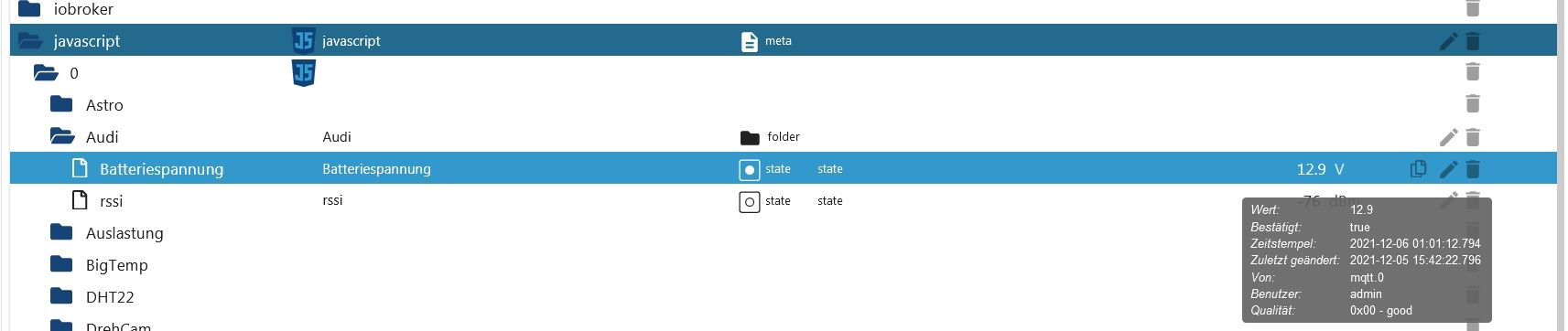
Bist Du Dir sicher, dass er nicht mehr sendet?
Ich frage das deshalb, weil Du in Deinem Screenshot "Zeitstempel"/"zuletzt geändert" anzeigst.
Bei mir ist es jedenfalls so, daß der Wert "zuletzt geändert" nicht zwangsläufig mit dem "Zeitstempel" übereinstimmen muss, s. Screenshot:
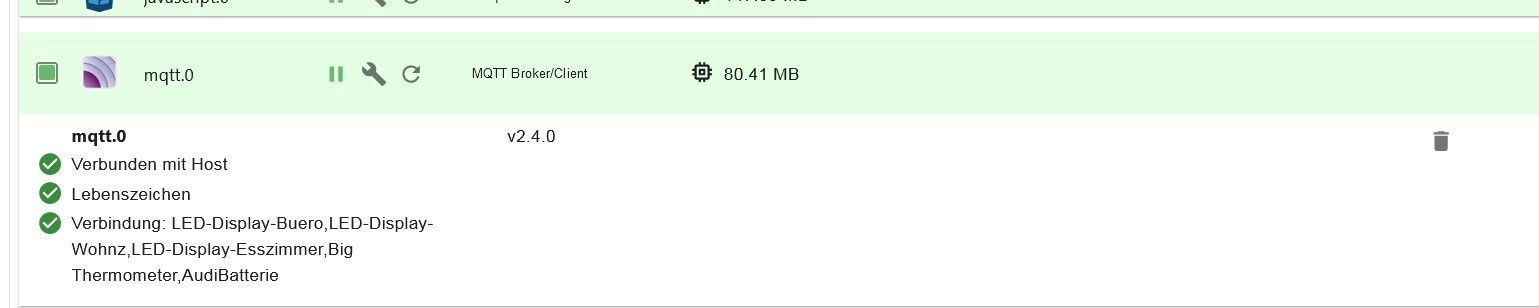
Auf jeden Fall sollte die bestehende MQTT-Verbindung aber bei den Instanzen angezeigt werden ( bei mir z.B. "AudiBatterie):
Zeig doch mal die Einstellungen Deiner MQTT-Instanz.
Edit:
Bin mir nicht sicher, aber evtl. könnten Deine Buffer zu klein dimensioniert sein.
Setz sie doch testweise mal "großzügig" höher, z.B. so:char temperatur[70]; char thema[70];


Hey! Du scheinst an dieser Unterhaltung interessiert zu sein, hast aber noch kein Konto.
Hast du es satt, bei jedem Besuch durch die gleichen Beiträge zu scrollen? Wenn du dich für ein Konto anmeldest, kommst du immer genau dorthin zurück, wo du zuvor warst, und kannst dich über neue Antworten benachrichtigen lassen (entweder per E-Mail oder Push-Benachrichtigung). Du kannst auch Lesezeichen speichern und Beiträge positiv bewerten, um anderen Community-Mitgliedern deine Wertschätzung zu zeigen.
Mit deinem Input könnte dieser Beitrag noch besser werden 💗
Registrieren Anmelden338
Online33.0k
Benutzer83.6k
Themen1.3m
Beiträge